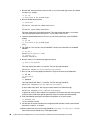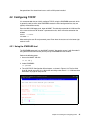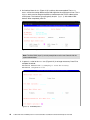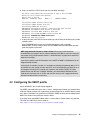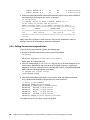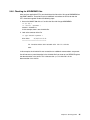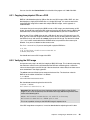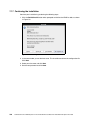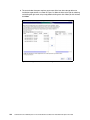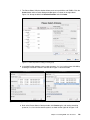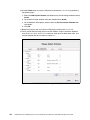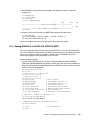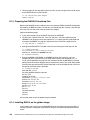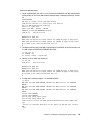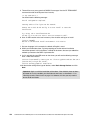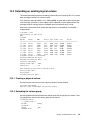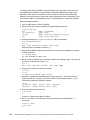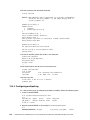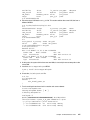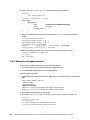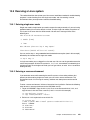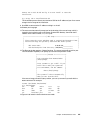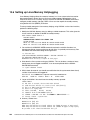
1
Front cover z/VM and Linux on IBM System z The Virtualization Cookbook for Red Hat Enterprise Linux 6.0 Hands-on instructions for installing z/VM and Linux on the mainframe Updated information for z/VM V6.1 and Red Hat Enterprise Linux 6.0 New, more versatile file system layout Brad Hinson Michael MacIsaac ibm.com/redbooks International Technical Support Organization z/VM and Linux on IBM System z: The Virtualization Cookbook for Red Hat Enterprise Linux 6.0 February 2011 SG24-7932-00 Note: Before using this information and the product it supports, read the information in “Notices” on page ix. First Edition (February 2011) This edition applies to z/VM Version 6.1 and Red Hat Enterprise Linux 6.0. © Copyright International Business Machines Corporation 2011. All rights reserved. Note to U.S. Government Users Restricted Rights -- Use, duplication or disclosure restricted by GSA ADP Schedule Contract with IBM Corp. Contents Notices . . . . . . . . . . . . . . . . . . . . . . . . . . . . . . . . . . . . . . . . . . . . . . . . . . . . . . . . . . . . . . . . . ix Trademarks . . . . . . . . . . . . . . . . . . . . . . . . . . . . . . . . . . . . . . . . . . . . . . . . . . . . . . . . . . . . . . .x Preface . . . . . . . . . . . . . . . . . . . . . . . . . . . . . . . . . . . . . . . . . . . . . . . . . . . . . . . . . . . . . . . . . xi Chapters and appendixes . . . . . . . . . . . . . . . . . . . . . . . . . . . . . . . . . . . . . . . . . . . . . . . . . . . xi History . . . . . . . . . . . . . . . . . . . . . . . . . . . . . . . . . . . . . . . . . . . . . . . . . . . . . . . . . . . . . . . . xii Conventions . . . . . . . . . . . . . . . . . . . . . . . . . . . . . . . . . . . . . . . . . . . . . . . . . . . . . . . . . . . . . xiii The team who wrote this book . . . . . . . . . . . . . . . . . . . . . . . . . . . . . . . . . . . . . . . . . . . . . . . xiii Special thanks . . . . . . . . . . . . . . . . . . . . . . . . . . . . . . . . . . . . . . . . . . . . . . . . . . . . . . . . . . . xiii Now you can become a published author, too! . . . . . . . . . . . . . . . . . . . . . . . . . . . . . . . . . . xiv Comments welcome. . . . . . . . . . . . . . . . . . . . . . . . . . . . . . . . . . . . . . . . . . . . . . . . . . . . . . . xiv Stay connected to IBM Redbooks . . . . . . . . . . . . . . . . . . . . . . . . . . . . . . . . . . . . . . . . . . . . xiv Summary of changes . . . . . . . . . . . . . . . . . . . . . . . . . . . . . . . . . . . . . . . . . . . . . . . . . . . . . xvii Summary of changes in the February 2011 version . . . . . . . . . . . . . . . . . . . . . . . . . . . . . . xvii Chapter 1. Introduction to z/VM and Linux . . . . . . . . . . . . . . . . . . . . . . . . . . . . . . . . . . . . 1.1 What is virtualization . . . . . . . . . . . . . . . . . . . . . . . . . . . . . . . . . . . . . . . . . . . . . . . . . . . . 1.2 The philosophy adopted in this book. . . . . . . . . . . . . . . . . . . . . . . . . . . . . . . . . . . . . . . . 1.3 Choices and decisions made in this book . . . . . . . . . . . . . . . . . . . . . . . . . . . . . . . . . . . . 1.4 Infrastructure design . . . . . . . . . . . . . . . . . . . . . . . . . . . . . . . . . . . . . . . . . . . . . . . . . . . . 1.5 Usability tests performed for this book . . . . . . . . . . . . . . . . . . . . . . . . . . . . . . . . . . . . . . 1 3 3 3 4 5 Chapter 2. Planning . . . . . . . . . . . . . . . . . . . . . . . . . . . . . . . . . . . . . . . . . . . . . . . . . . . . . . 7 2.1 Bill of materials . . . . . . . . . . . . . . . . . . . . . . . . . . . . . . . . . . . . . . . . . . . . . . . . . . . . . . . . 8 2.1.1 Hardware resources . . . . . . . . . . . . . . . . . . . . . . . . . . . . . . . . . . . . . . . . . . . . . . . . 8 2.1.2 Software resources . . . . . . . . . . . . . . . . . . . . . . . . . . . . . . . . . . . . . . . . . . . . . . . . . 8 2.1.3 Networking resources . . . . . . . . . . . . . . . . . . . . . . . . . . . . . . . . . . . . . . . . . . . . . . . 9 2.2 z/VM conventions . . . . . . . . . . . . . . . . . . . . . . . . . . . . . . . . . . . . . . . . . . . . . . . . . . . . . . 9 2.2.1 Volume labeling convention . . . . . . . . . . . . . . . . . . . . . . . . . . . . . . . . . . . . . . . . . . 9 2.2.2 Backup file naming convention . . . . . . . . . . . . . . . . . . . . . . . . . . . . . . . . . . . . . . . 10 2.2.3 The command retrieve convention . . . . . . . . . . . . . . . . . . . . . . . . . . . . . . . . . . . . 10 2.3 Disk planning. . . . . . . . . . . . . . . . . . . . . . . . . . . . . . . . . . . . . . . . . . . . . . . . . . . . . . . . . 11 2.4 Memory planning. . . . . . . . . . . . . . . . . . . . . . . . . . . . . . . . . . . . . . . . . . . . . . . . . . . . . . 12 2.5 Password planning . . . . . . . . . . . . . . . . . . . . . . . . . . . . . . . . . . . . . . . . . . . . . . . . . . . . 12 2.6 Planning worksheets . . . . . . . . . . . . . . . . . . . . . . . . . . . . . . . . . . . . . . . . . . . . . . . . . . . 13 2.6.1 z/VM resources used in this book . . . . . . . . . . . . . . . . . . . . . . . . . . . . . . . . . . . . . 13 2.6.2 z/VM DASD used in this book . . . . . . . . . . . . . . . . . . . . . . . . . . . . . . . . . . . . . . . . 14 2.6.3 Linux resources used in this book. . . . . . . . . . . . . . . . . . . . . . . . . . . . . . . . . . . . . 15 2.6.4 Linux user IDs used in this book . . . . . . . . . . . . . . . . . . . . . . . . . . . . . . . . . . . . . . 15 2.7 Blank worksheets . . . . . . . . . . . . . . . . . . . . . . . . . . . . . . . . . . . . . . . . . . . . . . . . . . . . . 16 2.7.1 z/VM resources worksheet . . . . . . . . . . . . . . . . . . . . . . . . . . . . . . . . . . . . . . . . . . 16 2.7.2 z/VM DASD worksheet . . . . . . . . . . . . . . . . . . . . . . . . . . . . . . . . . . . . . . . . . . . . . 17 2.7.3 Linux resources worksheet . . . . . . . . . . . . . . . . . . . . . . . . . . . . . . . . . . . . . . . . . . 18 2.7.4 Linux user ID worksheet . . . . . . . . . . . . . . . . . . . . . . . . . . . . . . . . . . . . . . . . . . . . 18 Chapter 3. Configuring a desktop machine . . . . . . . . . . . . . . . . . . . . . . . . . . . . . . . . . . 19 3.1 PuTTY: A no cost SSH client for Windows . . . . . . . . . . . . . . . . . . . . . . . . . . . . . . . . . . 20 3.2 Setting up a VNC client . . . . . . . . . . . . . . . . . . . . . . . . . . . . . . . . . . . . . . . . . . . . . . . . . 24 © Copyright IBM Corp. 2011. All rights reserved. iii 3.2.1 Downloading and running RealVNC . . . . . . . . . . . . . . . . . . . . . . . . . . . . . . . . . . . 24 3.3 3270 emulators . . . . . . . . . . . . . . . . . . . . . . . . . . . . . . . . . . . . . . . . . . . . . . . . . . . . . . . 25 iv Chapter 4. Installing and configuring z/VM. . . . . . . . . . . . . . . . . . . . . . . . . . . . . . . . . . . 4.1 Installing z/VM from DVD or FTP server . . . . . . . . . . . . . . . . . . . . . . . . . . . . . . . . . . . . 4.1.1 Obtaining z/VM through electronic download . . . . . . . . . . . . . . . . . . . . . . . . . . . . 4.1.2 Starting the z/VM installation . . . . . . . . . . . . . . . . . . . . . . . . . . . . . . . . . . . . . . . . 4.1.3 Copying a vanilla z/VM system to DASD . . . . . . . . . . . . . . . . . . . . . . . . . . . . . . . 4.1.4 Performing an IPL of the vanilla z/VM from DASD . . . . . . . . . . . . . . . . . . . . . . . . 4.1.5 Completing the z/VM installation. . . . . . . . . . . . . . . . . . . . . . . . . . . . . . . . . . . . . . 4.2 Configuring TCP/IP . . . . . . . . . . . . . . . . . . . . . . . . . . . . . . . . . . . . . . . . . . . . . . . . . . . . 4.2.1 Using the IPWIZARD tool . . . . . . . . . . . . . . . . . . . . . . . . . . . . . . . . . . . . . . . . . . . 4.3 Configuring the XEDIT profile . . . . . . . . . . . . . . . . . . . . . . . . . . . . . . . . . . . . . . . . . . . . 4.4 Customizing the SYSTEM CONFIG file . . . . . . . . . . . . . . . . . . . . . . . . . . . . . . . . . . . . 4.5 Configuring TCP/IP to start at IPL time . . . . . . . . . . . . . . . . . . . . . . . . . . . . . . . . . . . . . 4.5.1 Renaming the TCPIP configuration file . . . . . . . . . . . . . . . . . . . . . . . . . . . . . . . . . 4.5.2 Copying the PROFILE XEDIT file . . . . . . . . . . . . . . . . . . . . . . . . . . . . . . . . . . . . . 4.5.3 Configuring the FTP server . . . . . . . . . . . . . . . . . . . . . . . . . . . . . . . . . . . . . . . . . . 4.5.4 Shutting down and performing an IPL of the system . . . . . . . . . . . . . . . . . . . . . . 4.6 Adding paging volumes . . . . . . . . . . . . . . . . . . . . . . . . . . . . . . . . . . . . . . . . . . . . . . . . . 4.6.1 Formatting the paging volumes. . . . . . . . . . . . . . . . . . . . . . . . . . . . . . . . . . . . . . . 4.6.2 Formatting DASD for minidisks . . . . . . . . . . . . . . . . . . . . . . . . . . . . . . . . . . . . . . . 4.6.3 Updating the SYSTEM CONFIG file . . . . . . . . . . . . . . . . . . . . . . . . . . . . . . . . . . . 4.6.4 Testing the changes . . . . . . . . . . . . . . . . . . . . . . . . . . . . . . . . . . . . . . . . . . . . . . . 4.7 Creating a user ID for common files . . . . . . . . . . . . . . . . . . . . . . . . . . . . . . . . . . . . . . . 4.7.1 Defining the user in the USER DIRECT file . . . . . . . . . . . . . . . . . . . . . . . . . . . . . 4.7.2 Logging and customizing the new user ID . . . . . . . . . . . . . . . . . . . . . . . . . . . . . . 4.7.3 Copying a PROFILE XEDIT . . . . . . . . . . . . . . . . . . . . . . . . . . . . . . . . . . . . . . . . . 4.7.4 Creating a PROFILE EXEC . . . . . . . . . . . . . . . . . . . . . . . . . . . . . . . . . . . . . . . . . 4.7.5 Copying the files associated with this book to LNXMAINT . . . . . . . . . . . . . . . . . . 4.8 Customizing system startup and shutdown. . . . . . . . . . . . . . . . . . . . . . . . . . . . . . . . . . 4.8.1 Configuring the AUTOLOG1 PROFILE EXEC . . . . . . . . . . . . . . . . . . . . . . . . . . . 4.8.2 Testing the changes . . . . . . . . . . . . . . . . . . . . . . . . . . . . . . . . . . . . . . . . . . . . . . . 4.9 Addressing z/VM security issues . . . . . . . . . . . . . . . . . . . . . . . . . . . . . . . . . . . . . . . . . 4.9.1 VM security products . . . . . . . . . . . . . . . . . . . . . . . . . . . . . . . . . . . . . . . . . . . . . . 4.9.2 High-level z/VM security . . . . . . . . . . . . . . . . . . . . . . . . . . . . . . . . . . . . . . . . . . . . 4.9.3 Linux user ID privilege classes . . . . . . . . . . . . . . . . . . . . . . . . . . . . . . . . . . . . . . . 4.9.4 z/VM user ID and minidisk passwords . . . . . . . . . . . . . . . . . . . . . . . . . . . . . . . . . 4.9.5 Changing passwords in USER DIRECT . . . . . . . . . . . . . . . . . . . . . . . . . . . . . . . . 4.10 Backing up your z/VM system to tape . . . . . . . . . . . . . . . . . . . . . . . . . . . . . . . . . . . . . 4.11 Relabeling system volumes . . . . . . . . . . . . . . . . . . . . . . . . . . . . . . . . . . . . . . . . . . . . 4.11.1 Modifying labels in the SYSTEM CONFIG file . . . . . . . . . . . . . . . . . . . . . . . . . . 4.11.2 Modifying labels in the USER DIRECT file . . . . . . . . . . . . . . . . . . . . . . . . . . . . . 4.11.3 Changing the labels on the five volumes . . . . . . . . . . . . . . . . . . . . . . . . . . . . . . 4.11.4 Shutting down your system and restarting it . . . . . . . . . . . . . . . . . . . . . . . . . . . . 4.12 Restoring your z/VM system from tape . . . . . . . . . . . . . . . . . . . . . . . . . . . . . . . . . . . . 27 28 28 30 35 38 39 41 41 43 44 46 48 48 49 49 50 51 53 54 56 56 56 59 60 60 61 62 62 63 64 64 64 64 64 65 66 66 67 69 69 70 72 Chapter 5. Servicing z/VM . . . . . . . . . . . . . . . . . . . . . . . . . . . . . . . . . . . . . . . . . . . . . . . . 5.1 Applying a Recommended Service Upgrade . . . . . . . . . . . . . . . . . . . . . . . . . . . . . . . . 5.1.1 Getting service from the Internet. . . . . . . . . . . . . . . . . . . . . . . . . . . . . . . . . . . . . . 5.1.2 Downloading the service files . . . . . . . . . . . . . . . . . . . . . . . . . . . . . . . . . . . . . . . . 5.1.3 Creating a new MAINT minidisk . . . . . . . . . . . . . . . . . . . . . . . . . . . . . . . . . . . . . . 5.1.4 Receiving, applying, and building the service . . . . . . . . . . . . . . . . . . . . . . . . . . . . 73 74 75 76 77 78 z/VM and Linux on IBM System z: The Virtualization Cookbook for Red Hat Enterprise Linux 6.0 5.1.5 Putting the service into production . . . . . . . . . . . . . . . . . . . . . . . . . . . . . . . . . . . . 5.2 PTFs for the zEnterprise 196 . . . . . . . . . . . . . . . . . . . . . . . . . . . . . . . . . . . . . . . . . . . . 5.2.1 Ordering service for the zEnterprise 196 PTFs. . . . . . . . . . . . . . . . . . . . . . . . . . . 5.2.2 Applying the non-SES PTF UV61111 . . . . . . . . . . . . . . . . . . . . . . . . . . . . . . . . . . 5.2.3 Verifying that the zEnterprise 196 service is applied . . . . . . . . . . . . . . . . . . . . . . 5.3 Determining the z/VM service level . . . . . . . . . . . . . . . . . . . . . . . . . . . . . . . . . . . . . . . . 5.4 Applying a PTF . . . . . . . . . . . . . . . . . . . . . . . . . . . . . . . . . . . . . . . . . . . . . . . . . . . . . . . 5.4.1 Getting service using ShopzSeries . . . . . . . . . . . . . . . . . . . . . . . . . . . . . . . . . . . . 5.4.2 Determining whether a PTF has been applied . . . . . . . . . . . . . . . . . . . . . . . . . . . 5.4.3 Downloading the service to z/VM . . . . . . . . . . . . . . . . . . . . . . . . . . . . . . . . . . . . . 5.4.4 Receiving, applying, and building service . . . . . . . . . . . . . . . . . . . . . . . . . . . . . . . 5.4.5 Putting the service into production . . . . . . . . . . . . . . . . . . . . . . . . . . . . . . . . . . . . 5.4.6 Checking for APARMEMO files. . . . . . . . . . . . . . . . . . . . . . . . . . . . . . . . . . . . . . . 81 82 83 85 86 87 88 89 90 91 93 94 95 Chapter 6. Configuring an NFS/FTP server . . . . . . . . . . . . . . . . . . . . . . . . . . . . . . . . . . 97 6.1 Installing Linux on the PC . . . . . . . . . . . . . . . . . . . . . . . . . . . . . . . . . . . . . . . . . . . . . . . 98 6.2 Downloading the files associated with this book . . . . . . . . . . . . . . . . . . . . . . . . . . . . . . 98 6.3 Setting up a RHEL 6 installation tree . . . . . . . . . . . . . . . . . . . . . . . . . . . . . . . . . . . . . . 98 6.3.1 Copying from physical CDs or a DVD . . . . . . . . . . . . . . . . . . . . . . . . . . . . . . . . . . 99 6.3.2 Verifying the ISO image . . . . . . . . . . . . . . . . . . . . . . . . . . . . . . . . . . . . . . . . . . . . 99 6.3.3 Copying the DVD contents . . . . . . . . . . . . . . . . . . . . . . . . . . . . . . . . . . . . . . . . . 100 6.4 Enabling the NFS server . . . . . . . . . . . . . . . . . . . . . . . . . . . . . . . . . . . . . . . . . . . . . . . 100 6.5 Configuring an FTP server for z/VM installation . . . . . . . . . . . . . . . . . . . . . . . . . . . . . 102 6.5.1 Preparing the z/VM product installation files . . . . . . . . . . . . . . . . . . . . . . . . . . . . 102 6.5.2 Installing and configuring the FTP server . . . . . . . . . . . . . . . . . . . . . . . . . . . . . . 103 6.5.3 Testing the anonymous FTP server . . . . . . . . . . . . . . . . . . . . . . . . . . . . . . . . . . 104 Chapter 7. Installing RHEL 6 on the cloner. . . . . . . . . . . . . . . . . . . . . . . . . . . . . . . . . . 7.1 Installing the cloner . . . . . . . . . . . . . . . . . . . . . . . . . . . . . . . . . . . . . . . . . . . . . . . . . . . 7.1.1 Creating the RH6CLONE user ID . . . . . . . . . . . . . . . . . . . . . . . . . . . . . . . . . . . . 7.1.2 Adding RH6CLONE to AUTOLOG1 PROFILE EXEC. . . . . . . . . . . . . . . . . . . . . 7.1.3 Preparing RH6CLONE bootstrap files. . . . . . . . . . . . . . . . . . . . . . . . . . . . . . . . . 7.1.4 Beginning the Linux installation . . . . . . . . . . . . . . . . . . . . . . . . . . . . . . . . . . . . . 7.1.5 Stage 2 of the RHEL 6 installation . . . . . . . . . . . . . . . . . . . . . . . . . . . . . . . . . . . 7.1.6 Working around a known issue . . . . . . . . . . . . . . . . . . . . . . . . . . . . . . . . . . . . . . 7.1.7 Continuing the installation . . . . . . . . . . . . . . . . . . . . . . . . . . . . . . . . . . . . . . . . . . 7.1.8 Booting your new Linux system from disk. . . . . . . . . . . . . . . . . . . . . . . . . . . . . . 7.2 Configuring the cloner . . . . . . . . . . . . . . . . . . . . . . . . . . . . . . . . . . . . . . . . . . . . . . . . . 7.2.1 Copying files to the cloner. . . . . . . . . . . . . . . . . . . . . . . . . . . . . . . . . . . . . . . . . . 7.2.2 Retiring the NFS server. . . . . . . . . . . . . . . . . . . . . . . . . . . . . . . . . . . . . . . . . . . . 7.2.3 Configuring the yum command . . . . . . . . . . . . . . . . . . . . . . . . . . . . . . . . . . . . . . 7.2.4 Turning off unneeded services . . . . . . . . . . . . . . . . . . . . . . . . . . . . . . . . . . . . . . 7.2.5 Configuring the VNC server . . . . . . . . . . . . . . . . . . . . . . . . . . . . . . . . . . . . . . . . 7.2.6 Setting a system to halt on SIGNAL SHUTDOWN . . . . . . . . . . . . . . . . . . . . . . . 7.2.7 Turning on the NFS server . . . . . . . . . . . . . . . . . . . . . . . . . . . . . . . . . . . . . . . . . 7.2.8 Configuring SSH keys . . . . . . . . . . . . . . . . . . . . . . . . . . . . . . . . . . . . . . . . . . . . . 7.2.9 Inserting the vmcp module . . . . . . . . . . . . . . . . . . . . . . . . . . . . . . . . . . . . . . . . . 7.2.10 Changing the order of the swap disks. . . . . . . . . . . . . . . . . . . . . . . . . . . . . . . . 7.2.11 Setting the system to log off when Linux is shut down . . . . . . . . . . . . . . . . . . . 7.2.12 Rebooting the system . . . . . . . . . . . . . . . . . . . . . . . . . . . . . . . . . . . . . . . . . . . . 7.2.13 Verifying the changes . . . . . . . . . . . . . . . . . . . . . . . . . . . . . . . . . . . . . . . . . . . . 105 106 106 109 109 112 117 119 120 126 127 127 128 128 129 130 131 132 133 133 134 134 135 135 Chapter 8. Installing and configuring the golden image . . . . . . . . . . . . . . . . . . . . . . . 137 8.1 Installing the golden image . . . . . . . . . . . . . . . . . . . . . . . . . . . . . . . . . . . . . . . . . . . . . 138 Contents v vi 8.1.1 Creating the RH6GOLD user ID . . . . . . . . . . . . . . . . . . . . . . . . . . . . . . . . . . . . . 8.1.2 Adding RH6GOLD to AUTOLOG1 PROFILE EXEC. . . . . . . . . . . . . . . . . . . . . . 8.1.3 Preparing the RH6GOLD bootstrap files. . . . . . . . . . . . . . . . . . . . . . . . . . . . . . . 8.1.4 Installing RHEL 6 on the golden image. . . . . . . . . . . . . . . . . . . . . . . . . . . . . . . . 8.1.5 Verifying the installation . . . . . . . . . . . . . . . . . . . . . . . . . . . . . . . . . . . . . . . . . . . 8.2 Configuring the golden image . . . . . . . . . . . . . . . . . . . . . . . . . . . . . . . . . . . . . . . . . . . 8.2.1 Configuring the automount of the installation tree. . . . . . . . . . . . . . . . . . . . . . . . 8.2.2 Configuring the yum command for online updates . . . . . . . . . . . . . . . . . . . . . . . 8.2.3 Turning off unneeded services . . . . . . . . . . . . . . . . . . . . . . . . . . . . . . . . . . . . . . 8.2.4 Configuring the VNC server . . . . . . . . . . . . . . . . . . . . . . . . . . . . . . . . . . . . . . . . 8.2.5 Setting system to halt on SIGNAL SHUTDOWN . . . . . . . . . . . . . . . . . . . . . . . . 8.2.6 Setting the system to log off when Linux is shut down . . . . . . . . . . . . . . . . . . . . 8.2.7 Configuring SSH keys . . . . . . . . . . . . . . . . . . . . . . . . . . . . . . . . . . . . . . . . . . . . . 8.2.8 Changing the order of the swap disks. . . . . . . . . . . . . . . . . . . . . . . . . . . . . . . . . 8.2.9 Other configuration changes . . . . . . . . . . . . . . . . . . . . . . . . . . . . . . . . . . . . . . . . 8.2.10 Rebooting the system . . . . . . . . . . . . . . . . . . . . . . . . . . . . . . . . . . . . . . . . . . . . 8.2.11 Verifying the changes . . . . . . . . . . . . . . . . . . . . . . . . . . . . . . . . . . . . . . . . . . . . 138 139 140 140 147 148 148 149 150 151 151 151 152 152 153 153 153 Chapter 9. Configuring RHEL 6 for cloning . . . . . . . . . . . . . . . . . . . . . . . . . . . . . . . . . 9.1 Formatting DASD for minidisks . . . . . . . . . . . . . . . . . . . . . . . . . . . . . . . . . . . . . . . . . . 9.2 Defining a new user ID for a virtual server . . . . . . . . . . . . . . . . . . . . . . . . . . . . . . . . . 9.2.1 Adding LINUX01 to AUTOLOG1’s PROFILE EXEC . . . . . . . . . . . . . . . . . . . . . . 9.3 Cloning a virtual server manually . . . . . . . . . . . . . . . . . . . . . . . . . . . . . . . . . . . . . . . . 9.4 Cloning a new virtual server . . . . . . . . . . . . . . . . . . . . . . . . . . . . . . . . . . . . . . . . . . . . 9.4.1 Using the /etc/sysconfig/clone configuration file . . . . . . . . . . . . . . . . . . . . . . . . . 9.4.2 Creating a configuration file for LINUX01 . . . . . . . . . . . . . . . . . . . . . . . . . . . . . . 9.4.3 Using the clone script . . . . . . . . . . . . . . . . . . . . . . . . . . . . . . . . . . . . . . . . . . . . . 9.5 Defining three more virtual machines . . . . . . . . . . . . . . . . . . . . . . . . . . . . . . . . . . . . . 9.5.1 Defining three more user IDs . . . . . . . . . . . . . . . . . . . . . . . . . . . . . . . . . . . . . . . 9.5.2 Creating three new configuration files. . . . . . . . . . . . . . . . . . . . . . . . . . . . . . . . . 9.5.3 Adding new virtual machines to the startup process. . . . . . . . . . . . . . . . . . . . . . 9.5.4 Testing logging on to a new user ID . . . . . . . . . . . . . . . . . . . . . . . . . . . . . . . . . . 9.6 Reviewing system status. . . . . . . . . . . . . . . . . . . . . . . . . . . . . . . . . . . . . . . . . . . . . . . 155 156 157 157 158 163 163 164 165 168 168 170 171 172 173 Chapter 10. Installing Linux with kickstart . . . . . . . . . . . . . . . . . . . . . . . . . . . . . . . . . . 10.1 Configuring the cloner for kickstart . . . . . . . . . . . . . . . . . . . . . . . . . . . . . . . . . . . . . . 10.2 Configuring the LINUX02 user for kickstart . . . . . . . . . . . . . . . . . . . . . . . . . . . . . . . . 10.3 Kickstarting the LINUX02 user . . . . . . . . . . . . . . . . . . . . . . . . . . . . . . . . . . . . . . . . . 175 176 178 178 Chapter 11. Cloning open source virtual servers . . . . . . . . . . . . . . . . . . . . . . . . . . . . 11.1 Creating a virtual web server . . . . . . . . . . . . . . . . . . . . . . . . . . . . . . . . . . . . . . . . . . 11.1.1 Installing Apache RPMs . . . . . . . . . . . . . . . . . . . . . . . . . . . . . . . . . . . . . . . . . . 11.1.2 Testing Apache . . . . . . . . . . . . . . . . . . . . . . . . . . . . . . . . . . . . . . . . . . . . . . . . . 11.1.3 Turning on a firewall . . . . . . . . . . . . . . . . . . . . . . . . . . . . . . . . . . . . . . . . . . . . . 11.1.4 Configuring SSL for Apache . . . . . . . . . . . . . . . . . . . . . . . . . . . . . . . . . . . . . . . 11.1.5 Populating your website . . . . . . . . . . . . . . . . . . . . . . . . . . . . . . . . . . . . . . . . . . 11.1.6 Apache resources . . . . . . . . . . . . . . . . . . . . . . . . . . . . . . . . . . . . . . . . . . . . . . . 11.2 Creating a virtual LDAP server . . . . . . . . . . . . . . . . . . . . . . . . . . . . . . . . . . . . . . . . . 11.2.1 Installing the OpenLDAP server . . . . . . . . . . . . . . . . . . . . . . . . . . . . . . . . . . . . 11.2.2 Configuring the OpenLDAP server . . . . . . . . . . . . . . . . . . . . . . . . . . . . . . . . . . 11.2.3 Adding an LDAP user . . . . . . . . . . . . . . . . . . . . . . . . . . . . . . . . . . . . . . . . . . . . 11.2.4 Configuring an LDAP client . . . . . . . . . . . . . . . . . . . . . . . . . . . . . . . . . . . . . . . . 11.3 Creating a virtual file and print server . . . . . . . . . . . . . . . . . . . . . . . . . . . . . . . . . . . . 11.3.1 Cloning a Linux virtual server . . . . . . . . . . . . . . . . . . . . . . . . . . . . . . . . . . . . . . 181 182 182 182 183 184 185 185 185 185 186 187 189 191 191 z/VM and Linux on IBM System z: The Virtualization Cookbook for Red Hat Enterprise Linux 6.0 11.3.2 Installing the necessary RPMs . . . . . . . . . . . . . . . . . . . . . . . . . . . . . . . . . . . . . 11.3.3 Configuring the Samba configuration file . . . . . . . . . . . . . . . . . . . . . . . . . . . . . 11.3.4 Adding a Samba user . . . . . . . . . . . . . . . . . . . . . . . . . . . . . . . . . . . . . . . . . . . . 11.3.5 Starting Samba at boot time . . . . . . . . . . . . . . . . . . . . . . . . . . . . . . . . . . . . . . . 11.3.6 Testing your changes . . . . . . . . . . . . . . . . . . . . . . . . . . . . . . . . . . . . . . . . . . . . 11.3.7 Configuring printing . . . . . . . . . . . . . . . . . . . . . . . . . . . . . . . . . . . . . . . . . . . . . . 11.4 Creating a virtual application development server . . . . . . . . . . . . . . . . . . . . . . . . . . 11.4.1 Additional resources . . . . . . . . . . . . . . . . . . . . . . . . . . . . . . . . . . . . . . . . . . . . . 191 192 192 193 193 195 195 197 Chapter 12. Servicing Linux with Red Hat Network . . . . . . . . . . . . . . . . . . . . . . . . . . . 12.1 Registering your system with RHN . . . . . . . . . . . . . . . . . . . . . . . . . . . . . . . . . . . . . . 12.2 Installing and updating packages using yum . . . . . . . . . . . . . . . . . . . . . . . . . . . . . . 12.3 Managing your Linux guest through RHN . . . . . . . . . . . . . . . . . . . . . . . . . . . . . . . . . 199 200 200 201 Chapter 13. Miscellaneous tasks . . . . . . . . . . . . . . . . . . . . . . . . . . . . . . . . . . . . . . . . . . 13.1 Adding DASD . . . . . . . . . . . . . . . . . . . . . . . . . . . . . . . . . . . . . . . . . . . . . . . . . . . . . . 13.1.1 Adding minidisks to a virtual machine . . . . . . . . . . . . . . . . . . . . . . . . . . . . . . . . 13.1.2 Making new minidisks available to RHEL 6 . . . . . . . . . . . . . . . . . . . . . . . . . . . 13.2 Adding a logical volume . . . . . . . . . . . . . . . . . . . . . . . . . . . . . . . . . . . . . . . . . . . . . . 13.2.1 Creating a logical volume and file system. . . . . . . . . . . . . . . . . . . . . . . . . . . . . 13.2.2 Updating the file system table . . . . . . . . . . . . . . . . . . . . . . . . . . . . . . . . . . . . . . 13.3 Extending an existing logical volume . . . . . . . . . . . . . . . . . . . . . . . . . . . . . . . . . . . . 13.3.1 Creating a physical volume . . . . . . . . . . . . . . . . . . . . . . . . . . . . . . . . . . . . . . . . 13.3.2 Extending the volume group . . . . . . . . . . . . . . . . . . . . . . . . . . . . . . . . . . . . . . . 13.3.3 Extending the logical volume and the file system . . . . . . . . . . . . . . . . . . . . . . . 13.4 Adding SCSI/FCP disks . . . . . . . . . . . . . . . . . . . . . . . . . . . . . . . . . . . . . . . . . . . . . . 13.4.1 Adding a single LUN . . . . . . . . . . . . . . . . . . . . . . . . . . . . . . . . . . . . . . . . . . . . . 13.4.2 Configuring multipathing . . . . . . . . . . . . . . . . . . . . . . . . . . . . . . . . . . . . . . . . . . 13.4.3 Making the changes persistent . . . . . . . . . . . . . . . . . . . . . . . . . . . . . . . . . . . . . 13.5 Rescuing a Linux system . . . . . . . . . . . . . . . . . . . . . . . . . . . . . . . . . . . . . . . . . . . . . 13.5.1 Entering single user mode . . . . . . . . . . . . . . . . . . . . . . . . . . . . . . . . . . . . . . . . 13.5.2 Entering a rescue environment . . . . . . . . . . . . . . . . . . . . . . . . . . . . . . . . . . . . . 13.6 Setting up Linux Memory Hotplugging . . . . . . . . . . . . . . . . . . . . . . . . . . . . . . . . . . . 13.7 Using the cpuplugd service . . . . . . . . . . . . . . . . . . . . . . . . . . . . . . . . . . . . . . . . . . . . 13.7.1 Determining the virtual CPUs being used . . . . . . . . . . . . . . . . . . . . . . . . . . . . . 13.7.2 Generating a workload to see cpuplugd work . . . . . . . . . . . . . . . . . . . . . . . . . . 13.7.3 Setting memory sizes with cpuplugd. . . . . . . . . . . . . . . . . . . . . . . . . . . . . . . . . 13.8 Hardware cryptographic support for OpenSSH. . . . . . . . . . . . . . . . . . . . . . . . . . . . . 13.9 The X Window System . . . . . . . . . . . . . . . . . . . . . . . . . . . . . . . . . . . . . . . . . . . . . . . 13.9.1 VNC server . . . . . . . . . . . . . . . . . . . . . . . . . . . . . . . . . . . . . . . . . . . . . . . . . . . . 13.9.2 X Window System Server on workstation . . . . . . . . . . . . . . . . . . . . . . . . . . . . . 13.10 Centralizing home directories for LDAP users . . . . . . . . . . . . . . . . . . . . . . . . . . . . 13.10.1 Recommendations for centralizing home directories . . . . . . . . . . . . . . . . . . . 203 204 204 204 206 206 209 211 211 211 212 213 213 216 218 219 219 219 222 224 224 226 227 227 231 231 232 236 237 Chapter 14. Monitoring and tuning z/VM and Linux. . . . . . . . . . . . . . . . . . . . . . . . . . . 14.1 Using INDICATE and other commands . . . . . . . . . . . . . . . . . . . . . . . . . . . . . . . . . . 14.1.1 Using the INDICATE command . . . . . . . . . . . . . . . . . . . . . . . . . . . . . . . . . . . . 14.1.2 Using other basic commands . . . . . . . . . . . . . . . . . . . . . . . . . . . . . . . . . . . . . . 14.2 The z/VM Performance Toolkit . . . . . . . . . . . . . . . . . . . . . . . . . . . . . . . . . . . . . . . . . 14.2.1 Configuring the z/VM Performance Toolkit . . . . . . . . . . . . . . . . . . . . . . . . . . . . 14.2.2 Configuring web browser support . . . . . . . . . . . . . . . . . . . . . . . . . . . . . . . . . . . 14.2.3 Configuring PERFSVM . . . . . . . . . . . . . . . . . . . . . . . . . . . . . . . . . . . . . . . . . . . 14.2.4 Increasing the size of the MONDCSS DCSS . . . . . . . . . . . . . . . . . . . . . . . . . . 14.2.5 Starting the z/VM Performance Toolkit . . . . . . . . . . . . . . . . . . . . . . . . . . . . . . . 239 240 240 242 244 244 245 246 248 250 Contents vii 14.2.6 Using the z/VM Performance Toolkit. . . . . . . . . . . . . . . . . . . . . . . . . . . . . . . . . 14.3 Monitoring Linux . . . . . . . . . . . . . . . . . . . . . . . . . . . . . . . . . . . . . . . . . . . . . . . . . . . . 14.3.1 Monitoring Linux performance data from the kernel . . . . . . . . . . . . . . . . . . . . . 14.4 Viewing Linux data in the Performance Toolkit . . . . . . . . . . . . . . . . . . . . . . . . . . . . . 250 254 254 255 Appendix A. References . . . . . . . . . . . . . . . . . . . . . . . . . . . . . . . . . . . . . . . . . . . . . . . . . Cheat sheets . . . . . . . . . . . . . . . . . . . . . . . . . . . . . . . . . . . . . . . . . . . . . . . . . . . . . . . . . . . XEDIT cheat sheet . . . . . . . . . . . . . . . . . . . . . . . . . . . . . . . . . . . . . . . . . . . . . . . . . . . . A vi cheat sheet . . . . . . . . . . . . . . . . . . . . . . . . . . . . . . . . . . . . . . . . . . . . . . . . . . . . . . 257 258 258 259 Appendix B. Additional material . . . . . . . . . . . . . . . . . . . . . . . . . . . . . . . . . . . . . . . . . . Locating the web material . . . . . . . . . . . . . . . . . . . . . . . . . . . . . . . . . . . . . . . . . . . . . . . . . Using the web material. . . . . . . . . . . . . . . . . . . . . . . . . . . . . . . . . . . . . . . . . . . . . . . . . . . . System requirements for downloading the web material . . . . . . . . . . . . . . . . . . . . . . . Downloading and extracting the web material . . . . . . . . . . . . . . . . . . . . . . . . . . . . . . . 261 261 261 262 262 Related publications . . . . . . . . . . . . . . . . . . . . . . . . . . . . . . . . . . . . . . . . . . . . . . . . . . . . IBM Redbooks . . . . . . . . . . . . . . . . . . . . . . . . . . . . . . . . . . . . . . . . . . . . . . . . . . . . . . . . . . Other publications . . . . . . . . . . . . . . . . . . . . . . . . . . . . . . . . . . . . . . . . . . . . . . . . . . . . . . . Online resources . . . . . . . . . . . . . . . . . . . . . . . . . . . . . . . . . . . . . . . . . . . . . . . . . . . . . . . . Help from IBM . . . . . . . . . . . . . . . . . . . . . . . . . . . . . . . . . . . . . . . . . . . . . . . . . . . . . . . . . . 263 263 263 264 265 Index . . . . . . . . . . . . . . . . . . . . . . . . . . . . . . . . . . . . . . . . . . . . . . . . . . . . . . . . . . . . . . . . . 267 viii z/VM and Linux on IBM System z: The Virtualization Cookbook for Red Hat Enterprise Linux 6.0 Notices This information was developed for products and services offered in the U.S.A. IBM may not offer the products, services, or features discussed in this document in other countries. Consult your local IBM representative for information on the products and services currently available in your area. Any reference to an IBM product, program, or service is not intended to state or imply that only that IBM product, program, or service may be used. Any functionally equivalent product, program, or service that does not infringe any IBM intellectual property right may be used instead. However, it is the user's responsibility to evaluate and verify the operation of any non-IBM product, program, or service. IBM may have patents or pending patent applications covering subject matter described in this document. The furnishing of this document does not give you any license to these patents. You can send license inquiries, in writing, to: IBM Director of Licensing, IBM Corporation, North Castle Drive, Armonk, NY 10504-1785 U.S.A. The following paragraph does not apply to the United Kingdom or any other country where such provisions are inconsistent with local law: INTERNATIONAL BUSINESS MACHINES CORPORATION PROVIDES THIS PUBLICATION "AS IS" WITHOUT WARRANTY OF ANY KIND, EITHER EXPRESS OR IMPLIED, INCLUDING, BUT NOT LIMITED TO, THE IMPLIED WARRANTIES OF NON-INFRINGEMENT, MERCHANTABILITY OR FITNESS FOR A PARTICULAR PURPOSE. Some states do not allow disclaimer of express or implied warranties in certain transactions, therefore, this statement may not apply to you. This information could include technical inaccuracies or typographical errors. Changes are periodically made to the information herein; these changes will be incorporated in new editions of the publication. IBM may make improvements and/or changes in the product(s) and/or the program(s) described in this publication at any time without notice. Any references in this information to non-IBM websites are provided for convenience only and do not in any manner serve as an endorsement of those websites. The materials at those websites are not part of the materials for this IBM product and use of those websites is at your own risk. IBM may use or distribute any of the information you supply in any way it believes appropriate without incurring any obligation to you. Information concerning non-IBM products was obtained from the suppliers of those products, their published announcements or other publicly available sources. IBM has not tested those products and cannot confirm the accuracy of performance, compatibility or any other claims related to non-IBM products. Questions on the capabilities of non-IBM products should be addressed to the suppliers of those products. This information contains examples of data and reports used in daily business operations. To illustrate them as completely as possible, the examples include the names of individuals, companies, brands, and products. All of these names are fictitious and any similarity to the names and addresses used by an actual business enterprise is entirely coincidental. COPYRIGHT LICENSE: This information contains sample application programs in source language, which illustrate programming techniques on various operating platforms. You may copy, modify, and distribute these sample programs in any form without payment to IBM, for the purposes of developing, using, marketing or distributing application programs conforming to the application programming interface for the operating platform for which the sample programs are written. These examples have not been thoroughly tested under all conditions. IBM, therefore, cannot guarantee or imply reliability, serviceability, or function of these programs. © Copyright IBM Corp. 2011. All rights reserved. ix Trademarks IBM, the IBM logo, and ibm.com are trademarks or registered trademarks of International Business Machines Corporation in the United States, other countries, or both. These and other IBM trademarked terms are marked on their first occurrence in this information with the appropriate symbol (® or ™), indicating US registered or common law trademarks owned by IBM at the time this information was published. Such trademarks may also be registered or common law trademarks in other countries. A current list of IBM trademarks is available on the web at http://www.ibm.com/legal/copytrade.shtml The following terms are trademarks of the International Business Machines Corporation in the United States, other countries, or both: AIX® DirMaint™ DS8000® ECKD™ FICON® IBM® OMEGAMON® RACF® Redbooks® Redpaper™ Redbooks (logo) S/390® System Storage® System z10® System z9® System z® ® Tivoli® z/OS® z/VM® z10™ z9® zSeries® The following terms are trademarks of other companies: NOW, and the NetApp logo are trademarks or registered trademarks of NetApp, Inc. in the U.S. and other countries. Java, and all Java-based trademarks are trademarks of Sun Microsystems, Inc. in the United States, other countries, or both. Microsoft, Windows, and the Windows logo are trademarks of Microsoft Corporation in the United States, other countries, or both. Intel, Intel logo, Intel Inside logo, and Intel Centrino logo are trademarks or registered trademarks of Intel Corporation or its subsidiaries in the United States and other countries. UNIX is a registered trademark of The Open Group in the United States and other countries. Linux is a trademark of Linus Torvalds in the United States, other countries, or both. Red Hat, the Shadowman logo, Red Hat Enterprise Linux, RHEL, Red Hat Network and RHN are trademarks of Red Hat, Inc., registered in the United States and other countries. Other company, product, or service names may be trademarks or service marks of others. x z/VM and Linux on IBM System z: The Virtualization Cookbook for Red Hat Enterprise Linux 6.0 Preface This IBM® Redbooks® publication describes how to create Linux® virtual servers in IBM z/VM® on IBM System z® hardware. This book adopts a cookbook format that provides a concise, repeatable set of procedures for installing and configuring z/VM in a logical partition (LPAR) and then installing and customizing Linux. You need an IBM System z LPAR with the associated resources, z/VM V6.1 media, and a Linux distribution. This book assumes that you have a general familiarity with System z technology and terminology. It does not assume an in-depth understanding of z/VM and Linux. It is written for those clients who want to get a quick start with z/VM and Linux on the mainframe. Chapters and appendixes The chapters and appendixes in this book are summarized in the following list: Chapter 1, “Introduction to z/VM and Linux” on page 1 gives a brief introduction of the book. Chapter 2, “Planning” on page 7 describes how to plan hardware, software, and networking resources. It discusses the DASD labeling conventions used in the book and password planning. Sample worksheets are provided for the examples used in the book, as are blank copies for your use. Chapter 3, “Configuring a desktop machine” on page 19 describes how to set up Microsoft® Windows® desktops. Specifically, the following tools are discussed: – How to get and set up PuTTY, which is a commonly used SSH client. – How to get and set up a VNC client, which is a tool for running graphical applications. – 3270 emulator applications. Chapter 4, “Installing and configuring z/VM” on page 27 shows how to install and configure z/VM. Chapter 5, “Servicing z/VM” on page 73 describes how to apply services to z/VM both in the form of Programming Temporary Fixes (PTFs) and Recommended Service Upgrades (RSUs). Chapter 6, “Configuring an NFS/FTP server” on page 97 explains how to set up a temporary NFS server under Linux to install the first two Linux images. After the cloner is installed, you can copy the Linux installation tree to it and retire the Linux server. Chapter 7, “Installing RHEL 6 on the cloner” on page 105 describes how to install and configure a Linux image under the first Linux user IF, that is, the cloner, which does the cloning and other tasks. Chapter 8, “Installing and configuring the golden image” on page 137 describes how to install and configure a Linux image under the first Linux user ID, that is, the golden image, which is the image from which the clones are made. Chapter 9, “Configuring RHEL 6 for cloning” on page 155 explains how to prepare z/VM user IDs and clone your first virtual server. © Copyright IBM Corp. 2011. All rights reserved. xi Chapter 10, “Installing Linux with kickstart” on page 175 describes how to use the Red Hat kickstart tool to create Linux systems. This process is fundamentally different from cloning, as this tool is a script that is used for an automated installation. You may try kickstart and you may also try cloning. Understand that they try to accomplish the same goal of being able to quickly get Linux systems up and running, and that you do not need to use both. Chapter 11, “Cloning open source virtual servers” on page 181 shows how to configure cloned Linux images on the following appliances: – – – – Web server virtual server LDAP virtual server File and print virtual server Application development system Chapter 12, “Servicing Linux with Red Hat Network” on page 199 describes how the Red Hat Network works. The Red Hat Network provides centralized management and provisioning for multiple RHEL 6 systems. Chapter 13, “Miscellaneous tasks” on page 203 describes how to add and extend logical volumes to Linux, and many other miscellaneous tasks. Chapter 14, “Monitoring and tuning z/VM and Linux” on page 239 describes the basic steps that you perform to begin monitoring z/VM and your new Linux virtual servers. Appendix A, “References” on page 257 provides references to websites, books, and other pertinent information.. History There have been many versions of the Virtualization Cookbook: 2011 In February 2011, this book was published, targeting Red Hat’s RHEL 6 distribution, with the changes listed just above. 2008 In August 2008, z/VM and Linux on IBM System z, SG24-7492 was published targeting Red Hat’s RHEL 5.2 distribution. 2007 In March 2007, two books were published on http://linuxvm.org/present, each book targeting a different distribution: z/VM and Linux on IBM System z: The Virtualization Cookbook for SLES 10 z/VM and Linux on IBM System z: The Virtualization Cookbook for RHEL 5 2006 In September 2006, IBM z/VM and Linux on IBM System z: Virtualization Cookbook for Red Hat Enterprise Linux 4, SG24-7272 was published, and addressed both 31-bit and 64-bit RHEL 4. Conventions Except where noted in the individual chapters, the following font conventions are used in this book: xii z/VM and Linux on IBM System z: The Virtualization Cookbook for Red Hat Enterprise Linux 6.0 Monospace and bold Commands entered by the user on the command line when inline. This only applies to lower-case commands. <value> Values inside angle brackets are examples and are replaced with the values that are correct for your enterprise. monospace File, directories, statements, and commands set off in their own paragraph. The following command conventions are used in this book: z/VM commands are prefixed with ==>. z/VM XEDIT subcommands are prefixed with ====>. Linux commands running as root are prefixed with #. Linux commands running as non-root are usually prefixed with $. The team who wrote this book This book was updated for z/VM V6.1 and RHEL 6 by Brad Hinson of Red Hat and Michael MacIsaac of IBM in late 2010. Brad Hinson is the global lead for System z at Red Hat in Raleigh, NC. Michael MacIsaac has been with IBM for 24 years and now works in Poughkeepsie. He enjoys working on Linux and z/VM and writing IBM Redbooks publications. He currently manages a systems management development team in the z/VM organization. Special thanks Sincere thanks goes out to the following people who contributed to this project in many different ways: Roy Costa and Lydia Parziale IBM International Technical Support Organization, Poughkeepsie Eileen Digan IBM Poughkeepsie Sue Baloga, Bill Bitner, Carol Everitt, George Madl, Tami Zebrowski-Darrow IBM Endicott Steffen Maier, Hans-Joachim Picht, Dr. Manfred Gnirss IBM Boeblingen Marian Gasparovic IBM Slovakia David Boyes Sine Nomine Jeremy Agee and Justin Payne Red Hat, Raleigh, NC Thanks to many others in IBM Poughkeepsie and to the many others who answered questions on the linux-390 and IBMVM list servers. Preface xiii Now you can become a published author, too! Here’s an opportunity to spotlight your skills, grow your career, and become a published author - all at the same time! Join an ITSO residency project and help write a book in your area of expertise, while honing your experience using leading-edge technologies. Your efforts will help to increase product acceptance and customer satisfaction, as you expand your network of technical contacts and relationships. Residencies run from two to six weeks in length, and you can participate either in person or as a remote resident working from your home base. Find out more about the residency program, browse the residency index, and apply online at: ibm.com/redbooks/residencies.html Comments welcome Your comments are important to us! We want our books to be as helpful as possible. Send us your comments about this book or other IBM Redbooks publications in one of the following ways: Use the online Contact us review Redbooks form found at: ibm.com/redbooks Send your comments in an email to: [email protected] Mail your comments to: IBM Corporation, International Technical Support Organization Dept. HYTD Mail Station P099 2455 South Road Poughkeepsie, NY 12601-5400 Stay connected to IBM Redbooks Find us on Facebook: http://www.facebook.com/IBMRedbooks Follow us on Twitter: http://twitter.com/ibmredbooks Look for us on LinkedIn: http://www.linkedin.com/groups?home=&gid=2130806 xiv z/VM and Linux on IBM System z: The Virtualization Cookbook for Red Hat Enterprise Linux 6.0 Explore new Redbooks publications, residencies, and workshops with the IBM Redbooks weekly newsletter: https://www.redbooks.ibm.com/Redbooks.nsf/subscribe?OpenForm Stay current on recent Redbooks publications with RSS Feeds: http://www.redbooks.ibm.com/rss.html Preface xv xvi z/VM and Linux on IBM System z: The Virtualization Cookbook for Red Hat Enterprise Linux 6.0 Summary of changes This section describes the technical changes made in this edition of the book and in previous editions. This edition might also include minor corrections and editorial changes that are not identified. Summary of Changes for SG24-7932-00 for z/VM and Linux on IBM System z: The Virtualization Cookbook for Red Hat Enterprise Linux 6.0 as created or updated on February 18, 2011. Summary of changes in the February 2011 version This revision reflects the addition, deletion, or modification of new and changed information described below. There are significant changes in this book: The z/VM sections are updated for V6.1. The Linux sections are updated for RHEL 6. There are new sections about how to order z/VM electronically, and how to make the z/VM product files available for installation from an FTP server. See 4.1.1, “Obtaining z/VM through electronic download” on page 28 and 6.5, “Configuring an FTP server for z/VM installation” on page 102 for more details. Chapter 5, “Servicing z/VM” on page 73 has been updated to include information about service for the new IBM zEnterprise 196. See 5.2, “PTFs for the zEnterprise 196” on page 82 for more details. Section 13.4, “Adding SCSI/FCP disks” on page 213 is new. Section 13.6, “Setting up Linux Memory Hotplugging” on page 222 is new. Section 13.7, “Using the cpuplugd service” on page 224 is new. Section 13.8, “Hardware cryptographic support for OpenSSH” on page 227 is new. New document number, SG24-7932-00. See “Preface” on page xi for information about past editions. © Copyright IBM Corp. 2011. All rights reserved. xvii xviii z/VM and Linux on IBM System z: The Virtualization Cookbook for Red Hat Enterprise Linux 6.0 1 Chapter 1. Introduction to z/VM and Linux Virtualization is an important topic in the IT industry. The IBM z/VM mainframe and its predecessors have been performing virtualization for four decades. Today, it is the most functionally rich virtualization platform available. When Linux was ported to IBM mainframes in 2000, it was a natural fit to run under z/VM. You can run many tens of Linux images on the same IBM System z logical partition (LPAR). Some customers are running hundreds in production mode. With a z/VM and Linux infrastructure, you can reduce the time between deciding on the acquisition of new servers and then implementing them because new servers can be deployed in a matter of minutes. This powerful build and clone capability can enable you to launch new products and services without the exhaustive planning, purchasing, installing, and configuring of new hardware and software that can be associated with conventional and discrete hardware servers. Development groups who need test environments built and rebuilt rapidly to enable them to efficiently deliver their projects and handle change management in the process can also benefit from this unique advantage. Some of the mainframe’s and z/VM’s best strengths are: Their virtualization capabilities are more mature and robust than any other hardware and hypervisor combination. z/VM provides a rich, functional, and sophisticated level of systems management that can greatly help run large numbers of Linux servers. The z/VM virtual switch (VSWITCH) makes the networking of Linux much simpler. Full volume backup of systems allows for complete disaster recovery when another data center is available. z/VM is one of the easiest operating systems to customize at the base installation level. There is only a relatively small number of configuration files. Properly set up, z/VM can run for months with little maintenance or administration required. © Copyright IBM Corp. 2011. All rights reserved. 1 Many functions have been added to z/VM since Version 5.2. The following sections give a brief summary of the functions added in the last three releases. z/VM V6.1 z/VM V6.1, available since October 2009, is intended to be the base for all future z/VM enhancements. This release implements a new Architecture Level Set (ALS) available only on the IBM System z10® Enterprise Class server and System z10 Business Class server and future generations of System z servers. Requiring z10 technology or later allows z/VM to take advantage of newer hardware technology for future exploitation. Enhancements in z/VM V6.1 provide: Enhanced performance of virtual networking environments running heavy guest-to-guest streaming workloads Faster access to data when utilizing FICON® Express8 Closer integration with IBM Systems Director to eliminate the need to download agents and help simplify the installation of those agents Significantly better and more highly secure guest transactions when using Crypto Express3 as compared to Crypto Express2 Guest support for IBM System Storage® DS8000® Extended Address Volumes (EAVs) to help simplify storage management and relieve address constraints Read more about System z virtualization capabilities on the web at: http://www.vm.ibm.com z/VM V5.4 z/VM V5.4, available since August 2008, provides major improvements when operating on System z servers with large memory configurations. It improves scalability and can help support increased workloads on IBM System z servers. This release uses new capabilities of the System z10, including: Greater flexibility, with support for the new z/VM-mode logical partitions, allowing all System z processor-types (CPs, IFLs, zIIPs, zAAPs, and ICFs) to be defined in the same z/VM LPAR for use by various guest operating systems Capability to install Linux on System z from the HMC, which eliminates network setup or a connection between an LPAR and the HMC Enhanced physical connectivity by exploiting all OSA-Express3 ports, helping service the network and reducing the number of required resources z/VM V5.4 dynamic memory upgrade support allows real memory to be added to a running z/VM system, avoiding the need to shut down z/VM and its guests, deactivate the LPAR, change its memory allocation, reactivate the LPAR, perform an IPL of z/VM, and restart its guests. Memory can be added nondisruptively to individual guests that support the dynamic memory reconfiguration architecture. Read more about System z virtualization capabilities on the web at: http://www.vm.ibm.com z/VM V5.3 z/VM V5.3 became generally available in June 2007. Scalability was extended to allow 256 GB of real memory, a total of 8 TB of virtual storage, and 32 real processors. z/VM V5.3 also added support for the Collaborative Memory Management Assist (CMMA) on the z9® EC and 2 z/VM and Linux on IBM System z: The Virtualization Cookbook for Red Hat Enterprise Linux 6.0 the z9 BC processors or later. Virtual Machine Resource Manager (VMRM) detects when memory is constrained and notifies the Linux guests, which can then adjust their memory consumption to help relieve the memory constraint. In the previous major release, z/VM V5.2, many memory contention issues were removed with the Control Program (CP) now using memory above 2 GB for a much broader set of operations. Previously, guest pages had to be moved below 2 GB for many reasons, for example, in both standard I/O and Queued Direct I/O (QDIO). Now I/O can be done using buffers anywhere in real memory, and QDIO structures can reside above 2 GB, as can most CP control blocks. These improvements offer constraint relief for large-real-memory virtual server environments that are memory intensive 1.1 What is virtualization Virtualization is the ability for a computer system to share resources so that one physical server can act as many virtual servers. z/VM allows the sharing of the mainframe’s physical resources, such as disk (DASD), memory (sometimes called storage), network adapters (OSA cards), and CPU (CPs or IFLs). These resources are managed by a hypervisor. The z/VM hypervisor is called Control Program (CP). When the user logs onto z/VM, the hypervisor creates a virtual machine that can run one of many different operating systems. The two operating systems that are discussed in this book are the z/VM native one, that is, the Conversational Monitoring System (CMS), which can be thought of as a z/VM shell. and Linux. Virtual machines running Linux as guests of a z/VM host become the virtual servers. 1.2 The philosophy adopted in this book An important philosophy adopted in this book is to keep all the solutions simple. Albert Einstein once said, “Everything should be made as simple as possible, but not simpler”, which sums up this philosophy. This book aims to use the same clear and insightful presentation. Many books and papers discuss virtualization, but do not tell you how to accomplish virtualization. The remainder of this book discusses how to perform this virtualization. 1.3 Choices and decisions made in this book When deciding about installing, maintaining, and provisioning (cloning) Linux virtual servers under z/VM, there are many basic choices to make. Here are some of the choices and assumptions made in this book: Use of a cloning product versus using your own cloning process: Cloning products, such as Aduva Onstage, Mainstar Provisioning Expert, IBM Tivoli® Provisioning Manager, and IBM Systems Director, are outside the scope of this book. While these are all viable solutions, the cloning described in this book allows you to create your own Linux images without using such products. However, these products are more sophisticated than the simple clone script and z/VM configuration described in this book. Directory Maintenance product versus the USER DIRECT file: The USER DIRECT file is chosen over a directory maintenance product such as IBM DirMaint™ or CA VM:Direct. If you feel that DirMaint as a directory maintenance product is better suited to your enterprise, refer to Getting Started With Linux, SC24-6096 to configure z/VM; you can still use this book to configure Linux. Chapter 1. Introduction to z/VM and Linux 3 Provisioning versus predefined user IDs: z/VM user IDs must be predefined to clone them. There is no attempt to provision them (define and bring Linux user IDs online automatically) as part of the cloning process. The target Linux user ID must exist with the appropriate minidisks defined. Shared read-only Linux /usr/ file system versus read-write: Some cloning solutions use an environment which shares the /usr/ file system. This choice often makes the solution more complex, especially when adding software to the virtual servers. A read-write /usr/ file system on the virtual servers is chosen to keep things as simple as possible. Conventional 3390 ECKD™ DASD versus FBA disks accessed with SCSI over FCP: The System z server has traditionally only supported 3390 DASD. Support has been extended to include SCSI/FBA disks in storage area networks (SANs). The support of FBA disks is slightly more complicated than conventional DASD. In keeping things as simple as possible, only conventional DASD is described in this book. Cloning script or EXEC versus manual installation: Two methods of cloning are described: a manual process and a process that uses a Linux bash script. The manual method is described so that we can better teach these concepts. The Linux script is provided so you can save time. 1.4 Infrastructure design To install and configure z/VM, install, configure, and clone Linux, or provision virtual servers, there must be a certain infrastructure design in place. A System z server with its associated resources and the z/VM operating system define much of this infrastructure. 4 z/VM and Linux on IBM System z: The Virtualization Cookbook for Red Hat Enterprise Linux 6.0 Figure 1-1 shows a block diagram of a System z10 with multiple LPARs. z/VM V5.4 is installed in one of these LPARs. z/VM comes with many user IDs predefined. The most important six IDs are shown in the z/VM LPAR above the dashed line. Below the dashed line, you see the user IDs described in this book. Figure 1-1 System infrastructure and z/VM user IDs The user IDs that are described in this book have the following functions: LNXMAINT: A user ID on which to store files that will be used by both CMS and Linux. RH6CLONE: The cloner that does the cloning. It also serves as the Linux install server, and has other functions. LINUX01-04: The user IDs to which you clone. Each virtual server is configured with two 3390-3 minidisks to allow for slightly more than 4 GB of space. RH6GOLD: The RHEL 6 golden image. This is the Linux system that is cloned. 1.5 Usability tests performed for this book During the writing of this book, many usability tests were conducted. The participants had a variety of skills, but none had both Linux and z/VM system administration skills. By the end of the first day of all of the formal tests, most participants had all completed up to and including Chapter 5, “Servicing z/VM” on page 73, so z/VM was installed, serviced, and customized for TCP/IP communications with a highly available VSWITCH. By the end of the second day, most participants had cloned their first Linux virtual server. You should be able to complete most steps in the book in four solid days of work, if all goes well. Chapter 1. Introduction to z/VM and Linux 5 6 z/VM and Linux on IBM System z: The Virtualization Cookbook for Red Hat Enterprise Linux 6.0 2 Chapter 2. Planning This chapter covers the planning that should be done before installing z/VM. It begins by discussing a bill of materials, that is, all the resources that you need. Then it describes conventions adopted for labeling 3390 volumes. Finally, resource worksheets are presented for: z/VM resources other than direct access storage device (DASD) DASD resources Linux resources Linux user IDs © Copyright IBM Corp. 2011. All rights reserved. 7 2.1 Bill of materials The resources needed for a Linux on IBM System z project can be divided into the following areas: Hardware Software Networking 2.1.1 Hardware resources The following hardware is needed: A System z logical partition (LPAR) and a System z10 or System z196 – Processors or CPUs: One IFL (or CP) minimum, two or more are recommended. – Memory: 3 GB central memory and 1 GB of expanded minimum, 6 GB and 2 GB or more recommended. This 3:1 ratio of central to expanded storage is a good starting point for relatively small systems. See the following website for a discussion about how to apportion memory: http://www.vm.ibm.com/perf/tips/storconf.html – DASD: 27 3390-3s or nine 3390-9s at a minimum – Open Systems Adapter (OSA) network cards: One card minimum with eight device numbers (technically six, but OSA “triplets” usually start on an even address). Two OSA Express cards with eight device numbers on one and four on the other is recommended for high availability. A network-attached computer that will act as an NFS server and possibly an FTP server with at least 6 GB of disk space Setting up a Linux or UNIX® server is described. If you only have access to a Windows machine, AllegroNFS has been suggested as an NFS server. Refer to http://nfsforwindows.com/home for more information. A workstation or desktop that has network access to the mainframe. 2.1.2 Software resources The following software resources are needed: z/VM V6.1 installation media with documentation. The physical media of DVDs is described. In addition, there are now sections describing how to use electronic delivery of z/VM using an FTP server so that physical media is not needed. RHEL 6 Linux install media. If you do not have it, you can request a no-cost 180-day evaluation copy at the following website: http://www.redhat.com/z See 6.3, “Setting up a RHEL 6 installation tree” on page 98 for details. An operating system for the NFS server. The code associated with this book, which can be found at the following website: http://www.vm.ibm.com/devpages/mikemac/SG247932.tgz Tools on the workstation and desktop: – A 3270 Emulator, such as Attachmate Extra, Hummingbird Host Explorer, or IBM Personal Communications for Windows desktops 8 z/VM and Linux on IBM System z: The Virtualization Cookbook for Red Hat Enterprise Linux 6.0 – A Linux SSH client, such as PuTTY (recommended) or TeraTerm – A VNC viewer These resources are described in more detail in the chapters that follow. 2.1.3 Networking resources The following network resources are needed: A TCP/IP address for z/VM One TCP/IP address for each Linux virtual server Associated TCP/IP information: – – – – – – – DNS host name DNS domain DNS server TCP/IP address TCP/IP gateway TCP/IP subnet mask TCP/IP broadcast address (usually calculated from address and subnet mask) TCP/IP MTU size The TCP/IP addresses must be routed to the OSA card(s). 2.2 z/VM conventions It is a best practice to use naming conventions so that you and others can recognize z/VM resources by their names. This section discusses conventions for DASD volume names and backup file names. 2.2.1 Volume labeling convention You should have a convention for labeling DASDs. You might already have a labeling convention that will largely determine the labels to be given to the DASD used by your z/VM and Linux LPAR. Each System z DASD is addressed with a device number consisting of four hexadecimal digits. Each System z DASD has a six character label. It is convenient to include the four-digit address in the label so that you can easily tell the address of each DASD from its label. When followed, this convention guarantees that no two DASDs will have the same label. This can be an important issue especially when z/OS® has access to the DASD. Sometimes a DASD is shared among LPARs, in which case your z/VM LPAR can see a DASD owned by other LPARs. In this situation, it is convenient to identify the LPAR that owns the DASD. Therefore the volume labeling convention used in this book identifies the LPAR with the first character. That leaves the second character in the label to identify the basic function of the DASD. Chapter 2. Planning 9 The LPAR used in this book is identified by the character M. The following characters are used for the types of DASD in the second character of the label: M P S T V Minidisk space (PERM) Paging space (PAGE) Spool space (SPOL) Temporary disk space (TDISK) z/VM operating system volumes For example, Figure 2-1 shows the labeling convention for the DASD in LPAR M, of type minidisk at real address A700. M M A 7 0 0 R eal address D A S D type - M inidisk or P E R M space LP A R identifier Figure 2-1 DASD labeling convention The letter M is hardcoded into REXX EXECs that adopt this convention. If you want a different LPAR identifier character, they can easily be changed (search for the firstChar variable). 2.2.2 Backup file naming convention Keep copies of important z/VM and Linux configuration files. You should always keep copies of original configuration files in case you need to restore from them. Because z/VM file names are limited to 16 characters (eight for the file name and eight for the file type), only the last four characters of the file type are used. This situation often requires some characters to be overwritten. For the original file, the suffix ORIG is used, and for the most recent working copy, the suffix WRKS (for “it WoRKS”!) is used. For example, the original USER DIRECT file is copied to the file USER DIREORIG before it is modified the first time. 2.2.3 The command retrieve convention The ability to retrieve past commands is a common tool. The default Linux shell, bash, allows you to scroll through past commands by using the up arrow and down arrow keys. There is a convention in z/VM to use the F12 function key (labeled PF12 on physical 3270 devices) to retrieve the last command, although it is not defined to all user IDs. There is no convention retrieve commands in the other direction, but it is possible to set another key to that function. Therefore, F11 is used to retrieve forward, because it is right next to F12. Also, the same function is useful in the editor, XEDIT. The ? subcommand retrieves past commands, so you should assign it to F12. 10 z/VM and Linux on IBM System z: The Virtualization Cookbook for Red Hat Enterprise Linux 6.0 2.3 Disk planning There are different aspects to consider when planning how to choose and allocate disk storage. Some aspects include the following items: Conventional ECKD DASD versus FBA disks over SCSI/FCP 3390-3s versus 3390-9s or large disk support Amount of disk storage per Linux image and how to allocate file systems DASD versus SCSI/FCP This book describes how to use conventional ECKD DASDs and does not discuss FBA disks accessed over SCSI/FCP, not because either technology is superior, but simply because DASDs seems to be much more common than SCSI/FCP disks. If you were to use SCSI/FCP disks, cloning with the clone.sh script would have to be modified to account for World Wide Port Names and Numbers. Sometimes a combination of these two types of disk storage is used; when that is the case, the ECKD emulated DASD is often used for the root file system and SCSI/FCP disks are used for large data storage areas. 3390-3s versus 3390-9s Emulated 3390-3s format to about 2.3 GB, while 3390-9s are three times the size of emulated 3390-3s, or about 6.8 GB. Either size will work, although 3390-3s have been recommended over 3390-9s by some performance analysts. This book describes mainly using 3390-3s, however, and comments are added where using 3390-9s differs, especially with installing z/VM. Disk storage per Linux image Disk storage has the following characteristics: You should use two 3390-3 DASD to create minidisks at virtual addresses 100 and 101, instead of a single minidisk at virtual address 100. The root file system is on /dev/dasda1 with a recommended size of 384 MB. It is not a logical volume, so if there are any problems with LVM, the system will still be able to boot. Other file systems are on logical volumes that are part of single volume group have the characteristics shown in Table 2-1. Table 2-1 Recommended logical volume file systems and sizes Mount point Logical volume name Size /usr/ usr-lv 2 GB /var/ var-lv 512 MB /opt/ opt-lv 384 MB /tmp/ tmp-lv 384 MB This layout uses about 3.5 GB of 4.5 GB of disk space. You could choose to use other disk sizes than 3338 cylinders (3390-3 minus cylinder 0). For example, if you chose to use 3390-9s, you could give addresses 100 and 101 each half of the volume, giving each Linux about 6.8 GB of disk space. Chapter 2. Planning 11 Important: However you choose to layout the minidisks, it is important that the golden image and all target Linux user IDs have two minidisks of the same size at virtual addresses 100 and 101. These assumptions are coded into the clone.sh script. 2.4 Memory planning Planning memory may be the most difficult issue for z/VM and Linux on System z, yet the most important to ensure adequate performance. The simplest solution may appear to involve having enough central memory (storage) in the LPAR so that z/VM never pages and Linux never swaps. However, such resources are often not realistically available. A best practice is to allocate memory on a just enough basis for each Linux server. A good starting point is to set a virtual machine size by changing the memory allocation value at just over the value at which the guest starts to swap at the Linux system level when under normal loading. If some level of sustained swapping is inevitable due to the nature of the workloads, then ensure virtual disks are used for the swap media. To better understand of memory planning, refer to the following resources: Linux on IBM System z: Performance Measurement and Tuning, SG24-69266 The IBM z/VM Performance Resource pages in general, which can be found on the web at: http://www.vm.ibm.com/perf/ The IBM z/VM page specifically discussing memory allocation, which can be found on the web at: http://www.vm.ibm.com/perf/tips/storconf.html One rule is to have as few virtual machines logged on (or disconnected) as possible to handle the workload being presented. Every virtual machine that is not required should be logged off where appropriate, as this will mean more memory for the other virtual servers that are still running. 2.5 Password planning Good passwords are critical to good security. However, requiring many different passwords generally leads to people writing them down, which clearly detracts from good security. Sometimes it is difficult to balance these two extremes. This book considers different system administration roles: The z/VM system administrator The Linux system administrator The Linux virtual server end users The z/VM and Linux system administrator may be the same person. The method of backing up z/VM data onto the Linux cloner means that the Linux administrator will have access to all z/VM passwords. Therefore, the examples in this book set all z/VM and Linux system administration passwords to the same value, lnx4vm. If the z/VM and Linux system administrator roles must be kept separate and the Linux administrator is not to have access to the z/VM passwords, then a different method of backing up z/VM data must be chosen. 12 z/VM and Linux on IBM System z: The Virtualization Cookbook for Red Hat Enterprise Linux 6.0 You may want to define a finer granularity for passwords based on the following system administration roles: The main z/VM system administrator (MAINT) The z/VM network administrator (TCPMAINT) The z/VM Linux administrator (LNXMAINT, Linux cloner, and Linux virtual server user IDs) The Linux virtual server users (with or without access to 3270 sessions, with or without the root passwords) The sets of passwords that you define will depend on the roles that your organization will adopt. 2.6 Planning worksheets Four worksheets are included in this section. They are populated with the resources used in writing this book. There are also four corresponding blank worksheets in 2.7, “Blank worksheets” on page 16. 2.6.1 z/VM resources used in this book Table 2-2 lists the z/VM resource values used in the examples in this book. You can use these values as a reference for completing the blank worksheets that follow. Table 2-2 z/VM resources worksheet Name Value Comment LPAR name LVM2 16 GB main storage/2 GB expanded, 10 shared IFLs CPC name H15C Name of CPC on which the LPAR is located z/VM system name POKSND61 Name to be assigned to z/VM system TCP/IP host name gpok249 Assigned by a network administrator; helpful to set in DNS beforehand, but not necessary TCP/IP domain name endicott.ibm.com Helpful to set in DNS beforehand TCP/IP gateway 9.60.18.129 The router to and from the local subnet DNS server 1 9.0.2.11 Assigned by the network administrator DNS server 2/3 (optional) 9.0.3.1 Not used OSA device name eth0 Name of the interface to be assigned by IPWIZARD OSA starting device number B420 Start of OSA triplet for the z/VM TCP/IP stack TCP/IP address 9.60.18.249 The TCP/IP address of the z/VM system Subnet mask 255.255.255.128 Assigned by network administrator OSA device type QDIO Often “QDIO” for OSA/Express cards Network type Ethernet Usually “Ethernet” Chapter 2. Planning 13 Name Value Port name (optional) Comment Not required by z/VM Router type None Usually “None” MTU size 1500 Check with network administrator Primary OSA device number for VSWITCH B440 Specify the first device number (must be even number) and the next two device numbers will also be used Secondary OSA device number for VSWITCH B424 Should be on a different CHPID/OSA card 2.6.2 z/VM DASD used in this book Table 2-3 lists the z/VM DASD resource values used in the examples in this book. Table 2-3 z/VM DASD used in this book 14 Device number Label Type Notes 6280 610RES CP owned z/VM system residence volume 6281 UV6281 CP owned z/VM spool volume 1 6282 UV6282 CP owned z/VM paging volume 1 6283 UV6283 CP owned z/VM first work volume 6284 UV6284 CP owned z/VM second work volume 6285 UP6285 CP owned Paging volume 2 6286 UP6286 CP Owned Paging volume 3 6287 UM6287 CP Owned Paging volume 4 6289 UM6289 System (3390-3) LNXMAINT 191, LNXMAINT 192, 6290 UM6290 System (3390-3) RH6CLONE 100 6293 UM6293 System (3390-3) RH6CLONE 101 6294 UM6294 System (3390-3) RH6CLONE 102 63A2 UM63A2 System (3390-9) RH6GOLD 100 63A9 UM63A9 System (3390-9) RH6GOLD 101, LINUX01 100 and 101 63AA UM63AA System (3390-9) LINUX02 100 and 101, LINUX03 100 63AB UM3F09 System (3390-9) LINUX03 101, LINUX04 100 and 101 6339 UM6339 System (3390-3) For adding logical volumes 6360 UM6360 System (3390-3) For extending logical volumes z/VM and Linux on IBM System z: The Virtualization Cookbook for Red Hat Enterprise Linux 6.0 2.6.3 Linux resources used in this book Table 2-4 lists the Linux NFS server resources used for the first System z Linux installation. Table 2-4 Linux NFS server resources used in this book Name Value TCP/IP address 9.60.18.240 User/password root/lnx4vm NFS-exported install directory /nfs/rhel6/ Comment Directory with DVD 1 Table 2-5 lists the Linux resources used in the examples in this book. Table 2-5 Linux resources used in this book Name Value Comment Linux root password lnx4vm TCP/IP gateway 9.60.18.129 Obtain from network administrator Subnet mask 255.255.255.128 Obtain from network administrator DNS server 9.0.2.11, 9.0.3.1 Obtain from network administrator VNC installation password 12345678 Must be 8 characters 2.6.4 Linux user IDs used in this book Table 2-6 lists the z/VM user IDs for Linux used in the examples in this book. Table 2-6 Linux user ID used in this book User ID IP address DNS name Notes RH6GOLD 9.60.18.222 gpok222.endicott.ibm.com RHEL 6 golden image RH6CLONE 9.60.18.223 gpok223.endicott.ibm.com The cloner LINUX01 9.60.18.224 gpok224.endicott.ibm.com A web virtual server LINUX02 9.60.18.225 gpok246.endicott.ibm.com An LDAP virtual server LINUX03 9.60.18.226 gpok247.endicott.ibm.com A file and print virtual server LINUX04 9.60.18.227 gpok248.endicott.ibm.com An application development server Chapter 2. Planning 15 2.7 Blank worksheets Blank copies of the same four worksheets are provided for your use. 2.7.1 z/VM resources worksheet Use the worksheet in Table 2-7 to document the z/VM resources that you will use. Table 2-7 z/VM resources blank worksheet Name Value Comment LPAR name CPC name System name TCP/IP host name TCP/IP domain name TCP/IP gateway DNS server 1 DNS server 2/3 (optional) OSA device name Often “eth0” OSA starting device number TCP/IP address Subnet mask OSA device type Often “QDIO” Network Type Often “Ethernet Port name (optional) Router Type Often “None” Primary OSA device number for VSWITCH Secondary OSA device number for VSWITCH 16 Should be on a different CHPID/OSA card than primary z/VM and Linux on IBM System z: The Virtualization Cookbook for Red Hat Enterprise Linux 6.0 2.7.2 z/VM DASD worksheet Use the worksheet in Table 2-8 to document the z/VM DASD that you will use. Table 2-8 z/VM DASD blank worksheet Device number Label Type Notes Chapter 2. Planning 17 2.7.3 Linux resources worksheet Use the worksheet in Table 2-10 to document the resources associated with the NFS server that will be used as the installation source of the first System z Linux. Table 2-9 Linux NFS server resources blank worksheet Name Value Comment TCP/IP address User/password NFS-exported install directory Use the worksheet in Table 2-11 to document your System z Linux resources. Table 2-10 Linux resources blank worksheet Name Value Comment Linux install password Linux root password Apache user ID and password Linux TCP/IP gateway Linux TCP/IP broadcast Linux DNS server VNC Installation password 2.7.4 Linux user ID worksheet Use the worksheet in Table 2-11 to document the Linux user IDs that you will create. Table 2-11 Linux user ID blank worksheet Linux user ID 18 IP address DNS name Notes z/VM and Linux on IBM System z: The Virtualization Cookbook for Red Hat Enterprise Linux 6.0 3 Chapter 3. Configuring a desktop machine Many people use Microsoft Windows as a desktop operating system. This chapter addresses the following tools that are recommended for accessing z/VM and Linux from a Windows desktop: An SSH client: PuTTY is recommended A VNC client: RealVNC is recommended A 3270 emulator: Many choices are available © Copyright IBM Corp. 2011. All rights reserved. 19 3.1 PuTTY: A no cost SSH client for Windows Throughout this book, SSH is used to log into Linux systems. It is easy to use and cryptographically secure. If you are using a Linux desktop system, an SSH client is built in. But if you are using a Windows desktop, you will need a good SSH client. PuTTY is probably the most commonly used. You can download PuTTY from the web at: http://www.chiark.greenend.org.uk/~sgtatham/putty/download.html To download from this page, click the putty.exe link for your architecture. Save the file in a directory path such as C:\WINNT. PuTTY is a stand-alone executable (no installation needed other than copying the file). You may also want to create a shortcut on your desktop or task bar. Open PuTTY and the configuration window shown in Figure 3-4 on page 22 should open. If you spend a few minutes to configure PuTTY it may pay off in time savings. The examples shown are using PuTTY Release 0.60. 1. In the PuTTY Configuration window, in the left Category window, click Session. 2. Under the Connection Type heading on the top right, click SSH as shown in Figure 3-1. This specifies to use the SSH protocol. Figure 3-1 PuTTY Configuration window 20 z/VM and Linux on IBM System z: The Virtualization Cookbook for Red Hat Enterprise Linux 6.0 3. Click Logging in the left pane as shown in Figure 3-2. – Select Printable output in the Session logging radio group. This allows you to go back and check the output of certain commands. – Set the Log file name to &H&M&D&T.log so that a time stamp will be in the file name. Figure 3-2 Setting logging 4. In the left pane, click SSH near the bottom as shown in Figure 3-3. 5. On the right side, under the Preferred SSH protocol version, select 2 only. Figure 3-3 Setting SSH Protocol 2 Chapter 3. Configuring a desktop machine 21 6. In the left Category pane, click Terminal as shown in Figure 3-4. 7. Select the Use background colour to erase screen check box, which results in a better job of painting the window for applications that use curses (block graphics). Figure 3-4 Customizing PuTTY SSH settings (Part 1 of 4) 8. Click Window in the left pane as shown in Figure 3-5. 9. You may choose a larger window size and more lines of scrollback. In this example, 50 rows, 100 columns and 1000 lines of scrollback are set. Figure 3-5 Setting window and scrollback size (Part 2 of 4) 22 z/VM and Linux on IBM System z: The Virtualization Cookbook for Red Hat Enterprise Linux 6.0 10.Click Session in the left pane as shown in Figure 3-6. 11.Click Default Settings in the Saved Sessions pane, then click Save. This makes all future sessions that you define inherit the preferences you just set. Figure 3-6 Saving new default settings (Part 3 of 4) Saving sessions To save sessions, perform the following steps. In this example, a session for LINUX00, or the cloner, is saved. Figure 3-7 Customizing PuTTY window settings (Part 4 of 4) Chapter 3. Configuring a desktop machine 23 Now to save a session for each virtual server, perform the following steps: 1. In the Host Name (or IP address) field, enter the TCP/IP address (or DNS name). 2. In the Saved Sessions text area, choose a name that you will remember. In this example, the name LINUX00 (cloner) is used. 3. Again click Save and you should see the name added to the Saved Session list. Now, whenever you start PuTTY, you can simply double-click any saved session name, and an SSH session to the desired Linux system will be invoked. 3.2 Setting up a VNC client A VNC client allows access to a graphical windowing environment with System z Linux. If you are using a Linux desktop you probably have, or at least have access to, a VNC client named vncviewer. It is part of the tightvnc package. 3.2.1 Downloading and running RealVNC If you have a Windows desktop, the VNC client from RealVNC is a popular choice. You can purchase a full function RealVNC client, or there is a no cost version. The RealVNC home page is at: http://www.realvnc.com The download page is at: http://www.realvnc.com/download.html Click Download and Use. Fill out the web form and download the executable. When you have downloaded it, run it and an install program will start. At the time of writing of this book, RealVNC 4.1.2 was the current version. Accept all defaults, however, you probably do not need a VNC server on your desktop. So you can deselect VNC Server from the Select Components window, as shown in Figure 3-8. Figure 3-8 RealVNC Select Components window Complete the windows and the installation process should go quickly. 24 z/VM and Linux on IBM System z: The Virtualization Cookbook for Red Hat Enterprise Linux 6.0 3.3 3270 emulators To access a logon session with z/VM, it is common to use a 3270 emulator that runs on Windows. Many commercial products are available. Some of the more common ones are: Attachmate Extra! Hummingbird Host Explorer IBM Personal Communications Quick3270 It is beyond the scope of this book to explain the details of configuring all the various emulators. However, it is recommended that you investigate the following settings for your emulator: Set the Enter and Clear function keys to be where you would expect them. On some emulators, the default Enter key action is set to the right Ctrl key of modern keyboards. Likewise the Clear key action is sometimes set to the Esc key in the upper left corner of modern keyboards or the Pause key in the upper right. Set a larger window. Often the default number of lines in an emulator session is 24. You will probably be more productive with a 32, 43 or more lines if they can easily fit in a window given your desktop display size and resolution. Have the session automatically reconnect after logoff. Having a new logon window come back immediately after you log off can also save you time in the long run. This is often not the default behavior. Save your connection sessions. Rather than continually typing in the IP address or DNS name of the z/VM system to which you want to connect, spend a few minutes to define and save a session for each system to which you may connect, as was described for PuTTY. Then you can usually double-click the saved connection to quickly access a new 3270 session. Chapter 3. Configuring a desktop machine 25 26 z/VM and Linux on IBM System z: The Virtualization Cookbook for Red Hat Enterprise Linux 6.0 4 Chapter 4. Installing and configuring z/VM z/VM can be installed first level from tape, from DVD, or from an FTP server. Installing from tape is not described in this book. However, installing from the physical media of DVDs, or without physical media, from an FTP server, are. To complete this chapter, you must complete the majority of Chapter 6, “Configuring an NFS/FTP server” on page 97. If you are installing z/VM from an FTP server, you should complete 4.1, “Installing z/VM from DVD or FTP server” on page 28, then complete Chapter 6, “Configuring an NFS/FTP server” on page 97. We recommend that you start here, because there is a step when installing z/VM (instdvd) that can take two or more hours to complete. While that process is running, you can complete Chapter 6, “Configuring an NFS/FTP server” on page 97. Alternatively, if you have other personnel who can work on the project, you can start both chapters at the same time on the different systems. This chapter consists of the following sections that should be completed: “Installing z/VM from DVD or FTP server” on page 28 “Configuring TCP/IP” on page 41 “Configuring the XEDIT profile” on page 43 “Customizing the SYSTEM CONFIG file” on page 44 “Configuring TCP/IP to start at IPL time” on page 46 “Adding paging volumes” on page 50 “Creating a user ID for common files” on page 56 In addition, there are optional sections: “Addressing z/VM security issues” on page 64 “Backing up your z/VM system to tape” on page 66 “Relabeling system volumes” on page 66 “Restoring your z/VM system from tape” on page 72 © Copyright IBM Corp. 2011. All rights reserved. 27 4.1 Installing z/VM from DVD or FTP server This section assumes a first level installation of z/VM from DVD onto 3390 DASD. If you have not already done so, complete the worksheet in 2.7.1, “z/VM resources worksheet” on page 16. For IBM System z9® hardware and older, you will need access to the Hardware Management Console (HMC) with a user ID that has authority to go into single object operations mode, though this is not pertinent for z/VM V6.1 because it installs onto System z10 or later. The requirement to be in single object operations mode for z10 or later has been removed. z/VM V6.1 is shipped on tape, on DVD, and is available from the Internet through electronic download. z/VM should install faster from tape due to better I/O speeds; however, installing from tape is becoming less common. If you are not familiar with the HMC and z/ VM, you may want to use the complete installation manual z/VM Guide for Automated Installation and Service, Version 6 Release 1.0, GC24-6097. If you are installing z/VM at the second level (z/VM under z/VM) or onto FCP/SCSI disk, you will want to use this z/VM manual because the sections that follow do not address these options. 4.1.1 Obtaining z/VM through electronic download z/VM can be ordered and delivered electronically through IBM ShopzSeries. A detailed discussion is outside the scope of this book; however, short steps are documented. Note that the steps and links may change over time, but the basic process should remain the same. You may download the z/VM product install files to a staging machine, such as a Windows desktop, as was done in this example, and later upload them to an FTP server. However, you may also download them directly to the machine that will be the FTP server, such as a Linux PC if it has access to the Internet and a browser. To order z/VM, perform the following steps: 1. Go to the z/VM service page at: http://www.vm.ibm.com/service/ 2. Click IBM ShopzSeries in the section IBM Support Portals. 3. Sign in by clicking Sign in for registered users in the upper right. 4. Click create new software orders. 5. On Step 1, select z/VM Products and choose VM SDO version 6 in the drop-down menu to the right. Click Continue. 6. On Step 2, select a hardware system on which you plan to run z/VM from the list of Hardware systems for your customer number, and click Continue. 7. On Step 3, for the Filter, select VM - VM Base Product, select your language and for the Filter, select Show all products, then click Show catalog. A submenu appears. Select z/VM V6 3390 System DDR and click Continue. 8. On Step 4, verify the order and click Continue. 9. On Step 5, verify the entitlements and click Continue. 10.On Step 6, for the Preferred media, select Internet and click Continue. 11.On Step 7, review and click Submit. 28 z/VM and Linux on IBM System z: The Virtualization Cookbook for Red Hat Enterprise Linux 6.0 12.It may take some time for the order to be prepared. In this example, the email stating that the order was ready for download was received after about four hours. When you receive the email, it will contain the URL for downloading your order. Use a browser to go to that URL. 13.From that address, there will be links to investigate as shown in Figure 4-1. It has the following five sections: – Order Packing List: The list of available products and manuals – Installation Instructions: Clicking View now will take you to a web page: http://www.vm.ibm.com/install/vm61inst.pdf This PDF describes in general terms how to go from the product install files to physical DVDs or to an FTP server. If you want to go from the product install files to physical DVDs, you should complete this section, but will not need to use the later section on how to set up an FTP server. If you want to use an FTP server to avoid physical media altogether, you can read the PDF for a general approach, and then complete this section and 6.4, “Enabling the NFS server” on page 100 for specific details. – Product Publications: Allows you to access z/VM publications related to installation. – Additional Publications: Allows you to download a z/VM SDO document (4 pages). – VM product material: This is the most important section because it is where you go to download z/VM product installation files. In the example used in this book, the link Download to your workstation using IBM Download Director was clicked as shown in Figure 4-1. Figure 4-1 Web page for downloading z/VM electronically Chapter 4. Installing and configuring z/VM 29 14.Clicking this link brought up the window shown in Figure 4-2. The first and third check boxes were selected as z/VM is being installed onto 3390 DASD. The 1.3 GB of data was downloaded relatively quickly due to multiple connections being opened through the use of IBM Download Director. Figure 4-2 Choosing two files to be downloaded 15.The z/VM install code should now be staged or ready for the FTP server to be set up. In this example where the files are staged on a Windows workstation, the two files are shown from a DOS prompt: C:\zvm61> dir ... 11/11/2010 08:54 AM 11/11/2010 08:54 AM 1,277,435,798 cd813250.zip 45,088,210 CD813270.ZIP 16.To configure an FTP server, complete all of Chapter 6, “Configuring an NFS/FTP server” on page 97 and especially 6.4, “Enabling the NFS server” on page 100. When these steps are completed, you should be able to point the z/VM installation to the FTP server that was just set up. 4.1.2 Starting the z/VM installation This section explains how to install z/VM V6.1 from an HMC onto 3390-3 equivalent DASD. Some words are included for installing onto the larger 3390-9 DASD. For alternative configurations, such as installing from tape or onto SCSI disks, refer to the z/VM documentation. Perform the following steps: 1. Log on to the Hardware Management Console. You should see the HMC Workplace window. 2. Select the LPAR on which you want to install z/VM, often by clicking the CPC images icon. Be sure you have the correct LPAR selected. If you are not completely sure, check with someone who is. 3. If necessary, click the buttons with circular arrows on the bottom right corner of the CPC Recovery menu (this is sometimes referred to as “going around the racetrack”). 30 z/VM and Linux on IBM System z: The Virtualization Cookbook for Red Hat Enterprise Linux 6.0 4. On the Recovery or CPC Recovery menu, double-click the Integrated 3270 Console as shown at the bottom of Figure 4-3. A window entitled “Integrated 3270 Console for <your CPC>” will open (on older HMC levels, the window may be entitled Personal Communications). Hint: It is convenient to use the Alt-Tab key sequence to move between the HMC window and 3270 console. Figure 4-3 Recovery menu 5. Place the z/VM Product Package Version 6 Release 1.0 DVD in the HMC DVD drive. Chapter 4. Installing and configuring z/VM 31 Important: On z10 HMCs and later, it is no longer required to be in Single Object Operations mode to install z/VM. On a z9 HMC and older, get into Single Object Operations mode by performing the following steps: a. Double-click the Groups icon in the Views Area. b. Double-click Defined CPCs in the Groups Work Area. c. Select your CPC. d. If necessary, go around the racetrack (the buttons with circular arrows on the bottom right corner) to the CPC Recovery menu. e. Double-click the Single Object Operations icon. Click Yes to confirm. Now a new window, Primary Support Element Workplace, should appear (on older HMC levels it will be a “window within a window”). A window about a certificate not being valid may appear. If so, click OK. f. Double-click Groups near the top of this window. g. Double-click Images in the Groups Work Area. If you are unable to get into Single Object Operations mode, it may be because you do not have sufficient permission. Check with the system administrator. 6. The LPAR that z/VM will be installed into should still be selected. On the right you should still see the (CPC) Recovery menu. Double-click the Load from Removable Media or Server icon. If you received the z/VM product electronically, you will need to create your own DVDs. This step is not covered in this book. See the z/VM manual Installation Instructions for Electronically Delivered IBM z/VM Operating System Deliverable, GI11-2900, on the web at: http://www.vm.ibm.com/install/prodinst.html If the DVD is not burned correctly, you may see the error message: ACT36201 "An error has occurred while trying to obtain a list of the software that can be loaded. ...". Further, this error may have the side effect of locking the DVD drive. The HMC may need to be rebooted. To prevent this from happening, be sure you create the DVDs correctly. Use newer copies of DVD-burning software that has an option for the ISO9660 format, which is recommended. 32 z/VM and Linux on IBM System z: The Virtualization Cookbook for Red Hat Enterprise Linux 6.0 7. On the Load from Removable Media or Server window shown in Figure 4-4, the Hardware Management Console CD-ROM/DVD radio button should be selected. Figure 4-4 Load from Removable Media or Server window 8. In the same Load from Removable Media or Server window, fill in File Location with /cpdvd.This is the directory on the DVD with the z/VM V6.1 installation code. Click OK. If you do not have physical DVDs, but there is an FTP server set up with the z/VM installation code, then you can use FTP as an install method. If such an FTP server is set up, you can click FTP Source and fill in the fields Host Computer, User ID, Password and File location, as shown in Figure 4-5. Figure 4-5 Load from Removable Media or Server window with FTP source Chapter 4. Installing and configuring z/VM 33 Setting up an FTP server so as to provide the z/VM product files for installation is described in 6.4, “Enabling the NFS server” on page 100. 9. Load the RAMDISK a. From the Load from Removable Media or Server window, the 610vm.ins file should be selected as shown in Figure 4-6. Click OK. If you are at the HMC installing from DVD, you should see the green light on the DVD drive light up. Figure 4-6 Selecting z/VM V6.1 RAMdisk system b. On the “Confirm the action” window, click Yes. c. You should see the Disruptive Task Confirmation: Load from CD-ROM, DVD or Server Progress window. You will be prompted for the password, as shown in Figure 4-7. Figure 4-7 Supplying password for disruptive task d. When you see the message Completed successfully, click OK to close. This should normally take about two minutes or less. You should now have an in-memory z/VM V6.1 system running. 34 z/VM and Linux on IBM System z: The Virtualization Cookbook for Red Hat Enterprise Linux 6.0 4.1.3 Copying a vanilla z/VM system to DASD This section describes the steps to copy z/VM to DASD. Perform the following steps: 1. You can now get out of Single Object Operations mode (if you are in it). To do so, log off the primary SE window by closing that window. 2. Move to the Integrated 3270 Console window (you can use the Alt-Tab sequence). The RAMdisk should IPL and you should see z/VM boot as shown in Figure 4-8. If the Integrated 3270 Console window is still blank, be patient, it may take a minute or two to initialize. Note: The Esc key in the upper left clears the Integrated 3270 console on the HMC. Figure 4-8 z/VM first boot on the Integrated console Chapter 4. Installing and configuring z/VM 35 3. Invoke the instplan command. This will allow you to choose associated z/VM products to install, the language to use, and the type of DASD on which to install (Figure 4-9): ==> instplan Figure 4-9 Installation planning panel 4. You may need to clear the window with the Esc key. You should then see the display as shown in Figure 4-9. It is recommended that you leave the Ms in the top section alone. 5. Type the letter x next to AMENG (or select your language) and 3390 Mod 3 (or the type of DASD you will use), as shown in Figure 4-9. You can use the Tab key to move to the next input field. 6. Press F5. You should see the message HCPINP8392I INSTPLAN EXEC ENDED SUCCESSFULLY after a list of what will be installed. 7. Attach the DASD devices onto which z/VM will be installed defined in your planning worksheet in 2.7.2, “z/VM DASD worksheet” on page 17. In this example, the devices are 6280-6284. ==> att 6280-6284 * 6280-6284 ATTACHED TO MAINT Important: The devices 6280-6284 are in bold italics to signify that you should replace the example value with the correct value for your site. For example, if you are installing z/VM onto DASD 1200-1204, you would type the following: ==> att 1200-1204 * This convention is used throughout the book. 36 z/VM and Linux on IBM System z: The Virtualization Cookbook for Red Hat Enterprise Linux 6.0 Running INSTDVD The INSTDVD EXEC copies the z/VM system from DVD to disk. Perform the following steps: 1. Execute INSTDVD: ==> instdvd 2. If you are using 3390-3s, you see a panel asking for the five volumes, as shown in Figure 4-10 (if you are using 3390-9s, you will only see three lines). Figure 4-10 INSTDVD DASD address panel a. Enter the addresses of the five volumes (or three for 3390-9s) that z/VM will be installed on. The labels for the last four volumes are changed because the LPAR in this example had access to other z/VM systems. Changing the labels prevents the problem described in 4.11, “Relabeling system volumes” on page 66 from occurring. b. Press F5 to start the installation. 3. Verify that the five DASD addresses to be installed onto are correct. When you see the question DO YOU WANT TO CONTINUE?, type y. You should see the message NOW FORMATTING DASD 6280. Important: INSTDVD can take from 45 minutes to two hours. Now may be a good time to go to Chapter 6, “Configuring an NFS/FTP server” on page 97 to set up an NFS server. Also, read errors have been observed resulting in INSTDVD failing. If this is the case, you can try the command instdvd (restart and the install process should pick up where the read error occurred. This can be caused by dirt or fingerprints on the DVD. 4. You are asked to place the system RSU in the drive. Insert the z/VM Stacked Recommended Service Upgrade 6101 DVD into the HMC DVD-ROM drive 5. At the Integrated 3270 Console, type go. You should see a message of the form DVDLOAD: LOADING FILE CKD5000x IMAGE *. This step should take two to four minutes. 6. Finally, you should see the message HCPIDV8329I INSTDVD EXEC ENDED SUCCESSFULLY. Chapter 4. Installing and configuring z/VM 37 4.1.4 Performing an IPL of the vanilla z/VM from DASD Perform an IPL of your initial z/VM system now on DASD. Your 3270 Integrated Console session should still be running by performing the following steps: 1. In the HMC Workplace window, your LPAR should still be selected. If not, select your LPAR by clicking it. You may have to first double-click Groups. 2. You should see the Recovery menu. Double-click the Load icon in the menu at the right side. 3. The Load window opens, as shown in Figure 4-11. Follow these steps: a. Set the load address to the new system residence (610RES) volume, which is 6280 in this example. b. Set the load parameter to SYSG. This specifies to use the Integrated 3270 console. c. Click OK to perform the IPL. Figure 4-11 Load window 4. When you see the Load Task Confirmation window, click Yes. 5. After 1-3 minutes you should see a status of Success in the Load Progress window. Click OK. 38 z/VM and Linux on IBM System z: The Virtualization Cookbook for Red Hat Enterprise Linux 6.0 6. Move back to the Integrated 3270 Console window. You should see the Standalone Program Loader panel as shown in Figure 4-12. Figure 4-12 Stand Alone Program Loader a. Press the Tab key to get to the IPL Parameters section and enter the value cons=sysg. This specifies to use the Integrated 3270 console. b. Press the F10 key to continue the IPL of your z/VM system. This should take around 1 - 3 minutes. 7. At the Start (Warm|Force|COLD|CLEAN) prompt, enter: ==> cold drain noautolog 8. At the Change TOD clock prompt, enter: ==> no 9. The last message should be HCPCRC8082I EREP records are accumulating for userID EREP. Disconnect from the OPERATOR user ID using the disconnect command: ==> disc Press Enter to get a new logon window. 4.1.5 Completing the z/VM installation Perform the following steps to complete the z/VM installation: 1. On the HMC z/VM login window, log on as MAINT. The password is MAINT. You may receive messages HCPLNM102E or HCPLNM101E about disks not linked or attached. This is not a problem. Press Enter when you see the VM Read prompt in the lower right corner. Important: When logging onto a z/VM user ID that runs CMS, you should usually press Enter at the VM READ prompt. Doing so will run the PROFILE EXEC and result in a prompt of the form: Ready; T=0.01/0.01 11:14:20 Chapter 4. Installing and configuring z/VM 39 2. Run IPL CMS, then press Enter at the VM READ prompt in the lower right corner. You should see the Ready; prompt. ==> ipl cms ==> Press Enter at the VM READ prompt 3. Run the instvm dvd command: ==> instvm dvd ... HCPPLD8329I POSTLOAD EXEC ENDED SUCCESSFULLY ... HCPIVM8392I INSTVM ENDED SUCCESSFULLY This exec continues the installation process. This step should take about 4 - 8 minutes. The last message should be HCPIVM8392I INSTVM ENDED SUCCESSFULLY. 4. Load the recommended service. First run ipl cms, then press Enter at the VM READ prompt: ==> ipl cms ==> Press Enter at the VM READ prompt Ready; 5. For z/VM V6.1, the service name is 6101RSU1. Verify that this file exists on the MAINT 500 disk: ==> acc 500 c DMSACC724I 500 replaces C (2CC) ==> listfile * * c 6101RSU1 SERVLINK C1 6. Run the service all command to apply the service: ==> service all 6101rsu1 ... This step should take about 3 - 6 minutes. The last message should be: VMFSRV2760I SERVICE processing completed successfully. 7. Run ipl cms and run the put2prod command. This puts the service into production: ==> ipl cms ==> Press Enter Ready; ==> put2prod This step should take about 2 - 4 minutes. The last message should be: VMFP2P2760I PUT2PROD processing completed successfully. A return code of 0 is ideal. You may get a return code of 4 and the message: VMFP2P2760I PUT2PROD process completed with warnings. In general on z/VM, a return code of 4 is acceptable. That means that only warnings were issued. A return code of 8 or greater generally means that errors were encountered. 8. Enter the following command to shut down and perform an IPL your system: ==> shutdown reipl SYSTEM SHUTDOWN STARTED 9. You will lose the current session on the Integrated 3270 Console, but the system should come back in about 2 - 4 minutes. 10.After it comes back, the last message should be Press enter or clear key to continue. Press Enter and you should see a z/VM logon window. 40 z/VM and Linux on IBM System z: The Virtualization Cookbook for Red Hat Enterprise Linux 6.0 Congratulations! You should now have a vanilla z/VM system installed. 4.2 Configuring TCP/IP It is recommended that you initially configure TCP/IP using the IPWIZARD command, which is generally used just once. After IPWIZARD creates the initial configuration files, they are typically maintained manually. From the HMC z/VM logon panel, logon to MAINT. The default password for all z/VM user IDs is the same as the user ID. So enter a password of maint, which will not be echoed on the window. USERID ==> maint PASSWORD ==> After entering the user ID and password, press Enter when the status area in the lower right reads VM READ. 4.2.1 Using the IPWIZARD tool The IPWIZARD command is on the MAINT 193 disk. You need to access it with file mode G using the ACCESS command so you will pick up IPWIZARD from that minidisk. Perform the following steps: 1. Access the MAINT 193 disk: ==> acc 193 g 2. Invoke IPWIZARD: ==> ipwizard 3. The z/VM TCP/IP Configuration Wizard opens, as shown in Figure 4-13. The first field, User ID, should always be TCPIP. Obtain the remaining values from 2.7.1, “z/VM resources worksheet” on page 16 and press F8. Figure 4-13 IPWIZARD panel 1 Chapter 4. Installing and configuring z/VM 41 4. An Interface Name of eth0 (Figure 4-14) is arbitrary but recommended. The Device Number will be the starting address of the OSA triplet that the z/VM stack will use. The IP Address which must be routed to the OSA card will become the TCP/IP address of the z/VM system. The Interface Type will typically be QDIO (layer 3) with modern OSA devices. When completed, press F8. Figure 4-14 IPWIZARD panel 2 Note: To utilize QDIO (layer 2), certain prerequisites must be met. Consult with the system administrator. 5. In general, a value for the Port Name (Figure 4-15) is no longer necessary. Press F5 to complete the wizard: DTCIPW2508I DTCIPWIZ EXEC is attempting to create the necessary DTCIPW2508I configuration files Figure 4-15 IPWIZARD panel 3 42 z/VM and Linux on IBM System z: The Virtualization Cookbook for Red Hat Enterprise Linux 6.0 6. Enter 1 to restart the TCP/IP stack (you may see other warnings): The TCP/IP stack (TCPIP) must be restarted as part of this procedure Would you like to restart and continue? Enter 0 (No), 1 (Yes) 1 USER DSC LOGOFF AS TCPIP USERS = 2 FORCED BY MAINT ... Successfully PINGed Interface (9.12.5.22) Successfully PINGed Gateway (9.12.4.1) Successfully PINGed DNS (9.12.6.7) DTCIPW2519I Configuration complete; connectivity has been verified DTCIPW2520I File PROFILE TCPIP created on TCPIP 198 DTCIPW2520I File TCPIP DATA created on TCPIP 592 DTCIPW2520I File SYSTEM DTCPARMS created on TCPIP 198 HCPINP8392I IPWIZARD EXEC ENDED SUCCESSFULLY DMSVML2061I TCPIP 592 released 7. At this point your z/VM TCP/IP stack should be up. You should now be able to ping it from another system. If the IPWIZARD exec fails you must continue debugging it until it succeeds. Double-check all values. Verify that the TCP/IP network and OSA information you were given are properly associated. HMC Integrated 3270 Console or 3270 emulator? At this point z/VM should be accessible over the network. You can continue working at the HMC, or you can access your new system using a 3270 emulator. See 3.3, “3270 emulators” on page 25 for some brief words on that subject. If you want to switch to the 3270 emulator, first LOGOFF of MAINT or DISConnect on the Integrated 3270 Console. If you log off, the session is ended—it is analogous to shutting and powering down a PC. If you disconnect, your session remains where it is and is resumed when you log back on. It is analogous to turning a PC’s monitor off. In general, you should LOGOFF of system administration user IDs such as MAINT. However, you should always DISConnect from z/VM service machines such as TCPIP and user IDs running Linux. Logging off of these will terminate the service or crash Linux. 4.3 Configuring the XEDIT profile Log on to MAINT if you are not already logged on. The XEDIT command looks for the XEDIT PROFILE configuration file when it is invoked. Many z/VM user IDs do not have such a personal or shared system file, so all XEDIT default values are in effect. The MAINT 191 (A) disk has a PROFILE XEDIT so when you are editing files on MAINT, the values in this profile are usually in effect. If you have never used XEDIT before, there is a cheat sheet in “Cheat sheets” on page 258. The z/VM V6.1 PDF library is on the web at: http://www-03.ibm.com/systems/z/os/zos/bkserv/zvmpdf/#zvm61 Chapter 4. Installing and configuring z/VM 43 Search for the XEDIT User’s Guide and Command Reference. Also, there is an old manual available at: http://ukcc.uky.edu/ukccinfo/391/xeditref.html One default setting that can be dangerous, especially if you use F12 to retrieve commands, is that PF12 is set to the FILE subcommand. Sometimes you may not want to save your changes with the stroke of one key. It is recommended that you set PF12 to the ? subcommand, which has the effect of a retrieve key: ==> copy profile xedit a profile xediorig a (oldd ==> x profile xedit a Before: SET PF12 FILE After: SET PF12 ? Save your changes with the FILE subcommand. 4.4 Customizing the SYSTEM CONFIG file The first configuration file read when z/VM performs an IPL is the SYSTEM CONFIG file. The following changes are recommended: Change the system name. Increase retrieve key capacity. Allow virtual disks (VDISKs) to be created. Turn off the Disconnect_Timeout (this will prevent idle disconnected users from being forced off the system). Define a virtual switch (VSWITCH) that will be used for Linux networking. To make these changes, perform the following steps: 1. To edit the SYSTEM CONFIG file, the MAINT CF1 minidisk must be released as a CP disk using the CPRELASE command. The CP disks are queried using the QUERY CPDISK command. Note that the MAINT CF1 disk is accessed as CP disk A before it is released, but not after. ==> q cpdisk Label Userid Vdev Mode Stat Vol-ID Rdev Type StartLoc MNTCF1 MAINT 0CF1 A R/O 610RES 6280 CKD 39 MNTCF2 MAINT 0CF2 B R/O 610RES 6280 CKD 159 MNTCF3 MAINT 0CF3 C R/O 610RES 6280 CKD 279 ==> cprel a CPRELEASE request for disk A scheduled. HCPZAC6730I CPRELEASE request for disk A completed. ==> q cpdisk Label Userid Vdev Mode Stat Vol-ID Rdev Type StartLoc MNTCF2 MAINT 0CF2 B R/O 610RES 6280 CKD 159 MNTCF3 MAINT 0CF3 C R/O 610RES 6280 CKD 279 44 EndLoc 158 278 398 EndLoc 278 398 z/VM and Linux on IBM System z: The Virtualization Cookbook for Red Hat Enterprise Linux 6.0 2. After it is released, you can access the MAINT CF1 disk read-write. Use the LINK command with the multi-read (MR) parameter and ACCESS command to get read-write access as your F disk. ==> link * cf1 cf1 mr ==> acc cf1 f 3. Make a backup copy of the vanilla SYSTEM CONFIG file using the COPYFILE command with the OLDDATE parameter so that the time stamp of the file is not modified. Note that because the target file name (system) and mode (f) are the same, the equal sign (=) can be used as a wildcard. ==> copy system config f = conforig = (oldd 4. Edit the original file: ==> x system config f 5. The system name is set to ZVMV6R10 by default in the System_Identifier_Default statement. You can search for it using the / subcommand: ====> /System_Identifier_D Modify this to the new name of your system. In this example, POKSND61 is used. System_Identifier_Default POKSND61 6. Next look for the Features statement. You can search for it again or you can use F8 to page down. The following changes and additions are recommended: – Increase the number of commands that can be retrieved from 20 to 99. – Set the Disconnect_Timeout to off so disconnected users do not get forced off. – Allow unlimited VDISKs to be created by users by changing Userlim to infinite and by adding the Syslim infinite clause: Features , Disable , Set_Privclass , Auto_Warm_IPL , Clear_TDisk , Retrieve , Default 99 , Maximum 255 , MaxUsers noLimit , Passwords_on_Cmds , Autolog yes , Link yes , Logon yes , Disconnect_Timeout off , Vdisk , Syslim infinite , Userlim infinite /* /* /* /* /* /* /* /* /* /* /* /* /* /* Disable the following features Disallow SET PRIVCLASS command Prompt at IPL always Don't clear TDisks at IPL time Retrieve options Default.... default is 20 Maximum.... default is 255 No limit on number of users What commands allow passwords? ... AUTOLOG does ... LINK does ... and LOGON does, too Don't force disconnected users Allow VDISKS for Linux swaps */ */ */ */ */ */ */ */ */ */ */ */ */ */ 7. Define a VSWITCH. Use the BOTTOM subcommand to go to the bottom of the file. Add some lines (you can use the XEDIT add subcommand a3). Define a VSWITCH and set the MAC address prefix. This sets the first three bytes of the MAC address created for each virtual NIC. If you have multiple z/VM systems, increment this value to avoid having identical MAC addresses created. The last three bytes of the MAC address are automatically incremented by z/VM as they are assigned, so they will be unique on each z/VM system. Chapter 4. Installing and configuring z/VM 45 Modify the two starting addresses of the OSA triplets (B440 and B424 in this example) to those you specified in 2.7.1, “z/VM resources worksheet” on page 16. ====> bot ====> a3 /* define vswitch named vsw1 and set MAC address prefixes to 02-00-01 */ define vswitch vsw1 rdev B440 B424 vmlan macprefix 020001 8. Save your changes with the XEDIT FILE subcommand: ====> file 9. Test your changes with the CPSYNTAX command, which is on the MAINT 193 disk: ==> acc 193 g ==> cpsyntax system config f CONFIGURATION FILE PROCESSING COMPLETE -- NO ERRORS ENCOUNTERED. Pay attention to the output. If you get any syntax errors, fix them before proceeding. 10.Release and detach the MAINT CF1 disk with the RELEASE command. Then put it back online with the CPACCESS command: ==> rel f (det DASD 0CF1 DETACHED ==> cpacc * cf1 a CPACCESS request for mode A scheduled. HCPZAC6732I CPACCESS request for MAINT's 0CF1 in mode A completed. 11.Verify that the CP disk A has been accessed using the QUERY CPDISK command: ==> q cpdisk Label Userid MNTCF1 MAINT MNTCF2 MAINT MNTCF3 MAINT Vdev Mode Stat 0CF1 A R/O 0CF2 B R/O 0CF3 C R/O Vol-ID 610RES 610RES 610RES Rdev 6280 6280 6280 Type CKD CKD CKD StartLoc 39 159 279 EndLoc 158 278 398 Note that all three CP disks are now accessed. 4.5 Configuring TCP/IP to start at IPL time Configure the TCPIP service machine to be started when you perform an IPL of z/VM. This is commonly accomplished from AUTOLOG1’s PROFILE EXEC. If the noautolog parameter is not specified when you perform an IPL of z/VM, the AUTOLOG1 virtual machine is started. Because this virtual machine performs an IPL of CMS, the PROFILE EXEC that is found on its A disk is run. This is analogous to the /etc/profile file on Linux and the autoexec.bat on DOS systems. Perform the following steps: 1. Log off of MAINT: ==> log 2. You should see a new logon panel. Log on to AUTOLOG1. Again the password is the same as the user ID. 3. At the VM READ prompt, enter the command ACCESS (NOPROF so that the PROFILE EXEC is not run. z/VM Version 6 Release 1.0, Service Level 0901 (64-bit), built on IBM Virtualization Technology 46 z/VM and Linux on IBM System z: The Virtualization Cookbook for Red Hat Enterprise Linux 6.0 There is no logmsg data FILES: NO RDR, NO PRT, NO PUN LOGON AT 09:29:16 EST FRIDAY 11/20/09 DMSIND2015W Unable to access the Y-disk. Filemode Y (19E) not accessed z/VM V6.1.0 2009-11-19 13:47 ==> acc (noprof 4. Copy the PROFILE XEDIT from the MAINT 191 disk so that XEDIT sessions will have a common interface among user IDs. a. Use the VMLINK command to both link to the disk read-only and to access it as the highest available file mode. The default read password is read: ==> vmlink maint 191 ENTER READ PASSWORD: ==> read DMSVML2060I MAINT 191 linked as 0120 file mode Z b. Copy the PROFILE XEDIT to your A disk: ==> copy profile xedit z = = a 5. Make a backup copy of the PROFILE EXEC and edit it: ==> copy profile exec a = execorig = ==> x profile exec 6. You should see the text in the top half of the following example. Modify it as follows: a. You can safely delete the Address Command line. b. Add a line to start the TCPIP user ID using the XAUTOLOG command and keep two statements that start the VSWITCH cloners. c. Add a line to log off of AUTOLOG1 when the EXEC is complete. There is no need to keep that virtual machine running because its sole purpose is to run the PROFILE EXEC. Before: /***************************/ /* Autolog1 Profile Exec */ /***************************/ Address Command 'CP XAUTOLOG VMSERVS' 'CP XAUTOLOG VMSERVU' 'CP XAUTOLOG VMSERVR' 'CP XAUTOLOG DTCVSW1' 'CP XAUTOLOG DTCVSW2' After: /***************************/ /* Autolog1 Profile Exec */ /***************************/ 'cp xautolog tcpip' 'CP XAUTOLOG VMSERVS' 'CP XAUTOLOG VMSERVU' 'CP XAUTOLOG VMSERVR' 'CP XAUTOLOG DTCVSW1' 'CP XAUTOLOG DTCVSW2' 'cp logoff' /* start up TCPIP */ /* logoff when done */ Chapter 4. Installing and configuring z/VM 47 7. Save your changes with the FILE subcommand: ====> file 8. Log off of AUTOLOG1: ==> log When you perform an IPL of your z/VM system, the TCP/IP stack should now come up automatically (as long as you do not specify the notautolog parameter at IPL time). 4.5.1 Renaming the TCPIP configuration file We recommend that you change the name of the main TCPIP configuration file from PROFILE TCPIP to <system_ID> TCPIP, where <system_ID> is the name of your new z/VM system. This is to avoid the possibility that the PROFILE TCPIP file will be overwritten when applying maintenance. Perform the following steps: 1. Log on to TCPMAINT. The PROFILE TCPIP file is on the TCPMAINT 198 disk, which is accessed as the D disk. 2. Make a backup copy of the original PROFILE TCPIP file, then rename it to <SYSTEM_ID> TCPIP (where <SYSTEM_ID> is POKSND61 in this example). When the TCPIP service machine starts, it will search for this file before the PROFILE TCPIP file. ==> copy profile tcpip d = tcpiorig = (oldd ==> rename profile tcpip d poksnd61 = = 3. You have now backed up and renamed your TCP/IP profile. You can verify this using the LISTFILE command: ==> listfile * * d POKSND61 TCPIP D1 PROFILE $TCPBAK D1 SYSTEM $DTCBAK D1 SYSTEM DTCPARMS D1 TCPIORIG PROFILE D1 4.5.2 Copying the PROFILE XEDIT file Again, copy the PROFILE XEDIT file from the MAINT 191 disk so that XEDIT sessions will have a common interface among user IDs. Perform the following steps: 1. Use the VMLINK command to both link to the disk read-only and to access it as the highest available file mode. The default read password is read: ==> vmlink maint 191 ENTER READ PASSWORD: read DMSVML2060I MAINT 191 linked as 0120 file mode Z 2. Copy the PROFILE XEDIT file to your A disk: ==> copy profile xedit z = = a Now, XEDIT sessions on TCPMAINT will have the same configuration as on MAINT. 48 z/VM and Linux on IBM System z: The Virtualization Cookbook for Red Hat Enterprise Linux 6.0 4.5.3 Configuring the FTP server Turn on the FTP server by editing the renamed configuration file: 1. Edit the file ==> x poksnd61 tcpip d 2. Add an AUTOLOG statement near the top of the file with FTPSERVE as the only entry. 3. In the PORT statement, remove the semicolons to uncomment the lines with FTPSERVE on them (ports 20 and 21). These changes will cause the FTP server to start when TCPIP is started. The important lines before the file is edited and after are shown: ==> x poksnd61 tcpip d Before: ; ---------------------------------------------------------------------OBEY OPERATOR TCPMAINT MAINT MPROUTE DHCPD REXECD SNMPD SNMPQE LDAPSRV ENDOBEY ; ---------------------------------------------------------------------PORT ; 20 TCP FTPSERVE NOAUTOLOG ; FTP Server ; 21 TCP FTPSERVE ; FTP Server 23 TCP INTCLIEN ; TELNET Server ; 25 TCP SMTP ; SMTP Server ... After: ; ---------------------------------------------------------------------OBEY OPERATOR TCPMAINT MAINT MPROUTE ROUTED DHCPD REXECD SNMPD SNMPQE ENDOBEY ; ---------------------------------------------------------------------AUTOLOG FTPSERVE 0 ENDAUTOLOG PORT 20 TCP FTPSERVE NOAUTOLOG ; FTP Server 21 TCP FTPSERVE ; FTP Server 23 TCP INTCLIEN ; TELNET Server ; 25 TCP SMTP ; SMTP Server ... 4. Save your changes with the FILE subcommand: ====> file You could continue to configure the system, but at this time it is recommended that you test your changes by shutting down and performing an IPL of the system. 4.5.4 Shutting down and performing an IPL of the system You may want to be able to shut down and perform an IPL of z/VM without having to access the HMC. Often, the HMC will be logged off and thus the Integrated 3270 console (SYSG) will not be available. Because of these factors it is useful to use the System Console (SYSC which has a title of Operating System Messages on the HMC) to shut down z/VM and perform an IPL of it without needing to use the console. Chapter 4. Installing and configuring z/VM 49 This console is always accessible whether you are logged on to the HMC or not. z/VM messages during both the shutdown and IPL process will be written to the system console, but often you will be able to ignore them—you just want your system back in a few minutes over the network. To shut down and perform an IPL of the system, perform the following steps: 1. Pass the parameter IPLPARMS CONS=SYSC to the SHUTDOWN REPIL command: ==> shutdown reipl iplparms cons=sysc You will lose your session, but it should come back in a few minutes as described above. 2. When your system is back, start a 3270 session and log on as MAINT. This shows that there is TCP/IP access to z/VM. Important: If you cannot start another 3270 session, do not despair, and consider this a good learning experience. You must go back to an Integrated 3270 session from the HMC. Verify that TCPIP is logged on. If it is logged on and you still cannot get to your system, log TCPIP off (or just re-IPL CMS), log back on, press Enter and watch the messages for errors. 3. Query the new VSWITCH: ==> q vswitch VSWITCH SYSTEM VSW1 Type: VSWITCH Connected: 0 Maxconn: INFINITE PERSISTENT RESTRICTED NONROUTER Accounting: OFF VLAN Unaware MAC address: 02-00-01-00-00-01 State: Ready IPTimeout: 5 QueueStorage: 8 Isolation Status: OFF RDEV: B440.P00 VDEV: B440 Controller: DTCVSW2 RDEV: B424.P00 VDEV: B424 Controller: DTCVSW1 BACKUP You should see that the VSWITCH VSW1 exists, that the OSA devices you specified are being used and that there are two built-in VSWITCH controllers, DTCVSW1 and DTCVSW2. 4. Use the QUERY RETRIEVE and QUERY VDISK commands to see the changes made to the Features statement in the SYSTEM CONFIG file: ==> q retrieve 99 buffers available. Maximum of 255 buffers may be selected. ==> q vdisk userlim VDISK USER LIMIT IS INFINITE ==> q vdisk syslim VDISK SYSTEM LIMIT IS INFINITE, 0 BLK IN USE This shows that the changes to the SYSTEM CONFIG file have taken effect. 4.6 Adding paging volumes The z/VM operating system resides on the first three CP volumes (or one volume if installing onto 3390-9s). z/VM V6.1 is installed with one full paging volume and one full spool volume. A single spool volume is probably adequate for Linux needs; however, a single paging volume is probably not. 50 z/VM and Linux on IBM System z: The Virtualization Cookbook for Red Hat Enterprise Linux 6.0 It is recommended that you add at least three paging volumes, giving you a total of four (or one more 3390-9). Having adequate paging space will give you plenty of headroom to add more Linux virtual machines. A rule of thumb for the amount of paging space is to have twice as much as the total of all memory for all running Linux user IDs combined. 4.6.1 Formatting the paging volumes Before adding paging volumes to the system, the DASD volumes to be used for minidisk space (PERM) and paging space (PAGE) must be formatted. Normally this is done one volume at a time using the CPFMTXA command. If you have just a few volumes, that is fine, but when you have many volumes to format, the process of running CPFMTXA can become time consuming and tedious, which can lead to errors. Therefore, a REXX EXEC named CPFORMAT has been provided to allow you to format many volumes with a single command. The source code for “The CPFORMAT EXEC can be downloaded at: http://www.vm.ibm.com/devpages/mikemac/SG247932.tgz It is a wrapper around CPFMTXA. To use this EXEC, each DASD to be formatted must first be attached with the virtual device address—the same real device address (using ATTACH realDev *). This EXEC will label the volumes according to the convention described in 2.2.1, “Volume labeling convention” on page 9. If you want different volume labels, you can use the CPFMTXA command and manually specify each volume label, or you can modify the REXX EXEC. Getting the CPFORMAT EXEC to z/VM Perform the following steps: 1. Log off of MAINT so you will be able to get the MAINT 191 disk in read-write mode using FTP. Important: At this point, you need access to the NFS server described in Chapter 6, “Configuring an NFS/FTP server” on page 97 to get the files CPFORMAT EXEC. If you did not complete that chapter, it is necessary to do so to proceed. 2. Start an SSH (putty) session to the NFS server and change to the vm/ directory, which was created when you extracted the files associated with this book. Verify that the file CPFORMAT.EXEC exists: # cd /nfs/virt-cookbook-RH6/vm # ls cpformat* cpformat.exec 3. Start an FTP session to z/VM. If you get a reply from the FTP server, it shows that you correctly configured it on the z/VM TCPMAINT user ID. Issue the PUT subcommand to copy the file. # ftp 9.60.18.249 Name (9.12.5.22:root): maint 331-Password: maint 230-MAINT logged in; working directory = MAINT 191 ... ftp> put cpformat.exec Chapter 4. Installing and configuring z/VM 51 ... ftp> quit You should now have the CPFORMAT EXEC on the MAINT 191 disk. Using the CPFORMAT EXEC To use the CPFORMAT EXEC, perform the following steps: 1. Log back into MAINT. You should now have access to the CPFORMAT EXEC. You can get brief help for CPFORMAT by using the parameter ?: ==> cpformat ? Synopsis: Format one or a range of DASD as page, perm, spool or temp disk space The label written to each DASD is U<t><xxxx> where: <t> is type - P (page), M (perm), S (spool) or T (Temp disk) <xxxx> is the 4 digit address Syntax is: .-PAGE-. >>--CPFORMAT--.-rdev--------------.--AS---+-PERM-+--------->< | <---------------< | '-SPOL-' '-rdev1-rdev2-------' The following example shows how to attach three 3390-3 volumes and use CPFORMAT to format them as paging space. Refer to the planning work sheets that you filled out in 2.7.2, “z/VM DASD worksheet” on page 17. For 3390-9 volumes: If you are installing onto 3390-9s, only one more paging volume may be adequate to start. This will give you two full volumes, or the equivalent of six 3390-3s. 2. The DASD that will be used for paging volumes in this example are at real addresses 6285, 6286, and 6287. Query the DASD devices to see their status: ==> q 6285 6286 6287 DASD 6285 UM6285 , DASD 6286 UM6286 , DASD 6287 UM6287 3. Attach the devices to MAINT (the last parameter of * means the current user ID) using the ATTACH command: ==> att 6285-6287 * 6285-6287 ATTACHED TO MAINT 4. Use the CPFORMAT command with the AS PAGE parameter: ==> cpformat 6285-6287 as page Format the following DASD: TargetID Tdev OwnerID Odev MAINT 6285 MAINT 6285 TargetID Tdev OwnerID Odev MAINT 6286 MAINT 6286 TargetID Tdev OwnerID Odev MAINT 6287 MAINT 6287 Dtype 3390 Dtype 3390 Dtype 3390 Vol-ID FR6285 Vol-ID FR6286 Vol-ID FR6287 Rdev 6285 Rdev 6286 Rdev 6287 StartLoc 0 StartLoc 0 StartLoc 0 Size 3339 Size 3339 Size 3339 WARNING - this will destroy data! 52 z/VM and Linux on IBM System z: The Virtualization Cookbook for Red Hat Enterprise Linux 6.0 ARE YOU SURE you want to format the DASD y ... DASD status after: TargetID Tdev OwnerID Odev Dtype Vol-ID MAINT 6285 MAINT 6285 3390 UP6285 MAINT 6286 MAINT 6286 3390 UP6286 MAINT 6287 MAINT 6287 3390 UP6287 as PAGE space (y/n)? Rdev 6285 6286 6287 StartLoc 0 0 0 Size 3339 3339 3339 This formatting job should run for about 10-30 minutes, depending on many factors. 4.6.2 Formatting DASD for minidisks In addition to CP disks such as page space, system disks are needed to create minidisks for the virtual machines. In this section the DASD that will be used for the minidisks of LNXMAINT, RH6CLONE, and RH6GOLD will be formatted. Perform the followings steps: 1. Query the DASD that will be used for minidisks. In this example, they are 6289, 6290, 6293, 6294 (3390-3s), 63A2, and 63A9 (3390-9s): ==> q 6289 6290 6293 6294 63a2 63a9 DASD 6289 FR6289 , DASD 6290 FR6290 DASD 63A2 FR63A2 , DASD 63A9 FR63A9 , DASD 6293 FR6293 , DASD 6294 FR6294 2. Attach the six volumes that will be used for the cloner, the common CMS disk and the golden image. Note that in this example the DASD are four 3390-3s and two 3390-9s. If you are using all 3390-3s, you will need eight devices: ==> att 6289 6290 6293 6294 63a2 63a9 * 6289 6290 6293 6294 63A2 63A9 ATTACHED TO MAINT 3. Invoke the CPFORMAT command against these volumes using the parameter as perm: ==> cpformat 6289 6290 6293 6294 63a2 63a9 as perm Format the following DASD: TargetID Tdev OwnerID Odev MAINT 6289 MAINT 6289 TargetID Tdev OwnerID Odev MAINT 6290 MAINT 6290 TargetID Tdev OwnerID Odev MAINT 6293 MAINT 6293 TargetID Tdev OwnerID Odev MAINT 6294 MAINT 6294 TargetID Tdev OwnerID Odev MAINT 63A2 MAINT 63A2 TargetID Tdev OwnerID Odev MAINT 63A9 MAINT 63A9 Dtype 3390 Dtype 3390 Dtype 3390 Dtype 3390 Dtype 3390 Dtype 3390 Vol-ID FR6289 Vol-ID FR6290 Vol-ID FR6293 Vol-ID FR6294 Vol-ID FR63A2 Vol-ID FR63A2 Rdev 6289 Rdev 6290 Rdev 6293 Rdev 6294 Rdev 63A2 Rdev 63A9 StartLoc 0 StartLoc 0 StartLoc 0 StartLoc 0 StartLoc 0 StartLoc 0 Size 3339 Size 3339 Size 3339 Size 3339 Size 10017 Size 10017 WARNING - this will destroy data! ARE YOU SURE you want to format the DASD as PERM space (y/n)? y ... DASD successfully formatted: UM6289 UM6290 UM6293 UM6294 UM63A2 UM63A9 6289 6290 6293 6294 63A2 63A9 DETACHED 6289 6290 6293 6294 63A2 63A9 ATTACHED TO MAINT Chapter 4. Installing and configuring z/VM 53 DASD status after: TargetID Tdev OwnerID MAINT 6289 MAINT MAINT 6290 MAINT MAINT 6293 MAINT MAINT 6294 MAINT MAINT 63A2 MAINT MAINT 63A9 MAINT Odev 6289 6290 6293 6294 63A2 63A9 Dtype 3390 3390 3390 3390 3390 3390 Vol-ID UM6289 UM6290 UM6293 UM6294 UM63A2 UM63A9 Rdev 6289 6290 6293 6294 63A2 63A9 StartLoc 0 0 0 0 0 0 Size 3339 3339 3339 3339 10017 10017 You should now have newly formatted volumes that can be used for minidisks. 4.6.3 Updating the SYSTEM CONFIG file Now that the PAGE and PERM volumes are ready for use, they must be added to the SYSTEM CONFIG file so that z/VM can use them. Follow these steps to update the SYSTEM CONFIG file: 1. Log on to MAINT. 2. The following example uses the same steps to access the MAINT CF1 disk read-write that you used earlier: ==> q cpdisk Label Userid Vdev Mode Stat Vol-ID Rdev Type StartLoc MNTCF1 MAINT 0CF1 A R/O 610RES 61A2 CKD 39 MNTCF2 MAINT 0CF2 B R/O 610RES 61A2 CKD 159 MNTCF3 MAINT 0CF3 C R/O 610RES 61A2 CKD 279 ==> cprel a CPRELEASE request for disk A scheduled. HCPZAC6730I CPRELEASE request for disk A completed. ==> link * cf1 cf1 mr ==> acc cf1 f EndLoc 158 278 398 It is good to remember this sequence of steps. 3. Make a copy of the working SYSTEM CONFIG file using the “WRKS” (it works!) suffix convention: ==> copy system config f = confwrks = 4. Edit the SYSTEM CONFIG file and specify each of the new page volumes (PAGE) by name as CP_Owned. When your system performs an IPL, it will pick these up as paging volumes. ==> x system config f ====> /cp_owned ... /*****************************************************************/ /* CP_Owned Volume Statements */ /*****************************************************************/ CP_Owned CP_Owned CP_Owned CP_Owned CP_Owned CP_Owned CP_Owned CP_Owned CP_Owned 54 Slot Slot Slot Slot Slot Slot Slot Slot Slot 1 2 3 4 5 6 7 8 9 610RES UV6281 UV6282 UV6283 UV6284 UP6285 UP6286 UP6287 RESERVED z/VM and Linux on IBM System z: The Virtualization Cookbook for Red Hat Enterprise Linux 6.0 CP_Owned CP_Owned Slot Slot 10 11 RESERVED RESERVED ... 5. Move down to the User_Volume_List section. User volumes (PERM) can be specified individually with the User_Volume_List statement, or with wild cards using the User_Volume_Include statement. If you are using the labelling convention enforced by the CPFORMAT EXEC and no other LPAR will be using the same volumes with the same prefix, then add the following single line to include all PERM space as volume labels all beginning with UM6: ====> /user_v /**********************************************************************/ /* User_Volume_List */ /* These statements are not active at the present time. They are */ /* examples, and can be activated by removing the comment delimeters */ /**********************************************************************/ User_Volume_Include UM6* /* User_Volume_List USRP01 */ /* User_Volume_List USRP02 */ ... ====> file Important: If other z/VM LPARs might be attaching volumes with the UM prefix, you should specifically list each volume to be attached to SYSTEM using the User_Volume_List statement. This will prevent the possibility of multiple z/VM systems writing to the same volume. In this example, the list would be: User_Volume_List User_Volume_List User_Volume_List User_Volume_List User_Volume_List UM6289 UM6290 UM6293 UM6294 UM63A2 6. Save your changes with the FILE subcommand. Verify the integrity of the changes with the CPSYNTAX command: ==> acc 193 g ==> cpsyntax system config f CONFIGURATION FILE PROCESSING COMPLETE -- NO ERRORS ENCOUNTERED. 7. When you have confirmed that there are no syntax errors, put the MAINT CF1 disk back online. The following example shows how you did this previously: ==> rel f (det DASD 0CF1 DETACHED ==> cpacc * cf1 a CPACCESS request for mode A scheduled. HCPZAC6732I CPACCESS request for MAINT's 0CF1 in mode A completed. ==> q cpdisk Label Userid Vdev Mode Stat Vol-ID Rdev Type StartLoc EndLoc MNTCF1 MAINT 0CF1 A R/O 610RES 0200 CKD 39 83 MNTCF2 MAINT 0CF2 B R/O 610RES 0200 CKD 84 128 MNTCF3 MAINT 0CF3 C R/O 610RES 0200 CKD 129 188 Chapter 4. Installing and configuring z/VM 55 4.6.4 Testing the changes It is recommended that you again shut down and perform an IPL to test the changes. Before you shut down, note that you have only one page volume (UV6282 in this example) using the QUERY ALLOC PAGE command. Your output should look similar to the following: ==> q alloc page EXTENT EXTENT TOTAL PAGES HIGH % VOLID RDEV START END PAGES IN USE PAGE USED ------ ---- ---------- ---------- ------ ------ ------ ---UV6282 6282 1 3338 600840 1 4 1% ------ --------SUMMARY 600840 1 1% USABLE 600840 1 1% Now shut the system down again with the command SHUTDOWN REIPL IPLPARMS CONS=SYSC. This is analogous to the Linux reboot command in that the system attempts to come back up after it shuts down. If you are connected using a 3270 emulator, you will lose your session, but if all goes well, your system will be available again in a couple of minutes. ==> shutdown reipl iplparms cons=sysc After the system comes back, log on as MAINT and look at the page space again. You should now see that you have six paging volumes: ==> q alloc page EXTENT EXTENT TOTAL PAGES HIGH % RDEV START END PAGES IN USE PAGE USED ---- ---------- ---------- ------ ------ ------ ---6282 1 3338 600840 1 5 1% 6285 0 3338 601020 0 0 0% 6286 0 3338 601020 0 0 0% 6287 0 3338 601020 0 0 0% ------ --------SUMMARY 2348K 1 1% USABLE 2348K 1 1% VOLID -----UV6282 UP6285 UP6286 UP6287 The output shows that there are four paging volumes constituting 2348 K pages, or about 9 GB of page space (a page is 4 KB). 4.7 Creating a user ID for common files Now it is time to define your first z/VM user ID, LNXMAINT. It will be used to store files that will be shared by Linux user IDs. Before starting, make a copy of the original USER DIRECT file: ==> copy user direct c = direorig = (oldd 4.7.1 Defining the user in the USER DIRECT file A small 20-cylinder minidisk is allocated at virtual address 191 and a larger 300-cylinder minidisk (approximately 225 MB), to be shared by many guests, is defined at virtual address 192. Use the next free DASD designated as PERM space on your worksheet (2.7.2, “z/VM DASD worksheet” on page 17). Cylinder 0 should always be reserved for the label. Therefore, you should start minidisks at cylinder 1. 56 z/VM and Linux on IBM System z: The Virtualization Cookbook for Red Hat Enterprise Linux 6.0 Perform the following steps: 1. Edit the USER DIRECT file and add the following user ID definition to the bottom of the file. A comment is added signifying the split between z/VM system user IDs and locally added user IDs (this can be helpful when moving to a new version of z/VM): ==> x user direct c ====> bottom ====> a 9 ... *-----------------------------------------------------------* z/VM system user IDs are above, local user IDs are below *-----------------------------------------------------------USER LNXMAINT LNXMAINT 64M 128M BEG 1 INCLUDE TCPCMSU 2 LINK TCPMAINT 592 592 RR 3 MDISK 0191 3390 0001 0020 UM6289 MR READ WRITE MULTIPLE MDISK 0192 3390 0021 0300 UM6289 MR ALL WRITE MULTIPLE * ... ====> file 4 5 6 Note the following points for the numbers in black: 1 User ID LNXMAINT, same password, default size of 64 MB, with class B, E, and G privileges. 2 Include the profile named TCPCMSU (defined earlier in the USER DIRECT file). 3 Link to the TCPMAINT 592 disk read-only for access to FTP and other TCP/IP commands. 4 Define a 191 minidisk of size 20 cylinders from volume UM6289. 5 Define a 192 minidisk of size 300 cylinders (approximately 225 MB) from volume UM6289 with the special read password of ALL, which allows read access from any user ID without a disk password. 6 An empty comment line for better readability. 2. Whenever an MDISK statement is added or modified in the USER DIRECT file, always check for overlapping cylinders and gaps (gaps will only leave empty disk space; however, overlaps can occur because z/VM will allow you to shoot yourself in the foot by defining multiple minidisks over the same disk space). This is done with the DISKMAP command: ==> diskmap user The minidisks with the END option specified in this directory will not be includ ed in the following DISKMAP file. File USER DISKMAP A has been created. 3. The file created, USER DISKMAP, contains a mapping of all minidisk volumes defined in the USER DIRECT file. It will list any overlaps or gaps found on the volumes. Edit the file and turn off the prefix area with the XEDIT PREFIX OFF subcommand to view 80 columns: ==> x user diskmap ====> prefix off 4. Search for the text overlap with the / subcommand: ====> /overlap You should see the error message DMSXDC546E Target not found. This means that no minidisks are overlapping each other. Chapter 4. Installing and configuring z/VM 57 Now search for all the gaps using the ALL subcommand. You should see some gaps: ====> all /gap ---------------------------------------------------------- 0 500 501 line(s) not displayed -------------------0 0 1 216 line(s) not displayed -------------------0 0 1 86 line(s) not displayed -------------------- GAP 6 GAP GAP Type all with no argument again to get out of this mode: ====> all Three gaps should be listed on the right side: – 501 cylinders on the $$$$$$ volume – 1 cylinder on the $$$LNX volume – 1 cylinder on volume used for LNXMAINT 191 and 192 disks (UM6289 in this example) You do not have to worry about the first two gaps because they are expected, given the layout of the default USER DIRECT file. To avoid a 1-cylinder gap being reported on each user volume, we recommend to use the user ID $ALLOC$. This user is set to NOLOG, which means it can never be logged onto. Thus it is not a conventional user ID. Rather, it is a convenient place to put dummy minidisk definitions for cylinder 0 of all PERM volumes. 5. Get out of the file USER DISKMAP with the QUIT command or by pressing F3. 6. Edit the USER DIRECT file again and add a new minidisk definition at virtual address A04 for the first cylinder of the DASD you added (the label is UM6289 in this example): ==> x user direct ====> /user $alloc USER $ALLOC$ NOLOG MDISK A01 3390 000 MDISK A02 3390 000 MDISK A03 3390 000 MDISK A04 3390 000 001 001 001 001 610RES UV6283 UV6284 UM6289 R R R R 7. Save your changes with the FILE subcommand and run DISKMAP again. Edit the USER DISKMAP file. This time you should see just two gaps for volumes with labels $$$$$$ and $$$LNX. If you search for the $ALLOC$ user ID, you should see the disk map of the volume you added for LNXMAINT: ==> diskmap user The minidisks with the END option specified in this directory will not be includ ed in the following DISKMAP file. File USER DISKMAP A has been created. ==> x user diskmap ====> prefix off ====> all /gap --------------------------------------- 0 500 501 line(s) not displayed -------------------0 0 1 303 line(s) not displayed -------------------- 8. When you are done you can quit by pressing F3. ====> F3 58 GAP 6 z/VM and Linux on IBM System z: The Virtualization Cookbook for Red Hat Enterprise Linux 6.0 GAP 9. Now that you are sure the minidisk layout is correct, the changes to the USER DIRECT file can be brought online using the DIRECTXA command: ==> directxa user z/VM USER DIRECTORY CREATION PROGRAM - VERSION 6 RELEASE 1.0 EOJ DIRECTORY UPDATED AND ON LINE HCPDIR494I User directory occupies 43 disk pages If the DIRECTXA command fails, correct the problem before proceeding. You have now defined your first z/VM user ID named LNXMAINT. 4.7.2 Logging and customizing the new user ID Now you should be able to log on to the new user ID and format its two minidisks. Perform the following steps: 1. Log off of MAINT and log on to LNXMAINT: LOGON LNXMAINT z/VM Version 6 Release 1.0, Service Level 0901 (64-bit), built on IBM Virtualization Technology There is no logmsg data FILES: NO RDR, NO PRT, NO PUN LOGON AT 13:14:38 EST FRIDAY 11/20/09 z/VM V6.1.0 2009-11-19 13:47 DMSACP112S A(191) device error You should see an error message ending in “device error. When CMS is started, it tries to access the user’s 191 minidisk as file mode A. The 191 minidisk has been defined to this user ID. However, it has never been formatted as a CMS file system. 2. To format this disk for CMS use the FORMAT command. It requires a parameter specifying the file mode to access the disk as mode A in the following example: ==> format 191 a DMSFOR603R FORMAT will erase all files on disk A(191). Do you wish to continue? Enter 1 (YES) or 0 (NO). 1 DMSFOR605R Enter disk label: lxm191 DMSFOR733I Formatting disk A DMSFOR732I 20 cylinders formatted on A(191) 3. Format the larger 192 disk as the D minidisk, which should take a minute or two: ==> format 192 d DMSFOR603R FORMAT will erase all files on disk D(192). Do you wish to continue? Enter 1 (YES) or 0 (NO). 1 DMSFOR605R Enter disk label: lxm192 DMSFOR733I Formatting disk D DMSFOR732I 300 cylinders formatted on D(192) Chapter 4. Installing and configuring z/VM 59 4. You have now formatted the two minidisks and accessed them as file modes A and D. You can confirm this with the QUERY DISK command: ==> q disk LABEL VDEV LNX191 191 LXM192 192 MNT190 190 MNT19E 19E M STAT A R/W D R/W S R/O Y/S R/O CYL 20 300 100 250 TYPE 3390 3390 3390 3390 BLKSZ 4096 4096 4096 4096 FILES 0 0 694 1021 BLKS USED-(%) BLKS LEFT 7-00 3593 11-00 53989 15028-83 2972 28254-63 16746 BLK TOTAL 3600 54000 18000 45000 4.7.3 Copying a PROFILE XEDIT Copy the PROFILE XEDIT file from the MAINT 191 disk so that XEDIT sessions will have a common interface among user IDs. Perform the following steps: 1. Use the VMLINK command to both link to the disk read-only and to access it as the highest available file mode. The default read password is read: ==> vmlink maint 191 ENTER READ PASSWORD: ==> read DMSVML2060I MAINT 191 linked as 0120 file mode Z 2. Copy the PROFILE XEDIT file to the A disk: ==> copy profile xedit z = = a 3. Also copy the same file to the D disk (which will become the Linux user ID’s read-only A disk). Then release and detach the MAINT 191 disk: ==> copy profile xedit z = = d ==> rel z (det DASD 0120 DETACHED 4.7.4 Creating a PROFILE EXEC Create a simple PROFILE EXEC that will be run each time this user ID is logged on. Perform the following steps: 1. Create the new file using XEDIT and add the following lines (be sure to type the A file mode so you do not pick up a PROFILE EXEC on another disk). REXX EXECs must always begin with a C language-style comment. ==> x profile exec a ====> a 5 /* PROFILE EXEC */ 'acc 592 e' 'cp set run on' 'cp set pf11 retrieve forward' 'cp set pf12 retrieve' ====> file This PROFILE EXEC accesses the TCPMAINT 592 disk as file mode E, sets CP run on, and sets the retrieve keys per convention. 60 z/VM and Linux on IBM System z: The Virtualization Cookbook for Red Hat Enterprise Linux 6.0 2. You could test your changes by logging off and logging back on. However, typing the command PROFILE will do the same: ==> profile DMSACP723I E (592) R/O 3. By default CMS tries to access the 191 disk as A and the 192 disk as D. Also, you should have the TCPMAINT 592 disk accessed as E. Verify that these three disks are accessed with the QUERY DISK command: ==> q disk LABEL VDEV TOTAL LXM191 191 3600 LXM192 192 54000 TCM592 592 12600 MNT190 190 18000 MNT19E 19E 45000 M STAT CYL TYPE BLKSZ FILES BLKS USED-(%) BLKS LEFT A R/W 20 3390 4096 2 9-01 3591 D R/W 300 3390 4096 0 11-00 53989 E R/O 70 3390 4096 903 10183-81 2417 S R/O 100 3390 4096 694 15028-83 2972 Y/S R/O 250 3390 4096 1021 28254-63 16746 BLK 4. Verify that your F11 and F12 keys are set to the RETRIEVE command using the QUERY PFKEYS command: ==> q pf ... PF10 UNDEFINED PF11 RETRIEVE FORWARD PF12 RETRIEVE BACKWARD ... 4.7.5 Copying the files associated with this book to LNXMAINT The z/VM files associated with this book are in the vm/ subdirectory of the NFS server you set up earlier. These files should be stored on the larger 192 disk, which is accessed as your D disk. Perform the following steps: 1. Log off of LNXMAINT so that the 192 disk is available as a read-write disk. 2. Start an SSH session on the NFS server and change the directory to the VM files associated with this book. The directory name will be: # cd /nfs/virt-cookbook-RH6/vm 3. FTP to z/VM. By default, FTP copies files to your 191 disk, so first change the directory to the LNXMAINT 192 disk. The files are all in ASCII and the default behavior is to convert to ASCII to EBCDIC. Use the mput * subcommand to copy the files from the vm/ directory to LNXMAINT: # ftp 9.60.18.249 Connected to 9.12.5.22. Name (9.12.5.22:root): lnxmaint 331-Password: Password: lnxmaint 230-LNXMAINT logged in; working directory = LNXMAINT 191 Remote system type is z/VM. ftp> cd lnxmaint.192 Chapter 4. Installing and configuring z/VM 61 250 Working directory is LNXMAINT 192 ftp> prompt Interactive mode off ftp> mput * ... ftp> quit 4. Log on to LNXMAINT. You should see the following files on your D disk: ==> filel * * d LNXMAINT FILELIST A0 V Cmd Filename Filetype CHPW610 XEDIT CPFORMAT EXEC PROFILE EXEC RHEL6 EXEC SAMPLE CONF-RH6 SAMPLE PARM-RH6 SWAPGEN EXEC PROFILE XEDIT 169 Trunc=169 Size=5 Line=1 Col=1 Alt=0 Fm Format Lrecl Records Blocks Date D1 V 72 190 3 11/04/10 D1 V 79 252 3 11/04/10 D1 V 63 17 1 11/04/10 D1 V 69 10 1 11/04/10 D1 V 38 11 1 11/04/10 D1 V 80 3 1 11/04/10 D1 V 72 467 6 11/04/10 D1 V 45 17 1 11/04/10 Time 13:57:39 13:57:39 13:57:39 13:57:39 13:57:39 13:57:39 13:57:39 13:48:08 4.8 Customizing system startup and shutdown When your z/VM system performs an IPL, it is often desirable to have important Linux systems also start. Conversely, when you shut down z/VM, it is desirable to have all Linux systems shut down first. 4.8.1 Configuring the AUTOLOG1 PROFILE EXEC We recommend that the following tasks be accomplished by using AUTOLOG1’s PROFILE EXEC. Configure Linux to shut down gracefully using the SET SIGNAL command. Overcommit memory using the SET SRM STORBUF command. Grant access to the VSWITCH for each Linux user. Start user IDs that should be started using the XAUTOLOG command. Limit minidisk cache in main storage and turn it off in expanded storage. To accomplish this task, perform the following steps: 1. Log off of LNXMAINT and log on to AUTOLOG1. At the VM READ prompt you have usually been pressing Enter, which causes the PROFILE EXEC to be run. If you do not want this EXEC to run, enter the command ACCESS (NOPROF: LOGON AUTOLOG1 z/VM Version 6 Release 1.0, Service Level 0901 (64-bit), built on IBM Virtualization Technology There is no logmsg data FILES: NO RDR, NO PRT, NO PUN LOGON AT 09:29:16 EST FRIDAY 11/20/09 DMSIND2015W Unable to access the Y-disk. Filemode Y (19E) not accessed z/VM V6.1.0 2009-11-19 13:47 ==> acc (noprof 62 z/VM and Linux on IBM System z: The Virtualization Cookbook for Red Hat Enterprise Linux 6.0 2. Make a copy of the working PROFILE EXEC: ==> copy profile exec a = execwrks = 3. Edit the file and add the emboldened text. A LOGOFF command is added at the end of the EXEC so that the virtual machine will be logged off when it is complete. This will save a small amount of memory on the system, but does add the requirement that you type acc (noprof at the VM READ prompt when you log on interactively. ==> x profile exec /***************************/ /* Autolog1 Profile Exec */ /***************************/ 'cp xautolog tcpip' /* start up TCPIP */ 'CP XAUTOLOG VMSERVS' 'CP XAUTOLOG VMSERVU' 'CP XAUTOLOG VMSERVR' 'CP XAUTOLOG DTCVSW1' 'CP XAUTOLOG DTCVSW2' 'cp set pf12 ret' /* set the retrieve key */ 'cp set mdc stor 0m 128m' /* Limit minidisk cache in CSTOR */ 'cp set mdc xstore 0m 0m' /* Disable minidisk cache in XSTOR */ 'cp set srm storbuf 300% 250% 200%' /* Overcommit memory */ 'cp set signal shutdown 300' /* Allow guests 5 min to shut down */ 'cp logoff' /* logoff when done */ 4. Save your changes with the FILE subcommand. Important: The set mdc and set srm lines are z/VM tuning values. It is believed that these are good starts for Linux systems, but will not be optimal for all z/VM systems. For more reading on these values, see the following websites: http://www.vm.ibm.com/perf/tips/linuxper.html http://www.vm.ibm.com/perf/tips/prgmdcar.html You may choose to modify or omit some of these settings. Your system should now be configured to start up and send a signal to shut down Linux user IDs. 4.8.2 Testing the changes To test your changes, you must perform an IPL of z/VM again. Be sure you are in a position to do so! Perform the following steps: 1. Shut down and perform an IPL of your system: ==> shutdown reipl iplparms cons=sysc SYSTEM SHUTDOWN STARTED 2. When your system comes back, log on as MAINT. 3. Query the SRM values to see that the new STORBUF settings are in effect and the SIGNAL SHUTDOWN value is set to 300 seconds: ==> q srm IABIAS : INTENSITY=90%; DURATION=2 LDUBUF : Q1=100% Q2=75% Q3=60% STORBUF: Q1=300% Q2=250% Q3=200% DSPBUF : Q1=32767 Q2=32767 Q3=32767 Chapter 4. Installing and configuring z/VM 63 ... ==> q signal shutdown System default shutdown signal timeout: 300 seconds This output shows that your changes have taken effect. 4.9 Addressing z/VM security issues This section briefly discusses the following security issues. z/VM security products High-level z/VM security Linux user ID privilege classes z/VM user ID and minidisk passwords 4.9.1 VM security products You might want to use a z/VM security product such as IBM RACF® or CA VM:Secure. They allow you to address more security issues such as password aging and the auditing of users’ access attempts. 4.9.2 High-level z/VM security The paper z/VM Security and Integrity discusses the isolation and integrity of virtual servers under z/VM. It is on the web at: http://www.vm.ibm.com/library/zvmsecint.pdf 4.9.3 Linux user ID privilege classes Another security issue is the privilege class that Linux user IDs are assigned. Running Linux Guests with less than CP Class G Privilege, REDP-3870 addresses this issue. 4.9.4 z/VM user ID and minidisk passwords All passwords in a vanilla z/VM system are the same as the user ID. This is a large security hole. The minimum you should do is to address this issue. There are two types of passwords in the USER DIRECT file: User IDs The password required to log on with Minidisks Separate passwords for read access, write access, and multi-write access Both types of passwords should be modified. This can be done using the CHPW610 XEDIT macro described in the next section. 64 z/VM and Linux on IBM System z: The Virtualization Cookbook for Red Hat Enterprise Linux 6.0 4.9.5 Changing passwords in USER DIRECT Changing the passwords can be done manually in XEDIT. However, this is both tedious and error-prone. An XEDIT macro named CHPW610 XEDIT can be used. The source code for this can be found at: http://www.vm.ibm.com/devpages/mikemac/SG247932.tgz This macro changes all z/VM passwords to the same value, which may still not be adequate security given the different function of the various user IDs. If you want different passwords, you have to modify the USER DIRECT file manually, either with or without using the CHPW52 XEDIT macro. To modify all user ID and minidisk passwords to the same value, perform the following steps: 1. Log on to MAINT. 2. Link and access the LNXMAINT 192 disk to pick up the CHPW610 XEDIT macro: ==> vmlink lnxmaint 192 DMSVML2060I LNXMAINT 192 linked as 0120 file mode Z 3. Make a backup copy of the USER DIRECT file and first be sure the password that you want to use is not a string in the file. For example, if you want to change all passwords to lnx4vm, then perform the following steps: ==> copy user direct c = direwrks = (oldd ==> x user direct c ====> /lnx4vm DMSXDC546E Target not found ====> quit The Target not found message shows that the string lnx4vm is not used in the USER DIRECT file, so it is a good candidate for a password. 4. Edit the USER DIRECT file with the parameter (profile chpw610) followed by the new password. Rather than invoking the default profile of PROFILE XEDIT, this command invokes the XEDIT macro named CHPW610 XEDIT and passes it the new password. For example, to change all passwords to lnx4vm, enter the following command: ==> x user direct c (profile chpw610) lnx4vm Changing all passwords to: LNX4VM DMSXCG517I 1 occurrence(s) changed on 1 line(s) DMSXCG517I 1 occurrence(s) changed on 1 line(s) ... 5. When the profile finishes you are left in the XEDIT session with all passwords modified. You may want to first examine the changes. Then save the changes with the FILE subcommand: ====> file 6. Bring the changes online with the DIRECTXA command: ==> directxa user z/VM USER DIRECTORY CREATION PROGRAM - VERSION 6 RELEASE 1.0 EOJ DIRECTORY UPDATED AND ON LINE HCPDIR494I User directory occupies 43 disk pages Your new directory is online. Do not forget the new password! Chapter 4. Installing and configuring z/VM 65 Note that this XEDIT macro will only work on a vanilla USER DIRECT file because it searches for the original user IDs next to passwords. If you want to change your password again, it should be much easier because you can use the XEDIT CHANGE subcommand. For example, to change all passwords from lnx4vm to vm4lnx, invoke the following commands: ==> x user direct c ====> c/LNX4VM/VM4LNX/* * DMSXCG517I 798 occurrence(s) changed on 345 line(s) Congratulations, your z/VM system is now customized and ready for Linux. 4.10 Backing up your z/VM system to tape Your system is now customized with a running TCP/IP stack, a highly available VSWITCH, a startup and shutdown process, and with a user ID for shared files. You have changed the passwords. This would be a good time to back up the system to tape. There are five system volumes that should be backed up, 610RES, 610SPL, 610PAG, 610W01, and 610W02 (or just the first three if you are using 3390-9s). If you changed the labels of the last four at install time, then use those labels. You have also configured a sixth volume that is important to Linux: that is, the first 320 cylinders of the volume with LNXMAINT on it. To back up these volumes to tape, refer to Chapter 8, “Load the System Image, Step 11. Store a Backup Copy of the z/VM System on Tape” in The z/VM Guide for Automated Installation and Service, GC204-6099. 4.11 Relabeling system volumes In previous books, the z/VM installation was described using “standard labels” on the CP-owned volumes (for example, 610RES, 610SPL, 610PAG, 610W01, and 610W02). In this book, changing the last four labels to include the real device address in the last four characters of each label is recommended (the label of the “res pack”, for example 610RES, cannot be modified at install time). This alleviates the possibility that another vanilla z/VM system with the same labels is installed onto volumes accessible by your z/VM system. If that happens, it is likely that one of the systems will not IPL correctly. 66 z/VM and Linux on IBM System z: The Virtualization Cookbook for Red Hat Enterprise Linux 6.0 To understand this possibility, refer to Figure 4-16. The z/VM system with the lower device addresses starting at E340 should perform an IPL fine (though you may see a warning at system startup time about duplicate volume labels). However, if the z/VM system starting at device address F000 performs an IPL, the 540RES volume will be used, but the remaining volumes in the system are searched for by volume label, not by device address. Because z/VM system 1’s addresses are lower than z/VM system 2’s, system 2 will be using system 1’s volumes. This is not good for either system! 530RES 530SPL 530PAG 530W01 530W02 E340 E341 E342 E343 E344 530RES 530SPL 530PAG 530W01 530W02 F000 F001 F002 F003 F004 z/VM system 1 z/VM system 2 LPAR1 Figure 4-16 The problem with two z/VM systems with identical volume labels In previous books a REXX EXEC and an XEDIT macro were provided to help in the process of relabeling system volumes. However, if you followed the previous steps, you will have only one standard label, 610RES. The EXEC and macro are no longer provided because they relied on standard labels. However, high-level steps are still included. If you modified all labels except for the first one at install time, it is usually not necessary to perform the steps in this section. If you do need to relabel the system volumes, perform the following steps: “Modifying labels in the SYSTEM CONFIG file” on page 67 “Modifying labels in the USER DIRECT file” on page 69 “Changing the labels on the five volumes” on page 69 “Shutting down your system and restarting it” on page 70 Important: This process must be done as documented. Making a mistake in one of the steps can easily result in an unusable system. Check your steps carefully and your system will come back with no problems. Try to do all steps in succession in a short amount of time. 4.11.1 Modifying labels in the SYSTEM CONFIG file An HMC Integrated 3270 Console session will be needed in this section because z/VM will have to be restarted with a FORCE option. Perform the following steps: 1. Start a 3270 session. It can be a 3270 emulator session for now, or all of the steps can be done from the HMC. 2. Note the first five CP-owned volumes using the QUERY CPOWNED command. In this example they are D850-D854: ==> q cpowned 1 610RES D850 Own Online and attached Chapter 4. Installing and configuring z/VM 67 2 3 4 5 6 ... 610SPL 610PAG 610W01 610W02 MPD855 D851 D852 D853 D854 D855 Own Own Own Own Own Online Online Online Online Online and and and and and attached attached attached attached attached 3. To modify the labels in the SYSTEM CONFIG file, begin by releasing the A CP-disk and access it read-write. Back up the SYSTEM CONFIG file: ==> cprel a CPRELEASE request for disk A scheduled. HCPZAC6730I CPRELEASE request for disk A completed. ==> link * cf1 cf1 mr ==> acc cf1 f ==> copy system config f = confwrks = (oldd rep 4. Edit the SYSTEM CONFIG file and modify the five labels (if you installed onto 3390-9s, there are only three labels, no W01 and W02 volumes are required): ==> x system config f ====> c/610RES/MVD850/* DMSXCG517I 3 occurrence(s) ====> top ====> c/610SPL/MVD851/* DMSXCG517I 1 occurrence(s) ====> top ====> c/610PAG/MVD852/* DMSXCG517I 1 occurrence(s) ====> top ====> c/610W01/MVD853/* DMSXCG517I 1 occurrence(s) ====> top ====> c/610W02/MVD854/* DMSXCG517I 1 occurrence(s) changed on 3 line(s) changed on 1 line(s) changed on 1 line(s) changed on 1 line(s) changed on 1 line(s) 5. Search for the string cp_owned and you should see the new labels. Be sure they are correct before saving the file with the FILE subcommand: ====> top ====> /cp_owned /* CP_Owned Volume Statements */ /**********************************************************************/ CP_Owned CP_Owned CP_Owned CP_Owned CP_Owned CP_Owned ... ====> file Slot Slot Slot Slot Slot Slot 1 2 3 4 5 6 MVD850 MVD851 MVD852 MVD853 MVD854 MPD855 6. Verify that there are no syntax errors: ==> acc 193 g ==> cpsyntax system config f CONFIGURATION FILE PROCESSING COMPLETE -- NO ERRORS ENCOUNTERED. 68 z/VM and Linux on IBM System z: The Virtualization Cookbook for Red Hat Enterprise Linux 6.0 7. Release and detach the F disk, CPACCESS the A disk, and verify with the QUERY CPDISK command: ==> rel f (det DASD 0CF1 DETACHED ==> cpacc * cf1 a CPACCESS request for mode A scheduled. Ready; T=0.01/0.01 09:19:57 HCPZAC6732I CPACCESS request for MAINT's 0CF1 in mode A completed. ==> q cpdisk Label Userid Vdev Mode Stat Vol-ID Rdev Type StartLoc EndLoc MNTCF1 MAINT 0CF1 A R/O 610RES D850 CKD 39 158 MNTCF2 MAINT 0CF2 B R/O 610RES D850 CKD 159 278 MNTCF3 MAINT 0CF3 C R/O 610RES D850 CKD 279 398 You have now changed the labels of the system volumes in the SYSTEM CONFIG file. It is critical that you proceed as your system is now in a state where it will not IPL cleanly. 4.11.2 Modifying labels in the USER DIRECT file In this section, you will modify the system volume labels in the USER DIRECT file. Modify the labels in the USER DIRECT file. If you installed z/VM onto 3390-9s, you will need only the first three CHANGE subcommands: ==> copy user direct c = direwrks = (oldd rep ==> x user direct c ====> c/610RES/MVD850/* DMSXCG517I 94 occurrence(s) changed on 94 line(s) ====> top ====> c/610SPL/MVD851/* DMSXCG517I 78 occurrence(s) changed on 78 line(s) ====> top ====> c/610PAG/MVD852/* DMSXCG517I 117 occurrence(s) changed on 117 line(s) ====> top ====> c/610W01/MVD853/* DMSXCG517I 2 occurrence(s) changed on 2 line(s) ====> top ====> c/610W02/MVD854/* DMSXCG517I 1 occurrence(s) changed on 1 line(s) Traverse the file to view the changes before saving the changes with the FILE subcommand: ====> file You have now changed the labels of the system volumes in the USER DIRECT and SYSTEM CONFIG files. Again, it is critical that you proceed with the remaining steps. 4.11.3 Changing the labels on the five volumes In this section, you will change the labels on the five volumes using the CPFMTXA command. Four of the five system disks are defined as full-pack minidisks to MAINT as virtual devices 122-124 (610RES, 610SPL, 610W01, and 610W02). If you installed z/VM onto 3390-9s, you will not need to use 124 and 125. The fifth volume, 610PAG, is defined as the virtual device $PAGE$ A03. To modify the system volumes’ labels, you will use these virtual addresses. Chapter 4. Installing and configuring z/VM 69 For reference, here are the entries in the USER DIRECT file: ... USER $PAGE$ NOLOG MDISK A03 3390 000 END 610PAG R .. MDISK 122 3390 000 END 610SPL MR MDISK 123 3390 000 END 610RES MR MDISK 124 3390 000 END 610W01 MR MDISK 125 3390 000 END 610W02 MR ... Perform the following steps: 1. Use the CPFMTXA command to relabel the five system volumes (you will only need the first three if you installed onto 3390-9s). Be sure to watch for a return code of 0 on each command: ==> ... ==> ... ==> ==> ... ==> ... ==> ... cpfmtxa 123 mvd850 label cpfmtxa 122 mvd851 label link $page$ a03 a03 mr cpfmtxa a03 mvd852 label cpfmtxa 124 mvd853 label cpfmtxa 125 mvd854 label 2. Now that the five volumes have been relabeled (sometimes called clipping the volumes, derived from a contraction of the z/OS term change label program), you can run the DIRECTXA command to update the directory: ==> directxa user z/VM USER DIRECTORY CREATION PROGRAM - VERSION 6 RELEASE 1.0 EOJ DIRECTORY UPDATED AND ON LINE HCPDIR494I User directory occupies 43 disk pages Ready(00005); T=0.01/0.01 15:45:51 A return code of 5 is expected because the labels in the USER DIRECT file are different from the spool data in the currently running system. Finally, you are ready to issue a SHUTDOWN command. 4.11.4 Shutting down your system and restarting it You need an HMC console session for this step, if you are not already running from there. To test the changes you must shut your system down and then restart it. You cannot do a SHUTDOWN REIPL in this situation because you will have to do a FORCE start: ==> shutdown SYSTEM SHUTDOWN STARTED HCPSHU960I System shutdown may be delayed for up to 210 seconds Perform the following steps to bring the system back up: 1. Open an HMC session. 2. Select your LPAR. 70 z/VM and Linux on IBM System z: The Virtualization Cookbook for Red Hat Enterprise Linux 6.0 3. Use the circular arrow racetrack buttons to get to the CPC Recovery (or just Recovery) menu. 4. Double-click the Integrated 3270 Console menu item. A new window should appear. 5. Double-click the LOAD menu item. The Load Address (D850 in this example) and Load Parameter (SYSG) fields should be correct from the previous IPL. 6. Select Clear. The Load Address and Load Parameter fields should be correct from the previous IPL. Click OK. 7. Click Yes on the Load Task Confirmation window. 8. Go back to the Integrated 3270 console. After a few minutes, the Standalone Program Loader panel should appear. Use the Tab key to traverse to the section IPL Parameters and enter the value cons=sysg. 9. Press the F10 key to continue the IPL of your z/VM system. This should take 1 - 3 minutes. 10.At the Start prompt you have to specify a FORCE start, again because the spool volume label has changed: ==> force drain 11.Do not change the time of day clock: ==> no 12.When the IPL completes, DISCONNECT from the OPERATOR user ID: ==> disc 13.Close the HMC windows. 14.Start a 3270 emulator session, as the TCPIP service machine should be up. Log on as MAINT. 15.Open a 3270 session as MAINT and verify that the volume labels have changed with the QUERY CPOWNED command: ==> q Slot 1 2 3 4 5 6 ... cpowned Vol-ID MVD850 MVD851 MVD852 MVD853 MVD854 MPD855 Rdev D850 D851 D852 D853 D854 D855 Type Own Own Own Own Own Own Status Online Online Online Online Online Online and and and and and and attached attached attached attached attached attached Important: In the event that you perform an IPL of a system with duplicate system volumes, it is possible that you may have destroyed your saved segments. You will know this is the case when you cannot run ipl cms. Rather, you will have to run ipl 190. To rebuild saved segments, try the following commands (only do this if your saved segments are trashed!): ==> ==> ==> ==> ==> ==> ==> vmfsetup zvm cms sampnss cms ipl 190 clear parm nosprof instseg no acc (noprof acc 5e6 b acc 51d d vmfbld ppf segbld esasegs segblist ( all Chapter 4. Installing and configuring z/VM 71 4.12 Restoring your z/VM system from tape It is good to practice to restore a system. You do not want to be doing your first restore when the pressure is on. Restoring a z/VM system from tape that has the same set of volume labels as the system that is running is problematic. If there are two z/VM systems on the same LPAR with the same volume labels, both systems cannot be IPLed cleanly. If you have backed up your system in 4.10, “Backing up your z/VM system to tape” on page 66, you can restore this system to five other 3390-3s. Refer to the Appendix E, “Restore the z/VM System Backup Copy from Tape”, in The z/VM Guide for Automated Installation and Service, GC204-6099. 72 z/VM and Linux on IBM System z: The Virtualization Cookbook for Red Hat Enterprise Linux 6.0 5 Chapter 5. Servicing z/VM This chapter describes how to apply the two main types of service: A Recommended Service Upgrade (RSU), which is analogous to a Service Pack. A Programming Temporary Fix (PTF), which is analogous to a bug fix. The processes to install these types of service are basically the same. Important: When applying service, there is always a chance that you may want to back it out. It is recommended that you have an up-to-date backup of your system before starting this section. The application of corrective service to z/VM is covered in two manuals: z/VM V6.1 Guide for Automated Installation and Service (see Part 4), on the web at: http://publibz.boulder.ibm.com/epubs/pdf/hcsk2c00.pdf z/VM Service Guide, Version 6, Release 1, on the web at: http://publib.boulder.ibm.com/epubs/pdf/hcsf1c00.pdf These manuals are much more complete than this chapter. You might consider using these first, rather than this chapter, or you should certainly use them as references. VMSES/E is a component of z/VM that provides the SERVICE and PUT2PROD EXECs. The SERVICE EXEC: Installs an RSU or applies CORrective service for z/VM components, features, or products. Displays either the RSU level of the component specified or whether a particular PTF or APAR has been applied (when used with STATUS). Creates PTF bitmap files (when used with BITMAP). When SERVICE is successfully completed, the PUT2PROD EXEC places the z/VM components, features, or products that are installed on the z/VM System deliverable, and were serviced, into production. A good website to start at is: http://www.vm.ibm.com/service/ © Copyright IBM Corp. 2011. All rights reserved. 73 The body of the page should look similar to Figure 5-1. Figure 5-1 z/VM Service main web page You may want to consider viewing some of the links from this page. The following sections comprise this chapter: “Applying a Recommended Service Upgrade” on page 74 “PTFs for the zEnterprise 196” on page 82 “Determining the z/VM service level” on page 87 “Applying a PTF” on page 88 5.1 Applying a Recommended Service Upgrade Applying a Recommended Service Upgrade (RSU) is similar to applying a PTF described in the previous section. z/VM service can be preventive (RSU) or corrective (COR). Part 4, “Service Procedure”, in Guide for Automated Installation and Service gives a complete description of applying service to z/VM. You may prefer to use the official z/VM documentation. Following is an example of upgrading to a z/VM V6.1 RSU with the medium being files downloaded from the Internet. The section that follows is a summary of applying service and also describes how to obtain service over the Internet using IBM ShopzSeries. 74 z/VM and Linux on IBM System z: The Virtualization Cookbook for Red Hat Enterprise Linux 6.0 First determine whether your system needs service. Use the QUERY CPLEVEL command: ==> q cplevel z/VM Version 6 Release 1.0, service level 0901 (64-bit) Generated at 09/11/09 16:51:48 EDT IPL at 08/31/10 08:44:19 EDT The service level (or RSU) is a 4-digit field composed of two segments, each consisting of two digits. The first two digits represent the last two digits of the year and the second two digits represent the sequential RSU level within that year. Some examples are 0903RSU and 1002RSU. With 0903, the first two digits in the level, 09, represent the last two digits of the year 2009 and the 03 represents the third RSU service level of that year. Therefore, the 0903 is the third RSU issued in 2009. RSU 1002 would be the second RSU issued in 2010. The overall steps in applying an RSU are as follow: “Getting service from the Internet” on page 75 “Downloading the service files” on page 76 “Creating a new MAINT minidisk” on page 77 (not usually required) “Receiving, applying, and building the service” on page 78 “Putting the service into production” on page 81 5.1.1 Getting service from the Internet An RSU is obtained by its PTF number. The PTF for the most current RSU is of the form UM97xyz, where xyz is the z/VM version-release-modification level. So for z/VM V6.1, the RSU would be UM97610. With ShopzSeries, knowing the PTF number is not necessary. If you know you want the latest RSU, you can get it directly, based on the version of z/VM you are running. Perform the following steps (note that these same steps are documented with some window shots in 5.4, “Applying a PTF” on page 88): 1. Point a web browser to the z/VM Service page: http://www.vm.ibm.com/service/ 2. Click IBM ShopzSeries under the IBM Support Portals section. 3. Click the link Sign In for registered users. If you have a user ID and password, use that. If you do not, click the link New user registration and fill out the form to create an ID and password. You must have your IBM customer number. 4. Click the link Create new software orders at the top. 5. The My Orders page should show. Under the Package Category section, click z/VM Service and also choose RSU recommended service in the drop-down menu. Click Continue. 6. There will be five windows of forms that are hopefully self-explanatory. On window 3 of 5, choose the radio button that is applicable to your version of z/VM. In this example it was z/VM Version 6.1.0 Stacked 6103RSU (PTF UM97610). 7. On window 4 of 5 choose Internet as the delivery mechanism. 8. On window 5 of 5, complete the form and click Submit. 9. In a few minutes, you should get two e-mails, one for the core RSU and one for the PSP bucket (additional fixes that may have come out after the RSU). Chapter 5. Servicing z/VM 75 5.1.2 Downloading the service files In this example, the service files are staged on a desktop machine, then copied to z/VM with FTP. Perform the following steps: 1. Download the files to your desktop or another staging system. This example has two files: the SHIPTFSS file is for the PSP bucket and the SHIPRSU1 file is for the RSU. 2. FTP the file to the MAINT 500 disk. Here is an example of using FTP from a DOS session: C:\Downloads>ftp 9.60.18.249 User (9.60.18.249:(none)): maint Password: ftp> cd maint.500 ... ftp> bin ... ftp> quote site fix 1024 ... ftp> put S9338801.shiptfss ... ftp> put S9338766.shiprsu1 ... ftp> quit 3. Log on to MAINT. Access the MAINT 500 disk as file mode C. Query the disks: ==> acc 500 c DMSACC724I 500 replaces C ==> q disk LABEL VDEV M STAT CYL TOTAL MNT191 191 A R/W 175 31500 MNT5E5 5E5 B R/W 9 1620 MNT500 500 C R/W 600 108000 MNT51D 51D D R/W 26 4680 MNT190 190 S R/O 100 18000 MNT19E 19E Y/S R/O 250 45000 (2CC) TYPE BLKSZ FILES BLKS USED-(%) BLKS LEFT 3390 4096 41 214-01 31286 3390 4096 131 1290-80 330 3390 4096 3 38497-36 69503 3390 4096 305 1574-34 3106 3390 4096 691 14921-83 3079 3390 4096 1021 28225-63 16775 BLK 4. Extract the files: ==> deterse s9338801 shiptfss c = servlink = ==> deterse s9338766 shiprsu1 c = servlink = Usually this step should succeed. However, very large RSUs can fill up the MAINT 500 disk either on the FTP or the DETERSE steps. For example, you may get the error on the DETERSE step: DMSERD107S Disk C(500) is full No traceback - not enough CTL storage If this occurs, an extra step of creating a new disk is necessary. 76 z/VM and Linux on IBM System z: The Virtualization Cookbook for Red Hat Enterprise Linux 6.0 5.1.3 Creating a new MAINT minidisk Important: Normally, this step is not necessary. Some RSUs can be so large that they will not fit on the MAINT 500 minidisk. This is the case with the stacked RSU 5405 for z/VM V5.4. If you have adequate space to extract the files on the MAINT 500 disk, you can skip this section. If you received the error DMSERD107S Disk C(500) is full on the previous step, creating a new minidisk for MAINT will be necessary. If so, perform the following steps: 1. Create a new MAINT 501 disk for temporary storage of the uncompressed RSU by using 400 cylinders of space taken from the end of the W02 disk (volser is UV6284 in this example). Verify that the disk layout is good, then bring the changes online with the DIRECTXA command: ==> acc 2cc c DMSACC724I 2CC replaces C (500) ==> x user direct c ... USER MAINT LNX4VM 128M 1000M ABCDEFG AUTOLOG AUTOLOG1 OP1 MAINT ACCOUNT 1 SYSPROG ... * add a new MAINT 501 disk for additional space for service files MDISK 501 3390 2371 400 UV6284 MR LNX4VM LNX4VM LNX4VM ... ==> diskmap user ... ==> x user diskmap ... // check the report file for gaps or overlaps ==> directxa user z/VM USER DIRECTORY CREATION PROGRAM - VERSION 6 RELEASE 1.0 EOJ DIRECTORY UPDATED AND ON LINE HCPDIR494I User directory occupies 45 disk pages 2. Log off MAINT and log back on to load the new directory entry. An attempt is made to access the MAINT 500 and 501 disks as file mode C and F, respectively. However, the new 501 disk has never been formatted. Format it and access it as file mode F: ==> log ... // log back on ==> acc 500 c DMSACC724I 500 replaces C (2CC) ==> acc 501 f DMSACP112S F(501) device error ==> format 501 f DMSFOR603R FORMAT will erase all files on disk F(501). Do you wish to continue? Enter 1 (YES) or 0 (NO). 1 DMSFOR605R Enter disk label: mnt501 DMSFOR733I Formatting disk F Now that a new MAINT 501 disk is available, it can be used to stage the RSU file. Chapter 5. Servicing z/VM 77 3. Move the large RSU file from the MAINT 500 (C) to the 501 (F) disk and query the disks: ==> copy s8873950 shiprsu1 c = ==> erase S8873950 shiprsu1 c ==> q disk LABEL VDEV M STAT CYL TYPE TOTAL MNT191 191 A R/W 175 3390 31500 MNT5E5 5E5 B R/W 9 3390 1620 MNT500 500 C R/W 600 3390 108000 MNT51D 51D D R/W 26 3390 4680 MNT501 501 F R/W 400 3390 72000 ... = f BLKSZ FILES BLKS USED-(%) BLKS LEFT 4096 41 214-01 31286 4096 131 1290-80 330 4096 2 13054-12 94946 4096 305 1574-34 3106 4096 1 45207-63 26793 BLK 4. Extract the RSU from the 501 disk (F) back to the 500 disk (C) and again query the disks: ==> deterse ==> q disk LABEL VDEV TOTAL MNT191 191 31500 MNT5E5 5E5 1620 MNT500 500 108000 MNT51D 51D 4680 MNT501 501 72000 ... s8873950 shiprsu1 f = servlink c M STAT CYL TYPE BLKSZ FILES BLKS USED-(%) BLKS LEFT A R/W 175 3390 4096 41 214-01 31286 B R/W 9 3390 4096 131 1290-80 330 C R/W 600 3390 4096 4 98341-91 9659 D R/W 26 3390 4096 305 1574-34 3106 F R/W 400 3390 4096 1 45207-63 26793 BLK This shows that the MAINT 500 disk is now 91% full. The tersed file on the 501 disk is no longer necessary, but it is left there for reference. 5.1.4 Receiving, applying, and building the service You must receive, apply, and build the service. Then it can be put into production. In the past, this was a more lengthy and detailed procedure. For example, to receive, apply and build the CP component, the following steps were needed: vmfmrdsk zvm cp apply (setup vmfsetup zvm cp vmfpsu zvm cp vmfins install ppf zvm cp (nomemo env {filename} nolink override no vmfapply ppf zvm cp (setup vmfbld ppf zvm cp (status vmfbld ppf zvm cp (serviced 78 z/VM and Linux on IBM System z: The Virtualization Cookbook for Red Hat Enterprise Linux 6.0 Then the same steps were needed for many other components. The process is much easier now with the SERVICE ALL command. On the other hand, the previous method is more granular and better enables the system administrator to know which pieces of service have been applied. Perform the following steps: 1. Apply the service with the SERVICE ALL command. The RSU must be applied first (S8873950 SERVLINK in this example). Then any PTFs that came after the RSU can be applied: ==> service all S9338766 ... VMFSRV2760I SERVICE processing completed successfully for GCS BUILD VMFSUT2760I VMFSUFTB processing started VMFSUT2760I VMFSUFTB processing completed successfully VMFSRV2760I SERVICE processing completed successfully Ready; T=129.22/138.98 10:14:11 A return code of 0 is ideal. If the last Ready line has a number in parenthesis, that is the return code. In general a return code of 4 is acceptable. That means that only warnings were issued. A return code of 8 or greater generally means that errors were encountered. View details with the VMFVIEW command: ==> vmfview service ===> VMFVIEW - Message Log Browse of $VMFSRV $MSGLOG A1 <=== You are viewing ¬ST: messages from the LAST run. No messages meet the search criteria. ************************************************************************ **** SERVICE USERID: MAINT **** ************************************************************************ **** Date: 09/16/10 Time: 15:45:29 **** ************************************************************************ * * * End of File * * * You may also see warning messages. For example: You are viewing ¬ST: messages from the LAST run. Number of messages shown = 12 <===> Number of messages not shown = 985 ************************************************************************ **** SERVICE USERID: MAINT **** ************************************************************************ **** Date: 12/17/09 Time: 10:06:17 **** ************************************************************************ CK:VMFSUI2104I PTF UM32616 contains user information. Review the :UMEMO CK: section in file UM32616 $PTFPART CK:VMFSUI2104I PTF UM32616 contains user information. Review the :UMEMO CK: section in file UM32616 $PTFPART CK:VMFSUI2104I PTF UA46229 contains user information. Review the :UMEMO CK: section in file UA46229 $PTFPART CK:VMFSUI2104I PTF UA46229 contains user information. Review the :UMEMO CK: section in file UA46229 $PTFPART CK:VMFSUI2104I PTF UA46229 contains user information. Review the :UMEMO CK: section in file UA46229 $PTFPART CK:VMFSUI2104I PTF UA46229 contains user information. Review the :UMEMO CK: section in file UA46229 $PTFPART WN:VMFBDC2250W The following OSA objects have been built on BUILD0 100 WN: (L) and should be copied to your workstation: WN:VMFBDC2250W IOAJAVA BIN Chapter 5. Servicing z/VM 79 CK:VMFSUI2104I CK: CK:VMFSUI2104I CK: WN:VMFBDC2250W WN: WN:VMFBDC2250W PTF UM32501 contains user information. Review the :UMEMO section in file UM32501 $PTFPART PTF UM32654 contains user information. Review the :UMEMO section in file UM32654 $PTFPART The following VMHCD objects have been built on BUILD0 300 (J) and should be copied to your workstation: EEQINSTX EXEBIN For these example warnings, if you are running OSA or HCD then as the VMFBDC2250W message states you will need to copy the stated objects to your workstation at some point. 2. Press F3 to get out of XEDIT. 3. Run ipl cms and press Enter at the VM READ prompt. ==> ipl cms z/VM V5.4.0 2008-10-22 15:36 Ready; T=0.01/0.01 10:46:46 4. Re-access the MAINT 500 disk as C: ==> acc 500 c DMSACC724I 500 replaces C (2CC) 5. Apply the PSP bucket (S9338801 in this example): ==> service all S9338801 ... VMFSUT2760I VMFSUFTB processing started VMFSUT2760I VMFSUFTB processing completed successfully VMFSRV2760I SERVICE processing completed with warnings Ready(00004); T=29.96/33.46 15:55:40 In this example, the service was installed, but there were warnings. 6. Run the VMFVIEW SERVICE command: ==> vmfview service ===> VMFVIEW - Message Log Browse of $VMFSRV $MSGLOG A1 <=== You are viewing ¬ST: messages from the LAST run. Number of messages shown = 1 <===> Number of messages not shown = 510 ************************************************************************ **** SERVICE USERID: MAINT **** ************************************************************************ **** Date: 09/16/10 Time: 15:53:09 **** ************************************************************************ RO:VMFAPP2112W PTF UK59536 has a IFREQ requisite for PTF UM33113 in RO: product 6VMCMS10 (CMS component for z/VM 6.1.0) * * * End of File * * * This message is letting you know that there is a relationship between the two PTFs (UM33113 and UK59536). It is advisable to make sure you have both, or know about the requisite and decide it is not important in your environment. 7. Press F3 to get out of XEDIT. 80 z/VM and Linux on IBM System z: The Virtualization Cookbook for Red Hat Enterprise Linux 6.0 5.1.5 Putting the service into production This section describes how to use the PUT2PROD command to put the service into production. Important: The PUT2PROD command will affect your production environment. We recommend that all users be logged off before running it. Placing service into production should be performed as part of a planned system outage because a SHUTDOWN REIPL is recommended after running it. Perform the following steps: 1. Use the PUT2PROD command to put the service into production. Many windows will scroll by. This command can take quite a number of minutes to complete: ==> put2prod ... VMFP2P2760I PUT2PROD processing completed successfully for SAVECMS VMFP2P2760I PUT2PROD processing completed with warnings Ready(00004); T=13.93/15.21 16:03:13 2. The return code was 4 in this example. Review the warning messages with the VMFVIEW PUT2PROD command: ==> vmfview put2prod ===> VMFVIEW - Message Log Browse of $VMFP2P $MSGLOG A1 <=== You are viewing ¬ST: messages from the LAST run. No messages meet the search criteria. ************************************************************************ **** PUT2PROD USERID: MAINT **** ************************************************************************ **** Date: 09/16/10 Time: 16:00:26 **** ************************************************************************ WN:DTCPRD3043W File PROFILE STCPIP I has been updated; Its content WN: should be reviewed for changes that may affect your use of WN: this file WN:DTCPRD3043W File SCEXIT SAMPASM I has been updated; Its content WN: should be reviewed for changes that may affect your use of WN: this file WN:DTCPRD3021W TCP2PROD processing completed with RC = 4 With these warnings you should do as message DTCPRD3043W suggests and compare the files to see whether you need to pick up any of the new changes in your running copy of the sample file. 3. Press F3 to get out of XEDIT. 4. Even though the service has been “put into production”, the QUERY CPLEVEL command should still return the current service level, in this example 0901. This is because the new CP load module (nucleus) has not been loaded: ==> q cplevel z/VM Version 6 Release 1.0, service level 0901 (64-bit) Generated at 09/11/09 16:51:48 EDT IPL at 09/15/10 15:52:34 EDT Chapter 5. Servicing z/VM 81 5. To load the new CP load module, use the SHUTDOWN REIPL command. When your system comes back up, it should be at the new CP service level, in this example 0903: ==> shutdown reipl iplparms cons=sysc HCPSHU960I System shutdown may be delayed for up to 330 seconds Ready; T=0.01/0.01 11:12:32 6. After the system comes back up in a few minutes, start a new 3270 session and log on as MAINT. 7. Run the QUERY CPLEVEL command again: ==> q cplevel z/VM Version 6 Release 1.0, service level 1002 (64-bit) Generated at 09/16/10 15:54:07 EDT IPL at 09/16/10 16:07:01 EDT This shows that the new CP load module is now being used, and that the service level is the second RSU in the year 2010. 5.2 PTFs for the zEnterprise 196 In September of 2010, a new mainframe became available: the zEnterprise 196. See the following website for a list of the PMRs that apply to it: http://www.vm.ibm.com/service/vmreqze.html This web page also includes a link to the Preventative Service Planning (PSP) bucket for z/VM on the zEnterprise 196. The PSP bucket should always contain all the latest service information for z/VM on the z196. Table 5-1 shows a summary of the APARS for z/VM V6.1. Important: This list was correct at the time of the writing of this book in late 2010. It could change, so refer to the previous web page to confirm. Also, it is likely that all of the PTFs associated with these APARs will be rolled into the first RSU of 2011. So if you are up to service level 1101 or later, you can verify that the PTFs are applied with the steps shown in 5.2.3, “Verifying that the zEnterprise 196 service is applied” on page 86. Table 5-1 z/VM V6.1 APARs for the zEnterprise 196 82 APAR Component Description VM64774 CP Set/Query reorder command VM64798 CP zEnterprise 196 Processor Support VM64879 CP zEnterprise 196 Processor Support VM64881 CP VM Coupling Facility hang at IPL VM64793 CP Secure-Key Bulk Encryption Support VM64820 PERFTK New function in the Performance Toolkit VM64814 CP XRC Time-stamping Support VM64807 EREP EREP support for zEnterprise 196 VM64672 HCD HCD support for zEnterprise 196 z/VM and Linux on IBM System z: The Virtualization Cookbook for Red Hat Enterprise Linux 6.0 APAR Component Description VM64774 CP Set/Query reorder command VM64747 HCM HCM support for zEnterprise 196 VM64799 CMS IOCP support for zEnterprise 196 VM64891 CP HIPER data corruption issue in VM64709, EAV support Because support for HCD and HCM was not necessary for the system used in the examples in this book, only the PTFs for the following APARs were ordered from ShopzSeries: VM64774, VM64798, VM64879, VM64881, VM64793, VM64820, VM64814, VM64807, VM64799, VM64818, and VM64891. 5.2.1 Ordering service for the zEnterprise 196 PTFs This section briefly describes how to order PTFs for the zEnterprize 196. Perform the following steps: 1. Follow the steps in 5.1.1, “Getting service from the Internet” on page 75, up to the point where you click z/VM - Service on the My orders page. 2. Rather than clicking RSU Recommended Service Upgrade in the drop-down menu to the right, accept the default of Individual PTFs. Click Continue. 3. In Step 1 of 5, select Individual PTFs by APAR number as shown in Figure 5-2. Click Continue. Figure 5-2 Ordering PTFs by APAR number 4. In Step 2 of 5, accept the default of Do not use a report for this order and click Continue. Chapter 5. Servicing z/VM 83 5. In Step 3 of 5, enter the APAR numbers as shown in Figure 5-3. Figure 5-3 Specifying service order contents 6. In Step 4 of 5, specify your delivery options. In this example, Internet was chosen as the preferred media, and no alternate method was chosen. Click Continue. 7. In Step 5 of 5, review your order and click Submit when it is correct. 8. You can leave that web page up and click Refresh order status from time to time. It should move from Submitted to Received to Final Packaging to becoming a link named Download. 9. Click Download when it becomes available. You should see a window similar to what is shown in Figure 5-4. Figure 5-4 Downloading service for zEnterprise 196 PTFs 84 z/VM and Linux on IBM System z: The Virtualization Cookbook for Red Hat Enterprise Linux 6.0 10.Download the two documentation envelopes and the two PTF envelopes to your workstation or other staging system. 11.Complete the steps in a similar fashion to those starting at 5.1.2, “Downloading the service files” on page 76. This completes the process of applying the SES PTFs (with file types ending in S). 12.Refer to the following section to apply the non-SES PTF (with file types ending in N). You may consider performing a SHUTDOWN REIPL command at this point, or wait until after you finish the next section. 5.2.2 Applying the non-SES PTF UV61111 At the time of the writing of this book, PTF UV61111 corresponded to APAR VM64807. This PTF is non-SES, which means it cannot be applied using the typical SERVICE ALL and PUT2PROD commands. Perform the following steps: 1. After you get the PTF from ShopzSeries, copy it to the MAINT 500 disk in binary fixed 1024 byte record format. In the previous example, four files with a file name of S9421068 were uploaded to the MAINT 500 disk. The one with a file type of SHIPTFSS was extracted to a new file type of SERVLINK and applied with SERVICE ALL and PUT2PROD. 2. Access the MAINT 500 disk as C: ==> acc 500 c DMSACC724I 500 replaces C (2CC) 3. List the files that you uploaded. In this example, the file name is S9421068: ==> filel S9421068 * c MAINT FILELIST A0 V Cmd Filename Filetype S9421068 SERVLINK S9421068 SHIPTFSS S9421068 SHIPTFSN S9421068 SHIPDOCS S9421068 SHIPDOCN 169 Trunc=169 Size=5 Line=1 Col=1 Alt=0 Fm Format Lrecl Records Blocks Date C1 V 4005 18865 14243 11/05/10 C1 F 1024 17686 4422 11/05/10 C1 F 1024 4466 1117 11/05/10 C1 F 1024 83 21 11/05/10 C1 F 1024 6 2 11/05/10 Time 13:52:19 13:04:43 13:04:37 13:04:28 13:04:25 The two files in bold are non-SES, identified by a trailing N. 4. Extract the object code file to a file with a type of NOSESLNK and the documentation file to a file with a type of NOSESDOC. This can be done directly from FILELIST with the following DETERSE commands: S9421068 SERVLINK S9421068 SHIPTFSS deterse / = noseslnk = S9421068 SHIPDOCS deterse / = nosesdoc = C1 C1 C1 C1 C1 V F F F F 4005 1024 1024 1024 1024 18865 17686 4466 83 6 14243 4422 1117 21 2 11/05/10 11/05/10 11/05/10 11/05/10 11/05/10 13:52:19 13:04:43 13:04:37 13:04:28 13:04:25 5. Press F3 to get out of FILELIST. 6. Perform the following VMFPLCD command: ==> vmfplcd scan env= s9421068 noseslnk c (disk date eod Chapter 5. Servicing z/VM 85 7. This should create the file DISK MAP on your A disk. Edit the file and view the lines by running the following commands: ==> x disk map ====> pre off ====> ALL /ERPTFLIB ERPTFLIB TLB61111 U1 ERPTFLIB TLB60820 U1 ERPTFLIB TLB60786 U1 ERPTFLIB TLB60432 U1 ERPTFLIB TLB60345 U1 F F F F F 80 80 80 80 80 22266 21911 21882 21791 19312 08/24/10 09/29/03 03/26/03 06/01/99 12/10/98 16:46:32 20:02:53 16:57:52 09:18:46 11:28:23 Note that the most recent file has a date of 2010 and the last five digits of the file type correspond to the last five digits of the PTF. 8. The EREP program directory states that just one file needs be copied. Perform the following VMPLCD commands to do this: ==> vmfplcd rst ==> vmfplcd load erptflib tlb61111 a (eod Loading ... End-Of-Group OR End-Of-Disk ERPTFLIB TLB61111 A1 9. Access the MAINT 201 disk as file mode Z, back up the old EREP TXTLIB and replace it with the new one on the A disk: ==> acc 201 z ==> rename erptflib txtlib z erptflib tlbold z ==> copy erptflib tlb61111 a erptflib txtlib z (replace 10.A SHUTDOWN REIPL is not necessary. However, if you did not do one in the previous section, one is recommended now. Otherwise, the EREP virtual machine can just be recycled with the FORCE and XAUTOLOG commands: ==> force erep USER DSC LOGOFF AS EREP USERS = 11 FORCED BY MAINT ==> xautolog erep Command accepted AUTO LOGON *** EREP USERS = 12 HCPCLS6056I XAUTOLOG information for EREP: The IPL command is verified by the IP L command processor. You should now have all the service needed for the zEnterprise 196. 5.2.3 Verifying that the zEnterprise 196 service is applied A short REXX EXEC is written and run to verify that service for the zEnterprise 196 has been applied: ==> type check910 exec /* EXEC to check for z196 PTFs */ 'service cp status VM64774' 'service cp status VM64798' 'service cp status VM64879' 'service cp status VM64881' 'service cp status VM64793' 'service perftk status VM64820' 86 z/VM and Linux on IBM System z: The Virtualization Cookbook for Red Hat Enterprise Linux 6.0 'service cp status VM64814' 'service cms status VM64799' 'service cp status VM64818' ==> check910 VMFSRV2760I SERVICE processing started VMFSRV1226I CP (6VMCPR10%CP) APAR VM64774 (PTF UM33169) status: VMFSRV1226I RECEIVED 11/05/10 13:52:51 VMFSRV1226I APPLIED 11/05/10 13:52:52 VMFSRV1226I BUILT 11/05/10 13:53:57 VMFSRV1226I PUT2PROD 11/05/10 13:55:55 VMFSRV2760I SERVICE processing completed successfully ... Verify that all of the APARs are reported as received, applied, built, and put into production. 5.3 Determining the z/VM service level Often, you will want to be able to query more than just the service level. The following steps were taken from the links CP Maintenance Levels and Virtual Switch TCP/IP Maintenance Levels starting at the website: http://www.vm.ibm.com/virtualnetwork/ Perform the following steps: 1. Log on to TCPMAINT. Use the QUERY VMLAN command to determine the latest APAR applied: ==> cp query vmlan VMLAN maintenance level: Latest Service: VM64604 VMLAN MAC address assignment: MACADDR Prefix: 020003 MACIDRANGE SYSTEM: 000001-FFFFFF USER: 000000-000000 VMLAN default accounting status: SYSTEM Accounting: OFF USER Accounting: OFF VMLAN general activity: PERSISTENT Limit: INFINITE Current: 1 TRANSIENT Limit: INFINITE Current: 0 This shows that the latest APAR applied is VM64604. 2. The maintenance level of the TCP/IP stack is important to virtual networking. To determine this, first get the active VSWITCH controller: ==> q vswitch VSWITCH SYSTEM VSW1 Type: VSWITCH Connected: 0 Maxconn: INFINITE PERSISTENT RESTRICTED NONROUTER Accounting: OFF VLAN Unaware MAC address: 02-00-03-00-00-01 State: Ready IPTimeout: 5 QueueStorage: 8 Isolation Status: OFF RDEV: 1004.P00 VDEV: 1004 Controller: DTCVSW1 RDEV: 1100.P00 VDEV: 1100 Controller: DTCVSW2 BACKUP Chapter 5. Servicing z/VM 87 This shows the controller is named DTCVSW1. 3. Use the NETSTAT command with the controller name to determine the maintenance of the TCPIP MODULE: ==> netstat tcp dtcvsw1 level VM TCP/IP Netstat Level 540 TCP/IP Server Name: DTCVSW1 IBM 2084; z/VM Version 5 Release 4.0, service level 0903 (64-bit), VM TCP/IP Lev el 540; RSU 0903 running TCPIP MODULE E2 dated 12/17/09 at 10:53 TCP/IP Module Load Address: 00C21000 4. This shows information about the TCPIP MODULE. Use the TCPSLVL command and the complete file specification (TCPIP MODULE E in this example) to get more information. Of particular interest is the latest APAR applied to TCTOOSD: ==> tcpslvl tcpip module e DTCLVL3306I SLVL data obtained; file TCPIP SLVLDATA A created ==> x TCPIP SLVLDATA SLVL TCPIP PK67610 ... SLVL TCTOOSD PK98608 ... 5.4 Applying a PTF You may determine that you need to apply a specific fix or PTF to your system. For example, an Authorized Program Analysis Report (APAR), VM64670, was opened when Linux guests were hanging intermittently. The summary of the APAR is as follows: PROBLEM SUMMARY: LINUX USER HUNG BECAUSE SVPBK LOCK HELD USERS AFFECTED: All users of z/VM running Linux guests. PROBLEM DESCRIPTION: Linux guests may become hung due to a problem in managing a lock word. This problem is timing-related and may occur intermittently. PROBLEM CONCLUSION: Lock word processing in HCPWED is updated to properly handle all possible states of the lock. The APAR was assigned the following Programming Temporary Fix (PTF) numbers for each of the following z/VM releases: z/VM V5.3 z/VM V5.4 z/VM V6.1 UM32809 UM32810 UM32811 So for z/VM V6.1, you want to apply PTF UM32811. The next section shows how to perform that task. 88 z/VM and Linux on IBM System z: The Virtualization Cookbook for Red Hat Enterprise Linux 6.0 5.4.1 Getting service using ShopzSeries Service for z/VM is still available on the media of tape. However, getting service over the Internet is more convenient and becoming more common. Typically this is done with IBM ShopzSeries. Perform the following steps: 1. Click the link IBM ShopzSeries under the IBM Support Portals heading on the main Service page, as shown in Figure 5-1 on page 74. This should take you to the following address: https://www14.software.ibm.com/webapp/ShopzSeries/ShopzSeries.jsp 2. From there you can search for an APAR if you have the APAR number. In Figure 5-5, the first three steps to do this are shown: a. On the menu bar at the top, click Support and Downloads, then choose Search in the drop-down menu. This is shown at the top of the figure. b. In the Support type menu, choose System z and in the Search text area, type the APAR number, VM64670 in this example. This is shown in the middle of the figure. c. If the APAR is found, you should see a link as a result. Click that link, VM64670: LINUX USER HUNG..., in this example. This is shown at the bottom of the figure. Figure 5-5 Searching for a PTF on ShopzSeries Clicking the link should bring you to the APAR. In this example, you should find the information about APAR VM64670 that was summarized previously. At the top of the page, look for the section “A fix is available.” In this example, there is a fix available. Chapter 5. Servicing z/VM 89 Farther down the page, note the Fixed component name, which is important. In this example it is VM CP shown near the bottom of Figure 5-6. Figure 5-6 Web page for APAR VM64670 At the bottom of the page the “Applicable component levels” section shows that PTF UM32811 is available for z/VM V6.1. Before getting that PTF, you may want to be sure that it has not already been applied. 5.4.2 Determining whether a PTF has been applied Check to make sure that the PTF has not previously been applied. In this example it is known that the PTF is UM32811 and the component is VM CP. Because the description of the PTF cites a component name of VM CP, the component CP is used in the following command. Use the SERVICE command to query whether the PTF has been applied: ==> service VMFSRV2760I VMFSRV1227I VMFSRV2760I cp status um32811 SERVICE processing started UM32811 is not received or applied to CP (6VMCPR10%CP) SERVICE processing completed successfully This shows that PTF UM32811 has not been applied. The sections that follow describe how to obtain and apply it. 90 z/VM and Linux on IBM System z: The Virtualization Cookbook for Red Hat Enterprise Linux 6.0 5.4.3 Downloading the service to z/VM Perform the following steps: 1. From the previous APAR web page search, the link for UM32811 is clicked, which results in a web page that should be similar to the one shown in Figure 5-7. Figure 5-7 Getting fixes from ShopzSeries on IBMLink 2. In this example, the link ShopzSeries - Electronic or physical delivery is selected. Sign into ShopzSeries with your IBM ID and follow the five self-explanatory steps to order your PTF. When you are finished, click Submit to place your order. 3. You should receive an email within a few minutes. It will have your order number and a link to start the download of service files. Following is an example of the important information in the email: From: Oms Client01/Boulder/IBM Subject: IBM Order <Bxxxxxxx> is ready for download. ... To access your order directly, go to: https://www14.software.ibm.com/webapp/ShopzSeries/ShopzSeries.jsp?action=downlo ad&orderId=<Uxxxxxxxd>0 Chapter 5. Servicing z/VM 91 4. Point your browser to the link in the email. You should see a web page similar to the one shown in Figure 5-8. Figure 5-8 Web page created for downloading a PTF 5. Choose a method of downloading the VMSES PTF Envelope for your order to your desktop machine. You may also choose to download the VMSES Documentation Envelope. 6. There should be a SES envelope (the PTF or PTFs themselves) and a documentation envelope. Copy both to z/VM in binary with fixed 1024-byte records to the MAINT 500 disk. Usually, FTP is used. The PTF envelope files can be large, so this may take some time. As you are downloading the files, note the file sizes. Following is an example of FTPing from a DOS session: C:\downloads> ftp 9.60.18.249 User (9.60.18.249:(none)): maint Password: ... ftp> cd maint.500 ... ftp> bin ... ftp> quote site fix 1024 ... ftp> mput s8873674.* mput S8873674.SHIPDOCS? y ... ftp: 6144 bytes sent in 0.05Seconds 130.72Kbytes/sec. mput S8873674.SHIPTFSS? y ... ftp: 4096 bytes sent in 0.01Seconds 273.07Kbytes/sec. ftp> quit 7. Log on to z/VM as MAINT. 92 z/VM and Linux on IBM System z: The Virtualization Cookbook for Red Hat Enterprise Linux 6.0 8. Access the MAINT 500 disk as C: ==> acc 500 c DMSACC724I 500 replaces C (2CC) 9. The envelope files arrive in a compressed format to speed downloads. In order to use them they must first be renamed to have a file type of SERVLINK and uncompressed with the DETERSE command. Therefore, we recommend to leave the file name of the SES envelope unchanged, but to change the prefix letter of the documentation envelope to D. First rename them, then use the DETERSE command with the (REPLACE parameter to uncompress them in place and save disk space: ==> ==> ==> ==> rename s8873674 shipftss c = servlink = rename s8873674 shipdocs c d8873674 servlink = deterse s8873674 servlink c = = = (replace deterse d8873674 servlink c = = = (replace Be sure all commands complete successfully. 5.4.4 Receiving, applying, and building service You must receive, apply, and build the PTF. Then it can be put into production. This can be done in a process that is much easier now with the SERVICE command. To prepare to use the SERVICE command, you must have a minidisk with a lot of free space (that is what the MAINT 500 minidisk is for). Perform the following steps: 1. Access the MAINT 500 disk as file mode C: ==> acc 500 c DMSACC724I 500 replaces C (2CC) 2. Use the SERVICE ALL command specifying the envelope files you downloaded. Many, many windows of output will scroll by and will automatically be cleared. Important messages will be saved to the 500 disk. This process may take many minutes. Following is an example: ==> service ... VMFSUT2760I VMFSRV2760I ==> service ... VMFSUT2760I VMFSRV2760I all d8873674 VMFSUFTB processing completed successfully SERVICE processing completed successfully all s8873674 VMFSUFTB processing completed successfully SERVICE processing completed successfully If you see no number in parenthesis after the Ready; prompt, then the return code is 0. Any non-zero return code will be in parenthesis. A return code of 0 is ideal. In general a return code of 4 is acceptable. It means that only warnings were issued. A return code of 8 or greater generally means that errors were encountered. 3. The output files are of the form $VMF* $MSGLOG. You may want to inspect these files: ==> filel $vmf* $msglog $VMFSRV $MSGLOG $VMFBLD $MSGLOG $VMFAPP $MSGLOG $VMFREC $MSGLOG $VMFMRD $MSGLOG A1 A1 A1 A1 A1 V V V V V 80 80 80 80 80 728 787 252 56 231 14 11 4 1 4 12/15/09 12/15/09 12/15/09 12/15/09 12/15/09 13:43:34 13:41:47 13:41:37 13:41:36 13:41:35 Chapter 5. Servicing z/VM 93 $VMFP2P $VMFINS $MSGLOG $MSGLOG A1 V A1 V 80 80 805 163 15 11/19/09 13:52:09 3 11/19/09 13:47:25 4. Invoke the VMFVIEW SERVICE command to review the results of the previous SERVICE command. Press the F3 key to quit. Here is an example: ==> vmfview service ===> VMFVIEW - Message Log Browse of $VMFSRV $MSGLOG A1 <=== You are viewing ¬ST: messages from the LAST run. Number of messages shown = 1 <===> Number of messages not shown = 3 ************************************************************************ **** SERVICE USERID: MAINT **** ************************************************************************ **** Date: 12/15/09 Time: 13:43:34 **** ************************************************************************ ====> F3 Ideally there will be no output. If there are errors, they must be addressed. If there are warnings, they may be acceptable but should be investigated. 5.4.5 Putting the service into production To put the service into production, perform the following steps: 1. Use the PUT2PROD command to put the service into production: ==> put2prod ... VMFP2P2760I PUT2PROD processing completed successfully Again, watch for a return code of 0. 2. Your PTF should now be put into production. You may or may not have to perform an IPL of the system, depending on the nature of the PTF applied. If you are in a position to perform an IPL of your system, it may be safest to perform the IPL using the SHUTDOWN REIPL command to completely test the changes: ==> shutdown reipl iplparms cons=sysc SYSTEM SHUTDOWN STARTED ... 3. Your z/VM system should come back in a few minutes. When the system comes back, start a 3270 session to MAINT and again query the status of the PTF: ==> service VMFSRV2760I VMFSRV1226I VMFSRV1226I VMFSRV1226I VMFSRV1226I VMFSRV1226I VMFSRV2760I cp status um32811 SERVICE processing started CP (6VMCPR10%CP) PTF UM32811 status: RECEIVED 12/15/09 13:41:36 APPLIED 12/15/09 13:41:37 BUILT 12/15/09 13:42:14 PUT2PROD 12/15/09 13:47:59 SERVICE processing completed successfully This shows that the PTF has been successfully applied. 94 z/VM and Linux on IBM System z: The Virtualization Cookbook for Red Hat Enterprise Linux 6.0 5.4.6 Checking for APARMEMO files After you have applied the PTFs, you should check for files with a file type of APARMEMO on the MAINT 500 disk. These files may have additional instructions on work to do after the PTFs have been applied. Perform the following steps: 1. Access the MAINT 500 disk as C and list the files with file type APARMEMO: ==> acc 500 c ==> listfile * aparmemo c 6VMCMS10 APARMEMO C1 In this example, there is one APARMEMO file. 2. Look at the contents of the file: ==> type 6vmcms10 aparmemo c APAR MEMOS 01/26/10.12:50:20 ================================= THE FOLLOWING MEMOS WERE INCLUDED WITH THE PTFS SHIPPED: NONE. In this example, the APARMEMO file was created, but no additional memorandums are present. You will not see any new information in the APARMEMO file if you have not run SERVICE against the documentation SERVLINK file. This is because the <prodid> MEMO file is in the documentation SERVLINK file. Chapter 5. Servicing z/VM 95 96 z/VM and Linux on IBM System z: The Virtualization Cookbook for Red Hat Enterprise Linux 6.0 6 Chapter 6. Configuring an NFS/FTP server A common method of installing Linux on z/VM on a server is over the network from another server using the Network File System (NFS). To accomplish this task, you should use a PC system that has Linux installed on it. This server supplies both the RHEL 6 distribution and the files associated with this book. The server must have at least 4 GB of free disk space. It can be a Linux PC, but it can also be a UNIX box (Sun Solaris, Hewlett Packard HP-UX, IBM AIX®, or other). You can also choose to use a Windows workstation with FTP or HTTP, if you absolutely must. Often, more problems are encountered when using a Windows workstation than a Linux or UNIX workstation to serve the RHEL 6 install tree, so this choice is not recommended. The steps in this chapter explain how to configure a PC Linux box as the NFS server. The Red Hat Installation Guide for the IBM S/390 and IBM System z Architectures manual provides additional information about the installation options, and can be found at the following address: http://www.redhat.com/docs/manuals/enterprise/ In addition to being an NFS server for Linux installation, this system can also be used as an FTP server for z/VM installation. If this is the case, the steps in 6.5, “Configuring an FTP server for z/VM installation” on page 102 must be completed before completing the steps in Chapter 4, “Installing and configuring z/VM” on page 27. The following tasks will set up a Linux server: “Installing Linux on the PC” on page 98 “Downloading the files associated with this book” on page 98 “Setting up a RHEL 6 installation tree” on page 98 “Enabling the NFS server” on page 100 “Configuring an FTP server for z/VM installation” on page 102 © Copyright IBM Corp. 2011. All rights reserved. 97 6.1 Installing Linux on the PC If you do not have a Linux PC, then you must get access to a PC in the network and install Linux onto it. Describing that installation is outside the scope of this book. However, installing the same distribution onto a PC server on which you plan to install IBM System z is recommended. Doing so will give you practice with the installation process and will give you a reference system that may be helpful in understanding the differences between the Intel® (i386, i686) and System z (s390x) architectures. In this chapter, a PC running RHEL 6 is used. 6.2 Downloading the files associated with this book This book has files associated with it that make the task of customizing and cloning your virtual servers easier. The TAR file can be found at the following address: http://www.vm.ibm.com/devpages/mikemac/SG247932.tgz Perform the following steps: 1. The virt-cookbook-RH6.tgz TAR file is only about 24 KB. Download the file and extract it. The following example shows the extracted files being place into the newly created /nfs/ directory: # mkdir /nfs # cd /nfs ... download or copy the file SH247932.tgz to /nfs/ ... # tar xzf SG247932.tgz 2. List the files in the new virt-cookbook-RH6/ directory: # cd virt-cookbook-RH6 # ls README.txt clone-1.0-10.s390x.rpm disclaimer.txt vm/ The README.txt file briefly describes each of the files and the one directory. You may want to briefly view that file. You now have downloaded and uncompressed the files associated with this book. 6.3 Setting up a RHEL 6 installation tree You must have a valid Red Hat entitlement for Linux on IBM System z to access the Red Hat Enterprise Linux 6 ISO images. If you do not have one, you can request a no cost 180-day evaluation copy at the following address: http://www.redhat.com/z Click the Free Evaluation link on the left and complete the online form. If you do not have a Red Hat login ID, you will need to create one by clicking the Register and Continue button. Otherwise, enter your Red Hat login and password, then click Log In to continue. After completing the form, you will automatically receive an email with instructions about how to access the Red Hat Network (RHN), where you can download the installation discs, at the following address: https://rhn.redhat.com 98 z/VM and Linux on IBM System z: The Virtualization Cookbook for Red Hat Enterprise Linux 6.0 You can also click the Contact Sales link at the left of the page or call 1-888-733-4281. 6.3.1 Copying from physical CDs or a DVD RHEL 6 is distributed on physical CDs or files that are ISO images of CDs. RHEL 6 is also distributed on a single physical DVD disc as a single ISO image. It is easier to work with a single DVD ISO image than to work with multiple CD ISO images, so this approach is recommended. In the event that you have a physical DVD, but not an ISO image, you should create an ISO image. You could skip creating the ISO image and copy the data directly from the DVD to the installation tree, but creating the ISO image is recommended so you have a reference file. Be sure your PC has a DVD drive, not just a CD drive (if you have a PC that only has a CD drive, you can create ISO images of the CDs, but this task is not described in this book). Put the DVD in the tray and use the dd command to create the ISO image. The device file named /dev/cdrom is often associated with the CD/DVD drive, but your device file name may be different. If so, you must determine the correct name. Run these commands only if you are starting with a physical DVD disc: # cd /nfs # dd if=/dev/cdrom of=rhel-6-server-s390x-dvd.iso # umount /mnt/cdrom You should now have an ISO image of the DVD. 6.3.2 Verifying the ISO image An important early step is to verify the integrity of DVD ISO image. This is done by comparing the checksum value that was calculated when the DVD was created against a checksum value calculated against your ISO image. If the two checksum values differ, then there was an error somewhere in the copying process. The md5sum command allows you to compare checksum files. The checksum value for RHEL 6 for the s390x architecture is as follows: # cat MD5SUM 9d7aac4bb79db67b1add308be7019760 Run the md5sum command against the MD5SUM file: # md5sum -c MD5SUM rhel-server-6.0-s390x-dvd.iso: OK Important: Your MD5SUM file may have checksum values for the DVD and the CD ISO images. If this is true and you only have one DVD ISO image, md5sum will generate errors similar to the following form: md5sum: rhel-server-6.0-s390x-dvd.iso: No such file or directory rhel-server-6.0-s390x-dvd.iso: FAILED open or read This is not a problem as long as the DVD ISO image is reported as OK. If the ISO image does not report OK, it must be downloaded or copied again until it does. Chapter 6. Configuring an NFS/FTP server 99 6.3.3 Copying the DVD contents Copy the contents of the ISO image to the file system. Temporarily mount it on a new tmp/ directory using a loopback device: # cd /nfs # mkdir tmp # mount -o loop rhel-server-6.0-s390x-dvd.iso tmp List the contents of the mounted ISO image: # ls tmp EULA eula.en_US generic.ins ... README-pa.html README-pt_BR.html README-ru.html RELEASE-NOTES-ml.html RELEASE-NOTES-mr.html RELEASE-NOTES-or.html Make a new directory, /nfs/rhel6/, and recursively copy the contents of the DVD to it with the cp -a command. This will take a number of minutes to complete. Then unmount tmp/: # cp -a tmp/* rhel6/ # umount tmp Important: With RHEL 5, building a new repository for yum was necessary. With RHEL 6, this step should not be necessary, as the repository on the ISO image is correct. However, this short section from the previous book is left here for reference, should you need to build a repository. For the yum command to work, a common metadata repository must be built with the createrepo command. There is a sample repository in the Server/repodata/ directory. The group XML file named comps-rhel5-server-core.xml should be used to create group information: # cd /nfs/rhel5/Server/ # mv repodata/ repodata.orig # createrepo -g repodata.orig/comps-rhel5-server-core.xml . 2495/2495 - junit-javadoc-3.8.2-3jpp.1.s390x.rpm Saving Primary metadata Saving file lists metadata Saving other metadata The newly created repodata/ directory contains the correct common metadata. 6.4 Enabling the NFS server The method of enabling an NFS server will differ depending upon the operating system. However, the steps are basically the same: Export the appropriate directories. Start the NFS server in the current run level. 100 z/VM and Linux on IBM System z: The Virtualization Cookbook for Red Hat Enterprise Linux 6.0 The directories to export with NFS are in the /etc/exports configuration file. Export the /nfs/rhel6/ directory to make the installation tree available and /nfs/virt-cookbook-RH6/ to make the files associated with this book available. First, make a backup copy of the file. Then edit the original copy and add the two directories as follows: # cd /etc # cp exports exports.orig # vi exports // add two lines /nfs/rhel6 *(ro,sync) /nfs/virt-cookbook-RH6 *(ro,sync) The *(ro,sync) parameter specifies that any client with access to this server can get the NFS mount in read-only mode. You may want to be more restrictive than allowing any client (with the “*”) for security reasons. Type man exports for more details. Set the NFS server to start with the chkconfig command and start it on the current session with the service nfs start command: # chkconfig nfs on # chkconfig --list nfs nfs 0:off # service nfs start Starting NFS services: Starting NFS quotas: [ Starting NFS daemon: [ Starting NFS mountd: [ 1:off 2:on 3:on 4:on 5:on 6:off [ OK ] OK ] OK ] OK ] Your NFS server should now be running with the directory exported. You should test this configuration by mounting the exported directory locally. The following example shows that the /mnt/ directory is empty. Then the newly exported /nfs/ directory is mounted and the files are listed. # mkdir /mnt/tmp # mount localhost:/nfs/rhel6/ /mnt/tmp # ls -F /mnt/tmp EULA README-or.html eula.en_US README-pa.html generic.ins README-pt_BR.html GPL README-ru.html images/ README-si.html ... RELEASE-NOTES-ja.html RELEASE-NOTES-ko.html RELEASE-NOTES-ml.html RELEASE-NOTES-mr.html RELEASE-NOTES-or.html The output shows that the RHEL 6 installation tree is accessible through NFS. Now unmount it and test the virt-cookbook-RH6/ directory: # umount /mnt/tmp # mount localhost:/nfs/virt-cookbook-RH6 /mnt/tmp # ls -F /mnt/tmp clone-1.0-9.s390x.rpm README.txt vm/ # umount /mnt/tmp You should now be able to use this server as the source of a RHEL 6 mainframe Linux installation. Later, you will be able to copy the installation tree to a System z Linux virtual server. Chapter 6. Configuring an NFS/FTP server 101 6.5 Configuring an FTP server for z/VM installation This section assumes that you have access to the z/VM V6.1 installation code in electronic format. Ordering it through ShopzSeries is briefly described in 4.1.1, “Obtaining z/VM through electronic download” on page 28. If you have completed that section, you may have the two z/VM product install files staged on a intermediate workstation, or you may be ready to download them from the Internet. 6.5.1 Preparing the z/VM product installation files The two compresed files correspond to the first (larger) z/VM product DVD and to the second (smaller) second DVD (the RSU). The contents of these files must be copied to the directory on the FTP server. To accomplish this task, perform the following steps: 1. Create a target directory. In this example, the /ftp/zvm61/ directory is used: # mkdir -p /ftp/zvm61 2. Set the group ownership of this directory, recursively, to ftp. This will allow the FTP daemon, which runs as the user ftp, to change to that directory: # chgrp -R ftp /nfs/zvm61 3. Either upload the two z/VM installation compressed files from the intermediate workstation, or download them directly from the Internet. The following example shows copying them from an intermediate workstation using a Windows DOS session to the FTP server at IP address 9.60.18.233 into the /ftp/zvm61/ directory. We use the pscp command (Putty scp): C:>pscp *.zip [email protected]:/ftp/zvm61 ... cd813250.zip | 1247495 kB | 303.2 kB/s | ETA: 00:00:00 | 100% CD813270.ZIP | 44031 kB | 352.3 kB/s | ETA: 00:00:00 | 100% 4. List the newly copied files: # cd /ftp/zvm61 # ls -l total 1291532 -rw-r--r--. 1 root root 1277435798 Nov 11 14:08 cd813250.zip -rw-r--r--. 1 root root 45088210 Nov 11 14:06 CD813270.ZIP 5. Extract the files from DVD1, the larger file, using the unzip command. This action creates the cpdvd/ directory: # unzip cd813250.zip Archive: cd813250.zip creating: cpdvd/ inflating: cpdvd/610GANUC inflating: cpdvd/610GARAM ... 6. Extract the files from the RSU DVD2. When prompted to replace files, respond with A for all: # unzip CD813270.ZIP Archive: CD813270.ZIP inflating: cpdvd/610rsu.dvdimage inflating: cpdvd/61ckdrsu.srl inflating: cpdvd/61fbarsu.srl replace cpdvd/CKD50000? [y]es, [n]o, [A]ll, [N]one, [r]ename: A 102 z/VM and Linux on IBM System z: The Virtualization Cookbook for Red Hat Enterprise Linux 6.0 inflating: cpdvd/CKD50000 ... You should now have all the z/VM product installation files in place under the /ftp/zvm61/cpdvd/ directory. 6.5.2 Installing and configuring the FTP server An FTP server must be installed and configured. The vsftpd FTP server is recommended. This section shows how to configure it as an anonymous FTP server. To accomplish these tasks, perform the following steps: 1. Use the rpm -qa command to see if the RPM is installed: # rpm -qa | grep ftpd 2. The output shows that it is not installed. Use the yum -y command to install the package: # yum -y install vsftpd Loaded plugins: rhnplugin This system is not registered with RHN. ... Installed: vsftpd.s390x 0:2.2.2-6.el6 3. Make a backup of the /etc/vsftpd/vsftpd.conf vsftpd configuration file: # cd /etc/vsftpd # cp vsftpd.conf vsftpd.conf.orig 4. Modify the configuration file to set the directory so that an anonymous user will be logged in to /ftp/zvm61/ using the anon_root variable. Also, disable local (non-anonymous) logins by commenting out the local_enable=YES and write_enable=YES lines: # Example config file /etc/vsftpd/vsftpd.conf # # The default compiled in settings are fairly paranoid. This sample file # loosens things up a bit, to make the ftp daemon more usable. # Please see vsftpd.conf.5 for all compiled in defaults. # # READ THIS: This example file is NOT an exhaustive list of vsftpd options. # Please read the vsftpd.conf.5 manual page to get a full idea of vsftpd's # capabilities. # # Allow anonymous FTP? (Beware - allowed by default if you comment this out). anonymous_enable=YES # set the home directory of anonymous FTP to /ftp/zvm61 anon_root=/ftp/zvm61 # # Uncomment this to allow local users to log in. # local_enable=YES # # Uncomment this to enable any form of FTP write command. # write_enable=YES ... Chapter 6. Configuring an NFS/FTP server 103 5. Set the vsftpd service to start at boot time by using the chkconfig command and, for this session, with the service command: # chkconfig vsftpd on # service vsftpd start Starting vsftpd for vsftpd: [ OK ] An anonymous FTP server should now be running with the z/VM V6.1 directory in /cpdvd (relative to the anonymous FTP root directory). 6.5.3 Testing the anonymous FTP server Test your setup by using FTP to log in as an anonymous user from another system. You should see the cpdvd/ directory and the following output: # ftp gpok223 Connected to gpok223.endicott.ibm.com. 220 (vsFTPd 2.2.2) Name (gpok223:root): anonymous 331 Please specify the password. Password: 230 Login successful. Remote system type is UNIX. Using binary mode to transfer files. ftp> dir 229 Entering Extended Passive Mode (|||6252|). 150 Here comes the directory listing. -rw-r--r-1 0 0 45088210 Nov 11 19:06 CD813270.ZIP dr-xr-xr-x 2 0 0 24576 Nov 11 19:23 cpdvd 226 Directory send OK. ftp> quit This output shows that the anonymous FTP server is working. You should now be able to continue with a z/VM installation via FTP, starting in 4.1, “Installing z/VM from DVD or FTP server” on page 28. 104 z/VM and Linux on IBM System z: The Virtualization Cookbook for Red Hat Enterprise Linux 6.0 7 Chapter 7. Installing RHEL 6 on the cloner By now, you must have created a new z/VM user ID named LNXMAINT. Now it is time to create the first Linux user ID, which is named RH6CLONE. This Linux ID is used for the cloner installation server, and serves as the administration point for future Linux IDs. This server is referred to as the cloner. RH6CLONE serves in the following capacities: Red Hat Enterprise Linux 6 installation server: This server is a tree of Red Hat packages (RPMs) and other files required for installation. Network File System (NFS) server: This server exports the installation tree and possibly other useful files. Clone server: This server is used for cloning an existing installation to a new Linux ID. See Chapter 9, “Configuring RHEL 6 for cloning” on page 155 for more details. Kickstart server: This hosts files the product install files that are necessary for automated installations. See Chapter 10, “Installing Linux with kickstart” on page 175 for more information. Chapter 4, “Installing and configuring z/VM” on page 27, Chapter 5, “Servicing z/VM” on page 73, and Chapter 6, “Configuring an NFS/FTP server” on page 97 must be completed before proceeding. In this chapter, you will perform following tasks: “Installing the cloner” on page 106 “Configuring the cloner” on page 127 © Copyright IBM Corp. 2011. All rights reserved. 105 7.1 Installing the cloner In this section, you install the RHEL 6 cloner under the RH6CLONE user. This cloner is the guest server that will serve as the installation and file server for future Linux guests. 7.1.1 Creating the RH6CLONE user ID In this section, you define the RH6CLONE user ID in z/VM by performing the following steps: 1. Log on to MAINT and make a backup of and edit the USER DIRECT file: ==> copy user direct c = direwrks = (rep ==> x user direct c In the USER DIRECT file, you can group statements that will be common to many user definitions in a construct called a profile. This profile can then become part of the user definitions using the INCLUDE statement. You used the existing TCPCMSU profile when you defined the LNXMAINT user. 2. Create a new profile named LNXDFLT. This profile contains the user directory statements that will be common to all Linux user IDs. You can use the "" prefix commands to duplicate the IBMDFLT profile that should be on lines 37-50: ""037 00038 00039 00040 00041 00042 00043 00044 00045 00046 00047 00048 ""049 *************************************************************** * PROFILE IBMDFLT SPOOL 000C 2540 READER * SPOOL 000D 2540 PUNCH A SPOOL 000E 1403 A CONSOLE 009 3215 T LINK MAINT 0190 0190 RR LINK MAINT 019D 019D RR LINK MAINT 019E 019E RR LINK MAINT 0402 0402 RR LINK MAINT 0401 0401 RR ****************************** 3. Issue the CP command QUERY PROCESSORS to see how many physical CPUs your LPAR has. In this example, it is 10: ==> q proc PROCESSOR 00 PROCESSOR 01 PROCESSOR 02 PROCESSOR 03 PROCESSOR 04 PROCESSOR 05 PROCESSOR 06 PROCESSOR 07 PROCESSOR 08 PROCESSOR 09 106 MASTER CP ALTERNATE ALTERNATE ALTERNATE ALTERNATE ALTERNATE ALTERNATE ALTERNATE ALTERNATE ALTERNATE CP CP CP CP CP CP CP CP CP z/VM and Linux on IBM System z: The Virtualization Cookbook for Red Hat Enterprise Linux 6.0 Important: In the past, only two virtual CPUs were recommended for the next step. With the new cpuplugd service (see 13.7, “Using the cpuplugd service” on page 224), this recommendation has changed to be the same number as the physical CPUs. This setting could have the side effect of allowing a single Linux virtual machine to consume a large amount of CPU resource. You may consider leaving this setting at two for now. 4. Edit the duplicated profile by deleting the three LINK MAINT 040x lines, and inserting the lines that are shown in bold text: PROFILE LNXDFLT IPL CMS MACHINE ESA 10 CPU 00 BASE CPU 01 CPU 02 CPU 03 CPU 04 CPU 05 CPU 06 CPU 07 CPU 08 CPU 09 NICDEF 600 TYPE QDIO LAN SYSTEM VSW1 SPOOL 000C 2540 READER * SPOOL 000D 2540 PUNCH A SPOOL 000E 1403 A CONSOLE 009 3215 T LINK MAINT 0190 0190 RR LINK MAINT 019D 019D RR LINK MAINT 019E 019E RR LINK LNXMAINT 192 191 RR LINK TCPMAINT 592 592 RR Note that: – The first line performs an IPL of CMS when the user ID is logged onto. – You should update the MACHINE statement line to set the machine type to ESA with a maximum number of CPUs that can be defined. In this example, the LPAR has 10 processors, so the value of the last parameter is set to 10. – The next ten lines define ten virtual CPUs. Be sure to set the number of virtual CPUs equal to (or less than) the number of physical CPUs. – The NICDEF line defines a virtual NIC connected to the VSWITCH starting at virtual address 600. – The last two lines provide read access to the LNXMAINT 192 disk, as the user’s 191 disk, and the TCPMAINT 592 disk, so that the user has access to TCP/IP services, such as FTP. 5. Go to the bottom of the file and add the definition for a new user ID named RH6CLONE. This user ID is given class B, D, and E privilege classes, aside from the typical class G, to run the FLASHCOPY command (B), the QUERY ALLOC MAP (D) command, and the QUERY NSS (E) command. Be sure to replace the volume labels in bold and italics (for example, UM6290) with the labels of your DASD: USER RH6CLONE LNX4VM 512M 1G BDEG INCLUDE LNXDFLT Chapter 7. Installing RHEL 6 on the cloner 107 OPTION LNKNOPAS APPLMON MDISK 100 3390 0001 3338 UM6290 MR LNX4VM LNX4VM LNX4VM MDISK 101 3390 0001 3338 UM6293 MR LNX4VM LNX4VM LNX4VM MDISK 102 3390 0001 3338 UM6294 MR LNX4VM LNX4VM LNX4VM * This Linux user ID will have the minidisks and virtual disks (VDISKs) shown in Table 7-1. Table 7-1 Minidisks to be defined Minidisk or VDISK Description 100 The root file system of the Linux cloner. This system serves as the administration point for all your Linux virtual servers. 101-102 These are the minidisks that are used to create a logical volume mounted over /nfs/. This file system is used to make the RHEL 6 installation tree and the files associated with this book available over NFS. 300-301 These are virtual disk (VDISK) swap spaces that are not defined in the USER DIRECT file, but defined by calls to the SWAPGEN EXEC in the user’s PROFILE EXEC so that when the user ID logs on the VDISKs are created. 6. Go back to the top of the file and search for the USER $ALLOC$ string. Add cylinder 0 of each of the new volumes to this dummy user ID so they do not show up as gaps in the USER DISKMAP report file: ====> top ====> /user $alloc$ USER $ALLOC$ NOLOG MDISK A01 3390 000 MDISK A02 3390 000 MDISK A03 3390 000 MDISK A04 3390 000 MDISK A05 3390 000 MDISK A06 3390 000 MDISK A07 3390 000 ... ====> file 001 001 001 001 001 001 001 610RES UV6283 UV6284 UM6289 UM6290 UM6293 UM6294 R R R R R R R 7. Run DISKMAP to check for overlaps and gaps. You should only see only a 501 and a one cylinder gap: ==> diskmap user ==> x user diskmap ====> all /gap/|/overlap/ -------------------- 4 line(s) not displayed -------------------0 500 501 -------------------- 6 line(s) not displayed -------------------0 0 1 -------------------- 355 line(s) not displayed -------------------====> quit GAP GAP When the disk layout is correct, run DIRECTXA to bring the changes online: ==> directxa user z/VM USER DIRECTORY CREATION PROGRAM - VERSION 5 RELEASE 3.0 EOJ DIRECTORY UPDATED AND ON LINE You have now defined the user ID that will be both the master Linux image and the cloner. 108 z/VM and Linux on IBM System z: The Virtualization Cookbook for Red Hat Enterprise Linux 6.0 7.1.2 Adding RH6CLONE to AUTOLOG1 PROFILE EXEC The new Linux ID you defined needs access to the VSWITCH. A SET VSWITCH command with the GRANT parameter can be added to AUTOLOG1 PROFILE EXEC to accomplish this task. Also, an XAUTOLOG statement can be added if the user ID is automatically logged on at z/VM IPL time. Other examples show how to log off of MAINT and log on to AUTOLOG1. You can also modify the file by linking to the AUTOLOG1 191 disk read/write. Perform the following steps: 1. Use the LINK and ACCESS commands to link to and access the AUTOLOG1 191 disk in read/write mode: ==> link autolog1 191 1191 mr ==> acc 1191 f 2. Edit the PROFILE EXEC file. Add the RH6CLONE user ID to the sections that grant access to the VSWITCH and that use XAUTOLOG on the Linux user IDs: ==> x profile exec f // add two lines /***************************/ /* Autolog1 Profile Exec */ /***************************/ 'cp xautolog tcpip' /* start up TCPIP */ 'CP XAUTOLOG DTCVSW1' /* start VSWITCH controller 1 */ 'CP XAUTOLOG DTCVSW2' /* start VSWITCH controller 2 */ 'cp set pf12 ret' /* set the retrieve key */ 'cp set mdc stor 0m 128m' /* Limit minidisk cache in CSTOR */ 'cp set mdc xstore 0m 0m' /* Disable minidisk cache in XSTOR */ 'cp set srm storbuf 300% 250% 200%' /* Overcommit memory */ 'cp set signal shutdown 300' /* Allow guests 5 min to shut down */ /* Grant access to VSWITCH for each Linux user */ 'cp set vswitch vsw1 grant rh6clone' /* XAUTOLOG each Linux user that should be started */ 'cp xautolog rh6clone' 'cp logoff' ====> file /* logoff when done */ These changes will not take effect until the next IPL, so you must grant this user ID access to the VSWITCH for this z/VM session. This is done by running the following command: ==> set vswitch vsw1 grant rh6clone Command complete 7.1.3 Preparing RH6CLONE bootstrap files To perform an IPL on a RHEL 6 installation system, four bootstrap files must be prepared. Three are punched to the z/VM reader and then an IPL is performed. These three files are a kernel, a parameter file, and an initial RAM disk. The fourth file is a configuration file stored on a CMS disk to which the parameter file points. Think of these files as the files that are on as a PC Linux boot CD (or floppy disk). Also, a small REXX EXEC is commonly used to clean out the reader, punch the three files, and Chapter 7. Installing RHEL 6 on the cloner 109 perform an IPL of the reader. A sample RHEL 6 parameter file, configuration file, and installation EXEC are supplied and should be on the LNXMAINT 192 disk (this task is described in 4.7.5, “Copying the files associated with this book to LNXMAINT” on page 61). Therefore, only the kernel and RAM disk need to be copied. Perform the following steps: 1. Start an SSH session as root on the NFS server. 2. Use the ftp command to copy the RHEL 6 kernel and initial RAM disk to the LNXMAINT D disk. These files must have a record format of fixed 80 byte records. This format can be set by running the site fix 80 FTP subcommand (if this subcommand fails, try quote site fix 80). Here is an example: # cd /nfs/rhel6/dvd1/images # ftp 9.60.18.249 Name (9.60.18.249:root): lnxmaint Password: 230 LNXMAINT logged in; working directory = LNXMAINT 191 Remote system type is z/VM. ftp> cd lnxmaint.192 250 Working directory is LNXMAINT 192 ftp> site fix 80 200 Site command was accepted. ftp> bin 200 Representation type is IMAGE. ftp> put initrd.img rhel6.initrd ... 23651842 bytes sent in 00:01 (11.34 MB/s) ftp> put kernel.img rhel6.kernel ... 8016384 bytes sent in 00:01 (6.01 MB/s) ftp> quit 3. Go back to your 3270 session. Log off of MAINT and log on to LNXMAINT. 4. The SAMPLE PARM-RH6, SAMPLE CONF-RH6, and RHEL6 EXEC files should be on the LNXMAINT 192 (D) disk, as they were copied in 4.7.5, “Copying the files associated with this book to LNXMAINT” on page 61. Use the FILELIST command to verify that the files were copied, and that the kernel and initial RAM disk were copied in fixed 80 byte record format. You should see the following files (the number of records and blocks may vary): ==> filel * * d LNXMAINT FILELIST A0 V Cmd Filename Filetype RHEL6 EXEC RHEL6 KERNEL RHEL6 INITRD CHPW610 XEDIT CPFORMAT EXEC PROFILE EXEC SAMPLE CONF-RH6 SAMPLE PARM-RH6 SWAPGEN EXEC PROFILE XEDIT 169 Trunc=169 Size=10 Line=1 Col=1 Alt=0 Fm Format Lrecl Records Blocks Date Time D1 V 69 10 1 9/23/10 12:55:22 D1 F 80 100205 1642 9/23/10 12:52:07 D1 F 80 295649 5775 9/23/10 12:51:29 D1 V 72 190 3 9/23/10 9:13:31 D1 V 79 252 3 9/23/10 9:13:31 D1 V 63 17 1 9/23/10 9:13:31 D1 V 38 13 1 9/23/10 9:13:31 D1 V 80 3 1 9/23/10 9:13:31 D1 V 72 467 6 9/23/10 9:13:31 D1 V 45 17 1 9/23/10 8:41:19 5. Quit by pressing F3. 110 z/VM and Linux on IBM System z: The Virtualization Cookbook for Red Hat Enterprise Linux 6.0 6. Verify that the RHEL6 EXEC file has the correct information. Note the kernel and RAM disk have hardcoded file names (RHEL6), but the file name of the parameter file will be the user ID (userid() function) of the user running the EXEC: ==> type rhel6 exec d /* EXEC to punch a RHEL 6 install system to reader and IPL from it */ Address 'COMMAND' 'CP SPOOL PUN *' 'CP CLOSE RDR' 'CP PURGE RDR ALL' 'PUNCH RHEL6 KERNEL * (NOHEADER' 'PUNCH' Userid() 'PARM-RH6 * (NOHEADER' 'PUNCH RHEL6 INITRD * (NOHEADER' 'CP CHANGE RDR ALL KEEP' 'CP IPL 00C CLEAR' 7. There are two text files that are needed to install RHEL 6: a parameter file and a configuration file. A sample parameter file is provided and is named SAMPLE PARM-RH6. It has some values, the most important value of which, the CMSCONFFILE variable, points to the configuration file that remains on a CMS minidisk. Copy the sample parameter file to a new file named RH6CLONE. Change the configuration file variable to point to a file with the same file name: ==> copy sample parm-rh6 d rh6clone = = ==> x rh6clone parm-rh6 d root=/dev/ram0 ro ip=off ramdisk_size=40000 CMSDASD=191 CMSCONFFILE=RH6CLONE.CONF-RH6 vnc vncpassword=lnx4vm 8. Copy the sample configuration file and modify the appropriate fields. Refer to the worksheet in 2.7.4, “Linux user ID worksheet” on page 18. Here are the values used for the example in this book. ==> copy sample conf-rh6 d rh6clone = = ==> x rh6clone conf-rh6 DASD=100-105,300-301 HOSTNAME=gpok223.endicott.ibm.com NETTYPE=qeth IPADDR=9.60.18.223 SUBCHANNELS=0.0.0600,0.0.0601,0.0.0602 NETMASK=255.255.255.128 SEARCHDNS=endicott.ibm.com GATEWAY=9.60.18.129 DNS=9.0.3.1 MTU=1500 PORTNAME=DONTCARE PORTNO=0 LAYER2=0 Note: The RHEL 6 installer supports OSA/NIC in layer 2 (Ethernet) mode. In the example above, the Linux virtual machine is connecting to a layer 3 VSWITCH, so the parameter LAYER2=0 is set. When connecting in layer 2 mode, set LAYER2=1. Then, if this guest is connected to a VSWITCH, set VSWITCH=1, signifying that the VSWITCH will provide the MAC address. If this guest is not connected to a VSWITCH, set VSWITCH=0 and add the parameter MACADDR= followed by the MAC address for this guest. Chapter 7. Installing RHEL 6 on the cloner 111 9. Linux user IDs will obtain their PROFILE EXEC file from LNXMAINT 192. This file runs when you press Enter at the VM READ prompt. It creates two VDISKs with the SWAPGEN EXEC file, which will be used later to swap spaces. It also performs a few other functions, including performing an IPL of Linux automatically if the virtual machine is logged on disconnected. You can view the contents of the PROFILE EXEC file by running the CMS TYPE command: ==> type profile exec d /* PROFILE EXEC for Linux virtual servers */ 'CP SET RUN ON' 'CP SET PF11 RETRIEVE FORWARD' 'CP SET PF12 RETRIEVE' 'ACC 592 C' 'SWAPGEN 300 524288' /* create a 256M VDISK disk swap space */ 'SWAPGEN 301 1048576' /* create a 512M VDISK disk swap space */ 'PIPE CP QUERY' userid() '| var user' parse value user with id . dsc . if (dsc = 'DSC') then /* user is disconnected */ 'CP IPL 100' else /* user is interactive -> prompt */ do say 'Do you want to IPL Linux from minidisk 100? y/n' parse upper pull answer . if (answer = 'Y') then 'CP IPL 100' end /* else */ 7.1.4 Beginning the Linux installation Perform the following steps to begin the Linux installation: 1. Log on to RH6CLONE. The PROFILE EXEC file from the LNXMAINT 192 disk should prompt you to perform an IPL of minidisk 100. Because 100 is not installed yet, answer no. LOGON RH6CLONE NIC 0600 is created; devices 0600-0602 defined z/VM Version 6 Release 1.0, Service Level 1002 (64-bit), built on IBM Virtualization Technology There is no logmsg data FILES: 0003 RDR, NO PRT, NO PUN LOGON AT 07:41:38 EDT WEDNESDAY 09/29/10 z/VM V6.1.0 2010-09-23 11:31 DMSACP723I A (191) R/O DMSACP723I C (592) R/O DIAG swap disk defined at virtual address 300 (64989 4K pages of swap space) DIAG swap disk defined at virtual address 301 (129981 4K pages of swap space) Do you want to IPL Linux from minidisk 100? y/n n 2. Set the memory size to 1 GB with the CP DEFINE STORAGE command: ==> def stor 1g 00: STORAGE = 1G 00: Storage cleared - system reset. 3. Perform an IPL of CMS, and again answer no: ==> ipl cms z/VM V6.1.0 112 2010-09-23 11:31 z/VM and Linux on IBM System z: The Virtualization Cookbook for Red Hat Enterprise Linux 6.0 DMSACP723I A (191) R/O DMSACP723I C (592) R/O DIAG swap disk defined at virtual address 300 (64989 4K pages of swap space) DIAG swap disk defined at virtual address 301 (129981 4K pages of swap space) Do you want to IPL Linux from minidisk 100? y/n n 4. To begin the installation program, run the RHEL6 EXEC command. You should see many panels of questions and answers scrolling by. If you use the default parameter file shipped with RHEL 6, you would have had to answer all the networking questions manually. With the proper parameters set in RH6CLONE CONF-RH6, the installation process should proceed to the point where you have to use a browser to VNC client to access the installation program. ==> rhel6 RDR FILE 0004 SENT FROM RH6CLONE PUN WAS 0004 RECS 100K CPY 001 A NOHOLD NOKEEP RDR FILE 0005 SENT FROM RH6CLONE PUN WAS 0005 RECS 0003 CPY 001 A NOHOLD NOKEEP RDR FILE 0006 SENT FROM RH6CLONE PUN WAS 0006 RECS 296K CPY 001 A NOHOLD NOKEEP 0000003 FILES CHANGED 0000003 FILES CHANGED Initializing cgroup subsys cpuset Initializing cgroup subsys cpu Linux version 2.6.32-71.el6.s390x ([email protected]) (gcc version 4.4.4 20100726 (Red Hat 4.4.4-13) (GCC) ) #1 SMP Wed Sep 1 01:38:33 EDT 2010 setup: Linux is running as a z/VM guest operating system in 64-bit mode Zone PFN ranges: DMA 0x00000000 -> 0x00080000 Normal 0x00080000 -> 0x00080000 Movable zone start PFN for each node early_node_mapÝ1¨ active PFN ranges 0: 0x00000000 -> 0x00020000 PERCPU: Embedded 12 pages/cpu @000000000266d000 s16896 r8192 d24064 u65536 pcpu-alloc: s16896 r8192 d24064 u65536 alloc=16*4096 pcpu-alloc: Ý0¨ 00 Ý0¨ 01 Ý0¨ 02 Ý0¨ 03 Ý0¨ 04 Ý0¨ 05 Ý0¨ 06 Ý0¨ 07 pcpu-alloc: Ý0¨ 08 Ý0¨ 09 Ý0¨ 10 Ý0¨ 11 Ý0¨ 12 Ý0¨ 13 Ý0¨ 14 Ý0¨ 15 pcpu-alloc: Ý0¨ 16 Ý0¨ 17 Ý0¨ 18 Ý0¨ 19 Ý0¨ 20 Ý0¨ 21 Ý0¨ 22 Ý0¨ 23 pcpu-alloc: Ý0¨ 24 Ý0¨ 25 Ý0¨ 26 Ý0¨ 27 Ý0¨ 28 Ý0¨ 29 Ý0¨ 30 Ý0¨ 31 pcpu-alloc: Ý0¨ 32 Ý0¨ 33 Ý0¨ 34 Ý0¨ 35 Ý0¨ 36 Ý0¨ 37 Ý0¨ 38 Ý0¨ 39 pcpu-alloc: Ý0¨ 40 Ý0¨ 41 Ý0¨ 42 Ý0¨ 43 Ý0¨ 44 Ý0¨ 45 Ý0¨ 46 Ý0¨ 47 pcpu-alloc: Ý0¨ 48 Ý0¨ 49 Ý0¨ 50 Ý0¨ 51 Ý0¨ 52 Ý0¨ 53 Ý0¨ 54 Ý0¨ 55 pcpu-alloc: Ý0¨ 56 Ý0¨ 57 Ý0¨ 58 Ý0¨ 59 Ý0¨ 60 Ý0¨ 61 Ý0¨ 62 Ý0¨ 63 Built 1 zonelists in Zone order, mobility grouping on. Total pages: 129280 Kernel command line: root=/dev/ram0 ro ip=off ramdisk_size=40000 CMSDASD=191 CMSCONFFILE=RH6CLONE.CONF-RH6 vnc vncpassword=lnx4vm ... Chapter 7. Installing RHEL 6 on the cloner 113 Important: If the DASD you are using has never been formatted for Linux, you may get many screens of warning messages similar to the following on your 3270 session: dasd(eckd): dasd(eckd): dasd(eckd): dasd(eckd): I/O status report for device 0.0.0100: in req: 000000000e027ee8 CS: 0x40 DS: 0x0E device 0.0.0100: Failing CCW: 000000000e027fd0 Sense(hex) 0- 7: 00 08 00 00 04 ff ff 00 This is not a problem, as you just have to clear the panel many times or the installation process will freeze. An alternative to clearing the panel many times is to issue the following CP TERM command: #cp term more 0 0 Press Enter and the panel should scroll freely. The downside of this option is that you may miss some messages that are important. You may later want to set the value back to the default of waiting 50 seconds to beep and then another 10 seconds to clear the panel with the following command: #cp term more 50 10 5. You might see warnings about systems that cannot be reached: Trying to reach gateway 9.60.18.129... Could not reach your default gateway 9.60.18.129 0) redo this parameter, 1) continue, 2) restart dialog, 3) halt, 4) shell If so, be sure the IP address you are using is not already in use. 6. The kernel should continue to boot until you see the following messages: ... Starting sshd to allow login over the network. Connect now to 9.60.18.223 and log in as user install to start the installation. E.g. using: ssh -x [email protected] You may log in as the root user to start an interactive shell. 114 z/VM and Linux on IBM System z: The Virtualization Cookbook for Red Hat Enterprise Linux 6.0 7. From your workstation, use your SSH client (for example, PuTTY) to connect to the IP address and begin the installation. When prompted for a user name, enter install. A password will not be required. Figure 7-1 shows the initial panel of the installer. Use the Tab key to move between fields. Use the arrow keys to move among choices and Enter to select a choice. Figure 7-1 Initial panel of installer 8. The Choose a Language panel should appear. Select your language, press Tab to select OK, and press Enter. 9. The Installation Method panel should appear. Choose NFS image for the installation method, select OK, and press Enter. 10.The NFS Setup panel should appear. Enter the IP address of the PC NFS server on the first line, then the path to the installation tree on the second line, and select OK. See the example in Figure 7-2, which uses the NFS server at IP address 9.60.18.240. Figure 7-2 NFS setup panel 11.Now the curses windows should end and the installation program (anaconda) should start a VNC server. You should see messages similar to the following: Welcome to the anaconda install environment 1.2 for zSeries detecting hardware... waiting for hardware to initialize... detecting hardware... Chapter 7. Installing RHEL 6 on the cloner 115 waiting for hardware to initialize... Running anaconda 13.21.82, the Red Hat Enterprise Linux system installer please wait. 14:55:55 Starting VNC... 14:55:56 The VNC server is now running. 14:55:57 You chose to execute vnc with a password. 14:55:57 Please manually connect your vnc client to gpok223.endicott.ibm.com:1 (9.60.18.223) to begin the install. 14:55:57 Starting graphical installation. 12.Start a VNC client (for example, RealVNC) and connect to the server with your IP address with a :1 appended to the end, as shown in Figure 7-3. When prompted for a password, enter the password specified in the RH6CLONE PARM-RH6 file (lnx4vm in the sample file). In the following example, Linux is being installed with the IP address 9.60.18.223. Figure 7-3 Connecting with VNC client 116 z/VM and Linux on IBM System z: The Virtualization Cookbook for Red Hat Enterprise Linux 6.0 7.1.5 Stage 2 of the RHEL 6 installation After you have connected using VNC, perform the following steps: 1. A splash window appears, as shown in the top half of Figure 7-4. Click Next. 2. You will be asked what type of devices to use, as shown in the bottom half of Figure 7-4. Choose Basic Storage Devices and click Next. Figure 7-4 Splash window and device type window Chapter 7. Installing RHEL 6 on the cloner 117 3. You might see the Unformatted DASD Devices Found window, as shown in Figure 7-5. If the disks you are installing onto have been previously formatted by dasdfmt, you will not see this window. Figure 7-5 An example of the Unformatted DASD Devices Found window 118 z/VM and Linux on IBM System z: The Virtualization Cookbook for Red Hat Enterprise Linux 6.0 7.1.6 Working around a known issue Important: If the minidisks 100-102 (dasdb-dasdd) have not been formatted for Linux by dasdfmt before this installation, you should see the window shown in Figure 7-5 on page 118. However, there is a known issue in RHEL 6 where this window does not open and you do not have the ability to format the disks through the installer. If you proceed without formatting the disks with dasdfmt, the installation process will fail later. If this is the case, perform the following steps: 1. Start a second SSH session, this time logging in as root: login as: root Welcome to the anaconda install environment 1.2 for zSeries Issue the lsdasd command. The three minidisks should be dasdb, dasdc, and dasdd: # lsdasd Bus-ID Status Name Device Type BlkSz Size Blocks ============================================================================ == 0.0.0100 active dasdb 94:4 ECKD 4096 2347MB 600840 0.0.0101 active dasdc 94:8 ECKD 4096 2347MB 600840 0.0.0102 active dasdd 94:12 ECKD 4096 2347MB 600840 0.0.0300 active dasde 94:16 FBA 512 256MB 524288 0.0.0301 active dasdf 94:20 FBA 512 512MB 1048576 Format the minidisks in parallel with the following for loop: # for i in b c d > do > dasdfmt -b 4096 -y -f /dev/dasd$i & > done You may need to press Enter to see the jobs in the background complete. After the for loop completes, return to the VNC session and complete the installation. Chapter 7. Installing RHEL 6 on the cloner 119 7.1.7 Continuing the installation Continue your installation by performing the following steps: 1. Click the Reinitialize All button when prompted to initialize the VDISK as 300, as shown in Figure 7-6. Figure 7-6 Reinitializing disks 2. In the next window, you set the host name. This should be read from the configuration file. Click Next. 3. Select your time zone and click Next. 4. Set the root password and click Next. 120 z/VM and Linux on IBM System z: The Virtualization Cookbook for Red Hat Enterprise Linux 6.0 5. The installer now searches for a previous installation. It is important to select the Create Custom Layout radio button, as shown in Figure 7-7, as other choices will use VDISKs as physical volumes for a large volume group. VDISK data is not persistent across reboots. Click Next. Figure 7-7 Creating custom disk layout Chapter 7. Installing RHEL 6 on the cloner 121 6. The next window that opens requires you to move disks from data storage devices to installation target devices, as shown in Figure 7-8. Move all disks to the right by selecting and clicking the right arrow, or by simply double-clicking each disk. When you are finished, click Next. Figure 7-8 Moving disks to become installation targets 122 z/VM and Linux on IBM System z: The Virtualization Cookbook for Red Hat Enterprise Linux 6.0 7. The Please Select A Device window allows you to set up minidisks and VDISKs. Click the Create button and the Create Storage window opens, as shown in the right side of Figure 7-9. Accept the default of Standard Partition and click Create. Figure 7-9 Disk setup before creating a volume group 8. In the Add Partition window, create a swap space on /dev/dasdb with a size of 512 MB by choosing the selections shown in the left half of Figure 7-10 and click OK. Figure 7-10 Creating a swap partition and the root file system 9. Back at the Please Select a Device window, click Create again, and use the remaining space on /dev/dasdb for the root file system, as shown on the right half of Figure 7-10. Chapter 7. Installing RHEL 6 on the cloner 123 10.Use the Create button to create a LVM physical volume from /dev/dasdc by performing the following steps: a. Select the LVM Physical Volume radio button on the Create Storage window and click Create. b. On the Add a Partition window, select the allowable drive (dasdc). c. On the Additional Size Options window, select the Fill to maximum allowable size radio button. d. Click OK. 11.Repeat the previous step and create an LVM physical volume from /dev/dasdd. 12.Finally, create two more swap spaces from the VDISKs, using the maximum allowable size, on the /dev/dasde and /dev/dasdf devices. After you have done these steps, your setup should look like what is shown in Figure 7-11. Figure 7-11 Disks and swap spaces before creating a volume group 124 z/VM and Linux on IBM System z: The Virtualization Cookbook for Red Hat Enterprise Linux 6.0 13.The next step is to set up LVM. Perform the following steps: a. Click Create and the Create Storage window opens. b. Select the LVM Volume Group radio button and click Create. The Make LVM Volume Group window opens, as shown on the left side of Figure 7-12. c. Set the Volume Group Name to nfs_vg. d. Click Add under the Logical Volumes section. The Make Logical Volume window opens. e. Set the Mount Point to /nfs and the Logical Volume Name to nfs_lv, as shown on the right side of Figure 7-12. Click OK. f. In the Make LVM Volume Group window, click OK. Figure 7-12 Creating a volume group and a logical volume 14.You will be returned to the Please Select A Device window. Click Next. 15.On the Format Warnings window, click Format. 16.On the Writing storage confirmation to disk window, click Write changes to disk. Chapter 7. Installing RHEL 6 on the cloner 125 Important: If you see the window shown in Figure 7-13 on page 126, you have to start the installation over, this time using dasdfmt to format the minidisks. See 7.1.6, “Working around a known issue” on page 119. Figure 7-13 Symptom of a known issue 17.You will be prompted for the type of software to be installed. Accept the default of Basic Server and click Next. The installation process will start. This will run for 5 to 10 minutes 18.You will be prompted to reboot. Click Reboot. 7.1.8 Booting your new Linux system from disk A minimal system should now be installed onto minidisk 100. Return to your z/VM 3270 session and perform an IPL of the newly installed system by running the #CP IPL 100 command: /mnt/sysimage/dev done /mnt/sysimage done you may safely reboot your system ==> #cp ipl 100 CP IPL 100 zIPL v1.3.2 interactive boot menu 0. default (linux) 1. linux Note: VM users please use '#cp vi vmsg <input>' Please choose (default will boot in 15 seconds): ... Linux will boot after 15 seconds if you take no action. To boot immediately, issue the following command: ==> #cp vi vmsg 0 126 z/VM and Linux on IBM System z: The Virtualization Cookbook for Red Hat Enterprise Linux 6.0 You system should continue to boot until a login prompt is presented. Start an SSH session to the master image as root. At this point, you can disconnect from the 3270 session by running the following command: ==> #cp disc 7.2 Configuring the cloner Now that your cloner is installed, it must be configured. You must perform the following steps: “Copying files to the cloner” on page 127 “Retiring the NFS server” on page 128 “Configuring the yum command” on page 128 “Turning off unneeded services” on page 129 “Configuring the VNC server” on page 130 “Setting a system to halt on SIGNAL SHUTDOWN” on page 131 “Turning on the NFS server” on page 132 “Configuring SSH keys” on page 133 “Inserting the vmcp module” on page 133 “Changing the order of the swap disks” on page 134 “Setting the system to log off when Linux is shut down” on page 134 “Rebooting the system” on page 135 “Changing the order of the swap disks” on page 134 7.2.1 Copying files to the cloner Copy the RHEL 6 installation tree to the cloner, along with the other files associated with this book, by performing the following steps: 1. Mount the /nfs/rhel6/ directory on the NFS server over the /mnt/ directory. In this example, the NFS server is at IP address 9.60.18.240: # mount 9.60.18.240:/nfs/rhel6/dvd1 /mnt # ls /mnt boot.cat RELEASE-NOTES-es-ES.html EULA RELEASE-NOTES-fr-FR.html ... RELEASE-NOTES-pt-BR.html RELEASE-NOTES-ru-RU.html 2. Create a local directory of the same name and recursively copy the tree with the cp -a command: # mkdir -p /nfs/rhel6 # cd /mnt # rsync -av * /nfs/rhel6 sending incremental file list EULA GPL ... sent 2758827676 bytes received 56977 bytes total size is 2758270745 speedup is 1.00 9180980.54 bytes/sec This command will take some time, perhaps 5 to 10 minutes, depending on network speeds. Chapter 7. Installing RHEL 6 on the cloner 127 3. Unmount the RHEL 6 installation tree and repeat the process to copy the files associated with this book: # cd / # umount /mnt # mount 9.60.18.240:/nfs/virt-cookbook-RH6 /mnt # mkdir /nfs/virt-cookbook-RH6 # cd /mnt # rsync -av * /nfs/virt-cookbook-RH6 sending incremental file list README.txt clone.sh vm/ vm/chpw610.xedit vm/cpformat.exec vm/profile.exec vm/sample.conf-rh6 vm/sample.parm-rh6 vm/swapgen.exec sent 65178 bytes received 168 bytes total size is 64620 speedup is 0.99 130692.00 bytes/sec Now that the files are copied, unmount the /mnt/ directory. View the files that you copied: # cd .. # umount /mnt/ # cd /nfs/virt-cookbook-RH6 # ls -F README.txt clone-1.0-10.s390x.rpm vm/ The clone-1.0-10.s390x.rpm RPM contains files that you will use in Chapter 9, “Configuring RHEL 6 for cloning” on page 155. 7.2.2 Retiring the NFS server You have now copied all the files related to this book to the cloner. You should be in a position to retire your NFS server, if you desire. The remainder of the book will use files located on the cloner instead of the files on the NFS server. 7.2.3 Configuring the yum command You will now configure yum so it can install RPMs from the local installation tree. Perform the following steps: 1. Create a file named rhel6.repo in the /etc/yum.repos.d directory: # cd /etc/yum.repos.d # vi rhel6.repo [RHEL6] name=Red Hat Enterprise Linux 6 baseurl=file:///nfs/rhel6/Server 2. Import the RPM key, which is included in the RHEL 6 DVD root directory: # cd /nfs/rhel6 # rpm --import RPM-GPG-KEY-redhat-release 128 z/VM and Linux on IBM System z: The Virtualization Cookbook for Red Hat Enterprise Linux 6.0 Note: Red Hat signs each RPM with a private GPG key, which is compared to your public key every time a package is installed. This method ensures that the RPM is a genuine, unaltered package. When installing an RPM, if you ever see a message similar to Header V3 DSA signature: NOKEY, key ID 897da07a, then either the correct GPG key has not been imported, or the package itself has been altered. You are now ready to use yum to install or upgrade an RPM package. To install a package, run yum install <packagename>. The yum command will conveniently install the packages specified and automatically resolve dependencies for you. Note that you should not specify the package version on the command line, only the package name. 7.2.4 Turning off unneeded services There are a number of services that are started in a RHEL 6 minimum system. To keep the cloner as efficient as possible, some of these services can be turned off by performing the following steps: 1. Turn off the following services with the chkconfig command: # # # # # # chkconfig chkconfig chkconfig chkconfig chkconfig chkconfig iptables off ip6tables off auditd off abrtd off atd off mdmonitor off Note: You should only disable the iptables service if you are on a trusted network. Otherwise, you will need to configure iptables to allow network traffic for the VNC server and NFS, as well as any other services that require network access. For more information about configuring iptables for NFS traffic, see the article located at the following address: http://www.redhat.com/magazine/010aug05/departments/tips_tricks/ Also, turning on and tuning a firewall is briefly discussed in 11.1.3, “Turning on a firewall” on page 183. 2. You may choose to leave these services on, or turn others off. You can review which services are now configured to start in run level 3 by running the following chkconfig command: # chkconfig --list | grep 3:on abrtd 0:off 1:off cpi 0:off 1:on cpuplugd 0:off 1:off crond 0:off 1:off dumpconf 0:on 1:on lvm2-monitor 0:off 1:on messagebus 0:off 1:off mon_statd 0:off 1:off netfs 0:off 1:off network 0:off 1:off postfix 0:off 1:off rhnsd 0:off 1:off 2:off 2:on 2:on 2:on 2:on 2:on 2:on 2:on 2:off 2:on 2:on 2:on 3:on 3:on 3:on 3:on 3:on 3:on 3:on 3:on 3:on 3:on 3:on 3:on 4:off 4:on 4:on 4:on 4:on 4:on 4:on 4:on 4:on 4:on 4:on 4:on 5:on 5:on 5:on 5:on 5:on 5:on 5:on 5:on 5:on 5:on 5:on 5:on 6:off 6:off 6:off 6:off 6:on 6:off 6:off 6:off 6:off 6:off 6:off 6:off Chapter 7. Installing RHEL 6 on the cloner 129 rsyslog sshd sysstat udev-post xinetd 0:off 0:off 0:off 0:off 0:off 1:off 1:off 1:on 1:on 1:off 2:on 2:on 2:on 2:on 2:off 3:on 3:on 3:on 3:on 3:on 4:on 4:on 4:on 4:on 4:on 5:on 5:on 5:on 5:on 5:on 6:off 6:off 6:off 6:off 6:off 7.2.5 Configuring the VNC server Often, applications require a graphical environment. The Virtual Network Computing (VNC) server allows for a graphical environment to be set up easily by starting the vncserver service. Perform the following steps: 1. RHEL 6 configures the VNC server by using the /etc/sysconfig/vncservers configuration file. Add a line at the bottom of this file to specify the VNC user: # yum -y install tigervnc-server openmotif xterm xsetroot xorg-x11-xauth ... 2. Edit the vncservers file and add one line at the bottom: # cd /etc/sysconfig # vi vncservers ... # VNCSERVERS="2:myusername" # VNCSERVERARGS[2]="-geometry 800x600 -nolisten tcp -localhost" VNCSERVERS="1:root" 3. Set a VNC password with the vncpasswd command. This password will be needed to connect to the VNC server: # vncpasswd Password: lnx4vm Verify: lnx4vm 4. Stop the firewall: # service iptables: iptables: iptables: iptables stop Flushing firewall rules: [ OK ] Setting chains to policy ACCEPT: filter [ Unloading modules: [ OK ] OK ] 5. Start the VNC server. This will create some initial configuration files under the /root/.vnc/ directory: # service vncserver start Starting VNC server: 1:root xauth: /root/.Xauthority creating new authority file New 'gpok223.endicott.ibm.com:1 (root)' desktop is gpok223.endicott.ibm.com:1 Creating default startup script /root/.vnc/xstartup Starting applications specified in /root/.vnc/xstartup Log file is /root/.vnc/gpok223.endicott.ibm.com:1.log [ OK ] 6. There is one more configuration to be done. Change from the Tiny window manager (twm), to the Motif window manager (mwm): # cd /root/.vnc # vi xstartup // change last line 130 z/VM and Linux on IBM System z: The Virtualization Cookbook for Red Hat Enterprise Linux 6.0 ... xsetroot -solid grey vncconfig -iconic & xterm -geometry 80x24+10+10 -ls -title "$VNCDESKTOP Desktop" & mwm & 7. Restart the VNC server with the service command: # service vncserver restart Shutting down VNC server: 1:root [ OK ] Starting VNC server: 1:root New 'gpok223.endicott.ibm.com:1 (root)' desktop is gpok223.endicott.ibm.com:1 Starting applications specified in /root/.vnc/xstartup Log file is /root/.vnc/gpok223.endicott.ibm.com:1.log [ OK ] 8. You should now be able to use the VNC client to connect to the IP address of the cloner with a :1 appended. A sample session is shown in Figure 7-14. Figure 7-14 VNC client session to the VNC server Note that the VNC server will not be started automatically across reboots. When you need a graphical environment, you can either to start the vncserver process manually (recommended), or you can use chkconfig to enable automatic startup. 7.2.6 Setting a system to halt on SIGNAL SHUTDOWN By default, RHEL 6 reboots when a Ctrl-Alt-Del key sequence is used. This key sequence is simulated by z/VM when it issues a SIGNAL SHUTDOWN command. Rather than rebooting, you want your system to halt. To set the system to halt, edit /etc/init/control-alt-delete.conf and change shutdown -r (reboot) to shutdown -h (halt): # # # # # cd /etc/init vi control-alt-delete.conf control-alt-delete - emergency keypress handling This task is run whenever the Control-Alt-Delete key combination is Chapter 7. Installing RHEL 6 on the cloner 131 # pressed. Usually used to shut down the machine. start on control-alt-delete exec /sbin/shutdown -h now "Control-Alt-Delete pressed" After that change, when the system receives a SIGNAL SHUTDOWN from z/VM, the following message will be displayed: The system is going down for halt NOW! 7.2.7 Turning on the NFS server The NFS server will be needed to export the RHEL 6 installation tree and the files associated with this book to the other virtual servers. Enable NFS by performing the following steps: 1. Edit the empty /etc/exports file and add the following two lines: # cd /etc # vi exports /nfs/rhel6 *(ro,sync) /nfs/virt-cookbook-RH6 *(ro,sync) These two lines will cause NFS to export: – The /nfs/rhel6/ directory, which contains the Red Hat Enterprise Linux 6 installation. – The /nfs/virt-cookbook-RH6/ directory, which has the files associated with this book. 2. Set the NFS server to start at boot time and for this session: # service nfs start Starting NFS services: Starting NFS quotas: [ Starting NFS daemon: [ Starting NFS mountd: [ Starting RPC idmapd: [ # chkconfig nfs on [ OK OK ] OK ] OK ] OK ] ] 3. Test mount the directories locally: # mount localhost:/nfs/rhel6 /mnt # ls /mnt boot.cat RELEASE-NOTES-es-ES.html EULA RELEASE-NOTES-fr-FR.html ... # umount /mnt # mount localhost:/nfs/virt-cookbook-RH6 /mnt # ls /mnt clone.sh README.txt vm # umount /mnt RELEASE-NOTES-pt-BR.html RELEASE-NOTES-ru-RU.html In this section, you have turned the NFS server on and exported the RHEL 6 installation directory and the files associated with this book. 132 z/VM and Linux on IBM System z: The Virtualization Cookbook for Red Hat Enterprise Linux 6.0 7.2.8 Configuring SSH keys SSH sessions are typically authenticated with passwords entered on the keyboard. With SSH key-based authentication, sessions can be authenticated with public and private keys so that no password is needed. SSH key-based authentication can be set up from the cloner (client) to the virtual servers. If the master image has a copy of cloner’s public key in the /etc/ssh/authorized_keys file, then key-based authentication will work on the cloned virtual servers. Create a new DSA key in the /root/.ssh/ directory. If the /root/.ssh/ directory does not yet exist, create it by running the mkdir command: # cd /root/.ssh # ssh-keygen -t dsa -P "" -f id_dsa Generating public/private dsa key pair. Your identification has been saved in id_dsa. Your public key has been saved in id_dsa.pub. The key fingerprint is: 96:19:83:28:27:84:45:01:fa:e0:c8:8e:62:b8:01:30 [email protected] The key's randomart image is: +--[ DSA 1024]----+ |.==. | |o. . . | |E o o . o | |=+ + = | |oo. S | |= . | |=o | |oo | |. | +-----------------+ This command creates a key pair where the file with the .pub suffix is the public key and the other file is the private key. Note that the private key is only readable by root: # ls -l id_dsa* -rw-------. 1 root root 668 Oct 19 16:49 id_dsa -rw-r--r--. 1 root root 619 Oct 19 16:49 id_dsa.pub These files will be copied to the golden image Chapter 8, “Installing and configuring the golden image” on page 137. 7.2.9 Inserting the vmcp module To issue CP commands, the vmcp module is needed. By default, it is not loaded at boot time. If you would like it to run at boot time, add the modprobe vmcp command, which will insert the module, to the /etc/rc.d/rc.local, file, which is run at boot time: # cd /etc/rc.d # vi rc.local // add one line ... touch /var/lock/subsys/local modprobe vmcp The vmcp command will now be available after the next reboot. Chapter 7. Installing RHEL 6 on the cloner 133 7.2.10 Changing the order of the swap disks It is likely that the order of swap space priority is not optimal. Perform the following commands: 1. View the order of the swap space with the swapon -s command: # swapon -s Filename Priority /dev/dasda2 /dev/dasdb1 /dev/dasdc1 Type Size Used partition partition partition 524296 262132 524276 0 0 0 -1 -2 -3 This shows that the minidisk swap space will be used before the VDISK. As VDISKs are in-memory, they should be first in the priority, from smallest to largest. Make a backup of the /etc/fstab file by running the following commands: # cd /etc # cp fstab fstab.orig Modify the swap order by moving the line in /etc/fstab by placing the minidisk swap space below the lines with VDISK swap spaces: # vi fstab ... /dev/disk/by-path/ccw-0.0.0300-part1 swap 0 0 /dev/disk/by-path/ccw-0.0.0301-part1 swap 0 0 /dev/disk/by-path/ccw-0.0.0100-part2 swap 0 0 ... swap defaults swap defaults swap defaults After a reboot, the minidisk swap space should come back with the lowest priority. 7.2.11 Setting the system to log off when Linux is shut down When Linux is shut down, the default is for the virtual machine to remain logged on, even though it is not running an operating system. It is more convenient for the user ID to be logged off, both at z/VM SHUTDOWN time and for obtaining a refreshed 3270 emulator session. Edit the /etc/rc.d/rc.local file and add two lines at the end of the file: # cd /etc/rc.d # vi rc.local #!/bin/sh # # This script will be executed *after* all the other init scripts. # You can put your own initialization stuff in here if you don't # want to do the full Sys V style init stuff. touch /var/lock/subsys/local chshut halt vmcmd logoff chshut poff vmcmd logoff The z/VM user ID should now be logged off when you halt or power off Linux. 134 z/VM and Linux on IBM System z: The Virtualization Cookbook for Red Hat Enterprise Linux 6.0 7.2.12 Rebooting the system You should now reboot the system to test the changes: # reboot Broadcast message from [email protected] (/dev/pts/0) at 7:27 ... The system is going down for reboot NOW! After your system comes back online in a couple of minutes, start a new SSH session to the cloner. 7.2.13 Verifying the changes You are now done customizing the Linux cloner. SSH back into the cloner and check a few settings. Test the vmcp command with a CP command, such as QUERY NAMES: # vmcp q n FTPSERVE - DSC , DTCVSW2 VMSERVU - DSC , VMSERVS DISKACNT - DSC , EREP RH6CLONE - DSC VSM - TCPIP - DSC , DTCVSW1 - DSC , VMSERVR - DSC - DSC , TCPIP - DSC , OPERSYMP - DSC - DSC , OPERATOR - DSC , RH55GOLD - DSC Confirm that three swap spaces are operational and that the minidisk swap space is last in the priority: # swapon -s Filename /dev/dasdb1 /dev/dasdc1 /dev/dasda2 Type partition partition partition Size 262132 524276 524296 Used 0 0 0 Priority -1 -2 -3 Verify that the NFS server is running: # service nfs status rpc.mountd (pid 6776) is running... nfsd (pid 6770 6769 6768 6767 6766 6765 6764 6763) is running... rpc.rquotad (pid 6748) is running... Chapter 7. Installing RHEL 6 on the cloner 135 136 z/VM and Linux on IBM System z: The Virtualization Cookbook for Red Hat Enterprise Linux 6.0 8 Chapter 8. Installing and configuring the golden image In this chapter, you install the copy of Linux that will be cloned. This copy of Linux is called the golden image. This copy should be as basic as possible so that it can be used as a generic virtual server and fit comfortably on two 3390-3 DASD. In this chapter, you perform following tasks: “Installing the golden image” on page 138 “Configuring the golden image” on page 148 Chapter 4, “Installing and configuring z/VM” on page 27, Chapter 5, “Servicing z/VM” on page 73, Chapter 6, “Configuring an NFS/FTP server” on page 97, and Chapter 7, “Installing RHEL 6 on the cloner” on page 105 must be completed before proceeding. © Copyright IBM Corp. 2011. All rights reserved. 137 8.1 Installing the golden image In this section, you will install the RHEL 6 golden image under the RH6GOLD user ID. 8.1.1 Creating the RH6GOLD user ID In this section, you define the RH6GOLD user ID to z/VM. Perform the following steps: 1. Log on to MAINT and edit the USER DIRECT file: ==> x user direct c 2. Go to the bottom of the file and add the definition for a new user ID named RH6GOLD. This user ID is given class G privileges only. Be sure to replace the volume labels (UM3F06 and UM63A9 in this example) with the labels of your DASD: USER RH6GOLD 256M 1G G INCLUDE LNXDFLT OPTION LNKNOPAS APPLMON MDISK 100 3390 0001 3338 UM63A2 MR LNX4VM LNX4VM LNX4VM MDISK 101 3390 0001 3338 UM63A9 MR LNX4VM LNX4VM LNX4VM * This Linux user ID ha the minidisks and virtual disks (VDISKs) shown in Table 8-1. Table 8-1 Minidisks to be defined Minidisk Description 100-101 Minidisks used to create the root file system, plus a logical volume containing the other file systems of the Linux golden image. 300-301 These are virtual disk (VDISK) swap spaces that are not defined in the USER DIRECT file, but defined by calls to the SWAPGEN EXEC file in the user’s PROFILE EXEC file so that when the user ID logs on the VDISKs are created. 3. Go back to the top of the file and search for the USER $ALLOC$ string. Add cylinder 0 of the new volume (or volumes) to this dummy user ID so these volumes do not show up as gaps in the USER DISKMAP report file. In this example, one new volume is being used, that is, UM63A9: ====> top ====> /user $alloc$ USER $ALLOC$ NOLOG MDISK A01 3390 000 MDISK A02 3390 000 MDISK A03 3390 000 MDISK A04 3390 000 MDISK A05 3390 000 MDISK A06 3390 000 MDISK A07 3390 000 MDISK A08 3390 000 MDISK A09 3390 000 ... ====> file 138 001 001 001 001 001 001 001 001 001 610RES UV6283 UV6284 UM6289 UM6290 UM6293 UM6294 UM63A2 UM63A9 R R R R R R R R R z/VM and Linux on IBM System z: The Virtualization Cookbook for Red Hat Enterprise Linux 6.0 4. Run DISKMAP to check for overlaps and gaps. You should only see the single 501 cylinder gap: ==> diskmap user ==> x user diskmap ====> pre off ====> all /gap/|/overlap/ --------------------------------------====> quit 0 500 501 line(s) not displayed -------------------0 0 1 391 line(s) not displayed -------------------- GAP 6 GAP 5. When the disk layout is correct, run DIRECTXA to bring the changes online: ==> directxa user z/VM USER DIRECTORY CREATION PROGRAM - VERSION 5 RELEASE 3.0 EOJ DIRECTORY UPDATED AND ON LINE You have now defined the user ID that will contain the master Linux image. 8.1.2 Adding RH6GOLD to AUTOLOG1 PROFILE EXEC The new Linux ID you defined needs access to the VSWITCH. Just as with the RH6CLONE user, a SET VSWITCH command with the GRANT parameter will now be added to AUTOLOG1 PROFILE EXEC. Also, an XAUTOLOG statement is added so that the RH6GOLD user ID is automatically logged on when you perform an IPL of z/VM. Perform the following steps: 1. Link and access the AUTOLOG1 191 disk in read/write mode and edit the PROFILE EXEC field. Add the RH6GOLD user ID to the section that grants access to the VSWITCH. Note that you do not want to add RH6GOLD to the XAUTOLOG section, as this Linux user ID will not normally be logged on: ==> link autolog1 191 1191 mr ==> acc 1191 f ==> x profile exec f // add two lines /***************************/ /* Autolog1 Profile Exec */ /***************************/ 'cp xautolog tcpip' /* start up TCPIP */ 'CP XAUTOLOG DTCVSW1' /* start VSWITCH controller 1 */ 'CP XAUTOLOG DTCVSW2' /* start VSWITCH controller 2 */ 'cp set pf12 ret' /* set the retrieve key */ 'cp set mdc stor 0m 128m' /* Limit minidisk cache in CSTOR */ 'cp set mdc xstore 0m 0m' /* Disable minidisk cache in XSTOR */ 'cp set srm storbuf 300% 250% 200%' /* Overcommit memory */ 'cp set signal shutdown 300' /* Allow guests 5 min to shut down */ /* Grant access to VSWITCH for each Linux user */ 'cp set vswitch vsw1 grant rh6clone' 'cp set vswitch vsw1 grant rh6gold' /* XAUTOLOG each Linux user that should be started */ 'cp xautolog rh6clone' 'cp logoff' ====> file /* logoff when done */ Chapter 8. Installing and configuring the golden image 139 2. These changes will not take effect until the next IPL, so you must grant this user ID access to the VSWITCH for this z/VM session: ==> set vswitch vsw1 grant rh6gold Command complete 8.1.3 Preparing the RH6GOLD bootstrap files Now that the RH6GOLD user is defined, you must create the PARM and CONF configuration files used by the RHEL 6 installer. To save time, you should copy the RH6CLONE PARM-RH6 and RH6CLONE CONF-RH6 files, then make the necessary changes. Perform the following steps: 1. In your 3270 session, log off of MAINT and log on to LNXMAINT. 2. The RH6CLONE PARM-RH6, RH6CLONE CONF-RH6, and RHEL6 EXEC files should be on the LNXMAINT 192 (D) disk as they were copied in 4.7.5, “Copying the files associated with this book to LNXMAINT” on page 61. Copy these files to a new file named RH6GOLD: ==> copy rh6clone * d rh6gold = = 3. Change the CMSCONFFILE variable in the PARM-RH6 file to point to the new CONF file: ==> x rh6gold parm-rh6 root=/dev/ram0 ro ip=off ramdisk_size=40000 CMSDASD=191 CMSCONFFILE=RH6GOLD.CONF-RH6 vnc vncpassword=lnx4vm 4. Change the DASD, HOSTNAME, and IPADDR variables in the RH6GOLD CONF-RH6 configuration file. For these values, you might want to refer to the worksheet in 2.7.4, “Linux user ID worksheet” on page 18. Also, add one line with the METHOD= parameter pointing to the NFS server directory you just set up on the cloner. This action will preclude you from having to enter the NFS server information in the install SSH session. Here is an example of the values used in this book: ==> x rh6gold conf-rh6 DASD=100-101,300-301 HOSTNAME=gpok222.endicott.ibm.com NETTYPE=qeth IPADDR=9.60.18.222 SUBCHANNELS=0.0.0600,0.0.0601,0.0.0602 NETMASK=255.255.255.128 SEARCHDNS=endicott.ibm.com METHOD=nfs:9.60.18.223:/nfs/rhel6 GATEWAY=9.60.18.129 DNS=9.0.3.1 MTU=1500 PORTNAME=DONTCARE PORTNO=0 LAYER2=0 You are now ready to start the golden image installation. 8.1.4 Installing RHEL 6 on the golden image In this section, you install Linux onto the RH6GOLD virtual machine. Because the cloner is running and NFS is configured, install RHEL 6 using the installation tree exported from the cloner. 140 z/VM and Linux on IBM System z: The Virtualization Cookbook for Red Hat Enterprise Linux 6.0 Perform the following steps: 1. Log on to RH6GOLD. The PROFILE EXEC file from the LNXMAINT 192 disk should prompt you to perform an IPL of the 100 minidisk. Because there is nothing installed yet, answer no. LOGON RH6GOLD NIC 0600 is created; devices 0600-0602 defined z/VM Version 6 Release 1.0, Service Level 1002 (64-bit), built on IBM Virtualization Technology There is no logmsg data FILES: 0003 RDR, NO PRT, NO PUN LOGON AT 07:41:38 EDT WEDNESDAY 09/29/10 z/VM V6.1.0 2010-09-23 11:31 DMSACP723I A (191) R/O DMSACP723I C (592) R/O DIAG swap disk defined at virtual address 300 (64989 4K pages of swap space) DIAG swap disk defined at virtual address 301 (129981 4K pages of swap space) Do you want to IPL Linux from minidisk 100? y/n n 2. The default memory size of 256 MB is not enough to install RHEL 6. Set the memory size to 1 GB using the CP DEFINE STORAGE command: ==> def stor 1g 00: STORAGE = 1G 00: Storage cleared - system reset. 3. Perform an IPL of CMS and answer no: ==> ipl cms z/VM V6.1.0 2010-09-23 11:31 DMSACP723I A (191) R/O DMSACP723I C (592) R/O DIAG swap disk defined at virtual address 300 (64989 4K pages of swap space) DIAG swap disk defined at virtual address 301 (129981 4K pages of swap space) Do you want to IPL Linux from minidisk 100? y/n n 4. To begin the installation program, run the RHEL6 EXEC: ==> rhel6 RDR FILE 0001 SENT FROM RH6GOLD PUN WAS 0004 RECS 100K CPY 001 A NOHOLD NOKEEP RDR FILE 0002 SENT FROM RH6GOLD PUN WAS 0005 RECS 0003 CPY 001 A NOHOLD NOKEEP RDR FILE 0003 SENT FROM RH6GOLD PUN WAS 0006 RECS 296K CPY 001 A NOHOLD NOKEEP 0000003 FILES CHANGED 0000003 FILES CHANGED Initializing cgroup subsys cpuset Initializing cgroup subsys cpu Linux version 2.6.32-71.el6.s390x ([email protected]) (gcc version 4.4.4 20100726 (Red Hat 4.4.4-13) (GCC) ) #1 SMP Wed Sep 1 01:38:33 EDT 2010 ... Chapter 8. Installing and configuring the golden image 141 5. There will be many, many panels of DASD I/O messages. Use the CP TERM MORE command to make the 3270 panel clear instantly: ==> #cp term more 0 0 You should see the following message: Initial configuration completed. Starting sshd to allow login over the network. Connect now to 9.60.18.222 and log in as user install to start the installation. E.g. using: ssh -x [email protected] You may log in as the root user to start an interactive shell. 6. Start an SSH session to the new in-memory Linux installer and log on as install: login as: install Welcome to the anaconda install environment 1.2 for zSeries ... 7. Set your language. In this example, the default of English is used. 8. When you installed the cloner, a panel prompting you for the network installation information opened. In this installation, it should not be shown, because you added the method= parameter to the RHEL 6 parameter file. 9. If all is well with the new NFS server on the cloner, you will see the following message. Start a VNC client session: 11:52:02 Please manually connect your vnc client to gpok222.endicott.ibm.com:1 (9.60.18.222) to begin the install. 11:52:02 Starting graphical installation. 10.At the window asking for the type of devices, select Basic Storage Devices and click Next. Important: Again, as with the installation of the cloner, if the minidisks have not been formatted for Linux by dasdfmt, you should format them now, as described in 7.1.6, “Working around a known issue” on page 119. However, this time you only need to format dasdb and dasdc. 142 z/VM and Linux on IBM System z: The Virtualization Cookbook for Red Hat Enterprise Linux 6.0 11.A warning window opens, as shown in Figure 8-1. Click Re-initialize all. The mindisks are formatted before Linux is copied to them. Figure 8-1 Disk initialization window 12.In the window that sets the host name, the value read from the configuration file should be correct. Click Next. 13.Set the time zone and click Next. 14.Set the root password and click Next. 15.In the type of installation window, select Create Custom Layout and click Next. It is important the you choose this option as described earlier. 16.In the Data Storage Devices and Install Target Devices window, move all disks to the Install Target Devices side by selecting each disk and clicking the right arrow. Click Next. 17.In the Please Select A Device window, click Create. 18.In the Create Storage window, choose Standard Partition and click Create. Chapter 8. Installing and configuring the golden image 143 19.In the Add Partition window, shown in Figure 8-2, set the Mount Point to the root file system (/), clear all drives except dasdb, and set the Size (MB) to 512. Click OK. Figure 8-2 Defining the root file system 20.In the Create Storage window, choose Standard Partition and click Create again and create a 512 MB swap space, which is also on dasdb. 21.Again in the Create Storage window, click the partitions with a File System Type of physical volume (LVM) with the remainder of the space in dasdb (minidisk 100) and dasdc (minidisk 101). 144 z/VM and Linux on IBM System z: The Virtualization Cookbook for Red Hat Enterprise Linux 6.0 22.Create partitions with a File System Type of swap with dasdd (virtual disk 300) and dasde (virtual disk 301). When you return to the Please Select A Device window, you should see the window shown in Figure 8-3. Figure 8-3 Defining file systems for logical volumes and swap spaces 23.Click Create and in the resulting Create Storage window, choose the LVM Volume Group and click Create again. 24.In the Make LVM Volume Group window, set the Volume Group Name to system_vg and click Add. Create logical volumes for file systems mounted at /tmp, /opt, /var, /usr, and /. See Table 8-2 for the recommended logical volume layout and sizes to be used for the golden image. Table 8-2 LVM logical volume layout Mount point Logical Volume Name Size (MB) /tmp/ tmp_lv 384 /opt/ opt_lv 384 /var/ var_lv 384 /usr/ usr_lv 1536 Chapter 8. Installing and configuring the golden image 145 This results in about 1 GB of free space remaining in the volume group, as shown in Figure 8-4. Figure 8-4 Defining a volume group and logical volumes 146 z/VM and Linux on IBM System z: The Virtualization Cookbook for Red Hat Enterprise Linux 6.0 25.In the Please Select A Device window, click Next (Figure 8-5). You see a Format Warnings window. Click Format. Figure 8-5 Summary of file systems and swap spaces 26.In the Writing storage configuration to disk window, click Write changes to disk. 27.In the Software options window, accept the default of Basic Server and click Next. 28.The installer will take about 5 to 10 minutes to install Linux. When complete, click Reboot. The system should be restarted from disk. 29.Start an SSH session to the golden image. You may see a warning from PuTTY about a “POTENTIAL SECURITY BREACH”. This is expected because a new set of SSH keys were generated for the same IP address. Click Yes to begin the session. 8.1.5 Verifying the installation In this section, you verify some settings with the following commands. You should see an output similar to the following: # lsdasd Bus-ID Status Name Device Type BlkSz Size Blocks ============================================================================== 0.0.0100 active dasda 94:0 ECKD 4096 2347MB 600840 0.0.0300 active dasdb 94:4 FBA 512 256MB 524288 0.0.0301 active dasdc 94:8 FBA 512 512MB 1048576 0.0.0101 active dasdd 94:12 ECKD 4096 2347MB 600840 # swapon -s Filename Type Size Used Priority /dev/dasda2 partition 524296 0 -1 /dev/dasdb1 partition 262132 0 -2 Chapter 8. Installing and configuring the golden image 147 /dev/dasdc1 partition 524276 0 -3 # mount /dev/dasda1 on / type ext4 (rw) proc on /proc type proc (rw) sysfs on /sys type sysfs (rw) devpts on /dev/pts type devpts (rw,gid=5,mode=620) tmpfs on /dev/shm type tmpfs (rw,rootcontext="system_u:object_r:tmpfs_t:s0") /dev/mapper/system_vg-opt_lv on /opt type ext4 (rw) /dev/mapper/system_vg-tmp_lv on /tmp type ext4 (rw) /dev/mapper/system_vg-usr_lv on /usr type ext4 (rw) /dev/mapper/system_vg-var_lv on /var type ext4 (rw) none on /proc/sys/fs/binfmt_misc type binfmt_misc (rw) sunrpc on /var/lib/nfs/rpc_pipefs type rpc_pipefs (rw) # df -h Filesystem Size Used Avail Use% Mounted on /dev/dasda1 504M 146M 334M 31% / tmpfs 498M 0 498M 0% /dev/shm /dev/mapper/system_vg-opt_lv 372M 17M 337M 5% /opt /dev/mapper/system_vg-tmp_lv 372M 17M 337M 5% /tmp /dev/mapper/system_vg-usr_lv 1.5G 789M 647M 55% /usr /dev/mapper/system_vg-var_lv 372M 56M 298M 16% /var This shows that the three swap spaces are active and all file systems are about half full or less. 8.2 Configuring the golden image Now you want to customize the golden image as much as possible before cloning. The following high level steps are recommended, although you may add or omit some steps: “Configuring the automount of the installation tree” on page 148 “Configuring the yum command for online updates” on page 149 “Turning off unneeded services” on page 150 “Configuring the VNC server” on page 151 “Setting system to halt on SIGNAL SHUTDOWN” on page 151 “Setting the system to log off when Linux is shut down” on page 151 “Configuring SSH keys” on page 152 “Changing the order of the swap disks” on page 152 “Rebooting the system” on page 153 “Verifying the changes” on page 153 8.2.1 Configuring the automount of the installation tree You will now configure the Linux automount service to mount the installation tree on demand. The automounter automatically mounts a remote directory when it is accessed, and automatically unmount it after a period of inactivity. 148 z/VM and Linux on IBM System z: The Virtualization Cookbook for Red Hat Enterprise Linux 6.0 To configure automount, perform the following steps: 1. Make a backup copy of the /etc/auto.master file and add the following line at the bottom: # cd /etc # cp auto.master auto.master.orig # vi auto.master // add one line at the bottom ... # +auto.master /nfs /etc/auto.cloner 2. The new line specifies that the file system mounted under the /nfs/ directory will be configured in the /etc/auto.cloner file. Now create the /etc/auto.cloner file, and add one line that points to the RHEL 6 installation tree that is NFS-exported from the cloner: # vi auto.cloner rhel6 -ro,hard,intr 9.60.18.223:/nfs/rhel6 This line specifies that under /nfs/ (in auto.master), when the rhel6/ directory (field 1) is accessed, the automounter will use the specified options (field 2) to mount the directory (field 3). 3. Create the /nfs/ directory. Restart the autofs service to pick up the new configuration. List the contents of the /nfs/rhel6/ directory. Even though this directory does not exist as a local file system, it is automatically mounted when referenced: # mkdir /nfs # service autofs reload Reloading maps 4. Show that the /nfs/rhel6/ directory is automatically mounted: # ls /nfs/rhel6 boot.cat EULA ... RELEASE-NOTES-es-ES.html RELEASE-NOTES-fr-FR.html RELEASE-NOTES-pt-BR.html RELEASE-NOTES-ru-RU.html 8.2.2 Configuring the yum command for online updates You now configure the yum command so it can install RPMs from the automounted installation tree. The configuration is identical to the cloner because in both instances the installation tree is in the /nfs/rhel6/ directory. However, on the cloner, this directory is local, while on the golden image (and later the clones), the directory is automounted. To configure the yum command, perform the following steps: 1. You could create a file named rhel6.repo in the /etc/yum.repos.d directory again, or you could copy the same file from the cloner that you created previously. In this example, the scp command is used to copy the file: # cd /etc/yum.repos.d # scp gpok223:/etc/yum.repos.d/rhel6.repo . The authenticity of host 'gpok223 (9.60.18.223)' can't be established. RSA key fingerprint is 37:5f:83:99:ba:9e:10:14:04:65:06:e1:11:d9:d9:cd. Are you sure you want to continue connecting (yes/no)? yes Warning: Permanently added 'gpok223,9.60.18.223' (RSA) to the list of known hosts. root@gpok223's password: rhel6.repo 100% 73 0.1KB/s 00:00 Chapter 8. Installing and configuring the golden image 149 2. Enter the file to verify the contents: # cat rhel6.repo [RHEL6] name=Red Hat Enterprise Linux 6 baseurl=file:///nfs/rhel6/Server 3. Import the RPM GPG key so that the yum command knows you are installing official Red Hat packages. The Red Hat GPG key is located in the installation tree. Import the key by using the following command: # rpm --import /nfs/rhel6/RPM-GPG-KEY-redhat-release The yum command should now be configured. It will be tested in the next section. 8.2.3 Turning off unneeded services As with the golden image, perform the steps in 7.2.4, “Turning off unneeded services” on page 129. Here is a summary: # # # # # # chkconfig chkconfig chkconfig chkconfig chkconfig chkconfig iptables off ip6tables off auditd off abrtd off atd off mdmonitor off Verify that these service are turned off by using the chkconfig --list command: # chkconfig --list | grep 3:on autofs 0:off 1:off cpi 0:off 1:on cpuplugd 0:off 1:off crond 0:off 1:off dumpconf 0:on 1:on haldaemon 0:off 1:off lvm2-monitor 0:off 1:on messagebus 0:off 1:off mon_statd 0:off 1:off netfs 0:off 1:off network 0:off 1:off nfslock 0:off 1:off postfix 0:off 1:off rhnsd 0:off 1:off rpcbind 0:off 1:off rpcgssd 0:off 1:off rpcidmapd 0:off 1:off rsyslog 0:off 1:off sshd 0:off 1:off sysstat 0:off 1:on udev-post 0:off 1:on 150 2:off 2:on 2:on 2:on 2:on 2:off 2:on 2:on 2:on 2:off 2:on 2:off 2:on 2:on 2:on 2:off 2:off 2:on 2:on 2:on 2:on 3:on 3:on 3:on 3:on 3:on 3:on 3:on 3:on 3:on 3:on 3:on 3:on 3:on 3:on 3:on 3:on 3:on 3:on 3:on 3:on 3:on 4:on 4:on 4:on 4:on 4:on 4:on 4:on 4:on 4:on 4:on 4:on 4:on 4:on 4:on 4:on 4:on 4:on 4:on 4:on 4:on 4:on 5:on 5:on 5:on 5:on 5:on 5:on 5:on 5:on 5:on 5:on 5:on 5:on 5:on 5:on 5:on 5:on 5:on 5:on 5:on 5:on 5:on 6:off 6:off 6:off 6:off 6:on 6:off 6:off 6:off 6:off 6:off 6:off 6:off 6:off 6:off 6:off 6:off 6:off 6:off 6:off 6:off 6:off z/VM and Linux on IBM System z: The Virtualization Cookbook for Red Hat Enterprise Linux 6.0 8.2.4 Configuring the VNC server Configure the VNC server the same way as you did on the cloner. Perform the same steps described in 7.2.5, “Configuring the VNC server” on page 130. 8.2.5 Setting system to halt on SIGNAL SHUTDOWN Again, RHEL 6 reboots when a Ctrl-Alt-Del key sequence is pressed. This key sequence is simulated by z/VM when a SIGNAL SHUTDOWN command is issued. Rather than rebooting, you want your system to halt (shutdown). Edit /etc/init/control-alt-delete.conf and change shutdown -r (reboot) to shutdown -h (halt): # # # # # # cd /etc/init vi control-alt-delete.conf control-alt-delete - emergency keypress handling This task is run whenever the Control-Alt-Delete key combination is pressed. Usually used to shut down the machine. start on control-alt-delete exec /sbin/shutdown -h now "Control-Alt-Delete pressed" This change will be processed when the system is rebooted. 8.2.6 Setting the system to log off when Linux is shut down When Linux is shut down, the default is for the virtual machine to remain logged on even though it is not running an operating system. It is more convenient for the user ID to be logged off, both at z/VM SHUTDOWN time and to obtain a refreshed 3270 emulator session. Edit the /etc/rc.d/rc.local file and add two lines at the end as follows: # cd /etc/rc.d # vi rc.local #!/bin/sh # # This script will be executed *after* all the other init scripts. # You can put your own initialization stuff in here if you don't # want to do the full Sys V style init stuff. touch /var/lock/subsys/local chshut halt vmcmd logoff chshut poff vmcmd logoff The z/VM user ID should now be logged off when you halt or power off Linux. Chapter 8. Installing and configuring the golden image 151 8.2.7 Configuring SSH keys Recall that you generated SSH keys on the cloner in 7.2.8, “Configuring SSH keys” on page 133. Now it is time to copy these keys from the cloner to the golden image. Perform the following steps: 1. Create a new directory (if one does not already exist) on the golden image where the public key will be copied: # cd /root # mkdir .ssh 2. Set the permissions to 700 so that it can only be accessed by root: # chmod 700 .ssh 3. Copy the public key to the authorized_keys name using the secure copy command (scp): # scp 9.60.18.223:/etc/ssh/ssh_host_dsa_key.pub /root/.ssh/authorized_keys The authenticity of host '9.60.18.223 (9.60.18.223)' can't be established. RSA key fingerprint is c7:d6:3b:8c:20:57:06:fc:8c:71:80:a5:4f:72:47:38. Are you sure you want to continue connecting (yes/no)? yes Warning: Permanently added '9.60.18.223' (RSA) to the list of known hosts. [email protected]'s password: ssh_host_dsa_key.pub 100% 590 0.6KB/s 00:00 This action allows the cloner to initiate an encrypted SSH connection to the Linux server without needing to enter the root password. 8.2.8 Changing the order of the swap disks It is likely that the order of swap space priority is not optimal. To change this configuration, perform the following commands: 1. View your order with the swapon -s command: # swapon -s Filename Priority /dev/dasda2 /dev/dasdb1 /dev/dasdc1 Type Size Used partition partition partition 524296 262132 524276 0 0 0 -1 -2 -3 This output shows that the minidisk swap space will be used before the VDISK. As VDISKs are in-memory, they should be first in the priority, from smallest to largest. 2. Make a backup of the /etc/fstab file: # cd /etc # cp fstab fstab.orig 3. Modify the order by moving the line in /etc/fstab in the minidisk swap space below the lines with VDISK swap spaces: # vi fstab ... /dev/disk/by-path/ccw-0.0.0300-part1 swap 0 0 /dev/disk/by-path/ccw-0.0.0301-part1 swap 0 0 152 swap defaults swap defaults z/VM and Linux on IBM System z: The Virtualization Cookbook for Red Hat Enterprise Linux 6.0 /dev/disk/by-path/ccw-0.0.0100-part2 swap 0 0 ... swap defaults After a reboot, the minidisk swap space should come back with the lowest priority. 8.2.9 Other configuration changes You might consider other configuration changes. Of course, you can take an iterative approach: Start with this set of changes, clone some Linux images and test, then bring the golden image back up, make more changes, and re-clone. Whether you are on the first pass of configuration or not, refer to the following sections to consider other changes for performance and availability related issues: 12.1, “Registering your system with RHN” on page 200 13.6, “Setting up Linux Memory Hotplugging” on page 222 13.8, “Hardware cryptographic support for OpenSSH” on page 227 8.2.10 Rebooting the system Run the reboot command to test your changes: # reboot Broadcast message from root (pts/0) (Sun Nov 19 08:57:32 2006): The system is going down for reboot NOW! 8.2.11 Verifying the changes You are now done customizing the master Linux image. When the system comes back online, you should verify the changes that you made: 1. SSH back into the cloner and check a few settings. 2. Use the df command to display your file systems. Your output may differ: # df -h Filesystem Size Used Avail Use% Mounted on /dev/dasda1 504M 147M 332M 31% / tmpfs 498M 0 498M 0% /dev/shm /dev/mapper/system_vg-opt_lv 372M 17M 337M 5% /opt /dev/mapper/system_vg-tmp_lv 372M 17M 337M 5% /tmp /dev/mapper/system_vg-usr_lv 1.5G 817M 619M 57% /usr /dev/mapper/system_vg-var_lv 372M 85M 269M 24% /var 3. Confirm that both of your swap spaces are operational: # swapon -s Filename Priority /dev/dasdb1 /dev/dasdc1 /dev/dasda2 Type Size Used partition partition partition 262132 524276 524296 0 0 0 -1 -2 -3 Chapter 8. Installing and configuring the golden image 153 4. Verify the shutdown settings with the lsshut command: # lsshut Trigger Action ======================== Halt vmcmd ("logoff") Panic stop Power off vmcmd ("logoff") Reboot reipl 5. You might choose to confirm other settings. Congratulations! You have now successfully installed the golden image. This image will normally be shut down or quiesced. You are now ready to clone the golden image to a new virtual server. 154 z/VM and Linux on IBM System z: The Virtualization Cookbook for Red Hat Enterprise Linux 6.0 9 Chapter 9. Configuring RHEL 6 for cloning At this point, you have completed the installation of RH6CLONE, the Linux cloner, and RH6GOLD, the golden image. The cloner must be up and running. In this chapter, you perform the following steps: “Formatting DASD for minidisks” on page 156 “Defining a new user ID for a virtual server” on page 157 “Cloning a virtual server manually” on page 158 “Cloning a new virtual server” on page 163 “Defining three more virtual machines” on page 168 “Reviewing system status” on page 173 © Copyright IBM Corp. 2011. All rights reserved. 155 9.1 Formatting DASD for minidisks In 4.6.2, “Formatting DASD for minidisks” on page 53, DASD was formatted to become minidisks for the cloner and the golden image. The CPFMTXA command can be used to format one DASD at a time, but the CPFORMAT EXEC is a wrapper around CPFMTXA that allows the formatting of multiple DASD. To have access to enough DASDs to define four more user IDs, LINUX01 - LINUX04, with two 3390-3 volumes each, eight 3390-3s will be needed. In the examples used in this book, 3390-9s are being used, and two thirds of the 63A9 volume is available. So only two more volumes are needed: 63AA and 63AB. Consult your worksheets in 2.7.2, “z/VM DASD worksheet” on page 17 to determine how many volumes you need for four new virtual machines. To format DASD for minidisks, perform the following steps: 1. Logon to a 3270 session as MAINT. 2. Query the devices that will be used for the remaining Linux user IDs: ==> q 63aa-63ab DASD 63AA FR63AA , DASD 63AB FR63AB 3. Attach the volumes to MAINT using the * wildcard: ==> att 63aa-63ab * 63AA-63AB ATTACHED TO MAINT 4. Invoke the CPFORMAT command against these volumes using the as perm parameter: ==> cpformat 63aa-63ab as perm ... DASD status after: TargetID Tdev OwnerID MAINT 63AA MAINT MAINT 63AB MAINT Odev Dtype Vol-ID Rdev 63AA 3390 UM63AA 63AA 63AB 3390 UM63AB 63AB StartLoc 0 0 Size 10017 10017 5. Detach the seven volumes from MAINT with the DETACH command: ==> det 63aa-63ab 63AA-63AB DETACHED 6. Attach the newly formatted DASDs to SYSTEM so they can be used for minidisks: ==> att 63aa-63ab system DASD 63AA ATTACHED TO SYSTEM UM63AA DASD 63AB ATTACHED TO SYSTEM UM63AB The volumes will now be available to be used for minidisks in the USER DIRECT file. They will also be available after the next IPL because their new labels match the pattern specified by the User_Volume_Include UM* statement in the SYSTEM CONFIG file. 156 z/VM and Linux on IBM System z: The Virtualization Cookbook for Red Hat Enterprise Linux 6.0 9.2 Defining a new user ID for a virtual server In this section, you define a new user ID, LINUX01, in z/VM and clone the golden image to it. To do so, perform the following steps: 1. Logon to MAINT and edit the USER DIRECT file to add more Linux IDs: ==> x user direct c 2. Go to the bottom of the file and add the following five lines. In this example, the user ID is LINUX01 with a password of LNX4VM. It defaults to 256 MB of memory, but can be set up to 1 GB. It has only G (General user) privileges. It has two 3338 cylinder (about 2.2 GB each) minidisks. In this example, they are located at the 63A9 device address, which was formatted and given a label of UM63A9: USER LINUX01 LNX4VM 256M 1G G INCLUDE LNXDFLT OPTION APPLMON MDISK 100 3390 3339 3338 UM63A9 MR LNX4VM LNX4VM LNX4VM MDISK 101 3390 6677 3338 UM63A9 MR LNX4VM LNX4VM LNX4VM 3. You might need to add the new volumes to the $ALLOC$ user ID so cylinder 0 will not show up in the disk map as a gap. 4. Again, check for gaps and overlaps. You can use the ALL subcommand with the logical OR operator “|” to check for both strings. You should see only one 501 cylinder gap. ==> diskmap user ==> x user diskmap ====> all /gap/|/overlap/ -------------------- 4 line(s) not displayed -------------------0 500 501 -------------------- 368 line(s) not displayed -------------------====> quit GAP 5. Bring the changes online using the DIRECTXA command: ==> directxa user z/VM USER DIRECTORY CREATION PROGRAM - VERSION 5 RELEASE 3.0 EOJ DIRECTORY UPDATED AND ON LINE The new Linux user ID has now been defined. 9.2.1 Adding LINUX01 to AUTOLOG1’s PROFILE EXEC The new Linux ID you defined needs access to the VSWITCH. A SET VSWITCH command with the GRANT parameter can be added to AUTOLOG1 PROFILE EXEC to accomplish this task. Also, an XAUTOLOG statement can be added if the user ID is automatically logged on at z/VM IPL time. Link and access the AUTOLOG1 191 disk in read/write mode and edit the PROFILE EXEC file. Add LINUX01 to the sections that grant access to the VSWITCH and that use XAUTOLOG on the Linux user IDs: ==> link autolog1 191 1191 mr ==> acc 1191 f ==> x profile exec f // add two lines /***************************/ /* Autolog1 Profile Exec */ /***************************/ Chapter 9. Configuring RHEL 6 for cloning 157 'cp 'CP 'CP 'cp 'cp 'cp 'cp 'cp xautolog tcpip' /* XAUTOLOG DTCVSW1' /* XAUTOLOG DTCVSW2' /* set pf12 ret' /* set mdc stor 0m 128m' /* set mdc xstore 0m 0m' /* set srm storbuf 300% 250% 200%' /* set signal shutdown 300' /* /* Grant access 'cp set vswitch 'cp set vswitch 'cp set vswitch to VSWITCH vsw1 grant vsw1 grant vsw1 grant start up TCPIP */ start VSWITCH controller 1 */ start VSWITCH controller 2 */ set the retrieve key */ Limit minidisk cache in CSTOR */ Disable minidisk cache in XSTOR */ Overcommit memory */ Allow guests 5 min to shut down */ for each Linux user */ rh6clone' rh6gold' linux01' /* XAUTOLOG each Linux user that should be started */ 'cp xautolog rh6clone' 'cp xautolog linux01' 'cp logoff' ====> file /* logoff when done */ These changes will not take effect until the next IPL, so you must grant this user ID access to the VSWITCH for this z/VM session: ==> set vswitch vsw1 grant linux01 Command complete 9.3 Cloning a virtual server manually Before using the clone script to clone a server, you should clone a server manually to better understand the process. There are many ways to clone Linux under z/VM. The steps in this section are just one way to do it. The following assumptions are made based on what you have done so far: The source user ID, RH6GOLD in this example, has a root file system on LVM, located on minidisks 100-101. The target user ID, LINUX01 in this example, has identically sized mindisks 100-101. The vmcp command is available to issue z/VM CP commands The z/VM FLASHCOPY command can be used, but if you do not have that support, the Linux dd command will work. Given these assumptions, one set of steps that can be used to clone a system is as follows: 1. Link the source disks as read-only. 2. Link the target disks as read/write. 3. Copy the source to the target disk with FLASHCOPY or the Linux dd command. 4. Detach the source disks. 5. Bring the newly copied LVM online. 6. Mount the newly copied root file system. 7. Modify the networking information on the target system. 158 z/VM and Linux on IBM System z: The Virtualization Cookbook for Red Hat Enterprise Linux 6.0 8. Detach the target disks. 9. Perform an IPL of the target system. 10.Modify the SSH keys on the target system. Linking the source and target disks Start an SSH session to the cloner as root. The source disks, RH6GOLD 100-101, are linked as read-only virtual devices 1100 and 1101 with the CP LINK command: # vmcp link rh6gold 100 1100 rr # vmcp link rh6gold 101 1101 rr The target disks, LINUX01 100-101, are linked as multi-read (read/write if no other user ID has write access) as virtual devices 2100 and 2101: # vmcp link linux01 100 2100 mr # vmcp link linux01 101 2101 mr Copying the source to the target disk with FLASHCOPY The two disks are copied with the CP FLASHCOPY command: # vmcp flashcopy 1100 0 end Command complete: FLASHCOPY # vmcp flashcopy 1101 0 end Command complete: FLASHCOPY to 2100 0 end 1100 0 END TO 2100 0 END to 2101 0 end 1101 0 END TO 2101 0 END Chapter 9. Configuring RHEL 6 for cloning 159 Attention: If you do not have FLASHCOPY support, you can use the Linux dasdfmt and dd commands. You must first enable the 1100-1101 and 2100-2101 disks with the chccwdev -e command, then determine the newly created device nodes with the lsdasd command: # chccwdev -e 1100-1101,2100-2101 Setting device 0.0.1100 online Done ... # lsdasd ... 0.0.1100 active dasdf 94:20 0.0.1101 active dasdg 94:24 0.0.2100 active dasdh 94:28 0.0.2101 active dasdi 94:32 ECKD ECKD ECKD ECKD 4096 4096 4096 4096 2347MB 2347MB 2347MB 2347MB 600840 600840 600840 600840 In this example, the source minidisks (1100-1101) are named /dev/dasdf and /dev/dasdg, while the target minidisks (2100-2101) are named /dev/dasdh and /dev/dasdi. Format the target devices with the dasdfmt command using a 4096 byte (4 KB) block size: # dasdfmt -b 4096 -y -f Finished formatting the Rereading the partition # dasdfmt -b 4096 -y -f ... /dev/dasdh device. table... ok /dev/dasdi Now that the devices have been formatted, you can copy the volumes of the golden image with the dd command, again using a block size of 4 KB (4096) bytes: # dd if=/dev/dasdf of=/dev/dasdh bs=4096 ... # dd if=/dev/dasdg of=/dev/dasdi bs=4096 ... Bring the devices offline so the new file systems will be recognized when brought back online: # chccwdev -d 1100-1101,2100-2101 ... Detaching the source disks Now that you no longer need the source disks linked, detach them: # vmcp det 1100-1101 1100-1101 DETACHED Activating the target disk with the root file system Activate the minidisk at real device address 2100, which has the root file system in the first partition: # chccwdev -e 2100 Setting device 0.0.2100 online Done 160 z/VM and Linux on IBM System z: The Virtualization Cookbook for Red Hat Enterprise Linux 6.0 Mounting the newly copied root file system To mount the newly copied root file system, perform the following steps: 1. Use the lsdasd command to show the minidisks that are accessible. The target root file system is on the disk accessed as virtual device address 2100. # lsdasd Bus-ID Status Name Device Type BlkSz Size Blocks ============================================================================== 0.0.0100 active dasda 94:0 ECKD 4096 2347MB 600840 0.0.0300 active dasdb 94:4 FBA 512 256MB 524288 0.0.0301 active dasdc 94:8 FBA 512 512MB 1048576 0.0.0101 active dasdd 94:12 ECKD 4096 2347MB 600840 0.0.0102 active dasde 94:16 ECKD 4096 2347MB 600840 0.0.2100 active dasdf 94:20 ECKD 4096 2347MB 600840 0.0.2101 active dasdg 94:24 ECKD 4096 2347MB 600840 2. The device is /dev/dasdf and the first partition is /dev/dasdf1. Make a new mount point, /mnt/linux01, for the LINUX01 root file system and mount it there: # cd /mnt # mkdir linux01 # mount /dev/dasdf1 linux01/ Observe that this appears to be a root file system: # cd linux01 # ls bin cgroup boot dev etc home lib lib64 lost+found media misc mnt net nfs opt proc root sbin selinux srv sys tmp usr var Modifying networking information about the target system In this example, the only two pieces of networking information that are modified are the IP address and the host name. The two important files are /etc/sysconfig/network and /etc/sysconfig/network-scripts/ifcfg-eth0. Perform the following steps: 1. Observe the contents of these files: # cat /etc/sysconfig/network NETWORKING=yes HOSTNAME=gpok223.endicott.ibm.com GATEWAY=9.60.18.129 # cat /etc/sysconfig/network-scripts/ifcfg-eth0 DEVICE="eth0" BOOTPROTO="static" DNS1="9.0.3.1" DOMAIN="endicott.ibm.com" GATEWAY="9.60.18.129" IPADDR="9.60.18.223" MTU="1500" NETMASK="255.255.255.128" NETTYPE="qeth" NM_CONTROLLED="yes" ONBOOT="yes" OPTIONS="layer2=0 portno=0" PORTNAME="DONTCARE" SUBCHANNELS="0.0.0600,0.0.0601,0.0.0602" Chapter 9. Configuring RHEL 6 for cloning 161 2. Change the host name in the /etc/hosts file: # cd /mnt/linux01/etc/sysconfig # vi network NETWORKING=yes HOSTNAME=gpok224.endicott.ibm.com GATEWAY=9.60.18.129 3. Change the IP address in the /etc/sysconfig/network-scripts/ifcfg-eth0 file: # cd network-scripts # vi ifcfg-eth0 DEVICE="eth0" BOOTPROTO="static" DNS1="9.0.3.1" DOMAIN="endicott.ibm.com" GATEWAY="9.60.18.129" IPADDR="9.60.18.224" MTU="1500" NETMASK="255.255.255.128" NETTYPE="qeth" NM_CONTROLLED="yes" ONBOOT="yes" OPTIONS="layer2=0 portno=0" PORTNAME="DONTCARE" SUBCHANNELS="0.0.0600,0.0.0601,0.0.0602" Unmounting and detaching the target disk Now that the target disks have been copied and modified, they can be detached. Perform the following steps: 1. Change to the default directory with the cd command, use the sync command to flush the disks, and use the umount command to unmount the modified root file system: # cd # sync # umount /mnt/linux01 2. Set the LINUX01 1100-1101 disks offline with the chccwdev command and detach them using the CP DETACH command: # vmcp det 2100 2100 DETACHED You should now be ready to perform an IPL of the manually cloned system. Performing an IPL of the target system Log on to a 3270 session as LINUX01. CMS will undergo an IPL and the PROFILE EXEC file will ask you if you want to perform an IPL from minidisk 100. Type y for yes and Linux should boot. Look for the modified host name (gpok224 in this example): LOGON LINUX01 NIC 0600 is created; devices 0600-0602 defined z/VM Version 6 Release 1.0, Service Level 1002 (64-bit), built on IBM Virtualization Technology There is no logmsg data FILES: NO RDR, NO PRT, NO PUN LOGON AT 15:27:24 EDT MONDAY 10/04/10 z/VM V6.1.0 2010-09-23 11:31 162 z/VM and Linux on IBM System z: The Virtualization Cookbook for Red Hat Enterprise Linux 6.0 DMSACP723I A (191) R/O DMSACP723I C (592) R/O DIAG swap disk defined at virtual address 300 (64989 4K pages of swap space) DIAG swap disk defined at virtual address 301 (129981 4K pages of swap space) Do you want to IPL Linux from minidisk 100? y/n y zIPL v1.8.2-28.el6 interactive boot menu 0. default (linux) 1. linux Note: VM users please use '#cp vi vmsg <input>' Please choose (default will boot in 5 seconds): Booting default (linux)... Initializing cgroup subsys cpuset Initializing cgroup subsys cpu Linux version 2.6.32-71.el6.s390x ([email protected]) (gcc version 4.4.4 20100726 (Red Hat 4.4.4-13) (GCC) ) #1 SMP Wed Sep 1 01:38:33 EDT 2010 setup: Linux is running as a z/VM guest operating system in 64-bit mode ... gpok224 login: Your new system should come up cleanly using the modified IP address and host name. If it does, then congratulations! You have now cloned a Linux system manually. You can look around the new system. It should be identical to the golden image except for the IP address and host name. Next you will learn how to clone a Linux system automatically. You will use the LINUX01 user ID again. To clone, the target user ID must be logged off. You could shut the new system down cleanly, but because you will be cloning again, it does not matter. Go to the 3270 session and log off the LINUX01 user ID: ==> #cp log 9.4 Cloning a new virtual server Now that you have cloned a server manually and better understand the steps, you can use the clone script to clone automatically. 9.4.1 Using the /etc/sysconfig/clone configuration file The /etc/sysconfig/clone configuration file can be used to change global settings. The following variables can be set: # cat /etc/sysconfig/clone # AUTOLOG - If set to "y" the script will autolog the cloned # image after the cloning is completed. If it is # set to "n" the image will not autolog the cloned # image. AUTOLOG=y Chapter 9. Configuring RHEL 6 for cloning 163 # PROMPT # # # PROMPT=y - This will set if the script should prompt the user for confirmation before cloning. If set to "y" the user will be prompted to continue. If set to "n" the script will run without confirmation. # CLONE_MNT_PT - This specifies the location on the filesystem # that the cloned root filesystem should be mounted # to. If the directory does not exist it will be # created the first run. CLONE_MNT_PT=/mnt/clone # CLONE_METHOD - This is used to determine what method you want to use # for cloning. It can have a value of AUTO, which will first # attempt FLASHCOPY then fall back to dd, or DD which will # only try to perform a Linux dd command. CLONE_METHOD=auto # BLACKLIST # # # BLACKLIST="" - List of z/VM user IDs forbidden to be used as clone targets. It's a good idea to add your master server here, so it doesn't become a clone target by mistake. Format: BLACKLIST="userA userB userC ..." In the following example, this file is not modified, so all the defaults are present. 9.4.2 Creating a configuration file for LINUX01 For each Linux guest you want to clone, you must create a configuration file that you can use to customize the image after cloning. Perform the following steps on the RH6CLONE installation server: 1. Open an SSH session to RH6CLONE as root. 2. Install the clone script RPM: # rpm -ivh /nfs/virt-cookbook-RH6/clone-1.0-10.s390x.rpm Preparing... ########################################### [100%] 1:clone ########################################### [100%] 3. Copy and then edit the supplied sample configuration file to reflect the values of the new Linux system: # cd /etc/clone # cp rhel.conf.sample linux01.conf 4. Edit the new configuration file with the appropriate values for your system. If the new Linux image is going to be on the same network as the golden image, you are likely to only have to change two variables: the Internet Protocol (IP) address (IPADDR) and the Domain Name System (DNS) name (HOSTNAME). In the following example, the IP address is set to 9.60.18.224 and the DNS name to gpok224.endicott.ibm.com. # vi linux01.conf # Define the DASD that should be included as a part # of the clone. DASD=100,101 1 DASD_ROOT=100 2 VG_NAME= 3 LV_ROOT= 4 164 z/VM and Linux on IBM System z: The Virtualization Cookbook for Red Hat Enterprise Linux 6.0 # Define networking information that will be used for the host. IPADDR=9.60.18.224 SUBCHANNELS=0.0.0600,0.0.0601,0.0.0602 HOSTNAME=gpok224.endicott.ibm.com NETTYPE=qeth NETMASK=255.255.255.128 NETWORK=9.60.18.128 SEARCHDNS=endicott.ibm.com BROADCAST=9.60.18.255 GATEWAY=9.60.18.129 DNS=9.0.2.11 MTU=1500 Note the following points for the numbers in black above: 1 This is the range of minidisks that will be copied. You can enter dashes (-) or commas (,) to specify address ranges or specific disks, respectively. Make sure that the range following DASD= is one continuous block of text with no spaces added. 2 This is the minidisk that contains the root file system. 3 If the root file system of the golden image is on a logical volume, specify the volume group name here. 4 If you specified a value for 3 above (VG_NAME), specify the logical volume name of the root file system. 5. Save the file and log off root. 6. Log in to LINUX01. 7. Answer n to the question Do you want to IPL Linux from minidisk 100? y/n. Verify that the minidisks at addresses 100 and 101 and the VDISK at addresses 300 and 301 are set to read/write with the QUERY DASD command: ==> 00: 00: 00: 00: 00: 00: 00: 00: 00: q da DASD DASD DASD DASD DASD DASD DASD DASD DASD 0100 0101 0190 0191 019D 019E 0300 0301 0592 3390 3390 3390 3390 3390 3390 9336 9336 3390 UM63A9 UM63A9 610RES UM6289 UV6283 UV6283 (VDSK) (VDSK) UV6284 R/W R/W R/O R/O R/O R/O R/W R/W R/O 3338 3338 107 300 146 250 524288 1048576 70 CYL CYL CYL CYL CYL CYL BLK BLK CYL ON ON ON ON ON ON ON ON ON DASD DASD DASD DASD DASD DASD DASD DASD DASD 63A9 63A9 6280 6289 6283 6283 VDSK VDSK 6284 SUBCHANNEL SUBCHANNEL SUBCHANNEL SUBCHANNEL SUBCHANNEL SUBCHANNEL SUBCHANNEL SUBCHANNEL SUBCHANNEL = = = = = = = = = 0000 0001 0009 000C 000A 000B 000E 000F 000D 8. Log off LINUX01. You are now be ready to clone Linux to this new user ID. 9.4.3 Using the clone script To use the clone script, perform the following steps: 1. Go back to your SSH session to the controller. 2. Verify that the clone script is in your PATH using the which command: # which clone /usr/sbin/clone Chapter 9. Configuring RHEL 6 for cloning 165 The clone script can operate in two modes: where the DASD information is provided on the command line, and where the DASD information is included in the new user ID’s configuration file. Running clone with no arguments prints a usage message as follows: # clone Usage: clone [-v] sourceID targetID [rootMinidisk [minidisk1 minidisk2..]] Switches -v Verbose output Required sourceID the z/VM user id you want to clone from targetID the z/VM user id you want to clone to Optional rootMinidisk the minidisk address that contains the root filesystem minidisk1..n additional minidisks that should be copied The sourceID is the z/VM ID of the master Linux image and targetID is the z/VM ID of the target (LINUX01 in this example). These values are always required. In the following examples, DASD is set to 100-101, which implies that minidisks located at virtual addresses 100 and 101 are copied. The 300 and 301 VDISKs are omitted because SWAPGEN automatically creates them each time the user logs on. The DASD_ROOT value specifies which one of these minidisks contains the Linux root file system (/). The script exits if either the golden image or the clone image is logged in. The script first attempts to copy the disks with FLASHCOPY via the vmcp module command. If an error is returned, the script falls back to using Linux dasdfmt and dd commands. Finally, the script boots the new Linux image via the xautolog command. It takes less than a minute to clone with FLASHCOPY support and 3 to 20 minutes with dd. Here is an example of cloning from RHEL52 to LINUX01 with FLASHCOPY support. The example uses the verbose switch (-v) to clarify its actions. # clone -v rh6gold linux01 Invoking CP command: QUERY rh6gold Invoking CP command: QUERY linux01 This will copy disks from rh6gold to linux01 Host name will be: gpok224.endicott.ibm.com IP address will be: 9.60.18.224 Do you want to continue? (y/n): y The script makes sure the golden image (source) user ID and the target user ID exist and are logged off. It then confirms the order of the cloning and displays information collected from the /etc/clone/linux01.conf file. It then asks if you are sure you want to overwrite the disks on the target user ID. Next, the script links to the master clone minidisk and the target minidisk. The master minidisks are linked to RH6CLONE at virtual address FFFE, and the target minidisks are linked as FFFF. The FFFE links are read-only and the FFFF links are read-write. With the links in place, the script issues a FLASHCOPY command to copy the source 100 and 101 minidisks to the target 100 and 101 minidisks. The script then detaches the links. If FLASHCOPY fails, the script falls back to the Linux dasdfmt and dd commands. Cloning rh6gold to linux01 ... Copying minidisks... Invoking CP command: QUERY VIRTUAL fffe Invoking CP command: LINK rh6gold 100 fffe RR Invoking CP command: QUERY VIRTUAL ffff 166 z/VM and Linux on IBM System z: The Virtualization Cookbook for Red Hat Enterprise Linux 6.0 Invoking Invoking 100 disk Invoking Invoking Invoking Invoking Invoking Invoking Invoking 101 disk Invoking Invoking CP command: CP command: copied ... CP command: CP command: CP command: CP command: CP command: CP command: CP command: copied ... CP command: CP command: LINK linux01 100 ffff W FLASHCOPY fffe 0 END ffff 0 END DETACH fffe DETACH ffff QUERY VIRTUAL fffe LINK rh6gold 101 fffe RR QUERY VIRTUAL ffff LINK linux01 101 ffff W FLASHCOPY fffe 0 END ffff 0 END DETACH fffe DETACH ffff The root file system is mounted to /mnt/clone and the networking information is modified in /mnt/clone/etc/sysconfig/network/ifcfg-eth0, /mnt/clone/etc/sysconfig/network, and /mnt/clone/etc/hosts: Updating cloned image ... Invoking CP command: QUERY VIRTUAL ffff Invoking CP command: LINK linux01 100 ffff W Modifying networking info under /mnt/clone... Regenerating SSH keys in /mnt/clone/etc/ssh/ ... Invoking CP command: DETACH ffff Invoking CP command: XAUTOLOG linux01 Booting linux01 Successfully cloned rh6gold to linux01 Then the SSH keys are regenerated in such a way that they are unique for the new virtual server. The new root file system is then unmounted, set offline, and detached. In the final section, the LINUX01 user ID is logged on via XAUTOLOG. Because the shared PROFILE EXEC file detects that the user ID is in a disconnected mode, it carries out an IPL of Linux from minidisk 100. You may want to SSH into the newly cloned Linux server. Note: If the clone script fails, you can check that: The configuration contains all of the correct information in /etc/clone/. No other users have links to the clone’s read-write disks. Chapter 9. Configuring RHEL 6 for cloning 167 A block diagram of this process is shown in Figure 9-1. Figure 9-1 Cloning block diagram The top of the figure shows the Linux cloner/installation server that is running on the RH6CLONE user ID. To use FLASHCOPY or dd, the RH6CLONE user ID requires a LINK to the source minidisks that RH6GOLD owns and the destination minidisks that LINUX01 owns. The figure shows that the LINK statement is issued as read-only (RR) for the source and read/write (W) for the target. The VDISK-based swap spaces at virtual addresses 300 and 301 are defined in-memory, so they do not need to be copied. 9.5 Defining three more virtual machines So far, you have installed Linux manually twice onto RH6CLONE and RH6GOLD. You have created a new user ID named LINUX01 and cloned to it. Now it is time to prepare for more cloning of each of the virtual servers described in the remaining chapters. The following steps are performed: “Defining three more user IDs” on page 168 “Creating three new configuration files” on page 170 “Adding new virtual machines to the startup process” on page 171 “Testing logging on to a new user ID” on page 172 9.5.1 Defining three more user IDs Define three more user IDs for Linux virtual servers. Perform the following steps: 1. Log on to MAINT. 168 z/VM and Linux on IBM System z: The Virtualization Cookbook for Red Hat Enterprise Linux 6.0 2. Edit the USER DIRECT file and create three new sections, that is, LINUX02, LINUX03, and LINUX04. You need to use the DASD volumes you just formatted, with two for each virtual server. You can repeat the definition of LINUX01 three times with the block copy ""3 prefix command. For example: ==> x ====> ... ""3 02142 02143 02144 02145 "" user direct /user linux01 * USER LINUX01 LNX4VM 256M 1G G INCLUDE LNXDFLT OPTION APPLMON MDISK 100 3390 0001 3338 <UM63A9> MR LNX4VM LNX4VM LNX4VM MDISK 101 3390 0001 3338 <UM3F09> MR LNX4VM LNX4VM LNX4VM 3. This will create three more copies of the LINUX01 user definition. Modify them to have a user ID of LINUX02, LINUX03, and LINUX04, and give each one the correct DASD labels: USER LINUX02 LNX4VM 256M 1G G INCLUDE LNXDFLT OPTION APPLMON MDISK 100 3390 0001 3338 UM63AA MDISK 101 3390 3339 3338 UM63AA * USER LINUX03 LNX4VM 256M 1G G INCLUDE LNXDFLT OPTION APPLMON MDISK 100 3390 6677 3338 UM63AA MDISK 101 3390 0001 3338 UM63AB * USER LINUX04 LNX4VM 256M 1G G INCLUDE LNXDFLT OPTION APPLMON MDISK 100 3390 3339 3338 UM63AB MDISK 101 3390 6677 3338 UM63AB * MR LNX4VM LNX4VM LNX4VM MR LNX4VM LNX4VM LNX4VM MR LNX4VM LNX4VM LNX4VM MR LNX4VM LNX4VM LNX4VM MR LNX4VM LNX4VM LNX4VM MR LNX4VM LNX4VM LNX4VM 4. Go to the top of the file and find the definition for the $ALLOC$ user. Add dummy definitions for cylinder 0 of each of the new volumes and save the changes. In this example, two volumes are added, UM63AA and UM63AB: ====> top ====> /alloc USER $ALLOC$ NOLOG MDISK A01 3390 000 MDISK A02 3390 000 MDISK A03 3390 000 MDISK A04 3390 000 MDISK A05 3390 000 MDISK A06 3390 000 MDISK A07 3390 000 MDISK A08 3390 000 MDISK A09 3390 000 MDISK A0A 3390 000 MDISK A0B 3390 000 ====> file 001 001 001 001 001 001 001 001 001 001 001 610RES UV6283 UV6284 UM6289 UM6290 UM6293 UM6294 UM63A2 UM63A9 UM63AA UM63AB R R R R R R R R R R R Chapter 9. Configuring RHEL 6 for cloning 169 5. Check for overlaps and the single gap. Run quit to leave the USER DISKMAP file: ==> diskmap user ==> x user diskmap ====> pre off ====> all /gap/|/overlap/ --------------------------------------====> quit 0 500 501 line(s) not displayed -------------------0 0 1 388 line(s) not displayed -------------------- GAP 6 GAP 6. Bring the changes online using the DIRECTXA USER command: ==> directxa user z/VM USER DIRECTORY CREATION PROGRAM - VERSION 6 RELEASE 1.0 EOJ DIRECTORY UPDATED AND ON LINE HCPDIR494I User directory occupies 45 disk pages You have now created three new user IDs that can be cloned to. 9.5.2 Creating three new configuration files A new parameter must be created for each of the user IDs with the proper networking information. Perform the following steps: 1. Log off of MAINT and log on to LNXMAINT. 2. Copy the RH6GOLD parameter file three times: ==> copy rh6gold parm-rh6 d linux02 = = ==> copy rh6gold parm-rh6 d linux03 = = ==> copy rh6gold parm-rh6 d linux04 = = 3. Edit each of the three files and replace the name of the configuration file: ==> x linux02 parm-rh6 d root=/dev/ram0 ro ip=off ramdisk_size=40000 CMSDASD=191 CMSCONFFILE=LINUX02.CONF-RH6 vnc 4. Copy the RH6GOLD configuration file three times: ==> copy rh6gold conf-rh6 d linux02 = = ==> copy rh6gold conf-rh6 d linux03 = = ==> copy rh6gold conf-rh6 d linux04 = = 5. Edit each of the three files replacing the host name and IP address. In the following example, the LINUX02 CONF-RH6 file is modified: ==> x linux02 conf-rh6 d DASD=100-101,300-301 HOSTNAME=gpok225.endicott.ibm.com NETTYPE=qeth IPADDR=9.60.18.225 SUBCHANNELS=0.0.0600,0.0.0601,0.0.0602 NETMASK=255.255.255.128 SEARCHDNS=endicott.ibm.com GATEWAY=9.60.18.129 DNS=9.0.3.1 MTU=1500 PORTNAME=DONTCARE 170 z/VM and Linux on IBM System z: The Virtualization Cookbook for Red Hat Enterprise Linux 6.0 PORTNO=0 LAYER2=0 You should now have three new parameter files and three new configuration files. 9.5.3 Adding new virtual machines to the startup process Modify the PROFILE EXEC file on AUTOLOG1 191 to grant access to the VSWITCH for the three new user IDs and add XAUTOLOG commands so they boot when you perform an IPL of z/VM system. Perform the following steps: 1. Link and access the AUTOLOG1 191 disk so the file can be modified from MAINT: ==> link autolog1 191 1191 mr ==> acc 1191 f Edit the PROFILE EXEC file and add three new SET VSWITCH commands and three new XAUTOLOG commands: ==> x profile exec f ... /* Grant access to VSWITCH 'cp set vswitch vsw1 grant 'cp set vswitch vsw1 grant 'cp set vswitch vsw1 grant 'cp set vswitch vsw1 grant 'cp set vswitch vsw1 grant 'cp set vswitch vsw1 grant 'cp set vswitch vsw1 grant for each Linux user */ rh6clone' rh6gold' rh6gold2' linux01' linux02' linux03' linux04' /* XAUTOLOG each Linux user that should be started */ 'cp xautolog rh6clone' 'cp xautolog linux01' 'cp xautolog linux02' 'cp xautolog linux03' 'cp xautolog linux04' 'cp logoff' * * * End of File * * * /* logoff when done */ ====> file 2. Grant access to the new user IDs for the current z/VM session with the SET VSWITCH command: ==> set Command ==> set Command ==> set Command vswitch vsw1 grant linux02 complete vswitch vsw1 grant linux03 complete vswitch vsw1 grant linux04 complete 3. Verify that the new user IDs have access with the QUERY VSWITCH ACCESSLIST command: ==> query vswitch vsw1 acc VSWITCH SYSTEM VSW1 Type: VSWITCH Connected: 4 Maxconn: INFINITE PERSISTENT RESTRICTED NONROUTER Accounting: OFF Chapter 9. Configuring RHEL 6 for cloning 171 VLAN Unaware State: Ready IPTimeout: 5 QueueStorage: 8 Portname: UNASSIGNED RDEV: 3004 Controller: DTCVSW1 VDEV: 3004 Portname: UNASSIGNED RDEV: 3008 Controller: DTCVSW2 VDEV: 3008 BACKUP Authorized userids: LINUX01 LINUX02 LINUX03 LINUX04 RH6CLONE RH6GOLD SYSTEM ... 9.5.4 Testing logging on to a new user ID You should now be able to log on to a new user ID and verify the integrity of the definitions. Perform the following steps 1. Log on to LINUX02 and you should first notice that a NIC is created as well as two VDISKs: LOGON LINUX02 00: NIC 0600 is created; devices 0600-0602 defined z/VM Version 6 Release 1.0, Service Level 1002 (64-bit), built on IBM Virtualization Technology There is no logmsg data FILES: NO RDR, NO PRT, NO PUN LOGON AT 11:05:06 EDT TUESDAY 10/05/10 z/VM V6.1.0 2010-09-23 11:31 DMSACP723I A (191) R/O DMSACP723I C (592) R/O DIAG swap disk defined at virtual address 300 (64989 4K pages of swap space) DIAG swap disk defined at virtual address 301 (129981 4K pages of swap space) Do you want to IPL Linux from minidisk 100? y/n n If you forgot to grant access to the VSWITCH you will see an error message. 2. Verify that you have two read/write devices at addresses 100-101 with the QUERY DASD command: ==> q da DASD 0100 3390 UM63AA R/W DASD 0101 3390 UM63AA R/W ... 3338 CYL ON DASD 63AA SUBCHANNEL = 0000 3338 CYL ON DASD 63AA SUBCHANNEL = 0001 3. Log off of LINUX02. Congratulations, you have cloned one Linux virtual server and defined three more user IDs that should now be ready for cloning to. You will clone to these user IDs in Chapter 10, “Installing Linux with kickstart” on page 175. In addition to cloning, the Red Hat kickstart tool can also be used. That is discussed in Chapter 10, “Installing Linux with kickstart” on page 175 as well. 172 z/VM and Linux on IBM System z: The Virtualization Cookbook for Red Hat Enterprise Linux 6.0 9.6 Reviewing system status You can step back now and view your system from a DASD point of view, as shown in Figure 9-2. If you have followed all the sections in this book so far, you should have used the equivalent of 23 3390-3 volumes: eight for the z/VM system, seven for the Linux cloner and golden image, and eight for the four virtual servers. You can also view the system from an administrator’s and user’s point of view, as shown by the horizontal lines and the italicized text on the right side of the figure. The z/VM and Linux system administration roles may be performed by the same person, but these roles can also be done by different administrators. The Linux users may not care that their servers are virtual machines and may be oblivious to the fact that they might have been cloned in a matter of minutes. Figure 9-2 Linux virtual server system: DASD view and role view Chapter 9. Configuring RHEL 6 for cloning 173 174 z/VM and Linux on IBM System z: The Virtualization Cookbook for Red Hat Enterprise Linux 6.0 10 Chapter 10. Installing Linux with kickstart Kickstart is an automated way of installing RHEL 6. Using kickstart, you can create a single file that answers all of the questions usually asked during an interactive installation. In Chapter 9, “Configuring RHEL 6 for cloning” on page 155, you cloned to LINUX01 and created three new user IDs for virtual servers. In this chapter, you kickstart a RHEL 6 system to LINUX02. In comparison, cloning a server is faster, assuming the FLASHCOPY command is available. However, kickstarting a server is more flexible, as it allows for different package configurations and pre-installation and post-installation scripting. The cloner is now configured as an installation server using NFS to share the installation tree. You will now configure it as a kickstart server to perform automated installations over the network. The following steps are involved in installing Linux with kickstart: “Configuring the cloner for kickstart” on page 176 “Configuring the LINUX02 user for kickstart” on page 178 “Kickstarting the LINUX02 user” on page 178 © Copyright IBM Corp. 2011. All rights reserved. 175 10.1 Configuring the cloner for kickstart The installer generates a kickstart file at the end of every installation. It is based on the answers provided during the interactive installation. This kickstart file is named anaconda-ks.cfg and is located in the /root/ directory. This file on RH6CLONE will be used as a template for LINUX02. Perform the following steps: 1. Start an SSH session on the cloner (RH6CLONE) as root. 2. Start the golden image (RH6GOLD). You could log on to a 3270 session, but you can also start it from the cloner with the CP XAUTOLOG command: # vmcp xautolog rh6gold Command accepted 3. Create the /nfs/ks/ directory for the kickstart file: # cd /nfs # mkdir ks # cd ks 4. Copy the sample kickstart file from the golden image: # scp 9.60.18.222:/root/anaconda-ks.cfg linux02-ks.cfg anaconda-ks.cfg 100% 1813 # chmod +r linux02-ks.cfg 1.8KB/s 00:00 5. Edit the kickstart configuration file as follows. After the first four changes, which are in bold, remove the comments from the part, volgroup, and logvol lines. Edit the lines in bold to customize this kickstart for LINUX02: # vi linux02-ks.cfg # Kickstart file automatically generated by anaconda. #version=RHEL6 install reboot nfs --server=9.60.18.223 --dir=/nfs/rhel6 lang en_US.UTF-8 rootpw --iscrypted $6$jiFGqyU1FwxWWQ6t$7qnsOSsUsNOyGnjtIpR63z204RDjL1q6M//lxfA.E5SbQ.M2gNKCJpahQ.m 07JCm.56yH3vKbxc5bVtvRERwd0 firewall --disabled authconfig --enableshadow --passalgo=sha512 --enablefingerprint selinux --enforcing timezone --utc America/New_York bootloader --location=mbr --driveorder=dasdb,dasdc,dasdd,dasde --append="crashkernel=auto" # The following is the partition information you requested # Note that any partitions you deleted are not expressed # here so unless you clear all partitions first, this is # not guaranteed to work clearpart --all --initlabel --drives=dasdb,dasdc,dasdd,dasde part / --fstype=ext4 --size=512 part swap --size=512 part pv.Al9FUC-feWq-uHGF-Jaui-RxZQ-Kq9t-pi5zlC --grow --size=200 176 z/VM and Linux on IBM System z: The Virtualization Cookbook for Red Hat Enterprise Linux 6.0 part pv.uB82Dq-ajP3-QEln-dcsJ-XHds-tCxx-BRjx0c --grow --size=200 part swap --grow --size=200 part swap --grow --size=200 volgroup system_vg --pesize=4096 pv.Al9FUC-feWq-uHGF-Jaui-RxZQ-Kq9t-pi5zlC pv.uB82Dq-ajP3-QEln-dcsJ-XHds-tCxx-BRjx0c logvol /opt --fstype=ext4 --name=opt_lv --vgname=system_vg --size=384 logvol /tmp --fstype=ext4 --name=tmp_lv --vgname=system_vg --size=384 logvol /usr --fstype=ext4 --name=usr_lv --vgname=system_vg --size=1536 logvol /var --fstype=ext4 --name=var_lv --vgname=system_vg --size=384 repo --name="Red Hat Enterprise Linux" --baseurl=file:///mnt/source/ --cost=100 %packages @base ... %end Here are clarifications to some of the values: – The line reboot is added to set the server to automatically shut down after kickstart. – The line starting with nfs --server= sets the IP address of the installation server and path to the installation tree. – The line starting with firewall disables the firewall. Do not make this change if the server is on an external network. – The line starting with bootloader removes references to additional drives only available to the cloner. – The line starting with clearpart --all removes all existing partitions. – The line starting with part / defines the root partition to be 512 MB of type ext4. – The line starting with part swap defines a swap partition of size 512 MB. – The two lines starting with part pv specify making physical volumes. – The next two lines starting with part swap define partitions. Because they have the --grow parameter, all of the VDISK will be used for swap, regardless of the size specified. Anaconda creates the swap devices based on the order in the kickstart file, so the first 512 MB swap space will be created on the first minidisk while the last two will be created on VDISKs 300 and 301. – The line starting with volgroup creates a volume group. – The next four lines starting with logvol defines logical volumes based on the information given in Table 2-1 on page 11. – The line @base specifies a default set of packages for the installation. These can be customized later by adding or removing specific packages from the %packages section. 6. Add the path to the kickstart folder to /etc/exports: # vi /etc/exports /nfs/rhel6/ *(ro,sync) /nfs/virt-cookbook-RH6 *(ro,sync) /nfs/ks *(ro,sync) 7. Restart the NFS service on the cloner. The showmount -e command should show the exported file systems: # service nfs reload # showmount -e Export list for gpok223.endicott.ibm.com: Chapter 10. Installing Linux with kickstart 177 /nfs/ks * /nfs/virt-cookbook-RH6 * /nfs/rhel6 * 10.2 Configuring the LINUX02 user for kickstart Earlier, you should have created the LINUX02 user ID. It is now time to configure it for kickstart. LINUX02 must have its own parameter and configuration files, which are again based on the RH6GOLD user ID. Perform the following steps: 1. Log off of MAINT and log on to LNXMAINT. Copy the parameter and configuration files from RH6GOLD to LINUX02 as follows: ==> copy rh6gold * d linux02 = = 2. Edit the LINUX02 PARM-RH6 file. Because this is a non-interactive installation, the vnc options are no longer required. The ks= line directs the installer to get the kickstart file from the installation server. RUNKS=1 is required for kickstarts, and the cmdline option prevents the installer’s text-based user interface from opening on the 3270 console. ==> x linux02 parm-rh6 d ramdisk_size=40000 root=/dev/ram0 ro ip=off CMSDASD=191 CMSCONFFILE=linux02.conf-rh6 ks=nfs:9.60.18.223:/nfs/ks/linux02-ks.cfg RUNKS=1 cmdline ====> file 3. Next, edit the LINUX02 CONF file, and change the DASD range and networking information: ==> x linux02 conf-rh6 d DASD=100-101,300-301 HOSTNAME=gpok225.endicott.ibm.com NETTYPE=qeth IPADDR=9.60.18.225 ... ====> file 4. Log off of LNXMAINT. 10.3 Kickstarting the LINUX02 user Perform the following steps to kickstart the LINUX02 user: 1. Log on to LINUX02. When asked to perform an IPL from disk 100, answer n: LOGON LINUX02 ... Do you want to IPL Linux from minidisk 100? y/n n 2. Add more memory for the installation process. Temporarily modify the storage up to 512 MB with the DEFINE STORAGE command. Then run ipl cms and again answer n to the question of performing an IPL of Linux: ==> def stor 1g 00: STORAGE = 1G 178 z/VM and Linux on IBM System z: The Virtualization Cookbook for Red Hat Enterprise Linux 6.0 00: Storage cleared - system reset. ==> ipl cms ... Do you want to IPL Linux from minidisk 100? y/n n Verify that you have a 512 MB virtual machine: ==> q v stor 00: STORAGE = 512M This change is for the duration of the user ID session. When you log off and log back on this user ID, the storage will go back to 256 MB. 3. Run rhel6 exec to initiate the kickstart. You see some initial kernel messages, followed by the file system format and Red Hat Package Manager (RPM) package installation. Note: Towards the end of the kickstart, it is normal to see some unrecognized characters on the panel. This is because the 3270 console cannot display the progress meter during the post installation phase. To automatically clear the 3270 console and avoid multiple panels of unreadable messages, issue the #cp term more 0 0 command before running RHEL6 EXEC. ==> rhel6 ... Kernel command line: ramdisk_size=40000 root=/dev/ram0 ro ip=off CMSDASD=191 CMSCONFFILE=linux02.conf-rh6 ks=nfs:9.60.18.223:/nfs/ks/linux02-ks.cfg RUNKS=1 cmdline ... 4. The first time kickstart is run, the installer must format the DASD for Linux use. It is normal to see error messages of the following format if the DASD you are using has never been formatted. In subsequent kickstart installs, you should not see these errors: end_request: I/O error, dev dasda, sector 0 Buffer I/O error on device dasda, logical block 0 Please wait while formatting drive dasda... 5. At the end of the kickstart, perform an IPL of the 100 disk to make any changes to your RHEL 6 golden image: /mnt/sysimage/dev done /mnt/sysimage done you may safely reboot your system ==> #cp ipl 100 00: zIPL v1.5.3 interactive boot menu 00: 0. default (linux) 00: 1. linux ... Congratulations! You have now installed Linux onto the virtual server using kickstart. This process can be repeated in the future for other Linux guests. For the purpose of this book, we present a minimal installation with kickstart. However, you can completely customize the kickstart file to install different packages based on your requirements. For more information regarding kickstart options, see the documentation located at the following address: http://www.redhat.com/docs/manuals/enterprise/ From there, click Installation Guide, then 28. Kickstart Installations. Chapter 10. Installing Linux with kickstart 179 180 z/VM and Linux on IBM System z: The Virtualization Cookbook for Red Hat Enterprise Linux 6.0 11 Chapter 11. Cloning open source virtual servers This chapter describes how to clone and customize the following Linux virtual servers: “Creating a virtual web server” on page 182 “Creating a virtual LDAP server” on page 185 “Creating a virtual file and print server” on page 191 “Creating a virtual application development server” on page 195 The sections that follow do not go into the theory or detail of the four types of servers. Rather, they are just a reference to get the servers quickly installed and configured. There are many other resources that go into further depth about these types of servers. © Copyright IBM Corp. 2011. All rights reserved. 181 11.1 Creating a virtual web server The example in this section uses the LINUX01 user ID to create a virtual web server. You should have a virtual server cloned to the LINUX01 user ID, as described in Chapter 9, “Configuring RHEL 6 for cloning” on page 155. 11.1.1 Installing Apache RPMs To accomplish this task, perform the following steps: 1. SSH into the IP address of the new LINUX01 server. Install the following Apache RPMs with the yum -y install command. The -y flag prevents the “Is this OK” question: # yum -y install httpd httpd-manual ... Installed: httpd.s390x 0:2.2.15-5.el6 Dependency Installed: apr.s390x 0:1.3.9-3.el6 apr-util-ldap.s390x 0:1.3.9-3.el6 httpd-manual.noarch 0:2.2.15-5.el6 apr-util.s390x 0:1.3.9-3.el6 httpd-tools.s390x 0:2.2.15-5.el6 Complete! 2. Verify that the RPMs were installed: # rpm -qa | grep httpd httpd-tools-2.2.15-5.el6.s390x httpd-manual-2.2.15-5.el6.noarch httpd-2.2.15-5.el6.s390x Before starting the Apache web server, use the chkconfig command to set the service to start at boot time: # chkconfig --list httpd httpd 0:off 1:off # chkconfig httpd on # chkconfig --list httpd httpd 0:off 1:off 2:off 3:off 4:off 5:off 6:off 2:on 3:on 4:on 5:on 6:off 11.1.2 Testing Apache Start the Apache web server to verify that it installed successfully: # service httpd start Starting httpd: [ OK ] To verify that Apache is installed correctly, after it has started, open a web browser and use it to access the server. For example, the virtual server running on LINUX01 can be reached by using the following URL: http://9.60.18.224/ 182 z/VM and Linux on IBM System z: The Virtualization Cookbook for Red Hat Enterprise Linux 6.0 You should see the test page shown in Figure 11-1, which verifies that the web server is working. Figure 11-1 Apache test page If you get an error when starting Apache, look in the /var/log/httpd/error-log log file for clues. If Apache started successfully, but you cannot reach the test page from a browser, try accessing it using the IP address rather than the DNS name. 11.1.3 Turning on a firewall RHEL 6 comes with an IP tables firewall. In 8.2.3, “Turning off unneeded services” on page 150, it was recommended that you turn off the iptables service. If you did this on the golden image, the firewall is turned off on this clone. This section describes how to quickly enable an IP tables firewall and configure it to allow web traffic through. Perform the following steps: 1. Verify that the firewall is off using the chkconfig --list command. The service name is iptables: # chkconfig --list iptables iptables 0:off 1:off 2:off 3:off 4:off 5:off 6:off 2. Turn on the firewall at boot time using the chkconfig command, and for this session with the service command: # chkconfig iptables on # service iptables start Applying iptables firewall rules: [ OK ] Loading additional iptables modules: ip_conntrack_netbios_ns [ OK ] Chapter 11. Cloning open source virtual servers 183 3. Go back to your browser and click Refresh. You should get an error that the server is not responding (or Unable to connect). This is because the packets for the http: and https: ports (80 and 443) are dropped by default. 4. To allow web traffic through, you can modify the /etc/sysconfig/iptables file. First, make a backup copy, add two rules (in bold) to allow these ports, and save your changes: # cd /etc/sysconfig # cp iptables iptables.orig # vi iptables # Firewall configuration written by system-config-firewall # Manual customization of this file is not recommended. *filter :INPUT ACCEPT [0:0] :FORWARD ACCEPT [0:0] :OUTPUT ACCEPT [0:0] -A INPUT -m state --state ESTABLISHED,RELATED -j ACCEPT -A INPUT -p icmp -j ACCEPT -A INPUT -i lo -j ACCEPT -A INPUT -m state --state NEW -m tcp -p tcp --dport 22 -j ACCEPT -A INPUT -p tcp -m tcp --dport 80 -j ACCEPT -A INPUT -p tcp -m tcp --dport 443 -j ACCEPT -A INPUT -j REJECT --reject-with icmp-host-prohibited -A FORWARD -j REJECT --reject-with icmp-host-prohibited COMMIT 5. Restart the firewall to enable the new rules: # service iptables: iptables: iptables: iptables: iptables restart Flushing firewall rules: [ OK ] Setting chains to policy ACCEPT: filter [ Unloading modules: [ OK ] Applying firewall rules: [ OK ] OK ] 6. Go back to your browser and click Refresh again. You should not get an error this time. You should now have a firewall that allows web traffic. 11.1.4 Configuring SSL for Apache Use the Secure Sockets Layer (SSL) to encrypt data between the client (browser) and the server. This is done by specifying an https prefix in the URL, which uses port 443 rather than using the conventional http prefix, which uses port 80. Perform the following steps: 1. To use SSL, you must use the mod_ssl package. You can demonstrate that SSL communication do not work by changing http to https in the URL entered into your browser: https://9.60.18.224/ You should see a communications error. 2. Install the mod_ssl RPM using the yum -y install command: # yum -y install mod_ssl ... Installed: mod_ssl.s390x 1:2.2.15-5.el6 Complete! 184 z/VM and Linux on IBM System z: The Virtualization Cookbook for Red Hat Enterprise Linux 6.0 3. Verify that the RPM was added: # rpm -qa | grep mod_ssl mod_ssl-2.2.15-5.el6.s390x 4. Restart the web server: # service httpd restart Stopping httpd: [ OK ] Starting httpd: [ OK ] 5. Go back to your browser and click Restart again. This time you should get a warning about a self-signed certificate, which is acceptable for a test system. For a production website, you will probably want to obtain a certificate signed by a certificate authority. 11.1.5 Populating your website You can begin to put your web pages in the /var/www/html/ directory, which is the default web root. 11.1.6 Apache resources The following websites contain additional information about Apache: http://www.samspublishing.com/articles/article.asp?p=30115&seqNum=4 http://www.sitepoint.com/article/securing-apache-2-server-ssl http://www.securityfocus.com/infocus/1786 11.2 Creating a virtual LDAP server The Lightweight Directory Access Protocol (LDAP) is commonly implemented with the OpenLDAP package, which comes standard with most Linux distributions. Among other directory functions, OpenLDAP allows for centralized login authentication and user and group ID resolution. In this section, you install Linux manually and set up login authentication to a new virtual LDAP server. Then you go back to the virtual web server you just created and point it to the new LDAP server. The steps in this section are as follows: “Installing the OpenLDAP server” on page 185 “Configuring the OpenLDAP server” on page 186 “Configuring an LDAP client” on page 189 11.2.1 Installing the OpenLDAP server You should have created a RHEL 6 server on LINUX02 using kickstart. This server will not have the yum command configured for online updates. Perform the following steps to create an OpenLDAP server 1. Update the Linux system running on LINUX02 to configure the yum command, as described in 8.2.2, “Configuring the yum command for online updates” on page 149. You could also use the clone script to clone the golden image over the kickstarted Linux. Chapter 11. Cloning open source virtual servers 185 2. Start an SSH session to the IP address of the new virtual server running on LINUX02. Use the yum command to install the OpenLDAP client and server RPMs: # yum -y install openldap-clients openldap-servers ... Installed: openldap-clients.s390x 0:2.4.19-15.el6 openldap-servers.s390x 0:2.4.19-15.el6 Dependency Installed: libtool-ltdl.s390x 0:2.2.6-15.5.el6 Complete! OpenLDAP should now be installed on LINUX02. 11.2.2 Configuring the OpenLDAP server Any detailed description of LDAP is outside the scope of this book. Only short configuration recommendations are given in this section. There are two important configuration values that must be chosen. The suffix or base distinguished name of the LDAP Domain Information Tree (DIT). The most common suffix is to use your company’s DNS name. The LDAP administrator or root name and password. Perform the following steps: 1. Choose an administrative password and run the slappasswd command, which displays an encrypted version of it. The output of this command will be used shortly in a configuration file, so you may want to make a copy of it. # slappasswd New password: lnx4vm Re-enter new password: lnx4vm {SSHA}6KT4R+YjZqDidFUNGUa4jrWFGaqEFfkV 2. The OpenLDAP server configuration file that contains the LDAP manager (root) password is /etc/openldap/slapd.d/cn=config/olcDatabase={1}bdb.ldif. Make a backup copy of that file: # cd /etc/openldap/slapd.d/cn=config # cp olcDatabase={1}bdb.ldif olcDatabase={1}bdb.ldif.orig 3. Edit the file and add one line to set the LDAP manager’s password. Use the variable olcRootPW and set the password to the output of the previous slappasswd command: # vi olcDatabase={1}bdb.ldif dn: olcDatabase={1}bdb objectClass: olcDatabaseConfig objectClass: olcBdbConfig olcDatabase: {1}bdb olcSuffix: dc=my-domain,dc=com olcAddContentAcl: FALSE olcLastMod: TRUE olcMaxDerefDepth: 15 olcReadOnly: FALSE olcRootDN: cn=Manager,dc=my-domain,dc=com olcRootPW: {SSHA}6KT4R+YjZqDidFUNGUa4jrWFGaqEFfkV 186 z/VM and Linux on IBM System z: The Virtualization Cookbook for Red Hat Enterprise Linux 6.0 olcMonitoring: TRUE olcDbDirectory: /var/lib/ldap ... 4. Save the file. Your LDAP server should now be minimally configured. Start the LDAP service To start the LDAP server, perform the following steps: 1. Start LDAP at boot time by running the chkconfig command and, for this session, using the service command: # chkconfig slapd on # service slapd start Starting slapd: [ OK ] 2. Query the LDAP database with the ldapsearch command. The -x flag specifies that simple authentication is used: # # # # # # # # ldapsearch -x extended LDIF LDAPv3 base <> with scope subtree filter: (objectclass=*) requesting: ALL # search result search: 2 result: 32 No such object The result shows that the LDAP directory can be searched, but that it is empty. This is expected, as no data has been added to it. 11.2.3 Adding an LDAP user When the golden image was installed, it was recommended that a non-root user ID be added. In this example, it was named mikemac. To add an LDAP user, perform the following steps: 1. Choose an LDAP user name. In this example, mikemac will be used. Verify that there is no such local user by running the id command: # id mikemac id: mikemac: No such user 2. An LDIF (LDAP Interchange Format) file is created to add an organizational unit named People and a user ID named mikemac. Create a similar file for your system’s values. # cd /tmp # vi initial.ldif // create the input file ... dn: dc=my-domain,dc=com objectClass: dcObject objectClass: organization description: my-domain domain o: my-domain dc: my-domain Chapter 11. Cloning open source virtual servers 187 dn: cn=Manager,dc=my-domain,dc=com objectClass: organizationalRole cn: Manager dn: ou=People,dc=my-domain,dc=com ou: People objectClass: top objectClass: organizationalUnit dn: uid=mikemac,ou=People,dc=my-domain,dc=com uid: mikemac cn: mikemac objectClass: account objectClass: posixAccount objectClass: top objectClass: shadowAccount loginShell: /bin/bash uidNumber: 10000 gidNumber: 10000 homeDirectory: /home/mikemac dn: ou=Group,dc=my-domain,dc=com objectClass: top objectClass: organizationalUnit ou: Group dn: cn=mikemac,ou=Group,dc=my-domain,dc=com objectClass: posixGroup objectClass: top cn: mikemac userPassword: {crypt}x gidNumber: 10000 3. Add the contents of the LDIF file to the LDAP server by using the ldapadd command: # ldapadd -x -h localhost -D "cn=Manager,dc=my-domain,dc=com" -f /tmp/initial.ldif -W Enter LDAP Password: adding new entry "dc=my-domain,dc=com" adding new entry "cn=Manager,dc=my-domain,dc=com" adding new entry "ou=People,dc=my-domain,dc=com" adding new entry "uid=mikemac,ou=People,dc=my-domain,dc=com" adding new entry "ou=Group,dc=my-domain,dc=com" adding new entry "cn=mikemac,ou=Group,dc=my-domain,dc=com" 4. Set the base distinguished name to dc=my-domain,dc=com. This is set in the BASE variable in the /etc/openldap/ldap.conf LDAP client configuration file: # # # # # 188 cd /etc/openldap cp ldap.conf ldap.conf.orig vi ldap.conf LDAP Defaults z/VM and Linux on IBM System z: The Virtualization Cookbook for Red Hat Enterprise Linux 6.0 # # See ldap.conf(5) for details # This file should be world readable but not world writable. BASE dc=my-domain,dc=com ... 5. Search for the new user ID just added by using the ldapsearch command: # ldapsearch -x uid=mikemac ... # mikemac, People, my-domain.com dn: uid=mikemac,ou=People,dc=my-domain,dc=com uid: mikemac cn:: bWlrZW1hYyA= objectClass: account objectClass: posixAccount objectClass: top objectClass: shadowAccount loginShell: /bin/bash uidNumber: 10000 gidNumber: 10000 homeDirectory: /home/mikemac userPassword:: e1NTSEF9Q1hhSGMwU1NnQlkzTEZ6ZlJ5ZHV2aVhkQkhuaUxqNC8= # search result search: 2 result: 0 Success # numResponses: 2 # numEntries: 1 6. The output shows that the user ID exists in the LDAP database. Now you may want to set the password with the ldappasswd command. You need to provide a new password for the new user and you also need to provide the LDAP administrator password. # ldappasswd -x -D "cn=Manager,dc=my-domain,dc=com" -W -S "uid=mikemac,ou=People,dc=my-domain,dc=com" New password: Re-enter new password: Enter LDAP Password: Result: Success (0) You have now deleted a local user, added a new LDAP user using an LDIF file, and have set the new LDAP user’s password. You should now have an OpenLDAP server installed, configured, and populated with users and groups. 11.2.4 Configuring an LDAP client You are now ready to configure a system to authenticate users using the new LDAP server. You first go to a different virtual server, running under the LINUX01 user ID, and configure it to point to this LDAP server. Perform the following steps: 1. Start an SSH session to the Linux running under LINUX01. Chapter 11. Cloning open source virtual servers 189 2. Invoke the authconfig-tui command. Use the Tab key to move between fields, the space bar to change selections, and the Enter key to select. Set the Use LDAP under User Information, and Use LDAP Authentication under Authentication. Click Next. # authconfig-tui ------------------ Authentication Configuration ------------------¦ ¦ ¦ ¦ User Information Authentication ¦ ¦ [ ] Cache Information [ ] Use MD5 Passwords ¦ ¦ [ ] Use Hesiod [*] Use Shadow Passwords ¦ ¦ [*] Use LDAP [*] Use LDAP Authentication ¦ ¦ [ ] Use NIS [ ] Use Kerberos ¦ ¦ [ ] Use Winbind [*] Use Fingerprint reader ¦ ¦ [ ] Use Winbind Authentication ¦ ¦ [*] Local authorization is sufficient ¦ ¦ ¦ ¦ ----------------¦ ¦ ¦ Cancel ¦ ¦ Next ¦ ¦ ¦ ----------------¦ ¦ ¦ ¦ ¦ ------------------------------------------------------------------¦ 3. On the next panel, set the Server value to point to the LDAP server. In this example, it is ldap://9.60.18.225/. Set the Base DN to your suffix value. In this example, it is dc=my-domain,dc=com. Click OK. ------------------- LDAP Settings ------------------¦ ¦ ¦ ¦ [ ] Use TLS ¦ ¦ Server: ldap://9.60.18.225______________________ ¦ ¦ Base DN: dc=my-domain,dc=com_____________________ ¦ ¦ ¦ ¦ ------------¦ ¦ ¦ Back ¦ ¦ Ok ¦ ¦ ¦ ------------¦ ¦ ¦ ¦ ¦ ----------------------------------------------------¦ Your LDAP client should now be pointing to the LDAP server. Test it by running the id ldapuser1 command: # id ldapuser1 uid=500(ldapuser1) gid=500(ldapuser1) groups=500(ldapuser1) context=root:system_r:unconfined_t:s0-s0:c0.c1023 In RHEL 6, you can no longer authenticate over SSH without using TLS. This section has not described how to set up TLS. To perform that setup, you need a signed certificate that corresponds to your enterprise’s DNS domain name. Refer to the OpenLDAP website at the following address for more information: http://www.openldap.org/pub/ksoper/OpenLDAP_TLS.html More details about the cn=config/ directory replacing the /etc/openldap/slapd.conf file can be found at the following Red Hat website (you need a subscription to get to it): https://access.redhat.com/kb/docs/DOC-3637 190 z/VM and Linux on IBM System z: The Virtualization Cookbook for Red Hat Enterprise Linux 6.0 11.3 Creating a virtual file and print server Samba allows Windows clients to map Linux file systems as shared drives. Samba can also act as a middleman between Windows clients and a Linux print server. The recommended Linux print server is the Common UNIX Printing System (CUPS). This section does not describe the configuration of CUPS, but it does describe how the necessary RPMs are installed. The steps in this section are as follows: “Cloning a Linux virtual server” on page 191 “Installing the necessary RPMs” on page 191 “Configuring the Samba configuration file” on page 192 “Adding a Samba user” on page 192 “Starting Samba at boot time” on page 193 “Testing your changes” on page 193 11.3.1 Cloning a Linux virtual server To clone a new Linux server, perform the following steps: 1. Start an SSH session as root to the cloner. 2. Copy a Linux cloning configuration file and modify the IP address and host name variables: # cd /etc/clone # cp linux01.conf linux03.conf # vi linux03.conf // ... modify IPADDR and HOSTNAME variables 3. Clone a basic virtual server. In this example, the LINUX03 user ID is used. # clone -v rh6gold linux03 Invoking CP command: QUERY rh6gold Invoking CP command: QUERY linux03 This will copy disks from rh6gold to linux03 Host name will be: 6.endicott.ibm.com IP address will be: 9.60.18.224 Do you want to continue? (y/n): y ... 4. When the new system comes up, start an SSH session to the new virtual server. 11.3.2 Installing the necessary RPMs Perform the following steps: 1. Add the following RPMs by using the yum -y command: # yum -y install samba ... Installed: samba.s390x 0:3.5.4-68.el6 Chapter 11. Cloning open source virtual servers 191 2. Confirm that the RPMs were added: # rpm -qa | grep samba samba-common-3.0.28-0.el5.8 samba-client-3.0.28-0.el5.8 samba-3.0.28-0.el5.8 samba-common-3.0.28-0.el5.8 11.3.3 Configuring the Samba configuration file The one configuration file for Samba is /etc/samba/smb.conf. It is easy to add an SMB share that will be made available by the Samba server. A good test directory is /usr/share/doc,/ as it has good Linux documentation. The following example creates a file share named sharedoc: # cd /etc/samba # cp smb.conf smb.conf.orig # vi smb.conf // add three lines at the bottom of the file: ... [sharedoc] comment = RHEL 6 on System z documentation path = /usr/share/doc/ You can verify the syntax of your changes by using the testparm command: # testparm smb.conf Load smb config files from smb.conf Processing section "[homes]" Processing section "[printers]" Processing section "[sharedoc]" Loaded services file OK. Server role: ROLE_STANDALONE Press enter to see a dump of your service definitions ... This change creates an SMB share named sharedoc that contains the contents of the /usr/share/doc directory and its subdirectories. 11.3.4 Adding a Samba user The default method that Samba uses to determines users’ credentials is to look in the /etc/samba/smbpasswd file. That user must first exist in the Linux file system (/etc/passwd, /etc/shadow, and so on). Perform the following steps: 1. To create a new Samba user, run the smbpasswd -a command. First, use the useradd and passwd commands to add a user locally. In this example, the user sambauser1 is used: # id sambauser1 id: sambauser1: No such user # useradd sambauser1 # passwd sambauser1 Changing password for sambauser1. New password: lnx4vm BAD PASSWORD: it is based on a dictionary word BAD PASSWORD: is too simple Retype new password: lnx4vm passwd: all authentication tokens updated successfully. 192 z/VM and Linux on IBM System z: The Virtualization Cookbook for Red Hat Enterprise Linux 6.0 2. Add the sambauser1 user to the smbpasswd file by using the smbpasswd -a command: # smbpasswd -a sambauser1 New SMB password: lnx4vm Retype new SMB password: lnx4vm startsmbfilepwent_internal: file /etc/samba/smbpasswd did not exist. File successfully created. account_policy_get: tdb_fetch_uint32 failed for field 1 (min passwd length), returning 0 ... Added user sambauser1. This method of maintaining Samba users, groups, and passwords is good for a small number of users. For a larger number of users, merging Samba and LDAP is recommended. It is not a simple as pointing the virtual file and print server at the virtual LDAP server, as described in 11.2, “Creating a virtual LDAP server” on page 185, because the Samba schema must first be added to LDAP. The details of this process are outside the scope of this book. 11.3.5 Starting Samba at boot time Samba can be started for the current session by using the service command and at boot time by using the chkconfig command. Do this for both the smb and nmb services: # service smb start Starting SMB services: [ # service nmb start Starting NMB services: [ # chkconfig smb on # chkconfig nmb on OK ] OK ] Samba should now be running and configured to start at boot time. 11.3.6 Testing your changes You can verify that Samba is running by using the following service command: # service smb status smbd (pid 6987 6982) is running... You can verify that the shares that are available by using the following smbclient command: # smbclient -U sambauser1 -L localhost Domain=[MYGROUP] OS=[Unix] Server=[Samba 3.5.4-68.el6] Sharename Type Comment -----------------sharedoc Disk RHEL 6 on System z documentation IPC$ IPC IPC Service (Samba Server Version 3.5.4-68.el6) sambauser1 Disk Home Directories Domain=[MYGROUP] OS=[Unix] Server=[Samba 3.5.4-68.el6] Server --------GPOK226 Comment ------Samba Server Version 3.5.4-68.el6 Workgroup Master Chapter 11. Cloning open source virtual servers 193 --------MYGROUP ------GPOK226 ... You can test getting a Samba share from a Windows desktop. Perform the following steps 1. Go to any Windows Explorer window (such as My Computer) and select Tools Map Network Drive. 2. Use the Universal Naming Convention (UNC) to specify the Samba server and share name, as shown in the upper left of Figure 11-2. In this example, the UNC is \\9.60.18.226\sharedoc. 3. You may have to click different user name if the user or password on the new Samba server is different from the Windows system from which you are connecting. 4. Click Finish. If all the steps were done correctly, you should see the files in a new Explorer window, as shown in the bottom right of Figure 11-2. Figure 11-2 Mapping a network drive to the Samba server You should now have Samba configured and running with one new share available. If you prefer a DOS command line, you can also link to the share by using the net use command: c:\>net use y: \\9.60.18.226\sharedoc The command completed successfully. You can detach the share by using the following net use command: c:\>net use y: /delete y: was deleted successfully. 194 z/VM and Linux on IBM System z: The Virtualization Cookbook for Red Hat Enterprise Linux 6.0 11.3.7 Configuring printing Configuring printing is beyond the scope of this book. For more details about printing, refer to Printing with Linux on zSeriesPrinting with Linux on zSeries Using CUPS and Samba, REDP-3864. 11.4 Creating a virtual application development server Most Linux distributions come with a basic set of application development tools, making Linux one of the most versatile development systems. These basic tools are ideal for projects of any size. The development languages used in implementation range from scripting languages, such as Python or Tcl, to compiled languages, such as C/C++ and Java™. There are software available on Linux to help form a development system for developers to create integrated applications. MySQL and Apache are among them. A popular open source web platform is LAMP, which stands for the open source software and programming languages used to make up the platform: Linux, Apache, MySQL, and Python or PHP. To create a virtual application development server, perform the following steps: 1. Start an SSH session as root to the cloner. 2. Copy a Linux cloning configuration file and modify the IP address and host name variables: # cd /etc/clone # cp linux01.conf linux04.conf # vi linux04.conf // ... modify IPADDR and HOSTNAME variables 3. Clone a basic virtual server. In this example, the LINUX03 user ID is used. # clone -v rh6gold linux03 Invoking CP command: QUERY rh6gold Invoking CP command: QUERY linux03 This will copy disks from rh6gold to linux03 Host name will be: 6.endicott.ibm.com IP address will be: 9.60.18.224 Do you want to continue? (y/n): y ... 4. When the new system comes up, start an SSH session as root to it. 5. Before installing the development tools, note how full the root and /usr/ file systems are: # df -h Filesystem Size Used Avail Use% Mounted on /dev/dasda1 504M 147M 332M 31% / tmpfs 121M 0 121M 0% /dev/shm /dev/mapper/system_vg-opt_lv 372M 17M 337M 5% /opt /dev/mapper/system_vg-tmp_lv 372M 17M 337M 5% /tmp /dev/mapper/system_vg-usr_lv 1.5G 798M 638M 56% /usr /dev/mapper/system_vg-var_lv Chapter 11. Cloning open source virtual servers 195 372M 86M 267M 25% /var In this example, they are 31% and 56% full. 6. You can use the yum -y groupinstall command to install the groups named development-tools and development-libs. This command adds about 45 packages, which requires a number of minutes to complete: # yum -y groupinstall "Development tools" "Development libs" Installed: autoconf.noarch 0:2.63-5.1.el6 automake.noarch 0:1.11.1-1.2.el6 bison.s390x 0:2.4.1-5.el6 byacc.s390x 0:1.9.20070509-6.1.el6 cscope.s390x 0:15.6-6.el6 ctags.s390x 0:5.8-2.el6 diffstat.s390x 0:1.51-2.el6 doxygen.s390x 1:1.6.1-4.el6 flex.s390x 0:2.5.35-8.el6 gcc.s390x 0:4.4.4-13.el6 gcc-c++.s390x 0:4.4.4-13.el6 gcc-gfortran.s390x 0:4.4.4-13.el6 git.s390x 0:1.7.1-2.el6 indent.s390x 0:2.2.10-5.1.el6 intltool.noarch 0:0.41.0-1.1.el6 libtool.s390x 0:2.2.6-15.5.el6 patchutils.s390x 0:0.3.1-3.1.el6 rcs.s390x 0:5.7-37.el6 redhat-rpm-config.noarch 0:9.0.3-25.el6 rpm-build.s390x 0:4.8.0-12.el6 subversion.s390x 0:1.6.11-2.el6 swig.s390x 0:1.3.40-5.el6 systemtap.s390x 0:1.2-9.el6 Dependency Installed: apr.s390x 0:1.3.9-3.el6 cloog-ppl.s390x 0:0.15.7-1.2.el6 gettext-devel.s390x 0:0.17-16.el6 glibc-devel.s390x 0:2.12-1.7.el6 kernel-devel.s390x 0:2.6.32-71.el6 libXtst.s390x 0:1.0.99.2-3.el6 libgcj.s390x 0:4.4.4-13.el6 libproxy-bin.s390x 0:0.3.0-2.el6 libstdc++-devel.s390x 0:4.4.4-13.el6 neon.s390x 0:0.29.3-1.2.el6 perl-Error.noarch 1:0.17015-4.el6 ppl.s390x 0:0.10.2-11.el6 apr-util.s390x 0:1.3.9-3.el6 cpp.s390x 0:4.4.4-13.el6 gettext-libs.s390x 0:0.17-16.el6 glibc-headers.s390x 0:2.12-1.7.el6 kernel-headers.s390x 0:2.6.32-71.el6 libart_lgpl.s390x 0:2.3.20-5.1.el6 libproxy.s390x 0:0.3.0-2.el6 libproxy-python.s390x 0:0.3.0-2.el6 mpfr.s390x 0:2.4.1-6.el6 pakchois.s390x 0:0.4-3.2.el6 perl-Git.noarch 0:1.7.1-2.el6 Complete! Your application development server is now ready to use. You may choose to add or remove different packages. 7. Run df -h command to show your file systems. In this example, the root file system was not changed, but /usr/ is now 73% full: # df -h Filesystem Size Used Avail Use% Mounted on /dev/dasda1 504M 147M 332M 31% / tmpfs 121M 0 121M 0% /dev/shm /dev/mapper/system_vg-opt_lv 372M 17M 337M 5% /opt /dev/mapper/system_vg-tmp_lv 372M 17M 337M 5% /tmp /dev/mapper/system_vg-usr_lv 1.5G 1.1G 394M 73% /usr /dev/mapper/system_vg-var_lv 372M 94M 260M 27% /var 9.60.18.223:/nfs/rhel6 11G 5.2G 5.0G 52% /nfs/rhel6 196 z/VM and Linux on IBM System z: The Virtualization Cookbook for Red Hat Enterprise Linux 6.0 11.4.1 Additional resources The following websites provide additional information about application development topics: Scripting languages http://www.perl.com/ http://www.python.org/ http://www.freeos.com/guides/lsst/ C/C++ http://gcc.gnu.org/onlinedocs/gcc/ http://en.wikipedia.org/wiki/GNU_Compiler_Collection#External_links http://vertigo.hsrl.rutgers.edu/ug/make_help.htmll http://www.gnu.org/software/make/manual/html_chapter/make_toc.html Java http://www-130.ibm.com/developerworks/java/ http://java.sun.com/ http://csdl.ics.hawaii.edu/~johnson/613f99/modules/04/jar-files.html http://java.sun.com/j2se/1.3/docs/tooldocs/solaris/jdb.html Linux kernel development http://www.kernel.org/pub/linux/docs/lkml/#blkd Web development http://www.onlamp.com/ http://cgi.resourceindex.com/ http://www.perl.com/ Chapter 11. Cloning open source virtual servers 197 198 z/VM and Linux on IBM System z: The Virtualization Cookbook for Red Hat Enterprise Linux 6.0 12 Chapter 12. Servicing Linux with Red Hat Network This chapter describes Red Hat Network (RHN) and its ability to manage the virtual servers. Using the yum command, the virtual servers can be updated when new packages are released. You can also use yum to install new packages with automatic dependency resolution. You can find RHN at the following address: http://rhn.redhat.com/ The following sections describe how to configure a Linux guest to use the yum command and manage the guest through RHN: “Registering your system with RHN” on page 200 “Installing and updating packages using yum” on page 200 “Managing your Linux guest through RHN” on page 201 © Copyright IBM Corp. 2011. All rights reserved. 199 12.1 Registering your system with RHN This section assumes you have already obtained a valid entitlement for RHEL 6 on IBM System z, or have completed the steps to obtain an evaluation copy. To receive a no cost 90-day evaluation, go to the following address: http://www.redhat.com/z Select the Free Evaluation link under the Try section on the left and create an account if you do not already have one. After completing the form, you receive an email in a short while with the activation instructions. 12.2 Installing and updating packages using yum You may choose to perform these steps first on a clone, such as LINUX01, and then later on the golden image. In this fashion, you can test the process on an appliance that can be discarded, and later when all is tested and working, update the golden image so that all clones created thereafter are enabled for RHN. Before using the yum command for the first time, you must import the Red Hat GPG key and register your Linux guest with RHN. Use the following commands, substituting your RHN user name, password, and host name of the Linux guest: # rpm --import /etc/pki/rpm-gpg/RPM-GPG-KEY-redhat-release # rhnreg_ks --username=myuser --password=mypw --profilename=linux01.endicott.ibm.com Now that your system is registered with RHN, you can use the yum command to keep the system updated. You can download and install the latest version of a package by running yum with the RPM package name. You can also specify multiple packages on the command line separated by spaces. The yum install command installs the package if it is not present, and the yum upgrade command updates to the latest version if it is already installed. If a package has any dependencies, yum automatically downloads and installs them for you. Update the cpp package to get the latest security fixes: # rpm -q cpp cpp-4.1.1-30 # yum upgrade cpp Loading "rhnplugin" plugin Loading "installonlyn" plugin Setting up Upgrade Process Setting up repositories rhel-s390x-server-5-beta 100% |=========================| 950 B 00:00 ... ============================================================================= Package Arch Version Repository Size ============================================================================= Updating: cpp s390x 4.1.1-43.el5 RHEL5 2.6 M Transaction Summary ============================================================================= Install 0 Package(s) Update 1 Package(s) 200 z/VM and Linux on IBM System z: The Virtualization Cookbook for Red Hat Enterprise Linux 6.0 Remove 0 Package(s) Total download size: 2.6 M Is this ok [y/N]: y Downloading Packages: Running Transaction Test Finished Transaction Test Transaction Test Succeeded Running Transaction Updating : cpp Cleanup : cpp ######################### [1/2] ######################### [2/2] Updated: cpp.s390x 0:4.1.1-43.el5 Complete! Now query the cpp package and you should see that it has been updated. # rpm -q cpp cpp-4.1.1-43.el5 To update every installed package on the system, run: # yum upgrade For more information about the yum command, see the yum(8) man page. 12.3 Managing your Linux guest through RHN You can also manage the packages on this Linux guest through the web interface found at the following address: http://rhn.redhat.com/ When you first log in to RHN, you see the system that you registered under the Systems tab, as shown in Figure 12-1. If there is a red exclamation point next to your system, there are errata waiting to be applied. The number of relevant errata and the corresponding number of packages are visible to the left of the system name. Click the number beneath Errata or Packages to get a detailed list. If there is a blue check-mark, then the system is fully updated. Figure 12-1 RHN system overview Chapter 12. Servicing Linux with Red Hat Network 201 Next, click the link that is the system name. This opens a detailed overview, where you can see the system properties, as shown in Figure 12-2. Click the Packages tab to view all the packages installed on this system. From this tab, you can also update, remove, or install new packages onto the system. Figure 12-2 RHN system details For more information about managing your systems through RHN, including usage guides and frequently asked questions, go to the following address: http://rhn.redhat.com/help 202 z/VM and Linux on IBM System z: The Virtualization Cookbook for Red Hat Enterprise Linux 6.0 13 Chapter 13. Miscellaneous tasks This chapter describes the following miscellaneous tasks that you might want to perform: “Adding DASD” on page 204 “Adding a logical volume” on page 206 “Extending an existing logical volume” on page 211 “Setting up Linux Memory Hotplugging” on page 222 “Using the cpuplugd service” on page 224 “Hardware cryptographic support for OpenSSH” on page 227 “The X Window System” on page 231 “Centralizing home directories for LDAP users” on page 236 © Copyright IBM Corp. 2011. All rights reserved. 203 13.1 Adding DASD The process in this section describes how to add an additional DASD to a Linux guest. The overall steps are: “Adding minidisks to a virtual machine” on page 204 “Making new minidisks available to RHEL 6” on page 204 “Creating a logical volume and file system” on page 206 “Updating the file system table” on page 209 13.1.1 Adding minidisks to a virtual machine Here are the high level steps that you perform to add two new 3390-3-sized minidisks to LINUX02: 1. Determine the volume or volumes that will be added. In this example, a 3390-3 at real device address 6339 is added. Its space is split in half. 2. Add minidisk statements to define minidisks. In this example, two minidisks at virtual addresses 102 and 103 are defined at a size of 1669 cylinders to the LINUX02 user ID. 3. Create the USER DISKMAP file to verify the disk layout 4. Bring the changes online by using the DIRECTXA command. 5. Shut down the Linux system 6. Log off the user ID 7. Log back on to it and perform an IPL of Linux. Here is the updated directory entry: USER LINUX02 LNX4VM 256M 1G G INCLUDE LNXDFLT OPTION APPLMON MDISK 100 3390 0001 3338 UM63AA MDISK 101 3390 3339 3338 UM63AA MDISK 102 3390 0001 1669 UM6339 MDISK 103 3390 1670 1669 UM6339 MR MR MR MR LNX4VM LNX4VM LNX4VM LNX4VM LNX4VM LNX4VM LNX4VM LNX4VM LNX4VM LNX4VM LNX4VM LNX4VM 13.1.2 Making new minidisks available to RHEL 6 To make the new minidisks available, perform the following steps: 1. When your system comes back up, start an SSH session to it. Use the lsdasd command to verify that the new minidisks are not seen yet: # lsdasd Bus-ID Status Name Device Type BlkSz Size Blocks ============================================================================== 0.0.0100 active dasda 94:0 ECKD 4096 2347MB 600840 0.0.0101 active dasdb 94:4 ECKD 4096 2347MB 600840 0.0.0300 active dasdc 94:8 FBA 512 256MB 524288 0.0.0301 active dasdd 94:12 FBA 512 512MB 1048576 2. Enable the disks with the chccwdev -e command: # chccwdev -e 102 103 Setting device 0.0.0102 online Done 204 z/VM and Linux on IBM System z: The Virtualization Cookbook for Red Hat Enterprise Linux 6.0 Setting device 0.0.0103 online Done 3. View the available disks again with the lsdasd command: # lsdasd Bus-ID Status Name Device Type BlkSz Size Blocks ============================================================================== 0.0.0100 active dasda 94:0 ECKD 4096 2347MB 600840 0.0.0101 active dasdb 94:4 ECKD 4096 2347MB 600840 0.0.0300 active dasdc 94:8 FBA 512 256MB 524288 0.0.0301 active dasdd 94:12 FBA 512 512MB 1048576 0.0.0102 active dasde 94:16 ECKD 4096 1173MB 300420 0.0.0103 active dasdf 94:20 ECKD 4096 1173MB 300420 4. Format the disks with the dasdfmt command and create one partition on each with the fdasd -a command. The disks can be formatted in parallel by using a for loop and putting them in the background. However, before running fdasd, you have to wait until they are done formatting: # for i in 0.0.0102 0.0.0103 > do > dasdfmt -b 4096 -y -f /dev/disk/by-path/ccw-$i & > done [1] 1637 [2] 1638 ... wait for the two jobs to finish ... Finished formatting the device. Finished formatting the device. Rereading the partition table... ok Rereading the partition table... ok [1]- Done dasdfmt -b 4096 -y -f /dev/disk/by-path/ccw-$i [2]+ Done dasdfmt -b 4096 -y -f /dev/disk/by-path/ccw-$i # fdasd -a /dev/disk/by-path/ccw-0.0.0102 reading volume label ..: VOL1 reading vtoc ..........: ok auto-creating one partition for the whole disk... writing volume label... writing VTOC... rereading partition table... # fdasd -a /dev/disk/by-path/ccw-0.0.0103 reading volume label ..: VOL1 reading vtoc ..........: ok auto-creating one partition for the whole disk... writing volume label... writing VTOC... rereading partition table... 5. Make a backup of /etc/dasd.conf and add minidisks 102 and 103 to it: # cd /etc # cp dasd.conf dasd.conf.orig # vi dasd.conf 0.0.0301 use_diag=0 readonly=0 erplog=0 failfast=0 0.0.0300 use_diag=0 readonly=0 erplog=0 failfast=0 Chapter 13. Miscellaneous tasks 205 0.0.0101 use_diag=0 readonly=0 erplog=0 failfast=0 0.0.0100 use_diag=0 readonly=0 erplog=0 failfast=0 0.0.0102 0.0.0103 6. Verify the new minidisks are activated by using the lsdasd command: # lsdasd Bus-ID Status Name Device Type BlkSz Size Blocks ============================================================================== Bus-ID Status Name Device Type BlkSz Size Blocks ============================================================================== 0.0.0100 active dasda 94:0 ECKD 4096 2347MB 600840 0.0.0101 active dasdb 94:4 ECKD 4096 2347MB 600840 0.0.0300 active dasdc 94:8 FBA 512 256MB 524288 0.0.0301 active dasdd 94:12 FBA 512 512MB 1048576 0.0.0102 active dasde 94:16 ECKD 4096 1173MB 300420 0.0.0103 active dasdf 94:20 ECKD 4096 1173MB 300420 If you are creating a new logical volume, go to 13.2.1, “Creating a logical volume and file system” on page 206. If you are extending an existing logical volume, go to 13.3, “Extending an existing logical volume” on page 211. 13.2 Adding a logical volume There are times when you require more disk space than a single direct access storage device (DASD) volume provides. For example, if you want to have a shared /home/ directory, you want it to be of sufficient size. When this is the case, you can use the Logical Volume Manager (LVM) to combine multiple DASD volumes into one logical volume. The following process describes how to create a logical volume with additional DASD on a Linux guest. The overall steps in adding a logical volume are: “Adding DASD” on page 204 “Creating a logical volume and file system” on page 206 “Updating the file system table” on page 209 13.2.1 Creating a logical volume and file system The overall steps involved in creating a logical volume are: 206 Create physical volumes from the two partitions Create a single volume group Create a single logical volume Make a file system from the logical volume z/VM and Linux on IBM System z: The Virtualization Cookbook for Red Hat Enterprise Linux 6.0 Figure 13-1 shows a block diagram of the logical volume manager for this example. Volume Group - homevg Physical Volume - /dev/dasde1 Physical Volume - /dev/dasdf1 Physical Extent (PE) Physical Extent (PE) Physical Extent (PE) Physical Extent (PE) Physical Extent (PE) Physical Extent (PE) Physical Extent (PE) Physical Extent (PE) Logical Volume - homelv (/dev/homevg/homelv) ext3 file system mounted over /home/ Figure 13-1 LVM block diagram Creating physical volumes from the two DASD To create physical volumes, perform the following steps: 1. The pvcreate command initializes partitions for use by LVM. Initialize the two new DASD partitions: # pvcreate /dev/dasde1 /dev/dasdf1 Physical volume "/dev/dasde1" successfully created Physical volume "/dev/dasdf1" successfully created 2. Verify that the physical volumes were created by using the pvdisplay command: # pvdisplay /dev/dasde1 /dev/dasdf1 "/dev/dasde1" is a new physical volume of "1.15 GiB" --- NEW Physical volume --PV Name /dev/dasde1 VG Name PV Size 1.15 GiB Allocatable NO PE Size 0 Total PE 0 Free PE 0 Allocated PE 0 PV UUID JY247T-Xmb6-iQT5-FlFC-KZgx-CIH0-bVKnbL "/dev/dasdf1" is a new physical volume of "1.15 GiB" --- NEW Physical volume --PV Name /dev/dasdf1 VG Name Chapter 13. Miscellaneous tasks 207 PV Size Allocatable PE Size Total PE Free PE Allocated PE PV UUID 1.15 GiB NO 0 0 0 0 3LciEw-cMM7-tiEM-QEQW-B7Fa-2aoW-thOZ0r Creating a single volume group The vgcreate command can be used to create a volume group named homevg from the two partitions. Use the vgdisplay homevg command to verify that the volume group was created: # vgcreate homevg /dev/dasde1 /dev/dasdf1 Volume group "homevg" successfully created # vgdisplay homevg --- Volume group --VG Name homevg System ID Format lvm2 Metadata Areas 2 Metadata Sequence No 1 VG Access read/write VG Status resizable MAX LV 0 Cur LV 0 Open LV 0 Max PV 0 Cur PV 2 Act PV 2 VG Size 2.29 GiB PE Size 4.00 MiB Total PE 586 Alloc PE / Size 0 / 0 Free PE / Size 586 / 2.29 GiB VG UUID 9HPTso-Amw3-70HQ-3ofl-AszO-1aeo-dFvB7z In this example, there are 586 free physical extents. Creating a single logical volume The lvcreate command is used to create a logical volume. The -l flag specifies using all the free extents, 586 in this example. The -n homelv flag specifies the name of the new logical volume. The last argument, homevg, specifies the name of the volume group from which the logical volume will be created. # lvcreate -l 586 -n homelv homevg Logical volume "homelv" created Use the lvdisplay command to verify the creation. The parameter is the full path of the logical volume, not just the logical volume name. # lvdisplay /dev/homevg/homelv --- Logical volume --LV Name /dev/homevg/homelv VG Name homevg LV UUID BvXj0n-vA8D-yMY0-Ydex-bF2y-Gfeg-1pyr4O LV Write Access read/write 208 z/VM and Linux on IBM System z: The Virtualization Cookbook for Red Hat Enterprise Linux 6.0 LV Status # open LV Size Current LE Segments Allocation Read ahead sectors - currently set to Block device available 0 2.29 GiB 586 2 inherit auto 1024 253:4 Making a file system from the logical volume Now you have a logical volume. Create an ext4 file system out of it by using the mkfs.ext4 command: # mkfs.ext4 /dev/homevg/homelv mke2fs 1.41.12 (17-May-2010) Filesystem label= OS type: Linux Block size=4096 (log=2) Fragment size=4096 (log=2) Stride=1 blocks, Stripe width=0 blocks 150176 inodes, 600064 blocks 30003 blocks (5.00%) reserved for the super user First data block=0 Maximum filesystem blocks=616562688 19 block groups 32768 blocks per group, 32768 fragments per group 7904 inodes per group Superblock backups stored on blocks: 32768, 98304, 163840, 229376, 294912 Writing inode tables: done Creating journal (16384 blocks): done Writing superblocks and filesystem accounting information: done This filesystem will be automatically checked every 25 mounts or 180 days, whichever comes first. Use tune2fs -c or -i to override. The file system created from the logical volume is now ready to be mounted. 13.2.2 Updating the file system table You could now mount the file system manually. However, if you add the mount to the file system table file, /etc/fstab, you can effectively test the change by using the mount command with only one argument. Make a backup copy and then add the following line to the file: # cd /etc # cp fstab fstab.works # vi fstab # # /etc/fstab # Created by anaconda on Tue Oct 19 15:52:06 2010 # Chapter 13. Miscellaneous tasks 209 # Accessible filesystems, by reference, are maintained under '/dev/disk' # See man pages fstab(5), findfs(8), mount(8) and/or blkid(8) for more info # /dev/disk/by-path/ccw-0.0.0100-part1 / ext4 defaults 1 1 /dev/mapper/system_vg-opt_lv /opt ext4 defaults /dev/mapper/system_vg-tmp_lv /tmp ext4 defaults /dev/mapper/system_vg-usr_lv /usr ext4 defaults /dev/mapper/system_vg-var_lv /var ext4 defaults /dev/disk/by-path/ccw-0.0.0300-part1 swap swap defaults 0 0 /dev/disk/by-path/ccw-0.0.0301-part1 swap swap defaults 0 0 /dev/disk/by-path/ccw-0.0.0100-part2 swap swap defaults 0 0 /dev/homevg/homelv /home ext4 defaults 0 0 tmpfs /dev/shm tmpfs defaults 0 0 devpts /dev/pts devpts gid=5,mode=620 0 0 sysfs /sys sysfs defaults 0 0 proc /proc proc defaults 0 0 1 1 1 1 2 2 2 2 Before mounting over /home/, you may want to check that it is empty. If a non-root user exists and a new file system is mounted over it, the contents of the directory will be covered. In this example there is no data in the file system. # ls -a /home . .. Mount the /home/ file system with one argument. By using just one argument, you are testing the change to /etc/fstab. Use the df -h command to verify that it is mounted: # mount /home # df -h Filesystem Size Used Avail Use% Mounted on /dev/dasda1 504M 148M 331M 31% / tmpfs 121M 0 121M 0% /dev/shm /dev/mapper/system_vg-opt_lv 372M 17M 337M 5% /opt /dev/mapper/system_vg-tmp_lv 372M 17M 337M 5% /tmp /dev/mapper/system_vg-usr_lv 1.5G 1.1G 366M 75% /usr /dev/mapper/system_vg-var_lv 372M 93M 261M 27% /var /dev/mapper/homevg-homelv 2.3G 68M 2.1G 4% /home You may want to test a reboot to verify the new logical volume is successfully mounted over /home/. # reboot Broadcast message from root (pts/0) (Thu Sep 2 15:08:07 2010): The system is going down for reboot NOW! 210 z/VM and Linux on IBM System z: The Virtualization Cookbook for Red Hat Enterprise Linux 6.0 13.3 Extending an existing logical volume This section describes the process of adding a new minidisk to an existing LVM. This is useful when your logical volume has run out of space. First, repeat the steps described in 13.1, “Adding DASD” on page 204 to add a new minidisk. In this example, a minidisk at virtual address 104 is added with a size of 3338 cylinders. Do not forget to log off and log back on to LINUX02 so the new directory entry is read. When your system comes back, enable the new 104 disk, run dasdfmt on it and create a single partition: # chccwdev -e 104 Setting device 0.0.0104 online Done # lsdasd Bus-ID Status Name Device Type BlkSz Size Blocks ============================================================================== 0.0.0100 active dasda 94:0 ECKD 4096 2347MB 600840 0.0.0101 active dasdb 94:4 ECKD 4096 2347MB 600840 0.0.0300 active dasdc 94:8 FBA 512 256MB 524288 0.0.0301 active dasdd 94:12 FBA 512 512MB 1048576 0.0.0102 active dasde 94:16 ECKD 4096 1173MB 300420 0.0.0103 active dasdf 94:20 ECKD 4096 1173MB 300420 0.0.0104 active dasdg 94:24 ECKD 4096 2347MB 600840 # dasdfmt -b 4096 -y -f /dev/dasdg Finished formatting the device. Rereading the partition table... ok # fdasd -a /dev/dasdg reading volume label ..: VOL1 reading vtoc ..........: ok auto-creating one partition for the whole disk... writing volume label... writing VTOC... rereading partition table... 13.3.1 Creating a physical volume Use the pvcreate command to create a physical volume from the minidisk: # pvcreate /dev/dasdg1 Physical volume "/dev/dasdg1" successfully created 13.3.2 Extending the volume group Use the vgextend command to extend the volume group into the new physical volume. Then, use vgdisplay to verify that the volume group has free space. # vgdisplay homevg --- Volume group --VG Name System ID Format Metadata Areas homevg lvm2 2 Chapter 13. Miscellaneous tasks 211 Metadata Sequence No 2 VG Access read/write VG Status resizable MAX LV 0 Cur LV 1 Open LV 1 Max PV 0 Cur PV 2 Act PV 2 VG Size 2.29 GiB PE Size 4.00 MiB Total PE 586 Alloc PE / Size 586 / 2.29 GiB Free PE / Size 0 / 0 VG UUID 9HPTso-Amw3-70HQ-3ofl-AszO-1aeo-dFvB7z # vgextend homevg /dev/dasdg1 Volume group "homevg" successfully extended # vgdisplay homevg --- Volume group --VG Name homevg System ID Format lvm2 Metadata Areas 3 Metadata Sequence No 3 VG Access read/write VG Status resizable MAX LV 0 Cur LV 1 Open LV 1 Max PV 0 Cur PV 3 Act PV 3 VG Size 4.58 GiB PE Size 4.00 MiB Total PE 1172 Alloc PE / Size 586 / 2.29 GiB Free PE / Size 586 / 2.29 GiB VG UUID 9HPTso-Amw3-70HQ-3ofl-AszO-1aeo-dFvB7z Note there are 586 new free physical extents (PEs). 13.3.3 Extending the logical volume and the file system Now that you have free space in the volume group, you can increase the size of the existing logical volume with the lvextend command. The -l option specifies the number extents to add. Finally, use the ext2online command to increase the size of the file system while it is still mounted. You can use the df command to show the file system size before and after you extend it, as the following example shows: # df -h /home /dev/mapper/homevg-homelv 2.3G 68M 2.1G # lvextend -l +586 /dev/homevg/homelv 212 4% /home z/VM and Linux on IBM System z: The Virtualization Cookbook for Red Hat Enterprise Linux 6.0 Extending logical volume homelv to 4.58 GB Logical volume homelv successfully resized # resize2fs /dev/homevg/homelv resize2fs 1.41.12 (17-May-2010) Filesystem at /dev/homevg/homelv is mounted on /home; on-line resizing required old desc_blocks = 1, new_desc_blocks = 1 Performing an on-line resize of /dev/homevg/homelv to 1200128 (4k) blocks. The filesystem on /dev/homevg/homelv is now 1200128 blocks long. Use the df -h command to show that the file system is now 2.3 GB larger: # df -h /home Filesystem Size /dev/mapper/homevg-homelv 4.6G Used Avail Use% Mounted on 69M 4.3G 2% /home 13.4 Adding SCSI/FCP disks This book has only described ECKD disks, also known as DASD. In addition, z/VM and Linux support SCSI/FCP disks. The Fibre Channel (FC) standard was developed by the National Committee of Information Technology Standards (NCITS). The System z FCP I/O architecture conforms to these standards. IBM System z FCP support enables z/VM and Linux running on System z to access industry-standard SCSI devices. For disk applications, these FCP storage devices utilize Fixed Block (512 byte) sectors rather than Extended Count Key Data (ECKD) format. A new channel-path identifier (CHPID) type has been defined called FCP. The FCP CHPID type is supported on the FICON and FICON Express features of all System z processors. This is only a brief introduction to SCSI/FCP disks and multipathing. For more complete documentation, see Fibre Channel Protocol for Linux and z/VM on IBM System z, SG24-72666. In addition, see Introducing N_Port Identifier Virtualization for IBM System z9, REDP-41255. 13.4.1 Adding a single LUN You can determine if your LPAR has these types of disks defined by using the z/VM QUERY FCP and QUERY FCP FREE commands. Here is an example from a MAINT 3270 session: ==> q fcp An active ==> q fcp FCP 1F20 FCP 3B00 FCP 3B04 FCP 3B08 FCP 3B0C FCP 3B10 FCP 3B14 ... FCP was free FREE FREE FREE FREE FREE FREE FREE not found. , , , , , , , FCP FCP FCP FCP FCP FCP FCP 1F21 3B01 3B05 3B09 3B0D 3B11 3B15 FREE FREE FREE FREE FREE FREE FREE , , , , , , , FCP FCP FCP FCP FCP FCP FCP 1F50 3B02 3B06 3B0A 3B0E 3B12 3B16 FREE FREE FREE FREE FREE FREE FREE , , , , , , , FCP FCP FCP FCP FCP FCP FCP 1F51 3B03 3B07 3B0B 3B0F 3B13 3B17 FREE FREE FREE FREE FREE FREE FREE Chapter 13. Miscellaneous tasks 213 The output shows that the LPAR has many FCP devices free, but none of them are in use. Associated with FCP devices are World Wide Port Numbers (WWPNs) and Logical Unit Numbers (LUNs). Often, this information may be available as part of the LPAR definition. However, you may not have this information handy. If you do not have this information, it can be queried on RHEL 6. In the following section, an FCP/SCSI disk is attached to LINUX02. Perform the following steps: 1. Start an SSH session as root to LINUX02. 2. Verify that the zfcp module is loaded by using the following command: # lsmod | grep zfcp zfcp scsi_transport_fc scsi_mod qdio 144433 68240 296490 61977 0 1 3 3 [permanent] zfcp zfcp,scsi_transport_fc,scsi_tgt zfcp,qeth_l3,qeth 3. Change the directory to /sys/bus/ccw/drivers/ and list the contents: # cd /sys/bus/ccw/drivers # ls -F 3215/ 3270/ dasd-eckd/ dasd-fba/ qeth/ vmur/ Note that there is no directory named zfcp/. 4. Go back to the MAINT 3270 session and attach an FCP device to LINUX02 by using the ATTACH command: ==> att 3b16 linux02 FCP 3B16 ATTACHED TO LINUX02 3B16 5. Return to the Linux SSH session and list the contents of the directory again. This time, you should see a new directory named zfcp/: # ls -F 3215/ 3270/ dasd-eckd/ dasd-fba/ qeth/ vmur/ zfcp/ 6. Change to that directory and list the contents: # cd zfcp # ls -F 0.0.3b16@ bind module@ uevent unbind 7. Note that a symbolic link (identified by the trailing ampersand, @, after the file name in conjunction with the -F flag of ls) has been made to a new directory named 0.0.3b16. Change to that directory and list the contents: # ls -F availability cmb_enable cutype devtype driver@ modalias online power/ subsystem@ uevent 8. Enter the contents of the online file: # cat online 0 A value of 0 shows that the device is offline. 9. Echo a 1 into the file and it will be put online (you could also use the chccwdev -e command): # echo 1 > online # cat online 1 214 z/VM and Linux on IBM System z: The Virtualization Cookbook for Red Hat Enterprise Linux 6.0 10.List the contents of the directory again. You should see that many entries were added after the device was put online. The four entries in bold are the WWPNs available from this FCP device. # ls -F 0x5005076306138411/ 0x500507630613c411/ 0x500507630a10016c/ 0x500507630a13016c/ availability card_version cmb_enable cutype devtype driver@ failed hardware_version host0/ in_recovery lic_version modalias online peer_d_id peer_wwnn peer_wwpn port_remove port_rescan power/ status subsystem@ uevent 11.The lsluns command will show all of the available LUNs from a single WWPN. In the following example, the first WWPN is used: # lsluns -p 0x5005076306138411 Scanning for LUNs on adapter 0.0.3b16 at port 0x5005076306138411: 0x4010400000000000 0x4010400100000000 0x4010400200000000 ... 12.Bring a LUN online. In this example, the next free LUN is 4014402600000000. Change the directory to the first WWPN and list the contents: # cd 0x5005076306138411 # ls access_denied in_recovery failed power status uevent unit_add unit_remove 13.The output shows that there is no active LUN under this WWPN. Bring the LUN online by echoing the value into the unit_add file and list the contents of the directory: # echo 0x4014402600000000 > unit_add # ls -F 0x4014402600000000/ failed power/ access_denied in_recovery status uevent unit_add unit_remove 14.Note that a new directory with the LUN value is created: # lszfcp -D 0.0.010a/0x500507630503c73d/0x4020400800000000 0:0:0:1074282528 # cat /proc/scsi/scsi Attached devices: Host: scsi0 Channel: 00 Id: 00 Lun: 1074282528 Vendor: IBM Model: 2107900 Rev: .310 Type: Direct-Access ANSI SCSI revision: 05 15.Now a /dev/sda directory exists. Check that there are no partitions: # fdisk -l /dev/sda Disk /dev/sda: 8589 MB, 8589934592 bytes 64 heads, 32 sectors/track, 8192 cylinders Units = cylinders of 2048 * 512 = 1048576 bytes Sector size (logical/physical): 512 bytes / 512 bytes I/O size (minimum/optimal): 512 bytes / 512 bytes Disk identifier: 0x00000000 Device Boot Start End Blocks Id System Chapter 13. Miscellaneous tasks 215 16.Create a partition with the fdisk command: # fdisk /dev/sda WARNING: DOS-compatible mode is deprecated. It's strongly recommended to switch off the mode (command 'c') and change display units to sectors (command 'u'). Command (m for help): n Command action e extended p primary partition (1-4) p Partition number (1-4): 1 First cylinder (1-8192, default 1): Using default value 1 Last cylinder, +cylinders or +size{K,M,G} (1-8192, default 8192): Using default value 8192 Command (m for help): w The partition table has been altered! Calling ioctl() to re-read partition table. Syncing disks. 17.Create an ext4 file system with the mkfs.ext4 command: # mkfs.ext4 /dev/sda1 mke2fs 1.41.12 (17-May-2010) Filesystem label= OS type: Linux ... 18.You should now be able to mount it and see the size: # mount /dev/sda1 /mnt # df -h /mnt Filesystem Size /dev/sda1 7.9G Used Avail Use% Mounted on 146M 7.4G 2% /mnt 19.Create a test file: # echo “this is the file foo” > /mnt/foo # umount /mnt 13.4.2 Configuring multipathing It is a best practice to set up multipathing for better availability. Perform the following steps: 1. Create a second WWPN: # cd /sys/bus/ccw/drivers/zfcp/0.0.010a # ls availability cutype driver online cmb_enable devtype modalias power # echo 1 > online subsystem uevent 2. Note the second WWPN. In this example, it is 0x500507630503c73d: # ls 0x500507630503c73d 216 devtype in_recovery peer_wwnn status z/VM and Linux on IBM System z: The Virtualization Cookbook for Red Hat Enterprise Linux 6.0 availability driver card_version failed cmb_enable hardware_version cutype host2 # cd 0x500507630503c73d lic_version modalias online peer_d_id peer_wwpn port_remove port_rescan power subsystem uevent 3. Echo the same LUN into the unit_add file. This action enables the same LUN, but from a different WWPN. # cd /sys/bus/ccw/drivers/zfcp/0.0.010a # ls 0x500507630513c73d devtype in_recovery peer_wwnn availability driver lic_version peer_wwpn card_version failed modalias port_remove cmb_enable hardware_version online port_rescan cutype host1 peer_d_id power # cd 0x500507630513c73d/ # ls access_denied in_recovery status unit_add failed power uevent unit_remove # echo 0x4020400800000000 > unit_add # cat /proc/scsi/scsi Attached devices: Host: scsi0 Channel: 00 Id: 00 Lun: 1074282528 Vendor: IBM Model: 2107900 Rev: .310 Type: Direct-Access ANSI SCSI revision: Host: scsi1 Channel: 00 Id: 00 Lun: 1074282528 Vendor: IBM Model: 2107900 Rev: .310 Type: Direct-Access ANSI SCSI revision: status subsystem uevent 05 05 4. At this point, the system thinks there are two LUNs, but actually there are two paths to the same LUN. 5. Install the device-mapper-multipath RPM: # yum -y install device-mapper-multipath ... 6. Create the /etc/multipath.conf file: # cd /etc # vi multipath.conf defaults { user_friendly_names yes } 7. Turn the multipath service on for this session and across reboots: # service multipathd start Starting multipathd daemon: [ # chkconfig multipathd on OK ] # multipath -ll mpatha (36005076305ffc73d0000000000002008) dm-4 IBM,2107900 size=8.0G features='1 queue_if_no_path' hwhandler='0' wp=rw `-+- policy='round-robin 0' prio=1 status=active |- 0:0:0:1074282528 sda 8:0 active ready running `- 1:0:0:1074282528 sdb 8:16 active ready running Chapter 13. Miscellaneous tasks 217 8. Add an entry to /etc/multipath.conf using the mpatha value (WWID): defaults { user_friendly_names yes } # create a friendly name - test_lun multipaths { multipath { wwid 36005076305ffc73d0000000000002008 alias test_lun no_path_retry 5 } } 9. Restart the multipath service and verify that the new test_lun friendly name has been added: ]# service multipathd restart Stopping multipathd daemon: [ OK ] Starting multipathd daemon: [ OK ] [root@train4 etc]# ls /dev/mapper control system_vg-tmp_lv system_vg-var_lv system_vg-opt_lv system_vg-usr_lv test_lun test_lunp1 10.Mount the multipathed LUN with the new name and see that the test file exists: # mount /dev/mapper/test_lunp1 /mnt # ls /mnt foo lost+found 13.4.3 Making the changes persistent To make the changes persistent, two steps must be performed: 1. Put the FCP device in the virtual machines user directory entry. 2. Put the WWPN and LUN into a Linux configuration file. Perform the following steps: 1. Add a DEDICATE statement to virtualize A000 (which is the FCP device) as virtual device 200: USER LINUX02 LINUX02 256M 1G G INCLUDE LNXDFLT OPTION APPLMON DEDICATE 0200 A000 MDISK 100 3390 0001 3338 MM3F06 MR LNX4VM LNX4VM LNX4VM MDISK 101 3390 0001 3338 MM3F07 MR LNX4VM LNX4VM LNX4VM 2. Run DIRECTXA to bring the change online. 3. Create the /etc/zfcp.conf file. As a shortcut, you can use the output of lszfcp -D: # cd /etc # lszfcp -D > zfcp.conf # vi zfcp.conf 0.0.010a 0x500507630503c73d 0x4020400800000000 0.0.010b 0x500507630513c73d 0x4020400800000000 218 z/VM and Linux on IBM System z: The Virtualization Cookbook for Red Hat Enterprise Linux 6.0 13.5 Rescuing a Linux system This section describes how to boot your Linux server into different modes for troubleshooting purposes. It covers booting Linux into single user mode, and also entering a rescue environment when you require more advanced troubleshooting. 13.5.1 Entering single user mode Single user mode is helpful when you need to recover the root password, or if you are having problems booting Linux into the default run level. To enter single user mode, first perform an IPL of your Linux server from the 3270 console. You will see a message similar to the following one: zIPL v1.8.2-28.el6 interactive boot menu 0. default (linux) 1. linux Note: VM users please use '#cp vi vmsg <input>' Please choose (default will boot in 5 seconds): You can use the #cp vi vmsg command to boot the desired menu option (zero in this example), followed by the number one for single user mode: ==> #cp vi vmsg 0 1 In single user mode, you are logged in as the root user. You can use the passwd command to set the root password. All of the file systems in /etc/fstab are mounted, but networking has not been started. To exit single user mode, you can type reboot, or enter init 3 to continue booting normally. 13.5.2 Entering a rescue environment If you encounter errors while mounting the root file system, or have other problems that prevent you from entering single user mode, you can enter a rescue environment. This environment loads a Linux image in memory, and does not attempt to mount the root file system. To enter a rescue environment, initiate an interactive Linux installation. Perform the following steps to enter a rescue environment on the LINUX023 user ID: 1. Log on to LNXMAINT. Copy the RHEL6 EXEC file to a new file named RESCUE EXEC, and copy the user’s PARM-RH6 file to a new file (LINUX02 RESCUE in this example): ==> copy rhel6 exec d rescue = = ==> copy linux02 parm-rh6 d = rescue = 2. Edit RESCUE EXEC to point to the new RESCUE file: ==> x rescue exec /* EXEC to punch a RHEL 6 install system to reader and IPL from it */ Address 'COMMAND' 'CP SPOOL PUN *' 'CP CLOSE RDR' 'CP PURGE RDR ALL' Chapter 13. Miscellaneous tasks 219 'PUNCH RHEL6 KERNEL * (NOHEADER' 'PUNCH' Userid() 'RESCUE * (NOHEADER' 'PUNCH RHEL6 INITRD * (NOHEADER' 'CP CHANGE RDR ALL KEEP' 'CP IPL 00C CLEAR' 3. Edit the LINUX02 RESCUE file, replacing any kickstart or VNC lines with the rescue command line option: ==> x linux02 rescue d root=/dev/ram0 ro ip=off ramdisk_size=40000 CMSDASD=191 CMSCONFFILE=LINUX02.CONF-RH6 rescue 4. Log off of LNXMAINT. 5. Log on to LINUX02 and answer n to the IPL from 100 question. 6. Increase the memory to 1 GB: ==> def stor 1g 00: STORAGE = 1G 00: Storage cleared - system reset. 7. Run ipl cms and again answer n to the IPL from 100 question. ==> ipl cms z/VM V6.1.0 2010-09-23 11:31 DMSACP723I A (191) R/O DMSACP723I C (592) R/O DIAG swap disk defined at virtual address 300 (64989 4K pages of swap space) DIAG swap disk defined at virtual address 301 (129981 4K pages of swap space) Do you want to IPL Linux from minidisk 100? y/n n 8. Run the RESCUE EXEC file: ==> rescue NO FILES PURGED RDR FILE 0001 SENT FROM LINUX02 PUN WAS 0001 RECS 100K CPY 001 A NOHOLD NOKEEP RDR FILE 0002 SENT FROM LINUX02 PUN WAS 0002 RECS 0003 CPY 001 A NOHOLD NOKEEP RDR FILE 0003 SENT FROM LINUX02 PUN WAS 0003 RECS 296K CPY 001 A NOHOLD NOKEEP 0000003 FILES CHANGED 0000003 FILES CHANGED Initializing cgroup subsys cpuset Initializing cgroup subsys cpu Linux version 2.6.32-71.el6.s390x ([email protected]) (gcc version 4.4.4 20100726 (Red Hat 4.4.4-13) (GCC) ) #1 SMP Wed Sep 1 01:38:33 EDT 2010 ... Kernel command line: root=/dev/ram0 ro ip=off ramdisk_size=40000 CMSDASD=191 CMSCONFFILE=LINUX02.CONF-RH6 rescue ... Starting sshd to allow login over the network. 220 z/VM and Linux on IBM System z: The Virtualization Cookbook for Red Hat Enterprise Linux 6.0 Connect now to 9.60.18.225 and log in as user install to start the installation. E.g. using: ssh -x [email protected] The installation process directs you to telnet or SSH to the IP address of your Linux server to begin the first stage of the installation. 9. Use SSH to connect to the IP address and log in as install. 10.Choose your language. 11.The rescue environment will prompt you for the location of the rescue image, which is located in the installation tree on the cloner. Choose NFS directory, then enter the IP address of the cloner and the /nfs/rhel5 path: +------------------------------¦ NFS Setup +------------------------------+ ¦ ¦ ¦ Please enter the server and NFSv3 path to your Red Hat Enterprise Linux ¦ ¦ installation image and optionally additional NFS mount options. ¦ ¦ ¦ ¦ NFS server name: 9.60.18.223_____________ ¦ ¦ Red Hat Enterprise Linux directory: /nfs/rhel6______________ ¦ 12.The Rescue window appears. Choose Continue. The rescue image will search for your Linux installation. Hopefully it will prompt you to mount the partitions it finds. +--------------¦ Rescue +---------------+ ¦ ¦ ¦ Your system has been mounted under ¦ ¦ /mnt/sysimage. ¦ ¦ ¦ ¦ Press <return> to get a shell. If you ¦ ¦ would like to make your system the ¦ ¦ root environment, run the command: ¦ ¦ ¦ ¦ chroot /mnt/sysimage ¦ ¦ ¦ ¦ The system will reboot automatically ¦ ¦ when you exit from the shell. ¦ If the rescue image cannot find your partition, you can try to mount it yourself with the mount command. For example: # mount /dev/dasda1 /mnt/runtime/ # ls /mnt/runtime/ bin home media boot lib mnt dev lib64 opt etc lost+found proc root sbin selinux srv sys tmp usr var 13.Type exit to leave the shell and exit rescue mode. Chapter 13. Miscellaneous tasks 221 13.6 Setting up Linux Memory Hotplugging Linux Memory Hotplug allows the amount of memory in a Linux system to be increased or decreased without a reboot. You must first have standby memory defined to the virtual machine in which Linux is running. You can issue the CP DEFINE STORAGE command to configure standby memory (storage). RHEL 6 Linux can then exploit the standby memory using the Service Call (SERVC) instruction. To set up standby storage for Linux memory hotplug, using LINUX01 as the virtual machine, perform the following steps. 1. Modify the LINUX01 directory entry by adding a COMMAND statement. This action gives the virtual machine an additional 768 MB of standby memory: USER LINUX01 LNX4VM 256M 1G G INCLUDE LNXDFLT COMMAND DEFINE STORAGE 256M STANDBY 768M OPTION APPLMON MDISK 100 3390 3339 3338 UM63A9 MR LNX4VM LNX4VM LNX4VM MDISK 101 3390 6677 3338 UM63A9 MR LNX4VM LNX4VM LNX4VM 2. You could run the DISKMAP USER command to review the minidisk allocation, but because you did not change anything to do with disks, it is probably not necessary. Run the DIRECTXA command to bring the change online: ==> directxa user z/VM USER DIRECTORY CREATION PROGRAM - VERSION 6 RELEASE 1.0 EOJ DIRECTORY UPDATED AND ON LINE HCPDIR494I User directory occupies 45 disk pages 3. Shut down the Linux system running on LINUX01. This can be done a number of ways, but because you are logged onto MAINT, it can be accomplished with the SIGNAL SHUTDOWN command: ==> signal shutdown linux01 4. Within about 30 seconds, you should see notification that the system went down cleanly and the virtual machine was logged off: HCPSIG2113I User LINUX01 has reported successful termination USER DSC LOGOFF AS LINUX01 USERS = 16 AFTER SIGNAL 5. Log on to LINUX01. You should see the standby memory reported: LOGON LINUX01 00: NIC 0600 is created; devices 0600-0602 defined 00: z/VM Version 6 Release 1.0, Service Level 0901 (64-bit), 00: built on IBM Virtualization Technology 00: There is no logmsg data 00: FILES: 0003 RDR, NO PRT, NO PUN 00: LOGON AT 11:47:27 EDT MONDAY 09/13/10 00: STORAGE = 256M MAX = 1G INC = 1M STANDBY = 768M RESERVED = 0 00: Storage cleared - system reset. 6. Answer y to boot Linux: DMSACP723I A (191) R/O DMSACP723I C (592) R/O DIAG swap disk defined at virtual address 300 (64989 4K pages of swap space) DIAG swap disk defined at virtual address 301 (129981 4K pages of swap space) Do you want to IPL Linux from minidisk 100? y/n 222 z/VM and Linux on IBM System z: The Virtualization Cookbook for Red Hat Enterprise Linux 6.0 y ... 7. Start an SSH session as root and view the memory in the /sys/ file system. Change the directory to /sys/devices/system/memory/ and list the files: # cd /sys/devices/system/memory # ls block_size_bytes memory0 memory1 memory2 memory3 8. Enter the block_size_bytes file by using the cat command: # cat block_size_bytes 10000000 This number is the number of bytes in hexadecimal. 10000000 in hex is 256 MB in decimal. So the block size is 256 MB and there are four blocks, memory0 through memory3, which are represented as directories. Each of the memory blocks has a state, which is represented as a file. 9. Show the state of each memory block with the following command: # cat memory*/state online offline offline offline The output shows that the first 256 MB is online and the next three blocks are offline. 10.You can also show information about memory by using the free -m command: # free -m total Mem: 241 -/+ buffers/cache: Swap: 761 used 165 92 0 free 75 148 761 shared 0 buffers 18 cached 54 This shows 241 MB 11.You can turn on memory by sending the online string to the state file. Turn on an additional 512 MB of memory by using the following commands: # echo online > memory1/state # echo online > memory2/state 12.Show that the memory is now online: # cat memory*/state online online online offline 13.Again, confirm the memory by using the free -m command: # free -m total Mem: 753 -/+ buffers/cache: Swap: 761 used 170 98 0 free 582 654 761 shared 0 buffers 18 cached 54 14.You can also give the memory back by echoing offline to the state file: # echo offline # echo offline > memory1/state > memory2/state Chapter 13. Miscellaneous tasks 223 15.Verify that the memory has returned: # cat memory*/state online offline offline offline # free -m total Mem: 241 -/+ buffers/cache: Swap: 761 used 165 92 0 free 75 148 761 shared 0 buffers 18 cached 54 This section has shown how to configure virtual machines with standby memory and how to “hot-plug” the memory from Linux. Each of the four Linux virtual machines, LINUX01 through LINUX04, default to 256 MB of memory and can be moved up to 1 GB. However, LINUX02 through LINUX04 require Linux to be shut down, the CP DEFINE STORAGE command to be run, and Linux to be rebooted. LINUX01 can now have memory added while Linux is running. This function can increase your server farm’s performance and availability. 13.7 Using the cpuplugd service The cpuplugd service allows Linux to enable or disable CPUs and memory, based on a set of rules. It can improve performance by setting the correct number of processors and amount of memory for Linux systems depending on their current load. It can also prevent the Linux scheduler from queue balancing in partial load situations. More information about cpuplugd can be found in Linux on System z Device Drivers, Features and Commands on Red Hat Enterprise Linux 6, which can be found on the web at the following address: http://www.ibm.com/developerworks/linux/linux390/documentation_red_hat.html 13.7.1 Determining the virtual CPUs being used To determine the virtual CPUs that are being used, perform the following steps: 1. Start an SSH session to a Linux system and determine how many CPUs Linux has online. Use a short bash script, lscpus, to save typing: # cd /usr/local/sbin # vi lscpus #!/bin/bash # script to list the number and status of virtual CPUs for i in /sys/devices/system/cpu/cpu* do echo $i cat $i/online done 2. Save the file and the set it to be executable: # chmod +x lscpus 3. Observe the status of the cpuplugd service: # service cpuplugd status cpuplugd (pid 1574) is running... 224 z/VM and Linux on IBM System z: The Virtualization Cookbook for Red Hat Enterprise Linux 6.0 The output shows that cpuplugd starts by default in the current run level. 4. Wait a few minutes and run the lscpus script again: # lscpus /sys/devices/system/cpu/cpu0 1 /sys/devices/system/cpu/cpu1 0 /sys/devices/system/cpu/cpu2 0 /sys/devices/system/cpu/cpu3 0 /sys/devices/system/cpu/cpu4 0 /sys/devices/system/cpu/cpu5 0 /sys/devices/system/cpu/cpu6 0 /sys/devices/system/cpu/cpu7 0 /sys/devices/system/cpu/cpu8 0 /sys/devices/system/cpu/cpu9 0 The output shows that now only one of the ten virtual CPUs are active. The cpuplugd service turned off the other 9. 5. The cpuplugd configuration file is /etc/sysconfig/cpuplugd. Some middleware products recommend a minimum of two virtual processors. If the majority of your Linux servers will be running a workload, which recommends two processors, change the default for CPU_MIN to 2. An exception would be when only a single physical processor is available. View the non-comments and lines that are not blank in the configuration file with the following command: # cd /etc/sysconfig # egrep -v '^$|^#' cpuplugd CPU_MIN="1" CPU_MAX="0" UPDATE="10" CMM_MIN="0" CMM_MAX="8192" CMM_INC="256" HOTPLUG="(loadavg > onumcpus + 0.75) & (idle < 10.0)" HOTUNPLUG="(loadavg < onumcpus - 0.25) | (idle > 50)" MEMPLUG="0" MEMUNPLUG="0" The default rules for the plugging and unplugging of CPUs in the configuration file is as follows: HOTPLUG = "(loadavg > onumcpus +0.75) & (idle < 10.0)" HOTUNPLUG = "(loadavg < onumcpus -0.25) | (idle > 50)" Chapter 13. Miscellaneous tasks 225 Where the variables in the statements have the following meaning: loadavg onumcpus runable_proc idle The current average CPU load The number of CPUs that are online The current number of processes that can be run The current idle percentage These CPU hot plugging and unplugging values will be used in the next section. In the default setup, cpuplugd will only make changes to the virtual processor configuration. The auto adaptive adjustment of the memory using the cmm feature (module) is deactivated by default and also not available when running in a native LPAR environment. 13.7.2 Generating a workload to see cpuplugd work You can now generate a workload to show how cpuplugd will turn on CPUs. Important: Running the following command will generate significant CPU use. Verify that there is not a mission-critical workload running on this z/VM LPAR, as this test may affect it. Also, be sure to kill the processes after seeing cpuplugd in action. Perform the following steps: 1. Put ten looping jobs in the background with the following for loop: # for i in `seq 1 10` > do > bash -c "cat /dev/zero > /dev/null" & > done [1] 2441 [2] 2442 [3] 2443 [4] 2444 [5] 2445 [6] 2446 [7] 2447 [8] 2448 [9] 2449 [10] 2453 2. See that the jobs are running (you can also use the top command): # pstree -G | grep cat +-sshd---sshd---bash---10*[bash---cat] 3. Now run lscpus every so often. The following example shows that, after a minute or so, cpuplugd has started five of the nine spare processors. # lscpus /sys/devices/system/cpu/cpu0 1 /sys/devices/system/cpu/cpu1 1 /sys/devices/system/cpu/cpu2 1 /sys/devices/system/cpu/cpu3 1 /sys/devices/system/cpu/cpu4 1 226 z/VM and Linux on IBM System z: The Virtualization Cookbook for Red Hat Enterprise Linux 6.0 /sys/devices/system/cpu/cpu5 1 /sys/devices/system/cpu/cpu6 0 /sys/devices/system/cpu/cpu7 0 /sys/devices/system/cpu/cpu8 0 /sys/devices/system/cpu/cpu9 0 After a few more minutes, all of the CPUs should be activated. 4. Kill the processes with the killall command, then verify that the loops have stopped: # killall cat bash: line 1: 2450 Terminated cat /dev/zero > /dev/null bash: line 1: 2452 Terminated cat /dev/zero > /dev/null bash: line 1: 2451 Terminated cat /dev/zero > /dev/null bash: line 1: 2457 Terminated cat /dev/zero > /dev/null bash: line 1: 2456 Terminated cat /dev/zero > /dev/null [1] Exit 143 bash -c "cat /dev/zero > /dev/null" [2] Exit 143 bash -c "cat /dev/zero > /dev/null" ... # pstree -G | grep cat No output shows that the processes to create a workload have been stopped. 13.7.3 Setting memory sizes with cpuplugd Memory sizes can also be set by the cpuplugd service. However, unlike CPUs, there is no good generic default value. The following example is in the Device Drivers book: MEMPLUG = "swaprate > freemem+10 & freemem+10 < apcr" MEMUNPLUG = "swaprate > freemem + 10000" However, this is just a starting point to explain the syntactical structure of a rule. Do not use this configuration in production. You should test any setting that you want to implement against a representative workload that your Linux systems will be running. The details of this topic are beyond the scope of this book. 13.8 Hardware cryptographic support for OpenSSH This section shows how to copy a test file with OpenSSH, first without any crypto acceleration, and then crypto acceleration for OpenSSH is enabled and the same file is copied again. A much higher throughput rate should be observed. The prerequisite for using hardware cryptography is to have a firmware level of LIC 3863 installed on your System z CPC. This section is based on the white paper First experiences with hardware cryptographic support for OpenSSH with Linux for System z, by Gnirss, et al. It can be found at the following address: http://www-03.ibm.com/support/techdocs/atsmastr.nsf/WebIndex/WP101690 This section only shows a single example of crypto acceleration. For a much more complete and detailed analysis, refer to the white paper. Chapter 13. Miscellaneous tasks 227 To test copy a file with and without cryptographic acceleration, perform the following steps: 1. Start an SSH session to a Linux. 2. Create a 200 MB test file for copying in the /tmp/ directory: # cd /tmp # dd if=/dev/zero of=testdata.txt bs=1048576 count=200 200+0 records in 200+0 records out 209715200 bytes (210 MB) copied, 17.87 s, 11.7 MB/s # ls -lh testdata.txt -rw-r--r--. 1 root root 200M Oct 9 14:51 testdata.txt 3. Copy the file locally with the scp command, two times with specific encryption algorithms and once without, prefixing them all with the time command: # time scp -c 3des-cbc /tmp/testdata.txt localhost:/dev/null The authenticity of host 'localhost (::1)' can't be established. RSA key fingerprint is 41:77:58:10:50:09:ba:2a:6a:7b:8b:56:95:1a:37:79. Are you sure you want to continue connecting (yes/no)? yes Warning: Permanently added 'localhost' (RSA) to the list of known hosts. root@localhost's password: testdata.txt 100% 200MB 4.6MB/s 00:44 real 0m51.295s user 0m17.797s sys 0m1.047s # time scp -c aes128-cbc /tmp/testdata.txt localhost:/dev/null root@localhost's password: testdata.txt 100% 200MB 28.6MB/s 00:07 real 0m10.780s user 0m1.212s sys 0m0.698s [root@gpok225 ssl]# time scp /tmp/testdata.txt localhost:/dev/null root@localhost's password: testdata.txt 100% 200MB 16.7MB/s 00:12 real user sys 0m15.977s 0m3.072s 0m0.753s The output shows throughputs of about 4.6, 28.6, and 16.7 MBps and a user times of about 17.7, 1.2, and 3.0 seconds. 4. Determine if the necessary cryptographic-related RPMs are installed: # rpm -qa | grep openssl-ibmca No output shows that they are not installed. 5. Install the RPM by using the yum install command: # yum -y install openssl-ibmca openssl-ibmca.s390 ... Installed: openssl-ibmca.s390 0:1.1-3.el6 openssl-ibmca.s390x 0:1.1-3.el6 Dependency Installed: glibc.s390 0:2.12-1.7.el6 krb5-libs.s390 0:1.8.2-3.el6 228 keyutils-libs.s390 0:1.4-1.el6 libcom_err.s390 0:1.41.12-3.el6 z/VM and Linux on IBM System z: The Virtualization Cookbook for Red Hat Enterprise Linux 6.0 libselinux.s390 0:2.0.94-2.el6 openssl.s390 0:1.0.0-4.el6 nss-softokn-freebl.s390 0:3.12.7-1.1.el6 zlib.s390 0:1.2.3-25.el6 Complete! 6. Verify that the RPMs are now installed: # rpm -qa | egrep "libica|ibmca" libica-2.0.3-2.el6.s390x openssl-ibmca-1.1-3.el6.s390x openssl-ibmca-1.1-3.el6.s390 7. Verify that CP Assist for Cryptographic Function (CPACF) operations are supported: # icainfo The following CP Assist for Cryptographic Function (CPACF) operations are supported by libica on this system: SHA-1: yes SHA-256: yes SHA-512: yes DES: yes TDES-128: yes TDES-192: yes AES-128: yes AES-192: yes AES-256: yes PRNG: yes 8. Make a backup of the /etc/ssl/openssl.cnf SSL configuration file: # cd /etc/pki/tls # cp openssl.cnf openssl.cnf.orig 9. Append the sample SSL configuration file under /usr/share/doc/openssl-ibmca-1.1/ to the actual SSL configuration file, that is, /etc/openssl.cnf: # cat /usr/share/doc/openssl-ibmca-1.1/openssl.cnf.sample-s390x >> openssl.cnf 10.Edit the appended file and search for the line with the openssl_conf variable. Move that line from the bottom to the top and save the file, as shown in the following example: # vi openssl.cnf /openssl_conf # # OpenSSL example configuration file. # This is mostly being used for generation of certificate requests. # # This definition stops the following lines choking if HOME isn't # defined. HOME = . RANDFILE = $ENV::HOME/.rnd openssl_conf = openssl_def ... 11.Without a symlink, we receive the following error: # time scp -c 3des-cbc /tmp/testdata.txt localhost:/dev/null Auto configuration failed 2199031767552:error:25066067:DSO support routines:DLFCN_LOAD:could not load the shared library:dso_dlfcn.c:185:filename(/usr/lib64/libibmca.so): Chapter 13. Miscellaneous tasks 229 /usr/lib64/libibmca.so: cannot open shared object file: No such file or directory 2199031767552:error:25070067:DSO support routines:DSO_load:could not load the shared library:dso_lib.c:244: 2199031767552:error:260B6084:engine routines:DYNAMIC_LOAD:dso not found:eng_dyn.c:450: 2199031767552:error:260BC066:engine routines:INT_ENGINE_CONFIGURE:engine configuration error:eng_cnf.c:204:section=ibmca_section, name=dynamic_path, value=/usr/lib64/libibmca.so 2199031767552:error:0E07606D:configuration file routines:MODULE_RUN:module initialization error:conf_mod.c:235:module=engines, value=engine_section, retcode=-1 lost connection 12.Make a symbolic link to the /usr/lib64/openssl/engines/libibmca.so file: # cd /usr/lib64 # ln -s openssl/engines/libibmca.so # ls -l libibmca.so lrwxrwxrwx. 1 root root 27 Oct 20 16:47 libibmca.so -> openssl/engines/libibmca.so 13.Rerun the same scp commands: # time scp -c 3des-cbc /tmp/testdata.txt localhost:/dev/null Password: testdata.txt 100% 200MB 66.7MB/s 00:03 real 0m5.890s user 0m1.542s sys 0m0.558s # time scp -c aes128-cbc /tmp/testdata.txt localhost:/dev/null Password: testdata.txt 100% 200MB 66.7MB/s 00:03 real 0m6.287s user 0m0.993s sys 0m0.541s # time scp /tmp/testdata.txt localhost:/dev/null Password: testdata.txt 100% 00:03 real user sys 200MB 66.7MB/s 0m4.839s 0m0.996s 0m0.548s 14.Delete the test file: # rm /tmp/testdata.txt You should see an improved througput. 230 z/VM and Linux on IBM System z: The Virtualization Cookbook for Red Hat Enterprise Linux 6.0 13.9 The X Window System For many years, UNIX-like operating systems have been using the X Window System. This system was designed to provide a client/server, hardware-independent, and network-enabled graphical environment. The current version is X Window System 11, which is widely used on UNIX and Linux platforms. Confusion often arises among new X Window System users regarding the concept of client and server, because client and server are defined from an application point of view, where other protocols, such as SSH, Telnet, and FTP, are defined from an user point of view. In the X Window System, the server runs on a workstation or a desktop, while the client runs on the UNIX or Linux server. Many Linux desktop users do not recognize this difference because they often run both the server and client on their desktop. It is a common practice to connect from a PC (SSH client) to a remote Linux system (SSH server) and then run an X Window System application. It runs on a remote Linux system (X Window System client) and displays on a local PC (X Window System server). The X Window System communication protocol, by its nature, is not secure at all. For this reason, it is often used together with the SSH protocol, which tunnels X Window System 11 traffic using encrypted (and thus secure) communications. X Window System 11 itself provides the ability to display graphics on raster display only. If the user wants to be able to move, resize, and otherwise manage windows, a window manager is required. There are many window managers available; some are lightweight, while some are more robust. So using a window manager is a good idea, because it provides the functionality that one expects from a GUI. When you have Linux installed on your workstation, a window manager is probably not enough. Here you want a full desktop environment with menus, icons, task bars, and so on, such as Gnome and KDE. Installing GNOME or KDE on System z is discouraged, as they are resource-intensive. Installing the X Window System on System z is also not recommended. 13.9.1 VNC server As mentioned earlier, the X Window System server is run on the workstation. In a nutshell, a VNC server provides a virtual workstation with all the peripherals (virtual). The VNC server starts an embedded X Window System server. Then any X Window System-based application can send its output to this X Window System server, regardless whether the applications are local or remote to the X Window System server. To interact with the X Window System server, one uses a VNC client on a workstation, as described in 3.2, “Setting up a VNC client” on page 24. The VNC server customization is described in 8.2.4, “Configuring the VNC server” on page 151. In our experience, this is all you need if you want to run X Window System applications from time to time. One big advantage of VNC is that it is session oriented. If communication to VNC server is lost, a new connection is reestablished to the session as it was. Also, applications in a disconnected VNC session still continue to run. Chapter 13. Miscellaneous tasks 231 13.9.2 X Window System Server on workstation If for some reason VNC is not acceptable, it is possible to use a standard X Window System server on a workstation. Because Linux users usually know the X Window System, an X Window System server running on Windows is described in this section. There are many commercial and free X Window System servers available for Windows. In the following examples, XliveCD is used, which provides a free X Window System server based on Cygwin. It can be run directly from a CD without requiring installation. You can find the installation files at the following address: http://xlivecd.indiana.edu/ Any X Window System application will send its output to an address defined with the -display parameter or, if the address is not provided, to an address specified in the DISPLAY environment variable. If neither is provided, the local computer is used for output. Run the following command: gpok224:~ # xclock Error: Can't open display: There is no display specified for the xclock command and it will terminate. A display is specified by setting DISPLAY environment variable: gpok224:~ # export DISPLAY=9.145.177.158:0 gpok224:~ # xclock No protocol specified Error: Can't open display: 9.145.177.158:0 232 z/VM and Linux on IBM System z: The Virtualization Cookbook for Red Hat Enterprise Linux 6.0 This command failed, because XliveCD requires an explicit command to allow remote hosts to connect to it. When the command xhost + (plus means to add authorized hosts) is run, xclock can finally display on Windows, as shown in Figure 13-2. Remember the program itself runs on a remote Linux. Run the following command again. You should get a positive output this time. gpok224:~ # xclock & [1] 21915 Figure 13-2 Manual setting of DISPLAY variable The xhost + command allows any host to access the X Window System server. From a security point of view, this may not be a good idea. Even allowing just specific hosts is not enough, because the X Window System 11 protocol itself is not secure. Using SSH tunneling removes this security exposure. SSH tunneling also prevents firewalls and NAT from breaking X Window System 11 communications. It is possible to use an external SSH client that allows X Window System 11 forwarding, or SSH client embedded in XliveCD itself. Chapter 13. Miscellaneous tasks 233 Using PuTTY To use PuTTY for X Window System 11 forwarding, check Enable X11 forwarding, as shown in Figure 13-3. Figure 13-3 Enable X Window System 11 forwarding in PuTTY 234 z/VM and Linux on IBM System z: The Virtualization Cookbook for Red Hat Enterprise Linux 6.0 As you can see in Figure 13-4, the DISPLAY environment variable contains the special value of localhost:10.0, which tells PuTTY to forward the X Window System 11 protocol over SSH to an SSH client address. In this case, there is no need to enter the xhost command, because the connection appears as a local one to the X Window System server. Figure 13-4 X Window System 11 forwarding with PuTTY Chapter 13. Miscellaneous tasks 235 Using embedded SSH It is also possible to achieve X Window System 11 forwarding with an embedded SSH client as shown in Figure 13-5. Again, no xhost command is needed. Figure 13-5 X Window System 11 forwarding with embedded SSH client There are many ways to achieve the same results. It is up to you to choose a solution that best suits your purposes. 13.10 Centralizing home directories for LDAP users In related books about previous versions of RHEL, there was a section about how to create a travelling /home/ directory using LDAP, NFS, and automount. To save space, this section has been removed. The recipe for SLES 10 SP2 should be useful on SLES 11 SP1, although it might not work exactly as it did for SLES 10. See Section 13.3, “Centralizing home directories for LDAP users”, in z/VM and Linux on IBM System z The Virtualization Cookbook for Red Hat Linux Enterprise Server 5.2, SG24-7492. 236 z/VM and Linux on IBM System z: The Virtualization Cookbook for Red Hat Enterprise Linux 6.0 13.10.1 Recommendations for centralizing home directories In December of 2009, the topic of how to set up a common home directory came up on the linux-390 list server. The following post by Patrick Spinler is copied, with permission, as it may be helpful to you: “NFSv3 is not known for it's security. Consider the use of the NFS option root_squash, along with limiting the list of hosts who can connect to your home share. Only export home directories to hosts which you control, remember that anyone who has root on their box (e.g. a developer workstation) can impersonate any user to NFS. Here's the relevant /etc/exports line we use: /export/unixdata/homedirs \ @hgrp_autohome_admin(rw,no_root_squash,insecure,sync) \ @hgrp_autohome_hosts(rw,root_squash,insecure,sync) I look forward to going to NFSv4 with kerberos authentication, but we're not there yet. Regarding automount maps in LDAP, this works very well for us with one exception. The problem is that there's a significant number of automount map schemas out there, and different OS's (and different revisions of OS's) use different ones. As we are a fairly heterogeneous environment, I found it near impossible to keep a master map in LDAP. Right now we're just keeping a /etc/auto.master or /etc/auto_master on each host. In order to make the individual map entries work heterogeneously, I had to add several object classes and a few redundant attributes to each entry. Here's what my home directory automount map entry looks like: # ap00375, auto_home, unix.example.com dn: automountKey=ap00375,automountMapName=auto_home,dc=unix,dc=example,dc=com automountInformation: linux01.example.com:/vol/vol2/unixhomes-5gb/75/ap00375 cn: ap00375 automountKey: ap00375 objectClass: automount objectClass: nisNetId objectClass: top Regarding heterogeneous clients, we found AIX in particular to be the hardest of our clients to configure, and Linux the easiest. Insure on AIX that you have the latest available LDAP client package from IBM. Also be aware that AIX wants to use it's extended LDAP schema rather than RFC2307, and wants full write access to the LDAP servers from every AIX client. Despite that, it will work with RFC2307 and read only access. Solaris, like Linux, has an option to not use an LDAP proxy account at all via anonymous binding, but I never got Solaris anonymous binding to work. I recommend making LDAP use TLS or SSL on the wire, in order to keep clear-text passwords from flying about. Both AIX and Solaris require the server public SSL certificates to be loaded on every client to do LDAP over TLS or SSL. Linux can be configured to ignore authenticating the LDAP servers' certificates and proceed with TLS/SSL anyway - this is convenient, but does open the possibility of man in the middle attacks. In our environment this isn't a big deal, but it might be in yours. Chapter 13. Miscellaneous tasks 237 We've found POSIX group membership management to be one of our more challenging issues overall. Some older systems (e.g. solaris <= 8 or 9) enforce the old POSIX limit of no more than 16 secondary groups. Further, the primary group concept is annoying conceptually, in any organization with modest member mobility, which primary group do they get? If one assumes that the primary group is meaningful, e.g. reflective of someone's function, role, or job, what about people who do two or more things (E.g. student *and* employee) or people who transfer, but will have a transitional period? Our not so great compromise was to first use NIS-style netgroups via LDAP for anything we can. In particular, we use a mutation of netgroups to control individual's authorization to log in via the use of service search descriptors, and also for sudo privileges. Second in our environment all meaningful POSIX groups are secondary groups. For primary groups we adopt the linux convention of creating a separate POSIX group for each individual: e.g. userA gets a group userA as her primary group. This has the problem of a huge proliferation of groups, though, and several LDAP clients, in particular AIX, have issues with that.”1 1 238 Source: http://www2.marist.edu/htbin/wlvindex?linux-390 z/VM and Linux on IBM System z: The Virtualization Cookbook for Red Hat Enterprise Linux 6.0 14 Chapter 14. Monitoring and tuning z/VM and Linux This chapter briefly describes how to monitor z/VM and Linux. For another source on z/VM performance and monitoring, see Chapter 11, “Monitoring performance and capacity,” in the manual Getting Started With Linux, SC24-6096, on the web at: http://publibz.boulder.ibm.com/epubs/pdf/hcsx0b20.pdf There are a number of z/VM monitoring tools such as CA’s VM:Monitor, the IBM z/VM Performance Toolkit, the IBM Tivoli OMEGAMON® XE for z/VM and Linux. and products from Velocity Software. The IBM z/VM Performance Toolkit is briefly described in this section. There are also two sections on tuning z/VM and Linux using Cooperative Memory Management (CMM) and the processor plug daemon, cpuplugd. This chapter contains the following sections: “Using INDICATE and other commands” on page 240 “The z/VM Performance Toolkit” on page 244 “Monitoring Linux” on page 254 “Viewing Linux data in the Performance Toolkit” on page 255 © Copyright IBM Corp. 2011. All rights reserved. 239 14.1 Using INDICATE and other commands z/VM has many commands to monitor the state of the system. CP INDICATE is the most commonly used, and there are other commands that are addressed. For more information, see the z/VM Performance Resources web page at http://www.vm.ibm.com/perf/ 14.1.1 Using the INDICATE command z/VM has some basic commands such as INDICATE. There are many INDICATE parameters that can be included as command line options. Use the command HELP INDICATE for a basic understanding and then press F11 for help on each parameter. INIDICATE LOAD If no parameter is specified, INDICATE LOAD is the default option. There are two flavors of this, depending on whether the issuing user ID has privilege class G or class E. Class G users can use INDICATE to display recent contention for system resources, environment characteristics, and measurements of resources used by their virtual machine. The output from a user ID with class E privilege (for example, MAINT and OPERATOR) is shown here. The lines are numbered for clarity of the description that follows: ==> ind load 1 AVGPROC-038% 03 2 XSTORE-000021/SEC MIGRATE-0001/SEC 3 MDC READS-000068/SEC WRITES-000001/SEC HIT RATIO-099% 4 PAGING-0031/SEC STEAL-000% 5 Q0-00006(00000) DORMANT-00357 6 Q1-00001(00000) E1-00000(00000) 7 Q2-00001(00000) EXPAN-002 E2-00000(00000) 8 Q3-00034(00000) EXPAN-002 E3-00000(00000) 9 10 PROC 0000-038% PROC 0001-038% 11 PROC 0002-038% 12 13 LIMITED-00000 The INDICATE LOAD command gives a snapshot of current system performance. Except for the counts of virtual machines in various queues and the limited list, the values you see here are a smoothed average over the past 4 minutes. Areas on which z/VM performance analysts tend to focus are the following: AVGPROC on line 1 gives the overall processor utilization, 38% in this example. The number following it is the number of online processors, 3 in this example. The individual processor utilization is shown on lines 10 and 11. Take a glance at these to see if they are somewhat balanced. There are cases where an imbalance is okay. This would include low utilization scenarios or cases where there are not enough users ready to run virtual processors to keep the physical processors busy. One of the processors will be a Master, all of the others Alternate, and some imbalance may result from performing these functions. Line 2 describes paging to expanded storage. Most z/VM systems on z9 class machines can sustain several 1000s of this type of paging operations a second without any problems. z10 class machines will perform even better. The MIGRATE rate is the number of pages per second being moved from expanded storage out to paging space on DASD. A healthy system will have a MIGRATE rate significantly lower than the XSTORE rate, probably 240 z/VM and Linux on IBM System z: The Virtualization Cookbook for Red Hat Enterprise Linux 6.0 being measured in 100s rather than 1000s. The higher values seen tend to build up over time, and are sustained over periods of intense system activity. However, there are times when the MIGRATE value may spike for brief periods of time. Minidisk cache (MDC) statistics are given on the third line. The effectiveness of MDC can be judged by the combination of the READS rate and the HIT RATIO. If both are high, then a large number of physical I/Os are avoided due to the MDC feature. For a system that has an appreciably high I/O rate, composed of reads plus writes, and a high proportion of reads, and a good hit ratio for those reads (tending to 90% or greater), the real, physical I/O avoidance can be high. This author has seen the avoidance as high as 50% in some cases. Conversely, however, a high HIT RATIO with a low value for the READS rate should not be taken as good (100% hit ratio, when doing only 1 I/O per second is effectively meaningless). Line 4 describes more storage (memory) management. The PAGING rate is important. Higher values will often impact performance. This can be at least partially offset by increasing the number of page volumes, but a more thorough examination of this problem is advisable whenever it arises.The STEAL percentage is often misleading. This is basically the percentage of pages taken from guests that z/VM believes are non-dormant. Because some guests have periodic timers going off, they appear to be active to z/VM even when relatively idle. Pages taken from these guests are still considered to be stolen. So there are scenarios where a system only has a user set comprising active guests, in which case all pages taken would be considered stolen. Bearing this in mind, if a high STEAL value is observed, the paging rate needs to be checked. If the paging rate is relatively low, then the STEAL value is not important. On lines 5 through 8 you also see a series of counters that represent the users in various queues. The z/VM scheduler classifies work into 3 different classes (1 through 3) and a special additional class labelled zero. So the Column of Qx values and Ex represent the virtual machines in the dispatch list and the eligible list. The most important value here to validate is that there are no virtual machines in the Eligible list: E1, E2, E3; this implies z/VM has stopped dispatching some virtual machines to avoid overcommitting resources. Such a system would require further investigation, possibly leading to some tuning work, or even hardware addition in extreme cases. Ignore the values in parenthesis. INDICATE QUEUES EXP Another useful command to understand the state of the system is the INDICATE QUEUES EXP command. Here is an example: ==> ind q exp DATAMGT1 Q3 AP 00000537/00000537 .... -2.025 A02 BITNER Q1 R00 00000785/00000796 .I.. -1.782 A00 EDLLNX4 Q3 PS 00007635/00007635 .... -1.121 A00 TCPIP Q0 R01 00004016/00003336 .I.. -.9324 A01 APCTEST1 Q2 IO 00003556/00003512 .I.. -.7847 A01 EDLWRK20 Q3 AP 00001495/00001462 .... -.6996 A01 EDL Q3 IO 00000918/00000902 .... -.2409 A01 EDLWRK11 Q3 AP 00002323/00002299 .... -.0183 A00 EDLWRK18 Q3 IO 00001052/00000388 .... -.0047 A00 EDLWRK4 Q3 AP 00004792/00002295 .... .0055 A01 EDLWRK8 Q3 AP 00004804/00004797 .... .0089 A02 EDLWRK16 Q3 AP 00002378/00002378 .... .0170 A02 EDLWRK2 Q3 AP 00005544/00002956 .... .0360 A00 EDLWRK12 Q3 AP 00004963/00002348 .... .0677 A01 EDLWRK6 Q3 IO 00000750/00000302 .... .0969 A02 EDLWRK3 Q3 AP 00005098/00005096 .... .0999 A02 EDLWRK17 Q3 AP 00004786/00004766 .... .1061 A01 Chapter 14. Monitoring and tuning z/VM and Linux 241 EDLWRK9 EDLWRK5 EDLWRK14 EDLLIB19 EDLWRK19 EDLWRK15 EDLWRK1 Q3 Q3 Q3 Q3 Q3 Q3 Q3 AP IO AP IO AP AP AP 00002372/00002334 00002376/00002376 00002426/00002323 00001226/00001100 00002322/00002298 00002839/00002781 00002969/00002935 .... .... .... .... .... .... .... .1107 .1205 .1238 .1309 .1705 .2205 .2491 A02 A01 A02 A02 A00 A02 A02 This is another class E command and displays the virtual processors associated with a given user ID (a single virtual machine may have multiple virtual processors), what queue (dispatch list, eligible list, or limit list) they are in, and what state they are in. This is a snapshot in time. Again you want to check this output to make sure there are no virtual machines in the eligible list. Normal virtual processors in the dispatch list will be Qx (x=1,2,3). The eligible list would be marked as Ex . The third column in the example also gives the state of the virtual processor. This can be helpful to get an idea of how the virtual processors might be constrained. Virtual processors that are actually running in the snapshot period are marked with RNN where NN is the processor number they are on. An R without a number means the virtual processor is ready to run but there is no available processor. (Note: the virtual machine that issues the INDICATE command will always be one of the running machines). Other states are documented in the help for IND Q EXP. One does not have to be concerned about the other columns unless detailed analysis is required or when IBM support requests it. Also, always remember that it is just a snapshot in time, so repeating this command often over time can give a more accurate picture of your z/VM system. A single snapshot cannot be regarded as indicative. 14.1.2 Using other basic commands Some other useful basic commands are briefly mentioned. All examples are shown from the MAINT user ID. The results will be different for users with fewer privileges. Getting help To get help on the system use the HELP command. Sometimes it is hard to find help for exactly the command you are looking for. Some useful HELP commands are as follow ==> ==> ==> ==> ==> help help help help help menus cp menu cpquery cpset // // // // // for for for for for basic help menu of all z/VM a menu of all CP a menu of all CP a menu of all CP help menus commands QUERY command SET commands Determining who is logged on To see who is logged on to the system, use the QUERY NAMES command. For example: ==> q n FTPSERVE - DSC , LINUX01 - DSC , VMSERVR - DSC , OPERSYMP - DSC , MAINT -L0003 VSM - TCPIP 242 LINUX04 S11S1CLN VMSERVU DISKACNT - DSC DSC DSC DSC , , , , LINUX03 DTCVSW2 VMSERVS EREP - DSC DSC DSC DSC , , , , LINUX02 DTCVSW1 TCPIP OPERATOR - DSC DSC DSC DSC z/VM and Linux on IBM System z: The Virtualization Cookbook for Red Hat Enterprise Linux 6.0 Determining storage or memory To see how much central and expanded storage (memory) is installed and allocated to a system, use the QUERY STORAGE and QUERY XSTOR commands. For example: ==> q stor STORAGE = 16G CONFIGURED = 16G INC = 256M STANDBY = 0 RESERVED = 0 ==> q xstor XSTORE= 2048M online= 2048M XSTORE= 2048M userid= SYSTEM usage= 0% retained= 0M pending= 0M XSTORE MDC min=0M, max=0M, usage=0% XSTORE= 2048M userid= (none) max. attach= 2048M Determining processors To see how many processors (CPs, IFLs, and CPUs) you have allocated at the system level, use the QUERY PROCESSORS command. For example: ==> q proc PROCESSOR 00 PROCESSOR 01 PROCESSOR 02 PROCESSOR 03 PROCESSOR 04 PROCESSOR 05 PROCESSOR 06 PROCESSOR 07 PROCESSOR 08 PROCESSOR 09 MASTER CP ALTERNATE ALTERNATE ALTERNATE ALTERNATE ALTERNATE ALTERNATE ALTERNATE ALTERNATE ALTERNATE CP CP CP CP CP CP CP CP CP Determining the software level To determine what level of CP your system is at, use the QUERY CPLEVEL command. For example: ==> q cplevel z/VM Version 6 Release 1.0, service level 0901 (64-bit) Generated at 09/11/09 16:51:48 EDT IPL at 08/31/10 08:44:19 EDT Determining system cylinder allocation The QUERY ALLOC MAP command shows you the system allocation of spool, paging, and directory space. For example: ==> q alloc map EXTENT EXTENT % ALLOCATION VOLID RDEV START END TOTAL IN USE HIGH USED TYPE ------ ---- ---------- ---------- ------ ------ ------ ---- ------------610RES 6280 1 20 20 1 1 5% DRCT ACTIVE UV6281 6281 1 3338 600840 75482 75533 12% SPOOL UV6282 6282 1 3338 600840 0 0 0% PAGE UP6285 6285 0 3338 601020 0 0 0% PAGE UP6286 6286 0 3338 601020 16 59 1% PAGE UP6287 6287 0 3338 601020 0 0 0% PAGE Chapter 14. Monitoring and tuning z/VM and Linux 243 Determining DASD, OSA, and virtual resources The QUERY DASD and QUERY DASD FREE commands show you what DASD is assigned to the system and what DASD is free to be assigned. Similarly, the QUERY OSA and QUERY OSA FREE commands report on the OSA resources. Finally, the QUERY VIRTUAL ALL command can be useful. The following list gives the short form of these commands without any of the associated output shown: ==> ==> ==> ==> ==> q q q q q da da free osa osa free v all 14.2 The z/VM Performance Toolkit To use the z/VM Performance Toolkit, the product must be ordered. You should only configure the product if you have ordered it. Much more detail can be found in the following books: z/VM Performance Toolkit Guide, SC24-6156 z/VM Performance Toolkit Reference, SC24-6157 The Program Directory for Performance Toolkit for VM, GI10-0785 Linux on IBM zSeries® and S/390®: Performance Toolkit for VM, SG24-6059 The sections that follow describe how to set up and use the IBM Performance Toolkit briefly: “Configuring the z/VM Performance Toolkit” “Using the z/VM Performance Toolkit” 14.2.1 Configuring the z/VM Performance Toolkit The Performance Toolkit is installed with z/VM. Configuration is described in the Program Directory. Here is a summary of how to turn it on. Again, you should configure the product only if you have ordered it. Perform the following steps: 1. Query which priced products are enabled with the QUERY PRODUCT command: ==> q product Product State 6VMDIR10 Disabled 6VMPTK10 Disabled 6VMRAC10 Disabled 6VMRSC10 Disabled 1 Modification 0 Description 00/00/00.00:00:00.$BASEDDR 00/00/00.00:00:00.$BASEDDR 00/00/00.00:00:00.$BASEDDR 00/00/00.00:00:00.$BASEDDR DIRECTORY MAINTENANCE FL 610 PERFORMANCE TOOLKIT FOR VM RACF for VM RSCS Networking Version 6 Release 2. To enable the z/VM Performance Toolkit, log on to MAINT and enter the following command: ==> service perftk enable VMFSRV2760I SERVICE processing started ... VMFSUT2760I VMFSUFTB processing started 244 z/VM and Linux on IBM System z: The Virtualization Cookbook for Red Hat Enterprise Linux 6.0 VMFSUT2760I VMFSUFTB processing completed successfully VMFSRV2760I SERVICE processing completed successfully You should see a few screens of messages scroll by and finally the success messages shown above. This will enable the Performance Toolkit for the current z/VM session. At IPL time, the SYSTEM CONFIG file is modified by having a line appended to the end. Verify that this has been added by the SERVICE command with the following commands: ==> link * cf1 cf1 rr ==> acc cf1 f DMSACP723I F (CF1) R/O ==> x system config f ====> bot ====> -2 ====> pre off ... PRODUCT PRODID 6VMPTK10 STATE ENABLED DESCRIPTION '12/17/09.15:35:41.MAINT PE RFKIT Minidisk Install and Service' The Performance Toolkit is now enabled. You can also verify this with the QUERY PRODUCT command again. 14.2.2 Configuring web browser support After the product is enabled, the TCPIP profile must be modified to enable web access to the Performance Toolkit. The following example sets the port to 80, the default for a web browser: 1. Log on to TCPMAINT. Edit the TCPIP configuration file. In this example, it is the POKSND61 TCPIP D file (assuming you modified this file name earlier; the default name is PROFILE TCPIP) and search for the string reserve ports. This is where z/VM TCP/IP ports are reserved. ==> x poksnd61 tcpip d ====> /port 2. Add the following line under the PORT entries: ... PORT 20 21 23 ; 25 ; 53 ; 53 ; 67 ; 69 ; 69 80 ; 111 ... TCP TCP TCP TCP TCP UDP UDP UDP UDP TCP TCP FTPSERVE FTPSERVE INTCLIEN SMTP NAMESRV NAMESRV DHCPD TFTPD TFTPD PERFSVM PORTMAP NOAUTOLOG ; ; ; ; ; ; ; ; ; ; ; FTP Server FTP Server TELNET Server SMTP Server Domain Name Server Domain Name Server DHCP Server TFTPD (Trivial FTP) Server TFTPD (Trivial FTP) Server Performance Toolkit Portmap Server Save your changes. The TCPIP user ID needs to be recycled in order for our changes to take effect. You can FORCE and XAUTOLOG TCPIP from a console. Alternatively, if you are in a position to perform an IPL of the system, you can do that (run shutdown reipl iplparms cons=sysc). Chapter 14. Monitoring and tuning z/VM and Linux 245 3. When the system comes back, log on to TCPMAINT and check whether everything was successful with the NETSTAT CLIENTS command. You want to see that the service PERFSVM is a client (listening). This should be shown after a few windows of output: ==> netstat clients ... Client: PERFSVM Notes Handled: none Last Touched: 0:01:22 Vmcf error count: 0 Authorization: {none} The entry for PERFSVM should be at the end of the output. 14.2.3 Configuring PERFSVM The PERFSVM user ID is the Performance Toolkit service machine. To configure it, perform the following steps: 1. Log on to PERFSVM. If you successfully enabled the product, you should be put in a Performance Toolkit session and see the following text at the top of the panel: FCX001 Performance Toolkit for VM Autoscroll 12 FCXBAS500I Performance Toolkit for VM FL610 Monitor event started -- recording is activated Monitor sample started -- recording is activated FCXPMN446E Incomplete monitor data: SAMPLE CONFIG size too small 2. Press F12 twice to get to a CMS prompt. 3. Copy the PROFILE XEDIT file from the MAINT 191 disk so that editor sessions will have a common interface among user IDs. a. Use the VMLINK command to both link the disk read-only and access it as the highest available file mode. The default read password is read. However, if you changed your passwords as described in 4.9.5, “Changing passwords in USER DIRECT” on page 65, it will be lnx4vm (or whatever you set it to). ==> vmlink maint 191 ENTER READ PASSWORD: lnx4vm DMSVML2060I MAINT 191 linked as 0120 file mode Z b. Copy the PROFILE XEDIT file to the A disk: ==> copy profile xedit z = = a 4. Copy the default configuration files, which are on PERFSVM's D disk, to your A disk: ==> copy * * d = = a 5. The main configuration file is FCONX $PROFILE. Edit this file and search for the string VMCF. ==> x fconx $profile ====> /vmcf This should take you to line 175 where the next four lines are comments starting with an *. Perform the following changes: – Uncomment the second and fourth lines by changing *C to FC. – Change port 81 to 80 on the fourth line. This will enable you to use a browser interface without having to specify port 81 on the URL (with a :81 suffix). 246 z/VM and Linux on IBM System z: The Virtualization Cookbook for Red Hat Enterprise Linux 6.0 The modified lines should be as follows. Save your changes with the FILE subcommand: * Following command activates VMCF data retrieval interface FC MONCOLL VMCF ON * Following command activates Internet interface FC MONCOLL WEBSERV ON TCPIP TCPIP 80 * Following command activates Internet interface with SSL *C MONCOLL WEBSERV ON SSL TCPIP TCPIP 81 IDTEST RACF ... ====> file 6. Create a remote data retrieval authorization file with your z/VM system identifier (replace POKSND61 with your system identifier): ==> x fconrmt authoriz ====> a 2 POKSND61 PERFSVM S&FSERV POKSND61 MAINT DATA CMD EXCPMSG 7. Create a system identification file that links your z/VM system and PERFSVM to the special resource name FCXRES00 (replace POKSND61 with your system identifier): ==> x fconrmt systems ====> a POKSND61 PERFSVM ESA N FCXRES00 8. Edit the PROFILE EXEC file, search for the word once and uncomment the five MONITOR SAMPLE and the two MONITOR EVENT statements: ==> x profile exec a ====> /once Before: ... /*** Once you have PERFKIT enabled and running uncomment the /*** following comments /* 'CP MONITOR SAMPLE ENABLE PROCESSOR' */ /* 'CP MONITOR SAMPLE ENABLE STORAGE' */ /* 'CP MONITOR SAMPLE ENABLE USER ALL' */ /* 'CP MONITOR SAMPLE ENABLE I/O ALL' */ /* 'CP MONITOR SAMPLE ENABLE APPLDATA ALL' */ /* 'CP MONITOR EVENT ENABLE STORAGE' */ /* 'CP MONITOR EVENT ENABLE I/O ALL' */ 'PERFKIT' /* Invoke the PERFKIT module ***/ ***/ @FC012BD*/ Exit After: ... /*** Once you have PERFKIT enabled and running uncomment the /*** following comments 'CP MONITOR SAMPLE ENABLE PROCESSOR' 'CP MONITOR SAMPLE ENABLE STORAGE' 'CP MONITOR SAMPLE ENABLE USER ALL' 'CP MONITOR SAMPLE ENABLE I/O ALL' 'CP MONITOR SAMPLE ENABLE NETWORK' 'CP MONITOR SAMPLE ENABLE APPLDATA ALL' 'CP MONITOR EVENT ENABLE STORAGE' 'CP MONITOR EVENT ENABLE I/O ALL' ***/ ***/ Chapter 14. Monitoring and tuning z/VM and Linux 247 'PERFKIT' /* Invoke the PERFKIT module @FC012BD*/ Exit ====> file 9. Set the PERFSVM virtual machine to be started at z/VM IPL time. Edit the PROFILE EXEC file on AUTOLOG1 so that PERFSVM is automatically started at IPL time. First, log on to AUTOLOG1. 10.Before pressing Enter at the VM READ prompt, type acc (noprof so that the PROFILE EXEC file is not run: LOGON AUTOLOG1 z/VM Version 6 Release 1.0, Service Level 1002 (64-bit), built on IBM Virtualization Technology There is no logmsg data FILES: NO RDR, NO PRT, NO PUN LOGON AT 14:51:02 EDT THURSDAY 10/07/10 DMSIND2015W Unable to access the Y-disk. Filemode Y (19E) not accessed z/VM V6.1.0 2010-09-23 11:31 ==> acc (noprof 11.Add a line so the virtual machine PERFSVM is started at z/VM IPL time: ==> x profile exec /***************************/ /* Autolog1 Profile Exec */ /***************************/ 'cp xautolog tcpip' /* start up TCPIP */ 'CP XAUTOLOG VMSERVS' 'CP XAUTOLOG VMSERVU' 'CP XAUTOLOG VMSERVR' 'CP XAUTOLOG DTCVSW1' 'CP XAUTOLOG DTCVSW2' 'cp xautolog perfsvm' /* start Performance Toolkit */ 'cp set pf12 ret' /* set the retrieve key */ ... 12.Save the file and log off from AUTOLOG1. 14.2.4 Increasing the size of the MONDCSS DCSS The Discontiguous Shared Segments (DCSS) named MONDCSS shipped with z/VM V6.1 is often not large enough, especially when your LPAR has access to many devices. To increase the size of the DCSS, first determine where the current MONDCSS is located by entering the following command: ==> q nss name mondcss map FILE FILENAME FILETYPE MINSIZE 0011 MONDCSS CPDCSS N/A BEGPAG ENDPAG TYPE CL #USERS PARMREGS VMGROUP 09000 09FFF SC R 00001 N/A N/A In this example, the DCSS starts at x9000 and ends at x9FFF. This is x1000 or 4096 pages. Because a page is 4096 bytes or 4 KB, the size of this DCSS is 16 MB (4 KB * 4 KB). 248 z/VM and Linux on IBM System z: The Virtualization Cookbook for Red Hat Enterprise Linux 6.0 Before starting the Performance Toolkit, you may want to increase the size of the DCSS named MONDCSS. The following steps quadruples the size of MONDCSS to 64 MB: 1. Delete the old MONDCSS with the PURGE NSS command: ==> purge nss name mondcss NO FILES PURGED 0001 FILE PENDING PURGE 2. Verify that the device addresses 4000-7FFF are free with the QUERY NSS MAP command: ==> q nss map FILE FILENAME FILETYPE MINSIZE BEGPAG ENDPAG TYPE CL 0033 CMS NSS 0000256K 00000 0000D EW A 00020 00023 EW 00F00 013FF SR 0032 NLSKANJI DCSS N/A 02000 020FF SR A 0031 NLSUCENG DCSS N/A 02000 020FF SR A 0030 NLSAMENG DCSS N/A 02000 020FF SR A 0029 HELPSEG DCSS N/A 00C00 00CFF SR A 0016 SCEEX DCSS N/A 02100 028FF SR A 0023 ZCMS NSS 0000256K 00000 0000D EW A 00020 00023 EW 00F00 013FF SR 0002 GCS NSS 0000256K 00000 0000C EW R 00400 0044E SR 0044F 0044F SW 00450 005FF SN 01000 0101A SR 0101B 011FF SN 0018 PERFOUT DCSS N/A 08A00 08FFF SN A 0017 SCEE DCSS N/A 00900 009FF SR A 0014 CMSDOS DCSS-M N/A 00B00 00B0C SR A 0013 CMSBAM DCSS-M N/A 00B0D 00B37 SR A 0012 DOSBAM DCSS-S N/A 00B00 00B37 -- A 0010 GUICSLIB DCSS N/A 01F00 01FFF SR A 0009 CMSFILES DCSS N/A 01900 01BFF SR A 0008 SVM DCSS N/A 01900 019FF SR A 0007 CMSPIPES DCSS N/A 01800 018FF SR A 0006 CMSVMLIB DCSS N/A 01700 017FF SR A 0005 INSTSEG DCSS N/A 01400 016FF SR A 0003 DOSINST DCSS N/A 00900 0090F SR A #USERS PARMREGS VMGROUP 00007 00-15 NO 00000 00000 00004 00000 00000 00000 N/A N/A N/A N/A N/A 00-15 N/A N/A N/A N/A N/A NO 00000 OMITTED YES 00000 00000 00000 00000 00000 00000 00003 00000 00011 00011 00011 00000 N/A N/A N/A N/A N/A N/A N/A N/A N/A N/A N/A N/A N/A N/A N/A N/A N/A N/A N/A N/A N/A N/A N/A N/A 3. Redefine the DCSS to a larger size with the following DEFSEG and SAVESEG commands: ==> defseg mondcss 4000-7fff sc rstd HCPNSD440I Saved segment MONDCSS was successfully defined in fileid 0034. ==> saveseg mondcss HCPNSS440I Saved segment MONDCSS was successfully saved in fileid 0034. 4. Verify that the new DCSS was created: ==> q nss name mondcss map FILE FILENAME FILETYPE MINSIZE 0034 MONDCSS CPDCSS N/A BEGPAG ENDPAG TYPE CL #USERS PARMREGS VMGROUP 04000 07FFF SC R 00000 N/A N/A You should now be ready to run the Performance Toolkit. Chapter 14. Monitoring and tuning z/VM and Linux 249 14.2.5 Starting the z/VM Performance Toolkit To start the Performance Toolkit, perform the following steps: 1. Log on to the PERFSVM user ID. 2. Press Enter and the performance toolkit should start through the PROFILE EXEC file: FCX001 Performance Toolkit for VM Autoscroll 12 FCXBAS500I Performance Toolkit for VM FL610 FCXAPP530I Connected to *IDENT for resource FCXRES00 FCXAPF530I Connected to *IDENT for resource FCXSYSTM FCXTCP571I Connected to TCP/IP server TCPIP on path 0003 FCXAPP527I User PERFSVM connected on path 0006 FCXAPC535I Connected to resource FCXRES00 on path 0005, for S&F-Coll FCXTCP575I WebServer host IP address is 9.60.18.249:00080 FCXTCP590I WebServer interface activated Monitor event started -- recording is activated Monitor sample started -- recording is activated 3. Disconnect from PERFSVM now: Command ===> disc The Performance Toolkit should now be configured and running. 14.2.6 Using the z/VM Performance Toolkit The Performance Toolkit can be used with a web browser or 3270 interface. Using a web browser interface To use the web-enabled Performance Toolkit, perform the following steps: 1. Point a browser to your z/VM system. For example: http://9.60.18.249 250 z/VM and Linux on IBM System z: The Virtualization Cookbook for Red Hat Enterprise Linux 6.0 You should see a splash window, then the Web Server Logon window, as shown in Figure 14-1. Figure 14-1 Performance Toolkit logon window 2. Enter any valid user ID and password and click Submit. In this example, MAINT is used. 3. The Central Monitoring System Load Overview appears with your system identifier (Node-ID) on the left side. Chapter 14. Monitoring and tuning z/VM and Linux 251 4. Click your system identifier and the Initial Performance Data Selection Menu window appears, as shown in Figure 14-2. From this window, you can drill down into many different types of reports. Figure 14-2 Browser interface to the Performance Toolkit Using a 3270 interface You can also use a 3270 interface or a browser interface. To do so, perform the following steps: 1. Log on to PERFSVM. 252 z/VM and Linux on IBM System z: The Virtualization Cookbook for Red Hat Enterprise Linux 6.0 2. If you had disconnected, pressing Enter should get you back to the Performance Toolkit command line. If the virtual machine was logged off, the PROFILE EXEC should run and get you to the command line; see Figure 14-3. Enter the command MONITOR: Command ==> monitor FCX124 Monitor Performance Screen Selection General System Data Time) 1. CPU load and trans. selection 2. Storage utilization files* 3. Reserved displays* 4. Priv. operations coeff. 5. System counters 6. CP IUCV services storage 7. SPOOL file display* communications* 8. LPAR data 9. Shared segments A. Shared data spaces (FL610 ) Perf. I/O Data History Data (by 11. Channel load 31. Graphics 12. Control units 32. History data 13. I/O device load* 33. Benchmark 14. CP owned disks* 34. Correlation 15. Cache extend. func.* 16. DASD I/O assist 35. System summary* 36. Auxiliary 17. DASD seek distance* 37. CP 18. I/O prior. queueing* 19. I/O configuration 1A. I/O config. changes 38. DASD load 39. Minidisk cache* 3A. Storage mgmt. Figure 14-3 Performance Toolkit 3270 Interface Main Menu window Drilling down into report panels You should now be able to use the active report panels. To drill down into these, move the cursor to any of the titles that are active (active titles display the number or letter in white, inactive titles in green). Some of the more useful report panels to drill down into are: 21. 22. 23. 28. 29. 33. User resource usage User paging load User wait states User configuration Linux systems Benchmark displays For example, to drill down into the Benchmark submenu panel, enter the following command: Command ===> 33 Then type S over the period on the left side of the submenu panel in the row corresponding to the report you want to see. Chapter 14. Monitoring and tuning z/VM and Linux 253 14.3 Monitoring Linux Measurements can show resource consumption of the Linux guest as measured and dispatched by the VM host. It is also possible to measure performance data from within the Linux guest itself. To monitor Linux performance data at this level, a data gatherer process must be running within each Linux guest you want to monitor. There are different ways of gathering this data. The data should be gathered in the kernel. All modern Linux distributions have been enabled for the kernel to gather performance data. 14.3.1 Monitoring Linux performance data from the kernel To monitor Linux performance data directly from the kernel, the following items must be true: 1. The APPLMON option must be set in the user directory. 2. Applmon data monitoring must be built into the kernel. The first requirement should be true, as the OPTION APPLMON was set for the cloner, the golden image, and for Linux user IDs in earlier sections. For the second requirement, refer to Chapter 13, “Writing kernel APPLDATA records”, in Linux on System z Device Drivers, Features and Commands on Red Hat Enterprise Linux 6, found at the following address: http://www.ibm.com/developerworks/linux/linux390/documentation_red_hat.html A quick description about how to use this built-in monitoring function follows. Perform the following steps: 1. Start an SSH session to a Linux system. In this example, LINUX01 is used. 2. There are three modules that are built into the kernel but are not loaded by default. They are named appldata_mem, appldata_os, and appldata_net_sum. You can verify that they are not loaded by using the lsmod and grep commands: # lsmod | grep appldata 3. There is no output, so no modules with the appldata string are loaded. Load those modules by using the modprobe command and verify that they have been loaded: # modprobe appldata_mem # modprobe appldata_os # modprobe appldata_net_sum Now if you repeat the lsmod command, you should see the following output: # lsmod | grep appldata appldata_net_sum 1844 appldata_os 2987 appldata_mem 1966 0 0 0 4. The directory in the virtual /proc/ file system where the monitoring variables exist is /proc/sys/appldata/. In this directory, there are five files: timer interval mem os net_sum 254 Controls whether any data gathering is in effect. Sets the interval, in milliseconds, that samples will be taken. Controls the memory data gathering module. Controls the CPU data gathering module. Controls the net data gathering module. z/VM and Linux on IBM System z: The Virtualization Cookbook for Red Hat Enterprise Linux 6.0 To turn on the built in kernel monitoring, use the echo command to send a non-zero value into four of the five monitoring variables in the /proc/ virtual file system: # # # # echo echo echo echo 1 1 1 1 > > > > /proc/sys/appldata/timer /proc/sys/appldata/mem /proc/sys/appldata/os /proc/sys/appldata/net_sum Built-in kernel monitoring should now be turned on.You may only want to leave the monitoring on for specific periods of time. As Linux monitoring data is captured, the Performance Toolkit’s minidisk space can fill up relatively quickly. 14.4 Viewing Linux data in the Performance Toolkit After the system has had some time to collect data, you should be able to use the Performance Toolkit to view Linux performance data. To view that data, drill down into menu 29, Linux systems. This can be done either from the browser interface or the 3270 interface, as shown in Figure 14-4. Figure 14-4 Linux Guest Systems submenu Then type S over the period on the left side of the submenu panel in the row corresponding to the report you want to see. You should see a new report panel with the Linux guest systems CPU overview. You can also use a web interface to view the same data. You would drill down into menu 29 Linux systems and should see that the drill down links for LXCPU (Linux CPU), LXMEM (Linux memory), and LXNET (Linux Network) are hot. Chapter 14. Monitoring and tuning z/VM and Linux 255 256 z/VM and Linux on IBM System z: The Virtualization Cookbook for Red Hat Enterprise Linux 6.0 A Appendix A. References z/VM differs from Linux in regards to the location and number of configuration files. In Linux, there are many configuration files and most of them are in or under the /etc/ directory. On z/VM, there are relatively few configuration files. However, they are on many different minidisks. Table 14-1provides a summary and the location of important z/VM configuration files. Table 14-1 Important z/VM configuration files File Location Description SYSTEM CONFIG MAINT CF1 This is the operating system’s main configuration file. It defines the system name, the CP volumes, user volumes, and other settings. USER DIRECT MAINT 2CC This file defines the user directory. All user IDs or virtual machines known to the system are defined here (assuming a directory maintenance product is not being used). <System_ID> TCPIP TCPMAINT 198 This file defines the resources for the primary z/VM TCP/IP stack, including TCP/IP address, OSA resources, subnet mask, and gateway. It is initially created by the IPWIZARD tool as PROFILE TCPIP. SYSTEM DTCPARMS TCPMAINT 198 This file is created to define the TCP/IP stacks on the system. It is initially created by the IPWIZARD tool. TCPIP DATA TCPMAINT 592 This file defines the DNS server, the domain name, and some other settings. It is initially created by the IPWIZARD tool. PROFILE EXEC AUTOLOG1 191 This file is a REXX EXEC that is run when the system starts. It is analogous to the /etc/inittab file in Linux. © Copyright IBM Corp. 2011. All rights reserved. 257 Cheat sheets This section contains quick references or “cheat sheets” for the XEDIT and vi editors. XEDIT cheat sheet XEDIT has line commands that are entered on the command line (===>) and prefix commands that are typed over the line numbers on the left side of the panel. Line commands a Adds a line. a<n> Adds ‘n’ lines. c/<old>/<new>/ <n> <m> Searches for the ‘old’ string and replaces it with ‘new’ for ‘n’ lines below the current line and ‘m’ times on each line. ‘*’ can be used for ‘n’ and ‘m’ /<string> Searches for ‘string’ from the current line. -/<string> Searches backwards for ‘string’. all /<string>/ Shows all occurrences of ‘string’ and hide the other lines. bottom Moves to the bottom of the file. top Moves to the top of the file. down <n> Moves down ‘n’ lines. up <n> Moves up ‘n’ lines. file Saves the current file and exit XEDIT. ffile Saves the current file and exit but do not warn of overwrite. save Saves the current file but do not exit. quit Exits XEDIT if no changes have been made. qquit Exits XEIDT even if changes have not been saved. left <n> Shifts ‘n’ characters to the left. right <n> Shifts ‘n’ characters to the right. get <file> Copies the file and insert past the current line. :<n> Moves to line ‘n’. ? Displays the last command. = Executes the last command. x <file> Edits ‘file’ and put it into the XEDIT “ring”. x Moves to the next file in the ring. Prefix commands a a<n> c cc d dd f 258 Adds one line. Adds 'n' lines. Copies one line. Copies a block of lines. Deletes one line. Deletes a block of lines. The line after which a copy (c) or a move (m) is to be inserted. z/VM and Linux on IBM System z: The Virtualization Cookbook for Red Hat Enterprise Linux 6.0 p i i<n> m mm " "<n> "" The line before which a copy (c) or a move (m) is to be inserted. Inserts a line. Inserts 'n' lines. Moves one line. Moves a block of lines. Replicates a line. Replicates a line 'n' times. Replicates a block of lines. A vi cheat sheet Here is a small subset of vi commands (the ones most commonly used). The vi editor has three modes: 1. Input mode: The Insert key, i, o (add a line below), O (add a line above) and other commands put you in this mode. When you are in this mode, you will see the text --INSERT-- in the last line. 2. Command mode: Pressing Esc takes you out of input mode and into command mode. The relevant commands are: i dd <n>dd x dw p P o /string n jkl; A <nn>G G yy <n>yy Brings you back to input mode. Deletes a line and puts it into the buffer. Deletes <n> lines. Deletes a character. Deletes a word. Adds the buffer past the current location. Adds the buffer before the current location. Adds a line and goes into insert mode. Searches for a string. Performs the last command again. Performs a cursor movement. Adds text at the end of the line. Goes to line <nn>. Goes to the last line in the file. Yanks a line (copies into buffer). Yanks n lines. 3. Command line mode: Pressing the colon key puts you into this mode: :wq :q! :<nn> :r <file> :1,$s/old/new/g :help Saves (writes and quits). Quits and discards changes. Goes to line number <nn>. Leads <file> into the current file. Globally replaces <old> with <new>. Gives help. Appendix A. References 259 260 z/VM and Linux on IBM System z: The Virtualization Cookbook for Red Hat Enterprise Linux 6.0 B Appendix B. Additional material This book refers to additional material that can be downloaded from the Internet as described in the following sections. Locating the web material The web material associated with this book is available in softcopy on the Internet from the IBM Redbooks web server. Point your web browser at: http://www.vm.ibm.com/devpages/mikemac/SG247932.tgz Using the web material The additional web material that accompanies this book includes the following files: File name README.txt clone.sh vm/ vm/cpformat.exec vm/chpw610.xedit vm/profile.exec vm/swapgen.exec vm/sample.parm-rh6 vm/sample.conf-rh6 vm/rhel6.exec © Copyright IBM Corp. 2011. All rights reserved. Description The main README file The script to clone the golden image to a target user ID A directory containing files used on z/VM EXEC to format multiple DASD volumes XEDIT macro to change passwords Sample PROFILE EXEC for Linux IDs EXEC to define VDISK swap spaces Sample RHEL 6 parameter file Sample RHEL 6 configuration file XEC to start RHEL 6 install 261 clone-1.0-10.s390x.rpm README.txt RPM with Linux cloning script and man page Tar file description file System requirements for downloading the web material The web material requires the following system configuration: Hard disk space: Operating System: 25 KB minimum Linux Downloading and extracting the web material Download the tar file to your NFS server and use it as described in 7.2.1, “Copying files to the cloner” on page 127. After extracting the file, you have a directory named virt-cookbook-RH6, which contains the files listed in “Using the web material” on page 261. 262 z/VM and Linux on IBM System z: The Virtualization Cookbook for Red Hat Enterprise Linux 6.0 Related publications The publications listed in this section are considered particularly suitable for a more detailed discussion of the topics covered in this book. IBM Redbooks The following IBM Redbooks publications provide additional information about the topic in this document. Note that some publications referenced in this list might be available in softcopy only. Fibre Channel Protocol for Linux and z/VM on IBM System z, SG24-7266 IBM Lotus Domino 6.5 for Linux on zSeries Implementation, SG24-7021 Introducing N_Port Identifier Virtualization for IBM System z9, REDP-4125 Linux on IBM eServer zSeries and S/390: Application Development, SG24-6807 Linux on IBM eServer zSeries and S/390: Performance Toolkit for VM, SG24-6059 Linux on IBM System z: Performance Measurement and Tuning, SG24-6926 Lotus Workplace Messaging Administration Guide, REDP-3860 Printing with Linux on zSeries Using CUPS and Samba, REDP-3864 Running Linux Guest in less than CP Privilege Class G, REDP-3870 z/VM and Linux on IBM System z, SG24-7492 You can search for, view, or download IBM Redbooks, IBM Redpapers, Technotes, draft publications and Additional materials, as well as order hardcopy IBM Redbooks publications, at this website: ibm.com/redbooks Other publications These publications are also relevant as further information sources: Documentation for System z Linux Development stream, found at: http://www.ibm.com/developerworks/linux/linux390/documentation_red_hat.html First experiences with hardware cryptographic support for OpenSSH with Linux for System z, by Gnirss, et al., found at: http://www-03.ibm.com/support/techdocs/atsmastr.nsf/WebIndex/WP101690 Getting Started With Linux, SC24-6096 Installation Instructions for Electronically Delivered IBM z/VM Operating System Deliverable, GI11-2900 Linux on System z Device Drivers, Features and Commands on Red Hat Enterprise Linux 6, found at: http://www.ibm.com/developerworks/linux/linux390/documentation_red_hat.html © Copyright IBM Corp. 2011. All rights reserved. 263 The Program Directory for Performance Toolkit for VM, GI10-0785 Red Hat Installation Guide for the IBM S/390 and IBM System z Architectures, found at: http://www.redhat.com/docs/manuals/enterprise/ RHEL 6: IBM System z Architecture - Installation and Booting, found at: http://docs.redhat.com/docs/en-US/Red_Hat_Enterprise_Linux/6/html/Installation_ Guide/pt-install-info-s390.html XEDIT User’s Guide and Command Reference, found at: http://ukcc.uky.edu/ukccinfo/391/xeditref.html z/VM documentation, found at: http://www.vm.ibm.com/library/ Consult the following publications: – The Program Directory for Performance Toolkit for VM, which can be found at the following address: http://publib.boulder.ibm.com/infocenter/zvm/v5r3/index.jsp?topic=/com.ibm.z vm.v53.hcpl0/fconxcfg.htm – z/VM CP Commands and Utilities Reference, SC24-6175 – z/VM CP Messages and Codes, GC24-6177 – z/VM CP Planning and Administration, SC24-6178 – z/VM Getting Started with Linux on System z, SC24-6194 – The z/VM Guide for Automated Installation and Service, GC204-6099 – z/VM Guide for Automated Installation and Service, Version 6 Release 1.0, GC24-6097 – z/VM and Linux on IBM System z: The Virtualization Cookbook for RHEL 5 and z/VM and Linux on IBM System z: The Virtualization Cookbook for SLES 10, found at: http://linuxvm.org/present – z/VM Performance Toolkit Guide, SC24-6156 – z/VM Performance Toolkit Reference, SC24-6157 – z/VM Security and Integrity, found at: http://www.vm.ibm.com/library/zvmsecint.pdf – z/VM Service Guide, Version 6, Release 1, found at: http://publib.boulder.ibm.com/epubs/pdf/hcsf1c00.pdf – z/VM TCP/IP Messages and Codes, GC24-6237 – z/VM TCP/IP Planning and Customization, SC24-6238 Online resources These websites are also relevant as further information sources: The linux-390 list server: http://www2.marist.edu/htbin/wlvindex?linux-390 264 z/VM and Linux on IBM System z: The Virtualization Cookbook for Red Hat Enterprise Linux 6.0 The Linux for IBM eServer zSeries and S/390 portal: http://linuxvm.org/ Linux on IBM System z and S/390 developerWorks: http://awlinux1.alphaworks.ibm.com/developerworks/linux390/index.shtml SUSE LINUX Enterprise Server 9 evaluation: http://www.novell.com/products/linuxenterpriseserver/eval.html z/VM performance tips: http://www.vm.ibm.com/perf/tips/ z/VM publications: http://www.vm.ibm.com/pubs/ Help from IBM IBM Support and downloads ibm.com/support IBM Global Services ibm.com/services Related publications 265 266 z/VM and Linux on IBM System z: The Virtualization Cookbook for Red Hat Enterprise Linux 6.0 Index Symbols (REPLACE 93 $VMF* $MSGLOG 93 Numerics 3270 emulator software 25 63a2 63a9 53 A ACCESS (NOPROF 62 all /gap 58 Alloc PE 208 allow guests 5 min to shut down 63 APAR ShopzSeries 83 VM64670 88 VM64672 82 VM64747 83 VM64774 82 VM64793 82 VM64798 82 VM64799 83 VM64807 82, 85 VM64814 82 VM64820 82 VM64879 82 VM64881 82 VM64891 83 APARMEMO 95 APARS for z/VM V6.1 82 apply a specific fix or PTF 88 Architecture Level Set (ALS) 2 Authorized Program Analysis Report (APAR) 88 AUTOLOG 49 AUTOLOG1 191 disc 157 disk read/write 139 B B424 Controller 50 B424.P00 VDEV 50 B440 Controller 50 B440.P00 VDEV 50 back up the system to tape 66 backup copy 45, 101, 149, 209 BLK Total 60, 76 C cd lnxmaint 61 check910 86 checksum value 99 © Copyright IBM Corp. 2011. All rights reserved. chkconfig atd 150 chkconfig command 101 boot time 104 CHPW610 XEDIT 64 macro 65 CHPW610 XEDIT macro 65 CMSCONFFILE 140, 170, 178, 220 Collaborative Memory Management Assist (CMMA) 2 command configuration file 225 memory block 223 configuration file 1, 43, 46, 101, 140, 163–164, 178, 218, 225, 257 relatively small number 1 configuring the FTP server 49 Control Program (CP) 3, 205, 240 Conversational Monitoring System (CMS) 3, 246 copy profile tcpip d 48 xedit 44 xedit z 47, 246 copy rh6gold conf-rh6 d linux02 170 conf-rh6 d linux03 170 conf-rh6 d linux04 170 parm-rh6 d linux02 170 parm-rh6 d linux03 170 parm-rh6 d linux04 170 CP command 166 CP MONITOR Sample 247 CP Set 60, 139, 158, 242 CP Term 142, 179 cp vi vmsg 0 219 command 219 cpdisk 44 CPFMTXA command 51, 156 CPFORMAT command 52, 156 CPFORMAT EXEC 156 D1 V 62 cplevel 75, 243 CPSYNTAX 55 cpuplugd service 224 D DASD CPFORMAT 53 logical volume (LV) 206 DASD 63AA FR63AA 156 DCSS 248–249 dd command 99, 158 golden image 160 def stor 1g 141, 178, 220 267 define a VSWITCH 45 define z/VM user ID 56 device error 59 DIAG swap disc 141, 163, 220 direct access storage device (DASD) 7, 204 DIRECTXA 59 DIRECTXA command 59, 77, 157, 204 directxa user 59, 77, 157, 222 disable minidisk cache in XSTOR 63 disk layout 139, 204 disk page 59, 65, 77 diskmap user 57–58, 77, 139, 157 DMSACC724I 500 76 DMSACP723I C 141, 163, 220 DMSERD107S 77 DMSFOR603R Format 59, 77 DNS name 15, 24, 164 DNS server 1 13 2/3 13, 16 TCP/IP address 9 Domain Name System 140, 164 domain name and some (DNS) 257 drop-down menu 75 Service Upgrade 83 VM SDO version 6 28 DVD 27 DVD drive 99 E EDT 75, 243 eligible list 241 e-mail 91 email 98, 200 EOJ Directory 59, 77, 157, 222 EREP TXTLIB 86 ERPTFLIB 86 ERPTFLIB TLB61111 A1 86 Extended Count Key Data (ECKD) 11, 213 F FCONRMT AUTHORIZ file 247 FCONRMT SYSTEMS file 247 FCONX $PROFILE file 246 FCP device 214 Fibre Channel (FC) 213 file mode Z 47, 60 Z b 44, 253 file mode Z 48, 86, 246 file name 21, 85, 245 FILE subcommand 44, 247 file system 97, 138, 160, 206 logical volume (LV) 145 Filemode Y 47, 248 files to physical (FTP) 27, 76 FLASHCOPY command 158, 175 268 FLASHCOPY support 160 following command (FC) 40, 90, 244–245 FORMAT 59 FTP server 8, 27, 97, 245 FTPSERVE 49 G GiB 207 golden image 12, 53, 137, 155, 176, 200, 254, 261 root file system 165 sample kickstart file 176 H Hardware Management Console (HMC) 2 host name 24 HOSTNAME 140 I IBM Redbook z/VM 236 IBM ShopzSeries 28, 74 IBM System z xi, 1, 8, 97, 200, 213, 227, 236, 263–264, 276 architecture 264 CPC 227 DASD 9 Device Driver 224, 254, 263 FCP I/O architecture 213 FCP support 213 processor 213 processor-types 2 server 2, 4 technology xi, 276 virtualization capability 2 IBM System z10 2, 8 block diagram 5 new capabilities 2 IBM Virtualization Technology 46, 248 IBM z/VM operating system 263 page 12 Performance Resource page 12 IBM zEnterprise 196 82 installation process (IP) 220 installation tree 140, 148, 175 installing z/VM 6101RSU1 40 configure TCP/IP 41 copy z/VM to DASD 35 delivered electronically 28 first level installation 28 from an HMC 30 from DVD 28 HMC 28 INSTDVD 37 instdvd 27 instplan 36 instvm 40 z/VM and Linux on IBM System z: The Virtualization Cookbook for Red Hat Enterprise Linux 6.0 IPWIZARD 41 SET PF12 ? 44 shutdown reipl 40 SYSTEM CONFIG 44 XEDIT PROFILE 43 z/VM install code 30 ZVMV6R10 45 Integrated 3270 31 current session 40 IP address 9, 24, 42, 161, 177, 221 9.60.18.233 102 IPL 140, 156 IPL CMS 40, 80, 141, 178, 220 IPL Linux 141, 163, 178, 204 IPL time 45, 245 notautolog parameter 48 iplparms 63 ISO image 99 logmsg data 47, 141, 162, 222, 248 logon to AUTOLOG1 62 LPAR xi, 1, 8, 30, 213, 248, 276 lsdasd command 160, 204 LUN 213 K N kickstart file 176, 179 L limit minidisk cache in CSTOR 63 line 1 240 Linux xi, 1, 5, 7, 97, 204, 263, 276 Linux administrator 12 Linux desktop system 20 Linux guest 3, 88, 164, 179, 199, 206, 254 host name 200 resource consumption 254 Linux image xi, 1, 11, 153, 164, 166, 219 Disk storage 11 Linux on IBM System z resource 18 virtual server 101 Linux PC 28 Linux platform 231 Linux system xii, 5, 20, 62, 163–164, 204, 222, 253–254 good starts 63 Linux user 138–139, 156, 158, 232 ID 64, 157 ID privilege class 64 IDs online 4 Linux user ID 60 Linux user IDs privilege class 64 Linux virtual server user 12 user IDs 13 LNXMAINT 56 LNXMAINT 192 disc 61, 141 logical volume (LV) xii, 11, 138, 165, 177, 206, 208 file systems 145 full path 208 multiple DASD volumes 206 Logical Volume Manager (LVM) 206–207 M MAINT 500 disc 40, 76 minidisk 77, 93 MAINT CF1 disc 44 minidisk 44 Metadata Sequence 208 minidisk 100 141, 162, 178, 220 mkdir tmp 100 multi-read (MR) 45 National Committee of Information Technology Standards (NCITS) 213 NETSTAT CLIENTS command 246 networking information 158, 161, 178 NFS server 8, 37, 51, 97, 142, 262 operating system 8 SSH session 61 O Open Systems Adapter (OSA) 8 OPTION APPLMON 157, 204, 254 ordering service 83 OSA card 3, 9, 42 OSA device name 13 type 13 osa free 244 Overcommit memory 62–63 overcommit memory 139, 158 overlap 57 P PAGE volume 54 paging volume 50, 56 paging volumes 51 CPFMTXA 51 CPFORMAT 51 formatting 51 PARM-RH6 file 140, 178, 219 passwords changing in USER DIRECT 65 DIRECTXA 65 USER DIRECT 64 XEDIT CHANGE 66 z/VM 64 PC NFS server retiring 128 perform the following steps (PTFS) 79 Performance Toolkit 82, 239, 264 Index 269 3270 interface 252 browser interface 250 command line 253 Linux data 255 New function 82 Program Directory 244 service machine 246 session 246 web browser support 245 PERFSVM user ID 246 PERM volume 54 pf12 ret 63, 139, 158, 248 physical volume 144, 177, 206 volume group 211 Port Name 42 PORTNAME 140 practice to connect (PC) 231 Press F3 80 Preventative Service Planning (PSP) 82 PROFILE EXEC 39, 46, 60, 138, 157, 247, 257, 261 backup copy 47 PROFILE TCPIP 257 file 43, 48 to 48 PROFILE XEDIT 43–44, 60, 246 default profile 65 file 48 Programming Temporary Fix (PTF) 73 PRT 47, 141, 162, 222, 248 PSP bucket 75 PTF non-SES 85 S9421068 85 UM32809 88 UM32810 88 UM32811 88 UV61111 85 PTF UM32811 88 PUT2PROD 73, 81 PuTTY 20 category 22 configuration 20 connection type 20 download 20 preferred SSH protocol 21 save sessions 23 Q q signal shutdown 64 q vswitch command 87 QUERY DISK 60 QUERY PFKEYS 61 QUERY RETRIEVE 50 QUERY VDISK 50 QUERY VMLAN 87 Queued Direct I/O (QDIO) 3 quote site 76 270 R radio button Hardware Management 33 z/VM Product 28 RDR 47, 141, 162, 219, 248 Recommended Service Upgrade (RSU) xi, 73 RECS 141, 220 Red Hat Package Manager 179, 217 Redbooks website 263 Contact us xiv remote Linux 231 renaming the TCPIP configuration file 48 Return code 40, 79 RH6CLONE 101 14 RHEL 6 xii, 8, 97, 138, 140, 175, 200, 204, 261, 264 checksum value 99 distribution xii, 97 golden image 5, 140, 179 installer 140 Linux 222 mainframe Linux installation 101 parameter file 142 reboots 151 system 175 valid entitlement 200 root file system 11, 144, 158, 160, 219 logical volume name 165 target disk 160 root partition 177 RSU applying 74–75 deterse 76 downloading the service files 76 PTF number 75 QUERY CPLEVE 75 receive, apply, and build the service 78 service level 75 UM97xyz 75 run DIRECTXA 218 run level 100, 225 NFS server 100 S same LUN 217 scp command 228 SCSI/FBA disc 4 second RSU 75 security issue 64 SERVICE 73, 93 SERVICE ALL command 79 servicing z/VM 73 set mdc 63 SET SIGNAL 62 set srm 63 SET SRM STORBUF 62 shut down and re-IPL the system 50 shut down and re-IPL z/VM 49 SIGNAL SHUTDOWN 151 z/VM and Linux on IBM System z: The Virtualization Cookbook for Red Hat Enterprise Linux 6.0 command 151, 222 value 63 SMP 141, 163, 220 SSH 20 SSH client 19–20, 231, 233 SSH key 147, 159 new set 147 SSH session 24, 61, 140, 159, 176, 204, 254 startup process 171 STEAL percentage 241 STORAGE command 141, 178, 222 submenu panel 253 left side 253 subnet mask 9, 257 swap disc 152 swap space 138, 163, 220 SYSTEM CONFIG file 44, 50, 67, 156, 245 SYSTEM CONFIG file 44–45, 50 System Console 49 system disc 53, 69 system status 173 System z 89 Linux 24 T Tab key 31 target Linux user ID 4 target system 158–159 TCP FTPSERVE 49, 245 TCP INTCLIEN 49, 245 TCP SMTP 49, 245 TCP/IP address 9, 24, 42, 257 TCP/IP gateway 9 TCPCMSU 57 TCPIP MODULE E 88 E2 88 TCPSLVL 88 testdata.txt bs 228 time scp 228 tools for accessing z/VM and Linux 19 U URL 29, 246 user $alloc 58 user direct c 157 USER DIRECT file 3, 56–57, 138, 156–157 backup copy 65 Directory Maintenance product 3 system volume labels 69 USER DISKMAP 57, 139, 157 file 170, 204 report file 138 user diskmap 57, 77 user ID 28, 33, 59, 75, 240 user IDs 4, 15, 138, 157, 172, 178, 204, 261 common interface 246 different function 65 User_Volume_List statement 55 V VDISK 138, 165, 177 vdisk 50 VERSION 6 RELEASE 1.0 28, 75 Version 6 Release 1.0 162, 222, 264 VG Access 208 virtual address A04 58 FFFE 166 virtual machine 3, 12, 47, 53, 140, 156, 168, 204, 240–241, 257 virtual server xi, 3, 9, 12, 24, 64, 98, 154, 157, 175, 179, 199 new user IDs 157, 175 Virtualization Cookbook xii, 236 VM READ prompt 40 prompt Ready 29 VM Read 39, 80, 248 VM READ prompt 39 VM user 163, 219 vmcp link linux01 101 2101 mr 159 vmcp module 166 VMFBDC2250W 80 VMFPLCD 85 VMFSRV2760I SERVICE processing 40, 79, 244 VMFVIEW 79, 94 VMFVIEW SERVICE 80 VMLINK 60 VMSES Documentation Envelope 92 VMSES PTF Envelope 92 VMSES/E 73 VNC download 24 set up 24 VNC client xi, 19, 142, 231 VNC server 24, 151, 231 volume group 145, 177, 206, 208 free space 212 volume label 51, 138, 205 same set 72 VSWITCH 44, 50, 87, 139, 157 vswitch vsw1 grant linux01 158 grant linux02 171 grant linux03 171 grant linux04 171 grant rh6clone 139, 158 grant rh6gold 139, 158 grant rh6gold2 171 rdev B440 B424 46 W web page 29, 74 Index 271 website 185 WRKS 54 X XAUTOLOG 62 XAUTOLOG command 47 XAUTOLOG statement 139, 157 XEDIT macro 64 XEDIT session 47 zEnterprise 196 82 EREP support 82 HCD support 82 HCM support 83 IOCP support 83 Y yum configuring 128 Z z/VM xi, 1, 7, 27, 73, 157, 276 downloading service 76 eligible list 241 service via Internet 89 STEAL percentage 241 z/VM CP Command 264 Message 264 Planning 264 z/VM DASD resource value 14 worksheet 17 z/VM installation 39, 97 FTP server 97 z/VM Performance Resources Web page 240 Toolkit 244 Toolkit Guide 244 z/VM performance tip 265 z/VM Performance Toolkit Guide 244 Reference 244 z/VM security 64 z/VM Security and Integrity 64 z/VM Service Guide 74 z/VM service 73 z/VM system 12, 25, 35, 37, 66, 72–73, 94, 171, 240, 242 Backup Copy 66 DNS name 25 z/VM TCP/IP Configuration Wizard 41 Message 264 Planning 264 port 245 z/VM user IDs default password 41 z/VM V5.4.0 80 z/VM V6.1 xi, 2, 8, 28, 74–75, 102, 141, 162, 220, 248, 276 z/VM V6.1.0 47, 248 z/VM Version 6 Release 1.0 46, 81, 243 272 z/VM and Linux on IBM System z: The Virtualization Cookbook for Red Hat Enterprise Linux 6.0 z/VM and Linux on IBM System z: The Virtualization Cookbook for Red Hat Enterprise Linux 6.0 z/VM and Linux on IBM System z: The Virtualization Cookbook for Red Hat z/VM and Linux on IBM System z: The Virtualization Cookbook for Red Hat Enterprise Linux 6.0 z/VM and Linux on IBM System z: The Virtualization Cookbook for Red Hat (0.5” spine) 0.475”<->0.873” 250 <-> 459 pages z/VM and Linux on IBM System z: The Virtualization Cookbook for Red Hat Enterprise Linux 6.0 z/VM and Linux on IBM System z: The Virtualization Cookbook for Red Hat Enterprise Linux 6.0 Back cover ® z/VM and Linux on IBM System z The Virtualization Cookbook for Red Hat Enterprise Linux 6.0 ® Hands-on instructions for installing z/VM and Linux on the mainframe Updated information for z/VM V6.1 and Red Hat Enterprise Linux 6.0 New, more versatile file system layout This IBM Redbooks publication describes how to create Linux virtual servers in z/VM on IBM System z hardware. This book adopts a cookbook format that provides a concise, repeatable set of procedures for installing and configuring z/VM in a logical partition (LPAR) and then installing and customizing Linux. You need an IBM System z LPAR with the associated resources, z/VM V6.1 media, and a Linux distribution. INTERNATIONAL TECHNICAL SUPPORT ORGANIZATION This book assumes that you have a general familiarity with System z technology and terminology. It does not assume an in-depth understanding of z/VM and Linux. It is written for those clients who want to get a quick start with z/VM and Linux on the mainframe. BUILDING TECHNICAL INFORMATION BASED ON PRACTICAL EXPERIENCE IBM Redbooks are developed by the IBM International Technical Support Organization. Experts from IBM, Customers and Partners from around the world create timely technical information based on realistic scenarios. Specific recommendations are provided to help you implement IT solutions more effectively in your environment. For more information: ibm.com/redbooks SG24-7932-00 ISBN 0738435104