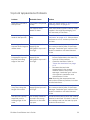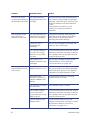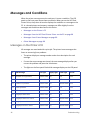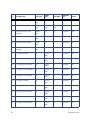
1
Card Printer System Overview
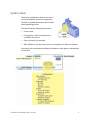
The card printer is used with other equipment and software to create a card production system. The system produces cards for a specific purpose, and the cards must meet requirements. Equipment
The system can include:
1. A PC, with software to support the printer, such as: •
The XPS Card Printer Driver for Windows. •
ID software designed specifically to capture, format, and save the data for cards. •
A retail application such as Microsoft® Word or Adobe® Photoshop®. 2. Capture devices, such as: •
A digital camera connected to the PC to take photos for ID badges and other cards. •
A signature capture pad or fingerprint reader. 3. The printer with supplies and a facility power source. 4. A data connection between the printer and PC, which can be a USB connection or a network connection. (Do not use both with one printer.) Tasks and Users
Typical roles in a card production system include:
12
•
The operator, who makes cards, loads supplies, and handles minor problems such as card jams. •
The system administrator, who sets up the card printer and other hardware, sets up card designs, configures card production software, and identifies the best use of the card printer in the organization. Using the System