1
12-Button and 48-Button Programmable Key Modules
12-Button and 48-Button Programmable Key Modules
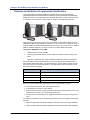
The Programmable Key Modules (PKM) are peripheral devices that provide additional
programmable buttons for the Mitel 5224 and 5324 IP phones and the 8528 and 8568 digital
telephones. There is a 12-button PKM and a 48-button PKM, which provide one-button access
to extensions, trunks, features, or other resources. Images of both PKMs appear below.
The PKMs connect to the phones using the modular cable included with the PKMs and an IP
PKM Interface Module (IM) installed in the phones. You can connect one 12 -button or up to two
48-button PKMs (providing 96 additional buttons) to the phone. You cannot connect a 12-button
PKM to a 48-button PKM and you cannot connect two 12-button PKM units together.
To program a PKM button on the PKM:
1.
With the handset on-hook, dial 397.
2.
Press the programmable button, and then enter the number you want to assign to the
button.
Refer to the appropriate user guide for additional details about programming buttons.
Each PKM button has a line status indicator and may be programmed as a feature button, a
Direct Station Select (DSS) button, or a Speed Dial button. The line status indicators work the
same way as those on the associated phones. The table below provides a description of the
status line indicator lamp signals.
Lamp Signals
Description
Continuously lit
The extension is busy or off-hook.
Slowly flashing
The extension is in Do-Not-Disturb (DND).
Quickly flashing
The extension has a call ringing in.
Continuously flashing
The extension is off-hook.
After you program a PKM button, depending on how you programmed it, you can:
• Press the button to place a call to the assigned extension.
• Press the button to access a system feature.
• Press the button and then hang up to transfer a call to the assigned extension. If the call is
transferred to voice mail, you hear repeating double tones.
• Visually monitor the call activity of the assigned extension if the button you assign has a
lamp.
For installation information, refer to the following documents, which are shipped in the box with
the PKM:
• Mitel IP Programmable Key Module (PKM) 12 Installation Guide, part number 56004531.
• Mitel IP Programmable Key Module (PKM) 48 Installation Guide, part number 56004530.
Page 8
Mitel® 5000 CP Phone User Guide Supplement for v3.2, September 2009