1
area, then your iPod display will look different from how I describe
it. To reset your Main Menu to the default values:
◊
6G iPod (classic) and 3G nano: choose Settings > Main
Menu > Reset Main Menu > Reset.
◊
Older iPods: The command is slightly different—Settings >
Reset Settings > Reset.
For example, If I want you to change the Contact settings on an
iPod by first selecting Settings in the main menu and then selecting
Contacts, I would write, “choose Settings > Contacts.”
• Controlling an iPod: I don’t cover techniques for controlling
each member of the iPod family, because it would take up a lot
of space and because the manual for each iPod model already
explains the functions of the buttons and switches. If you lost
your manual, you can download an electronic version at
http://www.apple.com/support/manuals/ipod/.
TIP iPOD MODELS
Certain iPod functions depend not only on the model of iPod, but also
on when that model was released. If you need help figuring out which
iPod you have, see Know Your iPod.
• iTunes version: I assume that you’re using iTunes 7.4 or later. If
you haven’t yet updated to iTunes 7.4, refer to Install iTunes.
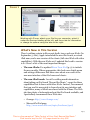
• iTunes preferences: Most iPod preferences are available from
the main iTunes window: select your attached iPod under Devices
at the left of the iTunes window to access settings and other
information at a glance (Figure 1).
Page 3
This is a free sample of “Take Control of Your iPod: Beyond the Music.”
Click here to buy the full 137-page ebook for only $10!