1
System connections (continued)
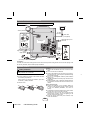
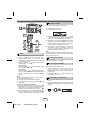
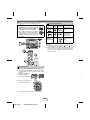
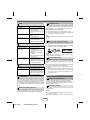
Make sure to unplug the AC power cord before making any connections.
TV
AM loop antenna
To video
input jack
Installing the AM loop
antenna
< Assembling >
< Attaching to
the wall >
Video cable
(not supplied)
subwoofer light-up wire
subwoofer
Cooling fan
wall
screws
(not supplied)
Left
speaker
light-up
wire
FM antenna
Right speaker lightup wire
Right speaker
Left
speaker
Red
Black
AC outlet (AC 120 V ~ 60 Hz)
Cooling fan :
The main unit is built with a cooling fan at the rear of the unit for improved cooling. Please do not cover the opening of the
fan with any obstacles, as this will block proper ventilation.
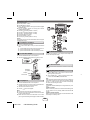
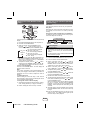
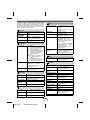
Remote control
Battery installation
Use 2 “AAA” size batteries (UM/SUM-4, R3, HP-16 or
similar). Batteries are not included.
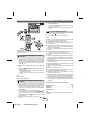
1 Open the battery cover.
2 Insert the batteries according to the direction indicated
in the battery compartment.
When inserting or removing the batteries, push them
toward the (–) battery terminals.
3 Close the cover.
Caution:
● Replace all old batteries with new ones at the same
time.
● Do not mix old and new batteries.
● Remove the batteries if the unit will not be used for a
long period of time. This will prevent potential damage
due to battery leakage.
● Do not use rechargeable batteries (nickel-cadmium
battery, etc.).
● Installing the batteries incorrectly may cause the unit to
malfunction.
● Batteries (battery pack or batteries installed) shall not
be exposed to excessive heat such as sunshine, fire or
the like.
Notes concerning use:
● Replace the batteries if the operating distance is
reduced or if the operation becomes erratic. Purchase
2 “AAA” size batteries (UM/SUM-4, R3, HP-16 or
similar).
● Periodically clean the transmitter on the remote control
and the sensor on the unit with a soft cloth.
● Exposing the sensor on the unit to strong light may
interfere with operation. Change the lighting or the
direction of the unit if this occurs.
● Keep the remote control away from moisture, heat,
shock and vibrations.
E-2
09/11/03
CD-SW440N_EN.fm
1
2
3
4
5
6
7
1
2