1
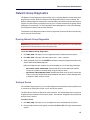
System and Diagnostics Administrator Features
Quick Reference Guide
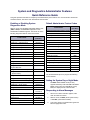
This guide provides information for frequently used administrator phone features. For more information about these
and other features, refer to the main Administrator Phone Guide.
Enabling or Disabling System
Diagnostics Mode
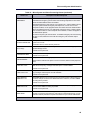
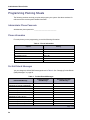
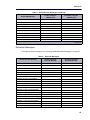
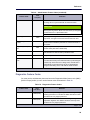
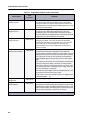
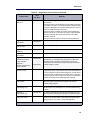
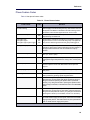
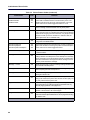
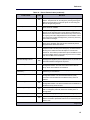
Default Administrator Feature Codes
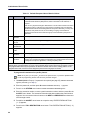
While on-hook, enter the Diagnostics Mode feature code
(9900 or 9100) to enable/disable diagnostics mode.
DIAGNOSTICS ON/OFF appears. Then enter one of the
following diagnostics feature codes shown below.
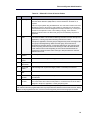
Feature Name
Code
(U.S./Eur.)
Feature Name
Code
(U.S./Eur.)
Automatic Diagnostics Delivery On/Off
9823
Clear Network Alarm
9851
Clear System Alarm
9850
Compression On/Off
9982/9182
9981/9181
9900/9100
Diagnostic – ASAI Snoop Off
9926/9126
Compression Statistics
Diagnostic – ASAI Snoop On
9927/9127
Diagnostics On/Off
Diagnostic – Dump Extension
9933/9133
Enable Network Day
Diagnostic – Dump Node Info
9936/9136
Enable Network Night
9861
Diagnostic – Heap Dump
9943/9143
Modem Disable
9867
Diagnostic – Heap Statistics
9947/9147
Modem Enable
9866
Diagnostic – ISDN View
9948/9148
Modem Reset
9869
Diagnostic – Major Reset
9962/9162
Night Ring On/Off
9860
Diagnostic – Mark as Leaks
9945/9145
Periodic Diagnostics On/Off
9825
Diagnostic – Mark as Quiescent
9946/9146
Program Database
Diagnostic – Minor Reset
9964/9164
Program System Speed Dial
9801
Diagnostic – Network Freeze Zone System Histories
9939/9139
Diagnostic – Network Groups
9963/9163
Diagnostic – Network Unfreeze Zone
- System History
9989/9189
Diagnostic – Print Auxdata
9972/9172
Diagnostic – Print Message Log
9975/9175
Diagnostic – Print Network Log
9976/9176
Diagnostic – Query Node Traffic
9978/9178
Diagnostic – Show Version
9928/9128
Diagnostic – SIP View
9987/9187
Diagnostic – Spare 1–3
9910-9912/
9110-9112
Diagnostic – System History
9974/9174
Diagnostic – View Displays
9983/9183
Seize Device
9973/9173
System History Freeze
9993/9193
System History Unfreeze
9998/9198
9862
9932/9132
Set Network Date/Time
9810
Set Time/Date
9800
Synchronize Network Time
9811
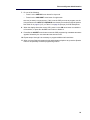
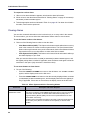
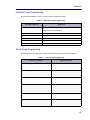
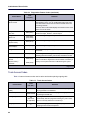
Use the administrator phone to program the following
system features.
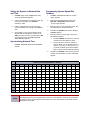
Setting the System Day or Night Mode
Dial 9860. NIGHT MODE IS ON (or OFF)
appears followed by THE SYSTEM IS IN NIGHT
MODE, if the system is in Night Mode. In Day
Mode, the display returns to the idle state.
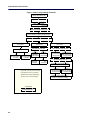
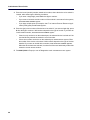
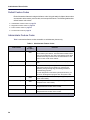
Responding to Alarm Messages
1.
When a minor alarm indication appears, write
down the alarm information.
2.
While on-hook, dial 9850 (Clear System Alarm)
or dial 9851 (Clear Network Alarm).
3.
Look up the alarm in the administrator guide and
take the appropriate action.