1
Parallel Computing Toolbox™
User's Guide
R2015a
How to Contact MathWorks
Latest news:
www.mathworks.com
Sales and services:
www.mathworks.com/sales_and_services
User community:
www.mathworks.com/matlabcentral
Technical support:
www.mathworks.com/support/contact_us
Phone:
508-647-7000
The MathWorks, Inc.
3 Apple Hill Drive
Natick, MA 01760-2098
Parallel Computing Toolbox™ User's Guide
© COPYRIGHT 2004–2015 by The MathWorks, Inc.
The software described in this document is furnished under a license agreement. The software may be used
or copied only under the terms of the license agreement. No part of this manual may be photocopied or
reproduced in any form without prior written consent from The MathWorks, Inc.
FEDERAL ACQUISITION: This provision applies to all acquisitions of the Program and Documentation
by, for, or through the federal government of the United States. By accepting delivery of the Program
or Documentation, the government hereby agrees that this software or documentation qualifies as
commercial computer software or commercial computer software documentation as such terms are used
or defined in FAR 12.212, DFARS Part 227.72, and DFARS 252.227-7014. Accordingly, the terms and
conditions of this Agreement and only those rights specified in this Agreement, shall pertain to and
govern the use, modification, reproduction, release, performance, display, and disclosure of the Program
and Documentation by the federal government (or other entity acquiring for or through the federal
government) and shall supersede any conflicting contractual terms or conditions. If this License fails
to meet the government's needs or is inconsistent in any respect with federal procurement law, the
government agrees to return the Program and Documentation, unused, to The MathWorks, Inc.
Trademarks
MATLAB and Simulink are registered trademarks of The MathWorks, Inc. See
www.mathworks.com/trademarks for a list of additional trademarks. Other product or brand
names may be trademarks or registered trademarks of their respective holders.
Patents
MathWorks products are protected by one or more U.S. patents. Please see
www.mathworks.com/patents for more information.
Revision History
November 2004
March 2005
September 2005
November 2005
March 2006
September 2006
March 2007
September 2007
March 2008
October 2008
March 2009
September 2009
March 2010
September 2010
April 2011
September 2011
March 2012
September 2012
March 2013
September 2013
March 2014
October 2014
March 2015
Online only
Online only
Online only
Online only
Online only
Online only
Online only
Online only
Online only
Online only
Online only
Online only
Online only
Online only
Online only
Online only
Online only
Online only
Online only
Online only
Online only
Online only
Online only
New for Version 1.0 (Release 14SP1+)
Revised for Version 1.0.1 (Release 14SP2)
Revised for Version 1.0.2 (Release 14SP3)
Revised for Version 2.0 (Release 14SP3+)
Revised for Version 2.0.1 (Release 2006a)
Revised for Version 3.0 (Release 2006b)
Revised for Version 3.1 (Release 2007a)
Revised for Version 3.2 (Release 2007b)
Revised for Version 3.3 (Release 2008a)
Revised for Version 4.0 (Release 2008b)
Revised for Version 4.1 (Release 2009a)
Revised for Version 4.2 (Release 2009b)
Revised for Version 4.3 (Release 2010a)
Revised for Version 5.0 (Release 2010b)
Revised for Version 5.1 (Release 2011a)
Revised for Version 5.2 (Release 2011b)
Revised for Version 6.0 (Release 2012a)
Revised for Version 6.1 (Release 2012b)
Revised for Version 6.2 (Release 2013a)
Revised for Version 6.3 (Release 2013b)
Revised for Version 6.4 (Release 2014a)
Revised for Version 6.5 (Release 2014b)
Revised for Version 6.6 (Release 2015a)
Contents
1
2
Getting Started
Parallel Computing Toolbox Product Description . . . . . . . .
Key Features . . . . . . . . . . . . . . . . . . . . . . . . . . . . . . . . . . . . .
1-2
1-2
Parallel Computing with MathWorks Products . . . . . . . . . . .
1-3
Key Problems Addressed by Parallel Computing . . . . . . . . .
Run Parallel for-Loops (parfor) . . . . . . . . . . . . . . . . . . . . . . .
Execute Batch Jobs in Parallel . . . . . . . . . . . . . . . . . . . . . . .
Partition Large Data Sets . . . . . . . . . . . . . . . . . . . . . . . . . . .
1-4
1-4
1-5
1-5
Introduction to Parallel Solutions . . . . . . . . . . . . . . . . . . . . .
Interactively Run a Loop in Parallel . . . . . . . . . . . . . . . . . . .
Run a Batch Job . . . . . . . . . . . . . . . . . . . . . . . . . . . . . . . . . .
Run a Batch Parallel Loop . . . . . . . . . . . . . . . . . . . . . . . . . .
Run Script as Batch Job from the Current Folder Browser .
Distribute Arrays and Run SPMD . . . . . . . . . . . . . . . . . . . .
1-6
1-6
1-8
1-9
1-11
1-12
Determine Product Installation and Versions . . . . . . . . . . .
1-14
Parallel for-Loops (parfor)
Introduction to parfor . . . . . . . . . . . . . . . . . . . . . . . . . . . . . . .
parfor-Loops in MATLAB . . . . . . . . . . . . . . . . . . . . . . . . . . .
Deciding When to Use parfor . . . . . . . . . . . . . . . . . . . . . . . .
2-2
2-2
2-2
Create a parfor-Loop . . . . . . . . . . . . . . . . . . . . . . . . . . . . . . . . .
2-4
Comparing for-Loops and parfor-Loops . . . . . . . . . . . . . . . . .
2-6
v
Reductions: Cumulative Values Updated by Each Iteration .
vi
Contents
2-8
parfor Programming Considerations . . . . . . . . . . . . . . . . . .
MATLAB Path . . . . . . . . . . . . . . . . . . . . . . . . . . . . . . . . . .
Error Handling . . . . . . . . . . . . . . . . . . . . . . . . . . . . . . . . . .
2-10
2-10
2-10
parfor Limitations . . . . . . . . . . . . . . . . . . . . . . . . . . . . . . . . . .
2-11
Inputs and Outputs in parfor-Loops . . . . . . . . . . . . . . . . . . .
Functions with Interactive Inputs . . . . . . . . . . . . . . . . . . . .
Displaying Output . . . . . . . . . . . . . . . . . . . . . . . . . . . . . . . .
2-12
2-12
2-12
Objects and Handles in parfor-Loops . . . . . . . . . . . . . . . . . .
Using Objects in parfor-Loops . . . . . . . . . . . . . . . . . . . . . . .
Handle Classes . . . . . . . . . . . . . . . . . . . . . . . . . . . . . . . . . .
Sliced Variables Referencing Function Handles . . . . . . . . . .
2-13
2-13
2-13
2-13
Nesting and Flow in parfor-Loops . . . . . . . . . . . . . . . . . . . . .
Nested Functions . . . . . . . . . . . . . . . . . . . . . . . . . . . . . . . .
Nested Loops . . . . . . . . . . . . . . . . . . . . . . . . . . . . . . . . . . . .
Nested spmd Statements . . . . . . . . . . . . . . . . . . . . . . . . . . .
Break and Return Statements . . . . . . . . . . . . . . . . . . . . . . .
P-Code Scripts . . . . . . . . . . . . . . . . . . . . . . . . . . . . . . . . . . .
2-15
2-15
2-15
2-17
2-17
2-17
Variables and Transparency in parfor-Loops . . . . . . . . . . .
Unambiguous Variable Names . . . . . . . . . . . . . . . . . . . . . .
Transparency . . . . . . . . . . . . . . . . . . . . . . . . . . . . . . . . . . . .
Structure Arrays in parfor-Loops . . . . . . . . . . . . . . . . . . . .
Scalar Expansion with Sliced Outputs . . . . . . . . . . . . . . . .
Global and Persistent Variables . . . . . . . . . . . . . . . . . . . . .
2-19
2-19
2-19
2-20
2-21
2-22
Classification of Variables in parfor-Loops . . . . . . . . . . . . .
Notes about Required and Recommended Guidelines . . . . . .
2-23
2-24
Loop Variable . . . . . . . . . . . . . . . . . . . . . . . . . . . . . . . . . . . . . .
2-25
Sliced Variables . . . . . . . . . . . . . . . . . . . . . . . . . . . . . . . . . . . .
Characteristics of a Sliced Variable . . . . . . . . . . . . . . . . . . .
Sliced Input and Output Variables . . . . . . . . . . . . . . . . . . .
2-27
2-27
2-29
Broadcast Variables . . . . . . . . . . . . . . . . . . . . . . . . . . . . . . . . .
2-31
3
Reduction Variables . . . . . . . . . . . . . . . . . . . . . . . . . . . . . . . .
Basic Rules for Reduction Variables . . . . . . . . . . . . . . . . . .
Further Considerations with Reduction Variables . . . . . . . .
Example: Using a Custom Reduction Function . . . . . . . . . .
2-32
2-33
2-34
2-37
Temporary Variables . . . . . . . . . . . . . . . . . . . . . . . . . . . . . . . .
Uninitialized Temporaries . . . . . . . . . . . . . . . . . . . . . . . . . .
Temporary Variables Intended as Reduction Variables . . . .
2-39
2-39
2-40
Improving parfor Performance . . . . . . . . . . . . . . . . . . . . . . .
Where to Create Arrays . . . . . . . . . . . . . . . . . . . . . . . . . . .
Slicing Arrays . . . . . . . . . . . . . . . . . . . . . . . . . . . . . . . . . . .
Optimizing on Local vs. Cluster Workers . . . . . . . . . . . . . .
2-42
2-42
2-42
2-42
Parallel Pools . . . . . . . . . . . . . . . . . . . . . . . . . . . . . . . . . . . . . .
What Is a Parallel Pool? . . . . . . . . . . . . . . . . . . . . . . . . . . .
Automatically Start and Stop a Parallel Pool . . . . . . . . . . .
Alternative Ways to Start and Stop Pools . . . . . . . . . . . . . .
Pool Size and Cluster Selection . . . . . . . . . . . . . . . . . . . . . .
2-44
2-44
2-45
2-45
2-46
Convert Nested for-Loops to parfor . . . . . . . . . . . . . . . . . . .
2-48
Single Program Multiple Data (spmd)
Execute Simultaneously on Multiple Data Sets . . . . . . . . . . .
Introduction . . . . . . . . . . . . . . . . . . . . . . . . . . . . . . . . . . . . .
When to Use spmd . . . . . . . . . . . . . . . . . . . . . . . . . . . . . . . .
Define an spmd Statement . . . . . . . . . . . . . . . . . . . . . . . . . .
Display Output . . . . . . . . . . . . . . . . . . . . . . . . . . . . . . . . . . .
3-2
3-2
3-2
3-3
3-5
Access Worker Variables with Composites . . . . . . . . . . . . . . .
Introduction to Composites . . . . . . . . . . . . . . . . . . . . . . . . . .
Create Composites in spmd Statements . . . . . . . . . . . . . . . .
Variable Persistence and Sequences of spmd . . . . . . . . . . . . .
Create Composites Outside spmd Statements . . . . . . . . . . . .
3-6
3-6
3-6
3-8
3-9
Distribute Arrays . . . . . . . . . . . . . . . . . . . . . . . . . . . . . . . . . . .
Distributed Versus Codistributed Arrays . . . . . . . . . . . . . .
Create Distributed Arrays . . . . . . . . . . . . . . . . . . . . . . . . . .
3-10
3-10
3-10
vii
4
5
Create Codistributed Arrays . . . . . . . . . . . . . . . . . . . . . . . .
3-11
Programming Tips . . . . . . . . . . . . . . . . . . . . . . . . . . . . . . . . . .
MATLAB Path . . . . . . . . . . . . . . . . . . . . . . . . . . . . . . . . . .
Error Handling . . . . . . . . . . . . . . . . . . . . . . . . . . . . . . . . . .
Limitations . . . . . . . . . . . . . . . . . . . . . . . . . . . . . . . . . . . . .
3-13
3-13
3-13
3-13
Interactive Parallel Computation with pmode
pmode Versus spmd . . . . . . . . . . . . . . . . . . . . . . . . . . . . . . . . .
4-2
Run Communicating Jobs Interactively Using pmode . . . . .
4-3
Parallel Command Window . . . . . . . . . . . . . . . . . . . . . . . . . .
4-10
Running pmode Interactive Jobs on a Cluster . . . . . . . . . .
4-15
Plotting Distributed Data Using pmode . . . . . . . . . . . . . . . .
4-16
pmode Limitations and Unexpected Results . . . . . . . . . . . .
Using Graphics in pmode . . . . . . . . . . . . . . . . . . . . . . . . . .
4-18
4-18
pmode Troubleshooting . . . . . . . . . . . . . . . . . . . . . . . . . . . . .
Connectivity Testing . . . . . . . . . . . . . . . . . . . . . . . . . . . . . .
Hostname Resolution . . . . . . . . . . . . . . . . . . . . . . . . . . . . .
Socket Connections . . . . . . . . . . . . . . . . . . . . . . . . . . . . . . .
4-19
4-19
4-19
4-19
Math with Codistributed Arrays
Nondistributed Versus Distributed Arrays . . . . . . . . . . . . . .
Introduction . . . . . . . . . . . . . . . . . . . . . . . . . . . . . . . . . . . . .
Nondistributed Arrays . . . . . . . . . . . . . . . . . . . . . . . . . . . . .
Codistributed Arrays . . . . . . . . . . . . . . . . . . . . . . . . . . . . . . .
viii
Contents
5-2
5-2
5-2
5-4
6
Working with Codistributed Arrays . . . . . . . . . . . . . . . . . . . .
How MATLAB Software Distributes Arrays . . . . . . . . . . . . .
Creating a Codistributed Array . . . . . . . . . . . . . . . . . . . . . . .
Local Arrays . . . . . . . . . . . . . . . . . . . . . . . . . . . . . . . . . . . .
Obtaining information About the Array . . . . . . . . . . . . . . .
Changing the Dimension of Distribution . . . . . . . . . . . . . . .
Restoring the Full Array . . . . . . . . . . . . . . . . . . . . . . . . . . .
Indexing into a Codistributed Array . . . . . . . . . . . . . . . . . .
2-Dimensional Distribution . . . . . . . . . . . . . . . . . . . . . . . . .
5-5
5-5
5-7
5-10
5-11
5-12
5-13
5-14
5-16
Looping Over a Distributed Range (for-drange) . . . . . . . . .
Parallelizing a for-Loop . . . . . . . . . . . . . . . . . . . . . . . . . . . .
Codistributed Arrays in a for-drange Loop . . . . . . . . . . . . .
5-20
5-20
5-21
MATLAB Functions on Distributed and Codistributed
Arrays . . . . . . . . . . . . . . . . . . . . . . . . . . . . . . . . . . . . . . . . . .
5-24
Programming Overview
How Parallel Computing Products Run a Job . . . . . . . . . . . .
Overview . . . . . . . . . . . . . . . . . . . . . . . . . . . . . . . . . . . . . . . .
Toolbox and Server Components . . . . . . . . . . . . . . . . . . . . . .
Life Cycle of a Job . . . . . . . . . . . . . . . . . . . . . . . . . . . . . . . .
6-2
6-2
6-3
6-7
Create Simple Independent Jobs . . . . . . . . . . . . . . . . . . . . . .
Program a Job on a Local Cluster . . . . . . . . . . . . . . . . . . . .
6-10
6-10
Parallel Preferences . . . . . . . . . . . . . . . . . . . . . . . . . . . . . . . .
6-12
Clusters and Cluster Profiles . . . . . . . . . . . . . . . . . . . . . . . . .
Cluster Profile Manager . . . . . . . . . . . . . . . . . . . . . . . . . . .
Discover Clusters . . . . . . . . . . . . . . . . . . . . . . . . . . . . . . . .
Import and Export Cluster Profiles . . . . . . . . . . . . . . . . . . .
Create and Modify Cluster Profiles . . . . . . . . . . . . . . . . . . .
Validate Cluster Profiles . . . . . . . . . . . . . . . . . . . . . . . . . . .
Apply Cluster Profiles in Client Code . . . . . . . . . . . . . . . . .
6-14
6-14
6-14
6-16
6-17
6-22
6-23
Apply Callbacks to MJS Jobs and Tasks . . . . . . . . . . . . . . .
6-25
ix
x
Contents
Job Monitor . . . . . . . . . . . . . . . . . . . . . . . . . . . . . . . . . . . . . . .
Job Monitor GUI . . . . . . . . . . . . . . . . . . . . . . . . . . . . . . . . .
Manage Jobs Using the Job Monitor . . . . . . . . . . . . . . . . . .
Identify Task Errors Using the Job Monitor . . . . . . . . . . . .
6-29
6-29
6-30
6-30
Programming Tips . . . . . . . . . . . . . . . . . . . . . . . . . . . . . . . . . .
Program Development Guidelines . . . . . . . . . . . . . . . . . . . .
Current Working Directory of a MATLAB Worker . . . . . . . .
Writing to Files from Workers . . . . . . . . . . . . . . . . . . . . . .
Saving or Sending Objects . . . . . . . . . . . . . . . . . . . . . . . . . .
Using clear functions . . . . . . . . . . . . . . . . . . . . . . . . . . . . . .
Running Tasks That Call Simulink Software . . . . . . . . . . .
Using the pause Function . . . . . . . . . . . . . . . . . . . . . . . . . .
Transmitting Large Amounts of Data . . . . . . . . . . . . . . . . .
Interrupting a Job . . . . . . . . . . . . . . . . . . . . . . . . . . . . . . . .
Speeding Up a Job . . . . . . . . . . . . . . . . . . . . . . . . . . . . . . .
6-32
6-32
6-33
6-34
6-34
6-34
6-35
6-35
6-35
6-35
6-35
Control Random Number Streams . . . . . . . . . . . . . . . . . . . .
Different Workers . . . . . . . . . . . . . . . . . . . . . . . . . . . . . . . .
Client and Workers . . . . . . . . . . . . . . . . . . . . . . . . . . . . . . .
Client and GPU . . . . . . . . . . . . . . . . . . . . . . . . . . . . . . . . .
Worker CPU and Worker GPU . . . . . . . . . . . . . . . . . . . . . .
6-37
6-37
6-38
6-39
6-41
Profiling Parallel Code . . . . . . . . . . . . . . . . . . . . . . . . . . . . . .
Introduction . . . . . . . . . . . . . . . . . . . . . . . . . . . . . . . . . . . . .
Collecting Parallel Profile Data . . . . . . . . . . . . . . . . . . . . . .
Viewing Parallel Profile Data . . . . . . . . . . . . . . . . . . . . . . .
6-42
6-42
6-42
6-43
Benchmarking Performance . . . . . . . . . . . . . . . . . . . . . . . . .
HPC Challenge Benchmarks . . . . . . . . . . . . . . . . . . . . . . . .
6-51
6-51
Troubleshooting and Debugging . . . . . . . . . . . . . . . . . . . . . .
Object Data Size Limitations . . . . . . . . . . . . . . . . . . . . . . .
File Access and Permissions . . . . . . . . . . . . . . . . . . . . . . . .
No Results or Failed Job . . . . . . . . . . . . . . . . . . . . . . . . . . .
Connection Problems Between the Client and MJS . . . . . . .
SFTP Error: Received Message Too Long . . . . . . . . . . . . . .
6-52
6-52
6-52
6-54
6-54
6-55
Run mapreduce on a Parallel Pool . . . . . . . . . . . . . . . . . . . .
Start Parallel Pool . . . . . . . . . . . . . . . . . . . . . . . . . . . . . . . .
Compare Parallel mapreduce . . . . . . . . . . . . . . . . . . . . . . .
6-57
6-57
6-57
7
Run mapreduce on a Hadoop Cluster . . . . . . . . . . . . . . . . . .
Cluster Preparation . . . . . . . . . . . . . . . . . . . . . . . . . . . . . . .
Output Format and Order . . . . . . . . . . . . . . . . . . . . . . . . . .
Calculate Mean Delay . . . . . . . . . . . . . . . . . . . . . . . . . . . . .
6-61
6-61
6-61
6-61
Partition a Datastore in Parallel . . . . . . . . . . . . . . . . . . . . . .
6-64
Program Independent Jobs
Program Independent Jobs . . . . . . . . . . . . . . . . . . . . . . . . . . .
7-2
Program Independent Jobs on a Local Cluster . . . . . . . . . . .
Create and Run Jobs with a Local Cluster . . . . . . . . . . . . . .
Local Cluster Behavior . . . . . . . . . . . . . . . . . . . . . . . . . . . . .
7-3
7-3
7-6
Program Independent Jobs for a Supported Scheduler . . . .
Create and Run Jobs . . . . . . . . . . . . . . . . . . . . . . . . . . . . . .
Manage Objects in the Scheduler . . . . . . . . . . . . . . . . . . . .
7-8
7-8
7-13
Share Code with the Workers . . . . . . . . . . . . . . . . . . . . . . . .
Workers Access Files Directly . . . . . . . . . . . . . . . . . . . . . . .
Pass Data to and from Worker Sessions . . . . . . . . . . . . . . .
Pass MATLAB Code for Startup and Finish . . . . . . . . . . . .
7-16
7-16
7-17
7-19
Program Independent Jobs for a Generic Scheduler . . . . .
Overview . . . . . . . . . . . . . . . . . . . . . . . . . . . . . . . . . . . . . . .
MATLAB Client Submit Function . . . . . . . . . . . . . . . . . . . .
Example — Write the Submit Function . . . . . . . . . . . . . . . .
MATLAB Worker Decode Function . . . . . . . . . . . . . . . . . . .
Example — Write the Decode Function . . . . . . . . . . . . . . . .
Example — Program and Run a Job in the Client . . . . . . . .
Supplied Submit and Decode Functions . . . . . . . . . . . . . . .
Manage Jobs with Generic Scheduler . . . . . . . . . . . . . . . . .
Summary . . . . . . . . . . . . . . . . . . . . . . . . . . . . . . . . . . . . . . .
7-21
7-21
7-22
7-25
7-27
7-29
7-29
7-33
7-34
7-37
xi
8
Program Communicating Jobs
Program Communicating Jobs . . . . . . . . . . . . . . . . . . . . . . . .
8-2
Program Communicating Jobs for a Supported Scheduler .
Schedulers and Conditions . . . . . . . . . . . . . . . . . . . . . . . . . .
Code the Task Function . . . . . . . . . . . . . . . . . . . . . . . . . . . .
Code in the Client . . . . . . . . . . . . . . . . . . . . . . . . . . . . . . . . .
8-4
8-4
8-4
8-5
Program Communicating Jobs for a Generic Scheduler . . .
Introduction . . . . . . . . . . . . . . . . . . . . . . . . . . . . . . . . . . . . .
Code in the Client . . . . . . . . . . . . . . . . . . . . . . . . . . . . . . . . .
8-7
8-7
8-7
Further Notes on Communicating Jobs . . . . . . . . . . . . . . . .
Number of Tasks in a Communicating Job . . . . . . . . . . . . .
Avoid Deadlock and Other Dependency Errors . . . . . . . . . .
9
xii
Contents
8-10
8-10
8-10
GPU Computing
GPU Capabilities and Performance . . . . . . . . . . . . . . . . . . . .
Capabilities . . . . . . . . . . . . . . . . . . . . . . . . . . . . . . . . . . . . . .
Performance Benchmarking . . . . . . . . . . . . . . . . . . . . . . . . .
9-2
9-2
9-2
Establish Arrays on a GPU . . . . . . . . . . . . . . . . . . . . . . . . . . . .
Transfer Arrays Between Workspace and GPU . . . . . . . . . . .
Create GPU Arrays Directly . . . . . . . . . . . . . . . . . . . . . . . . .
Examine gpuArray Characteristics . . . . . . . . . . . . . . . . . . . .
9-3
9-3
9-4
9-7
Run Built-In Functions on a GPU . . . . . . . . . . . . . . . . . . . . . .
MATLAB Functions with gpuArray Arguments . . . . . . . . . . .
Example: Functions with gpuArray Input and Output . . . . . .
Sparse Arrays on a GPU . . . . . . . . . . . . . . . . . . . . . . . . . . .
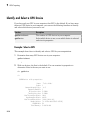
Considerations for Complex Numbers . . . . . . . . . . . . . . . . .
9-8
9-8
9-9
9-10
9-11
Run Element-wise MATLAB Code on GPU . . . . . . . . . . . . . .
MATLAB Code vs. gpuArray Objects . . . . . . . . . . . . . . . . . .
Run Your MATLAB Functions on a GPU . . . . . . . . . . . . . .
9-13
9-13
9-13
Example: Run Your MATLAB Code . . . . . . . . . . . . . . . . . .
Supported MATLAB Code . . . . . . . . . . . . . . . . . . . . . . . . . .
9-14
9-15
Identify and Select a GPU Device . . . . . . . . . . . . . . . . . . . . .
Example: Select a GPU . . . . . . . . . . . . . . . . . . . . . . . . . . . .
9-18
9-18
Run CUDA or PTX Code on GPU . . . . . . . . . . . . . . . . . . . . . .
Overview . . . . . . . . . . . . . . . . . . . . . . . . . . . . . . . . . . . . . . .
Create a CUDAKernel Object . . . . . . . . . . . . . . . . . . . . . . .
Run a CUDAKernel . . . . . . . . . . . . . . . . . . . . . . . . . . . . . .
Complete Kernel Workflow . . . . . . . . . . . . . . . . . . . . . . . . .
9-20
9-20
9-21
9-26
9-28
Run MEX-Functions Containing CUDA Code . . . . . . . . . . . .
Write a MEX-File Containing CUDA Code . . . . . . . . . . . . .
Set Up for MEX-File Compilation . . . . . . . . . . . . . . . . . . . .
Compile a GPU MEX-File . . . . . . . . . . . . . . . . . . . . . . . . . .
Run the Resulting MEX-Functions . . . . . . . . . . . . . . . . . . .
Comparison to a CUDA Kernel . . . . . . . . . . . . . . . . . . . . . .
Access Complex Data . . . . . . . . . . . . . . . . . . . . . . . . . . . . .
9-31
9-31
9-32
9-33
9-33
9-33
9-34
Measure and Improve GPU Performance . . . . . . . . . . . . . . .
Basic Workflow for Improving Performance . . . . . . . . . . . . .
Advanced Tools for Improving Performance . . . . . . . . . . . .
Best Practices for Improving Performance . . . . . . . . . . . . . .
Measure Performance on the GPU . . . . . . . . . . . . . . . . . . .
Vectorize for Improved GPU Performance . . . . . . . . . . . . . .
9-35
9-35
9-36
9-37
9-38
9-39
xiii
10
11
Objects — Alphabetical List
Functions — Alphabetical List
Glossary
xiv
Contents
1
Getting Started
• “Parallel Computing Toolbox Product Description” on page 1-2
• “Parallel Computing with MathWorks Products” on page 1-3
• “Key Problems Addressed by Parallel Computing” on page 1-4
• “Introduction to Parallel Solutions” on page 1-6
• “Determine Product Installation and Versions” on page 1-14
1
Getting Started
Parallel Computing Toolbox Product Description
Perform parallel computations on multicore computers, GPUs, and computer clusters
Parallel Computing Toolbox lets you solve computationally and data-intensive problems
using multicore processors, GPUs, and computer clusters. High-level constructs—parallel
for-loops, special array types, and parallelized numerical algorithms—let you parallelize
MATLAB® applications without CUDA or MPI programming. You can use the toolbox
with Simulink® to run multiple simulations of a model in parallel.
The toolbox lets you use the full processing power of multicore desktops by executing
applications on workers (MATLAB computational engines) that run locally. Without
changing the code, you can run the same applications on a computer cluster or a grid
computing service (using MATLAB Distributed Computing Server™). You can run
parallel applications interactively or in batch.
Key Features
• Parallel for-loops (parfor) for running task-parallel algorithms on multiple processors
• Support for CUDA-enabled NVIDIA GPUs
• Full use of multicore processors on the desktop via workers that run locally
• Computer cluster and grid support (with MATLAB Distributed Computing Server)
• Interactive and batch execution of parallel applications
• Distributed arrays and spmd (single-program-multiple-data) for large dataset
handling and data-parallel algorithms
1-2
Parallel Computing with MathWorks Products
Parallel Computing with MathWorks Products
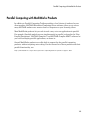
In addition to Parallel Computing Toolbox providing a local cluster of workers for your
client machine, MATLAB Distributed Computing Server software allows you to run as
many MATLAB workers on a remote cluster of computers as your licensing allows.
Most MathWorks products let you code in such a way as to run applications in parallel.
For example, Simulink models can run simultaneously in parallel, as described in “Run
Parallel Simulations”. MATLAB Compiler™ and MATLAB Compiler SDK™ software let
you build and deploy parallel applications, as shown in .
Several MathWorks products now offer built-in support for the parallel computing
products, without requiring extra coding. For the current list of these products and their
parallel functionality, see:
http://www.mathworks.com/products/parallel-computing/builtin-parallel-support.html
1-3
1
Getting Started
Key Problems Addressed by Parallel Computing
In this section...
“Run Parallel for-Loops (parfor)” on page 1-4
“Execute Batch Jobs in Parallel” on page 1-5
“Partition Large Data Sets” on page 1-5
Run Parallel for-Loops (parfor)
Many applications involve multiple segments of code, some of which are repetitive. Often
you can use for-loops to solve these cases. The ability to execute code in parallel, on one
computer or on a cluster of computers, can significantly improve performance in many
cases:
• Parameter sweep applications
• Many iterations — A sweep might take a long time because it comprises many
iterations. Each iteration by itself might not take long to execute, but to complete
thousands or millions of iterations in serial could take a long time.
• Long iterations — A sweep might not have a lot of iterations, but each iteration
could take a long time to run.
Typically, the only difference between iterations is defined by different input data. In
these cases, the ability to run separate sweep iterations simultaneously can improve
performance. Evaluating such iterations in parallel is an ideal way to sweep through
large or multiple data sets. The only restriction on parallel loops is that no iterations
be allowed to depend on any other iterations.
• Test suites with independent segments — For applications that run a series of
unrelated tasks, you can run these tasks simultaneously on separate resources. You
might not have used a for-loop for a case such as this comprising distinctly different
tasks, but a parfor-loop could offer an appropriate solution.
Parallel Computing Toolbox software improves the performance of such loop execution by
allowing several MATLAB workers to execute individual loop iterations simultaneously.
For example, a loop of 100 iterations could run on a cluster of 20 MATLAB workers, so
that simultaneously, the workers each execute only five iterations of the loop. You might
not get quite 20 times improvement in speed because of communications overhead and
network traffic, but the speedup should be significant. Even running local workers all on
1-4
Key Problems Addressed by Parallel Computing
the same machine as the client, you might see significant performance improvement on a
multicore/multiprocessor machine. So whether your loop takes a long time to run because
it has many iterations or because each iteration takes a long time, you can improve your
loop speed by distributing iterations to MATLAB workers.
Execute Batch Jobs in Parallel
When working interactively in a MATLAB session, you can offload work to a MATLAB
worker session to run as a batch job. The command to perform this job is asynchronous,
which means that your client MATLAB session is not blocked, and you can continue your
own interactive session while the MATLAB worker is busy evaluating your code. The
MATLAB worker can run either on the same machine as the client, or if using MATLAB
Distributed Computing Server, on a remote cluster machine.
Partition Large Data Sets
If you have an array that is too large for your computer's memory, it cannot be easily
handled in a single MATLAB session. Parallel Computing Toolbox software allows you
to distribute that array among multiple MATLAB workers, so that each worker contains
only a part of the array. Yet you can operate on the entire array as a single entity. Each
worker operates only on its part of the array, and workers automatically transfer data
between themselves when necessary, as, for example, in matrix multiplication. A large
number of matrix operations and functions have been enhanced to work directly with
these arrays without further modification; see “MATLAB Functions on Distributed and
Codistributed Arrays” on page 5-24 and “Using MATLAB Constructor Functions” on
page 5-9.
1-5
1
Getting Started
Introduction to Parallel Solutions
In this section...
“Interactively Run a Loop in Parallel” on page 1-6
“Run a Batch Job” on page 1-8
“Run a Batch Parallel Loop” on page 1-9
“Run Script as Batch Job from the Current Folder Browser” on page 1-11
“Distribute Arrays and Run SPMD” on page 1-12
Interactively Run a Loop in Parallel
This section shows how to modify a simple for-loop so that it runs in parallel. This
loop does not have a lot of iterations, and it does not take long to execute, but you can
apply the principles to larger loops. For these simple examples, you might not notice an
increase in execution speed.
1
Suppose your code includes a loop to create a sine wave and plot the waveform:
for i = 1:1024
A(i) = sin(i*2*pi/1024);
end
plot(A)
2
You can modify your code to run your loop in parallel by using a parfor statement:
parfor i = 1:1024
A(i) = sin(i*2*pi/1024);
end
plot(A)
The only difference in this loop is the keyword parfor instead of for. When the loop
begins, it opens a parallel pool of MATLAB sessions called workers for executing
the iterations in parallel. After the loop runs, the results look the same as those
generated from the previous for-loop.
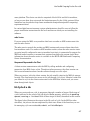
1-6
Introduction to Parallel Solutions
MATLAB®
workers
parfor
MATLAB®
client
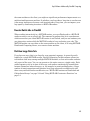
Because the iterations run in parallel in other MATLAB sessions, each iteration
must be completely independent of all other iterations. The worker calculating the
value for A(100) might not be the same worker calculating A(500). There is no
guarantee of sequence, so A(900) might be calculated before A(400). (The MATLAB
Editor can help identify some problems with parfor code that might not contain
independent iterations.) The only place where the values of all the elements of the
array A are available is in your MATLAB client session, after the data returns from
the MATLAB workers and the loop completes.
For more information on parfor-loops, see “Parallel for-Loops (parfor)”.
You can modify your cluster profiles to control how many workers run your loops, and
whether the workers are local or on a cluster. For more information on profiles, see
“Clusters and Cluster Profiles” on page 6-14.
Modify your parallel preferences to control whether a parallel pool is created
automatically, and how long it remains available before timing out. For more information
on preferences, see “Parallel Preferences” on page 6-12.
You can run Simulink models in parallel loop iterations with the sim command inside
your loop. For more information and examples of using Simulink with parfor, see “Run
Parallel Simulations” in the Simulink documentation.
1-7
1
Getting Started
Run a Batch Job
To offload work from your MATLAB session to run in the background in another session,
you can use the batch command. This example uses the for-loop from the previous
example, inside a script.
1
To create the script, type:
edit mywave
2
In the MATLAB Editor, enter the text of the for-loop:
for i = 1:1024
A(i) = sin(i*2*pi/1024);
end
3
Save the file and close the Editor.
4
Use the batch command in the MATLAB Command Window to run your script on a
separate MATLAB worker:
job = batch('mywave')
MATLAB®
client
MATLAB®
worker
batch
5
The batch command does not block MATLAB, so you must wait for the job to finish
before you can retrieve and view its results:
wait(job)
6
The load command transfers variables created on the worker to the client
workspace, where you can view the results:
load(job,'A')
plot(A)
7
When the job is complete, permanently delete its data and remove its reference from
the workspace:
delete(job)
clear job
1-8
Introduction to Parallel Solutions
batch runs your code on a local worker or a cluster worker, but does not require a
parallel pool.
You can use batch to run either scripts or functions. For more details, see the batch
reference page.
Run a Batch Parallel Loop
You can combine the abilities to offload a job and run a parallel loop. In the previous two
examples, you modified a for-loop to make a parfor-loop, and you submitted a script
with a for-loop as a batch job. This example combines the two to create a batch parforloop.
1
Open your script in the MATLAB Editor:
edit mywave
2
Modify the script so that the for statement is a parfor statement:
parfor i = 1:1024
A(i) = sin(i*2*pi/1024);
end
3
Save the file and close the Editor.
4
Run the script in MATLAB with the batch command as before, but indicate that the
script should use a parallel pool for the loop:
job = batch('mywave','Pool',3)
This command specifies that three workers (in addition to the one running the batch
script) are to evaluate the loop iterations. Therefore, this example uses a total of four
local workers, including the one worker running the batch script. Altogether, there
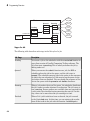
are five MATLAB sessions involved, as shown in the following diagram.
1-9
1
Getting Started
MATLAB®
client
MATLAB®
workers
batch
parfor
5
To view the results:
wait(job)
load(job,'A')
plot(A)
The results look the same as before, however, there are two important differences in
execution:
• The work of defining the parfor-loop and accumulating its results are offloaded
to another MATLAB session by batch.
• The loop iterations are distributed from one MATLAB worker to another set of
workers running simultaneously ('Pool' and parfor), so the loop might run
faster than having only one worker execute it.
6
When the job is complete, permanently delete its data and remove its reference from
the workspace:
delete(job)
clear job
1-10
Introduction to Parallel Solutions
Run Script as Batch Job from the Current Folder Browser
From the Current Folder browser, you can run a MATLAB script as a batch job by
browsing to the file’s folder, right-clicking the file, and selecting Run Script as Batch
Job. The batch job runs on the cluster identified by the default cluster profile. The
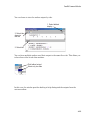
following figure shows the menu option to run the script file script1.m:
Running a script as a batch from the browser uses only one worker from the cluster. So
even if the script contains a parfor loop or spmd block, it does not open an additional
pool of workers on the cluster. These code blocks execute on the single worker used for
the batch job. If your batch script requires opening an additional pool of workers, you
can run it from the command line, as described in “Run a Batch Parallel Loop” on page
1-9.
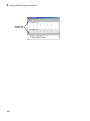
When you run a batch job from the browser, this also opens the Job Monitor. The
Job Monitor is a tool that lets you track your job in the scheduler queue. For more
information about the Job Monitor and its capabilities, see “Job Monitor” on page
6-29.
1-11
1
Getting Started
Distribute Arrays and Run SPMD
Distributed Arrays
The workers in a parallel pool communicate with each other, so you can distribute an
array among the workers. Each worker contains part of the array, and all the workers
are aware of which portion of the array each worker has.
Use the distributed function to distribute an array among the workers:
M = magic(4) % a 4-by-4 magic square in the client workspace
MM = distributed(M)
Now MM is a distributed array, equivalent to M, and you can manipulate or access its
elements in the same way as any other array.
M2 = 2*MM; % M2 is also distributed, calculation performed on workers
x = M2(1,1) % x on the client is set to first element of M2
Single Program Multiple Data (spmd)
The single program multiple data (spmd) construct lets you define a block of code that
runs in parallel on all the workers in a parallel pool. The spmd block can run on some or
all the workers in the pool.
spmd
% By default creates pool and uses all workers
R = rand(4);
end
This code creates an individual 4-by-4 matrix, R, of random numbers on each worker in
the pool.
Composites
Following an spmd statement, in the client context, the values from the block are
accessible, even though the data is actually stored on the workers. On the client,
these variables are called Composite objects. Each element of a composite is a symbol
referencing the value (data) on a worker in the pool. Note that because a variable might
not be defined on every worker, a Composite might have undefined elements.
Continuing with the example from above, on the client, the Composite R has one element
for each worker:
X = R{3};
1-12
% Set X to the value of R from worker 3.
Introduction to Parallel Solutions
The line above retrieves the data from worker 3 to assign the value of X. The following
code sends data to worker 3:
X = X + 2;
R{3} = X; % Send the value of X from the client to worker 3.
If the parallel pool remains open between spmd statements and the same workers are
used, the data on each worker persists from one spmd statement to another.
spmd
R = R + labindex
end
% Use values of R from previous spmd.
A typical use for spmd is to run the same code on a number of workers, each of which
accesses a different set of data. For example:
spmd
INP = load(['somedatafile' num2str(labindex) '.mat']);
RES = somefun(INP)
end
Then the values of RES on the workers are accessible from the client as RES{1} from
worker 1, RES{2} from worker 2, etc.
There are two forms of indexing a Composite, comparable to indexing a cell array:
• AA{n} returns the values of AA from worker n.
• AA(n) returns a cell array of the content of AA from worker n.
Although data persists on the workers from one spmd block to another as long as the
parallel pool remains open, data does not persist from one instance of a parallel pool to
another. That is, if the pool is deleted and a new one created, all data from the first pool
is lost.
For more information about using distributed arrays, spmd, and Composites, see
“Distributed Arrays and SPMD”.
1-13
1
Getting Started
Determine Product Installation and Versions
To determine if Parallel Computing Toolbox software is installed on your system, type
this command at the MATLAB prompt.
ver
When you enter this command, MATLAB displays information about the version of
MATLAB you are running, including a list of all toolboxes installed on your system and
their version numbers.
If you want to run your applications on a cluster, see your system administrator to verify
that the version of Parallel Computing Toolbox you are using is the same as the version
of MATLAB Distributed Computing Server installed on your cluster.
1-14
2
Parallel for-Loops (parfor)
• “Introduction to parfor” on page 2-2
• “Create a parfor-Loop” on page 2-4
• “Comparing for-Loops and parfor-Loops” on page 2-6
• “Reductions: Cumulative Values Updated by Each Iteration” on page 2-8
• “parfor Programming Considerations” on page 2-10
• “parfor Limitations” on page 2-11
• “Inputs and Outputs in parfor-Loops” on page 2-12
• “Objects and Handles in parfor-Loops” on page 2-13
• “Nesting and Flow in parfor-Loops” on page 2-15
• “Variables and Transparency in parfor-Loops” on page 2-19
• “Classification of Variables in parfor-Loops” on page 2-23
• “Loop Variable” on page 2-25
• “Sliced Variables” on page 2-27
• “Broadcast Variables” on page 2-31
• “Reduction Variables” on page 2-32
• “Temporary Variables” on page 2-39
• “Improving parfor Performance” on page 2-42
• “Parallel Pools” on page 2-44
• “Convert Nested for-Loops to parfor” on page 2-48
2
Parallel for-Loops (parfor)
Introduction to parfor
In this section...
“parfor-Loops in MATLAB” on page 2-2
“Deciding When to Use parfor” on page 2-2
parfor-Loops in MATLAB
The basic concept of a parfor-loop in MATLAB software is the same as the standard
MATLAB for-loop: MATLAB executes a series of statements (the loop body) over a range
of values. The MATLAB client (where the parfor is issued) coordinates with MATLAB
workers comprising a parallel pool, so that the loop iterations can be executed in parallel
on the pool. The necessary data on which parfor operates is sent from the client to
workers, where most of the computation happens, and the results are sent back to the
client and pieced together.
Because several MATLAB workers can be computing concurrently on the same loop, a
parfor-loop can provide significantly better performance than its analogous for-loop.
Each execution of the body of a parfor-loop is an iteration. MATLAB workers evaluate
iterations in no particular order, and independently of each other. Because each iteration
is independent, there is no guarantee that the iterations are synchronized in any way,
nor is there any need for this. If the number of workers is equal to the number of loop
iterations, each worker performs one iteration of the loop. If there are more iterations
than workers, some workers perform more than one loop iteration; in this case, a worker
might receive multiple iterations at once to reduce communication time.
Deciding When to Use parfor
A parfor-loop is useful in situations where you need many loop iterations of a simple
calculation, such as a Monte Carlo simulation. parfor divides the loop iterations into
groups so that each worker executes some portion of the total number of iterations.
parfor-loops are also useful when you have loop iterations that take a long time to
execute, because the workers can execute iterations simultaneously.
You cannot use a parfor-loop when an iteration in your loop depends on the results
of other iterations. Each iteration must be independent of all others. Since there is a
communications cost involved in a parfor-loop, there might be no advantage to using
2-2
Introduction to parfor
one when you have only a small number of simple calculations. The examples of this
section are only to illustrate the behavior of parfor-loops, not necessarily to show the
applications best suited to them.
Related Examples
•
“Create a parfor-Loop” on page 2-4
More About
•
“Parallel Pools” on page 2-44
•
“Comparing for-Loops and parfor-Loops” on page 2-6
•
“Reductions: Cumulative Values Updated by Each Iteration” on page 2-8
•
“parfor Programming Considerations” on page 2-10
•
“Classification of Variables in parfor-Loops” on page 2-23
•
“parfor Limitations” on page 2-11
2-3
2
Parallel for-Loops (parfor)
Create a parfor-Loop
The safest approach when creating a parfor-loop is to assume that iterations are
performed on different MATLAB workers in the parallel pool, so there is no sharing
of information between iterations. If you have a for-loop in which all iterations are
completely independent of each other, this loop is a good candidate for a parfor-loop.
Basically, if one iteration depends on the results of another iteration, these iterations are
not independent and cannot be evaluated in parallel, so you cannot easily reprogram the
loop into a parfor-loop.
The following example produces equivalent results, with a for-loop on the left, and a
parfor-loop on the right. Try typing each in your MATLAB Command Window:
clear A
for i = 1:8
A(i) = i;
end
A
1
2
clear A
parfor i = 1:8
A(i) = i;
end
A
3
4
5
6
7 1
8 2
3
4
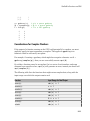
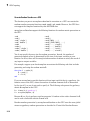
5
6
Notice that each element of A is equal to its index. The parfor-loop works because
each element depends only upon its iteration of the loop, and upon no other iterations.
for-loops that merely repeat such independent tasks are ideally suited candidates for
parfor-loops.
Note If a parallel pool is not running, parfor creates a pool using your default cluster
profile, if your parallel preferences are set accordingly.
Related Examples
•
“Run Parallel for-Loops (parfor)” on page 1-4
•
“Run a Batch Parallel Loop” on page 1-9
•
“Convert Nested for-Loops to parfor” on page 2-48
More About
2-4
•
“Parallel Pools” on page 2-44
•
“Introduction to parfor” on page 2-2
7
8
Create a parfor-Loop
•
“Comparing for-Loops and parfor-Loops” on page 2-6
•
“Reductions: Cumulative Values Updated by Each Iteration” on page 2-8
•
“parfor Programming Considerations” on page 2-10
•
“parfor Limitations” on page 2-11
2-5
2
Parallel for-Loops (parfor)
Comparing for-Loops and parfor-Loops
Because parfor-loops are not quite the same as for-loops, there are specific behaviors
of each to be aware of. As seen from the example in the topic “Create a parfor-Loop” on
page 2-4, when you assign to an array variable (such as A in that example) inside the loop
by indexing with the loop variable, the elements of that array are available in the client
workspace after the loop, much the same as with a for-loop.
However, suppose you use a nonindexed variable inside the loop, or a variable whose
indexing does not depend on the loop variable i. Try these examples and notice the
values of d and i afterward:
clear A
d = 0; i = 0;
for i = 1:4
d = i*2;
A(i) = d;
end
A
d
i
clear A
d = 0; i = 0;
parfor i = 1:4
d = i*2;
A(i) = d;
end
A
d
i
A =
A =
2
d =
4
6
8
2
4
6
8
d =
8
i =
0
i =
4
0
Although the elements of A come out the same in both of these examples, the value
of d does not. In the for-loop above on the left, the iterations execute in sequence, so
afterward d has the value it held in the last iteration of the loop. In the parfor-loop on
the right, the iterations execute in parallel, not in sequence, so it would be impossible to
assign d a definitive value at the end of the loop. This also applies to the loop variable, i.
Therefore, parfor-loop behavior is defined so that it does not affect the values d and i
outside the loop at all, and their values remain the same before and after the loop. So, a
2-6
Comparing for-Loops and parfor-Loops
parfor-loop requires that each iteration be independent of the other iterations, and that
all code that follows the parfor-loop not depend on the loop iteration sequence.
Related Examples
•
“Introduction to parfor” on page 2-2
•
“Create a parfor-Loop” on page 2-4
More About
•
“Reductions: Cumulative Values Updated by Each Iteration” on page 2-8
•
“Classification of Variables in parfor-Loops” on page 2-23
2-7
2
Parallel for-Loops (parfor)
Reductions: Cumulative Values Updated by Each Iteration
These two examples show parfor-loops using reduction assignments. A reduction is an
accumulation across iterations of a loop. The example on the left uses x to accumulate a
sum across 10 iterations of the loop. The example on the right generates a concatenated
array, 1:10. In both of these examples, the execution order of the iterations on the
workers does not matter: while the workers calculate individual results for each
iteration, the client properly accumulates and assembles the final loop result.
x = 0;
parfor i = 1:10
x = x + i;
end
x
x2 = [];
n = 10;
parfor i = 1:n
x2 = [x2, i];
end
x2
x =
x2 =
55
1
2
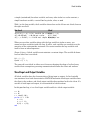
3
4
5
6
If the loop iterations operate in random sequence, you might expect the concatenation
sequence in the example on the right to be nonconsecutive. However, MATLAB
recognizes the concatenation operation and yields deterministic results.
The next example, which attempts to compute Fibonacci numbers, is not a valid parforloop because the value of an element of f in one iteration depends on the values of other
elements of f calculated in other iterations.
f = zeros(1,50);
f(1) = 1;
f(2) = 2;
parfor n = 3:50
f(n) = f(n-1) + f(n-2);
end
When you are finished with your loop examples, clear your workspace and delete your
parallel pool of workers:
clear
delete(gcp)
Related Examples
•
2-8
“Create a parfor-Loop” on page 2-4
7
8
Reductions: Cumulative Values Updated by Each Iteration
More About
•
“Introduction to parfor” on page 2-2
•
“Comparing for-Loops and parfor-Loops” on page 2-6
•
“Reduction Variables” on page 2-32
2-9
2
Parallel for-Loops (parfor)
parfor Programming Considerations
In this section...
“MATLAB Path” on page 2-10
“Error Handling” on page 2-10
MATLAB Path
All workers executing a parfor-loop must have the same MATLAB search path as the
client, so that they can execute any functions called in the body of the loop. Therefore,
whenever you use cd, addpath, or rmpath on the client, it also executes on all the
workers, if possible. For more information, see the parpool reference page. When
the workers are running on a different platform than the client, use the function
pctRunOnAll to properly set the MATLAB search path on all workers.
Functions files that contain parfor-loops must be available on the search path of
the workers in the pool running the parfor, or made available to the workers by the
AttachedFiles or AdditionalPaths setting of the parallel pool.
Error Handling
When an error occurs during the execution of a parfor-loop, all iterations that are in
progress are terminated, new ones are not initiated, and the loop terminates.
Errors and warnings produced on workers are annotated with the worker ID and
displayed in the client’s Command Window in the order in which they are received by the
client MATLAB.
The behavior of lastwarn is unspecified at the end of the parfor if used within the loop
body.
More About
2-10
•
“Variables and Transparency in parfor-Loops” on page 2-19
•
“parfor Limitations” on page 2-11
•
“Inputs and Outputs in parfor-Loops” on page 2-12
parfor Limitations
parfor Limitations
Most of these restrictions result from the need for loop iterations to be completely
independent of each other, or the fact that the iterations run on MATLAB worker
sessions instead of the client session.
• Inputs and Outputs
• “Functions with Interactive Inputs” on page 2-12
• “Displaying Output” on page 2-12
• Classes and Handles
• “Using Objects in parfor-Loops” on page 2-13
• “Handle Classes” on page 2-13
• “Sliced Variables Referencing Function Handles” on page 2-13
• Nesting and Flow
• “Nested Functions” on page 2-15
• “Nested Loops” on page 2-15
• “Nested spmd Statements” on page 2-17
• “Break and Return Statements” on page 2-17
• “P-Code Scripts” on page 2-17
• Variables and Transparency
• “Unambiguous Variable Names” on page 2-19
• “Transparency” on page 2-19
• “Structure Arrays in parfor-Loops” on page 2-20
• “Scalar Expansion with Sliced Outputs” on page 2-21
• “Global and Persistent Variables” on page 2-22
2-11
2
Parallel for-Loops (parfor)
Inputs and Outputs in parfor-Loops
In this section...
“Functions with Interactive Inputs” on page 2-12
“Displaying Output” on page 2-12
Functions with Interactive Inputs
If you use a function that is not strictly computational in nature (e.g., input, keyboard)
in a parfor-loop or in any function called by a parfor-loop, the behavior of that
function occurs on the worker. The behavior might include hanging the worker process or
having no visible effect at all.
Displaying Output
When running a parfor-loop on a parallel pool, all command-line output from
the workers displays in the client Command Window, except output from variable
assignments. Because the workers are MATLAB sessions without displays, any graphical
output (for example, figure windows from plot,) from the pool does not display at all.
More About
•
2-12
“parfor Limitations” on page 2-11
Objects and Handles in parfor-Loops
Objects and Handles in parfor-Loops
In this section...
“Using Objects in parfor-Loops” on page 2-13
“Handle Classes” on page 2-13
“Sliced Variables Referencing Function Handles” on page 2-13
Using Objects in parfor-Loops
If you are passing objects into or out of a parfor-loop, the objects must properly
facilitate being saved and loaded. For more information, see “Save and Load Process”.
Handle Classes
You can send handle objects as inputs to the body of a parfor-loop, but any changes
made to handle objects on the workers during loop iterations are not automatically
propagated back to the client. That is, changes made inside the loop are not
automatically reflected after the loop.
To get the changes back to the client after the loop, explicitly assign the modified handle
objects to output variables of the parfor-loop. In the following example, maps is a sliced
input/output variable:
maps = {containers.Map(),containers.Map(),containers.Map()};
parfor ii = 1:numel(maps)
mymap = maps{ii};
% input slice assigned to local copy
for jj = 1:1000
mymap(num2str(jj)) = rand;
end
maps{ii} = mymap;
% modified local copy assigned to output slice
end
Sliced Variables Referencing Function Handles
You cannot directly call a function handle with the loop index as an input argument,
because this cannot be distinguished from a sliced input variable. If you need to call a
function handle with the loop index variable as an argument, use feval.
For example, suppose you had a for-loop that performs:
2-13
2
Parallel for-Loops (parfor)
B = @sin;
for ii = 1:100
A(ii) = B(ii);
end
A corresponding parfor-loop does not allow B to reference a function handle. So you can
work around the problem with feval:
B = @sin;
parfor ii = 1:100
A(ii) = feval(B,ii);
end
More About
2-14
•
“parfor Limitations” on page 2-11
•
“Sliced Variables” on page 2-27
Nesting and Flow in parfor-Loops
Nesting and Flow in parfor-Loops
In this section...
“Nested Functions” on page 2-15
“Nested Loops” on page 2-15
“Nested spmd Statements” on page 2-17
“Break and Return Statements” on page 2-17
“P-Code Scripts” on page 2-17
Nested Functions
The body of a parfor-loop cannot make reference to a nested function. However, it can
call a nested function by means of a function handle.
Nested Loops
The body of a parfor-loop cannot contain another parfor-loop. But it can call a function
that contains another parfor-loop.
However, because a worker cannot open a parallel pool, a worker cannot run the inner
nested parfor-loop in parallel. This means that only one level of nested parfor-loops
can run in parallel. If the outer loop runs in parallel on a parallel pool, the inner loop
runs serially on each worker. If the outer loop runs serially in the client (e.g., parfor
specifying zero workers), the function that contains the inner loop can run the inner loop
in parallel on workers in a pool.
The body of a parfor-loop can contain for-loops. You can use the inner loop variable
for indexing the sliced array, but only if you use the variable in plain form, not part of an
expression. For example:
A = zeros(4,5);
parfor j = 1:4
for k = 1:5
A(j,k) = j + k;
end
end
A
Further nesting of for-loops with a parfor is also allowed.
2-15
2
Parallel for-Loops (parfor)
Limitations of Nested for-Loops
For proper variable classification, the range of a for-loop nested in a parfor must be
defined by constant numbers or variables. In the following example, the code on the left
does not work because the for-loop upper limit is defined by a function call. The code
on the right works around this by defining a broadcast or constant variable outside the
parfor first:
Invalid
Valid
A = zeros(100, 200);
parfor i = 1:size(A, 1)
for j = 1:size(A, 2)
A(i, j) = plus(i, j);
end
end
A = zeros(100, 200);
n = size(A, 2);
parfor i = 1:size(A,1)
for j = 1:n
A(i, j) = plus(i, j);
end
end
The index variable for the nested for-loop must never be explicitly assigned other than
in its for statement. When using the nested for-loop variable for indexing the sliced
array, you must use the variable in plain form, not as part of an expression. For example,
the following code on the left does not work, but the code on the right does:
Invalid
Valid
A = zeros(4, 11);
parfor i = 1:4
for j = 1:10
A(i, j + 1) = i + j;
end
end
A = zeros(4, 11);
parfor i = 1:4
for j = 2:11
A(i, j) = i + j - 1;
end
end
If you use a nested for-loop to index into a sliced array, you cannot use that array
elsewhere in the parfor-loop. In the following example, the code on the left does not
work because A is sliced and indexed inside the nested for-loop; the code on the right
works because v is assigned to A outside the nested loop:
2-16
Invalid
Valid
A = zeros(4, 10);
parfor i = 1:4
for j = 1:10
A(i, j) = i + j;
end
A = zeros(4, 10);
parfor i = 1:4
v = zeros(1, 10);
for j = 1:10
v(j) = i + j;
Nesting and Flow in parfor-Loops
Invalid
Valid
disp(A(i, 1))
end
disp(v(1))
A(i, :) = v;
end
end
Inside a parfor, if you use multiple for-loops (not nested inside each other) to index
into a single sliced array, they must loop over the same range of values. Furthermore, a
sliced output variable can be used in only one nested for-loop. In the following example,
the code on the left does not work because j and k loop over different values; the code on
the right works to index different portions of the sliced array A:
Invalid
Valid
A = zeros(4, 10);
parfor i = 1:4
for j = 1:5
A(i, j) = i + j;
end
for k = 6:10
A(i, k) = pi;
end
end
A = zeros(4, 10);
parfor i = 1:4
for j = 1:10
if j < 6
A(i, j) = i + j;
else
A(i, j) = pi;
end
end
end
Nested spmd Statements
The body of a parfor-loop cannot contain an spmd statement, and an spmd statement
cannot contain a parfor-loop.
Break and Return Statements
The body of a parfor-loop cannot contain break or return statements.
Consider instead using parfeval or parfevalOnAll.
P-Code Scripts
You can call P-code script files from within a parfor-loop, but P-code script cannot
contain a parfor-loop.
2-17
2
Parallel for-Loops (parfor)
More About
2-18
•
“parfor Limitations” on page 2-11
•
“Convert Nested for-Loops to parfor” on page 2-48
Variables and Transparency in parfor-Loops
Variables and Transparency in parfor-Loops
In this section...
“Unambiguous Variable Names” on page 2-19
“Transparency” on page 2-19
“Structure Arrays in parfor-Loops” on page 2-20
“Scalar Expansion with Sliced Outputs” on page 2-21
“Global and Persistent Variables” on page 2-22
Unambiguous Variable Names
If you use a name that MATLAB cannot unambiguously distinguish as a variable inside
a parfor-loop, at parse time MATLAB assumes you are referencing a function. Then at
run-time, if the function cannot be found, MATLAB generates an error. (See “Variable
Names” in the MATLAB documentation.) For example, in the following code f(5) could
refer either to the fifth element of an array named f, or to a function named f with an
argument of 5. If f is not clearly defined as a variable in the code, MATLAB looks for the
function f on the path when the code runs.
parfor i = 1:n
...
a = f(5);
...
end
Transparency
The body of a parfor-loop must be transparent, meaning that all references to variables
must be “visible” (i.e., they occur in the text of the program).
In the following example, because X is not visible as an input variable in the parfor
body (only the string 'X' is passed to eval), it does not get transferred to the workers.
As a result, MATLAB issues an error at run time:
X = 5;
parfor ii = 1:4
eval('X');
end
2-19
2
Parallel for-Loops (parfor)
Similarly, you cannot clear variables from a worker's workspace by executing clear
inside a parfor statement:
parfor ii = 1:4
<statements...>
clear('X') % cannot clear: transparency violation
<statements...>
end
As a workaround, you can free up most of the memory used by a variable by setting its
value to empty, presumably when it is no longer needed in your parfor statement:
parfor ii = 1:4
<statements...>
X = [];
<statements...>
end
Examples of some other functions that violate transparency are evalc, evalin, and
assignin with the workspace argument specified as 'caller'; save and load, unless
the output of load is assigned to a variable. Running a script from within a parforloop can cause a transparency violation if the script attempts to access (read or write)
variables of the parent workspace; to avoid this issue, convert the script to a function and
call it with the necessary variables as input or output arguments.
MATLAB does successfully execute eval and evalc statements that appear in functions
called from the parfor body.
Structure Arrays in parfor-Loops
Creating Structures as Temporaries
You cannot create a structure in a parfor-loop by using dot-notation assignment. For
example, in the following code both lines inside the loop generate a classification error.
parfor i = 1:4
temp.myfield1 = rand();
temp.myfield2 = i;
end
The workaround is to use the struct function to create the structure in the loop, or at
least to create the first field. The following code shows two such solutions.
parfor i = 1:4
2-20
Variables and Transparency in parfor-Loops
temp = struct();
temp.myfield1 = rand();
temp.myfield2 = i;
end
parfor i = 1:4
temp = struct('myfield1',rand(),'myfield2',i);
end
Slicing Structure Fields
You cannot use structure fields as sliced input or output arrays in a parfor-loop; that is,
you cannot use the loop variable to index the elements of a structure field. For example,
in the following code both lines in the loop generate a classification error because of the
indexing:
parfor i = 1:4
outputData.outArray1(i) = 1/i;
outputData.outArray2(i) = i^2;
end
The workaround for sliced output is to employ separate sliced arrays in the loop, and
assign the structure fields after the loop is complete, as shown in the following code.
parfor i = 1:4
outArray1(i) = 1/i;
outArray2(i) = i^2;
end
outputData = struct('outArray1',outArray1,'outArray2',outArray2);
The workaround for sliced input is to assign the structure field to a separate array before
the loop, and use that new array for the sliced input.
inArray1 = inputData.inArray1;
inArray2 = inputData.inArray2;
parfor i = 1:4
temp1 = inArray1(i);
temp2 = inArray2(i);
end
Scalar Expansion with Sliced Outputs
You cannot use scalar expansion to define a set of values assigned to a sliced output
array. For example, the following code attempts to expand the value idx for assignment
to each element of the vector defined by x(:,idx); this generates an error.
2-21
2
Parallel for-Loops (parfor)
x = zeros(10,12);
parfor idx = 1:12
x(:,idx) = idx;
end
The following code offers a suggested workaround for this limitation.
x = zeros(10,12);
parfor idx = 1:12
x(:,idx) = repmat(idx,10,1);
end
Global and Persistent Variables
The body of a parfor-loop cannot contain global or persistent variable declarations.
More About
2-22
•
“parfor Limitations” on page 2-11
•
“Classification of Variables in parfor-Loops” on page 2-23
Classification of Variables in parfor-Loops
Classification of Variables in parfor-Loops
When a name in a parfor-loop is recognized as referring to a variable, the variable is
classified into one of several categories. A parfor-loop generates an error if it contains
any variables that cannot be uniquely categorized or if any variables violate their
category restrictions.
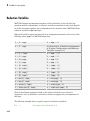
Classification
Description
“Loop Variable”
on page 2-25
Loop index
“Sliced
Variables” on
page 2-27
Arrays whose segments are operated on by different iterations of the
loop
“Broadcast
Variables” on
page 2-31
Variables defined before the loop whose value is required inside the
loop, but never assigned inside the loop
“Reduction
Variables” on
page 2-32
Variables that accumulate a value across iterations of the loop,
regardless of iteration order
“Temporary
Variables” on
page 2-39
Variables created inside the loop, and not accessed outside the loop
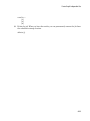
Each of these variable classifications appears in this code fragment:
2-23
2
Parallel for-Loops (parfor)
temporary variable
reduction variable
sliced output variable
loop variable
sliced input variable
broadcast variable
Notes about Required and Recommended Guidelines
The detailed topics linked from the table above, include guidelines and restrictions in
shaded boxes like the one shown below. Those labeled as Required result in an error
if your parfor code does not adhere to them. MATLAB software catches some of these
errors at the time it reads the code, and others when it executes the code. These are
referred to here as static and dynamic errors, respectively, and are labeled as Required
(static) or Required (dynamic). Guidelines that do not cause errors are labeled as
Recommended. You can use MATLAB Code Analyzer to help make parfor-loops
comply with the guidelines.
Required (static): Description of the guideline or restriction
More About
2-24
•
“Variables and Transparency in parfor-Loops” on page 2-19
•
“Reductions: Cumulative Values Updated by Each Iteration” on page 2-8
•
“parfor Programming Considerations” on page 2-10
Loop Variable
Loop Variable
The loop variable defines the loop index value for each iteration. It is set with the
beginning line of a parfor statement:
parfor p=1:12
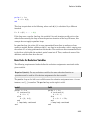
For values across all iterations, the loop variable must evaluate to ascending consecutive
integers. Each iteration is independent of all others, and each has its own loop index
value.
The following restriction is required, because changing p in the parfor body cannot
guarantee the independence of iterations.
Required (static): Assignments to the loop variable are not allowed.
This example attempts to modify the value of the loop variable p in the body of the loop,
and thus is invalid:
parfor p = 1:n
p = p + 1;
a(p) = i;
end
You cannot index or subscript the loop variable in any way. The following code attempts
to reference a field (b) of the loop variable (p) as if it were a structure. Both lines within
the loop are invalid:
parfor p = 1:n
p.b = 3
x(p) = fun(p.b)
end
Similarly, the following code is invalid because it attempts to index the loop variable as a
1-by-1 matrix:
parfor p = 1:n
x = p(1)
end
See Also
parfor
2-25
2
Parallel for-Loops (parfor)
More About
•
2-26
“Classification of Variables in parfor-Loops” on page 2-23
Sliced Variables
Sliced Variables
A sliced variable is one whose value can be broken up into segments, or slices, which
are then operated on separately by different workers. Each iteration of the loop works
on a different slice of the array. Using sliced variables is important because this type of
variable can reduce communication between the client and workers. Only those slices
needed by a worker are sent to it, and only when it starts working on a particular range
of indices.
In the this example, a slice of A consists of a single element of that array:
parfor i = 1:length(A)
B(i) = f(A(i));
end
Characteristics of a Sliced Variable
A variable in a parfor-loop is sliced if it has all of the following characteristics. A
description of each characteristic follows the list:
• Type of First-Level Indexing — The first level of indexing is either parentheses, (), or
braces, {}.
• Fixed Index Listing — Within the first-level parenthesis or braces, the list of indices
is the same for all occurrences of a given variable.
• Form of Indexing — Within the list of indices for the variable, exactly one index
involves the loop variable.
• Shape of Array — The array maintains a constant shape. In assigning to a sliced
variable, the right-hand side of the assignment cannot be [] or '', because these
operators attempt to delete elements.
Type of First-Level Indexing. For a sliced variable, the first level of indexing is enclosed in
either parentheses, (), or braces, {}.
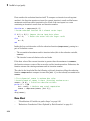
This table lists the forms for the first level of indexing for arrays sliced and not sliced.
Reference for Variable Not Sliced
Reference for Sliced Variable
A.x
A(...)
A.(...)
A{...}
2-27
2
Parallel for-Loops (parfor)
After the first level, you can use any type of valid MATLAB indexing in the second and
further levels.
The variable A shown here on the left is not sliced; that shown on the right is sliced:
A.q{i,12}
A{i,12}.q
Fixed Index Listing. Within the first-level parentheses or braces of a sliced variable’s
indexing, the list of indices is the same for all occurrences of a given variable.
The variable A shown here on the left is not sliced because A is indexed by i and i+1 in
different places; the code on the right shown on the right slices A:
Not sliced
Sliced
parfor i = 1:k
B(:) = h(A(i), A(i+1));
end
parfor i = 1:k
B(:) = f(A(i));
C(:) = g(A{i});
end
The example above on the right shows some occurrences of a sliced variable with firstlevel parenthesis indexing and with first-level brace indexing in the same loop. This is
acceptable.
The following example on the left does not slice A because the indexing of A is not the
same in all places. The example on the right slices A and B. The indexing of A is not the
same as the indexing of B, but all indexing of A is consistent, and all indexing of B is
consistent.
Not sliced
Sliced
parfor i=1:10
b = A(1,i) + A(2,i)
end
A = [ 1 2 3 4 5 6 7 8 9 10;
10 20 30 40 50 60 70 80 90 100];
B = zeros(1,10);
parfor i=1:10
for n=1:2
B(i) = B(i)+A(n,i)
end
end
Form of Indexing. Within the list of indices for a sliced variable, one of these indices is
of the form i, i+k, i-k, k+i, or k-i, where i is the loop variable and k is a constant or
2-28
Sliced Variables
a simple (nonindexed) broadcast variable; and every other index is a scalar constant, a
simple broadcast variable, a nested for-loop index, colon, or end.
With i as the loop variable, the A variables shown here on the left are not sliced; those on
the right are sliced:
Not sliced
Sliced
A(i+f(k),j,:,3) % f(k) invalid for slicing
A(i+k,j,:,3)
A(i,20:30,end) % 20:30 not scalar
A(i,:,end)
A(i,:,s.field1) % s.field1 not simple broadcast
A(i,:,k) var
When you use other variables along with the loop variable to index an array, you
cannot set these variables inside the loop. In effect, such variables are constant over the
execution of the entire parfor statement. You cannot combine the loop variable with
itself to form an index expression.
Shape of Array. A sliced variable must maintain a constant shape. The variable A shown
here on either line is not sliced:
A(i,:) = [];
A(end + 1) = i;
The reason A is not sliced in either case is because changing the shape of a sliced array
would violate assumptions governing communication between the client and workers.
Sliced Input and Output Variables
All sliced variables have the characteristics of being input or output. A sliced variable
can sometimes have both characteristics. MATLAB transmits sliced input variables from
the client to the workers, and sliced output variables from workers back to the client. If a
variable is both input and output, it is transmitted in both directions.
In this parfor-loop, r is a sliced input variable and b is a sliced output variable:
a = 0;
z = 0;
r = rand(1,10);
parfor ii = 1:10
a = ii;
z = z + ii;
b(ii) = r(ii);
end
2-29
2
Parallel for-Loops (parfor)
However, if it is clear that in every iteration, every reference to an array element is
set before it is used, the variable is not a sliced input variable. In this example, all the
elements of A are set, and then only those fixed values are used:
parfor ii = 1:n
if someCondition
A(ii) = 32;
else
A(ii) = 17;
end
loop code that uses A(ii)
end
Even if a sliced variable is not explicitly referenced as an input, implicit usage might
make it so. In the following example, not all elements of A are necessarily set inside the
parfor-loop, so the original values of the array are received, held, and then returned
from the loop, making A both a sliced input and output variable.
A = 1:10;
parfor ii = 1:10
if rand < 0.5
A(ii) = 0;
end
end
More About
•
2-30
“Classification of Variables in parfor-Loops” on page 2-23
Broadcast Variables
Broadcast Variables
A broadcast variable is any variable other than the loop variable or a sliced variable
that is not affected by an assignment inside the loop. At the start of a parfor-loop, the
values of any broadcast variables are sent to all workers. Although this type of variable
can be useful or even essential, broadcast variables that are large can cause a lot of
communication between client and workers. In some cases it might be more efficient to
use temporary variables for this purpose, creating and assigning them inside the loop.
More About
•
“Classification of Variables in parfor-Loops” on page 2-23
2-31
2
Parallel for-Loops (parfor)
Reduction Variables
MATLAB supports an important exception, called reductions, to the rule that loop
iterations must be independent. A reduction variable accumulates a value that depends
on all the iterations together, but is independent of the iteration order. MATLAB allows
reduction variables in parfor-loops.
Reduction variables appear on both side of an assignment statement, such as any of the
following, where expr is a MATLAB expression.
X = X + expr
X = expr + X
X = X - expr
See Associativity in Reduction Assignments
in “Further Considerations with Reduction
Variables” on page 2-34
X = X .* expr
X = expr .* X
X = X * expr
X = expr * X
X = X & expr
X = expr & X
X = X | expr
X = expr | X
X = [X, expr]
X = [expr, X]
X = [X; expr]
X = [expr; X]
X = {X, expr}
X = {expr, X}
X = {X; expr}
X = {expr; X}
X = min(X, expr)
X = min(expr, X)
X = max(X, expr)
X = max(expr, X)
X = union(X, expr)
X = union(expr, X)
X = intersect(X, expr)
X = intersect(expr, X)
Each of the allowed statements listed in this table is referred to as a reduction
assignment, and, by definition, a reduction variable can appear only in assignments of
this type.
The following example shows a typical usage of a reduction variable X:
X = ...;
2-32
% Do some initialization of X
Reduction Variables
parfor i = 1:n
X = X + d(i);
end
This loop is equivalent to the following, where each d(i) is calculated by a different
iteration:
X = X + d(1) + ... + d(n)
If the loop were a regular for-loop, the variable X in each iteration would get its value
either before entering the loop or from the previous iteration of the loop. However, this
concept does not apply to parfor-loops:
In a parfor-loop, the value of X is never transmitted from client to workers or from
worker to worker. Rather, additions of d(i) are done in each worker, with i ranging over
the subset of 1:n being performed on that worker. The results are then transmitted back
to the client, which adds the workers' partial sums into X. Thus, workers do some of the
additions, and the client does the rest.
Basic Rules for Reduction Variables
The following requirements further define the reduction assignments associated with a
given variable.
Required (static): For any reduction variable, the same reduction function or
operation must be used in all reduction assignments for that variable.
The parfor-loop on the left is not valid because the reduction assignment uses + in one
instance, and [,] in another. The parfor-loop on the right is valid:
Invalid
Valid
parfor i = 1:n
if testLevel(k)
A = A + i;
else
A = [A, 4+i];
end
% loop body continued
end
parfor i = 1:n
if testLevel(k)
A = A + i;
else
A = A + i + 5*k;
end
% loop body continued
end
2-33
2
Parallel for-Loops (parfor)
Required (static): If the reduction assignment uses * or [,], then in every reduction
assignment for X, X must be consistently specified as the first argument or consistently
specified as the second.
The parfor-loop on the left below is not valid because the order of items in the
concatenation is not consistent throughout the loop. The parfor-loop on the right is
valid:
Invalid
Valid
parfor i = 1:n
if testLevel(k)
A = [A, 4+i];
else
A = [r(i), A];
end
% loop body continued
end
parfor i = 1:n
if testLevel(k)
A = [A, 4+i];
else
A = [A, r(i)];
end
% loop body continued
end
Further Considerations with Reduction Variables
This section provides more detail about reduction assignments, associativity,
commutativity, and overloading of reduction functions.
Reduction Assignments. In addition to the specific forms of reduction assignment listed
in the table in “Reduction Variables” on page 2-32, the only other (and more general)
form of a reduction assignment is
X = f(X, expr)
X = f(expr, X)
Required (static): f can be a function or a variable. If it is a variable, it must not be
affected by the parfor body (in other words, it is a broadcast variable).
If f is a variable, then for all practical purposes its value at run time is a function
handle. However, this is not strictly required; as long as the right-hand side can be
evaluated, the resulting value is stored in X.
The parfor-loop below on the left will not execute correctly because the statement f =
@times causes f to be classified as a temporary variable and therefore is cleared at the
2-34
Reduction Variables
beginning of each iteration. The parfor on the right is correct, because it does not assign
f inside the loop:
Invalid
Valid
f = @(x,k)x * k;
parfor i = 1:n
a = f(a,i);
% loop body continued
f = @times; % Affects f
end
f = @(x,k)x * k;
parfor i = 1:n
a = f(a,i);
% loop body continued
end
Note that the operators && and || are not listed in the table in “Reduction Variables”
on page 2-32. Except for && and ||, all the matrix operations of MATLAB have a
corresponding function f, such that u op v is equivalent to f(u,v). For && and ||, such
a function cannot be written because u&&v and u||v might or might not evaluate v, but
f(u,v) always evaluates v before calling f. This is why && and || are excluded from the
table of allowed reduction assignments for a parfor-loop.
Every reduction assignment has an associated function f. The properties of f that ensure
deterministic behavior of a parfor statement are discussed in the following sections.
Associativity in Reduction Assignments. Concerning the function f as used in the
definition of a reduction variable, the following practice is recommended, but does not
generate an error if not adhered to. Therefore, it is up to you to ensure that your code
meets this recommendation.
Recommended: To get deterministic behavior of parfor-loops, the reduction function
f must be associative.
To be associative, the function f must satisfy the following for all a, b, and c:
f(a,f(b,c)) = f(f(a,b),c)
The classification rules for variables, including reduction variables, are purely syntactic.
They cannot determine whether the f you have supplied is truly associative or not.
Associativity is assumed, but if you violate this, different executions of the loop might
result in different answers.
Note: While the addition of mathematical real numbers is associative, addition of
floating-point numbers is only approximately associative, and different executions of this
2-35
2
Parallel for-Loops (parfor)
parfor statement might produce values of X with different round-off errors. This is an
unavoidable cost of parallelism.
For example, the statement on the left yields 1, while the statement on the right returns
1 + eps:
(1 + eps/2) + eps/2
1 + (eps/2 + eps/2)
With the exception of the minus operator (-), all the special cases listed in the table in
“Reduction Variables” on page 2-32 have a corresponding (perhaps approximately)
associative function. MATLAB calculates the assignment X = X - expr by using X =
X + (-expr). (So, technically, the function for calculating this reduction assignment is
plus, not minus.) However, the assignment X = expr - X cannot be written using an
associative function, which explains its exclusion from the table.
Commutativity in Reduction Assignments. Some associative functions, including +, .*,
min, and max, intersect, and union, are also commutative. That is, they satisfy the
following for all a and b:
f(a,b) = f(b,a)
Examples of noncommutative functions are * (because matrix multiplication is not
commutative for matrices in which both dimensions have size greater than one), [,],
[;], {,}, and {;}. Noncommutativity is the reason that consistency in the order
of arguments to these functions is required. As a practical matter, a more efficient
algorithm is possible when a function is commutative as well as associative, and parfor
is optimized to exploit commutativity.
Recommended: Except in the cases of *, [,], [;], {,}, and {;}, the function f of
a reduction assignment should be commutative. If f is not commutative, different
executions of the loop might result in different answers.
Violating the restriction on commutativity in a function used for reduction, could result
in unexpected behavior, even if it does not generate an error.
Unless f is a known noncommutative built-in, it is assumed to be commutative. There is
currently no way to specify a user-defined, noncommutative function in parfor.
Overloading in Reduction Assignments. Most associative functions f have an identity
element e, so that for any a, the following holds true:
2-36
Reduction Variables
f(e,a) = a = f(a,e)
Examples of identity elements for some functions are listed in this table.
Function
Identity Element
+
0
* and .*
1
[,] and [;]
[]
&
true
|
false
MATLAB uses the identity elements of reduction functions when it knows them. So, in
addition to associativity and commutativity, you should also keep identity elements in
mind when overloading these functions.
Recommended: An overload of +, *, .*, [,], or [;] should be associative if it is used
in a reduction assignment in a parfor. The overload must treat the respective identity
element given above (all with class double) as an identity element.
Recommended: An overload of +, .*, union, or intersect should be commutative.
There is no way to specify the identity element for a function. In these cases, the behavior
of parfor is a little less efficient than it is for functions with a known identity element,
but the results are correct.
Similarly, because of the special treatment of X = X - expr, the following is
recommended.
Recommended: An overload of the minus operator (-) should obey the mathematical
law that X - (y + z) is equivalent to (X - y) - z.
Example: Using a Custom Reduction Function
Suppose each iteration of a loop performs some calculation, and you are interested
in finding which iteration of a loop produces the maximum value. This is a reduction
exercise that makes an accumulation across multiple iterations of a loop. Your reduction
function must compare iteration results, until finally the maximum value can be
determined after all iterations are compared.
2-37
2
Parallel for-Loops (parfor)
First consider the reduction function itself. To compare an iteration's result against
another's, the function requires as input the current iteration's result and the known
maximum result from other iterations so far. Each of the two inputs is a vector
containing an iteration's result data and iteration number.
function mc = comparemax(A, B)
% Custom reduction function for 2-element vector input
if A(1) >= B(1) % Compare the two input data values
mc = A;
% Return the vector with the larger result
else
mc = B;
end
Inside the loop, each iteration calls the reduction function (comparemax), passing in a
pair of 2-element vectors:
• The accumulated maximum and its iteration index (this is the reduction variable,
cummax)
• The iteration’s own calculation value and index
If the data value of the current iteration is greater than the maximum in cummmax,
the function returns a vector of the new value and its iteration number. Otherwise, the
function returns the existing maximum and its iteration number.
The code for the loop looks like the following, with each iteration calling the reduction
function comparemax to compare its own data [dat i] to that already accumulated in
cummax.
% First element of cummax is maximum data value
% Second element of cummax is where (iteration) maximum occurs
cummax = [0 0]; % Initialize reduction variable
parfor ii = 1:100
dat = rand(); % Simulate some actual computation
cummax = comparemax(cummax, [dat ii]);
end
disp(cummax);
More About
2-38
•
“Classification of Variables in parfor-Loops” on page 2-23
•
“Reductions: Cumulative Values Updated by Each Iteration” on page 2-8
Temporary Variables
Temporary Variables
A temporary variable is any variable that is the target of a direct, nonindexed
assignment, but is not a reduction variable. In the following parfor-loop, a and d are
temporary variables:
a = 0;
z = 0;
r = rand(1,10);
parfor i = 1:10
a = i;
z = z + i;
if i <= 5
d = 2*a;
end
end
% Variable a is temporary
% Variable d is temporary
In contrast to the behavior of a for-loop, MATLAB effectively clears any temporary
variables before each iteration of a parfor-loop. To help ensure the independence of
iterations, the values of temporary variables cannot be passed from one iteration of the
loop to another. Therefore, temporary variables must be set inside the body of a parforloop, so that their values are defined separately for each iteration.
MATLAB does not send temporary variables back to the client. A temporary variable in
the context of the parfor statement has no effect on a variable with the same name that
exists outside the loop, again in contrast to ordinary for-loops.
Uninitialized Temporaries
Because temporary variables are cleared at the beginning of every iteration, MATLAB
can detect certain cases in which any iteration through the loop uses the temporary
variable before it is set in that iteration. In this case, MATLAB issues a static error
rather than a run-time error, because there is little point in allowing execution to proceed
if a run-time error is guaranteed to occur. This kind of error often arises because of
confusion between for and parfor, especially regarding the rules of classification of
variables. For example, suppose you write
b = true;
parfor i = 1:n
if b && some_condition(i)
do_something(i);
2-39
2
Parallel for-Loops (parfor)
b = false;
end
...
end
This loop is acceptable as an ordinary for-loop, but as a parfor-loop, b is a temporary
variable because it occurs directly as the target of an assignment inside the loop.
Therefore it is cleared at the start of each iteration, so its use in the condition of the if
is guaranteed to be uninitialized. (If you change parfor to for, the value of b assumes
sequential execution of the loop, so that do_something(i) is executed for only the lower
values of i until b is set false.)
Temporary Variables Intended as Reduction Variables
Another common cause of uninitialized temporaries can arise when you have a variable
that you intended to be a reduction variable, but you use it elsewhere in the loop, causing
it technically to be classified as a temporary variable. For example:
s = 0;
parfor i = 1:n
s = s + f(i);
...
if (s > whatever)
...
end
end
If the only occurrences of s were the two in the first statement of the body, it would
be classified as a reduction variable. But in this example, s is not a reduction variable
because it has a use outside of reduction assignments in the line s > whatever.
Because s is the target of an assignment (in the first statement), it is a temporary, so
MATLAB issues an error about this fact, but points out the possible connection with
reduction.
Note that if you change parfor to for, the use of s outside the reduction assignment
relies on the iterations being performed in a particular order. The point here is that in
a parfor-loop, it matters that the loop “does not care” about the value of a reduction
variable as it goes along. It is only after the loop that the reduction value becomes usable.
More About
•
2-40
“Classification of Variables in parfor-Loops” on page 2-23
Temporary Variables
•
“Reduction Variables” on page 2-32
2-41
2
Parallel for-Loops (parfor)
Improving parfor Performance
Where to Create Arrays
With a parfor-loop, it might be faster to have each MATLAB worker create its own
arrays or portions of them in parallel, rather than to create a large array in the client
before the loop and send it out to all the workers separately. Having each worker create
its own copy of these arrays inside the loop saves the time of transferring the data from
client to workers, because all the workers can be creating it at the same time. This might
challenge your usual practice to do as much variable initialization before a for-loop as
possible, so that you do not needlessly repeat it inside the loop.
Whether to create arrays before the parfor-loop or inside the parfor-loop depends on
the size of the arrays, the time needed to create them, whether the workers need all or
part of the arrays, the number of loop iterations that each worker performs, and other
factors. While many for-loops can be directly converted to parfor-loops, even in these
cases there might be other issues involved in optimizing your code.
Slicing Arrays
If a variable is initialized before a parfor-loop, then used inside the parfor-loop, it has
to be passed to each MATLAB worker evaluating the loop iterations. Only those variables
used inside the loop are passed from the client workspace. However, if all occurrences of
the variable are indexed by the loop variable, each worker receives only the part of the
array it needs.
Optimizing on Local vs. Cluster Workers
Running your code on local workers might offer the convenience of testing your
application without requiring the use of cluster resources. However, there are certain
drawbacks or limitations with using local workers. Because the transfer of data does not
occur over the network, transfer behavior on local workers might not be indicative of how
it will typically occur over a network.
With local workers, because all the MATLAB worker sessions are running on the same
machine, you might not see any performance improvement from a parfor-loop regarding
execution time. This can depend on many factors, including how many processors and
cores your machine has. You might experiment to see if it is faster to create the arrays
2-42
Improving parfor Performance
before the loop (as shown on the left below), rather than have each worker create its own
arrays inside the loop (as shown on the right).
Try the following examples running a parallel pool locally, and notice the difference in
time execution for each loop. First open a local parallel pool:
parpool('local')
Then enter the following examples. (If you are viewing this documentation in the
MATLAB help browser, highlight each segment of code below, right-click, and select
Evaluate Selection in the context menu to execute the block in MATLAB. That way the
time measurement will not include the time required to paste or type.)
tic;
n = 200;
M = magic(n);
R = rand(n);
parfor i = 1:n
A(i) = sum(M(i,:).*R(n+1-i,:));
end
toc
tic;
n = 200;
parfor i = 1:n
M = magic(n);
R = rand(n);
A(i) = sum(M(i,:).*R(n+1-i,:));
end
toc
Running on a remote cluster, you might find different behavior, as workers can
simultaneously create their arrays, saving transfer time. Therefore, code that is
optimized for local workers might not be optimized for cluster workers, and vice versa.
2-43
2
Parallel for-Loops (parfor)
Parallel Pools
In this section...
“What Is a Parallel Pool?” on page 2-44
“Automatically Start and Stop a Parallel Pool ” on page 2-45
“Alternative Ways to Start and Stop Pools” on page 2-45
“Pool Size and Cluster Selection” on page 2-46
What Is a Parallel Pool?
A parallel pool is a set of MATLAB workers in a compute cluster or desktop, bound
together by a special type of job so that they can be used interactively and can
communicate with each other during the lifetime of the job. In one sense, a parallel pool
describes this collection of workers, such as when referring to the pool size. In another
sense, a parallel pool describes the special job running on these workers, such as when
viewing your jobs in the “Job Monitor”. While these pool workers are reserved for your
interactive use, they are not available to other users.
You can have only one parallel pool accessible at a time from a MATLAB client session.
In MATLAB, the current parallel pool is represented by a parallel.Pool object.
2-44
Parallel Pools
Automatically Start and Stop a Parallel Pool
By default, a parallel pool starts automatically when needed by certain parallel language
features. The following statements and functions can cause a pool to start:
• parfor
• spmd
• distributed
• Composite
• parfeval
• parfevalOnAll
• gcp
• mapreduce
• mapreducer
Your parallel preferences specify which cluster the pool runs on, and the preferred
number of workers in the pool. To access your preferences, on the Home tab, in the
Environment section, click Parallel > Parallel Preferences.
Alternative Ways to Start and Stop Pools
In your parallel preferences, you can turn off the option for the pool to open or close
automatically. If you choose not to have the pool open automatically, you can control the
pool with the following techniques.
Parallel Pool Desktop Menu
You can use the pool indicator in the lower-left corner of the desktop to manually start a
parallel pool. Click the indicator icon, and select Start parallel pool. The pool size and
cluster are specified by your parallel preferences and default cluster. Your default cluster
is indicated by a check mark on the Parallel > Default Cluster menu.
The menu options are different when a pool is running; in this case you can select Shut
down parallel pool.
Programming Interface
Start a Parallel Pool
You can start and stop a parallel pool programmatically, using default settings or
specifying alternatives.
2-45
2
Parallel for-Loops (parfor)
To open a parallel pool based on your preference settings:
parpool
To open a pool of a specific size:
parpool(4)
To use a cluster other than your default, to specify where the pool runs:
parpool('MyCluster',4)
Shut Down a Parallel Pool
You can get the current parallel pool, and use that object when you want to shut down
the pool:
p = gcp;
delete(p)
Pool Size and Cluster Selection
There are several places to specify your pool size. Several factors might limit the size of
your pool. The actual size of your parallel pool is determined by the combination of the
following:
1
Licensing or cluster size
The ultimate limit on the number of workers in a pool is restricted to the number
of workers in your cluster. This might be determined by the number of MATLAB
Distributed Computing Server licenses available, or in the case of MJS by the
number of workers running in the cluster. A local cluster running on the client
machine requires no licensing beyond the one for Parallel Computing Toolbox, and
the limit on the number or workers is high enough to support the range of known
desktop hardware.
2
Cluster profile number of workers (NumWorkers)
A cluster object can set a hard limit on the number of workers, which you can set in
the cluster profile. Even if you request more workers at the command line or in your
preferences, you cannot exceed the limit set in the applicable profile. Attempting to
exceed this number generates an error.
3
2-46
Command-line argument
Parallel Pools
If you specify a pool size at the command line, this overrides the setting of your
preferences. But this value must fall within the limits of the applicable cluster
profile.
4
Parallel preferences
If you do not specify a pool size at the command line, MATLAB attempts to start
a parallel pool with a size determined by your parallel preferences, provided that
this value falls within the limits of the applicable cluster profile. Note that this is
a preference, not a requirement or request for a specific number of workers. So if a
pool cannot start with as many workers as called for in your preferences, you get a
smaller pool, without any errors. If you need an exact number of workers, specify the
number at the command line.
For selection of the cluster on which the pool runs, precedence is determined by:
1
The command-line cluster object argument. For example, this overrides the default
profile setting, and uses the cluster identified by the profile 'MyProfile':
c = parcluster('MyProfile');
p = parpool(c);
2
The cluster specified in the default profile:
p = parpool;
See Also
delete | distributed | gcp | parcluster | parfeval | parfor | parpool | spmd
More About
•
“How Parallel Computing Products Run a Job”
•
“Introduction to parfor” on page 2-2
•
“Parallel Preferences”
•
“Clusters and Cluster Profiles”
2-47
2
Parallel for-Loops (parfor)
Convert Nested for-Loops to parfor
A typical use case for nested loops is to step through an array using one loop variable to
index through one dimension, and a nested loop variable to index another dimension. The
basic form looks like this:
X = zeros(n,m);
for a = 1:n
for b = 1:m
X(a,b) = fun(a,b)
end
end
The following code shows an extremely simple example, with results you can easily view.
M1 = magic(5);
for x = 1:5
for y = 1:5
M2(x,y) = x*10 + y + M1(x,y)/10000;
end
end
M2
Although you can parallelize either of the nested loops, you cannot run both in parallel.
This is because the workers in a parallel pool cannot start or access further parallel
pools.
If the loop counted by x is converted to a parfor-loop, then each worker in the pool
executes the nested loops using the y loop counter, and the y loops themselves cannot run
as a parfor on each worker. So if you convert only the outer loop to a parfor, it looks
like this:
M1 = magic(5);
parfor a = 1:5
for b = 1:5
M2(a,b) = a*10 + b + M1(a,b)/10000;
end
end
M2
Should you consider converting only the inner loop to a parfor? While it might be
programmatically simpler in your case to do this, it might not be advisable. The
converted code looks like this:
2-48
Convert Nested for-Loops to parfor
M1 = magic(5);
for a = 1:5
parfor b = 1:5
M2(a,b) = a*10 + b + M1(a,b)/10000;
end
end
M2
In this case, each iteration of the outer loop in MATLAB, initiates a parfor-loop. That
is, this code creates five parfor-loops. There is generally more overhead to a parforloop than a for-loop, so you might find that this approach does not perform optimally.
More About
•
“Nesting and Flow in parfor-Loops” on page 2-15
2-49
3
Single Program Multiple Data (spmd)
• “Execute Simultaneously on Multiple Data Sets” on page 3-2
• “Access Worker Variables with Composites” on page 3-6
• “Distribute Arrays” on page 3-10
• “Programming Tips” on page 3-13
3
Single Program Multiple Data (spmd)
Execute Simultaneously on Multiple Data Sets
In this section...
“Introduction” on page 3-2
“When to Use spmd” on page 3-2
“Define an spmd Statement” on page 3-3
“Display Output” on page 3-5
Introduction
The single program multiple data (spmd) language construct allows seamless
interleaving of serial and parallel programming. The spmd statement lets you define a
block of code to run simultaneously on multiple workers. Variables assigned inside the
spmd statement on the workers allow direct access to their values from the client by
reference via Composite objects.
This chapter explains some of the characteristics of spmd statements and Composite
objects.
When to Use spmd
The “single program” aspect of spmd means that the identical code runs on multiple
workers. You run one program in the MATLAB client, and those parts of it labeled
as spmd blocks run on the workers. When the spmd block is complete, your program
continues running in the client.
The “multiple data” aspect means that even though the spmd statement runs identical
code on all workers, each worker can have different, unique data for that code. So
multiple data sets can be accommodated by multiple workers.
Typical applications appropriate for spmd are those that require running simultaneous
execution of a program on multiple data sets, when communication or synchronization is
required between the workers. Some common cases are:
• Programs that take a long time to execute — spmd lets several workers compute
solutions simultaneously.
• Programs operating on large data sets — spmd lets the data be distributed to multiple
workers.
3-2
Execute Simultaneously on Multiple Data Sets
Define an spmd Statement
The general form of an spmd statement is:
spmd
<statements>
end
Note If a parallel pool is not running, spmd creates a pool using your default cluster
profile, if your parallel preferences are set accordingly.
The block of code represented by <statements> executes in parallel simultaneously
on all workers in the parallel pool. If you want to limit the execution to only a portion of
these workers, specify exactly how many workers to run on:
spmd (n)
<statements>
end
This statement requires that n workers run the spmd code. n must be less than or equal
to the number of workers in the open parallel pool. If the pool is large enough, but n
workers are not available, the statement waits until enough workers are available. If n
is 0, the spmd statement uses no workers, and runs locally on the client, the same as if
there were not a pool currently running.
You can specify a range for the number of workers:
spmd (m,n)
<statements>
end
In this case, the spmd statement requires a minimum of m workers, and it uses a
maximum of n workers.
If it is important to control the number of workers that execute your spmd statement, set
the exact number in the cluster profile or with the spmd statement, rather than using a
range.
For example, create a random matrix on three workers:
spmd (3)
3-3
3
Single Program Multiple Data (spmd)
R = rand(4,4);
end
Note All subsequent examples in this chapter assume that a parallel pool is open and
remains open between sequences of spmd statements.
Unlike a parfor-loop, the workers used for an spmd statement each have a unique
value for labindex. This lets you specify code to be run on only certain workers, or to
customize execution, usually for the purpose of accessing unique data.
For example, create different sized arrays depending on labindex:
spmd (3)
if labindex==1
R = rand(9,9);
else
R = rand(4,4);
end
end
Load unique data on each worker according to labindex, and use the same function on
each worker to compute a result from the data:
spmd (3)
labdata = load(['datafile_' num2str(labindex) '.ascii'])
result = MyFunction(labdata)
end
The workers executing an spmd statement operate simultaneously and are aware of each
other. As with a communicating job, you are allowed to directly control communications
between the workers, transfer data between them, and use codistributed arrays among
them.
For example, use a codistributed array in an spmd statement:
spmd (3)
RR = rand(30, codistributor());
end
Each worker has a 30-by-10 segment of the codistributed array RR. For more information
about codistributed arrays, see “Working with Codistributed Arrays” on page 5-5.
3-4
Execute Simultaneously on Multiple Data Sets
Display Output
When running an spmd statement on a parallel pool, all command-line output from the
workers displays in the client Command Window. Because the workers are MATLAB
sessions without displays, any graphical output (for example, figure windows) from the
pool does not display at all.
3-5
3
Single Program Multiple Data (spmd)
Access Worker Variables with Composites
In this section...
“Introduction to Composites” on page 3-6
“Create Composites in spmd Statements” on page 3-6
“Variable Persistence and Sequences of spmd” on page 3-8
“Create Composites Outside spmd Statements” on page 3-9
Introduction to Composites
Composite objects in the MATLAB client session let you directly access data values
on the workers. Most often you assigned these variables within spmd statements. In
their display and usage, Composites resemble cell arrays. There are two ways to create
Composites:
• Use the Composite function on the client. Values assigned to the Composite elements
are stored on the workers.
• Define variables on workers inside an spmd statement. After the spmd statement, the
stored values are accessible on the client as Composites.
Create Composites in spmd Statements
When you define or assign values to variables inside an spmd statement, the data values
are stored on the workers.
After the spmd statement, those data values are accessible on the client as Composites.
Composite objects resemble cell arrays, and behave similarly. On the client, a Composite
has one element per worker. For example, suppose you create a parallel pool of three
local workers and run an spmd statement on that pool:
parpool('local',3)
spmd % Uses all 3 workers
MM = magic(labindex+2); % MM is a variable on each worker
end
MM{1} % In the client, MM is a Composite with one element per worker
8
3-6
1
6
Access Worker Variables with Composites
3
4
5
9
7
2
2
11
7
14
3
10
6
15
MM{2}
16
5
9
4
13
8
12
1
A variable might not be defined on every worker. For the workers on which a variable
is not defined, the corresponding Composite element has no value. Trying to read that
element throws an error.
spmd
if labindex > 1
HH = rand(4);
end
end
HH
Lab 1: No data
Lab 2: class = double, size = [4
Lab 3: class = double, size = [4
4]
4]
You can also set values of Composite elements from the client. This causes a transfer of
data, storing the value on the appropriate worker even though it is not executed within
an spmd statement:
MM{3} = eye(4);
In this case, MM must already exist as a Composite, otherwise MATLAB interprets it as a
cell array.
Now when you do enter an spmd statement, the value of the variable MM on worker 3 is as
set:
spmd
if labindex == 3, MM, end
end
Lab 3:
MM =
1
0
0
1
0
0
0
0
3-7
3
Single Program Multiple Data (spmd)
0
0
0
0
1
0
0
1
Data transfers from worker to client when you explicitly assign a variable in the client
workspace using a Composite element:
M = MM{1} % Transfer data from worker 1 to variable M on the client
8
3
4
1
5
9
6
7
2
Assigning an entire Composite to another Composite does not cause a data transfer.
Instead, the client merely duplicates the Composite as a reference to the appropriate
data stored on the workers:
NN = MM % Set entire Composite equal to another, without transfer
However, accessing a Composite’s elements to assign values to other Composites does
result in a transfer of data from the workers to the client, even if the assignment then
goes to the same worker. In this case, NN must already exist as a Composite:
NN{1} = MM{1} % Transfer data to the client and then to worker
When finished, you can delete the pool:
delete(gcp)
Variable Persistence and Sequences of spmd
The values stored on the workers are retained between spmd statements. This allows
you to use multiple spmd statements in sequence, and continue to use the same variables
defined in previous spmd blocks.
The values are retained on the workers until the corresponding Composites are cleared
on the client, or until the parallel pool is deleted. The following example illustrates data
value lifespan with spmd blocks, using a pool of four workers:
parpool('local',4)
spmd
AA = labindex; % Initial setting
end
3-8
Access Worker Variables with Composites
AA(:)
% Composite
[1]
[2]
[3]
[4]
spmd
AA = AA * 2; % Multiply existing value
end
AA(:) % Composite
[2]
[4]
[6]
[8]
clear AA % Clearing in client also clears on workers
spmd; AA = AA * 2; end
% Generates error
delete(gcp)
Create Composites Outside spmd Statements
The Composite function creates Composite objects without using an spmd statement.
This might be useful to prepopulate values of variables on workers before an spmd
statement begins executing on those workers. Assume a parallel pool is already running:
PP = Composite()
By default, this creates a Composite with an element for each worker in the parallel
pool. You can also create Composites on only a subset of the workers in the pool. See the
Composite reference page for more details. The elements of the Composite can now be
set as usual on the client, or as variables inside an spmd statement. When you set an
element of a Composite, the data is immediately transferred to the appropriate worker:
for ii = 1:numel(PP)
PP{ii} = ii;
end
3-9
3
Single Program Multiple Data (spmd)
Distribute Arrays
In this section...
“Distributed Versus Codistributed Arrays” on page 3-10
“Create Distributed Arrays” on page 3-10
“Create Codistributed Arrays” on page 3-11
Distributed Versus Codistributed Arrays
You can create a distributed array in the MATLAB client, and its data is stored on the
workers of the open parallel pool. A distributed array is distributed in one dimension,
along the last nonsingleton dimension, and as evenly as possible along that dimension
among the workers. You cannot control the details of distribution when creating a
distributed array.
You can create a codistributed array by executing on the workers themselves, either
inside an spmd statement, in pmode, or inside a communicating job. When creating a
codistributed array, you can control all aspects of distribution, including dimensions and
partitions.
The relationship between distributed and codistributed arrays is one of perspective.
Codistributed arrays are partitioned among the workers from which you execute code
to create or manipulate them. Distributed arrays are partitioned among workers in the
parallel pool. When you create a distributed array in the client, you can access it as a
codistributed array inside an spmd statement. When you create a codistributed array
in an spmd statement, you can access is as a distributed array in the client. Only spmd
statements let you access the same array data from two different perspectives.
Create Distributed Arrays
You can create a distributed array in any of several ways:
• Use the distributed function to distribute an existing array from the client
workspace to the workers of a parallel pool.
• Use any of the overloaded distributed object methods to directly construct a
distributed array on the workers. This technique does not require that the
array already exists in the client, thereby reducing client workspace memory
3-10
Distribute Arrays
requirements. These overloaded functions include eye(___,'distributed'),
rand(___,'distributed'), etc. For a full list, see the distributed object
reference page.
• Create a codistributed array inside an spmd statement, then access it as a distributed
array outside the spmd statement. This lets you use distribution schemes other than
the default.
The first two of these techniques do not involve spmd in creating the array, but you can
see how spmd might be used to manipulate arrays created this way. For example:
Create an array in the client workspace, then make it a distributed array:
parpool('local',2) % Create pool
W = ones(6,6);
W = distributed(W); % Distribute to the workers
spmd
T = W*2; % Calculation performed on workers, in parallel.
% T and W are both codistributed arrays here.
end
T
% View results in client.
whos
% T and W are both distributed arrays here.
delete(gcp) % Stop pool
Create Codistributed Arrays
You can create a codistributed array in any of several ways:
• Use the codistributed function inside an spmd statement, a communicating job, or
pmode to codistribute data already existing on the workers running that job.
• Use any of the overloaded codistributed object methods to directly construct
a codistributed array on the workers. This technique does not require that
the array already exists in the workers. These overloaded functions include
eye(___,'codistributed'), rand(___,'codistributed'), etc. For a full list,
see the codistributed object reference page.
• Create a distributed array outside an spmd statement, then access it as a
codistributed array inside the spmd statement running on the same parallel pool.
In this example, you create a codistributed array inside an spmd statement, using a
nondefault distribution scheme. First, define 1-D distribution along the third dimension,
with 4 parts on worker 1, and 12 parts on worker 2. Then create a 3-by-3-by-16 array of
zeros.
3-11
3
Single Program Multiple Data (spmd)
parpool('local',2) % Create pool
spmd
codist = codistributor1d(3,[4,12]);
Z = zeros(3,3,16,codist);
Z = Z + labindex;
end
Z % View results in client.
% Z is a distributed array here.
delete(gcp) % Stop pool
For more details on codistributed arrays, see “Working with Codistributed Arrays” on
page 5-5.
3-12
Programming Tips
Programming Tips
In this section...
“MATLAB Path” on page 3-13
“Error Handling” on page 3-13
“Limitations” on page 3-13
MATLAB Path
All workers executing an spmd statement must have the same MATLAB search path as
the client, so that they can execute any functions called in their common block of code.
Therefore, whenever you use cd, addpath, or rmpath on the client, it also executes
on all the workers, if possible. For more information, see the parpool reference page.
When the workers are running on a different platform than the client, use the function
pctRunOnAll to properly set the MATLAB path on all workers.
Error Handling
When an error occurs on a worker during the execution of an spmd statement, the error
is reported to the client. The client tries to interrupt execution on all workers, and throws
an error to the user.
Errors and warnings produced on workers are annotated with the worker ID (labindex)
and displayed in the client’s Command Window in the order in which they are received
by the MATLAB client.
The behavior of lastwarn is unspecified at the end of an spmd if used within its body.
Limitations
Transparency
The body of an spmd statement must be transparent, meaning that all references to
variables must be “visible” (i.e., they occur in the text of the program).
In the following example, because X is not visible as an input variable in the spmd body
(only the string 'X' is passed to eval), it does not get transferred to the workers. As a
result, MATLAB issues an error at run time:
3-13
3
Single Program Multiple Data (spmd)
X = 5;
spmd
eval('X');
end
Similarly, you cannot clear variables from a worker's workspace by executing clear
inside an spmd statement:
spmd; clear('X'); end
To clear a specific variable from a worker, clear its Composite from the client workspace.
Alternatively, you can free up most of the memory used by a variable by setting its value
to empty, presumably when it is no longer needed in your spmd statement:
spmd
<statements....>
X = [];
end
Examples of some other functions that violate transparency are evalc, evalin, and
assignin with the workspace argument specified as 'caller'; save and load, unless
the output of load is assigned to a variable.
MATLAB does successfully execute eval and evalc statements that appear in functions
called from the spmd body.
Nested Functions
Inside a function, the body of an spmd statement cannot make any direct reference to a
nested function. However, it can call a nested function by means of a variable defined as
a function handle to the nested function.
Because the spmd body executes on workers, variables that are updated by nested
functions called inside an spmd statement do not get updated in the workspace of the
outer function.
Anonymous Functions
The body of an spmd statement cannot define an anonymous function. However, it can
reference an anonymous function by means of a function handle.
Nested spmd Statements
The body of an spmd statement cannot directly contain another spmd. However, it can
call a function that contains another spmd statement. The inner spmd statement does not
3-14
Programming Tips
run in parallel in another parallel pool, but runs serially in a single thread on the worker
running its containing function.
Nested parfor-Loops
The body of a parfor-loop cannot contain an spmd statement, and an spmd statement
cannot contain a parfor-loop.
Break and Return Statements
The body of an spmd statement cannot contain break or return statements.
Global and Persistent Variables
The body of an spmd statement cannot contain global or persistent variable
declarations.
3-15
4
Interactive Parallel Computation with
pmode
This chapter describes interactive pmode in the following sections:
• “pmode Versus spmd” on page 4-2
• “Run Communicating Jobs Interactively Using pmode” on page 4-3
• “Parallel Command Window” on page 4-10
• “Running pmode Interactive Jobs on a Cluster” on page 4-15
• “Plotting Distributed Data Using pmode” on page 4-16
• “pmode Limitations and Unexpected Results” on page 4-18
• “pmode Troubleshooting” on page 4-19
4
Interactive Parallel Computation with pmode
pmode Versus spmd
pmode lets you work interactively with a communicating job running simultaneously
on several workers. Commands you type at the pmode prompt in the Parallel Command
Window are executed on all workers at the same time. Each worker executes the
commands in its own workspace on its own variables.
The way the workers remain synchronized is that each worker becomes idle when it
completes a command or statement, waiting until all the workers working on this job
have completed the same statement. Only when all the workers are idle, do they then
proceed together to the next pmode command.
In contrast to spmd, pmode provides a desktop with a display for each worker running
the job, where you can enter commands, see results, access each worker's workspace,
etc. What pmode does not let you do is to freely interleave serial and parallel work, like
spmd does. When you exit your pmode session, its job is effectively destroyed, and all
information and data on the workers is lost. Starting another pmode session always
begins from a clean state.
4-2
Run Communicating Jobs Interactively Using pmode
Run Communicating Jobs Interactively Using pmode
This example uses a local scheduler and runs the workers on your local MATLAB client
machine. It does not require an external cluster or scheduler. The steps include the
pmode prompt (P>>) for commands that you type in the Parallel Command Window.
1
Start the pmode with the pmode command.
pmode start local 4
This starts four local workers, creates a communicating job to run on those workers,
and opens the Parallel Command Window.
You can control where the command history appears. For this exercise, the position
is set by clicking Window > History Position > Above Prompt, but you can set it
according to your own preference.
2
To illustrate that commands at the pmode prompt are executed on all workers, ask
for help on a function.
P>> help magic
3
Set a variable at the pmode prompt. Notice that the value is set on all the workers.
P>> x = pi
4-3
4
Interactive Parallel Computation with pmode
4
A variable does not necessarily have the same value on every worker. The labindex
function returns the ID particular to each worker working on this communicating
job. In this example, the variable x exists with a different value in the workspace of
each worker.
P>> x = labindex
5
Return the total number of workers working on the current communicating job with
the numlabs function.
P>> all = numlabs
6
Create a replicated array on all the workers.
P>> segment = [1 2; 3 4; 5 6]
4-4
Run Communicating Jobs Interactively Using pmode
7
Assign a unique value to the array on each worker, dependent on the worker number
(labindex). With a different value on each worker, this is a variant array.
P>> segment = segment + 10*labindex
4-5
4
Interactive Parallel Computation with pmode
8
Until this point in the example, the variant arrays are independent, other than
having the same name. Use the codistributed.build function to aggregate the
array segments into a coherent array, distributed among the workers.
P>> codist = codistributor1d(2, [2 2 2 2], [3 8])
P>> whole = codistributed.build(segment, codist)
This combines four separate 3-by-2 arrays into one 3-by-8 codistributed array. The
codistributor1d object indicates that the array is distributed along its second
dimension (columns), with 2 columns on each of the four workers. On each worker,
segment provided the data for the local portion of the whole array.
9
Now, when you operate on the codistributed array whole, each worker handles the
calculations on only its portion, or segment, of the array, not the whole array.
P>> whole = whole + 1000
10 Although the codistributed array allows for operations on its entirety, you can use
the getLocalPart function to access the portion of a codistributed array on a
particular worker.
P>> section = getLocalPart(whole)
Thus, section is now a variant array because it is different on each worker.
11 If you need the entire array in one workspace, use the gather function.
4-6
Run Communicating Jobs Interactively Using pmode
P>> combined = gather(whole)
Notice, however, that this gathers the entire array into the workspaces of all the
workers. See the gather reference page for the syntax to gather the array into the
workspace of only one worker.
12 Because the workers ordinarily do not have displays, if you want to perform any
graphical tasks involving your data, such as plotting, you must do this from the
client workspace. Copy the array to the client workspace by typing the following
commands in the MATLAB (client) Command Window.
pmode lab2client combined 1
Notice that combined is now a 3-by-8 array in the client workspace.
whos combined
To see the array, type its name.
combined
13 Many matrix functions that might be familiar can operate on codistributed arrays.
For example, the eye function creates an identity matrix. Now you can create a
codistributed identity matrix with the following commands in the Parallel Command
Window.
P>> distobj = codistributor1d();
P>> I = eye(6, distobj)
P>> getLocalPart(I)
Calling the codistributor1d function without arguments specifies the default
distribution, which is by columns in this case, distributed as evenly as possible.
4-7
4
Interactive Parallel Computation with pmode
14 If you require distribution along a different dimension, you can use the
redistribute function. In this example, the argument 1 to codistributor1d
specifies distribution of the array along the first dimension (rows).
P>> distobj = codistributor1d(1);
P>> I = redistribute(I, distobj)
P>> getLocalPart(I)
4-8
Run Communicating Jobs Interactively Using pmode
15 Exit pmode and return to the regular MATLAB desktop.
P>> pmode exit
4-9
4
Interactive Parallel Computation with pmode
Parallel Command Window
When you start pmode on your local client machine with the command
pmode start local 4
four workers start on your local machine and a communicating job is created to run on
them. The first time you run pmode with these options, you get a tiled display of the four
workers.
Clear all output
windows
Show commands
in lab output
Lab outputs
in tiled
arrangement
Command
history
Command
line
The Parallel Command Window offers much of the same functionality as the MATLAB
desktop, including command line, output, and command history.
When you select one or more lines in the command history and right-click, you see the
following context menu.
4-10
Parallel Command Window
You have several options for how to arrange the tiles showing your worker outputs.
Usually, you will choose an arrangement that depends on the format of your data. For
example, the data displayed until this point in this section, as in the previous figure, is
distributed by columns. It might be convenient to arrange the tiles side by side.
Click tiling icon
Select layout
This arrangement results in the following figure, which might be more convenient for
viewing data distributed by columns.
Alternatively, if the data is distributed by rows, you might want to stack the worker tiles
vertically. For the following figure, the data is reformatted with the command
4-11
4
Interactive Parallel Computation with pmode
P>> distobj = codistributor('1d',1);
P>> I = redistribute(I, distobj)
When you rearrange the tiles, you see the following.
Select vertical
arrangement
Drag to adjust
tile sizes
You can control the relative positions of the command window and the worker output.
The following figure shows how to set the output to display beside the input, rather than
above it.
4-12
Parallel Command Window
You can choose to view the worker outputs by tabs.
1. Select tabbed
display
3. Select labs
shown in
this tab
2. Select tab
You can have multiple workers send their output to the same tile or tab. This allows you
to have fewer tiles or tabs than workers.
Click tabbed output
Select only two tabs
In this case, the window provides shading to help distinguish the outputs from the
various workers.
4-13
4
Interactive Parallel Computation with pmode
Multiple labs
in same tab
4-14
Running pmode Interactive Jobs on a Cluster
Running pmode Interactive Jobs on a Cluster
When you run pmode on a cluster of workers, you are running a job that is much like
any other communicating job, except it is interactive. The cluster can be heterogeneous,
but with certain limitations described at http://www.mathworks.com/products/parallelcomputing/requirements.html; carefully locate your scheduler on that page and note
that pmode sessions run as jobs described as “parallel applications that use inter-worker
communication.”
Many of the job's properties are determined by the cluster profile. For more details about
creating and using profilies, see “Clusters and Cluster Profiles” on page 6-14.
The general form of the command to start a pmode session is
pmode start <profile-name> <num-workers>
where <profile-name> is the name of the cluster prifile you want to use, and <numworkers> is the number of workers you want to run the pmode job on. If <numworkers> is omitted, the number of workers is determined by the profile. Coordinate
with your system administrator when creating or using a profile.
If you omit <profile-name>, pmode uses the default profile (see the
parallel.defaultClusterProfile reference page).
For details on all the command options, see the pmode reference page.
4-15
4
Interactive Parallel Computation with pmode
Plotting Distributed Data Using pmode
Because the workers running a job in pmode are MATLAB sessions without displays,
they cannot create plots or other graphic outputs on your desktop.
When working in pmode with codistributed arrays, one way to plot a codistributed array
is to follow these basic steps:
1
Use the gather function to collect the entire array into the workspace of one worker.
2
Transfer the whole array from any worker to the MATLAB client with pmode
lab2client.
3
Plot the data from the client workspace.
The following example illustrates this technique.
Create a 1-by-100 codistributed array of 0s. With four workers, each has a 1-by-25
segment of the whole array.
P>> D = zeros(1,100,codistributor1d())
Lab
Lab
Lab
Lab
1:
2:
3:
4:
This
This
This
This
lab
lab
lab
lab
stores
stores
stores
stores
D(1:25).
D(26:50).
D(51:75).
D(76:100).
Use a for-loop over the distributed range to populate the array so that it contains a sine
wave. Each worker does one-fourth of the array.
P>> for i = drange(1:100)
D(i) = sin(i*2*pi/100);
end;
Gather the array so that the whole array is contained in the workspace of worker 1.
P>> P = gather(D, 1);
Transfer the array from the workspace of worker 1 to the MATLAB client workspace,
then plot the array from the client. Note that both commands are entered in the
MATLAB (client) Command Window.
pmode lab2client P 1
plot(P)
4-16
Plotting Distributed Data Using pmode
This is not the only way to plot codistributed data. One alternative method, especially
useful when running noninteractive communicating jobs, is to plot the data to a file, then
view it from a later MATLAB session.
4-17
4
Interactive Parallel Computation with pmode
pmode Limitations and Unexpected Results
Using Graphics in pmode
Displaying a GUI
The workers that run the tasks of a communicating job are MATLAB sessions without
displays. As a result, these workers cannot display graphical tools and so you cannot do
things like plotting from within pmode. The general approach to accomplish something
graphical is to transfer the data into the workspace of the MATLAB client using
pmode lab2client var labindex
Then use the graphical tool on the MATLAB client.
Using Simulink Software
Because the workers running a pmode job do not have displays, you cannot use Simulink
software to edit diagrams or to perform interactive simulation from within pmode. If
you type simulink at the pmode prompt, the Simulink Library Browser opens in the
background on the workers and is not visible.
You can use the sim command to perform noninteractive simulations in parallel. If
you edit your model in the MATLAB client outside of pmode, you must save the model
before accessing it in the workers via pmode; also, if the workers had accessed the model
previously, they must close and open the model again to see the latest saved changes.
4-18
pmode Troubleshooting
pmode Troubleshooting
In this section...
“Connectivity Testing” on page 4-19
“Hostname Resolution” on page 4-19
“Socket Connections” on page 4-19
Connectivity Testing
For testing connectivity between the client machine and the machines of your compute
cluster, you can use Admin Center. For more information about Admin Center, including
how to start it and how to test connectivity, see “Start Admin Center” and “Test
Connectivity” in the MATLAB Distributed Computing Server documentation.
Hostname Resolution
If a worker cannot resolve the hostname of the computer running the MATLAB client,
use pctconfig to change the hostname by which the client machine advertises itself.
Socket Connections
If a worker cannot open a socket connection to the MATLAB client, try the following:
• Use pctconfig to change the hostname by which the client machine advertises itself.
• Make sure that firewalls are not preventing communication between the worker and
client machines.
• Use pctconfig to change the client's pmodeport property. This determines the port
that the workers will use to contact the client in the next pmode session.
4-19
5
Math with Codistributed Arrays
This chapter describes the distribution or partition of data across several workers,
and the functionality provided for operations on that data in spmd statements,
communicating jobs, and pmode. The sections are as follows.
• “Nondistributed Versus Distributed Arrays” on page 5-2
• “Working with Codistributed Arrays” on page 5-5
• “Looping Over a Distributed Range (for-drange)” on page 5-20
• “MATLAB Functions on Distributed and Codistributed Arrays” on page 5-24
5
Math with Codistributed Arrays
Nondistributed Versus Distributed Arrays
In this section...
“Introduction” on page 5-2
“Nondistributed Arrays” on page 5-2
“Codistributed Arrays” on page 5-4
Introduction
All built-in data types and data structures supported by MATLAB software are also
supported in the MATLAB parallel computing environment. This includes arrays of any
number of dimensions containing numeric, character, logical values, cells, or structures;
but not function handles or user-defined objects. In addition to these basic building
blocks, the MATLAB parallel computing environment also offers different types of arrays.
Nondistributed Arrays
When you create a nondistributed array, MATLAB constructs a separate array in the
workspace of each worker, using the same variable name on all workers. Any operation
performed on that variable affects all individual arrays assigned to it. If you display from
worker 1 the value assigned to this variable, all workers respond by showing the array of
that name that resides in their workspace.
The state of a nondistributed array depends on the value of that array in the workspace
of each worker:
• “Replicated Arrays” on page 5-2
• “Variant Arrays” on page 5-3
• “Private Arrays” on page 5-3
Replicated Arrays
A replicated array resides in the workspaces of all workers, and its size and content are
identical on all workers. When you create the array, MATLAB assigns it to the same
variable on all workers. If you display in spmd the value assigned to this variable, all
workers respond by showing the same array.
spmd, A = magic(3), end
5-2
Nondistributed Versus Distributed Arrays
WORKER 1
8
3
4
1
5
9
6
7
2
WORKER 2
|
|
|
|
8
3
4
1
5
9
WORKER 3
|
|
|
|
6
7
2
8
3
4
1
5
9
6
7
2
WORKER 4
|
|
|
|
8
3
4
1
5
9
6
7
2
Variant Arrays
A variant array also resides in the workspaces of all workers, but its content differs on
one or more workers. When you create the array, MATLAB assigns a different value to
the same variable on all workers. If you display the value assigned to this variable, all
workers respond by showing their version of the array.
spmd, A = magic(3) + labindex - 1, end
WORKER 1
8
3
4
1
5
9
6
7
2
WORKER 2
|
|
|
|
9
4
5
2
6
10
WORKER 3
|
| 10
| 5
| 6
7
9
3
3
7
11
8
9
4
WORKER 4
|
| 11
| 6
| 7
4
8
12
9
10
5
A replicated array can become a variant array when its value becomes unique on each
worker.
spmd
B = magic(3);
B = B + labindex;
end
%replicated on all workers
%now a variant array, different on each worker
Private Arrays
A private array is defined on one or more, but not all workers. You could create this array
by using labindex in a conditional statement, as shown here:
spmd
if labindex >= 3, A = magic(3) + labindex - 1, end
end
WORKER 1
A is
undefined
WORKER 2
|
|
|
A is
undefined
WORKER 3
|
|
|
|
10
5
6
3
7
11
8
9
4
WORKER 4
|
|
|
|
11
6
7
4
8
12
9
10
5
5-3
5
Math with Codistributed Arrays
Codistributed Arrays
With replicated and variant arrays, the full content of the array is stored in the
workspace of each worker. Codistributed arrays, on the other hand, are partitioned into
segments, with each segment residing in the workspace of a different worker. Each
worker has its own array segment to work with. Reducing the size of the array that
each worker has to store and process means a more efficient use of memory and faster
processing, especially for large data sets.
This example distributes a 3-by-10 replicated array A across four workers. The resulting
array D is also 3-by-10 in size, but only a segment of the full array resides on each
worker.
spmd
A = [11:20; 21:30; 31:40];
D = codistributed(A);
getLocalPart(D)
end
WORKER 1
11
21
31
12
22
32
13
23
33
WORKER 2
|
|
|
|
14
24
34
15
25
35
16
26
36
WORKER 3
|
|
|
|
17
27
37
18
28
38
WORKER 4
|
|
|
|
19
29
39
20
30
40
For more details on using codistributed arrays, see “Working with Codistributed Arrays”
on page 5-5.
5-4
Working with Codistributed Arrays
Working with Codistributed Arrays
In this section...
“How MATLAB Software Distributes Arrays” on page 5-5
“Creating a Codistributed Array” on page 5-7
“Local Arrays” on page 5-10
“Obtaining information About the Array” on page 5-11
“Changing the Dimension of Distribution” on page 5-12
“Restoring the Full Array” on page 5-13
“Indexing into a Codistributed Array” on page 5-14
“2-Dimensional Distribution” on page 5-16
How MATLAB Software Distributes Arrays
When you distribute an array to a number of workers, MATLAB software partitions
the array into segments and assigns one segment of the array to each worker. You can
partition a two-dimensional array horizontally, assigning columns of the original array to
the different workers, or vertically, by assigning rows. An array with N dimensions can
be partitioned along any of its N dimensions. You choose which dimension of the array is
to be partitioned by specifying it in the array constructor command.
For example, to distribute an 80-by-1000 array to four workers, you can partition it
either by columns, giving each worker an 80-by-250 segment, or by rows, with each
worker getting a 20-by-1000 segment. If the array dimension does not divide evenly over
the number of workers, MATLAB partitions it as evenly as possible.
The following example creates an 80-by-1000 replicated array and assigns it to variable
A. In doing so, each worker creates an identical array in its own workspace and assigns
it to variable A, where A is local to that worker. The second command distributes A,
creating a single 80-by-1000 array D that spans all four workers. Worker 1 stores
columns 1 through 250, worker 2 stores columns 251 through 500, and so on. The default
distribution is by the last nonsingleton dimension, thus, columns in this case of a 2dimensional array.
spmd
A = zeros(80, 1000);
D = codistributed(A)
5-5
5
Math with Codistributed Arrays
end
Lab
Lab
Lab
Lab
1:
2:
3:
4:
This
This
This
This
lab
lab
lab
lab
stores
stores
stores
stores
D(:,1:250).
D(:,251:500).
D(:,501:750).
D(:,751:1000).
Each worker has access to all segments of the array. Access to the local segment is
faster than to a remote segment, because the latter requires sending and receiving data
between workers and thus takes more time.
How MATLAB Displays a Codistributed Array
For each worker, the MATLAB Parallel Command Window displays information about
the codistributed array, the local portion, and the codistributor. For example, an 8-by-8
identity matrix codistributed among four workers, with two columns on each worker,
displays like this:
>> spmd
II = eye(8,'codistributed')
end
Lab 1:
This lab stores II(:,1:2).
LocalPart: [8x2 double]
Codistributor: [1x1 codistributor1d]
Lab 2:
This lab stores II(:,3:4).
LocalPart: [8x2 double]
Codistributor: [1x1 codistributor1d]
Lab 3:
This lab stores II(:,5:6).
LocalPart: [8x2 double]
Codistributor: [1x1 codistributor1d]
Lab 4:
This lab stores II(:,7:8).
LocalPart: [8x2 double]
Codistributor: [1x1 codistributor1d]
To see the actual data in the local segment of the array, use the getLocalPart function.
How Much Is Distributed to Each Worker
In distributing an array of N rows, if N is evenly divisible by the number of workers,
MATLAB stores the same number of rows (N/numlabs) on each worker. When this
5-6
Working with Codistributed Arrays
number is not evenly divisible by the number of workers, MATLAB partitions the array
as evenly as possible.
MATLAB provides codistributor object properties called Dimension and Partition
that you can use to determine the exact distribution of an array. See “Indexing
into a Codistributed Array” on page 5-14 for more information on indexing with
codistributed arrays.
Distribution of Other Data Types
You can distribute arrays of any MATLAB built-in data type, and also numeric arrays
that are complex or sparse, but not arrays of function handles or object types.
Creating a Codistributed Array
You can create a codistributed array in any of the following ways:
• “Partitioning a Larger Array” on page 5-7 — Start with a large array that is
replicated on all workers, and partition it so that the pieces are distributed across
the workers. This is most useful when you have sufficient memory to store the initial
replicated array.
• “Building from Smaller Arrays” on page 5-8 — Start with smaller variant
or replicated arrays stored on each worker, and combine them so that each array
becomes a segment of a larger codistributed array. This method reduces memory
requiremenets as it lets you build a codistributed array from smaller pieces.
• “Using MATLAB Constructor Functions” on page 5-9 — Use any of the MATLAB
constructor functions like rand or zeros with the a codistributor object argument.
These functions offer a quick means of constructing a codistributed array of any size
in just one step.
Partitioning a Larger Array
If you have a large array already in memory that you want MATLAB to process more
quickly, you can partition it into smaller segments and distribute these segments to all of
the workers using the codistributed function. Each worker then has an array that is a
fraction the size of the original, thus reducing the time required to access the data that is
local to each worker.
As a simple example, the following line of code creates a 4-by-8 replicated matrix on each
worker assigned to the variable A:
5-7
5
Math with Codistributed Arrays
spmd, A = [11:18; 21:28; 31:38; 41:48], end
A =
11
12
13
14
15
16
17
21
22
23
24
25
26
27
31
32
33
34
35
36
37
41
42
43
44
45
46
47
18
28
38
48
The next line uses the codistributed function to construct a single 4-by-8 matrix D
that is distributed along the second dimension of the array:
spmd
D = codistributed(A);
getLocalPart(D)
end
1: Local Part
11
12
21
22
31
32
41
42
| 2: Local Part
|
13
14
|
23
24
|
33
34
|
43
44
| 3: Local Part
|
15
16
|
25
26
|
35
36
|
45
46
| 4: Local Part
|
17
18
|
27
28
|
37
38
|
47
48
Arrays A and D are the same size (4-by-8). Array A exists in its full size on each worker,
while only a segment of array D exists on each worker.
spmd, size(A), size(D), end
Examining the variables in the client workspace, an array that is codistributed among
the workers inside an spmd statement, is a distributed array from the perspective of the
client outside the spmd statement. Variables that are not codistributed inside the spmd,
are Composites in the client outside the spmd.
whos
Name
A
D
Size
1x4
4x8
Bytes
613
649
Class
Composite
distributed
See the codistributed function reference page for syntax and usage information.
Building from Smaller Arrays
The codistributed function is less useful for reducing the amount of memory required
to store data when you first construct the full array in one workspace and then partition
it into distributed segments. To save on memory, you can construct the smaller pieces
5-8
Working with Codistributed Arrays
(local part) on each worker first, and then combine them into a single array that is
distributed across the workers.
This example creates a 4-by-250 variant array A on each of four workers and then uses
codistributor to distribute these segments across four workers, creating a 4-by-1000
codistributed array. Here is the variant array, A:
spmd
A = [1:250; 251:500; 501:750; 751:1000] + 250 * (labindex - 1);
end
1
251
501
751
WORKER 1
2 ... 250
252 ... 500
502 ... 750
752 ...1000
| 251
| 501
| 751
| 1001
|
WORKER 2
252 ... 500
502 ... 750
752 ...1000
1002 ...1250
| 501
| 751
| 1001
| 1251
|
WORKER 3
502 ... 750
752 ...1000
1002 ...1250
1252 ...1500
|
|
|
|
|
etc.
etc.
etc.
etc.
Now combine these segments into an array that is distributed by the first dimension
(rows). The array is now 16-by-250, with a 4-by-250 segment residing on each worker:
spmd
D = codistributed.build(A, codistributor1d(1,[4 4 4 4],[16 250]))
end
Lab 1:
This lab stores D(1:4,:).
LocalPart: [4x250 double]
Codistributor: [1x1 codistributor1d]
whos
Name
A
D
Size
1x4
16x250
Bytes
613
649
Class
Composite
distributed
You could also use replicated arrays in the same fashion, if you wanted to create
a codistributed array whose segments were all identical to start with. See the
codistributed function reference page for syntax and usage information.
Using MATLAB Constructor Functions
MATLAB provides several array constructor functions that you can use to build
codistributed arrays of specific values, sizes, and classes. These functions operate in the
same way as their nondistributed counterparts in the MATLAB language, except that
they distribute the resultant array across the workers using the specified codistributor
object, codist.
5-9
5
Math with Codistributed Arrays
Constructor Functions
The codistributed constructor functions are listed here. Use the codist argument
(created by the codistributor function: codist=codistributor()) to specify over
which dimension to distribute the array. See the individual reference pages for these
functions for further syntax and usage information.
eye(___,codist)
false(___,codist)
Inf(___,codist)
NaN(___,codist)
ones(___,codist)
rand(___,codist)
randi(___,codist)
randn(___,codist)
true(___,codist)
zeros(___,codist)
codistributed.cell(m,n,...,codist)
codistributed.colon(a,d,b)
codistributed.linspace(m,n,...,codist)
codistributed.logspace(m,n,...,codist)
sparse(m,n,codist)
codistributed.speye(m,...,codist)
codistributed.sprand(m,n,density,codist)
codistributed.sprandn(m,n,density,codist)
Local Arrays
That part of a codistributed array that resides on each worker is a piece of a larger array.
Each worker can work on its own segment of the common array, or it can make a copy of
that segment in a variant or private array of its own. This local copy of a codistributed
array segment is called a local array.
Creating Local Arrays from a Codistributed Array
The getLocalPart function copies the segments of a codistributed array to a separate
variant array. This example makes a local copy L of each segment of codistributed array
D. The size of L shows that it contains only the local part of D for each worker. Suppose
you distribute an array across four workers:
spmd(4)
A = [1:80; 81:160; 161:240];
D = codistributed(A);
5-10
Working with Codistributed Arrays
size(D)
L = getLocalPart(D);
size(L)
end
returns on each worker:
3
3
80
20
Each worker recognizes that the codistributed array D is 3-by-80. However, notice that
the size of the local part, L, is 3-by-20 on each worker, because the 80 columns of D are
distributed over four workers.
Creating a Codistributed from Local Arrays
Use the codistributed function to perform the reverse operation. This function,
described in “Building from Smaller Arrays” on page 5-8, combines the local variant
arrays into a single array distributed along the specified dimension.
Continuing the previous example, take the local variant arrays L and put them together
as segments to build a new codistributed array X.
spmd
codist = codistributor1d(2,[20 20 20 20],[3 80]);
X = codistributed.build(L,codist);
size(X)
end
returns on each worker:
3
80
Obtaining information About the Array
MATLAB offers several functions that provide information on any particular array. In
addition to these standard functions, there are also two functions that are useful solely
with codistributed arrays.
Determining Whether an Array Is Codistributed
The iscodistributed function returns a logical 1 (true) if the input array is
codistributed, and logical 0 (false) otherwise. The syntax is
spmd, TF = iscodistributed(D), end
5-11
5
Math with Codistributed Arrays
where D is any MATLAB array.
Determining the Dimension of Distribution
The codistributor object determines how an array is partitioned and its dimension
of distribution. To access the codistributor of an array, use the getCodistributor
function. This returns two properties, Dimension and Partition:
spmd, getCodistributor(X), end
Dimension: 2
Partition: [20 20 20 20]
The Dimension value of 2 means the array X is distributed by columns (dimension 2);
and the Partition value of [20 20 20 20] means that twenty columns reside on each
of the four workers.
To get these properties programmatically, return the output of getCodistributor to a
variable, then use dot notation to access each property:
spmd
C = getCodistributor(X);
part = C.Partition
dim = C.Dimension
end
Other Array Functions
Other functions that provide information about standard arrays also work on
codistributed arrays and use the same syntax.
• length — Returns the length of a specific dimension.
• ndims — Returns the number of dimensions.
• numel — Returns the number of elements in the array.
• size — Returns the size of each dimension.
• is* — Many functions that have names beginning with 'is', such as ischar and
issparse.
Changing the Dimension of Distribution
When constructing an array, you distribute the parts of the array along one of the array's
dimensions. You can change the direction of this distribution on an existing array using
the redistribute function with a different codistributor object.
5-12
Working with Codistributed Arrays
Construct an 8-by-16 codistributed array D of random values distributed by columns on
four workers:
spmd
D = rand(8,16,codistributor());
size(getLocalPart(D))
end
returns on each worker:
8
4
Create a new codistributed array distributed by rows from an existing one already
distributed by columns:
spmd
X = redistribute(D, codistributor1d(1));
size(getLocalPart(X))
end
returns on each worker:
2
16
Restoring the Full Array
You can restore a codistributed array to its undistributed form using the gather
function. gather takes the segments of an array that reside on different workers and
combines them into a replicated array on all workers, or into a single array on one
worker.
Distribute a 4-by-10 array to four workers along the second dimension:
spmd, A = [11:20; 21:30; 31:40; 41:50], end
A =
11
12
13
14
15
16
17
21
22
23
24
25
26
27
31
32
33
34
35
36
37
41
42
43
44
45
46
47
spmd,
D = codistributed(A),
WORKER 1
18
28
38
48
19
29
39
49
20
30
40
50
WORKER 2
end
WORKER 3
WORKER 4
5-13
5
Math with Codistributed Arrays
11
21
31
41
12
22
32
42
13
23
33
43
|
|
|
|
|
14
24
34
44
15
25
35
45
16
26
36
46
spmd, size(getLocalPart(D)),
Lab 1:
4
3
Lab 2:
4
3
Lab 3:
4
2
Lab 4:
4
2
|
|
|
|
|
17
27
37
47
18
28
38
48
|
|
|
|
|
19
29
39
49
20
30
40
50
end
Restore the undistributed segments to the full array form by gathering the segments:
spmd, X = gather(D),
X =
11
12
13
21
22
23
31
32
33
41
42
43
spmd,
4
size(X),
10
end
14
24
34
44
15
25
35
45
16
26
36
46
17
27
37
47
18
28
38
48
19
29
39
49
20
30
40
50
end
Indexing into a Codistributed Array
While indexing into a nondistributed array is fairly straightforward, codistributed arrays
require additional considerations. Each dimension of a nondistributed array is indexed
within a range of 1 to the final subscript, which is represented in MATLAB by the end
keyword. The length of any dimension can be easily determined using either the size or
length function.
With codistributed arrays, these values are not so easily obtained. For example, the
second segment of an array (that which resides in the workspace of worker 2) has a
starting index that depends on the array distribution. For a 200-by-1000 array with a
default distribution by columns over four workers, the starting index on worker 2 is 251.
For a 1000-by-200 array also distributed by columns, that same index would be 51. As for
the ending index, this is not given by using the end keyword, as end in this case refers
5-14
Working with Codistributed Arrays
to the end of the entire array; that is, the last subscript of the final segment. The length
of each segment is also not given by using the length or size functions, as they only
return the length of the entire array.
The MATLAB colon operator and end keyword are two of the basic tools for indexing
into nondistributed arrays. For codistributed arrays, MATLAB provides a version of
the colon operator, called codistributed.colon. This actually is a function, not a
symbolic operator like colon.
Note When using arrays to index into codistributed arrays, you can use only replicated
or codistributed arrays for indexing. The toolbox does not check to ensure that the
index is replicated, as that would require global communications. Therefore, the use of
unsupported variants (such as labindex) to index into codistributed arrays might create
unexpected results.
Example: Find a Particular Element in a Codistributed Array
Suppose you have a row vector of 1 million elements, distributed among several workers,
and you want to locate its element number 225,000. That is, you want to know what
worker contains this element, and in what position in the local part of the vector on
that worker. The globalIndices function provides a correlation between the local and
global indexing of the codistributed array.
D = rand(1,1e6,'distributed'); %Distributed by columns
spmd
globalInd = globalIndices(D,2);
pos = find(globalInd == 225e3);
if ~isempty(pos)
fprintf(...
'Element is in position %d on worker %d.\n', pos, labindex);
end
end
If you run this code on a pool of four workers you get this result:
Lab 1:
Element is in position 225000 on worker 1.
If you run this code on a pool of five workers you get this result:
Lab 2:
5-15
5
Math with Codistributed Arrays
Element is in position 25000 on worker 2.
Notice if you use a pool of a different size, the element ends up in a different location on a
different worker, but the same code can be used to locate the element.
2-Dimensional Distribution
As an alternative to distributing by a single dimension of rows or columns, you can
distribute a matrix by blocks using '2dbc' or two-dimensional block-cyclic distribution.
Instead of segments that comprise a number of complete rows or columns of the matrix,
the segments of the codistributed array are 2-dimensional square blocks.
For example, consider a simple 8-by-8 matrix with ascending element values. You can
create this array in an spmd statement, communicating job, or pmode. This example uses
pmode for a visual display.
P>> A = reshape(1:64, 8, 8)
The result is the replicated array:
1
9
17
25
33
41
49
57
2
10
18
26
34
42
50
58
3
11
19
27
35
43
51
59
4
12
20
28
36
44
52
60
5
13
21
29
37
45
53
61
6
14
22
30
38
46
54
62
7
15
23
31
39
47
55
63
8
16
24
32
40
48
56
64
Suppose you want to distribute this array among four workers, with a 4-by-4 block as
the local part on each worker. In this case, the lab grid is a 2-by-2 arrangement of the
workers, and the block size is a square of four elements on a side (i.e., each block is a 4by-4 square). With this information, you can define the codistributor object:
P>> DIST = codistributor2dbc([2 2], 4)
5-16
Working with Codistributed Arrays
Now you can use this codistributor object to distribute the original matrix:
P>> AA = codistributed(A, DIST)
This distributes the array among the workers according to this scheme:
LAB 2
LAB 1
1
9
17
25
33
41
49
57
2
10
18
26
34
42
50
58
3
11
19
27
35
43
51
59
4
12
20
28
36
44
52
60
5
13
21
29
37
45
53
61
6
14
22
30
38
46
54
62
7
15
23
31
39
47
55
63
8
16
24
32
40
48
56
64
LAB 3
LAB 4
If the lab grid does not perfectly overlay the dimensions of the codistributed array, you
can still use '2dbc' distribution, which is block cyclic. In this case, you can imagine
the lab grid being repeatedly overlaid in both dimensions until all the original matrix
elements are included.
Using the same original 8-by-8 matrix and 2-by-2 lab grid, consider a block size of 3
instead of 4, so that 3-by-3 square blocks are distributed among the workers. The code
looks like this:
P>> DIST = codistributor2dbc([2 2], 3)
P>> AA = codistributed(A, DIST)
The first “row” of the lab grid is distributed to worker 1 and worker 2, but that contains
only six of the eight columns of the original matrix. Therefore, the next two columns are
distributed to worker 1. This process continues until all columns in the first rows are
distributed. Then a similar process applies to the rows as you proceed down the matrix,
as shown in the following distribution scheme:
5-17
5
Math with Codistributed Arrays
Original matrix
1
9
17
25
LAB 1
33
41
49
57
LAB 2
2
10
18
26
34
42
50
58
3
11
19
27
35
43
51
59
12
20
28
36
44
52
60
4
LAB 3
LAB 1
LAB 2
LAB 3
LAB 4
LAB 4
5
13
21
29
37
45
53
61
6
14
22
30
38
46
54
62
7
15
23
31
39
47
55
63
8
16
24
32
40
48
56
64
LAB 1
LAB 2
LAB 1
LAB 2
LAB 3
LAB 4
LAB 3
LAB 4
The diagram above shows a scheme that requires four overlays of the lab grid to
accommodate the entire original matrix. The following pmode session shows the code and
resulting distribution of data to each of the workers:
5-18
Working with Codistributed Arrays
The following points are worth noting:
• '2dbc' distribution might not offer any performance enhancement unless the block
size is at least a few dozen. The default block size is 64.
• The lab grid should be as close to a square as possible.
• Not all functions that are enhanced to work on '1d' codistributed arrays work on
'2dbc' codistributed arrays.
5-19
5
Math with Codistributed Arrays
Looping Over a Distributed Range (for-drange)
In this section...
“Parallelizing a for-Loop” on page 5-20
“Codistributed Arrays in a for-drange Loop” on page 5-21
Note Using a for-loop over a distributed range (drange) is intended for explicit indexing
of the distributed dimension of codistributed arrays (such as inside an spmd statement or
a communicating job). For most applications involving parallel for-loops you should first
try using parfor loops. See “Parallel for-Loops (parfor)”.
Parallelizing a for-Loop
If you already have a coarse-grained application to perform, but you do not want to
bother with the overhead of defining jobs and tasks, you can take advantage of the easeof-use that pmode provides. Where an existing program might take hours or days to
process all its independent data sets, you can shorten that time by distributing these
independent computations over your cluster.
For example, suppose you have the following serial code:
results = zeros(1, numDataSets);
for i = 1:numDataSets
load(['\\central\myData\dataSet' int2str(i) '.mat'])
results(i) = processDataSet(i);
end
plot(1:numDataSets, results);
save \\central\myResults\today.mat results
The following changes make this code operate in parallel, either interactively in spmd or
pmode, or in a communicating job:
results = zeros(1, numDataSets, codistributor());
for i = drange(1:numDataSets)
load(['\\central\myData\dataSet' int2str(i) '.mat'])
results(i) = processDataSet(i);
end
res = gather(results, 1);
if labindex == 1
5-20
Looping Over a Distributed Range (for-drange)
plot(1:numDataSets, res);
print -dtiff -r300 fig.tiff;
save \\central\myResults\today.mat res
end
Note that the length of the for iteration and the length of the codistributed array
results need to match in order to index into results within a for drange loop.
This way, no communication is required between the workers. If results was simply
a replicated array, as it would have been when running the original code in parallel,
each worker would have assigned into its part of results, leaving the remaining parts
of results 0. At the end, results would have been a variant, and without explicitly
calling labSend and labReceive or gcat, there would be no way to get the total results
back to one (or all) workers.
When using the load function, you need to be careful that the data files are accessible to
all workers if necessary. The best practice is to use explicit paths to files on a shared file
system.
Correspondingly, when using the save function, you should be careful to only have one
worker save to a particular file (on a shared file system) at a time. Thus, wrapping the
code in if labindex == 1 is recommended.
Because results is distributed across the workers, this example uses gather to collect
the data onto worker 1.
A worker cannot plot a visible figure, so the print function creates a viewable file of the
plot.
Codistributed Arrays in a for-drange Loop
When a for-loop over a distributed range is executed in a communicating job,
each worker performs its portion of the loop, so that the workers are all working
simultaneously. Because of this, no communication is allowed between the workers while
executing a for-drange loop. In particular, a worker has access only to its partition of
a codistributed array. Any calculations in such a loop that require a worker to access
portions of a codistributed array from another worker will generate an error.
To illustrate this characteristic, you can try the following example, in which one for loop
works, but the other does not.
At the pmode prompt, create two codistributed arrays, one an identity matrix, the other
set to zeros, distributed across four workers.
5-21
5
Math with Codistributed Arrays
D = eye(8, 8, codistributor())
E = zeros(8, 8, codistributor())
By default, these arrays are distributed by columns; that is, each of the four workers
contains two columns of each array. If you use these arrays in a for-drange loop, any
calculations must be self-contained within each worker. In other words, you can only
perform calculations that are limited within each worker to the two columns of the arrays
that the workers contain.
For example, suppose you want to set each column of array E to some multiple of the
corresponding column of array D:
for j = drange(1:size(D,2)); E(:,j) = j*D(:,j); end
This statement sets the j-th column of E to j times the j-th column of D. In effect, while
D is an identity matrix with 1s down the main diagonal, E has the sequence 1, 2, 3, etc.,
down its main diagonal.
This works because each worker has access to the entire column of D and the entire
column of E necessary to perform the calculation, as each worker works independently
and simultaneously on two of the eight columns.
Suppose, however, that you attempt to set the values of the columns of E according to
different columns of D:
for j = drange(1:size(D,2)); E(:,j) = j*D(:,j+1); end
This method fails, because when j is 2, you are trying to set the second column of E using
the third column of D. These columns are stored in different workers, so an error occurs,
indicating that communication between the workers is not allowed.
Restrictions
To use for-drange on a codistributed array, the following conditions must exist:
• The codistributed array uses a 1-dimensional distribution scheme (not 2dbc).
• The distribution complies with the default partition scheme.
• The variable over which the for-drange loop is indexing provides the array
subscript for the distribution dimension.
• All other subscripts can be chosen freely (and can be taken from for-loops over the
full range of each dimension).
5-22
Looping Over a Distributed Range (for-drange)
To loop over all elements in the array, you can use for-drange on the dimension of
distribution, and regular for-loops on all other dimensions. The following example
executes in an spmd statement running on a parallel pool of 4 workers:
spmd
PP = zeros(6,8,12,'codistributed');
RR = rand(6,8,12,codistributor())
% Default distribution:
%
by third dimension, evenly across 4 workers.
for ii = 1:6
for jj = 1:8
for kk = drange(1:12)
PP(ii,jj,kk) = RR(ii,jj,kk) + labindex;
end
end
end
end
To view the contents of the array, type:
PP
5-23
5
Math with Codistributed Arrays
MATLAB Functions on Distributed and Codistributed Arrays
Many functions in MATLAB software are enhanced or overloaded so that they operate
on codistributed arrays in much the same way that they operate on arrays contained in a
single workspace.
In most cases, if any of the input arguments to these functions is a distributed or
codistributed array, their output arrays are distributed or codistributed, respectively. If
the output is always scalar, it is replicated on each worker. All these overloaded functions
with codistributed array inputs must reference the same inputs at the same time on all
workers; therefore, you cannot use variant arrays for input arguments.
The following table lists the enhanced MATLAB functions that operate on distributed or
codistributed arrays.
A few of these functions might exhibit certain limitations when operating on a
distributed or codistributed array. Click any function name to see specific help, including
limitations.
abs
acos
acosd
acosh
acot
acotd
acoth
acsc
acscd
acsch
all
and(&)
angle
any
arrayfun
asec
asecd
asech
asin
asind
asinh
atan
atan2
atan2d
5-24
cart2sph
cast
cat
ceil
cell2mat
cell2struct
celldisp
cellfun
char
chol
compan
complex
conj
corrcoef
cos
cosd
cosh
cot
cotd
coth
cov
csc
cscd
csch
erfcx
erfinv
exp
expm1
eye
false
fieldnames
fft
fft2
fftn
find
fix
floor
full
gamma
gammainc
gammaincinv
gammaln
ge(>=)
gt(>)
hankel
horzcat([])
hsv2rgb
hypot
isinf
isinteger
islogical
isnan
isnumeric
isreal
issparse
ldivide(.\)
le(<=)
length
log
log10
log1p
log2
logical
lt(<)
lu
max
mean
median
meshgrid
min
minus(-)
mldivide(\)
numel
nzmax
ones
or(|)
permute
planerot
plus(+)
pol2cart
polyarea
polyval
pow2
power(.^)
prod
psi
qr
rand
randi
randn
rdivide(./)
real
reallog
realpow
realsqrt
rem
sparse
spfun
sph2cart
spones
sqrt
std
struct2cell
subsasgn
subsindex
subsref
sum
svd
swapbytes
tan
tand
tanh
times(.*)
toeplitz
transpose(.')
trapz
tril
triu
true
typecast
MATLAB Functions on Distributed and Codistributed Arrays
atand
atanh
besselh
besseli
besselj
besselk
bessely
beta
betainc
betaincinv
betaln
bitand
bitor
bitxor
bsxfun
cart2pol
ctranspose(')
cummax
cummin
cumprod
cumsum
diag
diff
dot
double
eig
end
eps
eq(==)
erf
erfc
erfcinv
ifft
ifft2
ifftn
imag
Inf
int16
int32
int64
int8
inv
ipermute
isempty
isequal
isequaln
isfinite
isfloat
mrdivide(/)
mtimes(*)
mod
mode
NaN
ndims
ndgrid
ne(~=)
nextpow2
nnz
nonzeros
norm
normest
not(~)
nthroot
num2cell
repmat
reshape
rgb2hsv
rmfield
round
sec
secd
sech
sign
sin
sind
single
sinh
size
sort
sortrows
uint16
uint32
uint64
uint8
uminus(-)
unwrap
uplus(+)
vander
var
vertcat([;])
xor
zeros
5-25
6
Programming Overview
This chapter provides information you need for programming with Parallel Computing
Toolbox software. Further details of evaluating functions in a cluster, programming
independent jobs, and programming communicating jobs are covered in later chapters.
This chapter describes features common to programming all kinds of jobs. The sections
are as follows.
• “How Parallel Computing Products Run a Job” on page 6-2
• “Create Simple Independent Jobs” on page 6-10
• “Parallel Preferences” on page 6-12
• “Clusters and Cluster Profiles” on page 6-14
• “Apply Callbacks to MJS Jobs and Tasks” on page 6-25
• “Job Monitor” on page 6-29
• “Programming Tips” on page 6-32
• “Control Random Number Streams” on page 6-37
• “Profiling Parallel Code” on page 6-42
• “Benchmarking Performance” on page 6-51
• “Troubleshooting and Debugging” on page 6-52
• “Run mapreduce on a Parallel Pool” on page 6-57
• “Run mapreduce on a Hadoop Cluster” on page 6-61
• “Partition a Datastore in Parallel” on page 6-64
6
Programming Overview
How Parallel Computing Products Run a Job
In this section...
“Overview” on page 6-2
“Toolbox and Server Components” on page 6-3
“Life Cycle of a Job” on page 6-7
Overview
Parallel Computing Toolbox and MATLAB Distributed Computing Server software let
you solve computationally and data-intensive problems using MATLAB and Simulink
on multicore and multiprocessor computers. Parallel processing constructs such as
parallel for-loops and code blocks, distributed arrays, parallel numerical algorithms, and
message-passing functions let you implement task-parallel and data-parallel algorithms
at a high level in MATLAB without programming for specific hardware and network
architectures.
A job is some large operation that you need to perform in your MATLAB session. A job
is broken down into segments called tasks. You decide how best to divide your job into
tasks. You could divide your job into identical tasks, but tasks do not have to be identical.
The MATLAB session in which the job and its tasks are defined is called the client
session. Often, this is on the machine where you program MATLAB. The client uses
Parallel Computing Toolbox software to perform the definition of jobs and tasks and to
run them on a cluster local to your machine. MATLAB Distributed Computing Server
software is the product that performs the execution of your job on a cluster of machines.
The MATLAB job scheduler (MJS) is the process that coordinates the execution of jobs
and the evaluation of their tasks. The MJS distributes the tasks for evaluation to the
server's individual MATLAB sessions called workers. Use of the MJS to access a cluster
is optional; the distribution of tasks to cluster workers can also be performed by a thirdparty scheduler, such as Microsoft® Windows® HPC Server (including CCS) or Platform
LSF®.
See the Glossary for definitions of the parallel computing terms used in this manual.
6-2
How Parallel Computing Products Run a Job
MATLAB Worker
MATLAB Distributed
Computing Server
MATLAB Client
Parallel
Computing
Toolbox
MATLAB Worker
Scheduler
MATLAB Distributed
Computing Server
MATLAB Worker
MATLAB Distributed
Computing Server
Basic Parallel Computing Setup
Toolbox and Server Components
• “MJS, Workers, and Clients” on page 6-3
• “Local Cluster” on page 6-5
• “Third-Party Schedulers” on page 6-5
• “Components on Mixed Platforms or Heterogeneous Clusters” on page 6-6
• “mdce Service” on page 6-7
• “Components Represented in the Client” on page 6-7
MJS, Workers, and Clients
The MJS can be run on any machine on the network. The MJS runs jobs in the order in
which they are submitted, unless any jobs in its queue are promoted, demoted, canceled,
or deleted.
Each worker is given a task from the running job by the MJS, executes the task, returns
the result to the MJS, and then is given another task. When all tasks for a running job
have been assigned to workers, the MJS starts running the next job on the next available
worker.
6-3
6
Programming Overview
A MATLAB Distributed Computing Server software setup usually includes many
workers that can all execute tasks simultaneously, speeding up execution of large
MATLAB jobs. It is generally not important which worker executes a specific task. In
an independent job, the workers evaluate tasks one at a time as available, perhaps
simultaneously, perhaps not, returning the results to the MJS. In a communicating job,
the workers evaluate tasks simultaneously. The MJS then returns the results of all the
tasks in the job to the client session.
Note For testing your application locally or other purposes, you can configure a single
computer as client, worker, and MJS host. You can also have more than one worker
session or more than one MJS session on a machine.
Task
Worker
Job
Results
Client
All Results
Task
Scheduler
Job
Client
All Results
Worker
Results
Task
Worker
Results
Interactions of Parallel Computing Sessions
A large network might include several MJSs as well as several client sessions. Any client
session can create, run, and access jobs on any MJS, but a worker session is registered
with and dedicated to only one MJS at a time. The following figure shows a configuration
with multiple MJSs.
6-4
How Parallel Computing Products Run a Job
Worker
Client
Scheduler 1
Worker
Worker
Client
Client
Worker
Client
Scheduler 2
Worker
Worker
Cluster with Multiple Clients and MJSs
Local Cluster
A feature of Parallel Computing Toolbox software is the ability to run a local cluster
of workers on the client machine, so that you can run jobs without requiring a remote
cluster or MATLAB Distributed Computing Server software. In this case, all the
processing required for the client, scheduling, and task evaluation is performed on the
same computer. This gives you the opportunity to develop, test, and debug your parallel
applications before running them on your network cluster.
Third-Party Schedulers
As an alternative to using the MJS, you can use a third-party scheduler. This could be
a Microsoft Windows HPC Server (including CCS), Platform LSF scheduler, PBS Pro®
scheduler, TORQUE scheduler, or a generic scheduler.
Choosing Between a Third-Party Scheduler and an MJS
You should consider the following when deciding to use a third-party scheduler or the
MATLAB job scheduler (MJS) for distributing your tasks:
• Does your cluster already have a scheduler?
If you already have a scheduler, you may be required to use it as a means of
controlling access to the cluster. Your existing scheduler might be just as easy to use
as an MJS, so there might be no need for the extra administration involved.
6-5
6
Programming Overview
• Is the handling of parallel computing jobs the only cluster scheduling management
you need?
The MJS is designed specifically for MathWorks® parallel computing applications. If
other scheduling tasks are not needed, a third-party scheduler might not offer any
advantages.
• Is there a file sharing configuration on your cluster already?
The MJS can handle all file and data sharing necessary for your parallel computing
applications. This might be helpful in configurations where shared access is limited.
• Are you interested in batch mode or managed interactive processing?
When you use an MJS, worker processes usually remain running at all times,
dedicated to their MJS. With a third-party scheduler, workers are run as applications
that are started for the evaluation of tasks, and stopped when their tasks are
complete. If tasks are small or take little time, starting a worker for each one might
involve too much overhead time.
• Are there security concerns?
Your own scheduler might be configured to accommodate your particular security
requirements.
• How many nodes are on your cluster?
If you have a large cluster, you probably already have a scheduler. Consult your
MathWorks representative if you have questions about cluster size and the MJS.
• Who administers your cluster?
The person administering your cluster might have a preference for how jobs are
scheduled.
• Do you need to monitor your job's progress or access intermediate data?
A job run by the MJS supports events and callbacks, so that particular functions can
run as each job and task progresses from one state to another.
Components on Mixed Platforms or Heterogeneous Clusters
Parallel Computing Toolbox software and MATLAB Distributed Computing Server
software are supported on Windows, UNIX®, and Macintosh operating systems. Mixed
platforms are supported, so that the clients, MJS, and workers do not have to be on the
6-6
How Parallel Computing Products Run a Job
same platform. The cluster can also be comprised of both 32-bit and 64-bit machines,
so long as your data does not exceed the limitations posed by the 32-bit systems. Other
limitations are described at http://www.mathworks.com/products/parallel-computing/
requirements.html.
In a mixed-platform environment, system administrators should be sure to follow the
proper installation instructions for the local machine on which you are installing the
software.
mdce Service
If you are using the MJS, every machine that hosts a worker or MJS session must also
run the mdce service.
The mdce service controls the worker and MJS sessions and recovers them when their
host machines crash. If a worker or MJS machine crashes, when the mdce service starts
up again (usually configured to start at machine boot time), it automatically restarts the
MJS and worker sessions to resume their sessions from before the system crash. More
information about the mdce service is available in the MATLAB Distributed Computing
Server documentation.
Components Represented in the Client
A client session communicates with the MJS by calling methods and configuring
properties of an MJS cluster object. Though not often necessary, the client session can
also access information about a worker session through a worker object.
When you create a job in the client session, the job actually exists in the MJS job storage
location. The client session has access to the job through a job object. Likewise, tasks that
you define for a job in the client session exist in the MJS data location, and you access
them through task objects.
Life Cycle of a Job
When you create and run a job, it progresses through a number of stages. Each stage of
a job is reflected in the value of the job object’s State property, which can be pending,
queued, running, or finished. Each of these stages is briefly described in this section.
The figure below illustrates the stages in the life cycle of a job. In the MJS (or other
scheduler), the jobs are shown categorized by their state. Some of the functions you use
for managing a job are createJob, submit, and fetchOutputs.
6-7
6
Programming Overview
Worker
Cluster
Queued
Running
Job
Job
Job
Job
Pending
Job
Job
createJob
Job
Job
Job
Job
submit
Client
fetchOutputs
Worker
Worker
Worker
Finished
Job
Job
Job
Worker
Job
Stages of a Job
The following table describes each stage in the life cycle of a job.
6-8
Job Stage
Description
Pending
You create a job on the scheduler with the createJob function in
your client session of Parallel Computing Toolbox software. The
job's first state is pending. This is when you define the job by
adding tasks to it.
Queued
When you execute the submit function on a job, the MJS or
scheduler places the job in the queue, and the job's state is
queued. The scheduler executes jobs in the queue in the sequence
in which they are submitted, all jobs moving up the queue as the
jobs before them are finished. You can change the sequence of the
jobs in the queue with the promote and demote functions.
Running
When a job reaches the top of the queue, the scheduler distributes
the job's tasks to worker sessions for evaluation. The job’s state is
now running. If more workers are available than are required for
a job's tasks, the scheduler begins executing the next job. In this
way, there can be more than one job running at a time.
Finished
When all of a job’s tasks have been evaluated, the job is moved
to the finished state. At this time, you can retrieve the results
from all the tasks in the job with the function fetchOutputs.
How Parallel Computing Products Run a Job
Job Stage
Description
Failed
When using a third-party scheduler, a job might fail if the
scheduler encounters an error when attempting to execute its
commands or access necessary files.
Deleted
When a job’s data has been removed from its data location or from
the MJS with the delete function, the state of the job in the
client is deleted. This state is available only as long as the job
object remains in the client.
Note that when a job is finished, its data remains in the MJS’s JobStorageLocation
folder, even if you clear all the objects from the client session. The MJS or scheduler
keeps all the jobs it has executed, until you restart the MJS in a clean state. Therefore,
you can retrieve information from a job later or in another client session, so long as the
MJS has not been restarted with the -clean option.
You can permanently remove completed jobs from the MJS or scheduler's storage
location using the Job Monitor GUI or the delete function.
6-9
6
Programming Overview
Create Simple Independent Jobs
Program a Job on a Local Cluster
In some situations, you might need to define the individual tasks of a job, perhaps
because they might evaluate different functions or have uniquely structured arguments.
To program a job like this, the typical Parallel Computing Toolbox client session includes
the steps shown in the following example.
This example illustrates the basic steps in creating and running a job that contains a few
simple tasks. Each task evaluates the sum function for an input array.
1
Identify a cluster. Use parallel.defaultClusterProfile to indicate that you
are using the local cluster; and use parcluster to create the object c to represent
this cluster. (For more information, see “Create a Cluster Object”.)
parallel.defaultClusterProfile('local');
c = parcluster();
2
Create a job. Create job j on the cluster. (For more information, see “Create a Job”
on page 7-4.)
j = createJob(c)
3
Create three tasks within the job j. Each task evaluates the sum of the array that
is passed as an input argument. (For more information, see “Create Tasks” on page
7-5.)
createTask(j, @sum, 1, {[1 1]});
createTask(j, @sum, 1, {[2 2]});
createTask(j, @sum, 1, {[3 3]});
4
Submit the job to the queue for evaluation. The scheduler then distributes the job’s
tasks to MATLAB workers that are available for evaluating. The local cluster might
now start MATLAB worker sessions. (For more information, see “Submit a Job to the
Cluster” on page 7-5.)
submit(j);
5
Wait for the job to complete, then get the results from all the tasks of the job. (For
more information, see “Fetch the Job’s Results” on page 7-6.)
wait(j)
results = fetchOutputs(j)
6-10
Create Simple Independent Jobs
results =
[2]
[4]
[6]
6
Delete the job. When you have the results, you can permanently remove the job from
the scheduler's storage location.
delete(j)
6-11
6
Programming Overview
Parallel Preferences
You can access parallel preferences in the general preferences for MATLAB. To open the
Preferences dialog box, use any one of the following:
• On the Home tab in the Environment section, click Parallel > Parallel
Preferences
• Click the desktop pool indicator icon, and select Parallel preferences.
• In the command window, type
preferences
In the navigation tree of the Preferences dialog box, click Parallel Computing
Toolbox.
The parallel preferences dialog box looks something like this:
You can control the following with your preference settings:
• Default Cluster — This is the default on which a pool is opened when you do not
otherwise specify a cluster.
• Preferred number of workers — This specifies the number of workers to form a pool,
if possible. The actual pool size might be limited by licensing, cluster size, and cluster
profile settings. See “Pool Size and Cluster Selection” on page 2-46.
6-12
Parallel Preferences
• Automatically create a parallel pool — This setting causes a pool to automatically
start if one is not already running at the time a parallel language is encountered that
runs on a pool, such as:
• parfor
• spmd
• distributed
• Composite
• parfeval
• parfevalOnAll
• gcp
• mapreduce
• mapreducer
With this setting, you never need to manually open a pool using the parpool
function. If a pool automatically opens, you can still access the pool object with gcp.
• Shut down and delete a parallel pool — The pool’s IdleTimeout property setting
causes a parallel pool to automatically shut down if the pool has been idle for the
specified amount of time. Whenever the pool is used (for example, with a parfor
or parfeval), the timeout counter is reset. When the timeout is about to expire, a
tooltip on the desktop pool indicator warns you and allows you to reset the timer.
6-13
6
Programming Overview
Clusters and Cluster Profiles
In this section...
“Cluster Profile Manager” on page 6-14
“Discover Clusters” on page 6-14
“Import and Export Cluster Profiles” on page 6-16
“Create and Modify Cluster Profiles” on page 6-17
“Validate Cluster Profiles” on page 6-22
“Apply Cluster Profiles in Client Code” on page 6-23
Cluster Profile Manager
Cluster profiles let you define certain properties for your cluster, then have these
properties applied when you create cluster, job, and task objects in the MATLAB client.
Some of the functions that support the use of cluster profiles are
• batch
• parpool
• parcluster
To create, edit, and import cluster profiles, you can do this from the Cluster Profile
Manager. To open the Cluster Profile Manager, on the Home tab in the Environment
section, click Parallel > Manage Cluster Profiles.
Discover Clusters
You can let MATLAB discover clusters for you. Use either of the following techniques to
discover those clusters which are available for you to use:
• On the Home tab in the Environment section, click Parallel > Discover Clusters.
• In the Cluster Profile Manager, click Discover Clusters.
6-14
Clusters and Cluster Profiles
This opens the Discover Clusters dialog box, where you select the location of your
clusters. As clusters are discovered, they populate a list for your selection:
If you already have a profile for any of the listed clusters, those profile names are
included in the list. If you want to create a new profile for one of the discovered clusters,
select the name of the cluster you want to use, and click Next. The subsequent dialog box
lets you choose if you want to set the new profile as your default.
Requirements for Cluster Discovery
Cluster discovery is supported only for MATLAB job schedulers (MJS), Microsoft
Windows HPC Server, and Amazon EC2 cloud clusters. The following requirements apply
to these clusters.
• MJS — MJS clusters support two different means of discovery:
• Multicast: The discover clusters functionality uses the multicast networking
protocol from the client to search for head nodes where an MJS is running. This
requires that the multicast networking protocol is enabled and working on the
network that connects the MJS head nodes (where the schedulers are running)
and the client machines. This form of discovery might be limited to the client
local subnet, and therefore not always able to discover an MJS elsewhere in your
network.
• DNS SRV: An alternative discovery technique is to search for clusters by DNS
service records.
The Domain Name System (DNS) is a standard for identifying host names with
IP addresses, either on the Internet or in a private network. Using DNS allows
6-15
6
Programming Overview
discovery of MJS clusters by identifying specific hosts rather than broadcasting
across your network.
A DNS service (SRV) record defines the location of hosts and ports of services, such
as those related to the clusters you want to discover. Your system administrator
creates DNS SRV records in your organization’s DNS infrastructure. For a
description of the required record, and validation information, see “DNS SRV
Record”.
• HPC Server — Discover clusters functionality uses Active Directory Domain Services
to discover head nodes. HPC Server head nodes are added to the Active Directory
during installation of the HPC Server software.
• Amazon EC2 — Discover clusters functionality requires a working network
connection between the client and the Cloud Center web services running in
mathworks.com.
Import and Export Cluster Profiles
Cluster profiles are stored as part of your MATLAB preferences, so they are generally
available on an individual user basis. To make a cluster profile available to someone else,
you can export it to a separate .settings file. In this way, a repository of profiles can be
created so that all users of a computing cluster can share common profiles.
To export a cluster profile:
1
In the Profile Clusters Manager, select (highlight) the profile you want to export.
2
Click Export > Export. (Alternatively, you can right-click the profile in the listing
and select Export.)
If you want to export all your profiles to a single file, click Export > Export All
3
In the Export profiles to file dialog box, specify a location and name for the file.
The default file name is the same as the name of the profile it contains, with a
.settings extension appended; you can alter the names if you want to.
Profiles saved in this way can then be imported by other MATLAB users:
6-16
1
In the Cluster Profile Manager, click Import.
2
In the Import profiles from file dialog box, browse to find the .settings file for the
profile you want to import. Select the file and click Open.
Clusters and Cluster Profiles
The imported profile appears in your Cluster Profile Manager list. Note that the list
contains the profile name, which is not necessarily the file name. If you already have
a profile with the same name as the one you are importing, the imported profile gets
an extension added to its name so you can distinguish it.
You can also export and import profiles programmatically with the
parallel.exportProfile and parallel.importProfile functions.
Export Profiles for MATLAB Compiler
You can use an exported profile with MATLAB Compiler and MATLAB Compiler SDK
to identify cluster setup information for running compiled applications on a cluster. For
example, the setmcruserdata function can use the exported profile file name to set the
value for the key ParallelProfile. For more information and examples of deploying
parallel applications, see in the MATLAB Compiler documentation.
A compiled application has the same default profile and the same list of alternative
profiles that the compiling user had when the application was compiled. This means that
in many cases the profile file is not needed, as might be the case when using the local
profile for local workers. If an exported file is used, the first profile in the file becomes the
default when imported. If any of the imported profiles have the same name as any of the
existing profiles, they are renamed during import (though their names in the file remain
unchanged).
Create and Modify Cluster Profiles
The first time you open the Cluster Profile Manager, it lists only one profile called
local, which is the initial default profile having only default settings at this time.
6-17
6
Programming Overview
The following example provides instructions on how to create and modify profiles using
the Cluster Profile Manager.
Suppose you want to create a profile to set several properties for jobs to run in an MJS
cluster. The following example illustrates a possible workflow, where you create two
profiles differentiated only by the number of workers they use.
1
6-18
In the Cluster Profile Manager, select Add > Custom > MATLAB Job Scheduler
(MJS). This specifies that you want a new profile for an MJS cluster.
Clusters and Cluster Profiles
This creates and displays a new profile, called MJSProfile1.
2
Double-click the new profile name in the listing, and modify the profile name to be
MyMJSprofile1.
3
Click Edit in the tool strip so that you can set your profile property values.
In the Description field, enter the text MJS with 4 workers, as shown in the
following figure. Enter the host name for the machine on which the MJS is running,
and the name of the MJS. If you are entering information for an actual MJS already
running on your network, enter the appropriate text. If you are unsure about the
MJS (formerly known as a job manager) names and locations on your network, ask
your system administrator for help.
Note If the MJS is using a nondefault BASE_PORT setting as defined in the
mdce_def file, the Host property in the cluster profile must be appended with this
BASE_PORT number. For example, MJS-Host:40000.
4
Scroll down to the Workers section, and for the Range of number of workers, enter
the two-element vector [4 4]. This specifies that jobs using this profile require at
least four workers and no more than four workers. Therefore, a job using this profile
runs on exactly four workers, even if it has to wait until four workers are available
before starting.
6-19
6
Programming Overview
You might want to edit other properties depending on your particular network and
cluster situation.
5
Click Done to save the profile settings.
To create a similar profile with just a few differences, you can duplicate an existing
profile and modify only the parts you need to change, as follows:
1
In the Cluster Profile Manager, right-click the profile name MyMJSprofile1 in the
list and select Duplicate.
This creates a duplicate profile with a name based on the original profile name
appended with _Copy.
6-20
2
Double-click the new profile name and edit its name to be MyMJSprofile2.
3
Click Edit to allow you to change the profile property values.
4
Edit the description field to change its text to MJS with any workers.
Clusters and Cluster Profiles
5
Scroll down to the Workers section, and for the Range of number of workers, clear
the [4 4] and leave the field blank, as highlighted in the following figure:
6
Click Done to save the profile settings and to close the properties editor.
You now have two profiles that differ only in the number of workers required for running
a job.
When creating a job, you can apply either profile to that job as a way of specifying how
many workers it should run on.
6-21
6
Programming Overview
You can see examples of profiles for different kinds of supported schedulers in the
MATLAB Distributed Computing Server installation instructions at “Configure Your
Cluster”.
Validate Cluster Profiles
The Cluster Profile Manager includes the ability to validate profiles. Validation assures
that the MATLAB client session can access the cluster, and that the cluster can run the
various types of jobs with the settings of your profile.
To validate a profile, follow these steps:
1
Open the Cluster Profile Manager on the Home tab in the Environment section, by
clicking Parallel > Manage Cluster Profiles.
2
In the Cluster Profile Manager, click the name of the profile you want to test. You
can highlight a profile without changing the selected default profile. So a profile
selected for validation does not need to be your default profile.
3
Click Validate.
Profile validation includes five stages:
1
Connects to the cluster (parcluster)
2
Runs an independent job (createJob) on the cluster using the profile
3
Runs an SPMD-type communicating job on the cluster using the profile
4
Runs a pool-type communicating job on the cluster using the profile
5
Runs a parallel pool job on the cluster using the profile
While the tests are running, the Cluster Profile Manager displays their progress as
shown here:
6-22
Clusters and Cluster Profiles
Note Validation will fail if you already have a parallel pool open.
When the tests are complete, you can click Show Details to get more information about
test results. This information includes any error messages, debug logs, and other data
that might be useful in diagnosing problems or helping to determine proper network
settings.
The Validation Results tab keeps the test results available until the current MATLAB
session closes.
Apply Cluster Profiles in Client Code
In the MATLAB client where you create and define your parallel computing cluster, job,
and task objects, you can use cluster profiles when creating these objects.
Select a Default Cluster Profile
Some functions support default profiles, so that if you do not specify a profile for them,
they automatically apply the default. There are several ways to specify which of your
profiles should be used as the default profile:
• On the Home tab in the Environment section, click Parallel > Default Cluster,
and from there, all your profiles are available. The default profile is indicated. You
can select any profile in the list as the default.
6-23
6
Programming Overview
• The Cluster Profile Manager indicates which is the default profile. You can select any
profile in the list, then click Set as Default.
• You can get or set the default profile programmatically by using the
parallel.defaultClusterProfile function. The following sets of commands
achieve the same thing:
parallel.defaultClusterProfile('MyMJSprofile1')
parpool
or
parpool('MyMJSprofile1')
Create Cluster Object
The parcluster function creates a cluster object in your workspace according to the
specified profile. The profile identifies a particular cluster and applies property values.
For example,
c = parcluster('myMJSprofile')
This command finds the cluster defined by the settings of the profile named
myMJSprofile and sets property values on the cluster object based on settings in the
profile. By applying different profiles, you can alter your cluster choices without changing
your MATLAB application code.
Create Jobs and Tasks
Because the properties of cluster, job, and task objects can be defined in a profile, you
do not have to explicitly define them in your application. Therefore, your code can
accommodate any type of cluster without being modified. For example, the following code
uses one profile to set properties on cluster, job, and task objects:
c = parcluster('myProfile1');
job1 = createJob(c); % Uses profile of cluster object c.
createTask(job1,@rand,1,{3}) % Uses profile of cluster object c.
6-24
Apply Callbacks to MJS Jobs and Tasks
Apply Callbacks to MJS Jobs and Tasks
The MATLAB job scheduler (MJS) has the ability to trigger callbacks in the client session
whenever jobs or tasks in the MJS cluster change to specific states.
Client objects representing jobs and tasks in an MJS cluster include the following
properties:
Callback
Property
Object
Description
QueuedFcn Job only Specifies the function to execute in the client when a job is
submitted to the MJS queue
RunningFcn Job or
task
Specifies the function to execute in the client when a job or task
begins its execution
FinishedFcnJob or
task
Specifies the function to execute in the client when a job or task
completes its execution
Each of these properties can be set to any valid MATLAB callback value. The callback
follows the same behavior for Handle Graphics®, passing into the callback function the
object (job or task) that makes the call and an empty argument of event data.
These properties apply only in the client MATLAB session in which they are set. Later
sessions that access the same job or task objects do not inherit the settings from previous
sessions. You can apply the properties to existing jobs and tasks at the command-line,
but the cluster profile settings apply only at the time these objects are first created.
Note The callback properties are available only when using an MJS cluster.
Create Callbacks at the Command Line
This example shows how to create job and task callbacks at the client session command
line.
Create and save a callback function clientTaskCompleted.m on the path of the
MATLAB client, with the following content:
function clientTaskCompleted(task,eventdata)
6-25
6
Programming Overview
disp(['Finished task: ' num2str(task.ID)])
Create a job and set its QueuedFcn, RunningFcn, and FinishedFcn properties, using a
function handle to an anonymous function that sends information to the display.
c = parcluster('MyMJS');
j = createJob(c,'Name','Job_52a');
j.QueuedFcn = @(job,eventdata) disp([job.Name ' now ' job.State]);
j.RunningFcn = @(job,eventdata) disp([job.Name ' now ' job.State]);
j.FinishedFcn = @(job,eventdata) disp([job.Name ' now ' job.State]);
Create a task whose FinishedFcn is a function handle to the separate function.
createTask(j,@rand,1,{2,4}, ...
'FinishedFcn',@clientTaskCompleted);
Run the job and note the output messages from both the job and task callbacks.
submit(j)
Job_52a now queued
Job_52a now running
Finished task: 1
Job_52a now finished
To use the same callbacks for any jobs and tasks on a given cluster, you should set these
properties in the cluster profile. For details on editing profiles in the profile manager, see
“Clusters and Cluster Profiles” on page 6-14. These property settings apply to any jobs
and tasks created using a cluster derived from this profile. The sequence is important,
and must occur in this order:
1
Set the callback property values for the profile in the profile manager.
2
Use the cluster profile to create a cluster object in MATLAB.
3
Use the cluster object to create jobs and then tasks.
Set Callbacks in a Cluster Profile
This example shows how to set several job and task callback properties using the profile
manager.
Edit your MJS cluster profile in the profile manager so that you can set the callback
properties to the same values in the previous example. The saves profile looks like this:
6-26
Apply Callbacks to MJS Jobs and Tasks
Create and save a callback function clientTaskCompleted.m on the path of the
MATLAB client, with the following content. (If you created this function for the previous
example, you can use that.)
function clientTaskCompleted(task,eventdata)
disp(['Finished task: ' num2str(task.ID)])
Create objects for the cluster, job, and task. Then submit the job. All the callback
properties are set from the profile when the objects are created.
c = parcluster('MyMJS');
j = createJob(c,'Name','Job_52a');
createTask(j,@rand,1,{2,4});
submit(j)
Job_52a now queued
Job_52a now running
Finished task: 1
Job_52a now finished
Tips
• You should avoid running code in your callback functions that might cause conflicts.
For example, if every task in a job has a callback that plots its results, there is no
6-27
6
Programming Overview
guarantee to the order in which the tasks finish, so the plots might overwrite each
other. Likewise, the FinishFcn callback for a job might be triggered to start before
the FinishFcn callbacks for all its tasks are complete.
• Submissions made with batch use applicable job and task callbacks. Parallel pools
can trigger job callbacks defined by their cluster profile.
6-28
Job Monitor
Job Monitor
In this section...
“Job Monitor GUI” on page 6-29
“Manage Jobs Using the Job Monitor” on page 6-30
“Identify Task Errors Using the Job Monitor” on page 6-30
Job Monitor GUI
The Job Monitor displays the jobs in the queue for the scheduler determined by your
selection of a cluster profile. Open the Job Monitor from the MATLAB desktop on the
Home tab in the Environment section, by clicking Parallel > Monitor Jobs.
The job monitor lists all the jobs that exist for the cluster specified in the selected profile.
You can choose any one of your profiles (those available in your current session Cluster
Profile Manager), and whether to display jobs from all users or only your own jobs.
6-29
6
Programming Overview
Typical Use Cases
The Job Monitor lets you accomplish many different goals pertaining to job tracking and
queue management. Using the Job Monitor, you can:
• Discover and monitor all jobs submitted by a particular user
• Determine the status of a job
• Determine the cause of errors in a job
• Delete old jobs you no longer need
• Create a job object in MATLAB for access to a particular job in the queue
Manage Jobs Using the Job Monitor
Using the Job Monitor you can manage the listed jobs for your cluster. Right-click on
any job in the list, and select any of the following options from the context menu. The
available options depend on the type of job.
• Cancel — Stops a running job and changes its state to 'finished'. If the job is
pending or queued, the state changes to 'finished' without its ever running. This is
the same as the command-line cancel function for the job.
• Delete — Deletes the job data and removes the job from the queue. This is the
same as the command-line delete function for the job. Also closes and deletes an
interactive pool job.
• Show details — This displays detailed information about the job in the Command
Window.
• Show errors — This displays all the tasks that generated an error in that job, with
their error properties.
• Fetch outputs — This collects all the task output arguments from the job into the
client workspace.
Identify Task Errors Using the Job Monitor
Because the Job Monitor indicates if a job had a run-time error, you can use it to
identify the tasks that generated the errors in that job. For example, the following script
generates an error because it attempts to perform a matrix inverse on a vector:
A = [2 4 6 8];
B = inv(A);
6-30
Job Monitor
If you save this script in a file named invert_me.m, you can try to run the script as a
batch job on the default cluster:
batch('invert_me')
When updated after the job runs, the Job Monitor includes the job created by the batch
command, with an error icon ( ) for this job. Right-click the job in the list, and select
Show Errors. For all the tasks with an error in that job, the task information, including
properties related to the error, display in the MATLAB command window:
Task ID 1 from Job ID 2 Information
===================================
State
Function
StartTime
Running Duration
:
:
:
:
finished
@parallel.internal.cluster.executeScript
Tue Jun 28 11:46:28 EDT 2011
0 days 0h 0m 1s
- Task Result Properties
ErrorIdentifier : MATLAB:square
ErrorMessage : Matrix must be square.
Error Stack : invert_me (line 2)
6-31
6
Programming Overview
Programming Tips
In this section...
“Program Development Guidelines” on page 6-32
“Current Working Directory of a MATLAB Worker” on page 6-33
“Writing to Files from Workers” on page 6-34
“Saving or Sending Objects” on page 6-34
“Using clear functions” on page 6-34
“Running Tasks That Call Simulink Software” on page 6-35
“Using the pause Function” on page 6-35
“Transmitting Large Amounts of Data” on page 6-35
“Interrupting a Job” on page 6-35
“Speeding Up a Job” on page 6-35
Program Development Guidelines
When writing code for Parallel Computing Toolbox software, you should advance one
step at a time in the complexity of your application. Verifying your program at each step
prevents your having to debug several potential problems simultaneously. If you run into
any problems at any step along the way, back up to the previous step and reverify your
code.
The recommended programming practice for distributed or parallel computing
applications is
6-32
1
Run code normally on your local machine. First verify all your functions so
that as you progress, you are not trying to debug the functions and the distribution
at the same time. Run your functions in a single instance of MATLAB software on
your local computer. For programming suggestions, see “Techniques for Improving
Performance” in the MATLAB documentation.
2
Decide whether you need an independent or communicating job. If your
application involves large data sets on which you need simultaneous calculations
performed, you might benefit from a communicating job with distributed arrays.
If your application involves looped or repetitive calculations that can be performed
independently of each other, an independent job might be appropriate.
Programming Tips
3
Modify your code for division. Decide how you want your code divided. For
an independent job, determine how best to divide it into tasks; for example, each
iteration of a for-loop might define one task. For a communicating job, determine
how best to take advantage of parallel processing; for example, a large array can be
distributed across all your workers.
4
Use pmode to develop parallel functionality. Use pmode with the local
scheduler to develop your functions on several workers in parallel. As you progress
and use pmode on the remote cluster, that might be all you need to complete your
work.
5
Run the independent or communicating job with a local scheduler. Create
an independent or communicating job, and run the job using the local scheduler
with several local workers. This verifies that your code is correctly set up for batch
execution, and in the case of an independent job, that its computations are properly
divided into tasks.
6
Run the independent job on only one cluster node. Run your independent job
with one task to verify that remote distribution is working between your client and
the cluster, and to verify proper transfer of additional files and paths.
7
Run the independent or communicating job on multiple cluster nodes. Scale
up your job to include as many tasks as you need for an independent job, or as many
workers as you need for a communicating job.
Note The client session of MATLAB must be running the Java® Virtual Machine (JVM™)
to use Parallel Computing Toolbox software. Do not start MATLAB with the -nojvm flag.
Current Working Directory of a MATLAB Worker
The current directory of a MATLAB worker at the beginning of its session is
CHECKPOINTBASE\HOSTNAME_WORKERNAME_mlworker_log\work
where CHECKPOINTBASE is defined in the mdce_def file, HOSTNAME is the name of the
node on which the worker is running, and WORKERNAME is the name of the MATLAB
worker session.
For example, if the worker named worker22 is running on host nodeA52, and its
CHECKPOINTBASE value is C:\TEMP\MDCE\Checkpoint, the starting current directory
for that worker session is
6-33
6
Programming Overview
C:\TEMP\MDCE\Checkpoint\nodeA52_worker22_mlworker_log\work
Writing to Files from Workers
When multiple workers attempt to write to the same file, you might end up with a race
condition, clash, or one worker might overwrite the data from another worker. This
might be likely to occur when:
• There is more than one worker per machine, and they attempt to write to the same
file.
• The workers have a shared file system, and use the same path to identify a file for
writing.
In some cases an error can result, but sometimes the overwriting can occur without error.
To avoid an issue, be sure that each worker or parfor iteration has unique access to any
files it writes or saves data to. There is no problem when multiple workers read from the
same file.
Saving or Sending Objects
Do not use the save or load function on Parallel Computing Toolbox objects. Some of
the information that these objects require is stored in the MATLAB session persistent
memory and would not be saved to a file.
Similarly, you cannot send a parallel computing object between parallel computing
processes by means of an object's properties. For example, you cannot pass an MJS, job,
task, or worker object to MATLAB workers as part of a job's JobData property.
Also, system objects (e.g., Java classes, .NET classes, shared libraries, etc.) that are
loaded, imported, or added to the Java search path in the MATLAB client, are not
available on the workers unless explicitly loaded, imported, or added on the workers,
respectively. Other than in the task function code, typical ways of loading these objects
might be in taskStartup, jobStartup, and in the case of workers in a parallel pool, in
poolStartup and using pctRunOnAll.
Using clear functions
Executing
clear functions
6-34
Programming Tips
clears all Parallel Computing Toolbox objects from the current MATLAB session. They
still remain in the MJS. For information on recreating these objects in the client session,
see “Recover Objects” on page 7-14.
Running Tasks That Call Simulink Software
The first task that runs on a worker session that uses Simulink software can take a long
time to run, as Simulink is not automatically started at the beginning of the worker
session. Instead, Simulink starts up when first called. Subsequent tasks on that worker
session will run faster, unless the worker is restarted between tasks.
Using the pause Function
On worker sessions running on Macintosh or UNIX operating systems, pause(Inf)
returns immediately, rather than pausing. This is to prevent a worker session from
hanging when an interrupt is not possible.
Transmitting Large Amounts of Data
Operations that involve transmitting many objects or large amounts of data over the
network can take a long time. For example, getting a job's Tasks property or the results
from all of a job's tasks can take a long time if the job contains many tasks. See also
“Object Data Size Limitations” on page 6-52.
Interrupting a Job
Because jobs and tasks are run outside the client session, you cannot use Ctrl+C (^C)
in the client session to interrupt them. To control or interrupt the execution of jobs and
tasks, use such functions as cancel, delete, demote, promote, pause, and resume.
Speeding Up a Job
You might find that your code runs slower on multiple workers than it does on one
desktop computer. This can occur when task startup and stop time is significant relative
to the task run time. The most common mistake in this regard is to make the tasks too
small, i.e., too fine-grained. Another common mistake is to send large amounts of input or
output data with each task. In both of these cases, the time it takes to transfer data and
6-35
6
Programming Overview
initialize a task is far greater than the actual time it takes for the worker to evaluate the
task function.
6-36
Control Random Number Streams
Control Random Number Streams
In this section...
“Different Workers” on page 6-37
“Client and Workers” on page 6-38
“Client and GPU” on page 6-39
“Worker CPU and Worker GPU” on page 6-41
Different Workers
By default, each worker in a cluster working on the same job has a unique random
number stream. This example uses two workers in a parallel pool to show they generate
unique random number sequences.
p = parpool(2);
spmd
R = rand(1,4); % Different on each worker
end
R{1},R{2}
0.3246
0.6618
0.6349
0.6497
0.2646
0.0968
0.5052
0.4866
delete(p)
If you need all workers to generate the same sequence of numbers, you can seed their
generators all the same.
p = parpool(2);
spmd
s = RandStream('twister'); % Default seed 0.
RandStream.setGlobalStream(s);
R = rand(1,4); % Same on all workers
end
R{1},R{2}
0.8147
0.9058
0.1270
0.9134
0.8147
0.9058
0.1270
0.9134
6-37
6
Programming Overview
delete(p)
Note Because rng('shuffle') seeds the random number generator based on the
current time, you should not use this command to set the random number stream on
different workers if you want to assure independent streams. This is especially true
when the command is sent to multiple workers simultaneously, such as inside a parfor,
spmd, or a communicating job. For independent streams on the workers, use the default
behavior; or if that is not sufficient for your needs, consider using a unique substream on
each worker.
Client and Workers
By default, the MATLAB client and MATLAB workers use different random number
generators, even if the workers are part of a local cluster on the same machine with
the client. For the client, the default is the Mersenne Twister generator ('twister'),
and for the workers the default is the Combined Multiple Recursive generator
('CombRecursive' or 'mrg32k3a'). If it is necessary to generate the same stream of
numbers in the client and workers, you can set one to match the other.
For example, you might run a script as a batch job on a worker, and need the same
generator or sequence as the client. Suppose you start with a script file named
randScript1.m that contains the line:
R = rand(1,4);
You can run this script in the client, and then as a batch job on a worker. Notice that the
default generated random number sequences in the results are different.
randScript1; % In client
R
R =
0.8147
0.9058
0.1270
0.9134
parallel.defaultClusterProfile('local')
c = parcluster();
j = batch(c,'randScript1'); % On worker
wait(j);load(j);
R
R =
0.3246
6-38
0.6618
0.6349
0.6497
Control Random Number Streams
For identical results, you can set the client and worker to use the same generator and
seed. Here the file randScript2.m contains the following code:
s = RandStream('CombRecursive','Seed',1);
RandStream.setGlobalStream(s);
R = rand(1,4);
Now, run the new script in the client and on a worker:
randScript2; % In client
R
R =
0.4957
0.2243
0.2073
0.6823
j = batch(c,'randScript2'); % On worker
wait(j); load(j);
R
R =
0.4957
0.2243
0.2073
0.6823
Client and GPU
By default MATLAB clients use different random generators than code running on
a GPU. GPUs are more like workers in this regard, and use the Combined Multiple
Recursive generator ('CombRecursive' or 'mrg32k3a') unless otherwise specified.
This example shows a default generation of random numbers comparing CPU and GPU
in a fresh session.
Rc = rand(1,4)
Rc =
0.8147
0.9058
0.1270
0.9134
Rg = rand(1,4,'gpuArray')
Rg =
0.7270
0.4522
0.9387
0.2360
Be aware that the GPU supports only three generators ('CombRecursive',
'Philox4x32-10', and 'Threefry4x64-20'). The following table lists the algorithms
for these generators and their properties.
6-39
6
Programming Overview
Keyword
Generator
Multiple Stream and Approximate Period In Full
Substream Support Precision
'CombRecursive' or
'mrg32k3a'
Combined multiple
recursive generator
Yes
2127
'Philox4x32-10'
Philox 4x32 generator
with 10 rounds
Yes
2129
'Threefry4x64-20'
Threefry 4x64
generator with 20
rounds
Yes
2258
None of these is the default client generator for the CPU. To generate the same
sequence on CPU and GPU, you must use the only generator supported by both:
'CombRecursive'.
sc = RandStream('CombRecursive','Seed',1);
RandStream.setGlobalStream(sc);
Rc = rand(1,4)
Rc =
0.4957
0.2243
0.2073
0.6823
sg = parallel.gpu.RandStream('CombRecursive','Seed',1);
parallel.gpu.RandStream.setGlobalStream(sg);
Rg = rand(1,4,'gpuArray')
Rg =
0.4957
0.2243
0.2073
0.6823
For normally distributed random numbers created by randn, CPU code by default uses
a random stream with a NormalTransform setting of Ziggurat, while GPU code uses
a setting of Inversion. You can set CPU and GPU generators the same to get the same
randn sequence. The GPU supports only Inversion, so set the CPU to match:
sc = RandStream('CombRecursive','NormalTransform','Inversion','Seed',1);
RandStream.setGlobalStream(sc)
sg = parallel.gpu.RandStream('CombRecursive','NormalTransform','Inversion','Seed',1);
parallel.gpu.RandStream.setGlobalStream(sg);
Rc = randn(1,4)
Rc =
-0.0108
-0.7577
-0.8159
Rg = randn(1,4,'gpuArray')
6-40
0.4742
Control Random Number Streams
Rg =
-0.0108
-0.7577
-0.8159
0.4742
Worker CPU and Worker GPU
Code running on a worker’s CPU uses the same generator to create random numbers as
code running on a worker’s GPU, but they do not share the same stream. You can use
a common seed to generate the same sequence of numbers, as shown in this example,
where each worker creates the same sequence on GPU and CPU, but different from the
sequence on the other worker.
p = parpool(2);
spmd
sc = RandStream('CombRecursive','Seed',labindex);
RandStream.setGlobalStream(sc);
Rc = rand(1,4)
sg = parallel.gpu.RandStream('CombRecursive','Seed',labindex);
parallel.gpu.RandStream.setGlobalStream(sg);
Rg = rand(1,4,'gpuArray')
end
delete(p)
For normally distributed random numbers from randn, by default a worker CPU
uses a NormalTransform setting of Ziggurat while a worker GPU uses a setting of
Inversion. You can set them both to use Inversion if you need the same sequence
from CPU and GPU.
6-41
6
Programming Overview
Profiling Parallel Code
In this section...
“Introduction” on page 6-42
“Collecting Parallel Profile Data” on page 6-42
“Viewing Parallel Profile Data” on page 6-43
Introduction
The parallel profiler provides an extension of the profile command and the profile
viewer specifically for communicating jobs, to enable you to see how much time each
worker spends evaluating each function and how much time communicating or waiting
for communications with the other workers. Before using the parallel profiler, familiarize
yourself with the standard profiler and its views, as described in “Profiling for Improving
Performance”.
Note The parallel profiler works on communicating jobs, including inside pmode. It does
not work on parfor-loops.
Collecting Parallel Profile Data
For parallel profiling, you use the mpiprofile command within your communicating job
(often within pmode) in a similar way to how you use profile.
To turn on the parallel profiler to start collecting data, enter the following line in your
communicating job task code file, or type at the pmode prompt in the Parallel Command
Window:
mpiprofile on
Now the profiler is collecting information about the execution of code on each worker and
the communications between the workers. Such information includes:
• Execution time of each function on each worker
• Execution time of each line of code in each function
6-42
Profiling Parallel Code
• Amount of data transferred between each worker
• Amount of time each worker spends waiting for communications
With the parallel profiler on, you can proceed to execute your code while the profiler
collects the data.
In the pmode Parallel Command Window, to find out if the profiler is on, type:
P>> mpiprofile status
For a complete list of options regarding profiler data details, clearing data, etc., see the
mpiprofile reference page.
Viewing Parallel Profile Data
To open the parallel profile viewer from pmode, type in the Parallel Command Window:
P>> mpiprofile viewer
The remainder of this section is an example that illustrates some of the features of the
parallel profile viewer. This example executes in a pmode session running on four local
workers. Initiate pmode by typing in the MATLAB Command Window:
pmode start local 4
When the Parallel Command Window (pmode) starts, type the following code at the
pmode prompt:
P>>
P>>
P>>
P>>
P>>
P>>
R1 = rand(16, codistributor())
R2 = rand(16, codistributor())
mpiprofile on
P = R1*R2
mpiprofile off
mpiprofile viewer
The last command opens the Profiler window, first showing the Parallel Profile Summary
(or function summary report) for worker (lab) 1.
6-43
6
Programming Overview
The function summary report displays the data for each function executed on a worker in
sortable columns with the following headers:
6-44
Column Header
Description
Calls
How many times the function was called on this worker
Total Time
The total amount of time this worker spent executing this
function
Self Time
The time this worker spent inside this function, not within
children or local functions
Total Comm Time
The total time this worker spent transferring data with other
workers, including waiting time to receive data
Self Comm Waiting
Time
The time this worker spent during this function waiting to receive
data from other workers
Total Interlab Data
The amount of data transferred to and from this worker for this
function
Computation Time
Ratio
The ratio of time spent in computation for this function vs. total
time (which includes communication time) for this function
Profiling Parallel Code
Column Header
Description
Total Time Plot
Bar graph showing relative size of Self Time, Self Comm Waiting
Time, and Total Time for this function on this worker
Click the name of any function in the list for more details about the execution of that
function. The function detail report for codistributed.mtimes includes this listing:
The code that is displayed in the report is taken from the client. If the code has changed
on the client since the communicating job ran on the workers, or if the workers are
running a different version of the functions, the display might not accurately reflect what
actually executed.
You can display information for each worker, or use the comparison controls to display
information for several workers simultaneously. Two buttons provide Automatic
Comparison Selection, allowing you to compare the data from the workers that
took the most versus the least amount of time to execute the code, or data from the
workers that spent the most versus the least amount of time in performing interworker
6-45
6
Programming Overview
communication. Manual Comparison Selection allows you to compare data from
specific workers or workers that meet certain criteria.
The following listing from the summary report shows the result of using the Automatic
Comparison Selection of Compare (max vs. min TotalTime). The comparison shows
data from worker (lab) 3 compared to worker (lab) 1 because these are the workers that
spend the most versus least amount of time executing the code.
The following figure shows a summary of all the functions executed during the profile
collection time. The Manual Comparison Selection of max Time Aggregate means
that data is considered from all the workers for all functions to determine which worker
spent the maximum time on each function. Next to each function's name is the worker
that took the longest time to execute that function. The other columns list the data from
that worker.
6-46
Profiling Parallel Code
The next figure shows a summary report for the workers that spend the most versus
least time for each function. A Manual Comparison Selection of max Time
Aggregate against min Time >0 Aggregate generated this summary. Both aggregate
settings indicate that the profiler should consider data from all workers for all functions,
for both maximum and minimum. This report lists the data for codistributed.mtimes
from workers 3 and 1, because they spent the maximum and minimum times on this
function. Similarly, other functions are listed.
6-47
6
Programming Overview
Click on a function name in the summary listing of a comparison to get a detailed
comparison. The detailed comparison for codistributed.mtimes looks like this,
displaying line-by-line data from both workers:
6-48
Profiling Parallel Code
To see plots of communication data, select Plot All PerLab Communication in the
Show Figures menu. The top portion of the plot view report plots how much data each
worker receives from each other worker for all functions.
To see only a plot of interworker communication times, select Plot CommTimePerLab
in the Show Figures menu.
6-49
6
Programming Overview
Plots like those in the previous two figures can help you determine the best way to
balance work among your workers, perhaps by altering the partition scheme of your
codistributed arrays.
6-50
Benchmarking Performance
Benchmarking Performance
HPC Challenge Benchmarks
Several MATLAB files are available to illustrate HPC Challenge benchmark
performance. You can find the files in the folder matlabroot/toolbox/distcomp/
examples/benchmark/hpcchallenge. Each file is self-documented with explanatory
comments. These files are not self-contained examples, but rather require that you know
enough about your cluster to be able to provide the necessary information when using
these files.
6-51
6
Programming Overview
Troubleshooting and Debugging
In this section...
“Object Data Size Limitations” on page 6-52
“File Access and Permissions” on page 6-52
“No Results or Failed Job” on page 6-54
“Connection Problems Between the Client and MJS” on page 6-54
“SFTP Error: Received Message Too Long” on page 6-55
Object Data Size Limitations
The size limit of data transfers among the parallel computing objects is limited by the
Java Virtual Machine (JVM) memory allocation. This limit applies to single transfers of
data between client and workers in any job using an MJS cluster. The approximate size
limitation depends on your system architecture:
System Architecture Maximum Data Size Per Transfer (approx.)
64-bit
2.0 GB
32-bit
600 MB
File Access and Permissions
Ensuring That Workers on Windows Operating Systems Can Access Files
By default, a worker on a Windows operating system is installed as a service running as
LocalSystem, so it does not have access to mapped network drives.
Often a network is configured to not allow services running as LocalSystem to access
UNC or mapped network shares. In this case, you must run the mdce service under a
different user with rights to log on as a service. See the section “Set the User” in the
MATLAB Distributed Computing Server System Administrator's Guide.
Task Function Is Unavailable
If a worker cannot find the task function, it returns the error message
6-52
Troubleshooting and Debugging
Error using ==> feval
Undefined command/function 'function_name'.
The worker that ran the task did not have access to the function function_name. One
solution is to make sure the location of the function’s file, function_name.m, is included
in the job’s AdditionalPaths property. Another solution is to transfer the function file
to the worker by adding function_name.m to the AttachedFiles property of the job.
Load and Save Errors
If a worker cannot save or load a file, you might see the error messages
??? Error
Unable to
??? Error
Unable to
using ==> save
write file myfile.mat: permission denied.
using ==> load
read file myfile.mat: No such file or directory.
In determining the cause of this error, consider the following questions:
• What is the worker’s current folder?
• Can the worker find the file or folder?
• What user is the worker running as?
• Does the worker have permission to read or write the file in question?
Tasks or Jobs Remain in Queued State
A job or task might get stuck in the queued state. To investigate the cause of this
problem, look for the scheduler’s logs:
• Platform LSF schedulers might send emails with error messages.
• Microsoft Windows HPC Server (including CCS), LSF®, PBS Pro, and TORQUE save
output messages in a debug log. See the getDebugLog reference page.
• If using a generic scheduler, make sure the submit function redirects error messages
to a log file.
Possible causes of the problem are:
• The MATLAB worker failed to start due to licensing errors, the executable is not on
the default path on the worker machine, or is not installed in the location where the
scheduler expected it to be.
6-53
6
Programming Overview
• MATLAB could not read/write the job input/output files in the scheduler’s job storage
location. The storage location might not be accessible to all the worker nodes, or the
user that MATLAB runs as does not have permission to read/write the job files.
• If using a generic scheduler:
• The environment variable MDCE_DECODE_FUNCTION was not defined before the
MATLAB worker started.
• The decode function was not on the worker’s path.
No Results or Failed Job
Task Errors
If your job returned no results (i.e., fetchOutputs(job) returns an empty cell array), it
is probable that the job failed and some of its tasks have their Error properties set.
You can use the following code to identify tasks with error messages:
errmsgs = get(yourjob.Tasks, {'ErrorMessage'});
nonempty = ~cellfun(@isempty, errmsgs);
celldisp(errmsgs(nonempty));
This code displays the nonempty error messages of the tasks found in the job object
yourjob.
Debug Logs
If you are using a supported third-party scheduler, you can use the getDebugLog
function to read the debug log from the scheduler for a particular job or task.
For example, find the failed job on your LSF scheduler, and read its debug log:
c = parcluster('my_lsf_profile')
failedjob = findJob(c, 'State', 'failed');
message = getDebugLog(c, failedjob(1))
Connection Problems Between the Client and MJS
For testing connectivity between the client machine and the machines of your compute
cluster, you can use Admin Center. For more information about Admin Center, including
6-54
Troubleshooting and Debugging
how to start it and how to test connectivity, see “Start Admin Center” and “Test
Connectivity” in the MATLAB Distributed Computing Server documentation.
Detailed instructions for other methods of diagnosing connection problems between the
client and MJS can be found in some of the Bug Reports listed on the MathWorks Web
site.
The following sections can help you identify the general nature of some connection
problems.
Client Cannot See the MJS
If you cannot locate or connect to your MJS with parcluster, the most likely reasons
for this failure are:
• The MJS is currently not running.
• Firewalls do not allow traffic from the client to the MJS.
• The client and the MJS are not running the same version of the software.
• The client and the MJS cannot resolve each other’s short hostnames.
• The MJS is using a nondefault BASE_PORT setting as defined in the mdce_def file,
and the Host property in the cluster profile does not specify this port.
MJS Cannot See the Client
If a warning message says that the MJS cannot open a TCP connection to the client
computer, the most likely reasons for this are
• Firewalls do not allow traffic from the MJS to the client.
• The MJS cannot resolve the short hostname of the client computer. Use pctconfig to
change the hostname that the MJS will use for contacting the client.
SFTP Error: Received Message Too Long
The example code for generic schedulers with non-shared file systems contacts an sftp
server to handle the file transfer to and from the cluster’s file system. This use of sftp is
subject to all the normal sftp vulnerabilities. One problem that can occur results in an
error message similar to this:
Caused by:
Error using ==> RemoteClusterAccess>RemoteClusterAccess.waitForChoreToFinishOrError at 780
The following errors occurred in the
com.mathworks.toolbox.distcomp.clusteraccess.UploadFilesChore:
6-55
6
Programming Overview
Could not send Job3.common.mat for job 3:
One of your shell's init files contains a command that is writing to stdout,
interfering with sftp. Access help
com.mathworks.toolbox.distcomp.remote.spi.plugin.SftpExtraBytesFromShellException:
One of your shell's init files contains a command that is writing to stdout,
interfering with sftp.
Find and wrap the command with a conditional test, such as
if ($?TERM != 0) then
if ("$TERM" != "dumb") then
/your command/
endif
endif
: 4: Received message is too long: 1718579037
The telling symptom is the phrase "Received message is too long:" followed by a
very large number.
The sftp server starts a shell, usually bash or tcsh, to set your standard read and write
permissions appropriately before transferring files. The server initializes the shell in
the standard way, calling files like .bashrc and .cshrc. This problem happens if your
shell emits text to standard out when it starts. That text is transferred back to the sftp
client running inside MATLAB, and is interpreted as the size of the sftp server's response
message.
To work around this error, locate the shell startup file code that is emitting the text, and
either remove it or bracket it within if statements to see if the sftp server is starting the
shell:
if ($?TERM != 0) then
if ("$TERM" != "dumb") then
/your command/
endif
endif
You can test this outside of MATLAB with a standard UNIX or Windows sftp commandline client before trying again in MATLAB. If the problem is not fixed, the error message
persists:
> sftp yourSubmitMachine
Connecting to yourSubmitMachine...
Received message too long 1718579042
If the problem is fixed, you should see:
> sftp yourSubmitMachine
Connecting to yourSubmitMachine...
6-56
Run mapreduce on a Parallel Pool
Run mapreduce on a Parallel Pool
In this section...
“Start Parallel Pool” on page 6-57
“Compare Parallel mapreduce” on page 6-57
Start Parallel Pool
If you have Parallel Computing Toolbox installed, execution of mapreduce can open
a parallel pool on the cluster specified by your default profile, for use as the execution
environment.
You can set your parallel preferences so that a pool does not automatically open. In this
case, you must explicitly start a pool if you want mapreduce to use it for parallelization
of its work. See “Parallel Preferences”.
For example, the following conceptual code starts a pool, and some time later uses that
open pool for the mapreducer configuration.
p = parpool('local',n);
mr = mapreducer(p);
outds = mapreduce(tds,@MeanDistMapFun,@MeanDistReduceFun,mr)
Note mapreduce can run on any cluster that supports parallel pools. The examples
in this topic use a local cluster, which works for all Parallel Computing Toolbox
installations.
Compare Parallel mapreduce
The following example calculates the mean arrival delay from a datastore of airline data.
First it runs mapreduce in the MATLAB client session, then it runs in parallel on a local
cluster. The mapreducer function explicitly controls the execution environment.
Begin by starting a parallel pool on a local cluster.
p = parpool('local',4);
Starting parallel pool (parpool) using the 'local' profile ... connected to 4 workers.
6-57
6
Programming Overview
Create two MapReducer objects for specifying the different execution environments for
mapreduce.
inMatlab = mapreducer(0);
inPool = mapreducer(p);
Create and preview the datastore. The data set used in this example is available in
matlabroot/toolbox/matlab/demos.
ds = datastore('airlinesmall.csv','TreatAsMissing','NA',...
'SelectedVariableNames','ArrDelay','ReadSize',1000);
preview(ds)
ArrDelay
________
8
8
21
13
4
59
3
11
Next, run the mapreduce calculation in the MATLAB client session. The map and reduce
functions are available in matlabroot/toolbox/matlab/demos.
meanDelay = mapreduce(ds,@meanArrivalDelayMapper,@meanArrivalDelayReducer,inMatlab);
********************************
*
MAPREDUCE PROGRESS
*
********************************
Map
0% Reduce
0%
Map 10% Reduce
0%
Map 20% Reduce
0%
Map 30% Reduce
0%
Map 40% Reduce
0%
Map 50% Reduce
0%
Map 60% Reduce
0%
Map 70% Reduce
0%
Map 80% Reduce
0%
Map 90% Reduce
0%
Map 100% Reduce 100%
6-58
Run mapreduce on a Parallel Pool
readall(meanDelay)
Key
__________________
Value
________
'MeanArrivalDelay'
[7.1201]
Then, run the calculation on the current parallel pool. Note that the output text indicates
a parallel mapreduce.
meanDelay = mapreduce(ds,@meanArrivalDelayMapper,@meanArrivalDelayReducer,inPool);
Parallel mapreduce execution on the parallel pool:
********************************
*
MAPREDUCE PROGRESS
*
********************************
Map
0% Reduce
0%
Map 100% Reduce 50%
Map 100% Reduce 100%
readall(meanDelay)
Key
__________________
Value
________
'MeanArrivalDelay'
[7.1201]
With this relatively small data set, a performance improvement with the parallel pool is
not likely. This example is to show the mechanism for running mapreduce on a parallel
pool. As the data set grows, or the map and reduce functions themselves become more
computationally intensive, you might expect to see improved performance with the
parallel pool, compared to running mapreduce in the MATLAB client session.
Note When running parallel mapreduce on a cluster, the order of the key-value pairs in
the output is different compared to running mapreduce in MATLAB. If your application
depends on the arrangement of data in the output, you must sort the data according to
your own requirements.
See Also
Functions
datastore | mapreduce | mapreducer
6-59
6
Programming Overview
Related Examples
•
“Getting Started with MapReduce”
•
“Run mapreduce on a Hadoop Cluster”
More About
6-60
•
“MapReduce”
•
“Datastore”
Run mapreduce on a Hadoop Cluster
Run mapreduce on a Hadoop Cluster
In this section...
“Cluster Preparation” on page 6-61
“Output Format and Order” on page 6-61
“Calculate Mean Delay” on page 6-61
Cluster Preparation
Before you can run mapreduce on a Hadoop® cluster, make sure that the cluster and
client machine are properly configured. Consult your system administrator, or see
“Configure a Hadoop Cluster”.
Output Format and Order
When running mapreduce on a Hadoop cluster with binary output (the default), the
resulting KeyValueDatastore points to Hadoop Sequence files, instead of binary MATfiles as generated by mapreduce in other environments. For more information, see the
'OutputType' argument description on the mapreduce reference page.
When running mapreduce on a Hadoop cluster, the order of the key-value pairs in the
output is different compared to running mapreduce in other environments. If your
application depends on the arrangement of data in the output, you must sort the data
according to your own requirements.
Calculate Mean Delay
This example shows how modify the MATLAB example for calculating mean airline
delays to run on a Hadoop cluster.
First, you must set environment variables and cluster properties as appropriate for your
specific Hadoop configuration. See your system administrator for the values for these and
other properties necessary for submitting jobs to your cluster.
setenv('HADOOP_HOME','/share/hadoop/a2.2.0');
cluster = parallel.cluster.Hadoop;
cluster.HadoopProperties('mapred.job.tracker') = 'hadoophost1:50031';
cluster.HadoopProperties('fs.default.name') = 'hdfs://hadoophost2:8020';
6-61
6
Programming Overview
outputFolder = '/home/user/logs/hadooplog';
Note The specified outputFolder must not already exist. The mapreduce output from
a Hadoop cluster cannot overwrite an existing folder.
Create a MapReducer object to specify that mapreduce should use your Hadoop cluster. .
mr = mapreducer(cluster);
Create and preview the datastore. The data set is available in matlabroot/toolbox/
matlab/demos.
ds = datastore('airlinesmall.csv','TreatAsMissing','NA',...
'SelectedVariableNames','ArrDelay','ReadSize',1000);
preview(ds)
ArrDelay
________
8
8
21
13
4
59
3
11
Call mapreduce to execute on the Hadoop cluster specified by mr. The map and reduce
functions are available in matlabroot/toolbox/matlab/demos.
meanDelay = mapreduce(ds,@meanArrivalDelayMapper,@meanArrivalDelayReducer,mr,...
'OutputFolder',outputFolder)
Parallel mapreduce execution on the Hadoop cluster:
********************************
*
MAPREDUCE PROGRESS
*
********************************
Map
0% Reduce
0%
Map 66% Reduce
0%
Map 100% Reduce 66%
Map 100% Reduce 100%
6-62
Run mapreduce on a Hadoop Cluster
meanDelay =
KeyValueDatastore with properties:
Files: {
' .../tmp/alafleur/tpc00621b1_4eef_4abc_8078_646aa916e7d9/part0.seq'
}
ReadSize: 1 key-value pairs
FileType: 'seq'
Read the result.
readall(meanDelay)
Key
__________________
Value
________
'MeanArrivalDelay'
[7.1201]
Although for demonstration purposes this example uses a local data set, it is likely when
using Hadoop that your data set is stored in an HDFS™ file system. Likewise, you might
be required to store the mapreduce output in HDFS. For details about accessing HDFS
in MATLAB, see “Read from HDFS”.
See Also
Functions
datastore | mapreduce | mapreducer | parallel.cluster.Hadoop
Related Examples
•
“Getting Started with MapReduce”
•
“Run mapreduce on a Parallel Pool”
More About
•
“MapReduce”
•
“Datastore”
6-63
6
Programming Overview
Partition a Datastore in Parallel
Partitioning a datastore in parallel, with a portion of the datastore on each worker in a
parallel pool, can provide benefits in many cases:
• Perform some action on only one part of the whole datastore, or on several defined
parts simultaneously.
• Search for specific values in the data store, with all workers acting simultaneously on
their own partitions.
• Perform a reduction calculation on the workers across all partitions.
This example shows how to use partition to parallelize the reading of data from a
datastore. It uses a small datastore of airline data provided in MATLAB, and finds the
mean of the non-NaN values from its 'ArrDelay' column.
A simple way to calculate the mean is to divide the sum of all the non-NaN values by the
number of non-NaN values. The following code does this for the datastore first in a nonparallel way. To begin, you define a function to amass the count and sum. If you want
to run this example, copy and save this function in a folder on the MATLAB command
search path.
function [total,count] = sumAndCountArrivalDelay(ds)
total = 0;
count = 0;
while hasdata(ds)
data = read(ds);
total = total + sum(data.ArrDelay,1,'OmitNaN');
count = count + sum(~isnan(data.ArrDelay));
end
end
The following code creates a datastore, calls the function, and calculates the mean
without any parallel execution. The tic and toc functions are used to time the
execution, here and in the later parallel cases.
ds = datastore(repmat({'airlinesmall.csv'},20,1),'TreatAsMissing','NA');
ds.SelectedVariableNames = 'ArrDelay';
reset(ds);
tic
6-64
Partition a Datastore in Parallel
[total,count] = sumAndCountArrivalDelay(ds)
sumtime = toc
mean = total/count
total =
17211680
count =
2417320
sumtime =
10.8273
mean =
7.1201
The partition function allows you to partition the datastore into smaller parts,
each represented as a datastore itself. These smaller datastores work completely
independently of each other, so that you can work with them inside of parallel language
features such as parfor loops and spmd blocks.
The number of partitions in the following code is set by the numpartitions function,
based on the datastore itself (ds) and the parallel pool (gcp) size. This does not
necessarily equal the number of workers in the pool. In this case, the number of loop
iterations is then set to the number of partitions (N).
The following code starts a parallel pool on a local cluster, then partitions the datastore
among workers for iterating over the loop. Again, a separate function is called, which
includes the parfor loop to amass the count and sum totals. Copy and save this function
if you want to run the example.
function [total, count] = parforSumAndCountArrivalDelay(ds)
N = numpartitions(ds,gcp);
6-65
6
Programming Overview
total = 0;
count = 0;
parfor ii = 1:N
% Get partition ii of the datastore.
subds = partition(ds,N,ii);
[localTotal,localCount] = sumAndCountArrivalDelay(subds);
total = total + localTotal;
count = count + localCount;
end
end
Now the MATLAB code calls this new function, so that the counting and summing of the
non-NAN values can occur in parallel loop iterations.
p = parpool('local',4);
reset(ds);
tic
[total,count] = parforSumAndCountArrivalDelay(ds)
parfortime = toc
mean = total/count
Starting parallel pool (parpool) using the 'local' profile ... connected to 4 workers.
Analyzing and transferring files to the workers ...done.
total =
17211680
count =
2417320
parfortime =
13.6401
mean =
7.1201
6-66
Partition a Datastore in Parallel
Rather than let the software calculate the number of partitions, you can explicitly set
this value, so that the data can be appropriately partitioned to fit your algorithm. For
example, to parallelize data from within an spmd block, you can specify the number of
workers (numlabs) as the number of partitions to use. The following function uses an
spmd block to perform a parallel read, and explicitly sets the number of partitions equal
to the number of workers. To run this example, copy and save the function.
function [total,count] = spmdSumAndCountArrivalDelay(ds)
spmd
subds = partition(ds,numlabs,labindex);
[total,count] = sumAndCountArrivalDelay(subds);
end
total = sum([total{:}]);
count = sum([count{:}]);
end
Now the MATLAB code calls the function that uses an spmd block.
reset(ds);
tic
[total,count] = spmdSumAndCountArrivalDelay(ds)
spmdtime = toc
mean = total/count
Analyzing and transferring files to the workers ...done.
total =
17211680
count =
2417320
spmdtime =
10.4095
6-67
6
Programming Overview
mean =
7.1201
delete(p);
Parallel pool using the 'local' profile is shutting down.
You might get some idea of modest performance improvements by comparing the
times recorded in the variables sumtime, parfortime, and spmdtime. Your results
might vary, as the performance can be affected by the datastore size, parallel pool size,
hardware configuration, and other factors.
6-68
7
Program Independent Jobs
• “Program Independent Jobs” on page 7-2
• “Program Independent Jobs on a Local Cluster” on page 7-3
• “Program Independent Jobs for a Supported Scheduler” on page 7-8
• “Share Code with the Workers” on page 7-16
• “Program Independent Jobs for a Generic Scheduler” on page 7-21
7
Program Independent Jobs
Program Independent Jobs
An Independent job is one whose tasks do not directly communicate with each other, that
is, the tasks are independent of each other. The tasks do not need to run simultaneously,
and a worker might run several tasks of the same job in succession. Typically, all tasks
perform the same or similar functions on different data sets in an embarrassingly
parallel configuration.
Some of the details of a job and its tasks might depend on the type of scheduler you are
using:
• “Program Independent Jobs on a Local Cluster” on page 7-3
• “Program Independent Jobs for a Supported Scheduler” on page 7-8
• “Program Independent Jobs for a Generic Scheduler” on page 7-21
7-2
Program Independent Jobs on a Local Cluster
Program Independent Jobs on a Local Cluster
In this section...
“Create and Run Jobs with a Local Cluster” on page 7-3
“Local Cluster Behavior” on page 7-6
Create and Run Jobs with a Local Cluster
For jobs that require more control than the functionality offered by such high level
constructs as spmd and parfor, you have to program all the steps for creating and
running the job. Using the local cluster (or local scheduler) on your machine lets
you create and test your jobs without using the resources of your network cluster.
Distributing tasks to workers that are all running on your client machine might not
offer any performance enhancement, so this feature is provided primarily for code
development, testing, and debugging.
Note: Workers running in a local cluster on a Microsoft Windows operating system
can display Simulink graphics as well as the output from certain functions such as
uigetfile and uigetdir. (With other platforms or schedulers, workers cannot display
any graphical output.) This behavior is subject to removal in a future release.
This section details the steps of a typical programming session with Parallel Computing
Toolbox software using a local cluster:
• “Create a Cluster Object” on page 7-4
• “Create a Job” on page 7-4
• “Create Tasks” on page 7-5
• “Submit a Job to the Cluster” on page 7-5
• “Fetch the Job’s Results” on page 7-6
Note that the objects that the client session uses to interact with the cluster are only
references to data that is actually contained in the cluster’s job storage location, not in
the client session. After jobs and tasks are created, you can close your client session and
restart it, and your job still resides in the storage location. You can find existing jobs
using the findJob function or the Jobs property of the cluster object.
7-3
7
Program Independent Jobs
Create a Cluster Object
You use the parcluster function to create an object in your local MATLAB session
representing the local scheduler.
parallel.defaultClusterProfile('local');
c = parcluster();
Create a Job
You create a job with the createJob function. This statement creates a job in the
cluster’s job storage location, creates the job object job1 in the client session, and if you
omit the semicolon at the end of the command, displays some information about the job.
job1 = createJob(c)
Job
Properties:
ID:
Type:
Username:
State:
SubmitTime:
StartTime:
Running Duration:
AutoAttachFiles:
Auto Attached Files:
AttachedFiles:
AdditionalPaths:
2
Independent
eng864
pending
0 days 0h 0m 0s
true
List files
{}
{}
Associated Tasks:
Number Pending:
Number Running:
Number Finished:
Task ID of Errors:
0
0
0
[]
Note that the job’s State property is pending. This means the job has not yet been
submitted (queued) for running, so you can now add tasks to it.
The scheduler’s display now indicates the existence of your job, which is the pending one,
as appears in this partial listing:
7-4
Program Independent Jobs on a Local Cluster
c
Local Cluster
Associated Jobs
Number Pending:
Number Queued:
Number Running:
Number Finished:
1
0
0
0
Create Tasks
After you have created your job, you can create tasks for the job using the createTask
function. Tasks define the functions to be evaluated by the workers during the running
of the job. Often, the tasks of a job are all identical. In this example, five tasks will each
generate a 3-by-3 matrix of random numbers.
createTask(job1, @rand, 1, {{3,3} {3,3} {3,3} {3,3} {3,3}});
The Tasks property of job1 is now a 5-by-1 matrix of task objects.
job1.Tasks
ID
State
FinishTime Function Error
----------------------------------------------------1
1
pending
@rand
2
2
pending
@rand
3
3
pending
@rand
4
4
pending
@rand
5
5
pending
@rand
Submit a Job to the Cluster
To run your job and have its tasks evaluated, you submit the job to the cluster with the
submit function.
submit(job1)
The local scheduler starts the workers on your machine, and distributes the tasks of
job1 to these workers for evaluation.
7-5
7
Program Independent Jobs
Fetch the Job’s Results
The results of each task’s evaluation are stored in the task object’s OutputArguments
property as a cell array. After waiting for the job to complete, use the function
fetchOutputs to retrieve the results from all the tasks in the job.
wait(job1)
results = fetchOutputs(job1);
Display the results from each task.
results{1:5}
0.9501
0.2311
0.6068
0.4860
0.8913
0.7621
0.4565
0.0185
0.8214
0.4447
0.6154
0.7919
0.9218
0.7382
0.1763
0.4057
0.9355
0.9169
0.4103
0.8936
0.0579
0.3529
0.8132
0.0099
0.1389
0.2028
0.1987
0.6038
0.2722
0.1988
0.0153
0.7468
0.4451
0.9318
0.4660
0.4186
0.8462
0.5252
0.2026
0.6721
0.8381
0.0196
0.6813
0.3795
0.8318
After the job is complete, you can repeat the commands to examine the updated status of
the cluster, job, and task objects:
c
job1
job1.Tasks
Local Cluster Behavior
The local scheduler runs in the MATLAB client session, so you do not have to start any
separate scheduler or MJS process for the local scheduler. When you submit a job for
7-6
Program Independent Jobs on a Local Cluster
evaluation to the local cluster, the scheduler starts a MATLAB worker for each task in
the job, but only up to as many workers as allowed by the local profile. If your job has
more tasks than allowed workers, the scheduler waits for one of the current tasks to
complete before starting another MATLAB worker to evaluate the next task. You can
modify the number of allowed workers in the local cluster profile. If not specified, the
default is to run only as many workers as computational cores on the machine.
The local cluster has no interaction with any other scheduler or MJS, nor with any other
workers that might also be running on your client machine under the mdce service.
Multiple MATLAB sessions on your computer can each start its own local scheduler with
its own workers, but these groups do not interact with each other.
When you end your MATLAB client session, its local scheduler and any workers that
happen to be running at that time also stop immediately.
7-7
7
Program Independent Jobs
Program Independent Jobs for a Supported Scheduler
In this section...
“Create and Run Jobs” on page 7-8
“Manage Objects in the Scheduler” on page 7-13
Create and Run Jobs
This section details the steps of a typical programming session with Parallel Computing
Toolbox software using a supported job scheduler on a cluster. Supported schedulers
include the MATLAB job scheduler (MJS), Platform LSF (Load Sharing Facility),
Microsoft Windows HPC Server (including CCS), PBS Pro, or a TORQUE scheduler.
This section assumes you have anMJS, LSF, PBS Pro, TORQUE, or Windows HPC
Server (including CCS and HPC Server 2008) scheduler installed and running on
your network. For more information about LSF, see http://www.platform.com/
Products/. For more information about Windows HPC Server, see http://
www.microsoft.com/hpc. With all of these cluster types, the basic job programming
sequence is the same:
• “Define and Select a Profile” on page 7-8
• “Find a Cluster” on page 7-9
• “Create a Job” on page 7-10
• “Create Tasks” on page 7-11
• “Submit a Job to the Job Queue” on page 7-12
• “Retrieve Job Results” on page 7-12
Note that the objects that the client session uses to interact with the MJS are only
references to data that is actually contained in the MJS, not in the client session. After
jobs and tasks are created, you can close your client session and restart it, and your job
is still stored in the MJS. You can find existing jobs using the findJob function or the
Jobs property of the MJS cluster object.
Define and Select a Profile
A cluster profile identifies the type of cluster to use and its specific properties. In a
profile, you define how many workers a job can access, where the job data is stored,
7-8
Program Independent Jobs for a Supported Scheduler
where MATLAB is accessed and many other cluster properties. The exact properties are
determined by the type of cluster.
The step in this section all assume the profile with the name MyProfile identifies the
cluster you want to use, with all necessary property settings. With the proper use of a
profile, the rest of the programming is the same, regardless of cluster type. After you
define or import your profile, you can set it as the default profile in the Profile Manager
GUI, or with the command:
parallel.defaultClusterProfile('MyProfile')
A few notes regarding different cluster types and their properties:
Notes In a shared file system, all nodes require access to the folder specified in the
cluster object's JobStorageLocation property.
Because Windows HPC Server requires a shared file system, all nodes require access to
the folder specified in the cluster object's JobStorageLocation property.
In a shared file system, MATLAB clients on many computers can access the same job
data on the network. Properties of a particular job or task should be set from only one
client computer at a time.
When you use an LSF scheduler in a nonshared file system, the scheduler might report
that a job is in the finished state even though the LSF scheduler might not yet have
completed transferring the job’s files.
Find a Cluster
You use the parcluster function to identify a cluster and to create an object
representing the cluster in your local MATLAB session.
To find a specific cluster, user the cluster profile to match the properties of the cluster
you want to use. In this example, MyProfile is the name of the profile that defines the
specific cluster.
c = parcluster('MyProfile');
MJS Cluster
Properties
Name: my_mjs
Profile: MyProfile
7-9
7
Program Independent Jobs
Modified: false
Host: node345
Username: mylogin
NumWorkers: 1
NumBusyWorkers: 0
NumIdleWorkers: 1
JobStorageLocation:
ClusterMatlabRoot:
OperatingSystem:
AllHostAddresses:
SecurityLevel:
HasSecureCommunication:
Database on node345
C:\apps\matlab
windows
0:0:0:0
0 (No security)
false
Associated Jobs
Number Pending:
Number Queued:
Number Running:
Number Finished:
0
0
0
0
Create a Job
You create a job with the createJob function. Although this command executes in the
client session, it actually creates the job on the cluster, c, and creates a job object, job1,
in the client session.
job1 = createJob(c)
Job
Properties:
ID:
Type:
Username:
State:
SubmitTime:
StartTime:
Running Duration:
AutoAttachFiles:
Auto Attached Files:
AttachedFiles:
AdditionalPaths:
1
Independent
mylogin
pending
0 days 0h 0m 0s
true
List files
{}
{}
Associated Tasks:
Number Pending: 0
7-10
Program Independent Jobs for a Supported Scheduler
Number Running: 0
Number Finished: 0
Task ID of Errors: []
Note that the job’s State property is pending. This means the job has not been queued
for running yet, so you can now add tasks to it.
The cluster’s display now includes one pending job, as shown in this partial listing:
c
Associated Jobs
Number Pending:
Number Queued:
Number Running:
Number Finished:
1
0
0
0
You can transfer files to the worker by using the AttachedFiles property of the job
object. For details, see “Share Code with the Workers” on page 7-16.
Create Tasks
After you have created your job, you can create tasks for the job using the createTask
function. Tasks define the functions to be evaluated by the workers during the running of
the job. Often, the tasks of a job are all identical. In this example, each task will generate
a 3-by-3 matrix of random numbers.
createTask(job1,
createTask(job1,
createTask(job1,
createTask(job1,
createTask(job1,
@rand,
@rand,
@rand,
@rand,
@rand,
1,
1,
1,
1,
1,
{3,3});
{3,3});
{3,3});
{3,3});
{3,3});
The Tasks property of job1 is now a 5-by-1 matrix of task objects.
job1.Tasks
ID
State
FinishTime Function Error
----------------------------------------------------1
1
pending
@rand
2
2
pending
@rand
3
3
pending
@rand
4
4
pending
@rand
5
5
pending
@rand
7-11
7
Program Independent Jobs
Alternatively, you can create the five tasks with one call to createTask by providing a
cell array of five cell arrays defining the input arguments to each task.
T = createTask(job1, @rand, 1, {{3,3} {3,3} {3,3} {3,3} {3,3}});
In this case, T is a 5-by-1 matrix of task objects.
Submit a Job to the Job Queue
To run your job and have its tasks evaluated, you submit the job to the job queue with
the submit function.
submit(job1)
The job manager distributes the tasks of job1 to its registered workers for evaluation.
Each worker performs the following steps for task evaluation:
1
Receive AttachedFiles and AdditionalPaths from the job. Place files and
modify the path accordingly.
2
Run the jobStartup function the first time evaluating a task for this job. You can
specify this function in AttachedFiles or AdditionalPaths. When using an MJS,
ff the same worker evaluates subsequent tasks for this job, jobStartup does not
run between tasks.
3
Run the taskStartup function. You can specify this function in AttachedFiles
or AdditionalPaths. This runs before every task evaluation that the worker
performs, so it could occur multiple times on a worker for each job.
4
If the worker is part of forming a new parallel pool, run the poolStartup function.
(This occurs when executing parpool or when running other types of jobs that form
and use a parallel pool, such as batch.)
5
Receive the task function and arguments for evaluation.
6
Evaluate the task function, placing the result in the task’s OutputArguments
property. Any error information goes in the task’s Error property.
7
Run the taskFinish function.
Retrieve Job Results
The results of each task's evaluation are stored in that task object’s OutputArguments
property as a cell array. Use the function fetchOutputs to retrieve the results from all
the tasks in the job.
7-12
Program Independent Jobs for a Supported Scheduler
wait(job1)
results = fetchOutputs(job1);
Display the results from each task.
results{1:5}
0.9501
0.2311
0.6068
0.4860
0.8913
0.7621
0.4565
0.0185
0.8214
0.4447
0.6154
0.7919
0.9218
0.7382
0.1763
0.4057
0.9355
0.9169
0.4103
0.8936
0.0579
0.3529
0.8132
0.0099
0.1389
0.2028
0.1987
0.6038
0.2722
0.1988
0.0153
0.7468
0.4451
0.9318
0.4660
0.4186
0.8462
0.5252
0.2026
0.6721
0.8381
0.0196
0.6813
0.3795
0.8318
Manage Objects in the Scheduler
Because all the data of jobs and tasks resides in the cluster job storage location, these
objects continue to exist even if the client session that created them has ended. The
following sections describe how to access these objects and how to permanently remove
them:
• “What Happens When the Client Session Ends” on page 7-13
• “Recover Objects” on page 7-14
• “Reset Callback Properties (MJS Only)” on page 7-14
• “Remove Objects Permanently” on page 7-15
What Happens When the Client Session Ends
When you close the client session of Parallel Computing Toolbox software, all of the
objects in the workspace are cleared. However, the objects in MATLAB Distributed
7-13
7
Program Independent Jobs
Computing Server software or other cluster resources remain in place. When the client
session ends, only the local reference objects are lost, not the actual job and task data in
the cluster.
Therefore, if you have submitted your job to the cluster job queue for execution, you can
quit your client session of MATLAB, and the job will be executed by the cluster. You can
retrieve the job results later in another client session.
Recover Objects
A client session of Parallel Computing Toolbox software can access any of the objects in
MATLAB Distributed Computing Server software, whether the current client session or
another client session created these objects.
You create cluster objects in the client session by using the parcluster function.
c = parcluster('MyProfile');
When you have access to the cluster by the object c, you can create objects that reference
all those job contained in that cluster. The jobs are accessible in cluster object’s Jobs
property, which is an array of job objects:
all_jobs = c.Jobs
You can index through the array all_jobs to locate a specific job.
Alternatively, you can use the findJob function to search in a cluster for any jobs or a
particular job identified by any of its properties, such as its State.
all_jobs = findJob(c);
finished_jobs = findJob(c,'State','finished')
This command returns an array of job objects that reference all finished jobs on the
cluster c.
Reset Callback Properties (MJS Only)
When restarting a client session, you lose the settings of any callback properties (for
example, the FinishedFcn property) on jobs or tasks. These properties are commonly
used to get notifications in the client session of state changes in their objects. When you
create objects in a new client session that reference existing jobs or tasks, you must reset
these callback properties if you intend to use them.
7-14
Program Independent Jobs for a Supported Scheduler
Remove Objects Permanently
Jobs in the cluster continue to exist even after they are finished, and after the MJS
is stopped and restarted. The ways to permanently remove jobs from the cluster are
explained in the following sections:
• “Delete Selected Objects” on page 7-15
• “Start an MJS from a Clean State” on page 7-15
Delete Selected Objects
From the command line in the MATLAB client session, you can call the delete function
for any job or task object. If you delete a job, you also remove all tasks contained in that
job.
For example, find and delete all finished jobs in your cluster that belong to the user
joep.
c = parcluster('MyProfile')
finished_jobs = findJob(c,'State','finished','Username','joep')
delete(finished_jobs)
clear finished_jobs
The delete function permanently removes these jobs from the cluster. The clear
function removes the object references from the local MATLAB workspace.
Start an MJS from a Clean State
When an MJS starts, by default it starts so that it resumes its former session with all
jobs intact. Alternatively, an MJS can start from a clean state with all its former history
deleted. Starting from a clean state permanently removes all job and task data from the
MJS of the specified name on a particular host.
As a network administration feature, the -clean flag of the startjobmanager script
is described in “Start in a Clean State” in the MATLAB Distributed Computing Server
System Administrator's Guide.
7-15
7
Program Independent Jobs
Share Code with the Workers
Because the tasks of a job are evaluated on different machines, each machine must have
access to all the files needed to evaluate its tasks. The basic mechanisms for sharing code
are explained in the following sections:
In this section...
“Workers Access Files Directly” on page 7-16
“Pass Data to and from Worker Sessions” on page 7-17
“Pass MATLAB Code for Startup and Finish” on page 7-19
Workers Access Files Directly
If the workers all have access to the same drives on the network, they can access the
necessary files that reside on these shared resources. This is the preferred method for
sharing data, as it minimizes network traffic.
You must define each worker session’s search path so that it looks for files in the right
places. You can define the path:
• By using the job’s AdditionalPaths property. This is the preferred method for
setting the path, because it is specific to the job.
AdditionalPaths identifies folders to be added to the top of the command search
path of worker sessions for this job. If you also specify AttachedFiles, the
AttachedFiles are above AdditionalPaths on the workers’ path.
When you specify AdditionalPaths at the time of creating a job, the settings
are combined with those specified in the applicable cluster profile. Setting
AdditionalPaths on a job object after it is created does not combine the new setting
with the profile settings, but overwrites existing settings for that job.
AdditionalPaths is empty by default. For a mixed-platform environment, the
strings can specify both UNIX and Microsoft Windows style paths; those setting that
are not appropriate or not found for a particular machine generate warnings and are
ignored.
This example sets the MATLAB worker path in a mixed-platform environment to
use functions in both the central repository /central/funcs and the department
archive /dept1/funcs, which each also have a Windows UNC path.
7-16
Share Code with the Workers
c = parcluster(); % Use default
job1 = createJob(c);
ap = {'/central/funcs','/dept1/funcs', ...
'\\OurDomain\central\funcs','\\OurDomain\dept1\funcs'};
job1.AdditionalPaths = ap;
• By putting the path command in any of the appropriate startup files for the worker:
• matlabroot\toolbox\local\startup.m
• matlabroot\toolbox\distcomp\user\jobStartup.m
• matlabroot\toolbox\distcomp\user\taskStartup.m
Access to these files can be passed to the worker by the job’s AttachedFiles or
AdditionalPaths property. Otherwise, the version of each of these files that is used
is the one highest on the worker’s path.
Access to files among shared resources can depend upon permissions based on the user
name. You can set the user name with which the MJS and worker services of MATLAB
Distributed Computing Server software run by setting the MDCEUSER value in the
mdce_def file before starting the services. For Microsoft Windows operating systems,
there is also MDCEPASS for providing the account password for the specified user. For
an explanation of service default settings and the mdce_def file, see “Define Script
Defaults” in the MATLAB Distributed Computing Server System Administrator's Guide.
Pass Data to and from Worker Sessions
A number of properties on task and job objects are designed for passing code or data from
client to scheduler to worker, and back. This information could include MATLAB code
necessary for task evaluation, or the input data for processing or output data resulting
from task evaluation. The following properties facilitate this communication:
• InputArguments — This property of each task contains the input data you specified
when creating the task. This data gets passed into the function when the worker
performs its evaluation.
• OutputArguments — This property of each task contains the results of the function’s
evaluation.
• JobData — This property of the job object contains data that gets sent to every
worker that evaluates tasks for that job. This property works efficiently because the
data is passed to a worker only once per job, saving time if that worker is evaluating
7-17
7
Program Independent Jobs
more than one task for the job. (Note: Do not confuse this property with the UserData
property on any objects in the MATLAB client. Information in UserData is available
only in the client, and is not available to the scheduler or workers.)
• AttachedFiles — This property of the job object is a cell array in which you
manually specify all the folders and files that get sent to the workers. On the worker,
the files are installed and the entries specified in the property are added to the search
path of the worker session.
AttachedFiles contains a list of folders and files that the worker need to access for
evaluating a job’s tasks. The value of the property (empty by default) is defined in
the cluster profile or in the client session. You set the value for the property as a cell
array of strings. Each string is an absolute or relative pathname to a folder or file.
(Note: If these files or folders change while they are being transferred, or if any of the
folders are empty, a failure or error can result. If you specify a pathname that does
not exist, an error is generated.)
The first time a worker evaluates a task for a particular job, the scheduler passes
to the worker the files and folders in the AttachedFiles property. On the worker
machine, a folder structure is created that is exactly the same as that accessed on the
client machine where the property was set. Those entries listed in the property value
are added to the top of the command search path in the worker session. (Subfolders
of the entries are not added to the path, even though they are included in the folder
structure.) To find out where the files are placed on the worker machine, use the
function getAttachedFilesFolder in code that runs on the worker.
When the worker runs subsequent tasks for the same job, it uses the folder structure
already set up by the job’s AttachedFiles property for the first task it ran for that
job.
When you specify AttachedFiles at the time of creating a job, the settings are
combined with those specified in the applicable profile. Setting AttachedFiles on a
job object after it is created does not combine the new setting with the profile settings,
but overwrites the existing settings for that job.
The transfer of AttachedFiles occurs for each worker running a task for that
particular job on a machine, regardless of how many workers run on that machine.
Normally, the attached files are deleted from the worker machine when the job is
completed, or when the next job begins.
• AutoAttachFiles — This property of the job object uses a logical value to specify
that you want MATLAB to perform an analysis on the task functions in the job and on
7-18
Share Code with the Workers
manually attached files to determine which code files are necessary for the workers,
and to automatically send those files to the workers. You can set this property value
in a cluster profile using the Profile Manager, or you can set it programmatically on a
job object at the command line.
c = parcluster();
j = createJob(c);
j.AutoAttachFiles = true;
The supported code file formats for automatic attachment are MATLAB files (.m
extension), P-code files (.p), and MEX-files (.mex). Note that AutoAttachFiles
does not include data files for your job; use the AttachedFiles property to explicitly
transfer these files to the workers.
Use listAutoAttachedFiles to get a listing of the code files that are automatically
attached to a job.
If the AutoAttachFiles setting is true for the cluster profile used when starting a
parallel pool, MATLAB performs an analysis on spmd blocks, parfor-loops, and other
attached files to determine what other code files are necessary for execution, then
automatically attaches those files to the parallel pool so that the code is available to
the workers.
Note There is a default maximum amount of data that can be sent in a single call for
setting properties. This limit applies to the OutputArguments property as well as to
data passed into a job as input arguments or AttachedFiles. If the limit is exceeded,
you get an error message. For more information about this data transfer size limit, see
“Object Data Size Limitations” on page 6-52.
Pass MATLAB Code for Startup and Finish
As a session of MATLAB, a worker session executes its startup.m file each time it
starts. You can place the startup.m file in any folder on the worker’s MATLAB search
path, such as toolbox/distcomp/user.
These additional files can initialize and clean up a worker session as it begins or
completes evaluations of tasks for a job:
• jobStartup.m automatically executes on a worker when the worker runs its first
task of a job.
7-19
7
Program Independent Jobs
• taskStartup.m automatically executes on a worker each time the worker begins
evaluation of a task.
• poolStartup.m automatically executes on a worker each time the worker is included
in a newly started parallel pool.
• taskFinish.m automatically executes on a worker each time the worker completes
evaluation of a task.
Empty versions of these files are provided in the folder:
matlabroot/toolbox/distcomp/user
You can edit these files to include whatever MATLAB code you want the worker to
execute at the indicated times.
Alternatively, you can create your own versions of these files and pass them to the job as
part of the AttachedFiles property, or include the path names to their locations in the
AdditionalPaths property.
The worker gives precedence to the versions provided in the AttachedFiles property,
then to those pointed to in the AdditionalPaths property. If any of these files is not
included in these properties, the worker uses the version of the file in the toolbox/
distcomp/user folder of the worker’s MATLAB installation.
7-20
Program Independent Jobs for a Generic Scheduler
Program Independent Jobs for a Generic Scheduler
In this section...
“Overview” on page 7-21
“MATLAB Client Submit Function” on page 7-22
“Example — Write the Submit Function” on page 7-25
“MATLAB Worker Decode Function” on page 7-27
“Example — Write the Decode Function” on page 7-29
“Example — Program and Run a Job in the Client” on page 7-29
“Supplied Submit and Decode Functions” on page 7-33
“Manage Jobs with Generic Scheduler” on page 7-34
“Summary” on page 7-37
Overview
Parallel Computing Toolbox software provides a generic interface that lets you interact
with third-party schedulers, or use your own scripts for distributing tasks to other nodes
on the cluster for evaluation.
Because each job in your application is comprised of several tasks, the purpose of your
scheduler is to allocate a cluster node for the evaluation of each task, or to distribute
each task to a cluster node. The scheduler starts remote MATLAB worker sessions on
the cluster nodes to evaluate individual tasks of the job. To evaluate its task, a MATLAB
worker session needs access to certain information, such as where to find the job and
task data. The generic scheduler interface provides a means of getting tasks from your
Parallel Computing Toolbox client session to your scheduler and thereby to your cluster
nodes.
To evaluate a task, a worker requires five parameters that you must pass from the client
to the worker. The parameters can be passed any way you want to transfer them, but
because a particular one must be an environment variable, the examples in this section
pass all parameters as environment variables.
7-21
7
Program Independent Jobs
Client node
MATLAB client
Worker node
Environment
variables
Environment
variables
Submit
function
MATLAB worker
Decode
function
Scheduler
Note Whereas the MJS keeps MATLAB workers running between tasks, a third-party
scheduler runs MATLAB workers for only as long as it takes each worker to evaluate its
one task.
MATLAB Client Submit Function
When you submit a job to a cluster, the function identified by the cluster object's
IndependentSubmitFcn property executes in the MATLAB client session. You set the
cluster’s IndependentSubmitFcn property to identify the submit function and any
arguments you might want to send to it. For example, to use a submit function called
mysubmitfunc, you set the property with the command
c.IndependentSubmitFcn = @mysubmitfunc
where c is the cluster object in the client session, created with the parcluster function.
In this case, the submit function gets called with its three default arguments: cluster, job,
and properties object, in that order. The function declaration line of the function might
look like this:
function mysubmitfunc(cluster, job, props)
Inside the function of this example, the three argument objects are known as cluster,
job, and props.
You can write a submit function that accepts more than the three default arguments,
and then pass those extra arguments by including them in the definition of the
IndependentSubmitFcn property.
time_limit = 300
7-22
Program Independent Jobs for a Generic Scheduler
testlocation = 'Plant30'
c.IndependentSubmitFcn = {@mysubmitfunc, time_limit, testlocation}
In this example, the submit function requires five arguments: the three defaults, along
with the numeric value of time_limit and the string value of testlocation. The
function's declaration line might look like this:
function mysubmitfunc(cluster, job, props, localtimeout, plant)
The following discussion focuses primarily on the minimum requirements of the submit
and decode functions.
This submit function has three main purposes:
• To identify the decode function that MATLAB workers run when they start
• To make information about job and task data locations available to the workers via
their decode function
• To instruct your scheduler how to start a MATLAB worker on the cluster for each
task of your job
Client node
MATLAB client
Parallel
Computing
Toolbox
Environment variables
job.SubmitFcn
submit Submit
function
setenv
MDCE_DECODE_FUNCTION
MDCE_STORAGE_CONSTRUCTOR
MDCE_STORAGE_LOCATION
MDCE_JOB_LOCATION
MDCE_TASK_LOCATION
Scheduler
Identify the Decode Function
The client’s submit function and the worker’s decode function work together as a pair.
Therefore, the submit function must identify its corresponding decode function. The
submit function does this by setting the environment variable MDCE_DECODE_FUNCTION.
The value of this variable is a string identifying the name of the decode function
on the path of the MATLAB worker. Neither the decode function itself nor its
name can be passed to the worker in a job or task property; the file must already
7-23
7
Program Independent Jobs
exist before the worker starts. For more information on the decode function, see
“MATLAB Worker Decode Function” on page 7-27. Standard decode functions
for independent and communicating jobs are provided with the product. If your
submit functions make use of the definitions in these decode functions, you do not
have to provide your own decode functions. For example, to use the standard decode
function for independent jobs, in your submit function set MDCE_DECODE_FUNCTION to
'parallel.cluster.generic.independentDecodeFcn'.
Pass Job and Task Data
The third input argument (after cluster and job) to the submit function is the object with
the properties listed in the following table.
You do not set the values of any of these properties. They are automatically set by the
toolbox so that you can program your submit function to forward them to the worker
nodes.
Property Name
Description
StorageConstructor
String. Used internally to indicate that a
file system is used to contain job and task
data.
StorageLocation
String. Derived from the cluster
JobStorageLocation property.
JobLocation
String. Indicates where this job’s data is
stored.
TaskLocations
Cell array. Indicates where each task’s
data is stored. Each element of this array is
passed to a separate worker.
NumberOfTasks
Double. Indicates the number of tasks in
the job. You do not need to pass this value
to the worker, but you can use it within
your submit function.
With these values passed into your submit function, the function can pass them to the
worker nodes by any of several means. However, because the name of the decode function
must be passed as an environment variable, the examples that follow pass all the other
necessary property values also as environment variables.
The submit function writes the values of these object properties out to environment
variables with the setenv function.
7-24
Program Independent Jobs for a Generic Scheduler
Define Scheduler Command to Run MATLAB Workers
The submit function must define the command necessary for your scheduler to start
MATLAB workers. The actual command is specific to your scheduler and network
configuration. The commands for some popular schedulers are listed in the following
table. This table also indicates whether or not the scheduler automatically passes
environment variables with its submission. If not, your command to the scheduler must
accommodate these variables.
Scheduler
Scheduler Command
Passes Environment Variables
LSF
bsub
Yes, by default.
PBS
qsub
Command must specify
which variables to pass.
Sun™ Grid Engine
qsub
Command must specify
which variables to pass.
Your submit function might also use some of these properties and others when
constructing and invoking your scheduler command. cluster, job, and props (so
named only for this example) refer to the first three arguments to the submit function.
Argument Object
Property
cluster
MatlabCommandToRun
cluster
ClusterMatlabRoot
job
NumWorkersRange
props
NumberOfTasks
Example — Write the Submit Function
The submit function in this example uses environment variables to pass the necessary
information to the worker nodes. Each step below indicates the lines of code you add to
your submit function.
1
Create the function declaration. There are three objects automatically passed into
the submit function as its first three input arguments: the cluster object, the job
object, and the props object.
function mysubmitfunc(cluster, job, props)
7-25
7
Program Independent Jobs
This example function uses only the three default arguments. You can have
additional arguments passed into your submit function, as discussed in “MATLAB
Client Submit Function” on page 7-22.
2
Identify the values you want to send to your environment variables. For convenience,
you define local variables for use in this function.
decodeFcn = 'mydecodefunc';
jobLocation = get(props, 'JobLocation');
taskLocations = get(props, 'TaskLocations'); %This is a cell array
storageLocation = get(props, 'StorageLocation');
storageConstructor = get(props, 'StorageConstructor');
The name of the decode function that must be available on the MATLAB worker
path is mydecodefunc.
3
Set the environment variables, other than the task locations. All the MATLAB
workers use these values when evaluating tasks of the job.
setenv('MDCE_DECODE_FUNCTION', decodeFcn);
setenv('MDCE_JOB_LOCATION', jobLocation);
setenv('MDCE_STORAGE_LOCATION', storageLocation);
setenv('MDCE_STORAGE_CONSTRUCTOR', storageConstructor);
Your submit function can use any names you choose for the environment variables,
with the exception of MDCE_DECODE_FUNCTION; the MATLAB worker looks for its
decode function identified by this variable. If you use alternative names for the other
environment variables, be sure that the corresponding decode function also uses your
alternative variable names. You can see the variable names used in the standard
decode function by typing
edit parallel.cluster.generic.independentDecodeFcn
4
Set the task-specific variables and scheduler commands. This is where you instruct
your scheduler to start MATLAB workers for each task.
for i = 1:props.NumberOfTasks
setenv('MDCE_TASK_LOCATION', taskLocations{i});
constructSchedulerCommand;
end
The line constructSchedulerCommand represents the code you write to construct
and execute your scheduler’s submit command. This command is typically a string
that combines the scheduler command with necessary flags, arguments, and values
7-26
Program Independent Jobs for a Generic Scheduler
derived from the values of your object properties. This command is inside the forloop so that your scheduler gets a command to start a MATLAB worker on the
cluster for each task.
Note If you are not familiar with your network scheduler, ask your system
administrator for help.
MATLAB Worker Decode Function
The sole purpose of the MATLAB worker’s decode function is to read certain job and
task information into the MATLAB worker session. This information could be stored
in disk files on the network, or it could be available as environment variables on the
worker node. Because the discussion of the submit function illustrated only the usage of
environment variables, so does this discussion of the decode function.
When working with the decode function, you must be aware of the
• Name and location of the decode function itself
• Names of the environment variables this function must read
Worker node
Environment variables
MATLAB worker
MDCE_DECODE_FUNCTION
MDCE_STORAGE_CONSTRUCTOR
MDCE_STORAGE_LOCATION
MDCE_JOB_LOCATION
MDCE_TASK_LOCATION
Scheduler
getenv
Decode
function
matlab...
Note Standard decode functions are now included in the product. If your submit
functions make use of the definitions in these decode functions, you do not have to
provide your own decode functions. For example, to use the standard decode function
for independent jobs, in your submit function set MDCE_DECODE_FUNCTION to
7-27
7
Program Independent Jobs
'parallel.cluster.generic.independentDecodeFcn'. The remainder of this
section is useful only if you use names and settings other than the standards used in the
provided decode functions.
Identify File Name and Location
The client’s submit function and the worker’s decode function work together as a pair.
For more information on the submit function, see “MATLAB Client Submit Function”
on page 7-22. The decode function on the worker is identified by the submit function
as the value of the environment variable MDCE_DECODE_FUNCTION. The environment
variable must be copied from the client node to the worker node. Your scheduler might
perform this task for you automatically; if it does not, you must arrange for this copying.
The value of the environment variable MDCE_DECODE_FUNCTION defines the filename
of the decode function, but not its location. The file cannot be passed as part of the job
AdditionalPaths or AttachedFiles property, because the function runs in the
MATLAB worker before that session has access to the job. Therefore, the file location
must be available to the MATLAB worker as that worker starts.
Note The decode function must be available on the MATLAB worker’s path.
You can get the decode function on the worker’s path by either moving the file into
a folder on the path (for example, matlabroot/toolbox/local), or by having the
scheduler use cd in its command so that it starts the MATLAB worker from within the
folder that contains the decode function.
In practice, the decode function might be identical for all workers on the cluster. In this
case, all workers can use the same decode function file if it is accessible on a shared
drive.
When a MATLAB worker starts, it automatically runs the file identified by the
MDCE_DECODE_FUNCTION environment variable. This decode function runs before the
worker does any processing of its task.
Read the Job and Task Information
When the environment variables have been transferred from the client to the worker
nodes (either by the scheduler or some other means), the decode function of the MATLAB
worker can read them with the getenv function.
7-28
Program Independent Jobs for a Generic Scheduler
With those values from the environment variables, the decode function must set the
appropriate property values of the object that is its argument. The property values that
must be set are the same as those in the corresponding submit function, except that
instead of the cell array TaskLocations, each worker has only the individual string
TaskLocation, which is one element of the TaskLocations cell array. Therefore, the
properties you must set within the decode function on its argument object are as follows:
• StorageConstructor
• StorageLocation
• JobLocation
• TaskLocation
Example — Write the Decode Function
The decode function must read four environment variables and use their values to set the
properties of the object that is the function’s output.
In this example, the decode function’s argument is the object props.
function props = workerDecodeFunc(props)
% Read the environment variables:
storageConstructor = getenv('MDCE_STORAGE_CONSTRUCTOR');
storageLocation = getenv('MDCE_STORAGE_LOCATION');
jobLocation = getenv('MDCE_JOB_LOCATION');
taskLocation = getenv('MDCE_TASK_LOCATION');
%
% Set props object properties from the local variables:
set(props, 'StorageConstructor', storageConstructor);
set(props, 'StorageLocation', storageLocation);
set(props, 'JobLocation', jobLocation);
set(props, 'TaskLocation', taskLocation);
When the object is returned from the decode function to the MATLAB worker session, its
values are used internally for managing job and task data.
Example — Program and Run a Job in the Client
1. Create a Scheduler Object
You use the parcluster function to create an object representing the cluster in your
local MATLAB client session. Use a profile based on the generic type of cluster
7-29
7
Program Independent Jobs
c = parcluster('MyGenericProfile')
If your cluster uses a shared file system for workers to access job and task data, set the
JobStorageLocation and HasSharedFilesystem properties to specify where the
job data is stored and that the workers should access job data directly in a shared file
system.
c.JobStorageLocation = '\\share\scratch\jobdata'
c.HasSharedFilesystem = true
Note All nodes require access to the folder specified in the cluster object’s
JobStorageLocation property.
If JobStorageLocation is not set, the default location for job data is the current
working directory of the MATLAB client the first time you use parcluster to create an
object for this type of cluster, which might not be accessible to the worker nodes.
If MATLAB is not on the worker’s system path, set the ClusterMatlabRoot property to
specify where the workers are to find the MATLAB installation.
c.ClusterMatlabRoot = '\\apps\matlab\'
You can look at all the property settings on the scheduler object. If no jobs are in the
JobStorageLocation folder, the Jobs property is a 0-by-1 array. All settable property
values on a scheduler object are local to the MATLAB client, and are lost when you close
the client session or when you remove the object from the client workspace with delete
or clear all.
c
You must set the IndependentSubmitFcn property to specify the submit function for
this cluster.
c.IndependentSubmitFcn = @mysubmitfunc
With the scheduler object and the user-defined submit and decode functions defined,
programming and running a job is now similar to doing so with any other type of
supported scheduler.
7-30
Program Independent Jobs for a Generic Scheduler
2. Create a Job
You create a job with the createJob function, which creates a job object in the
client session. The job data is stored in the folder specified by the cluster object's
JobStorageLocation property.
j = createJob(c)
This statement creates the job object j in the client session.
Note Properties of a particular job or task should be set from only one computer at a
time.
This generic scheduler job has somewhat different properties than a job that uses an
MJS. For example, this job has no callback functions.
The job’s State property is pending. This state means the job has not been queued for
running yet. This new job has no tasks, so its Tasks property is a 0-by-1 array.
The cluster’s Jobs property is now a 1-by-1 array of job objects, indicating the existence
of your job.
c
3. Create Tasks
After you have created your job, you can create tasks for the job. Tasks define the
functions to be evaluated by the workers during the running of the job. Often, the tasks
of a job are identical except for different arguments or data. In this example, each task
generates a 3-by-3 matrix of random numbers.
createTask(j,
createTask(j,
createTask(j,
createTask(j,
createTask(j,
@rand,
@rand,
@rand,
@rand,
@rand,
1,
1,
1,
1,
1,
{3,3});
{3,3});
{3,3});
{3,3});
{3,3});
The Tasks property of j is now a 5-by-1 matrix of task objects.
j.Tasks
Alternatively, you can create the five tasks with one call to createTask by providing a
cell array of five cell arrays defining the input arguments to each task.
7-31
7
Program Independent Jobs
T = createTask(job1, @rand, 1, {{3,3} {3,3} {3,3} {3,3} {3,3}});
In this case, T is a 5-by-1 matrix of task objects.
4. Submit a Job to the Job Queue
To run your job and have its tasks evaluated, you submit the job to the scheduler’s job
queue.
submit(j)
The scheduler distributes the tasks of j to MATLAB workers for evaluation.
The job runs asynchronously. If you need to wait for it to complete before you continue in
your MATLAB client session, you can use the wait function.
wait(j)
This function pauses MATLAB until the State property of j is 'finished' or
'failed'.
5. Retrieve the Job's Results
The results of each task’s evaluation are stored in that task object’s OutputArguments
property as a cell array. Use fetchOutputs to retrieve the results from all the tasks in
the job.
results = fetchOutputs(j);
Display the results from each task.
results{1:5}
7-32
0.9501
0.2311
0.6068
0.4860
0.8913
0.7621
0.4565
0.0185
0.8214
0.4447
0.6154
0.7919
0.9218
0.7382
0.1763
0.4057
0.9355
0.9169
0.4103
0.8936
0.0579
0.3529
0.8132
0.0099
0.1389
0.2028
0.1987
Program Independent Jobs for a Generic Scheduler
0.6038
0.2722
0.1988
0.0153
0.7468
0.4451
0.9318
0.4660
0.4186
0.8462
0.5252
0.2026
0.6721
0.8381
0.0196
0.6813
0.3795
0.8318
Supplied Submit and Decode Functions
There are several submit and decode functions provided with the toolbox for your use
with the generic scheduler interface. These files are in the folder
matlabroot/toolbox/distcomp/examples/integration
In this folder are subdirectories for each of several types of scheduler.
Depending on your network and cluster configuration, you might need to modify these
files before they will work in your situation. Ask your system administrator for help.
At the time of publication, there are folders for PBS (pbs), and Platform LSF (lsf)
schedulers, generic UNIX-based scripts (ssh), and Sun Grid Engine (sge). In addition,
the pbs, lsf, and sge folders have subfolders called shared, nonshared, and
remoteSubmission, which contain scripts for use in particular cluster configurations.
Each of these subfolders contains a file called README, which provides instruction on
where and how to use its scripts.
For each scheduler type, the folder (or configuration subfolder) contains wrappers,
submit functions, and other job management scripts for independent and communicating
jobs. For example, the folder matlabroot/toolbox/distcomp/examples/
integration/pbs/shared contains the following files for use with a PBS scheduler:
Filename
Description
independentSubmitFcn.m
Submit function for a independent job
communicatingSubmitFcn.m
Submit function for a communicating job
independentJobWrapper.sh
Script that is submitted to PBS to start workers that
evaluate the tasks of an independent job
communicatingJobWrapper.shScript that is submitted to PBS to start workers that
evaluate the tasks of a communicating job
7-33
7
Program Independent Jobs
Filename
Description
deleteJobFcn.m
Script to delete a job from the scheduler
extractJobId.m
Script to get the job’s ID from the scheduler
getJobStateFcn.m
Script to get the job's state from the scheduler
getSubmitString.m
Script to get the submission string for the scheduler
These files are all programmed to use the standard decode functions provided with the
product, so they do not have specialized decode functions.
The folders for other scheduler types contain similar files.
As more files or solutions for more schedulers might become available at any time, visit
the product page at http://www.mathworks.com/products/distriben/. This Web page
provides links to updates, supported schedulers, requirements, and contact information
in case you have any questions.
Manage Jobs with Generic Scheduler
While you can use the cancel and delete methods on jobs that use the generic
scheduler interface, by default these methods access or affect only the job data where it is
stored on disk. To cancel or delete a job or task that is currently running or queued, you
must provide instructions to the scheduler directing it what to do and when to do it. To
accomplish this, the toolbox provides a means of saving data associated with each job or
task from the scheduler, and a set of properties to define instructions for the scheduler
upon each cancel or destroy request.
Save Job Scheduler Data
The first requirement for job management is to identify the job from the cluster’s
perspective. When you submit a job to the cluster, the command to do the submission in
your submit function can return from the scheduler some data about the job. This data
typically includes a job ID. By storing that job ID with the job, you can later refer to the
job by this ID when you send management commands to the scheduler. Similarly, you
can store information, such as an ID, for each task. The toolbox function that stores this
cluster data is setJobClusterData.
If your scheduler accommodates submission of entire jobs (collection of tasks) in a single
command, you might get back data for the whole job and/or for each task. Part of your
submit function might be structured like this:
7-34
Program Independent Jobs for a Generic Scheduler
for ii = 1:props.NumberOfTasks
define scheduler command per task
end
submit job to scheduler
data_array = parse data returned from scheduler %possibly NumberOfTasks-by-2 matrix
setJobClusterData(cluster, job, data_array)
If your scheduler accepts only submissions of individual tasks, you might get return data
pertaining to only each individual tasks. In this case, your submit function might have
code structured like this:
for ii = 1:props.NumberOfTasks
submit task to scheduler
%Per-task settings:
data_array(1,ii) = ... parse string returned from scheduler
data_array(2,ii) = ... save ID returned from scheduler
etc
end
setJobClusterData(scheduler, job, data_array)
Define Scheduler Commands in User Functions
With the scheduler data (such as the scheduler’s ID for the job or task) now stored on
disk along with the rest of the job data, you can write code to control what the scheduler
should do when that particular job or task is canceled or destroyed.
For example, you might create these four functions:
• myCancelJob.m
• myDeleteJob.m
• myCancelTask.m
• myDeleteTask.m
Your myCancelJob.m function defines what you want to communicate to your scheduler
in the event that you use the cancel function on your job from the MATLAB client. The
toolbox takes care of the job state and any data management with the job data on disk,
so your myCancelJob.m function needs to deal only with the part of the job currently
running or queued with the scheduler. The toolbox function that retrieves scheduler
data from the job is getJobClusterData. Your cancel function might be structured
something like this:
function myCancelTask(sched, job)
array_data = getJobClusterData(clust, job)
job_id = array_data(...) % Extract the ID from the data, depending on how
% it was stored in the submit function above.
7-35
7
Program Independent Jobs
command to scheduler canceling job job_id
In a similar way, you can define what do to for deleting a job, and what to do for
canceling and deleting tasks.
Delete or Cancel a Running Job
After your functions are written, you set the appropriate properties of the cluster object
with handles to your functions. The corresponding cluster properties are:
• CancelJobFcn
• DeleteJobFcn
• CancelTaskFcn
• DeleteTaskFcn
You can set the properties in the Cluster Profile Manager for your cluster, or on the
command line:
c = parcluster('MyGenericProfile');
% set required properties
c.CancelJobFcn = @myCancelJob
c.DeleteJobFcn = @myDeleteJob
c.CancelTaskFcn = @myCancelTask
c.DeleteTaskFcn = @myDeleteTask
Continue with job creation and submission as usual.
j1 = createJob(c);
for ii = 1:n
t(ii) = createTask(j1,...)
end
submit(j1)
While the job is running or queued, you can cancel or delete the job or a task.
This command cancels the task and moves it to the finished state, and triggers execution
of myCancelTask, which sends the appropriate commands to the scheduler:
cancel(t(4))
This command deletes job data for j1, and triggers execution of myDeleteJob, which
sends the appropriate commands to the scheduler:
7-36
Program Independent Jobs for a Generic Scheduler
delete(j1)
Get State Information About a Job or Task
When using a third-party scheduler, it is possible that the scheduler itself can have more
up-to-date information about your jobs than what is available to the toolbox from the
job storage location. To retrieve that information from the scheduler, you can write a
function to do that, and set the value of the GetJobStateFcn property as a handle to
your function.
Whenever you use a toolbox function such as wait, etc., that accesses the state of a job
on the generic scheduler, after retrieving the state from storage, the toolbox runs the
function specified by the GetJobStateFcn property, and returns its result in place of
the stored state. The function you write for this purpose must return a valid string value
for the State of a job object.
When using the generic scheduler interface in a nonshared file system environment, the
remote file system might be slow in propagating large data files back to your local data
location. Therefore, a job’s State property might indicate that the job is finished some
time before all its data is available to you.
Summary
The following list summarizes the sequence of events that occur when running a job that
uses the generic scheduler interface:
1
Provide a submit function and a decode function. Be sure the decode function is on
all the MATLAB workers’ search paths.
The following steps occur in the MATLAB client session:
1
Define the IndependentSubmitFcn property of your scheduler object to point to the
submit function.
2
Send your job to the scheduler.
submit(job)
3
The client session runs the submit function.
4
The submit function sets environment variables with values derived from its
arguments.
5
The submit function makes calls to the scheduler — generally, a call for each task
(with environment variables identified explicitly, if necessary).
7-37
7
Program Independent Jobs
The following step occurs in your network:
1
For each task, the scheduler starts a MATLAB worker session on a cluster node.
The following steps occur in each MATLAB worker session:
7-38
1
The MATLAB worker automatically runs the decode function, finding it on the path.
2
The decode function reads the pertinent environment variables.
3
The decode function sets the properties of its argument object with values from the
environment variables.
4
The MATLAB worker uses these object property values in processing its task
without your further intervention.
8
Program Communicating Jobs
• “Program Communicating Jobs” on page 8-2
• “Program Communicating Jobs for a Supported Scheduler” on page 8-4
• “Program Communicating Jobs for a Generic Scheduler” on page 8-7
• “Further Notes on Communicating Jobs” on page 8-10
8
Program Communicating Jobs
Program Communicating Jobs
Communicating jobs are those in which the workers can communicate with each other
during the evaluation of their tasks. A communicating job consists of only a single
task that runs simultaneously on several workers, usually with different data. More
specifically, the task is duplicated on each worker, so each worker can perform the task
on a different set of data, or on a particular segment of a large data set. The workers can
communicate with each other as each executes its task. The function that the task runs
can take advantage of a worker’s awareness of how many workers are running the job,
which worker this is among those running the job, and the features that allow workers to
communicate with each other.
In principle, you create and run communicating jobs similarly to the way you “Program
Independent Jobs” on page 7-2:
1
Define and select a cluster profile.
2
Find a cluster.
3
Create a communicating job.
4
Create a task.
5
Submit the job for running. For details about what each worker performs for
evaluating a task, see “Submit a Job to the Job Queue” on page 7-12.
6
Retrieve the results.
The differences between independent jobs and communicating jobs are summarized in
the following table.
Independent Job
Communicating Job
MATLAB workers perform the tasks but do MATLAB workers can communicate with
not communicate with each other.
each other during the running of their
tasks.
8-2
You define any number of tasks in a job.
You define only one task in a job.
Duplicates of that task run on all workers
running the communicating job.
Tasks need not run simultaneously. Tasks
are distributed to workers as the workers
become available, so a worker can perform
several of the tasks in a job.
Tasks run simultaneously, so you can run
the job only on as many workers as are
available at run time. The start of the
job might be delayed until the required
number of workers is available.
Program Communicating Jobs
Some of the details of a communicating job and its tasks might depend on the type of
scheduler you are using. The following sections discuss different schedulers and explain
programming considerations:
• “Program Communicating Jobs for a Supported Scheduler” on page 8-4
• “Program Communicating Jobs for a Generic Scheduler” on page 8-7
• “Further Notes on Communicating Jobs” on page 8-10
8-3
8
Program Communicating Jobs
Program Communicating Jobs for a Supported Scheduler
In this section...
“Schedulers and Conditions” on page 8-4
“Code the Task Function” on page 8-4
“Code in the Client” on page 8-5
Schedulers and Conditions
You can run a communicating job using any type of scheduler. This section illustrates
how to program communicating jobs for supported schedulers (MJS, local scheduler,
Microsoft Windows HPC Server (including CCS), Platform LSF, PBS Pro, or TORQUE).
To use this supported interface for communicating jobs, the following conditions must
apply:
• You must have a shared file system between client and cluster machines
• You must be able to submit jobs directly to the scheduler from the client machine
Note When using any third-party scheduler for running a communicating job, if all these
conditions are not met, you must use the generic scheduler interface. (Communicating
jobs also include pmode, parpool, spmd, and parfor.) See “Program Communicating
Jobs for a Generic Scheduler” on page 8-7.
Code the Task Function
In this section a simple example illustrates the basic principles of programming a
communicating job with a third-party scheduler. In this example, the worker whose
labindex value is 1 creates a magic square comprised of a number of rows and
columns that is equal to the number of workers running the job (numlabs). In this case,
four workers run a communicating job with a 4-by-4 magic square. The first worker
broadcasts the matrix with labBroadcast to all the other workers , each of which
calculates the sum of one column of the matrix. All of these column sums are combined
with the gplus function to calculate the total sum of the elements of the original magic
square.
8-4
Program Communicating Jobs for a Supported Scheduler
The function for this example is shown below.
function total_sum = colsum
if labindex == 1
% Send magic square to other workers
A = labBroadcast(1,magic(numlabs))
else
% Receive broadcast on other workers
A = labBroadcast(1)
end
% Calculate sum of column identified by labindex for this worker
column_sum = sum(A(:,labindex))
% Calculate total sum by combining column sum from all workers
total_sum = gplus(column_sum)
This function is saved as the file colsum.m on the path of the MATLAB client. It will be
sent to each worker by the job’s AttachedFiles property.
While this example has one worker create the magic square and broadcast it to the other
workers, there are alternative methods of getting data to the workers. Each worker could
create the matrix for itself. Alternatively, each worker could read its part of the data
from a file on disk, the data could be passed in as an argument to the task function, or
the data could be sent in a file contained in the job’s AttachedFiles property. The
solution to choose depends on your network configuration and the nature of the data.
Code in the Client
As with independent jobs, you choose a profile and create a cluster object in your
MATLAB client by using the parcluster function. There are slight differences in
the profiles, depending on the scheduler you use, but using profiles to define as many
properties as possible minimizes coding differences between the scheduler types.
You can create and configure the cluster object with this code:
c = parcluster('MyProfile')
where 'MyProfile' is the name of a cluster profile for the type of scheduler you are
using. Any required differences for various cluster options are controlled in the profile.
You can have one or more separate profiles for each type of scheduler. For complete
details, see “Clusters and Cluster Profiles” on page 6-14. Create or modify profiles
according to the instructions of your system administrator.
8-5
8
Program Communicating Jobs
When your cluster object is defined, you create the job object with the
createCommunicatingJob function. The job Type property must be set as 'SPMD'
when you create the job.
cjob = createCommunicatingJob(c,'Type','SPMD');
The function file colsum.m (created in “Code the Task Function” on page 8-4) is on
the MATLAB client path, but it has to be made available to the workers. One way to do
this is with the job’s AttachedFiles property, which can be set in the profile you used,
or by:
cjob.AttachedFiles = {'colsum.m'}
Here you might also set other properties on the job, for example, setting the number of
workers to use. Again, profiles might be useful in your particular situation, especially
if most of your jobs require many of the same property settings. To run this example on
four workers, you can established this in the profile, or by the following client code:
cjob.NumWorkersRange = 4
You create the job’s one task with the usual createTask function. In this example, the
task returns only one argument from each worker, and there are no input arguments to
the colsum function.
t = createTask(cjob, @colsum, 1, {})
Use submit to run the job.
submit(cjob)
Make the MATLAB client wait for the job to finish before collecting the results. The
results consist of one value from each worker. The gplus function in the task shares
data between the workers, so that each worker has the same result.
wait(cjob)
results = fetchOutputs(cjob)
results =
[136]
[136]
[136]
[136]
8-6
Program Communicating Jobs for a Generic Scheduler
Program Communicating Jobs for a Generic Scheduler
In this section...
“Introduction” on page 8-7
“Code in the Client” on page 8-7
Introduction
This section discusses programming communicating jobs using the generic scheduler
interface. This interface lets you execute jobs on your cluster with any scheduler you
might have.
The principles of using the generic scheduler interface for communicating jobs are the
same as those for independent jobs. The overview of the concepts and details of submit
and decode functions for independent jobs are discussed fully in “Program Independent
Jobs for a Generic Scheduler”.
The basic steps follow.
Code in the Client
Configure the Scheduler Object
Coding a communicating job for a generic scheduler involves the same procedure as
coding an independent job.
1
Create an object representing your cluster with parcluster.
2
Set the appropriate properties on the cluster object if they are not defined in the
profile. Because the scheduler itself is often common to many users and applications,
it is probably best to use a profile for programming these properties. See “Clusters
and Cluster Profiles” on page 6-14.
Among the properties required for a communicating job is
CommunicatingSubmitFcn. You can write your own communicating submit and
decode functions, or use those come with the product for various schedulers and
platforms; see the following section, “Supplied Submit and Decode Functions” on
page 8-8.
8-7
8
Program Communicating Jobs
3
Use createCommunicatingJob to create a communicating job object for your
cluster.
4
Create a task, run the job, and retrieve the results as usual.
Supplied Submit and Decode Functions
There are several submit and decode functions provided with the toolbox for your use
with the generic scheduler interface. These files are in the folder
matlabroot/toolbox/distcomp/examples/integration
In this folder are subfolders for each of several types of scheduler.
Depending on your network and cluster configuration, you might need to modify these
files before they will work in your situation. Ask your system administrator for help.
At the time of publication, there are folders for PBS (pbs), and Platform LSF (lsf)
schedulers, generic UNIX-based scripts (ssh), and Sun Grid Engine (sge). In addition,
the pbs, lsf, and sge folders have subfolders called shared, nonshared, and
remoteSubmission, which contain scripts for use in particular cluster configurations.
Each of these subfolders contains a file called README, which provides instruction on
where and how to use its scripts.
For each scheduler type, the folder (or configuration subfolder) contains wrappers,
submit functions, and other job management scripts for independent and communicating
jobs. For example, the folder matlabroot/toolbox/distcomp/examples/
integration/pbs/shared contains the following files for use with a PBS scheduler:
Filename
Description
independentSubmitFcn.m
Submit function for an independent job
communicatingSubmitFcn.m
Submit function for a communicating job
independentJobWrapper.sh
Script that is submitted to PBS to start workers that
evaluate the tasks of an independent job
communicatingJobWrapper.shScript that is submitted to PBS to start workers that
evaluate the tasks of a communicating job
8-8
deleteJobFcn.m
Script to delete a job from the scheduler
extractJobId.m
Script to get the job’s ID from the scheduler
getJobStateFcn.m
Script to get the job’s state from the scheduler
Program Communicating Jobs for a Generic Scheduler
Filename
Description
getSubmitString.m
Script to get the submission string for the scheduler
These files are all programmed to use the standard decode functions provided
with the product, so they do not have specialized decode functions. For
communicating jobs, the standard decode function provided with the product is
parallel.cluster.generic.communicatingDecodeFcn. You can view the required
variables in this file by typing
edit parallel.cluster.generic.communicatingDecodeFcn
The folders for other scheduler types contain similar files.
As more files or solutions for more schedulers might become available at any time, visit
the product page at http://www.mathworks.com/products/distriben/. This Web page
provides links to updates, supported schedulers, requirements, and contact information
in case you have any questions.
8-9
8
Program Communicating Jobs
Further Notes on Communicating Jobs
In this section...
“Number of Tasks in a Communicating Job” on page 8-10
“Avoid Deadlock and Other Dependency Errors” on page 8-10
Number of Tasks in a Communicating Job
Although you create only one task for a communicating job, the system copies this task
for each worker that runs the job. For example, if a communicating job runs on four
workers, the Tasks property of the job contains four task objects. The first task in the
job’s Tasks property corresponds to the task run by the worker whose labindex is 1,
and so on, so that the ID property for the task object and labindex for the worker that
ran that task have the same value. Therefore, the sequence of results returned by the
fetchOutputs function corresponds to the value of labindex and to the order of tasks
in the job’s Tasks property.
Avoid Deadlock and Other Dependency Errors
Because code running in one worker for a communicating job can block execution until
some corresponding code executes on another worker, the potential for deadlock exists in
communicating jobs. This is most likely to occur when transferring data between workers
or when making code dependent upon the labindex in an if statement. Some examples
illustrate common pitfalls.
Suppose you have a codistributed array D, and you want to use the gather function to
assemble the entire array in the workspace of a single worker.
if labindex == 1
assembled = gather(D);
end
The reason this fails is because the gather function requires communication between
all the workers across which the array is distributed. When the if statement limits
execution to a single worker, the other workers required for execution of the function are
not executing the statement. As an alternative, you can use gather itself to collect the
data into the workspace of a single worker: assembled = gather(D, 1).
8-10
Further Notes on Communicating Jobs
In another example, suppose you want to transfer data from every worker to the next
worker on the right (defined as the next higher labindex). First you define for each
worker what the workers on the left and right are.
from_lab_left = mod(labindex - 2, numlabs) + 1;
to_lab_right = mod(labindex, numlabs) + 1;
Then try to pass data around the ring.
labSend (outdata, to_lab_right);
indata = labReceive(from_lab_left);
The reason this code might fail is because, depending on the size of the data
being transferred, the labSend function can block execution in a worker until the
corresponding receiving worker executes its labReceive function. In this case, all the
workers are attempting to send at the same time, and none are attempting to receive
while labSend has them blocked. In other words, none of the workers get to their
labReceive statements because they are all blocked at the labSend statement. To
avoid this particular problem, you can use the labSendReceive function.
8-11
9
GPU Computing
• “GPU Capabilities and Performance” on page 9-2
• “Establish Arrays on a GPU” on page 9-3
• “Run Built-In Functions on a GPU” on page 9-8
• “Run Element-wise MATLAB Code on GPU” on page 9-13
• “Identify and Select a GPU Device” on page 9-18
• “Run CUDA or PTX Code on GPU” on page 9-20
• “Run MEX-Functions Containing CUDA Code” on page 9-31
• “Measure and Improve GPU Performance” on page 9-35
9
GPU Computing
GPU Capabilities and Performance
In this section...
“Capabilities” on page 9-2
“Performance Benchmarking” on page 9-2
Capabilities
Parallel Computing Toolbox enables you to program MATLAB to use your computer’s
graphics processing unit (GPU) for matrix operations. In many cases, execution in the
GPU is faster than in the CPU, so this feature might offer improved performance.
Toolbox capabilities with the GPU let you:
• “Identify and Select a GPU Device” on page 9-18
• “Transfer Arrays Between Workspace and GPU” on page 9-3
• “Run Built-In Functions on a GPU” on page 9-8
• “Run Element-wise MATLAB Code on GPU” on page 9-13
• “Run CUDA or PTX Code on GPU” on page 9-20
• “Run MEX-Functions Containing CUDA Code” on page 9-31
Performance Benchmarking
You can use gputimeit to measure the execution time of functions that run on the GPU.
For more details, see “Measure and Improve GPU Performance” on page 9-35.
The MATLAB Central file exchange offers a function called gpuBench, which measures
the execution time for various MATLAB GPU tasks and estimates the peak performance
of your GPU. See http://www.mathworks.com/matlabcentral/fileexchange/34080gpubench.
9-2
Establish Arrays on a GPU
Establish Arrays on a GPU
In this section...
“Transfer Arrays Between Workspace and GPU” on page 9-3
“Create GPU Arrays Directly” on page 9-4
“Examine gpuArray Characteristics” on page 9-7
Transfer Arrays Between Workspace and GPU
Send Arrays to the GPU
A gpuArray in MATLAB represents an array that is stored on the GPU. Use the
gpuArray function to transfer an array from MATLAB to the GPU:
N = 6;
M = magic(N);
G = gpuArray(M);
G is now a MATLAB gpuArray object that represents the magic square stored on the
GPU. The input provided to gpuArray must be numeric (for example: single, double,
int8, etc.) or logical. (See also “Considerations for Complex Numbers” on page 9-11.)
Retrieve Arrays from the GPU
Use the gather function to retrieve arrays from the GPU to the MATLAB workspace.
This takes an array that is on the GPU represented by a gpuArray object, and transfers
it to the MATLAB workspace as a regular MATLAB array. You can use isequal to
verify that you get the correct values back:
G = gpuArray(ones(100,'uint32'));
D = gather(G);
OK = isequal(D,ones(100,'uint32'))
Examples: Transfer Array
Transfer Array to the GPU
Create a 1000-by-1000 random matrix in MATLAB, and then transfer it to the GPU:
X = rand(1000);
G = gpuArray(X);
9-3
9
GPU Computing
Transfer Array of a Specified Precision
Create a matrix of double-precision random values in MATLAB, and then transfer the
matrix as single-precision from MATLAB to the GPU:
X = rand(1000);
G = gpuArray(single(X));
Construct an Array for Storing on the GPU
Construct a 100-by-100 matrix of uint32 ones and transfer it to the GPU. You can
accomplish this with a single line of code:
G = gpuArray(ones(100,'uint32'));
Create GPU Arrays Directly
A number of methods on the gpuArray class allow you to directly construct arrays
on the GPU without having to transfer arrays from the MATLAB workspace. These
constructors require only array size and data class information, so they can construct
an array without any elements from the workspace. Use any of the following to directly
create an array on the GPU:
eye(___,'gpuArray')
rand(___,'gpuArray')
false(___,'gpuArray')
randi(___,'gpuArray')
Inf(___,'gpuArray')
randn(___,'gpuArray')
NaN(___,'gpuArray')
gpuArray.freqspace
ones(___,'gpuArray')
gpuArray.linspace
true(___,'gpuArray')
gpuArray.logspace
zeros(___,'gpuArray')
gpuArray.colon
For a complete list of available static methods in any release, type
methods('gpuArray')
The constructors appear at the bottom of the output from this command.
For help on any one of the constructors, type
help gpuArray/functionname
9-4
Establish Arrays on a GPU
For example, to see the help on the colon constructor, type
help gpuArray/colon
Example: Construct an Identity Matrix on the GPU
To create a 1024-by-1024 identity matrix of type int32 on the GPU, type
II = eye(1024,'int32','gpuArray');
size(II)
1024
1024
With one numerical argument, you create a 2-dimensional matrix.
Example: Construct a Multidimensional Array on the GPU
To create a 3-dimensional array of ones with data class double on the GPU, type
G = ones(100,100,50,'gpuArray');
size(G)
100
100
50
classUnderlying(G)
double
The default class of the data is double, so you do not have to specify it.
Example: Construct a Vector on the GPU
To create a 8192-element column vector of zeros on the GPU, type
Z = zeros(8192,1,'gpuArray');
size(Z)
8192
1
For a column vector, the size of the second dimension is 1.
Control the Random Stream for gpuArray
The following functions control the random number stream on the GPU:
parallel.gpu.rng
9-5
9
GPU Computing
parallel.gpu.RandStream
These functions perform in the same way as rng and RandStream in MATLAB, but
with certain limitations on the GPU. For more information on the use and limits of these
functions, type
help parallel.gpu.rng
help parallel.gpu.RandStream
The GPU uses the combined multiplicative recursive generator by default to create
uniform random values, and uses inversion for creating normal values. This is not the
default stream in a client MATLAB session on the CPU, but is the equivalent of
RandStream('CombRecursive','NormalTransform','Inversion');
However, a MATLAB worker session has the same default stream as its GPU, even if it is
a worker in a local cluster on the same machine. That is, a MATLAB client and workers
do not have the same default stream.
In most cases, it does not matter that the default random stream on the GPU is not the
same as the default stream in MATLAB on the CPU. But if you need to reproduce the
same stream on both GPU and CPU, you can set the CPU random stream accordingly,
and use the same seed to set both streams:
seed=0; n=4;
cpu_stream = RandStream('CombRecursive','Seed',seed,'NormalTransform','Inversion');
RandStream.setGlobalStream(cpu_stream);
gpu_stream = parallel.gpu.RandStream('CombRecursive','Seed',seed);
parallel.gpu.RandStream.setGlobalStream(gpu_stream);
r = rand(n);
R = rand(n,'gpuArray');
OK = isequal(r,R)
% On CPU
% On GPU
1
There are three supported random generators on the GPU. The combined multiplicative
recursive generator (MRG32K3A) is the default because it is a popular and reliable
industry standard generator for parallel computing. You can choose the GPU random
generator with any of the following commands:
parallel.gpu.RandStream('combRecursive')
parallel.gpu.RandStream('Philox4x32-10')
parallel.gpu.RandStream('Threefry4x64-20')
9-6
Establish Arrays on a GPU
For more information about generating random numbers on a GPU, and a comparison
between GPU and CPU generation, see “Control Random Number Streams” on page 6-37.
For an example that shows performance comparisons for different random generators,
see Generating Random Numbers on a GPU.
Examine gpuArray Characteristics
There are several functions available for examining the characteristics of a gpuArray
object:
Function
Description
classUnderlying
Class of the underlying data in the array
existsOnGPU
Indication if array exists on the GPU and is accessible
isreal
Indication if array data is real
length
Length of vector or largest array dimension
ndims
Number of dimensions in the array
size
Size of array dimensions
For example, to examine the size of the gpuArray object G, type:
G = rand(100,'gpuArray');
s = size(G)
100
100
9-7
9
GPU Computing
Run Built-In Functions on a GPU
In this section...
“MATLAB Functions with gpuArray Arguments” on page 9-8
“Example: Functions with gpuArray Input and Output” on page 9-9
“Sparse Arrays on a GPU” on page 9-10
“Considerations for Complex Numbers” on page 9-11
MATLAB Functions with gpuArray Arguments
Many MATLAB built-in functions support gpuArray input arguments. Whenever any of
these functions is called with at least one gpuArray as an input argument, the function
executes on the GPU and generates a gpuArray as the result. You can mix inputs using
both gpuArray and MATLAB arrays in the same function call; the MATLAB arrays
are transferred to the GPU for the function execution. Supporting functions include
the discrete Fourier transform (fft), matrix multiplication (mtimes), and left matrix
division (mldivide).
The following functions and their symbol operators are enhanced to accept gpuArray
input arguments so that they execute on the GPU:
abs
acos
acosd
acosh
acot
acotd
acoth
acsc
acscd
acsch
accumarray
all
and
angle
any
arrayfun
asec
asecd
asech
asin
asind
asinh
atan
atan2
9-8
classUnderlying
colon
compan
complex
cond
conj
conv
conv2
convn
corrcoef
cos
cosd
cosh
cot
cotd
coth
cov
cross
csc
cscd
csch
ctranspose
cummax
cummin
fftshift
filter
filter2
find
fix
flip
fliplr
flipud
floor
fprintf
full
gamma
gammainc
gammaincinv
gammaln
gather
ge
gradient
gt
hankel
histcounts
horzcat
hsv2rgb
hypot
isfinite
isfloat
ishermitian
isinf
isinteger
islogical
ismatrix
ismember
isnan
isnumeric
isreal
isrow
issorted
issparse
issymmetric
istril
istriu
isvector
kron
ldivide
le
legendre
length
log
norm
normest
not
nthroot
null
num2str
numel
ones
or
orth
pagefun
perms
permute
pinv
planerot
plot (and related)
plus
pol2cart
poly
polyarea
polyder
polyfit
polyint
polyval
sign
sin
sind
single
sinh
size
sort
sph2cart
sprintf
sqrt
squeeze
std
sub2ind
subsasgn
subsindex
subspace
subsref
sum
superiorfloat
svd
swapbytes
tan
tand
tanh
Run Built-In Functions on a GPU
atan2d
atand
atanh
besselj
bessely
beta
betainc
betaincinv
betaln
bitand
bitcmp
bitget
bitor
bitset
bitshift
bitxor
blkdiag
bsxfun
cart2pol
cart2sph
cast
cat
cdf2rdf
ceil
chol
circshift
cumprod
cumsum
del2
det
diag
diff
disp
display
dot
double
eig
eps
eq
erf
erfc
erfcinv
erfcx
erfinv
exp
expm1
eye
factorial
false
fft
fft2
fftn
idivide
ifft
ifft2
ifftn
ifftshift
imag
ind2sub
Inf
inpolygon
int16
int2str
int32
int64
int8
interp1
interp2
interp3
interpn
inv
ipermute
isaUnderlying
iscolumn
isdiag
isempty
isequal
isequaln
log10
log1p
log2
logical
lt
lu
mat2str
max
median
mean
meshgrid
min
minus
mldivide
mod
mode
mpower
mrdivide
mtimes
NaN
ndgrid
ndims
ne
nextpow2
nnz
nonzeros
polyvalm
pow2
power
prod
psi
qr
rand
randi
randn
rank
rdivide
real
reallog
realpow
realsqrt
rem
repmat
reshape
rgb2hsv
roots
rot90
round
sec
secd
sech
shiftdim
times
toeplitz
trace
transpose
trapz
tril
triu
true
typecast
uint16
uint32
uint64
uint8
uminus
unwrap
uplus
vander
var
vertcat
xor
zeros
See the release notes for information about updates to individual functions.
To get information about any restrictions or limitations concerning the support of any of
these functions for gpuArray objects, type:
help gpuArray/functionname
For example, to see the help on the overload of lu, type
help gpuArray/lu
In most cases, if any of the input arguments to these functions is a gpuArray, any output
arrays are gpuArrays. If the output is always scalar, it returns as MATLAB data in the
workspace. If the result is a gpuArray of complex data and all the imaginary parts are
zero, these parts are retained and the data remains complex. This could have an impact
when using sort, isreal, etc.
Example: Functions with gpuArray Input and Output
This example uses the fft and real functions, along with the arithmetic operators +
and *. All the calculations are performed on the GPU, then gather retrieves the data
from the GPU back to the MATLAB workspace.
9-9
9
GPU Computing
Ga = rand(1000,'single','gpuArray');
Gfft = fft(Ga);
Gb = (real(Gfft) + Ga) * 6;
G = gather(Gb);
The whos command is instructive for showing where each variable's data is stored.
whos
Name
Size
G
Ga
Gb
Gfft
Bytes
1000x1000
1000x1000
1000x1000
1000x1000
4000000
108
108
108
Class
single
gpuArray
gpuArray
gpuArray
Notice that all the arrays are stored on the GPU (gpuArray), except for G, which is the
result of the gather function.
Sparse Arrays on a GPU
The following functions support sparse gpuArrays.
classUnderlying
conj
ctranspose
end
find
full
gpuArray.speye
imag
isaUnderlying
isempty
isfloat
isinteger
islogical
isnumeric
isreal
issparse
length
mtimes
ndims
nonzeros
nnz
numel
nzmax
real
size
sparse
spones
transpose
You can create a sparse gpuArray either by calling sparse with a gpuArray input, or by
calling gpuArray with a sparse input. For example,
x = [0 1 0 0 0; 0 0 0 0 1]
0
0
1
0
s = sparse(x)
9-10
0
0
0
0
0
1
Run Built-In Functions on a GPU
(1,2)
(2,5)
1
1
g = gpuArray(s);
% g is a sparse gpuArray
gt = transpose(g); % gt is a sparse gpuArray
f = full(gt)
% f is a full gpuArray
0
1
0
0
0
0
0
0
0
1
Considerations for Complex Numbers
If the output of a function running on the GPU could potentially be complex, you must
explicitly specify its input arguments as complex. This applies to gpuArray or to
functions called in code run by arrayfun.
For example, if creating a gpuArray which might have negative elements, use G =
gpuArray(complex(p)), then you can successfully execute sqrt(G).
Or, within a function passed to arrayfun, if x is a vector of real numbers, and some
elements have negative values, sqrt(x) will generate an error; instead you should call
sqrt(complex(x)).
The following table lists the functions that might return complex data, along with the
input range over which the output remains real.
Function
Input Range for Real Output
acos(x)
abs(x) <= 1
acosh(x)
x >= 1
acoth(x)
abs(x) >= 1
acsc(x)
abs(x) >= 1
asec(x)
abs(x) >= 1
asech(x)
0 <= x <= 1
asin(x)
abs(x) <= 1
atanh
abs(x) <= 1
9-11
9
GPU Computing
9-12
Function
Input Range for Real Output
log(x)
x >= 0
log1p(x)
x >= -1
log10(x)
x >= 0
log2(x)
x >= 0
power(x,y)
x >= 0
reallog(x)
x >= 0
realsqrt(x)
x >= 0
sqrt(x)
x >= 0
Run Element-wise MATLAB Code on GPU
Run Element-wise MATLAB Code on GPU
In this section...
“MATLAB Code vs. gpuArray Objects” on page 9-13
“Run Your MATLAB Functions on a GPU” on page 9-13
“Example: Run Your MATLAB Code” on page 9-14
“Supported MATLAB Code” on page 9-15
MATLAB Code vs. gpuArray Objects
You have options for performing MATLAB calculations on the GPU:
• You can transfer or create data on the GPU, and use the resulting gpuArray as input
to enhanced built-in functions that support them. For more information and a list of
functions that support gpuArray as inputs, see “Run Built-In Functions on a GPU” on
page 9-8.
• You can run your own MATLAB function of element-wise operations on a GPU.
Your decision on which solution to adopt depends on whether the functions you require
are enhanced to support gpuArray, and the performance impact of transferring data to/
from the GPU.
Run Your MATLAB Functions on a GPU
To execute your MATLAB function on a GPU, call arrayfun or bsxfun with a function
handle to the MATLAB function as the first input argument:
result = arrayfun(@myFunction,arg1,arg2);
Subsequent arguments provide inputs to the MATLAB function. These input arguments
can be workspace data or gpuArray. If any of the input arguments is a gpuArray,
the function executes on the GPU and returns a gpuArray. (If none of the inputs is a
gpuArray, then arrayfun and bsxfun execute in the CPU.)
Note arrayfun and bsxfun support only element-wise operations on a GPU.
See the arrayfun and bsxfun reference pages for descriptions of their available options.
9-13
9
GPU Computing
Example: Run Your MATLAB Code
In this example, a small function applies correction data to an array of measurement
data. The function defined in the file myCal.m is:
function c = myCal(rawdata, gain, offst)
c = (rawdata .* gain) + offst;
The function performs only element-wise operations when applying a gain factor and
offset to each element of the rawdata array.
Create some nominal measurement:
meas = ones(1000)*3; % 1000-by-1000 matrix
The function allows the gain and offset to be arrays of the same size as rawdata, so that
unique corrections can be applied to individual measurements. In a typical situation, you
might keep the correction data on the GPU so that you do not have to transfer it for each
application:
gn
= rand(1000,'gpuArray')/100 + 0.995;
offs = rand(1000,'gpuArray')/50 - 0.01;
Run your calibration function on the GPU:
corrected = arrayfun(@myCal,meas,gn,offs);
This runs on the GPU because the input arguments gn and offs are already in GPU
memory.
Retrieve the corrected results from the GPU to the MATLAB workspace:
results = gather(corrected);
9-14
Run Element-wise MATLAB Code on GPU
Supported MATLAB Code
The function you pass into arrayfun or bsxfun can contain the following built-in
MATLAB functions and operators:
abs
and
acos
acosh
acot
acoth
acsc
acsch
asec
asech
asin
asinh
atan
atan2
atanh
beta
betaln
bitand
bitcmp
bitget
bitor
bitset
bitshift
bitxor
ceil
complex
conj
cos
cosh
cot
coth
csc
csch
double
eps
eq
erf
erfc
erfcinv
erfcx
erfinv
exp
expm1
false
fix
floor
gamma
gammaln
ge
gt
hypot
imag
Inf
int8
int16
int32
int64
intmax
intmin
isfinite
isinf
isnan
ldivide
le
log
log2
log10
log1p
logical
lt
max
min
minus
mod
NaN
ne
not
or
pi
plus
pow2
power
rand
randi
randn
rdivide
real
reallog
realmax
realmin
realpow
realsqrt
rem
round
sec
sech
sign
sin
single
sinh
sqrt
tan
tanh
times
true
uint8
uint16
uint32
uint64
xor
+
.*
./
.\
.^
==
~=
<
<=
>
>=
&
|
~
&&
||
Scalar expansion versions
of the following:
*
/
\
^
Branching instructions:
break
continue
else
elseif
for
if
return
while
9-15
9
GPU Computing
Generate Random Numbers on a GPU
The function you pass to arrayfun or bsxfun for execution on a GPU can contain the
random number generator functions rand, randi, and randn. However, the GPU does
not support the complete functionality that MATLAB does.
arrayfun and bsxfun support the following functions for random matrix generation on
the GPU:
rand
rand()
rand('single')
rand('double')
randn
randn()
randn('single')
randn('double')
randi
randi()
randi(IMAX, ...)
randi([IMIN IMAX], ...)
randi(..., 'single')
randi(..., 'double')
randi(..., 'int32')
randi(..., 'uint32')
You do not specify the array size for random generation. Instead, the number of
generated random values is determined by the sizes of the input variables to your
function. In effect, there will be enough random number elements to satisfy the needs of
any input or output variables.
For example, suppose your function myfun.m contains the following code that includes
generating and using the random matrix R:
function Y = myfun(X)
R = rand();
Y = R.*X;
end
If you use arrayfun to run this function with an input variable that is a gpuArray, the
function runs on the GPU, where the number of random elements for R is determined
by the size of X, so you do not need to specify it. The following code passes the gpuArray
matrix G to myfun on the GPU.
G = 2*ones(4,4,'gpuArray')
H = arrayfun(@myfun, G)
Because G is a 4-by-4 gpuArray, myfun generates 16 random value scalar elements for R,
one for each calculation with an element of G.
Random number generation by arrayfun and bsxfun on the GPU uses the same global
stream as gpuArray random generation as described in “Control the Random Stream
9-16
Run Element-wise MATLAB Code on GPU
for gpuArray” on page 9-5. For more information about generating random numbers
on a GPU, and a comparison between GPU and CPU generation, see “Control Random
Number Streams” on page 6-37. For an example that shows performance comparisons for
different random generators, see Generating Random Numbers on a GPU.
Tips and Restrictions
The following limitations apply to the code within the function that arrayfun or bsxfun
is evaluating on a GPU.
• Like arrayfun in MATLAB, matrix exponential power, multiplication, and division
(^, *, /, \) perform element-wise calculations only.
• Operations that change the size or shape of the input or output arrays (cat, reshape,
etc.), are not supported.
• When generating random matrices with rand, randi, or randn, you do not need to
specify the matrix size, and each element of the matrix has its own random stream.
See “Generate Random Numbers on a GPU” on page 9-16.
• arrayfun and bsxfun support read-only indexing (subsref) and access to variables
of the parent (outer) function workspace from within nested functions, i.e., those
variables that exist in the function before the arrayfun/bsxfun evaluation on
the GPU. Assignment or subsasgn indexing of these variables from within the
nested function is not supported. For an example of the supported usage see Stencil
Operations on a GPU
• Anonymous functions do not have access to their parent function workspace.
• Overloading the supported functions is not allowed.
• The code cannot call scripts.
• There is no ans variable to hold unassigned computation results. Make sure to
explicitly assign to variables the results of all calculations that you need to access.
• The following language features are not supported: persistent or global variables,
parfor, spmd, switch, and try/catch.
• P-code files cannot contain a call to arrayfun or bsxfun with gpuArray data.
9-17
9
GPU Computing
Identify and Select a GPU Device
If you have only one GPU in your computer, that GPU is the default. If you have more
than one GPU device in your computer, you can use the following functions to identify
and select which device you want to use:
Function
Description
gpuDeviceCount
The number of GPU devices in your computer
gpuDevice
Select which device to use, or see which device is selected
and view its properties
Example: Select a GPU
This example shows how to identify and select a GPU for your computations.
1
Determine how many GPU devices are in your computer:
gpuDeviceCount
2
2
With two devices, the first is the default. You can examine its properties to
determine if that is the one you want to use:
d = gpuDevice
d =
CUDADevice with properties:
Name:
Index:
ComputeCapability:
SupportsDouble:
DriverVersion:
ToolkitVersion:
MaxThreadsPerBlock:
MaxShmemPerBlock:
MaxThreadBlockSize:
MaxGridSize:
SIMDWidth:
TotalMemory:
9-18
'Tesla K20c'
1
'3.5'
1
5.5000
5.5000
1024
49152
[1024 1024 64]
[2.1475e+09 65535 65535]
32
5.0327e+09
Identify and Select a GPU Device
AvailableMemory:
MultiprocessorCount:
ClockRateKHz:
ComputeMode:
GPUOverlapsTransfers:
KernelExecutionTimeout:
CanMapHostMemory:
DeviceSupported:
DeviceSelected:
4.9190e+09
13
614500
'Default'
1
0
1
1
1
If this is the device you want to use, you can proceed.
3
To use another device, call gpuDevice with the index of the other device, and view
its properties to verify that it is the one you want. For example, this step chooses and
views the second device (indexing is 1-based):
gpuDevice(2)
Note If you select a device that does not have sufficient compute capability, you get a
warning and you will not be able to use that device.
9-19
9
GPU Computing
Run CUDA or PTX Code on GPU
In this section...
“Overview” on page 9-20
“Create a CUDAKernel Object” on page 9-21
“Run a CUDAKernel” on page 9-26
“Complete Kernel Workflow” on page 9-28
Overview
This topic explains how to create an executable kernel from CU or PTX (parallel thread
execution) files, and run that kernel on a GPU from MATLAB. The kernel is represented
in MATLAB by a CUDAKernel object, which can operate on MATLAB array or gpuArray
variables.
The following steps describe the CUDAKernel general workflow:
1
Use compiled PTX code to create a CUDAKernel object, which contains the GPU
executable code.
2
Set properties on the CUDAKernel object to control its execution on the GPU.
3
Call feval on the CUDAKernel with the required inputs, to run the kernel on the
GPU.
MATLAB code that follows these steps might look something like this:
% 1. Create CUDAKernel object.
k = parallel.gpu.CUDAKernel('myfun.ptx','myfun.cu','entryPt1');
% 2. Set object properties.
k.GridSize = [8 1];
k.ThreadBlockSize = [16 1];
% 3. Call feval with defined inputs.
g1 = gpuArray(in1); % Input gpuArray.
g2 = gpuArray(in2); % Input gpuArray.
result = feval(k,g1,g2);
9-20
Run CUDA or PTX Code on GPU
The following sections provide details of these commands and workflow steps.
Create a CUDAKernel Object
• “Compile a PTX File from a CU File” on page 9-21
• “Construct CUDAKernel Object with CU File Input” on page 9-21
• “Construct CUDAKernel Object with C Prototype Input” on page 9-21
• “Supported Data Types” on page 9-22
• “Argument Restrictions” on page 9-23
• “CUDAKernel Object Properties” on page 9-24
• “Specify Entry Points” on page 9-24
• “Specify Number of Threads” on page 9-25
Compile a PTX File from a CU File
If you have a CU file you want to execute on the GPU, you must first compile it to create
a PTX file. One way to do this is with the nvcc compiler in the NVIDIA® CUDA® Toolkit.
For example, if your CU file is called myfun.cu, you can create a compiled PTX file with
the shell command:
nvcc -ptx myfun.cu
This generates the file named myfun.ptx.
Construct CUDAKernel Object with CU File Input
With a .cu file and a .ptx file you can create a CUDAKernel object in MATLAB that you
can then use to evaluate the kernel:
k = parallel.gpu.CUDAKernel('myfun.ptx','myfun.cu');
Note You cannot save or load CUDAKernel objects.
Construct CUDAKernel Object with C Prototype Input
If you do not have the CU file corresponding to your PTX file, you can specify the C
prototype for your C kernel instead of the CU file. For example:
9-21
9
GPU Computing
k = parallel.gpu.CUDAKernel('myfun.ptx','float *, const float *, float');
Another use for C prototype input is when your source code uses an unrecognized
renaming of a supported data type. (See the supported types below.) Suppose your kernel
comprises the following code.
typedef float ArgType;
__global__ void add3( ArgType * v1, const ArgType * v2 )
{
int idx = threadIdx.x;
v1[idx] += v2[idx];
}
ArgType itself is not recognized as a supported data type, so the CU file that includes
it cannot be directly used as input when creating the CUDAKernel object in MATLAB.
However, the supported input types to the add3 kernel can be specified as C prototype
input to the CUDAKernel constructor. For example:
k = parallel.gpu.CUDAKernel('test.ptx','float *, const float *','add3');
Supported Data Types
The supported C/C++ standard data types are listed in the following table.
Float Types
Integer Types
Boolean and Character Types
double, double2
short, unsigned short,
short2, ushort2
bool
float, float2
char, unsigned char,
int, unsigned int, int2, char2, uchar2
uint2
long, unsigned long,
long2, ulong2
long long, unsigned
long long, longlong2,
ulonglong2
ptrdiff_t, size_t
Also, the following integer types are supported when you include the tmwtypes.h header
file in your program.
9-22
Run CUDA or PTX Code on GPU
Integer Types
int8_T, int16_T, int32_T, int64_T
uint8_T, uint16_T, uint32_T, uint64_T
The header file is shipped as matlabroot/extern/include/tmwtypes.h. You include
the file in your program with the line:
#include "tmwtypes.h"
Argument Restrictions
All inputs can be scalars or pointers, and can be labeled const.
The C declaration of a kernel is always of the form:
__global__ void aKernel(inputs ...)
• The kernel must return nothing, and operate only on its input arguments (scalars or
pointers).
• A kernel is unable to allocate any form of memory, so all outputs must be preallocated before the kernel is executed. Therefore, the sizes of all outputs must be
known before you run the kernel.
• In principle, all pointers passed into the kernel that are not const could contain
output data, since the many threads of the kernel could modify that data.
When translating the definition of a kernel in C into MATLAB:
• All scalar inputs in C (double, float, int, etc.) must be scalars in MATLAB, or
scalar (i.e., single-element) gpuArray variables.
• All const pointer inputs in C (const double *, etc.) can be scalars or matrices
in MATLAB. They are cast to the correct type, copied onto the device, and a pointer
to the first element is passed to the kernel. No information about the original size
is passed to the kernel. It is as though the kernel has directly received the result of
mxGetData on an mxArray.
• All nonconstant pointer inputs in C are transferred to the kernel exactly as
nonconstant pointers. However, because a nonconstant pointer could be changed by
the kernel, this will be considered as an output from the kernel.
• Inputs from MATLAB workspace scalars and arrays are cast into the requested type
and then passed to the kernel. However, gpuArray inputs are not automatically cast,
so their type and complexity must exactly match those expected.
9-23
9
GPU Computing
These rules have some implications. The most notable is that every output from a kernel
must necessarily also be an input to the kernel, since the input allows the user to define
the size of the output (which follows from being unable to allocate memory on the GPU).
CUDAKernel Object Properties
When you create a kernel object without a terminating semicolon, or when you type the
object variable at the command line, MATLAB displays the kernel object properties. For
example:
k = parallel.gpu.CUDAKernel('conv.ptx','conv.cu')
k =
parallel.gpu.CUDAKernel handle
Package: parallel.gpu
Properties:
ThreadBlockSize:
MaxThreadsPerBlock:
GridSize:
SharedMemorySize:
EntryPoint:
MaxNumLHSArguments:
NumRHSArguments:
ArgumentTypes:
[1 1 1]
512
[1 1 1]
0
'_Z8theEntryPf'
1
2
{'in single vector'
'inout single vector'}
The properties of a kernel object control some of its execution behavior. Use dot notation
to alter those properties that can be changed.
For a descriptions of the object properties, see the CUDAKernel object reference page. A
typical reason for modifying the settable properties is to specify the number of threads,
as described below.
Specify Entry Points
If your PTX file contains multiple entry points, you can identify the particular kernel in
myfun.ptx that you want the kernel object k to refer to:
k = parallel.gpu.CUDAKernel('myfun.ptx','myfun.cu','myKernel1');
A single PTX file can contain multiple entry points to different kernels. Each of these
entry points has a unique name. These names are generally mangled (as in C++
mangling). However, when generated by nvcc the PTX name always contains the
original function name from the CU file. For example, if the CU file defines the kernel
function as
9-24
Run CUDA or PTX Code on GPU
__global__ void simplestKernelEver( float * x, float val )
then the PTX code contains an entry that might be called
_Z18simplestKernelEverPff.
When you have multiple entry points, specify the entry name for the particular kernel
when calling CUDAKernel to generate your kernel.
Note The CUDAKernel function searches for your entry name in the PTX file, and
matches on any substring occurrences. Therefore, you should not name any of your
entries as substrings of any others.
You might not have control over the original entry names, in which case you must be
aware of the unique mangled derived for each. For example, consider the following
function template.
template <typename T>
__global__ void add4( T * v1, const T * v2 )
{
int idx = threadIdx.x;
v1[idx] += v2[idx];
}
When the template is expanded out for float and double, it results in two entry points,
both of which contain the substring add4.
template __global__ void add4<float>(float *, const float *);
template __global__ void add4<double>(double *, const double *);
The PTX has corresponding entries:
_Z4add4IfEvPT_PKS0_
_Z4add4IdEvPT_PKS0_
Use entry point add4If for the float version, and add4Id for the double version.
k = parallel.gpu.CUDAKernel('test.ptx','double *, const double *','add4Id');
Specify Number of Threads
You specify the number of computational threads for your CUDAKernel by setting two of
its object properties:
9-25
9
GPU Computing
• GridSize — A vector of three elements, the product of which determines the number
of blocks.
• ThreadBlockSize — A vector of three elements, the product of which determines
the number of threads per block. (Note that the product cannot exceed the value of the
property MaxThreadsPerBlock.)
The default value for both of these properties is [1 1 1], but suppose you want to
use 500 threads to run element-wise operations on vectors of 500 elements in parallel.
A simple way to achieve this is to create your CUDAKernel and set its properties
accordingly:
k = parallel.gpu.CUDAKernel('myfun.ptx','myfun.cu');
k.ThreadBlockSize = [500,1,1];
Generally, you set the grid and thread block sizes based on the sizes of your inputs.
For information on thread hierarchy, and multiple-dimension grids and blocks, see the
NVIDIA CUDA C Programming Guide.
Run a CUDAKernel
• “Use Workspace Variables” on page 9-26
• “Use gpuArray Variables” on page 9-27
• “Determine Input and Output Correspondence” on page 9-27
Use the feval function to evaluate a CUDAKernel on the GPU. The following examples
show how to execute a kernel using MATLAB workspace variables and gpuArray
variables.
Use Workspace Variables
Assume that you have already written some kernels in a native language and want to
use them in MATLAB to execute on the GPU. You have a kernel that does a convolution
on two vectors; load and run it with two random input vectors:
k = parallel.gpu.CUDAKernel('conv.ptx','conv.cu');
result = feval(k,rand(100,1),rand(100,1));
Even if the inputs are constants or variables for MATLAB workspace data, the output is
gpuArray.
9-26
Run CUDA or PTX Code on GPU
Use gpuArray Variables
It might be more efficient to use gpuArray objects as input when running a kernel:
k = parallel.gpu.CUDAKernel('conv.ptx','conv.cu');
i1 = gpuArray(rand(100,1,'single'));
i2 = gpuArray(rand(100,1,'single'));
result1 = feval(k,i1,i2);
Because the output is a gpuArray, you can now perform other operations using this
input or output data without further transfers between the MATLAB workspace and the
GPU. When all your GPU computations are complete, gather your final result data into
the MATLAB workspace:
result2 = feval(k,i1,i2);
r1 = gather(result1);
r2 = gather(result2);
Determine Input and Output Correspondence
When calling [out1, out2] = feval(kernel, in1, in2, in3), the inputs in1,
in2, and in3 correspond to each of the input arguments to the C function within your
CU file. The outputs out1 and out2 store the values of the first and second non-const
pointer input arguments to the C function after the C kernel has been executed.
For example, if the C kernel within a CU file has the following signature:
void reallySimple( float * pInOut, float c )
the corresponding kernel object (k) in MATLAB has the following properties:
MaxNumLHSArguments: 1
NumRHSArguments: 2
ArgumentTypes: {'inout single vector'
'in single scalar'}
Therefore, to use the kernel object from this code with feval, you need to provide feval
two input arguments (in addition to the kernel object), and you can use one output
argument:
y = feval(k,x1,x2)
9-27
9
GPU Computing
The input values x1 and x2 correspond to pInOut and c in the C function prototype. The
output argument y corresponds to the value of pInOut in the C function prototype after
the C kernel has executed.
The following is a slightly more complicated example that shows a combination of const
and non-const pointers:
void moreComplicated( const float * pIn, float * pInOut1, float * pInOut2 )
The corresponding kernel object in MATLAB then has the properties:
MaxNumLHSArguments: 2
NumRHSArguments: 3
ArgumentTypes: {'in single vector'
'inout single vector'
'inout single vector'}
You can use feval on this code’s kernel (k) with the syntax:
[y1,y2] = feval(k,x1,x2,x3)
The three input arguments x1, x2, and x3, correspond to the three arguments that are
passed into the C function. The output arguments y1 and y2, correspond to the values of
pInOut1 and pInOut2 after the C kernel has executed.
Complete Kernel Workflow
• “Add Two Numbers” on page 9-28
• “Add Two Vectors” on page 9-29
• “Example with CU and PTX Files” on page 9-30
Add Two Numbers
This example adds two doubles together in the GPU. You should have the NVIDIA
CUDA Toolkit installed, and have CUDA-capable drivers for your device.
1
The CU code to do this is as follows.
__global__ void add1( double * pi, double c )
{
*pi += c;
}
The directive __global__ indicates that this is an entry point to a kernel. The code
uses a pointer to send out the result in pi, which is both an input and an output. Put
this code in a file called test.cu in the current directory.
9-28
Run CUDA or PTX Code on GPU
2
Compile the CU code at the shell command line to generate a PTX file called
test.ptx.
nvcc -ptx test.cu
3
Create the kernel in MATLAB. Currently this PTX file only has one entry so you do
not need to specify it. If you were to put more kernels in, you would specify add1 as
the entry.
k = parallel.gpu.CUDAKernel('test.ptx','test.cu');
4
Run the kernel with two numeric inputs. By default, a kernel runs on one thread.
result = feval(k,2,3)
result =
5
Add Two Vectors
This example extends the previous one to add two vectors together. For simplicity,
assume that there are exactly the same number of threads as elements in the vectors and
that there is only one thread block.
1
The CU code is slightly different from the last example. Both inputs are pointers,
and one is constant because you are not changing it. Each thread will simply add the
elements at its thread index. The thread index must work out which element this
thread should add. (Getting these thread- and block-specific values is a very common
pattern in CUDA programming.)
__global__ void add2( double * v1, const double * v2 )
{
int idx = threadIdx.x;
v1[idx] += v2[idx];
}
Save this code in the file test.cu.
2
Compile as before using nvcc.
nvcc -ptx test.cu
3
If this code was put in the same CU file along with the code of the first example, you
need to specify the entry point name this time to distinguish it.
k = parallel.gpu.CUDAKernel('test.ptx','test.cu','add2');
9-29
9
GPU Computing
4
Before you run the kernel, set the number of threads correctly for the vectors you
want to add.
N = 128;
k.ThreadBlockSize = N;
in1 = ones(N,1,'gpuArray');
in2 = ones(N,1,'gpuArray');
result = feval(k,in1,in2);
Example with CU and PTX Files
For an example that shows how to work with CUDA, and provides CU and PTX files
for you to experiment with, see Illustrating Three Approaches to GPU Computing: The
Mandelbrot Set.
9-30
Run MEX-Functions Containing CUDA Code
Run MEX-Functions Containing CUDA Code
In this section...
“Write a MEX-File Containing CUDA Code” on page 9-31
“Set Up for MEX-File Compilation” on page 9-32
“Compile a GPU MEX-File” on page 9-33
“Run the Resulting MEX-Functions” on page 9-33
“Comparison to a CUDA Kernel” on page 9-33
“Access Complex Data” on page 9-34
Write a MEX-File Containing CUDA Code
Note Creating MEX-functions for gpuArray data is supported only on 64-bit platforms
(win64, glnxa64, maci64).
As with all MEX-files, a MEX-file containing CUDA code has a single entry point, known
as mexFunction. The MEX-function contains the host-side code that interacts with
gpuArray objects from MATLAB and launches the CUDA code. The CUDA code in the
MEX-file must conform to the CUDA runtime API.
You should call the function mxInitGPU at the entry to your MEX-file. This ensures that
the GPU device is properly initialized and known to MATLAB.
The interface you use to write a MEX-file for gpuArray objects is different from the MEX
interface for standard MATLAB arrays.
You can see an example of a MEX-file containing CUDA code at:
matlabroot/toolbox/distcomp/gpu/extern/src/mex/mexGPUExample.cu
This file contains the following CUDA device function:
void __global__ TimesTwo(double const * const A,
double * const B,
int const N)
9-31
9
GPU Computing
{
int i = blockDim.x * blockIdx.x + threadIdx.x;
if (i < N)
B[i] = 2.0 * A[i];
}
It contains the following lines to determine the array size and launch a grid of the proper
size:
N = (int)(mxGPUGetNumberOfElements(A));
blocksPerGrid = (N + threadsPerBlock - 1) / threadsPerBlock;
TimesTwo<<<blocksPerGrid, threadsPerBlock>>>(d_A, d_B, N);
Set Up for MEX-File Compilation
• Your MEX source file that includes CUDA code must have a name with the extension
.cu, not .c nor .cpp.
• Before you compile your MEX-file, copy the provided mex_CUDA_platform.xml file
for your platform and compiler from the specified location, into the same folder as
your MEX source file.
• For Linux® platforms:
matlabroot/toolbox/distcomp/gpu/extern/src/mex/glnxa64/gcc/mex_CUDA_glnxa64.xml
• For Macintosh platforms:
matlabroot/toolbox/distcomp/gpu/extern/src/mex/maci64/clang/mex_CUDA_maci64.xml
• For Windows platforms with Visual Studio® 2012:
matlabroot\toolbox\distcomp\gpu\extern\src\mex\win64\msvc2012\mex_CUDA_win64.xml
• For Windows platforms with Visual Studio 2013:
matlabroot\toolbox\distcomp\gpu\extern\src\mex\win64\msvc2013\mex_CUDA_win64.xml
• You must use the version of the NVIDIA compiler (nvcc) consistent with the
ToolkitVersion property of the GPUDevice object.
• Before compiling, make sure either that the location of the folder containing nvcc
is on your search path, or that the path to this folder is encoded in the environment
variable MW_NVCC_PATH. You can set this variable using the MATLAB setenv
command. For example:
setenv('MW_NVCC_PATH','/usr/local/CUDA/bin')
9-32
Run MEX-Functions Containing CUDA Code
Compile a GPU MEX-File
When you have set up the options file, use the mex command in MATLAB to compile
a MEX-file containing the CUDA code. You can compile the example file using the
command:
mex -largeArrayDims mexGPUExample.cu
The -largeArrayDims option is required to ensure that 64-bit values for array
dimensions are passed to the MEX API.
Run the Resulting MEX-Functions
The MEX-function in this example multiplies every element in the input array by 2 to get
the values in the output array. To test it, start with a gpuArray in which every element is
1:
x = ones(4,4,'gpuArray');
y = mexGPUExample(x)
y =
2
2
2
2
2
2
2
2
2
2
2
2
2
2
2
2
Both the input and output arrays are gpuArray objects:
disp(['class(x) = ',class(x),', class(y) = ',class(y)])
class(x) = gpuArray, class(y) = gpuArray
Comparison to a CUDA Kernel
Parallel Computing Toolbox also supports CUDAKernel objects that can be used to
integrate CUDA code with MATLAB. Consider the following when choosing the MEX-file
approach versus the CUDAKernel approach:
• MEX-files can interact with host-side libraries, such as the NVIDIA Performance
Primitives (NPP) or CUFFT libraries, and can also contain calls from the host to
functions in the CUDA runtime library.
9-33
9
GPU Computing
• MEX-files can analyze the size of the input and allocate memory of a different size,
or launch grids of a different size, from C or C++ code. In comparison, MATLAB code
that calls CUDAKernel objects must pre-allocated output memory and determine the
grid size.
Access Complex Data
Complex data on a GPU device is stored in interleaved complex format. That is, for a
complex gpuArray A, the real and imaginary parts of element i are stored in consecutive
addresses. MATLAB uses CUDA built-in vector types to store complex data on the device
(see the NVIDIA CUDA C Programming Guide).
Depending on the needs of your kernel, you can cast the pointer to complex data either as
the real type or as the built-in vector type. For example, in MATLAB, suppose you create
a matrix:
a = complex(ones(4,'gpuArray'),ones(4,'gpuArray'));
If you pass a gpuArray to a MEX-function as the first argument (prhs[0]), then you can
get a pointer to the complex data by using the calls:
mxGPUArray const * A = mxGPUCreateFromMxArray(prhs[0]);
mwSize numel_complex = mxGPUGetNumberOfElements(A);
double2 * d_A = (double2 const *)(mxGPUGetDataReadOnly(A));
To treat the array as a real double-precision array of twice the length, you could do it this
way:
mxGPUArray const * A = mxGPUCreateFromMxArray(prhs[0]);
mwSize numel_real =2*mxGPUGetNumberOfElements(A);
double * d_A = (double const *)(mxGPUGetDataReadOnly(A));
Various functions exist to convert data between complex and real formats on
the GPU. These operations require a copy to interleave the data. The function
mxGPUCreateComplexGPUArray takes two real mxGPUArrays and interleaves their
elements to produce a single complex mxGPUArray of the same length. The functions
mxGPUCopyReal and mxGPUCopyImag each copy either the real or the imaginary
elements into a new real mxGPUArray. (There is no equivalent of the mxGetImagData
function for mxGPUArray objects.)
9-34
Measure and Improve GPU Performance
Measure and Improve GPU Performance
In this section...
“Basic Workflow for Improving Performance” on page 9-35
“Advanced Tools for Improving Performance” on page 9-36
“Best Practices for Improving Performance” on page 9-37
“Measure Performance on the GPU” on page 9-38
“Vectorize for Improved GPU Performance” on page 9-39
Basic Workflow for Improving Performance
The purpose of GPU computing in MATLAB is to speed up your applications. This
topic discusses fundamental concepts and practices that can help you achieve better
performance on the GPU, such as the configuration of the GPU hardware and best
practices within your code. It discusses the trade-off between implementation difficulty
and performance, and describes the criteria you might use to choose between using
gpuArray functions, arrayfun, MEX-files, or CUDA kernels. Finally, it describes how to
accurately measure performance on the GPU.
When converting MATLAB code to run on the GPU, it is best to start with MATLAB
code that already performs well. While the GPU and CPU have different performance
characteristics, the general guidelines for writing good MATLAB code also help you write
good MATLAB code for the GPU. The first step is almost always to profile your CPU
code. The lines of code that the profiler shows taking the most time on the CPU will
likely be ones that you must concentrate on when you code for the GPU.
It is easiest to start converting your code using MATLAB built-in functions that support
gpuArray data. These functions take gpuArray inputs, perform calculations on the
GPU, and return gpuArray outputs. A list of the MATLAB functions that support
gpuArray data is found in “Run Built-In Functions on a GPU” on page 9-8. In general
these functions support the same arguments and data types as standard MATLAB
functions that are calculated in the CPU. Any limitations in these overloaded functions
for gpuArrays are described in their command-line help (e.g., help gpuArray/qr).
If all the functions that you want to use are supported on the GPU, running code on
the GPU may be as simple as calling gpuArray to transfer input data to the GPU, and
calling gather to retrieve the output data from the GPU when finished. In many cases,
9-35
9
GPU Computing
you might need to vectorize your code, replacing looped scalar operations with MATLAB
matrix and vector operations. While vectorizing is generally a good practice on the CPU,
it is usually critical for achieving high performance on the GPU. For more information,
see “Vectorize for Improved GPU Performance” on page 9-39.
Advanced Tools for Improving Performance
It is possible that even after converting inputs to gpuArrays and vectorizing your code,
there are operations in your algorithm that are either not built-in functions, or that are
not fast enough to meet your application’s requirements. In such situations you have
three main options: use arrayfun to precompile element-wise parts of your application,
make use of GPU library functions, or write a custom CUDA kernel.
If you have a purely element-wise function, you can improve its performance by calling
it with arrayfun. The arrayfun function on the GPU turns an element-wise MATLAB
function into a custom CUDA kernel, thus reducing the overhead of performing the
operation. Often, there is a subset of your application that can be used with arrayfun
even if the entire application cannot be. The example Improve Performance of Elementwise MATLAB Functions on the GPU using ARRAYFUN shows the basic concepts of this
approach; and the example Using ARRAYFUN for Monte-Carlo Simulations shows how
this can be done in simulations for a finance application.
MATLAB provides an extensive library of GPU-enabled functions in Parallel Computing
Toolbox, Image Processing Toolbox™, Signal Processing Toolbox™, and other products.
However, there are many libraries of additional functions that do not have direct builtin analogs in MATLAB’s GPU support. Examples include the NVIDIA Performance
Primitives library and the CURAND library, which are included in the CUDA toolkit
that ships with MATLAB. If you need to call a function in one of these libraries, you can
do so using the GPU MEX interface. This interface allows you to extract the pointers to
the device data from MATLAB gpuArrays so that you can pass these pointers to GPU
functions. You can convert the returned values into gpuArrays for return to MATLAB.
For more information see “Run MEX-Functions Containing CUDA Code” on page 9-31.
Finally, you have the option of writing a custom CUDA kernel for the operation that
you need. Such kernels can be directly integrated into MATLAB using the CUDAKernel
object.
The example Illustrating Three Approaches to GPU Computing: The Mandelbrot Set
shows how to implement a simple calculation using three of the approaches mentioned
in this section. This example begins with MATLAB code that is easily converted to run
9-36
Measure and Improve GPU Performance
on the GPU, rewrites the code to use arrayfun for element-wise operations, and finally
shows how to integrate a custom CUDA kernel for the same operation.
Alternately, you can write a CUDA kernel as part of a MEX-file and call it using the
CUDA Runtime API inside the MEX-file. Either of these approaches might let you work
with low-level features of the GPU, such as shared memory and texture memory, that
are not directly available in MATLAB code. For more details, see the example Accessing
Advanced CUDA Features Using MEX.
Best Practices for Improving Performance
Hardware Configuration
In general you can achieve the best performance when your GPU is dedicated to
computing. It is usually not practical to use the same GPU device for both computations
and graphics, because of the amount of memory taken up for problems of reasonable
size and the constant use of the device by the system for graphics. If possible, obtain a
separate device for graphics. Details of configuring your device for compute or graphics
depend on the operating system and driver version.
On Windows systems, a GPU device can be in one of two modes: Windows Display Driver
Model (WDDM) or Tesla Compute Cluster (TCC) mode. For best performance, any
devices used for computing should be in TCC mode. Consult NVIDIA documentation for
more details.
NVIDIA’s highest-performance compute devices, the Tesla line, support error correcting
codes (ECC) when reading and writing GPU memory. The purpose of ECC is to correct
for occasional bit-errors that occur normally when reading or writing dynamic memory.
One technique to improve performance is to turn off ECC to increase the achievable
memory bandwidth. While the hardware can be configured this way, MathWorks does
not recommend this practice. The potential loss of accuracy due to silent errors can be
more harmful than the performance benefit.
MATLAB Coding Practices
This topic describes general techniques that help you achieve better performance on the
GPU. Some of these tips apply when writing MATLAB code for the CPU as well.
Data in MATLAB arrays is stored in column-major order. Therefore, it is beneficial
to operate along the first or column dimension of your array. If one dimension of
your data is significantly longer than others, you might achieve better performance
9-37
9
GPU Computing
if you make that the first dimension. Similarly, if you frequently operate along a
particular dimension, it is usually best to have it as the first dimension. In some cases, if
consecutive operations target different dimensions of an array, it might be beneficial to
transpose or permute the array between these operations.
GPUs achieve high performance by calculating many results in parallel. Thus, matrix
and higher-dimensional array operations typically perform much better than operations
on vectors or scalars. You can achieve better performance by rewriting your loops to
make use of higher-dimensional operations. The process of revising loop-based, scalaroriented code to use MATLAB matrix and vector operations is called vectorization. For
more details, see “Using Vectorization”.
By default, all operations in MATLAB are performed in double-precision floating-point
arithmetic. However, most operations support a variety of data types, including integer
and single-precision floating-point. Today’s GPUs and CPUs typically have much higher
throughput when performing single-precision operations, and single-precision floatingpoint data occupies less memory. If your application’s accuracy requirements allow the
use of single-precision floating-point, it can greatly improve the performance of your
MATLAB code.
The GPU sits at the end of a data transfer mechanism known as the PCI bus. While this
bus is an efficient, high-bandwidth way to transfer data from the PC host memory to
various extension cards, it is still much slower than the overall bandwidth to the global
memory of the GPU device or of the CPU (for more details, see the example Measuring
GPU Performance). In addition, transfers from the GPU device to MATLAB host memory
cause MATLAB to wait for all pending operations on the device to complete before
executing any other statements. This can significantly hurt the performance of your
application. In general, you should limit the number of times you transfer data between
the MATLAB workspace and the GPU. If you can transfer data to the GPU once at the
start of your application, perform all the calculations you can on the GPU, and then
transfer the results back into MATLAB at the end, that generally results in the best
performance. Similarly, when possible it helps to create arrays directly on the GPU,
using either the 'gpuArray' or the 'like' option for functions such as zeros (e.g., Z =
zeros(___,'gpuArray') or Z = zeros(N,'like',g) for existing gpuArray g).
Measure Performance on the GPU
The best way to measure performance on the GPU is to use gputimeit. This function
takes as input a function handle with no input arguments, and returns the measured
execution time of that function. It takes care of such benchmarking considerations as
9-38
Measure and Improve GPU Performance
repeating the timed operation to get better resolution, executing the function before
measurement to avoid initialization overhead, and subtracting out the overhead of
the timing function. Also, gputimeit ensures that all operations on the GPU have
completed before the final timing.
For example, consider measuring the time taken to compute the lu factorization of a
random matrix A of size N-by-N. You can do this by defining a function that does the lu
factorization and passing the function handle to gputimeit:
A = rand(N,'gpuArray');
fh = @() lu(A);
gputimeit(fh,2); % 2nd arg indicates number of outputs
You can also measure performance with tic and toc. However, to get accurate timing
on the GPU, you must wait for operations to complete before calling toc. There are two
ways to do this. You can call gather on the final GPU output before calling toc: this
forces all computations to complete before the time measurement is taken. Alternately,
you can use the wait function with a GPUDevice object as its input. For example, if you
wanted to measure the time taken to compute the lu factorization of matrix A using tic,
toc, and wait, you can do it as follows:
gd = gpuDevice();
tic();
[l,u] = lu(A);
wait(gd);
tLU = toc();
You can also use the MATLAB profiler to show how computation time is distributed in
your GPU code. Note, that to accomplish timing measurements, the profiler runs each
line of code independently, so it cannot account for overlapping (asynchronous) execution
such as might occur during normal operation. For timing whole algorithms, you should
use tic and toc, or gputimeit, as described above. Also, the profile might not yield
correct results for user-defined MEX functions if they run asynchronously.
Vectorize for Improved GPU Performance
This example shows you how to improve performance by running a function on the GPU
instead of the CPU, and by vectorizing the calculations.
Consider a function that performs fast convolution on the columns of a matrix. Fast
convolution, which is a common operation in signal processing applications, transforms
each column of data from the time domain to the frequency domain, multiplies it by the
9-39
9
GPU Computing
transform of a filter vector, transforms back to the time domain, and stores the result in
an output matrix.
function y = fastConvolution(data,filter)
[m,n] = size(data);
% Zero-pad filter to the column length of data, and transform
filter_f = fft(filter,m);
% Create an array of zeros of the same size and class as data
y = zeros(m,n,'like',data);
% Transform each column of data
for ix = 1:n
af = fft(data(:,ix));
y(:,ix) = ifft(af .* filter_f);
end
end
Execute this function in the CPU on data of a particular size, and measure the execution
time using the MATLAB timeit function. The timeit function takes care of common
benchmarking considerations, such as accounting for startup and overhead.
a = complex(randn(4096,100),randn(4096,100)); % Data input
b = randn(16,1);
% Filter input
c = fastConvolution(a,b);
% Calculate output
ctime = timeit(@()fastConvolution(a,b));
% Measure CPU time
disp(['Execution time on CPU = ',num2str(ctime)]);
On a sample machine, this code displays the output:
Execution time on CPU = 0.019335
Now execute this function on the GPU. You can do this easily by changing the input data
to be gpuArrays rather than normal MATLAB arrays. The 'like' syntax used when
creating the output inside the function ensures that y will be a gpuArray if data is a
gpuArray.
ga = gpuArray(a);
% Move array to GPU
gb = gpuArray(b);
% Move filter to GPU
gc = fastConvolution(ga,gb);
% Calculate on GPU
gtime = gputimeit(@()fastConvolution(ga,gb)); % Measure GPU time
gerr = max(max(abs(gather(gc)-c)));
% Calculate error
disp(['Execution time on GPU = ',num2str(gtime)]);
disp(['Maximum absolute error = ',num2str(gerr)]);
9-40
Measure and Improve GPU Performance
On the same machine, this code displays the output:
Execution time on CPU = 0.019335
Execution time on GPU = 0.027235
Maximum absolute error = 1.1374e-14
Unfortunately, the GPU is slower than the CPU for this problem. The reason is that the
for-loop is executing the FFT, multiplication, and inverse FFT operations on individual
columns of length 4096. The best way to increase the performance is to vectorize the
code, so that a single MATLAB function call performs more calculation. The FFT and
IFFT operations are easy to vectorize: fft(A) computes the FFT of each column of a
matrix A. You can perform a multiply of the filter with every column in a matrix at once
using the MATLAB binary scalar expansion function bsxfun. The vectorized function
looks like this:
function y = fastConvolution_v2(data,filter)
m = size(data,1);
% Zero-pad filter to the length of data, and transform
filter_f = fft(filter,m);
% Transform each column of the input
af = fft(data);
% Multiply each column by filter and compute inverse transform
y = ifft(bsxfun(@times,af,filter_f));
end
Perform the same experiment using the vectorized function:
a = complex(randn(4096,100),randn(4096,100));
% Data input
b = randn(16,1);
% Filter input
c = fastConvolution_v2(a,b);
% Calculate output
ctime = timeit(@()fastConvolution_v2(a,b));
% Measure CPU time
disp(['Execution time on CPU = ',num2str(ctime)]);
ga = gpuArray(a);
% Move data to GPU
gb = gpuArray(b);
% Move filter to GPU
gc = fastConvolution_v2(ga, gb);
% Calculate on GPU
gtime = gputimeit(@()fastConvolution_v2(ga,gb));% Measure GPU time
gerr = max(max(abs(gather(gc)-c)));
% Calculate error
disp(['Execution time on GPU = ',num2str(gtime)]);
disp(['Maximum absolute error = ',num2str(gerr)]);
Execution time on CPU = 0.010393
9-41
9
GPU Computing
Execution time on GPU = 0.0020537
Maximum absolute error = 1.1374e-14
In conclusion, vectorizing the code helps both the CPU and GPU versions to run faster.
However, vectorization helps the GPU version much more than the CPU. The improved
CPU version is nearly twice as fast as the original; the improved GPU version is 13 times
faster than the original. The GPU code went from being 40% slower than the CPU in the
original version, to about five times faster in the revised version.
9-42
10
Objects — Alphabetical List
10
Objects — Alphabetical List
codistributed
Access elements of arrays distributed among workers in parallel pool
Constructor
codistributed, codistributed.build
You can also create a codistributed array explicitly from spmd code or a communicating
job task with any of several overloaded MATLAB functions.
eye(___,'codistributed')
rand(___,'codistributed')
false(___,'codistributed')
randi(___,'codistributed')
Inf(___,'codistributed')
randn(___,'codistributed')
NaN(___,'codistributed')
codistributed.cell
ones(___,'codistributed')
codistributed.spalloc
true(___,'codistributed')
codistributed.speye
zeros(___,'codistributed')
codistributed.sprand
codistributed.sprandn
Description
Arrays partitioned among the workers in a pool, are accessible from the workers as
codistributed array objects.
Codistributed arrays on workers that you create inside spmd statements or from within
task functions of communicating job can be accessed as distributed arrays on the client.
Methods
The overloaded methods for codistributed arrays are too numerous to list here. Most
resemble and behave the same as built-in MATLAB functions. See “MATLAB Functions
on Distributed and Codistributed Arrays”.
10-2
codistributed
Also among the methods there are several for examining the characteristics of the array
itself. Most behave like the MATLAB functions of the same name:
Function
Description
classUnderlying
Class (data type) of the elements in the array
iscodistributed
Indication if array is codistributed
isreal
Indication if array elements are real
length
Length of vector or largest array dimension
ndims
Number of dimensions in the array
size
Size of array dimensions
10-3
10
Objects — Alphabetical List
codistributor1d
1-D distribution scheme for codistributed array
Constructor
codistributor1d
Description
A codistributor1d object defines the 1-D distribution scheme for a codistributed array.
The 1-D codistributor distributes arrays along a single specified dimension, the
distribution dimension, in a noncyclic, partitioned manner.
For help on codistributor1d, including a list of links to individual help for its methods
and properties, type
help codistributor1d
Methods
Properties
10-4
Property
Description
Dimension
Distributed dimension of codistributor1d
object
Partition
Partition scheme of codistributor1d object
codistributor2dbc
codistributor2dbc
2-D block-cyclic distribution scheme for codistributed array
Constructor
codistributor2dbc
Description
A codistributor2dbc object defines the 2-D block-cyclic distribution scheme for a
codistributed array. The 2-D block-cyclic codistributor can only distribute twodimensional matrices. It distributes matrices along two subscripts over a rectangular
computational grid of labs in a blocked, cyclic manner. The parallel matrix computation
software library called ScaLAPACK uses the 2-D block-cyclic codistributor.
For help on codistributor2dbc, including a list of links to individual help for its methods
and properties, type
help codistributor2dbc
Methods
Properties
Property
Description
BlockSize
Block size of codistributor2dbc object
LabGrid
Lab grid of codistributor2dbc object
Orientation
Orientation of codistributor2dbc object
10-5
10
Objects — Alphabetical List
Composite
Access nondistributed variables on multiple workers from client
Constructor
Composite
Description
Variables that exist on the workers running an spmd statement are accessible on the
client as a Composite object. A Composite resembles a cell array with one element for
each worker. So for Composite C:
C{1} represents value of C on worker1
C{2} represents value of C on worker2
etc.
spmd statements create Composites automatically, which you can access after the
statement completes. You can also create a Composite explicitly with the Composite
function.
Methods
Other methods of a Composite object behave similarly to these MATLAB array functions:
10-6
disp, display
Display Composite
end
Indicate last Composite index
isempty
Determine whether Composite is empty
length
Length of Composite
ndims
Number of Composite dimensions
numel
Number of elements in Composite
size
Composite dimensions
CUDAKernel
CUDAKernel
Kernel executable on GPU
Constructor
parallel.gpu.CUDAKernel
Description
A CUDAKernel object represents a CUDA kernel, that can execute on a GPU. You create
the kernel when you compile PTX or CU code, as described in “Run CUDA or PTX Code
on GPU” on page 9-20.
Methods
Properties
A CUDAKernel object has the following properties:
Property Name
Description
ThreadBlockSize
Size of block of threads on the kernel. This can be an integer vector
of length 1, 2, or 3 (since thread blocks can be up to 3-dimensional).
The product of the elements of ThreadBlockSize must not exceed
the MaxThreadsPerBlock for this kernel, and no element of
ThreadBlockSize can exceed the corresponding element of the
GPUDevice property MaxThreadBlockSize.
MaxThreadsPerBlock
Maximum number of threads permissible in a single block for this
CUDA kernel. The product of the elements of ThreadBlockSize
must not exceed this value.
GridSize
Size of grid (effectively the number of thread blocks that will be
launched independently by the GPU). This is an integer vector
of length 3. None of the elements of this vector can exceed the
10-7
10
Objects — Alphabetical List
Property Name
Description
corresponding element in the vector of the MaxGridSize property
of the GPUDevice object.
SharedMemorySize
The amount of dynamic shared memory (in bytes) that each thread
block can use. Each thread block has an available shared memory
region. The size of this region is limited in current cards to ~16 kB,
and is shared with registers on the multiprocessors. As with all
memory, this needs to be allocated before the kernel is launched.
It is also common for the size of this shared memory region to be
tied to the size of the thread block. Setting this value on the kernel
ensures that each thread in a block can access this available shared
memory region.
EntryPoint
(read-only) A string containing the actual entry point name in the
PTX code that this kernel is going to call. An example might look
like '_Z13returnPointerPKfPy'.
MaxNumLHSArguments
(read-only) The maximum number of left hand side arguments that
this kernel supports. It cannot be greater than the number of right
hand side arguments, and if any inputs are constant or scalar it
will be less.
NumRHSArguments
(read-only) The required number of right hand side arguments
needed to call this kernel. All inputs need to define either the scalar
value of an input, the elements for a vector input/output, or the size
of an output argument.
ArgumentTypes
(read-only) Cell array of strings, the same length as
NumRHSArguments. Each of the strings indicates what the expected
MATLAB type for that input is (a numeric type such as uint8,
single, or double followed by the word scalar or vector to
indicate if we are passing by reference or value). In addition, if that
argument is only an input to the kernel, it is prefixed by in; and
if it is an input/output, it is prefixed by inout. This allows you to
decide how to efficiently call the kernel with both MATLAB arrays
and gpuArray, and to see which of the kernel inputs are being
treated as outputs.
10-8
CUDAKernel
See Also
gpuArray, GPUDevice
10-9
10
Objects — Alphabetical List
distributed
Access elements of distributed arrays from client
Constructor
distributed
You can also create a distributed array explicitly from the client with any of several
overloaded MATLAB functions.
eye(___,'distributed')
rand(___,'distributed')
false(___,'distributed')
randi(___,'distributed')
Inf(___,'distributed')
randn(___,'distributed')
NaN(___,'distributed')
distributed.cell
ones(___,'distributed')
distributed.spalloc
true(___,'distributed')
distributed.speye
zeros(___,'distributed')
distributed.sprand
distributed.sprandn
Description
Distributed arrays represent those arrays which are partitioned out among the workers
in a parallel pool. A distributed array resembles a normal MATLAB array in the way you
index and manipulate its elements, but none of its elements exists on the client.
Codistributed arrays that you create inside spmd statements are accessible as distributed
arrays from the client.
Use the gather function to retrieve distributed arrays into the client work space.
10-10
distributed
Methods
The overloaded methods for distributed arrays are too numerous to list here. Most
resemble and behave the same as built-in MATLAB functions. See “MATLAB Functions
on Distributed and Codistributed Arrays”.
Also among the methods are several for examining the characteristics of the array itself.
Most behave like the MATLAB functions of the same name:
Function
Description
classUnderlying
Class (data type) of the elements in the array
isdistributed
Indication if array is distributed
isreal
Indication if array elements are real
length
Length of vector or largest array dimension
ndims
Number of dimensions in the array
size
Size of array dimensions
10-11
10
Objects — Alphabetical List
gpuArray
Array stored on GPU
Constructor
gpuArray converts an array in the MATLAB workspace into a gpuArray with elements
stored on the GPU device.
Also, the following create gpuArrays:
eye(___,'gpuArray')
rand(___,'gpuArray')
false(___,'gpuArray')
randi(___,'gpuArray')
Inf(___,'gpuArray')
randn(___,'gpuArray')
NaN(___,'gpuArray')
gpuArray.colon
ones(___,'gpuArray')
gpuArray.freqspace
true(___,'gpuArray')
gpuArray.linspace
zeros(___,'gpuArray')
gpuArray.logspace
gpuArray.speye
For class specific help on the three methods with the gpuArray prefix, type
help gpuArray.methodname
where methodname is the name of the method. For example, to get help on colon, type
help gpuArray.colon
The following methods control the random number stream on the GPU:
parallel.gpu.RandStream
parallel.gpu.rng
10-12
gpuArray
Description
A gpuArray object represents an array stored on the GPU. You can use the array for
direct calculations, or in CUDA kernels that execute on the GPU. You can return the
array to the MATLAB workspace with the gather function.
Methods
Other overloaded methods for a gpuArray object are too numerous to list here. Most
resemble and behave the same as built-in MATLAB functions. See “Run Built-In
Functions on a GPU ”.
Among the gpuArray methods there are several for examining the characteristics of a
gpuArray object. Most behave like the MATLAB functions of the same name:
Function
Description
classUnderlying
Class (data type) of the elements in the array
existsOnGPU
Indication if array exists on the GPU and is accessible
isreal
Indication if array elements are real
length
Length of vector or largest array dimension
ndims
Number of dimensions in the array
size
Size of array dimensions
See Also
CUDAKernel, GPUDevice
10-13
10
Objects — Alphabetical List
GPUDevice
Graphics processing unit (GPU)
Constructor
gpuDevice
Description
A GPUDevice object represents a graphic processing unit (GPU) in your computer. You
can use the GPU to execute CUDA kernels or MATLAB code.
Methods
The following functions let you identify, select, reset, or wait for a GPU device:
Methods of the class include the following:
Method Name
Description
parallel.gpu.GPUDevice.isAvailable(idx)
True if the GPU specified by index idx is
supported and capable of being selected.
idx can be an integer or a vector of
integers; the default index is the current
device.
parallel.gpu.GPUDevice.getDevice(idx)
Returns a GPUDevice object without
selecting it.
For the complete list, use the methods function on the GPUDevice class:
methods('parallel.gpu.GPUDevice')
You can get help on any of the class methods with the command
help parallel.gpu.GPUDevice.methodname
10-14
GPUDevice
where methodname is the name of the method. For example, to get help on
isAvailable, type
help parallel.gpu.GPUDevice.isAvailable
Properties
A GPUDevice object has the following read-only properties:
Property Name
Description
Name
Name of the CUDA device.
Index
Index by which you can select the device.
ComputeCapability
Computational capability of the CUDA device. Must meet
required specification.
SupportsDouble
Indicates if this device can support double precision
operations.
DriverVersion
The CUDA device driver version currently in use. Must meet
required specification.
ToolkitVersion
Version of the CUDA toolkit used by the current release of
MATLAB.
MaxThreadsPerBlock
Maximum supported number of threads per block during
CUDAKernel execution.
MaxShmemPerBlock
Maximum supported amount of shared memory that can be
used by a thread block during CUDAKernel execution.
MaxThreadBlockSize
Maximum size in each dimension for thread block.
Each dimension of a thread block must not exceed these
dimensions. Also, the product of the thread block size must
not exceed MaxThreadsPerBlock.
MaxGridSize
Maximum size of grid of thread blocks.
SIMDWidth
Number of simultaneously executing threads.
TotalMemory
Total memory (in bytes) on the device.
AvailableMemory
Total amount of memory (in bytes) available for data. This
property is available only for the currently selected device.
MultiprocessorCount
The number of vector processors present on the device.
10-15
10
Objects — Alphabetical List
Property Name
Description
ClockRateKHz
Peak clock rate of the GPU in kHz.
ComputeMode
The compute mode of the device, according to the following
values:
'Default' — The device is not restricted and can be used
by multiple applications simultaneously. MATLAB can
share the device with other applications, including other
MATLAB sessions or workers.
'Exclusive thread' or 'Exclusive process' — The
device can be used by only one application at a time. While
the device is selected in MATLAB, it cannot be used by other
applications, including other MATLAB sessions or workers.
'Prohibited' — The device cannot be used.
GPUOverlapsTransfers
Indicates if the device supports overlapped transfers.
KernelExecutionTimeout
Indicates if the device can abort long-running kernels. If
true, the operating system places an upper bound on the
time allowed for the CUDA kernel to execute, after which
the CUDA driver times out the kernel and returns an error.
CanMapHostMemory
Indicates if the device supports mapping host memory into
the CUDA address space.
DeviceSupported
Indicates if toolbox can use this device. Not all devices are
supported; for example, if their ComputeCapability is
insufficient, the toolbox cannot use them.
DeviceSelected
Indicates if this is the currently selected device.
See Also
CUDAKernel, gpuArray
10-16
mxGPUArray
mxGPUArray
Type for MATLAB gpuArray
Description
mxGPUArray is an opaque C language type that allows a MEX function access to the
elements in a MATLAB gpuArray. Using the mxGPU API, you can perform calculations
on a MATLAB gpuArray, and return gpuArray results to MATLAB.
All MEX functions receive inputs and pass outputs as mxArrays. A gpuArray in
MATLAB is a special kind of mxArray that represents an array stored on the GPU. In
your MEX function, you use mxGPUArray objects to access an array stored on the GPU:
these objects correspond to MATLAB gpuArrays.
The mxGPU API contains functions that manipulate mxGPUArray objects. These
functions allow you to extract mxGPUArrays from input mxArrays, to wrap output
mxGPUArrays as mxArrays for return to MATLAB, to determine the characteristics of
the arrays, and to get pointers to the underlying elements. You can perform calculations
by passing the pointers to CUDA functions that you write or that are available in
external libraries.
The basic structure of a GPU MEX function is:
1
Call mxInitGPU to initialize MathWorks GPU library.
2
Determine which mxArray inputs contain GPU data.
3
Create mxGPUArray objects from the input mxArray arguments, and get pointers to
the input elements on the device.
4
Create mxGPUArray objects to hold the outputs, and get the pointers to the output
elements on the device.
5
Call a CUDA function, passing it the device pointers.
6
Wrap the output mxGPUArray as an mxArray for return to MATLAB.
7
Destroy the mxGPUArray objects you created.
The header file that contains this type is mxGPUArray.h. You include it with the line:
#include “gpu/mxGPUArray.h”
10-17
10
Objects — Alphabetical List
See Also
gpuArray, mxArray
10-18
parallel.Cluster
parallel.Cluster
Access cluster properties and behaviors
Constructors
parcluster
getCurrentCluster (in the workspace of the MATLAB worker)
Container Hierarchy
Parent
None
Children
parallel.Job, parallel.Pool
Description
A parallel.Cluster object provides access to a cluster, which controls the job queue, and
distributes tasks to workers for execution.
Types
The two categories of clusters are the MATLAB job scheduler (MJS) and common job
scheduler (CJS). The MJS is available in the MATLAB Distributed Computer Server.
The CJS clusters encompass all other types, including the local, generic, and third-party
schedulers.
The following table describes the available types of cluster objects.
Cluster Type
Description
parallel.cluster.MJS
Interact with MATLAB job scheduler
(MJS) cluster on-premises
parallel.cluster.Local
Interact with CJS cluster running locally
on client machine
10-19
10
Objects — Alphabetical List
Cluster Type
Description
parallel.cluster.HPCServer
Interact with CJS cluster running Windows
Microsoft HPC Server
parallel.cluster.LSF
Interact with CJS cluster running Platform
LSF
parallel.cluster.PBSPro
Interact with CJS cluster running Altair
PBS Pro
parallel.cluster.Torque
Interact with CJS cluster running
TORQUE
parallel.cluster.Generic
Interact with CJS cluster using the generic
interface
Methods
Common to All Cluster Types
MJS
HPC Server, PBS Pro, LSF, TORQUE, and Local Clusters
Generic
Properties
Common to All Cluster Types
The following properties are common to all cluster object types.
10-20
Property
Description
ClusterMatlabRoot
Specifies path to MATLAB for workers to
use
parallel.Cluster
Property
Description
Host
Host name of the cluster head node
JobStorageLocation
Location where cluster stores job and task
information
Jobs
List of jobs contained in this cluster
Modified
True if any properties in this cluster have
been modified
NumWorkers
Number of workers available for this
cluster
OperatingSystem
Operating system of nodes used by cluster
Profile
Profile used to build this cluster
Type
Type of this cluster
UserData
Information associated with cluster object
within client session
MJS
MJS cluster objects have the following properties in addition to the common properties:
Property
Description
AllHostAddresses
IP addresses of the cluster host
BusyWorkers
Workers currently running tasks
IdleWorkers
Workers currently available for running
tasks
HasSecureCommunication
True if cluster is using secure
communication
Name
Name of this cluster
NumBusyWorkers
Number of workers currently running tasks
NumIdleWorkers
Number of workers available for running
tasks
PromptForPassword
True if system should prompt for password
when authenticating user
10-21
10
Objects — Alphabetical List
Property
Description
SecurityLevel
Degree of security applied to cluster and its
jobs. For descriptions of security levels, see
“Set MJS Cluster Security”.
State
Current state of cluster
Username
User accessing cluster
Local
Local cluster objects have no editable properties beyond the properties common to all
clusters.
HPC Server
HPC Server cluster objects have the following properties in addition to the common
properties:
Property
Description
ClusterVersion
Version of Microsoft Windows HPC Server
running on the cluster
JobDescriptionFile
Name of XML job description file to use
when creating jobs
JobTemplate
Name of job template to use for jobs
submitted to HPC Server
HasSharedFilesystem
Specify whether client and cluster nodes
share JobStorageLocation
UseSOAJobSubmission
Allow service-oriented architecture (SOA)
submission on HPC Server
PBS Pro and TORQUE
PBS Pro and TORQUE cluster objects have the following properties in addition to the
common properties:
10-22
Property
Description
CommunicatingJobWrapper
Script that cluster runs to start workers
parallel.Cluster
Property
Description
RcpCommand
Command to copy files to and from client
ResourceTemplate
Define resources to request for
communicating jobs
RshCommand
Remote execution command used on
worker nodes during communicating job
HasSharedFilesystem
Specify whether client and cluster nodes
share JobStorageLocation
SubmitArguments
Specify additional arguments to use when
submitting jobs
LSF
LSF cluster objects have the following properties in addition to the common properties:
Property
Description
ClusterName
Name of Platform LSF cluster
CommunicatingJobWrapper
Script cluster runs to start workers
HasSharedFilesystem
Specify whether client and cluster nodes
share JobStorageLocation
SubmitArguments
Specify additional arguments to use when
submitting jobs
Generic
Generic cluster objects have the following properties in addition to the common
properties:
Property
Description
CancelJobFcn
Function to run when cancelling job
CancelTaskFcn
Function to run when cancelling task
CommunicatingSubmitFcn
Function to run when submitting
communicating job
DeleteJobFcn
Function to run when deleting job
10-23
10
Objects — Alphabetical List
Property
Description
DeleteTaskFcn
Function to run when deleting task
GetJobStateFcn
Function to run when querying job state
IndependentSubmitFcn
Function to run when submitting
independent job
HasSharedFilesystem
Specify whether client and cluster nodes
share JobStorageLocation
Help
For further help on cluster objects, including links to help for specific cluster types and
object properties, type:
help parallel.Cluster
See Also
parallel.Job, parallel.Task, parallel.Worker, parallel.Pool,
parallel.cluster.Hadoop
10-24
parallel.cluster.Hadoop
parallel.cluster.Hadoop
Hadoop cluster for mapreducer
Constructors
parallel.cluster.Hadoop
Description
A parallel.cluster.Hadoop object provides access to a cluster for configuring mapreducer
to use a Hadoop cluster for the computation environment.
Properties
A parallel.cluster.Hadoop object has the following properties.
Property
Description
AdditionalPaths
Paths to be added to MATLAB command
search path on workers
AttachedFiles
Files transferred to the workers during a
mapreduce call
AutoAttachFiles
Specifies whether automatically attach files
ClusterMatlabRoot
Specifies path to MATLAB for workers to
use
HadoopConfigurationFile
Application configuration file to be given to
Hadoop
HadoopInstallFolder
Installation location of Hadoop on the local
machine
HadoopProperties
Map of name-value property pairs to be
given to Hadoop
LicenseNumber
License number to use with MathWorks
hosted licensing
10-25
10
Objects — Alphabetical List
Property
Description
RequiresMathWorksHostedLicensing
Specify whether cluster uses MathWorks
hosted licensing
Help
For further help, type:
help parallel.cluster.Hadoop
See Also
parallel.Cluster, parallel.Pool
Related Examples
•
10-26
“Run mapreduce on a Hadoop Cluster”
parallel.Future
parallel.Future
Request function execution on parallel pool workers
Constructors
parfeval, parfevalOnAll
Container Hierarchy
Parent
parallel.Pool.FevalQueue
Types
The following table describes the available types of future objects.
Future Type
Description
parallel.FevalFuture
Single parfeval future instance
parallel.FevalOnAllFuture
parfevalOnAll future instance
Description
A parallel.FevalFuture represents a single instance of a function to be executed on a
worker in a parallel pool. It is created when you call the parfeval function. To create
multiple FevalFutures, call parfeval multiple times; for example, you can create a
vector of FevalFutures in a for-loop.
An FevalOnAllFuture represents a function to be executed on every worker in a parallel
pool. It is created when you call the parfevalOnAll function.
Methods
Future objects have the following methods. Note that some exist only for
parallel.FevalFuture objects, not parallel.FevalOnAllFuture objects.
10-27
10
Objects — Alphabetical List
Method
Description
cancel
Cancel queued or running future
fetchNext
Retrieve next available unread future
outputs (FevalFuture only)
fetchOutputs
Retrieve all outputs of future
isequal
True if futures have same ID (FevalFuture
only)
wait
Wait for futures to complete
Properties
Future objects have the following properties. Note that some exist only for
parallel.FevalFuture objects, not parallel.FevalOnAllFuture objects.
Property
Description
Diary
Text produced by execution of function
Error
Error information
Function
Function to evaluate
ID
Numeric identifier for this future
InputArguments
Input arguments to function
NumOutputArguments
Number of arguments returned by function
OutputArguments
Output arguments from running function
Parent
FevalQueue containing this future
Read
Indication if outputs have been read
by fetchNext or fetchOutputs
(FevalFuture only)
State
Current state of future
Help
To get further help on either type of parallel.Future object, including a list of links to
help for its properties, type:
10-28
parallel.Future
help parallel.FevalFuture
help parallel.FevalOnAllFuture
See Also
parallel.Pool
10-29
10
Objects — Alphabetical List
parallel.Job
Access job properties and behaviors
Constructors
createCommunicatingJob, createJob, findJob, recreate
getCurrentJob (in the workspace of the MATLAB worker)
Container Hierarchy
Parent
parallel.Cluster
Children
parallel.Task
Description
A parallel.Job object provides access to a job, which you create, define, and submit for
execution.
Types
The following table describes the available types of job objects. The job type is determined
by the type of cluster, and whether the tasks must communicate with each other during
execution.
10-30
Job Type
Description
parallel.job.MJSIndependentJob
Job of independent tasks on MJS cluster
parallel.job.MJSCommunicatingJob
Job of communicating tasks on MJS cluster
parallel.job.CJSIndependentJob
Job of independent tasks on CJS cluster
parallel.job.CJSCommunicatingJob
Job of communicating tasks on CJS cluster
parallel.Job
Methods
All job type objects have the same methods, described in the following table.
Properties
Common to All Job Types
The following properties are common to all job object types.
Property
Description
AdditionalPaths
Folders to add to MATLAB search path of
workers
AttachedFiles
Files and folders that are sent to workers
AutoAttachFiles
Specifies if dependent code files are
automatically sent to workers
CreateTime
Time at which job was created
FinishTime
Time at which job finished running
ID
Job’s numeric identifier
JobData
Information made available to all workers
for job’s tasks
Name
Name of job
Parent
Cluster object containing this job
StartTime
Time at which job started running
State
State of job: 'pending', 'queued',
'running', 'finished', or 'failed'
SubmitTime
Time at which job was submitted to queue
Tag
Label associated with job
Tasks
Array of task objects contained in job
Type
Job type: 'independent', 'pool', or
'spmd'
10-31
10
Objects — Alphabetical List
Property
Description
UserData
Information associated with job object
Username
Name of user who owns job
MJS Jobs
MJS independent job objects and MJS communicating job objects have the following
properties in addition to the common properties:
Property
Description
AuthorizedUsers
Users authorized to access job
FinishedFcn
Callback function executed on client when
this job finishes
NumWorkersRange
Minimum and maximum limits for number
of workers to run job
QueuedFcn
Callback function executed on client when
this job is submitted to queue
RestartWorker
True if workers are restarted before
evaluating first task for this job
RunningFcn
Callback function executed on client when
this job starts running
Timeout
Time limit, in seconds, to complete job
CJS Jobs
CJS independent job objects do not have any properties beyond the properties common to
all job types.
CJS communicating job objects have the following properties in addition to the common
properties:
10-32
Property
Description
NumWorkersRange
Minimum and maximum limits for number
of workers to run job
parallel.Job
Help
To get further help on a particular type of parallel.Job object, including a list of links to
help for its properties, type help parallel.job.<job-type>. For example:
help parallel.job.MJSIndependentJob
See Also
parallel.Cluster, parallel.Task, parallel.Worker
10-33
10
Objects — Alphabetical List
parallel.Pool
Access parallel pool
Constructors
parpool, gcp
Description
A parallel.Pool object provides access to a parallel pool running on a cluster.
Methods
A parallel pool object has the following methods.
Properties
A parallel pool object has the following properties.
10-34
Property
Description
AttachedFiles
Files and folders that are sent to workers
Cluster
Cluster on which the parallel pool is
running
Connected
False if the parallel pool has shut down
FevalQueue
Queue of FevalFutures to run on the
parallel pool
IdleTimeout
Time duration in minutes before idle
parallel pool will shut down
NumWorkers
Number of workers comprising the parallel
pool
SpmdEnabled
Indication if pool can run SPMD code
parallel.Pool
Help
To get further help on parallel.Pool objects, including a list of links to help for specific
properties, type:
help parallel.Pool
See Also
parallel.Cluster, parallel.Future
Tutorials
•
“Parallel Pools” on page 2-44
10-35
10
Objects — Alphabetical List
parallel.Task
Access task properties and behaviors
Constructors
createTask, findTask
getCurrentTask (in the workspace of the MATLAB worker)
Container Hierarchy
Parent
parallel.Job
Children
none
Description
A parallel.Task object provides access to a task, which executes on a worker as part of a
job.
Types
The following table describes the available types of task objects, determined by the type
of cluster.
Task Type
Description
parallel.task.MJSTask
Task on MJS cluster
parallel.task.CJSTask
Task on CJS cluster
Methods
All task type objects have the same methods, described in the following table.
10-36
parallel.Task
Properties
Common to All Task Types
The following properties are common to all task object types.
Property
Description
CaptureDiary
Specify whether to return diary output
CreateTime
When task was created
Diary
Text produced by execution of task object’s
function
Error
Task error information
ErrorIdentifier
Task error identifier
ErrorMessage
Message from task error
FinishTime
When task finished running
Function
Function called when evaluating task
ID
Task’s numeric identifier
InputArguments
Input arguments to task function
Name
Name of this task
NumOutputArguments
Number of arguments returned by task
function
OutputArguments
Output arguments from running task
function on worker
Parent
Job object containing this task
StartTime
When task started running
State
Current state of task
UserData
Information associated with this task object
Worker
Object representing worker that ran this
task
10-37
10
Objects — Alphabetical List
MJS Tasks
MJS task objects have the following properties in addition to the common properties:
Property
Description
FailureInfo
Information returned from failed task
FinishedFcn
Callback executed in client when task
finishes
MaximumRetries
Maximum number of times to rerun failed
task
NumFailures
Number of times tasked failed
RunningFcn
Callback executed in client when task starts
running
Timeout
Time limit, in seconds, to complete task
CJS Tasks
CJS task objects have no properties beyond the properties common to all clusters.
Help
To get further help on either type of parallel.Task object, including a list of links to help
for its properties, type:
help parallel.task.MJSTask
help parallel.task.CJSTask
See Also
parallel.Cluster, parallel.Job, parallel.Worker
10-38
parallel.Worker
parallel.Worker
Access worker that ran task
Constructors
getCurrentWorker in the workspace of the MATLAB worker.
In the client workspace, a parallel.Worker object is available from the Worker property
of a parallel.Task object.
Container Hierarchy
Parent
parallel.cluster.MJS
Children
none
Description
A parallel.Worker object provides access to the MATLAB worker session that executed a
task as part of a job.
Types
Worker Type
Description
parallel.cluster.MJSWorker
MATLAB worker on MJS cluster
parallel.cluster.CJSWorker
MATLAB worker on CJS cluster
Methods
There are no methods for a parallel.Worker object other than generic methods for any
objects in the workspace, such as delete, etc.
10-39
10
Objects — Alphabetical List
Properties
MJS Worker
The following table describes the properties of an MJS worker.
Property
Description
AllHostAddresses
IP addresses of worker host
Name
Name of worker, set when worker session
started
Parent
MJS cluster to which this worker belongs
CJS Worker
The following table describes the properties of an CJS worker.
Property
Description
ComputerType
Type of computer on which worker ran; the
value of the MATLAB function computer
executed on the worker
Host
Host name where worker executed task
ProcessId
Process identifier for worker
Help
To get further help on either type of parallel.Worker object, including a list of links to
help for its properties, type:
help parallel.cluster.MJSWorker
help parallel.cluster.CJSWorker
See Also
parallel.Cluster, parallel.Job, parallel.Task
10-40
RemoteClusterAccess
RemoteClusterAccess
Connect to schedulers when client utilities are not available locally
Constructor
r = parallel.cluster.RemoteClusterAccess(username)
r = parallel.cluster.RemoteClusterAccess(username,P1,V1,...,Pn,Vn)
Description
parallel.cluster.RemoteClusterAccess allows you to establish a connection and
run commands on a remote host. This class is intended for use with the generic scheduler
interface when using remote submission of jobs or on nonshared file systems.
r = parallel.cluster.RemoteClusterAccess(username) uses the supplied
username when connecting to the remote host, and returns a RemoteClusterAccess object
r. You will be prompted for a password when establishing the connection.
r = parallel.cluster.RemoteClusterAccess(username,P1,V1,...,Pn,Vn)
allows additional parameter-value pairs that modify the behavior of the connection. The
accepted parameters are:
• 'IdentityFilename' — A string containing the full path to the identity file to use
when connecting to a remote host. If 'IdentityFilename' is not specified, you are
prompted for a password when establishing the connection.
• 'IdentityFileHasPassphrase' — A logical indicating whether or not the identity
file requires a passphrase. If true, you are prompted for a password when establishing
a connection. If an identity file is not supplied, this property is ignored. This value is
false by default.
For more information and detailed examples, see the integration scripts provided in
matlabroot/toolbox/distcomp/examples/integration. For example, the scripts
for PBS in a nonshared file system are in
matlabroot/toolbox/distcomp/examples/integration/pbs/nonshared
10-41
10
Objects — Alphabetical List
Methods
Method Name
Description
connect
connect(r,clusterHost) establishes a connection to the
specified host using the user credential options supplied in the
constructor. File mirroring is not supported.
connect(r,clusterHost,remoteDataLocation)
establishes a connection to the specified host using the
user credential options supplied in the constructor.
remoteDataLocation identifies a folder on the
clusterHost that is used for file mirroring. The user
credentials supplied in the constructor must have write access
to this folder.
disconnect
disconnect(r) disconnects the existing remote connection.
The connect method must have already been called.
doLastMirrorForJob
doLastMirrorForJob(r,job) performs a final copy of
changed files from the remote DataLocation to the local
DataLocation for the supplied job. Any running mirrors
for the job also stop and the job files are removed from
the remote DataLocation. The startMirrorForJob or
resumeMirrorForJob method must have already been
called.
getRemoteJobLocation
getRemoteJobLocation(r,jobID,remoteOS) returns the
full path to the remote job location for the supplied jobID.
Valid values for remoteOS are 'pc' and 'unix'.
isJobUsingConnection
isJobUsingConnection(r,jobID) returns true if the job
is currently being mirrored.
resumeMirrorForJob
resumeMirrorForJob(r,job) resumes the mirroring
of files from the remote DataLocation to the local
DataLocation for the supplied job. This is similar to the
startMirrorForJob method, but does not first copy the files
from the local DataLocation to the remote DataLocation.
The connect method must have already been called. This is
useful if the original client MATLAB session has ended, and
you are accessing the same files from a new client session.
10-42
RemoteClusterAccess
Method Name
Description
runCommand
[status,result] = runCommand(r,command) runs
the supplied command on the remote host and returns the
resulting status and standard output. The connect method
must have already been called.
startMirrorForJob
startMirrorForJob(r,job) copies all the job files from the
local DataLocation to the remote DataLocation, and starts
mirroring files so that any changes to the files in the remote
DataLocation are copied back to the local DataLocation.
The connect method must have already been called.
stopMirrorForJob
stopMirrorForJob(r,job) immediately stops the
mirroring of files from the remote DataLocation
to the local DataLocation for the specified job. The
startMirrorForJob or resumeMirrorForJob method
must have already been called. This cancels the running
mirror and removes the files for the job from the remote
location. This is similar to doLastMirrorForJob, except that
stopMirrorForJob makes no attempt to ensure that the
local job files are up to date. For normal mirror stoppage, use
doLastMirrorForJob.
Properties
A RemoteClusterAccess object has the following read-only properties. Their values are
set when you construct the object or call its connect method.
Property Name
Description
Hostname
Name of the remote host to access.
IdentityFileHasPassphrase
Indicates if the identity file requires a passphrase.
IdentityFilename
Full path to the identity file used when connecting to the
remote host.
IsConnected
Indicates if there is an active connection to the remote host.
IsFileMirrorSupported
Indicates if file mirroring is supported for this connection.
This is false if no remote DataLocation is supplied to the
connect() method.
10-43
10
Objects — Alphabetical List
Property Name
Description
JobStorageLocation
Location on the remote host for files that are being mirrored.
UseIdentityFile
Indicates if an identity file should be used when connecting to
the remote host.
Username
User name for connecting to the remote host.
Examples
Mirror files from the remote data location. Assume the object job represents a job on
your generic scheduler.
remoteConnection = parallel.cluster.RemoteClusterAccess('testname');
connect(remoteConnection,'headnode1','/tmp/filemirror');
startMirrorForJob(remoteConnection,job);
submit(job)
% Wait for the job to finish
wait(job);
% Ensure that all the local files are up to date, and remove the
% remote files
doLastMirrorForJob(remoteConnection,job);
% Get the output arguments for the job
results = fetchOutputs(job)
For more detailed examples, see the integration scripts provided in matlabroot/
toolbox/distcomp/examples/integration. For example, the scripts for PBS in a
nonshared file system are in
matlabroot/toolbox/distcomp/examples/integration/pbs/nonshared
10-44
11
Functions — Alphabetical List
11
Functions — Alphabetical List
addAttachedFiles
Attach files or folders to parallel pool
Syntax
addAttachedFiles(poolobj,files)
Description
addAttachedFiles(poolobj,files) adds extra attached files to the specified parallel
pool. These files are transferred to each worker and are treated exactly the same as if
they had been set at the time the pool was opened — specified by the parallel profile or
the 'AttachedFiles' argument of the parpool function.
Examples
Add Attached Files to Current Parallel Pool
Add two attached files to the current parallel pool.
poolobj = gcp;
addAttachedFiles(poolobj,{'myFun1.m','myFun2.m'})
Input Arguments
poolobj — Pool to which files attach
pool object
Pool to which files attach, specified as a pool object.
Example: poolobj = gcp;
files — Files or folders to attach
string | cell array
11-2
addAttachedFiles
Files or folders to attach, specified as a string or cell array of strings. Each string can
specify either an absolute or relative path to a file or folder.
Example: {'myFun1.m','myFun2.m'}
More About
•
“Create and Modify Cluster Profiles” on page 6-17
See Also
gcp | listAutoAttachedFiles | parpool | updateAttachedFiles
11-3
11
Functions — Alphabetical List
arrayfun
Apply function to each element of array on GPU
Syntax
A = arrayfun(FUN, B)
A = arrayfun(FUN,B,C,...)
[A,B,...] = arrayfun(FUN,C,...)
Description
This method of a gpuArray object is very similar in behavior to the MATLAB function
arrayfun, except that the actual evaluation of the function happens on the GPU, not on
the CPU. Thus, any required data not already on the GPU is moved to GPU memory, the
MATLAB function passed in for evaluation is compiled for the GPU, and then executed
on the GPU. All the output arguments return as gpuArray objects, whose data you can
retrieve with the gather method.
A = arrayfun(FUN, B) applies the function specified by FUN to each element of
the gpuArray B, and returns the results in gpuArray A. A is the same size as B, and
A(i,j,...) is equal to FUN(B(i,j,...)). FUN is a function handle to a function that
takes one input argument and returns a scalar value. FUN must return values of the
same class each time it is called. The input data must be an array of one of the following
types: numeric, logical, or gpuArray. The order in which arrayfun computes elements of
A is not specified and should not be relied on.
FUN must be a handle to a function that is written in the MATLAB language (i.e., not a
MEX-function).
For more detailed information, see “Run Element-wise MATLAB Code on GPU” on page
9-13. For the subset of the MATLAB language that is currently supported by arrayfun
on the GPU, see “Supported MATLAB Code” on page 9-15.
A = arrayfun(FUN,B,C,...) evaluates FUN using elements of arrays B, C, ... as
input arguments with singleton expansion enabled. The resulting gpuArray element
A(i,j,...) is equal to FUN(B(i,j,...),C(i,j,...),...). The inputs B, C, ... must
11-4
arrayfun
all have the same size or be scalar. Any scalar inputs are scalar expanded before being
input to the function FUN.
One or more of the inputs B, C, ... must be a gpuArray; any of the others can reside
in CPU memory. Each array that is held in CPU memory is converted to a gpuArray
before calling the function on the GPU. If you plan to use an array in several different
arrayfun calls, it is more efficient to convert that array to a gpuArray before making the
series of calls to arrayfun.
[A,B,...] = arrayfun(FUN,C,...), where FUN is a function handle to a function
that returns multiple outputs, returns gpuArrays A, B, ..., each corresponding to one of
the output arguments of FUN. arrayfun calls FUN each time with as many outputs as
there are in the call to arrayfun. FUN can return output arguments having different
classes, but the class of each output must be the same each time FUN is called. This
means that all elements of A must be the same class; B can be a different class from A,
but all elements of B must be of the same class, etc.
Although the MATLAB arrayfun function allows you to specify optional parameter
name/value pairs, the gpuArray arrayfun method does not support these options.
Tips
• The first time you call arrayfun to run a particular function on the GPU, there is
some overhead time to set up the function for GPU execution. Subsequent calls of
arrayfun with the same function can run significantly faster.
• Nonsingleton dimensions of input arrays must match each other. In other words,
the corresponding dimensions of arguments B, C, etc., must be equal to each other,
or equal to one. Whenever a dimension of an input array is singleton (equal to 1),
arrayfun uses singleton expansion to virtually replicate the array along that
dimension to match the largest of the other arrays in that dimension. In the case
where a dimension of an input array is singleton and the corresponding dimension
in another argument array is zero, arrayfun virtually diminishes the singleton
dimension to 0.
The size of the output array A is such that each dimension is the largest of the
input arrays in that dimension for nonzero size, or zero otherwise. Notice in the
following code how dimensions of size 1 are scaled up or down to match the size of the
corresponding dimension in the other argument:
R1 = rand(2,5,4,'gpuArray');
11-5
11
Functions — Alphabetical List
R2 = rand(2,1,4,3,'gpuArray');
R3 = rand(1,5,4,3,'gpuArray');
R = arrayfun(@(x,y,z)(x+y.*z),R1,R2,R3);
size(R)
2
5
4
3
R1 = rand(2,2,0,4,'gpuArray');
R2 = rand(2,1,1,4,'gpuArray');
R = arrayfun(@plus,R1,R2);
size(R)
2
2
0
4
• Because the operations supported by arrayfun are strictly element-wise, and each
element’s computation is performed independently of the others, certain restrictions
are imposed:
• Input and output arrays cannot change shape or size.
• Functions like rand do not support size specifications. Arrays of random numbers
have independent streams for each element.
For more limitations and details, see “Tips and Restrictions” on page 9-17.
Examples
If you define a MATLAB function as follows:
function [o1,o2] = aGpuFunction(a,b,c)
o1 = a + b;
o2 = o1 .* c + 2;
You can evaluate this on the GPU.
s1 = gpuArray(rand(400));
s2 = gpuArray(rand(400));
s3 = gpuArray(rand(400));
[o1,o2] = arrayfun(@aGpuFunction,s1,s2,s3);
whos
Name
o1
11-6
Size
400x400
Bytes
108
Class
gpuArray
arrayfun
o2
s1
s2
s3
400x400
400x400
400x400
400x400
108
108
108
108
gpuArray
gpuArray
gpuArray
gpuArray
Use gather to retrieve the data from the GPU to the MATLAB workspace.
d = gather(o2);
See Also
bsxfun | gather | gpuArray | pagefun
11-7
11
Functions — Alphabetical List
batch
Run MATLAB script or function on worker
Syntax
j
j
j
j
j
=
=
=
=
=
batch('aScript')
batch(myCluster,'aScript')
batch(fcn,N,{x1, ..., xn})
batch(myCluster,fcn,N,{x1,...,xn})
batch(...,'p1',v1,'p2',v2,...)
Arguments
j
The batch job object.
'aScript'
The script of MATLAB code to be evaluated by the worker.
myCluster
Cluster object representing cluster compute resources.
fcn
Function handle or string of function name to be evaluated by the
worker.
N
The number of output arguments from the evaluated function.
{x1, ..., xn}
Cell array of input arguments to the function.
p1, p2
Object properties or other arguments to control job behavior.
v1, v2
Initial values for corresponding object properties or arguments.
Description
j = batch('aScript') runs the script code of the file aScript.m on a worker in the
cluster specified by the default cluster profile. (Note: Do not include the .m file extension
with the script name argument.) The function returns j, a handle to the job object that
runs the script. The script file aScript.m is copied to the worker.
j = batch(myCluster,'aScript') is identical to batch('aScript') except that
the script runs on a worker according to the cluster identified by the cluster object
myCluster.
11-8
batch
j = batch(fcn,N,{x1, ..., xn}) runs the function specified by a function handle
or function name, fcn, on a worker in the cluster identified by the default cluster profile.
The function returns j, a handle to the job object that runs the function. The function is
evaluated with the given arguments, x1,...,xn, returning N output arguments. The
function file for fcn is copied to the worker. (Do not include the .m file extension with the
function name argument.)
j = batch(myCluster,fcn,N,{x1,...,xn}) is identical to batch(fcn,N,
{x1,...,xn}) except that the function runs on a worker in the cluster identified by the
cluster object myCluster.
j = batch(...,'p1',v1,'p2',v2,...) allows additional parameter-value pairs
that modify the behavior of the job. These parameters support batch for functions and
scripts, unless otherwise indicated. The supported parameters are:
• 'Workspace' — A 1-by-1 struct to define the workspace on the worker just before the
script is called. The field names of the struct define the names of the variables, and
the field values are assigned to the workspace variables. By default this parameter
has a field for every variable in the current workspace where batch is executed. This
parameter supports only the running of scripts.
• 'Profile' — A single string that is the name of a cluster profile to use to identify
the cluster. If this option is omitted, the default profile is used to identify the cluster
and is applied to the job and task properties.
• 'AdditionalPaths' — A string or cell array of strings that defines paths to be
added to the MATLAB search path of the workers before the script or function
executes. The default search path might not be the same on the workers as it is on
the client; the path difference could be the result of different current working folders
(pwd), platforms, or network file system access. The 'AdditionalPaths' property
can assure that workers are looking in the correct locations for necessary code files,
data files, model files, etc.
• 'AttachedFiles' — A string or cell array of strings. Each string in the list
identifies either a file or a folder, which gets transferred to the worker.
• 'AutoAttachFiles' — A logical value to specify whether code files should be
automatically attached to the job. If true, the batch script or function is analyzed
and the code files that it depends on are automatically transferred to the worker. The
default is true.
• 'CurrentFolder' — A string indicating in what folder the script executes. There is
no guarantee that this folder exists on the worker. The default value for this property
11-9
11
Functions — Alphabetical List
is the cwd of MATLAB when the batch command is executed. If the string for this
argument is '.', there is no change in folder before batch execution.
• 'CaptureDiary' — A logical flag to indicate that the toolbox should collect the diary
from the function call. See the diary function for information about the collected
data. The default is true.
• 'Pool' — An integer specifying the number of workers to make into a parallel
pool for the job in addition to the worker running the batch job itself. The script or
function uses this pool for execution of statements such as parfor and spmd that are
inside the batch code. Because the pool requires N workers in addition to the worker
running the batch, there must be at least N+1 workers available on the cluster. You
do not need a parallel pool already running to execute batch; and the new pool that
batch creates is not related to a pool you might already have open. (See “Run a Batch
Parallel Loop”.) The default value is 0, which causes the script or function to run on
only a single worker without a parallel pool.
Examples
Run a batch script on a worker, without using a parallel pool:
j = batch('script1');
Run a batch script that requires two additional files for execution:
j = batch('myScript','AttachedFiles',{'mscr1.m','mscr2.m'});
wait(j);
load(j);
Run a batch pool job on a remote cluster, using eight workers for the parallel pool in
addition to the worker running the batch script. Capture the diary, and load the results
of the job into the workspace. This job requires a total of nine workers:
j = batch('script1','Pool',8,'CaptureDiary',true);
wait(j);
% Wait for the job to finish
diary(j)
% Display the diary
load(j)
% Load job workspace data into client workspace
Run a batch pool job on a local worker, which employs two other local workers for the
pool. Note, this requires a total of three workers in addition to the client, all on the local
machine:
j = batch('script1','Profile','local','Pool',2);
11-10
batch
Clean up a batch job’s data after you are finished with it:
delete(j)
Run a batch function on a cluster that generates a 10-by-10 random matrix:
c = parcluster();
j = batch(c,@rand,1,{10,10});
wait(j)
diary(j)
% Wait for the job to finish
% Display the diary
r = fetchOutputs(j); % Get results into a cell array
r{1}
% Display result
More About
Tips
To see your batch job’s status or to track its progress, use the Job Monitor, as described
in “Job Monitor” on page 6-29. You can also use the Job Monitor to retrieve a job object
for a batch job that was created in a different session, or for a batch job that was created
without returning a job object from the batch call.
As a matter of good programming practice, when you no longer need it, you should delete
the job created by the batch function so that it does not continue to consume cluster
storage resources.
See Also
delete | load | wait | diary | findJob
11-11
11
Functions — Alphabetical List
bsxfun
Binary singleton expansion function for gpuArray
Syntax
C = bsxfun(FUN,A,B)
Description
bsxfun with gpuArray input is similar in behavior to the MATLAB function bsxfun,
except that the actual evaluation of the function, FUN, happens on the GPU, not on the
CPU.
C = bsxfun(FUN,A,B) applies the element-by-element binary operation specified by
the function handle FUN to arrays A and B, with singleton expansion enabled. If A or
B is a gpuArray, bsxfun moves all other required data to the GPU and performs its
calculation on the GPU. The output array C is a gpuArray, which you can copy to the
MATLAB workspace with gather.
For more detailed information, see “Run Element-wise MATLAB Code on GPU” on page
9-13. For the subset of the MATLAB language that is currently supported by bsxfun on
the GPU, see “Supported MATLAB Code” on page 9-15.
The corresponding dimensions of A and B must be equal to each other, or equal to one.
Whenever a dimension of A or B is singleton (equal to 1), bsxfun virtually replicates the
array along that dimension to match the other array. In the case where a dimension of
A or B is singleton and the corresponding dimension in the other array is zero, bsxfun
virtually diminishes the singleton dimension to 0.
The size of the output array C is such that each dimension is the larger of the two input
arrays in that dimension for nonzero size, or zero otherwise. Notice in the following code
how dimensions of size 1 are scaled up or down to match the size of the corresponding
dimension in the other argument:
R1 = rand(2,5,4,'gpuArray');
R2 = rand(2,1,4,3,'gpuArray');
R = bsxfun(@plus,R1,R2);
11-12
bsxfun
size(R)
2
5
4
3
R1 = rand(2,2,0,4,'gpuArray');
R2 = rand(2,1,1,4,'gpuArray');
R = bsxfun(@plus,R1,R2);
size(R)
2
2
0
4
Examples
Subtract the mean of each column from all elements in that column:
A = rand(8,'gpuArray');
M = bsxfun(@minus,A,mean(A));
See Also
arrayfun | gather | gpuArray | pagefun
11-13
11
Functions — Alphabetical List
cancel
Cancel job or task
Syntax
cancel(t)
cancel(j)
Arguments
t
Pending or running task to cancel.
j
Pending, running, or queued job to cancel.
Description
cancel(t) stops the task object, t, that is currently in the pending or running state.
The task’s State property is set to finished, and no output arguments are returned.
An error message stating that the task was canceled is placed in the task object's
ErrorMessage property, and the worker session running the task is restarted.
cancel(j) stops the job object, j, that is pending, queued, or running. The job’s State
property is set to finished, and a cancel is executed on all tasks in the job that are not
in the finished state. A job object that has been canceled cannot be started again.
If the job is running from an MJS, any worker sessions that are evaluating tasks
belonging to the job object are restarted.
If the specified job or task is already in the finished state, no action is taken.
Examples
Cancel a task. Note afterward the task’s State, ErrorIdentifier, and ErrorMessage
properties.
11-14
cancel
c = parcluster();
job1 = createJob(c);
t = createTask(job1, @rand, 1, {3,3});
cancel(t)
t
Task with properties:
ID:
State:
Function:
Parent:
StartTime:
Running Duration:
1
finished
@rand
Job 1
0 days 0h 0m 0s
ErrorIdentifier: parallel:task:UserCancellation
ErrorMessage: The task was cancelled by user "mylogin" on machine
"myhost.mydomain.com".
See Also
delete | submit
11-15
11
Functions — Alphabetical List
cancel (FevalFuture)
Cancel queued or running future
Syntax
cancel(F)
Description
cancel(F) stops the queued and running futures contained in F. No action is taken
for finished futures. Each element of F that is not already in state 'finished' has
its State property set to 'finished', and its Error property is set to contain an
MException indicating that execution was cancelled.
Examples
Run a function several times until a satisfactory result is found. In this case, the array of
futures F is cancelled when a result is greater than 0.95.
N = 100;
for idx = N:-1:1
F(idx) = parfeval(@rand,1); % Create a random scalar
end
result = NaN; % No result yet.
for idx = 1:N
[~, thisResult] = fetchNext(F);
if thisResult > 0.95
result = thisResult;
% Have all the results needed, so break
break;
end
end
% With required result, cancel any remaining futures
cancel(F)
result
11-16
cancel (FevalFuture)
See Also
fetchOutputs | isequal | parfeval | parfevalOnAll | fetchNext
11-17
11
Functions — Alphabetical List
changePassword
Prompt user to change MJS password
Syntax
changePassword(mjs)
changePassword(mjs,username)
Arguments
mjs
MJS cluster object on which password is changing
username
Character string identifying the user whose password is changing
Description
changePassword(mjs) prompts you to change your password as the current user on
the MATLAB job scheduler (MJS) cluster represented by cluster object mjs. (Use the
parcluster function to create a cluster object.) In the dialog box that opens, you must
enter your current password as well as the new password.
changePassword(mjs,username) prompts you as the admin user to change the
password for the specified user. In the dialog box that opens, you must enter the admin
user’s password as well as the user’s new password. This allows the admin user to reset a
password if a user has forgotten it.
For more information on MJS security, see “Set MJS Cluster Security”.
Examples
Change your password for the MJS cluster identified by an MJS cluster profile.
mjs = parcluster('MyMjsProfile');
changePassword(mjs)
11-18
changePassword
Change your password for the MJS cluster on which the parallel pool is running.
p = gcp;
mjs = p.Cluster;
changePassword(mjs)
See Also
logout | parcluster
11-19
11
Functions — Alphabetical List
classUnderlying
Class of elements within gpuArray or distributed array
Syntax
C = classUnderlying(D)
Description
C = classUnderlying(D) returns the name of the class of the elements contained
within the gpuArray or distributed array D. Similar to the MATLAB class function, this
returns a string indicating the class of the data.
Examples
Examine the class of the elements of a gpuArray.
N
G8
G1
c8
c1
=
=
=
=
=
1000;
ones(1,N,'uint8','gpuArray');
NaN(1,N,'single','gpuArray');
classUnderlying(G8)
classUnderlying(G1)
c8 =
uint8
c1 =
single
Examine the class of the elements of a distributed array.
N
D8
D1
c8
11-20
=
=
=
=
1000;
ones(1,N,'uint8','distributed');
NaN(1,N,'single','distributed');
classUnderlying(D8)
classUnderlying
c1 = classUnderlying(D1)
c8 =
uint8
c1 =
single
See Also
distributed | codistributed | gpuArray
11-21
11
Functions — Alphabetical List
clear
Remove objects from MATLAB workspace
Syntax
clear obj
Arguments
obj
An object or an array of objects.
Description
clear obj removes obj from the MATLAB workspace.
Examples
This example creates two job objects on the MATLAB job scheduler jm. The variables
for these job objects in the MATLAB workspace are job1 and job2. job1 is copied to a
new variable, job1copy; then job1 and job2 are cleared from the MATLAB workspace.
The job objects are then restored to the workspace from the job object's Jobs property as
j1 and j2, and the first job in the MJS is shown to be identical to job1copy, while the
second job is not.
c = parcluster();
delete(c.Jobs) % Assure there are no jobs
job1 = createJob(c);
job2 = createJob(c);
job1copy = job1;
clear job1 job2;
j1 = c.Jobs(1);
j2 = c.Jobs(2);
isequal (job1copy, j1)
ans =
11-22
clear
1
isequal (job1copy, j2)
ans =
0
More About
Tips
If obj references an object in the cluster, it is cleared from the workspace, but it remains
in the cluster. You can restore obj to the workspace with the parcluster, findJob, or
findTask function; or with the Jobs or Tasks property.
See Also
createJob | createTask | findJob | findTask | parcluster
11-23
11
Functions — Alphabetical List
codistributed
Create codistributed array from replicated local data
Syntax
C
C
C
C
=
=
=
=
codistributed(X)
codistributed(X,codist)
codistributed(X,codist,lab)
codistributed(C1,codist)
Description
C = codistributed(X) distributes a replicated array X using the default codistributor,
creating a codistributed array C as a result. X must be a replicated array, that is, it must
have the same value on all workers. size(C) is the same as size(X).
C = codistributed(X,codist) distributes a replicated array X using the distribution
scheme defined by codistributor codist. X must be a replicated array, namely it must
have the same value on all workers. size(C) is the same as size(X). For information
on constructing codistributor objects, see the reference pages for codistributor1d and
codistributor2dbc.
C = codistributed(X,codist,lab) distributes a local array X that resides on the
worker identified by lab, using the codistributor codist. Local array X must be defined
on all workers, but only the value from lab is used to construct C. size(C) is the same
as size(X).
C = codistributed(C1,codist) where the input array C1 is already a codistributed
array, redistributes the array C1 according to the distribution scheme defined by
codistributor codist. This is the same as calling C = redistribute(C1,codist). If
the specified distribution scheme is that same as that already in effect, then the result is
the same as the input.
Tips
gather essentially performs the inverse of codistributed.
11-24
codistributed
Examples
Create a 1000-by-1000 codistributed array C1 using the default distribution scheme.
spmd
N = 1000;
X = magic(N);
% Replicated on every worker
C1 = codistributed(X); % Partitioned among the workers
end
Create a 1000-by-1000 codistributed array C2, distributed by rows (over its first
dimension).
spmd
N = 1000;
X = magic(N);
C2 = codistributed(X,codistributor1d(1));
end
See Also
distributed | codistributor1d | codistributor2dbc | gather |
globalIndices | getLocalPart | redistribute | size | subsasgn | subsref
11-25
11
Functions — Alphabetical List
codistributed.build
Create codistributed array from distributed data
Syntax
D = codistributed.build(L, codist)
D = codistributed.build(L, codist, 'noCommunication')
Description
D = codistributed.build(L, codist) forms a codistributed array with
getLocalPart(D) = L. The codistributed array D is created as if you had combined
all copies of the local array L. The distribution scheme is specified by codist. Global
error checking ensures that the local parts conform with the specified distribution
scheme. For information on constructing codistributor objects, see the reference pages for
codistributor1d and codistributor2dbc.
D = codistributed.build(L, codist, 'noCommunication') builds a
codistributed array, without performing any interworker communications for error
checking.
codist must be complete, which you can check by calling codist.isComplete(). The
requirements on the size and structure of the local part L depend on the class of codist.
For the 1-D and 2-D block-cyclic codistributors, L must have the same class and sparsity
on all workers. Furthermore, the local part L must represent the region described by the
globalIndices method on codist.
Examples
Create a codistributed array of size 1001-by-1001 such that column ii contains the value
ii.
spmd
N = 1001;
globalSize = [N, N];
11-26
codistributed.build
% Distribute the matrix over the second dimension (columns),
% and let the codistributor derive the partition from the
% global size.
codistr = codistributor1d(2, ...
codistributor1d.unsetPartition, globalSize)
% On 4 workers, codistr.Partition equals [251, 250, 250, 250].
% Allocate storage for the local part.
localSize = [N, codistr.Partition(labindex)];
L = zeros(localSize);
% Use globalIndices to map the indices of the columns
% of the local part into the global column indices.
globalInd = codistr.globalIndices(2);
% On 4 workers, globalInd has the values:
% 1:251
on worker 1
% 252:501 on worker 2
% 502:751 on worker 3
% 752:1001 on worker 4
% Initialize the columns of the local part to
% the correct value.
for localCol = 1:length(globalInd)
globalCol = globalInd(localCol);
L(:, localCol) = globalCol;
end
D = codistributed.build(L, codistr)
end
See Also
codistributor1d | codistributor2dbc | gather | globalIndices |
getLocalPart | redistribute | size | subsasgn | subsref
11-27
11
Functions — Alphabetical List
codistributed.cell
Create codistributed cell array
Syntax
C
C
C
C
C
C
=
=
=
=
=
=
codistributed.cell(n)
codistributed.cell(m, n, p, ...)
codistributed.cell([m, n, p, ...])
cell(n, codist)
cell(m, n, p, ..., codist)
cell([m, n, p, ...], codist)
Description
C = codistributed.cell(n) creates an n-by-n codistributed array of underlying
class cell, distributing along columns.
C = codistributed.cell(m, n, p, ...) or C = codistributed.cell([m, n,
p, ...]) creates an m-by-n-by-p-by-... codistributed array of underlying class cell, using
a default scheme of distributing along the last nonsingleton dimension.
Optional arguments to codistributed.cell must be specified after the required
arguments, and in the following order:
• codist — A codistributor object specifying the distribution scheme of the resulting
array. If omitted, the array is distributed using the default distribution scheme.
For information on constructing codistributor objects, see the reference pages for
codistributor1d and codistributor2dbc.
• 'noCommunication' — Specifies that no communication is to be performed when
constructing the array, skipping some error checking steps.
C = cell(n, codist) is the same as C = codistributed.cell(n, codist).
You can also use the 'noCommunication' object with this syntax. To use the default
distribution scheme, specify a codistributor constructor without arguments. For example:
spmd
11-28
codistributed.cell
C = cell(8, codistributor1d());
end
C = cell(m, n, p, ..., codist) and C = cell([m, n, p, ...],
codist) are the same as C = codistributed.cell(m, n, p, ...) and C =
codistributed.cell([m, n, p, ...]), respectively. You can also use the optional
'noCommunication' argument with this syntax.
Examples
With four workers,
spmd(4)
C = codistributed.cell(1000);
end
creates a 1000-by-1000 distributed cell array C, distributed by its second dimension
(columns). Each worker contains a 1000-by-250 local piece of C.
spmd(4)
codist = codistributor1d(2, 1:numlabs);
C = cell(10, 10, codist);
end
creates a 10-by-10 codistributed cell array C, distributed by its columns. Each worker
contains a 10-by-labindex local piece of C.
See Also
cell | distributed.cell
11-29
11
Functions — Alphabetical List
codistributed.colon
Distributed colon operation
Syntax
codistributed.colon(a,d,b)
codistributed.colon(a,b)
codistributed.colon( ___ ,codist)
codistributed.colon( ___ ,'noCommunication')
codistributed.colon( ___ ,codist,'noCommunication')
Description
codistributed.colon(a,d,b) partitions the vector a:d:b into numlabs contiguous
subvectors of equal, or nearly equal length, and creates a codistributed array whose local
portion on each worker is the labindex-th subvector.
codistributed.colon(a,b) uses d = 1.
Optional arguments to codistributed.colon must be specified after the required
arguments, and in the following order:
codistributed.colon( ___ ,codist) uses the codistributor object codist to specify
the distribution scheme of the resulting vector. If omitted, the result is distributed using
the default distribution scheme. For information on constructing codistributor objects,
see the reference pages for codistributor1d and codistributor2dbc.
codistributed.colon( ___ ,'noCommunication') or
codistributed.colon( ___ ,codist,'noCommunication') specifies that no
communication is to be performed when constructing the vector, skipping some error
checking steps.
Examples
Partition the vector 1:10 into four subvectors among four workers.
11-30
codistributed.colon
spmd(4); C = codistributed.colon(1,10), end
Lab 1:
This worker stores C(1:3).
LocalPart: [1 2 3]
Codistributor: [1x1 codistributor1d]
Lab 2:
This worker stores C(4:6).
LocalPart: [4 5 6]
Codistributor: [1x1 codistributor1d]
Lab 3:
This worker stores C(7:8).
LocalPart: [7 8]
Codistributor: [1x1 codistributor1d]
Lab 4:
This worker stores C(9:10).
LocalPart: [9 10]
Codistributor: [1x1 codistributor1d]
See Also
colon | codistributor1d | for | codistributor2dbc
11-31
11
Functions — Alphabetical List
codistributed.spalloc
Allocate space for sparse codistributed matrix
Syntax
SD = codistributed.spalloc(M, N, nzmax)
SD = spalloc(M, N, nzmax, codist)
Description
SD = codistributed.spalloc(M, N, nzmax) creates an M-by-N all-zero sparse
codistributed matrix with room to hold nzmax nonzeros.
Optional arguments to codistributed.spalloc must be specified after the required
arguments, and in the following order:
• codist — A codistributor object specifying the distribution scheme of the resulting
array. If omitted, the array is distributed using the default distribution scheme. The
allocated space for nonzero elements is consistent with the distribution of the matrix
among the workers according to the Partition of the codistributor.
• 'noCommunication' — Specifies that no communication is to be performed when
constructing the array, skipping some error checking steps. You can also use this
argument with SD = spalloc(M, N, nzmax, codistr).
SD = spalloc(M, N, nzmax, codist) is the same as SD =
codistributed.spalloc(M, N, nzmax, codist). You can also use the optional
arguments with this syntax.
Examples
Allocate space for a 1000-by-1000 sparse codistributed matrix with room for up to 2000
nonzero elements. Use the default codistributor. Define several elements of the matrix.
spmd % codistributed array created inside spmd statement
N = 1000;
11-32
codistributed.spalloc
SD = codistributed.spalloc(N, N, 2*N);
for ii=1:N-1
SD(ii,ii:ii+1) = [ii ii];
end
end
See Also
spalloc | sparse | distributed.spalloc
11-33
11
Functions — Alphabetical List
codistributed.speye
Create codistributed sparse identity matrix
Syntax
CS
CS
CS
CS
CS
CS
=
=
=
=
=
=
codistributed.speye(n)
codistributed.speye(m, n)
codistributed.speye([m, n])
speye(n, codist)
speye(m, n, codist)
speye([m, n], codist)
Description
CS = codistributed.speye(n) creates an n-by-n sparse codistributed array of
underlying class double.
CS = codistributed.speye(m, n) or CS = codistributed.speye([m, n])
creates an m-by-n sparse codistributed array of underlying class double.
Optional arguments to codistributed.speye must be specified after the required
arguments, and in the following order:
• codist — A codistributor object specifying the distribution scheme of the resulting
array. If omitted, the array is distributed using the default distribution scheme.
For information on constructing codistributor objects, see the reference pages for
codistributor1d and codistributor2dbc.
• 'noCommunication' — Specifies that no interworker communication is to be
performed when constructing the array, skipping some error checking steps.
CS = speye(n, codist) is the same as CS = codistributed.speye(n, codist).
You can also use the optional arguments with this syntax. To use the default distribution
scheme, specify a codistributor constructor without arguments. For example:
spmd
CS = codistributed.speye(8, codistributor1d());
end
11-34
codistributed.speye
CS = speye(m, n, codist) and CS = speye([m, n], codist) are the same as
CS = codistributed.speye(m, n) and CS = codistributed.speye([m, n]),
respectively. You can also use the optional arguments with this syntax.
Note To create a sparse codistributed array of underlying class logical, first create an
array of underlying class double and then cast it using the logical function:
CLS = logical(speye(m, n, codistributor1d()))
Examples
With four workers,
spmd(4)
CS = speye(1000, codistributor())
end
creates a 1000-by-1000 sparse codistributed double array CS, distributed by its second
dimension (columns). Each worker contains a 1000-by-250 local piece of CS.
spmd(4)
codist = codistributor1d(2, 1:numlabs);
CS = speye(10, 10, codist);
end
creates a 10-by-10 sparse codistributed double array CS, distributed by its columns. Each
worker contains a 10-by-labindex local piece of CS.
See Also
speye | distributed.speye | sparse
11-35
11
Functions — Alphabetical List
codistributed.sprand
Create codistributed sparse array of uniformly distributed pseudo-random values
Syntax
CS = codistributed.sprand(m, n, density)
CS = sprand(n, codist)
Description
CS = codistributed.sprand(m, n, density) creates an m-by-n sparse
codistributed array with approximately density*m*n uniformly distributed nonzero
double entries.
Optional arguments to codistributed.sprand must be specified after the required
arguments, and in the following order:
• codist — A codistributor object specifying the distribution scheme of the resulting
array. If omitted, the array is distributed using the default distribution scheme.
For information on constructing codistributor objects, see the reference pages for
codistributor1d and codistributor2dbc.
• 'noCommunication' — Specifies that no interworker communication is to be
performed when constructing the array, skipping some error checking steps.
CS = sprand(n, codist) is the same as CS = codistributed.sprand(n,
codist). You can also use the optional arguments with this syntax. To use the default
distribution scheme, specify a codistributor constructor without arguments. For example:
spmd
CS = codistributed.sprand(8, 8, 0.2, codistributor1d());
end
Examples
With four workers,
11-36
codistributed.sprand
spmd(4)
CS = codistributed.sprand(1000, 1000, .001);
end
creates a 1000-by-1000 sparse codistributed double array CS with approximately 1000
nonzeros. CS is distributed by its second dimension (columns), and each worker contains
a 1000-by-250 local piece of CS.
spmd(4)
codist = codistributor1d(2, 1:numlabs);
CS = sprand(10, 10, .1, codist);
end
creates a 10-by-10 codistributed double array CS with approximately 10 nonzeros. CS is
distributed by its columns, and each worker contains a 10-by-labindex local piece of CS.
More About
Tips
When you use sprand on the workers in the parallel pool, or in an independent or
communicating job (including pmode), each worker sets its random generator seed to
a value that depends only on the labindex or task ID. Therefore, the array on each
worker is unique for that job. However, if you repeat the job, you get the same random
data.
See Also
sprand | rand | distributed.sprandn
11-37
11
Functions — Alphabetical List
codistributed.sprandn
Create codistributed sparse array of uniformly distributed pseudo-random values
Syntax
CS = codistributed.sprandn(m, n, density)
CS = sprandn(n, codist)
Description
CS = codistributed.sprandn(m, n, density) creates an m-by-n sparse
codistributed array with approximately density*m*n normally distributed nonzero
double entries.
Optional arguments to codistributed.sprandn must be specified after the required
arguments, and in the following order:
• codist — A codistributor object specifying the distribution scheme of the resulting
array. If omitted, the array is distributed using the default distribution scheme.
For information on constructing codistributor objects, see the reference pages for
codistributor1d and codistributor2dbc.
• 'noCommunication' — Specifies that no interworker communication is to be
performed when constructing the array, skipping some error checking steps.
CS = sprandn(n, codist) is the same as CS = codistributed.sprandn(n,
codist). You can also use the optional arguments with this syntax. To use the default
distribution scheme, specify a codistributor constructor without arguments. For example:
spmd
CS = codistributed.sprandn(8, 8, 0.2, codistributor1d());
end
Examples
With four workers,
11-38
codistributed.sprandn
spmd(4)
CS = codistributed.sprandn(1000, 1000, .001);
end
creates a 1000-by-1000 sparse codistributed double array CS with approximately 1000
nonzeros. CS is distributed by its second dimension (columns), and each worker contains
a 1000-by-250 local piece of CS.
spmd(4)
codist = codistributor1d(2, 1:numlabs);
CS = sprandn(10, 10, .1, codist);
end
creates a 10-by-10 codistributed double array CS with approximately 10 nonzeros. CS is
distributed by its columns, and each worker contains a 10-by-labindex local piece of CS.
More About
Tips
When you use sprandn on the workers in the parallel pool, or in an independent or
communicating job (including pmode), each worker sets its random generator seed to
a value that depends only on the labindex or task ID. Therefore, the array on each
worker is unique for that job. However, if you repeat the job, you get the same random
data.
See Also
sprandn | rand | randn | sparse | codistributed.speye |
codistributed.sprand | distributed.sprandn
11-39
11
Functions — Alphabetical List
codistributor
Create codistributor object for codistributed arrays
Syntax
codist
codist
codist
codist
codist
codist
codist
=
=
=
=
=
=
=
codistributor()
codistributor('1d')
codistributor('1d', dim)
codistributor('1d', dim, part)
codistributor('2dbc')
codistributor('2dbc', lbgrid)
codistributor('2dbc', lbgrid, blksize)
Description
There are two schemes for distributing arrays. The scheme denoted by the string '1d'
distributes an array along a single specified subscript, the distribution dimension, in a
noncyclic, partitioned manner. The scheme denoted by '2dbc', employed by the parallel
matrix computation software ScaLAPACK, applies only to two-dimensional arrays,
and varies both subscripts over a rectangular computational grid of labs (workers) in a
blocked, cyclic manner.
codist = codistributor(), with no arguments, returns a default codistributor object
with zero-valued or empty parameters, which can then be used as an argument to other
functions to indicate that the function is to create a codistributed array if possible with
default distribution. For example,
Z = zeros(..., codistributor())
R = randn(..., codistributor())
codist = codistributor('1d') is the same as codist = codistributor().
codist = codistributor('1d', dim) also forms a codistributor object with
codist.Dimension = dim and default partition.
codist = codistributor('1d', dim, part) also forms a codistributor object with
codist.Dimension = dim and codist.Partition = part.
11-40
codistributor
codist = codistributor('2dbc') forms a 2-D block-cyclic codistributor object. For
more information about '2dbc' distribution, see “2-Dimensional Distribution” on page
5-16.
codist = codistributor('2dbc', lbgrid) forms a 2-D block-cyclic codistributor
object with the lab grid defined by lbgrid and with default block size.
codist = codistributor('2dbc', lbgrid, blksize) forms a 2-D block-cyclic
codistributor object with the lab grid defined by lbgrid and with a block size defined by
blksize.
codist = getCodistributor(D) returns the codistributor object of codistributed
array D.
Examples
On four workers, create a 3-dimensional, 2-by-6-by-4 array with distribution along the
second dimension, and partition scheme [1 2 1 2]. In other words, worker 1 contains a
2-by-1-by-4 segment, worker 2 a 2-by-2-by-4 segment, etc.
spmd
dim = 2; % distribution dimension
codist = codistributor('1d', dim, [1 2 1 2], [2 6 4]);
if mod(labindex, 2)
L = rand(2,1,4);
else
L = rand(2,2,4);
end
A = codistributed.build(L, codist)
end
A
On four workers, create a 20-by-5 codistributed array A, distributed by rows (over its first
dimension) with a uniform partition scheme.
spmd
dim = 1; % distribution dimension
partn = codistributor1d.defaultPartition(20);
codist = codistributor('1d', dim, partn, [20 5]);
L = magic(5) + labindex;
A = codistributed.build(L, codist)
end
11-41
11
Functions — Alphabetical List
A
See Also
codistributed | codistributor1d | codistributor2dbc | getCodistributor |
getLocalPart | redistribute
11-42
codistributor1d
codistributor1d
Create 1-D codistributor object for codistributed arrays
Syntax
codist
codist
codist
codist
=
=
=
=
codistributor1d()
codistributor1d(dim)
codistributor1d(dim,part)
codistributor1d(dim,part,gsize)
Description
The 1-D codistributor distributes arrays along a single, specified distribution dimension,
in a noncyclic, partitioned manner.
codist = codistributor1d() forms a codistributor1d object using default
dimension and partition. The default dimension is the last nonsingleton dimension of
the codistributed array. The default partition distributes the array along the default
dimension as evenly as possible.
codist = codistributor1d(dim) forms a 1-D codistributor object for distribution
along the specified dimension: 1 distributes along rows, 2 along columns, etc.
codist = codistributor1d(dim,part) forms a 1-D codistributor object
for distribution according to the partition vector part. For example C1 =
codistributor1d(1,[1,2,3,4]) describes the distribution scheme for an array of ten
rows to be codistributed by its first dimension (rows), to four workers, with 1 row to the
first, 2 rows to the second, etc.
The resulting codistributor of any of the above syntax is incomplete because its global
size is not specified. A codistributor constructed in this manner can be used as an
argument to other functions as a template codistributor when creating codistributed
arrays.
codist = codistributor1d(dim,part,gsize) forms a codistributor object
with distribution dimension dim, distribution partition part, and global size of its
codistributed arrays gsize. The resulting codistributor object is complete and can be
used to build a codistributed array from its local parts with codistributed.build.
11-43
11
Functions — Alphabetical List
To use a default dimension, specify codistributor1d.unsetDimension for
that argument; the distribution dimension is derived from gsize and is set to
the last non-singleton dimension. Similarly, to use a default partition, specify
codistributor1d.unsetPartition for that argument; the partition is then derived
from the default for that global size and distribution dimension.
The local part on worker labidx of a codistributed array using such a codistributor is of
size gsize in all dimensions except dim, where the size is part(labidx). The local part
has the same class and attributes as the overall codistributed array. Conceptually, the
overall global array could be reconstructed by concatenating the various local parts along
dimension dim.
Examples
Use a codistributor1d object to create an N-by-N matrix of ones, distributed by rows.
N = 1000;
spmd
codistr = codistributor1d(1); % 1st dimension (rows)
C = ones(N,codistr);
end
Use a fully specified codistributor1d object to create a trivial N-by-N codistributed matrix
from its local parts. Then visualize which elements are stored on worker 2.
N = 1000;
spmd
codistr = codistributor1d( ...
codistributor1d.unsetDimension, ...
codistributor1d.unsetPartition, ...
[N,N]);
myLocalSize = [N,N]; % start with full size on each lab
% then set myLocalSize to default part of whole array:
myLocalSize(codistr.Dimension) = codistr.Partition(labindex);
myLocalPart = labindex*ones(myLocalSize); % arbitrary values
D = codistributed.build(myLocalPart,codistr);
end
spy(D==2);
See Also
codistributed | codistributor2dbc | redistribute
11-44
codistributor1d.defaultPartition
codistributor1d.defaultPartition
Default partition for codistributed array
Syntax
P = codistributor1d.defaultPartition(n)
Description
P = codistributor1d.defaultPartition(n) is a vector with sum(P) = n and
length(P) = numlabs. The first rem(n,numlabs) elements of P are equal to ceil(n/
numlabs) and the remaining elements are equal to floor(n/numlabs). This function
is the basis for the default distribution of codistributed arrays.
Examples
If numlabs = 4, the following code returns the vector [3 3 2 2] on all workers:
spmd
P = codistributor1d.defaultPartition(10)
end
See Also
codistributed | codistributed.colon | codistributor1d
11-45
11
Functions — Alphabetical List
codistributor2dbc
Create 2-D block-cyclic codistributor object for codistributed arrays
Syntax
codist
codist
codist
codist
codist
=
=
=
=
=
codistributor2dbc()
codistributor2dbc(lbgrid)
codistributor2dbc(lbgrid,blksize)
codistributor2dbc(lbgrid,blksize,orient)
codistributor2dbc(lbgrid,blksize,orient,gsize)
Description
The 2-D block-cyclic codistributor can be used only for two-dimensional arrays. It
distributes arrays along two subscripts over a rectangular computational grid of labs
(workers) in a block-cyclic manner. For a complete description of 2-D block-cyclic
distribution, default parameters, and the relationship between block size and lab grid,
see “2-Dimensional Distribution” on page 5-16. The 2-D block-cyclic codistributor is used
by the ScaLAPACK parallel matrix computation software library.
codist = codistributor2dbc() forms a 2-D block-cyclic codistributor2dbc
codistributor object using default lab grid and block size.
codist = codistributor2dbc(lbgrid) forms a 2-D block-cyclic codistributor object
using the specified lab grid and default block size. lbgrid must be a two-element vector
defining the rows and columns of the lab grid, and the rows times columns must equal
the number of workers for the codistributed array.
codist = codistributor2dbc(lbgrid,blksize) forms a 2-D block-cyclic
codistributor object using the specified lab grid and block size.
codist = codistributor2dbc(lbgrid,blksize,orient) allows an orientation
argument. Valid values for the orientation argument are 'row' for row orientation, and
'col' for column orientation of the lab grid. The default is row orientation.
The resulting codistributor of any of the above syntax is incomplete because its global
size is not specified. A codistributor constructed this way can be used as an argument to
other functions as a template codistributor when creating codistributed arrays.
11-46
codistributor2dbc
codist = codistributor2dbc(lbgrid,blksize,orient,gsize) forms
a codistributor object that distributes arrays with the global size gsize. The
resulting codistributor object is complete and can therefore be used to build a
codistributed array from its local parts with codistributed.build. To use
the default values for lab grid, block size, and orientation, specify them using
codistributor2dbc.defaultLabGrid, codistributor2dbc.defaultBlockSize,
and codistributor2dbc.defaultOrientation, respectively.
Examples
Use a codistributor2dbc object to create an N-by-N matrix of ones.
N = 1000;
spmd
codistr = codistributor2dbc();
D = ones(N,codistr);
end
Use a fully specified codistributor2dbc object to create a trivial N-by-N codistributed
matrix from its local parts. Then visualize which elements are stored on worker 2.
N = 1000;
spmd
codistr = codistributor2dbc(...
codistributor2dbc.defaultLabGrid, ...
codistributor2dbc.defaultBlockSize, ...
'row',[N,N]);
myLocalSize = [length(codistr.globalIndices(1)), ...
length(codistr.globalIndices(2))];
myLocalPart = labindex*ones(myLocalSize);
D = codistributed.build(myLocalPart,codistr);
end
spy(D==2);
See Also
codistributed | codistributor1d | getLocalPart | redistribute
11-47
11
Functions — Alphabetical List
codistributor2dbc.defaultLabGrid
Default computational grid for 2-D block-cyclic distributed arrays
Syntax
grid = codistributor2dbc.defaultLabGrid()
Description
grid = codistributor2dbc.defaultLabGrid() returns a vector, grid = [nrow
ncol], defining a computational grid of nrow-by-ncol workers in the open parallel pool,
such that numlabs = nrow x ncol.
The grid defined by codistributor2dbc.defaultLabGrid is as close to a square as
possible. The following rules define nrow and ncol:
• If numlabs is a perfect square, nrow = ncol = sqrt(numlabs).
• If numlabs is an odd power of 2, then nrow = ncol/2 = sqrt(numlabs/2).
• nrow <= ncol.
• If numlabs is a prime, nrow = 1, ncol = numlabs.
• nrow is the greatest integer less than or equal to sqrt(numlabs) for which ncol =
numlabs/nrow is also an integer.
Examples
View the computational grid layout of the default distribution scheme for the open
parallel pool.
spmd
grid = codistributor2dbc.defaultLabGrid
end
See Also
codistributed | codistributor2dbc | numlabs
11-48
Composite
Composite
Create Composite object
Syntax
C = Composite()
C = Composite(nlabs)
Description
C = Composite() creates a Composite object on the client using workers from the
parallel pool. The actual number of workers referenced by this Composite object depends
on the size of the pool and any existing Composite objects. Generally, you should
construct Composite objects outside any spmd statement.
C = Composite(nlabs) creates a Composite object on the parallel pool set that
matches the specified constraint. nlabs must be a vector of length 1 or 2, containing
integers or Inf. If nlabs is of length 1, it specifies the exact number of workers to use. If
nlabs is of size 2, it specifies the minimum and maximum number of workers to use. The
actual number of workers used is the maximum number of workers compatible with the
size of the parallel pool, and with other existing Composite objects. An error is thrown if
the constraints on the number of workers cannot be met.
A Composite object has one entry for each lab; initially each entry contains no data. Use
either indexing or an spmd block to define values for the entries.
Tips
• A Composite is created on the workers of the existing parallel pool. If no pool exists,
Composite starts a new parallel pool, unless the automatic starting of pools is
disabled in your parallel preferences. If there is no parallel pool and Composite
cannot start one, the result is a 1-by-1 Composite in the client workspace.
11-49
11
Functions — Alphabetical List
Examples
The following examples all use a local parallel pool of four workers, opened with the
statement:
p = parpool('local',4);
This example shows how to create a Composite object with no defined elements, then
assign values using a for-loop in the client.
c = Composite(); % One element per worker in the pool
for w = 1:length(c)
c{w} = 0;
% Value stored on each worker
end
This example shows how to assign Composite elements in an spmd block.
c = Composite();
spmd
c = 0;
% Value stored on each worker
end
This example shows how to assign the elements of a Composite with a value from each
worker.
c = Composite();
spmd
c = labindex;
end
c{:}
1
2
3
4
This example shows how to use a distributed array vector to set the values of a
Composite.
11-50
Composite
d = distributed([3 1 4 2]); % One integer per worker
spmd
c = getLocalPart(d);
% Unique value on each worker
end
c{:}
3
1
4
2
See Also
parpool | spmd
11-51
11
Functions — Alphabetical List
createCommunicatingJob
Create communicating job on cluster
Syntax
job
job
job
job
job
=
=
=
=
=
createCommunicatingJob(cluster)
createCommunicatingJob(...,'p1',v1,'p2',v2,...)
createCommunicatingJob(...,'Type','pool',...)
createCommunicatingJob(...,'Type','spmd',...)
createCommunicatingJob(...,'Profile','profileName',...)
Description
job = createCommunicatingJob(cluster) creates a communicating job object for
the identified cluster.
job = createCommunicatingJob(...,'p1',v1,'p2',v2,...) creates a
communicating job object with the specified property values. For a listing of the valid
properties of the created object, see the parallel.Job object reference page. The
property name must be in the form of a string, with the value being the appropriate
type for that property. In most cases, the values specified in these property-value
pairs override the values in the profile. But when you specify AttachedFiles or
AdditionalPaths at the time of creating a job, the settings are combined with those
specified in the applicable profile. If an invalid property name or property value is
specified, the object will not be created.
job = createCommunicatingJob(...,'Type','pool',...) creates a
communicating job of type 'pool'. This is the default if 'Type' is not specified. A
'pool' job runs the specified task function with a parallel pool available to run the body
of parfor loops or spmd blocks. Note that only one worker runs the task function, and
the rest of the workers in the cluster form the parallel pool. So on a cluster of N workers
for a 'pool' type job, only N-1 workers form the actual pool that performs the spmd and
parfor code found within the task function.
job = createCommunicatingJob(...,'Type','spmd',...) creates
a communicating job of type 'spmd', where the specified task function runs
11-52
createCommunicatingJob
simultaneously on all workers, and lab* functions can be used for communication
between workers.
job = createCommunicatingJob(...,'Profile','profileName',...)
creates a communicating job object with the property values specified in the profile
'profileName'. If no profile is specified and the cluster object has a value specified in
its 'Profile' property, the cluster’s profile is automatically applied.
Examples
Pool Type Communicating Job
Consider the function 'myFunction' which uses a parfor loop:
function result = myFunction(N)
result = 0;
parfor ii=1:N
result = result + max(eig(rand(ii)));
end
end
Create a communicating job object to evaluate myFunction on the default cluster:
myCluster = parcluster;
j = createCommunicatingJob(myCluster,'Type','pool');
Add the task to the job, supplying an input argument:
createTask(j, @myFunction, 1, {100});
Set the number of workers required for parallel execution:
j.NumWorkersRange = [5 10];
Run the job.
submit(j);
Wait for the job to finish and retrieve its results:
wait(j)
out = fetchOutputs(j)
11-53
11
Functions — Alphabetical List
Delete the job from the cluster.
delete(j);
See Also
createJob | createTask | findJob | parcluster | recreate | submit
11-54
createJob
createJob
Create independent job on cluster
Syntax
obj = createJob(cluster)
obj = createJob(...,'p1',v1,'p2',v2,...)
job = createJob(...,'Profile','profileName',...)
Arguments
obj
The job object.
cluster
The cluster object created by parcluster.
p1, p2
Object properties configured at object creation.
v1, v2
Initial values for corresponding object properties.
Description
obj = createJob(cluster) creates an independent job object for the identified
cluster.
The job’s data is stored in the location specified by the cluster’s JobStorageLocation
property.
obj = createJob(...,'p1',v1,'p2',v2,...) creates a job object with the
specified property values. For a listing of the valid properties of the created object, see
the parallel.Job object reference page. The property name must be in the form of a
string, with the value being the appropriate type for that property. In most cases, the
values specified in these property-value pairs override the values in the profile; but when
you specify AttachedFiles or AdditionalPaths at the time of creating a job, the
settings are combined with those specified in the applicable profile. If an invalid property
name or property value is specified, the object will not be created.
job = createJob(...,'Profile','profileName',...) creates an independent
job object with the property values specified in the profile 'profileName'. If a profile
11-55
11
Functions — Alphabetical List
is not specified and the cluster has a value specified in its 'Profile' property, the
cluster’s profile is automatically applied. For details about defining and applying profiles,
see “Clusters and Cluster Profiles” on page 6-14.
Examples
Create and Run a Basic Job
Construct an independent job object using the default profile.
c = parcluster
j = createJob(c);
Add tasks to the job.
for i = 1:10
createTask(j,@rand,1,{10});
end
Run the job.
submit(j);
Wait for the job to finish running, and retrieve the job results.
wait(j);
out = fetchOutputs(j);
Display the random matrix returned from the third task.
disp(out{3});
Delete the job.
delete(j);
Create a Job with Attached Files
Construct an independent job with attached files in addition to those specified in the
default profile.
c = parcluster
j = createJob(c,'AttachedFiles',...
11-56
createJob
{'myapp/folderA','myapp/folderB','myapp/file1.m'});
See Also
createCommunicatingJob | createTask | findJob | parcluster | recreate |
submit
11-57
11
Functions — Alphabetical List
createTask
Create new task in job
Syntax
t
t
t
t
=
=
=
=
createTask(j, F, N, {inputargs})
createTask(j, F, N, {C1,...,Cm})
createTask(..., 'p1',v1,'p2',v2,...)
createTask(...,'Profile', 'ProfileName',...)
Arguments
t
Task object or vector of task objects.
j
The job that the task object is created in.
F
A handle to the function that is called when the task is
evaluated, or an array of function handles.
N
The number of output arguments to be returned from
execution of the task function. This is a double or array of
doubles.
{inputargs}
A row cell array specifying the input arguments to be
passed to the function F. Each element in the cell array
will be passed as a separate input argument. If this is
a cell array of cell arrays, a task is created for each cell
array.
{C1,...,Cm}
Cell array of cell arrays defining input arguments to each
of m tasks.
p1, p2
Task object properties configured at object creation.
v1, v2
Initial values for corresponding task object properties.
Description
t = createTask(j, F, N, {inputargs}) creates a new task object in job j, and
returns a reference, t, to the added task object. This task evaluates the function specified
11-58
createTask
by a function handle or function name F, with the given input arguments {inputargs},
returning N output arguments.
t = createTask(j, F, N, {C1,...,Cm}) uses a cell array of m cell arrays to create
m task objects in job j, and returns a vector, t, of references to the new task objects.
Each task evaluates the function specified by a function handle or function name F. The
cell array C1 provides the input arguments to the first task, C2 to the second task, and
so on, so that there is one task per cell array. Each task returns N output arguments.
If F is a cell array, each element of F specifies a function for each task in the vector; it
must have m elements. If N is an array of doubles, each element specifies the number of
output arguments for each task in the vector. Multidimensional matrices of inputs F,
N and {C1,...,Cm} are supported; if a cell array is used for F, or a double array for N,
its dimensions must match those of the input arguments cell array of cell arrays. The
output t will be a vector with the same number of elements as {C1,...,Cm}. Note that
because a communicating job has only one task, this form of vectorized task creation is
not appropriate for such jobs.
t = createTask(..., 'p1',v1,'p2',v2,...) adds a task object with the specified
property values. For a listing of the valid properties of the created object, see the
parallel.Task object reference page. The property name must be in the form of a
string, with the value being the appropriate type for that property. The values specified
in these property-value pairs override the values in the profile. If an invalid property
name or property value is specified, the object will not be created.
t = createTask(...,'Profile', 'ProfileName',...) creates a task object
with the property values specified in the cluster profile ProfileName. For details about
defining and applying cluster profiles, see “Clusters and Cluster Profiles” on page 6-14.
Examples
Create a Job with One Task
Create a job object.
c = parcluster(); % Use default profile
j = createJob(c);
Add a task object which generates a 10-by-10 random matrix.
t = createTask(j, @rand, 1, {10,10});
11-59
11
Functions — Alphabetical List
Run the job.
submit(j);
Wait for the job to finish running, and get the output from the task evaluation.
wait(j);
taskoutput = fetchOutputs(j);
Show the 10-by-10 random matrix.
disp(taskoutput{1});
Create a Job with Three Tasks
This example creates a job with three tasks, each of which generates a 10-by-10 random
matrix.
c = parcluster(); % Use default profile
j = createJob(c);
t = createTask(j, @rand, 1, {{10,10} {10,10} {10,10}});
Create a Task with Different Property Values
This example creates a task that captures the worker diary, regardless of the setting in
the profile.
c = parcluster(); % Use default profile
j = createJob(c);
t = createTask(j,@rand,1,{10,10},'CaptureDiary',true);
See Also
createCommunicatingJob | createJob | findTask | recreate
11-60
delete
delete
Remove job or task object from cluster and memory
Syntax
delete(obj)
Description
delete(obj) removes the job or task object, obj, from the local MATLAB session,
and removes it from the cluster’s JobStorageLocation. When the object is deleted,
references to it become invalid. Invalid objects should be removed from the workspace
with the clear command. If multiple references to an object exist in the workspace,
deleting one reference to that object invalidates the remaining references to it. These
remaining references should be cleared from the workspace with the clear command.
When you delete a job object, this also deletes all the task objects contained in that job.
Any references to those task objects will also be invalid, and you should clear them from
the workspace.
If obj is an array of objects and one of the objects cannot be deleted, the other objects in
the array are deleted and a warning is returned.
Because its data is lost when you delete an object, delete should be used only after you
have retrieved all required output data from the effected object.
Examples
Create a job object using the default profile, then delete the job:
myCluster = parcluster;
j = createJob(myCluster,'Name','myjob');
t = createTask(j,@rand,1,{10});
delete(j);
clear j t
11-61
11
Functions — Alphabetical List
Delete all jobs on the cluster identified by the profile myProfile:
myCluster = parcluster('myProfile');
delete(myCluster.Jobs)
See Also
batch | createJob | createTask | findJob | findTask | wait
11-62
delete (Pool)
delete (Pool)
Shut down parallel pool
Syntax
delete(poolobj)
Description
delete(poolobj) shuts down the parallel pool associated with the object poolobj, and
destroys the communicating job that comprises the pool. Subsequent parallel language
features will automatically start a new parallel pool, unless your parallel preferences
disable this behavior.
References to the deleted pool object become invalid. Invalid objects should be removed
from the workspace with the clear command. If multiple references to an object exist in
the workspace, deleting one reference to that object invalidates the remaining references
to it. These remaining references should be cleared from the workspace with the clear
command.
Examples
Get the current pool and shut it down.
poolobj = gcp('nocreate');
delete(poolobj);
See Also
gcp | parpool
11-63
11
Functions — Alphabetical List
demote
Demote job in cluster queue
Syntax
demote(c,job)
Arguments
c
Cluster object that contains the job.
job
Job object demoted in the job queue.
Description
demote(c,job) demotes the job object job that is queued in the cluster c.
If job is not the last job in the queue, demote exchanges the position of job and the job
that follows it in the queue.
Examples
Create and submit multiple jobs to the MATLAB job scheduler (MJS) identified by the
default parallel configuration:
c = parcluster();
pause(c) % Prevent submissions from running.
j1 = createJob(c,'Name','Job A');
j2 = createJob(c,'Name','Job B');
j3 = createJob(c,'Name','Job C');
submit(j1);submit(j2);submit(j3);
Demote one of the jobs by one position in the queue:
demote(c,j2)
11-64
demote
Examine the new queue sequence:
[pjobs,qjobs,rjobs,fjobs] = findJob(c);
get(qjobs,'Name')
'Job A'
'Job C'
'Job B'
More About
Tips
After a call to demote or promote, there is no change in the order of job objects
contained in the Jobs property of the cluster object. To see the scheduled order of
execution for jobs in the queue, use the findJob function in the form [pending queued
running finished] = findJob(c).
See Also
createJob | findJob | promote | submit
11-65
11
Functions — Alphabetical List
diary
Display or save Command Window text of batch job
Syntax
diary(job)
diary(job, 'filename')
Arguments
job
Job from which to view Command Window output text.
'filename'
File to append with Command Window output text from batch job
Description
diary(job) displays the Command Window output from the batch job in the MATLAB
Command Window. The Command Window output will be captured only if the batch
command included the 'CaptureDiary' argument with a value of true.
diary(job, 'filename') causes the Command Window output from the batch job to
be appended to the specified file.
The captured Command Window output includes only the output generated by execution
of the task function. Output is not captured from code that runs asynchronously from the
task.
See Also
diary | batch | load
11-66
distributed
distributed
Create distributed array from data in client workspace
Syntax
D = distributed(X)
Description
D = distributed(X) creates a distributed array from X. X is an array stored on the
MATLAB client workspace, and D is a distributed array stored in parts on the workers of
the open parallel pool.
Constructing a distributed array from local data this way is appropriate only if the
MATLAB client can store the entirety of X in its memory. To construct large distributed
arrays, use one of the constructor methods such as ones(___,'distributed'),
zeros(___,'distributed'), etc.
If the input argument is already a distributed array, the result is the same as the input.
Use gather to retrieve the distributed array elements from the pool back to an array in
the MATLAB workspace.
Tips
• A distributed array is created on the workers of the existing parallel pool. If no pool
exists, distributed will start a new parallel pool, unless the automatic starting
of pools is disabled in your parallel preferences. If there is no parallel pool and
distributed cannot start one, the result is the full array in the client workspace.
Examples
Create a small array and distribute it:
Nsmall = 50;
11-67
11
Functions — Alphabetical List
D1 = distributed(magic(Nsmall));
Create a large distributed array directly, using a build method:
Nlarge = 1000;
D2 = rand(Nlarge,'distributed');
Retrieve elements of a distributed array, and note where the arrays are located by their
Class:
D3 = gather(D2);
whos
Name
D1
D2
D3
Nlarge
Nsmall
See Also
Size
50x50
1000x1000
1000x1000
1x1
1x1
Bytes
733
733
8000000
8
8
codistributed | gather | parpool
11-68
Class
distributed
distributed
double
double
double
distributed.cell
distributed.cell
Create distributed cell array
Syntax
D = distributed.cell(n)
D = distributed.cell(m, n, p, ...)
D = distributed.cell([m, n, p, ...])
Description
D = distributed.cell(n) creates an n-by-n distributed array of underlying class cell.
D = distributed.cell(m, n, p, ...) or D = distributed.cell([m, n,
p, ...]) create an m-by-n-by-p-by-... distributed array of underlying class cell.
Examples
Create a distributed 1000-by-1000 cell array:
D = distributed.cell(1000)
See Also
cell | codistributed.cell
11-69
11
Functions — Alphabetical List
distributed.spalloc
Allocate space for sparse distributed matrix
Syntax
SD = distributed.spalloc(M, N, nzmax)
Description
SD = distributed.spalloc(M, N, nzmax) creates an M-by-N all-zero sparse
distributed matrix with room to hold nzmax nonzeros.
Examples
Allocate space for a 1000-by-1000 sparse distributed matrix with room for up to 2000
nonzero elements, then define several elements:
N = 1000;
SD = distributed.spalloc(N, N, 2*N);
for ii=1:N-1
SD(ii,ii:ii+1) = [ii ii];
end
See Also
spalloc | codistributed.spalloc | sparse
11-70
distributed.speye
distributed.speye
Create distributed sparse identity matrix
Syntax
DS = distributed.speye(n)
DS = distributed.speye(m, n)
DS = distributed.speye([m, n])
Description
DS = distributed.speye(n) creates an n-by-n sparse distributed array of underlying
class double.
DS = distributed.speye(m, n) or DS = distributed.speye([m, n]) creates
an m-by-n sparse distributed array of underlying class double.
Examples
Create a distributed 1000-by-1000 sparse identity matrix:
N = 1000;
DS = distributed.speye(N);
See Also
speye | codistributed.speye | eye
11-71
11
Functions — Alphabetical List
distributed.sprand
Create distributed sparse array of uniformly distributed pseudo-random values
Syntax
DS = distributed.sprand(m, n, density)
Description
DS = distributed.sprand(m, n, density) creates an m-by-n sparse distributed
array with approximately density*m*n uniformly distributed nonzero double entries.
Examples
Create a 1000-by-1000 sparse distributed double array DS with approximately 1000
nonzeros.
DS = distributed.sprand(1000, 1000, .001);
More About
Tips
When you use sprand on the workers in the parallel pool, or in an independent or
communicating job (including pmode), each worker sets its random generator seed to
a value that depends only on the labindex or task ID. Therefore, the array on each
worker is unique for that job. However, if you repeat the job, you get the same random
data.
See Also
sprand | codistributed.sprand | rand | randn | sparse | distributed.speye
| distributed.sprandn
11-72
distributed.sprandn
distributed.sprandn
Create distributed sparse array of normally distributed pseudo-random values
Syntax
DS = distributed.sprandn(m, n, density)
Description
DS = distributed.sprandn(m, n, density) creates an m-by-n sparse distributed
array with approximately density*m*n normally distributed nonzero double entries.
Examples
Create a 1000-by-1000 sparse distributed double array DS with approximately 1000
nonzeros.
DS = distributed.sprandn(1000, 1000, .001);
More About
Tips
When you use sprandn on the workers in the parallel pool, or in an independent or
communicating job (including pmode), each worker sets its random generator seed to
a value that depends only on the labindex or task ID. Therefore, the array on each
worker is unique for that job. However, if you repeat the job, you get the same random
data.
See Also
sprandn | codistributed.sprandn | rand | randn | sparse |
distributed.speye | distributed.sprand
11-73
11
Functions — Alphabetical List
dload
Load distributed arrays and Composite objects from disk
Syntax
dload
dload filename
dload filename X
dload filename X Y Z ...
dload -scatter ...
[X,Y,Z,...] = dload('filename','X','Y','Z',...)
Description
dload without any arguments retrieves all variables from the binary file named
matlab.mat. If matlab.mat is not available, the command generates an error.
dload filename retrieves all variables from a file given a full pathname or a relative
partial pathname. If filename has no extension, dload looks for filename.mat. dload
loads the contents of distributed arrays and Composite objects onto parallel pool workers,
other data types are loaded directly into the workspace of the MATLAB client.
dload filename X loads only variable X from the file. dload filename X Y Z ...
loads only the specified variables. dload does not support wildcards, nor the -regexp
option. If any requested variable is not present in the file, a warning is issued.
dload -scatter ... distributes nondistributed data if possible. If the data cannot be
distributed, a warning is issued.
[X,Y,Z,...] = dload('filename','X','Y','Z',...) returns the specified
variables as separate output arguments (rather than a structure, which the load
function returns). If any requested variable is not present in the file, an error occurs.
When loading distributed arrays, the data is distributed over the available parallel pool
workers using the default distribution scheme. It is not necessary to have the same size
pool open when loading as when saving using dsave.
11-74
dload
When loading Composite objects, the data is sent to the available parallel pool workers. If
the Composite is too large to fit on the current parallel pool, the data is not loaded. If the
Composite is smaller than the current parallel pool, a warning is issued.
Examples
Load variables X, Y, and Z from the file fname.mat:
dload fname X Y Z
Use the function form of dload to load distributed arrays P and Q from file fname.mat:
[P,Q] = dload('fname.mat','P','Q');
See Also
load | distributed | Composite | dsave | parpool
11-75
11
Functions — Alphabetical List
dsave
Save workspace distributed arrays and Composite objects to disk
Syntax
dsave
dsave filename
dsave filename X
dsave filename X Y Z
Description
dsave without any arguments creates the binary file named matlab.mat and writes to
the file all workspace variables, including distributed arrays and Composite objects. You
can retrieve the variable data using dload.
dsave filename saves all workspace variables to the binary file named
filename.mat. If you do not specify an extension for filename, it assumes the
extension .mat.
dsave filename X saves only variable X to the file.
dsave filename X Y Z saves X, Y, and Z. dsave does not support wildcards, nor the regexp option.
dsave does not support saving sparse distributed arrays.
Examples
With a parallel pool open, create and save several variables to mydatafile.mat:
D = rand(1000,'distributed');
C = Composite();
C{1} = magic(20);
X = rand(40);
dsave mydatafile D C X
11-76
%
%
%
%
%
Distributed array
Data on worker 1 only
Client workspace only
Save all three variables
dsave
See Also
save | distributed | Composite | dload | parpool
11-77
11
Functions — Alphabetical List
exist
Check whether Composite is defined on workers
Syntax
h = exist(C,labidx)
h = exist(C)
Description
h = exist(C,labidx) returns true if the entry in Composite C has a defined value on
the worker with labindex labidx, false otherwise. In the general case where labidx
is an array, the output h is an array of the same size as labidx, and h(i) indicates
whether the Composite entry labidx(i) has a defined value.
h = exist(C) is equivalent to h = exist(C, 1:length(C)).
If exist(C,labidx) returns true, C(labidx) does not throw an error, provided that
the values of C on those workers are serializable. The function throws an error if any
labidx is invalid.
Examples
Define a variable on a random number of workers. Check on which workers the
Composite entries are defined, and get all those values:
spmd
if rand() > 0.5
c = labindex;
end
end
ind = exist(c);
cvals = c(ind);
See Also
Composite
11-78
existsOnGPU
existsOnGPU
Determine if gpuArray or CUDAKernel is available on GPU
Syntax
TF = existsOnGPU(DATA)
Description
TF = existsOnGPU(DATA) returns a logical value indicating whether the gpuArray or
CUDAKernel object represented by DATA is still present on the GPU and available from
your MATLAB session. The result is false if DATA is no longer valid and cannot be used.
Such arrays and kernels are invalidated when the GPU device has been reset with any of
the following:
reset(dev)
% Where dev is the current gpuDevice
gpuDevice(ix) % Where ix is valid index of current or different device
gpuDevice([]) % With an empty argument (as opposed to no argument)
Examples
Query Existence of gpuArray
Create a gpuArray on the selected GPU device, then reset the device. Query array’s
existence and content before and after resetting.
g = gpuDevice(1);
M = gpuArray(magic(4));
M_exists = existsOnGPU(M)
1
M
% Display gpuArray
16
5
9
2
11
7
3
10
6
13
8
12
11-79
11
Functions — Alphabetical List
4
14
15
1
reset(g);
M_exists = existsOnGPU(M)
0
M
% Try to display gpuArray
Data no longer exists on the GPU.
clear M
See Also
gpuDevice | gpuArray | parallel.gpu.CUDAKernel | reset
11-80
eye
eye
Identity matrix
Syntax
E
E
E
E
C
C
C
C
=
=
=
=
=
=
=
=
eye(sz,arraytype)
eye(sz,datatype,arraytype)
eye(sz,'like',P)
eye(sz,datatype,'like',P)
eye(sz,codist)
eye(sz,datatype,codist)
eye(sz, ___ ,codist,'noCommunication')
eye(sz, ___ ,codist,'like',P)
Description
E = eye(sz,arraytype) creates an arraytype identity matrix with underlying class
of double, with ones on the main diagonal and zeros elsewhere.
E = eye(sz,datatype,arraytype) creates an arraytype identity matrix with
underlying class of datatype, with ones on the main diagonal and zeros elsewhere.
The size and type of array are specified by the argument options according to the
following table.
Argument
sz
Values
Descriptions
n
Specifies array size as an n-by-n matrix.
m,n
Specifies array size as an m-by-n matrix.
[m n]
arraytype
datatype
'distributed'
Specifies distributed array.
'codistributed'
Specifies codistributed array, using the default
distribution scheme.
'gpuArray'
Specifies gpuArray.
'double' (default), Specifies underlying class of the array, i.e., the
'single', 'int8', data type of its elements.
11-81
11
Functions — Alphabetical List
Argument
Values
Descriptions
'uint8', 'int16',
'uint16',
'int32',
'uint32',
'int64', or
'uint64'
E = eye(sz,'like',P) creates an identity matrix of the same type and underlying
class (data type) as array P.
E = eye(sz,datatype,'like',P) creates an identity matrix of the specified
underlying class (datatype), and the same type as array P.
C = eye(sz,codist) or C = eye(sz,datatype,codist) creates a codistributed
identity matrix of the specified size and underlying class (the default datatype is
'double'). The codistributor object, codist, specifies the distribution scheme for
creating the codistributed array. For information on constructing codistributor objects,
see the reference pages for codistributor1d and codistributor2dbc. To use
the default distribution scheme, you can specify a codistributor constructor without
arguments. For example:
spmd
C = eye(8,codistributor1d());
end
C = eye(sz, ___ ,codist,'noCommunication') specifies that no interworker
communication is to be performed when constructing a codistributed array, skipping
some error checking steps.
C = eye(sz, ___ ,codist,'like',P) creates a codistributed identity matrix with
the specified size, underlying class (datatype), and distribution scheme. If either the
datatype or codistributor argument is omitted, the characteristic is acquired from the
codistributed array P.
Examples
Create Distributed Identity Matrix
Create a 1000-by-1000 distributed identity matrix of underlying class double:
11-82
eye
D = eye(1000,'distributed');
Create Codistributed Identity Matrix
Create a 1000-by-1000 codistributed double identity matrix, distributed by its second
dimension (columns).
spmd(4)
C = eye(1000,'codistributed');
end
With four workers, each worker contains a 1000-by-250 local piece of C.
Create a 1000-by-1000 codistributed uint16 identity matrix , distributed by its columns.
spmd(4)
codist = codistributor('1d',2,100*[1:numlabs]);
C = eye(1000,1000,'uint16',codist);
end
Each worker contains a 100-by-labindex local piece of C.
Create gpuArray Identity Matrix
Create a 1000-by-1000 gpuArray identity matrix of underlying class uint32:
G = eye(1000,'uint32','gpuArray');
See Also
codistributed.speye | distributed.speye | eye | false | Inf | NaN | ones |
true | zeros
11-83
11
Functions — Alphabetical List
false
Array of logical 0 (false)
Syntax
F
F
C
C
C
=
=
=
=
=
false(sz,arraytype)
false(sz,'like',P)
false(sz,codist)
false(sz, ___ ,codist,'noCommunication')
false(sz, ___ ,codist,'like',P)
Description
F = false(sz,arraytype) creates a matrix with false values in all elements.
The size and type of array are specified by the argument options according to the
following table.
Argument
sz
arraytype
Values
Descriptions
n
Specifies size as an n-by-n matrix.
m,n or [m n]
Specifies size as an m-by-n matrix.
m,n,...,k or [m
n ... k]
Specifies size as an m-by-n-by-...-by-k array.
'distributed'
Specifies distributed array.
'codistributed'
Specifies codistributed array, using the default
distribution scheme.
'gpuArray'
Specifies gpuArray.
F = false(sz,'like',P) creates an array of false values with the same type as
array P.
C = false(sz,codist) creates a codistributed array of false values with the
specified size. The codistributor object codist specifies the distribution scheme for
creating the codistributed array. For information on constructing codistributor objects,
11-84
false
see the reference pages for codistributor1d and codistributor2dbc. To use
the default distribution scheme, you can specify a codistributor constructor without
arguments. For example:
spmd
C = false(8,codistributor1d());
end
C = false(sz, ___ ,codist,'noCommunication') specifies that no interworker
communication is to be performed when constructing a codistributed array, skipping
some error checking steps.
C = false(sz, ___ ,codist,'like',P) creates a codistributed array of false
values with the specified size and distribution scheme. If the codistributor argument is
omitted, the distribution scheme is taken from the codistributed array P.
Examples
Create Distributed False Matrix
Create a 1000-by-1000 distributed array of falses with underlying class double:
D = false(1000,'distributed');
Create Codistributed False Matrix
Create a 1000-by-1000 codistributed matrix of falses, distributed by its second
dimension (columns).
spmd(4)
C = false(1000,'codistributed');
end
With four workers, each worker contains a 1000-by-250 local piece of C.
Create a 1000-by-1000 codistributed matrix of falses, distributed by its columns.
spmd(4)
codist = codistributor('1d',2,100*[1:numlabs]);
C = false(1000,1000,codist);
end
11-85
11
Functions — Alphabetical List
Each worker contains a 100-by-labindex local piece of C.
Create gpuArray False Matrix
Create a 1000-by-1000 gpuArray of falses:
G = false(1000,'gpuArray');
See Also
eye | false | Inf | NaN | ones | true | zeros
11-86
fetchNext
fetchNext
Retrieve next available unread FevalFuture outputs
Syntax
[idx,B1,B2,...,Bn] = fetchNext(F)
[idx,B1,B2,...,Bn] = fetchNext(F,TIMEOUT)
Description
[idx,B1,B2,...,Bn] = fetchNext(F) waits for an unread FevalFuture in the array
of futures F to finish, and then returns the index of that future in array F as idx, along
with the future’s results in B1,B2,...,Bn. Before this call, the 'Read' property of the
particular future is false; afterward it is true.
[idx,B1,B2,...,Bn] = fetchNext(F,TIMEOUT) waits no longer than TIMEOUT
seconds for a result to become available. If the timeout expires before any result becomes
available, all output arguments are empty.
If there are no futures in F whose 'Read' property is false, then an error is
reported. You can check whether there are any unread futures using anyUnread =
~all([F.Read]).
If the element of F which has become finished encountered an error during execution,
that error will be thrown by fetchNext. However, that future’s 'Read' property is set
true, so that any subsequent calls to fetchNext can proceed.
Examples
Request several function evaluations, and update a progress bar while waiting for
completion.
N = 100;
for idx = N:-1:1
% Compute the rank of N magic squares
F(idx) = parfeval(@rank,1,magic(idx));
11-87
11
Functions — Alphabetical List
end
% Build a waitbar to track progress
h = waitbar(0,'Waiting for FevalFutures to complete...');
results = zeros(1,N);
for idx = 1:N
[completedIdx,thisResult] = fetchNext(F);
% store the result
results(completedIdx) = thisResult;
% update waitbar
waitbar(idx/N,h,sprintf('Latest result: %d',thisResult));
end
delete(h)
See Also
isequal | fetchOutputs | parfeval | parfevalOnAll | parpool
11-88
fetchOutputs (job)
fetchOutputs (job)
Retrieve output arguments from all tasks in job
Syntax
data = fetchOutputs(job)
Description
data = fetchOutputs(job) retrieves the output arguments contained in the tasks
of a finished job. If the job has M tasks, each row of the M-by-N cell array data contains
the output arguments for the corresponding task in the job. Each row has N elements,
where N is the greatest number of output arguments from any one task in the job. The N
elements of a row are arrays containing the output arguments from that task. If a task
has less than N output arguments, the excess arrays in the row for that task are empty.
The order of the rows in data is the same as the order of the tasks contained in the job’s
Tasks property.
Calling fetchOutputs does not remove the output data from the location where it is
stored. To remove the output data, use the delete function to remove individual tasks or
entire jobs.
fetchOutputs reports an error if the job is not in the 'finished' state, or if one of its
tasks encountered an error during execution. If some tasks completed successfully, you
can access their output arguments directly from the OutputArguments property of the
tasks.
Examples
Create a job to generate a random matrix:
myCluster = parcluster; % Use default profile
j = createJob(myCluster,'Name','myjob');
t = createTask(j,@rand,1,{10});
submit(j);
11-89
11
Functions — Alphabetical List
Wait for the job to finish and retrieve the random matrix:
wait(j)
data = fetchOutputs(j);
data{1}
11-90
fetchOutputs (FevalFuture)
fetchOutputs (FevalFuture)
Retrieve all output arguments from Future
Syntax
[B1,B2,...,Bn] = fetchOutputs(F)
[B1,B2,...,Bn] = fetchOutputs(F,'UniformOutput',false)
Description
[B1,B2,...,Bn] = fetchOutputs(F) fetches all outputs of future object F after first
waiting for each element of F to reach the state 'finished'. An error results if any
element of F has NumOutputArguments less than the requested number of outputs.
When F is a vector of FevalFutures, each output argument is formed by concatenating
the corresponding output arguments from each future in F. An error results if these
outputs cannot be concatenated. To avoid this error, set the 'UniformOutput' option to
false.
[B1,B2,...,Bn] = fetchOutputs(F,'UniformOutput',false) requests that
fetchOutputs combine the future outputs into cell arrays B1,B2,...,Bn. The outputs
of F can be of any size or type.
After the call to fetchOutputs, all futures in F have their 'Read' property set to
true. fetchOutputs returns outputs for all futures in F regardless of the value of each
future’s 'Read' property.
Examples
Create an FevalFuture, and fetch its outputs.
f = parfeval(@rand,1,3);
R = fetchOutputs(f)
0.5562
0.0084
0.6218
0.4399
0.3897
0.2700
11-91
11
Functions — Alphabetical List
0.0048
0.9658
0.8488
Create an FevalFuture vector, and fetch all its outputs.
for idx = 1:10
F(idx) = parfeval(@rand,1,1,10); % One row each future
end
R = fetchOutputs(F); % 10-by-10 concatenated output
See Also
fetchNext | parfeval | parpool
11-92
feval
feval
Evaluate kernel on GPU
Syntax
feval(KERN, x1, ..., xn)
[y1, ..., ym] = feval(KERN, x1, ..., xn)
Description
feval(KERN, x1, ..., xn) evaluates the CUDA kernel KERN with the given
arguments x1, ..., xn. The number of input arguments, n, must equal the value of
the NumRHSArguments property of KERN, and their types must match the description
in the ArgumentTypes property of KERN. The input data can be regular MATLAB data,
GPU arrays, or a mixture of the two.
[y1, ..., ym] = feval(KERN, x1, ..., xn) returns multiple output arguments
from the evaluation of the kernel. Each output argument corresponds to the value of
the non-const pointer inputs to the CUDA kernel after it has executed. The output from
feval running a kernel on the GPU is always gpuArray type, even if all the inputs are
data from the MATLAB workspace. The number of output arguments, m, must not exceed
the value of the MaxNumLHSArguments property of KERN.
Examples
If the CUDA kernel within a CU file has the following signature:
void myKernel(const float * pIn, float * pInOut1, float * pInOut2)
The corresponding kernel object in MATLAB then has the properties:
MaxNumLHSArguments: 2
NumRHSArguments: 3
ArgumentTypes: {'in single vector' ...
'inout single vector' 'inout single vector'}
You can use feval on this code's kernel (KERN) with the syntax:
11-93
11
Functions — Alphabetical List
[y1, y2] = feval(KERN, x1, x2, x3)
The three input arguments, x1, x2, and x3, correspond to the three arguments that
are passed into the CUDA function. The output arguments, y1 and y2, are gpuArray
types, and correspond to the values of pInOut1 and pInOut2 after the CUDA kernel has
executed.
See Also
arrayfun | gather | gpuArray | parallel.gpu.CUDAKernel
11-94
findJob
findJob
Find job objects stored in cluster
Syntax
out = findJob(c)
[pending queued running completed] = findJob(c)
out = findJob(c,'p1',v1,'p2',v2,...)
Arguments
c
Cluster object in which to find the job.
pending
Array of jobs whose State is pending in cluster c.
queued
Array of jobs whose State is queued in cluster c.
running
Array of jobs whose State is running in cluster c.
completed
Array of jobs that have completed running, i.e., whose
State is finished or failed in cluster c.
out
Array of jobs found in cluster c.
p1, p2
Job object properties to match.
v1, v2
Values for corresponding object properties.
Description
out = findJob(c) returns an array, out, of all job objects stored in the cluster c. Jobs
in the array are ordered by the ID property of the jobs, indicating the sequence in which
they were created.
[pending queued running completed] = findJob(c) returns arrays of all job
objects stored in the cluster c, by state. Within pending, running, and completed,
the jobs are returned in sequence of creation. Jobs in the array queued are in the order
in which they are queued, with the job at queued(1) being the next to execute. The
11-95
11
Functions — Alphabetical List
completed jobs include those that failed. Jobs that are deleted or whose status is
unavailable are not returned by this function.
out = findJob(c,'p1',v1,'p2',v2,...) returns an array, out, of job objects
whose property values match those passed as property-value pairs, p1, v1, p2, v2, etc.
The property name must be in the form of a string, with the value being the appropriate
type for that property. For a match, the object property value must be exactly the same
as specified, including letter case. For example, if a job’s Name property value is MyJob,
then findJob will not find that object while searching for a Name property value of
myjob.
See Also
createJob | findTask | parcluster | recreate | submit
11-96
findTask
findTask
Task objects belonging to job object
Syntax
tasks = findTask(j)
[pending running completed] = findTask(j)
tasks = findTask(j,'p1',v1,'p2',v2,...)
Arguments
j
Job object.
tasks
Returned task objects.
pending
Array of tasks in job obj whose State is pending.
running
Array of tasks in job obj whose State is running.
completed
Array of completed tasks in job obj, i.e., those whose State is
finished or failed.
p1, p2
Task object properties to match.
v1, v2
Values for corresponding object properties.
Description
tasks = findTask(j) gets a 1-by-N array of task objects belonging to a job object j.
Tasks in the array are ordered by the ID property of the tasks, indicating the sequence in
which they were created.
[pending running completed] = findTask(j) returns arrays of all task objects
stored in the job object j, sorted by state. Within each array (pending, running, and
completed), the tasks are returned in sequence of creation.
tasks = findTask(j,'p1',v1,'p2',v2,...) returns an array of task objects
belonging to a job object j. The returned task objects will be only those matching the
11-97
11
Functions — Alphabetical List
specified property-value pairs, p1, v1, p2, v2, etc. The property name must be in the
form of a string, with the value being the appropriate type for that property. For a match,
the object property value must be exactly the same as specified, including letter case. For
example, if a task’s Name property value is MyTask, then findTask will not find that
object while searching for a Name property value of mytask.
Examples
Create a job object.
c = parcluster();
j = createJob(c);
Add a task to the job object.
createTask(j, @rand, 1, {10})
Find all task objects now part of job j.
t = findTask(j)
More About
Tips
If job j is contained in a remote service, findTask will result in a call to the remote
service. This could result in findTask taking a long time to complete, depending on the
number of tasks retrieved and the network speed. Also, if the remote service is no longer
available, an error will be thrown.
See Also
createJob | createTask | findJob
11-98
for
for
for-loop over distributed range
Syntax
for variable = drange(colonop)
statement
...
statement
end
Description
The general format is
for variable = drange(colonop)
statement
...
statement
end
The colonop is an expression of the form start:increment:finish or
start:finish. The default value of increment is 1. The colonop is partitioned by
codistributed.colon into numlabs contiguous segments of nearly equal length. Each
segment becomes the iterator for a conventional for-loop on an individual worker.
The most important property of the loop body is that each iteration must be independent
of the other iterations. Logically, the iterations can be done in any order. No
communication with other workers is allowed within the loop body. The functions that
perform communication are gop, gcat, gplus, codistributor, codistributed,
gather, and redistribute.
It is possible to access portions of codistributed arrays that are local to each worker, but
it is not possible to access other portions of codistributed arrays.
The break statement can be used to terminate the loop prematurely.
11-99
11
Functions — Alphabetical List
Examples
Find the rank of magic squares. Access only the local portion of a codistributed array.
r = zeros(1, 40, codistributor());
for n = drange(1:40)
r(n) = rank(magic(n));
end
r = gather(r);
Perform Monte Carlo approximation of pi. Each worker is initialized to a different
random number state.
m = 10000;
for p = drange(1:numlabs)
z = rand(m, 1) + i*rand(m, 1);
c = sum(abs(z) < 1)
end
k = gplus(c)
p = 4*k/(m*numlabs);
Attempt to compute Fibonacci numbers. This will not work, because the loop bodies are
dependent.
f = zeros(1, 50, codistributor());
f(1) = 1;
f(2) = 2;
for n = drange(3:50)
f(n) = f(n - 1) + f(n - 2)
end
See Also
for | numlabs | parfor
11-100
gather
gather
Transfer distributed array or gpuArray to local workspace
Syntax
X = gather(A)
X = gather(C,lab)
Description
X = gather(A) can operate inside an spmd statement, pmode, or communicating job to
gather together the elements of a codistributed array, or outside an spmd statement to
gather the elements of a distributed array. If you execute this inside an spmd statement,
pmode, or communicating job, X is a replicated array with all the elements of the array
on every worker. If you execute this outside an spmd statement, X is an array in the local
workspace, with the elements transferred from the multiple workers.
X = gather(distributed(X)) or X = gather(codistributed(X)) returns the
original array X.
X = gather(C,lab) converts a codistributed array C to a variant array X, such that all
of the elements are contained on worker lab, and X is a 0-by-0 empty double on all other
workers.
For a gpuArray input, X = gather(A) transfers the array elements from the GPU to
the local workspace.
If the input argument to gather is not a distributed, a codistributed, or a gpuArray, the
output is the same as the input.
Examples
Distribute a magic square across your workers, then gather the whole matrix onto every
worker and then onto the client. This code results in the equivalent of M = magic(n) on
all workers and the client.
11-101
11
Functions — Alphabetical List
n = 10;
spmd
C = codistributed(magic(n));
M = gather(C) % Gather all elements to all workers
end
S = gather(C)
% Gather elements to client
Gather all of the elements of C onto worker 1, for operations that cannot be performed
across distributed arrays.
n = 10;
spmd
C = codistributed(magic(n));
out = gather(C,1);
if labindex == 1
% Characteristic sum for this magic square:
characteristicSum = sum(1:n^2)/n;
% Ensure that the diagonal sums are equal to the
% characteristic sum:
areDiagonalsEqual = isequal ...
(trace(out),trace(flipud(out)),characteristicSum)
end
end
Lab 1:
areDiagonalsEqual =
1
Gather all of the elements from a distributed array D onto the client.
n = 10;
D = distributed(magic(n)); % Distribute array to workers
M = gather(D)
% Return array to client
Gather the results of a GPU operation to the MATLAB workspace.
G = gpuArray(rand(1024,1));
F = sqrt(G);
% Input and output are both gpuArray
W = gather(G); % Return array to workspace
whos
Name
F
G
11-102
Size
1024x1
1024x1
Bytes
108
108
Class
gpuArray
gpuArray
gather
W
1024x1
8192
double
More About
Tips
Note that gather assembles the codistributed or distributed array in the workspaces of
all the workers on which it executes, or on the MATLAB client, respectively, but not both.
If you are using gather within an spmd statement, the gathered array is accessible on
the client via its corresponding Composite object; see “Access Worker Variables with
Composites”. If you are running gather in a communicating job, you can return the
gathered array to the client as an output argument from the task.
As the gather function requires communication between all the workers, you cannot
gather data from all the workers onto a single worker by placing the function inside a
conditional statement such as if labindex == 1.
See Also
arrayfun | codistributed | bsxfun | distributed | gpuArray | pagefun |
pmode
11-103
11
Functions — Alphabetical List
gcat
Global concatenation
Syntax
Xs = gcat(X)
Xs = gcat(X, dim)
Xs = gcat(X, dim, targetlab)
Description
Xs = gcat(X) concatenates the variant array X from each worker in the second
dimension. The result is replicated on all workers.
Xs = gcat(X, dim) concatenates the variant array X from each worker in the
dimension indicated by dim.
Xs = gcat(X, dim, targetlab) performs the reduction, and places the result into
res only on the worker indicated by targetlab. res is set to [] on all other workers.
Examples
With four workers,
Xs = gcat(labindex)
returns Xs = [1 2 3 4] on all four workers.
See Also
cat | gop | labindex | numlabs
11-104
gcp
gcp
Get current parallel pool
Syntax
p = gcp
p = gcp('nocreate')
Description
p = gcp returns a parallel.Pool object representing the current parallel pool. The
current pool is where parallel language features execute, such as parfor, spmd,
distributed, Composite, parfeval and parfevalOnAll.
If no parallel pool exists, gcp starts a new parallel pool and returns a pool object for that,
unless automatic pool starts are disabled in your parallel preferences. If no parallel pool
exists and automatic pool starts are disabled, gcp returns an empty pool object.
p = gcp('nocreate') returns the current pool if one exists. If no pool exists,
the 'nocreate' option causes gcp not to create a pool, regardless of your parallel
preferences settings.
Examples
Find Size of Current Pool
Find the number of workers in the current parallel pool.
p = gcp('nocreate'); % If no pool, do not create new one.
if isempty(p)
poolsize = 0;
else
poolsize = p.NumWorkers
end
Delete Current Pool
Use the parallel pool object to delete the current pool.
11-105
11
Functions — Alphabetical List
delete(gcp('nocreate'))
See Also
Composite | delete | distributed | parfeval | parfevalOnAll | parfor |
parpool | spmd
11-106
getAttachedFilesFolder
getAttachedFilesFolder
Folder into which AttachedFiles are written
Syntax
folder = getAttachedFilesFolder
Arguments
folder
String indicating location where files from job’s AttachedFiles
property are placed
Description
folder = getAttachedFilesFolder returns a string, which is the path to the local
folder into which AttachedFiles are written. This function returns an empty array if it
is not called on a MATLAB worker.
Examples
Find the current AttachedFiles folder.
folder = getAttachedFilesFolder;
See Also
getCurrentCluster | getCurrentJob | getCurrentTask | getCurrentWorker
11-107
11
Functions — Alphabetical List
getCodistributor
Codistributor object for existing codistributed array
Syntax
codist = getCodistributor(D)
Description
codist = getCodistributor(D) returns the codistributor object of codistributed
array D. Properties of the object are Dimension and Partition for 1-D distribution; and
BlockSize, LabGrid, and Orientation for 2-D block cyclic distribution. For any one
codistributed array, getCodistributor returns the same values on all workers. The
returned codistributor object is complete, and therefore suitable as an input argument for
codistributed.build.
Examples
Get the codistributor object for a 1-D codistributed array that uses default distribution on
4 workers:
spmd (4)
I1 = eye(64,codistributor1d());
codist1 = getCodistributor(I1)
dim
= codist1.Dimension
partn
= codist1.Partition
end
Get the codistributor object for a 2-D block cyclic codistributed array that uses default
distribution on 4 workers:
spmd (4)
I2 = eye(128,codistributor2dbc());
codist2 = getCodistributor(I2)
blocksz = codist2.BlockSize
partn
= codist2.LabGrid
11-108
getCodistributor
ornt
= codist2.Orientation
end
Demonstrate that these codistributor objects are complete:
spmd (4)
isComplete(codist1)
isComplete(codist2)
end
See Also
codistributed | codistributed.build | getLocalPart | redistribute
11-109
11
Functions — Alphabetical List
getCurrentCluster
Cluster object that submitted current task
Syntax
c = getCurrentCluster
Arguments
c
The cluster object that scheduled the task currently being evaluated by
the worker session.
Description
c = getCurrentCluster returns the parallel.Cluster object that has sent the
task currently being evaluated by the worker session. Cluster object c is the Parent of
the task’s parent job.
Examples
Find the current cluster.
myCluster = getCurrentCluster;
Get the host on which the cluster is running.
host = myCluster.Host;
More About
Tips
If this function is executed in a MATLAB session that is not a worker, you get an empty
result.
11-110
getCurrentCluster
See Also
getAttachedFilesFolder | getCurrentJob | getCurrentTask |
getCurrentWorker
11-111
11
Functions — Alphabetical List
getCurrentJob
Job object whose task is currently being evaluated
Syntax
job = getCurrentJob
Arguments
job
The job object that contains the task currently being evaluated by
the worker session.
Description
job = getCurrentJob returns the Parallel.Job object that is the Parent of the
task currently being evaluated by the worker session.
More About
Tips
If the function is executed in a MATLAB session that is not a worker, you get an empty
result.
See Also
getAttachedFilesFolder | getCurrentCluster | getCurrentTask |
getCurrentWorker
11-112
getCurrentTask
getCurrentTask
Task object currently being evaluated in this worker session
Syntax
task = getCurrentTask
Arguments
task
The task object that the worker session is currently evaluating.
Description
task = getCurrentTask returns the Parallel.Task object whose function is
currently being evaluated by the MATLAB worker session on the cluster.
More About
Tips
If the function is executed in a MATLAB session that is not a worker, you get an empty
result.
See Also
getAttachedFilesFolder | getCurrentCluster | getCurrentJob |
getCurrentWorker
11-113
11
Functions — Alphabetical List
getCurrentWorker
Worker object currently running this session
Syntax
worker = getCurrentWorker
Arguments
worker
The worker object that is currently evaluating the task that contains
this function.
Description
worker = getCurrentWorker returns the Parallel.Worker object representing the
MATLAB worker session that is currently evaluating the task function that contains this
call.
If the function runs in a MATLAB session that is not a worker, it returns an empty
result.
Examples
Find the Host property of a worker that runs a task. The file identifyWorkerHost.m
contains the following function code.
function localHost = identifyWorkerHost()
thisworker = getCurrentWorker; % Worker object
localHost = thisworker.Host;
% Host property
end
Create a job with a task to execute this function on a worker and return the worker’s host
name. This example manually attaches the necessary code file.
c = parcluster();
11-114
getCurrentWorker
j = createJob(c);
j.AttachedFiles = {'identifyWorkerHost.m'};
t = createTask(j,@identifyWorkerHost,1,{});
submit(j)
wait(j)
workerhost = fetchOutputs(j)
See Also
getAttachedFilesFolder | getCurrentCluster | getCurrentJob |
getCurrentTask
11-115
11
Functions — Alphabetical List
getDebugLog
Read output messages from job run in CJS cluster
Syntax
str = getDebugLog(cluster, job_or_task)
Arguments
str
Variable to which messages are returned as a string
expression.
cluster
Cluster object referring to Microsoft Windows HPC Server (or
CCS), Platform LSF, PBS Pro, or TORQUE cluster, created by
parcluster.
job_or_task
Object identifying job or task whose messages you want.
Description
str = getDebugLog(cluster, job_or_task) returns any output written to the
standard output or standard error stream by the job or task identified by job_or_task,
being run in the cluster identified by cluster.
Examples
This example shows how to create and submit a communicating job, and how to retrieve
the job’s debug log. Assume that you already have a cluster profile called My3pCluster
that defines the properties of the cluster.
c = parcluster('My3pCluster');
j = createCommunicatingJob(c);
createTask(j,@labindex,1,{});
submit(j);
11-116
getDebugLog
getDebugLog(c,j);
See Also
createCommunicatingJob | createJob | createTask | parcluster
11-117
11
Functions — Alphabetical List
getJobClusterData
Get specific user data for job on generic cluster
Syntax
userdata = getJobClusterData(cluster,job)
Arguments
userdata
Information that was previously stored for this job
cluster
Cluster object identifying the generic third-party cluster running the job
job
Job object identifying the job for which to retrieve data
Description
userdata = getJobClusterData(cluster,job) returns data stored for the job
job that was derived from the generic cluster cluster. The information was originally
stored with the function setJobClusterData. For example, it might be useful to store
the third-party scheduler’s external ID for this job, so that the function specified in
GetJobStateFcn can later query the scheduler about the state of the job.
To use this feature, you should call the function setJobClusterData in the submit
function (identified by the IndependentSubmitFcn or CommunicatingSubmitFcn
property) and call getJobClusterData in any of the functions identified by the
properties GetJobStateFcn, DeleteJobFcn, DeleteTaskFcn, CancelJobFcn, or
CancelTaskFcn.
For more information and examples on using these functions and properties, see
“Manage Jobs with Generic Scheduler” on page 7-34.
See Also
setJobClusterData
11-118
getJobFolder
getJobFolder
Folder on client where jobs are stored
Syntax
joblocation = getJobFolder(cluster,job)
Description
joblocation = getJobFolder(cluster,job) returns the path to the folder on disk
where files are stored for the specified job and cluster. This folder is valid only the client
MATLAB session, not necessarily the workers. This method exists only on clusters using
the generic interface.
See Also
getJobFolderOnCluster | parcluster
11-119
11
Functions — Alphabetical List
getJobFolderOnCluster
Folder on cluster where jobs are stored
Syntax
joblocation = getJobFolderOnCluster(cluster,job)
Description
joblocation = getJobFolderOnCluster(cluster,job) returns the path to
the folder on disk where files are stored for the specified job and cluster. This folder is
valid only in worker MATLAB sessions. An error results if the HasSharedFilesystem
property of the cluster is false. This method exists only on clusters using the generic
interface.
See Also
getJobFolder | parcluster
11-120
getLocalPart
getLocalPart
Local portion of codistributed array
Syntax
L = getLocalPart(A)
Description
L = getLocalPart(A) returns the local portion of a codistributed array.
Examples
With four workers,
A = magic(4);
%replicated on all workers
D = codistributed(A, codistributor1d(1));
L = getLocalPart(D)
returns
Lab
Lab
Lab
Lab
1:
2:
3:
4:
L
L
L
L
=
=
=
=
[16 2 3 13]
[ 5 11 10 8]
[ 9 7 6 12]
[ 4 14 15 1]
See Also
codistributed | codistributor
11-121
11
Functions — Alphabetical List
getLogLocation
Log location for job or task
Syntax
logfile = getLogLocation(cluster,cj)
logfile = getLogLocation(cluster,it)
Description
logfile = getLogLocation(cluster,cj) for a generic cluster cluster and
communicating job cj, returns the location where the log data should be stored for the
whole job cj.
logfile = getLogLocation(cluster,it) for a generic cluster cluster and task
it of an independent job returns the location where the log data should be stored for the
task it.
This function can be useful during submission, to instruct the third-party cluster to put
worker output logs in the correct location.
See Also
parcluster
11-122
globalIndices
globalIndices
Global indices for local part of codistributed array
Syntax
K = globalIndices(C,dim)
K = globalIndices(C,dim,lab)
[E,F] = globalIndices(C,dim)
[E,F] = globalIndices(C,dim,lab)
K = globalIndices(codist,dim,lab)
[E,F] = globalIndices(codist,dim,lab)
Description
globalIndices tells you the relationship between indices on a local part and the
corresponding index range in a given dimension on the codistributed array. The
globalIndices method on a codistributor object allows you to get this relationship
without actually creating the array.
K = globalIndices(C,dim) or K = globalIndices(C,dim,lab) returns a vector
K so that getLocalPart(C) = C(...,K,...) in the specified dimension dim of
codistributed array C on the specified worker. If the lab argument is omitted, the default
is labindex.
[E,F] = globalIndices(C,dim) or [E,F] = globalIndices(C,dim,lab) returns
two integers E and F so that getLocalPart(C) = C(...,E:F,...) of codistributed
array C in the specified dimension dim on the specified worker. If the lab argument is
omitted, the default is labindex.
K = globalIndices(codist,dim,lab) is the same as K =
globalIndices(C,dim,lab), where codist is the codistributor to be used for C,
or codist = getCodistributor(C). This allows you to get the global indices for a
codistributed array without having to create the array itself.
[E,F] = globalIndices(codist,dim,lab) is the same as [E,F] =
globalIndices(C,dim,lab), where codist is the codistributor to be used for C,
or codist = getCodistributor(C). This allows you to get the global indices for a
codistributed array without having to create the array itself.
11-123
11
Functions — Alphabetical List
Examples
Create a 2-by-22 codistributed array among four workers, and view the global indices on
each lab:
spmd
C = zeros(2,22,codistributor1d(2,[6 6 5
if labindex == 1
K = globalIndices(C,2)
% returns
elseif labindex == 2
[E,F] = globalIndices(C,2) % returns
end
K = globalIndices(C,2,3)
% returns
[E,F] = globalIndices(C,2,4) % returns
end
5]));
K = 1:6.
E = 7, F = 12.
K = 13:17.
E = 18, F = 22.
Use globalIndices to load data from a file and construct a codistributed array
distributed along its columns, i.e., dimension 2. Notice how globalIndices makes the
code not specific to the number of workers and alleviates you from calculating offsets or
partitions.
spmd
siz = [1000,1000];
codistr = codistributor1d(2,[],siz);
% Use globalIndices to figure out which columns
% each worker should load.
[firstCol,lastCol] = globalIndices(codistr,2);
% Call user-defined function readRectangleFromFile to
% load all the values that should go into
% the local part for this worker.
labLocalPart = readRectangleFromFile(fileName, ...
1,siz(1),firstCol,lastCol);
% With the local part and codistributor,
% construct the corresponding codistributed array.
C = codistributed.build(labLocalPart,codistr);
end
See Also
getLocalPart | labindex
11-124
gop
gop
Global operation across all workers
Syntax
res = gop(FUN,x)
res = gop(FUN,x,targetlab)
Arguments
FUN
Function to operate across workers.
x
Argument to function F, should be the same variable on all workers, but
can have different values.
res
Variable to hold reduction result.
targetlab
Lab to which reduction results are returned. This value is returned by
that worker’s labindex.
Description
res = gop(FUN,x) is the reduction via the function FUN of the quantities x from each
worker. The result is duplicated on all workers.
FUN can be a handle to any function, including user-written functions and user-defined
anonymous functions. It should accept two arguments of the same type, and return one
result of that same type, so it can be used iteratively in the form:
FUN(FUN(x1,x2),FUN(x3,x4))
The function FUN should be associative, that is,
FUN(FUN(x1,x2),x3) = FUN(x1,FUN(x2,x3))
res = gop(FUN,x,targetlab) performs the reduction, and places the result into res
only on the worker indicated by targetlab. res is set to [ ] on all other workers.
11-125
11
Functions — Alphabetical List
Examples
This example shows how to calculate the sum and maximum values for x among all
workers.
p = parpool('local',4);
x = Composite();
x{1} = 3;
x{2} = 1;
x{3} = 4;
x{4} = 2;
spmd
xsum = gop(@plus,x);
xmax = gop(@max,x);
end
xsum{1}
10
xmax{1}
4
This example shows how to horizontally concatenate the column vectors of x from all
workers into a matrix. It uses the same 4-worker parallel pool opened by the previous
example.
x{1} = [3;30];
x{2} = [1;10];
x{3} = [4;40];
x{4} = [2;20];
spmd
res = gop(@horzcat,x);
end
res{1}
3
30
1
10
4
40
2
20
This example shows how to use an anonymous function with gop to join character strings
with spaces between them. In this case, the strings are created from each worker’s
labindex value.
afun = @(a,b)[a,' ',b]
11-126
gop
spmd
res = gop(afun,num2str(labindex));
end
res{1}
1 2 3 4
See Also
labBarrier | labindex | numlabs
11-127
11
Functions — Alphabetical List
gplus
Global addition
Syntax
S = gplus(X)
S = gplus(X, targetlab)
Description
S = gplus(X) returns the addition of the variant array X from each worker. The result
S is replicated on all workers.
S = gplus(X, targetlab) performs the addition, and places the result into S only on
the worker indicated by targetlab. S is set to [] on all other workers.
Examples
With four workers,
S = gplus(labindex)
returns S = 1 + 2 + 3 + 4 = 10 on all four workers.
See Also
gop | labindex
11-128
gpuArray
gpuArray
Create array on GPU
Syntax
G = gpuArray(X)
Description
G = gpuArray(X) copies the numeric array X to the GPU, and returns a gpuArray
object. You can operate on this array by passing its gpuArray to the feval method of
a CUDA kernel object, or by using one of the methods defined for gpuArray objects in
“Establish Arrays on a GPU” on page 9-3.
The MATLAB array X must be numeric (for example: single, double, int8, etc.) or
logical, and the GPU device must have sufficient free memory to store the data.
If the input argument is already a gpuArray, the output is the same as the input.
Use gather to retrieve the array from the GPU to the MATLAB workspace.
Examples
Transfer a 10-by-10 matrix of random single-precision values to the GPU, then use the
GPU to square each element.
X = rand(10,'single');
G = gpuArray(X);
classUnderlying(G)
single
G2 = G .* G;
whos G2
Name
% Performed on GPU
% Result on GPU
Size
Bytes
Class
11-129
11
Functions — Alphabetical List
G2
10x10
108
gpuArray
Copy the array back to the MATLAB workspace.
G1 = gather(G2);
whos G1
Name
G1
See Also
Size
Bytes
10x10
400
Class
single
arrayfun | bsxfun | existsOnGPU | feval | gather | parallel.gpu.CUDAKernel
| reset
11-130
gpuDevice
gpuDevice
Query or select GPU device
Syntax
D = gpuDevice
D = gpuDevice()
D = gpuDevice(IDX)
gpuDevice([ ])
Description
D = gpuDevice or D = gpuDevice(), if no device is already selected, selects the
default GPU device and returns a GPUDevice object representing that device. If a
GPU device is already selected, this returns an object representing that device without
clearing it.
D = gpuDevice(IDX) selects the GPU device specified by index IDX. IDX must be
in the range of 1 to gpuDeviceCount. A warning or error might occur if the specified
GPU device is not supported. This form of the command with a specified index resets the
device and clears its memory (even if this device is already currently selected, equivalent
to reset); so all workspace variables representing gpuArray or CUDAKernel variables
are now invalid, and you should clear them from the workspace or redefine them.
gpuDevice([ ]), with an empty argument (as opposed to no argument), deselects the
GPU device and clears its memory of gpuArray and CUDAKernel variables. This leaves
no GPU device selected as the current device.
Examples
Create an object representing the default GPU device.
g = gpuDevice;
Query the compute capabilities of all available GPU devices.
11-131
11
Functions — Alphabetical List
for ii = 1:gpuDeviceCount
g = gpuDevice(ii);
fprintf(1,'Device %i has ComputeCapability %s \n', ...
g.Index,g.ComputeCapability)
end
Device 1 has ComputeCapability 3.5
Device 2 has ComputeCapability 2.0
See Also
arrayfun | wait (GPUDevice) | feval | gpuDeviceCount |
parallel.gpu.CUDAKernel | reset
11-132
gpuDeviceCount
gpuDeviceCount
Number of GPU devices present
Syntax
n = gpuDeviceCount
Description
n = gpuDeviceCount returns the number of GPU devices present in your computer.
Examples
Determine how many GPU devices you have available in your computer and examine the
properties of each.
n = gpuDeviceCount;
for ii = 1:n
gpuDevice(ii)
end
See Also
arrayfun | feval | gpuDevice | parallel.gpu.CUDAKernel
11-133
11
Functions — Alphabetical List
gputimeit
Time required to run function on GPU
Syntax
t = gputimeit(F)
t = gputimeit(F,N)
Description
t = gputimeit(F) measures the typical time (in seconds) required to run the function
specified by the function handle F. The function handle accepts no external input
arguments, but can be defined with input arguments to its internal function call.
t = gputimeit(F,N) calls F to return N output arguments. By default, gputimeit
calls the function F with one output argument, or no output arguments if F does not
return any output.
Examples
Measure the time to calculate sum(A.' .* B, 1) on a GPU, where A is a 12000-by-400
matrix and B is 400-by-12000.
A
B
f
t
=
=
=
=
rand(12000,400,'gpuArray');
rand(400,12000,'gpuArray');
@() sum(A.' .* B, 1);
gputimeit(f)
0.0026
Compare the time to run svd on a GPU, with one versus three output arguments.
X = rand(1000,'gpuArray');
f = @() svd(X);
t3 = gputimeit(f,3)
1.0622
11-134
gputimeit
t1 = gputimeit(f,1)
0.2933
More About
Tips
gputimeit is preferable to timeit for functions that use the GPU, because it ensures
that all operations on the GPU have finished before recording the time and compensates
for the overhead. For operations that do not use a GPU, timeit offers greater precision.
Note the following limitations:
• The function F should not call tic or toc.
• You cannot use tic and toc to measure the execution time of gputimeit itself.
See Also
gpuArray | wait
11-135
11
Functions — Alphabetical List
help
Help for toolbox functions in Command Window
Syntax
help class/function
Arguments
class
A Parallel Computing Toolbox object class, for example,
parallel.cluster, parallel.job, or parallel.task.
function
A function or property of the specified class. To see what functions or
properties are available for a class, see the methods or properties
reference page.
Description
help class/function returns command-line help for the specified function of the
given class.
If you do not know the class for the function, use class(obj), where function is of the
same class as the object obj.
Examples
Get help on functions or properties from Parallel Computing Toolbox object classes.
help parallel.cluster/createJob
help parallel.job/cancel
help parallel.task/wait
c = parcluster();
j1 = createJob(c);
class(j1)
11-136
help
parallel.job.CJSIndependentJob
help parallel.job/createTask
help parallel.job/AdditionalPaths
See Also
methods
11-137
11
Functions — Alphabetical List
Inf
Array of infinity
Syntax
A
A
A
A
C
C
C
C
=
=
=
=
=
=
=
=
Inf(sz,arraytype)
Inf(sz,datatype,arraytype)
Inf(sz,'like',P)
Inf(sz,datatype,'like',P)
Inf(sz,codist)
Inf(sz,datatype,codist)
Inf(sz, ___ ,codist,'noCommunication')
Inf(sz, ___ ,codist,'like',P)
Description
A = Inf(sz,arraytype) creates a matrix with underlying class of double, with Inf
values in all elements.
A = Inf(sz,datatype,arraytype) creates a matrix with underlying class of
datatype, with Inf values in all elements.
The size and type of array are specified by the argument options according to the
following table.
Argument
sz
arraytype
11-138
Values
Descriptions
n
Specifies size as an n-by-n matrix.
m,n or [m n]
Specifies size as an m-by-n matrix.
m,n,...,k or [m
n ... k]
Specifies size as an m-by-n-by-...-by-k array.
'distributed'
Specifies distributed array.
'codistributed'
Specifies codistributed array, using the default
distribution scheme.
Inf
Argument
datatype
Values
Descriptions
'gpuArray'
Specifies gpuArray.
'double' (default), Specifies underlying class of the array, i.e., the
'single'
data type of its elements.
A = Inf(sz,'like',P) creates an array of Inf values with the same type and
underlying class (data type) as array P.
A = Inf(sz,datatype,'like',P) creates an array of Inf values with the specified
underlying class (datatype), and the same type as array P.
C = Inf(sz,codist) or C = Inf(sz,datatype,codist) creates a codistributed
array of Inf values with the specified size and underlying class (the default datatype
is 'double'). The codistributor object codist specifies the distribution scheme for
creating the codistributed array. For information on constructing codistributor objects,
see the reference pages for codistributor1d and codistributor2dbc. To use
the default distribution scheme, you can specify a codistributor constructor without
arguments. For example:
spmd
C = Inf(8,codistributor1d());
end
C = Inf(sz, ___ ,codist,'noCommunication') specifies that no interworker
communication is to be performed when constructing a codistributed array, skipping
some error checking steps.
C = Inf(sz, ___ ,codist,'like',P) creates a codistributed array of Inf values
with the specified size, underlying class, and distribution scheme. If either the class or
codistributor argument is omitted, the characteristic is acquired from the codistributed
array P.
Examples
Create Distributed Inf Matrix
Create a 1000-by-1000 distributed array of Infs with underlying class double:
D = Inf(1000,'distributed');
11-139
11
Functions — Alphabetical List
Create Codistributed Inf Matrix
Create a 1000-by-1000 codistributed double matrix of Infs, distributed by its second
dimension (columns).
spmd(4)
C = Inf(1000,'codistributed');
end
With four workers, each worker contains a 1000-by-250 local piece of C.
Create a 1000-by-1000 codistributed single matrix of Infs, distributed by its columns.
spmd(4)
codist = codistributor('1d',2,100*[1:numlabs]);
C = Inf(1000,1000,'single',codist);
end
Each worker contains a 100-by-labindex local piece of C.
Create gpuArray Inf Matrix
Create a 1000-by-1000 gpuArray of Infs with underlying class double:
G = Inf(1000,'double','gpuArray');
See Also
eye | false | Inf | NaN | ones | true | zeros
11-140
isaUnderlying
isaUnderlying
True if distributed array's underlying elements are of specified class
Syntax
TF = isaUnderlying(D, 'classname')
Description
TF = isaUnderlying(D, 'classname') returns true if the elements of distributed
or codistributed array D are either an instance of classname or an instance of a class
derived from classname. isaUnderlying supports the same values for classname as
the MATLAB isa function does.
Examples
N = 1000;
D_uint8 =
D_cell
=
isUint8 =
isDouble =
ones(1,N,'uint8','distributed');
distributed.cell(1,N);
isaUnderlying(D_uint8,'uint8') % returns true
isaUnderlying(D_cell,'double') % returns false
See Also
isa
11-141
11
Functions — Alphabetical List
iscodistributed
True for codistributed array
Syntax
tf = iscodistributed(X)
Description
tf = iscodistributed(X) returns true for a codistributed array, or false
otherwise. For a description of codistributed arrays, see “Nondistributed Versus
Distributed Arrays” on page 5-2.
Examples
With a running parallel pool,
spmd
L = ones(100,1);
D = ones(100,1,'codistributed');
iscodistributed(L) % returns false
iscodistributed(D) % returns true
end
See Also
isdistributed
11-142
isComplete
isComplete
True if codistributor object is complete
Syntax
tf = isComplete(codist)
Description
tf = isComplete(codist) returns true if codist is a completely defined
codistributor, or false otherwise. For a description of codistributed arrays, see
“Nondistributed Versus Distributed Arrays” on page 5-2.
See Also
codistributed | codistributor
11-143
11
Functions — Alphabetical List
isdistributed
True for distributed array
Syntax
tf = isdistributed(X)
Description
tf = isdistributed(X) returns true for a distributed array, or false otherwise. For
a description of a distributed array, see “Nondistributed Versus Distributed Arrays” on
page 5-2.
Examples
With a running parallel pool,
L = ones(100,1);
D = ones(100,1,'distributed');
isdistributed(L) % returns false
isdistributed(D) % returns true
See Also
iscodistributed
11-144
isequal
isequal
True if clusters have same property values
Syntax
isequal(C1,C2)
isequal(C1,C2,C3,...)
Description
isequal(C1,C2) returns logical 1 (true) if clusters C1 and C2 have the same property
values, or logical 0 (false) otherwise.
isequal(C1,C2,C3,...) returns true if all clusters are equal. isequal can operate
on arrays of clusters. In this case, the arrays are compared element by element.
When comparing clusters, isequal does not compare the contents of the clusters’ Jobs
property.
Examples
Compare clusters after some properties are modified.
c1 = parcluster('local');
c1.NumWorkers = 2;
% Modify cluster
c1.saveAsProfile('local2') % Create new profile
c2 = parcluster('local2'); % Make cluster from new profile
isequal(c1,c2)
1
c0 = parcluster('local')
isequal(c0,c1)
% Use original profile
0
See Also
parcluster
11-145
11
Functions — Alphabetical List
isequal (FevalFuture)
True if futures have same ID
Syntax
eq = isequal(F1,F2)
Description
eq = isequal(F1,F2) returns logical 1 (true) if futures F1 and F2 have the same ID
property value, or logical 0 (false) otherwise.
Examples
Compare future object in workspace to queued future object.
p = parpool('local',2);
q = p.FevalQueue;
Fp = parfevalOnAll(p,@pause,0,30);
F1 = parfeval(p,@magic,1,10);
F2 = q.QueuedFutures;
isequal(F1,F2)
1
See Also
fetchOutputs | cancel | fetchNext | parfeval | wait
11-146
isreplicated
isreplicated
True for replicated array
Syntax
tf = isreplicated(X)
Description
tf = isreplicated(X) returns true for a replicated array, or false otherwise. For a
description of a replicated array, see “Nondistributed Versus Distributed Arrays” on page
5-2. isreplicated also returns true for a Composite X if all its elements are identical.
Examples
With an open parallel pool,
spmd
A
t
B
f
end
=
=
=
=
magic(3);
isreplicated(A) % returns t = true
magic(labindex);
isreplicated(B) % returns f = false
More About
Tips
isreplicated(X) requires checking for equality of the array X across all workers. This
might require extensive communication and time. isreplicated is most useful for
debugging or error checking small arrays. A codistributed array is not replicated.
See Also
iscodistributed | isdistributed
11-147
11
Functions — Alphabetical List
jobStartup
File for user-defined options to run when job starts
Syntax
jobStartup(job)
Arguments
job
The job for which this startup is being executed.
Description
jobStartup(job) runs automatically on a worker the first time that worker evaluates
a task for a particular job. You do not call this function from the client session, nor
explicitly as part of a task function.
You add MATLAB code to the jobStartup.m file to define job initialization actions on
the worker. The worker looks for jobStartup.m in the following order, executing the
one it finds first:
1
Included in the job’s AttachedFiles property.
2
In a folder included in the job’s AdditionalPaths property.
3
In the worker’s MATLAB installation at the location
matlabroot/toolbox/distcomp/user/jobStartup.m
To create a version of jobStartup.m for AttachedFiles or AdditionalPaths, copy
the provided file and modify it as required. For further details on jobStartup and its
implementation, see the text in the installed jobStartup.m file.
See Also
poolStartup | taskFinish | taskStartup
11-148
labBarrier
labBarrier
Block execution until all workers reach this call
Syntax
labBarrier
Description
labBarrier blocks execution of a parallel algorithm until all workers have reached the
call to labBarrier. This is useful for coordinating access to shared resources such as file
I/O.
Examples
Synchronize Workers for Timing
When timing code execution on the workers, use labBarrier to ensure all workers are
synchronized and start their timed work together.
labBarrier;
tic
A = rand(1,1e7,'codistributed');
distTime = toc;
See Also
labBroadcast | labReceive | labSend | labSendReceive
11-149
11
Functions — Alphabetical List
labBroadcast
Send data to all workers or receive data sent to all workers
Syntax
shared_data = labBroadcast(srcWkrIdx,data)
shared_data = labBroadcast(srcWkrIdx)
Arguments
srcWkrIdx
The labindex of the worker sending the broadcast.
data
The data being broadcast. This argument is required only
for the worker that is broadcasting. The absence of this
argument indicates that a worker is receiving.
shared_data
The broadcast data as it is received on all other workers.
Description
shared_data = labBroadcast(srcWkrIdx,data) sends the specified
data to all executing workers. The data is broadcast from the worker with
labindex == srcWkrIdx, and is received by all other workers.
shared_data = labBroadcast(srcWkrIdx) receives on each executing worker the
specified shared_data that was sent from the worker whose labindex is srcWkrIdx.
If labindex is not srcWkrIdx, then you do not include the data argument. This
indicates that the function is to receive data, not broadcast it. The received data,
shared_data, is identical on all workers.
This function blocks execution until the worker’s involvement in the collective broadcast
operation is complete. Because some workers may complete their call to labBroadcast
before others have started, use labBarrier if you need to guarantee that all workers
are at the same point in a program.
11-150
labBroadcast
Examples
In this case, the broadcaster is the worker whose labindex is 1.
srcWkrIdx = 1;
if labindex == srcWkrIdx
data = randn(10);
shared_data = labBroadcast(srcWkrIdx,data);
else
shared_data = labBroadcast(srcWkrIdx);
end
See Also
labBarrier | labindex | labSendReceive
11-151
11
Functions — Alphabetical List
labindex
Index of this worker
Syntax
id = labindex
Description
id = labindex returns the index of the worker currently executing the function.
labindex is assigned to each worker when a job begins execution, and applies only for
the duration of that job. The value of labindex spans from 1 to n, where n is the number
of workers running the current job, defined by numlabs.
More About
Tips
In an spmd block, because you have access to all workers individually and control what
gets executed on them, each worker has a unique labindex.
However, inside a parfor-loop, labindex always returns a value of 1.
See Also
labSendReceive | numlabs
11-152
labProbe
labProbe
Test to see if messages are ready to be received from other worker
Syntax
isDataAvail = labProbe
isDataAvail = labProbe(srcWkrIdx)
isDataAvail = labProbe('any',tag)
isDataAvail = labProbe(srcWkrIdx,tag)
[isDataAvail,srcWkrIdx,tag] = labProbe
Arguments
srcWkrIdx
labindex of a particular worker from which to test for a
message.
tag
Tag defined by the sending worker’s labSend function to
identify particular data.
'any'
String to indicate that all workers should be tested for a
message.
isDataAvail
Logical indicating if a message is ready to be received.
Description
isDataAvail = labProbe returns a logical value indicating whether any data is
available for this worker to receive with the labReceive function.
isDataAvail = labProbe(srcWkrIdx) tests for a message only from the specified
worker.
isDataAvail = labProbe('any',tag) tests only for a message with the specified
tag, from any worker.
isDataAvail = labProbe(srcWkrIdx,tag) tests for a message from the specified
worker and tag.
11-153
11
Functions — Alphabetical List
[isDataAvail,srcWkrIdx,tag] = labProbe returns labindex of the workers and
tags of ready messages. If no data is available, srcWkrIdx and tag are returned as [].
See Also
labindex | labReceive | labSend | labSendReceive
11-154
labReceive
labReceive
Receive data from another worker
Syntax
data = labReceive
data = labReceive(srcWkrIdx)
data = labReceive('any',tag)
data = labReceive(srcWkrIdx,tag)
[data,srcWkrIdx,tag] = labReceive
Arguments
srcWkrIdx
labindex of a particular worker from which to receive data.
tag
Tag defined by the sending worker’s labSend function to
identify particular data.
'any'
String to indicate that data can come from any worker.
data
Data sent by the sending worker’s labSend function.
Description
data = labReceive receives data from any worker with any tag.
data = labReceive(srcWkrIdx) receives data from the specified worker with any tag
data = labReceive('any',tag) receives data from any worker with the specified
tag.
data = labReceive(srcWkrIdx,tag) receives data from only the specified worker
with the specified tag.
[data,srcWkrIdx,tag] = labReceive returns the source worker labindex and tag
with the data.
11-155
11
Functions — Alphabetical List
More About
Tips
This function blocks execution in the worker until the corresponding call to labSend
occurs in the sending worker.
See Also
labBarrier | labindex | labProbe | labSend | labSendReceive
11-156
labSend
labSend
Send data to another worker
Syntax
labSend(data,rcvWkrIdx)
labSend(data,rcvWkrIdx,tag)
Arguments
data
Data sent to the other workers; any MATLAB data type.
rcvWkrIdx
labindex of receiving worker or workers.
tag
Nonnegative integer to identify data.
Description
labSend(data,rcvWkrIdx) sends the data to the specified destination.data can be
any MATLAB data type. rcvWkrIdx identifies the labindex of the receiving worker,
and must be either a scalar or a vector of integers between 1 and numlabs; it cannot be
labindex of the current (sending) worker.
labSend(data,rcvWkrIdx,tag) sends the data to the specified destination with the
specified tag value. tag can be any integer from 0 to 32767, with a default of 0.
More About
Tips
This function might or might not return before the corresponding labReceive completes
in the receiving worker.
See Also
labBarrier | labindex | labProbe | labReceive | labSendReceive | numlabs
11-157
11
Functions — Alphabetical List
labSendReceive
Simultaneously send data to and receive data from another worker
Syntax
dataReceived = labSendReceive(rcvWkrIdx,srcWkrIdx,dataSent)
dataReceived = labSendReceive(rcvWkrIdx,srcWkrIdx,dataSent,tag)
Arguments
dataSent
Data on the sending worker that is sent to the receiving
worker; any MATLAB data type.
dataReceived
Data accepted on the receiving worker.
rcvWkrIdx
labindex of the receiving worker to which data is sent.
srcWkrIdx
labindex of the source worker from which data is sent.
tag
Nonnegative integer to identify data.
Description
dataReceived = labSendReceive(rcvWkrIdx,srcWkrIdx,dataSent) sends
dataSent to the worker whose labindex is rcvWkrIdx, and receives dataReceived
from the worker whose labindex is srcWkrIdx. The values for arguments rcvWkrIdx
and srcWkrIdx must be scalars. This function is conceptually equivalent to the following
sequence of calls:
labSend(dataSent,rcvWkrIdx);
dataReceived = labReceive(srcWkrIdx);
with the important exception that both the sending and receiving of data happens
concurrently. This can eliminate deadlocks that might otherwise occur if the equivalent
call to labSend would block.
If rcvWkrIdx is an empty array, labSendReceive does not send data, but only receives.
If srcWkrIdx is an empty array, labSendReceive does not receive data, but only sends.
11-158
labSendReceive
dataReceived = labSendReceive(rcvWkrIdx,srcWkrIdx,dataSent,tag) uses
the specified tag for the communication. tag can be any integer from 0 to 32767.
Examples
Create a unique set of data on each worker, and transfer each worker’s data one worker
to the right (to the next higher labindex).
First use the magic function to create a unique value for the variant array mydata on
each worker.
mydata = magic(labindex)
Lab 1:
mydata =
1
Lab 2:
mydata =
1
4
Lab 3:
mydata =
8
3
4
3
2
1
5
9
6
7
2
Define the worker on either side, so that each worker will receive data from the worker
on its “left,” while sending data to the worker on its “right,” cycling data from the end
worker back to the beginning worker.
rcvWkrIdx = mod(labindex, numlabs) + 1; % one worker to the right
srcWkrIdx = mod(labindex - 2, numlabs) + 1; % one worker to the left
Transfer the data, sending each worker’s mydata into the next worker’s otherdata
variable, wrapping the third worker’s data back to the first worker.
otherdata = labSendReceive(rcvWkrIdx,srcWkrIdx,mydata)
Lab 1:
otherdata =
8
1
3
5
4
9
6
7
2
11-159
11
Functions — Alphabetical List
Lab 2:
otherdata =
1
Lab 3:
otherdata =
1
3
4
2
Transfer data to the next worker without wrapping data from the last worker to the first
worker.
if labindex < numlabs; rcvWkrIdx = labindex + 1; else rcvWkrIdx = []; end;
if labindex > 1; srcWkrIdx = labindex - 1; else srcWkrIdx = []; end;
otherdata = labSendReceive(rcvWkrIdx,srcWkrIdx,mydata)
Lab 1:
otherdata =
[]
Lab 2:
otherdata =
1
Lab 3:
otherdata =
1
3
4
2
See Also
labBarrier | labindex | labProbe | labReceive | labSend | numlabs
11-160
length
length
Length of object array
Syntax
length(obj)
Arguments
obj
An object or an array of objects.
Description
length(obj) returns the length of obj. It is equivalent to the command
max(size(obj)).
Examples
Examine how many tasks are in the job j1.
length(j1.Tasks)
ans =
9
See Also
size
11-161
11
Functions — Alphabetical List
listAutoAttachedFiles
List of files automatically attached to job, task, or parallel pool
Syntax
listAutoAttachedFiles(obj)
Description
listAutoAttachedFiles(obj) performs a dependency analysis on all the task
functions, or on the batch job script or function. Then it displays a list of the code files
that are already or going to be automatically attached to the job or task object obj.
If obj is a parallel pool, the output lists the files that have already been attached to the
parallel pool following an earlier dependency analysis. The dependency analysis runs
if a parfor or spmd block errors due to an undefined function. At that point any files,
functions, or scripts needed by the parfor or spmd block are attached if possible.
Examples
Automatically Attach Files via Cluster Profile
Employ a cluster profile to automatically attach code files to a job. Set the
AutoAttachFiles property for a job in the cluster’s profile. If this property value is
true, then all jobs you create on that cluster with this profile will have the necessary
code files automatically attached. This example assumes that the cluster profile
myAutoCluster has that setting.
Create batch job, applying your cluster.
obj = batch(myScript,'profile','myAutoCluster');
Verify attached files by viewing list.
11-162
listAutoAttachedFiles
listAutoAttachedFiles(obj)
Automatically Attach Files Programmatically
Programmatically set a job to automatically attach code files, and then view a list of
those files for one of the tasks in the job.
c = parcluster(); % Use default profile
j = createJob(c);
j.AutoAttachFiles = true;
obj = createTask(j,myFun,OutNum,ArgCell);
listAutoAttachedFiles(obj) % View attached list
The files returned in the output listing are those that analysis has determined to be
required for the workers to evaluate the function myFun, and which automatically attach
to the job.
Input Arguments
obj — Job, task, or pool to which files automatically attach
job object | task object | parallel pool object
Job, task, or pool to which code files are automatically attached, specified as a
parallel.Job, parallel.Task, or parallel.Pool object. The AutoAttachFiles property of
the job object must be true; if the input is a task object, then this applies to its parent
job object.
Example: obj = createJob(cluster);
Example: obj = gcp
More About
•
“Create and Modify Cluster Profiles” on page 6-17
See Also
batch | createCommunicatingJob | createJob | createTask | parcluster |
parpool
11-163
11
Functions — Alphabetical List
load
Load workspace variables from batch job
Syntax
load(job)
load(job, 'X')
load(job, 'X', 'Y', 'Z*')
load(job, '-regexp', 'PAT1', 'PAT2')
S = load(job ...)
Arguments
job
Job from which to load workspace variables.
'X' , 'Y', 'Z*' Variables to load from the job. Wildcards allow pattern matching
in MAT-file style.
'-regexp'
Indication to use regular expression pattern matching.
S
Struct containing the variables after loading.
Description
load(job) retrieves all variables from a batch job and assigns them into the current
workspace. load throws an error if the batch runs a function (instead of a script), the job
is not finished, or the job encountered an error while running, .
load(job, 'X') loads only the variable named X from the job.
load(job, 'X', 'Y', 'Z*') loads only the specified variables. The wildcard '*'
loads variables that match a pattern (MAT-file only).
load(job, '-regexp', 'PAT1', 'PAT2') can be used to load all variables matching
the specified patterns using regular expressions. For more information on using regular
expressions, type doc regexp at the command prompt.
11-164
load
S = load(job ...) returns the contents of job into variable S, which is a struct
containing fields matching the variables retrieved.
Examples
Run a batch job and load its results into your client workspace.
j = batch('myScript');
wait(j)
load(j)
Load only variables whose names start with 'a'.
load(job, 'a*')
Load only variables whose names contain any digits.
load(job, '-regexp', '\d')
See Also
batch | fetchOutputs
11-165
11
Functions — Alphabetical List
logout
Log out of MJS cluster
Syntax
logout(c)
Description
logout(c) logs you out of the MJS cluster specified by cluster object c. Any subsequent
call to a privileged action requires you to re-authenticate with a valid password. Logging
out might be useful when you are finished working on a shared machine.
See Also
changePassword
11-166
mapreducer
mapreducer
Define parallel execution environment for mapreduce
mapreducer is the execution configuration function for mapreduce. This function
specifies where mapreduce execution takes place. With Parallel Computing Toolbox, you
can expand the execution environment to include various compute clusters.
Syntax
mapreducer
mapreducer(0)
mapreducer(poolobj)
mapreducer(hcluster)
mapreducer(mr)
mr = mapreducer( ___ )
mr = mapreducer( ___ ,'ObjectVisibility','Off')
Description
mapreducer specifies the default global execution environment for mapreduce.
If you have Parallel Computing Toolbox installed, and your default cluster profile
specifies a local cluster, then mapreducer also opens a parallel pool so that mapreduce
can distribute mapper and reducer tasks to the pool workers.
You can set your parallel preferences so that a pool does not automatically open. In this
case, you must explicitly start a pool if you want to use parallel resources. See “Parallel
Preferences”.
mapreducer(0) specifies that mapreduce run in the MATLAB client session without
using any parallel resources.
mapreducer(poolobj) specifies a cluster for parallel execution of mapreduce.
poolobj is a parallel.Pool object. The default pool is the current pool that is returned or
opened by gcp.
11-167
11
Functions — Alphabetical List
mapreducer(hcluster) specifies a Hadoop cluster for parallel execution of
mapreduce. hcluster is a parallel.cluster.Hadoop object.
mapreducer(mr) sets the global execution environment for mapreduce using a
previously created MapReducer object, mr, if its ObjectVisibility property is 'On'.
mr = mapreducer( ___ ) returns a MapReducer object to specify the execution
environment. You can define several MapReducer objects, allowing you to swap execution
environments by passing one as an input argument to mapreduce.
mr = mapreducer( ___ ,'ObjectVisibility','Off') hides the visibility of the
MapReducer object, mr, using any of the previous syntaxes. Use this syntax to create new
MapReducer objects without affecting the global execution environment of mapreduce.
If this object’s ObjectVisibility property is 'On' (the default), mr defines the default
global execution environment for mapreduce. If the ObjectVisibility property is
'Off', you can pass mr as an input argument to mapreduce to explicitly specify the
execution environment for that particular call.
Examples
•
“Run mapreduce on a Parallel Pool”
•
“Run mapreduce on a Hadoop Cluster”
Input Arguments
poolobj — Pool for parallel execution
gcp (default) | parallel.Pool object
Pool for parallel execution, specified as a parallel.Pool object.
Example: p = gcp
hcluster — Hadoop cluster for parallel execution
parallel.cluster.Hadoop object
Hadoop cluster for parallel execution, specified as a parallel.cluster.Hadoop object.
Example: hcluster = parallel.cluster.Hadoop
11-168
mapreducer
Output Arguments
mr — Execution environment for mapreduce
MapReducer object
Execution environment for mapreduce, returned as a MapReducer object.
See Also
gcmr | gcp | mapreduce | parallel.cluster.Hadoop
11-169
11
Functions — Alphabetical List
methods
List functions of object class
Syntax
methods(obj)
out = methods(obj)
Arguments
obj
An object or an array of objects.
out
Cell array of strings.
Description
methods(obj) returns the names of all methods for the class of which obj is an
instance.
out = methods(obj) returns the names of the methods as a cell array of strings.
Examples
Create cluster, job, and task objects, and examine what methods are available for each.
c = parcluster();
methods(c)
j1 = createJob(c);
methods(j1)
t1 = createTask(j1, @rand, 1, {3});
methods(t1)
11-170
methods
See Also
help
11-171
11
Functions — Alphabetical List
mpiLibConf
Location of MPI implementation
Syntax
[primaryLib, extras] = mpiLibConf
Arguments
primaryLib
MPI implementation library used by a communicating job.
extras
Cell array of other required library names.
Description
[primaryLib, extras] = mpiLibConf returns the MPI implementation library
to be used by a communicating job. primaryLib is the name of the shared library file
containing the MPI entry points. extras is a cell array of other library names required
by the MPI library.
To supply an alternative MPI implementation, create a file named mpiLibConf.m, and
place it on the MATLAB path. The recommended location is matlabroot/toolbox/
distcomp/user. Your mpiLibConf.m file must be higher on the cluster workers'
path than matlabroot/toolbox/distcomp/mpi. (Sending mpiLibConf.m as a file
dependency for this purpose does not work.)
Examples
Use the mpiLibConf function to view the current MPI implementation library:
mpiLibConf
mpich2.dll
11-172
mpiLibConf
More About
Tips
Under all circumstances, the MPI library must support all MPI-1 functions. Additionally,
the MPI library must support null arguments to MPI_Init as defined in section 4.2
of the MPI-2 standard. The library must also use an mpi.h header file that is fully
compatible with MPICH2.
When used with the MATLAB job scheduler or the local cluster, the MPI library must
support the following additional MPI-2 functions:
• MPI_Open_port
• MPI_Comm_accept
• MPI_Comm_connect
When used with any third-party scheduler, it is important to launch the workers using
the version of mpiexec corresponding to the MPI library being used. Also, you might need
to launch the corresponding process management daemons on the cluster before invoking
mpiexec.
11-173
11
Functions — Alphabetical List
mpiprofile
Profile parallel communication and execution times
Syntax
mpiprofile
mpiprofile on <options>
mpiprofile off
mpiprofile resume
mpiprofile clear
mpiprofile status
mpiprofile reset
mpiprofile info
mpiprofile viewer
mpiprofile('viewer', <profinfoarray>)
Description
mpiprofile enables or disables the parallel profiler data collection on a MATLAB
worker running a communicating job. mpiprofile aggregates statistics on execution
time and communication times. The statistics are collected in a manner similar to
running the profile command on each MATLAB worker. By default, the parallel
profiling extensions include array fields that collect information on communication with
each of the other workers. This command in general should be executed in pmode or as
part of a task in a communicating job.
mpiprofile on <options> starts the parallel profiler and clears previously recorded
profile statistics.
mpiprofile takes the following options.
Option
Description
-detail mmex
This option specifies the set of functions
for which profiling statistics are gathered.
-detail mmex (the default) records
information about functions, local functions,
and MEX-functions. -detail builtin
-detail builtin
11-174
mpiprofile
Option
Description
additionally records information about built-in
functions such as eig or labReceive.
-messagedetail default
This option specifies the detail at which
communication information is stored.
-messagedetail simplified
-messagedetail default collects
information on a per-lab instance.
-messagedetail simplified turns off
collection for *PerLab data fields, which
reduces the profiling overhead. If you have
a very large cluster, you might want to use
this option; however, you will not get all the
detailed inter-lab communication plots in the
viewer.
For information about the structure of
returned data, see mpiprofile info below.
-history
-nohistory
-historysize <size>
mpiprofile supports these options in the
same way as the standard profile.
No other profile options are supported by
mpiprofile. These three options have no
effect on the data displayed by mpiprofile
viewer.
mpiprofile off stops the parallel profiler. To reset the state of the profiler and disable
collecting communication information, you should also call mpiprofile reset.
mpiprofile resume restarts the profiler without clearing previously recorded function
statistics. This works only in pmode or in the same MATLAB worker session.
mpiprofile clear clears the profile information.
mpiprofile status returns a valid status when it runs on the worker.
mpiprofile reset turns off the parallel profiler and resets the data collection back to
the standard profiler. If you do not call reset, subsequent profile commands will collect
MPI information.
11-175
11
Functions — Alphabetical List
mpiprofile info returns a profiling data structure with additional fields to the one
provided by the standard profile info in the FunctionTable entry. All these fields
are recorded on a per-function and per-line basis, except for the *PerLab fields.
Field
Description
BytesSent
Records the quantity of data sent
BytesReceived
Records the quantity of data received
TimeWasted
Records communication waiting time
CommTime
Records the communication time
CommTimePerLab
Vector of communication receive time for each lab
TimeWastedPerLab
Vector of communication waiting time for each lab
BytesReceivedPerLab
Vector of data received from each lab
The three *PerLab fields are collected only on a per-function basis, and can be turned off
by typing the following command in pmode:
mpiprofile on -messagedetail simplified
mpiprofile viewer is used in pmode after running user code with mpiprofile on.
Calling the viewer stops the profiler and opens the graphical profile browser with parallel
options. The output is an HTML report displayed in the profiler window. The file listing
at the bottom of the function profile page shows several columns to the left of each line of
code. In the summary page:
• Column 1 indicates the number of calls to that line.
• Column 2 indicates total time spent on the line in seconds.
• Columns 3–6 contain the communication information specific to the parallel profiler
mpiprofile('viewer', <profinfoarray>) in function form can be used from the
client. A structure <profinfoarray> needs be passed in as the second argument, which
is an array of mpiprofile info structures. See pInfoVector in the Examples section
below.
mpiprofile does not accept -timer clock options, because the communication timer
clock must be real.
For more information and examples on using the parallel profiler, see “Profiling Parallel
Code ”.
11-176
mpiprofile
Examples
In pmode, turn on the parallel profiler, run your function in parallel, and call the viewer:
mpiprofile on;
% call your function;
mpiprofile viewer;
If you want to obtain the profiler information from a communicating job outside of pmode
(i.e., in the MATLAB client), you need to return output arguments of mpiprofile info
by using the functional form of the command. Define your function foo(), and make it
the task function in a communicating job:
function [pInfo, yourResults] = foo
mpiprofile on
initData = (rand(100, codistributor()) ...
* rand(100, codistributor()));
pInfo = mpiprofile('info');
yourResults = gather(initData,1)
After the job runs and foo() is evaluated on your cluster, get the data on the client:
A = fetchOutputs(yourJob);
Then view parallel profile information:
pInfoVector = [A{:, 1}];
mpiprofile('viewer', pInfoVector);
See Also
profile | pmode | mpiSettings
11-177
11
Functions — Alphabetical List
mpiSettings
Configure options for MPI communication
Syntax
mpiSettings('DeadlockDetection','on')
mpiSettings('MessageLogging','on')
mpiSettings('MessageLoggingDestination','CommandWindow')
mpiSettings('MessageLoggingDestination','stdout')
mpiSettings('MessageLoggingDestination','File','filename')
Description
mpiSettings('DeadlockDetection','on') turns on deadlock detection during calls
to labSend and labReceive. If deadlock is detected, a call to labReceive might cause
an error. Although it is not necessary to enable deadlock detection on all workers, this
is the most useful option. The default value is 'off' for communicating jobs, and 'on'
inside pmode sessions or spmd statements. Once the setting has been changed within a
pmode session or an spmd statement, the setting stays in effect until either the pmode
session ends or the parallel pool is closed.
mpiSettings('MessageLogging','on') turns on MPI message logging. The default
is 'off'. The default destination is the MATLAB Command Window.
mpiSettings('MessageLoggingDestination','CommandWindow') sends
MPI logging information to the MATLAB Command Window. If the task within a
communicating job is set to capture Command Window output, the MPI logging
information will be present in the task's CommandWindowOutput property.
mpiSettings('MessageLoggingDestination','stdout') sends MPI logging
information to the standard output for the MATLAB process. If you are using a MATLAB
job scheduler (MJS), this is the mdce service log file.
mpiSettings('MessageLoggingDestination','File','filename') sends MPI
logging information to the specified file.
11-178
mpiSettings
Examples
Set deadlock detection for a communicating job inside the jobStartup.m file for that
job:
% Inside jobStartup.m for the communicating job
mpiSettings('DeadlockDetection', 'on');
myLogFname = sprintf('%s_%d.log', tempname, labindex);
mpiSettings('MessageLoggingDestination', 'File', myLogFname);
mpiSettings('MessageLogging', 'on');
Turn off deadlock detection for all subsequent spmd statements that use the same
parallel pool:
spmd; mpiSettings('DeadlockDetection', 'off'); end
More About
Tips
Setting the MessageLoggingDestination does not automatically enable message
logging. A separate call is required to enable message logging.
mpiSettings has to be called on the worker, not the client. That is, it should be called
within the task function, within jobStartup.m, or within taskStartup.m.
11-179
11
Functions — Alphabetical List
mxGPUCopyFromMxArray (C)
Copy mxArray to mxGPUArray
C Syntax
#include "gpu/mxGPUArray.h"
mxGPUArray* mxGPUCopyFromMxArray(mxArray const * const mp)
Arguments
mp
Pointer to an mxArray that contains either GPU or CPU data.
Returns
Pointer to an mxGPUArray.
Description
mxGPUCopyFromMxArray produces a new mxGPUArray object with the same
characteristics as the input mxArray.
• If the input mxArray contains a gpuArray, the output is a new copy of the data on
the GPU.
• If the input mxArray contains numeric or logical CPU data, the output is copied to
the GPU.
Either way, this function always allocates memory on the GPU and allocates a new
mxGPUArray object on the CPU. Use mxGPUDestroyGPUArray to delete the result when
you are done with it.
See Also
mxGPUCopyGPUArray | mxGPUDestroyGPUArray
11-180
mxGPUCopyGPUArray (C)
mxGPUCopyGPUArray (C)
Duplicate (deep copy) mxGPUArray object
C Syntax
#include "gpu/mxGPUArray.h"
mxGPUArray* mxGPUCopyGPUArray(mxGPUArray const * const mgp)
Arguments
mgp
Pointer to an mxGPUArray.
Returns
Pointer to an mxGPUArray.
Description
mxGPUCopyGPUArray produces a new array on the GPU and copies the data, and then
returns a new mxGPUArray that refers to the copy. Use mxGPUDestroyGPUArray to
delete the result when you are done with it.
See Also
mxGPUCopyFromMxArray | mxGPUDestroyGPUArray
11-181
11
Functions — Alphabetical List
mxGPUCopyImag (C)
Copy imaginary part of mxGPUArray
C Syntax
#include "gpu/mxGPUArray.h"
mxGPUArray* mxGPUCopyImag(mxGPUArray const * const mgp)
Arguments
mgp
Pointer to an mxGPUArray. The target gpuArray must be full, not sparse.
Returns
Pointer to an mxGPUArray.
Description
mxGPUCopyImag copies the imaginary part of GPU data, and returns a new mxGPUArray
object that refers to the copy. The returned array is real, with element values equal to the
imaginary values of the input, similar to how the MATLAB imag function behaves. If the
input is real rather than complex, the function returns an array of zeros.
Use mxGPUDestroyGPUArray to delete the result when you are done with it.
See Also
mxGPUCopyReal | mxGPUDestroyGPUArray
11-182
mxGPUCopyReal (C)
mxGPUCopyReal (C)
Copy real part of mxGPUArray
C Syntax
#include "gpu/mxGPUArray.h"
mxGPUArray* mxGPUCopyReal(mxGPUArray const * const mgp)
Arguments
mgp
Pointer to an mxGPUArray. The target gpuArray must be full, not sparse.
Returns
Pointer to an mxGPUArray.
Description
mxGPUCopyReal copies the real part of GPU data, and returns a new mxGPUArray object
that refers to the copy. If the input is real rather than complex, the function returns a
copy of the input.
Use mxGPUDestroyGPUArray to delete the result when you are done with it.
See Also
mxGPUCopyImag | mxGPUDestroyGPUArray
11-183
11
Functions — Alphabetical List
mxGPUCreateComplexGPUArray (C)
Create complex GPU array from two real gpuArrays
C Syntax
#include "gpu/mxGPUArray.h"
mxGPUArray* mxGPUCreateComplexGPUArray(mxGPUArray const * const mgpR,
mxGPUArray const * const mgpI)
Arguments
mgpRmgpI
Pointers to mxGPUArray data containing real and imaginary coefficients. The target
gpuArrays must be full, not sparse.
Returns
Pointer to an mxGPUArray.
Description
mxGPUCreateComplexGPUArray creates a new complex mxGPUArray from two
real mxGPUArray objects. The function allocates memory on the GPU and copies
the data. The inputs must both be real, and have matching sizes and classes. Use
mxGPUDestroyGPUArray to delete the result when you are done with it.
See Also
mxGPUDestroyGPUArray
11-184
mxGPUCreateFromMxArray (C)
mxGPUCreateFromMxArray (C)
Create read-only mxGPUArray object from input mxArray
C Syntax
#include "gpu/mxGPUArray.h"
mxGPUArray const * mxGPUCreateFromMxArray(mxArray const * const mp)
Arguments
mp
Pointer to an mxArray that contains either GPU or CPU data.
Returns
Pointer to a read-only mxGPUArray object.
Description
mxGPUCreateFromMxArray produces a read-only mxGPUArray object from an mxArray.
• If the input mxArray contains a gpuArray, this function extracts a reference to the
GPU data from an mxArray passed as an input to the function.
• If the input mxArray contains CPU data, the data is copied to the GPU, but the
returned object is still read-only.
If you need a writable copy of the array, use mxGPUCopyFromMxArray instead.
This function allocates a new mxGPUArray object on the CPU. Use
mxGPUDestroyGPUArray to delete the result when you are done with it.
See Also
mxGPUCopyFromMxArray | mxGPUCreateGPUArray | mxGPUDestroyGPUArray
11-185
11
Functions — Alphabetical List
mxGPUCreateGPUArray (C)
Create mxGPUArray object, allocating memory on GPU
C Syntax
#include "gpu/mxGPUArray.h"
mxGPUArray* mxGPUCreateGPUArray(mwSize const ndims,
mwSize const * const dims,
mxClassID const cid,
mxComplexity const ccx,
mxGPUInitialize const init0)
Arguments
ndims
mwSize type specifying the number of dimensions in the created mxGPUArray.
dims
Pointer to an mwSize vector specifying the sizes of each dimension in the created
mxGPUArray.
cid
mxClassID type specifying the element class of the created mxGPUArray.
ccx
mxComplexity type specifying the complexity of the created mxGPUArray.
init0
mxGPUInitialize type specifying whether to initialize elements values to 0 in the
created mxGPUArray.
• A value of MX_GPU_INITIALIZE_VALUES specifies that elements are to be
initialized to 0.
• A value of MX_GPU_DO_NOT_INITIALIZE specifies that elements are not to be
initialized.
11-186
mxGPUCreateGPUArray (C)
Returns
Pointer to an mxGPUArray.
Description
mxGPUCreateGPUArray creates a new mxGPUArray object with the specified size, type,
and complexity. It also allocates the required memory on the GPU, and initializes the
memory if requested.
This function allocates a new mxGPUArray object on the CPU. Use
mxGPUDestroyGPUArray to delete the object when you are done with it.
See Also
mxGPUCreateFromMxArray | mxGPUDestroyGPUArray
11-187
11
Functions — Alphabetical List
mxGPUCreateMxArrayOnCPU (C)
Create mxArray for returning CPU data to MATLAB with data from GPU
C Syntax
#include "gpu/mxGPUArray.h"
mxArray* mxGPUCreateMxArrayOnCPU(mxGPUArray const * const mgp)
Arguments
mgp
Pointer to an mxGPUArray.
Returns
Pointer to an mxArray object containing CPU data that is a copy of the GPU data.
Description
mxGPUCreateMxArrayOnCPU copies the GPU data from the specified mxGPUArray into
an mxArray on the CPU for return to MATLAB. This is similar to the gather function.
After calling this function, the input mxGPUArray object is no longer needed and you can
delete it with mxGPUDestroyGPUArray.
See Also
mxGPUCreateMxArrayOnGPU | mxGPUDestroyGPUArray
11-188
mxGPUCreateMxArrayOnGPU (C)
mxGPUCreateMxArrayOnGPU (C)
Create mxArray for returning GPU data to MATLAB
C Syntax
#include "gpu/mxGPUArray.h"
mxArray* mxGPUCreateMxArrayOnGPU(mxGPUArray const * const mgp)
Arguments
mgp
Pointer to an mxGPUArray.
Returns
Pointer to an mxArray object containing GPU data.
Description
mxGPUCreateMxArrayOnGPU puts the mxGPUArray into an mxArray for return
to MATLAB. The data remains on the GPU and the returned class in MATLAB is
gpuArray. After this call, the mxGPUArray object is no longer needed and can be
destroyed.
See Also
mxGPUCreateMxArrayOnCPU | mxGPUDestroyGPUArray
11-189
11
Functions — Alphabetical List
mxGPUDestroyGPUArray (C)
Delete mxGPUArray object
C Syntax
#include "gpu/mxGPUArray.h"
mxGPUDestroyGPUArray(mxGPUArray const * const mgp)
Arguments
mgp
Pointer to an mxGPUArray.
Description
mxGPUDestroyGPUArray deletes an mxGPUArray object on the CPU. Use this function
to delete an mxGPUArray object you created with:
• mxGPUCreateGPUArray
• mxGPUCreateFromMxArray
• mxGPUCopyFromMxArray
• mxGPUCopyReal
• mxGPUCopyImag, or
• mxGPUCreateComplexGPUArray.
This function clears memory on the GPU, unless some other mxArray holds a reference
to the same data. For example, if the mxGPUArray was extracted from an input mxArray,
or wrapped in an mxArray for an output, then the data remains on the GPU.
See Also
mxGPUCopyFromMxArray | mxGPUCopyImag | mxGPUCopyReal |
mxGPUCreateComplexGPUArray | mxGPUCreateFromMxArray |
mxGPUCreateGPUArray
11-190
mxGPUGetClassID (C)
mxGPUGetClassID (C)
mxClassID associated with data on GPU
C Syntax
#include "gpu/mxGPUArray.h"
mxClassID mxGPUGetClassID(mxGPUArray const * const mgp)
Arguments
mgp
Pointer to an mxGPUArray.
Returns
mxClassID type.
Description
mxGPUGetClassID returns an mxClassID type indicating the underlying class of the
input data.
See Also
mxGPUGetComplexity
11-191
11
Functions — Alphabetical List
mxGPUGetComplexity (C)
Complexity of data on GPU
C Syntax
#include "gpu/mxGPUArray.h"
mxComplexity mxGPUGetComplexity(mxGPUArray const * const mgp)
Arguments
mgp
Pointer to an mxGPUArray.
Returns
mxComplexity type.
Description
mxGPUGetComplexity returns an mxComplexity type indicating the complexity of the
GPU data.
See Also
mxGPUGetClassID
11-192
mxGPUGetData (C)
mxGPUGetData (C)
Raw pointer to underlying data
C Syntax
#include "gpu/mxGPUArray.h"
void* mxGPUGetData(mxGPUArray const * const mgp)
Arguments
mgp
Pointer to an mxGPUArray on the GPU. The target gpuArray must be full, not sparse.
Returns
Pointer to data.
Description
mxGPUGetData returns a raw pointer to the underlying data. Cast this pointer
to the type of data that you want to use on the device. It is your responsibility to
check that the data inside the array has the appropriate type, for which you can use
mxGPUGetClassID.
See Also
mxGPUGetClassID | mxGPUGetDataReadOnly
11-193
11
Functions — Alphabetical List
mxGPUGetDataReadOnly (C)
Read-only raw pointer to underlying data
C Syntax
#include "gpu/mxGPUArray.h"
void const* mxGPUGetDataReadOnly(mxGPUArray const * const mgp)
Arguments
mgp
Pointer to an mxGPUArray on the GPU. The target gpuArray must be full, not sparse.
Returns
Read-only pointer to data.
Description
mxGPUGetDataReadOnly returns a read-only raw pointer to the underlying data. Cast
it to the type of data that you want to use on the device. It is your responsibility to
check that the data inside the array has the appropriate type, for which you can use
mxGPUGetClassID.
See Also
mxGPUGetClassID | mxGPUGetData
11-194
mxGPUGetDimensions (C)
mxGPUGetDimensions (C)
mxGPUArray dimensions
C Syntax
#include "gpu/mxGPUArray.h"
mwSize const * mxGPUGetDimensions(mxGPUArray const * const mgp)
Arguments
mgp
Pointer to an mxGPUArray.
Returns
Pointer to a read-only array of mwSize type.
Description
mxGPUGetDimensions returns a pointer to an array of mwSize indicating the
dimensions of the input argument. Use mxFree to delete the output.
See Also
mxGPUGetComplexity | mxGPUGetNumberOfDimensions
11-195
11
Functions — Alphabetical List
mxGPUGetNumberOfDimensions (C)
Size of dimension array for mxGPUArray
C Syntax
#include "gpu/mxGPUArray.h"
mwSize mxGPUGetNumberOfDimensions(mxGPUArray const * const mgp)
Arguments
mgp
Pointer to an mxGPUArray.
Returns
mwSize type.
Description
mxGPUGetNumberOfDimensions returns the size of the dimension array for the
mxGPUArray input argument, indicating the number of its dimensions.
See Also
mxGPUGetComplexity | mxGPUGetDimensions
11-196
mxGPUGetNumberOfElements (C)
mxGPUGetNumberOfElements (C)
Number of elements on GPU for array
C Syntax
#include "gpu/mxGPUArray.h"
mwSize mxGPUGetNumberOfElements(mxGPUArray const * const mgp)
Arguments
mgp
Pointer to an mxGPUArray.
Returns
mwSize type.
Description
mxGPUGetNumberOfElements returns the total number of elements on the GPU for this
array.
See Also
mxGPUGetComplexity | mxGPUGetDimensions | mxGPUGetNumberOfDimensions
11-197
11
Functions — Alphabetical List
mxGPUIsSame (C)
Determine if two mxGPUArrays refer to same GPU data
C Syntax
#include "gpu/mxGPUArray.h"
int mxGPUIsSame(mxGPUArray const * const mgp1,
mxGPUArray const * const mgp2)
Arguments
mgp1mgp2
Pointers to mxGPUArray.
Returns
int type.
Description
mxGPUIsSame returns an integer indicating if two mxGPUArray pointers refer to the
same GPU data:
• 1 (true) indicates that the inputs refer to the same data.
• 0 (false) indicates that the inputs do not refer to the same data.
See Also
mxGPUIsValidGPUData
11-198
mxGPUIsSparse (C)
mxGPUIsSparse (C)
Determine if mxGPUArray contains sparse GPU data
C Syntax
#include "gpu/mxGPUArray.h"
int mxGPUIsSparse(mxGPUArray const * mp);
Arguments
mp
Pointer to an mxGPUArray to be queried for sparse data.
Returns
Integer indicating true result:
• 1 indicates the input is a sparse gpuArray.
• 0 indicates the input is not a sparse gpuArray.
See Also
mxGPUIsValidGPUData | mxIsGPUArray
11-199
11
Functions — Alphabetical List
mxGPUIsValidGPUData (C)
Determine if mxArray is pointer to valid GPU data
C Syntax
#include "gpu/mxGPUArray.h"
int mxGPUIsValidGPUData(mxArray const * const mp)
Arguments
mgp
Pointer to an mxArray.
Returns
int type.
Description
mxGPUIsValidGPUData indicates if the mxArray is a pointer to valid GPU data
If the GPU device is reinitialized in MATLAB with gpuDevice, all data on the device
becomes invalid, but the CPU data structures that refer to the GPU data still exist. This
function checks whether the mxArray is a container of valid GPU data, and returns one
of the following values:
• 0 (false) for CPU data or for invalid GPU data.
• 1 (true) for valid GPU data.
See Also
mxIsGPUArray
11-200
mxInitGPU (C)
mxInitGPU (C)
Initialize MATLAB GPU library on currently selected device
C Syntax
#include "gpu/mxGPUArray.h"
int mxInitGPU()
Returns
int type with one of the following values:
• MX_GPU_SUCCESS if the MATLAB GPU library is successfully initialized.
• MX_GPU_FAILURE if not successfully initialized.
Description
Before using any CUDA code in your MEX file, initialize the MATLAB GPU library if
you intend to use any mxGPUArray functionality in MEX or any GPU calls in MATLAB.
There are many ways to initialize the MATLAB GPU API, including:
• Call mxInitGPU at the beginning of your MEX file before any CUDA code.
• Call gpuDevice(deviceIndex) in MATLAB before running any MEX code.
• Create a gpuArray in MATLAB before running any MEX code.
You should call mxInitGPU at the beginning of your MEX file, unless you have an
alternate way of guaranteeing that the MATLAB GPU library is initialized at the start of
your MEX file.
If the library is initialized, this function returns without doing any work. If the library is
not initialized, the function initializes the default device. Note: At present, a MATLAB
MEX file can work with only one GPU device at a time.
See Also
gpuArray | gpuDevice
11-201
11
Functions — Alphabetical List
mxIsGPUArray (C)
Determine if mxArray contains GPU data
C Syntax
#include "gpu/mxGPUArray.h"
int mxIsGPUArray(mxArray const * const mp);
Arguments
mp
Pointer to an mxArray that might contain gpuArray data.
Returns
Integer indicating true result:
• 1 indicates the input is a gpuArray.
• 0 indicates the input is not a gpuArray.
See Also
mxGPUIsSparse | mxGPUIsValidGPUData
11-202
NaN
NaN
Array of Not-a-Numbers
Syntax
A
A
A
A
C
C
C
C
=
=
=
=
=
=
=
=
NaN(sz,arraytype)
NaN(sz,datatype,arraytype)
NaN(sz,'like',P)
NaN(sz,datatype,'like',P)
NaN(sz,codist)
NaN(sz,datatype,codist)
NaN(sz, ___ ,codist,'noCommunication')
NaN(sz, ___ ,codist,'like',P)
Description
A = NaN(sz,arraytype) creates a matrix with underlying class of double, with NaN
values in all elements.
A = NaN(sz,datatype,arraytype) creates a matrix with underlying class of
datatype, with NaN values in all elements.
The size and type of array are specified by the argument options according to the
following table.
Argument
sz
arraytype
Values
Descriptions
n
Specifies size as an n-by-n matrix.
m,n or [m n]
Specifies size as an m-by-n matrix.
m,n,...,k or [m
n ... k]
Specifies size as an m-by-n-by-...-by-k array.
'distributed'
Specifies distributed array.
'codistributed'
Specifies codistributed array, using the default
distribution scheme.
11-203
11
Functions — Alphabetical List
Argument
datatype
Values
Descriptions
'gpuArray'
Specifies gpuArray.
'double' (default), Specifies underlying class of the array, i.e., the
'single'
data type of its elements.
A = NaN(sz,'like',P) creates an array of NaN values with the same type and
underlying class (data type) as array P.
A = NaN(sz,datatype,'like',P) creates an array of NaN values with the specified
underlying class (datatype), and the same type as array P.
C = NaN(sz,codist) or C = NaN(sz,datatype,codist) creates a codistributed
array of NaN values with the specified size and underlying class (the default datatype
is 'double'). The codistributor object codist specifies the distribution scheme for
creating the codistributed array. For information on constructing codistributor objects,
see the reference pages for codistributor1d and codistributor2dbc. To use
the default distribution scheme, you can specify a codistributor constructor without
arguments. For example:
spmd
C = NaN(8,codistributor1d());
end
C = NaN(sz, ___ ,codist,'noCommunication') specifies that no interworker
communication is to be performed when constructing a codistributed array, skipping
some error checking steps.
C = NaN(sz, ___ ,codist,'like',P) creates a codistributed array of NaN values
with the specified size, underlying class, and distribution scheme. If either the class or
codistributor argument is omitted, the characteristic is acquired from the codistributed
array P.
Examples
Create Distributed NaN Matrix
Create a 1000-by-1000 distributed matrix of NaNs with underlying class double:
D = NaN(1000,'distributed');
11-204
NaN
Create Codistributed NaN Matrix
Create a 1000-by-1000 codistributed double matrix of NaNs, distributed by its second
dimension (columns).
spmd(4)
C = NaN(1000,'codistributed');
end
With four workers, each worker contains a 1000-by-250 local piece of C.
Create a 1000-by-1000 codistributed single matrix of NaNs, distributed by its columns.
spmd(4)
codist = codistributor('1d',2,100*[1:numlabs]);
C = NaN(1000,1000,'single',codist);
end
Each worker contains a 100-by-labindex local piece of C.
Create gpuArray NaN Matrix
Create a 1000-by-1000 gpuArray of NaNs with underlying class double:
G = NaN(1000,'double','gpuArray');
See Also
eye | false | Inf | ones | true | NaN | zeros
11-205
11
Functions — Alphabetical List
numlabs
Total number of workers operating in parallel on current job
Syntax
n = numlabs
Description
n = numlabs returns the total number of workers currently operating on the current
job. This value is the maximum value that can be used with labSend and labReceive.
More About
Tips
In an spmd block, numlabs on each worker returns the parallel pool size.
However, inside a parfor-loop, numlabs always returns a value of 1.
See Also
labindex | labSendReceive
11-206
ones
ones
Array of ones
Syntax
N
N
N
N
C
C
C
C
=
=
=
=
=
=
=
=
ones(sz,arraytype)
ones(sz,datatype,arraytype)
ones(sz,'like',P)
ones(sz,datatype,'like',P)
ones(sz,codist)
ones(sz,datatype,codist)
ones(sz, ___ ,codist,'noCommunication')
ones(sz, ___ ,codist,'like',P)
Description
N = ones(sz,arraytype) creates a matrix with underlying class of double, with ones
in all elements.
N = ones(sz,datatype,arraytype) creates a matrix with underlying class of
datatype, with ones in all elements.
The size and type of array are specified by the argument options according to the
following table.
Argument
sz
arraytype
Values
Descriptions
n
Specifies size as an n-by-n matrix.
m,n or [m n]
Specifies size as an m-by-n matrix.
m,n,...,k or [m
n ... k]
Specifies size as an m-by-n-by-...-by-k array.
'distributed'
Specifies distributed array.
'codistributed'
Specifies codistributed array, using the default
distribution scheme.
11-207
11
Functions — Alphabetical List
Argument
datatype
Values
Descriptions
'gpuArray'
Specifies gpuArray.
'double' (default),
'single', 'int8',
'uint8', 'int16',
'uint16',
Specifies underlying class of the array, i.e., the
'int32',
data type of its elements.
'uint32',
'int64', or
'uint64'
N = ones(sz,'like',P) creates an array of ones with the same type and underlying
class (data type) as array P.
N = ones(sz,datatype,'like',P) creates an array of ones with the specified
underlying class (datatype), and the same type as array P.
C = ones(sz,codist) or C = ones(sz,datatype,codist) creates a codistributed
array of ones with the specified size and underlying class (the default datatype is
'double'). The codistributor object codist specifies the distribution scheme for
creating the codistributed array. For information on constructing codistributor objects,
see the reference pages for codistributor1d and codistributor2dbc. To use
the default distribution scheme, you can specify a codistributor constructor without
arguments. For example:
spmd
C = ones(8,codistributor1d());
end
C = ones(sz, ___ ,codist,'noCommunication') specifies that no interworker
communication is to be performed when constructing a codistributed array, skipping
some error checking steps.
C = ones(sz, ___ ,codist,'like',P) creates a codistributed array of ones with
the specified size, underlying class, and distribution scheme. If either the class or
codistributor argument is omitted, the characteristic is acquired from the codistributed
array P.
11-208
ones
Examples
Create Distributed Ones Matrix
Create a 1000-by-1000 distributed array of ones with underlying class double:
D = ones(1000,'distributed');
Create Codistributed Ones Matrix
Create a 1000-by-1000 codistributed double matrix of ones, distributed by its second
dimension (columns).
spmd(4)
C = ones(1000,'codistributed');
end
With four workers, each worker contains a 1000-by-250 local piece of C.
Create a 1000-by-1000 codistributed uint16 matrix of ones, distributed by its columns.
spmd(4)
codist = codistributor('1d',2,100*[1:numlabs]);
C = ones(1000,1000,'uint16',codist);
end
Each worker contains a 100-by-labindex local piece of C.
Create gpuArray Ones Matrix
Create a 1000-by-1000 gpuArray of ones with underlying class uint32:
G = ones(1000,'uint32','gpuArray');
See Also
eye | false | Inf | NaN | ones | true | zeros
11-209
11
Functions — Alphabetical List
pagefun
Apply function to each page of array on GPU
Syntax
A = pagefun(FUN,B)
A = pagefun(FUN,B,C,...)
[A,B,...] = pagefun(FUN,C,...)
Description
pagefun iterates over the pages of a gpuArray, applying the same function to each page.
A = pagefun(FUN,B) applies the function specified by FUN to each page of the
gpuArray B, and returns the results in gpuArray A, such that A(:,:,I,J,...) =
FUN(B(:,:,I,J,...)). FUN is a handle to a function that takes a two-dimensional
input argument.
You can use gather to retrieve the array from the GPU back to the MATLAB workspace.
A = pagefun(FUN,B,C,...) evaluates FUN using pages of the arrays B, C, etc., as
input arguments with scalar expansion enabled. Any of the input page dimensions that
are scalar are virtually replicated to match the size of the other arrays in that dimension
so that A(:,:,I,J,...) = FUN(B(:,:,I,J,...), C(:,:,I,J,...),...). At least
one of the inputs B, C, etc. must be a gpuArray. Any other inputs held in CPU memory
are converted to a gpuArray before calling the function on the GPU. If an array is to
be used in several different pagefun calls, it is more efficient to convert that array to
a gpuArray before your series of pagefun calls. The input pages B(:,:,I, J, ...),
C(:,:,I, J, ...), etc., must satisfy all of the input and output requirements of FUN.
[A,B,...] = pagefun(FUN,C,...), where FUN is a handle to a function that returns
multiple outputs, returns gpuArrays A, B, etc., each corresponding to one of the output
arguments of FUN. pagefun invokes FUN with as many outputs as there are in the call to
pagefun. All elements of A must be the same class; B can be a different class from A, but
all elements of B must be of the same class; etc.
FUN must return values of the same class each time it is called. The order in which
pagefun computes pages is not specified and should not be relied on.
11-210
pagefun
FUN must be a handle to a function that is written in the MATLAB language (i.e., not a
built-in function or a MEX-function).
Currently the supported values for FUN are:
• Most element-wise gpuArray functions, listed in “Run Built-In Functions on a GPU ”,
and the following:
• @ctranspose
• @fliplr
• @flipud
• @inv
• @mldivide (for square matrix divisors of sizes up to 32-by-32)
• @mrdivide (for square matrix divisors of sizes up to 32-by-32)
• @mtimes
• @rot90
• @transpose
Examples
M = 3;
% output number of rows
K = 6;
% matrix multiply inner dimension
N = 2;
% output number of columns
P1 = 10;
% size of first page dimension
P2 = 17;
% size of second page dimension
P3 = 4;
% size of third page dimension
P4 = 12;
% size of fourth page dimension
A = rand(M,K,P1,1,P3,'gpuArray');
B = rand(K,N,1,P2,P3,P4,'gpuArray');
C = pagefun(@mtimes,A,B);
s = size(C)
% M-by-N-by-P1-by-P2-by-P3-by-P4
s =
3
M
K
N
P
A
=
=
=
=
=
2
10
17
4
12
300;
% output number of rows
500;
% matrix multiply inner dimension
1000;
% output number of columns
200;
% number of pages
rand(M,K,'gpuArray');
11-211
11
Functions — Alphabetical List
B = rand(K,N,P,'gpuArray');
C = pagefun(@mtimes,A,B);
s = size(C)
% returns M-by-N-by-P
s =
300
See Also
1000
200
arrayfun | bsxfun | gather | gpuArray
11-212
parallel.cluster.Hadoop
parallel.cluster.Hadoop
Create Hadoop cluster object
Syntax
hcluster = parallel.cluster.Hadoop
hcluster = parallel.cluster.Hadoop(Name,Value)
Description
hcluster = parallel.cluster.Hadoop creates a parallel.cluster.Hadoop object
representing the Hadoop cluster.
You use the resulting object as input to the mapreducer function, for specifying the
Hadoop cluster as the mapreduce parallel execution environment.
hcluster = parallel.cluster.Hadoop(Name,Value) uses the specified names and
values to set properties on the created parallel.cluster.Hadoop object.
Examples
Set Hadoop Cluster as mapreduce Execution Environment
This example shows how to create and use a parallel.cluster.Hadoop object to set a
Hadoop cluster as the mapreduce parallel execution environment.
hcluster = parallel.cluster.Hadoop('HadoopInstallFolder','/host/hadoop-install');
mr = mapreducer(hcluster);
•
“Run mapreduce on a Hadoop Cluster”
11-213
11
Functions — Alphabetical List
Input Arguments
Name-Value Pair Arguments
Specify optional comma-separated pairs of Name,Value arguments. Name is the
argument name and Value is the corresponding value. Name must appear inside single
quotes (' '). You can specify several name and value pair arguments in any order as
Name1,Value1,...,NameN,ValueN.
Example: 'HadoopInstallFolder','/share/hadoop/a1.2.1'
'ClusterMatlabRoot' — Path to MATLAB for workers
character string
Path to MATLAB for workers, specified as the comma-separated pair consisting of
'ClusterMatlabRoot' and a character string. This points to the installation of
MATLAB Distributed Computing Server for the workers, whether local to each machine
or on a network share.
'HadoopConfigurationFile' — Path to Hadoop application configuration file
character string
Path to Hadoop application configuration file, specified as the comma-separated pair
consisting of 'HadoopConfigurationFile' and a character string.
'HadoopInstallFolder' — Path to Hadoop installation on worker machines
character string
Path to Hadoop installation on worker machines, specified as the comma-separated pair
consisting of 'HadoopInstallFolder' and a character string. If this property is not
set, the default is the value specified by the environment variable HADOOP_PREFIX, or if
that is not set, then HADOOP_HOME.
Output Arguments
hcluster — Hadoop cluster
parallel.cluster.Hadoop object
Hadoop cluster, returned as a parallel.cluster.Hadoop object.
11-214
parallel.cluster.Hadoop
See Also
mapreduce | mapreducer
11-215
11
Functions — Alphabetical List
parallel.clusterProfiles
Names of all available cluster profiles
Syntax
ALLPROFILES = parallel.clusterProfiles
[ALLPROFILES, DEFAULTPROFILE] = parallel.clusterProfiles
Description
ALLPROFILES = parallel.clusterProfiles returns a cell array containing the
names of all available profiles.
[ALLPROFILES, DEFAULTPROFILE] = parallel.clusterProfiles returns a cell
array containing the names of all available profiles, and separately the name of the
default profile.
The cell array ALLPROFILES always contains a profile called local for the local cluster,
and always contains the default profile. If the default profile has been deleted, or if it has
never been set, parallel.clusterProfiles returns local as the default profile.
You can create and change profiles using the saveProfile or saveAsProfile methods
on a cluster object. Also, you can create, delete, and change profiles through the Cluster
Profile Manager.
Examples
Display the names of all the available profiles and set the first in the list to be the default
profile.
allNames = parallel.clusterProfiles()
parallel.defaultClusterProfile(allNames{1});
Display the names of all the available profiles and get the cluster identified by the last
profile name in the list.
11-216
parallel.clusterProfiles
allNames = parallel.clusterProfiles()
myCluster = parcluster(allNames{end});
See Also
parallel.defaultClusterProfile | parallel.exportProfile |
parallel.importProfile
11-217
11
Functions — Alphabetical List
parallel.defaultClusterProfile
Examine or set default cluster profile
Syntax
p = parallel.defaultClusterProfile
oldprofile = parallel.defaultClusterProfile(newprofile)
Description
p = parallel.defaultClusterProfile returns the name of the default cluster
profile.
oldprofile = parallel.defaultClusterProfile(newprofile) sets the default
profile to be newprofile and returns the previous default profile. It might be useful to
keep the old profile so that you can reset the default later.
If the default profile has been deleted, or if it has never been set,
parallel.defaultClusterProfile returns 'local' as the default profile.
You can save modified profiles with the saveProfile or saveAsProfile method on
a cluster object. You can create, delete, import, and modify profiles with the Cluster
Profile Manager, accessible from the MATLAB desktop Home tab Environment area by
selecting Parallel > Manage Cluster Profiles.
Examples
Display the names of all available profiles and set the first in the list to be the default.
allProfiles = parallel.clusterProfiles
parallel.defaultClusterProfile(allProfiles{1});
First set the profile named 'MyProfile' to be the default, and then set the profile
named 'Profile2' to be the default.
parallel.defaultClusterProfile('MyProfile');
11-218
parallel.defaultClusterProfile
oldDefault = parallel.defaultClusterProfile('Profile2');
strcmp(oldDefault,'MyProfile') % returns true
See Also
parallel.clusterProfiles | parallel.importProfile
11-219
11
Functions — Alphabetical List
parallel.exportProfile
Export one or more profiles to file
Syntax
parallel.exportProfile(profileName, filename)
parallel.exportProfile({profileName1, profileName2,...,
profileNameN}, filename)
Description
parallel.exportProfile(profileName, filename) exports the profile with the
name profileName to specified filename. The extension .settings is appended to the
filename, unless already there.
parallel.exportProfile({profileName1, profileName2,...,
profileNameN}, filename) exports the profiles with the specified names to
filename.
To import a profile, use parallel.importProfile or the Cluster Profile Manager.
Examples
Export the profile named MyProfile to the file MyExportedProfile.settings.
parallel.exportProfile('MyProfile','MyExportedProfile')
Export the default profile to the file MyDefaultProfile.settings.
def_profile = parallel.defaultClusterProfile();
parallel.exportProfile(def_profile,'MyDefaultProfile')
Export all profiles except for local to the file AllProfiles.settings.
allProfiles = parallel.clusterProfiles();
% Remove 'local' from allProfiles
11-220
parallel.exportProfile
notLocal = ~strcmp(allProfiles,'local');
profilesToExport = allProfiles(notLocal);
if ~isempty(profilesToExport)
parallel.exportProfile(profilesToExport,'AllProfiles');
end
See Also
parallel.clusterProfiles | parallel.importProfile
11-221
11
Functions — Alphabetical List
parallel.gpu.CUDAKernel
Create GPU CUDA kernel object from PTX and CU code
Syntax
KERN
KERN
KERN
KERN
=
=
=
=
parallel.gpu.CUDAKernel(PTXFILE,
parallel.gpu.CUDAKernel(PTXFILE,
parallel.gpu.CUDAKernel(PTXFILE,
parallel.gpu.CUDAKernel(PTXFILE,
CPROTO)
CPROTO, FUNC)
CUFILE)
CUFILE, FUNC)
Description
KERN = parallel.gpu.CUDAKernel(PTXFILE, CPROTO) and KERN =
parallel.gpu.CUDAKernel(PTXFILE, CPROTO, FUNC) create a CUDAKernel object
that you can use to call a CUDA kernel on the GPU. PTXFILE is the name of the file
that contains the PTX code, or the contents of a PTX file as a string; and CPROTO is the
C prototype for the kernel call that KERN represents. If specified, FUNC must be a string
that unambiguously defines the appropriate kernel entry name in the PTX file. If FUNC is
omitted, the PTX file must contain only a single entry point.
KERN = parallel.gpu.CUDAKernel(PTXFILE, CUFILE) and KERN =
parallel.gpu.CUDAKernel(PTXFILE, CUFILE, FUNC) create a kernel object that
you can use to call a CUDA kernel on the GPU. In addition, they read the CUDA source
file CUFILE, and look for a kernel definition starting with '__global__' to find the
function prototype for the CUDA kernel that is defined in PTXFILE.
For information on executing your kernel object, see “Run a CUDAKernel” on page 9-26.
Examples
If simpleEx.cu contains the following:
/*
* Add a constant to a vector.
*/
__global__ void addToVector(float * pi, float c, int vecLen)
11-222
{
parallel.gpu.CUDAKernel
int idx = blockIdx.x * blockDim.x + threadIdx.x;
if (idx < vecLen) {
pi[idx] += c;
}
and simpleEx.ptx contains the PTX resulting from compiling simpleEx.cu into
PTX, both of the following statements return a kernel object that you can use to call the
addToVector CUDA kernel.
kern = parallel.gpu.CUDAKernel('simpleEx.ptx', ...
'simpleEx.cu');
kern = parallel.gpu.CUDAKernel('simpleEx.ptx', ...
'float *, float, int');
See Also
arrayfun | feval | existsOnGPU | gpuArray | reset
11-223
11
Functions — Alphabetical List
parallel.importProfile
Import cluster profiles from file
Syntax
prof = parallel.importProfile(filename)
Description
prof = parallel.importProfile(filename) imports the profiles stored in the
specified file and returns the names of the imported profiles. If filename has no
extension, .settings is assumed; configuration files must be specified with the .mat
extension. Configuration .mat files contain only one profile, but profile .settings files
can contain one or more profiles. If only one profile is defined in the file, then prof is a
string reflecting the name of the profile; if multiple profiles are defined in the file, then
prof is a cell array of strings. If a profile with the same name as an imported profile
already exists, an extension is added to the name of the imported profile.
You can use the imported profile with any functions that support profiles.
parallel.importProfile does not set any of the imported profiles as the default; you
can set the default profile by using the parallel.defaultClusterProfile function.
Profiles that were exported in a previous release are upgraded during import.
Configurations are automatically converted to cluster profiles.
Imported profiles are saved as a part of your MATLAB settings, so these profiles are
available in subsequent MATLAB sessions without importing again.
Examples
Import a profile from file ProfileMaster.settings and set it as the default cluster
profile.
profile_master = parallel.importProfile('ProfileMaster');
parallel.defaultClusterProfile(profile_master)
11-224
parallel.importProfile
Import all the profiles from the file ManyProfiles.settings, and use the first one to
open a parallel pool.
profs = parallel.importProfile('ManyProfiles');
parpool(profs{1})
Import a configuration from the file OldConfiguration.mat, and set it as the default
parallel profile.
old_conf = parallel.importProfile('OldConfiguration.mat')
parallel.defaultClusterProfile(old_conf)
See Also
parallel.clusterProfiles | parallel.defaultClusterProfile |
parallel.exportProfile
11-225
11
Functions — Alphabetical List
parcluster
Create cluster object
Syntax
c = parcluster
c = parcluster(profile)
Description
c = parcluster returns a cluster object representing the cluster identified by the
default cluster profile, with the cluster object properties set to the values defined in that
profile.
c = parcluster(profile) returns a cluster object representing the cluster identified
by the specified cluster profile, with the cluster object properties set to the values defined
in that profile.
You can save modified profiles with the saveProfile or saveAsProfile method on
a cluster object. You can create, delete, import, and modify profiles with the Cluster
Profile Manager, accessible from the MATLAB desktop Home tab Environment area by
selecting Parallel > Manage Cluster Profiles. For more information, see “Clusters and
Cluster Profiles” on page 6-14.
Examples
Find the cluster identified by the default parallel computing cluster profile, with the
cluster object properties set to the values defined in that profile.
myCluster = parcluster;
View the name of the default profile and find the cluster identified by it. Open a parallel
pool on the cluster.
defaultProfile = parallel.defaultClusterProfile
myCluster = parcluster(defaultProfile);
11-226
parcluster
parpool(myCluster);
Find a particular cluster using the profile named 'MyProfile', and create an
independent job on the cluster.
myCluster = parcluster('MyProfile');
j = createJob(myCluster);
See Also
createJob | parallel.clusterProfiles | parallel.defaultClusterProfile |
parpool
11-227
11
Functions — Alphabetical List
parfeval
Execute function asynchronously on parallel pool worker
Syntax
F = parfeval(p,fcn,numout,in1,in2,...)
F = parfeval(fcn,numout,in1,in2,...)
Description
F = parfeval(p,fcn,numout,in1,in2,...) requests asynchronous execution
of the function fcn on a worker contained in the parallel pool p, expecting numout
output arguments and supplying as input arguments in1,in2,.... The asynchronous
evaluation of fcn does not block MATLAB. F is a parallel.FevalFuture object, from
which the results can be obtained when the worker has completed evaluating fcn. The
evaluation of fcn always proceeds unless you explicitly cancel execution by calling
cancel(F). To request multiple function evaluations, you must call parfeval multiple
times. (However, parfevalOnAll can run the same function on all workers.)
F = parfeval(fcn,numout,in1,in2,...) requests asynchronous execution on the
current parallel pool. If no pool exists, it starts a new parallel pool, unless your parallel
preferences disable automatic creation of pools.
Examples
Submit a single request to the parallel pool and retrieve the outputs.
p = gcp(); % get the current parallel pool
f = parfeval(p,@magic,1,10);
value = fetchOutputs(f); % Blocks until complete
Submit a vector of multiple future requests in a for-loop and retrieve the individual
future outputs as they become available.
p = gcp();
% To request multiple evaluations, use a loop.
11-228
parfeval
for idx = 1:10
f(idx) = parfeval(p,@magic,1,idx); % Square size determined by idx
end
% Collect the results as they become available.
magicResults = cell(1,10);
for idx = 1:10
% fetchNext blocks until next results are available.
[completedIdx,value] = fetchNext(f);
magicResults{completedIdx} = value;
fprintf('Got result with index: %d.\n', completedIdx);
end
See Also
fetchOutputs | wait | cancel | fetchNext | isequal | parfevalOnAll |
parpool
11-229
11
Functions — Alphabetical List
parfevalOnAll
Execute function asynchronously on all workers in parallel pool
Syntax
F = parfevalOnAll(p,fcn,numout,in1,in2,...)
F = parfevalOnAll(fcn,numout,in1,in2,...)
Description
F = parfevalOnAll(p,fcn,numout,in1,in2,...) requests the asynchronous
execution of the function fcn on all workers in the parallel pool p, expecting numout
output arguments from each worker and supplying input arguments in1,in2,... to
each worker. F is a parallel.FevalOnAllFuture object, from which you can obtain the
results when all workers have completed executing fcn.
F = parfevalOnAll(fcn,numout,in1,in2,...) requests asynchronous execution
on all workers in the current parallel pool. If no pool exists, it starts a new parallel pool,
unless your parallel preferences disable automatic creation of pools.
Examples
Close all Simulink models on all workers.
p = gcp(); % Get the current parallel pool
f = parfevalOnAll(p,@bdclose,0,'all');
% No output arguments, but you might want to wait for completion
wait(f);
See Also
fetchOutputs | wait | cancel | fetchNext | parfeval | parpool
11-230
parfor
parfor
Execute loop iterations in parallel
Syntax
parfor loopvar = initval:endval, statements, end
parfor (loopvar = initval:endval, M), statements, end
Description
parfor loopvar = initval:endval, statements, end allows you to write a
loop for a statement or block of code that executes in parallel on a cluster of workers,
which are identified and reserved with the parpool command. initval and endval
must evaluate to finite integer values, or the range must evaluate to a value that can be
obtained by such an expression, that is, an ascending row vector of consecutive integers.
The following table lists some ranges that are not valid.
Invalid parfor Range
Reason Range Not Valid
parfor i = 1:2:25
1, 3, 5,... are not consecutive.
parfor i = -7.5:7.5
-7.5, -6.5,... are not integers.
A = [3 7 -2 6 4 -4 9 3 7];
The resulting range, 1, 2, 4,..., has
nonconsecutive integers.
parfor i = find(A>0)
parfor i = [5;6;7;8]
[5;6;7;8] is a column vector, not a row vector.
You can enter a parfor-loop on multiple lines, but if you put more than one segment of
the loop statement on the same line, separate the segments with commas or semicolons:
parfor i = range; <loop body>; end
parfor (loopvar = initval:endval, M), statements, end uses M to specify
the maximum number of MATLAB workers that will evaluate statements in the body of
the parfor-loop. M must be a nonnegative integer. By default, MATLAB uses as many
workers as it finds available. If you specify an upper limit, MATLAB employs no more
11-231
11
Functions — Alphabetical List
than that number, even if additional workers are available. If you request more resources
than are available, MATLAB uses the maximum number available at the time of the call.
If the parfor-loop cannot run on workers in a parallel pool (for example, if no workers
are available or M is 0), MATLAB executes the loop on the client in a serial manner. In
this situation, the parfor semantics are preserved in that the loop iterations can execute
in any order.
Note Because of independence of iteration order, execution of parfor does not guarantee
deterministic results.
The maximum amount of data that can be transferred in a single chunk between client
and workers in the execution of a parfor-loop is determined by the JVM memory
allocation limit. For details, see “Object Data Size Limitations” on page 6-52.
For a detailed description of parfor-loops, see “Parallel for-Loops (parfor)”.
Examples
Suppose that f is a time-consuming function to compute, and that you want to compute
its value on each element of array A and place the corresponding results in array B:
parfor i = 1:length(A)
B(i) = f(A(i));
end
Because the loop iteration occurs in parallel, this evaluation can complete much faster
than it would in an analogous for-loop.
Next assume that A, B, and C are variables and that f, g, and h are functions:
parfor i = 1:n
t = f(A(i));
u = g(B(i));
C(i) = h(t, u);
end
If the time to compute f, g, and h is large, parfor will be significantly faster than the
corresponding for statement, even if n is relatively small. Although the form of this
statement is similar to a for statement, the behavior can be significantly different.
11-232
parfor
Notably, the assignments to the variables i, t, and u do not affect variables with the
same name in the context of the parfor statement. The rationale is that the body of the
parfor is executed in parallel for all values of i, and there is no deterministic way to
say what the “final” values of these variables are. Thus, parfor is defined to leave these
variables unaffected in the context of the parfor statement. By contrast, the variable
C has a different element set for each value of i, and these assignments do affect the
variable C in the context of the parfor statement.
Another important use of parfor has the following form:
s = 0;
parfor i = 1:n
if p(i)
% assume p is a function
s = s + 1;
end
end
The key point of this example is that the conditional adding of 1 to s can be done in any
order. After the parfor statement has finished executing, the value of s depends only on
the number of iterations for which p(i) is true. As long as p(i) depends only upon i,
the value of s is deterministic. This technique generalizes to functions other than plus
(+).
Note that the variable s refers to the variable in the context of the parfor statement.
The general rule is that the only variables in the context of a parfor statement that can
be affected by it are those like s (combined by a suitable function like +) or those like C in
the previous example (set by indexed assignment).
More About
Tips
• A parfor-loop runs on the existing parallel pool. If no pool exists, parfor will start
a new parallel pool, unless the automatic starting of pools is disabled in your parallel
preferences. If there is no parallel pool and parfor cannot start one, the loop runs
serially in the client session.
• Inside a parfor-loop, the functions labindex and numlabs both always return a
value of 1.
• If the AutoAttachFiles property in the cluster profile for the parallel pool is set to
true, MATLAB performs an analysis on a parfor-loop to determine what code files
11-233
11
Functions — Alphabetical List
are necessary for its execution, then automatically attaches those files to the parallel
pool so that the code is available to the workers.
See Also
for | parpool | pmode | numlabs
11-234
parpool
parpool
Create parallel pool on cluster
Syntax
parpool
parpool(poolsize)
parpool(profilename)
parpool(profilename,poolsize)
parpool(cluster)
parpool(cluster,poolsize)
parpool( ___ ,Name,Value)
poolobj = parpool( ___ )
Description
parpool enables the full functionality of the parallel language features (parfor and
spmd) in MATLAB by creating a special job on a pool of workers, and connecting the
MATLAB client to the parallel pool.
parpool starts a pool using the default cluster profile, with the pool size specified by
your parallel preferences and the default profile.
parpool(poolsize) overrides the number of workers specified in the preferences or
profile, and starts a pool of exactly that number of workers, even if it has to wait for them
to be available. Most clusters have a maximum number of workers they can start. If the
profile specifies a MATLAB job scheduler (MJS) cluster, parpool reserves its workers
from among those already running and available under that MJS. If the profile specifies
a local or third-party scheduler, parpool instructs the scheduler to start the workers for
the pool.
parpool(profilename) or parpool(profilename,poolsize) starts a worker pool
using the cluster profile identified by profilename.
parpool(cluster) or parpool(cluster,poolsize) starts a worker pool on the
cluster specified by the cluster object cluster.
11-235
11
Functions — Alphabetical List
parpool( ___ ,Name,Value) applies the specified values for certain properties when
starting the pool.
poolobj = parpool( ___ ) returns a parallel.Pool object to the client workspace
representing the pool on the cluster. You can use the pool object to programmatically
delete the pool or to access its properties.
Examples
Create Pool from Default Profile
Start a parallel pool using the default profile to define the number of workers.
parpool
Create Pool from Specified Profile
Start a parallel pool of 16 workers using a profile called myProf.
parpool('myProf',16)
Create Pool from Local Profile
Start a parallel pool of 2 workers using the local profile.
parpool('local',2)
Create Pool on Specified Cluster
Create an object representing the cluster identified by the default profile, and use that
cluster object to start a parallel pool. The pool size is determined by the default profile.
c = parcluster
parpool(c)
Create Pool and Attach Files
Start a parallel pool with the default profile, and pass two code files to the workers.
parpool('AttachedFiles',{'mod1.m','mod2.m'})
11-236
parpool
Return Pool Object and Delete Pool
Create a parallel pool with the default profile, and later delete the pool.
poolobj = parpool;
delete(poolobj)
Determine Size of Current Pool
Find the number of workers in the current parallel pool.
poolobj = gcp('nocreate'); % If no pool, do not create new one.
if isempty(poolobj)
poolsize = 0;
else
poolsize = poolobj.NumWorkers
end
Input Arguments
poolsize — Size of parallel pool
set in parallel preferences or parallel profile (default)
Size of the parallel pool, specified as a numeric value.
Data Types: single | double | int8 | int16 | int32 | int64 | uint8 | uint16 |
uint32 | uint64
profilename — Profile that defines cluster and properties
string
Profile that defines cluster and properties, specified as a string.
Example:
Data Types: char
cluster — Cluster to start pool on
cluster object
Cluster to start pool on, specified as a cluster object
11-237
11
Functions — Alphabetical List
Example: c = parcluster();
Name-Value Pair Arguments
Specify optional comma-separated pairs of Name,Value arguments. Name is the
argument name and Value is the corresponding value. Name must appear inside single
quotes (' '). You can specify several name and value pair arguments in any order as
Name1,Value1,...,NameN,ValueN.
Example: 'AttachedFiles',{'myFun.m'}
'AttachedFiles' — Files to attach to pool
string or cell array of strings
Files to attach to pool, specified as a string or cell array of strings.
With this argument pair, parpool starts a parallel pool and passes the identified files
to the workers in the pool. The files specified here are appended to the AttachedFiles
property specified in the applicable parallel profile to form the complete list of attached
files. The 'AttachedFiles' property name is case sensitive, and must appear as
shown.
Example: {'myFun.m','myFun2.m'}
Data Types: char | cell
'SpmdEnabled' — Indication if pool is enabled to support SPMD
true (default) | false
Indication if pool is enabled to support SPMD, specified as a logical. You can disable
support only on a local or MJS cluster. Because parfor iterations do not involve
interworker communication, disabling SPMD support this way allows the parallel pool to
keep evaluating a parfor-loop even if one or more workers aborts during loop execution.
Data Types: logical
Output Arguments
poolobj — Access to parallel pool from client
parallel.Pool object
Access to parallel pool from client, returned as a parallel.Pool object.
11-238
parpool
More About
Tips
• The pool status indicator in the lower-left corner of the desktop shows the client
session connection to the pool and the pool status. Click the icon for a menu of
supported pool actions.
With a pool running:
With no pool running:
• If you set your parallel preferences to automatically create a parallel pool when
necessary, you do not need to explicitly call the parpool command. You might
explicitly create a pool to control when you incur the overhead time of setting it up, so
the pool is ready for subsequent parallel language constructs.
• delete(poolobj) shuts down the parallel pool. Without a parallel pool, spmd and
parfor run as a single thread in the client, unless your parallel preferences are set to
automatically start a parallel pool for them.
• When you use the MATLAB editor to update files on the client that are attached to a
parallel pool, those updates automatically propagate to the workers in the pool. (This
automatic updating does not apply to Simulink model files. To propagate updated
model files to the workers, use the updateAttachedFiles function.)
• When connected to a parallel pool, the following commands entered in the client
Command Window also execute on all the workers in the pool:
• cd
• addpath
• rmpath
This behavior allows you to set the working folder and the command search path on
all the workers, so that subsequent parfor-loops execute in the proper context.
If any of these commands does not work on the client, it is not executed on the
workers either. For example, if addpath specifies a folder that the client cannot
access, the addpath command is not executed on the workers. However, if the
working directory or path can be set on the client, but cannot be set as specified on
any of the workers, you do not get an error message returned to the client Command
Window.
11-239
11
Functions — Alphabetical List
This slight difference in behavior might be an issue in a mixed-platform environment
where the client is not the same platform as the workers, where folders local to or
mapped from the client are not available in the same way to the workers, or where
folders are in a nonshared file system. For example, if you have a MATLAB client
running on a Microsoft Windows operating system while the MATLAB workers are
all running on Linux operating systems, the same argument to addpath cannot work
on both. In this situation, you can use the function pctRunOnAll to assure that a
command runs on all the workers.
Another difference between client and workers is that any addpath arguments that
are part of the matlabroot folder are not set on the workers. The assumption is that
the MATLAB install base is already included in the workers’ paths. The rules for
addpath regarding workers in the pool are:
• Subfolders of the matlabroot folder are not sent to the workers.
• Any folders that appear before the first occurrence of a matlabroot folder are
added to the top of the path on the workers.
• Any folders that appear after the first occurrence of a matlabroot folder are
added after the matlabroot group of folders on the workers’ paths.
For example, suppose that matlabroot on the client is C:\Applications\matlab
\. With an open parallel pool, execute the following to set the path on the client and
all workers:
addpath('P1',
'P2',
'C:\Applications\matlab\T3',
'C:\Applications\matlab\T4',
'P5',
'C:\Applications\matlab\T6',
'P7',
'P8');
Because T3, T4, and T6 are subfolders of matlabroot, they are not set on the
workers’ paths. So on the workers, the pertinent part of the path resulting from this
command is:
P1
P2
<worker original matlabroot folders...>
P5
11-240
parpool
P7
P8
•
“Parallel Preferences”
•
“Clusters and Cluster Profiles”
•
“Pass Data to and from Worker Sessions”
See Also
Composite | delete | distributed | gcp | parallel.defaultClusterProfile |
parfeval | parfevalOnAll | parfor | pctRunOnAll | spmd
11-241
11
Functions — Alphabetical List
pause
Pause MATLAB job scheduler queue
Syntax
pause(mjs)
Arguments
mjs
MATLAB job scheduler object whose queue is paused.
Description
pause(mjs) pauses the MATLAB job scheduler’s queue so that jobs waiting in the
queued state will not run. Jobs that are already running also pause, after completion
of tasks that are already running. No further jobs or tasks will run until the resume
function is called for the MJS.
The pause function does nothing if the MJS is already paused.
See Also
resume | wait
11-242
pctconfig
pctconfig
Configure settings for Parallel Computing Toolbox client session
Syntax
pctconfig('p1', v1, ...)
config = pctconfig('p1', v1, ...)
config = pctconfig()
Arguments
p1
Property to configure. Supported properties are 'portrange',
'hostname'.
v1
Value for corresponding property.
config
Structure of configuration value.
Description
pctconfig('p1', v1, ...) sets the client configuration property p1 with the value
v1.
Note that the property value pairs can be in any format supported by the set function,
i.e., param-value string pairs, structures, and param-value cell array pairs. If a structure
is used, the structure field names are the property names and the field values specify the
property values.
If the property is 'portrange', the specified value is used to set the range of ports to
be used by the client session of Parallel Computing Toolbox software. This is useful in
environments with a limited choice of ports. The value of 'portrange' should either
be a 2-element vector [minport, maxport] specifying the range, or 0 to specify that
the client session should use ephemeral ports. By default, the client session searches
for available ports to communicate with the other sessions of MATLAB Distributed
Computing Server software.
11-243
11
Functions — Alphabetical List
If the property is 'hostname', the specified value is used to set the hostname for
the client session of Parallel Computing Toolbox software. This is useful when the
client computer is known by more than one hostname. The value you should use is
the hostname by which the cluster nodes can contact the client computer. The toolbox
supports both short hostnames and fully qualified domain names.
config = pctconfig('p1', v1, ...) returns a structure to config. The field
names of the structure reflect the property names, while the field values are set to the
property values.
config = pctconfig(), without any input arguments, returns all the current values
as a structure to config. If you have not set any values, these are the defaults.
Examples
View the current settings for hostname and ports.
config = pctconfig()
config =
portrange: [27370 27470]
hostname: 'machine32'
Set the current client session port range to 21000-22000 with hostname fdm4.
pctconfig('hostname', 'fdm4', 'portrange', [21000 22000]);
Set the client hostname to a fully qualified domain name.
pctconfig('hostname', 'desktop24.subnet6.companydomain.com');
More About
Tips
The values set by this function do not persist between MATLAB sessions. To guarantee
its effect, call pctconfig before calling any other Parallel Computing Toolbox functions.
11-244
pctRunDeployedCleanup
pctRunDeployedCleanup
Clean up after deployed parallel applications
Syntax
pctRunDeployedCleanup
Description
pctRunDeployedCleanup performs necessary cleanup so that the client JVM can
properly terminate when the deployed application exits. All deployed applications that
use Parallel Computing Toolbox functionality need to call pctRunDeployedCleanup
after the last call to Parallel Computing Toolbox functionality.
After calling pctRunDeployedCleanup, you should not use any further Parallel
Computing Toolbox functionality in the current MATLAB session.
11-245
11
Functions — Alphabetical List
pctRunOnAll
Run command on client and all workers in parallel pool
Syntax
pctRunOnAll command
Description
pctRunOnAll command runs the specified command on all the workers of the parallel
pool as well as the client, and prints any command-line output back to the client
Command Window. The specified command runs in the base workspace of the workers
and does not have any return variables. This is useful if there are setup changes that
need to be performed on all the workers and the client.
Note If you use pctRunOnAll to run a command such as addpath in a mixed-platform
environment, it can generate a warning on the client while executing properly on the
workers. For example, if your workers are all running on Linux operating systems and
your client is running on a Microsoft Windows operating system, an addpath argument
with Linux-based paths will warn on the Windows-based client.
Examples
Clear all loaded functions on all workers:
pctRunOnAll clear functions
Change the directory on all workers to the project directory:
pctRunOnAll cd /opt/projects/c1456
Add some directories to the paths of all the workers:
pctRunOnAll addpath({'/usr/share/path1' '/usr/share/path2'})
11-246
pctRunOnAll
See Also
parpool
11-247
11
Functions — Alphabetical List
pload
Load file into parallel session
Syntax
pload(fileroot)
Arguments
fileroot
Part of filename common to all saved files being loaded.
Description
pload(fileroot) loads the data from the files named [fileroot
num2str(labindex)] into the workers running a communicating job. The files should
have been created by the psave command. The number of workers should be the same
as the number of files. The files should be accessible to all the workers. Any codistributed
arrays are reconstructed by this function. If fileroot contains an extension, the
character representation of the labindex will be inserted before the extension. Thus,
pload('abc') attempts to load the file abc1.mat on worker 1, abc2.mat on worker 2,
and so on.
Examples
Create three variables — one replicated, one variant, and one codistributed. Then save
the data. (This example works in a communicating job or in pmode, but not in a parfor
or spmd block.)
clear all;
rep = speye(numlabs);
var = magic(labindex);
D = eye(numlabs,codistributor());
psave('threeThings');
11-248
pload
This creates three files (threeThings1.mat, threeThings2.mat,
threeThings3.mat) in the current working directory.
Clear the workspace on all the workers and confirm there are no variables.
clear all
whos
Load the previously saved data into the workers. Confirm its presence.
pload('threeThings');
whos
isreplicated(rep)
iscodistributed(D)
See Also
load | save | labindex | pmode | psave | numlabs
11-249
11
Functions — Alphabetical List
pmode
Interactive Parallel Command Window
Syntax
pmode
pmode
pmode
pmode
pmode
pmode
pmode
pmode
start
start numworkers
start prof numworkers
quit
exit
client2lab clientvar workers workervar
lab2client workervar worker clientvar
cleanup prof
Description
pmode allows the interactive parallel execution of MATLAB commands. pmode achieves
this by defining and submitting a communicating job, and opening a Parallel Command
Window connected to the workers running the job. The workers then receive commands
entered in the Parallel Command Window, process them, and send the command output
back to the Parallel Command Window. Variables can be transferred between the
MATLAB client and the workers. For more details about program development in pmode
and its interactive features, see “Interactive Parallel Development”.
pmode start starts pmode, using the default profile to define the cluster and number
of workers. (The initial default profile is local; you can change it by using the function
parallel.defaultClusterProfile.) You can also specify the number of workers
using pmode start numworkers.
pmode start prof numworkers starts pmode using the Parallel Computing Toolbox
profile prof to locate the cluster, submits a communicating job with the number of
workers identified by numworkers, and connects the Parallel Command Window
with the workers. If the number of workers is specified, it overrides the minimum and
maximum number of workers specified in the profile.
11-250
pmode
pmode quit or pmode exit stops the pmode job, deletes it, and closes the Parallel
Command Window. You can enter this command at the MATLAB prompt or the pmode
prompt.
pmode client2lab clientvar workers workervar copies the variable clientvar
from the MATLAB client to the variable workervar on the workers identified by
workers. If workervar is omitted, the copy is named clientvar. workers can be
either a single index or a vector of indices. You can enter this command at the MATLAB
prompt or the pmode prompt.
pmode lab2client workervar worker clientvar copies the variable workervar
from the worker identified by worker, to the variable clientvar on the MATLAB
client. If clientvar is omitted, the copy is named workervar. You can enter this
command at the MATLAB prompt or the pmode prompt. Note: If you use this command
in an attempt to transfer a codistributed array to the client, you get a warning, and only
the local portion of the array on the specified worker is transferred. To transfer an entire
codistributed array, first use the gather function to assemble the whole array into the
worker workspaces.
pmode cleanup prof deletes all communicating jobs created by pmode for the current
user running on the cluster specified in the profile prof, including jobs that are currently
running. The profile is optional; the default profile is used if none is specified. You can
enter this command at the MATLAB prompt or the pmode prompt.
You can invoke pmode as either a command or a function, so the following are equivalent.
pmode start prof 4
pmode('start', 'prof', 4)
Examples
In the following examples, the pmode prompt (P>>) indicates commands entered in the
Parallel Command Window. Other commands are entered in the MATLAB Command
Window.
Start pmode using the default profile to identify the cluster and number of workers.
pmode start
Start pmode using the local profile with four local workers.
11-251
11
Functions — Alphabetical List
pmode start local 4
Start pmode using the profile myProfile and eight workers on the cluster.
pmode start myProfile 8
Execute a command on all workers.
P>> x = 2*labindex;
Copy the variable x from worker 7 to the MATLAB client.
pmode lab2client x 7
Copy the variable y from the MATLAB client to workers 1 through 8.
pmode client2lab y 1:8
Display the current working directory of each worker.
P>> pwd
See Also
createCommunicatingJob | parallel.defaultClusterProfile | parcluster
11-252
poolStartup
poolStartup
File for user-defined options to run on each worker when parallel pool starts
Syntax
poolStartup
Description
poolStartup runs automatically on a worker each time the worker forms part of a
parallel pool. You do not call this function from the client session, nor explicitly as part of
a task function.
You add MATLAB code to the poolStartup.m file to define pool initialization on the
worker. The worker looks for poolStartup.m in the following order, executing the one it
finds first:
1
Included in the job's AttachedFiles property.
2
In a folder included in the job's AdditionalPaths property.
3
In the worker’s MATLAB installation at the location
matlabroot/toolbox/distcomp/user/poolStartup.m
To create a version of poolStartup.m for AttachedFiles or AdditionalPaths, copy
the provided file and modify it as required. .
poolStartup is the ideal location for startup code required for parallel execution on
the parallel pool. For example, you might want to include code for using mpiSettings.
Because jobStartup and taskStartup execute before poolStartup, they are
not suited to pool-specific code. In other words, you should use taskStartup for
setup code on your worker regardless of whether the task is from an independent job,
communicating job, or using a parallel pool; while poolStartup is for setup code for pool
usage only.
For further details on poolStartup and its implementation, see the text in the installed
poolStartup.m file.
11-253
11
Functions — Alphabetical List
See Also
jobStartup | taskFinish | taskStartup
11-254
promote
promote
Promote job in MJS cluster queue
Syntax
promote(c,job)
Arguments
c
The MJS cluster object that contains the job.
job
Job object promoted in the queue.
Description
promote(c,job) promotes the job object job, that is queued in the MJS cluster c.
If job is not the first job in the queue, promote exchanges the position of job and the
previous job.
Examples
Create and submit multiple jobs to the cluster identified by the default cluster profile,
assuming that the default cluster profile uses an MJS:
c = parcluster();
pause(c) % Prevent submissions from running.
j1 = createJob(c,'Name','Job A');
j2 = createJob(c,'Name','Job B');
j3 = createJob(c,'Name','Job C');
submit(j1);submit(j2);submit(j3);
Promote Job C by one position in its queue:
promote(c,j3)
11-255
11
Functions — Alphabetical List
Examine the new queue sequence:
[pjobs, qjobs, rjobs, fjobs] = findJob(c);
get(qjobs,'Name')
'Job A'
'Job C'
'Job B'
More About
Tips
After a call to promote or demote, there is no change in the order of job objects
contained in the Jobs property of the MJS cluster object. To see the scheduled order of
execution for jobs in the queue, use the findJob function in the form [pending queued
running finished] = findJob(c).
See Also
createJob | demote | findJob | submit
11-256
psave
psave
Save data from communicating job session
Syntax
psave(fileroot)
Arguments
fileroot
Part of filename common to all saved files.
Description
psave(fileroot) saves the data from the workers’ workspace into the files named
[fileroot num2str(labindex)]. The files can be loaded by using the pload
command with the same fileroot, which should point to a folder accessible to all
the workers. If fileroot contains an extension, the character representation of the
labindex is inserted before the extension. Thus, psave('abc') creates the files
'abc1.mat', 'abc2.mat', etc., one for each worker.
Examples
Create three arrays — one replicated, one variant, and one codistributed. Then save the
data. (This example works in a communicating job or in pmode, but not in a parfor or
spmd block.)
clear all;
rep = speye(numlabs);
var = magic(labindex);
D = eye(numlabs,codistributor());
psave('threeThings');
This creates three files (threeThings1.mat, threeThings2.mat,
threeThings3.mat) in the current working folder.
11-257
11
Functions — Alphabetical List
Clear the workspace on all the workers and confirm there are no variables.
clear all
whos
Load the previously saved data into the workers. Confirm its presence.
pload('threeThings');
whos
isreplicated(rep)
iscodistributed(D)
See Also
load | save | labindex | pmode | pload | numlabs
11-258
rand
rand
Array of rand values
Syntax
R
R
R
R
C
C
C
C
=
=
=
=
=
=
=
=
rand(sz,arraytype)
rand(sz,datatype,arraytype)
rand(sz,'like',P)
rand(sz,datatype,'like',P)
rand(sz,codist)
rand(sz,datatype,codist)
rand(sz, ___ ,codist,'noCommunication')
rand(sz, ___ ,codist,'like',P)
Description
R = rand(sz,arraytype) creates a matrix with underlying class of double, with rand
values in all elements.
R = rand(sz,datatype,arraytype) creates a matrix with underlying class of
datatype, with rand values in all elements.
The size and type of array are specified by the argument options according to the
following table.
Argument
sz
arraytype
Values
Descriptions
n
Specifies size as an n-by-n matrix.
m,n or [m n]
Specifies size as an m-by-n matrix.
m,n,...,k or [m
n ... k]
Specifies size as an m-by-n-by-...-by-k array.
'distributed'
Specifies distributed array.
'codistributed'
Specifies codistributed array, using the default
distribution scheme.
11-259
11
Functions — Alphabetical List
Argument
datatype
Values
Descriptions
'gpuArray'
Specifies gpuArray.
'double' (default), Specifies underlying class of the array, i.e., the
'single'
data type of its elements.
R = rand(sz,'like',P) creates an array of rand values with the same type and
underlying class (data type) as array P.
R = rand(sz,datatype,'like',P) creates an array of rand values with the specified
underlying class (datatype), and the same type as array P.
C = rand(sz,codist) or C = rand(sz,datatype,codist) creates a codistributed
array of rand values with the specified size and underlying class (the default datatype
is 'double'). The codistributor object codist specifies the distribution scheme for
creating the codistributed array. For information on constructing codistributor objects,
see the reference pages for codistributor1d and codistributor2dbc. To use
the default distribution scheme, you can specify a codistributor constructor without
arguments. For example:
spmd
C = rand(8,codistributor1d());
end
C = rand(sz, ___ ,codist,'noCommunication') specifies that no interworker
communication is to be performed when constructing a codistributed array, skipping
some error checking steps.
C = rand(sz, ___ ,codist,'like',P) creates a codistributed array of rand values
with the specified size, underlying class, and distribution scheme. If either the class or
codistributor argument is omitted, the characteristic is acquired from the codistributed
array P.
Examples
Create Distributed Rand Matrix
Create a 1000-by-1000 distributed array of rands with underlying class double:
D = rand(1000,'distributed');
11-260
rand
Create Codistributed Rand Matrix
Create a 1000-by-1000 codistributed double matrix of rands, distributed by its second
dimension (columns).
spmd(4)
C = rand(1000,'codistributed');
end
With four workers, each worker contains a 1000-by-250 local piece of C.
Create a 1000-by-1000 codistributed single matrix of rands, distributed by its columns.
spmd(4)
codist = codistributor('1d',2,100*[1:numlabs]);
C = rand(1000,1000,'single',codist);
end
Each worker contains a 100-by-labindex local piece of C.
Create gpuArray Rand Matrix
Create a 1000-by-1000 gpuArray of rands with underlying class double:
G = rand(1000,'double','gpuArray');
See Also
rand | randi | randn | codistributed.sprand | distributed.sprand
11-261
11
Functions — Alphabetical List
randi
Array of random integers
Syntax
R
R
R
R
C
C
C
C
=
=
=
=
=
=
=
=
randi(valrange,sz,arraytype)
randi(valrange,sz,datatype,arraytype)
randi(valrange,sz,'like',P)
randi(valrange,sz,datatype,'like',P)
randi(valrange,sz,codist)
randi(valrange,sz,datatype,codist)
randi(valrange,sz, ___ ,codist,'noCommunication')
randi(valrange,sz, ___ ,codist,'like',P)
Description
R = randi(valrange,sz,arraytype) creates a matrix with underlying class of
double, with randi integer values in all elements.
R = randi(valrange,sz,datatype,arraytype) creates a matrix with underlying
class of datatype, with randi values in all elements.
The size and type of array are specified by the argument options according to the
following table.
Argument
Values
Descriptions
valrange
max or [min max]
Specifies integer value range from 1 to max, or
from min to max..
n
Specifies size as an n-by-n matrix.
m,n or [m n]
Specifies size as an m-by-n matrix.
m,n,...,k or [m
n ... k]
Specifies size as an m-by-n-by-...-by-k array.
'distributed'
Specifies distributed array.
sz
arraytype
11-262
randi
Argument
datatype
Values
Descriptions
'codistributed'
Specifies codistributed array, using the default
distribution scheme.
'gpuArray'
Specifies gpuArray.
'double' (default),
'single', 'int8',
'uint8', 'int16',
'uint16',
Specifies underlying class of the array, i.e., the
'int32',
data type of its elements.
'uint32',
'int64', or
'uint64'
R = randi(valrange,sz,'like',P) creates an array of randi values with the same
type and underlying class (data type) as array P.
R = randi(valrange,sz,datatype,'like',P) creates an array of randi values
with the specified underlying class (datatype), and the same type as array P.
C = randi(valrange,sz,codist) or C =
randi(valrange,sz,datatype,codist) creates a codistributed array of randi
values with the specified size and underlying class (the default datatype is 'double').
The codistributor object codist specifies the distribution scheme for creating the
codistributed array. For information on constructing codistributor objects, see the
reference pages for codistributor1d and codistributor2dbc. To use the default
distribution scheme, you can specify a codistributor constructor without arguments. For
example:
spmd
C = randi(8,codistributor1d());
end
C = randi(valrange,sz, ___ ,codist,'noCommunication') specifies that no
interworker communication is to be performed when constructing a codistributed array,
skipping some error checking steps.
C = randi(valrange,sz, ___ ,codist,'like',P) creates a codistributed array of
randi values with the specified range, size, underlying class, and distribution scheme. If
either the class or codistributor argument is omitted, the characteristic is acquired from
the codistributed array P.
11-263
11
Functions — Alphabetical List
Examples
Create Distributed Randi Matrix
Create a 1000-by-1000 distributed array of randi values from 1 to 100, with underlying
class double:
D = randi(100,1000,'distributed');
Create Codistributed Randi Matrix
Create a 1000-by-1000 codistributed double matrix of randi values from 0 to 12,
distributed by its second dimension (columns).
spmd(4)
C = randi([0 12],1000,'codistributed');
end
With four workers, each worker contains a 1000-by-250 local piece of C.
Create a 1000-by-1000 codistributed single matrix of randi values from 1 to 4,
distributed by its columns.
spmd(4)
codist = codistributor('1d',2,100*[1:numlabs]);
C = randi(4,1000,1000,'single',codist);
end
Each worker contains a 100-by-labindex local piece of C.
Create gpuArray Randi Matrix
Create a 1000-by-1000 gpuArray of randi values from —50 to 50, with underlying class
double:
G = randi([-50 50],1000,'double','gpuArray');
See Also
randi | rand | randn
11-264
randn
randn
Array of randn values
Syntax
R
R
R
R
C
C
C
C
=
=
=
=
=
=
=
=
randn(sz,arraytype)
randn(sz,datatype,arraytype)
randn(sz,'like',P)
randn(sz,datatype,'like',P)
randn(sz,codist)
rand(sz,datatype,codist)
randn(sz, ___ ,codist,'noCommunication')
randn(sz, ___ ,codist,'like',P)
Description
R = randn(sz,arraytype) creates a matrix with underlying class of double, with
randn values in all elements.
R = randn(sz,datatype,arraytype) creates a matrix with underlying class of
datatype, with randn values in all elements.
The size and type of array are specified by the argument options according to the
following table.
Argument
sz
arraytype
Values
Descriptions
n
Specifies size as an n-by-n matrix.
m,n or [m n]
Specifies size as an m-by-n matrix.
m,n,...,k or [m
n ... k]
Specifies size as an m-by-n-by-...-by-k array.
'distributed'
Specifies distributed array.
'codistributed'
Specifies codistributed array, using the default
distribution scheme.
11-265
11
Functions — Alphabetical List
Argument
datatype
Values
Descriptions
'gpuArray'
Specifies gpuArray.
'double' (default), Specifies underlying class of the array, i.e., the
'single'
data type of its elements.
R = randn(sz,'like',P) creates an array of randn values with the same type and
underlying class (data type) as array P.
R = randn(sz,datatype,'like',P) creates an array of randn values with the
specified underlying class (datatype), and the same type as array P.
C = randn(sz,codist) or C = rand(sz,datatype,codist) creates a codistributed
array of randn values with the specified size and underlying class (the default datatype
is 'double'). The codistributor object codist specifies the distribution scheme for
creating the codistributed array. For information on constructing codistributor objects,
see the reference pages for codistributor1d and codistributor2dbc. To use
the default distribution scheme, you can specify a codistributor constructor without
arguments. For example:
spmd
C = randn(8,codistributor1d());
end
C = randn(sz, ___ ,codist,'noCommunication') specifies that no interworker
communication is to be performed when constructing a codistributed array, skipping
some error checking steps.
C = randn(sz, ___ ,codist,'like',P) creates a codistributed array of randn
values with the specified size, underlying class, and distribution scheme. If either
the class or codistributor argument is omitted, the characteristic is acquired from the
codistributed array P.
Examples
Create Distributed Randn Matrix
Create a 1000-by-1000 distributed array of randn values with underlying class double:
D = randn(1000,'distributed');
11-266
randn
Create Codistributed Randn Matrix
Create a 1000-by-1000 codistributed double matrix of randn values, distributed by its
second dimension (columns).
spmd(4)
C = randn(1000,'codistributed');
end
With four workers, each worker contains a 1000-by-250 local piece of C.
Create a 1000-by-1000 codistributed single matrix of randn values, distributed by its
columns.
spmd(4)
codist = codistributor('1d',2,100*[1:numlabs]);
C = randn(1000,1000,'single',codist);
end
Each worker contains a 100-by-labindex local piece of C.
Create gpuArray Rand Matrix
Create a 1000-by-1000 gpuArray of randn values with underlying class double:
G = randn(1000,'double','gpuArray');
See Also
randn | rand | randi | codistributed.sprandn | distributed.sprandn
11-267
11
Functions — Alphabetical List
recreate
Create new job from existing job
Syntax
newjob = recreate(oldjob)
newjob = recreate(oldjob,'TaskID',ids)
Arguments
newjob
New job object.
oldjob
Original job object to be duplicated.
'TaskID'
Option to include only some tasks
ids
Vector of integers specifying task IDs
Description
newjob = recreate(oldjob) creates a new job object based on an existing job,
containing the same tasks and settable properties as oldjob. The old job can be in any
state; the new job state is pending.
newjob = recreate(oldjob,'TaskID',ids) creates a job object containing the
tasks from oldjob that correspond to the tasks with IDs specified by ids, a vector of
integers. Because communicating jobs have only one task, this option supports only
independent jobs.
Examples
Recreate an Entire Job
This example shows how to recreate the entire job myJob.
newJob = recreate(myJob)
11-268
recreate
Recreate a Job with Specified Tasks
This example shows how to recreate an independent job, which has only the tasks with
IDs 21 to 32 from the job oldIndependentJob.
newJob = recreate(oldIndependentJob,'TaskID',[21:32]);
Recreate Jobs of a Specific User
This example shows how to find and recreate all failed jobs submitted by user Mary.
Assume the default cluster is the one Mary had submitted her jobs to.
c = parcluster();
failedjobs = findJob(c,'Username','Mary','State','failed');
for m = 1:length(failedjobs)
newJob(m) = recreate(failedjobs(m));
end
See Also
createCommunicatingJob | createJob | createTask | findJob | submit
11-269
11
Functions — Alphabetical List
redistribute
Redistribute codistributed array with another distribution scheme
Syntax
D2 = redistribute(D1, codist)
Description
D2 = redistribute(D1, codist) redistributes a codistributed array D1 and returns
D2 using the distribution scheme defined by the codistributor object codist.
Examples
Redistribute an array according to the distribution scheme of another array.
spmd
% First, create a magic square distributed by columns:
M = codistributed(magic(10), codistributor1d(2, [1 2 3 4]));
% Create a pascal matrix distributed by rows (first dimension):
P = codistributed(pascal(10), codistributor1d(1));
% Redistribute the pascal matrix according to the
% distribution (partition) scheme of the magic square:
R = redistribute(P, getCodistributor(M));
end
See Also
codistributed | codistributor | codistributor1d.defaultPartition
11-270
reset
reset
Reset GPU device and clear its memory
Syntax
reset(gpudev)
Description
reset(gpudev) resets the GPU device and clears its memory of gpuArray and
CUDAKernel data. The GPU device identified by gpudev remains the selected device,
but all gpuArray and CUDAKernel objects in MATLAB representing data on that device
are invalid.
Arguments
gpudev
GPUDevice object representing the currently selected device
Tips
After you reset a GPU device, any variables representing arrays or kernels on the device
are invalid; you should clear or redefine them.
Examples
Reset GPU Device
Create a gpuArray on the selected GPU device, then reset the device.
g = gpuDevice(1);
M = gpuArray(magic(4));
11-271
11
Functions — Alphabetical List
M
% Display gpuArray
16
5
9
4
2
11
7
14
3
10
6
15
13
8
12
1
reset(g);
g
% Show that the device is still selected
g =
CUDADevice with properties:
Name:
Index:
ComputeCapability:
SupportsDouble:
DriverVersion:
ToolkitVersion:
MaxThreadsPerBlock:
MaxShmemPerBlock:
MaxThreadBlockSize:
MaxGridSize:
SIMDWidth:
TotalMemory:
AvailableMemory:
MultiprocessorCount:
ClockRateKHz:
ComputeMode:
GPUOverlapsTransfers:
KernelExecutionTimeout:
CanMapHostMemory:
DeviceSupported:
DeviceSelected:
whos
% Show that the gpuArray variable name
% is still in the MATLAB workspace
Name
g
M
M
'Tesla K20c'
1
'3.5'
1
5.5000
5.5000
1024
49152
[1024 1024 64]
[2.1475e+09 65535 65535]
32
5.0327e+09
4.9190e+09
13
614500
'Default'
1
0
1
1
1
Size
1x1
1x1
Bytes
112
108
Class
parallel.gpu.CUDADevice
gpuArray
% Try to display gpuArray
Data no longer exists on the GPU.
11-272
reset
clear M
See Also
gpuDevice | gpuArray | parallel.gpu.CUDAKernel
11-273
11
Functions — Alphabetical List
resume
Resume processing queue in MATLAB job scheduler
Syntax
resume(mjs)
Arguments
mjs
MATLAB job scheduler object whose queue is resumed.
Description
resume(mjs) resumes processing of the specified MATLAB job scheduler's queue so that
jobs waiting in the queued state will be run. This call will do nothing if the MJS is not
paused.
See Also
pause | wait
11-274
saveAsProfile
saveAsProfile
Save cluster properties to specified profile
Description
saveAsProfile(cluster,profileName) saves the properties of the cluster object to
the specified profile, and updates the cluster Profile property value to indicate the new
profile name.
Examples
Create a cluster, then modify a property and save the properties to a new profile.
myCluster = parcluster('local');
myCluster.NumWorkers = 3;
saveAsProfile(myCluster,'local2'); New profile now specifies 3 workers
See Also
parcluster | saveProfile
11-275
11
Functions — Alphabetical List
saveProfile
Save modified cluster properties to its current profile
Description
saveProfile(cluster) saves the modified properties on the cluster object to the
profile specified by the cluster’s Profile property, and sets the Modified property to
false. If the cluster’s Profile property is empty, an error is thrown.
Examples
Create a cluster, then modify a property and save the change to the profile.
myCluster = parcluster('local')
myCluster =
Local Cluster
Properties:
Profile:
Modified:
Host:
NumWorkers:
local
false
HOSTNAME
4
myCluster.NumWorkers = 3
myCluster =
Local Cluster
Properties:
Profile:
Modified:
Host:
NumWorkers:
local
true
HOSTNAME
3
The myCluster.Modified property is now true.
saveProfile(myCluster);
myCluster
myCluster =
Local Cluster
11-276
saveProfile
Properties:
Profile:
Modified:
Host:
NumWorkers:
local
false
HOSTNAME
3
After saving, the local profile now matches the current property settings, so the
myCluster.Modified property is false.
See Also
parcluster | saveAsProfile
11-277
11
Functions — Alphabetical List
setConstantMemory
Set some constant memory on GPU
Syntax
setConstantMemory(kern,sym,val)
setConstantMemory(kern,sym1,val1,sym2,val2,...)
Description
setConstantMemory(kern,sym,val) sets the constant memory in the CUDA kernel
kern with symbol name sym to contain the data in val. val can be any numeric array,
including a gpuArray. The command errors if the named symbol does not exist or if it is
not big enough to contain the specified data. Partially filling a constant is allowed.
There is no automatic data-type conversion for constant memory, so it is important to
make sure that the supplied data is of the correct type for the constant memory symbol
being filled.
setConstantMemory(kern,sym1,val1,sym2,val2,...) sets multiple constant
symbols.
Examples
If KERN represents a CUDA kernel whose CU file contains the following includes and
constant definitions:
#include “tmwtypes.h”
__constant__ int32_t N1;
__constant__ int N2; // Assume 'int' is 32 bits
__constant__ double CONST_DATA[256];
you can fill these with MATLAB data as follows:
KERN = parallel.gpu.CUDAKernel(ptxFile,cudaFile);
11-278
setConstantMemory
setConstantMemory(KERN,'N1',int32(10));
setConstantMemory(KERN,'N2',int32(10));
setConstantMemory(KERN,'CONST_DATA',1:10);
or
setConstantMemory(KERN,'N1',int32(10),'N2',int32(10),'CONST_DATA',1:10);
See Also
gpuArray | parallel.gpu.CUDAKernel
11-279
11
Functions — Alphabetical List
setJobClusterData
Set specific user data for job on generic cluster
Syntax
setJobClusterData(cluster,job,userdata)
Arguments
cluster
Cluster object identifying the generic third-party cluster running the job
job
Job object identifying the job for which to store data
userdata
Information to store for this job
Description
setJobClusterData(cluster,job,userdata) stores data for the job job that is
running on the generic cluster cluster. You can later retrieve the information with the
function getJobClusterData. For example, it might be useful to store the third-party
scheduler’s external ID for this job, so that the function specified in GetJobStateFcn
can later query the scheduler about the state of the job. Or the stored data might be an
array with the scheduler’s ID for each task in the job.
You should call the function setJobClusterData in the submit function (identified
by the IndependentSubmitFcn or CommunicatingSubmitFcn property) and
call getJobClusterData in any of the functions identified by the properties
GetJobStateFcn, DeleteJobFcn, DeleteTaskFcn, CancelJobFcn, or
CancelTaskFcn.
For more information and examples on using these functions and properties, see
“Manage Jobs with Generic Scheduler” on page 7-34.
See Also
getJobClusterData
11-280
size
size
Size of object array
Syntax
d = size(obj)
[m,n] = size(obj)
[m1,m2,m3,...,mn] = size(obj)
m = size(obj,dim)
Arguments
obj
An object or an array of objects.
dim
The dimension of obj.
d
The number of rows and columns in obj.
m
The number of rows in obj, or the length of the dimension
specified by dim.
n
The number of columns in obj.
m1,m2,m3,...,mn
The lengths of the first n dimensions of obj.
Description
d = size(obj) returns the two-element row vector d containing the number of rows
and columns in obj.
[m,n] = size(obj) returns the number of rows and columns in separate output
variables.
[m1,m2,m3,...,mn] = size(obj) returns the length of the first n dimensions of obj.
m = size(obj,dim) returns the length of the dimension specified by the scalar dim.
For example, size(obj,1) returns the number of rows.
11-281
11
Functions — Alphabetical List
See Also
length
11-282
sparse
sparse
Create sparse distributed or codistributed matrix
Syntax
SD
SC
SC
SC
SC
SC
=
=
=
=
=
=
sparse(FD)
sparse(m,n,codist)
sparse(m,n,codist,'noCommunication')
sparse(i,j,v,m,n,nzmax)
sparse(i,j,v,m,n)
sparse(i,j,v)
Description
SD = sparse(FD) converts a full distributed or codistributed array FD to a sparse
distributed or codistributed (respectively) array SD.
SC = sparse(m,n,codist) creates an m-by-n sparse codistributed array of underlying
class double, distributed according to the scheme defined by the codistributor codist.
For information on constructing codistributor objects, see the reference pages for
codistributor1d and codistributor2dbc. This form of the syntax is most useful
inside spmd, pmode, or a communicating job.
SC = sparse(m,n,codist,'noCommunication') creates an m-by-n sparse
codistributed array in the manner specified above, but does not perform any global
communication for error checking when constructing the array. This form of the syntax is
most useful inside spmd, pmode, or a communicating job.
SC = sparse(i,j,v,m,n,nzmax) uses vectors i and j to specify indices, and
v to specify element values, for generating an m-by-n sparse matrix such that
SC(i(k),j(k)) = v(k), with space allocated for nzmax nonzeros. If any of the input
vectors i, j, or v is codistributed, the output sparse matrix SC is codistributed. Vectors
i, j, and v must be the same length. Any elements of v that are zero are ignored, along
with the corresponding values of i and j. Any elements of v that have duplicate values of
i and j are added together.
11-283
11
Functions — Alphabetical List
To simplify this six-argument call, you can pass scalars for the argument v and one of the
arguments i or j, in which case they are expanded so that i, j, and v all have the same
length.
SC = sparse(i,j,v,m,n) uses nzmax = max([length(i) length(j)]) .
SC = sparse(i,j,v) uses m = max(i) and n = max(j). The maxima are computed
before any zeros in v are removed, so one of the rows of [i j v] might be [m n 0],
assuring the matrix size satisfies the requirements of m and n.
Note: To create a sparse codistributed array of underlying class logical, first create an
array of underlying class double and then cast it using the logical function:
spmd
SC = logical(sparse(m, n, codistributor1d()));
end
Examples
With four workers,
spmd(4)
C = sparse(1000, 1000, codistributor1d())
end
creates a 1000-by-1000 codistributed sparse double array C. C is distributed by its second
dimension (columns), and each worker contains a 1000-by-250 local piece of C.
spmd(4)
codist = codistributor1d(2, 1:numlabs)
C = sparse(10, 10, codist);
end
creates a 10-by-10 codistributed sparse double array C, distributed by its columns. Each
worker contains a 10-by-labindex local piece of C.
Convert a distributed array into a sparse distributed array:
R = rand(1000,'distributed');
D = floor(2*R); % D also is distributed
SD = sparse(D); % SD is sparse distributed
11-284
sparse
Create a sparse codistributed array from vectors of indices and a distributed array of
element values:
r = [ 1 1 4 4 8];
c = [ 1 4 1 4 8];
v = [10 20 30 40 0];
V = distributed(v);
spmd
SC = sparse(r,c,V);
end
In this example, even though the fifth element of the value array v is 0, the size of the
result is an 8–by-8 matrix because of the corresponding maximum indices in r and c.
Matrix SC is considered codistributed when viewed inside an spmd block, and distributed
when viewed from the client workspace. To view a full version of the matrix, the full
function converts this distributed sparse array to a full distributed array:
S = full(SC)
10
0
0
30
0
0
0
0
0
0
0
0
0
0
0
0
0
0
0
0
0
0
0
0
20
0
0
40
0
0
0
0
0
0
0
0
0
0
0
0
0
0
0
0
0
0
0
0
0
0
0
0
0
0
0
0
0
0
0
0
0
0
0
0
See Also
sparse | distributed.spalloc | codistributed.spalloc
11-285
11
Functions — Alphabetical List
spmd
Execute code in parallel on workers of parallel pool
Syntax
spmd, statements, end
spmd(n), statements, end
spmd(m,n), statements, end
Description
The general form of an spmd (single program, multiple data) statement is:
spmd
statements
end
spmd, statements, end defines an spmd statement on a single line. MATLAB
executes the spmd body denoted by statements on several MATLAB workers
simultaneously. The spmd statement can be used only if you have Parallel Computing
Toolbox. To execute the statements in parallel, you must first open a pool of MATLAB
workers using parpool or have your parallel prefences allow the automatic start of a
pool.
Inside the body of the spmd statement, each MATLAB worker has a unique value of
labindex, while numlabs denotes the total number of workers executing the block
in parallel. Within the body of the spmd statement, communication functions for
communicating jobs (such as labSend and labReceive) can transfer data between the
workers.
Values returning from the body of an spmd statement are converted to Composite
objects on the MATLAB client. A Composite object contains references to the values
stored on the remote MATLAB workers, and those values can be retrieved using cellarray indexing. The actual data on the workers remains available on the workers for
subsequent spmd execution, so long as the Composite exists on the client and the parallel
pool remains open.
11-286
spmd
By default, MATLAB uses as many workers as it finds available in the pool. When there
are no MATLAB workers available, MATLAB executes the block body locally and creates
Composite objects as necessary.
spmd(n), statements, end uses n to specify the exact number of MATLAB workers
to evaluate statements, provided that n workers are available from the parallel pool.
If there are not enough workers available, an error is thrown. If n is zero, MATLAB
executes the block body locally and creates Composite objects, the same as if there is no
pool available.
spmd(m,n), statements, end uses a minimum of m and a maximum of n workers to
evaluate statements. If there are not enough workers available, an error is thrown. m
can be zero, which allows the block to run locally if no workers are available.
For more information about spmd and Composite objects, see “Distributed Arrays and
SPMD”.
Examples
Perform a simple calculation in parallel, and plot the results:
parpool(3)
spmd
% build magic squares in parallel
q = magic(labindex + 2);
end
for ii=1:length(q)
% plot each magic square
figure, imagesc(q{ii});
end
delete(gcp)
More About
Tips
• An spmd block runs on the workers of the existing parallel pool. If no pool exists, spmd
will start a new parallel pool, unless the automatic starting of pools is disabled in
your parallel preferences. If there is no parallel pool and spmd cannot start one, the
code runs serially in the client session.
11-287
11
Functions — Alphabetical List
• If the AutoAttachFiles property in the cluster profile for the parallel pool is set to
true, MATLAB performs an analysis on an spmd block to determine what code files
are necessary for its execution, then automatically attaches those files to the parallel
pool job so that the code is available to the workers.
• For information about restrictions and limitations when using spmd, see “Limitations”
on page 3-13.
See Also
batch | Composite | gop | labindex | parpool | numlabs | parfor
11-288
submit
submit
Queue job in scheduler
Syntax
submit(j)
Arguments
j
Job object to be queued.
Description
submit(j) queues the job object j in its cluster queue. The cluster used for this job was
determined when the job was created.
Examples
Find the MJS cluster identified by the cluster profile Profile1.
c1 = parcluster('Profile1');
Create a job object in this cluster.
j1 = createJob(c1);
Add a task object to be evaluated for the job.
t1 = createTask(j1,@rand,1,{8,4});
Queue the job object in the cluster for execution.
submit(j1);
11-289
11
Functions — Alphabetical List
More About
Tips
When a job is submitted to a cluster queue, the job’s State property is set to queued,
and the job is added to the list of jobs waiting to be executed.
The jobs in the waiting list are executed in a first in, first out manner; that is, the order
in which they were submitted, except when the sequence is altered by promote, demote,
cancel, or delete.
See Also
createCommunicatingJob | createJob | findJob | parcluster | promote |
recreate
11-290
subsasgn
subsasgn
Subscripted assignment for Composite
Syntax
C(i) = {B}
C(1:end) = {B}
C([i1, i2]) = {B1, B2}
C{i} = B
Description
subsasgn assigns remote values to Composite objects. The values reside on the workers
in the current parallel pool.
C(i) = {B} sets the entry of C on worker i to the value B.
C(1:end) = {B} sets all entries of C to the value B.
C([i1, i2]) = {B1, B2} assigns different values on workers i1 and i2.
C{i} = B sets the entry of C on worker i to the value B.
See Also
subsasgn | Composite | subsref
11-291
11
Functions — Alphabetical List
subsref
Subscripted reference for Composite
Syntax
B = C(i)
B = C([i1, i2, ...])
B = C{i}
[B1, B2, ...] = C{[i1, i2, ...]}
Description
subsref retrieves remote values of a Composite object from the workers in the current
parallel pool.
B = C(i) returns the entry of Composite C from worker i as a cell array.
B = C([i1, i2, ...]) returns multiple entries as a cell array.
B = C{i} returns the value of Composite C from worker i as a single entry.
[B1, B2, ...] = C{[i1, i2, ...]} returns multiple entries.
See Also
subsref | Composite | subsasgn
11-292
taskFinish
taskFinish
User-defined options to run on worker when task finishes
Syntax
taskFinish(task)
Arguments
task
The task being evaluated by the worker
Description
taskFinish(task) runs automatically on a worker each time the worker finishes
evaluating a task for a particular job. You do not call this function from the client
session, nor explicitly as part of a task function.
You add MATLAB code to the taskFinish.m file to define anything you want executed
on the worker when a task is finished. The worker looks for taskFinish.m in the
following order, executing the one it finds first:
1
Included in the job’s AttachedFiles property.
2
In a folder included in the job’s AdditionalPaths property.
3
In the worker’s MATLAB installation at the location
matlabroot/toolbox/distcomp/user/taskFinish.m
To create a version of taskFinish.m for AttachedFiles or AdditionalPaths, copy
the provided file and modify it as required. For further details on taskFinish and its
implementation, see the text in the installed taskFinish.m file.
See Also
jobStartup | poolStartup | taskStartup
11-293
11
Functions — Alphabetical List
taskStartup
User-defined options to run on worker when task starts
Syntax
taskStartup(task)
Arguments
task
The task being evaluated by the worker.
Description
taskStartup(task) runs automatically on a worker each time the worker evaluates
a task for a particular job. You do not call this function from the client session, nor
explicitly as part of a task function.
You add MATLAB code to the taskStartup.m file to define task initialization on the
worker. The worker looks for taskStartup.m in the following order, executing the one it
finds first:
1
Included in the job’s AttachedFiles property.
2
In a folder included in the job’s AdditionalPaths property.
3
In the worker’s MATLAB installation at the location
matlabroot/toolbox/distcomp/user/taskStartup.m
To create a version of taskStartup.m for AttachedFiles or AdditionalPaths, copy
the provided file and modify it as required. For further details on taskStartup and its
implementation, see the text in the installed taskStartup.m file.
See Also
jobStartup | poolStartup | taskFinish
11-294
true
true
Array of logical 1 (true)
Syntax
T
T
C
C
C
=
=
=
=
=
true(sz,arraytype)
true(sz,'like',P)
true(sz,codist)
true(sz, ___ ,codist,'noCommunication')
true(sz, ___ ,codist,'like',P)
Description
T = true(sz,arraytype) creates a matrix with true values in all elements.
The size and type of array are specified by the argument options according to the
following table.
Argument
sz
arraytype
Values
Descriptions
n
Specifies size as an n-by-n matrix.
m,n or [m n]
Specifies size as an m-by-n matrix.
m,n,...,k or [m
n ... k]
Specifies size as an m-by-n-by-...-by-k array.
'distributed'
Specifies distributed array.
'codistributed'
Specifies codistributed array, using the default
distribution scheme.
'gpuArray'
Specifies gpuArray.
T = true(sz,'like',P) creates an array of true values with the same type as array
P.
C = true(sz,codist) creates a codistributed array of true values with the specified
size. The codistributor object codist specifies the distribution scheme for creating
the codistributed array. For information on constructing codistributor objects, see the
11-295
11
Functions — Alphabetical List
reference pages for codistributor1d and codistributor2dbc. To use the default
distribution scheme, you can specify a codistributor constructor without arguments. For
example:
spmd
C = true(8,codistributor1d());
end
C = true(sz, ___ ,codist,'noCommunication') specifies that no interworker
communication is to be performed when constructing a codistributed array, skipping
some error checking steps.
C = true(sz, ___ ,codist,'like',P) creates a codistributed array of true values
with the specified size and distribution scheme. If the codistributor argument is omitted,
the distribution scheme is taken from the codistributed array P.
Examples
Create Distributed True Matrix
Create a 1000-by-1000 distributed array of trues with underlying class double:
D = true(1000,'distributed');
Create Codistributed True Matrix
Create a 1000-by-1000 codistributed matrix of trues, distributed by its second dimension
(columns).
spmd(4)
C = true(1000,'codistributed');
end
With four workers, each worker contains a 1000-by-250 local piece of C.
Create a 1000-by-1000 codistributed matrix of trues, distributed by its columns.
spmd(4)
codist = codistributor('1d',2,100*[1:numlabs]);
C = true(1000,1000,codist);
end
11-296
true
Each worker contains a 100-by-labindex local piece of C.
Create gpuArray True Matrix
Create a 1000-by-1000 gpuArray of trues:
G = true(1000,'gpuArray');
See Also
eye | false | Inf | NaN | ones | true | zeros
11-297
11
Functions — Alphabetical List
updateAttachedFiles
Update attached files or folders on parallel pool
Syntax
updateAttachedFiles(poolobj)
Description
updateAttachedFiles(poolobj) checks all the attached files of the specified parallel
pool to see if they have changed, and replicates any changes to each of the workers in
the pool. This checks files that were attached (by a profile or parpool argument) when
the pool was started and those subsequently attached with the addAttachedFiles
command.
Examples
Update Attached Files on Current Parallel Pool
Update all attached files on the current parallel pool.
poolobj = gcp;
updateAttachedFiles(poolobj)
Input Arguments
poolobj — Pool with attached files
pool object
Pool with attached files, specified as a pool object.
Example: poolobj = gcp;
More About
•
11-298
“Create and Modify Cluster Profiles” on page 6-17
updateAttachedFiles
See Also
addAttachedFiles | gcp | listAutoAttachedFiles | parpool
11-299
11
Functions — Alphabetical List
wait
Wait for job to change state
Syntax
wait(j)
wait(j,'state')
wait(j,'state',timeout)
Arguments
j
Job object whose change in state to wait for.
'state'
Value of the job object’s State property to wait for.
timeout
Maximum time to wait, in seconds.
Description
wait(j) blocks execution in the client session until the job identified by the object j
reaches the 'finished' state or fails. This occurs when all the job’s tasks are finished
processing on the workers.
wait(j,'state') blocks execution in the client session until the specified job object
changes state to the value of 'state'. The valid states to wait for are 'queued',
'running', and 'finished'.
If the object is currently or has already been in the specified state, a wait is
not performed and execution returns immediately. For example, if you execute
wait(j,'queued') for a job already in the 'finished' state, the call returns
immediately.
wait(j,'state',timeout) blocks execution until either the job reaches the specified
'state', or timeout seconds elapse, whichever happens first.
11-300
wait
Note Simulink models cannot run while a MATLAB session is blocked by wait. If you
must run Simulink from the MATLAB client while also running jobs, you cannot use
wait.
Examples
Submit a job to the queue, and wait for it to finish running before retrieving its results.
submit(j);
wait(j,'finished')
results = fetchOutputs(j)
Submit a batch job and wait for it to finish before retrieving its variables.
j = batch('myScript');
wait(j)
load(j)
See Also
pause | resume | wait (GPUDevice) | wait (FevalFuture)
11-301
11
Functions — Alphabetical List
wait (FevalFuture)
Wait for futures to complete
Syntax
OK = wait(F)
OK = wait(F,STATE)
OK = wait(F,STATE,TIMEOUT)
Description
OK = wait(F) blocks execution until each of the array of futures F has reached the
'finished' state. OK is true if the wait completed successfully, and false if any of the
futures was cancelled or failed execution.
OK = wait(F,STATE) blocks execution until the array of futures F has reached the
state STATE. Valid values for STATE are 'running' or 'finished'.
OK = wait(F,STATE,TIMEOUT) blocks execution for a maximum of TIMEOUTseconds.
OK is set false if TIMEOUT is exceeded before STATE is reached, or if any of the futures
was cancelled or failed execution.
See Also
fetchOutputs | isequal | parfeval | parfevalOnAll | fetchNext
11-302
wait (GPUDevice)
wait (GPUDevice)
Wait for GPU calculation to complete
Syntax
wait(gpudev)
Description
wait(gpudev) blocks execution in MATLAB until the GPU device identified by the
GPUDevice object gpudev completes its calculations. This can be used before calls to
toc when timing GPU code that does not gather results back to the workspace. When
gathering results from a GPU, MATLAB automatically waits until all GPU calculations
are complete, so you do not need to explicitly call wait in that situation.
See Also
gather | gpuArray | gpuDevice | gputimeit
Related Examples
•
“Measure Performance on the GPU”
11-303
11
Functions — Alphabetical List
zeros
Array of zeros
Syntax
Z
Z
Z
Z
C
C
C
C
=
=
=
=
=
=
=
=
zeros(sz,arraytype)
zeros(sz,datatype,arraytype)
zeros(sz,'like',P)
zeros(sz,datatype,'like',P)
zeros(sz,codist)
zeros(sz,datatype,codist)
zeros(sz, ___ ,codist,'noCommunication')
zeros(sz, ___ ,codist,'like',P)
Description
Z = zeros(sz,arraytype) creates a matrix with underlying class of double, with
zeros in all elements.
Z = zeros(sz,datatype,arraytype) creates a matrix with underlying class of
datatype, with zeros in all elements.
The size and type of array are specified by the argument options according to the
following table.
Argument
sz
arraytype
11-304
Values
Descriptions
n
Specifies size as an n-by-n matrix.
m,n or [m n]
Specifies size as an m-by-n matrix.
m,n,...,k or [m
n ... k]
Specifies size as an m-by-n-by-...-by-k array.
'distributed'
Specifies distributed array.
'codistributed'
Specifies codistributed array, using the default
distribution scheme.
zeros
Argument
datatype
Values
Descriptions
'gpuArray'
Specifies gpuArray.
'double' (default),
'single', 'int8',
'uint8', 'int16',
'uint16',
Specifies underlying class of the array, i.e., the
'int32',
data type of its elements.
'uint32',
'int64', or
'uint64'
Z = zeros(sz,'like',P) creates an array of zeros with the same type and underlying
class (data type) as array P.
Z = zeros(sz,datatype,'like',P) creates an array of zeros with the specified
underlying class (datatype), and the same type as array P.
C = zeros(sz,codist) or C = zeros(sz,datatype,codist) creates a
codistributed array of zeros with the specified size and underlying class (the
default datatype is 'double'). The codistributor object codist specifies the
distribution scheme for creating the codistributed array. For information on
constructing codistributor objects, see the reference pages for codistributor1d
and codistributor2dbc. To use the default distribution scheme, you can specify a
codistributor constructor without arguments. For example:
spmd
C = zeros(8,codistributor1d());
end
C = zeros(sz, ___ ,codist,'noCommunication') specifies that no interworker
communication is to be performed when constructing a codistributed array, skipping
some error checking steps.
C = zeros(sz, ___ ,codist,'like',P) creates a codistributed array of zeros
with the specified size, underlying class, and distribution scheme. If either the class or
codistributor argument is omitted, the characteristic is acquired from the codistributed
array P.
11-305
11
Functions — Alphabetical List
Examples
Create Distributed Zeros Matrix
Create a 1000-by-1000 distributed array of zeros with underlying class double:
D = zeros(1000,'distributed');
Create Codistributed Zeros Matrix
Create a 1000-by-1000 codistributed double matrix of zeros, distributed by its second
dimension (columns).
spmd(4)
C = zeros(1000,'codistributed');
end
With four workers, each worker contains a 1000-by-250 local piece of C.
Create a 1000-by-1000 codistributed uint16 matrix of zeros, distributed by its columns.
spmd(4)
codist = codistributor('1d',2,100*[1:numlabs]);
C = zeros(1000,1000,'uint16',codist);
end
Each worker contains a 100-by-labindex local piece of C.
Create gpuArray Zeros Matrix
Create a 1000-by-1000 gpuArray of zeros with underlying class uint32:
G = zeros(1000,'uint32','gpuArray');
See Also
eye | false | Inf | NaN | ones | true | zeros
11-306
Glossary
CHECKPOINTBASE
The name of the parameter in the mdce_def file that
defines the location of the checkpoint directories for the
MATLAB job scheduler and workers.
checkpoint directory
See CHECKPOINTBASE.
client
The MATLAB session that defines and submits the job.
This is the MATLAB session in which the programmer
usually develops and prototypes applications. Also known
as the MATLAB client.
client computer
The computer running the MATLAB client; often your
desktop.
cluster
A collection of computers that are connected via a network
and intended for a common purpose.
coarse-grained application
An application for which run time is significantly greater
than the communication time needed to start and stop the
program. Coarse-grained distributed applications are also
called embarrassingly parallel applications.
codistributed array
An array partitioned into segments, with each segment
residing in the workspace of a different worker. When
created, viewed, accessed, or manipulated from one of
the worker sessions that contains part of the array,
it is referred to as a codistributed array. Compare to
distributed array.
communicating job
Job composed of tasks that communicate with each other
during evaluation. All tasks must run simultaneously. A
special case of communicating job is a parallel pool, used
for executing parfor-loops and spmd blocks.
Composite
An object in a MATLAB client session that provides
access to data values stored on the workers in a parallel
pool, such as the values of variables that are assigned
inside an spmd statement.
computer
A system with one or more processors.
Glossary-1
Glossary
distributed application
The same application that runs independently on several
nodes, possibly with different input parameters. There is
no communication, shared data, or synchronization points
between the nodes, so they are generally considered to be
coarse-grained.
distributed array
An array partitioned into segments, with each segment
residing in the workspace of a different worker. When
created, viewed, accessed, or manipulated from the client
session, it is referred to as a distributed array. Compare
to codistributed array.
DNS
Domain Name System. A system that translates Internet
domain names into IP addresses.
dynamic licensing
The ability of a MATLAB worker to employ all the
functionality you are licensed for in the MATLAB
client, while checking out only an engine license. When
a job is created in the MATLAB client with Parallel
Computing Toolbox software, the products for which
the client is licensed will be available for all workers
that evaluate tasks for that job. This allows you to
run any code on the cluster that you are licensed for
on your MATLAB client, without requiring extra
licenses for the worker beyond MATLAB Distributed
Computing Server software. For a list of products that
are not eligible for use with Parallel Computing Toolbox
software, see http://www.mathworks.com/products/
ineligible_programs/.
fine-grained application
An application for which run time is significantly less
than the communication time needed to start and stop the
program. Compare to coarse-grained applications.
head node
Usually, the node of the cluster designated for running
the job scheduler and license manager. It is often useful
to run all the nonworker related processes on a single
machine.
heterogeneous cluster
A cluster that is not homogeneous.
Glossary-2
Glossary
homogeneous cluster
A cluster of identical machines, in terms of both hardware
and software.
independent job
A job composed of independent tasks, which do not
communication with each other during evaluation. Tasks
do not need to run simultaneously.
job
The complete large-scale operation to perform in
MATLAB, composed of a set of tasks.
job scheduler checkpoint
information
Snapshot of information necessary for the MATLAB job
scheduler to recover from a system crash or reboot.
job scheduler database
The database that the MATLAB job scheduler uses to
store the information about its jobs and tasks.
LOGDIR
The name of the parameter in the mdce_def file that
defines the directory where logs are stored.
MATLAB client
See client.
MATLAB job scheduler (MJS)
The MathWorks process that queues jobs and assigns
tasks to workers. Formerly known as a job manager.
MATLAB worker
See worker.
mdce
The service that has to run on all machines before they
can run a MATLAB job scheduler or worker. This is
the engine foundation process, making sure that the
job scheduler and worker processes that it controls are
always running.
Note that the program and service name is all lowercase
letters.
mdce_def file
The file that defines all the defaults for the mdce
processes by allowing you to set preferences or definitions
in the form of parameter values.
MPI
Message Passing Interface, the means by which workers
communicate with each other while running tasks in the
same job.
Glossary-3
Glossary
node
A computer that is part of a cluster.
parallel application
The same application that runs on several workers
simultaneously, with communication, shared data, or
synchronization points between the workers.
parallel pool
A collection of workers that are reserved by the client
and running a special communicating job for execution
of parfor-loops, spmd statements, and distributed
arrays.
private array
An array which resides in the workspaces of one or more,
but perhaps not all workers. There might or might not be
a relationship between the values of these arrays among
the workers.
random port
A random unprivileged TCP port, i.e., a random TCP port
above 1024.
register a worker
The action that happens when both worker and MATLAB
job scheduler are started and the worker contacts the job
scheduler.
replicated array
An array which resides in the workspaces of all workers,
and whose size and content are identical on all workers.
scheduler
The process, either local, third-party, or the MATLAB job
scheduler, that queues jobs and assigns tasks to workers.
spmd (single program
multiple data)
A block of code that executes simultaneously on multiple
workers in a parallel pool. Each worker can operate on a
different data set or different portion of distributed data,
and can communicate with other participating workers
while performing the parallel computations.
task
One segment of a job to be evaluated by a worker.
variant array
An array which resides in the workspaces of all workers,
but whose content differs on these workers.
worker
The MATLAB session that performs the task
computations. Also known as the MATLAB worker or
worker process.
Glossary-4
Glossary
worker checkpoint
information
Files required by the worker during the execution of
tasks.
Glossary-5