1
NS-R5101AHD-A_10-0487_MAN_.book Page 3 Friday, May 7, 2010 7:51 AM
Insignia NS-R5101AHD-A AV Home Theater Receiver
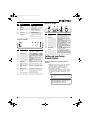
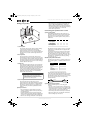
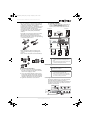
Components
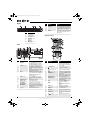
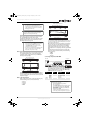
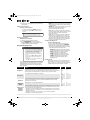
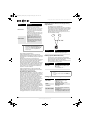
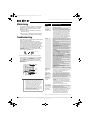
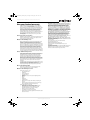
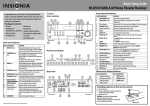
Front controls
Features
• 90 Watts/Channel @ 8 ohms
• Rocketboost™ Expandable Wireless Audio
Technology: sends wireless audio for surround
sound, subwoofer, and 2nd zone; receives wireless
audio from Rocketboost™ devices
• Audyssey 2EQ® to Correct Room Acoustic
Problems
• Audyssey Dynamic EQ® to Maintain Surround and
Bass Detail at any Volume
• Audyssey Dynamic Volume to Stop Volume Spikes
and Maintain Optimal Volume
• HDMI (Ver.1.4 with Audio Return Channel, 3D),
Deep-Color, x.v.Color, Lip Sync, DTS-HD Master
Audio, DTS-HD High Resolution Audio, Dolby
TrueHD, Dolby Digital Plus, DSD and Multi-CH
PCM
• 3 HDMI Inputs and 1 Output
• 3 Digital Inputs (2 Optical/1 Coaxial)
• Component Video Switching (2 Inputs/1 Output)
• Banana Plug-Compatible Speaker Posts
• 40 FM/AM Presets
• H.C.P.S. (High Current Power Supply) Massive High
Power Transformer
• Direct Mode
• 192 kHz/24-bit D/A Converters
• Powerful and Highly Accurate 32-bit Processing
DSP
• Crossover Adjustment
(40/50/60/80/100/120/150/200 Hz)
• A/V Sync Control Function (up to 100 ms)
• On-Screen Display via HDMI
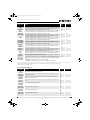
Item
Description
1
2
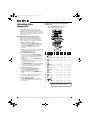
|/ ON/STANDBY button Press to turn on your stereo receiver.
HDMI THRU indicator
Lights when the HDMI pass-through function is
activated in standby mode.
Zone 2 indicator
Lights when NS-RB1 is connected to the
Rocketboost™ Port.
STANDBY indicator
Lights red when your stereo receiver is in
standby mode.
Remote control sensor
Receives the signal from the remote control.
Display
See “Display” on page 4 for additional
information.
SETUP button
Press to open the on-screen menus.
Press TUNING / to tune the radio to the
TUNING /
next or previous station.
PRESET /
ENTER
Press PRESET / to tune the radio to the
next or previous station preset.
Press ENTER to confirm a selection.
RETURN button
In menu mode, press to return to the main
menu.
MEMORY button
Press to save a radio station preset. Press with
the TUNING MODE button to clear presets.
TUNING MODE button
Press to turn on the receiver tuning mode and
listen to the radio. Press with the MEMORY
button to clear presets.
MASTER VOLUME knob
Turn to increase or decrease the volume.
Headphone jack
Plug your headphones into this jack.
Input selector buttons
Press to select the input signal source you want.
Protective cap
Remove when using jack.
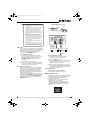
AUX INPUT VIDEO jack
Plug an external video source into this jack.
AUX INPUT AUDIO L/R
Plug an external sound source into this jack.
jacks
SETUP MIC jack
Plug the Audyssey setup microphone into this
jack. See “Using the Audyssey 2EQ® room
correction and speaker setup” on page 14.
AUDIO button
Press to access audio settings. See “Changing
audio settings” on page 26.
3
4
5
6
7
8
9
10
* “x.v.Color” is a trademark of Sony Corporation.
11
Package contents
•
•
•
•
•
•
•
Receiver
Rocketboost™ Sender/Receiver (NS-RB1)
Remote control
2 x AA batteries
FM antenna
AM antenna
Speaker setup microphone
12
13
14
15
16
17
18
19
www.insigniaproducts.com
Function
3