1
Use these buttons together to tune in a station by inputting the
station’s broadcast frequency directly through the remote control.
1. Press the F.DIRECT button on the remote control.
ENGLISH
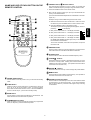
t F.DIRECT button, y Numeric buttons
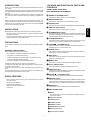
NAME AND USE OF EACH BUTTON ON THE
REMOTE CONTROL
2. Next, use the numeric buttons (0 to 9) to input the broadcast frequency of the desired station.
u
!2
SLEEP
BAND
DISPLAY
F.DIRECT
1
2
3
4
5
6
7
8
9
FM MODE
IF BAND
0
TUNING
PRESET
PRESET
MEMO
P.SCAN
q
t
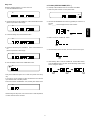
Example: Tuning in FM 84.0MHz through the remote control
a. Make sure that the set is set to the FM band. If the set is set to
the AM band, press the BAND button in order to switch to FM.
b. Press the F.DIRECT button on the remote control.
The frequency that was being displayed disappears, and is re” on the display.
placed by “
y
i
o
!1
c. Next, press numeric button “8”. The display now reads “
”.
d. Next, press numeric button “4”. The display now reads “
”.
e. Next, press numeric button “0”. The display now reads “
”.
f. Next, press numeric button “0”. The display now reads “
”,
the TUNED and STEREO indicators light, and you can now hear
the broadcast from that station.
To tune in an AM station, follow the same procedure, except set
the band to AM.
!0
u FM MODE button
Use this button to listen to a stereo broadcast in monaural sound.
This button works for both FM and AM stereo broadcasts.
REMOTE CONTROL UNIT
RC6000ST
i IF BAND button
Use this button to switch the FM intermediate frequency band.
o TUNING 5∞ buttons
Use these buttons to increase or decrease the frequency to which
the tuner is currently tuned. Holding one of these buttons down
initiates the auto tuning operation. (The operation of these buttons
is the same as on the main unit.)
!0 PRESET 5∞ buttons
Use these buttons to move up or down through the preset stations.
!1 MEMO button
Use this button to store a station in preset memory. The operation of
this button is the same as on the main unit.
q POWER ON/OFF button
!2 P.SCAN (Preset Scan) button
Use this button to turn the power on or to put the unit into standby
mode.
Use this button to automatically tune in each of the stations stored
in preset memory, for five seconds each. If you hear a broadcast
that you want to listen to, press this button again to stop scanning
on that station.
w SLEEP button
Press this button to set the sleep timer. The sleep timer can be set
to 10, 20, 30, 40, 60, or 90 minutes, or OFF. To cancel the sleep
timer, either use this button to select “OFF,” or use the POWER button to turn the set off (i.e., put the set in standby mode).
e BAND button
Use this button to select either the AM band or the FM band. The
band switches each time this button is pressed.
r ST.NAME/DISPLAY button
Press this button to switch the display between the programmed
name, the frequency, and the antenna input level.
5
ENGLISH
w
e
r
(You can find the broadcast frequencies of local stations in the newspaper, etc.)