1
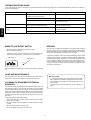
TROUBLESHOOTING GUIDE
If your Tuner should not perform as expected, consult the table below to see if the problem can be corrected before seeking help from your dealer or
our service organization.
Probable cause (s)
Symptom
Suggested remedy
INPUT SELECTOR of amplifier is not Select
“TUNER” in INPUT SELECTOR
set to “TUNER”
Volume of amplifier positioned in “MIN.”
Adjust Volume accordingly
The terminal for system connection is pullet out.
Connect the terminal for system
Connection correctly
Only noise is heard
The antenna is pulled out
The frequency is not detected exactly
Connect the antenna on the rear panel.
Set the frequency correctly
Broadcasting is received but with
noise
The position of antenna is not suitable.
Install the antenna again after locating the best
reception position.
The power of CD player is turned on
Turn off CD player.
No sound
ENGLISH
WHEN TO USE RESET SWITCH
REPAIRS
• When this system is subjected to an electrical shock.
Only the most competent and qualified service technicians shoud be
allowed to service your unit. Marantz and its factory trained warranty
station personnel have the knowledge and special equipment needed
for the repair and calibration of this precision instrument.
• When the power is irregular.
In the above cases, function buttons may not often operate or the
display may operate wrongly. In these cases, try the following:
In the event of difficulty, call the proper toll-free telephone number listed
on the face of the warranty to obtain the name and address of the Marants
Authorized Service Center nearest you. In many cases, the dealer where
you purchased your Marants unit may be equipped to provide service.
Please include the model, serial number of your unit together with a
copy of your purchase receipt and a full description of what you feel is
abnormal in its behaviour.
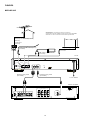
— Rear panel —
RESET SWITCH
LINE OUT
REMOTE
CONTROL
RESET
R
L
Press the RESET switch lightly once or twice with a pencil or a ballpoint
pen.
CARE AND MAIN TENANCE
Memory backup
This section describes the care and maintenance tasks that must be
performed to optimize the operation of your Marantz equipment.
• In case a power outage occurs or the power cord is accidentally unplugged, the ST6000 is equipped with a backup function to prevent memory data such as the preset memory from
being erased.
The memory funcitons are backed up for up to about one
week.
CLEANING OF EQUIPMENT EXTERNAL
SURFACES
The exterior finish of your ST6000 will last indefinitely with proper care
and cleaning. Never use scouring pads, steel wool, scouring powders
or harsh chemical agents (e.g., lye solution), alxohol, thinners, benzine,
insecticide or other volatile substances as these will mar the finish of the
equipment. Likewise, never use cloths containing chemical substances.
If the equipment gets dirty, wipe the external surfaces with a soft, lintfree cloth.
If the equipment becomes heavily soiled:
– dilute some washing up liquid in water, in a ratio of one part detergent to six parts water;
– dip a soft, lint free cloth in the solution and wring the cloth out until it
is damp;
– wipe the equipment with the damp cloth;
– dry the equipment by wiping it with a dry cloth.
4