1
Circle Communication Products, Inc
1. Introduction
Welcome
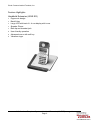
Thank you for choosing the Cordless Handheld Extension (WHE ER) display hands free
feature telephone. To enjoy the full benefit of the features and use it safely, please read and
follow all the instructions in this user guide.
Before Using
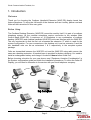
The Cordless Desktop Extension (WHE ER) cannot be used by itself. It is part of a cordless
telephone system. All the cordless extensions require connection to the wireless Main
Control Base (WMC ER). A maximum of 10 Extensions in any combination of cordless
desktop (WDE ER) and cordless handheld (WHE ER) units can interface with the WMC ER.
The only requirement is that the first unit connected be extension “0” which is used for the
system configuration. For your convenience, the desktop unit is set as extension 0 and the
two handheld units are set as extensions 1 & 2 respectively in the complete system
package.
Calls are transmitted between the WHE ER unit and the WMC ER using radio waves, the
same as a desktop extension. A handset base is provided for battery charging. You need to
install a rechargeable battery and charge it for about 8 hours before initial use.
Before choosing a location for your new phone, read “Equipment Location Consideration” in
the System configuration guide and follow the installation procedures. To utilize the Caller ID
Display, you will need to subscribe to the service with your local telephone company.
2.4G Cordless Telephone System - Handheld Extension (WHE ER) user guide
Page 5