1
Taurus 3 User’s Manual - The Components
D – Footswitches
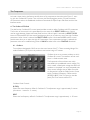
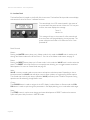
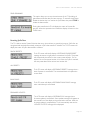
The eight footswitches in the footswitch section provide controls for selecting individual Presets and Preset
Banks, and for turning selected functions ON/OFF. All of the footswitches have an LED above the switch
mechanism, which illuminates when the switch is in the ON state.
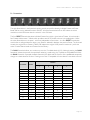
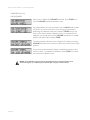
The four PRESET footswitches select individual Presets from within a given bank of Presets. A bank contains
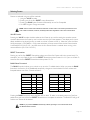
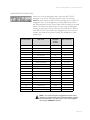
four Presets and there are 13 Banks, which provide a total of 52 Presets as shown in the table below. Unlike
the other footswitches on the panel – which are independent of each other – the four PRESET footswitches
work similar to radio pushbuttons; when a new Preset is selected, it deselects the previous Preset. The first bank
contains the original Taurus Presets (‘TAURUS III’ replaces the original “VAR’ preset in location A1), while the
other 12 banks feature brand new Presets from the factory.
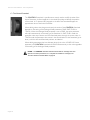
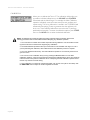
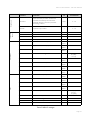
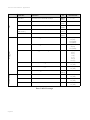
The BANK footswitch allows you to select any one the 13 available banks (A–M). Although pressing the BANK
footswitch initiates the process, the actual bank selection is made using the 13 pedals on the pedalboard. When
the BANK footswitch is pressed, the Bank footswitch LED blinks and the function of the pedalboard temporarily
changes to a ‘bank selection’ function. Pressing one of the 13 footpedals will now select the new bank as shown:
PRESETS
FOOTPEDAL
BANK
1
2
3
4
C1
A
TAURUS III
TAURUS
BASS
TUBA
C#1
B
B1
B2
B3
B4
D
C
C1
C2
C3
C4
D#1
D
D1
D2
D3
D4
E1
E
E1
E2
E3
E4
F1
F
F1
F2
F3
F4
F#1
G
G1
G2
G3
G4
G1
H
H1
H2
H3
H4
G#1
I
I1
I2
I3
I4
A1
J
J1
J2
J3
J4
A#1
K
K1
K2
K3
K4
B1
L
L1
L2
L3
L4
C2
M
M1
M2
M3
M4
Page 19