1
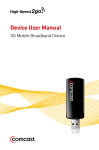
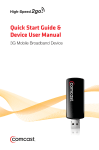
USB Broadband Device
RF-BCD2
User Guide
USB Broadband Device
Contents
Important safety instructions .................................................... 3
Introduction ..................................................................................... 6
Features ............................................................................................. 6
Package contents ....................................................................... 6
Best Buy Connect........................................................................ 6
Components................................................................................. 7
LED status indicator................................................................... 8
System requirements ................................................................ 8
Using your USB broadband device.......................................... 9
Setting up the Connection Manager software ................ 9
Connecting and disconnecting from the network.......10
Inserting or removing a microSD™ memory card.........11
Using a microSD memory card............................................12
Attaching the key chain .........................................................13
Connecting an external antenna ........................................14
Troubleshooting ...........................................................................14
Specifications ................................................................................16
Legal notices..................................................................................17
One-year limited warranty........................................................21
2
RF-BCD2 USB Broadband Device
RF-[model#] RF-BCD2
Important safety instructions
Read these instructions.
Keep these instructions.
Heed all warnings.
Follow all instructions.
Do not use this apparatus near water.
Clean only with dry cloth.
Only use attachments/accessories specified by the
manufacturer.
8 Unplug this apparatus during lightning storms or when
unused for long periods of time.
9 Refer all servicing to qualified service personnel.
Servicing is required when the apparatus has been
damaged in any way, such as power-supply cord or plug
is damaged, liquid has been spilled or objects have fallen
into the apparatus, the apparatus has been exposed to
rain or moisture, does not operate normally, or has been
dropped.
1
2
3
4
5
6
7
Additional safety precautions
• Do not apply adhesive labels to your USB broadband
device. They might cause it to overheat and could alter
the performance of the antenna.
• The USB connector should plug easily into your
computer’s Type A USB port. Forcing the connector into a
port might damage the connector.
• Protect your USB broadband device from liquids, dust,
and excessive heat.
• Do not leave your USB broadband device in a closed car.
• Store your USB broadband device in a safe place when
not in use.
RF-BCD2 USB Broadband Device
3
Wireless communications
Due to the transmission and reception properties of wireless
communications, data can occasionally be lost or delayed.
This can be due to the variation in radio signal strength that
results from changes in the characteristics of the radio
transmission path.
Although data loss is rare, the environment where you
operate your USB broadband device may adversely affect
communications.
Variations in radio signal strength are referred to as fading.
Fading is caused by several different factors including signal
reflection, the ionosphere, and interference from other radio
channels.
Best Buy, Inc. or its partners will not be held responsible for
damages of any kind resulting from the delays or errors in
data transmitted or received with your USB broadband
device, or failure of the dongle to transmit or receive such
data.
Safety hazards
Do not operate your device in an environment that may be
susceptible to radio interference resulting in danger
specifically;
Areas where prohibited by the law
Follow any special rules and regulations and obey all signs
and notices. Always turn off the host device and remove the
USB broadband device from the USB port when instructed to
do so, or when you suspect that it may cause interference or
danger.
Where explosive atmospheres may be present
Do not operate your USB broadband device in any area
where a potentially explosive atmosphere may exist. Sparks
in such areas could cause an explosion or fire resulting in
bodily injury or even death. Be aware and comply with all
signs and instructions.
You are advised not to operate your USB broadband device
while at a refueling point or service station.
4
RF-BCD2 USB Broadband Device
RF-[model#] RF-BCD2
You are reminded to observe restrictions on the use of radio
equipment in fuel depots (fuel storage and distribution
areas), chemical plants, or where blasting operations are in
progress.
Areas with a potentially explosive atmosphere are often but
not always clearly marked. Potential locations can include
gas stations, below deck on boats, chemical transfer or
storage facilities, vehicles using liquefied petroleum gas
(such as propane or butane), areas where the air contains
chemicals or particles, such as grain, dust or metal powders,
and any other area where you would normally be advised to
turn off your vehicle engine.
Near medical and life support equipment
Do not operate your USB broadband device around medical
equipment, life support equipment, or near any equipment
that may be susceptible to any form of radio interference. In
such areas, the host communications device must be turned
off. The modem may transmit signals that could interfere
with this equipment.
On an aircraft, either on the ground or airborne
In addition to FAA requirements, many airline regulations
state that you must suspend wireless operations before
boarding an airplane. Ensure that the host device is turned
off and your USB broadband device is removed from the USB
port prior to boarding aircraft in order to comply with these
regulations. Your USB broadband device can transmit signals
that could interfere with various onboard systems and
controls.
While operating a vehicle
The driver or operator of any vehicle should not operate a
wireless data device while in control of a vehicle. Doing so
will detract from the driver’s control and operation of that
vehicle. In some countries, operating such communications
devices while in control of a vehicle is an offense.
RF-BCD2 USB Broadband Device
5
Introduction
Congratulations on your purchase of the RF-BCD2 USB
Broadband Device. This device represents the state of the art
in wireless communications design and is designed for
reliable and trouble-free performance.
Features
•
•
•
•
•
•
3G Internet On-the-Go
Adds mobile broadband connectivity to any PC
Lightweight and portable
Plug and Play
microSD memory card slot
Pre-installed software
Package contents
•
•
•
•
•
USB broadband device
USB flex cable
Key chain
User Guide
Quick Setup Guide
Best Buy Connect
Welcome to Best Buy Connect. We offer flexible mobile
broadband options that let you connect to the Internet from
practically anywhere in the US. Using Best Buy Connect’s
mobile broadband service, you can browse the Internet,
access files and send e-mail when you are on the go. We’ll
activate your service and keep you connected with personal
help and specialized support.
To access your online account log on to
https://www.bestbuyconnect.com
or click Manage My Account in the Connection Manager
application.
6
RF-BCD2 USB Broadband Device
RF-[model#] RF-BCD2
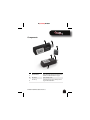
Components
#
1
Item
LED status indicator
2
USB connector
3
Protective cap
Description
Indicates current power and connection status. For more
information, see “LED status indicator” on page 8.
Plug into a USB port on a PC.
Cover the USB connector to protect it when you are not
using your USB broadband device.
RF-BCD2 USB Broadband Device
7
#
4
5
6
Item
Description
microSD memory card slot Insert a microSD memory card (not included) in this slot
to copy and transfer files. For more information, see
“Inserting or removing a microSD™ memory card” on
page 11 and “Using a microSD memory card” on page 12.
Key chain hook
Attach the key chain to this hook.
External antenna connector Connect an external antenna (not included) to this
connector. For more information, see “Connecting an
external antenna” on page 14.
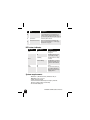
LED status indicator
LED color
None
LED behavior
None
Solid
Slow blinking
Green
Intermittent blinking
Red
Amber
Solid
Solid
Description
USB broadband device is not
receiving power.
USB broadband device has power
but is not sending or receiving.
USB broadband device is searching
for a network.
USB broadband device is sending or
receiving data. The blinking speed
depends on the data transmission
rate.
No service.
An error has occurred. You need to
reset your USB broadband device
by unplugging it from the USB port
and plugging it back in.
System requirements
• Windows® 7, Windows Vista®, Windows® XP, or
MAC OS™ 10.4, 10.5, 10.6
• A PDF reader program
• Internet browser software (for example, Internet
Explorer, Safari, Firefox, or Chrome)
• An available USB port
8
RF-BCD2 USB Broadband Device
RF-[model#] RF-BCD2
Using your USB broadband
device
Setting up the Connection Manager software
To set up the Best Buy Connect software:
1 Log on to your PC as an administrator.
2 Plug your USB broadband device into a USB port on your
PC.
3 In Windows: Run setup.exe to install the Best Buy Connect
software. After installation, you may need to restart
your PC.
OR
In MAC OS: Open BestBuyConnect icon, then double click
the MAC Installer to begin software installation.
4 Click Activate, then follow the on-screen instructions to
select your service plan.
RF-BCD2 USB Broadband Device
9
Connecting and disconnecting from the
network
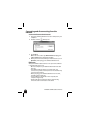
To connect and disconnect from the network:
1 Plug your USB broadband device into a USB port on your
computer.
2 Double-click the
desktop icon.
3 Click Connect.
Note: If the device status says No Device Detected, unplug your
USB broadband device and plug it in again.
4 When you have finished with your Internet session, click
Disconnect, then unplug your USB broadband device.
Daily use
After your USB broadband device is set up and the software
is installed, daily use is easy.
• On most computers your USB broadband device’s label
faces up.
• Your USB broadband device has power when you
connect it to your PC. However, it does not automatically
connect to the Internet.
• When you plug your USB broadband device into a PC,
the LED indicator lights up.
• If sound effects are enabled on the computer, the
computer might beep.
• The Best Buy Connect software opens automatically,
unless the auto-launch feature is disabled.
10
RF-BCD2 USB Broadband Device
RF-[model#] RF-BCD2
• When you are finished using the device, use the program
to disconnect from the network.
• When you are disconnected from the network, exit the
program and eject the device before removing it from
your PC. You can also remove the device after your PC is
shut down.
Inserting or removing a microSD™ memory
card
Your USB broadband device has a microSD memory card slot
that is hot-swappable. You can insert or remove the memory
card whether your USB broadband device is connected to a
PC or not.
Cautions:
Do not force the microSD memory card into the slot. You
may damage the card or the slot.
Do not remove the card while data is being transferred. You
may corrupt or lose the data.
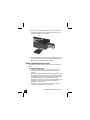
To insert or remove a microSD memory card:
1 If this is the first time you are inserting a memory card,
remove the plastic insert in the memory card slot by
gently pressing in on the blank. When the blank pops out
slightly, pull the blank from the slot.
RF-BCD2 USB Broadband Device
11
2 Gently insert a microSD memory card into the slot with
the gold contact points facing toward the slot. Press in
on the card until it clicks into place.
3 To remove the microSD memory card, gently press in on
the card until it pops out, then pull the card from the slot.
Note: Store memory cards in a dry, safe place.
Using a microSD memory card
An inserted microSD memory card works like any USB flash
drive.
To use a microSD memory card:
1 Insert a microSD memory card into the card slot. See
“Inserting or removing a microSD™ memory card” on
page 11.
2 Plug your USB broadband device into a USB port on your
PC. If this is the first time you have connected your USB
broadband device with a memory card inserted, your PC
automatically detects the new hardware, and the
unplug/eject icon appears on the computer taskbar. The
microSD memory card appears in My Computer or
Computer as a drive letter.
3 Copy files to or from the microSD memory card in the
same way you copy files from any drive.
12
RF-BCD2 USB Broadband Device
RF-[model#] RF-BCD2
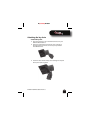
Attaching the key chain
To attach the key chain:
1 Place the protective cap on the USB connector on your
USB broadband device.
2 Pinch the looped thread on the key chain and slide it
through the key chain slots on the cap and your USB
broadband device.
3 Insert the other end of the key chain through the looped
thread, then pull to tighten.
RF-BCD2 USB Broadband Device
13
Connecting an external antenna
An external antenna (not included) may improve reception
in outdoor environments. The antenna connector type is a
SMK-TS9.
To connect an external antenna:
1 Locate the external antenna connector. See
“Components” on page 7.
2 Remove the protective cap and store it in a safe place.
When you are not using an external antenna, replace the
cap to protect the connector from debris or damage.
3 Plug an external antenna (not included) into the antenna
connector.
Troubleshooting
Problem
Cannot connect to the network.
Cannot reboot PC when the USB
broadband device is connected.
Screen is blank or error message
appears.
No Device Detected message
appears when the Best Buy
Connect program opens.
14
Solution
• System resources required by your USB broadband
device are being used by other devices.
• Network coverage is not available (either because you
are outside the coverage area or because of an account
or network problem).
• Remove your USB broadband device and reboot your
PC. Your USB broadband device contains internal
memory which behaves like a CD. Some PCs,
depending on the system BIOS settings, may try to
reboot from the CD before the hard drive. The PC may
show a black screen with a cursor or an error message
about a non-bootable disc. This behavior is similar
when using any non-bootable CD in your CD drive.
• Your USB broadband device is not correctly plugged
into the PC. Close the Best Buy Connect program,
unplug your USB broadband device, then reboot the
PC. Open the Best Buy Connect program, then plug
your dongle in again.
RF-BCD2 USB Broadband Device
RF-[model#] RF-BCD2
Problem
Searching for network message
displays continuously when
running the Best Buy Connect
program.
Cannot browse the Web.
Solution
• You may be out of your network coverage area.
Check your browser settings. The following steps are for
Internet Explorer. Other browsers have similar functions.
1. Start Internet Explorer.
2. Click the Tools menu, then click Internet Options.
3. Click Connections.
4. Under Dial-up and Virtual Private Network
settings, double-click the name of your connection (for
example, 3G Connection). This field name varies,
depending on your network type.
5. Click Settings to check your username and password.
6. If you are using a proxy server, select the appropriate
boxes.
7. Click OK twice to finish.
RF-BCD2 USB Broadband Device
15
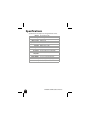
Specifications
Specifications are subject to change without notice.
Approvals
Weight
Dimensions
Wireless network
Chip set QUALCOMM™
Interface type
Technology
Band designation
Transmit band
Receive band
Operating
temperature
Storage temperature
Relative humidity
Drop
Vibration stability
16
FCC (North America); CDG
0.67 oz (19 g)
2.24 × 0.98 × 0.47 in. (57 × 25 × 12 mm)
CDMA 1X/EV-DO
MDM6085
Type A USB Port
CDMA Rev A, Rev 0, 1XRTT
800/1900 MHz
824.7-848.31 MHz / 1851.25-1908.75 MHz
869.7-893.31 MHz / 1931.25-1988.75 MHz
32° to 113° F (0° to +45° C)
–4°to 149° F (–20° C to +65° C)
5% to 90% over operating temperature
3.3 ft. (1 m) drop, no damage/fully operational
5 Hz to 500 Hz, 0.1 octave/second
RF-BCD2 USB Broadband Device
RF-[model#] RF-BCD2
Legal notices
Federal Communications Commission
Notice (FCC -- United States)
Electronic devices, including computers and wireless modems,
generate RF energy incidental to their intended function and are
therefore subject to FCC rules and regulations.
This equipment has been tested to, and found to be within the
acceptable limits for a Class B digital device, pursuant to part 15 of
the FCC Rules. These limits are designed to provide reasonable
protection against harmful interference when the equipment is
operated in a residential environment. This equipment generates
radio frequency energy and is designed for use in accordance with
the manufacturer’s user manual. However, there is no guarantee that
interference will not occur in any particular installation. If this
equipment causes harmful interference to radio or television
reception, which can be determined by turning the equipment off
and on, you are encouraged to try to correct the interference by one
or more of the following measures:
• Reorient or relocate the receiving antenna
• Increase the separation between the equipment and the
receiver
• Connect the equipment into an outlet on a circuit different from
that to which the receiver is connected
• Consult the dealer or an experienced radio/television technician
for help
This device complies with Part 15 of the Federal Communications
Commission (FCC) Rules. Operation is subject to the following two
conditions:
1. This device may not cause harmful interference.
2. This device must accept any interference received, including
interference that may cause undesired operation.
RF-BCD2 USB Broadband Device
17
WARNING: Do not attempt to service the wireless communication
device yourself. Such action may void the warranty. The USB Modem
is factory tuned. No customer calibration or tuning is required.
Contact Best Buy Connect Technical Support for information about
servicing your wireless communication device.
FCC CAUTION: Any changes or modification not expressly approved by
the party responsible for compliance could void the user’s authority
to operate this equipment.
MODIFICATIONS: The FCC requires that you be notified that any changes
or modifications made to this device that are not expressly approved
by Best Buy Connect may void your authority to operate the
equipment.
This USB modem is approved for use in normal size notebook
computers only (typically with 12” or larger display screens). To
comply with FCC RF exposure requirements, this modem should not
be used in configurations that cannot maintain at least 11 mm
(approximately 0.43” or 7/16”) from users and bystanders; for
example, in certain notebook and tablet computers and
configurations where the USB connectors are unable to provide or
ensure the necessary separation is available between the modem
and its users to satisfy compliance.
RF Exposure/Specific Absorption Rate (SAR) Information
This product has been evaluated for SAR and meets the FCC
Guidelines for exposure to radio waves.
FCC Equipment Authorization ID: PKRNVWMC760
Your wireless modem is a radio transmitter and receiver. It is
designed and manufactured not to exceed the exposure limits for
radio frequency (RF) energy set by the Federal Communications
Commission (FCC) of the U.S. Government. These limits are part of
comprehensive guidelines and establish permitted levels of RF
energy for the general population. The guidelines are based on
standards that were developed by independent scientific
organizations through periodic and thorough evaluation of
scientific studies. The standards include a substantial safety margin
designed to assure the safety of all persons, regardless of age and
health.
18
RF-BCD2 USB Broadband Device
RF-[model#] RF-BCD2
The exposure standard for wireless devices including mobile USB
Modems and wireless modems uses a unit of measurement known
as the Specific Absorption Rate, or SAR. Tests for SAR are conducted
using standard operating positions reviewed by the FCC with the
device under test transmitting at its highest certified power level in
all frequency bands. Although the SAR is determined at the highest
certified power level, the actual SAR level of the USB Modem or
modem while operating can be well below the maximum value. This
is because the USB Modem is designed to operate at multiple power
levels so as to use only the power required to reach the network. In
general, the closer you are to a wireless base station antenna, the
lower the power output.
Before this device is made available for sale to the public, it must be
tested and certified to the FCC that it does not exceed the limit
established by the government-adopted requirement for safe
exposure. The tests are performed in positions and locations (for
example, at the ear or worn on the body) as required by the FCC for
each model.
The FCC has granted an Equipment Authorization for this wireless
Modem with all reported SAR levels evaluated as in compliance with
the FCC RF exposure guidelines. The highest SAR value for this
Modem when tested for compliance against FCC standards was
1.53 W/KG User-Lap position.
Cellular Service Agreement
The USB Broadband Device uses a wireless digital service that is
furnished by Best Buy Connect, a mobile virtual network operator
("MVNO"). The MVNO disclaims all liability of any nature to the
customer and any third party, whether direct, indirect, incidental or
consequential, arising out of the customer's use of the USB
Broadband Device, and customer agrees that customer shall have no
claims against the MVNO of any kind with respect thereto.
RF-BCD2 USB Broadband Device
19
20
RF-BCD2 USB Broadband Device
RF-[model#] RF-BCD2
One-year limited warranty
Rocketfish Products (“Rocketfish”) warrants to you, the original
purchaser of this new RF-BCD2 (“Product”), that the Product shall be
free of defects in the original manufacture of the material or
workmanship for one (1) year from the purchase of the Product
(“Warranty Period”). This Product must be purchased from an
authorized dealer of Rocketfish brand products and packaged with
this warranty statement. This warranty does not cover refurbished
Product. If you notify Rocketfish during the Warranty Period of a
defect covered by this warranty that requires service, terms of this
warranty apply.
How long does the coverage last?
The Warranty Period lasts for one year (365 days), beginning on the
date you purchased the Product. The purchase date is printed on the
receipt you received with the product.
What does this warranty cover?
During the Warranty Period, if the original manufacture of the
material or workmanship of the Product is determined to be
defective by an authorized Rocketfish repair center or store
personnel, Rocketfish will (at its sole option): (1) repair the Product
with new or rebuilt parts; or (2) replace the Product at no charge
with new or rebuilt comparable products or parts. Products and
parts replaced under this warranty become the property of
Rocketfish and are not returned to you. If service of Products and
parts are required after the Warranty Period expires, you must pay all
labor and parts charges. This warranty lasts as long as you own your
Rocketfish Product during the Warranty Period. Warranty coverage
terminates if you sell or otherwise transfer the Product.
RF-BCD2 USB Broadband Device
21
How to obtain warranty service?
If you purchased the Product at a retail store location, take your
original receipt and the Product to the store you purchased it from.
Make sure that you place the Product in its original packaging or
packaging that provides the same amount of protection as the
original packaging. If you purchased the Product from an online web
site, mail your original receipt and the Product to the address listed
on the web site. Make sure that you put the Product in its original
packaging or packaging that provides the same amount of
protection as the original packaging.
Where is the warranty valid?
This warranty is valid only to the original purchaser of the Product in
the United States, Canada, and Mexico.
What does the warranty not cover?
This warranty does not cover:
• Customer instruction
• Installation
• Set up adjustments
• Cosmetic damage
• Damage due to acts of God, such as lightning strikes
• Accident
• Misuse
• Abuse
• Negligence
• Commercial use
• Modification of any part of the Product, including the antenna
This warranty also does not cover:
• Damage due to incorrect operation or maintenance
• Connection to an incorrect voltage supply
• Attempted repair by anyone other than a facility authorized by
Rocketfish to service the Product
• Products sold as is or with all faults
• Consumables, such as fuses or batteries
• Products where the factory applied serial number has been
altered or removed
22
RF-BCD2 USB Broadband Device
RF-[model#] RF-BCD2
REPAIR REPLACEMENT AS PROVIDED UNDER THIS WARRANTY IS
YOUR EXCLUSIVE REMEDY. ROCKETFISH SHALL NOT BE LIABLE FOR
ANY INCIDENTAL OR CONSEQUENTIAL DAMAGES FOR THE BREACH
OF ANY EXPRESS OR IMPLIED WARRANTY ON THIS PRODUCT,
INCLUDING, BUT NOT LIMITED TO, LOST DATA, LOSS OF USE OF
YOUR PRODUCT, LOST BUSINESS OR LOST PROFITS. ROCKETFISH
PRODUCTS MAKES NO OTHER EXPRESS WARRANTIES WITH RESPECT
TO THE PRODUCT, ALL EXPRESS AND IMPLIED WARRANTIES FOR THE
PRODUCT, INCLUDING, BUT NOT LIMITED TO, ANY IMPLIED
WARRANTIES OF AND CONDITIONS OF MERCHANTABILITY AND
FITNESS FOR A PARTICULAR PURPOSE, ARE LIMITED IN DURATION TO
THE WARRANTY PERIOD SET FORTH ABOVE AND NO WARRANTIES,
WHETHER EXPRESS OR IMPLIED, WILL APPLY AFTER THE WARRANTY
PERIOD. SOME STATES, PROVINCES AND JURISDICTIONS DO NOT
ALLOW LIMITATIONS ON HOW LONG AN IMPLIED WARRANTY LASTS,
SO THE ABOVE LIMITATION MAY NOT APPLY TO YOU. THIS
WARRANTY GIVES YOU SPECIFIC LEGAL RIGHTS, AND YOU MAY
ALSO HAVE OTHER RIGHTS, WHICH VARY FROM STATE TO STATE OR
PROVINCE TO PROVINCE.
Contact Rocketfish:
For customer service please call 1-800-620-2790
www.rocketfishproducts.com
Best Buy Connect Customer Care
(866) 652-4141
[email protected]
https://www.BestBuyConnect.com
Distributed by Best Buy Purchasing, LLC
7601 Penn Avenue South, Richfield, Minnesota, U.S.A. 55423-3645
© 2011 BBY Solutions, Inc.
All rights reserved. ROCKETFISH is a trademark of BBY Solutions, Inc.
Registered in some countries.
Best Buy ConnectSM is a registered trademark of Best Buy
Connect, LLC
Minneapolis, MN 55402
© Best Buy Connect, LLC All. Rights Reserved
All other products and brand names are trademarks of their
respective owners.
RF-BCD2 USB Broadband Device
23
www.rocketfishproducts.com
(800) 620-2790
Distributed by Best Buy Purchasing, LLC
7601 Penn Avenue South, Richfield, MN 55423-3645 USA
© 2011 BBY Solutions, Inc.
All rights reserved. ROCKETFISH is a trademark of BBY Solutions, Inc.
All other products and brand names are trademarks of their respective owners.
10-1092
ENGLISH