1
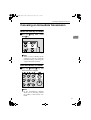
Paper type: OK Prince Eco G100(55kg), Paper Thickness=80 µm // Pages in book=84 // Print scale=81%
Gap (when printed at 81% scale) = Pages in book × Paper thickness / 2 = 4.200000 mm
Operating Instructions
<Basic Features>
Type for 3725/F9103/LF310/3310L
Printed in China
UE USA H555-8600
1
Getting Started
2
Faxing
3
Registering
4
Troubleshooting
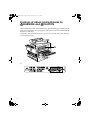
For safety, please read this manual carefully before you use this product and keep it handy
for future reference.
Paper type: Wood Free 80g/m2, Paper Thickness=100 µm // Pages in book=84 // Print scale=81%
Gap (when printed at 81% scale) = Pages in book × Paper thickness / 2 = 4.200000 mm
Introduction
USA
This manual contains detailed instructions on the operation and maintenance of this machine. To get
maximum versatility from this machine all operators should carefully read and follow the instructions in
this manual. Please keep this manual in a handy place near the machine.
❖ FCC Requirements
Please read the Safety Information in the Basic Features manual before using this machine. It contains
important information related to USER SAFETY and PREVENTING EQUIPMENT PROBLEMS.
Notes:
Some illustrations in this manual might be slightly different from the machine.
Certain options might not be available in some countries. For details, please contact your local dealer.
Laser Safety:
CDRH Regulations
This equipment complies with requirements of 21 CFR subchapter J for class 1 laser products. This
equipment contains a 5 milliwatt, 760–800 nanometer wavelength, GaAIAs laser diode. This equipment does not emit hazardous light, since the beam is totally enclosed during all customer modes of
operation and maintenance.
Warning:
Use of controls or adjustment or performance of procedures other than those specified in this manual
might result in hazardous radiation exposure.
Two kinds of size notation are employed in this manual. With this machine refer to the inch version.
For good copy quality, the supplier recommends that you use genuine toner from the supplier.
The supplier shall not be responsible for any damage or expense that might result from the use of parts
other than genuine parts from the supplier with your office products.
Important
Contents of this manual are subject to change without prior notice. In no event will the company be liable for direct, indirect, special, incidental, or consequential damages as a result of handling or operating the machine.
Power Source:
115V, 60Hz
Please be sure to connect the power cord to a power source as above. For details about power source,
see Chapter 10, “Connecting the Power and Switching On” in the Advanced Features manual.
Declaration of Conformity
Product Name: Facsimile
Model Number: 3725/F9103/LF310AG/3310L
Responsible party: Ricoh Corporation
Address: 5 Dedrick Place, West Caldwell, NJ 07006
Telephone number: 973-882-2000
This device complies with part 15 of FCC Rules.
Operation is subject to the following two conditions:
1. This device may not cause harmful interference, and
2. this device must accept any interference received,
including interference that may cause undesired operation.
1. This equipment complies with Part 68 of the FCC rules. On the cover of this equipment is a label
that contains, among other information, the FCC registration number and ringer equivalence
number (REN) for this equipment. If requested, this information must be provided to the telephone company.
2. The following is applicable only for an equipment using an analog G3 line.
This equipment uses the RJ11C USOC jack.
An FCC compliant telephone cord and modular plug is provided with this equipment. This equipment is designed to be connected to the telephone network or premises wiring using a compatible modular jack that is Part 68 compliant. See the Operating Instructions for details.
3. The REN is used to determine the quantity of devices which may be connected to the telephone
line. Excessive REN's on the telephone line may result in the devices not ringing in response to
an incoming call. Typically, the sum of the REN's should not exceed five (5.0). Contact the telephone company to determine the maximum REN for the calling area.
4. If this equipment causes harm to the telephone network, the telephone company will notify you
in advance that temporary discontinuance of service may be required. But if advance notice is
not practical, the telephone company will notify the customer as soon as possible. Also, you will
be advised of your right to file a complaint with the FCC if you believe it is necessary.
5. The telephone company may make changes to its facilities, equipment, operations, or procedures that could affect the operation of the equipment. If this happens, the telephone company
will provide advance notice so that you can make the necessary modifications to maintain uninterrupted service.
6. In the event of operation problems (document jam, copy jam, communication error indication),
refer to the solving problems section in this manual.
7. If you cannot correct the problem, please contact the RICOH CORP. CUSTOMER SUPPORT
DEPT. at 1-800-FASTFIX for repair or warranty information. If the equipment is causing harm
to the telephone network, the telephone company may request you to disconnect the equipment
from the network until the problem is resolved.
8. This equipment cannot be used with telephone company-provided coin service. Connection to
Party Line Service is subject to state tariffs.
❖ WHEN PROGRAMMING EMERGENCY NUMBERS AND/OR MAKING TEST CALLS TO
EMERGENCY NUMBERS:
1. Remain on the line and briefly explain to the dispatcher the reason for the call before hanging up.
2. Perform such activities in the off-peak hours, such as early morning hours or late evenings.
CANADA
The Industry Canada label identifies certified equipment. This certification means that the equipment
meets telecommunications network protective, operational, and safety requirements as prescribed in
the appropriate Terminal Equipment Technical Requirements document(s). The department does not
guarantee the equipment will operate to the user's satisfaction.
Before installing this equipment, users should ensure that it is permissible to be connected to the facilities of the local telecommunications company. The equipment must also be installed using an acceptable method of connection. The customer should be aware that compliance with the above conditions
may not prevent degradation of service in some situations.
Repairs to certified equipment should be coordinated by a representative designated by the supplier.
Any repairs or alterations made by the user to this equipment, or equipment malfunctions, may give the
telecommunications company cause to request the user to disconnect the equipment.
User should ensure for their own protection that the electrical ground connections of the power utility,
telephone lines, and internal metallic water pipe system, if present, are connected together. This precaution may be particularly important in rural areas.
Caution: Users should not attempt to make such connections themselves, but should contact the appropriate electric inspection authority, or electrician, as appropriate.
The Ringer Equivalence Number (REN) assigned to each terminal device provides an indication of the
maximum number of terminals allowed to be connected to a telephone interface. The termination on
an interface may consist of any combination of devices subject only to the requirement that the sum of
the Ringer Equivalence Numbers of all the devices does not exceed 5.
In accordance with IEC 60417, this machine uses the following symbols for the main power switch:
a means POWER ON.
b means POWER OFF.
Copyright © 2001
StellaF1EN-3_FM.book Page i Monday, November 12, 2001 11:38 AM
TABLE OF CONTENTS
NOTICE ........................................................................................................ 1
Safety Information .......................................................................................... 3
Safety During Operation .............................................................................. 3
Important Safety Instructions.................................................................... 5
Grounding ...................................................................................................... 5
Important Safety Instructions ......................................................................... 5
Caution ........................................................................................................ 5
Positions of Labels and Hallmarks for RWARNING and RCAUTION ... 6
ENERGY STAR Program............................................................................ 7
Energy Saving Modes .................................................................................... 8
Recycled Paper ........................................................................................... 9
How to Read this Manual ......................................................................... 10
Symbols ....................................................................................................... 10
Manuals for This Machine........................................................................ 11
Basic Features (this manual) ....................................................................... 11
Advanced Features ...................................................................................... 11
1. Getting Started
Guide to Components .............................................................................. 13
Front View .................................................................................................... 13
Side View ..................................................................................................... 14
Control Panel ............................................................................................ 15
Starting the Machine ................................................................................ 17
Turning On the Power .................................................................................. 17
Turning Off the Power .................................................................................. 17
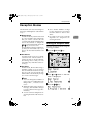
Reading the Display ................................................................................. 18
Reading the Display and Using Keys........................................................... 18
Standby Display ........................................................................................... 18
Communication Display ............................................................................... 19
Display Prompts ........................................................................................... 19
i
StellaF1EN-3_FM.book Page ii Monday, November 12, 2001 11:38 AM
2. Faxing
Transmission Modes................................................................................ 21
Switching between Memory Transmission and Immediate Transmission.... 22
Setting Originals....................................................................................... 23
Loading Originals in the Document Feeder.................................................. 24
Original Sizes Difficult to Detect................................................................... 24
Memory Transmission ............................................................................. 25
Canceling a Memory Transmission ........................................................ 27
Before the Start Key is Pressed ................................................................... 27
While the Original is Being Scanned............................................................ 27
During Transmission .................................................................................... 27
While the Original is Awaiting Transmission ................................................ 28
Immediate Transmission ......................................................................... 29
Canceling an Immediate Transmission .................................................. 31
Before the Start key is Pressed.................................................................... 31
After the Start key is Pressed....................................................................... 31
Scan Settings............................................................................................ 32
Resolution .................................................................................................... 32
Original Type................................................................................................ 33
Dialing........................................................................................................ 34
Entering Numbers Directly ........................................................................... 34
Pause......................................................................................................... 35
Tone........................................................................................................... 35
Using Quick Dials......................................................................................... 35
Using Speed Dials........................................................................................ 36
Using Groups ............................................................................................... 37
When Specifying a Group with a Quick Dial .............................................. 38
When Specifying a Group with the Group key........................................... 38
Reception Modes...................................................................................... 39
Selecting the Reception Mode ..................................................................... 39
3. Registering
Own Name/Fax Header/Own Fax Number .............................................. 41
Registering ................................................................................................... 42
Editing ......................................................................................................... 44
Deleting ........................................................................................................ 45
Quick Dial .................................................................................................. 46
Registering .................................................................................................. 46
Editing ......................................................................................................... 48
Deleting ....................................................................................................... 49
Quick Dial Key Label (Dial label).................................................................. 50
Label paper................................................................................................ 51
ii
StellaF1EN-3_FM.book Page iii Monday, November 12, 2001 11:38 AM
Speed Dial ................................................................................................. 52
Registering .................................................................................................. 52
Editing .......................................................................................................... 54
Deleting ....................................................................................................... 55
Groups....................................................................................................... 57
Registering .................................................................................................. 57
Editing .......................................................................................................... 60
Editing a Group Name ............................................................................... 60
Adding a Fax Number to a Group.............................................................. 61
Deleting ........................................................................................................ 63
To delete a destination from a group ......................................................... 63
To delete an entire group........................................................................... 65
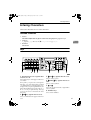
Entering Characters ................................................................................. 67
Available Characters .................................................................................... 67
Keys ............................................................................................................. 67
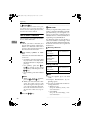
How to Enter Characters.............................................................................. 68
4. Troubleshooting
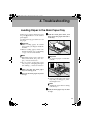
Loading Paper in the Main Paper Tray .................................................. 69
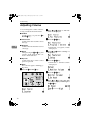
Adjusting Volume ..................................................................................... 70
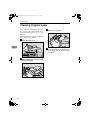
Clearing Original Jams ............................................................................ 72
Clearing a Copy, Fax, or Print Jam ......................................................... 73
Inside the Machine ....................................................................................... 73
Error Messages......................................................................................... 74
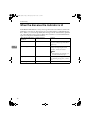
When the Receive File Indicator is Lit .................................................... 76
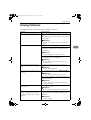
Solving Problems ..................................................................................... 77
INDEX......................................................................................................... 78
iii
StellaF1EN-3_FM.book Page iv Monday, November 12, 2001 11:38 AM
iv
StellaF1EN-3_FM.book Page 1 Monday, November 12, 2001 11:38 AM
NOTICE
R CAUTION:
Use of controls, adjustments or performance of procedures other than those
specified herein may result in hazardous radiation exposure.
Shielded interconnect cables must be employed with this equipment to ensure
compliance with the pertinent RF emission limits governing this device.
Direct (or indirect reflected) eye contact with the laser beam may cause serious eye damage.
Safety precautions and interlock mechanisms have been designed to prevent any possible laser
beam exposure to the operator.
Note to users in the United States of America
- Notice:
This equipment has been tested and found to comply with the limits for a Class
B digital device, pursuant to Part 15 of the FCC Rules. These limits are designed
to provide reasonable protection against harmful interference in a residential installation. This equipment generates, uses and can radiate radio frequency energy and, if not installed and used in accordance with the instructions, may cause
harmful interference to radio communications. However, there is no guarantee
that interference will not occur in a particular installation. If this equipment does
cause harmful interference to radio or television reception, which can be determined by turning the equipment off and on, the user is encouraged to try to correct the interference by one more of the following measures:
• Reorient or relocate the receiving antenna.
• Increase the separation between the equipment and receiver.
• Connect the equipment into an outlet on a circuit different from that to which
the receiver is connected.
• Consult the dealer or an experienced radio /TV technician for help.
- Warning
Changes or modifications not expressly approved by the party responsible for
compliance could void the user's authority to operate the equipment.
1
StellaF1EN-3_FM.book Page 2 Monday, November 12, 2001 11:38 AM
Note to users in Canada
- Note:
This Class B digital apparatus complies with Canadian ICES-003.
Remarque concernant les utilisateurs au Canada
- Avertissement:
Cet appareil numérique de la classe B est conforme à la norme NMB-003 du Canada.
- Notice about the Telephone Consumer Protection Act (Valid in USA
only).
The Telephone Consumer Protection Act of 1991 among other things makes it
unlawful for any person to send any message via a telephone fax machine unless
such message clearly contains in a margin at the top or bottom of each transmitted page or on the first page of the transmission, the date and time it is sent and
an identification of the business, other entity, or other individual sending the
message and the telephone number of the sending machine or such business,
other entity or individual. This information is transmitted with your document
by the TTI (Transmit Terminal Identification) feature. In order for you to meet
the requirement, your machine must be programmed by following the instructions in the accompanying Operation Manual. In particular, please refer to the
chapter of Installation. Also refer to the TTI (Transmit Terminal Identification)
programming procedure to enter the business identification and telephone
number of the terminal or business. Do not forget to set the date and time.
Thank you.
For this machine, TTI is called FAX HEADER.
2
StellaF1EN-3_FM.book Page 3 Monday, November 12, 2001 11:38 AM
Safety Information
When using this machine, the following safety precautions should always be followed.
Safety During Operation
In this manual, the following important symbols are used:
R WARNING:
Indicates a potentially hazardous situation which, if instructions
are not followed, could result in death or serious injury.
R CAUTION:
Indicates a potentially hazardous situation which, if instructions are not
followed, may result in minor or moderate injury or damage to property.
R WARNING:
• Connect the power cord directly into a wall outlet and never use an extension cord.
• Disconnect the power plug (by pulling the plug, not the cable) if the
power cable or plug becomes frayed or otherwise damaged.
• To avoid hazardous electric shock or laser radiation exposure, do not
remove any covers or screws other than those specified in this manual.
• Turn off the power and disconnect the power plug (by pulling the plug,
not the cable) if any of the following occurs:
• You spill something into the machine.
• You suspect that your machine needs service or repair.
• The external housing of your machine has been damaged.
• Do not incinerate spilled toner or used toner. Toner dust might ignite
when exposed to an open flame.
• Disposal can take place at our authorized dealer.
• Dispose of the used toner cartridge in accordance with the local regulations.
3
StellaF1EN-3_FM.book Page 4 Monday, November 12, 2001 11:38 AM
R CAUTION:
• Protect the machine from dampness or wet weather, such as rain and snow.
• Unplug the power cord from the wall outlet before you move the machine.
While moving the machine, you should take care that the power cord will not
be damaged under the machine.
• When you disconnect the power plug from the wall outlet, always pull the
plug (not the cable).
• Do not allow paper clips, staples, or other small metallic objects to fall inside
the machine.
• Keep toner (used or unused) and toner cartridge out of the reach of children.
• For environmental reasons, do not dispose of the machine or expended
supply waste at household waste collection points. Disposal can take place
at an authorized dealer.
• The inside of the machine could be very hot. Do not touch the parts with a
label indicating the “hot surface”. Otherwise an injury might occur.
• Our products are engineered to meet high standards of quality and functionality, and we recommend that you use only the expendable supplies available at an authorized dealer.
4
StellaF1EN-3_FM.book Page 5 Monday, November 12, 2001 11:38 AM
Important Safety Instructions
Grounding
In order to prevent potentially hazardous electrical shock, provide means of
connecting to the protective grounding conductor in the building, wiring those
grounding conductors of power cable and 3 pins plug.
Important Safety Instructions
Caution
When using your telephone equipment, basic safety precautions should always
be followed to reduce the risk of fire, electric shock and injury to persons, including the following:
• Do not use this product near water, for example, near a bath tub, wash bowl,
kitchen sink or laundry tub, in a wet basement or near a swimming pool.
• Avoid using a telephone during an electrical storm. There may be a remote
risk of electric shock from lightning.
• Do not use a telephone in the vicinity of a gas leak to report the leak.
• Use only the power cord and batteries indicated in this manual. Do not dispose of batteries in a fire. They may explode. Check with local codes for possible special disposal instructions.
Save these instructions.
IMPORTANTES MESURES DE SÉCURITÉ
Certalnes mesures de sécurité doivent être prises pendant l'utilisation de matérial téléphonique afin de réduire les risques d'incendle , de choc électrique et de
blessures. En voici quelquesunes:
• Ne pas utiliser l'appareil près de l'eau, p.ex., près d'une balgnoire, d'un lavabo, d'un évier de cuisine, d'un bac à laver, dans un sous-sol humide ou près
d'une piscine.
• Éviter d'utiliser le téléphone (sauf s'il s'agit d'un apparell sans fil) pendant un
orage électrique. Ceci peut présenter un risque de choc électrique causé par la
foudre.
• Ne pas utiliser l'appareil téléphonique pour signaler une fulte de gaz s'il est
situé près de la fuite.
• Utiliser seulement le cordon d'alimentation et le type de piles indiqués dans
ce manual. Ne pas jeter les piles dans le feu: elles peuvent exploser. Se conformer aux ègrlements pertinents quant à l'élimination des piles.
Conserver ces instructions.
5
StellaF1EN-3_FM.book Page 6 Monday, November 12, 2001 11:38 AM
Positions of Labels and Hallmarks for
RWARNING and RCAUTION
This machine has labels and hallmarks for RWARNING,RCAUTION at the
positions shown below. For safety, please follow the instructions and handle the
machine as indicated.
The inside of the machine becomes very hot. Do not touch the inside. Doing so
could result in a burn.
A
6
StellaF1EN-3_FM.book Page 7 Monday, November 12, 2001 11:38 AM
ENERGY STAR Program
As an ENERGY STAR Partner, we have determined
that this machine model meets the ENERGY STAR
Guidelines for energy efficiency.
The ENERGY STAR Guidelines intend to establish an international energy-saving system for
developing and introducing energy-efficient office equipment to deal with environmental issues, such as global warming.
When a product meets the ENERGY STAR Guidelines for energy efficiency, the Partner shall
place the ENERGY STAR logo onto the machine model.
This product was designed to reduce the environmental impact associated with office equipment by means of energy-saving features, such as Low-power mode.
• Low-power Mode
At the factory, this fax machine is set to enter the low power mode after no operation takes place for more than 5 minutes. To exit the low power mode, press
the {Energy Saver/Clear Modes}
} key. The machine starts printing in about 40 seconds in the Energy Saving Standby mode, or in about 30 seconds in the Fax
Standby Mode.
❖ Specification
Low-power mode
Power Consumption
1.2W
Default Time
5 minutes
7
StellaF1EN-3_FM.book Page 8 Monday, November 12, 2001 11:38 AM
Energy Saving Modes
Energy Saving mode enables you to avoid using unnecessary power and economize on electricity. Although we recommend you use this mode from the viewpoint of environmental consciousness, you can also turn it off.
When you install this machines for the first time, Energy Saving mode is turned
on by default.
Two types of Energy Saving mode are available:
• Fax Standby: Use when you receive faxes regularly.
• Energy Saving Standby: Use when you wish to economize on power consumption.
Choose the one that best suits your circumstances.
Even though the operation panel display goes out in Energy Saving mode, Indicators that flash or light during communication or reception still work. When the
Receive File indicator lights, exit Energy Saving mode and take the appropriate
action.
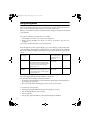
Energy Saving
Mode Type
Status
How long before
you can print after
exiting Energy Saving mode
Power
consumption
Fax Standby
Display turns off
Within about
30 seconds
40W
Within about
40 seconds
1.2W
The machine maintains the heating
roller temperature at half the full temperature; warm up takes less time.
(Heater half cool)
Energy Saving
Standby
Display turns off
The machine lets the heating roller cool
to room temperature; warm-up takes
longer.(Heater off)
You can turn Energy Saving mode on or off with User Parameter. When the machine is shipped, Energy Saving Standby is selected on.
The machine enters Energy Saving mode when:
• Nobody uses the machine for about 5 minutes (the machine automatically enters Energy Saving mode)
• The user holds down the Energy Saver key for about 2 seconds.
To exit Energy Saving mode:
• In Energy Saving Standby mode, press the Energy Saver key.
• In FAX Standby mode, press any key.
• Set a document.
• Pick up the optional handset or the external telephone handset.
8
StellaF1EN-3_FM.book Page 9 Monday, November 12, 2001 11:38 AM
Note
❒ When you load paper in Energy Saving mode, no error will be displayed even
if the cassette is not pushed right in.
❒ After loading paper, press the Energy Saver key and check that "READY” is
shown on the display.
The Manual Receive indicator goes out in Energy Saving mode even if Manual
Receive is turned on.
Reception in Energy Saving mode
In Energy Saving mode, documents that have been stored in memory are still
sent and the machine can still receive messages.
When a message is received in Energy Saving mode, the machine prints it and
returns to Energy Saving mode.
Limitation
It is not possible to enter Energy Saving mode when an original is set.
Recycled Paper
In accordance with the ENERGY STAR Program, we recommend use of recycled
paper which is environmentally friendly. Please contact your sales representative for recommended paper.
9
StellaF1EN-3_FM.book Page 10 Monday, November 12, 2001 11:38 AM
How to Read this Manual
Symbols
The following set of symbols is used in this manual.
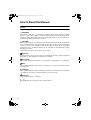
R WARNING:
This symbol indicates a potentially hazardous situation that might result in
death or serious injury when you misuse the machine without following the instructions under this symbol. Be sure to read the instructions, all of which are described in the Safety Information section.
R CAUTION:
This symbol indicates a potentially hazardous situation that might result in minor or moderate injury or property damage that does not involve personal injury
when you misuse the machine without following the instructions under this
symbol. Be sure to read the instructions, all of which are described in the Safety
Information section.
* The statements above are notes for your safety.
Important
If this instruction is not followed, paper might be misfed, originals might be
damaged, or data might be lost. Be sure to read this.
Preparation
This symbol indicates information or preparations required prior to operating.
Note
This symbol indicates precautions for operation, or actions to take after abnormal operation.
Limitation
This symbol indicates numerical limits, functions that cannot be used together,
or conditions in which a particular function cannot be used.
Reference
This symbol indicates a reference.
{
}
Keys built into the operation panel of the machine.
10
StellaF1EN-3_FM.book Page 11 Monday, November 12, 2001 11:38 AM
Manuals for This Machine
Two Facsimile Reference manuals are provided, the Basic Features manual and
the Advanced Features manual. Please refer to the manual that suits your needs.
Basic Features (this manual)
The Basic Features manual explains the most frequently used fax functions and
operations.
Advanced Features
The Advanced Features manual describes more advanced functions, and also
explains settings for key operators.
❖ Chapter 1 Transmission Options
Explains about sending at a specific time without having to be by the machine
and also taking advantage of off-peak telephone line charges.
❖ Chapter 2 Job Information
Explains about erasing a fax message stored in memory and checking the contents of any files in memory.
❖ Chapter 3 Other Transmission Features
Explains about useful features for transmission. You can find out about dialing numbers easily.
❖ Chapter 4 Reception Features
Explains about reception features. You can find out about screening out message from anonymous senders.
❖ Chapter 5 Copying
Explains about copying operations and functions.
❖ Chapter 6 Facsimile User Tools
Explains about programming frequently used functions for User Function
Key and setting the Date and Time.
❖ Chapter 7 Key Operator Settings
Explains about functions the key operator handles . You can find out how to
change the user parameter settings.
❖ Chapter 8 Solving Operation Problems
Explains about things you should do when an Error Report is printed and
power is turned off.
11
StellaF1EN-3_FM.book Page 12 Monday, November 12, 2001 11:38 AM
❖ Chapter 9 Maintaining Your Machine
Explains about changing the paper size in the paper trays, cleaning the scanner and so on.
❖ Chapter 10 Installation
Explains about installation considerations, connecting to a telephone line,
and connecting the power.
❖ Chapter 11 Appendix
You can check the specifications for this machine.
12
StellaF1EN-3_FM.book Page 13 Monday, November 12, 2001 11:38 AM
1. Getting Started
Guide to Components
Front View
1. ADF Cover
6. Front Cover
Cover for the document feeder (ADF).
Open this cover when changing the toner
cassette and the photo conductor unit inside the machine.
2. Release Button
Push this button to open the document
feeder.
3. Document Feeder (ADF)
7. Main Paper Tray
Load paper here.
Originals will be fed automatically.
8. Paper Tray Unit (Option)
4. Output Tray
You can load more paper here.
Received fax messages and copies are
stacked here.
5. Control Panel
Operate the machine using keys and
watching the display on the Control Panel.
9. Lower Right Cover
Open this cover to remove jammed paper
fed from the optional paper tray unit.
10. Bypass Tray
A fax message can be printed, and the
original is copied on the paper placed
here.
13
StellaF1EN-3_FM.book Page 14 Monday, November 12, 2001 11:38 AM
Getting Started
1
11. Right Cover
13. Original Tray
Open this cover to remove jammed paper
fed from the paper tray.
Place originals here for sending a fax and
copying.
12. Original Output Tray
14. Original guide
Scanned originals are stacked here.
Adjust the original guide to match the
size of the originals.
Side View
1. Output tray guide
Pull out and raise the end fence to support large papers.
2. Power Switch
The power switch turns your machine on
and off.
3. Handset (Option)
This permits voice communication.
14
4. G3 Line Connector
5. External Telephone Connector
6. Memory Card Slot
Insert an optional memory card here.
7. Ventilation hole
Prevents overheating. Do not obstruct
the ventilation hole by placing an object
near it. If the machine overheats, a fault
might occur.
StellaF1EN-3_FM.book Page 15 Monday, November 12, 2001 11:38 AM
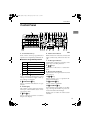
Control Panel
Control Panel
1
1. User Function keys
6. Add Toner indicator
Each of these can be programmed for
rapid access to frequently used functions.
Blinks when toner is about to runout and
lights continuously when toner has run
out.
❖ Functions Programmed by Default
7. Load Paper indicator
Key
Function
F1
Print Journal
Lights when a paper tray is empty or the
paper tray is not fully inserted.
F2
FAX Header Print
8. 0 1 keys
F3
TX Result Report
F4
Group Dial
Press to move the cursor or select functions.
F5
Dial Option
2. {Trans. Option}} key
9. Receive File indicator
Lights when a message has been received
into memory.
Press to change the transmission option
settings. The indicator lights when option settings are changed.
10. {OK}} key
3. {Job Information}} key
11. {Speed Dial}} key
Press to search for information on a specific job.
4. LCD display
This guides you through tasks and informs you of the machine status. A message appears here.
5. {Cancel}} key
Press to answer " Yes " to a question displayed on the display.
Press to select a Speed Dial.
12. {Pause/Redial}} key
Pause: Inserts a pause when you are dialing or storing a fax number. A pause cannot be inserted as the first digit.
Redial: Press to redial one of the last ten
numbers.
Press to cancel an operation or return to
the previous display.
15
StellaF1EN-3_FM.book Page 16 Monday, November 12, 2001 11:38 AM
Getting Started
1
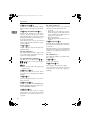
13. {On Hook Dial}} key
22. Status Indicators
Use to dial a number from the numeric
keypad without having to lift the handset.
These indicators keep you informed
about the current status of the unit.
14. {Energy Saver/Clear Modes}} key
Energy Saver: Hold down 2 seconds to
select or deselect energy saver mode.
When the machine is not used for a fixed
period, the machine goes into energy saver mode automatically.
Clear Modes: Press to clear any selected
settings and return the machine to its previous condition.
15. {Copy}} key
Press to copy the original currently loaded in the feeder.
16. Quick Dial keys
Use to dial numbers with a single touch
or to enter letters and symbols. Also use
for the Group Dial function.
17. Quick Dial Key Flip Plate
Flip down to access Quick Dials {01}
} to
}, and flip up to access Quick Dials
{ 15}
{16}
} to {30}
}.
Note
❒ Make sure the plate is flat against the
control panel.
18. {User Tools}} key
Press to enter User Tools mode. These
tools allow you to customize the default
settings.
19. {Help}} key
Press the Help key when you want to
print a help list.
20. {Resolution}} key
Press to switch between Standard, Auto,
Detail and Fine. When the indicator is
not lit, Standard is selected.
21. {Halftone}} key
Select halftone when faxing or copying
photographs or illustrations with fine
gradations. Also can be used for color
originals.
16
• hAlarm
When the alarm indicator flashes,
check the display and read the message to identify the problem (such as a
paper jam or open cover).
• 0Communicating
Lights during fax transmission or reception.
23. {Memory Trans.}} key
Press this key to switch between Memory
Transmission and Immediate Transmission modes.
When the indicator is not lit, Immediate
Transmission is selected, and when the
indicator is lit, Memory Transmission is
selected.
24. Number keys
Use to dial fax numbers or enter the number of copies.
25. {Start}} key
Press to start all tasks.
26. {Clear/Stop}} key
Clear: Deletes one character or digit.
Stop: Interrupts the current operation
(transmission, scanning, copying or
printing).
StellaF1EN-3_FM.book Page 17 Monday, November 12, 2001 11:38 AM
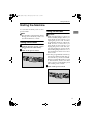
Starting the Machine
Starting the Machine
To start the machine, turn on the
power switch.
Note
❒ This machine automatically enters
Energy Saver mode if you do not
use the machine for a while.
Turning On the Power
A Confirm
that the power cord is
plugged into the outlet firmly.
B Turn on the power switch.
Turning Off the Power
1
Important
❒ Make sure that 100% is shown on
the Fax standby display before you
turn off the power switch or you
unplug the power cord. Fax files
programed in memory will be deleted 12 hours or more after you
turn off the power switch or you
unplug the power cord. The storage time might be shorter if the
surrounding temperature is low or
the machine has been on for less
than a week.
❒ Fax files programmed in memory
will not be deleted while the optional memory card is installed.
When you install the memory card
to the machine, make sure that
100% is shown on the display and
turn off the power switch.
A Turn off the power switch.
17
StellaF1EN-3_FM.book Page 18 Monday, November 12, 2001 11:38 AM
Getting Started
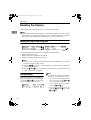
Reading the Display
The machine status and instructions are shown on the display.
1
Note
❒ This machine automatically returns to the standby display if you do not use
the machine for a certain period of time. You can select the period in Fax Reset
Timer. See p.64 “Setting the Fax Reset Timer”, <Advanced Features> .
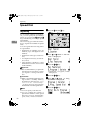
Reading the Display and Using Keys
A
B
C
Display for the machine status or currently selected function.
Display for the messages.
Items which can be selected or specified.
Display for items which can be selected.
Note
❒ Press 0 or 1 to display another function on the LCD display or move the
brackets to select another values.
❒ Press the {OK}
} key to set a selected function or entered value, and return
to the previous display.
❒ Press the {Cancel}
} key to cancel the selected function or entered value, and
return to the previous display.
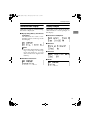
Standby Display
While the machine is in standby display (immediately after it is turned on
or after the {Cancel}
} key is pressed),
the following display is shown.
18
Note
❒ To return the machine to standby
display, do one of the following:
• If you have set the original and
have not pressed the { Start}
}
key, remove the original.
• If you have not set an original,
press the {Cancel}
} key.
• If you are in User Tools mode,
press the {User Tools}
} key or the
{Cancel}
} key.
StellaF1EN-3_FM.book Page 19 Monday, November 12, 2001 11:38 AM
Reading the Display
Communication Display
Display Prompts
While the machine is communicating,
the status is displayed.
Depending on the situation, the machine will show various prompts on
the display.
❖ Display during Memory Transmission
or Reception:
The destination's name or fax
number appears on the top of the
LCD display.
1
❖ Instructions and Requests
❖ Questions
Note
❒ Even when the machine is sending or receiving a fax message
from/into memory, you can
still scan the next original into
memory.
❖ Immediate Transmission:
❖ Selections
❖ Status
19
StellaF1EN-3_FM.book Page 20 Monday, November 12, 2001 11:38 AM
Getting Started
1
20
StellaF1EN-3_FM.book Page 21 Monday, November 12, 2001 11:38 AM
2. Faxing
Transmission Modes
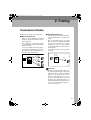
There are two types of transmission.
❖ Memory Transmission
When a fax document is stored in
memory, then transmission starts
automatically.
This makes it convenient when
you would like to take documents
back in a hurry.
You can send the same message to
more than one destination in a single operation. This technique is referred to as Broadcasting.
❖ Immediate Transmission
The machine dials immediately,
and transmits the fax while scanning.
It is convenient when you would
like to send a document immediately, and would like to check
whether you have successfully
connected with the other party's
fax machine.
A fax document is not stored in
memory.
Receiver
Transmitter
(This machine)
Transmitter (This machine)
Receiver
Receiver
Receiver
GDRH240E
GDRH230E
Important
❒ If there is a power failure, the power switch is turned off, or the plug
is pulled out for a certain period of
time, all documents stored in
memory are deleted. As soon as
power is restored, the Power Failure Report is printed to help you
identify deleted documents. See
p.103 “Power Failure Report”,
<Advanced Features> .
21
StellaF1EN-3_FM.book Page 22 Monday, November 12, 2001 11:38 AM
Faxing
Switching between Memory
Transmission and Immediate
Transmission
Press the { Memory Trans.}
} key to
switch between Memory Transmission and Immediate Transmission.
When the indicator of the { Memory
Trans.}
} key is not lit, Immediate
Transmission is selected. When the
indicator of the {Memory Trans.}
} key is
lit, Memory Transmission is selected.
2
Note
❒ You can set whether the machine is
in Memory Transmission mode or
Immediate Transmission mode
right after the power is turned on
with the User Parameters (Switch
00 Bit 6). See p.85 “User Parameters”, <Advanced Features> .
❒ You can set whether the Transmission mode returns to the default
mode after each transmission with
the User Parameters (Switch 01 Bit
7). See p.85 “User Parameters”,
<Advanced Features> .
22
StellaF1EN-3_FM.book Page 23 Monday, November 12, 2001 11:38 AM
Setting Originals
Setting Originals
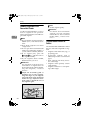
You can set your originals in the Document Feeder.
❖ How to set A4, B5, A5, 51/2"×
×81/2",
81/2"×
×11, 81/2"x14" and 8"x13" size
originals
× 51/2"size
❖ How to set A5 and 81/2"×
originals
Note
❒ When sending a fax, the image
output at the other end depends on
the size and direction of paper
used in the receiver's terminal. If
the receiver does not use paper of
the same size and direction as that
of the original, the fax image size
may be reduced on output,
trimmed at the both edges, or divided into two or more sheets.
When sending an important original, we recommend that you ask
the receiver about the size and direction of the paper used in their
terminal.
❒ Make sure that all ink, correcting
fluid, etc., has completely dried before setting your original. If it is
still wet, the scanne r will be
marked and those marks will appear on the received image.
❒ You can set the original any time
up until you press the {Start}
} key.
2
23
StellaF1EN-3_FM.book Page 24 Monday, November 12, 2001 11:38 AM
Faxing
Loading Originals in the
Document Feeder
Use the Document Feeder to scan in a
stack of originals in one operation.
The Document Feeder can handle single-sided originals.
2
Note
❒ The maximum document length is
600mm (23.7”) with manual assistance.
❒ Place all the originals to be sent in
a single stack.
❒ Do not open the Document Feeder
while it is scanning the originals or
your document could be jammed.
❒ If an original jams, press the
{Clear/Stop}
} key, and then remove
the original carefully.
❒ If your original is bent or folded,
flatten it before you set it.
Reference
For information about the sizes
and number of originals that can
be placed in the Document Feeder,
see p.127 “Originals”, <Advanced
Features> .
A Adjust
the document guide to
match the size of your originals.
Align the edges of your originals
and stack them in the Document
Feeder face up. Adjust the document guide to match the size of
the originals again.
24
Note
❒ Set the originals gently.
Reference
For details about unsuitable
originals, see p.127 “Originals
unsuitable for the Document
Feeder (ADF)”, <Advanced Features> ”.
Original Sizes Difficult to
Detect
The machine finds it difficult to detect
the size of the following kinds of originals.
• Originals with index tabs, tags, or
projecting parts
• Transparent originals, such as
OHP transparencies or translucent
paper
• Dark originals with many characters or drawings
• Originals which partially contain
solid printing
• Originals which have solid printing at their edges
StellaF1EN-3_FM.book Page 25 Monday, November 12, 2001 11:38 AM
Memory Transmission
Memory Transmission
Memory Transmission is convenient
because:
• Fax documents can be scanned
much more quickly. Your scanned
document is stored in the memory,
an d t h en s en t aut o m at i c al l y,
meaning you do not have to wait
for your document to send.
• While your fax document is being
sent, another user can operate the
machine (people do not have to
wait long to use the fax machine).
• You can send the same document
to more than one place with the
same operation. (Broadcasting)
• There are two kinds of Memory
Transmission: Parallel and Normal. See p.31 “Parallel Memory
Transmission”, <Advanced Features> .
Important
❒ If there is a power failure (power
switch is off) or the plug is pulled
out for a certain period of time, all
the files stored in memory are deleted. As soon as the power switch
is turned on, the Power Failure Report is printed to help you identify
deleted files. See p.103 “Power
Failure Report”, <Advanced Features> .
Note
❒ Maximum number of Memory
Transmission files: 140
❒ Maximum number of destinations
per Memory Transmission: 140
❒ Combined total number of destinations that can be stored: 300
❒ The theoretical maximum number
of destinations you can enter with
the number keys is 69, but this will
depend on the amount of memory
currently available.
❒ The number of pages that you can
store in memory depends on the
original images and the scan settings. You can store up to 240 standard pages (ITU-T #1 chart,
Resolution: Standard, Original
Type: Text).
❒ You can set whether the machine
returns to the default transmission
mode after every transmission
with the User Parameters. See p.85
“User Parameters”, <Advanced Features> (Switch 01, Bit 7) .
2
A Make
sure that the Memory
Transmission indicator is lit.
Limitation
❒ If memory is full (0% appears on
the display), Memory Transmission is disabled. Use Immediate
Transmission instead.
If it is not lit, press the { Memory
Trans.}
} key.
25
StellaF1EN-3_FM.book Page 26 Monday, November 12, 2001 11:38 AM
Faxing
B Set the original.
E Press the {Start}} key.
Note
❒ Do not open the Document
Feeder while it is scanning in
originals.
Reference
p.23 “Setting Originals”
2
C Select
any scan settings you require. See p.32 “Scan Settings”.
D Dial. If you wish to send the same
message to more than one destination, press the { OK}
} key, and
then dial another destination. Repeat this step for all destinations.
If you make a mistake, press the
{Clear/Stop}
} key, and then enter the
correct number again.
Note
❒ When specifying a destination
using a Quick Dial, the destination is added even if you did not
press the {OK}
} key.
Reference
p.34 “Dialing”
26
The machine starts scanning the
original.
The machine calls the destination.
The name or fax number which is
programmed as the Own Name or
Own Fax Number at the other end
is shown on the top of the display.
Reference
p.41 “Own Name/Fax Header/Own Fax Number”
After transmission, the machine
will return to standby display.
StellaF1EN-3_FM.book Page 27 Monday, November 12, 2001 11:38 AM
Canceling a Memory Transmission
Canceling a Memory Transmission
Before the Start Key is
Pressed
A Press
the {Energy Saver / Clear
Modes}
} key.
Note
❒ When you have already set the
original, you can also cancel the
transmission by removing the
original from the machine.
During Transmission
Use this procedure to cancel a transmission after the original has been
scanned.
2
Note
❒ If transmission finishes while you
are carrying out this procedure, it
will not be canceled.
❒ If you cancel a message while it is
being sent, transmission is halted
as soon as you finish this procedure. However, some pages of
your message may have already
been sent and will be received at
the other end.
A Press
the {Job Information}
} key,
and confirm that " 1. Cancel TX /
RX " is displayed.
While the Original is Being
Scanned
A Press the {Clear/Stop}} key.
The Information menu is shown.
B Press the {OK } key.
The machine will stop storing the
original and the data will not be
sent.
27
StellaF1EN-3_FM.book Page 28 Monday, November 12, 2001 11:38 AM
Faxing
C Display the file you want to delete.
Enter the file number with the
number keys, or search using 0 or
1.
A Press
the {Job Information}
} key,
and confirm that "1. Cancel TX /
RX" is displayed.
2
D Press the {OK}} key.
E Press 0 or 1 to select " Yes "
F Press the {OK}} key.
The file is erased, and the machine
will return to standby display
While the Original is Awaiting
Transmission
Note
❒ Pages already being sent to the
destination cannot be canceled,
even if you cancel the transmission. The transmission may be sent
before you can cancel it, even if
you start canceling the transmission before it is fully sent.
B Press the {OK}} key.
C Display the file you want to delete.
Enter the file number with the
number keys, or search using 0 or
1.
If you are unable to find the file, it
has already been sent.
D Press the {OK}} key.
E Press 0 or 1 to select " Yes ”.
F Press the {OK}} key.
The file is erased, and the machine
will return to standby display
28
StellaF1EN-3_FM.book Page 29 Monday, November 12, 2001 11:38 AM
Immediate Transmission
Immediate Transmission
Immediate Transmission is convenient when:
• You wish to send a document immediately as it is scanning.
• You wish to quickly check whether
you have successfully connected
with the other party's fax machine.
• Your machine's memory is getting
full.
The machine dials immediately after
you press the {Start}
} key. The message is scanned and transmitted page
by page without being stored in
memory.
Note
❒ You can only specify one destination for Immediate Transmission.
❒ You can set whether the machine is
in Memory Transmission mode or
Immediate Transmission mode
right after the power is turned on
with the User Parameters.
❒ The machine does not redial with
immediate transmission.
B Set your original.
Reference
p.23 “Setting Originals”
C Select
2
any scan settings you require. See p.32 “Scan Settings”.
D Dial.
If you make a mistake, press the
{Clear/Stop}
} key, and then enter the
correct number again.
Reference
p.34 “Dialing”
See p.21 “Chain Dial”, <Advanced Features> .
E Press the {Start}} key.
A Check
that the Memory Transmission indicator is not lit.
If it is lit, press the {Memory Trans.}
}
key.
The machine calls the destination.
While it is dialing, the number or
name which is programmed as the
Own Name or Own Fax Number
in the machine of the other party is
shown on the display. When connected, the machine starts scanning the original.
29
StellaF1EN-3_FM.book Page 30 Monday, November 12, 2001 11:38 AM
Faxing
Reference
p.41 “Own Name/Fax Header/Own Fax Number”
After transmission the machine
will return to standby display.
2
30
StellaF1EN-3_FM.book Page 31 Monday, November 12, 2001 11:38 AM
Canceling an Immediate Transmission
Canceling an Immediate Transmission
Before the Start key is Pressed
A Press
the {Energy Saver / Clear
Modes}
} key.
2
Note
❒ When you have already set the
original, you can also cancel the
transmission by removing the
original from the machine.
After the Start key is Pressed
A Press
the {Clear/Stop}
} key, and
then remove the original.
Note
❒ If the transmission finishes
while you are carrying out this
procedure, it will not be canceled.
31
StellaF1EN-3_FM.book Page 32 Monday, November 12, 2001 11:38 AM
Faxing
Scan Settings
You may wish to send many different
types of fax messages. Some of these
may be difficult to reproduce at the
other end. However, your machine
has three settings that you can adjust
to help you transmit your document
with the best possible image quality.
2
❖ Resolution:
Standard, Detail, Fine, Auto
❖ Original Type:
Halftone
Resolution
Images and text are scanned into the
machine by converting them to a sequence of dots. The frequency of dots
determines the quality of the image
and how long it takes to transmit.
Therefore, images scanned at high
resolution (Fine) have high quality
but transmission takes longer. Conversely, low resolution (Standard)
scanning results in less quality but
your original is sent more quickly.
Choose the setting that matches your
needs based upon this trade off between speed and image clarity.
×3.85 lines/mm, 200×
×100dpi)
❖ Standard (8×
Select for originals containing normal sized characters.
❖ Detail (8×
×7.7 lines/mm, 200×
×200dpi)
Select for originals containing
small characters or when you require greater clarity. This resolution is twice as fine as Standard.
32
❖ Fine (8×
×15.4 lines/mm, 200×
×400dpi)
Select for originals with very fine
details or when you require the
best possible image clarity. This
resolution is four times as fine as
Standard.
❖ Auto (8×
×3.85 lines/mm, 200×
×100dpi)
and (8×
×7.7 lines/mm, 200×
×200dpi)
Select for originals containing normal size characters and small size
charact ers. The m achine will
choose either Standard or Detail
for originals automatically.
Limitation
❒ If the other party's machine does
not support the resolution at
which you are sending, this machine automatically switches to a
resolution which is supported.
❒ Sending with Fine resolution requires that the other party's machine has the capability to receive
fax messages at Fine resolution.
Note
❒ The resolution returns to the default setting after every transmission. You can change this with the
User Parameters (Switch01, Bit7).
See p.85 “User Parameters”, <Advanced Features> .
❒ Auto resolution can be selected
when the machine is in memory
transmission mode and it can not
be selected when the machine is in
immediate transmission mode.
❒ Standard Memory Transmission is
used instead of Parallel Memory
Transmission when Auto resolution is selected.
❒ Auto resolution can not be selected
when copying.
StellaF1EN-3_FM.book Page 33 Monday, November 12, 2001 11:38 AM
Scan Settings
❒ Usually, transmission takes shorter when Auto resolution is selecte d t h an D et a il r e so lu tion is
selected. However, transmission
for some originals containing normal size characters and small size
characters takes longer because
resolution modes are changed.
A Press
the {Resolution}
} key to
switch between resolutions. The
indicators above the key show the
current selection. When none of
the indicators are lit, Standard is
selected.
Original Type
If your original contains photographs
or colored illustrations, select Halftone to optimize image clarity.
❖ Halftone
Select Halftone to send an original
containing a halftone image such
as a photograph or a color original.
2
Note
❒ If you select Halftone, resolution is
automatically set to Detail. Even if
you do not select Halftone again,
the resolution will not return to
Standard.
❒ If you select Halftone, the transmission will take longer than when
it is not selected.
❒ You can set whether the machine
returns to the Original Type default setting after every transmission with the User Parameters
(Switch 01 Bit 7). See p.85 “User
Parameters”, <Advanced Features> .
A Press the {Halftone}} key.
33
StellaF1EN-3_FM.book Page 34 Monday, November 12, 2001 11:38 AM
Faxing
Dialing
There are four main ways to dial a
number:
❖ Entering Numbers Directly
See p.34 “Entering Numbers Directly”
2
❖ Using Quick Dials:
See p.35 “Using Quick Dials”
❖ Using Speed Dials:
See p.36 “Using Speed Dials”
❖ Using Groups
See p.37 “Using Groups”
Entering Numbers Directly
Enter numbers directly using the
number keys on the right side of the
operation panel.
Note
❒ Maximum length of a fax number:
254 digits.
❒ You can insert pauses and tones in
a fax number. See p.35 “Pause”,
p.35 “Tone”
A Make sure that the machine is in
standby display.
B Set your original and select any
scan settings you require.
C Enter
the fax number with the
number keys.
The digits appear on the display as
you enter them.
34
Note
❒ If you make a mistake, press the
{ Clear/Stop } key and enter
again.
❒ If you wish to send this message
to more than one destination,
press the {OK}
} key, and then enter the next destination.
D Press the {Start}} key.
-Limitations when dialing with
the number keys
Fax numbers entered with the number keys are stored in internal memory (separate from memory for storing
original data). Therefore, using the
number keys, you cannot program 69
or more numbers for the following:
• Destinations specified in a Memory Transmission (including Polling
Reception)
• Destinations specified in a Group
For example, when 60 destinations
are registered in a Group with the
number keys, only 9 destinations can
be dialed for Memory Transmission
from the number keys.
StellaF1EN-3_FM.book Page 35 Monday, November 12, 2001 11:38 AM
Dialing
Note
❒ If a memory file is awaiting transmission and the "Exceeded the
Max.Cannot Add" message is displayed when dialing with the
number keys, you cannot dial any
more numbers. That is because the
fax numbers have been dialed with
the number keys for some of the
files awaiting transmission. When
these files have been sent and their
fax numbers are deleted from
memory, additional fax numbers
can be dialed.
❒ The display shows the percentage
of free memory space for storing
originals. Since fax numbers are
stored in separate memory, dialing
fax numbers with the number keys
does not change the percentage on
the display.
Pause
Press the {Pause/Redial}
} key when dialing or storing a number to insert
about a two-second pause.
Tone
This function allows a machine connected to a pulse dialing line to send
tone signals (for example if you want
to use a special service on a tone dialing line). When you press the {p}
key, the machine dials the number using tone signals.
2
Note
❒ You cannot place a tone before the
first digit of a fax number.
❒ Some services may not be available
when using the {p} key.
❒ A tone is shown as a "•" on the display.
Using Quick Dials
You can specify destinations simply
by pressing the Quick Dial.
You must program the destination's
fax number in a Quick Dial beforehand.
Additionally, you can store a name
for the destination in Quick Dials.
Note
❒ To register, edit, or delete a Quick
Dial, see p.46 “Quick Dial”
❒ To check the contents of all Quick
dials, print the quick Dial list. See
p.56 “Printing Reports/Lists”,
<Advanced Features> .
❒ You can have the label stored with
a Quick Dial printed on the first
page received at the other end.
Note
❒ You cannot insert a pause before
the first digit of a fax number.
❒ A pause is shown as a "-" on the
display.
❒ You can insert a pause in numbers
stored in Quick Dials and Speed
Dials.
Reference
p.34 “Dialing”
35
StellaF1EN-3_FM.book Page 36 Monday, November 12, 2001 11:38 AM
Faxing
A Make sure that the machine is in
standby display.
B Set your original and select any
scan settings you require.
2
C Press the Quick Dial key in which
the destination's number is programmed.
If the destination's name has been
stored, the name is shown on the
display. If it is not, the fax number
is shown.
Note
❒ If you make a mistake, press the
{Clear/Stop}
} key and try again.
❒ If you wish to dial another destination, press the {OK}
} key and
dial another fax number.
D Press the {Start}} key.
36
Using Speed Dials
You can specify destinations simply
by pressing the {Speed Dial}
} key and a
Speed Dial code (00 to 49).
You must store the destination's fax
number in a Speed Dial beforehand.
Additionally, you can store a name
for the destination in Speed Dials.
Note
❒ To register, edit, or delete Speed
Dial entries, see p.52 “Speed Dial”
❒ To check the contents of all Speed
Dials, print the Speed Dial list. See
p.56 “Printing Reports/Lists”,
<Advanced Features> .
❒ You can use codes 00-49 for Speed
Dials.
❒ If a search letter is registered with
a Speed Dial, you can find this
number quickly using the Telephone Directory function. See p.22
“Telephone Directory”, <Advanced
Features> .
❒ You can have the label stored with
a Speed Dial printed on the first
page received at the other end.
A Make sure that the machine is in
standby display.
B Set your original and select any
scan settings you require.
StellaF1EN-3_FM.book Page 37 Monday, November 12, 2001 11:38 AM
Dialing
C Press the {Speed Dial}} key.
D Enter the two digit code (00 to 49)
for the destination with the number keys.
Note
❒ When a name is stored for the
destination, the name is displayed, and when no name is
stored, the fax number is displayed.
❒ If you wish to dial another destination, press the {OK}
} key and
dial another fax number.
❒ If you make a mistake, press the
{Clear/Stop}
} key, and try again.
E Press the {Start}} key.
Using Groups
You can store multiple destinations as
a single Group and simply specify a
particular Group.
You must store the destinations' fax
number in a Group beforehand.
Additionally, you can store destination names and a Group name in
Groups.
The method for specifying Groups
differs according to the way they
were programmed.
• When programmed in a Quick Dial: Press the Quick Dial key.
• When not programmed in a Quick
Dial: Use the User Function Key.
Group Dial is assigned to {F4}
} as a
default setting. If this setting is
changed, program the Group function in a User Function key ( {F1}
}
to {F5}
} ). When you want to specify a destination, press the User
Function key in which the Group
Function is programmed, and then
press the Group number with the
number keys. See p.53 “User Function Keys”, <Advanced Features> .
2
Limitation
❒ You cannot use Immediate Transmission to send Groups. You can
only use Memory Transmission.
Note
❒ Quick Dials programmed for
Groups cannot be used for any other function.
❒ To register, edit, or delete Groups,
see p.57 “Groups”
❒ To check the contents of all Groups,
print the Group Dial list. See p.56
“Printing Reports/Lists”, <Advanced Features> .
37
StellaF1EN-3_FM.book Page 38 Monday, November 12, 2001 11:38 AM
Faxing
2
When Specifying a Group with a Quick
Dial
When Specifying a Group with the Group
key
Make sure that the Memory Transmission indicator is lit, if not, press
the {Memory Trans.}
} key to light it.
Make sure that the Memory Transmission indicator is lit, if not, press
the {Memory Trans.}
} key to light it.
Note
❒ You must register Groups to Quick
Dials beforehand. See p.57
“Groups”
Note
❒ Group Dial is assigned to {F4}
} as a
default setting. If this setting is
changed, you must program the
Group function in a User Function
key beforehand. See p.53 “User
Function Keys”, <Advanced Features> .
A Make sure that the machine is in
standby display.
B Set your original and select any
scan settings you require.
A Make sure that the machine is in
standby display.
B Set your original and select any
C Press the Quick Dial key in which
scan settings you require.
the Group is programmed.
C Press the User Function key proNote
❒ If you make a mistake, press the
{Clear/Stop}
} key and try again.
❒ If you wish to dial another destination, press the { OK}
} key,
and then dial another fax number.
grammed with the Group function.
D Enter the Group number (1 to 5)
with the number keys.
D Press the {Start}} key.
Note
❒ If you want to specify another
Group, press the {OK}
} key, and
then repeat step C above.
❒ If you make a mistake, press the
{ Clear/Stop}
} key, and the display will return to that in step B.
E Press the {Start}} key.
38
StellaF1EN-3_FM.book Page 39 Monday, November 12, 2001 11:38 AM
Reception Modes
Reception Modes
The machine can treat incoming fax
messages and telephone calls in three
ways.
❖ Manual Receive
Use this mode if your line is shared
by a fax machine and a telephone
but you wish to answer all calls
yourself and decide whether they
are fax documents or telephone
calls. You must manually press the
{Start}
} key to receive a fax.
The machine will ring continuously until you answer the call, so you
have to be near the machine at all
times.
❒ Set a smaller number of rings
for the telephone answering
machine than for the fax machine.
❒ It could not be work correctly
depends on a telephone answering machine.
2
Selecting the Reception Mode
Select the Reception Mode using the
following procedure.
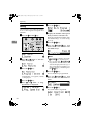
A Press the {User Tools}} key.
❖ Auto Receive
Use this mode if you have a dedicated fax line. The machine assumes all calls are fax documents.
It will ring once to alert you of an
incoming call, and then starts receiving.
❖ Auto Select
In this mode, the machine rings a
number of times. You can answer
the call while the machine is ringing. If you do not answer the call,
the machine automatically changes to receive fax messages.
Note
❒ You can change the number of
rings. See p.61 “Setting the Auto
Ring Time”, <Advanced Features> .
B Press 0 or 1 until " 2. Fax Features " is displayed.
C Press the {OK}} key.
❒ When the other party send a fax
message, the machine changes
to receive the fax message automatically.
❒ You can connect a telephone answering machine with Auto Select.
39
StellaF1EN-3_FM.book Page 40 Monday, November 12, 2001 11:38 AM
Faxing
D Press 0 or 1 until " 3. Setup " is
displayed.
E Press the {OK}} key.
2
F Press 0 or 1 until “ 5. Reception
Mode “ is displayed.
G Press the {OK}} key.
H Press 0 or 1 to select the reception mode.
I Press the {OK}} key.
J Press the {User Tools}} key to return to the standby display.
40
StellaF1EN-3_FM.book Page 41 Monday, November 12, 2001 11:38 AM
3. Registering
Own Name/Fax Header/Own Fax Number
Make sure that all necessary settings
are made before connecting your machine to the telephone line.
❖ Own Name
This should be your name or company name, in 20 characters or less.
During communication, if the other party's fax machine supports
Own Name, this replaces the Own
Fax Number that follows. This
name will appear on the display of
the other party's fax machine, and
the name registered on that machine will appear on yours.
Limitation
❒ The registered name will not be
used unless the other party has
the same machine of the same
make that supports the Own
Name function.
Note
❒ In some areas, the Own Fax
Number is preprogrammed by
your service representative, and
cannot be re-programmed by
the user.
Important
❒ When sending a fax, your Own Fax
Number is required by international law. You cannot legally connect a fax machine to the telephone
system if the Own Fax Number is
not programmed.
Note
❒ You can confirm the Own Name,
Fax Header, and Own Fax Number
settings in the User Parameters
List. See p.90 “Printing the User
Parameter List”, <Advanced Features> .
❖ Fax Header
This is ordinarily your name or
company name. Your fax header
can be up to 32 characters long,
and is printed on the header of every page you send.
❖ Own Fax Number (Required by international law)
This is your fax machine's phone
number that must include country
and area codes using 20 characters
or less. During any communication, your Own Fax Number appears on their display. (Conversely
their Own Fax Number appears on
your display.)
41
StellaF1EN-3_FM.book Page 42 Monday, November 12, 2001 11:38 AM
Registering
Registering
F Press 0 or 1 until "6. Fax Information" is displayed.
The following procedure describes
how to make initial settings.
A Press the {User Tools}} key.
G Press the {OK}} key.
Confirm that " 1. Own Name " is
displayed.
3
H Press the {OK}} key.
I Enter your Own Name.
B Press 0 or 1 until "2. Fax Features" is displayed.
C Press the {OK}} key.
Note
❒ If you want to erase a character
in the name, press the
{Clear/Stop}
} key.
Reference
See p.67 “Entering Characters”for how to enter characters.
D Press 0 or 1 until " 3. Setup " is
displayed.
E Press the {OK}} key.
J Press the {OK}} key.
Your Own Name is programmed.
K Press 0 or 1 until " 2. Fax Header
" is displayed.
42
StellaF1EN-3_FM.book Page 43 Monday, November 12, 2001 11:38 AM
Own Name/Fax Header/Own Fax Number
L Press the {OK}} key.
The programmed Own Name is
displayed.
M Enter your Fax Header.
If your Fax Header is the same as
your Own Name, go to step N.
N Press the {OK}} key.
Your Fax Header is programmed.
O Press 0 or 1 until " 3. Own Fax
Number " is displayed.
Note
❒ The format of the number is
normally as follows: International Dial Prefix, Your Country
Code, Your Area Code (do not
insert a pause after your Area
Code), followed by your telephone number. Check the International Dialing Prefix and the
Country Code with your local
telecommunications operator.
Characters you can enter include
numerals 0-9, plus symbols (+),
and spaces.
3
R Press the {OK}} key.
Your Own Fax Number is programmed.
S Press the {User Tools}} key to return to standby display.
P Press the {OK}} key.
Q Enter your Own Fax Number.
43
StellaF1EN-3_FM.book Page 44 Monday, November 12, 2001 11:38 AM
Registering
Editing
F Press 0 or 1 until "6. Fax Information" is displayed.
The following procedure describes
how to edit initial settings.
A Press the {User Tools}} key.
3
G Press the {OK}} key.
H Press 0 or 1 to select the item
that you want to edit.
I Press the {OK}} key.
J Press the {Clear/Stop}}
key, and
t h e n r ee n t e r t h e N u mb er o r
Name.
B Press 0 or 1 until " 2. Fax Features " is displayed.
C Press the {OK}} key.
D Press 0 or 1 until " 3. Setup " is
displayed.
E Press the {OK}} key.
44
K Press the {OK}} key.
L Press the {User Tools}} key to return to standby display.
StellaF1EN-3_FM.book Page 45 Monday, November 12, 2001 11:38 AM
Own Name/Fax Header/Own Fax Number
Deleting
F Press 0 or 1 until "6. Fax Information" is displayed.
The following procedure describes
how to delete initial settings.
A Press the {User Tools}} key.
G Press the {OK}} key.
3
H Press 0 or 1 to select the item
that you want to delete.
B Press 0 or 1 until " 2. Fax Fea-
I Press the {OK}} key.
J Press the {Clear/Stop}} key.
K Press the {OK}} key.
L Press the {User Tools}} key to return to standby display.
tures " is displayed.
C Press the {OK}} key.
D Press 0 or 1 until " 3. Setup " is
displayed.
E Press the {OK}} key.
45
StellaF1EN-3_FM.book Page 46 Monday, November 12, 2001 11:38 AM
Registering
Quick Dial
To save time, you can program a fax
number that you use often into a
Quick Dial key. Then, whenever you
are sending a message to that location, just press that Quick Dial key to
dial.
Note
❒ You can confirm fax numbers
stored in Quick Dials on the Quick
Dial List. See p.56 “Printing Reports/Lists”, <Advanced Features> .
A Press the {User Tools}} key.
Registering
3
The following procedure describes
how to register fax numbers in Quick
Dial keys. There are 30 Quick Dials
available.
You can register the following items
in each key:
• Destination fax number (up to 254
digits)
• Destination name (up to 20 characters)
• Label Insertion (whether to print
the destination name on faxes sent
to this number)
Important
❒ We recommend that you print the
Quick Dial list and keep it when
you program or change fax numbers. See p.56 “Printing Reports/Lists”, <Advanced Features> .
Limitation
❒ When a registered Quick Dial key
is being used for a standby Memory Transmission, the message "
This Dial is in Use. Cannot
Change. " is shown and you can-
B Press 0 or 1 until " 2. Fax Features " is displayed.
C Press the {OK}} key.
Confirm that " 1. Program / Delete
" is displayed.
D Press the {OK}} key.
not change the destination for this
key.
Confirm that " 1. Prog. Quick Dial "
is displayed.
46
StellaF1EN-3_FM.book Page 47 Monday, November 12, 2001 11:38 AM
Quick Dial
E Press the {OK}} key.
H Press the {OK}} key.
The fax number is programmed.
F Display the number of the Quick
Dial key you want to register.
Press a Quick Dial key, or search
using 0 or 1.
I Enter the destination name.
3
Note
❒ If a Quick Dial has already been
registered, the contents are displayed. Press 0 or 1 to select a
Quic k Dial that is not pro grammed, and then press the
{OK}
} key.
G Enter a fax number with the number keys.
Note
❒ Under rare circumstances, garbled characters may appear
during name registration if you
use the { Pause/Redial}
} key to
display the fax number of parties located in other countries. If
this happens, simply delete the
garbled characters using 0 or
1 and the { Clear/Stop}
} keys,
then go on to enter the name.
J Press the {OK}} key.
The name is programmed.
Note
❒ If you make a mistake, press the
{Clear/Stop}
} key and try again.
❒ If you press the {Pause/Redial}
}
key, the last 10 fax numbers dialed are displayed. Press 0 or
1 to select the fax number you
want to specify, and then press
the {OK}
} key.
❒ Make sure a Dial Option is
stored in one of the User Function keys, and then enter the
other party's fax number, and
then press the User Function
key that contains the Dial Option. You can specify SUB or
SEP, SID and PWD. See p.25
“SEP Code”, <Advanced Features> or p.26 “SUB Code”,
<Advanced Features> .
K Press
0 or 1 to select "On" or
"Off".
Note
❒ Label insertion allows the receiver's name that is program m ed in Qu ic k Dial or
Speed Dial to be printed on the
fax when it is received at the
other end. See p.8 “Label Insertion”, <Advanced Features> .
47
StellaF1EN-3_FM.book Page 48 Monday, November 12, 2001 11:38 AM
Registering
L Press the {OK}} key.
If you want to store another Quick
Dial, go to step E.
M Press the {User Tools}} key to return to standby display.
3
Editing
The following procedure describes
how to edit fax numbers registered in
Quick Dial keys.
A Press the {User Tools}} key.
D Press the {OK}} key.
Confirm that " 1. Prog. Quick Dial "
is displayed.
E Press the {OK}} key.
F Display the number of the Quick
Dial key you want to edit.
Press a Quick Dial key, or search
using 0 or 1.
G Press the {OK}} key.
H Press the {Clear/Stop}}
key, and
then reenter the fax number with
the number keys.
B Press 0 or 1 until " 2. Fax Features " is displayed.
C Press the {OK}} key.
Confirm that " 1. Program / Delete
" is displayed.
48
Note
❒ If you make a mistake, press the
{Clear/Stop}
} key and try again.
❒ If you press the {Pause/Redial}
}
key, the last 10 fax numbers dialed are displayed. Press 0 or
1 to select the fax number you
want to specify, and then press
the {OK}
} key.
❒ Make sure a Dial Option is
stored in one of the User Function keys, and then enter the
other party's fax number and
press the User Function key that
contains the Dial Option. You
can specify SUB or SEP, SID and
PWD. See p.25 “SEP Code”,
<Advanced Features> or p.26
“SUB Code”, <Advanced Features> .
I Press the {OK}} key.
StellaF1EN-3_FM.book Page 49 Monday, November 12, 2001 11:38 AM
Quick Dial
J Press
the {Clear/Stop}
} key, and
th en r een ter th e des tination
name.
Note
❒ Under rare circumstances, garbled characters may appear
during name registration if you
use the { Pause/Redial}
} key to
display the fax number of parties located in other countries. If
this happens, simply delete the
garbled characters using 0 or
1 and the { Clear/Stop}
} keys,
and then go on to enter the
name.
Deleting
The following procedure describes
how to delete fax numbers registered
in Quick Dial keys.
Limitation
❒ When a Quick Dial key is being
used for a standby Memory Transmission, the message " This Dial
is in Use. Cannot Delete. " is
shown and you cannot delete the
destination for this key.
3
A Press the {User Tools}} key.
K Press the {OK}} key.
The name is programmed.
L Press
0 or 1 to select "On" or
"Off".
Note
❒ Label insertion allows the receiver's name that is program m ed in Quick Dial or
Speed Dial to be printed on the
fax when it is received at the
other end. See p.8 “Label Insertion”, <Advanced Features> .
B Press 0 or 1 until " 2. Fax Features " is displayed.
C Press the {OK}} key.
M Press the {OK}} key.
If you want to store another Quick
Dial, go to step E.
Confirm that " 1. Program / Delete
" is displayed.
D Press the {OK}} key.
N Press the {User Tools}} key to return to standby display.
49
StellaF1EN-3_FM.book Page 50 Monday, November 12, 2001 11:38 AM
Registering
3
E Press 0 or 1 until " 2. Del. Quick
Dial " is displayed.
Quick Dial Key Label (Dial label)
F Press the {OK}} key.
You can print a template that can be
used to make labels for Quick Dial
keys. The template will have destination or Group names programmed in
Quick Dial keys.
G Display the Quick Dial key that
you want to delete.
Press a Quick Dial key or search by
pressing 0 or 1.
The number of the Quick Dial key
and the fax number or name are
displayed.
H Press the {OK}} key.
The stored data (fax number and
name) is deleted.
If you want to delete another
Quick Dial key, go to step F.
I Press the {User Tools}} key to return to standby display.
50
Limitation
❒ Set the label paper to landscape in
the Bypass Tray. Portrait position
will print the wrong size.
Note
❒ To print the label template, see
p.56 “Printing Reports/Lists”,
<Advanced Features> .
StellaF1EN-3_FM.book Page 51 Monday, November 12, 2001 11:38 AM
Quick Dial
Label paper
AUG. 21. 2002 11:22AM
3
51
StellaF1EN-3_FM.book Page 52 Monday, November 12, 2001 11:38 AM
Registering
Speed Dial
Registering
If you register numbers in Speed Dials, you can specify the fax number
simply by pressing the {Speed Dial}
}
key, and entering a two-digit Speed
Dial number.
The following procedure describes
how to register fax numbers in Speed
Dials.
You can register the following items
in a Speed Dial:
• Destination fax number (up to 50
numbers, up to 254 digits for each
number)
• Destination name (up to 20 characters)
• A Telephone Directory search letter (A to Z)
• Label Insertion (whether to print
the destination name on faxes sent
to this number)
3
Important
❒ We recommend that you print the
Speed Dial list and keep it when
you register or change a destination.
Limitation
❒ When a registered Speed Dial is being used for a standby Memory
Transmission, the message " This
A Press the {User Tools}} key.
B Press 0 or 1 until " 2. Fax Features " is displayed.
C Press the {OK}} key.
Confirm that " 1. Program / Delete
" is displayed.
D Press the {OK}} key.
E Press 0 or 1 until
" 3. Prog.
Speed Dial " is displayed.
Dial is in Use. Cannot Change.
" is shown and you cannot change
the destination for this Quick Dial. .
Note
❒ You can specify codes 00 to 49.
❒ You can confirm the contents of
Speed Dial numbers in the Speed
Dial List. See p.56 “Printing Reports/Lists”, <Advanced Features> .
52
F Press the {OK}} key.
StellaF1EN-3_FM.book Page 53 Monday, November 12, 2001 11:38 AM
Speed Dial
G Display the number of the Speed
Dial you want to register (00 to
49).
Enter the Speed Dial number with
the number keys, or search using
0 or 1.
Note
❒ If you make a mistake, press the
{Clear/Stop}
} key and try again.
❒ If a Speed Dial number has already been stored, the contents
are displayed. Press 0 or 1 to
select an unprogrammed number, then press the {OK}
} key.
H Enter a fax number with the number keys.
J Enter the Destination name.
Note
❒ If a destination name is already
registered in the Speed Dial, the
name is shown on the display. If
you wish to change the destination name, press the
{Clear/Stop}
} key, and then enter
another name.
3
K Press the {OK}} key.
The search letter is registered.
L Press
0 or 1 to select "On" or
"Off".
Note
❒ If you make a mistake, press the
{Clear/Stop}
} key and try again.
❒ If you press the {Pause/Redial}
}
key, the last 10 fax numbers dialed are displayed. Press 0 or
1 to select the fax number you
want to specify, and then press
the {OK}
} key.
I Press the {OK}} key.
Note
❒ Label insertion allows the destination name that is program m ed in Qu ic k Dial or
Speed Dial to be printed on the
fax when it is received at the
other end. See p.8 “Label Insertion”, <Advanced Features> .
M Press the {OK}} key.
The fax number is programmed.
If you want to store another Speed
Dial number, go to step F.
N Press the {User Tools}} key to return to standby display.
53
StellaF1EN-3_FM.book Page 54 Monday, November 12, 2001 11:38 AM
Registering
Editing
The following procedure describes
how to edit registered Speed Dial
numbers.
A Press the {User Tools}} key.
3
F Press the {OK}} key.
G Display the number of the Speed
Dial you want to edit (00 to 49).
Enter the Speed Dial number with
the number keys, or search using
0 or 1.
H Press the {OK}} key.
I Press the {Clear/Stop}}
key, and
then reenter a fax number with
the number keys.
B Press 0 or 1 until " 2. Fax Features " is displayed.
C Press the {OK}} key.
Note
❒ If you make a mistake, press the
{Clear/Stop}
} key and try again.
❒ If you press the {Pause/Redial}
}
key, the last 10 fax numbers dialed are displayed. Press 0 or
1 to select the fax number you
want to specify, and then press
the {OK}
} key.
J Press the {OK}} key.
The fax number is programmed.
Confirm that " 1. Program / Delete
" is displayed.
D Press the {OK}} key.
E Press 0 or 1 until
K Press
the {Clear/Stop}
} key, and
then reenter the Destination
name.
" 3. Prog.
Speed Dial " is displayed.
L Press the {OK}} key.
The search letter is registered.
54
StellaF1EN-3_FM.book Page 55 Monday, November 12, 2001 11:38 AM
Speed Dial
M Press
0 or 1 to select "On" or
"Off".
Deleting
The following procedure describes
how to delete fax numbers in Speed
Dials.
Note
❒ Label insertion allows the destination name that is program m ed in Quick Dial or
Speed Dial to be printed on the
fax when it is received at the
other end. See p.8 “Label Insertion”, <Advanced Features> .
N Press the {OK}} key.
Limitation
❒ If a registered Speed Dial is being
used for a standby Memory Transmission, the message " This Dial
is in Use. Cannot Delete. " is
shown and you cannot delete the
destination for this Speed Dial.
3
A Press the {User Tools}} key.
If you want to edit another Speed
Dial number, go to step F.
O Press the {User Tools}} key to return to standby display.
B Press 0 or 1 until " 2. Fax Features " is displayed.
C Press the {OK}} key.
Confirm that " 1. Program / Delete
" is displayed.
D Press the {OK}} key.
55
StellaF1EN-3_FM.book Page 56 Monday, November 12, 2001 11:38 AM
Registering
E Press 0 or 1 until " 4. Del. Speed
Dial " is displayed.
F Press the {OK}} key.
3
G Display the Speed Dial number
you want to delete (00 to 49).
Enter the Speed Dial number with
the number keys or search using 0
or 1.
The Speed Dial number and the fax
number or name are displayed.
H Press the {OK}} key.
The programmed data (fax number and name) is deleted.
If you want to delete another
name, go to step F.
I Press the {User Tools}} key to return to standby display.
56
StellaF1EN-3_FM.book Page 57 Monday, November 12, 2001 11:38 AM
Groups
Groups
If you regularly broadcast documents
to the same set of destinations, you
can combine these numbers into a
group. Then just select the group and
each number will be dialed in sequence automatically.
There are two ways of programming
Groups:
❖ Registering groups in Quick Dial keys
If you register a group in a Quick
Dial key, you can specify that
group by pressing a Quick Dial
key. However, if you use Quick
Dial keys to register groups, you
will be able to register fewer Quick
Dial keys .
Note
❒ You cannot register another
function (Quick Dials) in a
Quick Dial key already used for
a group. Also, you cannot register groups in a Quick Dial key
already used for another function.
❖ Assigning the Group Functions to the
Group key
To assign the Group Function to
the Group key, you must first assign the Group function to a User
Function key. To send a fax, press
the Group key, and then enter the
group number (1 to 5). To select a
Group using a Group key, one
more step is required than when
using a Quick Dial key. However,
multiple Groups (a maximum of
five) can be stored in a Group key,
thus leaving the Quick Dial keys to
be used more effectively.
Registering
You can register the following items
in a Group:
• Destination fax numbers
• Group name (up to 20 characters)
You can enter destination numbers
using Quick Dial keys, Speed Dials,
or the number keys.
3
Note
❒ You can register up to 5 Groups.
❒ The maximum number of destinations you can register in a Group is
140.
❒ The combined maximum number
of destinations you can register in
all Groups is 149. This 149 can be
composed of up to 30 Quick Dial
numbers, 50 Speed Dial numbers
and 69 numbers entered directly
with the number keys.
❒ The number of destinations that
can be registered with the number
keys depends on how the machine
is used. In theory you can register
up to a combined maximum of 69
destinations with the number keys
for all groups.
❒ If you register 69 destinations with
the number keys, Memory Transmission using the number keys becom e s un ava ilable , an d on ly
Immediate Transmission is available.
57
StellaF1EN-3_FM.book Page 58 Monday, November 12, 2001 11:38 AM
Registering
❒ If you register a Group with the
number keys when a file is waiting
to be transmitted, a message is
shown. You sometimes cannot register any more destinations even
when the number of specified destination is 68 or less.
❒ It is recommended that you print
the Group Dial list and keep it
when you register or change destinations. See p.56 “Printing Reports/Lists”, <Advanced Features> .
❒ If you register the same destination
in different Groups, it is only
counted as one item.
❒ The table below shows how to
count numbers.
3
Group1
Group2
Quick Dial
[01]
Quick Dial
[01]
Quick Dial
[03]
Quick Dial
[05]
Quick Dial
[05]
Speed Dial
[02]
Speed Dial
[02]
Speed Dial
[04]
Speed Dial
[04]
A Press the {User Tools}} key.
B Press 0 or 1 until " 2. Fax Features " is displayed.
Total
Number of
items
9
C Press the {OK}} key.
Confirm that " 1. Program / Delete
" is displayed.
D Press the {OK}} key.
E Press 0 or 1 until
" 5. Prog.
Group Dial " is displayed.
Speed Dial
[06]
Speed Dial
[09]
Number
keys
12345678
Number
keys
87654321
58
Number
keys
12345678
F Press the {OK}} key.
StellaF1EN-3_FM.book Page 59 Monday, November 12, 2001 11:38 AM
Groups
G Display the number of the Group
you want to register (1 to 5).
Enter the group number with the
number keys, or search using 0 or
1.
J Press the 0 or 1 to select " Add "
or " Exit ".
K Press the {OK}} key.
If you selected " Exit ", go to step M.
Note
❒ If you make a mistake, press the
{Cancel}
} key and try again.
❒ If a group has already been
stored, the contents are displayed. Press 0 or 1 to select a
group number that is not programmed, and then press the
{OK}
} key.
❒ If a group is programmed, but
no name is specified, the group
number only is displayed on the
lower line of the display.
H Specify the destination using one
L Repeat step G to K for all the desM Enter the Group name.
Note
❒ If the Group name is already
registered, it is shown on the
display. If you wish to change
the Group name, p ress the
{Clear/Stop}
} key, and then enter
another name.
of the following three methods:
Enter the fax number with the
number keys.
N Press the {OK}} key to register the
Press a Quick Dial key.
O Press 0 or 1 to select "Yes" or
Press the { Speed Dial}
} key, and
then enter a Speed Dial number.
I Press the {OK}} key.
The destination is programmed.
3
tinations you want to register in
the Group.
Group.
"No" to be programmed in the
Quick Dial key. Then press the
{OK}
} key.
If you selected " No ", go to step R.
P Press
the Quick Dial key you
want to register in the Group.
Q Press the {OK}} key.
59
StellaF1EN-3_FM.book Page 60 Monday, November 12, 2001 11:38 AM
Registering
R Press the {User Tools}} key to return to standby display.
C Press the {OK}} key.
Editing
You can edit the group name or add
destinations for programmed groups.
To edit a destination:
• For destinations programmed in
Quick Dial or Speed Dial, edit the
contents of the programmed Quick
Dial or Speed Dial.
• For destinations programmed
with the number keys, delete the
destination you want to edit from
the group, and then program the
new destination.
3
Editing a Group Name
A Press the {User Tools}} key.
Confirm that " 1. Program / Delete
" is displayed.
D Press the {OK}} key.
E Press 0 or 1 until
" 5. Prog.
Group Dial " is displayed.
F Press the {OK}} key.
G Display the number of the group
you want to edit (1 to 5).
Enter the group number with the
number keys, or search using 0 or
1.
H Press the {OK}} key.
I Press 0 or 1 to select "No".
B Press 0 or 1 until " 2. Fax Features " is displayed.
J Press the {OK}} key.
60
StellaF1EN-3_FM.book Page 61 Monday, November 12, 2001 11:38 AM
Groups
K Press
the {Clear/Stop}
} key, and
then enter the new name.
Adding a Fax Number to a Group
A Press the {User Tools}} key.
Note
❒ If you want to delete a character
of the name, press the
{Clear/Stop}
} key.
❒ If you press the {Cancel}
} key,
the display will return to that
shown for step E.
3
L Press the {OK}} key.
The name is changed.
M Press 0 or 1 to select "Yes" if the
gr ou p w as p rog rammed in a
Quick Dial, or select "No" if it was
not.
N Press the {OK}} key.
B Press 0 or 1 until " 2. Fax Features " is displayed.
C Press the {OK}} key.
If you selected "No", go to step P .
Confirm that " 1. Program / Delete
" is displayed.
Note
❒ If you want to edit a programmed Quick Dial key, press
the Quick Dial key, and then the
{OK}
} key.
D Press the {OK}} key.
E Press 0 or 1 until
" 5. Prog.
Group Dial " is displayed.
O Press the {OK}} key.
F Press the {OK}} key.
If you want to program another
group name, go to step F.
P Press the {User Tools}} key to return to standby display.
61
StellaF1EN-3_FM.book Page 62 Monday, November 12, 2001 11:38 AM
Registering
G Display the number of the group
to which you want to add a number (1 to 5).
Enter the group number with the
number keys, or search using 0 or
1.
M Specify the destination using one
of the following three methods:
Enter the fax number with the
number keys.
Press a Quick Dial key.
H Press the {OK}} key.
3
Press the {Speed Dial}
} key and enter a Speed Dial number.
I Press 0 or 1 to select "Yes".
J Press the {OK}} key
Note
❒ If you have finished adding destinations, select "Exit" and go to
step Q.
K Press 0 or 1 to select "Add".
Note
❒ If you specify a Quick Dial or
Sp eed Dial that is not programmed, " This key is Not
Programmed " is displayed. Respecify the destination.
N Press the {OK}} key.
The destination is added.
O To
add another destination, repeat steps K to N.
P If you have finished adding destinations, select "Exit".
L Press the {OK}} key.
Q Press the {OK}} key.
Note
❒ If you want to change the group
name, press the {Clear/Stop}
} key
and enter the new name.
62
StellaF1EN-3_FM.book Page 63 Monday, November 12, 2001 11:38 AM
Groups
R Press the {OK}} key.
S Press 0 or 1 to select "Yes" if the
gr ou p w as p rog rammed in a
Quick Dial, or select "No" if it was
not.
T Press the {OK}} key.
If you selected "No", go to step V.
Deleting
The following procedure describes
how to delete a destination from a
group.
• When you delete a destination
from a group programmed in a
Quick Dial or a Speed Dial, the
contents of the Quick Dial or Speed
Dial are not deleted.
3
To delete a destination from a group
A Press the {User Tools}} key.
Note
❒ If you want to edit a programmed Quick Dial, press the
Quick Dial key, and then the
{OK}
} key.
U Press the {OK}} key.
If you want to add another destination to the group, go to step F.
B Press 0 or 1 until " 2. Fax Features " is displayed.
V Press the {User Tools}} key to return to standby display.
C Press the {OK}} key.
Confirm that " 1. Program / Delete
" is displayed.
D Press the {OK}} key.
63
StellaF1EN-3_FM.book Page 64 Monday, November 12, 2001 11:38 AM
Registering
E Press
0 or 1 until " 5. Prog.
Group Dial " is displayed.
F Press the {OK}} key.
3
G Display the group number for the
destination you want to delete (1
to 5).
Enter the group number with the
number keys, or search using 0 or
1.
L Press the {OK}} key.
M Press 0 or 1 to display the destination you want to delete.
N
Press the {OK}
} key.
To delete another destination, repeat steps L to N.
O If you are finished deleting destiH Press the {OK}} key.
I Press 0 or 1 to select "Yes".
J
Press the {OK}
} key.
K Press 0 or 1 to select "Delete".
64
nations, press 0 or 1 to select
"Exit".
P Press the {OK}} key.
Q Press the {OK}} key.
R Press 0 or 1 to select "Yes" if the
g rou p was p rog rammed in a
Quick Dial, or select "No" if it was
not.
StellaF1EN-3_FM.book Page 65 Monday, November 12, 2001 11:38 AM
Groups
S Press the {OK}} key.
If you selected "No", go to step U.
Note
❒ If you want to edit a programmed Quick Dial key, press
the Quick Dial key and then the
{OK}
} key.
T Press the {OK}} key.
If you want to delete another destination from the group, go to step
F.
U Press the {User Tools}} key to return to standby display.
B Press 0 or 1 until " 2. Fax Features " is displayed.
C Press the {OK}} key.
3
Confirm that " 1. Program / Delete
" is displayed.
D Press the {OK}} key.
E Press 0 or 1 until " 6. Del. Group
Dial " is displayed.
F Press the {OK}} key.
To delete an entire group
A Press the {User Tools}} key.
G Display the number of the group
you want to delete (1 to 5).
Enter the group number with the
number keys, or search using 0 or
1.
H Press the {OK}} key.
The entire Group is deleted.
I Press the {User Tools}} key to return to standby display.
65
StellaF1EN-3_FM.book Page 66 Monday, November 12, 2001 11:38 AM
Registering
- To change and delete Quick
Dials programmed as groups:
To store an entire group under a different Quick Dial key, or to delete the
group from the Quick Dial key altogether, perform the following procedure:
A Press the {User Tools}
} key.
B Press 0 or 1 until " 2. Fax Features " is displayed.
C Press the {OK}
} key.
D Press the {OK}
} key, and then press
0 or 1 to display "5. Prog. Group
Dial".
E Press the {OK}
} key.
F Enter the group number (1 to 5).
G Press the {OK}
} key.
H Press 0 or 1 to select "No", and
then press the {OK}
} key.
I Press the {OK}
} key.
J If you want to change the Quick
Dial key, press "Yes", and if you
want to delete the Quick Dial key,
press "No".
K Press the {OK}
} key.
If you selected "No" in step J, the
Quick Dial key is deleted. Go to
step N.
L If you want to change the Quick
Dial key, press the new Quick Dial
key.
M Press the {OK}
} key.
The Quick Dial key is changed.
N Press the {User Tools}
} key to return
to standby display.
3
66
StellaF1EN-3_FM.book Page 67 Monday, November 12, 2001 11:38 AM
Entering Characters
Entering Characters
This section describes how to enter characters.
Available Characters
• Letters:
ABCDEFGHIJKLMNOPQRSTUVWXYZabcdefghijklmnopqrstuvwxyz
• Symbols:
– _ (space) . , ( ) / @ & $ ! ' # p % + : ; < = > ? ^ [ ] ` { | } ∼
• Numbers:
0123456789
3
Keys
1. Quick Dial 01 to 09 or Quick Dial
16 to 24 (A to Z)
3. {Space}} key (Quick Dial 14 or 29)
Press these keys to enter upper and lower
case letters.
Every time you press the same Quick
Dial key, one of the three letters printed
on a Quick Dial key is displayed. For example, when you press Quick Dial 01, the
letter displayed changes in the order A →
B → C → A as you press the key. Press 1
to move the cursor and enter the next
character.
4. {Symbols}} key (Quick Dial 15 or
30)
Press to enter a space.
Press to enter symbols.
5. 0 or 1
Use to move the cursor left or right and to
select a symbol.
6. Number keys
Use to enter numbers.
2. {Shift}} key (Quick Dial 13 or 28)
Use to switch between upper and lower
case.
67
StellaF1EN-3_FM.book Page 68 Monday, November 12, 2001 11:38 AM
Registering
7. {Clear/Stop}} key
Deletes the character at the cursor position. If the cursor is placed to the right of
the last character at the right end of a line,
that character will be deleted.
How to Enter Characters
The following procedure describes
how to enter characters.
3
Note
❒ When you enter a character, it is
shown at the position of the cursor.
If there is a character at the cursor
position, the entered character is
shown before the character.
A Enter
letters, symbols or num-
bers.
Characters are entered and the cursor moves.
• For letters, press the Quick Dial
keys (01 to 09 or 16 to 24). When
the desired letter is displayed,
press 1.
• For symbols, press the {Symbols}
} key and 0 or 1 to select
the symbol, and then press the
{OK}
} key.
• For numbers, press the number
key.
Note
❒ When you make a mistake,
press the {Clear/Stop}
} key.
❒ When you want to insert a character, move the cursor to the
character right of the position
you want to enter the character.
Now the inserted character is
shown left of the cursor position.
B Press the {OK}} key.
68
-Wild Cards
When you register other parties' Own
Name or Own Fax Numbers for multiple destinations, you can register a sequence of characters common to these
identifications as a wild card instead of
registering every identification.
If a destination has an Own Name or
Own Fax Number containing a wild
card, the machine determines that the
destination matches the registered
destination.
❖ Not using a wild card
Destination to be
registered
(Own Name)
Number of registered identifications
NEW YORK
BRANCH
3
HONG KONG
BRANCH
SYDNEY BRANCH
❖ Using a wild card
Destination to be
registered
(Own Name)
Number of registered identifications
BRANCH
1
Note
❒ You can register up to 30 wild
cards.
❒ Compare identifications by neglecting spaces.
❒ You can use wild cards for the following functions:
• Memory Lock
See p.72 “Memory Lock”, <Advanced Features> .
• Forwarding
See p.76 “Forwarding”, <Advanced Features> .
StellaF1EN-3_FM.book Page 69 Monday, November 12, 2001 11:38 AM
4. Troubleshooting
Loading Paper in the Main Paper Tray
If there is no paper in the main paper
tray, the B indicator on the control
panel lights.
Use the following procedure to load
the paper.
C Push the metal plate down, and
then square the paper and load it
in the tray.
Important
❒ When loading paper, be careful
not to pinch your fingers inside the
machine.
❒ Before loading paper, make sure
that the machine is not outputting
a copy or received document.
Note
❒ Regarding paper types and sizes
that can be used, see p.128 “Paper”, <Advanced Features> .
❒ If you want to change the paper
size, see p.62 “Changing the Paper
Size Setting”, <Advanced Features>
.
Important
❒ Do not stack paper over the limit mark.
A Make
sure that the main paper
tray is not being used.
B Pull out the main paper tray until
it stops.
❒ If paper is left in the main paper
tray and you add paper, a misfeed might occur.
Note
❒ Shuffle the paper before setting
it in the tray.
D Push the main paper tray in until
it stops.
69
StellaF1EN-3_FM.book Page 70 Monday, November 12, 2001 11:38 AM
Troubleshooting
Adjusting Volume
You can change the volume of the following sounds the machine makes.
B Press 0 or 1 until " 2. Fax Features " is displayed.
❖ On Hook
Sounds when you press the {On
Hook Dial}
} key.
❖ Transmission
Sounds when the machine send a
message.
❖ Reception
Sounds when the machine receives
a message.
4
❖ Dialing
After pressing the {Start}
} key, this
sound is made until the line connects to the destination.
❖ Key Tone
Sounds when keys on the Control
panel are pressed.
❖ Alarm
The sound to signal something going amiss.
A Press the {User Tools}} key.
C Press the {OK}} key.
Confirm that " 1. Program / Delete
" is displayed.
D Press 0 or 1 until " 3. Setup " is
displayed.
E Press the {OK}} key.
Confirm that " 1. Monitor Volume
" is displayed.
F Press the {OK}} key.
G Press 0 or 1 to select the item
you want to adjust, and then press
the {OK}
} key.
70
StellaF1EN-3_FM.book Page 71 Monday, November 12, 2001 11:38 AM
Adjusting Volume
H Press 0 or 1 to adjust the volume.
I Press the {OK}} key.
The volume is adjusted.
If you want to adjust another item,
repeat steps G to I.
4
J Press the {User Tools}} key to return to standby display.
71
StellaF1EN-3_FM.book Page 72 Monday, November 12, 2001 11:38 AM
Troubleshooting
Clearing Original Jams
If an original is jammed, the hindicator on the Control Panel blinks and “
Clear Misfed Original (S) “ is displayed.
Perform the following procedure to
clear the jammed original.
C Remove the original.
A Open the ADF cover.
4
D Close the ADF unit and ADF cov-
er making sure it clicks firmly
into place.
B While pushing the release button,
lift the ADF unit.
72
StellaF1EN-3_FM.book Page 73 Monday, November 12, 2001 11:38 AM
Clearing a Copy, Fax, or Print Jam
Clearing a Copy, Fax, or Print Jam
If a copy, fax, or printed paper is
jammed, the hindicator on the Control Panel blinks and “ Clear Misfed
Paper “ is displayed.
Perform the following procedure to
clear the jammed paper.
The inside of the machine could be
very hot. Do not touch the parts with
a label indicating the “hot surface”.
Otherwise an injury might occur.
Important
❒ The fusing unit and surrounding
area inside the machine becomes
hot during printing. To avoid injury when removing paper jams, do
not touch any parts other than
those specified in this manual.
B Open the blue cover.
4
C Pull out the jammed paper.
Note
❒ If paper jams occur in the optional
paper tray unit, see p.102 “Clearing a Copy, Fax or Print Jam”, <Advanced Features> .
Inside the Machine
A Open the right cover.
When paper is caught in the
lower unit
A Pull out the jammed paper.
D Close the right cover making sure
it clicks firmly into place.
73
StellaF1EN-3_FM.book Page 74 Monday, November 12, 2001 11:38 AM
Troubleshooting
Error Messages
The following messages may appear while you are operating or programming
the machine.
Message
Problem/Solution
No Files Exist
No polling reception operations have been programmed.
There are no documents in memory waiting for transmission.
Incorrect file number. Check the file number and try again.
Cannot Combine : (currently selected function)
4
Appears when you attempt to select a function that cannot
be used in combination with another currently selected
function.
This Key is in Use as a Group Dial This Quick Dial Key has a Group stored in it.
This Key is in Use as a Program
This Quick Dial Key has a Keystroke Program stored in it.
This Key is in Use as a Quick Dial This Quick Dial Key has a Quick Dial stored in it.
This Key is Not Programmed
Either:
• This Quick Dial Key does not contain a number.
• This Quick Dial Key does not contain a Keystroke Program.
This Speed Dial No. is Not Programmed
This Speed Dial number does not contain a number.
This Dest. is Already Selected
Either:
• This number is already included in this Group.
• The same destination was specified more than once.
Insert Pause “-” After Area Code
You must add a pause after your area code when you input
your fax terminal's own telephone number.
Replace Toner
The toner cassette is empty. Install a new cassette.
Clear Misfed Original(s)
A document is jammed in the feeder.
Clear Misfed Paper
Paper is jammed in the printer.
Close Front/Right Cover
A cover is not closed properly. Check that all covers are
closed.
Machine is in Use. Please Wait
Machine cannot print a list/file, because the plotter is not
ready.
Call Service
Machine is out of order. Contact your service representative.
Check Paper Size. Press OK to
Correct.
The size of the installed paper does not match the currently
selected paper size.
} key, and then set the paper size or install the
Press the {OK}
appropriate paper.
74
StellaF1EN-3_FM.book Page 75 Monday, November 12, 2001 11:38 AM
Error Messages
Message
Problem/Solution
This Dial is in Use. Cannot Delete.
This Dial is in Use. Cannot
Change.
This Quick Dial is being used (such as for a Send Later
Transmission).
Some Page(s) are Blank
An almost entirely blank document was scanned. Check
your document.
Reset Toner Correctly
The toner cassette is not set correctly.
Toner is Almost Empty
The toner cassette is nearly empty.
Copy Mode Locked
Copy mode is disabled. Enable it with the User Parameters.
Change ADF Maintenance Kit
Replace the ADF Maintenance Kit.
Scanner Needs Cleaning
Wipe the exposure glass and the white strip.
4
75
StellaF1EN-3_FM.book Page 76 Monday, November 12, 2001 11:38 AM
Troubleshooting
When the Receive File Indicator is Lit
If the Receive File indicator is lit, a message has been received but could not be
printed for some reason. The message was stored in memory (Substitute Reception). When you solve the problem, the message will be automatically printed
out. The table below lists some problems that could have caused Substitute Reception to take place and their solutions.
Why Substitute Reception Indication/Status
Occurred
Paper has run out
B is lit red.
Solution
Load paper.
See p.69 “Loading Paper in the Main
Paper Tray”.
4
Toner is empty
D is lit red.
Replace the toner cassette.
See Cp.117 “Replacing the Toner
Cassette”, <Advanced Features> .
Note
❒ Even if there is no toner left, you
can still send fax messages.
Paper is jammed
h is lit red.
Remove the jammed paper.
p.73 “Clearing a Copy, Fax, or Print
Jam”
Cover is open
76
h is lit red.
Close the cover.
StellaF1EN-3_FM.book Page 77 Monday, November 12, 2001 11:38 AM
Solving Problems
Solving Problems
This table lists some common problems and their solutions.
Problem
Required Action
Printed or sent image contains spots.
The Document Feeder (ADF) or scanner is dirty. Clean
them.
Make sure that ink or correction fluid is dry before setting the original.
Reference
See p.112 “Cleaning the Scanner”, <Advanced Features> .
Received image is too light.
Request the sender to increase the image density.
4
When using moist, rough or processed paper, the
printed image may be hard to see. Only use recommended paper.
Reference
See p.127 “Originals”, <Advanced Features> .
When D appears on the display, toner is beginning to
run out. Replace the toner cassette soon.
Reference
See p.117 “Replacing the Toner Cassette”, <Advanced Features> .
Message appears blank at the other
end.
The original was set upside down. Set it properly.
Reference
See p.23 “Setting Originals”.
You want to cancel a Memory Transmission.
} key.
If the original is being stored, press the {Clear/Stop}
Reference
See p.27 “Canceling a Memory Transmission”.
If the original is being sent, use "Cancel TX/RX" in the
Job Information menu.
Reference
See p.13 “Canceling Transmission or Reception”,
<Advanced Features> .
You want to cancel an Immediate
Transmission.
} key.
Press the {Clear/Stop}
Reference
See p.31 “Canceling an Immediate Transmission”.
You cannot add any destinations to a
Group, even though the maximum
number of destinations has not been
reached.
69 destinations have been programmed with the number keys. Program more numbers with Quick Dials or
Speed Dials.
Reference
See p.57 “Groups”
77
StellaF1EN-3_FM.book Page 78 Monday, November 12, 2001 11:38 AM
INDEX
A
E
Add Toner indicator, 15
ADF Cover, 13
Adjusting Volume
Alarm, 70
Dialing, 70
Key Tone, 70
On Hook, 70
Reception, 70
Transmission, 70
Advanced Features, 11
Auto Receive, 39
Auto Select, 39
B
Editing
Fax Header, 44
Groups, 60
Own Fax Number, 44
Own Name, 44
Quick Dial, 48
Speed Dial, 54
Energy Saver/Clear Modes key, 16
Energy Saver key, 16
Entering Characters, 67
Error Messages, 74
External Telephone Connector, 14
F
Basic Features (this manual), 11
Bypass Tray, 13
Fax Header, 41
Editing, 44
Registering, 42
Faxing, 21
Fine, 32
Front Cover, 13
Front View, 13
C
Cancel key, 15
Characters
Available Characters, 67
Entering, 67
Keys, 67
Clear Modes key, 16
Clear/Stop key, 16
Components, 13
Control Panel, 13, 15
Copy key, 16
CSI→Own Fax Number, 41
G
G3 Line Connector, 14
Getting Started, 13
Group Name, 60
Groups, 37, 57
Deleting, 63
Dialing, 37
Editing, 60
Registering, 57
D
Deleting
Groups, 63
Quick Dial, 49
Speed Dial, 55
Detail, 32
Dialing, 34
Entering Numbers Directly, 34
Using Groups, 37
Using Quick Dials, 35
Using Speed Dials, 36
Dial label, 50
Display, 18
Document Feeder (ADF), 13, 24
78
H
Halftone, 33
Halftone key, 16
Handset (Option), 14
Help key, 16
How to Read this Manual, 10
I
Immediate Transmission, 21, 29
Canceling, 31
StellaF1EN-3_FM.book Page 79 Monday, November 12, 2001 11:38 AM
J
Job Information key, 15
L
LCD display, 15
Loading Paper, 69
Load Paper Indicator, 15
Lower Right Cover, 13
Low-power Mode, 7
M
Main Paper Tray, 69
Manual Receive, 39
Manuals for This Machine, 11
Memory Card Slot, 14
Memory Trans. key, 16
Memory Transmission, 21, 25
Canceling, 27
N
NOTICE, 1
Number keys, 16
Dialing, 34
O
OK key, 15
On Hook Dial key, 16
Original guide, 14
Original Output Tray, 14
Original Tray, 14
Original Type, 32, 33
Output Tray, 13
Output tray guide, 14
Own Fax Number, 41
Editing, 44
Registering, 42
Own Name, 41
Editing, 44
Registering, 42
P
Paper Tray Unit, 13
Pause, 35
Pause/Redial key, 15
Power Switch, 14
Q
Quick Dial, 46
Deleting, 49
Dialing, 35
Dial label, 50
Editing, 48
Registering, 46
Quick Dial keys, 16
R
Receive File Indicator, 15, 76
Reception Mode
Selecting, 39
Reception Modes
Auto Receive, 39
Auto Select, 39
Manual Receive, 39
Registering
Fax Header, 41
Groups, 57
Own Fax Number, 41
Own Name, 41
Quick Dial, 46
Speed Dial, 52
Release Button, 13
Resolution, 32
Resolution key, 16
Right Cover, 14
RTI→Own Name, 41
S
Scan Settings, 32
Setting Originals, 23
Side View, 14
Solving Problems, 77
Speed Dial, 52, 54, 55
Deleting, 55
Dialing, 36
Editing, 54
Registering, 52
Speed Dial key, 15
Standard, 32
Starting the Machine, 17
Start key, 16
Status Indicators
Alarm, 16
Communicating, 16
Substitute Reception, 76
79
StellaF1EN-3_FM.book Page 80 Monday, November 12, 2001 11:38 AM
T
Tone, 35
Transmission Modes, 21
Trans. Option key, 15
Troubleshooting, 69
Error Messages, 74
TTI→Fax Header, 41
U
User Function keys, 15
User Tools key, 16
V
Ventilation hole, 14
Volume, 70
W
Wild Cards, 68
80
UE
USA
H555
Paper type: Wood Free 80g/m2, Paper Thickness=100 µm // Pages in book=84 // Print scale=81%
Gap (when printed at 81% scale) = Pages in book × Paper thickness / 2 = 4.200000 mm
Introduction
USA
This manual contains detailed instructions on the operation and maintenance of this machine. To get
maximum versatility from this machine all operators should carefully read and follow the instructions in
this manual. Please keep this manual in a handy place near the machine.
❖ FCC Requirements
Please read the Safety Information in the Basic Features manual before using this machine. It contains
important information related to USER SAFETY and PREVENTING EQUIPMENT PROBLEMS.
Notes:
Some illustrations in this manual might be slightly different from the machine.
Certain options might not be available in some countries. For details, please contact your local dealer.
Laser Safety:
CDRH Regulations
This equipment complies with requirements of 21 CFR subchapter J for class 1 laser products. This
equipment contains a 5 milliwatt, 760–800 nanometer wavelength, GaAIAs laser diode. This equipment does not emit hazardous light, since the beam is totally enclosed during all customer modes of
operation and maintenance.
Warning:
Use of controls or adjustment or performance of procedures other than those specified in this manual
might result in hazardous radiation exposure.
Two kinds of size notation are employed in this manual. With this machine refer to the inch version.
For good copy quality, the supplier recommends that you use genuine toner from the supplier.
The supplier shall not be responsible for any damage or expense that might result from the use of parts
other than genuine parts from the supplier with your office products.
Important
Contents of this manual are subject to change without prior notice. In no event will the company be liable for direct, indirect, special, incidental, or consequential damages as a result of handling or operating the machine.
Power Source:
115V, 60Hz
Please be sure to connect the power cord to a power source as above. For details about power source,
see Chapter 10, “Connecting the Power and Switching On” in the Advanced Features manual.
Declaration of Conformity
Product Name: Facsimile
Model Number: 3725/F9103/LF310AG/3310L
Responsible party: Ricoh Corporation
Address: 5 Dedrick Place, West Caldwell, NJ 07006
Telephone number: 973-882-2000
This device complies with part 15 of FCC Rules.
Operation is subject to the following two conditions:
1. This device may not cause harmful interference, and
2. this device must accept any interference received,
including interference that may cause undesired operation.
1. This equipment complies with Part 68 of the FCC rules. On the cover of this equipment is a label
that contains, among other information, the FCC registration number and ringer equivalence
number (REN) for this equipment. If requested, this information must be provided to the telephone company.
2. The following is applicable only for an equipment using an analog G3 line.
This equipment uses the RJ11C USOC jack.
An FCC compliant telephone cord and modular plug is provided with this equipment. This equipment is designed to be connected to the telephone network or premises wiring using a compatible modular jack that is Part 68 compliant. See the Operating Instructions for details.
3. The REN is used to determine the quantity of devices which may be connected to the telephone
line. Excessive REN's on the telephone line may result in the devices not ringing in response to
an incoming call. Typically, the sum of the REN's should not exceed five (5.0). Contact the telephone company to determine the maximum REN for the calling area.
4. If this equipment causes harm to the telephone network, the telephone company will notify you
in advance that temporary discontinuance of service may be required. But if advance notice is
not practical, the telephone company will notify the customer as soon as possible. Also, you will
be advised of your right to file a complaint with the FCC if you believe it is necessary.
5. The telephone company may make changes to its facilities, equipment, operations, or procedures that could affect the operation of the equipment. If this happens, the telephone company
will provide advance notice so that you can make the necessary modifications to maintain uninterrupted service.
6. In the event of operation problems (document jam, copy jam, communication error indication),
refer to the solving problems section in this manual.
7. If you cannot correct the problem, please contact the RICOH CORP. CUSTOMER SUPPORT
DEPT. at 1-800-FASTFIX for repair or warranty information. If the equipment is causing harm
to the telephone network, the telephone company may request you to disconnect the equipment
from the network until the problem is resolved.
8. This equipment cannot be used with telephone company-provided coin service. Connection to
Party Line Service is subject to state tariffs.
❖ WHEN PROGRAMMING EMERGENCY NUMBERS AND/OR MAKING TEST CALLS TO
EMERGENCY NUMBERS:
1. Remain on the line and briefly explain to the dispatcher the reason for the call before hanging up.
2. Perform such activities in the off-peak hours, such as early morning hours or late evenings.
CANADA
The Industry Canada label identifies certified equipment. This certification means that the equipment
meets telecommunications network protective, operational, and safety requirements as prescribed in
the appropriate Terminal Equipment Technical Requirements document(s). The department does not
guarantee the equipment will operate to the user's satisfaction.
Before installing this equipment, users should ensure that it is permissible to be connected to the facilities of the local telecommunications company. The equipment must also be installed using an acceptable method of connection. The customer should be aware that compliance with the above conditions
may not prevent degradation of service in some situations.
Repairs to certified equipment should be coordinated by a representative designated by the supplier.
Any repairs or alterations made by the user to this equipment, or equipment malfunctions, may give the
telecommunications company cause to request the user to disconnect the equipment.
User should ensure for their own protection that the electrical ground connections of the power utility,
telephone lines, and internal metallic water pipe system, if present, are connected together. This precaution may be particularly important in rural areas.
Caution: Users should not attempt to make such connections themselves, but should contact the appropriate electric inspection authority, or electrician, as appropriate.
The Ringer Equivalence Number (REN) assigned to each terminal device provides an indication of the
maximum number of terminals allowed to be connected to a telephone interface. The termination on
an interface may consist of any combination of devices subject only to the requirement that the sum of
the Ringer Equivalence Numbers of all the devices does not exceed 5.
In accordance with IEC 60417, this machine uses the following symbols for the main power switch:
a means POWER ON.
b means POWER OFF.
Copyright © 2001
Paper type: OK Prince Eco G100(55kg), Paper Thickness=80 µm // Pages in book=84 // Print scale=81%
Gap (when printed at 81% scale) = Pages in book × Paper thickness / 2 = 4.200000 mm
Operating Instructions
<Basic Features>
Type for 3725/F9103/LF310/3310L
Printed in China
UE USA H555-8600
1
Getting Started
2
Faxing
3
Registering
4
Troubleshooting
For safety, please read this manual carefully before you use this product and keep it handy
for future reference.