1
PMA8000-SR Audio Control Panel with Integrated
SIRIUS Satellite Radio
Congratulation on your selection of the PS Engineering PMA8000SR Audio Control Panel with integrates SIRIUS Satellite Radio inflight entertainment. This products represents the most completely
integrated audio system ever designed for General Aviation. This
manual provides detailed operating instructions for the PS Engineering PMA8000-SR, Audio Selector Panel/Intercom Systems.
Please read it carefully before using the equipment so that you can
take full advantage of its capabilities.
This publication is divided into four sections covering the basic operating areas of the PMA8000-SR systems. They are Audio Selector,
Intercom, SIRIUS Satellite Radio and Marker Beacon Receiver.
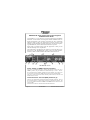
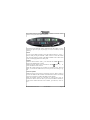
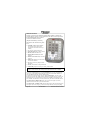
PMA8000-SR controls
Power Switch (1) (EMG-Fail Safe Operation)
Unit power is turned on and off by pushing the volume knob. In the OFF or
"EMG" position, the pilot headset is connected directly to Com 1. This allows communication capability regardless of unit condition. Any time power
is removed or turned OFF, the audio selector will revert to fail-safe mode.
The power switch controls all audio selector panel functions, intercom and
marker beacon receiver.
Communications Transmit (XMT) Selection (2)
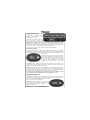
There are two pushbuttons associated with the transmitter selection. The two
lower buttons (item 2) control which transceiver is selected for transmit. The
top row of pushbuttons labeled COM 1 and COM 2 allows selection of the
receiver audio.
Push the lower button to select the desired COM transmitter.
Page 2
202-880-0000
PMA8000-SR Pilot Guide R5