1
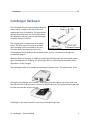
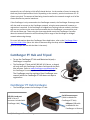
Commands ...................................................................................................................................................... 25 CamRanger Hardware The CamRanger device is turned on by sliding the power switch, located on the side of the unit, towards the front of the device. The green power light will illuminate when the unit is powered on. Any additional switch present on the CamRanger currently serves no function. The charging port is located next to the power switch. The male micro B end of the provided white charging cord is connected to this port. The other end of the charging cord can be connected to a female USB port that provides power, such as a computer or through the provided AC adapter. When the device is charging, an additional yellow light will illuminate next to the green power light indicating that it is charging. The yellow light will turn off leaving only the green power light when it is fully charged. The CamRanger battery is accessible by removing the bottom cover. The bottom cover is the side with the CamRanger serial number. Simply grasp the side edge/corner of the cover near the USB connector and pull back to remove. To replace the cover, first place the two lower tabs into the slots and then snap in the top. CamRanger is not water-‐resistant in any way and should not get wet. © CamRanger – Patent Pending 3