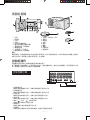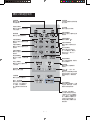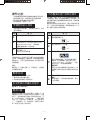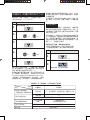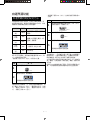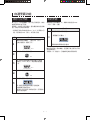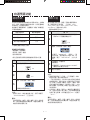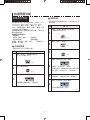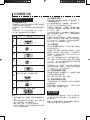
1
香港電器安全規格 (國際電工委員會規格適合) 雙重燒烤及熱風對流微波爐 DOUBLE GRILL CONVECTION MICROWAVE OVEN R R-892M(S) 使用說明書 OPERATION MANUAL 1128 R-892M_Cover.indd 1 11/28/07 11:00:40 AM 目 錄 CONTENTS 頁數 Page 警告 ...............................................................................C-1 特別注意事項及警告 ..................................................C-2 安裝事宜 .......................................................................C-3 各部位名稱...................................................................C-4 控制板操作 控制板顯示器 ..........................................................C-4 觸按式軟鍵控制板 .................................................C-5 操作之前 烹調開始前之須知 .................................................C-6 暫停/取消 .................................................................C-6 取消烹調中所編定的程序 .....................................C-6 電源中斷 ..................................................................C-6 不放置食品進行加熱的場合.................................C-6 時鐘設定(時鐘時間的設定方法) ....................C-7 節能模式 ..................................................................C-7 自選烹調功能 自選烹調時間的設定方法 .....................................C-8 順序分段烹調 ..........................................................C-9 即時烹調 ..................................................................C-9 緩速烹調 ................................................................C-10 燒烤烹調 ................................................................C-11 預熱功能 ...............................................................C-11 熱風對流烹調 .......................................................C-12 (1) 不預熱烹調 ...................................................... C-12 (2) 預熱烹調 ...................................................... ....C-12 混合烹調 ...............................................................C-13 (1) 混合烹調 ...................................................... ...C-13 (2) 使用先預熱之對流混合烹調 .........................C-14 自動烹調功能 自動烹調須知 ........................................................C-15 如何使用自動操作 ...............................................C-15 其他簡便功能 減少/增加功能的設定 ..........................................C-16 烹調進行時時間的調節 .......................................C-16 功能查閱 (INFO) ...............................................C-17 (1) 自動開始功能 ..................................................C-17 (2) 兒童安全鎖 ......................................................C-17 (3) 示範功能 ..........................................................C-17 (4) 切換語言顯示功能 ................................. ........C-17 (5) 烹調步驟提示功能 ................................. ........C-17 提示聆聲 ................................................................C-17 清洗及注意事項 ........................................................C-18 維修前的檢查 ............................................................C-19 規格 .............................................................................C-19 烹調指南 微波烹調技巧 ........................................................C-20 燒烤及混合烹調食譜 ...........................................C-21 自動燒烤烹調指南 ...............................................C-25 自動粥飯烹調指南 ...............................................C-26 自動烘烤烹調指南 ...............................................C-27 自動翻熱烹調指南 ...............................................C-28 自動烘焗烹調指南 ...............................................C-29 自動烘焗烹調食譜 ...............................................C-30 自動蒸烹調指南....................................................C-31 香脆小食烹調指南 ...............................................C-32 薄餅烹調指南 ........................................................C-33 簡便解凍功能指南 ...............................................C-35 Warning ...............................................................E-1 Special Notes and Warning ...............................E-2 Installation Instructions ......................................E-3 Oven Diagram .....................................................E-4 Operation of Control Panel Control Panel Display .......................................E-4 Touch Control Panel Layout .............................E-5 Before Operating Getting Started..................................................E-6 Stop / Clear ........................................................E-6 To Cancel Programme During Cooking ..........E-6 Power Interruption ...........................................E-6 Heating without Food .......................................E-6 Clock Set Mode (Clock Setting) .......................E-7 Energy Save Mode ..........................................E-7 Manual Operations Microwave Time Cooking.................................E-8 Sequence Cooking ............................................E-9 Instant Cook ......................................................E-9 Slow Cook .......................................................E-10 Grill Cooking ...................................................E-11 Preheating .......................................................E-11 Convection Cooking .......................................E-12 (1) To Cook without Preheating ..................E-12 (2) To Cook with Preheating ........................E-12 Mix Cooking ....................................................E-13 (1)To Cook by Mix Cooking .........................E-13 (2)To Cook by Convec Mix with Preheating ................................................E-14 Automatic Operations Notes for Automatic Operations ...................E-15 How to Use Automatic Operations ...............E-15 Other Convenient Features Less / More Setting .........................................E-16 Adjust Time During Cooking ..........................E-16 Help Feature (INFO) ........................................E-17 (1) Auto Start ................................................E-17 (2) Child Lock................................................E-17 (3) Demonstration Mode .............................E-17 (4) Language ................................................E-17 (5) Help .........................................................E-17 Alarm ...............................................................E-17 Care and Cleaning ............................................E-18 Service Call Check ............................................E-19 Specifications ....................................................E-19 Cooking Guides Microwave Cooking Techniques....................E-20 Grill and Grill Mix Recipes .............................E-21 Auto Grill Menu Guide ...................................E-25 Auto Rice Menu Guide ...................................E-26 Auto Roast Menu Guide .................................E-27 Auto Reheat Menu Guide ...............................E-28 Auto Bake Menu Guide ..................................E-29 Auto Bake Recipe ............................................E-30 Auto Steam Menu Guide ...............................E-31 Crispy Snack Menu Guide ..............................E-32 Pizza Menu Guide ..........................................E-33 Easy Defrost Menu Guide ..............................E-35 警 告 重要安全須知:請細心閱讀﹐並儲存作將來參考之用。 1. 為防止意外發生﹐請注意並遵守下列事項: a. 切勿讓食品烹調過度。 b. 烹調食品前﹐先拆去綁紮包裝袋的金屬線。 c. 切勿用微波爐來加熱食油或油炸食品﹐因為油溫會變得很高而難以控制。 d. 使用即棄容器如塑膠﹐紙或其他可燃燒物料作烹調時﹐應小心注意冒煙或燃燒的現象。 e. 烹調中發生冒煙或起火現象時﹐請不要立刻拉開爐門﹐應先停止操作及拔除電源線﹐或將保險絲或電流斷 路器之開關關閉。 f. 每次使用後﹐應先以濕布﹐再以乾布除去噴濺於波導管罩及爐內的食物及油垢。積存在微波爐內部的油污 可能引致黑煙或起火。 2. 在使用微波爐烹調時應儘量避免食物爆裂或過長時間沸煮。微波爐可以快速加熱食品和飲料﹐因此您在烹調食物時 一定要根據食物的種類和重量選擇合適的烹調時間和微波功率。如果您無法確定烹調所需時間和微波功率﹐您可以 先選擇低微波功率以及短時間烹調﹐再根據實際需要增加時間或功率加熱食物。 請遵守下列事項: a. 切勿用密封容器進行烹調。如帶有瓶蓋或奶嘴的奶瓶均屬密封容器。 b. 烹調時間切勿過長。 c. 加熱液體時﹐一定要用闊口容器。 d. 待烹調後最少20秒才取出食物﹐以免煮滾的液體爆濺。 e. 烹調前及烹調中將液體攪拌﹐盛載食物的器皿﹐或放匙羹或其他器具於器皿內時﹐應特別小心處理。 3. 本微波爐僅可作為家庭烹調使用﹐並僅應用於食物和飲料之加熱﹐烹調和解凍。 本微波爐不適合作為商業或實驗室之用或用來加熱治療工具如:小麥包等。 4. 微波爐門夾有雜物或沒有關閉好時﹐切勿加以使用。 5. 請勿試圖自行更改或維修此微波爐。若由未接受過聲寶公司正式訓練之合格技術人員進行任何服務或維修﹐是非常 危險的。尤其當維修時如需要開啟微波爐蓋﹐可能會導致微波洩漏。 6. 微波爐發生故障時﹐應先請聲寶技術人員加以檢查修理後才繼續使用。請注意爐門必須可以關緊及沒有以下故障: (1) 爐門(彎曲﹑扭翹)﹐ (2) 鉸鏈和鎖扣(破斷﹐鬆落)﹐ (3) 爐門密封襯墊﹐襯墊層表面及微波 爐爐腔(彎曲或變形)﹐ (4) 爐門密封襯墊表面有燒焦的痕跡。 7. 小心從微波爐內取出食物﹐避免微波爐門鎖到器具﹐衣物或裝飾物。 8. 微波爐正在操作時切勿以物件﹐特別是金屬製品刺向機門的網狀表面或爐門與微波爐之間的位置。 9. 切勿改造或損壞門鎖。 10. 烹調結束後欲取出爐內食品時﹐務請戴上烹調手套﹐以免燙傷﹔並應小心揭蓋﹐以免蒸氣灼傷皮膚。 11. 電源供應線發生破損時﹐必須更換一條聲寶認可的維修中心所提供之電源線﹐並必須由接受過聲寶公司訓練之合格服 務技術員更換。 12. 如果爐箱內照明燈發生故障﹐請與聲寶維修中心聯絡。 13. 避免熱蒸汽直接接觸面部和雙手﹐對面部或雙手造成灼傷。遠離面部﹐從碟子最邊緣的位置慢慢揭起覆蓋碟面的微波 爐專用保鮮紙﹐小心開啟爆玉米花的袋子和其他微波烹飪袋。 14. 切勿將電源線壓於微波爐之下﹐擱置於發熱體表面或掛於銳利的物品上﹐以免受損壞。 15. 為防止轉盤受損壞﹐請遵守下列事項: a. 用水清洗轉盤時﹐應先待轉盤冷卻。 b. 切勿置滾熱食品或熾熱容器於冷卻的轉盤之上。 c. 切勿置冰冷食品或容器於熾熱的轉盤之上。 16. 切勿將任何物件放在爐頂上﹐因為在運行過程中微波爐會變得很熱。 17. 請勿使用微波爐作任何貯藏食物或物件用途。 18. 請確保烹調器皿於烹調時不會與爐箱內壁碰觸。 19. 在沒有負責其安全人員的正確指引和監護下﹐生理﹐感覺或者精神上能力受限﹐缺乏經驗和知識的人(包括兒童) 不得自行操作此爐。 20. 請勿讓兒童把微波爐當作玩具玩耍。 21. 可觸及的零件(例如﹐爐門﹐爐箱﹐碟子與附件) 在使用期間可能會變熱。為避免燙傷﹐小孩應遠離微波爐。經 常使用較厚的微波爐手套﹐以防燙傷。 22. 當在組合模式(混合烹調)﹐燒烤或者自動操作下使用此裝置時﹐由於產生高溫﹐年幼兒童只能在成人監護下使用 此爐。 23. 在使用期間零件可能會變熱﹐注意避免接觸爐內受熱元件。 C–1 特別注意事項及警告 可 不可 蛋類﹐水果﹐ 果仁﹐種子﹐ 蔬菜﹐香腸和牡 蠣(蠔) * 烹調蛋類﹐蠔等食品時﹐需於蛋黃﹐蛋 * 烹調或加熱帶殼蛋類。(若「爆裂」﹐ 爆玉米花 * 用微波爐爆玉米花時﹐必須使用微波爐 * * 嬰兒食品 爆玉米花專用袋。 聽到爆玉米花聲已減慢到1-2秒時﹐應 停止繼續烹調﹐以免過火。 * 轉盛嬰兒食品於微波爐烹調容器中﹐小 * 一般食品 白或蠔表面刺數孔﹐以免烹調加熱時爆 裂。 烹調馬鈴薯﹐蘋果﹐美國南瓜﹐熱 狗﹐香腸及蠔等時﹐戳其皮數孔﹐讓烹 調加熱時內部水蒸氣能溢出。 心加熱之。必要時﹐均勻攪拌數次﹐直 至加熱至適當的溫度為免燙傷。 直接加熱嬰兒奶瓶時﹐必須揭去旋蓋 和奶嘴。加熱後﹐套上奶嘴﹐充份搖 勻﹐達至適當溫度後﹐才餵嬰兒食用。 * 烹調有餡料的食品後﹐請分斷切開﹐讓 * 蒸氣溢出﹐避免灼傷。 加熱湯類飲料時﹐須用深底容器﹐以防 湯類飲料濺出。 可能損壞微波爐。) * 為帶殼熟蛋類加熱。 * 過度加熱牡蠣(蠔)。 * 為帶殼果仁或種子類加熱。 * 用普通的爆玉米花袋或玻璃器皿來爆玉 米花。 * 用微波爐爆玉米花專用袋爆玉米花 時﹐設定的烹調時間過於所需時間。 * 加熱即棄式瓶罐。 * 對奶瓶加熱過度﹐或只加熱至微溫的程 度。 * 把帶有奶嘴的奶瓶加熱。 * 直接把盛載嬰兒食品的瓶罐加熱。 * 盛載食品於玻璃瓶或密封容器來加熱烹 調。 * 以微波爐來煎炸食品。 * 用微波爐烘乾木頭﹐草類或沾濕紙的 張﹐衣服或花類。 * 在沒有放進食物的情況下操作微波 爐﹐除了使用說明書中指定的情況外。 * 超過建議的烹調時間。 液體 (飲料) * 如要煮沸或烹調液體﹐請參照C-1頁之 罐頭食品 * 把罐頭食品取出及放於容器內。 * 把整個罐頭加熱或烹調。 香腸卷﹐餡 餅﹐聖誕布丁 * 屬高糖份或高脂肪含量的食品。因此必 * 烹調過份﹐以致冒煙起火。 肉類 * 燒烤時使用金屬烤架及碟子以盛載。 * 直接置肉塊於轉盤上燒烤或烹調。 容器 * 使用微波爐適用之容器。 * 使用金屬容器進行微波烹調。金屬反射 警告﹐以免引起爆炸或爆濺。 須按“烹調指南”中的設定時間加以烹 調。 微波能引起火花現象。(燒烤烹調除 外) 鋁箔紙(錫紙) * 用鋁箔紙來包裹食品薄細部份﹐以免烹 * 褐色碟子 調過度。 注意火花產生。所以儘可能減少使用鋁 箔紙﹐及應與爐之內壁保持距離。 * 使用鋁箔紙過多。 * 用鋁箔紙包裹的食品過於靠近爐箱內 壁﹐以致火花產生﹐或損壞微波爐。 * 放置一件適當的絕緣體(例如﹐適用於 * 超過製造商建議的預熱時間。過度預熱 微波爐及耐熱的餐碟)於轉盤及褐色碟 子之間。 會使玻璃砸碎及∕或損壞微波爐內壁。 C–2 安裝事宜 1. 將微波爐內的包裝物件全部拆去﹐(請不要拆出波導管罩)﹐並從爐門外撕下宣傳標貼(若附有)。 檢查微波爐是否有損壞﹐例如爐門的安裝是否有偏差﹐爐門周圍的密封襯墊是否有損壞或微波爐內 及爐門上是否有凹痕等。若發現有任何損壞之處﹐請立即與聲寶授權的維修中心聯絡﹐接受維修人 員的檢查與修理之後﹐才可使用本微波爐。 2. 檢查本微波爐是否帶有下述附件﹕— 6) 快速入門指南 1) 轉盤 2) 低腳烤架 3) 高腳烤架 4) 使用說明書 5) 食譜 2 本 3. 由於爐門在烹調期間會變熱﹐為了避免意外接觸﹐應將微波爐放在地面上至少 80 厘米。而且﹐應 使兒童遠離爐門﹐以免燙傷。 4. 把轉盤放在爐底部的轉動馬達軸上。參考C-4頁上的“各部位名稱”。切勿在無轉盤的情況下操作 此爐。 5. 按照設計﹐本微波爐只能在工作臺面上使用。請勿將微波爐安裝在過熱與過濕的地方﹐例如焗爐附 近。 從爐頂以上之空間應有最少四十厘米﹐以便空氣流通。微波爐的設計不適宜嵌入牆壁或櫥櫃內。 6. 由於用戶自行更換電源插頭而引致微波爐損壞或其他不良後果時﹐廠方及經銷商概不負責。 本微波爐所使用的交流電源的電壓和頻率必須與標牌所示一致。 7. 本微波爐的地線必須接地: 重 電源線中導線按照以下方式標色: 點 綠黃色 : 地線 藍色 : 中線 褐色 : 火線 本微波爐電源線中導線的色標可能與閣下所用的插頭(或插座)上的色標不相同﹐屆時請按以下規則 操作: 綠黃色的導線必須與以下幾種插頭(插座)之一相接:標有E字母﹑帶有 ( )符號﹑色標為綠色或黃 綠色。 藍色的導線必須與標有N字母或藍色的插頭(或插座)相接。 褐色的導線必須與標有L字母或褐色的插頭(或插座)相接。 C–3 各部位名稱 1. 門柄 2. 照明燈 3. 門鉸 4. 門鎖 5. 裝有透明窗的爐門 6. 爐門密封襯墊和襯墊表層 7. 燒烤發熱器(頂部燒烤) 8. 轉盤馬達軸 9. 波導管罩(不可取出) 10. 燒烤發熱器(底部燒烤) 11. 控制板(請見第C -5 頁) 12. 通風口 13. 電源線 14. 外箱 15. 爐箱 16. 轉盤 17. 標牌 18. 低腳烤架 19. 高腳烤架 警告:: 當頂部燒烤﹐底部燒烤或者對流符號在顯示器中點亮﹐附件的溫度會很高﹐此時如果從爐中的轉盤上放置或 者取出食品時﹐需要戴上較厚的烹調手套﹐防止燒傷。 控制板操作 通過觸按控制板表面上適當的軟鍵控制微波爐的運行。 除了軟鍵選入的鳴響聲外﹐在烹調程式完成時﹐微波爐還會發出一聲約2秒的鳴響聲;而按烹調操作之需 要﹐需要輸入烹調程式時亦會發出四聲鳴響聲。 控制板顯示器 1 2 3 4 5 ጶ० ᇥࡳ ์ٰ 1. 頂部燒烤符號 當使用頂部燒烤編入程式﹐或者頂部燒烤運行過程中出現。 2. 底部燒烤符號 當使用底部燒烤編入程式﹐或者底部燒烤運行過程中出現。 3. 對流符號 當使用對流模式編入程式﹐或者在對流烹調過程中出現。 4. 微波符號 當使用微波模式編入程式﹐或者在微波烹調過程中出現。 5. 增加( )/減少 ( ) 數字顯示器 當設定增加或者減少功能時出現。 6. 指南顯示 當設定指南功能或者自動運行時出現。 7. 烹調顯示 閃爍時通知您觸按即時烹調/開始軟鍵﹐或者在烹調過程中點亮。 C–4 ቡ 6 7 觸按式軟鍵控制板 時間軟鍵 觸按之以輸入烹調時間或 者時鐘時間。 預熱軟鍵 在烹調之前觸按可對微波爐 進行預熱。 熱風對流軟鍵 觸按之以選定對流烹調模式 和對流溫度。 混合軟鍵 觸按可選定混合烹調。 自動粥飯軟鍵 觸按之以選定三種常見的粥 飯烹調。 燒烤軟鍵 觸按之以選定燒烤烹調。 自動翻熱軟鍵 觸按此鍵翻熱 菜。 自動燒烤軟鍵 觸按之以選定三種常用的燒 烤項目。 自動蒸烹調軟鍵 觸按可選定三種常見的蒸 烹調。 自動烘烤軟鍵 觸按之以選定三種常用的烘 烤項目。 微波強度軟鍵 觸按此鍵以選定微波強 度。若不觸按時﹐會自行 選定為100%(高火力) 的微波強度。 自動烘焗軟鍵 觸按之以選定三種常用的烘 焗項目。 緩速烹調軟鍵 觸按之以慢速﹐更長時間 烹調。 簡便解凍軟鍵 輸入冷凍肉類重量﹐觸按此 鍵以為其解凍。 香脆小食軟鍵 觸按之以選定五種常用的 小食烹調。 薄餅軟鍵 觸按可選定三種薄餅烹 調模式。 重量軟鍵 觸按之以輸入重量。 增加(▲)﹐減少(▼) 時間軟鍵 觸按之以分鐘為單位來調節 烹調中的時間﹐或在使用自 動烹調功能時﹐增減烹調 時間。 時鐘軟鍵 觸按之能設定時鐘時刻。 暫停∕取消軟鍵 觸按之便能取消編訂烹調 時之程式。或在烹調進行 時﹐觸按一次為暫停烹 調﹐觸按兩次為取消烹調 程式。 功能查閱軟鍵 觸按可選定自動開始﹐兒童 安全鎖﹐語言切換﹐或者示 範模式或烹調資料等。 即時烹調∕開始軟鍵 在未編入烹調程式的狀態 下觸按可立即用1分鐘微波 100%(高火)自動開始烹 調﹐故觸按的次數等於按 分鐘所計的烹調時間。在 烹調程式編入後觸按此鍵 開始操作。 C–5 操作之前 不放置食品進行加熱的場合 *(本微波爐預設英語使用指南對微波爐進行預先設定。) 使用燒烤﹐預熱﹐對流﹐混合烹調或者自動燒烤(除 為幫助您編入程式﹐在顯示器中將出現操作指南。 * 操作指南以英語或者馬來西亞語顯示。 若想改變語言﹐請見第C-17頁 烹調開始前之須知 (本微波爐附有節能模式。若該爐沒有操作時﹐本裝 置可節省電力。) 步驟 操 步驟 作 1 把微波爐插頭插入電源插座。 2 打開爐門。顯示器將顯示“ENERGY SAVE MODE TO CANCEL ENERGY SAVE MODE SET THE CLOCK”(節能模式。 如要取消節能模式﹐設定時鐘) 3 關閉爐門。 顯示器顯示“.0”﹐ 此時您可以使用微波爐。 了粥飯烹調﹐翻熱﹐蒸烹調和簡便解凍)等功能時﹐開 始的短暫時間內可能會冒煙或者發出異味﹐但微波爐 是操作正常的。 最初使用或者於清洗後使用時﹐應在沒有食物的情 況下﹐使用頂部和底部燒烤﹐開啟燒烤功能二十分 鐘﹐便能除去冒出的煙和異味。 1 操 作 確保沒有食物在爐內。 觸按燒烤軟鍵三次。 x3 輸入加熱時間(二十分鐘)。 2 x2 觸按即時烹調∕開始軟鍵。 註︰ 在節能模式中﹐如果您在三分鐘以內未對微波爐進 行操作(如關閉爐門﹐觸按暫停∕取消軟鍵或者烹 調結束後)﹐您將不能使用微波爐﹐除非重新打開 並關閉爐門。 3 注意︰: 設定時間開始倒數﹐至0時所有數字顯示 器熄滅﹐發出鳴響聲。在顯示器上出現 “NOW COOLING”(正在冷卻)。在爐 箱冷卻之前﹐冷卻風扇持續開啟。 重要事項︰ 使用此功能時或會冒煙及有異味發出﹐請 打開窗戶或使用室內的抽氣扇以保持空氣 流通。 當您設定了“兒童安全鎖”及“示範功能”﹐節能模 式將會暫時取消。 暫停/取消 觸按暫停∕取消軟鍵一次用來: 1. 暫停烹調中微波爐的操作。 2. 取消編定時錯誤選入的烹調程式。 4 取消烹調中所編定的程序 觸按暫停∕取消軟鍵兩次。 電源中斷 若關掉電源或顯示屏沒有任何顯示﹐參看上列“烹 調開始前之須知”的步驟2及3回復正常操作。在這 情況下﹐你的微波爐仍然處於正常的操作狀態。可 是﹐之前所設定的“兒童安全鎖”﹐“自動開始 功能”及“示範功能”將被取消。在不同的情況 下﹐“時鐘模式”及“節能模式”的顯示亦會不 同﹐詳情已列於第C-7頁作參考。 C–6 開啟爐門讓爐箱冷卻。 警告︰ 烹調時爐門﹐外殼及爐箱裡會很熱﹐請小 心以防燙傷。 時鐘設定(時鐘時間的設定方法) 如果您設定了時鐘(時鐘模式)﹐節能模式不再運行。 * 設定現在時間11:34(上午或下午)。 步驟 1 操 作 微波爐的時鐘是在電源頻率的基礎上工作的。所以在 頻率發生變化的時候﹐時鐘可能變慢或變快。建議您 定期調整時間。 在烹調模式下如果您想知道當天的時間﹐請按“時 鐘”軟鍵。在您手按著“時鐘”軟鍵時﹐時間會被顯 示。 節能模式 觸按時鐘軟鍵一次。 你的微波爐設有節能模式。在節能模式下﹐當顯示屏 處於沒有任何顯示的狀態﹐耗電量大約是0.1 瓦特。但 在時鐘模式下而顯示屏正在顯示目前的時間時﹐耗電 量則大約是3瓦特。 觸按時間軟鍵輸入小時。 2 x1 在節能模式下﹐如果您在三分鐘內未對微波爐進行操 作(如關閉爐門﹐觸按暫停/取消軟鍵或者烹調結束 後)﹐顯示器不會有顯示﹐您將不能使用微波爐﹐若 想重新使用微波爐﹐需要重新打開並關閉爐門。此時 顯示“.0”﹐微波爐可以使用。 x1 觸按時鐘軟鍵一次﹐從小時改變到分鐘。 3 如果您設定了時鐘﹐節能模式將被取消。 若想自行啟動節能模式﹐按照下面的說明進行。 * 若想啟動節能模式(顯示器顯示當前時間)。 觸按時間軟鍵輸入分鐘。 步驟 4 操 作 觸按“時鐘”軟鍵兩次。 x3 x4 1 x2 再次觸按時鐘軟鍵。 觸按“即時烹調∕開始”軟鍵。 5 2 這是一個12小時制式時鐘 。時鐘設定後﹐烹調結束 時﹐顯示器會顯示一天中的當前時間。如果沒有設定 時鐘﹐當烹調完成後顯示器只顯示“.0”。 如果微波爐的電源連接中斷﹐重新將電源線插入插 座﹐打開爐門。顯示器將顯示:“ENERGY SAVE MODE TO CANCEL ENERGY SAVE MODE SET THE CLOCK” (節能模式。若想取消節能模式﹐設定時鐘)。如果在 烹調過程中發生﹐將取消程式﹐也會取消當前時間。 電源將關閉﹐顯示器不會有顯示。 “時鐘模式”及“節能模式”在不同的情況下的顯示 情況 模式 沒有進行烹調或操作 (兒童安全鎖﹐示範功能除外) 已設定兒童安全鎖 時鐘模式 目前時間 節能模式 “.0” 或沒有顯示(沒有操作達3分鐘或以上時) 目前時間 “.0” (每次觸按按鈕時顯示屏會顯示“LOCK” (鎖定) ) 已設定自動開始功能 已設定的烹調 時間 已設定示範功能 顯示“DEMO MICROWAVE OVEN” (微波爐示範) “自動開始功能” 不能在節能模式下使用 電源中斷 沒有任何顯示 C–7 自選烹調功能 * 假設閣下想用50%(中火)之微波強度烹調魚塊10 分鐘。 自選烹調時間的設定方法 用自選烹調方法進行烹調時﹐先設定所需烹調時間﹐然 後再選定微波強度。最長的烹調時間為99分90秒。本微 波爐設有5段微波輸出強度以供烹調選擇。 微波強度 顯示器 舉 100% (高) 100 P 70% (中高) 70 P 50% (中) 50 P 30% (中低) 30 P 一般解凍﹐軟化牛油等。 10% (低) 10 P 食品保溫。 1 1 操 作 觸按微波強度軟鍵選定微波強度(50%(中火) 之微波強度時﹐可觸按三次)。 例 x3 生的肉類﹐蔬菜﹐飯及 意粉。 選定所需烹調時間。 2 x1 需要小心烹調之食品﹐如 蛋類﹐海鮮等。 操 觸按即時烹調∕開始軟鍵。 3 烹調剩餘時間開始逐秒遞減。 閣下可隨不同的食物而選擇不同的微波強度。 若不作任何選擇時﹐微波爐將自動選其為100%(高 火)之微波強度來烹調。 * 假設閣下想用100%(高火)來烹調10分鐘。 步驟 步驟 作 選定所需烹調時間。 x1 觸按即時烹調∕開始軟鍵。 2 烹調剩餘時間開始逐秒遞減。 每觸按微波強度軟鍵一次﹐微波強度會相繼遞減。例 如﹐觸按一次為100P(高火)﹐觸按兩次為70P(中高 火)﹐觸按三次為50P(中火)﹐觸按四次為30P(中低 火)﹐觸按五次為10P(低火)。 C–8 烹調過程中﹐一旦將爐門拉開﹐顯示器上的時間顯示 便隨即停止;之後若將爐門關上﹐並觸按即時烹調/ 開始軟鍵後﹐顯示器上的時間又接著逐秒遞減。 在烹調過程中如果您想檢查微波強度﹐按「微波強 度」軟鍵。只要您觸按「微波強度」軟鍵﹐即顯示微 波強度。 如果以100%微波輸出進行烹調﹐且設定時間超過20分 鐘﹐20分鐘後微波強度將自動降低以防止過度加熱。 自選烹調功能 順序分段烹調 即時烹調 閣下可在一次中連續輸入4項不同之烹調程序﹐微波 爐便可順序來進行烹調。 請留意﹐在使用分段烹調時﹐應先觸按微波強度軟 鍵﹐才輸入所要的烹調時間。 單觸按即時烹調軟鍵一次﹐便會以微波強度100% (高火)烹調一分鐘。 步驟 * 假設閣下想先用微波強度50%(中火)來烹調10分 操 作 觸按即時烹調∕開始軟鍵。 鐘﹐再用微波100%(高火)來烹調5分鐘。 (關閉爐門3分鐘內。)) 步驟 操 1 作 觸按微波強度軟鍵。(選定50%(中火) 之微波強度時﹐觸按三次)。 1 烹調剩餘時間開始逐秒遞減。 觸按即時烹調∕開始軟鍵﹐直至顯示器上顯示出所需 烹調時間為止。 每觸按一次﹐便能以一分鐘為單位增加烹調時間。 x3 輸入第一階段的烹調時間。 2 x1 3 第二階段同樣選擇微波烹調及輸入所需微 波強度(100%(高火))請按微波強度鍵 一次。 x1 輸入第二階段的烹調時間。 4 x5 觸按即時烹調∕開始軟鍵。 5 第一階段烹調剩餘時間顯示逐秒遞減。 其時間顯示遞減至0時﹐ 顯示器上即出現第二階段的程序﹐而烹調時 間再次逐秒遞減。 C–9 自選烹調功能 緩速烹調注意事項 緩速烹調 「緩速烹調」軟鍵是為了需長時間烹調的食物而設 計﹐如燉﹐燜﹐煲湯或中式糖水等。「緩速烹調」 之設定有兩種選擇﹐分別是「強微波緩速烹調」及 「弱微波緩速烹調」﹐兩種選擇均分別最長可烹調 2小時。 觸按「緩速烹調」軟鍵一次選擇以「強微波緩速烹 調」。將顯示強微波緩速烹調。 觸按「緩速烹調」軟鍵兩次選擇以「弱微波緩速烹 調」。將顯示弱微波緩速烹調。 為了達到理想的烹調效果﹐請儘量: 1. 把材料切成較小塊。 2. 加入適當的液體分量(如水﹐醬汁)﹐而使材料浸 沒其中﹐以免材料表面灼焦。 3. 在煲湯或烹調較多份量時﹐材料最低限度要距離 容器頂部11/2吋(3.8厘米)﹐不然可能會有溢出的 現象。 4. 在食品剛烹調時﹐請避免加入太多調味。特別是 鹽﹐應在烹調完畢後才加入。 5. 在 烹 調 時 加 上 蓋 。而 在 烹 調 中 ﹐ 也 不 要 隨 便 打 開﹐以免影響烹調效果。 6. 在烹調後攪拌及擱置10分鐘。 * 假定閣下想用強微波緩速烹調來炆雞1小時30分 鐘。 步驟 操 作 觸按緩速烹調軟鍵一次。 1 x1 2 輸入所需烹調時間。 x9 觸按即時烹調∕開始軟鍵。 3 顯示器上的烹調時間逐秒遞減。其遞減至 0時 ﹐ 微 波 爐 發 出 烹 調 終 了 的 一 聲 鳴 響 信 號。 注意:: 1. 如需檢查食物的熟透程度﹐閣下可觸按暫停∕取 消軟鍵一次或直接打開爐門。待攪拌後﹐關閉爐 門﹐觸按即時烹調∕開始軟鍵繼續其烹調。 2. 您最多只可以將緩速烹調設為兩個階段﹐依次烹調 (請見第C-9頁)。 3. 烹調過程中﹐如果您想知道緩速烹調的強度﹐請 觸按微波強度軟鍵。只要您的手指觸按微波強度 軟鍵﹐即會顯示選定的緩速烹調設定。 4. 緩速烹調最長時間為2小時 5. 可在“自動開始功能”下使用此功能。 請見第C-17頁。 C – 10 自選烹調功能 預熱功能 燒烤烹調 頂部和底部燒烤發熱器的輸出功率是內設的。在燒烤 牛扒﹐排骨﹐雞肉塊或者其他食品時﹐必須用適當的 烹調時間﹐以達理想的效果。 微波爐有三種燒烤模式。通過觸按“燒烤”軟鍵選定 所需的燒烤模式。 燒烤烹調模式 步驟 觸按燒烤軟鍵 頂部燒烤模式 一次 底部燒烤模式 兩次 頂部和底部燒烤模式 三次 為在熱風對流和混合(熱風)烹調中獲得理想效 果﹐需要預熱到所需溫度。(分別為︰ 250°C, 230°C, 220°C, 200°C, 180°C, 160°C, 130°C, 100°C, 70°C及40°C)預熱後放入食品。 * 將微波爐預熱至200°C。 作 根據需要觸按預熱軟鍵﹐選定預熱溫度 (例如200°C只需觸按軟鍵4次) 1 x4 不需要對燒烤烹調進行預熱。 觸按“即時烹調∕開始”軟鍵。 建議使用的烹調器具︰ • 高腳烤架 • 低腳烤架 • 鋁箔紙(錫紙)烤盤 • 耐熱玻璃容器 2 將 顯 示 “ PREHEAT” ( 預 熱 ) 。預 熱完成後﹐微波爐發出四聲“嗶”的 聲響﹐顯示“ADD FOOD”(加入食 物)。 * 假定您想使用頂部和底部燒烤模式烹調20分鐘。 步驟 操 操 作 3 觸按燒烤軟鍵三次。 1 x3 4 打開爐門﹐放置食物。 關閉爐門。 將重複顯示“PRESS CONVEC OR MIX” (觸按對流或者混合烹調)。 輸入所需設定。 輸入所需烹調時間。 2 x2 觸按“即時烹調∕開始”軟鍵。 3 烹調剩餘時間開始減少。 注意︰: 烹調完成後﹐微波爐自動冷卻﹐顯示器顯示 “NOW COOLING”(正在冷卻)。 警告︰ 在使用過程中﹐爐門﹐外箱﹐爐箱﹐附件﹐食物盛 器﹐尤其在燒烤過程中將會很熱。為避免燙傷﹐經 常使用厚身的隔熱手套。 C – 11 注意︰ 1. 預熱溫度將保持三十分鐘。一旦打開爐門﹐或者 超過30分鐘﹐預熱功能將取消。 2. 一旦設定預熱溫度﹐以前設定的對流溫度將自動轉 換成預熱溫度。預熱完成後﹐如果您想在不同的溫 度下烹調﹐於步驟4 中觸按「熱風°C」軟鍵;如果 您想改變混合烹調模式(請見第C-13頁)﹐於步 驟4 中觸按「混合烹調」軟鍵﹐直至在顯示器上出 現所需設定。 3. 在預熱時﹐觸按「熱風°C」軟鍵可查看實際溫 度。溫度將在顯示器上顯示﹐這不會對微波爐 的運行產生影響。如果爐溫低於40°C﹐將顯示 “LO C”。 警告︰ 在使用過程中﹐爐門﹐外箱﹐爐箱﹐附件﹐食物盛 器﹐尤其在燒烤過程中將會很熱。為避免燙傷﹐經 常使用厚身的隔熱手套。 自選烹調功能 (2) 預熱烹調 熱風對流烹調 微波爐設有十段不同的熱風流溫度(分別為︰250°C, 230°C, 220°C, 200°C, 180°C, 160°C, 130°C, 100°C, 70°C及40°C)觸按「熱風°C」軟鍵一次﹐選定 250°C。若想降低溫度﹐觸按「熱風°C」軟鍵﹐直到 在顯示器上顯示所需溫度。 若想瞭解更多特定烹調說明和操作步驟﹐可參照 熱 風對流微波食譜。 建議使用的烹調器具︰ • 高腳烤架 • 低腳烤架 • 鋁箔紙(錫紙)烤盤 • 烤焗金屬盤 • 耐熱玻璃容器 烹調前﹐請見第C-13頁的“提示”﹐“熱風對流注 意事項”和“警告”。 (1) 不預熱烹調 * 假設您想把微波爐預熱到200°C﹐隨後在200°C烹 調20分鐘。 步驟 操 作 觸按“預熱”軟鍵選定預熱溫度 (觸按四次選定200°C)。 1 x4 觸按「熱風°C」軟鍵一次。 2 x1 * 假設您想在180°C下烹調20分鐘。 輸入所需的烹調時間。 步驟 操 作 3 觸按「熱風°C」軟鍵選定對流溫 度(按五次選定180°C)。 x2 1 觸按“即時烹調∕開始”軟鍵。 x5 4 輸入所需烹調時間。 2 x2 觸按“即時烹調∕開始”軟鍵。 5 3 將顯示“PREHEAT”(預熱)。 預熱完成後﹐微波爐發出四聲“嗶”的聲 響﹐顯示“ADD FOOD”(加入食物)。 打開爐門﹐在爐內放入食物。關閉爐門。 觸按“即時烹調∕開始”軟鍵。 烹調剩餘時間開始減少﹐直到結束。 6 計時器開始倒計時﹐直到0。 C – 12 自選烹調功能 提示 1. 可直接在轉盤上烹調食品﹐也可使用低腳烤 架。 2. 不要用鋁箔覆蓋低腳烤架﹐它可影響到食物 烹調過程中的熱風循環。 混合烹調 混合烹調模式設有微波加熱風對流或微波加頂部 燒烤。 微波功率與對流或者燒烤的結合減少了烹調時 間﹐使食品更鬆脆﹐美觀。 建議使用的烹調器具︰ • 高腳烤架 • 低腳烤架 • 耐熱玻璃容器 熱風對流烹調注意事項︰: 1. 烹調完成後﹐微波爐會自動冷卻﹐顯示器將 會顯示“NOW COOLING”(正在冷卻)。 2. 在烹調時如果您想查看烹調溫度﹐觸按 「熱風°C」軟鍵。 溫度會在顯示器上顯示。在預熱時﹐觸按 「熱風°C」軟鍵可查看實際溫度。 這不會對微波爐的操作產生影響。 3. 微波爐在熱風對流模式下操作時﹐量度的溫 度與顯示器上的溫度不同。這是因為燒烤組 件不斷開關﹐用來調節烤箱溫度。只要按照 使用說明書和食譜正確操作﹐就不會影響烹 調結果。 微波爐有四種混合烹調模式。但微波爐強度的設定 是不可調校的。對流溫度預先設定為250°C。您可以 在從40°C至250°C範圍內的十段中改變溫度。請見第 C-14頁上的混合烹調注意事項第一點。 觸按“混合烹 調”軟鍵 混合烹調模式 預熱注意事項︰: 1. 一旦設定預熱溫度﹐以前設定的對流溫度將自動 轉換成預熱溫度。 溫度預熱完成後﹐如果您想 在不同的溫度下烹調﹐觸按步驟2中的「熱風°C」 軟鍵﹐直至在顯示器上出現所需設定。 2. 預熱溫度將保持三十分鐘。一旦打開爐門﹐預熱 功能將被取消。30分鐘後﹐預熱和所選的對流程 式將被取消。 警告︰ 在使用過程中﹐爐門﹐外箱﹐爐箱﹐附件﹐食物盛 器﹐尤其在燒烤過程中將會很熱。為避免燙傷﹐經 常使用厚身的隔熱手套。 熱風高混合 (30% 微波輸出和熱風對流)) 熱風低混合 (10%微波輸出和熱風對流)) 燒烤高混合 (50%微波輸出和燒烤(頂部發熱器) ) 燒烤低混合 (10%微波輸出和燒烤(頂部發熱器) ) 一次 兩次 三次 四次 烹調之前﹐請見第C-14頁上的“「混合烹調」注意 事項”和“警告”。 (1) 混合烹調 * 假設在“燒烤低混合”模式下烹調6分鐘。 步驟 1 操 作 觸按“混合烹調”軟鍵選定“混合烹 調”模式(對於“燒烤低混合”﹐觸按4 次選定燒烤低混合) x4 輸入所需的烹調時間。 2 x6 觸按“即時烹調∕開始”軟鍵。 3 計時器開始倒計時。 C – 13 自選烹調功能 (2) 使用先預熱之對流混合烹調 * 假設您想把微波爐預熱到250°C﹐隨後在“熱風高 混合”模式下烹調20分鐘。 步驟 操 作 根據需要觸按預熱軟鍵﹐選定預熱溫度 (觸按一次選定250°C)。 1 x1 觸按“混合烹調”軟鍵選定混合烹調模式 (觸按一次選定熱風高混合)。 2 「混合烹調」注意事項︰ 1. 如果您想更改熱風溫度﹐在步驟1中設定“混合 烹調”模式後觸按「熱風°C」軟鍵﹐直到在顯示 器上出現所需溫度。隨後進行步驟2。 2. 烹調完成後﹐微波爐會自動冷卻﹐顯示器顯示 “NOW COOLING”(正在冷卻)。 3. 在烹調時如果您想查看熱風對流溫度﹐觸按「熱 風°C」軟鍵。 只要您觸按「熱風°C」軟鍵﹐溫度會在顯示器上 顯示。在預熱時﹐觸按「熱風°C」軟鍵。可查看 實際溫度。這不會對微波爐的運行產生影響。 4. 微波爐在熱風對流模式下操作時﹐量度溫度結果 與顯示的溫度不同。 這是因為燒烤組件不斷開啓和關閉以調節烤箱溫 度。只要按照使用說明書和食譜正確操作﹐就不 會影響烹調效果。 預熱注意事項︰ x1 1. 預熱溫度設定後﹐以前設定的熱風溫度將自動轉 換成預熱溫度。 預熱完成後﹐如果您想改變混合烹調模式(請 見第C-13頁)﹐於步驟2中觸按「混合烹調」軟 鍵﹐直至在顯示器上出現所需設定。 2. 預熱溫度將保持三十分鐘。一旦打開爐門﹐預熱 功能將被取消。30分鐘後﹐預熱和所選的對流程 式將被取消。 輸入所需的烹調時間。 3 x2 觸按“即時烹調∕開始”軟鍵。 4 5 警告︰: 在使用過程中﹐爐門﹐外箱﹐爐箱﹐附件﹐食物盛 器﹐尤其在燒烤過程中將會很熱。為避免燙傷﹐經 常使用厚身的隔熱手套。 將重複顯示“PREHEAT”(預熱)。預 熱完成後﹐微波爐發出四聲“嗶”的聲 響﹐顯示“ADD FOOD”(加入食物)。 打開爐門﹐在爐內放入食物。關閉爐門。 觸按“即時烹調∕開始”軟鍵。 6 計時器開始倒計時﹐直到0。 C – 14 自動烹調功能 自動烹調須知 自動操作包括下列功能: - 自動燒烤 - 粥飯烹調 - 翻熱餸菜 - 自動烘焗 - 簡便解凍 - 香脆小食 如何使用自動操作 自動操作將自動計算烹調模式和烹調時間。 (詳情請依照第 C-25-35 頁各類烹調指南。) - 自動烘烤 - 蒸烹調 - 薄餅 * 假設閣下欲烹調0.6公斤之牛扒。 1. 觸按即時烹調∕開始軟鍵而進行自動烹調時﹐若食 品的份量或重量少於或多於烹調指南表中指定之範圍 時﹐顯示器上即顯示出“ERROR”(錯誤)字樣。 此時﹐應觸按暫停/取消軟鍵﹐以取消“ERROR” (錯誤)的顯示﹐然後重新編定烹調程序。 2. 用自動烹調功能來烹調時﹐應按各類烹調指南中的 步驟而進行烹調﹐否則會影響烹調效果﹐食物會 出現過熱或未完全熟透的情況或在顯示器上顯示 出“ERROR”(錯誤)的字樣。 3. 當食物重量或份量少於或多於所建議之範圍時﹐請 用自選烹調方法進行烹調。 4. 輸 入 重 量 時 ﹐ 請 按 公 斤 後 的 首 個 小 數 點 調 整 尾 數 單 位 才 輸 入 。例 如 :0.35公 斤 ﹐ 改 為 輸 入 0.4公斤。 如果觸按減少( )重量軟鍵﹐每按一次﹐顯示器 開始從最大重量/數量減少。 如果觸按增加( )重量軟鍵﹐每按一次﹐顯示器 開始從最小重量/數量開始增加。 5. 若操作途中需要採取某些步驟。“TURNOVER” (翻轉)時﹐微波爐會暫停操作﹐此時您會聽到一 聲鳴響聲。若要繼續烹調﹐請觸按“即時烹調/開 始”軟鍵。 6. 用標準烹調方法進行烹調後﹐若您想調節煮熟/解凍 程度﹐只要在觸按“即時烹調/開始”軟鍵之前觸 按“增加”( )(PLUS)或者“減少”( ) (LESS)軟鍵即可。請見第C-16頁。 7. 烹調效果會因食物的不同情況﹐如烹調前的溫度﹐形 狀﹐質素而有異﹐故烹調後應檢查食物﹐如有需 要﹐請以自選烹調繼續加熱。 警告︰ 爐門﹐外箱﹐爐箱﹐附件﹐食物盛器﹐尤其在燒烤過 程中將會很熱。為避免燙傷﹐經常使用厚身的隔熱手 套。 步驟 操 作 觸按相應的軟鍵選擇烹調方式 (觸按軟鍵3次選定自動燒烤牛扒)。 1 x3 觸按“重量”軟鍵輸入數值。 2 x1 or x5 觸按即時烹調∕開始軟鍵。 3 烹調剩餘時間顯示逐秒遞減。當發出鳴 響 聲 時 ﹐ 微 波 爐 停 止 ﹐ 顯 示 “ TURNOVER”(翻轉)。 4 打開爐門﹐翻轉食物。 再關上爐門。 觸按即時烹調∕開始軟鍵。 將繼續逐秒遞減剩餘的烹調時間直至到達0。 到達0時﹐便會發出一鳴響聲。 注意簡便解凍︰ 在步驟 1 中﹐只能觸按一次簡便解凍軟鍵。 預熱注意事項︰ 觸按「烘焗」軟鍵(一次﹐兩次或三次)及“即時烹 調∕開始”軟鍵後﹐預熱會在步驟3中自動開始。當完 成預熱後﹐爐發出“嗶”的響聲四次﹐並顯示“ADD FOOD”(加入食物)。 重量注意事項︰: 只有薄餅﹐自動燒烤﹐自動烘烤模式下在步驟2中顯 示“ENTER WEIGHT”(輸入重量)。除了上述模 式外﹐忽略步驟2。 C – 15 減少/增加功能的設定 其他簡便功能 Multi Cook 烹調進行時時間的調節 減少∕增加功能的設定 按閣下的口味觸按(減少)∕(增加)軟鍵可調整 烹調時間。 “減少/增加時間”軟鍵可用作調節如下的自動功能 的烹調時間。 – 自動燒烤 – 翻熱餸菜 – 粥飯烹調 – 自動 烘焗 – 薄餅 – 香脆小食 – 蒸烹調 – 自動 烘烤 – 簡便解凍 若您想調節烹調時間﹐只要在觸按“即時烹調∕開 始”軟鍵之前觸按“減少”( ) (LESS)或者 “增加”( ) (PLUS)軟鍵即可。 * 假設閣下想用較長時間來解凍1.0公斤的烤羊肉。 步驟 在自選烹調程式中﹐使用“增加” ( ) 或者“減少” ( ) 時間軟鍵可增加或者減少烹調時間。 * 假設閣下想於5分鐘50%(中火)之微波強度的烹 調過程中﹐追加2分鐘的烹調時間。 步驟 1 作 觸按微波強度軟鍵3次以選定50% (中火)之微波強度。 x3 操 作 輸入烹調時間。 觸按簡便解凍軟鍵。 2 1 x5 觸按即時烹調∕開始軟鍵。 觸按“重量”軟鍵輸入重量。 2 3 烹調時間開始逐秒遞減。 x 11 or x 10 3 操 觸按“增加”軟鍵一次。 觸按“增加”兩次可增加時間兩分鐘。 4 x1 x2 觸按即時烹調∕開始軟鍵。 4 注意︰ 緩速烹調不能使用此功能。 C – 16 其他簡便功能 (2) 兒童安全鎖 功能查閱(INFO) (1) 自動開始功能 “自動開始”功能允許您只需要設定時鐘﹐微波爐即 可在設定時間內進行自動烹調。 “自動開始”可用於自選烹調﹐緩速烹調和自動粥 飯功能。 * 假設您想在下午4:30以50%強度(中火)煲湯 20分鐘(檢查當前時間是否正確顯示) 步驟 操 作 觸按「功能查閱」軟鍵兩次。 1 2 3 4 x2 (3) 示範功能 輸入所需的開始時間。 本功能主要是讓零售店使用﹐同時亦可讓用戶練習各 項功能的操作方法。 x4 若想進行示範﹐觸按「功能查閱」軟鍵四次﹐然後持 續按著“即時烹調∕開始”軟鍵3秒。在時鐘模式和 節能模式下﹐顯示器也將顯示“DEMO MICROWAVE OVEN”(微波爐示範)。 觸按“時鐘”軟鍵。 現在﹐即可在無微波輸出的情況下作烹調操作示範。 例如﹐觸按“即時烹調/開始”軟鍵﹐顯示器將顯 示“1.00”﹐並以十倍的速度逐秒減至零。當計時器 遞減至零時﹐顯示器上將顯示“0”。 輸入所需的開始時間。 x3 5 6 若微波爐內沒有放置食物或液體﹐而不慎被啟動﹐則 可能會損壞微波爐。 為了避免此種意外發生﹐本爐備有“兒童安全鎖”功 能﹐用戶可在不使用本爐時進行此設定。 若想設定“兒童安全鎖”﹐可觸按「功能查閱」軟鍵 三次並觸按“即時烹調∕開始”軟鍵。顯示器上會顯 示“LOCK”(鎖定)。 此時控制板已經鎖上﹐在時鐘模式下會顯示目前的 時間﹐而節能模式下會顯示“.0”。每次觸按軟鍵將 顯示“LOCK”(鎖定)。 若想解除控制板安全鎖的設定﹐可觸按「功能查閱」 軟鍵和“即時烹調/開始”軟鍵。顯示器同時顯 示“LOCK OFF”(解除鎖定)。顯示器將再度顯示 當天的時間﹐此時微波爐即可供使用。 若想取消此功能﹐可觸按「功能查閱」軟鍵四次 和即時烹調/開始”軟鍵。一旦取消﹐顯示器將顯 示“DEMO OFF”(停止示範功能)。 觸按“時鐘”軟鍵。 (4) 切換語言顯示功能 選定所需的烹調模式(觸按“微波強度”軟 鍵三次可以選定50%強度微波烹調)。 微波爐設定為英語。通過觸按五次「功能查閱」軟鍵 可把語言改變為馬來西亞語。 隨後﹐觸按“即時烹調∕開始”軟鍵。 (5) 烹調步驟提示功能 輸入所需的烹調時間。 7 8 「自動烹調功能」和「緩速烹調」的設定中均備有烹 調步驟的提示。 x2 如果您想查看﹐每次顯示器“HELP”(指南)的字樣 點亮時﹐觸按「功能查閱」軟鍵。 觸按“即時烹調∕開始”軟鍵。 提示聆聲 注意︰ 1. 若想查看當前時間﹐只需觸按“時鐘”軟鍵就會顯示時 間。 2. 如果在步驟8後爐門打開﹐關上爐門﹐ 觸按“開始”軟 鍵﹐在“自動開始”模式下繼續運行。 3. 觸按“暫停∕取消”一次可取消“自動開始”。 4. 在使用“自動開始”之前必須正確設定當前時間﹐請見 第C-7頁上的時鐘時間設定。 C – 17 本微波爐設有提示鈴聲功能。若用戶於烹調完畢 2分 鐘 後 仍 將 食 物 擱 置 於 爐 中 ﹐ 則 本 爐 會 發 出 三 聲“嗶”聲。 若閣下不立即將食物取出﹐則微波爐會於4分鐘和6分 鐘後各發出三聲“嗶”聲以提示用戶。 清洗及注意事項 警告﹕ 清洗前先拔去電源插頭或在清洗時把爐門打開﹐以防止微波爐啟動。清洗前確保爐門﹐外殼﹐爐箱與附 件完全冷卻。 定時清洗微波爐 — 常保持微波爐清潔﹐清除殘留食物﹐否則會導致微波爐表面變質﹐更大大減低微波爐 的壽命﹐甚致會造成危險。 爐箱外殼﹕: 爐箱外殼請用中性肥皂水來清洗。洗淨後用柔軟的濕布將其清洗並抹乾。清潔時﹐請勿使用粗粒狀洗潔劑。 保持通風口清潔。 爐門﹕: 經常用濕布抹拭爐門﹐透明窗兩面﹐爐門襯墊﹐襯墊表層及其四周﹐以清除油膩和渣滓等。請勿使用粗糙的 洗擦劑或銳利的金屬刮刀來清潔爐門玻璃﹐因為其會刮花表面﹐從而可能使玻璃碎裂。 輕觸式控制板﹕ 用一微濕軟布抹拭軟鍵控制板。切勿刮洗或以化學清潔劑或過多之水份來清洗。 爐箱內壁﹕ 用柔軟濕布沾少許洗潔精抹除濺漬。爐箱內的較頑強污漬可使用溫和的不銹鋼清潔劑﹐用軟布塗抹不要抹爐 門內側﹐徹底抹淨﹐確保清潔劑被完全抹去。使用完畢後﹐以微濕軟布擦拭波導管罩﹐以去除食物渣滓。微 波爐內積藏的食物殘渣可能會過熱並冒煙或燃燒起來。切勿把波導管罩移走。 不要使用腐蝕性清潔劑﹐粗糙﹐堅硬的灶刷或鑊刷清潔爐箱。不要把爐灶清潔劑直接噴在爐上任何部份。 不要使用蒸氣潔淨器。應注意避免用過多的水清洗。而清洗之後﹐必須用布把水份抹乾。 注意﹕ 定時按照第C-6頁「不放置食品進行加熱的場合」指示開動微波爐。因為留在爐壁周圍的濺漬或食物油漬會 引致冒煙和異味。 附件﹕ 可用中性餐具洗潔精來清洗﹐然後用柔軟的乾布抹乾。 注意﹕ 經常保持波導管罩與附件清潔。如果在爐箱或附件內留有油漬﹐下次使用微波爐時可能會過熱﹐引起火 花﹐冒煙﹐甚至燃燒起來。 C – 18 維修前的檢查 在維修之前請先自行作以下檢查﹕: 1. 電源接駁後﹐顯示器是否亮著? 是__________ 否__________ 2. 爐門打開時﹐照明燈是否亮著? 是__________ 否__________ 3. 將一杯水(250毫升)放置於轉盤上﹐並把爐門關妥。(在爐門關好的情況下﹐照明燈應熄滅。) 用100%(高火)之微波強度煮1分鐘。此時: A. 照明燈是否點亮? 是__________ 否__________ B. 通風扇是否轉動?(將手放在後部的通風口上) 是__________ 否__________ C. 轉盤是否旋轉(轉盤可沿順時針或逆時針方向旋轉) 是__________ 否__________ D. 微波標誌和 “COOK”(烹調)指示是否點亮? 是__________ 否__________ E. 1分鐘後﹐微波爐有無發出一聲鳴響信號? 是__________ 否__________ F. 水是否已沸騰 ? 是__________ 否__________ 4. 把水從爐中取出﹐使用頂部和底部燒烤將微波爐調至燒烤模式﹐加熱三分鐘。 A. 頂部和底部燒烤及 “COOK”(烹調)指示是否點亮? 是__________ 否__________ B. 三分鐘後﹐發熱器是否燒紅? 是__________ 否__________ 如以上問題答案都是「否」﹐檢查電源插座及電錶箱的保險線。 如電源插座及保險線均無問題﹐請立刻與就近聲寶所指定的維修中心聯絡。 重要事項:如果在電源線正確連接之後﹐顯示器無顯示﹐“節能模式”可能正在運行。打開和關閉烤箱門使烤 箱運行。請見第C-6頁上的“烹調開始前之須知”。 注意: 1. 如顯示的時間倒數快速﹐檢查示範功能。(請見C-17頁上的細節。) 2. 下列屬正常情況: 每一烹調功能均有最長烹調時間之限制﹐如超過最長的烹調時間﹐微波爐的強度會自動降低。下表 是每功能的最長烹調時間。 烹調功能 20分鐘 底部燒烤 15分鐘 頂部和底部燒烤 混合烹調/低混合烹調 規 15分鐘 頂部燒烤6分鐘 底部燒烤6分鐘 15分鐘 格 交流電壓 電力消耗 微波烹調時 — 燒烤烹調時 — 對流 輸出功率 微波發熱器 — 燒烤發熱器 — 對流 微波頻率 外型尺寸 爐箱內尺寸 微波爐容量 烹調均勻度 重量 * ** *** **** 最長烹調時間 微波100%(高火) 燒烤烹調 頂部燒烤 ﹕ 請參照微波爐背面的標牌所示 ﹕ 1.4千瓦 1.15千瓦(頂部燒烤)) 0.6千瓦(底部燒烤)) 1.7千瓦(頂部和底部燒烤)) 1.7千瓦 ﹕ 0.85千瓦*(IEC測試程序) 1.1千瓦(頂部燒烤)) 0.55千瓦(底部燒烤)) 1.65千瓦(頂部和底部燒烤) 1.65千瓦 ﹕ 2450MHz**(乙類/第二組) ﹕ 520(闊) × 309(高) × 486(深)毫米**** ﹕ 343(闊) × 209(高) × 357(深)毫米*** ﹕ 26公升*** ﹕ 轉盤系統(直徑325毫米) ﹕ 約19公斤 此規格是以國際電工委員會(IEC)測量輸出功率的方法為標準。 此是以國際標準(International Standard)CISPR11中對工業﹐科學及醫學(ISM)儀器的分類。 微波爐內部容量是根據最大闊度﹐深度和高度而計算的。實際存放食品的容量稍少於此值。 深度不包括爐門打開手柄。 C – 19 烹調指南 微波烹調技巧 食品的放置 較厚向外﹐較薄向內(中央)。 決定烹調時間 開始時先用較短之烹調時間﹐然後再根據烹調後的情況而追加時間。 若烹調時間過長﹐會引起食物燒焦﹐起火。 食品的覆蓋 參考食譜的指南用耐微波保鮮紙﹐蓋或紙巾把食品覆蓋好。這樣可以 防止汁液飛濺﹐以及幫助食物均勻烹調。 食品的局部遮蓋 以防止肉塊細薄部份烹調過度﹐解凍時應用鋁箔紙(錫紙)把這些部 份包好。 食品的攪拌 必要時於烹調過程中由外至內攪拌食物一至兩次。 食品的翻轉 烹調雞腿﹐漢堡或扒類時﹐時間過半翻轉之﹐以達均勻的烹調效果。 食品的重新放置 在烹調中途置換食品的位置﹐如外圍及中部食品的交換﹐以及上層和 下層的交換﹐以達均勻的烹調效果。 食品的擱置 烹調之後﹐應擱置一段適當時間。若有可能﹐應將食物由爐中取出並 攪拌。擱置時加蓋﹐可讓食物完全地完成烹調。 熟度檢查 烹調後食品之顏色及軟硬﹐可作為測試其生熟程度﹐方法如下﹕ - 整個食品是否都有蒸氣溢出﹐而非只是局部或邊沿﹔ - 家禽關節部是否容易撕開﹔ - 肉塊或家禽已無血可見﹔ - 魚肉已煮熟(非透明)﹐且可用刀叉輕易切開。 濕氣的凝聚 濕氣凝聚是微波爐烹調的正常現象。烹調中﹐食物內部的水份和濕氣受 熱蒸發﹐使爐箱內的含水量增加。一般來說﹐加蓋的食物比不加蓋的食 物所凝聚的濕氣較少。故應經常保持微波爐通風口暢通無阻。 微波用煎碟 採用煎碟或可加熱之質料用具時﹐應先用一耐熱絕緣體如陶瓷碟把煎 碟與轉盤分離﹐以免轉盤﹐轉盤馬達軸受熱過度而爆裂。而煎碟之加 熱時間也不應超過指定的範圍。 微波適用保鮮紙 烹調多油的食物時﹐由於保鮮紙有溶化之可能﹐故不可讓保鮮紙和食 物表面接觸。 微波適用塑膠廚具 有些微波爐用的塑膠廚具不宜用來烹調多油或多糖的食物。 C – 20 自動燒烤及混合烹調食譜 燒排骨 [ 材料 ] 豬排骨1千克﹐ 粟米油3湯匙 [ 調味料 ] 生抽3湯匙 水3湯匙 海鮮醬2湯匙 乾雪利/酒3湯匙 豬肉湯5湯匙 鹽﹐糖﹐蒜(剁碎)末少許 [ 作法 ] 1. 排骨放入滾水中灼2分鐘﹐之後沖水。 2. 醃上調味料20分鐘。 3. 置於低烤架上﹐塗油。 4. 進行烘烤。 模式 1. 微波 2. 高混合烹調 3. 微波 4. 高混合烹調 烹調時間 微波強度 4'-6' 7'-9' 4'-6' 5'-6' 中高 操作 翻轉 中 5. 飾以黃瓜和波蘿。 烤豬肉-叉燒 [ 材料 ] 豬肉0.9千克 [ 調味料 ] 叉燒醬5湯匙或者 叉燒著色劑半茶匙與水1/2湯匙混合 鹽1茶匙 糖12湯匙 生抽1湯匙 老抽1湯匙 粟米油2湯匙 [ 光澤用料 ] 蜜糖2湯匙 [ 作法 ] 1. 豬肉洗淨拍乾﹐用線綁緊。 2. 以調味料醃2至3小時。 3. 豬肉放於低腳架上。 4. 進行燒烤。 模式 1. 微波 2. 高混合烹調 3. 高混合烹調 烹調時間 微波強度 13'-15' 13'-17' 8'-10' 中高 操作 翻轉 5. 燒烤完前2至3分鐘塗上蜜糖。 6. 燒烤後擱置10分鐘。 洋蔥豬扒 [ 材料 ] 豬扒650克 洋蔥半個(切條) 番茄一個(切片) 油1湯匙 黑胡椒粉少許 蜜糖少許 [ 調味料 ] 生抽1湯匙 老抽1湯匙 糖2茶匙﹐酒1茶匙 油1茶匙 鹽和胡椒粉少許 [ 調味汁 ] 蠔油1湯匙 糖1茶匙 蒜頭1瓣(切碎) 油1茶匙 水70毫升 鹽少許 生粉2茶匙與水1湯匙攪勻 [ 作法 ] 1. 把豬肉洗淨拍乾。 2. 把豬扒以調味料醃30分鐘。 3. 之後撒上黑胡椒粉﹐置於高腳烤架上進行烹調。 模式 1. 高混合烹調 2. 燒烤 (底部燒烤) 3. 微波 (頂部燒烤) 4. 微波 烹調時間 微波強度 操作 5'30" 5' 塗上蜂 蜜﹐翻轉 7'-9' 3'-4' 高 4. 洋蔥條和油加在一起﹐附蓋用微波100%(高火)來烹調2 至 3分鐘。 5. 加入調味汁(除生粉以外)﹐用微波100%(高火)來烹調 1分鐘﹐取出攪勻﹐再烹調1分鐘。 6. 加入番茄﹐附蓋用微波100%(高火)來烹調30秒鐘。 7. 加入開稀之生粉﹐攪拌至生粉變濃。 8. 把調味汁淋在豬排上﹐以洋蔥伴飾。 C – 21 烤鴨 [ 材料 ] 鴨1只(約900克) 鹽﹐胡椒粉 紅辣椒粉 油 [ 作法 ] 1. 用鹽和胡椒粉塗抹鴨身內側。 2. 把拌好的油和紅辣椒粉塗於鴨表面。 3. 置於低烤架上烹調﹐觸按“混合烹調”三次﹐以高混合烹調 16至20分鐘﹐中途翻轉一次。 4. 用鋁箔紙包好﹐擱置5至10分鐘即成。 烤肉蝦串燒 [ 材料 ] 豬肉300克(切成24個方塊) 洋蔥100克(切成12個方塊) 青椒80克(切成12個方塊) 番茄80克(切成12個方塊) 大蝦70克(除去蝦皮及腸﹐切成3個方塊) [ 作法 ] 1. 用調味料將預備好的材料醃約30分鐘以上。 2. 按順序將豬肉﹐番茄﹐大蝦﹐洋蔥和青椒交互插於竹簽﹐然 後塗上牛油和檸檬汁。 3. 置於高烤架上燒烤。觸按“混合烹調”三次﹐以高混合烹調 7至10分鐘﹐過半時翻轉之。 4. 趁熱食用為佳。 [ 調味料 ] 粟米油2湯匙 鹽1 1/2 茶匙 胡椒粉半茶匙 紅辣椒粉1茶匙 蒜粉半茶匙 [ 調味汁 ] 牛油(軟身)3湯匙 檸檬汁1湯匙 燒乳鴿 [ 材料 ] 乳鴿1只(約300克) [ 調味料 ] 生抽1湯匙 老抽1茶匙 油1湯匙 鹽1/2茶匙 糖1茶匙 薑汁1茶匙 白酒1茶匙 [ 作法 ] 1. 用繩把乳鴿的腳和翼綁著。 2. 醃乳鴿不少於10分鐘。 3. 置乳鴿於烤架或者低烤架上烹調。觸按“混合烹調”三 次﹐以高混合烹調7至11分鐘﹐過半時翻轉之。 中式薄餅 [ 材料 ] 麵粉200克 酵母 1/2 茶匙 抱打粉1茶匙 糖40克 鹼水少量 少量白芝麻 油適量 [ 作法 ] 1. 將麵粉及酵母開水﹐並加入足量水形成 生麵團。擱置使其 發酵。 2. 加入其他材料(白芝麻除外)並再次和麵團搓勻﹐然後壓 開成直徑約10吋的大圓塊狀。 3. 塗上油﹐在其表面塗上少量芝麻。將薄餅置於塗油的轉盤 上﹐在燒烤(底部燒烤)模式下烹調5分鐘﹐隨後在雙倍 (頂部和底部燒烤)模式下烹調3分鐘。 4. 翻轉﹐在薄餅餅表面塗上油﹐再次在燒烤(底部燒烤)模 式下烹調4分30秒。 C – 22 菜汁牛柳 [ 材料 ] 牛柳塊510克(約1釐米厚) 洋蔥 1/2 個(切片) 番茄一個(切片) 蒜頭2瓣(切粒) 油1湯匙 [ 調味料 ] 生抽1湯匙 老抽1湯匙 薑末1湯匙 糖1茶匙 酒1茶匙 鹽半茶匙 油2湯匙 蒜粉半茶匙 胡椒粉1茶匙 [ 調味料 ] 番茄汁2湯匙 糖2茶匙 鹽半茶匙 醋1茶匙 水5湯匙 生粉2茶匙與水1湯匙攪勻 [ 作法 ] (牛柳) 1. 牛柳洗淨拍乾。 2. 牛柳以調味料醃20分鐘。 3. 置於低烤架上﹐塗上油進行烘烤。 模式 1. 高混合烹調 2. 高混合烹調 烹調時間 程序 12'-14' 5'-6' 翻轉 4. 把牛柳用鋁箔紙包好﹐擱置10分鐘。 (菜汁) 1. 放入洋蔥﹐蒜頭和油於耐熱容器內﹐附蓋用微波100%(高 火)烹調2分20秒至3分20秒。 2. 加入調味料(除生粉以外)﹐附蓋用微波100%(高火)烹調 50秒鐘﹐取出攪勻﹐再烹調50秒。 3. 加入番茄﹐附蓋用微波100%(高火)烹調30秒。 4. 加入開稀之生粉﹐攪拌至生粉變濃。 5. 淋在牛柳片上﹐以紫蘇菜伴飾。 脆焗冬菇 [ 材料 ] 冬菇12個 牛油75克 蒜頭(壓碎)2瓣 新鮮麵包糠75克 芝士茸50克 [ 作法 ] 1. 把冬菇浸軟後去蒂。把蒂切出並切碎﹐而冬菇則留用。 2. 把牛油及蒜頭碎用微波100%(高火)烹調50秒﹐之後瓣入冬 菇蒂碎及麵包糠成餡料。把餡料填入冬菇中。 3. 把冬菇置於一平碟上﹐再放於高烤架。觸按“混合烹調”軟 鍵三次﹐以高混合烹調4分40秒至5分40秒鐘。 香酥牛油果 [ 材料 ] 牛油50克 新鮮麵包糠50克 熟火腿(切碎)100克 厚忌廉約90毫升 鹽﹐胡椒粉適量 芫荽(切碎)1茶匙 牛油果(熟透)2個(大) 檸檬汁1湯匙 芝士茸50克 [ 作法 ] 1. 把牛油用微波100%(高火)50秒煮溶。拌入麵包糠及火腿 碎﹐再加入適量之厚忌廉並攪勻成糊狀。以鹽﹐胡椒粉及芫 荽碎調味﹐用微波100%(高火)煮1分40秒至2分40秒。 2. 把牛油切去半核﹐並掃上檸檬汁﹐之後把餡料填入。 3. 把牛油果放於平碟上﹐撒上芝士茸。 4. 把平碟置於高烤架上﹐用微波100%(高火)煮50秒﹐再以燒 烤烹調6至7分鐘直至金黃酥脆。 C – 23 串燒魚球 [ 材料 ] 木簽4支 魚塊450克(切成8粒) 毛瓜2個(切成8厚塊) 冬菇(浸軟﹐去蒂)4個 橙4片 番茄(切半)2個(中) 新鮮蒔蘿(切碎1茶匙) 牛油50克 [ 作法 ] 1. 把所有材料排好並緊密地串於木簽上(不可讓木簽有留空地 方)。 2. 用微波100%(高火)1分鐘把蒔蘿碎及牛油煮溶﹐之後掃於 已串好地木簽上﹐再把木簽放於平盤上﹐並置於高烤架。 3. 觸按“混合烹調”軟鍵三次﹐以高混合烹調11至13分鐘﹐中 途每三分鐘翻轉一次。 (注:把未用之木簽先浸於水中30分鐘﹐以便烹調後之串燒 材料容易移出來)。 沙爹雞柳 [ 材料 ] 木簽4支 雞柳(切成方塊)450克 [ 調味料 ] 食用油1湯匙 檸檬汁1湯匙 沙爹醬2湯匙 蒜頭(壓碎)1瓣 辣味汁適量 [ 作法 ] 1. 把所有調味料放於一大碗內混合﹐拌入雞塊後雪凍約2小 時。 2. 以木簽把雞塊串好(不可讓木簽有留空地方)﹐放於一平 碟﹐並置於高烤架上。觸按“混合烹調”軟鍵三次﹐以高混 合烹調10分30秒至12分鐘﹐中途每三分鐘翻轉一次。 (注:把未用之木簽浸入水中30分鐘﹐以便烹調後串燒材料 容易移出來。) 雜菜焗盤 [ 材料 ] (A) 新鮮麵包糠175克 紅蘿蔔(碎條)1個(大) 毛瓜(切片)2個(細) 薯仔(碎條)1個(大) 西芹(碎條)3株 醃肉(切碎)4條 車打芝士(碎)125克 雞蛋(打散)2只(中) 鹽核胡椒粉適量 [ 作法 ] 1. 把材料(A)混合。 2. 把(1)放於已塗油的長形焗盤(約1.5公升)內﹐撒材料(B) 於面上。 3. 把(2)置於轉盤上﹐先用微波50%(中火)烹調15至16分 鐘﹐再觸按“混合烹調”軟鍵三次﹐以高混合烹調6至8分 鐘。 (B) 車打芝士(碎)75克 芫荽(切碎)1湯匙 蔥油薄餅 [ 材料 ] 麵粉200克 熱水約100毫升 洋蔥2根(切塊) 調味鹽少量 油少量 [ 作法 ] 1. 將麵粉與熱水混合形成生麵團。把生麵團搓壓成長而扁的薄 麵片。 2. 再麵團上塗油﹐將洋蔥塊放在上面﹐再塗少量調味鹽。 3. 抬起一端﹐從右側向左側滾動形成一個短小的圓柱形。修整 並壓實開口兩端﹐在端部上碾壓形成扁平圓形餅狀。 4. 在餅的上部塗上油﹐置於刷有油的轉盤上﹐燒烤(底部燒 烤)5分鐘﹐隨後雙倍燒烤(頂部和底部燒烤)6分鐘。翻 轉﹐塗油餅再次燒烤(底部燒烤)5分鐘。 C – 24 自動燒烤烹調指南 項目編 號 項目 烤魚 AG-1 8 - 12°C 重量 注意 10 - 14°C 操作 0.1 - 0.4 公斤 • • • • • 0.1- 0.6 公斤 一隻龍蝦 標準尺寸: 360 - 600克 小尺寸 240克至360克 • • • • 如: 魚倉魚 紅衫魚 鯖魚(秋刀魚) 魚立魚等 烤龍蝦 AG-2 烹調前溫度 • 烹調之前﹐盡可能把蝦尾弄“平”﹐避免 燒焦。 • 應使用新鮮的龍蝦﹐否則烹調後或者在烹 調過程中會溢出蝦汁而降低龍蝦的味道。 • 烹調結束後﹐應該把龍蝦置於另一容器中 進食﹐避免烹調時溶化之乾酪﹐粘附於容 器周圍而影響食欲或雅觀。 洗淨﹐去鱗。 用刀於魚身割幾次﹐且刺破魚眼膜。 拍乾﹐在魚身上塗油少許。 置於高烤架上(塗少量油)﹐不加蓋。 烤箱停止時翻轉(TURNOVER)﹐繼續烹 調。 把全隻龍蝦切開一半。 洗淨及除去其頭部的餘物。 把生粉均勻地撒於龍蝦表面。 將乾酪切成約1厘米厚度﹐鋪於龍蝦表 面。 • 置於微波磁碟上﹐再置於烤架上。 • 不加蓋進行烹調。 • 每次可烹調半隻(1件)或者1隻(2件) 龍蝦。但若烹調小尺寸之龍蝦時﹐必須按 入減少(▼)軟鍵以達理想之效果。 類 扒類 (牛扒) 8 - 12°C 0.2 - 0.6公斤 AG-3 C – 25 • 為取得較好效果﹐把牛扒切成1.5厘米厚 度。 • 用調味料醃上牛扒。 • 置於高腳架上。 • 微波爐一暫停即翻轉牛扒。 • 烹調完成後擱置一段時間為宜。 • 如有需要可以配上各種調味汁。 自動粥飯烹調指南 項 目 號碼 項 目 份 米飯 R-1 操 量 1 - 2份量 份量 白米 水 1份量(1~2人用) 2份量(3~5人用) 150克 300克 250毫升 480毫升 白粥 1 - 2份量 份量 白米 水 1份量(1~2人用)) 2份量(3~5人用)) 50克 80克 750毫升 1400毫升 作 • 將米淘洗乾淨。 • 將米和水共盛於一深底容器 ( 約 2公 升 ) ﹐ 浸 泡 30分 鐘 ( 其 間﹐將米攪拌數次)。 • 攪拌均勻後﹐加蓋進行烹調。 • 烹調完畢後﹐輕輕攪拌﹐加蓋擱置 5分鐘。 • 將米淘洗乾淨。 • 將米和水共盛於一深底容器 ( 約 2公 升 ) ﹐ 浸 泡 30分 鐘 ( 其 間﹐將米攪拌數次)。 • 攪拌均勻後﹐不加蓋進行烹調。 • 烹調後﹐攪拌擱置數分鐘。 各種粥類之烹調法 例)★ 柴魚花生粥 材料: 柴魚 100克 (3~5人) 花生 50克 蘿蔔乾 1片 切小片 蔥 3條 切細 R-2 注意 可於白粥烹調完畢時加入以上材料﹐並將蔥花及蘿蔔乾灑於粥上以作裝 飾。 ★ 皮蛋瘦肉粥 材料﹕ 瘦肉 (3 - 5人)皮蛋 注意 230克(1/2磅) 2隻切小塊 切小片(預先煮熟) 可於白粥烹調完畢前10分鐘加入以上材料。 稀白粥 1 - 2份量 份量 1份量(1~2人用) 2份量(3~5人用) R-3 切小片(預先炸熟) 白米 60克 140克 水 700毫升 1400毫升 • 將米淘洗乾淨。 • 將米和水共盛於一深底容器(1人份 約2公升﹐ 2人份約3公升)﹐浸泡 15分鐘(期間﹐將米攪拌數次)。 • 攪拌均勻後﹐不加蓋進行烹調。 • 烹調後﹐攪拌擱置數分鐘。 各種粥類之烹調法 可於稀白粥烹調完畢時或完畢前10分鐘﹐加入各種不同肉類及材料﹐便可烹調出下列不同的 稀白粥﹕ 例)★ 雞片粥﹕ 雞片 200克 切小片(預先煮熟) (3~5人用)蔥 切三厘米長度 ★ 魚片粥﹕ 魚片 250克(預先煮熟) (3~5人用)薑 2片 切絲 注意 1. 開始烹調時﹐水溫應大約為20°C。 2. 中式度量衡一兩相等於三十八克。 C – 26 自動烘烤烹調指南 項目號 碼 烹調前溫度 項目 牛肉 8 - 12°C 重量(公斤) 1.0 - 1.6公斤 * 可通過觸按時間軟鍵調節烹調 AR-1 時間。﹕ — (增加)— (減少)— 注意 全熟 半生熟 8 - 12°C 1.0 - 1.6公斤 * 可通過觸按時間軟鍵調節生熟程度。﹕ — (增加)) (減少)— 注意 雞 不能使用﹐將顯示 “ERROR”(錯誤) 8 - 12°C 1.0 - 1.6公斤 * 觸按時間軟鍵以分鐘為單位調 節烹調時間。 (增加)或 (減少) 注意 • 置於低腳烤架中央﹐不加蓋。 • 微波爐停止後立即翻轉羊肉﹐如有需要蓋住 煮熟的部分。 (注意:確認鋁箔不會相互接觸﹐也不能接 觸爐壁。) • 烹調完成後﹐擱置10到15分鐘。 如果在烹調之前使用調味料﹐可增加 羊肉的煮熟程度。 例如﹕全隻雞﹐半隻雞 AR-3 • 置於低腳烤架中央﹐不加蓋。 • 微波爐停止後立即翻轉牛肉﹐如有需要蓋住 煮熟的部分。 (注意:確認鋁箔不會相互接觸﹐也不能接 觸爐壁。) • 烹調完成後﹐擱置10到15分鐘。 如果在烹調之前使用調味料﹐可增加 牛肉的熟透程度。 羊肉 AR-2 操作 若使用剛解凍之雞隻﹐必須確保已在 室溫下擱置至少六小時﹐待完全溶 解﹐方可考慮烘烤。 C – 27 • • • • 把雞洗乾淨﹐出去多餘脂肪﹐拍淨。 用調味料把雞肉醃大約30分鐘或以上。 置於低烤架上﹐不加蓋。 當微波爐暫停時﹐打開爐門﹐將雞隻翻轉之 並用鋁箔紙遮蓋雞腿末端和較薄部位(如果 需要去掉轉盤上多餘的油)﹐然後繼續烹 調。 (注意:遮蓋時﹐小心避免鋁箔紙與爐壁接 觸。)) • 烹調完畢﹐擱置10-15分鐘為宜。 自動翻熱烹調指南 項 目 菜 午餐∕晚餐盤 肉類 炒麵 飯類 烹調前溫度 份量 4 - 12°C 冷凍溫度 1份 (大約200克) C – 28 操 • • • • 作 將盤子從雪櫃取出。 以微波保鮮紙或蓋覆蓋。 不需要輸入數量。 烹調之後加以攪拌並加蓋擱置1分鐘。 自動烘焗烹調指南 項目編 號 項目 烹調前溫度 蛋糕 (普通蛋糕) 20 - 25°C 室溫 製成22厘米 的圓形蛋糕 • • • • 預熱前取出轉盤(此模式下會自動預熱)。 按照第C-30頁上的食譜準備蛋糕。 放置轉盤﹐預熱後將蛋糕置於低烤架上。 烹調完畢﹐擱置一段時間。 蘋果批 20 - 25°C 室溫 製成22厘米 的圓形蛋糕 • • • • 預熱前取出轉盤(此模式下會自動預熱)。 按照第C-30頁上的食譜準備蘋果批。 放置轉盤﹐預熱後將蛋糕置於微波爐中。 烹調完畢﹐擱置一段時間。 份 AB-1 AB-2 曲奇餅 20 - 25°C (朱古力粒曲奇餅) 室溫 AB-3 操作 量 1層 製成13 個曲奇餅 C – 29 • 預熱前取出轉盤(此模式下會自動預熱)。 • 按照第C-30頁上的食譜準曲奇餅。 • 放置轉盤﹐預熱後將曲奇餅(朱古力粒 曲奇餅)置於微波爐中。 • 烹調完畢﹐擱置一段時間。 自動烘焗烹調食譜 蛋糕 [ 材料 ] 自發粉 發粉 牛奶 牛油(軟身) 幼砂糖 雞蛋 180克 1/2茶匙 80毫升 120克 120克 3隻 [ 作法 ] 1. 把牛油和糖充分混合﹐直至輕身及鬆軟。 2. 加入打勻的雞蛋並攪勻。 3. 拌入自發粉﹐發粉和牛奶。 4. 倒入22厘米的圓形金屬焗盆中﹐該焗盆用牛油紙包好。 5. 置於低腳烤架上烘焗 蘋果批 [ 材料 ] (餡料)) 蘋果(中等尺寸) 糖 麵粉 檸檬汁 玉桂粉 豆蔻粉 (油酥皮)) 麵粉 糖 牛油 冷水 蛋白 5個(900克) 60克 1/2湯匙 2茶匙 適量 適量 360克 60克 185克 5湯匙 1個(打勻) [ 作法 ] ( 餡料 ) 1. 蘋果去皮及核。把蘋果切成3×4厘米的塊狀。 2. 與容器中的其他餡料混合﹐蓋上蓋子﹐用微波100%(高火) 烹調8分鐘﹐或者直到蘋果變軟。 3. 烹調完畢﹐攪動並擱置一段時間﹐直到冷卻。 ( 油酥皮 ) 1. 撒上麵粉﹐與糖混合。拌入牛油﹐攪至麵包屑狀。加入少 量冷水﹐形成一個柔軟生麵團。 2. 牛油紙將粉團包好﹐放入雪櫃冷卻一小時。 3. 將2/3之粉團輾開成一薄皮﹐直至可鋪於一已塗油的金屬批 盆中(底部直徑22厘米﹐高3厘米)。 4. 將餡料填入批皮中。 5. 鋪開剩餘面皮﹐切成條。使用面皮條作為裝飾﹐蓋住餅的 上部。把面皮邊緣壓在一起﹐壓齊。 6. 把蛋白刷在面皮上(蘋果批上端和邊緣)﹐置於轉盤上烘 焗。 7. 烘焗結束﹐待蘋果批冷卻後配上忌廉或者雪糕伴食。 朱古力粒曲奇餅 [ 材料 ] 牛油(軟化) 細白砂糖 雲呢拿香精 雞蛋(中等) 自發粉(經過篩分) 朱古力粒 合桃粒 60克 100克 1 /4茶匙 1個 180克 40克 30克 [ 作法 ] 1. 將牛油和砂糖混合直至輕身及鬆軟﹐直到柔軟蓬鬆。打入雞 蛋和雲呢拿香精。 2. 加入篩過的麵粉﹐隨後加入巧克力碎屑和胡桃片。 3. 把13個一大湯匙量的混合物做成球狀。直接置於鋪有鋁箔 紙的轉盤上﹐輕輕按壓﹐使直徑在4厘米左右。留出擴散空 間。隨後烘焗。 4. 烘焗結束後﹐立即從微波爐中取出曲奇餅並冷卻。 C – 30 自動蒸烹調指南 項目 號碼 S-1 項 目 烹調前溫度 魚 例:黃腳魚立 魚立魚 鯉魚 魚倉魚 紅衫魚 烏頭 韃沙 石斑 8-12°C 8 - 12°C S-2 肉類 例: 蒸肉餅 豆豉蒸排骨 冬菇蒸雞 份量 1 - 3份量 • 洗淨﹐去鱗。 (整條魚) • 用刀於魚身割幾次﹐且刺破魚眼膜。 • 盛於直徑22 - 28厘米的圓形淺碟上。 • 灑上水﹐適量之鹽和油。 • 撒上蔥粒及薑絲。 • 加上耐微波保鮮紙。 重量 份量 • 烹調結束後﹐加蓋擱置3 - 5分鐘。 1份量 130 - 199克 2份量 200 - 300克 3份量 301 - 420克 1 - 3份量 份量 重量 1份量 180 - 249克 2份量 250 - 400克 3份量 401 - 520克 1 - 2份量 點心類 1.已熟點心 8-12°C 重量 份量 1份量 100 - 199克 2份量 200 - 370克 低於-10°C S-3 注 意 • • • • • 把肉醃好。 蒸肉餅時﹐儘量把之壓平。 盛於直徑22 - 31厘米的圓形淺碟上。 加上耐微波保鮮紙。 烹調結束後﹐加蓋擱置3 - 5分鐘。 • 從外圍向中心均勻排放點心於淺碟 上。 • 用微波爐保鮮紙包好。 • 放在低腳烤架上。 • 烹調結束後﹐加蓋擱置1分鐘。 1 - 2份量 2.冷凍點心 (已熟) 份量 重量 1份量 100 - 199克 2份量 200 - 370克 注 意 操 作 • • • • 剪開包裝袋兩端。 灑水少許。 將包裝袋放在較低烤架上。 烹調結束後﹐加蓋擱置3分鐘。 1. 只有註明微波適用之包裝袋才能連同袋一起烹調。否則﹐應取出冷凍點心放於碟 上﹐加蓋後才烹調。 2. 對於上海蒸餃﹐烹調時間應自行適當加長﹐以充分蒸軟餃皮。 3. 如有需要﹐用戶可自行調校或增加烹調時間。 請參照烹飪書的食譜。 C – 31 香脆小食烹調指南 項目編 號 烹調前溫度 項目 烤薯皮 CS-1 20 - 25°C 室溫 材料:: 煮熟的整個馬鈴薯 4個(1000克) 酸忌廉 少量 配料:: 車打芝士(0.5厘米切片)200克 沙律煙肉(切塊) 少量 洋蔥(切粒) 少量 鹽和胡椒粉 適量 20 - 25°C 室溫 蒜茸多士 CS-2 2 - 7片 1片 , 約25克 • 切掉馬鈴薯皮﹐切成0.5厘米厚﹐尺寸為5 x 7厘米的片(馬鈴薯皮的總重應當在350克 左右)。 • 把馬鈴薯皮置於刷有油的轉盤上(皮向 下)。 • 不加蓋進行烹調。 • 當 微 波 爐 暫 停 ﹐ 顯 示 “ ADD FOOD” (加入食物)﹐撒上少量鹽和胡椒粉﹐隨 後在馬鈴薯皮上撒一層芝士﹐鹹肉塊和 洋蔥粒。 • 繼續烹調。 • 烹調結束﹐擱置一段時間。 • 配上酸忌廉伴食。 • 把蒜茸三文治醬均勻撒在法式麵包片上。 • 把法式麵包片佈置在低烤架邊緣上。 • 烹調結束﹐擱置一段時間。 20 - 25°C 室溫 8 - 12塊 • 清洗雞中翼﹐刺破雞皮﹐抹乾並浸在調味 料中醃製。(如果使用雞全翼﹐應切開三 (每塊35 - 40克) 件﹐去掉翼尖)。 • 把雞中翼置於低腳烤架上。 材料: • 烹調結束﹐擱置一段時間。 8 - 12塊(350 - 450克)雞中翼(雞翅) 調味料: 豉油 燒烤醬 TABASCO 辣醬 鹽和胡椒粉 2湯匙 3湯匙 幾滴 少量 鹽焗花生 20 - 25°C 室溫 300 克 CS-4 CS-5 操作 材料:: 法式麵包 2 - 7片 (2厘米厚) 蒜茸三文治醬 少量 注意 如果表面需要更脆﹐在燒烤模式下烹調1 - 2分鐘。 雞翅 CS-3 份量 (只供一個份量) 350 克 即脆食品 (香脆冷凍食品) 如:: -薯片 -魚手指 -薯仔蛋 -炸魚柳 -炸蝦 -忌廉粟米球 -18°C 雪藏 • 把花生鋪在轉盤上。 • 當微波爐在前兩次暫停時﹐攪動花生﹐ 隨後繼續烹調。 • 當微波爐第三次暫停﹐顯示“ADD STIR” (加入攪動)﹐取出花生並加入適量油和 鹽﹐隨後把花生均勻撒在轉盤上。 • 繼續烹調。 • 烹調結束﹐攪動並擱置一段時間。 • 去掉包裝。 • 置於刷油鋁箔紙的轉盤上。 • 微波爐暫停後﹐“TURNOVER”(翻 注意 轉)﹐如有需要在鋁箔紙覆蓋的轉盤上 如果冷凍食品尺寸較 塗油。 小﹐建議在完成之前 • 繼續烹調。 的最後階段自行翻轉 • 烹調結束﹐擱置一段時間。 或者攪動。 280 - 330 克 C – 32 薄餅烹調指南 項目編 號 項目 冷凍薄餅 PZ-1 烹調前溫度 重量(公斤)) -18°C 冷凍 0.1 - 0.5公斤 操作 • 從包裝中取出。 • 直接置於轉盤上。 • 烹調結束﹐擱置一段時間。 注意: 若薄餅重量少於100克﹐用戶應自行調校烹調時間。 PZ-2 自製薄餅 (薄批) PZ-3 自製薄餅 (厚批) 20-25°C 室溫 0.6 - 1.3 千克 (薄餅1塊) • 請見第C-34頁上的食譜。 20-25°C 室溫 0.8 - 1.6 千克 (薄餅1塊) • 請見第C-34頁上的食譜。 C – 33 自製薄餅食譜 [材料] (1個份量) 麵團 麵粉 .................................................. 150 克 水(溫水適中) ............................ 90毫升 酵母 ...................................................... 7 克 糖 ........................................................ 1茶匙 鹽 .....................................................1/2茶匙 橄欖油 ............................................... 2茶匙 配料 罐裝番茄 ............................................ 50 克 番茄膏 ................................................ 50 克 *配料種類 ........................................ 180 克 (粟米﹐波蘿﹐火腿﹐意式香腸)) 芝士碎 .............................................. 150 克 *香料品種 ........................................... 適量 (紫蘇﹐意大利香料粉﹐百里香﹐鹽﹐胡椒粉)) [作法] 1. 麵團製作 在麵粉中央留空﹐注入酵母水(酵母及溫水混合﹐待麵粉溶化約5分鐘。)﹐糖﹐鹽及油。搓勻成團 狀﹐把粉團放入一大容器內﹐用保鮮紙微微蓋好﹐讓麵團發酵約30分鐘。 2. 把麵團輾開成圓形﹐直徑8吋(或12吋)﹐而邊部則隆起成堤狀﹐之後便可放入已塗油的轉盤上。 3. 把罐裝蕃茄瀝水﹐切成粒狀﹐拌入茄膏及香料。先塗於粉團上﹐並撒上芝士碎(適量)﹐再加上其他配 料﹐最後再以芝士碎舖於面。 4. 用戶可調校材料(麵團及配料)的份量(如下表)﹐便可自製不同種類或尺寸的薄餅。之後只需輸入薄 餅的重量﹐便可開始進行烹調︰ 類型 薄脆 尺寸 生麵團重量 配料重量 8吋 1份 (如上) 1份 (如上)) 厚皮 12吋 1 8吋 1 1 /2份 1 /2份 2份 1份 如上 * 可根據個人口味調節配料和調味料種類。 5. 烹調結束﹐擱置一段時間。 C – 34 12吋 2 1/2份 2份 () 簡便解凍功能指南 項 目 操 作 烹調指南 牛扒 豬扒 肉塊 0.1 - 2.0公斤 • 用鋁箔紙包裹豬扒或牛扒較細的一端。 • 將較薄之端向中心置於淺碟上﹐肉塊不可重疊。如果肉塊 重疊﹐應儘快將其分開。 • 當微波爐停止操作後﹐將已解凍的肉塊取出﹐將已解凍的 部分翻轉(TURNOVER)並覆蓋。 • 觸按開始軟鍵﹐繼續解凍。 • 解凍結束後﹐以鋁箔紙覆蓋及擱置5~30分鐘為宜。 免冶肉 牛肉∕豬肉 0.1 - 2.0 公斤 • 將冷凍碎肉放在淺碟上。將邊沿加以覆蓋。 • 當微波爐停止操作後﹐將已解凍的肉碎取出﹐溫熱部份則 翻轉(TURNOVER)並以鋁箔紙條覆蓋。 • 觸按開始軟鍵﹐繼續解凍。 • 解凍結束後﹐以鋁箔紙覆蓋及擱置5~30分鐘為宜。 注意 解凍少量食物時﹐建議在解凍過程中偶爾檢查一下﹐ 避免解凍過度。 烤肉 牛肉∕豬肉∕羊肉 0.5 - 2.0 公斤 • 用約2.5厘米闊的鋁箔紙條裹住肉塊的邊沿。 • (如果可能)將瘦肉側朝上排放﹐置於淺碟上進行解凍。 • 當 微 波 爐 停 止 操 作 後 ﹐ 將 已 解 凍 的 部 分 翻 轉 ( TURNOVER)並覆蓋。 • 觸按開始軟鍵﹐繼續解凍。 • 解凍結束後﹐以鋁箔紙覆蓋及擱置10~30分鐘為宜。 家禽類 0.1 - 2.0 公斤 • 將家禽從包裝紙中取出。 • 將胸肉向下放於淺碟上進行解凍。 • 當微波爐停止操作後﹐將已解凍的部分(例如翅膀和腿部 的尖端)翻轉(TURNOVER)並以鋁箔紙條覆蓋。 • 觸按開始軟鍵﹐繼續解凍。 • 解凍結束後﹐以鋁箔紙覆蓋及擱置15~60分鐘為宜。 注意 如有需要﹐擱置之後可於冷水下沖洗﹐以取出內臟。 雞塊 0.1 - 2.0 公斤 • 用鋁箔紙包住雞骨暴露部份進行解凍。 • 將雞塊放置於淺碟上。 • 當微波爐停止操作後﹐將已解凍的肉塊取出﹐翻轉﹐ (TURNOVER)然後重新排列﹐並以鋁箔紙條覆蓋已解 凍之部份。 • 觸按開始軟鍵﹐繼續解凍。 • 解凍結束後﹐以鋁箔紙覆蓋及擱置5~30分鐘為宜。 未列入以上指南的食物類別﹐用戶可自行使用30%(中低火)之微波強度來解凍。 注意 1. 冷凍碎肉時﹐將其分成平坦﹐均勻的大小。 2. 冷凍雞塊﹐牛扒和豬扒時﹐分成平坦的單片﹐分層冷凍。如有需要﹐可使用冷凍保鮮紙將其分層 隔開。如此可確保解凍均勻。 3. 不妨在每一包裝上註明正確的重量。 C – 35 WARNING IMPORTANT SAFETY INSTRUCTIONS: READ CAREFULLY AND KEEP FOR FUTURE REFERENCE. 1. 2. 3. 4. 5. 6. 7. 8. 9. 10. 11. 12. 13. 14. 15. 16. 17. 18. 19. 20. 21. 22. 23. To reduce the risk of fire in the oven cavity: a. Do not overcook food. b. Remove wire twist-ties from paper or plastic bags before placing bag in the oven. c. Do not heat oil or fat for deep frying. The temperature of the oil cannot be controlled. d. Look at the oven from time to time when food is heated in disposable containers made of plastic, paper or other combustible materials for signs of smoke or burning. e. If materials inside the oven should ignite, or smoke is observed, keep oven door closed, turn oven off, and disconnect the power plug, or shut off power at the fuse or circuit breaker panel. f. After use wipe the waveguide cover with a damp cloth, followed by a dry cloth to remove any food splashes and grease. Built-up grease may overheat and begin to cause smoke or catch fire. To reduce the risk of an explosion or delayed eruptive boiling when handling the container. Your microwave oven is capable of heating food and beverages very quickly therefore, it is very important that you select the appropriate cooking time and power level for the type and quantity of food to be heated. If you are unsure of the cooking time and power level required, begin with low cooking times and power levels until the food is sufficiently heated evenly throughout. Additionally: a. Do not place sealed containers in the oven. Babies bottles fitted with a screw cap or teat are considered to be sealed containers. b. Do not use excessive amount of time. c. When boiling liquids in the oven, use a wide-mouthed container. d. Stand at least for 20 seconds at the end of cooking to avoid delayed eruptive boiling of liquids. e. Stir the liquid before and during cooking. Use extreme care when handling the container or inserting a spoon or other utensil into the container. This oven is for home food preparation only and should only be used for heating, cooking and defrosting food and beverage. It is not suitable for commercial, laboratory use, or heating therapeutic devices eg. Wheat bags. Never operate the oven whilst any object is caught or jammed between the door and the oven. Do not try to adjust or repair the oven yourself. It is hazardous for anyone other than a qualified service technician trained by SHARP to carry out any service or repair operation. Especially those which involve the removal of a cover which gives protection against exposure to microwave energy are very hazardous. Do not operate the oven if it is not working correctly or damaged until it has been repaired by a qualified service technician trained by SHARP. It is particularly important that the oven door closes properly and that there is no damage to: (1) Door (warped), (2) Hinges and Latches (broken or loosened), (3) Door Seals, Sealing Surfaces and oven cavity (buckled or deformed), (4) Burn marks on the door seal faces. Handle with care when removing items from the oven so that the utensil, your clothes or accessories do not touch the safety door latches. Never poke an object, particularly a metal object, through a grille or between the door and the oven while the oven is operating. Never tamper with or deactivate the door safety latches. Always use oven gloves to prevent burns when handling utensils that are in contact with hot food. Enough heat from the food can transfer through utensils to cause skin burns. Should the power supply cord become damaged, it must be replaced with a special cord supplied by a SERVICE CENTRE APPROVED BY SHARP. And it must be replaced by a qualified service technician trained by SHARP in order to avoid a hazard. If the oven lamp fails please consult your dealer or a qualified service technician trained by SHARP. Avoid steam burns by directing steam away from the face and hands. Slowly lift the furthest edge of a dish's cover including microwave plastic wrap etc., and carefully open popcorn and oven cooking bags away from the face. Make sure that the power supply cord is undamaged, and that it does not run under the oven or over any hot surfaces or sharp edges. To prevent the turntable from breaking: a. Before cleaning the turntable with water, leave the turntable to cool. b. Do not place anything hot on a cold turntable. c. Do not place anything cold on a hot turntable. Do not place anything on the outer cabinet because the microwave oven will become very hot during the operation. Do not store food or any other items inside the oven. Make sure the utensil does not touch the interior walls during cooking. This appliance is not intended for use by persons (including children) with reduced physical, sensory or mental capabilities, or lack of experience and knowledge, unless they have been given supervision or instruction concerning use of the appliance by a person responsible for their safety. Children should be supervised to ensure that they do not play with the appliance. Accessible parts (e.g. oven door, oven cavity, dishes and accessories) may become hot during use. To avoid burns young children should be kept away. Always use thick oven gloves to prevent yourself from getting burnt. When the appliance is operated in the combination mode (Mix cooking), Grill or Automatic Operations, children should only use the oven under adult supervision due to the temperature generated. During use the appliance becomes hot. Care should be taken to avoid touching heating elements inside the oven. E–1 1128 R-892M [EN].indd Sec1:1 11/28/07 11:02:58 AM SPECIAL NOTES AND WARNING DO DON’T Eggs, fruits, nuts, seeds, vegetables, sausages and oysters * Puncture egg yolks and whites and oysters before cooking to prevent “explosion”. * Pierce skins of potatoes, apples, squash, hot dogs, sausages and oysters so that steam escapes. * Cook eggs in shells. This prevents “explosion”, which may damage the oven or injure yourself. * Cook hard / soft boiled eggs. * Overcook oysters. * Dry nuts or seeds in shells. Popcorn * Use specially bagged popcorn for the microwave oven. * Listen while popping corn for the popping to slow to 1-2 seconds. * Pop popcorn in regular brown bags or glass bowls. * Exceed maximum time on popcorn package. Baby food * Transfer baby food to small dish and heat carefully, stirring often. Check for suitable temperature to prevent burns. * Remove the screw cap and teat before warming baby bottles. After warming shake thoroughly. Check for suitable temperature. * Heat disposable bottles. * Overheat baby bottles. Only heat until warm. * Heat bottles with nipples on. * Heat baby food in original jars. General * Food with filling should be cut after heating, to release steam and avoid burns. * Use a deep bowl when cooking liquids or cereals to prevent boiling over. * Heat or cook in closed glass jars or airtight containers. * Deep fat fry. * Heat or dry wood, herbs, wet papers, clothes or flowers. * Operate the oven empty except the directed case in the operation manual. Liquids (Beverages) * For boiling or cooking liquids see WARNING on page E-1 to prevent explosion and delayed eruptive boiling. * Heat for longer than recommended time. Canned foods * Remove food from can. * Heat or cook food while in cans. Sausage rolls, Pies, Christmas pudding * Cook for the recommended time. (These foods have high sugar and / or fat contents.) * Overcook as they may catch fire. Meats * Use a microwave proof rack or plate to collect drained juices. * Place meat directly on the turntable for cooking. Utensils * Check the utensils are suitable for MICROWAVE cooking before you use them. * Use metal utensils for MICROWAVE cooking. Metal reflects microwave energy and may cause an electrical discharge known as arcing. Aluminium foil * Use to shield food to prevent over cooking. * Watch for sparkling. Reduce foil or keep clear of cavity walls. * Use too much. * Shield food close to cavity walls. Sparkling can damage the oven. Browning dish * Place a suitable insulator such as a microwave and heat proof dinner plate between the turntable and the browning dish. * Exceed the preheating time recommended by the manufacturer. Excessive preheating can cause the glass turntable to shatter and / or damage internal parts of the oven. E–2 1128 R-892M [EN].indd Sec1:2 11/28/07 11:03:02 AM INSTALLATION INSTRUCTIONS 1. Remove all packing materials from the oven cavity , (do not remove the waveguide cover), and the feature sticker from the outside of the door, if there is one. Check the unit for any damage, such as a misaligned door, damaged door seals around the door or dents inside the oven cavity or on the door. If there is any damage, please do not operate the oven until it has been checked by a SERVICE CENTRE APPROVED BY SHARP and repaired, if necessary. 2. Accessories provided 1) Turntable 2) Low rack 3) High rack 4) Operation manual 5) 2 Cookbooks 6) Quick start guide 3. Since the door may become hot during cooking, and in order to avoid its accidental touch, the oven should be placed at least 80 cm or more above floor. You should also keep children away from the door to prevent them burning themselves. 4. Place the turntable over the turntable motor shaft on the oven floor. Refer to OVEN DIAGRAM on page E-4. NEVER operate the oven without the turntable. 5. This oven is designed to be used on a countertop only. It should not be installed in any area where excessive heat and steam are generated, for example, next to a conventional oven unit. The oven should be installed so as not to block ventilation openings. Allow space of at least 40cm from top of the oven for air ventilation. This oven is not designed to be built-in to a wall or cabinet. 6. Neither the manufacturer nor the distributors can accept any liability for damage to the machine or personal injury for failure to observe the correct electrical connecting procedure. The A.C. voltage and frequency must correspond to the one indicated on the rating label on the back of the oven. 7. This appliance must be earthed: IMPORTANT The wires in power supply cord are coloured in accordance with the following code: Green-and-yellow : Earth Blue : Neutral Brown : Live As the colours of the wires in the power supply cord of this appliance may not correspond with the coloured marking identifying the terminals in your plug, proceed as follows: The wire which is coloured green-and-yellow must be connected to the terminal in the plug which is marked with the letter E or by the earth symbol or coloured green or green-and-yellow. The wire which is coloured blue must be connected to the terminal which is marked with the letter N or coloured blue. The wire which is coloured brown must be connected to the terminal which is marked with the letter L or coloured brown. E–3 1128 R-892M [EN].indd Sec1:3 11/28/07 11:03:02 AM OVEN DIAGRAM 1. Door open handle 2. Oven lamp 3. Door hinges 4. Door safety latches 5. See through door 6. Door seals and sealing surfaces 7. Top grill heater (top grill) 8. Turntable motor shaft 9. Waveguide cover (Do not remove) 10. Bottom grill heater (bottom grill) 11. Control panel (See pages E-5) 12. Ventilation openings 13. Power supply cord 14. Outer cabinet 15. Oven cavity 16. Turntable 17. Rating label 18. Low rack 19. High rack Warning: The accessories will become very hot whenever the top grill, bottom grill or convection symbols are lighted in the display, and use thick oven gloves when putting/removing the food or turntable from the oven to PREVENT BURNS. OPERATION OF CONTROL PANEL The operation of the oven is controlled by pressing the appropriate pads arranged on the surface of the control panel. An entry signal tone should be heard each time you press the control panel to make a correct entry. In addition the oven will beep for approximately 2 seconds at the end of the cooking cycle, or 4 times when a cooking procedure is required. Control Panel Display 1 2 3 4 5 ጶ० ᇥࡳ ์ٰ ቡ 6 7 1. TOP GRILL SYMBOL It will appear when setting a programme using the top grill, or when the top grill is in use. 2. BOTTOM GRILL SYMBOL It will appear when setting a programme using the bottom grill, or when the bottom grill is in use. 3. CONVECTION SYMBOL It will appear when setting a programme using the convection mode, or when in a convection cooking. 4. MICROWAVE SYMBOL It will appear when setting a programme using the microwave mode, or when in a microwave cooking. 5. MORE ( )/LESS ( ) indicators They will appear when setting the MORE or LESS function. 6. HELP indicator It will appear when setting the HELP feature or an automatic operation. 7. COOK indicator It will flash to inform you to press the INSTANT COOK/START pad, or light when in the cooking. E–4 1128 R-892M [EN].indd Sec1:4 11/28/07 11:03:02 AM Touch Control Panel Layout TIME PADS Press to enter cooking time and clock time. PREHEAT PAD Press to preheat the oven prior to cooking. CONVEC PAD Press to select convection cooking and convection temperature. MIX PAD Press to select mix cooking. AUTO RICE PAD Press to select 3 popular rice menus. GRILL PAD Press to select grill cooking. AUTO REHEAT PAD Press to reheat dish. AUTO GRILL PAD Press to select 3 popular grill menus. AUTO STEAM PAD Press to select 3 popular steam menus. AUTO ROAST PAD Press to select 3 popular roast menus. POWER LEVEL PAD Press to select microwave power setting. If not pressed, 100% (HIGH power) is automatically selected. AUTO BAKE PAD Press to select 3 popular baking menus. SLOW COOK PAD Press to cook slowly and longer time. EASY DEFROST PAD Press to defrost meat by entering weight. CRISPY SNACK PAD Press to select 5 popular snack menus. PIZZA PAD Press to select 3 pizza menus. WEIGHT PADS Press to enter weight. MORE(▲), LESS(▼) TIME PADS Press to adjust the doneness of food in one minute increments during cooking or to increase/decrease the time whilst programming the automatic operations. CLOCK PAD Press to set clock time. STOP/CLEAR PAD Press to clear during programming. Press once to stop operation of oven during cooking; Press twice to cancel cooking programme. INFO PAD Press to select auto start, child lock, language or demonstration modes. Press to get cooking information. INSTANT COOK/START PAD Press once to cook for 1 minute at 100% (HIGH power) or increase by 1 minute multiples each time this pad is pressed during cooking. Press to start oven after setting programs. E–5 1128 R-892M [EN].indd Sec1:5 11/28/07 11:03:03 AM BEFORE OPERATING Heating without Food * This oven is preset with the OPERATION GUIDE in English. To assist you in programming your oven, the operation guide will appear in the display. * You can get operation guide in English or Malay. To change the language, see page E-17. Some smoke and odor may occur for a while at the beginning of Grill, Preheat, Convection, Mix cooking or Automatic Operations (except Rice Menu, Reheat, Steam Menu and Easy Defrost), but the oven is not out of order. To remove the cause of the smoke and odor, operate the oven without food for 20 min. on Grill using top and bottom grills before the first use Your oven has an Energy Save Mode. This facility and after cleaning. saves electricity when the oven is not in use. Step Procedure Step Procedure Ensure that no food is in the oven. Getting Started 1 Plug the oven into a power point. Nothing will appear on the display at this time. 2 Open the door. The display will show ENERGY SAVE MODE TO CANCEL ENERGY SAVE MODE SET THE CLOCK. 3 Close the door. This display will show " . 0", and now you can ready to use the oven. 1 Press the GRILL pad 3 times. x3 Enter the heating time (20 min.). 2 x2 Press the INSTANT COOK/START pad. CAUTION: In Energy Save Mode, if you do not operate the oven for 3 minutes or more (i.e. after closing the door, or pressing the STOP/CLEAR pad, or at the end of cooking), you will not be able to operate the oven until you open and close the oven door. 3 NOTE: When you set Child Lock or Demonstration Mode, Energy Save Mode will be cancelled temporary. IMPORTANT: During this operation, some smoke and odor will occur. Therefore open the windows or run the ventilation fan in the room. Stop/Clear Press the STOP/CLEAR pad once to: 1. Stop the oven temporarily during cooking. 2. Clear if you make a mistake during programming. 4 To Cancel a Programme During Cooking The timer will begin to count down. When it reaches zero, all indicators will go out and audible signal will sound. NOW COOLING will appear on the display. The cooling fan will remain on until the oven cavity has been cooled. Open the door to cool the oven cavity. WARNING: The oven door, outer cabinet and oven cavity will become hot and pay attention to avoid burn when cooling the oven. Press the STOP/CLEAR pad twice. Power Interruption If the power goes off or the display is blank, refer to Step 2 and 3 in the above Getting Started to resume normal operation. Your oven works normally, however there is a case that previous setting such as Child Lock, Auto Start, and Demonstration Mode will be cancelled. The Display in Clock Set mode and Energy Save Mode under different conditions is listed on page E-7 for your reference. E–6 1128 R-892M [EN].indd Sec1:6 11/28/07 11:03:03 AM Clock Set Mode (Clock Setting) If you set the clock (Clock Set Mode), Energy Save Mode does not work. * To enter the present time of day 11:34 (AM or PM). Procedure Step Press the CLOCK pad once. is recommended that you should adjust the time occasionally. If you wish to know the time of day during the cooking mode, press the CLOCK pad. As long as your finger is pressed the CLOCK pad, the time of day will be displayed. 1 Energy Save Mode Your oven has an Energy Save Mode. In Energy Save Mode approximately 0.1 watt is used, when blank shows on the digital display. While in Clock Set Mode approximately 3 watt is used as the time will be shown. The Display in Clock Set Mode or Energy Save Mode under different conditions is listed below for your reference. In Energy Save Mode, if you do not operate the oven for 3 minutes or more (i.e. closing the door, pressing the STOP/CLEAR pad, or at the end of cooking), the display will be blank and the oven cannot be used. To restore power on, open and then close the door, “. 0” will be displayed and the oven is ready for use. If you set the clock, Energy Save Mode will be cancelled. Enter the hours by pressing the TIME pads. 2 3 4 x1 x1 Press the CLOCK pad once to change from hours to minutes. Enter the minutes by pressing the TIME pads. x3 x4 To start Energy Save Mode manually, follow the instructions below. Press the CLOCK pad again. 5 * To start the Energy Save Mode (the display shows the time of day). This is a 12-hour clock. If the clock is set, when cooking is complete, the display will show the correct time of day. If the clock has not been set, the display will only show “.0” when cooking is complete. If the electrical power supply to your microwave oven is interrupted, plug in the oven again, then open the door. The display will show: ENERGY SAVE MODE TO CANCEL ENERGY SAVE MODE SET THE CLOCK. If this occurs during cooking, the programme will be erased. The time of day will also be erased. The clock of the oven works based on the frequency of power source. So it may gain or lose in some area where the frequency varies. It Procedure Step Press the CLOCK pad twice. 1 x2 Press the INSTANT COOK/START pad. 2 The power will be off and the display will show nothing. The Display in Clock Set Mode or Energy Save Mode Condition Mode Clock Set Mode Energy Save Mode No cooking or no operating (Except Child Lock, Demo) Current time Child Lock Setting " .0" Current time (Lock will be displayed by pressing a pad each time.) Auto Start setting Setting time Demostration Mode setting " .0" or Blank (without operating over 3 minutes) Auto Start can't be set in Energy Save Mode. DEMO MICROWAVE OVEN Power Interruption Blank E–7 1128 R-892M [EN].indd Sec1:7 11/28/07 11:03:03 AM MANUAL OPERATIONS * Suppose you want to cook Fish Fillets for 10 minutes on 50% (MEDIUM power). Microwave Time Cooking This is a manual cooking feature, first enter the cooking time then the power level. You can programme up to 99 minutes, 90 seconds. There are five different power levels. Power level 100% (HIGH) 1 Examples Display 100 P Step Procedure Select power level by pressing the POWER LEVEL pad as required (for 50% press three times). Raw meat, Vegetables Rice or Pasta x3 Enter desired cooking time. 70% (MEDIUM HIGH) 70 P 50% (MEDIUM) 50 P 30% (MEDIUM LOW) 30 P Defrost, Softening butter 10% (LOW) 10 P Keep food warm 2 Delicate Foods such as Eggs or Seafood x1 Press the INSTANT COOK/START pad. 3 The timer begins to count down. This variable cooking control allows you to select the rate of microwave cooking. If a power level is not selected, then 100% (HIGH power) is automatically used. * Suppose you want to cook for 10 minutes on 100% (HIGH power). Step Procedure If you want to check the power level during the cooking, press POWER LEVEL pad. As long as you press the POWER LEVEL pad, the power level will be displayed. If more than 20 minutes on 100% power is entered, the microwave power will be reduced after 20 minutes to avoid overheating. Enter desired cooking time. 1 If the door is opened during cooking process, the cooking time in the readout automatically stops. The cooking time starts to count down again when the door is closed and the INSTANT COOK/START pad is pressed. x1 Press the INSTANT COOK/START pad. 2 The timer begins to count down. To lower the power, press the POWER LEVEL pad once. Note the display will indicate 100P. To lower to "70P", press the POWER LEVEL pad again. Repeat as necessary to select 50P, 30P or 10P power levels. E–8 1128 R-892M [EN].indd Sec1:8 11/28/07 11:03:04 AM MANUAL OPERATIONS Instant Cook™ Sequence Cooking Your oven can be programmed for up to 4 automatic cooking sequences, switching from one variable power setting to another automatically. Note that POWER LEVEL must be entered first when programming sequence cooking. For your convenience, Sharp’s Instant Cook allows you to easily cook for one minute on 100% (HIGH power). Step * Suppose you want to cook for 10 minutes on 50% (MEDIUM power) followed by 5 minutes on 100% (HIGH power). Step 1 Procedure Press the INSTANT COOK/START pad. (Within 3 minutes of closing the door.) 1 Procedure Select desired power level by pressing the POWER LEVEL pad (for 50% press three times). The timer begins to count down. x3 Press the INSTANT COOK/ START pad until desired time is displayed. Each time the pad is pressed, the cooking time is increased by 1 minute. Enter desired cooking time. 2 x1 3 For second sequence, select microwave cooking and power level (for 100% press the POWER LEVEL pad once). x1 Enter desired cooking time. 4 x5 Press the INSTANT COOK/START pad. 5 The timer begins to count down to zero. When it reaches zero, the second sequence will appear and the timer will begin counting down to zero again. E–9 1128 R-892M [EN].indd Sec1:9 11/28/07 11:03:05 AM MANUAL OPERATIONS 4. Maximum time of Slow Cook is 2 hours. 5. This function can be used with AUTO START. See page E-17 Slow Cook The SLOW COOK setting is designed for foods which cook longer time. For example, stewing, braising, boiling soup or Chinese desserts of liquid type. The SLOW COOK setting provides two choices: SLOW COOK HIGH or SLOW COOK LOW. The maximum cooking time is 2 hours for each choice when cook manually. To select SLOW COOK HIGH, press the SLOW COOK pad once. SLOW COOK HIGH will be displayed. To select SLOW COOK LOW, press the SLOW COOK pad twice. SLOW COOK LOW will be displayed. * Suppose you want to cook stew chicken on SLOW COOK HIGH for 1 hour 30 min. Step Procedure SPECIAL NOTES ON SLOW COOKING For better cooking result, always try to: 1. Cut the ingredients into smaller pieces. 2. Add in adequate liquid medium (e.g. : water, sauce) and try to submerge the ingredients into the liquid medium in order to avoid scorching. This is especially important when stew or chicken soup is prepared. 3. When soup or large quantity is prepared, make sure that the water level is at least 1 1/2 inches (3.8cm) from the rim of casserole, otherwise spill over may result. 4. Do not add too much seasonings or salt at the initial stage of cooking. Try to add (especially salt) soon after or just after finish. 5. Cook with the casserole lid on. Also please do not open the lid during cooking as this may disturb the cooking sequence. 6. Stir and stand for 10 minutes after cooking. Press the SLOW COOK pad once. 1 x1 Enter desired cooking time. 2 x9 Press the INSTANT COOK/START pad. 3 The cooking time will count down to zero. After cooking an audible signal will sound. NOTE: 1. If you need to check the food doneness during cooking, you can open the oven door or pressing the STOP/CLEAR pad once, then check and stir. After that close the door and press INSTANT COOK/START pad to resume cooking. 2. You can only set any SLOW COOK programmes up to 2 stages as a sequence cooking (see page E-9). 3. If you wish to know the level of slow cook during cooking, press the POWER LEVEL pad. As long as your finger is pressing the POWER LEVEL pad, selected slow cook setting will be displayed. E – 10 1128 R-892M [EN].indd Sec1:10 11/28/07 11:03:05 AM MANUAL OPERATIONS Preheating Grill Cooking The top and bottom grills have one power setting only. Use appropriate time for steaks, chops, chicken pieces or other grilled food to achieve optimum results of cooking. Your oven has 3 grill cooking modes. Select the desired grill mode by pressing the GRILL pad. Grill cooking Mode For best results of Convection and Convection Mix cooking, preheat to the required temperature (250, 230, 220, 200, 180, 160, 130, 100, 70, 40°C). Add food after preheating. * To preheat the oven to 200°C Step Press the GRILL pad Top Grill mode Once Bottom Grill mode Twice Double Grill mode (top and bottom) 3 times 1 Procedure Select preheating temperature by pressing the PREHEAT pad as required (for 200°C press four times). x4 Press the INSTANT COOK/START pad. It is not necessary to preheat for grill cooking. 2 Recommended Utensils: • High rack • Low rack • Aluminium foil container • Heat resistant cookware * Suppose you want to cook for 20 minutes using the double grill mode. Step 3 Procedure Press the GRILL pad 3 times. 1 4 x3 Enter desired cooking time. 2 x2 Press the INSTANT COOK/START pad. 3 The timer begins to count down. NOTE: After cooking the oven will automatically cool and the display will show NOW COOLING. WARNING: The door, outer cabinet, oven cavity, accessories, dishes and especially the grills will become very hot during operation. To prevent burns, always use thick oven gloves. PREHEAT will be displayed. When preheat is over, the oven will "beep" 4 times and ADD FOOD will be displayed. Open the door and place food. Close the door. PRESS CONVEC OR MIX will be displayed repeatedly. Enter the desired setting. NOTES: 1. The preheated temperature will be maintained for 30 minutes. Once the oven door is opened, this function will be cancelled. After 30 minutes, preheat will be cancelled. 2. When you set the preheat, the preset convection temperature will be automatically changed to the preheated temperature. After preheating, if you want to cook at a different temperature press the CONVEC pad and you want to change Mix cooking mode (see Page E-13), press the MIX pad at step 4 until the desired setting appears on the display. 3. You can check the actual temperature during preheating by pressing the CONVEC pad. The temperature will appear on the display. This will not affect the oven operation. If the oven temperature is below 40°C, LO C will be displayed. WARNING: The door, outer cabinet, oven cavity, accessories, dishes and especially the grills will become very hot during operation. To prevent burns, always use thick oven gloves. E – 11 1128 R-892M [EN].indd Sec1:11 11/28/07 11:03:05 AM MANUAL OPERATIONS (2) To Cook with Preheating Convection Cooking Your oven has 10 preset convection temperatures (250, 230, 220, 200, 180, 160, 130, 100, 70, 40°C). When you press the CONVEC pad once, 250°C will be selected. To lower the temperature, press the CONVEC pad until the desired temperature appears in the display. Please consult your Convection Microwave Cookbook for more specific cooking instructions and procedures. Recommended Utensils: • High rack • Low rack • Baking-tin • Aluminum foil container • Heat resistant cookware Before cooking, see "Helpful Hints", "NOTES" and "WARNING" on page E-13. * Suppose you want to preheat the oven to 200°C then cook for 20 minutes at 200°C. Step 1 Procedure Select preheat temperature by pressing the PREHEAT pad (for 200°C press 4 times). x4 Press the CONVEC pad once. 2 (1) To Cook without Preheating x1 Enter desired cooking time. * Suppose you want to cook for 20 minutes at 180°C. 3 x2 Procedure Step 1 Press the INSTANT COOK/START pad. Select convection temperature by pressing the CONVEC pad (for 180°C press five times). 4 x5 Enter desired cooking time. 2 5 x2 PREHEAT will be displayed. When preheat is over, the oven will "beep" 4 times and ADD FOOD will be displayed. Open the door. Place food in the oven. Close the door. Press the INSTANT COOK/START pad. Press the INSTANT COOK/START pad. 3 6 The timer begins to count down to zero. The timer begins to count down to zero. E – 12 1128 R-892M [EN].indd Sec1:12 11/28/07 11:03:06 AM MANUAL OPERATIONS Helpful Hints: 1. Foods may be cooked either directly on turntable, or using the low rack. 2. Do not cover low rack with aluminum foil. It interferes with the flow of air that cooks food. Mix Cooking NOTES for CONVECTION COOKING: 1. After cooking the oven will automatically cool and the display will show NOW COOLING. 2. If you want to check the convection temperature during the cooking, press the CONVEC pad. As long as you press the CONVEC pad, the temperature will appear on the display. You can check the actual temperature during preheating by pressing the CONVEC pad. This will not affect the oven operation. 3. Temperature measurements taken whilst the oven is in convection mode will differ from the displayed level. This is due to the grill elements turning on and off in order to regulate the oven temperature. This will not affect the cooking results as long as the operation manual and cookbook are followed correctly. NOTES for PREHEATING: 1. When you set the preheat, the preset convection temperature will be automatically changed to the preheated temperature. After preheating, if you want to cook at a different temperature press the CONVEC pad at step 2 until the desired setting appears on the display. 2. The preheated temperature will be maintained for 30 minutes. Once the oven door is opened, this function will be cancelled. After 30 minutes, preheat and the selected convection programme will be cancelled. WARNING: The door, outer cabinet, oven cavity, accessories, dishes and especially the grills will become very hot during operation. To prevent burns, always use thick oven gloves. Mix cooking modes combines microwave power with convection or top grill. The combination of microwave power with convection or grill reduces cooking time and provides a crisp, brown finish. Recommended Utensils: • High rack • Low rack • Heat resistant cookware Your oven has 4 Mix cooking modes. You cannot change the microwave power level. The convection temperature is preset with 250˚C. You can change the convection temperature from 40˚C to 250˚C in ten levels. See NOTE 1 for MIX COOKING on page E-14. Mix cooking Mode Press MIX pad Convec Mix High (Microwave 30% and Convection) Once Convec Mix Low (Microwave 10% and Convection) Twice Grill Mix High (Microwave 50% and Top Grill) 3 times Grill Mix Low (Microwave 10% and Top Grill) 4 times Before cooking, see "NOTES" and "WARNING" on page E-14. (1) To cook by Mix Cooking * Suppose you want to cook for 6 minutes on Grill Mix Low. Step 1 Procedure Select the MIX cooking mode by pressing the MIX pad (for Grill Mix Low press the MIX pad 4 times). x4 Enter desired cooking time. 2 x6 Press the INSTANT COOK/START pad. 3 The timer begins to count down. E – 13 1128 R-892M [EN].indd Sec1:13 11/28/07 11:03:06 AM MANUAL OPERATIONS (2) To Cook by Convec Mix with Preheating * Suppose you want to preheat the oven to 250°C and cook for 20 minutes on Convec Mix High. Procedure Step 1 Select preheat temperature by pressing the PREHEAT pad as required (for 250°C press once). x1 2 Select the Mix cooking mode by pressing the MIX pad (for Convec Mix High press once). x1 Enter desired cooking time. 3 NOTES for MIX COOKING: 1. I f y o u w a n t t o c h a n g e c o n v e c t i o n temperature, press the CONVEC pad until the desired temperature appears in the display after setting Convec Mix mode at step 1 and continue step 2. 2. After cooking the oven will automatically cool and the display will show NOW COOLING. 3. If you want to check the convection temperature during the cooking, press the CONVEC pad. As long as you press the CONVEC pad, the temperature will appear on the display. You can check the actual temperature during preheating by pressing the CONVEC pad. This will not affect the oven operation. 4. Temperature measurements taken whilst the oven is in convection mode will differ from the displayed level. This is due to the grill elements turning on and off in order to regulate the oven temperature. This will not affect the cooking results as long as the operation manual and cookbook are followed correctly. x2 NOTES for PREHEATING: 1. When you set the preheat, the preset convection temperature will be automatically changed to the preheated temperature. After preheating, if you want to change Mix cooking mode(see Page E-13), press the MIX pad at step 2until the desired setting appears on the display. 2. The preheated temperature will be maintained for 30 minutes. Once the oven door is opened, this function will be cancelled. After 30 minutes, preheat and the selected convection programme will be cancelled. Press the INSTANT COOK/START pad. 4 5 PREHEAT will be displayed repeatedly. When preheat is over, the oven will "beep" 4 times and ADD FOOD will be displayed. Open the door. Place food in oven. Close the door. Press the INSTANT COOK/START pad. WARNING: The door, outer cabinet, oven cavity, accessories, dishes and especially the grills will become very hot during operation. To prevent burns, always use thick oven gloves. 6 The timer begins to count zero. down to E – 14 1128 R-892M [EN].indd Sec1:14 11/28/07 11:03:07 AM AUTOMATIC OPERATIONS Notes for Automatic Operations How to Use Automatic Operations Automatic Operations include the following features :- AUTO GRILL - AUTO RICE - AUTO ROAST - AUTO REHEAT - AUTO BAKE - AUTO STEAM - EASY DEFROST - CRISPY SNACK - PIZZA 1. More or less than the quantity or weight of foods suggested in each MENU GUIDE is programmed when the INSTANT COOK/ START pad is pressed. To clear, press the STOP/CLEAR pad and reprogramme. 2. When using the automatic features, carefully follow the details provided in each MENU GUIDE to achieve the best result. If the details are not followed carefully, the food may be overcooked or undercooked or "ERROR" may be displayed. 3. Food weighing more or less than the quantity or weight listed in each MENU GUIDE, cook manually. 4. When entering the weight of the food, round off the weight to the nearest 0.1kg(100g). For example, 0.35kg would become 0.4kg. If the DOWN ( ) weight pad is pressed the display will count down from the highest weight/quantity each time the pad is pressed. If the UP ( ) weight pad is pressed the display will count up from the lowest weight/quantity each time the pad is pressed. 5 When action is required (e.g. to turn food over) the oven stops and the audible signals sound. To continue cooking, press the INSTANT COOK/ START pad. 6. To change the final cooking or defrosting result from the standard setting, press the MORE ( ) (PLUS) or LESS ( ) (LESS) TIME pad prior to pressing the INSTANT COOK/START pad. See page E-16. 7. The final cooking result will vary according to the food condition (e.g. initial temperature, shape, quality). Check the food after cooking and if necessary continue cooking manually. WARNING : The door, outer cabinet, oven cavity, accessories, dishes and especially the grills will become very hot during operation. To prevent burns, always use thick oven gloves. Automatic Operations will automatically compute the cooking mode and cooking time. (Follow the details provided in each Menu Guide on pages E-25-35.) * Suppose you want to cook 0.6 kg of Steak. Step 1 Procedure Select the menu by pressing the desired pad (for Steak press the AUTO GRILL pad 3 times). x3 Press the WEIGHT pads to enter quantity. 2 x1 or x5 Press the INSTANT COOK/START pad. 3 The cooking time will begin counting down. When the audible signals sound, the oven will stop and TURN OVER will be displayed. Open the door. Turn over the meat. Close the door. Press the INSTANT COOK/START pad. 4 The cooking time will continue counting down to zero. When it reaches zero, an audible signal will sound. NOTE FOR EASY DEFROST: Always press the EASY DEFROST pad only once at step 1. NOTE FOR PREHEAT: After pressing the AUTO BAKE pad (once, twice, or three times) and the INSTANT COOK/START pad, PREHEAT will start automatically at step 3. When preheat is over, the oven will "beep" 4 times and ADD FOOD will be displayed. NOTE FOR WEIGHT: Only the menu of Pizza, Auto Grill, and Auto Roast will display ENTER WEIGHT at step 2. Skip the step 2 except the above. E – 15 1128 R-892M [EN].indd Sec1:15 11/28/07 11:03:07 AM OTHER CONVENIENT FEATURES Multi Cook Adjust Time During Cooking Multi CookSetting Less/More To adjust the cooking time to your individual preference - use the "more" or "less" feature to either add (more) or reduce (less) cooking time. Cooking time can be added or decreased during a manual cooking programme using the "MORE ( )" or "LESS ( )" TIME pads. The LESS/MORE TIME pads can be used to adjust the cooking time of the following features:– AUTO GRILL – AUTO REHEAT – AUTO RICE – AUTO BAKE – PIZZA – CRISPY SNACK – AUTO STEAM MENU – AUTO ROAST – EASY DEFROST * Suppose you want to increase cooking time by 2 minutes during 5 minutes on 50% (MEDIUM power) cooking. Step To adjust cooking time, press the LESS ( ) or MORE ( ) TIME pad before pressing the INSTANT COOK/START pad. 1 * Suppose you want to defrost 1.0 kg Roast Lamb for a longer time. Step Procedure Select power level by pressing the POWER LEVEL pad as required. (for 50% press three times) x3 Enter desired cooking time. Procedure 2 Press the EASY DEFROST pad. 1 x5 Press the INSTANT COOK/ START pad. Press WEIGHT pads to enter weight. 3 2 The timer starts to count down. x 11 or x 10 4 Press the MORE TIME pad once. 3 Press the MORE TIME pad twice to increase time by two minutes. x2 x1 Press the INSTANT COOK/ START pad. NOTE: 4 SLOW COOK cannot use this function. E – 16 1128 R-892M [EN].indd Sec1:16 11/28/07 11:03:08 AM OTHER CONVENIENT FEATURES (2) Child Lock Help Feature (INFO) (1) Auto Start The Auto Start feature allows you to set your oven to start automatically only when clock is set. Auto Start can be used for manual cooking, SLOW COOK and AUTO RICE. * Suppose you want to start cooking a casserole for 20 minutes on 50% (MEDIUM power) at 4:30 in the afternoon. (Check that the correct time of day is displayed.) Step Procedure Press the INFO pad twice. 1 x2 (3) Demonstration Mode Enter the desired start time. 2 This feature is mainly for use by retail outlets, and also allows you to practice the key operation. x4 To demonstrate, press the INFO pad four times and press the INSTANT COOK/START pad and hold for 3 seconds.DEMO MICROWAVE OVEN will appear in the display in both of Clock Set Mode and Energy Save Mode. Cooking operations can now be demonstrated with no power in the oven. For example, press INSTANT COOK/START pad, and the display will show "1.00" and count down to zero at ten times the speed faster than normal. When the timer reaches zero, "0" will appear in the display. Press the CLOCK pad. 3 Enter the desired start time. 4 x3 Press the CLOCK pad. 5 6 To cancel, press the INFO pad four times and the INSTANT COOK / START pad. Once, the display will show DEMO OFF. Set the desired cooking mode. (for microwave cooking on 50%, press the POWER LEVEL pad 3 times) (4) Language The oven comes set for English. You can change the language to Malay by pressing the INFO pad 5 times. Then, press INSTANT COOK/START pad. Enter the desired cooking time. (5) Help 7 8 If the oven is accidentally started with no food/ liquid in the cavity, the oven could be damaged. To prevent accidents like this, your oven has a "Child Lock" feature that you can set when the oven is not in use. To set the Child Lock, press the INFO pad three times and press the INSTANT COOK/START pad. LOCK will appear in the display. The Control Panel is now locked and current time is shown in Clock Set Mode, and " . 0 " is shown in Energy Save Mode. Each time a pad is pressed, the display will show LOCK. To unlock the control panel, press the INFO pad, and the INSTANT COOK / START pad. The display will show LOCK OFF at the same time. The time of day will be displayed and the oven is ready to use. x2 Each setting of Automatic Operations and Slow Cook has a cooking hint. Press the INSTANT COOK/START pad. If you wish to check, press the INFO pad whenever HELP is lighted in the display. NOTES: 1. To check the current time, simply press the CLOCK pad, the time will be displayed. 2. If the door is opened after step 8, close the door and press the START pad to continue with Auto Start. 3. Press the STOP/CLEAR pad once to cancel Auto Start. 4. The correct time of day must be set before using Auto Start, see clock setting on page E-7. Alarm Your oven has an alarm function. If you leave food in the oven after cooking, the oven will "beep" 3 times after 2 minutes. If you do not remove the food at that time, the oven will "beep" 3 times after 4 minutes and 6 minutes. E – 17 1128 R-892M [EN].indd Sec1:17 11/28/07 11:03:08 AM CARE AND CLEANING IMPORTANT: Disconnect the power supply cord before cleaning or leave the door open to inactivate the oven during cleaning. Before cleaning, make sure the oven door, outer cabinet, oven cavity and accessories are completely cool. CLEAN THE OVEN AT REGULAR INTERVALS - Keep the oven clean and remove any food deposits, or it could lead to deterioration of the surface. This could adversely affect the life of the appliance and possibly result in a hazardous situation. Exterior: The outside may be cleaned with mild soap and warm water, wipe clean with a damp cloth. Avoid the use of harsh abrasive cleaners. Keep the ventilation openings free of dust. Door: Wipe the door and window on both sides, the door seals and adjacent parts frequently with a damp cloth to remove any spills or spatters. Do not use harsh abrasive cleaners or sharp metal scrapers to clean the oven door glass since they can scratch the surface, which may result in shattering of the glass. Touch Control Panel: Wipe the panel with a cloth dampened slightly with water only. Do not scrub or use any sort of chemical cleaners. Avoid the use of excess water. Interior walls: Wipe spatters and spills with a little dishwashing liquid on a soft damp cloth. For heavier stains inside the oven cavity only, use a mild stainless steel cleaner applied with a soft damp cloth. Do not apply to the inside of the door. Wipe clean ensuring all cleaner is removed. After use, wipe the waveguide cover in the oven with a soft damp cloth to remove any food splashes. Built-up splashes may overheat and begin to smoke or catch fire. Do not remove the waveguide cover. DO NOT USE CAUSTIC CLEANERS, ABRASIVE OR HARSH CLEANERS OR SCOURING PADS ON YOUR OVEN. NEVER SPRAY OVEN CLEANERS DIRECTLY ONTO ANY PART OF YOUR OVEN. DO NOT USE A STEAM CLEANER. Avoid using excess water. After cleaning the oven, ensure any water is removed with a soft cloth. NOTE: At regular intervals, heat the oven referring to "Heating without Food" on page E-6. Because, the splashed dirt or food oil remained around oven walls may cause the smoke and odour. Accessories: Wash with mild soapy water and dry thoroughly. NOTE: Keep the waveguide cover and accessories clean at all times. If you leave grease or fat in the cavity or accessories, it may overheat, cause arcing, smoke or even catch fire when next using the oven. E – 18 1128 R-892M [EN].indd Sec1:18 11/28/07 11:03:09 AM SERVICE CALL CHECK Check the following before calling service: 1. Does the display light ? Yes _______ No _______ 2. When the door is opened, is the oven lamp switched on? Yes _______ No _______ 3. Place one cup of water (approx. 250 ml) in a glass measure in the oven and close the door securely. Oven lamp should go off if door is closed properly. Programme the oven for one minute on 100% (HIGH). At this moment: A. Does the oven lamp light? Yes _______ No _______ B. Does the cooling fan work? Yes _______ No _______ (Put your hand over the rear ventilation openings.) C. Does the turntable rotate? Yes _______ No _______ (The turntable can rotate clockwise or counterclockwise. This is quite normal.) D. Do the microwave symbol and COOK indicator light? Yes _______ No _______ E. After one minute, did an audible signal sound? Yes _______ No _______ F. Is the water inside the oven hot? Yes _______ No _______ 4. Remove water from the oven and programme the oven for 3 minutes on GRILL mode using top and bottom grills. A. Do the top and bottom grill symbols and COOK indicator light? Yes _______ No _______ B. After 3 minutes, do the both grills become red? Yes _______ No _______ If “NO” is the answer to any of the above questions, please check your wall socket and the fuse in your meter box. If both the wall socket and the fuse are functioning properly, CONTACT YOUR NEAREST SERVICE CENTRE APPROVED BY SHARP. IMPORTANT: If the display shows nothing even if the power supply plug is properly connected, the Energy Save Mode may be in operation. Open and close the oven door to operate the oven. See "Getting Started" on page E-6. NOTE: 1. If time in the display is counting down very rapidly, check Demonstration Mode. (Please see page E-17 for detail.) 2. The following thing is not trouble; Each cooking mode has a maximum cooking time. If you operate the oven longer than the maximum time, the power will automatically be reduced. The table below shows the maximum time for each cooking mode. Cooking mode Maximum cooking time Microwave 100% cooking 20 min. Grill cooking Top grill 15 min. Bottom grill 15 min. Top grill 6 min. Bottom grill 6 min. Top and bottom grill MIX cooking / Grill Mix-Low 15 min. SPECIFICATIONS AC Line Voltage AC Power Required Microwave Grill Convection Output Power Microwave Grill Heater : : Refer to the rating label. 1.4kW 1.15kW (Top Grill) 0.6kW (Bottom Grill) 1.7kW (Top and bottom Grill) 1.7kW : 0.85kW* (IEC test procedure) 1.1kW (Top Grill) 0.55kW (Bottom Grill) 1.65kW (Top and bottom Grill) Convection 1.65 kW Microwave Frequency : 2450 MHz** (Class B/Group 2) Outside Dimensions : 520 mm(W) x 309 mm(H) x 486 mm(D)**** Cavity Dimensions : 343 mm(W) x 209 mm(H) x 357 mm(D)*** Oven Capacity : 26 litre*** Cooking Uniformity : Turntable (325 mm in diameter) system Weight : Approx. 19kg * This measurement is based on the International Electrotechnical Commission’s standardised method for measuring output power. ** This is the classification of ISM (Industrial, Scientific and Medical) equipment described in the International Standard CISPR11. *** Internal capacity is calculated by measuring maximum width, depth and height. Actual capacity for holding food is less. **** The depth does not include the door opening handle. E – 19 1128 R-892M [EN].indd Sec1:19 11/28/07 11:03:09 AM COOKING GUIDES Microwave Cooking Techniques Arrange food carefully Place the thickest areas toward outside of dish. Watch cooking time Cook for the shortest amount of time indicated and add more time as needed. Food severely overcooked can smoke or ignite. Cover foods before cooking Check recipe for suggestions: paper towels, microwave plastic wrap or a lid. Covers prevent spattering and help foods to cook evenly. (Helps keep oven clean) Shield foods Use small pieces of aluminium foil to cover thin areas of meat or poultry in order to avoid overcooking. Stir foods From outside to center of dish once or twice during cooking, if possible. Turn foods Foods such as chicken, hamburgers or steaks should be turned over once during cooking. Rearrange foods Like meatballs halfway through cooking both from top to bottom and from the center of the dish to the outside. Allow standing time After cooking ensure adequate standing time. Remove food from oven and stir if possible. Cover during standing time can allow the food to finish cooking completely. Check for doneness Look for signs indicating that cooking temperature has been reached. Doneness signs include: – Steam emits throughout the food, not just at edge; – Joints of poultry can be torn apart easily; – Pork and poultry show no pinkness; – Fish is opaque and flakes easily with a fork. Condensation A normal part of microwave cooking. The humidity and moisture in food will influence the amount of moisture in the oven. Generally, covered foods will not cause as much condensation as uncovered foods. Ensure that the ventilation openings are not blocked. Browning dish When using a browning dish or self-heating material, always place a heat-resistant insulator such as a porcelain plate under it to prevent damage to the turntable and Turntable motor shaft due to heat stress. The preheating time specified in the dish's instructions must not be exceeded. Microwave safe plastic wrap For cooking food with high fat content, do not bring the wrap in contact with the food as it may melt. Microwave safe plastic cookware Some microwave safe plastic cookware are not suitable for cooking foods with high fat and sugar content. E – 20 1128 R-892M [EN].indd Sec1:20 11/28/07 11:03:10 AM Grill and Grill Mix Recipes Spare Ribs [ Ingredients ] 1 kg pork spare ribs 3 tbsp. corn oil [ Seasonings ] 3 tbsp. light soy sauce 3 tbsp. water 2 tbsp. hoisin sauce 3 tbsp. dry sherry or wine 5 tbsp. pork broth Salt, sugar, chopped garlic to taste [ Method ] 1. Blanch the spare ribs in boiling water for 2 minutes. Then rinse. 2. Marinate ribs for 20 minutes with seasonings. 3. Place on the low rack and brush with oil. 4. Let them roast. Mode Cooking time Microwave Power 1st Microwave 2nd Grill Mix High 3rd Microwave 4th Grill Mix High 4'-6' 7'-9' 4'-6' 5'-6' MED HIGH Procedure Turn over MED 5. Garnish with pickles and pineapple. Chinese Roast Pork [ Ingredients ] 0.9 kg pork loaf [ Seasonings ] 5 tbsp. barbecue pork sauce or 1 /2 tsp. char siew coloring, blended with 1 1/2 tbsp. water 1 tsp. salt 12 tbsp. sugar 1 tbsp. light soy sauce 1 tbsp. dark soy sauce 2 tbsp. corn oil [ Glazing ] 2 tbsp. honey [ Method ] 1. Wash pork clean and pat dry. Bind with thread. 2. Marinate with seasonings for 2 to 3 hours. 3. Set the pork on low rack. 4. Let it grill. Mode Cooking time Microwave Power 1st Microwave 2nd Grill Mix High 3rd Grill Mix High 13'-15' 13'-17' 8'-10' MED HIGH Procedure Turn over 5. Brush with honey 2 - 3 minutes before finish. 6. After grill let stand for 10 minutes. Pork Steaks with Onion Sauce [ Ingredients ] 650 g pork chop 1 /2 onion, sliced 1 tomato, sliced 1 tbsp. oil Black pepper, Honey to taste [ Seasonings ] 1 tbsp. light soy sauce 1 tsp. dark soy sauce 2 tsp. sugar 1 tsp. wine 1 tsp. oil Salt and pepper to taste [ Gravy ] 1 tbsp. oyster sauce 1 tsp. sugar 1 grated garlic 1 tsp. oil 70 ml water Salt to taste 2 tsp. cornflour blended with 1 tbsp. water [ Method ] 1. Wash pork and pat dry. 2. Marinate pork with seasonings for 30 minutes. 3. Sprinkle black pepper on marinated pork, then cook on the high rack. Mode Cooking time 1st Grill Mix-High 2nd Grill 5'30" 5' Microwave Power Brush honey and turn over (Bottom grill) 3rd Microwave Procedure 7'-9' (Top grill) 4th Microwave 3'-4' HIGH 4. Combine onion and oil; cover, microwave on 100% (HIGH) for 2-3 minutes. 5. Add gravy, except blended cornflour; microwave on 100% (HIGH) for 1 minute; remove, stir and continue to cook another 1 minute. 6. Add tomato; cover and microwave on 100% (HIGH) for 30 seconds. 7. Add blended cornflour to boiled seasonings; stir until cornflour is thick. 8. Top sliced pork with prepared gravy and garnish with spring onion. E – 21 1128 R-892M [EN].indd Sec1:21 11/28/07 11:03:10 AM Grilled Duck [ Ingredients ] 1 duck (approx. 900 g) salt, pepper paprika oil [ Method ] 1. Season breast cavity with salt and pepper. 2. Stir together oil and paprika and rub over outside of duck. 3. Place on the low rack and press MIX pad 3 times to Grill Mix High. Cook for 16-20 minutes. Turn over halfway through cooking. 4. Cover with foil and let stand 5 - 10 minutes before serving. Pork and Prawn Kebabs [ Ingredients ] 300 g pork, cut into 24 square pcs. 100 g onion, cut into 12 square pcs. 80 g green pepper, cut into 12 square pcs. 80 g tomato, cut into 12 square pcs. 70 g prawns, shelled and deveined then cut into 3 pcs. [ Seasonings ] 2 tbsp. corn oil 1 1/2 tsp. salt 1 /2 tsp. pepper 1 tsp. paprika 1 /2 tsp. garlic powder [ Method ] 1. Marinate prepared ingredients with blended seasonings for more than 30 minutes. 2. Skewer a variety of ingredients onto bamboo sticks alternately with pork, tomato, prawn, onion, and green pepper, then glaze with melted butter and lemon juice. 3. Place on the high rack and press MIX pad 3 times to Grill Mix High. Cook for 7-10 minutes. Turn over halfway through cooking. 4. Serve hot. [ Glazing ] 3 tbsp. melted butter 1 tbsp. lemon juice Grilled Pigeon [ Ingredients ] 1 pigeon (approx. 300g) [ Seasonings ] 1 tbsp. light soy sauce 1 tsp. dark soy sauce 1 tbsp. oil 1 /2 tsp. salt 1 tsp. sugar 1 tsp. ginger juice 1 tsp. cooking wine [ Method ] 1. Bind wings and legs of pigeon with string. 2. Marinate pigeon for at least 10 minutes. 3. Place on the low rack and press MIX pad 3 times to Grill Mix High. Cook for 7-11 minutes. Turn over halfway through cooking. Chinese Pizza [ Ingredients ] 200g plain flour 1 /2 tsp. yeast 1 tsp. baking powder 40g sugar few alkaline water few sesame seeds [ Method ] 1. Dissolve yeast in water, then mix with flour and add enough water to form a dough. Let stand and rise. 2. Add in the remaining ingredients(except sesame seeds) and mix the dough again, then roll into a 10-inches flat round shape. 3. Brush oil and place sesame seeds sparingly on top of it. Put the pizza onto an oil-brushed turntable and cook at Grill (Bottom Grill) for 5'00", then at Double Grill (Top and Bottom Grill) for 3'00". 4. Turnover, brush oil on pizza top and cook again at Grill (Bottom Grill) for 4'30". E – 22 1128 R-892M [EN].indd Sec1:22 11/28/07 11:03:10 AM Beef Steak with Vegetable Sauce [ Ingredients ] 510g beef, (about 1 cm thick) 1 /2 onion (sliced) 1 tomato (sliced) 2 cloves garlic (chopped) 1 tbsp. oil [ Seasonings ] 1 tbsp. light soy sauce 1 tbsp. dark soy sauce 1 tbsp. chopped ginger 1 tsp. sugar 1 tsp. wine 1 /2 tsp. salt 2 tbsp. oil 1 /2 tsp. garlic powder 1 tsp. pepper [ Gravy ] 2 tbsp. tomato sauce 2 tsp. sugar 1 /2 tsp. salt 1 tsp. vinegar 5 tbsp. water 2 tsp. cornflour blended with 1 tbsp. water [ Method ] (Beef Steak) 1. Wash beef and pat dry. 2. Marinate beef with seasonings for 20 minutes. 3. Place on the low rack. Brush with oil. Let it roast. Mode 1st Grill MIx High 2nd Grill Mix High Cooking time Procedure 12'-14' 5'-6' Turn over 4. Wrap the roasted beef with aluminum foil; let it stand for 10 minutes. (Vegetable Sauce) 1. Place onion, garlic and oil in a casserole and cover; microwave on 100% (HIGH) for 2'20" - 3'20". 2. Add gravy, (except blended cornflour); cover; microwave on 100% (HIGH) for 50 seconds.; remove, stir and continue to cook for 50 seconds. 3. Add tomato; cover and microwave on 100% (HIGH) for 30 seconds. 4. Add blended cornflour into boiled seasonings, stir until cornflour is thick. 5. Top sliced beef with prepared gravy and garnish with shiso leaves. Crispy Stuffed Mushrooms [ Ingredients ] 12 Black mushrooms 75g butter 2 cloves garlic (crushed) 75g fresh breadcrumbs 50g cheese (grated) [ Method ] 1. Soak the mushrooms until soften, then remove and chop mushroom stalks. 2. Heat butter with garlic on 100% (HIGH) for 50 seconds, stir in chopped mushroom stalks and breadcrumbs. Fill mushrooms with mixture, sprinkle with cheese. 3. Place the mushrooms on a dish and place on the high rack. Press MIX pad 3 times to Grill Mix High and cook for 4'40"-5'40". Baked Avocados with Ham [ Ingredients ] 50g butter 50g fresh brown breadcrumbs 100g cooked ham (finely chopped) 90ml double cream salt and pepper to taste 1 tsp. fresh parsley (chopped) 2 large ripe avocados 1 tbsp. lemon juice 50g cheese (grated) [ Method ] 1. Place the butter in a bowl and heat on 100% (HIGH) for 50 seconds. Stir in the breadcrumbs and ham, add enough cream to bind the mixture. Season with salt and pepper to taste and stir in the parsley, cook on 100% (HIGH) for 1'40"-2'40". 2. Cut the avocados in half, remove the stone and brush the flesh with lemon juice. Fill each avocado half with the breadcrumb mixture. 3. Place the avocados in a large flan dish and sprinkle with the grated cheese. 4. Place the dish on the high rack, cook on 100% (HIGH) for 50 seconds, then on GRILL (Top Grill) for 6-7 minutes until brown and crispy. E – 23 1128 R-892M [EN].indd Sec1:23 11/28/07 11:03:10 AM Fish Kebabs [ Ingredients ] 4 wooden skewers 450g firm fleshed fish (skinned and cut into 8 cubes) 2 courgettes, cut into 8 chunks 4 medium mushrooms (stalks removed) 4 slices of orange 2 medium tomatoes (halved) 1 tsp. fresh dill (chopped) 50g butter [ Method ] 1. Arrange all ingredients onto each skewer in a regular sequence. Leave no wood exposed. 2. Heat the dill and butter in a small bowl on 100% (HIGH) for 1 minute. Brush kebabs with the dill butter, place in a flan dish on the high rack. 3. Press MIX pad 3 times to Grill Mix High and cook for 11-13 minutes. Turn over and rearrange the kebabs every 3 minutes. (NOTE: To remove food easily from wooden skewers, soak the skewers in water for 30 minutes prior to using them.) Chicken Satay [ Ingredients ] 4 wooden skewers 450g chicken fillets (cubed) [ Seasonings ] 1 tbsp. groundnut oil 1 tbsp. lemon juice 2 tbsp. satay sauce 1 clove garlic (crushed) Tabasco sauce to taste [ Method ] 1. Place all the seasonings in a large bowl, mix well. Stir in the chicken, refrigerate for 2 hours to marinate. 2. Thread the chicken onto skewers leaving no wood exposed. Place in a large flan dish on the high rack. Press MIX pad 3 times to Grill Mix High and cook for 10'30" - 12'00". Turn over and rearrange skewers every 3 minutes. (NOTE: To remove food easily from wooden skewers, soak the skewers in water for 30 minutes prior to using them.) Vegetable Loaf [ Ingredients ] (A) 175g fresh breadcrumbs 1 large carrot (grated) 2 small courgettes (sliced) 1 large potato (grated) 3 sticks of celery (sliced) 4 rashers bacon (chopped) 125g Cheddar cheese (grated) 2 eggs (beaten) salt and pepper to taste [ Method ] 1. Combine (A), mix well. 2. Pour mixture into a greased 1.5 litre loaf dish, cover with (B). 3. Place on turntable, cook on 50% (MEDIUM) for 15-16 minutes. Then press MIX pad 3 times to Grill Mix High and cook for 6 - 8 minutes. (B) 75g Cheddar cheese (grated to sprinkle) 1 tbsp. fresh parsley (chopped) Green Onion Cake [ Ingredients ] 200g plain flour around 100ml hot water 2 stalks green onion dices few castor salt few tbsps. oil [ Method ] 1. Mix flour with hot water to form a dough. Roll out the dough into a flat, long rectangular sheet. 2. Brush oil on dough, then place green onion dices on top and sprinkle sparingly with castor salt. 3. Hold up from one end and roll along from Right to Left to form a short roll shape. Trim and press both ends of openings, then roll on top of ends to form a flat round cake shape. 4. Brush oil on top of the cake. Put it onto an oil-brushed turntable and cook at Grill (Bottom Grill) for 5'00", then at Double Grill (Top and Bottom Grill) for 6'00". Turnover, brush oil on the cake and cook again at Grill (Bottom Grill) for 5'00". E – 24 1128 R-892M [EN].indd Sec1:24 11/28/07 11:03:11 AM Auto Grill Menu Guide Menu No. Menu Initial Temperature Weight (KG) 8 - 12˚C 0.1 - 0.4kg • Wash fish thoroughly and remove scales. • Make a few slits on the skin of fish, pierce the eyes of fish. • Pat dry, then brush oil on fish body. • Place on the high rack (brushed lightly with oil), uncovered. • When oven stops, turn it over. Continue to cook. 10 - 14˚C 0.1 - 0.6kg 1 lobster, Regular size: 360g to 600g Small size (LESS) 240g to 360g • Cut the whole lobster into 2 halves. • Wash the lobster halves and remove all substances inside its head. • Sprinkle little cornflour over surface of lobster’s body. • Slice cheese in about 1 cm thickness and cover the top of lobster with the cheese. • Place on a ceramic plate, then on the high rack. • Cook uncovered. • ½ (1pc) or 1 (2pcs) lobster can be cooked each time. But whenever small size of lobster is cooked, make sure the ( ) LESS TIME pad is entered for best results. Grill Fish AG-1 eg: Pomfret Golden Thread Mackerel Snapper etc. Grill Lobster AG-2 NOTE • The tail of lobsters should be made "flat" as much as possible to avoid getting burnt. • Lobsters should be fresh, otherwise there will be much "juice" came out during and after cooking. • Lobsters should be transferred to another plate after cooking as the cheese might melt and spread around the plate, making it messy and not presentable when serve. Steak (Beef Steak) 8 - 12˚C 0.2 - 0.6kg AG-3 Procedure • Steak is recommended to have a thickness of about 1.5 cm to get good result. • Season as desired. • Place on the high rack. • When oven stops, turn steak over. • After cooking, stand. • Serve with hot sauce where necessary. E – 25 1128 R-892M [EN].indd Sec1:25 11/28/07 11:03:11 AM Auto Rice Menu Guide Menu No. Quantity Menu 1 - 2 serves Rice Serving (s) R-1 Procedure Rice Water 1 serve (1-2 persons) 150g 250ml 2 serves (3-5 persons) 300g 480ml 1 - 2 serves Congee Serving (s) Rice Water 1 serve (1-2 persons) 50g 750ml 2 serves (3-5 persons) 80g 1400ml • • • • • • • • Wash rice until water runs clear. Place rice and water into a deep casserole (about 2 ) and soak for 30 mins (stir rice a few times during soaking). Stir and cook with cover. After cooking, stir lightly and stand for 5 mins with a cover. Wash rice until water runs clear. Place rice and water into a deep casserole (about 2 ) and soak for 30 mins (stir rice a few times during soaking). Stir and cook uncovered. After cooking, stir and stand. Menu Variation R-2 eg ★ ★ Congee with Pallock Fish and Peanuts Ingredients: 100g Pallock fish (fried; chopped) (3-5 persons) 50g Peanuts 1 slice Salted Turnip (chopped) 3 Spring onions (chopped) NOTE The ingredients can be added just after finish, with Salted Turnip and Spring onions as garnish and sprinkles on top. Congee with salted pork and preserved duck eggs Ingredients: approx. 230g (1/2 ) cooked lean pork (chopped) (3-5 persons) 2 preserved duck eggs (diced) NOTE The ingredients can be added 10 min. before finish. Porridge 1 - 2 serves Serving (s) R-3 Rice Water 1 serve (1-2 persons) 60g 700ml 2 serves (3-5 persons) 140g 1400ml • • • • Wash rice until water runs clear. Place rice and water into a deep casserole (2 for 1 serve, 3 for 2 serves) and soak for 15 mins (stir rice a few times during soaking). Stir and cook uncovered. After cooking, stir and stand. Menu Variation You can enjoy the variation by putting some ingredients into Porridge just after finish or 10 mins before finish. eg ★ ★ NOTE Chicken porridge: (3-5 persons) Fish porridge : (3-5 persons) 200g Chicken (cut small pieces, precooked) spring onion, cut 3cm long 250g fish (precooked) 2 slices ginger (cut into stripes) 1. Water temperature should be about 20°C at initial cooking. 2. 1 tael=38 grams. E – 26 1128 R-892M [EN].indd Sec1:26 11/28/07 11:03:11 AM Auto Roast Menu Guide Menu No. Menu Initial Temperature Weight (KG) Procedure 8 - 12˚C 1.0 - 1.6kg • Place in centre of low rack, uncovered. • When oven has stopped, turn beef over and shield the well cooked portions where necessary. (Note: Make sure the foil does not touch each other and the oven wall.) • After cooking, stand for 10-15 minutes. Beef AR-1 * You can adjust doneness by pressing the time pad: — (MORE) — Well done (LESS) — Rare NOTE If seasonings are used prior to cooking, a well-cooked doneness may be resulted. 8 - 12˚C Lamb AR-2 1.0 - 1.6kg * You can adjust doneness by pressing the time pad: — (MORE) (LESS) — Cannot be used and ERROR will be displayed. NOTE If seasonings are used prior to cooking, a well-cooked doneness may be resulted. 8 - 12˚C Chicken 1.0 - 1.6kg eg: Whole chicken Half chicken AR-3 * You can adjust doneness by pressing the time pad (MORE) or (LESS). NOTE • Place in centre of low rack, uncovered. • When oven has stopped, turn lamb over and shield the well cooked portions where necessary. (Note: Make sure the foil does not touch each other and the oven wall.) • After cooking, stand for 10-15 minutes. If the chicken has just been defrosted, make sure it has stood for at least 6 hours at room temperature and defrosted completely before roasting. • • • • Wash chicken, trim away fat and pat dry. Season as desired for at least 30 mins. Place on the low rack, uncovered. When oven stops, cover thinner part or end of legs with foil. (Discard excess oil on the turntable where necessary.) Turn it over and continue to cook. (Note: Make sure the foil does not touch each other and the oven wall.) • After cooking, stand for 10-15 mins. E – 27 1128 R-892M [EN].indd Sec1:27 11/28/07 11:03:12 AM Auto Reheat Menu Guide Menu Dish Lunch/Dinner plate Meat Dish Fried Noodles Plate of Rice Initial Temperature 4-12°C Refrigerated temperature Procedure Quantity 1 serve (approx. 200g) • • • • Take out the dish from the refrigerator. Cover with microwave wrap or lid. No need to enter quantity. After reheating, stir and stand covered for 1 minute. E – 28 1128 R-892M [EN].indd Sec1:28 11/28/07 11:03:12 AM Auto Bake Menu Guide Menu No. Initial Temperature Quantity Procedure Cake (Plain cake) 20 - 25˚C Room temperature Make one 22 cm round cake • Remove turntable before preheating. (Preheat is automatic for this menu.) • Prepare the cake as in the recipe on page E-30. • Place turntable with cake on the low rack in the oven after preheating. • After cooking, stand. Apple Pie 20 - 25˚C Room temperature Make one 22 cm round pie • Remove turntable before preheating. (Preheat is automatic for this menu.) • Prepare the pie as in the recipe on page E-30. • Place turntable with pie in the oven after preheating. • After cooking, stand. Cookies (Chocolate chip cookies) 20 - 25˚C Room temperature 1 layer Make 13 cookies • Remove turntable before preheating. (Preheat is automatic for this menu.) • Prepare the cookies as in the recipe on page E-30. • Place turntable with cookies in the oven after preheating. • After cooking, stand. Menu AB-1 AB-2 AB-3 E – 29 1128 R-892M [EN].indd Sec1:29 11/28/07 11:03:12 AM Auto Bake Recipe Plain Cake [ Ingredients ] 180 g 1 /2 tsp 80ml 120g 120g 3 self raising flour baking powder milk butter (soften) caster sugar eggs [ Method ] 1. Mix butter and sugar thoroughly until light and fluffy. 2. Add in beaten eggs and stir well. 3. Fold in self raising flower, baking powder and milk. 4. Pour into a 22cm round metal baking tin lined with wax paper. 5. Place on low rack and bake. Apple Pie [ Ingredients ] (Filling) 5 (900g) 60g 1 1/2 tbsp 2 tsp few few (Pastry) 360g 60g 185g 5 tbsp 1 apples (medium) sugar plain flour lemon juice cinnamon nutmeg plain flour sugar butter cold water egg white (lightly beaten) [ Method ] ( Filling ) 1. Peel off apple skins and discard apple cores. Cut the apples into cubes of 3 × 4cm. 2. Mix with other filling ingredients in casserole. Cover and cook at microwave 100% (HIGH) for 8 minutes or until apple is tender. 3. After cooking, stir and let stand until it cools off. ( Pastry ) 1. Sift flour and mix with sugar. Rub in butter until mixture resembles fine breadcrumbs. Add in cold water sparingly to form a soft dough. 2. Wrap with greaseproof paper and refrigerate for 1 hour. 3. Roll out 2/3 of pastry on a 22cm bottom, 3cm high metal pie plate brushed with oil. 4. Spoon prepared filling into pastry case. 5. Roll out remaining pastry and cut into strips. Use pastry strips as braids and cover the top of pie. Press edges of pastry together; trim. 6. Brush egg white on pastry (pie top and edges). Place on turntable and bake. 7. After baking, serve with cream or ice cream when the pie cools off. Chocolate Chip Cookies [ Ingredients ] 60g 100g 1 /4 tsp 1 180g 40g 30g butter (soften) caster sugar vanilla essence egg (medium) self raising flour (sifted) chocolate chips walnut pieces [ Method ] 1. Cream butter and sugar until light and fluffy. Beat in egg and vanilla essence. 2. Mix in sifted flour, then mix in chocolate chips and walnut pieces. 3. Shape 13 each tablespoonfuls of mixture into balls. Place directly on turntable lined with greased foil paper; press each down slightly with around 4cm in diameter. Allow room for spreading, then bake. 4. After baking, remove cookies from the oven immediately and let cool. E – 30 1128 R-892M [EN].indd Sec1:30 11/28/07 11:03:13 AM Auto Steam Menu Guide Menu No. Menu Initial Temperature 8-12°C Fish S-1 eg: Sea Bream Red Snapper Carp Pomfret Golden Thread Black Mullet Flatfish Garoupa etc. S-2 Weight 1 serve 130 - 199g 2 serves 200 - 300g 3 serves 301 - 420g 8-12°C 1 - 3 serves Serving (s) Weight Dumpling 1.Ready-made (cooked) S-3 1 - 3 serves (Whole fish) Serving (s) Meat eg: Pork patty Beef patty Spare rib cubes Chicken pieces etc. Quantity 1 serve 180 - 249g 2 serves 250 - 400g 3 serves 401 - 520g 8-12°C 1 - 2 serves Serving (s) Weight 2.Frozen (cooked) 1 serve 100 - 199g 2 serves 200 - 370g below -10°C 1 - 2 serves Serving (s) Weight 1 serve 100 - 199g 2 serves 200 - 370g Procedure • Wash fish thoroughly and remove scales. • Make a few cuts on the skin of fish, pierce the eyes of fish. • Put on a shallow dish, 22-28 cm in diameter. • Sprinkle lightly with water, salt and oil. • Put green onion and ginger slices on top. • Cover with microwave wrap. • After cooking, stand covered for 3-5 minutes. • Marinate the meat. • For meat patty, try to make it a thin layer. • Put on a shallow dish, 22-31 cm in diameter. • Cover with microwave wrap. • After cooking, stand covered for 3-5 minutes. • Arrange the dumplings from outside to inside of dish. • Cover with microwave wrap. • Place on the low rack. • After cooking, stand covered for 1 minute. • • • • Cut both ends of package. Sprinkle with water. Place the package on the low rack. After cooking, stand covered for 3 minute. NOTE 1. Only the package that is microwave-recommended is allowed, otherwise, remove the package and transfer to a ceramic plate and cover. 2. For the Shanghai Dumplings, more time may be required for steaming to soften the dough. 3. Whenever necessary, dumplings can be cooked for a longer time manually. NOTE See recipes in cookbook. E – 31 1128 R-892M [EN].indd Sec1:31 11/28/07 11:03:13 AM Crispy Snack Menu Guide Menu No. Menu Potato Skins CS-1 CS-3 Quantity (One Serve only) 350 g Ingredients: 4(1000g) Whole Potatoes (cooked) Few Sour Cream Toppings: 200g Cheddar Cheese (0.5cm slices) Few Salad Bacon (diced) Few Green Onion (diced) To taste Salt & Pepper Garlic Toast CS-2 Initial Temperature 20-25˚C Room temperature 20-25˚C Room temperature 2-7 pieces 1 piece, approx. 25 g • Cut out the potato skins into slices of 0.5 cm thick, 5 x 7 cm in size (total weight of potato skins should be around 350 g). • Put the potato skins on the turntable brushed with oil (with skin side down). • Cook uncovered. • When oven has stopped and ADD FOOD is displayed, sprinkle slightly with salt and pepper, then layer cheese slices, bacon dices and green onion dices on top of the potato skins. • Continue to cook. • After cooking, stand. • Serve with sour cream. • Spread the garlic spread evenly on the French bread slices. • Arrange the French bread slices along the edge of low rack. • After cooking, stand. Ingredients: 2-7 slices French Bread (2cm thick) Few Garlic Spread NOTE Manually cook at Grill for 1 - 2 minutes when more crispy finish is desired. • Wash the chicken mid-joints, pierce the 8 - 12 pieces skin, pat dry and marinate with the sauce (1 piece, 35 - 40 g) mixture. (If chicken wings are used, separate at joints into 3 parts each, discarding tip.) Ingredients: • Arrange the mid-joints on low rack. 8-12 (350-450g) Chicken mid-joints • After cooking, stand. (Chicken wings) Sauce: 2 tbsp. Soya Sauce 3 tbsp. Barbecue Sauce Drops Tabasco Sauce Few Salt & Pepper Chicken Wings 20-25˚C Room temperature Salty Peanuts 20-25˚C Room temperature 300 g CS-4 CS-5 Procedure -18˚C Convenient Food (Crispy Frozen Food) Frozen temperature eg: -Oven Chips -Fish Fingers -Potato Balls -Fish Fillets in Batter -Fried Shrimp -Creamy Corn Croquette • Spread the peanuts on the turntable. • When oven has stopped for the first two times, stir. Then continue to cook. • When oven has stopped for the third time and ADD STIR is displayed, takeout the peanuts and mix sparingly with oil and salt, then spread the peanuts evenly on the turntable again. • Continue to cook. • After cooking, stir and stand. • Remove from package. • Put onto the turntable lined with oil-brushed foil paper. NOTE • When oven has stopped, turn over, and If the frozen food brush oil on foil paper lined turntable where is small in size, it is necessary. recommended to turn • Continue to cook. it over or stir manually • After cooking, stand. during the final stage before finish. 280 - 330 g E – 32 1128 R-892M [EN].indd Sec1:32 11/28/07 11:03:13 AM Pizza Menu Guide Menu No. Menu Frozen Pizza PZ-1 Initial Temperature -18˚C Frozen temperature Weight (KG) Procedure 0.1-0.5 kg • Remove from package. • Place directly onto turntable. • After cooking, stand. Note: Reheated manually when weight is less than 100g. PZ-2 Fresh Pizza (thin crust) 20-25˚C Room temperature 0.6-1.3 kg (1 pizza) • See recipe on Page E-34. PZ-3 Fresh Pizza (thick crust) 20-25˚C Room temperature 0.8-1.6 kg (1 pizza) • See recipe on Page E-34. E – 33 1128 R-892M [EN].indd Sec1:33 11/28/07 11:03:14 AM HOMEMADE FRESH PIZZA RECIPE [Ingredients] (1 portion) Dough Flour .......................................... 150 g Water (lukewarm)..................... 90 ml Yeast .............................................. 7 g Sugar......................................... 1 tsp. Salt ......................................... 1/2 tsp. Olive Oil .................................... 2 tsp. Toppings Canned Tomatoes ...................... 50 g Tomate Paste .............................. 50 g * Topping Varieties ..................... 180 g (Corn, Pineapple, Ham, Salami) Grated Cheese .......................... 150 g * Spices Varieties ..................... to taste (Basil, Oregano, Thyme, Salt, Pepper) [Method] 1. Dough PreparationMake a deepening in the flour. Mix the lukewarm water with yeast and let stand for around 5 minutes. Pour the mixture into the deepening, then add sugar, salt & olive oil. Mix carefully to form a dough. Put the dough in a deep bowl and slightly cover with wrap. Then let stand for 30 minutes. 2. Roll out the dough to a round sheet, with diameter 8 inches (or 12 inches). Raise the edge with the thumb to form a rim, then put the sheet of dough onto the turntable brushed with oil. 3. Drain the canned tomatoes and cut into pieces, mix well with tomato paste and the spices varieties. Spread the mixture onto the sheet of dough. Then add grated cheese, followed by the topping varieties. Sprinkle with grated cheese again before baking. 4. The Pizza function enables you to make different types or size of pizza. Adjust the portion of ingredients (dough and toppings) as follows and enter the weight of pizza to start baking:Type Size Thin Crust 8 inches Portion of 1 portion Dough (As above) Portion of 1 portion Toppings (As above) 12 inches 1 1 /2 portions 2 portions Thick Crust 8 inches 1 12 inches 1 /2 portions 2 1/2 portions 1 portion 2 portions (As above) * Topping and spices varieties can be adjusted according to personal flavour. 5. After cooking, stand. E – 34 1128 R-892M [EN].indd Sec1:34 11/28/07 11:03:14 AM Easy Defrost Menu Guide MENU QUANTITY PROCEDURE Steaks Chops 0.1 - 2.0 kg • Shield thin end of chops or steaks with foil. • Position the food with thinner parts in the centre in a single layer on a shallow dish. If pieces are stuck together, try to separate as soon as possible. • When oven has stopped, remove defrosted pieces, turn over and shield the defrosted portions. • Press start to continue defrosting. • After defrost time, stand covered with aluminium foil for 5-30 minutes. Minced Meat Beef/Pork 0.1 - 2.0 kg • Place frozen minced meat on a shallow dish. Shield edges. • When oven has stopped, remove defrosted portions, turn over and shield edges with foil strips. • Press start to continue defrosting. • After defrost time, stand covered with aluminium foil for 5-30 minutes. NOTE When defrosting small amount, it is recommended to check occasionally during defrosting to avoid overdefrosting. Roast Meat Beef/Pork/Lamb 0.5 - 2.0 kg • Shield the edge with foil strips about 2.5cm wide. • Place joint with lean side face upwards (if possible) on a shallow dish. • When oven has stopped, turn over and shield the defrosted portions. • Press start to continue defrosting. • After defrost time, stand covered with aluminium foil for 10-30 minutes. Poultry 1.0 - 2.0 kg • Remove from original wrap. • Place breast side down on a shallow dish. • When oven has stopped, turn over and shield the defrosted portions such as wing and leg tips with foil. • Press start to continue defrosting. • After defrost time, stand covered with aluminium foil for 15-60 minutes. NOTE After standing run under cold water to remove giblets if necessary. Chicken Pieces 0.1 - 2.0 kg • Shield the exposed bone with foil. • Place chicken pieces on a shallow dish. • When oven has stopped, remove defrosted pieces, turn over, rearrange and shield the defrosted portions. • Press start to continue defrosting. • After defrost time, stand covered with aluminium foil for 5-30 minutes. Food not listed in the Guide can be defrosted manually using 30% (MED LOW) power level. NOTE 1. When freezing minced meat, shape it into flat even sizes. 2. For chicken pieces, steaks and chops, freeze separately in single flat layers and if necessary interleave with freezer plastic to separate layers. This will ensure even defrosting. 3. It is also a good idea to label the packs with the correct weights. E – 35 1128 R-892M [EN].indd Sec1:35 11/28/07 11:03:14 AM SHARP CORPORATION 1128 R-892M_Cover.indd 2 72 TINS-A750WRRZ-R71 11/28/07 11:00:41 AM