1
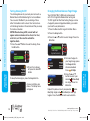
High and Low Limits
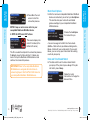
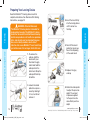
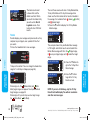
A screen confirms that all target ranges are set. If
correct, press the Done button. You will be returned to
the Setup menu.
Target is Set.
80 - 120
120 - 150
HIGH AND LOW LIMITS
High: 250 mg/dL
Accept
mg/dL
Low: 70
Change
Change
Done
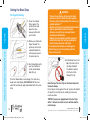
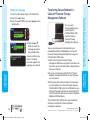
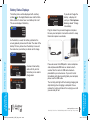
Setting Trends Range
SETUP
AUTOLOG
DEFAULT RANGE
OK
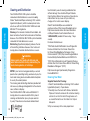
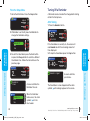
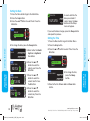
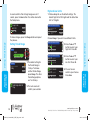
2. Press the or button to select your
high limit. Press OK.
OK
3. Press the or button to select your
low limit. Press OK.
Low: 70 mg/dL
OK
Accept
Change
Trends Range Selected:
7 Day
HIGH AND LOW LIMITS
High: 251 mg/dL
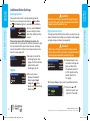
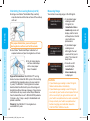
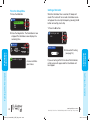
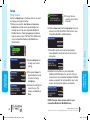
1. The default setting for
the Trends Range is
14 days. To choose
another Trends Range,
press Change. The other
Trends Range options
are 7 or 30 days.
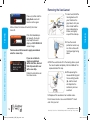
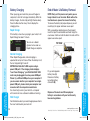
HIGH AND LOW LIMITS
High: 251 mg/dL
Low: 69 mg/dL
Limits are set.
High: 251 mg/dL
Low: 69 mg/dL
Done
Change
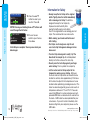
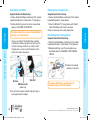
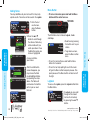
4. The next screen
confirms your choices.
Press Done.
MAIN MENU
FUNCTIONS
MAIN MENU
FUNCTIONS
14 day
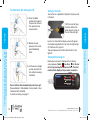
Choose Change if you wish to use different limits.
High and Low Limits
Setting Trends Range
To make changes, press the Change button and repeat
the process.
Target
Trends Range
High and Low Limits
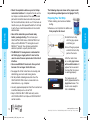
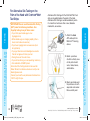
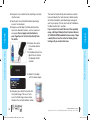
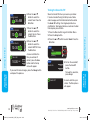
1. Choose Accept to use the default settings. The
default high limit is 250 mg/dL and the default low
limit is 70 mg/dL.
2. The next screen will
confirm your selection.
®
56
84359751_CntrNextLINK_UG_EN_FpBp_v4.indd 56-57
www.bayerdiabetes.com/us
Need Help? Call toll free: 1.800.348.8100 (available 24 hours a day, 7 days a week)
57
3/29/12 12:19 PM