1
Using the NiTek3
Setting the dive options
Setting the dive options includes setting up the following:
•
Dive profile sampling rate: This is how frequently depth
data is measured and stored during a dive, which is 5, 10, 20,
30, or 60 seconds.
•
Salt or fresh water use: This is the setting for salt water or
fresh water use.
•
FO2 gas percentage: This is the oxygen percentage for the
mix number selected. The O2 percentage setting range is 21
to 99 percent.
Setting the dive profile sampling rate
The NiTek3 allows you to choose how frequently it samples and
stores depth, time, temperature, etc. data. The data it samples and
stores is used in profile mode or when the data is uploaded to a
personal computer. There are five sampling rates to choose from,
5, 10, 20, 30, or 60 seconds.
The faster the sampling rate, the more detailed the dive profile,
but because it stores more information, fewer dives can be
stored. The slower the sampling rate, the less detailed the dive
profile, but it is capable of storing more information for more
dives.
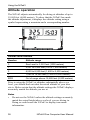
Sampling rate
Approximate dive time storage capacity
5
2 hours and 30 minutes
10
5 hours
20
7 hours and 30 minutes
30
15 hours
60
30 hours
Note: When the computer’s memory storage is full, it overwrites
the oldest dive profile data stored with the new information.
To set the dive profile sampling rate:
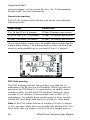
1. Press and hold button A for ten seconds.
14
NiTek3 Dive Computer User Manual