1
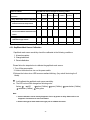
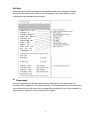
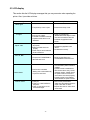
6. Maintenance This session presents the clean tools and methods to maintain your printer. 1. Please use one of following material to clean the printer. Cotton swab (Head cleaner pen) Lint-free cloth Vacuum / Blower brush 100% ethanol 2. The cleaning process is described as following: Printer Part 1. Always turn off the printer before cleaning Clean the print head when changing a Method Interval new label roll the print head. 2. Allow the print head to cool for a minimum of one minute. 3. Use a cotton swab and 100% ethanol to clean the print head surface. Print Head 1. Turn the power off. 2. Rotate the platen roller and wipe it Platen Roller thoroughly with 100% ethanol and a cotton swab, or lint-free cloth. Use the lint-free cloth with 100% ethanol to Tear Bar/Peel Bar Clean the platen roller when changing a new label roll As needed wipe it. Sensor Compressed air or vacuum Monthly Exterior Wipe it with water-dampened cloth As needed Interior Brush or vacuum As needed Note: Do not touch printer head by hand. If you touch it careless, please use ethanol to clean it. 37