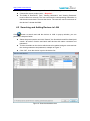
1
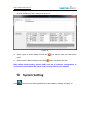
http://www.wansview.com optionally after you entered, you will not add this device again otherwise). Choose the correct product series(Required). The fields of 'Domain/IP', 'Port', 'Viewing Username', and ‘Viewing Password' must be filled out correctly. The user can enter the corresponding information in web browser and check if connect the device. The user also can fill out domain of the device if it locate the WAN. 4.2 Searching and Adding Devices in LAN Click button to search and add the devices in LAN. In pop-up window, you can perform the steps as below. Select the product series and click “Search”, the found devices will be listed (add search “all series” function and batch add devices with same username and password.) Tick the checkbox on the device which want to be added, assign a name and set the viewing username and password, example of Figure 4. Click “OK” , then the device is put in the device list. Figure 4: Search and add devices