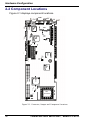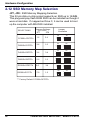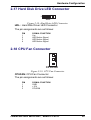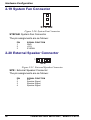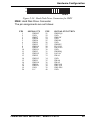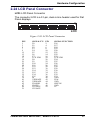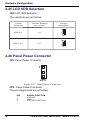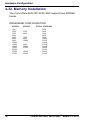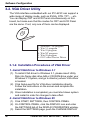
1
MultiTech Model IPC-623C Single Board Computer for CommPlete 4000 Server User Guide CommPlete 4000 Single Board Computer (IPC-623C) User Guide S000277A Revision A All rights reserved. This publication may not be reproduced, in whole or in part, without prior expressed written permission from Multi-Tech Systems, Inc. All rights reserved. Copyright © 2002 by Multi-Tech Systems, Inc. Multi-Tech Systems, Inc. makes no representation or warranties with respect to the contents hereof and specifically disclaims any implied warranties of merchantability or fitness for any particular purpose. Furthermore, Multi-Tech Systems, Inc. reserves the right to revise this publication and to make changes from time to time in the content hereof without obligation of Multi-Tech Systems, Inc., to notify any person or organization of such revisions or changes. Record of Revisions Revision Description A Manual released (08/12/02). Patents This product is covered by one or more of the following U.S. Patent Numbers: 5.301.274, 5.309.562, 5.355.365, 5.355.653, 5.452.289, 5.453.986. Other patents Pending. Trademarks The Multi-Tech logo is a registered trademark of Multi-Tech Systems, Inc. NetWare is a registered trademark of Novell, Inc. Pentium is a registered trademark of Intel Corporation. SCO is a registered trademark of Santa Cruz Operation, Inc. UNIX is a registered trademark of X/Open Company, Ltd. Windows 95 and Windows NT are registered trademarks of Microsoft. Multi-Tech Systems, Inc. 2205 Woodale Drive Mounds View, Minnesota 55112 (763) 785-3500 or (800) 328-9717 Fax (763) 785-9874 Tech Support (800) 972-2439 Internet Address: http://www.multitech.com Table of Contents Contents Chapter 1 - Introduction ................................................................ 5 1-1 About This Manual .............................................................................. 5 1-2 System Specifications ......................................................................... 7 1-3 Safety Precautions ............................................................................ 10 Chapter 2 - Hardware Configuration ........................................... 11 2-1 List of Jumpers and Connectors ....................................................... 11 2-2 Component Locations ....................................................................... 12 2-3 How to Set Jumpers .......................................................................... 13 2-4 COM Port Connector ......................................................................... 15 2-5 RS232/422/485 (COM2) Selection ................................................... 16 2-6 IRQ12 Release Selection .................................................................. 18 2-7 ATX Power Signal Connector ............................................................ 18 2-8 ATX Power Button ............................................................................. 19 2-9 AT/ATX Power Selection ................................................................... 19 2-10 Universal Serial Bus Connector ...................................................... 20 2-11 Solid-State Disk Socket ................................................................... 21 2-12 SSD Memory Map Selection ........................................................... 22 2-13 Keyboard / PS2 Mouse Selection ................................................... 23 2-14 Keyboard / PS2 Mouse Connector ................................................. 23 2-15 External Keyboard Connector ......................................................... 24 2-16 Reset Connector ............................................................................. 24 2-17 Hard Disk Drive LED Connector ..................................................... 25 2-18 CPU Fan Connector ........................................................................ 25 2-19 System Fan Connector ................................................................... 26 2-20 External Speaker Connector ........................................................... 26 2-21 Floppy Disk Drive Connector .......................................................... 27 2-22 Hard Disk Drive Connector ............................................................. 28 2-23 VGA CRT Connector ....................................................................... 30 2-24 LCD Panel Connector ..................................................................... 31 2-25 LCD VDD Selection ......................................................................... 32 2-26 Panel Power Connector .................................................................. 32 2-27 Printer Connector ............................................................................ 33 2-28 Power LED & Keylock Connector ................................................... 34 2-29 LAN Connector ................................................................................ 34 2-30 LAN LED Indicators ......................................................................... 35 2-31 Green Function Connector .............................................................. 35 2-32. Memory Installation ........................................................................ 36 Chapter 3 - Software Configuration ........................................... 37 3-1. Introduction ...................................................................................... 37 CommPlete 4000 Server SBC, Model IPC-623C 3 Table of Contents 3-2. VGA Driver Utility ............................................................................. 38 3-3. Flash BIOS Update .......................................................................... 41 3-4. LAN Driver Utility .............................................................................. 43 3-5. Watchdog Timer Configuration ......................................................... 45 Chapter 4 - Green PC Function .................................................. 46 4-1. Power Saving Block Diagram .......................................................... 46 4-2. CPU Doze Mode .............................................................................. 47 4-3. System Standby Mode ..................................................................... 47 4-4 System Suspend Mode ..................................................................... 47 Chapter 5 - Award BIOS Setup ................................................... 48 5.1 Introduction ........................................................................................ 48 5-2 Entering Setup .................................................................................. 49 5-3 Standard CMOS Setup Menu ........................................................... 51 5-4 BIOS Features Setup Menu .............................................................. 56 5-5 Chipset Features Setup .................................................................... 60 5-6 Power Management Setup ............................................................... 64 5-7 PnP/PCI Configuration ...................................................................... 67 5-8 Load BIOS Defaults .......................................................................... 69 5-9 Load Setup Defaults ......................................................................... 69 5-10 Integrated Peripherals ..................................................................... 70 5-11 Password Setting ............................................................................ 73 5-12 IDE HDD Auto Detection ................................................................. 74 Appendices .................................................................................. 78 PC-104 Connector Pin Assignment ......................................................... 78 ISA Bus Pin Assignments ........................................................................ 79 PCI Bus Pin Assignments ........................................................................ 80 C-1 Introduction ....................................................................................... 85 C-2 Troubleshooting with Error Messages .............................................. 85 4 CommPlete 4000 Server SBC, Model IPC-623C Introduction Chapter 1 - Introduction This chapter introduces the IPC-623C single-board computer and outlines the system specifications. Sections include: About This Manual System Specifications Safety Precautions 1-1 About This Manual Thank you for purchasing the IPC-623C Socket 370 embedded CPU card with VGA/LAN. This single-board computer is PC/AT compatible and produces VGA video. The IPC-623C provides faster processing speed, greater expandability and can handle more tasks than before. This manual will assist you in installing and setting up the system. The manual contains five chapters and three appendices. Chapter 1 Introduction Presents an overview of this manual, system specifications, and cautionary information to protect both the product and personnel. Chapter 2 Hardware Configuration Outlines the components’ locations and their functions. Describes how to set jumpers and how to configure this PC card to meet your own needs. Chapter 3 Software Utilities Describes proper installation of your VGA and LAN drivers, Flash BIOS update, and configuration of your watchdog-timer. CommPlete 4000 Server SBC, Model IPC-623C 5 Introduction Chapter 4 Green PC Function Describes “Green” PC functions, which allow the computer to work at a decreased power level after a period of idleness. Chapter 5 Award BIOS Setup Shows how to set up BIOS configurations. Appendix A Expansion Bus Describes the expansion bus with slots for PCI and ISA cards and an on-board PC-104 receptacle (an ISA-type connection typically used for testing). Appendix B Technical Summary Describes mapping of interrupts, RAM, hard-drive memory and other parameters. Appendix C Troubleshooting Outlines error messages and presents solutions for associated problems. 6 CommPlete 4000 Server SBC, Model IPC-623C Introduction 1-2 System Specifications CPU: Intel® Celeron™ processor in 370-pin socket. Default 600 MHz. 300A/333/366/400/433/466/500/533/566/600 MHz clock generator. Intel® Pentium®III processor in 370-pin socket 500E/550E/600E/650E/700E/750E/800E/850E MHz generator. Auto detect voltage regulator. Memory: Up to 512MB SDRAM. 128 MB default Two 168-pin DIMM sockets on board. Cache: Depend on CPU (128KB/256KB Cache). Real-Time Clock/Calendar: CMOS data back up from BIOS setting or BIOS default. Dallas DS 12887 Real Time Clock. BIOS: Award Flash BIOS with plug & play functionality. Easily updated 128/256KB flash EEPROM. Supports “Green” power-saving function . Supports System IO Setup. Keyboard Connector: PC/AT type miniature DIN connector. Supports PC/AT, PS/2 Keyboard or PS/2 Mouse; determined by jumper selection. 5-pin External keyboard connector. Bus Support and Speed: External ISA/PCI bus (PICMG Spec.). Internal PCI bus for VGA, IDE, and LAN. PC-104 bus. CommPlete 4000 Server SBC, Model IPC-623C 7 Introduction Display: Supports simultaneous display for CRT & Panel. Supports 32-bit PCI Local Bus. VGA BIOS combines 128/256KB flash ROM with system BIOS. Supports 15 pin connector 1024 x 768 resolution (256 colors) on SVGA Monitor. Supports 2 MB video memory (4 MB optional). Supports 51-pin connector 640 x 480, 800 x 600 resolution on LCD Panel. Panel support Color STN and TFT modes. Watchdog Timer: The watchdog timer is controlled by software. Once enabled, the system will reboot, unless the timer is re-enabled before the specified timeout duration expires. Timeout durations range from zero to 120 seconds in eight-second increments (+/- 25%). IDE Interface: Two Enhanced IDE ports. Supports up to four Enhanced IDE devices. Supports Ultra DMA-33. Floppy Disk Driver Interface: Supports up to two floppy disk drives: 3.5" and 5.25" (360K / 720K / 1.2M / 1.44M / 2.88M / LS-120). Disk-on-Chips Socket: 32-pin SSD socket on board, supports up to 144MB disk-on-chip. USB Connector: Universal Serial Bus Connector on board, supports up to two USB ports. LAN Adapter: Realtek RTL8139 Fast Ethernet. 10/100 Base-T PCI-Bus. Wake on LAN support. 8 CommPlete 4000 Server SBC, Model IPC-623C Introduction Serial Port: Two high-speed 16550-compatible UARTs with Send / Receive 16-byte FIFOs. COM1=RS-232; COM2=RS-232/422/485 MIDI Compatible. Programmable Band Rate Generator. Parallel Port: SPP, ECP, EPP Function. Bi-directional parallel port. “Green” Power-Saving Function: Software support determined by BIOS setup. Hardware support by switch control. Hardware Monitoring Function: Supports monitoring function for voltage, CPU temperature, and cooling fan. LED Indicators System power, Hardware Disk access, Turbo mode, LAN Led indicator. DMA Controller: 82C37 x 2 DMA Channels: 7 Interrupt Controllers: 82C59 x 2 15 levels Operating Temperature: 0 to 60°C 32 to 140°F. CommPlete 4000 Server SBC, Model IPC-623C 9 Introduction System Power Requirements : DC Voltage: +5V; minimum +4.75V, maximum 5.25V. DC Ampere: 15A. DC Voltage: +12; minimum +11.4V, maximum +12.6V DC Ampere: 500mA Board Dimensions: 338.5mm x 122mm (13.33in. x 4.80in.) Board Net Weight: 0.4 Kg. 14.1 oz. 1-3 Safety Precautions Follow the practices below to prevent electrical damage to personnel and to the computer: 1.Employ standard ESD precautions when working with this product and its components. Static electricity can damage semiconductor devices. 2.Take precautions against electric shock. Do not touch any components of this card when the card is on. Disconnect the power cord when the system is not in use. 3.Disconnect the power cord when you change any hardware devices. For instance, when you connect a jumper or install any cards, a surge of power may damage electronic components that affect the whole system. 10 CommPlete 4000 Server SBC, Model IPC-623C Hardware Configuration Chapter 2 - Hardware Configuration 2-1 List of Jumpers and Connectors COM Port Connector........................................ COM1,COM2 RS232/422/485 (COM2) Selection ................................... JP6 AT Keyboard / PS/2 Mouse Selection .............................. JP9 IRQ 12 Release Selection .............................................. JP10 ATX Power Signal Connector ......................................... JP14 ATX Power Button .......................................................... JP12 AT/ATX Power Selection .................................. JP1,JP2,JP13 Universal Serial Bus Connector ...................................... USB SSD Memory Mapping Selection .............................. JP7,JP8 Keyboard or PS/2 Mouse Connector ................................ DIN External Keyboard Connector ...................................... EXKB CPU Fan Connector ................................................. CPUFAN System Fan Connector ............................................ SYSFAN Panel VCC Selection ........................................................ JP4 Panel Power Connector ................................................... JP5 LAN Connector ............................................................... LAN LAN LED Indicator .................................... LED1,LED2,LED3 Green Function Connector ............................................. GRN Reset Connector ............................................................. RST Floppy Disk Drive Connector .......................................... FDD Hard Disk Drive Connector .................................. IDE1, IDE2 Hard Disk Drive LED Connector ...................................... HDL Power LED & KeyLock Connector .................................. KBL LCD Panel Connector .................................................... LCD VGA CRT Connector ...................................................... VGA Printer Connector ............................................................ PRT External Speaker Connector .......................................... SPK Memory Installation: ....................................... DIMM1,DIMM2 Disk-on-chip Socket ........................................................ SSD Reserved Pin ................................................. JP3,JP15,JP11 CommPlete 4000 Server SBC, Model IPC-623C 11 Hardware Configuration 2-2 Component Locations Figure 2-1 displays component locations. COM1 JP7 JP9 DIN EXKB SSD SIO COM2 PRT JP6 VGA JP8 LAN HDL SPK 440BX JP3 JP15 IDE1 IDE2 PC104 KB Controller LED1 LED2 LED3 JP10 C&T 69000 JP5 USB JP4 FDD LCD 12887 440BX JP14 Socket 370 CPU JP13 JP12 JP1 JP2 JP11 DIMM2 DIMM1 ADAPTEC 7890 GRN RST CPUFAN1 SYSFAN1 Figure 2-1: Connector, Jumper and Component Locations 12 CommPlete 4000 Server SBC, Model IPC-623C Hardware Configuration 2-3 How to Set Jumpers You can configure your board by setting the jumpers. Jumper consists of two or three metal pins with a plastic base mounted on the card, and by using a small plastic “cap”, Also known as the jumper cap (with a metal contact inside), you are able to connect the pins. So you can set-up your hardware configuration by “opening” or “closing” the pins. The jumper can be combined into sets called jumper blocks. When the jumpers are all in the block, you have to put them together to set up the hardware configuration. The figure below shows what this looks like. JUMPERS AND CAPS 2 Pin Jumper 3 Pin Jumper Jumper Block Jumper Cap If a jumper has three pins (for example, labelled PIN1, PIN2, and PIN3), You can connect PIN1 & PIN2 to create one setting and shorting. You can connect PIN2 & PIN3 to create another setting. The same jumper diagrams are applied all through this manual. The figures on the next page will show you what the manual diagrams look like and what they represent. CommPlete 4000 Server SBC, Model IPC-623C 13 Hardware Configuration Jumper Diagrams Jumper cap looks like this 2 pin jumper looks like this 3 pin jumper looks like this Jumper block looks like this Jumper Settings 2 pin jumper closed (enabled) looks like this 1 1 3 pin jumper 2-3 pin closed (enabled) looks like this 1 1 2 14 1 Jumper Block 1-2 pin closed (enabled) looks like this 1 2 CommPlete 4000 Server SBC, Model IPC-623C Hardware Configuration 2-4 COM Port Connector COM1 : connector type is DB9 male and has pinout as follows: 1 5 6 9 COM1 Figure 2-2: COM1 Connector PIN 1 2 3 4 5 6 7 8 9 SIGNAL FUNCTION DCD RX TX DTR GND DSR RTS CTS RI COM2 : COM2 Connector 5 COM2 1 6 10 Figure 2-3: COM2 Connector The COM2 Connector assignments are as follows: PIN 1 2 3 4 5 6 7 8 9 10 SIGNAL FUNCTION RS-232 DCD RX TX DTR GND DSR RTS CTS RI NC RS-422 TXTX+ RX+ RXGND RTSRTS+ CTS+ CTSNC RS-485 TXTX+ RX+ RXGND NC NC NC NC NC CommPlete 4000 Server SBC, Model IPC-623C 15 Hardware Configuration 2-5 RS232/422/485 (COM2) Selection JP6 : RS-232/422/485 selection COM1 supports RS-232 functionality only. (The COM1 port has a receptacle at the edge of the IPC-623C board.) COM2 is selectable for RS-232, RS-422, or RS- 485 functionality. (A COM2 connector is available on the IPC-623C board. To use COM2, you must attach a cable to this connector. This attached cable must terminate to a receptacle that can be mounted on the backplane of the CommPlete 4000 chassis.) The jumper settings are as follows: 1 2 19 20 JP6 Figure 2-4: RS-232 at COM2 16 CommPlete 4000 Server SBC, Model IPC-623C Hardware Configuration 1 2 19 20 JP6 Figure 2-5: RS-422 at COM2 1 2 19 20 JP6 Figure 2-6: RS-485 at COM2 *** Factory default — RS-232. CommPlete 4000 Server SBC, Model IPC-623C 17 Hardware Configuration 2-6 IRQ12 Release Selection JP10: IRQ12 Release/PS2 Mouse Selection 1 JP10 Figure 2-7: IRQ12 Release Selection 1 JP10 Figure 2-8: PS2 Mouse Selection (Default) 2-7 ATX Power Signal Connector J14: ATX Power Signal Connector 1 JP14 Figure 2-9: ATX Power Signal Connector The pin assignments are as follows: PIN 1 2 3 18 SIGNAL FUNCTION Power ON Ground 5V SB CommPlete 4000 Server SBC, Model IPC-623C Hardware Configuration 2-8 ATX Power Button J12: ATX Power Button 1 JP12 Figure 2-10: ATX Power Button The pin assignments are as follows: PIN 1 2 SIGNAL FUNCTION Pull Low PWR BTN Switch 2-9 AT/ATX Power Selection JP1,JP2, JP13: AT/ATX Power Selection The selections are as follows: Power Selection ATX Jumper Settings Jumper Illustration (Pin Closed) JP1 JP2 ON OFF JP13 ON 1 1 1 JP1 JP2 JP13 AT ON ON ON 1 JP1 1 1 JP2 JP13 *** Manufacturing Default: ATX CommPlete 4000 Server SBC, Model IPC-623C 19 Hardware Configuration 2-10 Universal Serial Bus Connector USB: Universal Serial Bus Connector USB connector supports two USB ports. 5 1 10 6 USB Figure 2-11: USB Connector The pin assignments are as follows: PIN 1 2 3 4 5 6 7 8 9 10 20 SIGNAL FUNCTION VCC DATA0DATA0+ GND CGND VCC DATA1DATA1+ GND CGND CommPlete 4000 Server SBC, Model IPC-623C Hardware Configuration 2-11 Solid-State Disk Socket SSD: The 32pin Disk-on-Chip Socket SSD Figure 2-12: Solid-State Disk Socket Pin assignments as follows: PIN 1 2 3 4 5 6 7 8 9 10 11 12 13 14 15 16 FUNCTION NC NC NC SA12 SA7 SA6 SA5 SA4 SA3 SA2 SA1 SA0 SD0 SD1 SD2 GND PIN 17 18 19 20 21 22 23 24 25 26 27 28 29 30 31 32 FUNCTION SD3 SD4 SD5 SD6 SD7 CE SA10 OE SA11 SA9 SA8 NC NC VCC WR VCC CommPlete 4000 Server SBC, Model IPC-623C 21 Hardware Configuration 2-12 SSD Memory Map Selection JP7, JP8 : SSD Memory Mapping Selection. This 32-pin disk-on-chip socket supports an SSD up to 144MB. This plug-and-play flash ROM SSD can be installed as though it were a hard disk. If mapped as Drive C, it can be used to boot up the computer with MS-DOS installed. SELECTIONS Jumper Settings Jumper Illustration (pins closed) JP7 JP8 CC000h-CDFFFh 1-2 3-4 D0000h-D1FFFh 3-4 1-2 JP7 JP8 2 1 4 2 8 3 1 7 JP7 JP8 2 4 2 8 1 3 1 7 JP7 JP8 3-4 3-4 D8000h-D9FFFh 5-6 1-2 DC000h-DDFFFh 5-6 3-4 D4000h-D5FFFh 4 2 8 3 1 7 2 4 2 8 1 3 1 7 2 1 JP7 JP8 JP7 JP8 4 2 8 3 1 7 2 4 2 8 1 3 1 7 2 1 JP7 JP8 E0000h-E1FFFh 7-8 1-2 *** Factory Default CC000h-DCFFFh 22 CommPlete 4000 Server SBC, Model IPC-623C Hardware Configuration 2-13 Keyboard / PS2 Mouse Selection JP9 : AT keyboard / PS2 mouse selection The jumper settings are as follows: 1 2 5 6 JP9 Figure 2-13: AT Keyboard Jumper (Default) 1 2 5 6 JP9 Figure 2-14: PS2 Mouse Jumper 2-14 Keyboard / PS2 Mouse Connector Connector Type: DIN 5 6 3 4 2 1 DIN Figure 2-15: Keyboard/PS2 Mouse DIN Connector Pin assignments are as follows: PIN 1 2 3 4 5 6 SIGNAL FUNCTION KBDATA MSDATA GND IOVSD KBCLK MSCLK CommPlete 4000 Server SBC, Model IPC-623C 23 Hardware Configuration 2-15 External Keyboard Connector EXKB : external keyboard connector EXKB 1 Figure 2-16: External Keyboard Connector The pin assignments are as follows: PIN 1 2 3 4 5 SIGNAL FUNCTION KBCLK KBDATA NC GND Vcc 2-16 Reset Connector 1 RST Figure 2-17: Reset Connector RST : Reset Connector. The pin assignments are as follows: PIN 1 2 24 SIGNAL FUNCTION Ground Reset CommPlete 4000 Server SBC, Model IPC-623C Hardware Configuration 2-17 Hard Disk Drive LED Connector 1 HDL Figure 2-18: Hard Drive LED Connector HDL : Hard Disk Driver LED Connector The pin assignments are as follows: PIN 1 2 3 4 SIGNAL FUNCTION Vcc HDD Active Signal HDD Active Signal HDD Active Signal 2-18 CPU Fan Connector 1 CPUFAN Figure 2-19: CPU Fan Connector CPUFAN: CPU Fan Connector The pin assignments are as follows: PIN 1 2 3 SIGNAL FUNCTION GND +12V CPUFAN CommPlete 4000 Server SBC, Model IPC-623C 25 Hardware Configuration 2-19 System Fan Connector 1 SYSFAN Figure 2-20: System Fan Connector SYSFAN: System Fan Connector The pin assignments are as follows: PIN 1 2 3 SIGNAL FUNCTION GND +12V SYSFAN 2-20 External Speaker Connector 1 SPK Figure 2-21: External Speaker Connector SPK : External Speaker Connector The pin assignments are as follows: PIN 1 2 3 4 26 SIGNAL FUNCTION Vcc Speaker Signal Speaker Signal Speaker Signal CommPlete 4000 Server SBC, Model IPC-623C Hardware Configuration 2-21 Floppy Disk Drive Connector 33 1 34 2 FDD Figure 2-22: Floppy Disk Drive Connector FDD : Floppy Disk Drive Connector The pin assignments are as follows: PIN 1 3 5 7 9 11 13 15 17 19 21 23 25 27 29 31 33 SIGNAL FN GND GND GND GND GND GND GND GND GND GND GND GND GND GND GND GND GND PIN 2 4 6 8 10 12 14 16 18 20 22 24 26 28 30 32 34 SIGNAL FUNCTION RPM NC NC INDEX MTR0 DRV1 DRV0 MTR1 DIR STEP WDATA WGATE TRK0 WRPRT RDATA SEL DSKCHG CommPlete 4000 Server SBC, Model IPC-623C 27 Hardware Configuration 2-22 Hard Disk Drive Connector 39 1 40 2 IDE1 Figure 2-23: Hard Disk Drive Connector for IDE1 IDE1: Hard Disk Drive Connector The CommPlete 4000 has two HDD connectors, IDE1 and IDE2. The pin assignments are as follows: PIN 1 2 3 4 5 6 7 8 9 10 11 12 13 14 15 16 17 18 19 20 28 SIGNAL FUNCTION IDERST GND IDED7 IDED8 IDED6 IDED9 IDED5 IDED10 IDED4 IDED11 IDED3 IDED12 IDED2 IDED13 IDED1 IDED14 IDED0 IDED15 GND N.C. PIN SIGNAL FUNCTION 21 22 23 24 25 26 27 28 29 30 31 32 33 34 35 36 37 38 39 40 IDEREQ0 GND IDEIOW GND IDEIOR GND IDERDY PULL HI IDEACK0 GND IRQ14 IOCS16 IDEA1 GND IDEA0 IDEA2 IDECS1P IDECS3P IDELEDP GND CommPlete 4000 Server SBC, Model IPC-623C Hardware Configuration 39 1 40 2 IDE2 Figure 2-24: Hard Disk Drive Connector for IDE2 IDE2: Hard Disk Drive Connector The pin assignments are as follows: PIN 1 2 3 4 5 6 7 8 9 10 11 12 13 14 15 16 17 18 19 20 SIGNAL FN PIN SIGNAL FUNCTION IDERST GND IDED7 IDED8 IDED6 IDED9 IDED5 IDED10 IDED4 IDED11 IDED3 IDED12 IDED2 21 22 23 24 25 26 27 28 29 30 31 32 33 IDEREQ1 GND IDEIOW GND IDEIOR GND IDERDY PULL HI IDEACK1 GND IDESIRQ IOCS16 IDEA1 IDED13 IDED1 IDED14 IDED0 IDED15 GND N.C. 34 35 36 37 38 39 40 GND IDEA0 IDEA2 IDECS1S IDECS3S IDELEDS GND CommPlete 4000 Server SBC, Model IPC-623C 29 Hardware Configuration 2-23 VGA CRT Connector 1 10 15 5 6 11 VGA Figure 2-25: VGA Connector for CRT VGA : VGA CRT Connector The pin assignments are as follows: PIN 1 2 3 4 5 6 7 8 30 SIGNAL FN RED GREEN BLUE NC GND GND GND GND PIN 9 10 11 12 13 14 15 SIGNAL FUNCTION NC GND NC NC HSYNC VSYNC NC CommPlete 4000 Server SBC, Model IPC-623C Hardware Configuration 2-24 LCD Panel Connector LCD: LCD Panel Connector The connector LCD is a 51-pin, dual-in-line header used for Flat Panel displays. 2 50 51 1 LCD Figure 2-26: LCD Panel Connector PIN 1 3 5 7 9 11 13 15 17 19 21 23 25 27 29 31 33 35 37 39 41 43 45 47 49 51 SIGNAL FN P0 P1 P2 P3 P4 P5 P6 P7 LCD VDD P8 P9 P10 P11 P12 P13 P14 P15 P34 P35 M VDDSAFE VDDSAFE ENABKL ENVEE 12VSAFE 12VSAFE PIN 2 4 6 8 10 12 14 16 18 20 22 24 26 28 30 32 34 36 38 40 42 44 46 48 50 SIGNAL FUNCTION P16 P17 P18 P19 P20 P21 P22 P23 LCD VDD P24 P25 P26 P27 P28 P29 P30 P31 P32 P33 GND FLM GND SHFCLK GND LP CommPlete 4000 Server SBC, Model IPC-623C 31 Hardware Configuration 2-25 LCD VDD Selection JP4: LCD VDD Selection The selections are as follows: Power Selection Jumper Settings (Pin Closed) Jumper Illustration 1 VDD 5V 1-2 3 JP4 1 VDD 3.3V 2-3 3 JP4 2-26 Panel Power Connector JP5: Panel Power Connector 1 JP5 Figure 2-27: Panel Power Connector JP5 : Panel Power Connector The pin assignments are as follows: PIN 1 2 3 32 SIGNAL FUNCTION LCD+12V GND LCD VDD (+5V/3.3V) CommPlete 4000 Server SBC, Model IPC-623C Hardware Configuration 2-27 Printer Connector PRT : Printer Connector As to link the Printer to the card, you need a cable to connect both DB25 connector and parallel port. 13 1 26 14 PRT Figure 2-28: Printer Connector The pin assignments are as follows: PIN 1 2 3 4 5 6 7 8 9 10 11 12 13 SIGNAL FN STB P0 P1 P2 P3 P4 P5 P6 P7 ACK BUSY PE SLCT PIN 14 15 16 17 18 19 20 21 22 23 24 25 26 SIGNAL FUNCTION AUTFE ERROR INIT SLCTIN GND GND GND GND GND GND GND GND NC CommPlete 4000 Server SBC, Model IPC-623C 33 Hardware Configuration 2-28 Power LED & Keylock Connector KBL : Power LED & Keylock Connector 1 KBL Figure 2-29: Power LED & Keylock Connector The pin assignments are as follows: PIN 1 2 3 4 5 SIGNAL FUNCTION Power LED NC GND KB Inh GND 2-29 LAN Connector LAN: LAN Connector 1 2 3 4 5 6 7 8 Figure 2-30: LAN Connector The pin assignments are as follows: PIN 1 2 3 4 5 6 7 8 34 SIGNAL FUNCTION TX+ TXRX+ ISOLATED GND ISOLATED GND RXISOLATED GND ISOLATED GND CommPlete 4000 Server SBC, Model IPC-623C Hardware Configuration 2-30 LAN LED Indicators The CommPlete 4000 SBC has has three LAN LED indicators; LED1, LED2, and LED3. 1 1 LED1 1 LED2 Pin Function 1 Pull Hi 2 Link Pin Function LED3 Pin Function 1 2 Pull Hi 1 Pull Hi Active2 Active100Mbps 10Mbps Figure 2-31: LAN LED Indicators 2-31 Green Function Connector GRN: Green Function Connector 1 GRN Figure 2-32: Green Function Connector The pin assignments are as follows: PIN 1 2 SIGNAL FUNCTION EXTSMIGND CommPlete 4000 Server SBC, Model IPC-623C 35 Hardware Configuration 2-32. Memory Installation The CommPlete 4000 IPC-623C SBC supports two SDRAM banks. DRAM BANK CONFIGURATION SIMM 1 32m 32M 32M 64M 64M 64M 64M 128M 128M 128M 128M 256M 256M 256M 36 SIMM 2 32M 64M 32M 64M 128M 64M 128M 256M 128M 256M TOTAL MEMORY 32M 64M 96M 64M 96M 128M 192M 128M 192M 256M 384M 256M 384M 512M CommPlete 4000 Server SBC, Model IPC-623C Software Configuration Chapter 3 - Software Configuration This chapter presents detailed information on VGA driver, LAN driver, and Flash BIOS update. It also describes how to install configurations. Sections include: ´ VGA Driver Utility Flash BIOS Update ´ LAN Driver Utility ´ Watchdog Timer Configuration 3-1. Introduction Enclosed with our IPC-623C package is our driver utility, which may comes in a form of a CD ROM disc or floppy diskettes. For CD ROM disc user, you will only need some of the files contained in the CD ROM disc, please kindly refer to the following chart: File name (Assume that CD ROM drive is D:) Purpose D:\VGA\C&T\CT69K C&T 69000 For VGA driver installation D:\Flash\Awdflash.exe For BIOS update D:\LAN\RTL8139 For LAN Driver installation CommPlete 4000 Server SBC, Model IPC-623C 37 Software Configuration 3-2. VGA Driver Utility The VGA interface embedded with our IPC-623C can support a wide range of display mode, such as SVGA, STN, TFT,.....etc. You can display CRT and LCD Panel simultaneously on this board, but make sure that the modes for CRT and LCD Panel are the same. If not, only one of them can be displayed. VGA CD 1. Awdflash 7.xx program 2. Win 3.1 program 3. Win 95 program 4. Win NT program 5. Win 98 program 6. OS/2 video Device Driver 3-1-2. Installation Procedures of VGA Driver 1. Install VGA Driver to Windows 3.1 (1). To install VGA driver to Windows 3.1, please insert Utility Disk into floppy disk drive A/B or CD ROM drive under your Windows 3.1 system, and go to directory where VGA driver is located. (2). Click Setup.exe file for VGA driver installation directly. Follow the instructions on the screen and complete the installation. (3). Once installation is completed, you must shut down system and restart in order for changes to take effect. 2. Install VGA Driver to Windows 95 (1). Click START, SETTINGS, then CONTROL PANEL. (2). On CONTROL PANEL, click the DISPLAY icon and enter the SETTINGS tab of the DISPLAY PROPERTIES window. (3). Select the SETTINGS page, push the CHANGE DISPLAY 38 CommPlete 4000 Server SBC, Model IPC-623C Software Configuration TYPE button. Click the CHANGE button in the “Adapter Type” area. (4). Push the “HAVE DISK BUTTON” and press OK. (5). Specify the path for the new driver and press the <Enter> key. The “Select Device” dialog box will appear. Select the “Chips and Tech 69000 PCI”. (6). Follow the remaining instruction that appear on the screen to complete the rest of the installation, then restart your computer. 3. Install VGA driver to Windows NT 3.5x/4.0 (1). To install VGA drivers to Windows 3.5x/4.0 is as you normally would. Click START, then SETTINGS, then CONTROL PANEL of the operating system. (2). Select the DISPLAY icon to start the DISPLAY PROPERTIES window, then choose the SETTING tab, then DISPLAY TYPE. (3). In the CHANGE DISPLAY TYPE window, click on the CHANGE button in the ADAPTER TYPE, this will bring up the SELECT DEVICE window. (4). In the CHANGE DISPLAY window, click on Have Disk. Follow the instructions appearing on the screen until you complete the whole installation. (5). Once installation is completed, the system must be shut down and restarted for the new drivers to take effect. 4. Install VGA driver to OS/2 Warp Operation System (1) Preliminary Steps: (i) OS/2 DOS Support must be installed. (ii) If you previously installed SVGA support, you must reset the system to VGA mode. VGA is the default video mode enable when OS/2 is to be installed. (iii) To restore VGA mode, Use SELECTIVE INSTALL and select VGA for PRIMARY DISPLAY. For more information on this procedure, see the section on Changing Display Adapter Support in the OS/2 User’s Guide. CommPlete 4000 Server SBC, Model IPC-623C 39 Software Configuration (2) Start Driver installation (i) Open an OS/2 full screen or windowed session. (ii) Place into Drive A/B the Utility Disk, which contains the 69000 Display Driver. (iii) At the OS/2 command prompt , type the following commands to copy the files to the OS/2 drive: Type A: and press ENTER to make this the default drive. Type Setup A: C: and press ENTER 6 When the setup Program is completed, you will need to perform a shut down and then restart the system in order for change to take effect. (iv) After restarting the system, first open the OS/2 System folder. (v) Then open the System Setup folder. (vi) Open the Display Driver Install Object. (vii) When the Display Driver Install window appears, select PRIMARY DISPLAY, and click OK. (viii) When the Primary Display Driver List window appears, select “Chips and Technologies 69000” from the list of Adapter types, then select OK to install the video driver. (ix) When installation is complete, you should shut down and restart the system for the changes to take effect. And also make sure to remove the install Utility Disk before restarting system. For more details on Installation procedure, please refer to readme.txt or install.txt file found on VGA DRIVER UTILITY. 40 CommPlete 4000 Server SBC, Model IPC-623C Software Configuration 3-3. Flash BIOS Update 3-3-1. System BIOS Update: Users of IPC-623C can use the program “Awdflash.exe” contained in the Utility Disk for system BIOS and VGA BIOS update. 3-3-2. To update VGA BIOS for LCD Flat Panel Display: As IPC-623C user, you have to update the VGA BIOS for your specific LCD flat panel you are going to use. For doing this, you need two files. One is the “Awdflash.exe” file and the other is the VGA BIOS C&T 69000 file for LCD panel display. Both file must be provided by the vendor or manufacturer. When you get these two files ready, follow the following steps for updating your VGA BIOS: 1. Install “Awdflash.exe” from Utility Disk to Drive C. 2. Insert the VGA BIOS file you have obtained from the vendor. 3. Type the path to Awdflash.exe and execute the VGA BIOS update with file 620xxxxx.bin C:\UTIL\AWDFLASH>AWDFLASH 620xxxxx.bin 4. The screen will display the table below: FLASH MEMORY WRITER v7.XX (C) Award Software 2000 All Rights Reserved For i440BX-SMC669-2A69KP6PC-0 DATE: 03/02/2001 Flash Type - MXIC 29F002(N)T /5V File Name to Program: 620xxxxx.bin Checksum: XXXXX Error Message : Do You Want To Save BIOS (Y/N) If you want to save the original BIOS, enter “Y” and press < Enter >. If you choose “N”, the following table will appear on screen. CommPlete 4000 Server SBC, Model IPC-623C 41 Software Configuration FLASH MEMORY WRITER v7.XX (C) Award Software 2000 All Rights Reserved For i440BX-SMC669-2A69KP6PC-0 DATE: 03/02/2001 Flash Type - MXIC 29F002(N)T /5V File Name to Program: 620xxxxx.bin Checksum: XXXXX Error Message: Are you sure to program (Y/N) Select “Y” , and the BIOS will be renewed. When you are refreshing the BIOS, do not turn off or reset the system, or you will damage the BIOS. After you have completed all the programming, the following screen appears. FLASH MEMORY WRITER v7.XX (C) Award Software 2000 All Rights Reserved For i440BX-SMC669-2A69KP6PC-0 DATE: 03/02/2001 Flash Type - MXIC 29F002(N)T /5V File Name to Program: 620xxxxx.bin Checksum: XXXXX Reset System or Power off to accomplish update process! F1: Reset F10: Exit Please reset or power off the system and then the Flash BIOS is fully implemented. 42 CommPlete 4000 Server SBC, Model IPC-623C Software Configuration 3-4. LAN Driver Utility 3-4-1. Introduction IPC-623C Embedded Card is enhanced with LAN function that can support various network adapters. Installation programs for LAN drivers are listed as follows: LAN CD 1. Win 95/98/2000 program 2. Win NT program 3. Novell 3.x/4.x program 4. SCO-Unix 5. WFW 3.11 6. NDIS 7. MSLAN 8. LINUX 3-4-2. Installation Procedures of LAN Driver 1. Install LAN Driver to Windows 98/2000 Executing Windows 98/Windows 2000, it will auto-detect your system configuration and find the adapter hardware. (1) Ask you to select which driver you want to install, select “Driver from disk provided by hardware manufacturer”. (2) Insert the Realtek RTL8139 driver disk into the drive A or CD drive and specify the setup file pathname, ex: A:\ . (3) Win 98/ Win 2000 will appear some messages to insert Windows 98/Win2000 system disk to complete setup step. (4) Windows 98/Windows 2000 will finish the other installation procedure automatically, and then restart the system. CommPlete 4000 Server SBC, Model IPC-623C 43 Software Configuration 2. Install LAN Driver to Windows NT 3.0/4.0 (1) In the Main group of NT, select the “Control Panel” icon. (2) In the Control Panel window, choose the “Network” icon. (3) In the Network Settings dialog box, choose the “Add adapter” button. The Add Network Adapter dialog box appears. (4) In the list of network cards, select “<other> Requires disk from manufacturer”, and then press <Enter> button. (5) Insert the LAN driver utility, and enter the filename (ex. A:\ pathname) where the setup file OEMSETUP.INF is located, and then choose OK button. (6) The screen will appear “Select Line Speed” dialog box, which is provided by RTL8139.SYS driver. The default value is “auto” so that the line speed can be auto detected as 10MB or 100MB, while the RTL8139.SYS is loading. (7) The screen will appear “Input Ethernet ID” dialog box, which is provided by RTL8139.SYS driver. This option is only required when you have more than one RTL8139 PCI Fast Ethernet adapters on this computer. Select “SKIP” if only one adapter is installed on this computer. (8) “Bus Location” displayed in next screen. Your machine contains more than one hardware bus, please select the Bus Type and Bus number on which your network adapter card is installed. (9) NT will then perform the binding process. If any additional network software options were installed, you may be prompted for specific information for these packages. (10) Re-starting your system you will acquire network service. Note: For Installing Multiple LAN Adapters: Enter Windows NT and follow above setup procedure step 2, in the “Network Settings” dialog box, choose the “Configure...” button. The “Input Ethernet ID” dialog box appears and input adapter’s Ethernet ID. Last step to select OK and close NETWORK SETUP. Select SKIP if only one adapter is installed on this computer. For more information on installation procedure, please refer to TXT directory found on LAN DRIVER UTILITY. 44 CommPlete 4000 Server SBC, Model IPC-623C Software Configuration 3-5. Watchdog Timer Configuration The watchdog timer does not run constantly. It must be started in DOS Debug mode or from another application program, customized for this purpose, that runs on the system. The watchdog timer is especially useful for remote rebooting of the PC. The watchdog timer is defined at I/O port 0443H. To enable the watchdog timer, write I/O port 0443H, then the system will reset itself. To disable the function, write I/O port 0441H and the system will stop the Watchdog timer. Since the timer’s intervals have a tolerance of 25%, you should specify that the timer be refreshed about once every second. To program your watch timer, follow these steps: Watchdog enable program: MOVAX, 000FH (choose the values you need; start from 0) MOVDX, 0443H OUTDX, AX Watchdog disable program: MOVAX, 000FH (this value can be ignored) MOVDX, 0441H OUTDX, AX The Watchdog Timer control table is as follows: Level 1 2 3 4 5 6 7 8 Value F E D C B A 9 8 Time/sec Level 0 8 16 24 32 40 48 56 9 10 11 12 13 14 15 16 Value 7 6 5 4 3 2 1 0 CommPlete 4000 Server SBC, Model IPC-623C Time/sec 64 72 80 88 96 104 112 120 45 Green PC Function Chapter 4 - Green PC Function The CommPlete 4000 is equipped with a “green function” that allows it to operate using reduced electrical power when the machine is inactive. When in green mode, the CommPlete 4000 slows down and shuts down certain computer functions in order to reduce power consumption. There are three reduced-power operating modes (presented in order of increasing power savings): (1) CPU Doze Mode, (2) System Standby Mode, (3) System Suspend Mode . By default, however, the green function is turned off. 4-1. Power Saving Block Diagram d & en h sp itc Su w o t Up l S in ena ol ak ter ontr x W E C se er ou m M Ti d/ ar o yb Ke Timer Control into Standby Suspend Ti m er On Ke yb Ti m er Co nt oa rd ro li /M nt o ou se W ak e-U Do p ze Doze Keyboard/Mouse Wake-Up y Co nt ro li nt o Su sp en d er Standby m Ti l tro to in b nd a St n Co Timer Control into Suspend Figure 4-1: Power On & Three Reduced-Power States 46 CommPlete 4000 Server SBC, Model IPC-623C Green PC Function 4-2. CPU Doze Mode 1. After a pre-determined period of inactivity has elapsed, the CPU will slow down to 8 MHz. 2. The computer will emit one ‘beep’ sound. 3. The green function will monitor PC activity according to settings in the Power Management Setup screen. 4. If any activity occurs, the system will switch from “Doze Mode” to “On Mode.” 4-3. System Standby Mode 1. After a pre-determined period of inactivity has elapsed, the CPU will slow down to 8 MHz. 2. The computer will emit two beeps. 3. The Level 1 cache will be disabled. 4. The VGA monitor will display a blank screen. 5. The hard drive will be powered down. 6. If any activity occurs, the system will switch from “Standby Mode” to “On Mode.” 4-4 System Suspend Mode 1. After a pre-determined period of inactivity has elapsed, the CPU will slow down to 8 MHz. 2. The computer will emit three beeps. 3. The Level 2 cache will be disabled. 4. The VGA monitor will display a blank screen. 5. The hard drive will be powered down. 6. The green function will monitor PC activity according to settings in the Power Management Setup screen. 7. When the system is in Suspend Mode, input from the keyboard, or the mouse, or alarm is required to wake up the PC. CommPlete 4000 Server SBC, Model IPC-623C 47 Award BIOS Setup Chapter 5 - Award BIOS Setup 5.1 Introduction This chapter describes the function of the BIOS in managing the features of your system and how to configure the BIOS in its Setup Menu. The IPC-623C single-board computer is equipped with a system BIOS chipset from Award Software Inc. Your application programs (such as word processing, spreadsheets, and games) rely on an operating system such as DOS or OS/2 to manage such things as keyboard, monitor, disk drives, and memory. The operating system, in turn, relies on a BIOS (Basic Input and Output system), a program stored on a ROM (Read-only Memory) chip, to initialize and configure your computer’s hardware. As the interface between the hardware and the operating system, the BIOS enables you to make basic changes to your system’s hardware without having to write a new operating system. The following diagram illustrates the interlocking relationships between the system hardware, BIOS, operating system, and an application program: Application Program Operating System BIOS System Hardware Figure 5-1: PC Subsystem Relationships 48 CommPlete Series 4000 Server SBC, Model IPC-623C Award BIOS Setup The Setup program built into the Award BIOS lets users modify the basic system configuration. This special configuration information is then stored in battery-backed RAM so that the PC retains the Setup information when the power is turned off. The Award BIOS is a custom version of an industry standard BIOS. It supports Intel/Cyrix/AMD processors in a standard IBM-AT compatible input/output system. The BIOS provides critical low-level support for standard devices such as disk drives and serial and parallel ports. The Award BIOS has been customized by adding important, but non-standard, features such as virus and password protection as well as special support for detailed fine-tuning of the chipset that controls the entire PC system. Descriptions in this chapter will help you configure your system using the BIOS Setup screens. Note: MultiTech has pre-set the BIOS before shipping the CommPlete 4000. In most cases, the user will not need to change any BIOS settings. However, if any hardware within the CommPlete 4000 has been changed, or if the boot sequence has been changed, the user will need to revise the BIOS accordingly. 5-2 Entering Setup To enter the BIOS Setup screen, power on the computer and then press the Delete key immediately. The other way to enter Setup is to power on the computer and then, when the below message appears briefly at the bottom of the screen during the POST (Power On Self Test), press the Delete key or simultaneously press <Ctrl>, < Alt >, and < Esc > keys (Control, Alternate, & Escape). TO ENTER SETUP BEFORE BOOT PRESS <CTRL-ALT-ESC> OR <DEL> KEY As long as the above message is present on the screen you may press the <Del> key (the one that shares the decimal point CommPlete Series 4000 Server SBC, Model IPC-623C 49 Award BIOS Setup at bottom of the number keypad) to access the Setup program. After a moment, the main menu of the Award SETUP program will appear on the screen: ROM / PCI / ISA BIOS (2A69KP6A) CMOS SETUP UTILITY AWARD SOFTWARE, INC. STANDARD CMOS SETUP INTERGRATED PERIPHERALS BIOS FEATURES SETUP SUPERVISOR PASSWORD CHIPSET FEATURES SETUP USER PASSWORD POWER MANAGEMT SETUP IDE HDD AUTO DETECTION PNP/PCI CONFIGURATION SAVE & EXIT SETUP LOAD BIOS DEFAULTS EXIT WITHOUT SAVING LOAD SETUP DEFAULTS Esc: Quit F10: Save & Exit Setup :Select Item (Shift) F2: Change Color Time, Date, Hard Disk Type ......... Figure 5-2: Setup Program Initial Screen You may use the cursor up/down keys to highlight each individual menu item. As you highlight each item, a brief description of that item’s function appears in the lower window. If you have a color monitor, you can use Shift F2 key to scroll through the various color combinations available. 50 CommPlete Series 4000 Server SBC, Model IPC-623C Award BIOS Setup 5-3 Standard CMOS Setup Menu Highlight STANDARD CMOS SETUP and press < ENTER > . The following screen display will appear: ROM PCI / ISA BIOS (2A69KP6C) STANDARD CMOS SETUP AWARD SOFTWARE, INC. Date (mm:dd:yy) : Thur, Feb 1 2001 Time (hh:mm:ss) : 10 : 17 : 37 HARD DISKS Type Size Cyls.Head PreComp LandZ Sector Mode Primary Master :Auto 0 0 0 0 0 Auto 0 :Auto 0 Primary Slave 0 0 0 0 Auto 0 Secondary Master:Auto 0 0 0 0 0 Auto 0 Secondary Slave :Auto 0 0 0 0 0 Auto 0 Base Memory: 640K Drive A: 1.44M, 3.5in. Extended Memory: 3100484K Drive B: None Other Memory: 384K _______________________ Video: EGA/VGA Halt On: All Errors Total Memory: 131072K Esc: Quit F1:Help :Select Item (Shift) F2: Change Color Pu/Pd/+/-: Modify Figure 5-3: Standard CMOS Setup Screen In the above table the base memory size and the extended memory size are displayed. This is automatically read from your system. You do not need to set these parameters. The screen displays the date and time, which the operator must set correctly after powering up the computer. The format of the date/time display is as follows: Date: < Month >, < Date > and <Year >. Ranges for each value are in the CMOS Setup Screen, and the week-day will be skipped automatically. CommPlete Series 4000 Server SBC, Model IPC-623C 51 Award BIOS Setup Time: < Hour >, < Minute >, and < Second >. Use 24 hour clock format, i.e., for “p.m.” numbers, add 12 to the hour. For example, 4: 30 p.m. should be expressed as 16:30:00. Drives: Primary Master/Slave & Secondary Master/ Slave In general, the IPC-623C can handle four disk drives: a primary master, a primary slave, a secondary master, and a secondary slave. The hard drive shipped with the CommPlete 4000 will be a “Primary Master” drive designated as Drive C. An IDE CDROM may optionally function as a Primary Slave drive and be designated as Drive D. The “type” and “mode” settings for the primary master and the primary slave drives should, in most cases, be AUTO. The default configuration state for the secondary master/slave is DISABLED. When this field of the Standard CMOS Setup screen is set to AUTO, the IPC-623C will automatically detect the hard drive(s) in the system. The IPC-623C can auto-detect 45 specific drive types ( designated 1-45 in this field). The drive type can also be entered manually. If entered manually, the drive in use must match the type entered in this field. If the drive being used is not of the type specified in this field, it will not work properly in the CommPlete 4000. For drives not on the list of 45 types, a user-defined drive can also be specified in this field (as type “User”). When “User” is selected for this field, the operator must specify the parameters of the hard drive (number of cylinders, heads, etc.). This information should be provided in the documentation for the hard drive unit (this information is often specified on the exterior of the hard drive unit, as well). Note: If your IPC-623C has trouble detecting your hard drive when the Type field in the Standard CMOS Setup screen is set to AUTO, then you should enable the IDE HDD Auto Detection function in the CMOS Setup Utility screen. If the hard drive is still not detected, designate the Type as User and enter the hard-drive values into the Standard CMOS Setup screen 52 CommPlete Series 4000 Server SBC, Model IPC-623C Award BIOS Setup If the controller of the hard-disk drive interface is ESDI, the selection shall be “Type 1”. If the controller of the hard-disk drive interface is SCSI, the selection shall be “None” If the controller of the hard-disk drive interface is CD-ROM, the selection shall be “None” Type: Describes the hard drive. Default value is AUTO. Other values: 1-45, user, and none. CYLS.: Denotes the number of cylinders in the specified drive type. HEADS: Denotes the number of heads in the specified drive type. PRECOM: Precom is the read delay circuitry which takes into account the timing differences between the inner and outer edges of the surface of the disk platter. The number designates the starting cylinder of the signal. LANDZ: LandZ is the landing zone of the heads. This number determines the cylinder location where the heads will normally park when the system is shut down. SECTORS: Denotes the number of sectors in the specified drive type. CommPlete Series 4000 Server SBC, Model IPC-623C 53 Award BIOS Setup Size (Capacity): Denotes the formatted capacity of the drive based on the following formula: (# of heads) X (# of cylinders) X (# of sets) X (512bytes/sects) Drive A and Drive B: The option are 360KB 5.25in, 1.2KB 5.25in, 720KB 3.5in, 1.44MB 3.5in, 2.88MB 3.5in and None. Video: Options are Monochrome, Color 40, VGA/EGA (default), Color 80. Halt On: Options are No Errors, All but Keyboard, All but Diskette, All but Diskette/Keyboard, All Errors. Default is No Errors. 54 CommPlete Series 4000 Server SBC, Model IPC-623C Award BIOS Setup Hard Disk Attributes: Type Cylinders Heads V-P comp 1 306 128 4 2 615 300 4 3 615 300 6 4 940 512 8 5 940 512 6 6 615 65535 4 7 642 256 8 8 733 65535 5 9 900 65535 15 10 820 65535 3 11 855 65535 5 12 855 65535 7 13 306 128 8 14 733 65535 7 15 000 0000 0 16 612 0000 4 17 977 300 5 18 977 65535 7 19 1024 512 7 20 733 300 5 21 733 300 7 22 733 300 5 23 306 0000 4 24 977 65535 5 25 1024 65535 9 26 1224 65535 7 27 1224 65535 11 28 1224 65535 15 29 1024 65535 8 30 1024 65535 11 31 918 65535 11 32 925 65535 9 33 1024 65535 10 34 1024 65535 12 35 1024 65535 13 36 1024 65535 14 37 1024 65535 2 38 1024 65535 16 39 918 65535 15 40 820 65535 6 41 1024 65535 5 42 1024 65535 5 43 809 65535 6 44 809 65535 6 45 776 65535 8 47 AUTO LZone Sect Capacity 10 305 17 20 615 17 30 615 17 62 940 17 46 940 17 20 615 17 30 511 17 30 733 17 112 901 17 20 820 17 35 855 17 49 855 17 20 319 17 42 733 17 00 000 00 20 663 17 40 977 17 56 977 17 59 1023 17 30 732 17 42 732 17 30 733 17 10 336 17 40 976 17 76 1023 17 71 1223 17 111 1223 17 152 1223 17 68 1023 17 93 1023 17 83 1023 17 69 926 17 85 1023 17 102 1023 17 110 1023 17 119 1023 17 17 1023 17 136 1023 17 114 1023 17 40 820 17 42 1023 17 65 1023 26 40 852 17 61 852 26 100 775 33 Figure 5-4: Award Hard Disk Type Table CommPlete Series 4000 Server SBC, Model IPC-623C 55 Award BIOS Setup 5-4 BIOS Features Setup Menu When you select BIOS FEATURES SETUP in the CMOS Setup Utility menu, the following screen appears: ROM / PCI / ISA BIOS (2A69KP6A) BIOS FEATURES SETUP AWARD SOFTWARE, INC. Virus Warning CPU Internal Cache External Cache :Disabled :Enabled :Enabled CPU L2 Cache ECC Checking :Enabled Quick Power-On Self-Test Boot Sequence Swap Floppy Drive Boot-Up Floppy Seek Boot-Up Numlock Status Gate A20 Option Typematic Rate Setting Typematic Rate (char/sec) Typematic Delay (msec) Security Option PCI/VGA palette snoop OS Select for DRAM>64Mb Report NO FDD For WIN 95 :Disabled :A, C, SCSI :Disabled :Enabled :ON :Fast :Disabled :6 :250 :Setup :Disabled :Non-OS2 :Yes Video BIOS Shadow C8000-CBFFF Shadow CC000-CFFF Shadow D000-D3FFF Shadow D4000-D7FFF Shadow D8000-DBFFF Shadow DC000-DFFFF Shadow :Enabled :Disabled :Disabled :Disabled :Disabled :Disabled :Disabled :Select Item Esc: Quit F1: Help Pu/Pd/+/-: Modify F5: Old Values (Shift) F2: Color F6: Load BIOS Defaults F7: Load Setup Defaults Figure 5-5: BIOS Features Setup The parameters accessible on this screen govern the system’s default speed, boot-up sequence, keyboard operation, shadowing and security. Note: MultiTech presets all BIOS features before shipping the CommPlete 4000. BIOS features should not be changed except by expert operators. Virus Warning When this item is enabled, the Award BIOS will monitor the boot sector and partition table of the hard disk drive for any attempt at modification. CPU Internal Cache/External Cache These two categories speed up memory access. However, it depends on CPU chipset design. 56 CommPlete Series 4000 Server SBC, Model IPC-623C Award BIOS Setup CPU L2 Cache EDD Checking This item allows you to enable/disable CPU L2 Cache ECC Checking. Quick Power On Self Test This setting affects the duration of the Power On Self Test (POST), which occurs after you power up the computer. If enabled, the BIOS will shorten or skip some ‘check items’ during the POST. Boot Sequence This setting determines the sequence for which drive to look for first when the system boots up. You may set the system to look at drive A: and then at drive C: or vice versa. Swap Floopy Drive This setting is effective only in systems where there are two floppy drives. Selecting enabled assigns physical swapping or drive B to logical Drive A and physical drive A to logical drive B. Boot Up Floppy Seek You may enable/disable this item to define whether the system will look for a floppy disk drive to boot at power-on, or directly to the hard disk drive. Boot Up NumLock Status This allows you to determine the default state of the numeric keypad. By default, the system boots up with NumLock on. Gate A20 Option This entry allows you to select how gate A20 is handled. Gate A20 is a device used to address memory above 1 Mbyte. Initially, Gate A20 was handled by a pin on the keyboard. Today, while keyboards still provide this support, it is more common, and much faster, for the system chipset to provide support for gate A20. CommPlete Series 4000 Server SBC, Model IPC-623C 57 Award BIOS Setup Typematic Rate Setting Enable the “typematic” function if you want to be able to configure the key-repetition characteristics of your keyboard. Typematic refers to the way in which characters are entered repeatedly if a key is held down. For example, if you press and hold down the “A” key, the letter “a” will repeatedly appear on your screen until you release the key. This setting is disabled by default. Typematic Rate (Chars/Sec) When the typematic rate is enabled, the “typematic rate” selection allows you select the rate at which a ‘held-down’ key accelerates. Typematic Delay (Msec) When the typematic rate is enabled, this selection allows you to select the delay between when the key is first depressed and when the acceleration begins. Security Option Allows you to limit access to the system and Setup, or just Setup. System The system will not boot and access to Setup will be denied if the correct password is not entered at the prompt. Setup The system will boot, but access to Setup will be denied if the correct password is not entered at the prompt. Note: To disable security, select PASSWORD SETTING at the main menu. You will be asked to enter a password. Do not type anything; just press Enter, and security will be disabled. Once its disabled, the system will boot and you can enter Setup freely. PCI/VGA Palette Snoop This setting determines whether the MPEG ISA/VESA VGA cards can work with PCI/VGA or not. 58 CommPlete Series 4000 Server SBC, Model IPC-623C Award BIOS Setup OS SELECT FOR DRAM>64MB This setting allows you to access the memory over 64MB is OS/2. You may choose OS2 or Non-OS2. Report No FDD for Win 95 Whether you report no FDD for Win 95 or not. Video BIOS Shadow Determines whether the video BIOS will be copied to RAM. However, it is optional depending on chipset design. Video Shadow will increase the video speed. C8000 - CFFFF Shadow/DC000 - DFFFF Shadow Determines whether option ROMs will be copied to RAM or not. An example of such option ROM would be support of on-board SCSI hard-drive functionality. CommPlete Series 4000 Server SBC, Model IPC-623C 59 Award BIOS Setup 5-5 Chipset Features Setup Choose CHIPSET FEATURES SETUP from the CMOS Setup Utilities menu, the following screen appears. ROM / PCI / ISA BIOS (2A69KP6A) BIOS FEATURES SETUP AWARD SOFTWARE, INC. Auto Configuration EDO DRAM Speed Selection : EDO CASx# MA Wait State EDO RASx# Wait State SDRAM RAS-to-CAS Delay SDRAM RAS Precharge Time SDRAM CAS Latency Time SDRAM Precharge Control DRAM Data Integrity Mode System BIOS Cacheable Video BIOS Cacheable Video RAM Cascheable 8-Bit I/O Recovery Time 16-Bit I/O Recovery Time Memory Hole at 15M-16M Passive Release Delayed Transaction AGP Aperture Size (MB) :Enable :60 ns :2 :2 :3 :3 :3 :Disabled :Non-ECC :Disabled :Disabled :Disabled :1 :1 :Disabled :Enabled :Disabled :64 Power-Supply Type Auto Detect DIMM Clk CUP warning Temperature Current System Temperature Current CUP1 Temperature Current CPUFAN1 Speed Current CUPFAN2 Speed IN0 (V): 2.00V IN1(V) IN2 (V): 3.32V +5V +12 V : 12.28V -12V -5V : -4.99V VBAT(V) 5VSB(V): 5.05V Shutdown Temperature :AT :Enabled :Disabled :35°C/95°F :45°C/113°F :5037 RPM : :1.50V :5.02V :-11.95V :3.28V :Disabled :Select Item Esc: Quit F1: Help Pu/Pd/+/-: Modify F5: Old Values (Shift) F2: Color F6: Load BIOS Defaults F7: Load Setup Defaults Figure 5-6: Chipset Features Setup The parameters in this screen are for system designers, service personnel, and technically competent users only. Do not reset these values unless you understand the consequences of your changes. Auto Configuration Function: Auto Configuration selects predetermined optimal values of the chipset parameters. When disabled, chipset parameters revert to setup information stored in CMOS. Many fields in this screen are not available when Auto Configuration is Enabled. EDO DRAM Speed Selection The DRAM timing is controlled by the DRAM Timing Registers. The timings programmed into this register are dependent on the system design. Slower rates may be required in certain system designs to support loose layouts or slower memory. 60 CommPlete Series 4000 Server SBC, Model IPC-623C Award BIOS Setup EDO CASx# MA Wait State You can select the timing control type of EDO DRAM CAS MA (memory address bus). EDO RASx# Wait State You can select the timing control type of EDO DRAM RAS MA (memory address bus). SDRAM RAS-to-CAS Delay You can select RAS to CAS Delay time in HCLKs of 2/2 or 3/3. The system board designer should set the values in this field, depending on the DRAM installed. Do not change the values in this field unless you change specification of the installed DRAM or the installed CPU. SDRAM RAS Precharge Time Defines the length of time the Row Address Strobe is allowed to precharge. SDRAM CAS Latency Time You can select CAS latency time in HCLKs of 2/2 or 3/3. The system board designer should set the values in this field, depending on the DRAM installed. Do not change the values in this field unless you change specification of the installed DRAM or the installed CPU. SDRAM Precharged Control When enabled, all CPU cycles to SDRAM result in an All Banks Precharged Command on the SDRAM interface. DRAM Data Integrity Mode Select parity or ECC (error-correcting code) according to the type of install DRAM. System BIOS Cacheable Select Enabled allows caching of the system BIOS ROM at F000h-FFFFFh, resulting in better system performance. However, if any program writes to this memory area, a system error may result. CommPlete Series 4000 Server SBC, Model IPC-623C 61 Award BIOS Setup Video BIOS Cacheable Select Enabled allows caching of the video BIOS ROM at C0000h-F7FFFh, resulting in better video performance. However, if any program writes to this memory area, a system error may result. Video RAM Cachable Select Enabled allows caching of the video RAM, resulting in better system performance. However, if any program writes to this memory area, a system error may result. 8 Bit I/O Recovery Time The recovery time is the length of time, measured in CPU clocks, which the system will delay after the completion of any Input/output request. This delay takes place because the CPU is operating so much faster than the input/output bus that the CPU must be delayed to allow for the completion of the I/O. This item allows you to determine the recovery time allowed for 8bit I/O. 16 Bit I/O Recovery Time This item allows you to determine the recovery time allowed for 16bit I/O. Choices from NA, 1 to 4 CPU clocks. Memory Hole at 15M-16M In order to improve performance, certain space in memory can be reserved for ISA cards. This memory must be mapped into the memory space below 16Mb. Passive Release When enabled, CPU to PCI bus accesses are allowed during passive release. Otherwise, the arbiter only accepts another PCI master access to local DRAM. Delayed Transaction The chipset has an embedded 32-bit posted write buffer to support delay transactions cycles. Selected Enabled to support compliance with PCI specification version 2.1. 62 CommPlete Series 4000 Server SBC, Model IPC-623C Award BIOS Setup DELAYED TRANSACTION: The chipset has an embedded 32-bit posted write buffer to support delay transactions cycles. Select Enabled to support compliance with PCI specification version 2.1. AGP APERTURE SIZE (MB): Select the size of the Accelerated Graphics Port (AGP) aperture. The aperture is a portion of the PCI memory address range dedicated for graphics memory address space. Host cycles that hit the aperture range are forwarded to the AGP without any translation. See www.agpforum.org for AGP information. AUTO DETECT DIMM CLK: To reduce the occurrence of electromagnetic interference (EMI), the BIOS detects the presence or absence of components in DIMM and turns off system clock generator pulses to empty slots. CPU WARNING TEMPERATURE: Select the combination of lower and upper limits for the CPU temperature. If the CPU temperature extends beyond either limit, any warning mechanism programmed into your system will be activated. CURRENT SYSTEM TEMP.: This item displays the current system temperature, if your computer contains a monitoring system. CURRENT CPU1 TEMPERATURE: This item displays the current CPU temperature, if your computer contains a monitoring system. CURRENT CPUFAN1/CPUFAN2 SPEED: This item indicate the current speed of the CPU fans, if your computer contains a monitoring system. SHUTDOWN TEMPERATURE: This item select the shutdown temperature. CommPlete Series 4000 Server SBC, Model IPC-623C 63 Award BIOS Setup 5-6 Power Management Setup Choose “POWER MANAGEMENT SETUP” option on the main menu, the following screen is displayed. ROM / PCI / ISA BIOS (2A69KP6C) POWER MANAGEMENT SETUP AWARD SOFTWARE, INC. ACPI function Power Management PM Control by APM Video Off Method Video Off After MODEM Use IRQ Doze Mode Standby Mode Suspend Mode HDD Power-Down Throttle Duty Cycle PCI/VGA Act-Monitor Soft-Off by PWR-BTTN :Disabled :User Define :Yes :DPMS :Standby :N/A :Disable :Disable :Disable :Disable :62.5% :Disabled :Disabled Wake Up On LAN IRQ 8 Break Suspend :Enabled :Disabled ** Reload Global Timer IRQ (3-7, 9-15), NMI Primary IDE 0 Primary IDE 1 Secondary IDE 0 Secondary IDE 1 Floppy Disk Serial Port Parallel Port Events ** :Disabled :Disabled :Disabled :Disabled :Disabled :Disabled :Disabled :Enabled :Select Item Esc: Quit F1: Help Pu/Pd/+/-: Modify F5: Old Values (Shift) F2: Color F6: Load BIOS Defaults F7: Load Setup Defaults Figure 5-7: Power Management Setup This category allows you to configure your system to the most effective save energy while operating in a manner consistent with your own style of computer use. Having made all the settings above, press <ESC> to return to the main menu. ACPI Function This item allows you to enable/disable the Advanced Configuration and Power Management (ACPI). Power Management This item allows you to select the type (or degree) of power saving and is directly related to HDD power down, Doze Mode, Standby Mode, and Suspend Mode. PM Control APM When this item is set to YES, the system BIOS will wait for APM’s prompt before it enter any PM mode, e.g., Doze, Standby, or Suspend. If AMP is installed and if there is a task running, even if the timer has timed out, the AMP will not prompt the BIOS to put the system into any power saving mode. 64 CommPlete Series 4000 Server SBC, Model IPC-623C Award BIOS Setup Video Off Method This category determines the manner in which the monitor is blanked. V/H SYNC+BLANK This selection will cause the system to turn off the vertical & horizontal synchronization ports and write blanks to video buffer. BLANK SCREEN This selection only writes blanks to video buffer. DPMS Initial display power management signaling. Video off After When enabled, this feature allows the VGA adapter to operate in a power saving mode. Modem Use IRQ This item enables you to name the interrupt request (IRQ) line assigned to the modem (if any) on your system. Activity of the selected IRQ always awakens the system. Doze Mode When enabled and after the set time of system inactivity, the CUP clock will run at slower speed while all other devices still operate at full speed. Standby Mode When enabled and after the set time of system inactivity, the fixed disk drive and video will shut down while the other devices still operate at full speed. Suspend Mode When enabled and after the set time of system inactivity, all devices except the CPU shut down. HDD Power Down When enabled and after the set time of system inactivity, the hard disk drive will power down while all other devices remain active. CommPlete Series 4000 Server SBC, Model IPC-623C 65 Award BIOS Setup Throttle Duty Cycle This item allows you to select the percent of time that the clock runs when the system enters Doze mode. PCI/VGA Active Monitor This item allows you to enable any video activity to restart the global timer for Standby mode. Soft-Off by Pwr-Bttn Pressing the power button for more than 4 seconds forces the system to enter the Soft-Off state when the system has “hung”. Wake Up on LAN This item allows your computer to be booted from another computer via network by sending a wake-up signal. IRQ 8 Break Suspend This item allows you to enable and disable the monitoring of IRQ8 so it doesn’t awaken the system from Suspend mode. Reload Global Timer Events When enabled, an event occurring on each device listed below restarts the global timer for Standby mode. 66 1- IRQ[3-7,9-15], NMI 2- Primary IDE 0 3- Primary IDE 1 4- Secondary IDE 0 5- Secondary IDE 1 6- Floppy Disk 7- Serial Port 8- Parallel Port CommPlete Series 4000 Server SBC, Model IPC-623C Award BIOS Setup 5-7 PnP/PCI Configuration If you choose PNP/PCI CONFIGURATION from the CMOS Setup Utility menu, the following screen will appear: ROM / PCI / ISA BIOS (2A69KP6A) PNP/PCI CONFIGURATION AWARD SOFTWARE, INC. PNP OS Installed Resources Controlled by Reset Configuration Data :No :Manual :Disabled IRQ3 assigned to IRQ4 assigned to IRQ5 assigned to IRQ6 assigned to IRQ7assigned to IRQ8 assigned to IRQ9 assigned to IRQ10 assigned to IRQ11 assigned to IRQ12 assigned to IRQ13 assigned to IRQ14 assigned to IRQ15 assigned to DMA-0 assigned to DMA-1 assigned to DMA-3 assigned to DMA-5 assigned to DMA-6 assigned to DMA-7 assigned to :PCI/ISAPnP :PCI/ISA PnP :PCI/ISA PnP :Legacy ISA :PCI/ISA PnP :PCI/ISA PnP :PCI/ISA PnP :PCI/ISA PnP :PCI/ISA PnP :PCI/ISA PnP :PCI/ISA PnP :PCI/ISA PnP :PCI/ISA PnP :PCI/ISA PnP :PCI/ISA PnP :PCI/ISA PnP :PCI/ISA PnP :PCI/ISA PnP :PCI/ISA PnP Used MEM base addr :N/A :Select Item Esc: Quit F1: Help Pu/Pd/+/-: Modify F5: Old Values (Shift) F2: Color F6: Load BIOS Defaults F7: Load Setup Defaults Figure 5-7: PNP/PCI Configuration This section describes how to configure PCI bus system. PCI, also known as Personal Computer Interconnect, is a system which allows I/O devices to operate at speeds nearing the speed of the CPU when communicating with its own special components. This section covers technical items, which is strongly recommended for experience users only. You can manually configure the PnP/PCI Device’s IRQ. Highlight the selected item and pressing <F1> key, all the options for the desired selection will be displayed for choice. Resource Controlled by The Award Plug and Play BIOS can automatically configure all the booth and Plug and Play-competitive devices. If set to Auto, all interrupt request (IRQ) and DMA assignment fields disappear, as the BIOS automatically assigns them. CommPlete Series 4000 Server SBC, Model IPC-623C 67 Award BIOS Setup Reset Configuration Data When enabled, the system will reset Extended System Configuration Data (ESCD) when you exit Setup, if you have installed a new add-on and the system reconfiguration has caused such a serious conflict that the operating system cannot boot. IRQ # Assigned to If resources are controlled manually, assign each system interrupt as Legacy ISA devices or PCI/ISA PnP devices. Legacy ISA Devices complaint with the original PC AT bus specification, requiring a specific interrupt IRQ4 for serial port 1. PCI/ISA PnP Devices complaint with the Plug and Play standard, whether designed for PCI or ISA bus architecture. DMA # Assigned to If resources are controlled manually, assign each system DMA channel as Legacy ISA devices or PCI/ISA PnP devices. Legacy ISA Devices complaint with the original PC AT bus specification, requiring a specific interrupt IRQ4 for serial port 1. PCI/ISA PnP Devices complaint with the Plug and Play standard, whether designed for PCI or ISA bus architecture. Used MEM Base Addr Select a base address for the memory area by any peripheral that requires high memory. 68 CommPlete Series 4000 Server SBC, Model IPC-623C Award BIOS Setup 5-8 Load BIOS Defaults Auto Configuration with BIOS Defaults Choosing LOAD BIOS DEFAULTS from the CMOS Setup Utility menu will restore default BIOS values to the PC. Invoking LOAD BIOS DEFAULTS will bring up this dialog box: Load BIOS Default ( Y ? N ) ? Y To use the BIOS defaults, change the prompt to “Y” and press Enter; the default BIOS values will be loaded into CMOS automatically the next time you power up the IPC-623C. Load BIOS Defaults are the same as Load Setup Defaults. 5-9 Load Setup Defaults Auto Configuration with Setup Defaults Choosing LOAD SETUP DEFAULTS from the CMOS Setup Utility menu will restore default SETUP values to the PC. Invoking LOAD SETUP DEFAULTS brings up this dialog box: Load SETUP Default ( Y ? N ) ? Y To use the SETUP defaults, change the prompt to “Y” and press <Enter>; the default SETUP values will be loaded into the CMOS automatically the next time you power up the IPC-623C. Load Setup Defaults are the same as Load BIOS Defaults. CommPlete Series 4000 Server SBC, Model IPC-623C 69 Award BIOS Setup 5-10 Integrated Peripherals If you choose INTEGRATED PERIPHERALS from the CMOS Setup Utility menu, this screen will appear: ROM / PCI / ISA BIOS (2A69KP6A) INTEGRATED PERIPHERALS AWARD SOFTWARE, INC. IDE HDD Block Mode IDE Primary Master PIO IDE Primary Slave PIO IDE Secondary Master PIO IDE Secondary Slave PIO IDE Primary Master UDMA IDE Primary Slave UDMA IDE Secondary Master UDMA IDE Secondary Slave UDMA On-Chip Primary SCSI Chip On-Chip Secondary SCSI Chip Onboard PCI SCSI Chip USB Keyboard Support Init Display First :Enabled :Auto :Auto :Auto :Auto :Auto :Auto :Auto :Auto :Enabled :Enabled :Disabled :Disabled :PCI Slot Onboard FDC Controller Onboard UART 1 Onboard UART 2 Onboard UART 2 mode :Enabled :3F8/IRQ4 :2F8/IRQ3 :Standard Onboard Parallel Port Parallel Port Mode :378/IRQ7 :Normal :Select Item Esc: Quit F1: Help Pu/Pd/+/-: Modify F5: Old Values (Shift) F2: Color F6: Load BIOS Defaults F7: Load Setup Defaults Figure 5-8: Integrated Peripherals By moving the cursor to the desired selection and pressing the <F1> key, all options for the desired selection will be displayed. Select the desired option for your selection. When all selections are changed, press the <ESC> to return to the main menu. IDE HDD Block Mode Block mode is also called block transfer, multiple commands, or multiple sector read/write. If your IDE hard drive supports block mode (most new drives do), select Enabled for automatic detection of the optimal number of block read/writes per sector the drive can support. IDE Primary Master/Slave PIO, IDE Secondary Master/Slave PIO The four IDE PIO fields allow you to set a PIO mode (0-4) for each of the four IDE devices that the onboard IDE interface supports. Modes 0 through 4 provide successively increased performance. In Auto mode, the system automatically determines the best mode for each device. 70 CommPlete Series 4000 Server SBC, Model IPC-623C Award BIOS Setup IDE Primary Master/Slave UDMA IDE Secondary Master/Slave UDMA UDMA, also known as Ultra DMA, is a DMA data transfer protocol that utilizes ATA commands and the ATA bus to allow DMA commands to transfer data at a maximum burst rate of 33 MB/s. When you select Auto in the four IDE UDMA fields, the system automatically determines the optimal data transfer rate for each IDE device. On-Chip Primary PCI IDE On-Chip Secondary PCI IDE This Integrated peripheral controller contains an IDE interface with support for two IDE channels. Select Enabled to activate each channel separately. Onboard PCI SCSI Chip Select Enabled if your system contains a built-in SCSI controller. USB Keyboard Support Select Enabled if you have a USB Keyboard. Init Display First Initialize the AGP video display before initializing any other display device on the system. Thus the AGP display becomes the primary display. Onboard FDC Controller Select Enabled unless you installed an add-in FDC. Onboard UART1 Select a logical COM port name and matching address for the first and second serial ports. Select an address and corresponding interrupt for the first and second serial ports. CommPlete Series 4000 Server SBC, Model IPC-623C 71 Award BIOS Setup Onboard UART 2 Mode Select an operating mode for the second serial port. Onboard Parallel Port Select a logical LPT port address and corresponding interrupt for the physical parallel port Parallel Port Mode Select an operating mode for the onboard parallel (printer) port. Select Normal, Compatible, or SPP unless you are certain your hardware and software both support one of the other avilable modes. For more information about parallel port modes, see http://www.fapo.com/1284int.htm. 72 CommPlete Series 4000 Server SBC, Model IPC-623C Award BIOS Setup 5-11 Password Setting Access to the computer system in general or to the BIOS settings in particular can be put under password protection using this function. When you select PASSWORD SETTING on the CMOS Setup Utility menu, the following dialog box will appear at the center of the screen to assist you in creating a password. Enter Password Type the password, up to eight characters in length, and press Enter. The password typed now will clear any previously entered password from CMOS memory. You will be asked to confirm the password. Type the password again and press Enter. You may also press Esc to abort the selection and not enter a password. Caution: Losing or forgetting your system password will render your computer unusable. Assign a password only if it is necessary for security purposes. Restoring access after loss of a password is nontrivial and requires the clearing and re-loading of BIOS settings. If a password is forgotten or lost, contact MultiTech Technical Support to establish a new password. To disable a password, just press Enter when you are prompted to enter the password. A message will confirm that the password is to be disabled. Once the password has been disabled, the system will boot and you can enter Setup freely. Password Disabled When a password has been enabled, you will be prompted to enter it every time you try to enter Setup. This prevents an unauthorized person from changing any part of your system configuration. CommPlete Series 4000 Server SBC, Model IPC-623C 73 Award BIOS Setup 5-12 IDE HDD Auto Detection The parameters presented on this menu are pre-set at the factory. They should be altered only by expert users. When you select IDE HDD AUTO DETECTION from the CMOS Setup Utility menu, this screen will appear: ROM / PCI / ISA BIOS (2A69KP6A) STANDARD CMOS SETUP AWARD SOFTWARE, INC. Primary Master :( Mb) Primary Slave : Secondary Master : Secondary Slave : CYLS. HEADS PRECOMP LANDZONE SECTORS MODE -------0 0 0 0 0 Select Secondary Slave Option (N=Skip) :N Option Size Cyls Heads Precomp Landzone Sectors Mode 2(Y) 1 3 540 541 540 524 1049 524 32 16 32 0 65535 65535 1048 1048 1048 63 63 63 LBA Normal LARGE Note: Some OSes (like SCO-UNIX) must use Normal for installation Esc: Skip Figure 5-9: IDE HDD Auto Detection Screen This setup menu allows you to save time in finding the Hard Disk Drive information, just follow the following steps: 1. Select the “IDE HDD AUTO DETECTION” from the main menu. 2. After a couple of seconds, the screen will appear with the Hard Disk information and the following message will appear: “SELECT PRIMARY MASTER OPTION (N=SKIP):N” 3. Enter Y or N to confirm the acceptance of the parameter reported by the BIOS, then press the ENTER key. The process will repeat again for the Primary Slave, Secondary Master and Secondary Slave Hard Disks. 74 CommPlete Series 4000 Server SBC, Model IPC-623C Award BIOS Setup 5-14 Save & Exit Setup When all required adjustments are complete, you must save these settings into the CMOS RAM. Select SAVE & EXIT SETUP and press Enter, as shown in the below display. ROM / PCI / ISA BIOS (2A59FP6C) CMOS SETUP UTILITY AWARD SOFTWARE, INC. STANDARD CMOS SETUP INTERGRATED PERIPHERALS BIOS FEATURES SETUP PASSWORD SETTING CHIPSET FEATURES SETUP IDE HDD AUTO DETECTION POWER MANAGEMT SETUP HDD LOW LEVEL FORMAT PNP/PCI CONFIGURATION SAVE & EXIT SETUP SAVE to CMOS and EXIT (Y/N)? N LOAD BIOS DEFAULTS EXIT WITHOUT SAVING LOAD SETUP DEFAULTS Esc: Quit F10: Save & Exit Setup :SELECT ITEM (Shift) F2: Change Color Save Data to CMOS & Exit SETUP Figure 5-11: Saving a CMOS Setup Configuration When you confirm that you want to save the settings, your machine will automatically reboot and the changes you have made will be implemented. You can call up the setup program at any time to adjust any of the individual items by pressing the <Del> key during boot up. CommPlete Series 4000 Server SBC, Model IPC-623C 75 Award BIOS Setup To cancel any changes you have made, select QUIT WITHOUT SAVING (see figure below) and the original settings stored in CMOS will be retained. ROM / PCI / ISA BIOS (2A59FP6C) CMOS SETUP UTILITY AWARD SOFTWARE, INC. STANDARD CMOS SETUP INTERGRATED PERIPHERALS BIOS FEATURES SETUP PASSWORD SETTING CHIPSET FEATURES SETUP IDE HDD AUTO DETECTION POWER MANAGEMT SETUP HDD LOW LEVEL FORMAT PNP/PCI CONFIGURATION SAVE & EXIT SETUP QUIT Without Saving (Y/N)? Y LOAD BIOS DEFAULTS EXIT WITHOUT SAVING LOAD SETUP DEFAULTS Esc: Quit F10: Save & Exit Setup :SELECT ITEM (Shift) F2: Change Color Abandon All Data and Exit SETUP Figure 5-12: Exiting Setup Mode without Saving 76 CommPlete Series 4000 Server SBC, Model IPC-623C Appendix A: ExpansionBus Appendix A - Expansion Bus This appendix presents the pin assignments for the PC-104 connector, the ISA bus, and the PCI bus. CommPlete 4000 Server SBC, Model IPC-623C 77 Appendix A: Expansion Bus PC-104 Connector Pin Assignment 104AB, 104CD : PC-104 Connector B32 B1 A32 A1 104AB C1 D1 C32 D32 Figure A-1: PC104 Connector The PC-104 can support multiple PC-104 modules. This card has two connectors : one (104AB) consists of 64 pins; the other one (104CD) consists of 40 pins, both are dual-in-line headers. The pin assignments for connectors 104AB & 104CD are as follows: 104AB Pin A1 A2 A3 A4 A5 A6 A7 A8 A9 A10 A11 A12 A13 A14 A15 A16 A17 A18 A19 A20 A21 A22 A23 A24 A25 A26 A27 A28 A29 A30 A31 A32 Assignment IOCHK D7 D6 D5 D4 D3 D2 D1 D0 iOCHRDY AEN A19 A18 A17 A16 A15 A14 A13 A12 A11 A10 A9 A8 A7 A6 A5 A4 A3 A2 A1 A0 GND 104CD Pin Assignment Pin Assignment Pin Assignment B1 GND D1 GND GND C1 B2 D2 MEMCS16 RESET SBHE C2 B3 IOCS16 D3 VCC LA23 C3 B4 IRQ10 D4 IRQ9 LA22 C4 B5 IRQ11 D5 -5V LA21 C5 B6 IRQ12 D6 DRQ2 LA20 C6 B7 IRQ15 D7 -12V LA19 C7 B8 IRQ14 D8 OWS LA18 C8 B9 DACK0 D9 +12V LA17 C9 B10 DRQ0 D10 GND MEMR C10 B11 SMEMW C11 D11 DACK5 MEMW B12 SMEMR DRQ5 D12 D8 C12 B13 D13 DACK6 IOW D9 C13 B14 DRQ6 D14 IOR D10 C14 B15 D15 DACK7 DACK3 D11 C15 B16 DRQ7 D16 DRQ3 D12 C16 B17 +5V D17 DACK1 D13 C17 B18 D18 MASTER DRQ1 D14 C18 B19 REFRESH C19 GND D19 D15 B20 GND CLK C20 KEY PIN D20 B21 IRQ7 B22 IRQ6 B23 IRQ5 B24 IRQ4 B25 IRQ3 B26 DACK2 B27 T/C B28 BALE B29 VCC B30 OSC B31 GND B32 GND Figure A-2: PC-104 Pin Assignments 78 CommPlete 4000 Server SBC, Model IPC-623C Appendix A: ExpansionBus ISA Bus Pin Assignments There are two edge connectors on this CPU Card. The one closest to the edge bracket is the ISA bus connector; the other is the PCI bus connector. The ISA-bus connector is divided into two sets : one consists of 62 pins; the other consists of 36 pins. A31 COMPONENT SIDE B31 C18 C1 D18 D1 A1 B1 Figure A-3: ISA Bus Connector The pin assignments are as follows: Pin Assignment Pin Assignment Pin Assignment Pin Assignment -IOCHK A1 GND D1 -MEMCS16 C1 B1 SBHE SD07 A2 C2 RESET -IOCS16 D2 B2 LA23 SD06 A3 C3 VCC IRQ10 D3 B3 LA22 SD05 A4 C4 IRQ9 IRQ11 D4 B4 LA21 SD04 A5 C5 -5V IRQ12 D5 B5 LA20 SD03 A6 C6 DRQ2 IRQ15 D6 B6 LA19 SD02 A7 -12V C7 IRQ14 D7 B7 LA18 SD01 A8 OWS -DACK0 C8 D8 B8 LA17 SD00 A9 +12V DRQ0 C9 D9 B9 MEMR A10 -IOCHRDY D10 -DACK5 C10 MEMW GND B10 AEN DRQ5 D11 B11 -SMEMW A11 C11 SD08 SA19 D12 -DACK6 C12 B12 -SMEMR A12 SD09 SA18 A13 -IOW DRQ6 D13 B13 C13 SD10 SA17 A14 -IOR -DACK7 D14 B14 C14 SD11 SA16 A15 -DACK3 DRQ7 D15 B15 C15 SD12 SA15 A16 -DRQ3 +5V D16 B16 C16 SD13 SA14 A17 -DACK1 D17 -MASTER C17 B17 SD14 SA13 A18 -DRQ1 GND D18 B18 C18 SD15 SA12 B19 -REFRESH A19 SA11 A20 BCLK B20 SA10 A21 IRQ7 B21 SA09 A22 IRQ6 B22 SA08 A23 IRQ5 B23 SA07 A24 IRQ4 B24 SA06 A25 IRQ3 B25 SA05 A26 -DACK2 B26 SA04 A27 T/C B27 SA03 A28 BALE B28 SA02 A29 +5V B29 SA01 A30 OSC B30 SA00 A31 GND B31 Figure A-4: ISA Bus Pin Assignments CommPlete 4000 Server SBC, Model IPC-623C 79 Appendix A: Expansion Bus PCI Bus Pin Assignments Like the ISA-BUS connector, the PCI-BUS edge connector is also divided into two parts: one consists of 98 pins; the other consists of 22 pins. The standard of PCI-MG 32-bit PCI-ISA connector contains 218 pins in total. COMPONENT SIDE F49 F62 F52 E62 E52 E49 F1 E1 Figure A-5: PCI Bus Connector The pin assignments are as follows: Pin F1 F2 F3 F4 F5 F6 F7 F8 F9 F10 F11 F12 F13 F14 F15 F16 F17 F18 F19 F20 F21 F22 F23 F24 F25 F26 F27 F28 F29 F30 F Assignment -12V TCK GND TDO +5V +5V INTB# INTD# REQ3# REQ1# GNT3# GND GND CLKA GND CLKB GND REQ0# +5V(I/O) AD31 AD29 GND AD27 AD25 +3.3V C/BE3# AD23 GND AD21 AD19 Pin E1 E2 E3 E4 E5 E6 E7 E8 E9 E10 E11 E12 E13 E14 E15 E16 E17 E18 E19 E20 E21 E22 E23 E24 E25 E26 E27 E28 E29 E30 E Assignment TRST# +12V TMS TDI +5V INTA# INTC# +5V CLKC +5V(I/O) CLKD GND GND GNT1# RST# +5V(I/O) GNT0# GND REQ2# AD30 +3.3V AD28 AD26 GND AD24 GNT2# +3.3V AD22 AD20 GND Pin F31 F32 F33 F34 F35 F36 F37 F38 F39 F40 F41 F42 F43 F44 F45 F46 F47 F48 F49 F52 F53 F54 F55 F56 F57 F58 F59 F60 F61 F62 F Assignment +3.3V AD17 C/BE2# GND IRDY# +3.3V DEVSEL# GND LOCK# PERR# +3.3V SERR# +3.3V C/BE1# AD14 GND AD12 AD10 GND AD08 AD07 +3.3V AD05 AD03 GND AD01 +5V(I/O) ACK64# +5V +5V Pin E31 E32 E33 E34 E35 E36 E37 E38 E39 E40 E41 E42 E43 E44 E45 E46 E47 E48 E49 E52 E53 E54 E55 E56 E57 E58 E59 E60 E61 E62 E Assignment AD18 AD16 +3.3V FRAME# GND TRDY# GND STOP# +3.3V SDONE SB0# GND PAR AD15 +3.3V AD13 AD11 GND AD09 C/BE0# +3.3V AD06 AD04 GND AD02 AD00 +5V(I/O) REQ64# +5V +5V Figure A-6: PCI Pin Assignments 80 CommPlete 4000 Server SBC, Model IPC-623C Appendix B: Technical Summary Appendix B - Technical Summary This appendix presents mappings of six parameter sets: Interrupts RTC & CMOS RAM Assignments Timer Channels DMA Channels Memory Functions Input/Output Functions Table B-1: Interrupt Map IRQ 0 Assignme nt System TIMER interrupt from Timer-0 1 Keyboard output buffer full 2 Cascade for IRQ 8-15 3 Serial Port 2 4 Serial Port 1 5 Parallel Port 2 6 Floppy Disk Adapter 7 Parallel Port 1 8 RTC Clock 9 Available 10 Available 11 Available 12 Available 13 Math Co-Processor 14 Hard Disk Adapter 15 Available CommPlete 4000 Server SBC, Model IPC-623C 81 Appendix B: Technical Summary Table B-2: RTC & CMOS Map Code 82 Assignme nt 00 Seconds 01 Second Alarm 02 Minutes 03 Minute Alarm 04 Hours 05 Hours Alarm 06 Day of Week 07 Day of Month 08 Month 09 Year 0A Status Register A 0B Status Register B 0C Status Register C 0D Status Register D 0E Diagnostic Status Byte 0F Shutdow n Byte 10 Floppy Disk Drive Type Byte 11 Reserved 12 Hard Disk Drive Type Byte 13 Reserved 14 Equipment Byte 15 Base Memory Low Byte 16 Base Memory High Byte 17 Extension Memory Low Byte 18 Extension Memory High Byte 30 Reserved for Extension Memory Low Byte 31 Reserved for Extension Memory High Byte 32 Date Century Byte 33 Information Flag 34-3F Reserved 40-7F Reserved for Chipset Setting Data CommPlete 4000 Server SBC, Model IPC-623C Appendix B: Technical Summary Table B-3: Timer Channels Map Time r Channe l Assignme nt 0 System Timer Interrupt 1 DRAM Refresh Request 2 Speaker Tone Generator Table B-4: DMA Channels Map DMA Channe l Assignme nt 0 Available 1 IBM SDLC 2 Floppy Disk Adapter 3 Channel 3; available 4 Cascade for DMA Controller 1 5 Available 6 Available 7 Available CommPlete 4000 Server SBC, Model IPC-623C 83 Appendix B: Technical Summary Table B-5: Memory Map M e mory M ap As s ignme nt 0000000- 009FFFF System memory used by DO S and application. 00A0000- 00BFFFF Display buffer memory for VGA/EGA/CGA/ monochrome adapter. 00E0000- 00EFFFF Reserved for PCI device RO M 00F0000- 00FFFFF System BIO S RO M 0100000- FFFFFFF System extension memory Table B-6: I/O Map 84 I/O Map Assignme nt 000-01F DMA Controller (Master) 020-021 Interrupt Controller (Master) 022-023 Chipset Controller: Registers, I/O Ports 040-05F Timer Control Registers 060-06F Keyboard Interface Controller (8042) 070-07F RTC Ports & CMOS I/O Ports 080-09F DMA Register 0A0-0BF Interrupt Controller (slave) 0C0-0DF DMA Controller (slave) 0F0-0FF Math Co-Processor 1F0-1F8 Hard Disk Controller 278-27F Parallel Port 2 2B0-2DF Graphics Adapter Controller 2F8-2FF Serial Port 2 360-36F Netw ork Ports 378-37F Parallel Port 1 3B0-3BF Monochrome & Printer Adapter 3C0-3CF EGA Adapter 3D0-3DF CGA Adapter 3F0-3F7 Floppy Disk Controller 3F8-3FF Serial Port 1 CommPlete 4000 Server SBC, Model IPC-623C Appendix C: Troubleshooting Appendix C Troubleshooting C-1 Introduction This appendix outlines errors that may occur during system operation and likely remedies for these problems. C-2 Troubleshooting with Error Messages This section describes error messages and their use in troubleshooting. Since many errors can be caused by poor cable connections, you should verify that all cables have been connected firmly to their proper receptacles. If error messages persist after the recommended adjustments have been made, contact MultiTech Systems for maintenance. Post Beep: The BIOS generates two beeping (audible) error codes. 1 A single long beep followed by three short beeps indicates that a video error has occurred and the BIOS cannot initialize the video screen to display any additional information. 2 A single long beep sounded repeatedly indicates that a DRAM error has occurred. CMOS Battery Failure: If the CMOS battery is low or dead, it should be replaced. The battery is located inside the real-time clock chip. Replacement requires soldering. The user should return the IPC-623C to MultiTech Systems for repair if the clock fails. CommPlete 4000 Server SBC, Model IPC-623 85 Appendix C: Troubleshooting CMOS Checksum Error: This error indicates that the CMOS has been corrupted. Corruption may be caused by a weak battery. Display Switch Is Set Incorrectly: The display switch on the motherboard can be set to either monochrome or color. This error message indicates that the switch setting does not match the video display mode specified in the Setup screen. Determine which setting is correct. Then either turn off the system and change the jumper, or enter Setup and change the entry in the “Video” field. Disk Boot Failure: When you can‘t find the boot device, insert a system disk into Drive A and press < Enter >. Make sure that the controller and the cables are in their proper positions and that the hard disk drive has been formatted correctly. Then reboot the system. Diskette Drives Or Types Mismatch Error: When the diskette drive type is different from the settings specified in CMOS (BIOS Setup), run Setup and re-configure the drive. Error Encountered Initializing Hard Drive: If you cannot initialize the hard drive, check that the adapter has been installed correctly and that all cables are correctly and firmly attached. Also be sure the correct hard-drive type has been selected in the BIOS Setup. Error Initializing Hard Disk Controller: When this error occurs, check to see that the cable connecting the hard drive to the motherboard is seated properly in its receptacle. Make sure the correct hard-drive type has been selected in the BIOS Setup. Also, check to see that all of the jumpers in the hard disk drive unit have been set correctly. Floppy Disk Controller Error or No Controller Present: When you cannot find or initialize the floppy drive controller, please check that the controller settings in the BIOS Setup screen match the actual controller being used. If no floppy drives are installed in your PC, be sure the Diskette Drive field of the Setup screen is set to NONE. 86 CommPlete 4000 Server SBC, Model IPC-623C Appendix C: Troubleshooting Keyboard Error Or No Keyboard Present: When this error message appears, check to see that your keyboard is attached properly to its receptacle. Make sure JP6 is jumpered for keyboard. Also, be sure that no keys are being pressed during the booting process. If you are purposely configuring the system without a keyboard, set the error halt condition in Setup to HALT ON ALL, BUT KEYBOARD. This will cause the BIOS to ignore the missing keyboard and continue the boot. Memory Address Error: If the memory address indicates an error, use the specified location and the memory map for your system to find and replace the bad memory chips. Memory Size Has Changed: Memory has been added or removed since the last boot. In EISA mode, use the Configuration Utility to re-configure memory. In ISA mode, enter the BIOS Setup screen and type the new memory size in the memory field. Memory Verifying Error : It indicates an error verifying a value already written to memory. Use the specified memory location and your system’s memory map to locate the bad chip. Offending Address Missing: This message is used in connection with the I/O CHANNEL CHECK and RAM PARITY ERROR messages when the segment that has caused the problem cannot be isolated. Reboot Error: When this error occurs, you must re-boot. Press any key and the system will re-boot. System Halted: Indicates that the present boot attempt has been aborted and the system must be re-booted. Press and hold down the CTRL and ALT keys and press DEL. CommPlete 4000 Server SBC, Model IPC-623 87