1
MR9600 User Guide
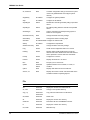
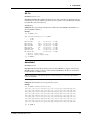
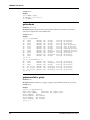
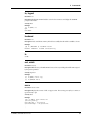
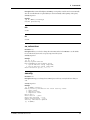
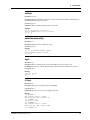
e1cfg
Parameter: Device
Description: Sends E1 configuration information stored in nonvolatile memory to the specified device.
The specified device must be an E1 device. E1 devices can exist only at 1b, 1c, 5b, 5c, 9b, 9c, 13b, and 13c.
Security: Operator
Example:
[0] A:\MMM # e1cfg 13b
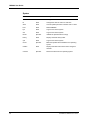
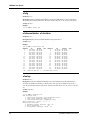
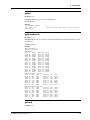
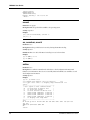
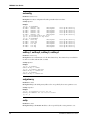
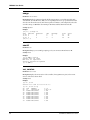
e1channelstatus, e1chstatus
Parameter: Device
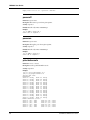
Description: Displays the status of all the channels for the given E1 device.
Security: Guest
Example:
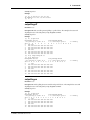
[0] A:\MMM # e1chstatus 13b
Channel
CO
Modem
OOS Channel
CO
1
On Hook On Hook
2
On Hook
3
On Hook On Hook
4
On Hook
5
On Hook On Hook
6
On Hook
7
On Hook On Hook
8
On Hook
9
On Hook On Hook
10
On Hook
11
On Hook On Hook
12
On Hook
13
On Hook On Hook
14
On Hook
15
On Hook On Hook
16
On Hook
17
On Hook On Hook
18
On Hook
19
On Hook On Hook
20
On Hook
21
On Hook On Hook
22
On Hook
23
On Hook On Hook
24
On Hook
25
On Hook On Hook
26
On Hook
27
On Hook On Hook
28
On Hook
29
On Hook On Hook
30
On Hook
CO - Central Office, * - Inconsistent State
Modem
On Hook
On Hook
On Hook
Timeout
On Hook
On Hook
On Hook
On Hook
On Hook
On Hook
On Hook
On Hook
On Hook
On Hook
On Hook
OOS
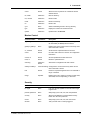
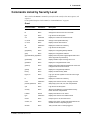
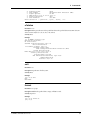
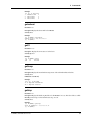
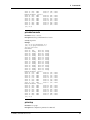
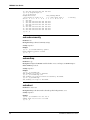
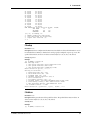
e1setup
Parameter: Device
Description: Sets the E1 configuration information associated with an E1 device. This information is
stored in a nonvolatile area of memory so that the device can be properly reconfigured on power-up or
reset. The specified device must be an E1 device. E1 devices can exist only at 1b, 1c, 5b, 5c, 9b, 9c, 13b, and
13c.
Security: Supervisor
Example:
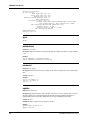
[0] A:\MMM # e1setup 13b
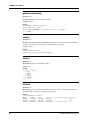
Use settings from:
1. Use Active Settings (pre-configured card)
2. Use System Defaults (new card)
3. Use Stored Settings (swapping cards)
Enter Selection (q(uit), <1>): 1
Getting E1 Card Info ...
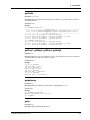
1. Channel Polling Interval (Sec):20
2. Error Threshold
:10
3. Disconnect Timeout (sec) :11
36
CommPlete Communications Server