1
SPH10
CONTENTS
INTRODUCTION
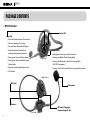
PACKAGE CONTENTS
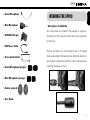
WEARING THE SPH10
• Microphone Installation
• Placing the Headset on Your Ear
POWERING ON/OFF AND CHARGING
• Powering On
• Powering Off
• Charging
• Low Battery Warning
PAIRING THE SPH10 WITH BLUETOOTH DEVICES
• Mobile Phone Pairing
• Bluetooth MP3 Player Pairing
• Bluetooth GPS Navigation Pairing
PAIRING WITH SELECTIVE PROFILE: A2DP STEREO OR HANDSFREE
• A2DP Stereo Music Only
• HFP for Phone Call Only
PAIRING WITH OTHER SPH10 HEADSETS FOR INTERCOM CONVERSATION
USING THE SPH10
• Volume Adjustment
• Mobile Phone Call Making and Answering
• Enabling/Disabling Voice Activated Phone Answering (Factory Default: Disabled)
• Intercom Conversation
• 3-Way Conference Intercom
• Terminating Conference Intercom
3
4
5
6
6
6
6
6
6
7
7
7
8
8
8
9
9
9
11
11
11
11
12
13
14
• Enabling/Disabling Voice Activated Intercom (Factory Default: Disabled)
• Intercom Failure
• Intercom Reconnection
• Stereo Music
• Function Priority
• Reset to Factory Default Settings
• Fault Reset
FIRMWARE UPGRADE
OPERATION QUICK REFERENCE
BATTERY INFOFMATION
MAINTENANCE AND CARE
DISPOSAL
CERTIFICATION AND SAFETY APPROVALS
• FCC Compliance Statement
• FCC RF Exposure Statement
• FCC Caution
• CE Declaration of Conformity
• Industry Canada Statement
• Bluetooth License
WAIVER AND GENERAL RELEASE
• Two-Year Limited Warranty
• Limitation of Liability
• Return for Full Refund
WARNING
14
15
15
16
17
17
18
19
19
20
21
22
22
22
23
23
23
23
24
24
26
27
28
28