1
User
Manual
VideoReQuest gives you the freedom to finally browse through your
entire movie collection. With the press of a button you have access to
hundreds of DVDs, each one instantly accessible by Title, Actor,
Director, Rating, or Genre. Leave the movies to your VideoReQuest
it’s guaranteed to entertain.
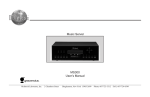
VideoReQuest is your very own movie entertainment system. Please
only use DVDs that you own or have license to, as copyright laws exist
to ensure artists receive full monetary compensation for their artistic
creations.
This manual is written for:
• Firmware v1.1.x
Copyright © 2005 ReQuest, Inc. All rights reserved. Printed in the USA.
REQ-20050114-01—001000
ReQuest, ReQuest Multimedia, ReQuest Multimedia logo, VideoReQuest, and
VideoReQuest logo are trademarks of ReQuest, Inc.
2005 All rights reserved.
ReQuest, Inc., 100 Saratoga Village Blvd, Suite #44, Ballston Spa, NY, 12020
January 2005
Table of Contents
Table of Contents ........................................................................................................ 1
1. Getting Started ........................................................................................................ 2
1.1 How to Use This Manual........................................................................................ 2
1.2 How to Get Help .................................................................................................. 2
1.3 Package Contents ................................................................................................ 2
1.4 Remote Control ................................................................................................... 2
1.5 Front Panel ......................................................................................................... 3
2. Setting Up Your VideoReQuest ................................................................................ 5
2.1 Connecting DVD Changers to the VideoReQuest....................................................... 5
2.2 Connecting VideoReQuest to an External Video Switch.............................................. 5
2.3 Controlling Other Video Switchers and Receivers Through IR ..................................... 6
2.4 Controlling VideoReQuest With Home Automation Systems ....................................... 6
2.5 Rear IR Mini-jack Port........................................................................................... 6
2.6 Video and Audio Connections for VideoReQuest and DVD Changers ............................ 6
2.7 Connecting VideoReQuest to Your Home Network .................................................... 6
3. Configuring VideoReQuest ....................................................................................... 7
3.1 Getting to the VideoReQuest Menu ......................................................................... 7
3.2 Configuration Menu .............................................................................................. 7
3.3 Network Configuration .......................................................................................... 9
3.4 System Information ............................................................................................. 9
3.5 About ReQuest .................................................................................................... 9
4. Loading DVDs into the DVD Changer ..................................................................... 10
4.1 Adding New DVDs ...............................................................................................10
4.2 Ejecting and Changing DVDs ................................................................................10
5. Browsing Your Movie Library ................................................................................. 11
5.1 VideoReQuest Home............................................................................................11
5.2 Browsing and Searching.......................................................................................11
5.3 All Movies ..........................................................................................................12
5.4 Genres ..............................................................................................................12
5.5 MPAA Ratings .....................................................................................................13
5.6 Actors................................................................................................................14
5.6 Directors............................................................................................................15
5.7 More Info ...........................................................................................................15
5.8 Chapters ............................................................................................................16
6. Playing a Movie ..................................................................................................... 16
6.1 Switching Between the VideoReQuest and DVD Changer(s) ......................................17
6.2 DVD Navigation and Menus ..................................................................................17
6.3 DVD Transport Controls, Chapter Browsing, and Other DVD Commands.....................17
7. Editing DVD Entries ............................................................................................... 18
7.1 Manual Edit ........................................................................................................18
7.2 Search Edit ........................................................................................................19
8. DVD Cover Art ....................................................................................................... 20
9. Troubleshooting .................................................................................................... 22
10. ReQuest Multimedia Customer Service ................................................................ 23
11. Specifications ...................................................................................................... 24
12. Regulatory Notices .............................................................................................. 25
12.1 United States FCC Compliance ............................................................................25
12.2 FCC Declaration of Conformity ............................................................................25
-1-
1. Getting Started
The first two chapters of this manual will explain how to setup your VideoReQuest and load
DVDs in the DVD changer(s). Subsequent chapters will show you how to use your
VideoReQuest and remote control.
Once you have completed the setup procedure, VideoReQuest will become your essential allin-one movie source, revolutionizing the way you find and watch your movies.
1.1 How to Use This Manual
In this manual, you will find all of the information you need to get years of movie viewing
enjoyment. All remote control buttons will be shown in capital letters (for example: ENTER)
and all categories will be shown in bold and capitalized (for example: NOW PLAYING).
1.2 How to Get Help
Your best source of information and support for your VideoReQuest system is your dealer.
Most questions or problems can be solved by contacting your dealer.
The ReQuest Multimedia website, http://www.request.com, contains the latest information
on your VideoReQuest, including software upgrades, user guides, and answers to many
general questions.
ReQuest Multimedia’s technical support is accessible via email. Please email your technical
questions or comments to [email protected].
1.3 Package Contents
(1)
(1)
(1)
(1)
(1)
(1)
(1)
(1)
(1)
VideoReQuest Digital Video Controller
User Manual
Remote Control Quick Guide
Installation Manual (For Dealers)
Power Cable
RS-232 Serial Cable (Female to Female Null Modem)
Serial Cable (Male to Female)
CAT 5 Ethernet Cable (Grey)
64 Button VideoReQuest Remote Control with Batteries
1.4 Remote Control
The VideoReQuest remote control provides all the functionality to control your VideoReQuest.
Your dealer may have provided other ways of controlling your VideoReQuest through touch
screen(s), keypads, or other remote controls.
When using the VideoReQuest remote control, please refer to the Remote Control Quick Guide
that accompanied your unit. The Remote Control Quick Guide can also be found at
www.request.com in the Support Section.
-2-
1.5 Front Panel
1.5.1 Status Light
The status light on the front of the unit indicates the state of your VideoReQuest.
Flashing Red/Green – Unit is starting.
Solid Green – Unit is operational and ready.
Flashing Green – Unit is performing a DVD Look-Up.
Flashing Red – Unit is shutting down.
Solid Red – Unit is in “soft power” with the power button on the remote control.
1.5.2 Behind the Front Panel
By removing the two thumb screws on the front panel, you gain access to the hard power switch,
IR receiver, USB keyboard port, reset switch, and IEEE-1394 Firewire port (for future use).
-3-
1.5.3 Front IR Port and Power Light
The front IR port and Blue Power Light on the VideoReQuest unit can each be enabled by
flipping both dip switches up. Similarly, they can be disabled by moving the DIP switches
down.
1.5.4 Keyboard
All of the functions of the remote control can be performed on a USB or PS2 keyboard. There
is a USB port for keyboards in the front of the unit behind the front plate and a USB and PS2
port in the rear of the unit. We advise you to turn off the VideoReQuest before connecting any
keyboard. A keyboard overlay is available for download from our website at www.request.com
in the Support Section.
1.5.5 Powering Up VideoReQuest
Your VideoReQuest has two power buttons, one on the front of the unit behind the removable
face-plate and another on the remote control. Using the power button on the VideoReQuest
will “hard-power” the unit on or off, completely cutting the power to the unit. The POWER
button on the remote control initiates a “soft-power” off, which will put your VideoReQuest in a
stand-by mode. Leaving your VideoReQuest in stand-by is a safe way to have quick access to
your movies. The “soft-power” button provides you instant on/off control of your
VideoReQuest.
-4-
2. Setting Up Your VideoReQuest
Note: VideoReQuest is a versatile product designed to be installed by professional
dealers. It works in conjunction with home automation systems and specialized video
switchers. Dealers, please refer to our VideoReQuest Installation Manual found on
www.request.com in the Support Section.
Back Panel:
2.1 Connecting DVD Changers to the
VideoReQuest
Your VideoReQuest controls the DVD changer(s) through RS-232. Up to 4 changers can be
controlled with the VideoReQuest if used with a home automation system, and up to three
changers can be controlled if used in conjunction with an external switch or Xantech RS232IR
blaster as described below. Additional changer models may be supported in the future.
Connect each changer with the RS-232 serial cable to the RS-232 serial ports on the back of
the VideoReQuest labeled Port 1-4, starting with 1.
2.2 Connecting VideoReQuest to an
External Video Switch
Your VideoReQuest supports direct control of Zektor and Key Digital, Sima A/V Switches
through RS-232 labeled as Port 4. This enables the VideoReQuest to switch between the
VideoReQuest video screens and the DVD changer(s). Please refer to the VideoReQuest
Installation Manual for more information.
Note: Only three DVD Changers can be used with VideoReQuest while it is also
controlling a Video Switch.
-5-
2.3 Controlling Other Video Switchers and
Receivers Through IR
The VideoReQuest supports direct control of the Xantech RS232IR module to allow the
VideoReQuest to control other IR based Video Switchers and A/V Receivers. Please refer to the
VideoReQuest Installation Manual for more information.
2.4 Controlling VideoReQuest With Home
Automation Systems
Your VideoReQuest can be controlled using several home automation products. If you are
interested in using touch panels, keypads, or other home automation products, please contact
your dealer. There are help guides for these interfaces available at www.request.com in the
Support Section.
2.5 Rear IR Mini-jack Port
Also used for home automation, a rear 3.5 mm IR jack is available to connect an amplified
connector block, such as the Xantech 789-44. This is useful for IR based control systems or to
have extra IR receivers throughout the home.
2.6 Video and Audio Connections for
VideoReQuest and DVD Changers
The VideoReQuest and DVD changers each have a variety of video connections available,
including Component (Best Quality), S-Video (Good Quality), and Composite (Lesser Quality).
If connecting the VideoReQuest and DVD changers to a switch or receiver, connect the proper
video and audio connectors to the first input of the switch or receiver. Connect the DVD
changers’ video and audio outputs to inputs 2+ of the switch or receiver. Please refer to the
VideoReQuest Installation Manual for more information.
In addition, the VideoReQuest has a VGA port to connect to a VGA monitor or LCD screen as a
stand-alone interface. Note: VGA and TV can’t be operated simultaneously.
2.7 Connecting VideoReQuest to Your Home
Network
An Internet connection is required for your VideoReQuest to access movie information on your
DVD collection. To connect to your home network, connect the supplied Ethernet cable to your
Router/Gateway or Switch. We DO NOT recommend using regular Hubs, as they hinder
performance of your network and the VideoReQuest.
For broadband internet services including cable modem and DSL, we highly recommend the
use of a Router. This provides you security from the Internet and allows you to have several
Internet capable devices on your network sharing the same Internet connection.
-6-
3. Configuring VideoReQuest
VideoReQuest was designed for easy set-up. This chapter explains the initial configuration of
the VideoReQuest and how to use the System Menus to customize your VideoReQuest.
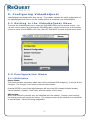
3.1 Getting to the VideoReQuest Menu
To access the VideoReQuest menu, press the VRQ MENU button on the remote control. You
can also exit the menus by pressing the VRQ MENU again. Use the cursor keys on the remote
control to move UP and DOWN in the lists, and LEFT and RIGHT to enter and exit menu items.
3.2 Configuration Menu
3.2.1 DVD Option
Player Status
This menu provides information about each of the connected DVD changer(s). It will list all the
changers. If a changer is not found, press the Detect button.
Pressing ENTER on one of the listed changers will show the DVD changer’s Model Number,
Version Number, Capacity, Total DVDs, and the number of Free slots.
DVD Lookup
When new DVDs are inserted, they are identified over the network. Playing a movie during
the lookup process will cancel the lookup. The lookup process can be resumed on a scheduled
or manual basis. See the following paragraphs.
-7-
Schedule
All the DVDs on all the changers can be looked up on a weekly or monthly schedule basis to
check the integrity of the database. This is useful if the DVD changers are accessible to
children, who might rearrange all the positions of the DVDs on the changer.
Manual
The DVDs in the changer can be identified immediately, rather than waiting for a scheduled
check. It can be checked by ALL DVDs, Changer, and range of DVDs in a changer.
DVD Play Mode
This Menu item allows you to choose between pausing or continuing to play a movie when
switching between your VideoReQuest and the DVD player. VideoReQuest pauses the movie
by default.
3.2.2 Video Options
TV Mode
This menu allows you to choose between the different video inputs, including:
4:3 Composite / S-Video (Default)
4:3 Composite / Component
16:9 Component (720P)
4:3 VGA (No TV)
Screen Saver Settings
To prevent screen damage due to a static picture on the screen, you can set the screen saver.
It is on by default. You can set the time interval before the screen saver appears and choose
from three different screen savers.
Video Switch
If an external video switch is being controlled by VideoReQuest, connect the RS-232 control to
Port 4 on the VideoReQuest. To set the proper video switch in this menu, the choices include:
None (Default)
KDS Flash 4
Xantech IR Blaster
Zektor HDS4.2
Sima
3.2.3 Time Zone
Choose your Time Zone to properly set the time for scheduled DVD database maintenance.
3.2.4 Advanced
This menu provides additional utilities. Please contact your dealer before using these utilities.
Test Network Connectivity
Online Software Update
Reboot
Shutdown
Reset to Factory Defaults
Reset System Database
-8-
3.3 Network Configuration
Choose between Dynamic Host Configuration (only with a Router) or Static IP Address. If
Static is used, please refer to your router instructions as to what the proper IP Address,
subnet mask, Gateway Address, and DNS address is needed.
Name your VideoReQuest to identify it with network applications. Only use letters and
numbers, without spaces or punctuation.
3.4 System Information
This screen provides the following information: Product Family, Name, Serial Number, IP
Address, Software Address, Software Version, Hardware Version, # of DVD
Changers, # of Discs, # of Free Slots, Video Mode, Video Switch, Subnet Mask,
Gateway IP, and MAC Address.
3.5 About ReQuest
Menu Item showing ReQuest Multimedia’s contact information.
-9-
4. Loading DVDs into the DVD Changer
Note: VideoReQuest will only work with DVD movies. Even though your changer
may support other discs including SACD and audio CDs, the VideoReQuest has been
designed as the ultimate movie player and will not display these discs.
4.1 Adding New DVDs
Every DVD changer has its own method of loading discs. For example, the Sony DVPCX777ES Changer requires the discs to be loaded with the label to the right. It is
recommended to load discs starting on Slot #1 of every changer. Spin the knob on the Sony
Changer to move the disc position to add more discs (please refer to Sony Owners Manual).
When you are done adding the DVDs, close the DVD changer door and the VideoReQuest will
start checking all the DVDs added. You can check the number of discs and compare with the
number of free slots to see if any discs are not identified as a DVD by VideoReQuest, including
DVDs put in the wrong direction.
4.2 Ejecting and Changing DVDs
To remove a specific DVD, navigate to the DVD (see Chapter 5) and press the EJECT button on
the VideoReQuest remote. An Alert window will tell you which changer to press eject and line
up the disc position.
When changing discs, it is recommended to first remove the discs and close the DVD changer
door allowing the VideoReQuest to register the removed discs. When the DVD changer
completes its cycle, you can then open the changer to add additional DVDs. Removing a disc
and putting a different disc in the same position will not register correctly on the
VideoReQuest and will not reflect the change until the next scheduled lookup. See Chapter
3.2.1 for more information about scheduling DVD lookups.
-10-
5. Browsing Your Movie Library
5.1 VideoReQuest Home
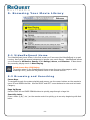
The VideoReQuest Home screen is the first screen you’ll see once the VideoReQuest is up and
running. Here you’ll see several categories to browse your movie library. VideoReQuest allows
you to browse by All Movies, Genres, MPAA Ratings, Actors, and Directors. It also shows
any currently playing movie in Now Playing.
Quick Access Key: VRQ Button
To quickly return to the VideoReQuest Home screen from any other page or while
watching a DVD, press the VRQ button twice on the remote control.
5.2 Browsing and Searching
Cursor Keys
To navigate through the system playlists and menus, use the cursor buttons on the remote to
move UP and DOWN the lists. Use the RIGHT and LEFT cursor buttons to enter and exit each
Category.
Page Up/Down
Use the PAGE UP and PAGE DOWN buttons to quickly page through a large list.
Search By Letter
Press a letter (A,B,C, etc.) on the remote control to quickly go to an entry beginning with that
letter.
-11-
5.3 All Movies
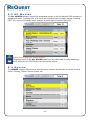
The ALL MOVIES category lists all the recognized movies on all the attached DVD changers in
alphabetical order. Pressing PLAY on a movie will load that DVD and begin playing. Pressing
EJECT on a movie will indicate which changer to press eject to remove the movie.
Quick Access Key: ALL DISCS Button
To quickly return to the ALL MOVIES page from any other page or while watching a
DVD, press the ALL DISCS button on the remote control.
5.4 Genres
The GENRES category allows you to sort the movie selection by the style of movies, such as
Action, Comedy, Drama, Science Fiction, etc.
-12-
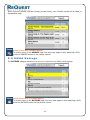
When a genre is picked, such as Comedy (shown below), only Comedy movies will be listed, in
alphabetical order.
Quick Access Key: GENRES Button
To quickly return to the GENRES Page from any other page or while watching a DVD,
press the GENRES button on the remote control.
5.5 MPAA Ratings
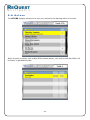
The RATINGS category allows you to sort your movies by the MPAA rating system.
Quick Access Key: RATINGS Button
To quickly return to the RATINGS page from any other page or while watching a DVD,
press the RATINGS button on the remote control.
-13-
5.6 Actors
The ACTORS category allows you to sort your movies by the starring actors of a movie.
When an Actor is picked, such as Ben Stiller (shown below), only movies with Ben Stiller will
be listed, in alphabetical order.
-14-
5.6 Directors
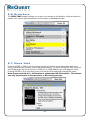
The DIRECTORS category allows you to sort your movies by the director. When a director is
picked, only movies with that director will be listed, in alphabetical order.
5.7 More Info
Pressing ENTER or RIGHT with the remote control will display more information about the
movie, including cast, director, genre and plot summary. To scroll through the text, press UP
and DOWN to go one line at a time, or PAGE UP or PAGE DOWN to go a full page at a time.
Pressing ENTER or PLAY from this screen will load the DVD and begin playing the movie.
Note: Press and Hold ALT + Edit button to update the DVD Information. This feature
can only be performed in the More Info or Now Playing screen.
-15-
5.8 Chapters
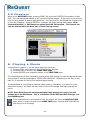
While in the MORE INFO page, pressing RIGHT will show the CHAPTERS information of that
DVD. The red highlighted chapter is the currently playing chapter. If the movie is not playing,
then the first chapter is always highlighted red. You can scroll UP and DOWN the Chapters list
to view the Chapters. Pressing ENTER on a chapter will begin playing that chapter. Note:
Press and Hold ALT + Edit button to update the DVD Information. This feature can
only be performed in the More Info or Now Playing screen.
6. Playing a Movie
As described in
1) Pressing
2) Pressing
3) Pressing
chapter 5, you can begin playing a movie by:
PLAY over a movie in any of the System Playlists,
PLAY or ENTER in the MORE INFO page,
ENTER over a specific chapter in the CHAPTERS page.
The VideoReQuest will then proceed to command the DVD changer to load the appropriate disc
and provide an alert window stating “MOVIE NOW LOADING.” Depending on the disc, it may
take 20-30 seconds for the DVD to load and begin playing.
If VideoReQuest is controlling an external video switch or IR blaster, or is part of a home
automation system, the video will then switch to the DVD changer and begin playing the
movie.
NOTE: Some DVD titles will not automatically begin playing the movie, but will
instead go to the DVD Menu. This is a limitation of the DVD and DVD Changer, not
the VideoReQuest.
If the VideoReQuest is connected to VGA, the output will show the NOW PLAYING
page, which is nearly identical to the MORE INFO page. Pressing NOW PLAYING will
also bring you to this page.
-16-
6.1 Switching Between the VideoReQuest
and DVD Changer(s)
To switch back to the VideoReQuest while a movie is being played on the DVD changer, you
can either press STOP to stop the movie and return, or any of the VideoReQuest quick
navigation buttons including: VRQ, MENU, ALL DISCS, GENRES, RATINGS, SEARCH, and NOW
PLAYING.
If a VideoReQuest navigation button is pressed while watching a DVD, the changer will either
pause the movie (Default) or continue to play the movie depending on the configuration
setting. See chapter 3.2.1. To return to the movie/DVD interface, press the DVD button.
6.2 DVD Navigation and Menus
When in the DVD interface, the cursor and ENTER buttons will navigate through the DVD
menus. Pressing DVD MENU will bring up the top menu for the currently playing DVD. This
allows navigation of the special features found on some DVDs.
6.3 DVD Transport Controls, Chapter
Browsing, and Other DVD Commands
The PLAY, PAUSE, and STOP buttons on the remote control allow you to control the DVD
changer. You can also move quickly between chapters by pressing the CHAPTER “+” and
CHAPTER “–“buttons. Pressing STOP will always return you to the VideoReQuest.
Using the remote, you can also utilize the DVD AUDIO, SUBTITLE, and ANGLE commands by
pressing and holding the ALT button on the bottom right of the remote control and A,B, and C
buttons, respectively.
-17-
7. Editing DVD Entries
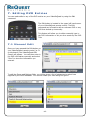
You can make edits to any of the DVD entries on your VideoReQuest by using the Edit
command.
The Edit button is located in the upper left hand corner
of your VideoReQuest remote control. The Edit
command can be used to edit an unknown DVD or any
DVD that looked up incorrectly.
This feature will allow you to either manually type in
the DVD information or let you do a search by the DVD
Title.
7.1 Manual Edit
Once you have pressed the Edit button on
your VideoReQuest remote control (or F1
on Keyboard), the VideoReQuest Edit
Screen will appear. You can then enter in
the DVD information manually and select
“Save” to store the information you
entered.
To edit the Genre and Ratings fields, you will be given a list of categories to select from
supplied by the AMG Database. You cannot create your own rating our genre.
-18-
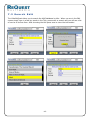
7.2 Search Edit
The VideoReQuest allows you to search the AMG database by title. When you are in the Edit
screen simply type in a few key words in the Title, press enter or search and you will see a list
of movies to choose from. After choosing the title press save to store the information.
-19-
8. Manual DVD Cover Art
VideoReQuest supports DVD Cover Art with our DVD Image Manager interface. Using the
VideoReQuest webserver you can quickly and easily search for DVD cover art images online and
load them to the VideoReQuest. You can even search your VideoReQuest for all movies without
cover art, allowing you to quickly access them to make changes. To access the webserver, simply
open a browser window and type in the IP address of your VideoReQuest (i.e http://192.168.1.25).
You can find the IP address of the VideoReQuest by going to System Information in the
VideoReQuest menu.
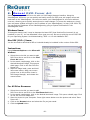
Windows Users:
If the applet doesn't load, it may be because the latest JRE (Java Runtime Environment) is not
installed on your PC. You can download it from java.sun.com. Be sure to pick the correct J2SE JRE
for your Operating System. Avoid downloading "J2SE v 1.4.2 with NetBeans IDE".
Mac OSX (10.2+) Users:
You do not need to download a JRE as it should already be included in this version of Mac OSX.
Instructions:
Using Internet Explorer under Microsoft
Windows:
1. Select the movie title you want to add
DVD Cover Art to and click on the Find
Cover Art button.
2. In the search results page, click on the
desired thumbnail image. This opens a
detail page. Click on the See Full-Size
Image link.
3. After the image loads, press and hold
left mouse button, drag your mouse
pointer over to the picture viewer in
DVD Image Manager, and release the
mouse button.
For All Other Browsers:
1. Select the movie title you want to add
DVD Cover Art to and click on the Find Cover Art button.
2. In the search results page, click on the desired thumbnail image. This opens a detail page. Click
on the See Full-Size Image link.
3. Save the picture to your computer. Press right mouse button over the picture and select 'Save
Picture As...'
4. Click on the Browse button and select the file you just saved.
5. Click the Upload button.
-20-
Strategies:
For best quality graphics, look for JPEGs, GIFs, or PNGs that are 160x220 or larger. Some sites
that have good quality DVD images include Amazon, Buy.com, DVDEmpire, Allmovies.com.
Troubleshooting:
•
•
Find Cover Art may not work if a pop-up blocker is enabled. Disable the pop-up blocker or set
it to ignore your VideoReQuest webserver page.
If Drag and Drop does not work on IE in Windows, click on
Tools->Internet Options and click the “Delete Files…” button under “Temporary Internet files”.
DVD Image Manager has been tested and is supported by:
•
•
Windows: Internet Explorer*, Mozilla, Mozilla Firefox, Netscape
Mac: Internet Explorer, Mozilla, Mozilla Firefox, Netscape, Safari
* Supports drag & drop
-21-
9. Troubleshooting
Q: The VideoReQuest cannot detect my Sony DVP-CX777ES DVD changer.
A:
1) Check the RS-232 connection between the two and make sure both units are turned on.
2) Run the detect action from DVD Menu/Configuration/DVD Options/Player/Detect
Q: I connected the Component Video output of the VideoReQuest to my video screen,
but I get a black and white picture, strange colors or no video.
A:
1) Using a composite connection, set the VideoReQuest to component output under
Menu/Configuration/Video Options/TV Mode.
2) If the TV Mode is set to 16:9 720P, make sure your display supports this mode.
3) Check the cables and make sure the display is on the right mode.
Q: The VideoReQuest lists all my movies as Unknown DVDs.
A: VideoReQuest requires an Internet connection to get the DVD information. Check the
cables, the network, the router, and Network Configuration menu item. In the Advanced
menu, you can use the Test Network Connectivity feature.
Q: VideoReQuest lists one or more of my movies as Unknown DVDs.
A: While we incorporate one of the largest DVDs databases available, some DVDs may not be
found. Be sure to only put in DVDs from North America Region 1.
Q: I put in several discs in the DVD changer that VideoReQuest is not showing.
A: VideoReQuest will only display DVD discs loaded in the DVD changer and will not list audio,
SACD, MP3, or other non-DVD discs. Also check to make sure you loaded your movies with
the label facing right in Sony DVD changers.
Q: Why do some DVDs go straight to playing a movie while others go to the DVD
menu?
A: This is a limitation on the DVD changer and certain DVDs authored by some movie studios.
Q: My Sony Changer DVD changer is not working.
A: Contact your dealer or Sony.
Q: The VideoReQuest can’t find a DVD changer.
A: Make sure the proper Null Modem RS-232 cable is plugged into the DVD changer and
VideoReQuest serial port.
Q: I get no Video on my TV.
A: Connect a VGA screen, Go to Menu/Configuration/Video Options/TV Mode, and confirm VGA
Only is not selected.
Q: When I play a movie, the TV does not switch to the movie.
A: If using an external switch controlled by VideoReQuest, make sure a null modem RS-232
cable is connected between the switch and VideoReQuest port 4 and the proper switch is set in
Menu/Configuration/Video Options/Switch.
-22-
10. ReQuest Multimedia Customer
Service
Your best source for support is your dealer. Please contact your dealer with any setup
questions or concerns. He/She is the expert on your particular installation and should be able
to help you.
If for some reason your dealer cannot help, please feel free to contact ReQuest by Internet,
email, or telephone.
10.1.1 Internet
ReQuest Multimedia’s website, http://www.request.com, contains the latest information on
VideoReQuest software upgrades, user guides, and answers to many general questions. We
suggest that you check our website as a first step to answer any questions.
10.1.2 E-mail
ReQuest technical and consumer support is always accessible via e-mail. Please send your
technical questions to ReQuest by e-mail to [email protected].
ReQuest recommends e-mail as the preferred form of communication to answer your
questions and address your comments. When sending ReQuest an e-mail, please reference
your VideoReQuest model and serial number.
10.1.3 Telephone
If you were unable to get the answer you needed from ReQuest Multimedia’s website, you can
contact ReQuest’s technical support team at (800) 236-2812. Please have your VideoReQuest
model, serial number, and the name of your VideoReQuest dealer ready.
10.1.4 Future Updates
Your dealer is your best source of information on your VideoReQuest.
The movie industry is constantly changing and VideoReQuest has been designed to change
too. Your new VideoReQuest unit has been designed to be updated from time to time, as new
technology and features become available.
-23-
11. Specifications
Features
DVD Changer Controller
Ethernet, Serial, and IR control support for any home control system
DVD Movie Lookup Support
Interfaces
TV Interface
Crestron™ Interface Enabled
AMX™ Interface Support
Full featured remote control
Ethernet, Serial RS232, and IR Control
Inputs
4 RS-232 Ports for DVD Changer and Video Switching Control
Outputs
Analog Audio (Stereo RCA Jacks)
Composite Video and S-Video (NTSC)
Component (NTSC and Progressive 16:9 720P)
VGA Monitor
Other Connectors
3 USB Ports (1 Front and 2 Back)
Ethernet 10/100 Base T (RJ 45 Jack)
RS-232 Control Port
IR Receiver Mini-jack
IEEE 1394 Firewire ports (Future Use)
PS/2 Keyboard Port
Supported USB Peripherals
USB Keyboards
Power Requirements
115 VAC/60 Hz and 230 VAC/50 Hz Manually Switched.
Power Consumption
0.5 A <60 watts
Operating Temperature
Do not operate in temperatures above 90˚F (32˚C) or below 40˚F (4˚C).
Weight
15.5 lbs.
Size
Chassis: 17” (W) x 3.5” (H) x 15” without faceplate, 15.25” with faceplate (L)
Rack Space:
2 RU
-24-
12. Regulatory Notices
12.1 United States FCC Compliance
VideoReQuest complies with the limits for a Class B digital device, pursuant to part 15 of the
Federal Communications Commission rules and regulations. These limits are designed to
provide reasonable protection against radio and television interference in a residential
installation. This device uses and generates radio frequency energy and if not installed and
used in accordance with the instructions can cause interference with radio communications.
12.2 FCC Declaration of Conformity
We, ReQuest, Inc., 100 Saratoga Village Blvd. #44, Ballston Spa, NY 12020 declare under our
sole responsibility that the VideoReQuest Digital Video Controller complies with Part 15 of the
FCC rules. Operation is subject to the following two conditions: 1) this device may not cause
harmful interference and 2) this device must accept any interference received, including
interference that may cause undesired operation.
Application of Council Directives: 89/336/EEC (EMC Directive)
73/23/EEC (LVD)
Conformity Declared to Standards:
Model Name:
EN 55022 (Emissions)
EN 55024 (Immunity)
EN 60950 (Safety)
VideoReQuest VRQ 1
Manufacturer:
Manufacturer’s Address:
100 Saratoga Village Blvd #44
Ballston Spa, NY 12020
The undersigned declares that the above named equipment conforms to the above
Standards and Directives.
Signature:
Date:
Name: D. Joseph Gersuk
Position: Chief Executive Officer
-25-
100 Saratoga Village Blvd #44
Ballston Spa, NY 12020
P: 800.236.2812
F: 518.899.1251