1
Unit 5: Troubleshooting
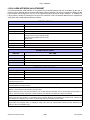
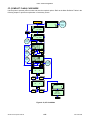
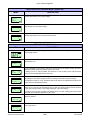
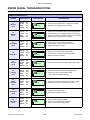
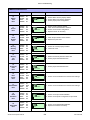
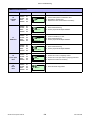
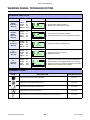
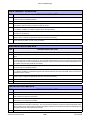
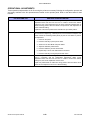
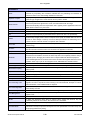
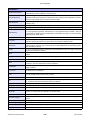
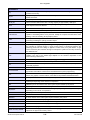
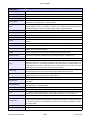
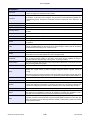
ERROR ICONS
LCD ICONS
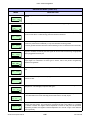
DESCRIPTION OF ERROR
POSITION ON LCD
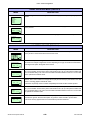
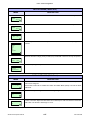
Displayed when detecting Label End.
Icon 1
Displayed when detecting Ribbon End.
Icon 1
Displayed when detecting Sensor Error.
Icon 1
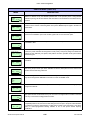
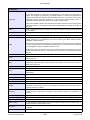
Displayed when detecting Head Open.
Icon 1
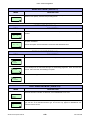
Displayed when head is disconnected.
Icon 1
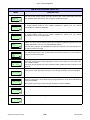
Displayed when detecting Communication Error.
Icon 1
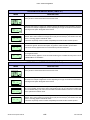
Displayed when detecting Receive Buffer Over.
Icon 1
Displayed when detecting Item No. Error or BCC Error.
Icon 1
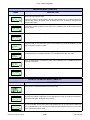
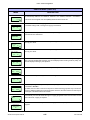
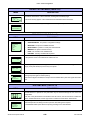
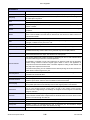
Displayed when having access error to CF (Compact Flash) Card.
Icon 1
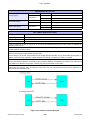
Displayed when having write error to main ROM or when detecting Kanji ROM
error.
Icon 1
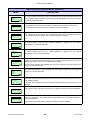
Displayed when detecting Calendar Error.
Icon 1
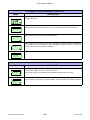
Displayed when having a write error to RFID tag.
Icon 1
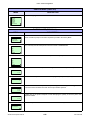
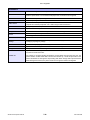
Displayed when printer error other than above is detected.
Icon 1
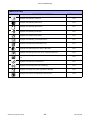
Displayed error number corresponding to various errors.
Icon 2
S8400 Series Operator Manual
5-5
PN: 9001160B