1
Handheld Transmitter SQ-816(UHF) / SQ-216(VHF)
VHF Handheld Transmitter Q-1002
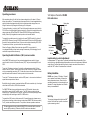
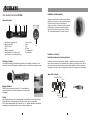
Parts and Functions
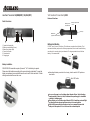
Parts & functions
Battery status
LED indicator
Battery compartment
cover
Color cap
Metal Grille
( Capsule module inside )
Power Switch
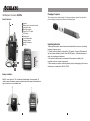
Battery Installation
1. Capsule with metal grille
2. Battery normal indicator (Green)
3. Battery low indicator (Red)
4. Power on/off switch
5. Channel switch
6. Charging port
Q-1002 uses 1 piece of 9V battery. To install new or replace the old battery, First
unscrew the battery cap from the battery compartment, then insert the new battery
according to its correct polarity as indicated. For longer operation hour, Alkaline
battery is recommended!
P r e ss
Battery installation
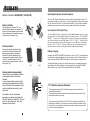
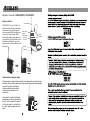
SQ-816/SQ-216 transmitter requires 3 pieces of " AA " size battery to operate.
Please insert the batteries according to the correct polarity as indicated. To open the
battery compartment, press and slide down the cover until it clicks and locks. Further
sliding movement will remove the cover.
After putting the battery cover back to the housing , slide the switch to "ON" position as
shown below.
slide to "ON" position
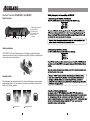
As soon as the power is on, the battery-status indicator will give flash, indicating a
normal operation. If there is no flash, it indicates either power supply is not available
or battery is installed wrongly.
After switching on, the Therefore signal indicator LED(s) of matching receiver will light
up, indicating the microphone signal transmission is in normal operation.
Switch off the power when the microphone is not in use, meanwhile, remove the
battery out of microphone if it is not to be used for an extended period.
9
10