1
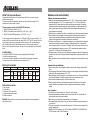
Caution and tips on how to obtain the best results.
SMART 300
( Amplifier version )
SMART 300 Passive Speaker
1. Before inserting the batteries, please make sure that they are inserted according to
the correct polarity.
2. The audio cable of VHF transmitters also serves as antenna. The length of the cable
is cut according to the specific frequency range. Do not alter the length or mix around
the cable of different transmitters. The use of wrong audio cable will affect the antenna
efficiency of the transmitter!
3. Use only brand new Alkaline batteries. Do not use " general purpose " batteries, When
batteries are weak, replace all the batteries at the same time. Do not mix and use new and
old batteries together.
4. Position the receiver such that it has the least possible obstructions between it and the
transmitter. Line of sight is best !
5.The transmitter and the receiver should be as close as possible but not less than 1m.
6. A receiver cannot receive signals from two or more transmitters simultaneously.
7. Turn the transmitter off when it is not in use. Remove the batteries if it is not to be
used for a period of time.
8. Antennas form an integral part of the receiver and must be installed when in Operation.
A
F
PWR / MIC
B
LOW
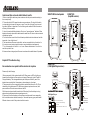
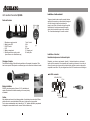
K. WR1 channel selector
L. WR2 channel selector
G
C
AUX / USB
HI
TONE
A
K
H
C
A
L
B
CH1
D
D
CH2
E
F
E
I
A
G
EXT. SP
H
J
J
Fig. 1
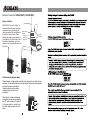
Simple DIY Trouble-shooting :
No sound when one speaks into the wireless microphone
I
J
MIC IN
AUX IN
TONE
EXT. SP
DC IN
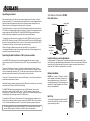
Main Power &
MIC Volume
AUX / MP3
WR Power &
Volume control
CHARGING indicator
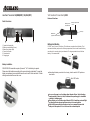
Battery Compartment
cover release button
Fig. 2
SMART 300
( USB Digital Player version )
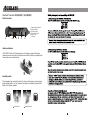
Please verify the followings:
1.Main power switch of the system should be ON. When power on LED not lighting up,
it means that the battery is either weak or not charged. Please plug in the AC cable to
Charge the battery. The rechargeable battery has a life span of about 2 years. If the
batteries have reached their life expectancy, please change to a fresh pair.
2.The power switch of the corresponding receiver module should be put to ON. This is
indicated by the lighted power LED. When two wireless microphones are used, both
power switches of the receiver modules must be ON.
3.Wireless microphone should be switched to ON and verify that the battery is okay. (
please refer to wireless microphone operating manual ).
4.Please verify that the frequency on the wireless microphone and the corresponding
built-in wireless receiver module are exactly of the same frequency group and channel.
5.Master volume control of the system should be turned on.
a
PWR / MIC
f
A. WR1 channel selector
B. WR2 channel selector
a
b
b
c
g
c
A
d
TONE
e
CH1
h
f
g
i
B
CH2
h
d
j
e
k
l
m
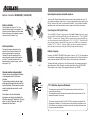
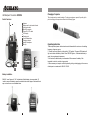
USB Dig it al Pla yer:
i
PLAY /
PAUSE
j
MODE
n
k
MIC IN
AUX IN
TONE
EXT. SPKR
DC IN
Main Power & MIC Volume
AUX / USB Power & Volume
WR1
WR2
Play / Pause
MODE selector
l
p
m
o
2
PLAY /PAUSE
Music Format:MP3 & WMA only
3
1 USB Jack ( Play starts automatically)
o
USB jack
Battery Compartment
cover release button
p CHARGING indicator
n
o
MODE
4
1
2 PLAY / PAUSE
3 4 EQ Modes : Normal / Rock / Classic / Jazz
5
4 UP
Fig. 3
5 DOWN
17
2