1
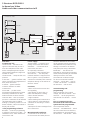
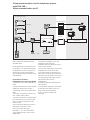
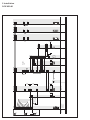
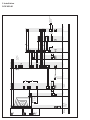
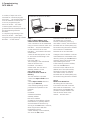
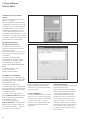
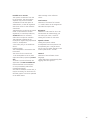
1 System description 2 Safety remarks System conditions: DoorCom IP In-Home Siedle DoorCom IP links the Siedle In-Home bus: Video with the IP world. Door calls are transformed via the DoorCom IP and transmitted via the IP network (Intranet) to certain PCs. The video image at the door station is converted and transmitted via the IP network. Electrical voltage The DoorCom IP Software Client is used here as a virtual in-house telephone for communication to the door station. The Software Client must be installed on every PC in the network which is intended to receive a door call. Switching and control commands can be visualized and operated using the Software Client. Assignment of door calls to the Software Clients takes place using an IWA address (Interface Working Address) which is entered in the DoorCom IP with the aid of the con figuration software. The door call can optionally also be held over the telephone system using a telephone, while the picture is displayed by the Software Client and all control functions such as door release can also be initiated by the software. For this, a DCA 740-01 must additionally be connected to the DoorCom IP. The video camera picture continues to appear in the Software Client on the PC monitor. Mounting, installation and servicing work on electrical devices may only be performed by a suitably qualified electrician. Failure to observe this regulation could result in the risk of serious damage to health or fatal injury due to electric shocks. •When working at the device, observe the remarks relating to mains cut-off. •Observe the standard DIN EN 60065! When establishing the electronic connection, observe the requirements of VDE 0805 / EN 60950. •The building installation must include an all-pole mains switch with a contact separation of at least 3 mm. •Ensure maximum fusing of 16A for the mains connection in the building installation. •When planning, the required distributor space for switch panel mounted devices must be taken into account. •No external voltages >30 V AC / DC may be applied to bus users. Devices with 230 V connection In accordance with DIN VDE 0100 part 410, section 411.1.3 attention must be paid to ensuring a safe separation between system lines and the mains voltage; i.e. system and mains cores must not be permitted to touch! The system line cable (extra-low safety voltage) must be stripped back by the minimum pos sible. Find out about the necessary safety measures and system requirements before starting installation and com missioning of the DoorCom IP. System conditions for the bus programming software BPS 650‑... System requirements, software conditions: • IBM-compatible PC with CD-ROM drive • Intel Pentium III/1 GHz, and compatible CPUs • Main memory with at least 512 MB RAM • Powerful graphics card • Operating systems from Microsoft® Windows 2000/XP/ Vista/Windows 7 (no guarantee with Windows 95, 98SE and 98Me, and Windows NT 4.0 from SP3, as support for these operating systems has now been discontinued by Microsoft) (currently also still without engagement for Windows Vista, USB drivers are already being reworked) • Appr. 25 MB free space on the hard disk (for BPS 650-... incl. help file) • Sufficient free storage space for project data (appr. 5-250 kB per project) • Microsoft Internet Explorer 6.0 or higher • Acrobat Reader 7.0 or higher • Where necessary up to 150 MB free space on the hard disk for additional service packs, Internet Explorer, Acrobat Reader, etc. • The PRI 602‑... USB is required for programming. For mains connection and network settings such as assignment of the IP address, the responsible network administrator must be consulted. 3