1
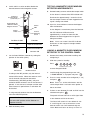
36 Zone
Wireless Security System
SL5
POWER
ALARM
STATUS
ALARM MEM/
MESSAGE
1
2
3
4
5
7
8
0
LINE
STATUS
6
?
9
!
ESC
ENTER
Installation & Operating Manual
FOREWORD
All devices in this wireless Alarm System are
designed and manufactured to provide long reliable
service. The system is designed for ease of
installation using only conventional domestic tools.
However, it is essential that the installer reads and
fully understands the advice and procedures
contained in this manual and plans the system before
proceeding with the installation.
During installation, it is important that the procedures
described in this manual are followed in sequence.
DEVICE RANGE
The quoted range of the system devices (see component
specification on rear cover) is measured in ideal
conditions. Any solid object (e.g. walls, ceilings,
reinforced PVC doors etc) placed between the transmitter
and Receiver device will reduce the radio range.
The amount by which the range will be reduced is
dependant upon the nature of the barrier.
For example:
Wall Type
This manual should be retained in a safe place
for future reference.
IMPORTANT: All devices, with the exception of the
External Siren are suitable for mounting in dry
interior locations only.
IMPORTANT:
LOCAL AUTHORITY REGULATIONS AND
LEGISLATION
This alarm system should be installed and operated
in accordance with the requirements of any current
local and / or national regulations and legislation.
We recommend that you contact your authority to
obtain details of your area's requirements regarding
intruder alarm installations.
For example in Belgium, the installation and use of
an alarm system including notification by telephone
(Voice Dialler) functionality and the optional use of
an external siren is controlled by Belgium legislation
"KB" of 19/06/2002.
Dry-lined partition wall:
Single layer brick wall:
Double layer brick wall:
Metal panel/radiator:
Range Reduction
10 - 30%
20 - 40%
30 - 70%
90 - 100%
Note: The effect on the range of multiple walls is
cumulative, i.e. if there are 2 brick walls in the way,
the range will be reduced by up to 40% by each wall.
SYSTEM SECURITY
This system has been designed to both detect
intruders and act as a strong deterrent to would-be
intruders when installed correctly.
We recommend that your Alarm is used in conjunction
with good physical protection such as security window
and door locks.
All units in the system are encoded to operate together
using a 20 bit House Code.
The system is operated from one or more Remote
Control Units and/or Keypads - depending on which
system and/or accessories purchased.
SAFETY
DECLARATION
Novar ED&S hereby declares that this wireless alarm
system is in compliance with the essential
requirements and other relevant provisions of the
Radio and Telecommunications Terminal Equipment
(R&TTE) directive, 1999/5/EC.
Tools and Equipment Required:
2
No.0 Philips Screwdriver
Bradawl
No.1 Philips Screwdriver
Drill
No.2 Philips Screwdriver
3mm Drill Bit
Small Spirit Level
5 & 6mm Masonry Drill Bits
Always follow the manufacturers advice when using
power tools; steps, ladders etc. and wear suitable
protective equipment (e.g. safety goggles) when
drilling holes etc.
Before drilling holes in walls, check for hidden
electricity cables and water pipes, the use of a
cable/pipe locater maybe advisable if in doubt.
When using ladders, ensure that they are positioned
on a firm stable surface at the correct angle and
suitably secured before use.
The use of ear defenders is advisable when working
in close proximity to the Siren due to the high sound
level produced by this device.
CONTENTS
KIT CONTENTS
4
TESTING THE SYSTEM
26
INTRODUCTION AND OVERVIEW
5
5
5
5
5
6
6
6
6
6
6
7
7
7
7
7
FACTORY SETTINGS
31
31
Multiple Users
User Access Code
System Arming
Entry/Exit Delay
Zones
Zone Lockout
Quick Set
Event Log
Chime
Monitoring
Latch Key
Remote System Control
Tamper Protection
Jamming Detection
Battery Monitoring
PLANNING AND EXTENDING YOUR
ALARM SYSTEM
Typical Installation
REMOTE CONTROL UNIT
General Information
Configuring the Remote Control
Testing the Remote Control
CONTROL PANEL
Positioning the Control Panel
Installing and Configuring the Control Panel
Linking a Remote Control or Remote Keypad
to the Control Panel
Testing the Control Panel and Remote Control
PASSIVE INFRA-RED (PIR) MOVEMENT
DETECTORS
Positioning the PIR Detectors
Installing and Configuring the PIR Detectors
Testing a PIR Detector Independently
Linking a PIR Detector to the Control Panel
Testing a PIR Detector with the Control Panel
MAGNETIC DOOR / WINDOW DETECTORS
Positioning the Door / Window Detectors
Installing and Configuring the Door / Window
Detectors
Testing a Door / Window Detector Independently
Linking a Door / Window Detector to
the Control Panel
Testing a Door / Window Detector
with the Control Panel
EXTERNAL SOLAR SIREN
8
8
9
9
10
10
10
10
11
12
13
14
14
15
15
16
17
17
17
18
19
19
20
Reset Factory Settings
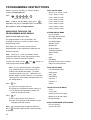
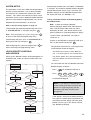
PROGRAMMING INSTRUCTIONS
Navigating through the Programming Mode Menus
Telephone Application Setup
User Setup
System Setup
Learn Remote Controls and Keypads
Alarm Duration
Entry / Exit Delay Period
Entry Delay Beeps
Exit Delay Beeps
Wireless Siren
Wired Siren
Auxiliary Relay
Jamming Detection
Zone Lockout
Time & Date Setup
Dialler Operating Mode
Remote Phone Access and Control
Rings to Answer Phone
Zone Setup
Learn Detector Code
Monitoring Setup
- Remote Manager
- Voice Dialler
Latch Key Setup
Friedland Spectra Plus Lighting Setup
OPERATING INSTRUCTIONS
Voice Dialler
Arming the System
Part-Arming the System: Part-Arm 1
Part-Arming the System: Part-Arm 2
Disarming the System
Disarming the System with the Duress Code
Friedland Spectra Plus Lighting
Quick Set
Personal Attack (PA) Alarm
Latch Key
Zone Lockout
Device Tamper
Chime
Keyboard Beep Mute
Entry / Exit Beeps
Event Log
Remote Phone Access and Control
Monitoring
- Remote Manager
- Voice Dialler
Siren Service / Operating Mode
Battery Monitoring
32
32
33
33
34
35
36
36
37
37
37
37
37
37
38
38
38
38
38
39
40
42
42
42
45
47
48
48
48
48
48
48
49
49
49
49
50
50
50
50
50
50
50
51
52
52
53
54
54
21
21
21
21
22
23
23
MAINTENANCE
56
ALARM RECORD
57
TROUBLE SHOOTING
59
DUMMY SIREN
24
EXTENDING YOUR ALARM SYSTEM
62
EXTERNAL CONNECTIONS
25
COMPONENT SPECIFICATION
64
General Information
Positioning the Solar Siren
Installing and Configuring the Solar Siren
Power-up of the Solar Siren
Testing the Wireless Solar Siren
Mounting the Solar Siren on to the wall
3
KIT CONTENTS
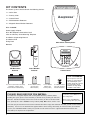
The Alarm System should contain the following devices.
1 x Solar Siren
1 x Dummy Siren
1 x Control Panel
2 x PIR Movement Detectors
2 x Magnetic Door / Window Detectors
Also included:
Power Supply Adaptor
RJ11-BT Telephone Connection Lead
Siren and Dummy Siren Mounting Template
Installation & Operating Manual
Installation DVD
Fixing Pack
Solar Siren / Dummy Siren
Batteries
POWER
ALARM
STATUS
1
2
3
4
5
6
7
8
0
PIR Movement
Detector
Door / Window
Detector
ALARM MEM/
MESSAGE
?
9
LINE
STATUS
!
ESC
ENTER
Control Panel
HEALTH WARNING:
6V/1.2Ahr Sealed lead acid battery
(supplied 1 x fitted in Siren
and 2 x fitted in Control Panel)
9V PP3 Alkaline battery
(for Siren and
PIR Detectors)
1.5V C Alkaline
batteries (for
Dummy Siren)
3V CR2032 Lithium
Coin Cell (for Door /
Window Detectors)
PLEASE READ BEFORE YOU INSTALL
The Solar Siren is supplied complete with a rechargeable 6V battery. However, before
Do not put the coin cell
battery in your mouth as
this could impair your
health. Keep this cell out
of reach from young
children as they could
swallow it and choke.
Install battery before MM/YYYY or
else recharge after.
installing this system, please ensure the battery is still fit for use by checking the date code
label on it. Remove the battery cover on the rear of the Siren, you will see the label shown
here. (Example of a date is 02/2009 meaning February 2009) MM = Month, YYYY = Year.
Battery expiry date MM/YYYY
(Do not recharge after expiry date).
If the date you purchased this kit exceeds the install date but not the expiry date marked on this label, you will need to recharge
the battery. You can use the Control Panel supplied with this kit to recharge this battery for 24 hours before you install the
system. (See CONTROL PANEL section), but you will need to remove one of the supplied Control Panel batteries first.
If the battery has expired seek a replacement.
4
INTRODUCTION AND OVERVIEW
MULTIPLE USERS
The system allows for up to 6 Users, a Master and
a Duress User to be configured. This allows the
system Event Log to maintain a record of which
users have armed and disarmed the system. Each
user will have a different User Access Code. In
addition a 4 second voice recorder facility enables
the user’s name to be recorded for use with the
Latch Key facility.
Full Arm
Only the Master User has access to the
programming functions and is able to configure
the system.
Note: Any Remote Control Units on the system will
be recorded as User 6.
Part-Arm 1
USER ACCESS CODE
The Control Panel is the brains of the system and is
where the system is programmed and operated
from. A 4 digit code is used to ensure that only
authorised people have access to the system. This
is the User access code and can be set to a code of
your choice that only you and other authorised
system users know.
SYSTEM ARMING
The system has a ‘Full Arm’ and two ‘Part-Arm’
modes. ARM will ‘Arm’ all zones while the ‘Part-Arm’
modes will only arm the zones that are enabled for
the particular Part-Arm mode.
For example:
The system could be configured so that during night
time, ‘Part-Arm 1’ would arm only zones protecting
the lower floor and outbuildings leaving the upper
floor free for movement without triggering the alarm.
During the day while the property is occupied
‘Part-Arm 2’ could arm only the zones protecting the
outbuildings. However, when the property is left
un-occupied, the ‘Full Arm’ mode will arm all zones
to protect the entire property, (i.e. upper and lower
floors and outbuildings).
Part-Arm 2
ENTRY/EXIT DELAY
When the system is armed with the Exit-Delay
enabled, no signal from any detector on an active
zone will be able to trigger an alarm until the ExitDelay has expired. This enables the system to be
armed from within the property and allows time for
the user to exit the property without triggering an
alarm. If the Exit-Delay is disabled then detectors
on active zones will immediately be able to trigger
an alarm once the system is armed.
The system Exit-Delay may be configured for
between 10 to 250 seconds or disabled completely.
If a detector on a zone with its Entry-Delay enabled
is triggered, then an alarm will not sound until the
Entry-Delay period has expired. This allows time for
the user to re-enter the property and disarm the
system before an alarm occurs. Generally only the
zones on the main entry route to the property will be
configured with an Entry-Delay. The remaining
zones would be configured with their Entry-Delay
disabled allowing them to immediately initiate an
alarm the instant a detector on the zone is triggered.
5
The Entry-Delay for each zone may be configured for
between 10 to 250 seconds or disabled completely.
Note: To conserve power and maximise battery life
the PIR Detector will only detect movement if there
has been no movement detected within the previous
2 minutes. Consequently the PIR Detector will not
become active until the protected area has been
free from movement for more than 3 minutes.
ZONES
The system incorporates 32 wireless alarm zones
for the connection of a detector per zone used to
independently monitor different areas of the
property. In addition to standard intruder protection,
each zone can also be configured to operate in
alternative modes.
QUICK SET
The system may be fully armed in 10 seconds using
the quick set facility, overriding the programmed exitdelay. This is useful for setting the system at night
when the Exit-Delay warning beep will be silenced
after just a few seconds.
EVENT LOG
The Control Panel incorporates a memory capable
of storing the last 99 system events. This enables
the user to see which user has Armed/Disarmed
the system and if and when any alarms occurred.
The time, date and details of the event type will be
recorded for each system event.
CHIME
– ‘24-hour Intruder’ mode provides 24 hour intruder
protection for areas where continuous monitoring
is required, (e.g. gun lockers).
Chime is a low security facility for use when the
system is in Standby mode. If the Chime feature is
ON, and a detector on a zone that has its Chime
function enabled is triggered, the internal sounder
will produce a low volume warning tone. A typical
use of the Chime function would be to warn that a
door or particular area has been entered.
– ‘Fire’ mode provides 24 hour monitoring of any
Smoke detectors incorporated into the system.
MONITORING (OPTIONAL)
For example:
– ‘Intruder’ mode provides standard intruder
monitoring.
– ‘Test’ mode allows a zone to be monitored while
the system is armed. If a detector on a zone is
triggered an entry will be recorded in the Event
Log but an alarm will not occur.
In addition there is the facility to connect up to 4
hard wired zones to the Control Panel, each of which
is configurable with most of the features of the
wireless zones.
ZONE LOCKOUT
If a detector on an active zone is triggered while the
system is armed an alarm will sound. After the
programmed alarm duration has expired the alarm
will stop and the system will automatically reset.
Subsequent detectors triggered will again trigger an
alarm. If a single zone triggers an alarm more than
3 times then that zone will be ‘Locked Out’ and any
further alarm signals from that zone will be ignored
until the system is disarmed.
Note: The ‘Zone Lockout’ feature can be disabled
if required.
6
This system incorporates a telephone dialler (Voice
Dialler) and monitoring service (Remote Manager).
The monitoring service enables the system to make
a check call to the premises and generate text / email /
telephone calls / messages to up to 6 key holders.
A monitoring service provider is required to make
use of these features.
IMPORTANT: to set up monitoring follow REMOTE
MANAGER instructions.
The system telephone dialler can be set up as a
Voice Dialler that can be used to call for help and
or / notify the user that the system has been triggered
and an alarm has occurred.
In this mode the system will call for help using
your recorded message and dial up to 4 telephone
numbers and replay the corresponding alarm
message for each number. Switching the system
between Remote Manager to Voice Dialler is
straightforward.
LATCH KEY
When the system is Disarmed the Latch Key facility,
if enabled, will call the first Latch Key phone number
and replay the user message (recorded under latch
key setup) for the set ‘Play Time’. The recipient must
acknowledge the message by pressing the button on
their telephone keypad. If the call is unanswered or
an acknowledgment is not received then the second
Latch Key phone number will be called. The Voice
Dialler will continue calling each number in turn until
each number has been dialled the set number of
times or the sequence is cancelled/acknowledged by
the recipient.
The jamming detection circuit will constantly scan for
jamming signals. However, it will also detect and
could in extreme cases be triggered by radio signals
from other radio equipment within range operating on
the same frequency which would not interfere with
the normal operation of your alarm.
If you are planning to operate the Jamming
Detection feature we recommend that you wait
at least 30 days before activating this feature to
allow time for you to become familiar with the
operation of your system.
For example, the Latch Key facility is useful to inform
parents that a child has returned from school and
Disarmed the system.
When activating jamming detection the system
should be monitored carefully for false jamming
alarms for at least 2 weeks before leaving the
Jamming Detection function permanently enabled.
REMOTE PHONE ACCESS
AND CONTROL
BATTERY MONITORING
It is possible to dial into the system via the connected
telephone line to interrogate the system status and to
have basic control over the system, (e.g. to Arm and
Disarm the system). You may also activate the
microphone on the Control Panel to Listen-In to what
is happening in the protected property.
TAMPER PROTECTION
All devices powered by non-rechargeable batteries
incorporate a battery level monitoring feature which
will warn of a low battery status.
In addition the Control Panel will also indicate a low
battery status on any PIR (Passive Infra-Red) or
Magnetic Door / Window Detector on the system.
The batteries on any device indicating a low battery
status should be replaced immediately.
All system devices (except any Remote Control
Units) incorporate Tamper protection features to
protect against unauthorised attempts to interfere
with the device.
Any attempt to remove the battery cover from any
device (except a Remote Control) or to remove the
Solar Siren or Control Panel from the wall will trigger
the alarm even if the system is Disarmed (unless the
system is in Test or Program modes).
JAMMING DETECTION
In order to detect any attempts to illegally jam the
radio channel used by your alarm system, a special
jamming detection function is incorporated into the
Control Panel. If this feature is enabled, an alarm
will be triggered if the radio channel is jammed
continuously for more than 30 seconds or if the
system is jammed for more than 3 periods of
10 seconds in a 5 minute period. At full alarm it will
beep for 3 seconds and will alarm after 10 seconds,
at Part Arm it will beep for 3 seconds.
7
PLANNING AND EXTENDING YOUR ALARM SYSTEM
Before attempting to install your Alarm System it is
important to study your security requirements and
plan your installation accordingly.
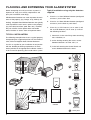
Typical Installation using only the detectors
supplied:
PIR Movement Detectors are used to protect the main
areas of the property, (e.g. lounge, study, hallway and
landing). Magnetic Door/Window Detectors are typically
used to protect the main access points to the property,
(e.g. front door, back door, patio doors etc). However,
they can also be used to protect other vulnerable
doors/ windows or access doors to important rooms.
TYPICAL INSTALLATION
1.
Place the 1st Door / Window Detector (configured
on zone 1) on the front door.
2.
Place the 2nd Door / Window Detector (configured
on zone 2) on the back or patio doors.
3.
Place the 1st PIR Detector (set on zone 3) and
the 2nd PIR Detector (set on zone 4) in two of
the following locations:
i) downstairs in the main living room containing
most valuables, or
The following example below shows a typical property
incorporating the suggested positions for the External
Siren, PIR and Magnetic Door / Window Detectors.
Use this as a guide for your installation in conjunction
with the detailed positioning requirements for each
device provided in the appropriate installation sections
in this manual for planning your intruder alarm system.
ii) on the landing covering the access routes
between bedrooms and the stairs, or
iii) in the hall covering the Control Panel and
routes between downstairs rooms.
A
POWER
ALARM
STATUS
1
2
4
5
ALARM MEM/
MESSAGE
7
8
0
LINE
STATUS
3
6
!
?
9
ESC
ENTER
E
Control Panel
F
C
C
B
D
C
A
Remote Control
D
D
C
PIR Movement
Detector
B
SHED
D
D
D
C
Back Door
KITCHEN
Magnetic
Door/Window
Detector
DINING
ROOM
HALL
LOUNGE
A
D
GROUND FLOOR
D
GARAGE
E
External
Solar Siren
C
F
8
Dummy Siren
The system may be expanded with additional
detectors, Remote Controls and Keypads to provide
even greater protection. However, the following rules
should be followed:
a. Any detectors covering the main door and the
route to the Control Panel should be set on
zone 1 only.
b. Any detectors covering the remainder of the lower
floor should be set on zones 2 to 4 only.
c. Any detectors placed upstairs (which are not
required when activating Part-Arm1) should be
set on zones 5 or 6 only.
The pre-configured system defaults provide a basic
functional system, which will suit most installations,
(i.e. a 2 floor house):
The systems factory settings are pre-configured to
provide a basic functional system to suit most typical
basic installations:
●
Detectors on zones 1 and 2 will have a 30 second
entry delay period. Detectors on all other zones
are configured as INSTANT, (i.e. they have no
entry delay).
●
The system has a 3 minute alarm duration.
●
The Zone Lockout feature is ON so that if any
single zone triggers an alarm more than 3 times
they will be ignored until the system is next
disarmed, (this feature helps protect against
continuous false alarms).
●
PART-ARM 1 is configured with a 30 second exit
delay and operates with detectors on zones 1 to
4 only.
●
PART-ARM 2 is OFF.
●
All other system features, (e.g. telephone dialler,
Latch Key, Chime etc.) are OFF and not
programmed.
IMPORTANT:
As soon as installation is complete
– The default Master User Access Code for the
Control Panel should be changed to your own
code that only you know.
– User Access Codes 1-6 for the Control Panel
should be changed to your own codes that
only the relevant system user knows.
– The system Time and Date must be configured.
Note: If you wish to change the system configuration
away from the above example and factory settings
and customise it to your own unique requirements or
activate any of the more advanced system features
then refer to the Programming section on page 32.
REMOTE CONTROL UNIT
The Remote Control Unit(s) is used to Arm in either
Arm or Part-Arm and to Disarm the system.
Transmit LED
Arm
Part-Arm
Disarm
Slide up
to operate
Personal Attack
Switch
The Remote Control Unit also incorporates a
Personal Attack (PA) switch. Activating the PA switch
on the side of the Remote Control will immediately
trigger an Alarm (unless the Control Panel is in Test
or Program Modes) even if the system is disarmed.
The alarm can be cancelled using the Remote
Control by pressing the ‘DISARM’ button.
Up to a total of 6 Remote Controls and/or Keypad
Units can be used with your system, providing they
are all operated within effective radio range of the
Control Panel.
The Remote Control is powered by a CR2032 type
Lithium cell which under normal conditions will have an
expected life of approximately 1 year. Under normal
battery conditions the Transmit LED on the Remote
Control will only illuminate when a button is pressed.
However, under low-battery conditions this LED will
continue to flash after the button has been released.
When this occurs the battery should be replaced as
soon as possible.
9
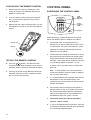
CONFIGURING THE REMOTE CONTROL
1.
2.
3.
Remove the rear cover by undoing the small
screw on the rear of the Remote Control and
keeping it safe for later.
CONTROL PANEL
POSITIONING THE CONTROL PANEL
LCD
Display
Window
Insert the battery under the clip ensuring that
the + terminal faces upwards away from the
Circuit Board.
Replace the rear cover and fixing screw. Do not
over tighten the screw as this could damage the
thread.
POWER
ALARM
STATUS
ALARM MEM/
MESSAGE
1
2
3
4
5
7
8
Status
Indicator
LEDs
6
!
?
0
LINE
STATUS
9
ESC
ENTER
Keypad
When choosing a suitable location for the Control
Panel, the following points should be considered.
Battery Clip
1.
The Control Panel should be located in a
position out of sight of potential intruders and in
a safe location, but easily accessible for system
operation and leaving and entering the house
within the set time period.
2.
The Control Panel should be mounted on a sound
flat surface to ensure that the rear tamper switch
on the Control Panel is closed when the Panel is
mounted. The Control Panel should be mounted
at a convenient height of between 1.5 and
2 metres and in a position where it will be seen
each day.
Battery
TESTING THE REMOTE CONTROL
4.
Press the
button. The Transmit LED
should illuminate while the button is pressed and
extinguish within 1 second of releasing the button.
5.
Pressing any button on the Remote Control will
illuminate the Transmit LED as before to check
that it is functioning correctly.
10
Note: If small children are in the household, a
further consideration should be given to keeping
the unit out of their reach.
3.
It is recommended that the Control Panel should
be positioned such that the Exit/Entry tone
(emitted by the Control Panel) can be heard from
outside the property.
4.
The Control Panel should be mounted within a
protected area so that any intruder cannot reach
the Control Panel without opening a protected
door or passing through an area protected by a
PIR Detector when the system is armed.
5.
The Control Panel must be located within
reach of a mains socket.
6.
If any of the telephone based functions are to be
used then the Control Panel will need connecting
to a convenient telephone point.
Note: It is recommended that the telephone
connection lead is not extended beyond 10 metres
before connecting to a telephone master or
secondary outlet.
DO NOT fix the Control Panel onto or very close
to metalwork (i.e. radiators, water pipes, etc) as
this could affect the radio range of the device.
4.
Fit two 18mm No.4 screws into the top holes
until 3mm protrudes from the wall face and
hang the Control Panel over these screws using
the two keyhole slots in the top corners of the
panel casing.
5.
Route the cable from the Power Supply Adaptor
up behind and on the right hand side of the
Control Panel and connect the plug to the DC
power socket in the panel. Ensuring that the cable
is not trapped between the panel and the wall.
6.
Fix the Control Panel to the wall using two 18mm
No.4 screws in the lower two fixing holes in the
Control Panel and tighten the upper fixing
screws until they just grip the casing. Do not
over-tighten the screws as this could damage or
distort the casing.
1.
Undo the two cover fixing screws on top of the
panel and open the cover. The cover is hinged
along the bottom edge.
2.
Unclip and remove the two back-up batteries on
either side of the panel.
3.
Hold the Control Panel in position on the wall
and mark the positions of the four fixing holes.
Remove the panel, drill four 5mm holes and fit
the 22mm wall plugs.
Note: The wall plugs supplied with the product
are not suitable for plasterboard walls. If
mounting the Control Panel onto plasterboard
use appropriate wall plugs.
T1
T2
GND
T3
T4
N.C.
C
N.O. GND
V+
OUT GND
External Tamper
Switch Jumper
Link P51
GND BUZ BUT
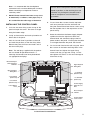
INSTALLING THE CONTROL PANEL
TAMP GND B+
7.
Do not drill the fixing holes with the Control
Panel in position; as the resulting dust and
vibration may damage the Control Panel’s
internal components and invalidate the
guarantee.
Upper Keyhole
Fixing Hole
Upper Keyhole
Fixing Hole
– ve Terminal
(Black Lead)
+ ve Terminal
(Red Lead)
+ ve Terminal
(Red Lead)
– ve Terminal
(Black Lead)
Power Supply
Cable Access
Hole
Lower Fixing
Hole
Reset Jumper
Link P1
Power Supply
Jack Socket
Inside View of Control Panel
11
7.
Ensure that the Reset Jumper Link (P1) and the
External Tamper Switch Jumper Link (P51) are
set in the OFF position.
inserting the small RJ11 plug into socket marked
LINE located on the bottom edge of the Control
Panel. If the cable supplied is not long enough
to reach a suitable phone point then it will need
extending using a coupler and extension lead
(not supplied).
Jumper
Link
Jumper
Link
O. GND
V+
OUT GND
Note: If the Control Panel Tamper alarm sounds
during the installation reset the alarm by pressing
,
1
2
3
4 ,
ENTER
User Access Code
External Tamper Switch
Jumper Link P51
Reset Jumper
Link P1
on the Control
Panel.
IMPORTANT: The keys must be pressed firmly
and within 5 seconds of each other. If you make
a mistake, press
and start the sequence again.
ESC
Jumper
Link
OFF
8.
ON
Connect battery leads to both back-up batteries
and refit batteries.
LEFT Battery:
Red lead to the Red (+) battery
terminal
Black lead to the Black (-) battery
terminal
RIGHT Battery: Red lead to the Red (+) battery
terminal
Black lead to the Black (-) battery
terminal
LINKING A REMOTE CONTROL OR
REMOTE KEYPAD TO THE
CONTROL PANEL
If there are already 6 Remote Controls/Keypads
linked to the Control Panel then it will not be possible
to link any more. Attempting to learn a 7th device
will cause the panel to produce a single long beep
and display ‘Cannot Learn - System Full’ message
on screen for 3 seconds.
With unit in Standby mode (Power LED only
illuminated).
1.
IMPORTANT: Take care when connecting
battery leads to the batteries as connecting
incorrectly could damage the batteries or the
Control Panel.
,
Press
1
2
3
4 ,
ENTER
Master User Access Code
This puts the Control Panel into Programming
Mode.
‘1. USER SETUP’ will be displayed.
9.
Note: The Power LED may flash to indicate that
the unit is being operated from the back-up
batteries and that mains supply is not present.
2.
If fitted, remove the plastic film covering the LCD
display and on the display window on the cover.
3.
ENTER
12. If required, connect the Control Panel to the
telephone line using the cable supplied by
12
Press
ENTER
again.
The number of Remote Controls/Keypads
already linked will be shown, (e.g. if there are
two Remotes Controls and one Remote Keypad
linked the display will show ‘2.1 Remotes = 3’).
10. Close the lid of the Control Panel and fasten the
cover fixing screws.
11. Plug in and switch ON the Power Supply
Adaptor, (the Power LED should illuminate).
Use the
and
buttons to scroll through
the menu until ‘2. SYSTEM SETUP’ is displayed
and press
. ‘2-1 Remotes’ will be displayed.
The new Remote Control/Keypad can be programmed
as follows:
4.
Press
3 .
5.
The panel will now listen for a valid signal from a
new Remote Control or Keypad.
TESTING THE CONTROL PANEL AND
REMOTE CONTROL
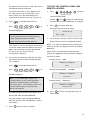
The Panel will remain in Learn Mode for 30s.
If a valid signal is not received from a new
device within 30s it will automatically exit
Learn Mode and return to the top of level 2.0.
1.
Press
Press
?
?
?
,
,
on
to put the
2.
Press
ENTER
to activate Walk Test.
Waiting...
3.
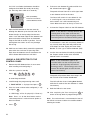
Confirm the new device ID code from the same
new Remote Control or Remote Keypad within
15s as follows:
Press the Arm, Part Arm, Disarm and Personal
Attack buttons in turn on the Remote Control.
Note: If no signal is received by the Control Panel
within 10 minutes, the display will return to ‘Detector
Walk Test’.
When signals are received from linked Remote
Control, the appropriate messages will be displayed
on the LCD screen:
Remote Control - ARM
Remote/Keypad
Arm
on the Remote Control, or
?
ENTER
Walktest
If the device is new and not already linked to the
system the control panel will produce two short
beeps and the display will show ‘New Device’
and the type or the detected device;
(e.g. Remote or Keypad).
?
4 ,
During the test the LCD will display:
Note: If the device is already linked to the
control panel then the panel will produce a
single long beep and the received
signal from the device will be ignored.
Press
3
Use the
and
buttons to scroll through
the menu until ‘Detector Walk Test’ is displayed.
the Remote Keypad.
Press
2
system into Test Mode.
Keypad User Access Code
6.
1
User Access Code
on the Remote Control, or
?
Press
?
?
,
1
on
Remote Control/Keypad - DISARM
Keypad User Access Code
Remote/Keypad
the Remote Keypad.
Disarm
Note: If the confirmation signal is not
received within 15s the control panel will
produce a single long beep and exit the
learning process. The learning process will
need to started again to learn the new
device into memory.
Remote Control - PANIC/PA
Remote/Keypad
Panic/PA
4.
The panel will produce three short beeps and
the LCD will show ‘Device Confirmed’.
Press
to return to the top level menu of
TEST MODE.
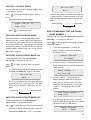
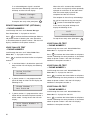
ESC
The LCD will then show ‘Saving New Device’
while the ID code of the new detector is stored
into memory.
7.
Press
ESC
twice to return to standby.
13
2m - 2.5m
PASSIVE INFRA-RED (PIR)
MOVEMENT DETECTORS
PIR Detectors detect movement in a protected area
by detecting changes in infra-red radiation levels
caused for example when a person moves within or
across the PIR’s detection pattern. If movement is
detected an alarm will be triggered, (if the system is
armed). PIR Detectors will also detect animals, so
ensure that pets are not permitted access to areas
fitted with PIR Movement Detectors when the
system is armed.
The Detector incorporates an anti-tamper protection
feature to protect against attempts to interfere with
the device. If the battery cover is removed, an
alarm will immediately occur at any time, (unless
the system is in Program or Test Modes).
The PIR Detector also incorporates a sensitivity
adjustment feature to compensate for situations
where the detector may be triggered by
environmental changes, (e.g. insects, air
temperature, etc).
1
2
3
4
5
6
7
8
9
10 11 12
Detector Range (metres)
12m
110°
180°
When deciding upon the mounting position for the
detector the following points should be considered to
ensure trouble free operation:
1.
Do not position the Detector facing a window or
where it is exposed to or facing direct sunlight.
PIR Detectors are not suitable for use in
conservatories.
2.
Do not position the Detector where it is exposed
to draughts.
3.
Do not position the Detector directly above a
heat source, (e.g. fire, radiator, boiler, etc).
4.
Where possible, mount the Detector in the
corner of the room so that the logical path of an
intruder would cut across the fan detection
pattern. PIR Detectors respond more effectively
to movement across the device than to
movement directly towards it.
5.
Do not position the Detector in a position where
it is subject to excessive vibration.
The system allows you to link one Detector to a
zone, provided that the Detector is mounted within
effective radio range of the Control Panel.
6.
Ensure that the position selected for the PIR
Detector is within effective range of the
Control Panel.
POSITIONING THE PIR DETECTORS
7.
Do not fix the PIR Detector onto or very close
to metalwork (i.e. radiators, water pipes, etc) as
this could affect the radio range of the device.
To conserve power and maximise battery life the PIR
Detector will only detect movement if there has been
no movement detected within the previous 2 minutes,
(this is known as the detectors sleep period).
The PIR Detector is powered by a PP3 Alkaline
battery which under normal conditions will have an
expected life of approximately 1 year. When the
battery level drops, with the PIR in normal operation
mode and the battery cover fitted, the LED behind
the detection window will flash. When this occurs
the battery should be replaced as soon as possible.
(Note: in normal operation, the LED behind the lens
will not flash on detection of movement).
The recommended position for a PIR Detector is in
the corner of a room mounted at a height between
2 and 2.5 metres. At this height, the detector will
have a maximum range of up to 12 metres with a
field of view of 110°.
14
Note: When the system is Armed, pets should not
be allowed into an area protected by a PIR Detector
as their movement could be detected and trigger
an alarm.
4.
Rear Cover
Flat Wall
Mounting
Note: The wall plugs supplied with the product
are not suitable for plasterboard walls, if
mounting the Detector onto plasterboard use
appropriate wall plugs.
5.
Fixing
Screw
Fix the rear cover to the wall using the two
18mm No.4 screws and 22mm wall plugs,
(a 5mm hole will be required for the wall plugs).
Do not over-tighten the screws as this may
distort or damage the cover.
Corner Wall
Mounting
UP
HIGH sensitivity
DOWN
LOW sensitivity
SW3
Rear Cover
To select the required sensitivity, set switch SW3
as follows:
Sensitivity
Hi
Low
SW3 up
High Sensitivity
Undo and remove the fixing screw from the
bottom edge of the PIR Detector, (keep the
screw safe for later). Carefully pull the bottom
edge of the detector away from the rear cover
and then slide down to release the top clips.
2.
Carefully drill out the required mounting holes in
the rear cover using a 3mm drill according to
whether the unit is being mounted in a corner or
against a flat wall.
3.
Using the rear cover as a template, mark the
positions of the fixing holes on the wall.
2
SW
ity
sitiv
Sen
Hi
SW3
SW1 (Test Mode)
1
SW ode
tM
Tes
SW2 (Tamper)
Low
SW3 (Sensitivity)
Sensitivity
Hi
Low
SW3 down
Low Sensitivity
Note: The recommended setting is HIGH.
However, in cases of extreme environmental
problems or if unexplained false alarms are
experienced, it may be necessary to set the
sensitivity to LOW. Setting the device to LOW
sensitivity will require a greater amount of
movement in order to trigger the device.
Fixing
Screw
1.
SW3
INSTALLING AND CONFIGURING THE
PIR DETECTORS
6.
Connect the PP3 Alkaline battery to the battery
clip. The LED behind the lens will rapidly flash
for approximately 2-3 minutes until the PIR has
stabilised. The LED will then stop flashing and
turn OFF.
TESTING A PIR DETECTOR
INDEPENDENTLY
7.
Ensure that the LED indicator has stopped
flashing rapidly.
8.
The ‘Test Mode’ button (SW1) is used to put
the PIR Detector into Walk Test Mode, which
overrides the 2 minute sleep period and allows
the operation of the detector to be checked
during installation. Press and hold the button
for 2 seconds to activate Test Mode for a fixed
5 minute after which it will automatically revert
to normal operation.
15
On initial installation the detector should be
configured into Walk Test ready for testing,
(i.e. Pressing down SW1 for 2 seconds).
6.
To learn a new detector ID code and link it to
the selected zone press 3 .
The panel will now listen for a valid signal from
a new detector to link to the zone.
SW1 (Test Mode)
SW1
Test Mode
SW3
SW2
The Panel will remain in Learn Mode for 30s.
If a valid signal is not received from a new
device within 30s it will automatically exit
Learn Mode and return to the top of level 2.0.
Press for 2 seconds to
activate Walk Test mode
Sensitivity
Hi
Low
7.
9.
Refit the PIR Detector to the rear cover by
offering the detector up to the rear cover and
locate the clips in the top edge into the rear
cover. Push the lower edge of the detector into
place and refit the fixing screw in the bottom
edge of the PIR to secure in position. Do not
over-tighten the screws as this may damage
the casing.
10. Walk into and move slowly around the protected
area within the 5 minutes of pressing SW1.
Each time the detector senses movement the
LED indicator behind the lens will flash.
Note: If the detector is already linked to the
control panel on any other zone then the
panel will produce a single long beep and the
received signal from the detector will be ignored.
If the detector is new and not already linked on
any security zone the panel will produce two
short beeps and the display will show ‘New
Device’ and the type of device detected (PIR).
8.
LINKING A PIR DETECTOR TO THE
CONTROL PANEL
1.
Remove the PIR Detector from its rear cover
after installing and configuring it.
2.
With the system in Standby
Press
,
?
?
?
? ,
ENTER
The panel will produce three short beeps and
the LCD will show ‘Device Confirmed’.
to enter Program Mode.
Scroll through the programming menu until
‘3. ZONE SETUP’ is displayed and press
ENTER
4.
Confirm the new device ID code by activating
the Tamper Switch on the same new PIR
detector within 15 seconds.
Note: If the confirmation signal is not
received within 15s the control panel will
produce a single long beep and exit the
learning process. The learning process will
need to be started again to learn the new
device into memory.
Installer Access Code
3.
Activate the Tamper Switch on the PIR detector.
The LCD will then show ‘Saving New Device’
while the ID code of the new detector is stored
into memory.
.
Enter the zone number to be configured (1 - 36)
and press
.
9.
‘3-1 ZX Empty’ will be displayed (X = Zone no.)
10. After completing the Zone Setup press
to
return to the top level of programming menu.
Refit the PIR to its rear cover.
ENTER
Note: Zones 33 - 36 the wired zones are the
same except there is no learn menu option as
these are wired.
5.
16
Press
ENTER
.
ESC
Note: Ensure that there is no movement in front of
the PIR for 3 minutes to allow it to stabilise before
entering test mode.
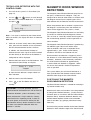
TESTING A PIR DETECTOR WITH THE
CONTROL PANEL
1.
2.
Ensure that the system is in Test Mode (see
page 13).
Use the
and
buttons to scroll through
the menu until ‘Detector Walk Test’ is displayed
and press
.
ENTER
Walktest
Waiting...
will be displayed.
Note: If no signal is received by the Control Panel
within 10 minutes, the display will return to ‘Detector
Walk Test’.
3.
Walk into and move slowly around the protected
area, each time the detector senses movement
the LED indicator behind the lens will flash.
In addition, the Control Panel will beep to
indicate that the alarm signal has been received
and the identity of the zone that the detector is
configured for will be displayed.
4.
Remove the back cover of the PIR detector. The
Control Panel should beep and display:
Zone X : PIR
Tamper
to show that the detector’s tamper switch has
been activated.
5.
Refit the cover to the PIR Detector.
6.
Press
standby.
ESC
to exit Test Mode and return to
IMPORTANT: In normal operation, the LED
indicator behind the detector lens will not flash on
movement detection, (unless the battery is low).
When the detector is fully installed i.e. battery
cover fitted and in operating mode; in order to
conserve power and maximise battery life the
PIR Detector will only detect movement if there
has been no movement detected within the
previous 2 minutes.
MAGNETIC DOOR / WINDOW
DETECTORS
The Magnetic Door / Window Detector comprises of
two parts; a Detector and a Magnet. They are
designed to be fitted to either doors or windows with
the Magnet mounted on the opening part of the
door / window and the Detector mounted to the frame.
When the protected door or window is opened and
the Magnet is moved away from the Detector an
alarm will be triggered if the system is armed,
The Magnetic Door / Window Detector has the facility
to connect an additional wired Magnetic Contact.
This must be of a normally closed contact type with
the contact being opened in order to generate an
alarm condition.
The Magnetic Door / Window Detector is powered by
two CR2032 type Lithium cells which under
normal conditions will have an expected life of
approximately 1 year. Under normal battery
conditions the LED on the Detector will not
illuminate when the Detector is triggered, (unless
the detector is in Test Mode with the battery cover
removed). However, under low battery conditions
this LED will be illuminated for approximately
1 second when the detector is triggered. When
this occurs the batteries should be replaced as
soon as possible.
The system allows you to link one Detector to a
zone, provided that the Detector mounted within
effective radio range of the Control Panel.
POSITIONING THE MAGNETIC
DOOR / WINDOW DETECTORS
The Door / Window Detector is suitable for mounting in
dry interior locations only.
Decide which doors and windows are to be protected
by fitting Door / Window Detectors, (usually the front
and back doors as a minimum will have Door / Window
Detectors fitted). However additional detectors may
be fitted where required to other more vulnerable
doors or windows, (e.g. garage, patio/conservatory
doors etc).
Ensure that the position selected for the Door / Window
Detector is within effective range of the Control Panel.
17
Do not fix the Detector onto or very close to
metalwork (i.e. radiators, water pipes, etc) as this
could affect the radio range of the device.
Note: If mounting the device using the adhesive
pads, ensure that the mounting surfaces are
clean and dry before mounting.
On PVC door / window frames, it may be necessary to
space the Detector and Magnet away from the metal
surface using a plastic or wooden spacer to achieve
the necessary radio range.
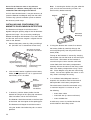
Detector
Magnet
INSTALLING AND CONFIGURING THE
MAGNETIC DOOR / WINDOW DETECTORS
The Detector and Magnet should be mounted
together along the opening edge of the window/door
opposite the hinges. Ensure that the parallel gap
between the Magnet and Detector is less than 10mm
and that the arrow on the magnet is aligned with the
mark on the detector.
1.
Remove the battery cover by sliding and lifting it
off. (DO NOT use a screwdriver to lever it off).
Alternative
Mountings
4.
Slide Open and Lift Off
Do Not Use A Screwdriver
The top of the Detector is secured by hanging
the keyhole slot over the head of the 10mm pan
head screw. The bottom of the Detector is
secured using the 12mm counter-sunk head
screw fitted within the battery compartment.
Carefully drill out the centre of the fixing screw
hole in the battery compartment using a 3mm
drill. Fit the Magnet using the two 15mm fixing
screws. Do not over- tighten the screws as this
may distort or damage the casing.
Raised Head Screw,
Key-hole Slot Fixing
Double Sided Tape
OR Screw Fixing
2.
Small Counter-sunk
Screw Fixing
Slide the two batteries supplied into the battery
holder, ensuring that the + side is uppermost on
each battery as it is installed.
Fit TWO
Batteries
Battery
Connector
Tilt and Remove
Battery Holder
and Insert
Two Batteries
3.
If necessary, refit the battery holder into the
detector ensuring that the spring clip connectors
slide onto either side of the circuit board.
If fixing the detector with screws first remove
the battery holder by carefully tilting up the
end and pulling away from the printed circuit
board (PCB).
5.
If an additional wired Magnetic Contact is
required, this should be wired to the terminal
block provided in the battery compartment.
The wired contact should be connected using
a maximum length of 1.5 metres of any of
the following:
– 6 core alarm cable
– 2 core bell wire (6 x 0.2mm minimum)
– 2 core 24AWG wire
The Detector should be mounted on the fixed part
of the frame and the magnet on the opening part.
The Detector and Magnet should be mounted
using the double sided adhesive pads or screws
provided.
18
A cable entry cut-out is provided beside the
terminal block in the battery cover.
6.
Switch SW3 is used to enable / disable the
internal / external wired magnetic contact.
TESTING A MAGNETIC DOOR / WINDOW
DETECTOR INDEPENDENTLY
9.
8mm
As the button is released the LED indicator will
illuminate for approximately 1 second to show
that the tamper switch has been triggered and a
signal is being transmitted.
11mm
Location of
Key-hole Screw
(underside)
SW3
Terminal Block for
Additional Wired
Magnetic Contact
Tamper
Switch
INT./EXT.
Function
INT.
Internal Contact ON
INT./EXT.
Internal and External
Contacts ON
SW3
Set the Door / Window Detector by setting the
position of the switch (SW3).
INT.
10. Open the door / window to remove the Magnet
from the Detector.
As the Magnet is moved away from the Detector
the LED indicator will illuminate for
approximately 1 second to show that the
Detector has been triggered and a signal is
being transmitted.
Hole for
Mounting
Screw
Position of SW3
SW3
7.
Switch
SW3
INT.
Remove battery cover to activate the tamper switch.
INT.
Note: It does not matter if the LED indicator
illuminates as the magnet is brought towards
the detector.
LINKING A MAGNETIC DOOR / WINDOW
DETECTOR TO THE CONTROL PANEL
1.
Remove the battery cover after installing and
configuring it.
2.
With the system in Standby
Press
INT./EXT.
,
?
?
?
? ,
ENTER
INT./EXT.
Installer Access Code
Switch SW3
INT. Position
to enter Program Mode.
Switch SW3
INT./EXT. Position
3.
If setting to the INT. position, only the internal
contact will be active. When two contacts are in
use for internal and external connection
simultaneously (INT./EXT. position), only one
activation will be counted if one of the contacts is
opened. If one contact is left open and the other
closed contact is opened then an activation will
be counted.
4.
IMPORTANT: If not using external contacts,
set to the INT. position for the Detector to
operate correctly.
8.
Refit the battery cover.
.
ENTER
Enter the zone number to be configured (1 - 36)
and press
.
ENTER
Note: Zones 33 - 36 the wired zones are the
same except there is no learn menu option as
these are wired.
5.
If using external contacts wired to the Detector,
set to the INT./EXT. position.
Scroll through the programming menu until
‘3. ZONE SETUP’ is displayed and press
To learn a new detector ID code and link it to the
selected zone press 3 .
The panel will now listen for a valid signal from
a new detector to link to the zone.
The Panel will remain in Learn Mode for 30s.
If a valid signal is not received from a new
detector within 30s it will automatically exit
Learn Mode and return to the top of level 3.1
19
6.
Activate the Tamper Switch on the MAG
detector.
Note: If no signal is received by the Control Panel
within 10 minutes, the display will return to ‘Detector
Walk Test’.
Note: If the detector is already linked to the
control panel on any other zone then the
panel will produce a single long beep and
the received signal from the detector will
be ignored.
If the detector is new and not already linked on
any security zone the panel will produce two
short beeps and the display will show ‘New
Device’ and the type of device detected (MAG).
7.
Open the door/window to remove the Magnet
from the Detector.
In addition, the Control Panel will beep to
indicate that the alarm signal has been received
and the identity of the zone that the detector is
configured for will be displayed.
4.
Remove the battery cover. The Control Panel
should beep and display:
Zone X : MAG
Confirm the new device ID code by activating
the Tamper Switch on the same new MAG
detector within 15 seconds.
Note: If the confirmation signal is not
received within 15s the control panel will
produce a single long beep and exit the
learning process. The learning process will
need to be started again to learn the new
device into memory.
The panel will produce three short beeps and
the LCD will show ‘Device Confirmed’.
The LCD will then show ‘Saving New Device’
while the ID code of the new detector is stored
into memory.
8.
Refit the battery cover.
9.
After completing the Zone Setup press
to
return to the top level of programming menu.
ESC
TESTING A MAGNETIC DOOR / WINDOW
DETECTOR WITH THE CONTROL PANEL
1.
Ensure that the system is in Test Mode (see
page 13).
2.
Use the
and
buttons to scroll through
the menu until ‘Detector Walk Test’ is displayed
and press
.
ENTER
Walktest
Waiting...
will be displayed.
20
3.
Tamper
to show that the detector’s tamper switch has
been activated.
5.
Refit the battery cover.
6.
Press
standby.
ESC
to exit Test Mode and return to
IMPORTANT: With the battery cover fitted the
LED indicator will not flash when the door / window
is opened, (unless the battery is low).
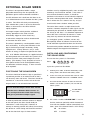
EXTERNAL SOLAR SIREN
The Siren is encapsulated within a tough
polycarbonate housing that also provides full
protection against adverse weather conditions.
An LED indicator unit is built into the Siren to act
as a visible deterrent and indication that the system
is active. The LEDs will slowly and alternately
flash whether the system is Armed or Disarmed.
When an alarm occurs the LEDs will flash
rapidly together.
An integral tamper switch provides additional
security protection to the Siren and will
immediately trigger an alarm should any
unauthorised attempt be made to interfere with
and remove the Siren cover.
The Siren is powered by a rechargeable sealed
lead acid battery. A solar panel mounted on the
top of the housing charges the battery during
daylight hours. During darkness, only a small
amount of energy is required to operate the Siren
unit. A 9V Alkaline PP3 battery is supplied to boost
the initial power to the unit when the system is first
activated until the solar panel charges the main
battery. (This battery is only designed to last for a
short period until the main rechargeable battery
has obtained sufficient charge). It does not need
to be replaced.
POSITIONING THE SOLAR SIREN
The Siren should be located as high as possible in
a prominent position on an external wall so that it
can be easily seen and heard. The Siren should be
mounted on a sound flat surface so that the rear
tamper switch is not activated when mounted.
Shadows cast by neighbouring walls, trees and roof
overhangs should also be avoided. If the Siren is
to be mounted below the eaves, it should be
positioned a distance of at least twice the depth of
the eaves overhang below the eaves. Remember
that in winter the sun is lower in the sky and you
should avoid winter shadows where possible.
The Solar Siren contains a sophisticated radio
receiver. However, reception of radio signals can be
affected by the presence of metallic objects within
the vicinity of the Siren. It is therefore important to
mount the Siren a minimum distance of 1 metre
away from any external or internal metalwork,
(i.e. drainpipes, gutters, radiators, mirrors etc).
Be especially aware of radiators mounted on the
inside wall behind possible locations for the Siren.
Ensure that the position selected for the Siren is within
effective range of the Keypad and all detectors.
INSTALLING AND CONFIGURING
THE SOLAR SIREN
Ensure that the system is in Test Mode.
1
,
Press
2
3
4 ,
ENTER
User Access Code
to put the system into Test Mode.
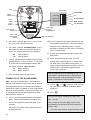
1.
Working on a table, undo the two battery cover
fixing screws and remove the battery cover.
2.
Under the cover you will also find a row of 5 DIP
Switches labelled SW3 and a “LEARN” button.
3.
Ensure that DIP switch 5 of SW3 on the main
board is set to OFF (“SIREN”) for use with this
alarm system.
Ensure that the tamper switch does not fall
ON
into the recess between brick courses as
C.U. OR SIREN
Set to 'OFF'
this could prevent the switch from closing
2
1
and give a permanent tamper signal.
3
4
5
Switch SW3
In order to provide the maximum amount of daylight
to the solar panel, the Siren should ideally be
mounted on a south facing wall. However, an
easterly or westerly position will suffice, but mounting
the device on a north facing wall should be avoided
due to the short dark days of winter months.
4.
DIP switch 1 marked “ALARM TIME” is used to
limit the maximum period for which the external
siren will sound before it will be automatically shut
down, (even if the Control Panel is still in alarm):
ON
10 minutes
OFF
3 minutes
21
Siren
Switch SW3
ALARM TIME
ALARM TIME
AJ
BEEP SOUND
C.U. OR SIREN
ALARM SOUND
5
DIP switch 2 marked “AJ” does not function for
this system and should be ignored.
6.
DIP switch 3 marked “ALARM SOUND” if OFF
will prevent the siren from sounding during an
alarm, (this will not affect the warning beeps):
8.
Siren enabled
Siren disabled
Switching between Service Mode and Operating
Mode generates a series of beeps. It is possible
to disable these acknowledgement beeps with
DIP switch 4 marked “BEEP SOUND”.
Beeps enabled
Beeps disabled
Now see Power-Up of the Solar Siren.
POWER-UP OF THE SOLAR SIREN
Note: The use of ear defenders is advisable when
working in close proximity to the Siren due to the high
sound level produced by this device when triggered.
Whenever the Siren is powered-up, it will automatically
power-up in Service Mode. It cannot be switched out
of Service Mode and into Operating Mode until the
Control Panel is linked to it.
9.
Connect the rechargeable battery to the battery
leads. Connect the Red lead to the Red (+ve)
terminal and the Black lead to the Black (-ve)
terminal.
Connect the 9V 6LR61 (PP3) power-up battery
to the battery clip.
22
BEEP SOUND
Wall mounting plate
5.
ON
OFF
ALARM SOUND
7.5 Volt DC
charging
adaptor input
6 Volt 1.2Ah
rechargeable
battery
7.
AJ
C.U. OR SIREN
9 Volt startup
battery
ON
OFF
BEEP SOUND
C.U. OR SIREN
ON
4
5
3
4
Learn
Switch
2
ALARM SOUND
3
ON
1
AJ
2
Learn
LED
ALARM TIME
1
Tamper
Switch
10. Press the tamper switch, both indicator LEDs will
flash together several times. The LEDs will then
continue to flash alternately every 5 seconds
thereafter to indicate that the Siren is functioning
(still in Service Mode).
11. If fitted remove the protective film covering the
Solar Panel.
12. Press and hold the Learn button inside the
Sirens battery compartment for 5 seconds until
the Siren enters Learn Mode and produces a
single short low volume beep and both Learn and
Indicator-LEDs start flashing together slowly
(once every 2 seconds).
The siren will remain in Learn Mode for 30s. If a
valid signal is not received from a Control Panel
within that period it will automatically exit Learn
Mode. It will remain in Service mode.
13. Use the
and
buttons to scroll through
the menu until ‘Link Panel to Wirefree Siren’ is
displayed.
14. Press
ENTER
.
The LCD will display ‘Sending ID Codes wait
15s…’ for 15s.
After 2 seconds the ‘Siren Stop’ signal will be
transmitted by the panel to the siren to learn the
panel’s code.
The siren will produce a single short beep and
19. Scroll through the Test Mode menu using the
and
buttons until ‘Wirefree Siren
Service ON’ is displayed and press
.
the Indicator/Learn LEDs will start flashing
together rapidly, (once every second).
ENTER
After 10s the ‘Siren Stop’ signal will automatically
be retransmitted by the Control Panel for the siren
to confirm the control panels ID code.
The siren will produce single long beep and
the Indicator/Learn LEDs will stop flashing
and remain ON for 3 seconds after which it
will go out to indicate that the Control Panel is
now linked to the Siren and its ID code
recorded in memory.
15. Now scoll through the menu again until ‘Wirefree
Siren Service OFF’ is displayed and press
.
The Siren will produce two short beeps followed
by one long beep.
20. Hold the clear plastic mounting template
supplied in position on the wall and mark the
positions of the four mounting holes. A spirit
level placed on the top edge will help ensure you
get the unit level.
21. Undo the fixing screw securing the mounting
plate from the bottom edge of the siren and
remove the plate.
22. Drill four 6mm holes and fit the wall plugs.
ENTER
The Siren will produce a single long beep
followed by two short beeps.
23. Fit the two 30mm fixing screws in the top holes
leaving approximately 9mm of the screw protruding.
16. Do not exit Test Mode at this stage. Now test the
Wireless Siren prior to installing it on the wall.
(See step 17 below).
24. Fit the keyhole slots in the top of the siren over
these screws and check that they form a neat fit
with minimal movement. If necessary remove
the siren and adjust the screws as required.
TESTING THE WIRELESS SOLAR SIREN
25. Remove the siren and fit the wall mounting plate
in position using the two 25mm fixing screws.
Enter Test Mode if not already in (see page 13).
17. Use the
and
buttons to scroll through
the menu until ‘Wirefree Siren Test’ is displayed
and press
.
ENTER
During the test the LCD will display:
Siren ON for 5s
Stop->ESC
18. The Siren will activate for 5 seconds to show it is
working. Now follow the instructions below to
mount the Solar Siren on to the wall.
MOUNTING THE SOLAR SIREN ON
TO THE WALL
Prior to mounting the Siren, the Siren needs to be
placed into Service mode again else pressing the
Siren’s Tamper Switch against the wall will trigger
the Siren.
26. Fit the siren to the wall ensuring that the keyhole
slots are correctly fitted over the heads of the
two top fixing screws and the lower fixing hole
lines up with the wall plate.
27. Secure the Siren in place by fitting the lower
fixing screw in the wall plate. Do not over-tighten
the screw as this could damage the thread.
28. Now switch the Siren out of service mode. In
the Test Menu, select ‘Wirefree Service OFF’
again and press
.
ENTER
The Siren will produce a single long beep
followed by two short beeps.
29. Press
to exit Test Mode and return the
system to Operating Mode.
ESC
IMPORTANT:
The Siren must now be left in
position for at least 24 hours to fully
charge the Main Battery before
testing or operating the alarm.
23
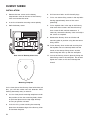
DUMMY SIREN
INSTALLATION
1.
Remove the two screws on the battery
compartment cover on the rear of the Dummy
Siren and remove the cover.
2.
Insert the 4 batteries ensuring correct polarity
3.
Refit the battery cover.
6.
Drill four 6mm holes and fit the wall plugs.
7.
Fit the two 30mm fixing screws in the top holes
leaving approximately 9mm of the screw
protruding.
8.
Fit the keyhole slots in the top of the Dummy
Siren over these screws and check that they
form a neat fit with minimal movement. If
necessary remove the Dummy Siren and adjust
the screws as required.
9.
Remove the Dummy Siren and fit the wall
mounting plate in position using the two 25mm
fixing screws.
10. Fit the Dummy Siren to the wall ensuring that
the keyhole slots are correctly fitted over the
heads of the two top fixing screws and the
lower fixing hole lines up with the wall plate.
Rear view of Dummy Siren Unit
Mounting Template
On the front face of the Dummy Siren behind the red
lens, you will now notice two red deterrent LEDs
flashing alternately every 5 seconds.
4.
Use the clear plastic mounting template to mark
the positions of the four mounting holes shown.
A spirit level placed on the top edge will help
ensure you get the unit level.
5.
Undo the fixing screw securing the mounting
plate from the bottom edge of the Dummy Siren
and remove the plate.
24
11. Secure the Dummy Siren in place by fitting the
lower fixing screw in the wall plate. Do not over
tighten the screw as this could damage the
thread.
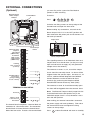
EXTERNAL CONNECTIONS
you must first put the system into Test Mode to
prevent an alarm occurring.
(Optional)
External Tamper
Switch Jumper
Link P51
Terminal Block
To do this:
,
Press
1
2
3
4 ,
ENTER
TAMP GND B+
User Access Code
GND BUZ BUT
T1
T2
GND
T3
T4
N.C.
C
N.O. GND
V+
OUT GND
Undo the two fixing screws on the top edge of the
Control Panel and open the front cover.
Before making any connections, ensure that the
Reset Jumper Link P1 is in the ‘OFF’ position and
then remove the DC power jack and disconnect 1 of
the back-up batteries.
Jumper Link
Jumper Link
Switched 12Vdc
output for
wired Siren
(300mA max.)
Permanent
12Vdc power
supply output
(100mA max.)
Reset Jumper
Link P1
GND
V+
GND
N.O.
Latching
relay contacts
(volt-free)
OFF
OUT
C
ON
Reset Jumper Link P1
The signalling contacts on all hardwired alarm and
tamper zones must be volt free. (i.e. they must only
open and close and not apply any self generated
voltage across the contacts).
N.C.
T4
T3
Hardwired Zone
Connections
(using normally
closed contacts)
GND
T2
T1
TERMINAL BLOCK DETAIL
GND
Not Used
B+
Tamper circuit
connections for
wired Siren
GND
TAMP
The Control Panel incorporates a terminal block for
connection of a Hard-wired Siren. The connection
terminal block is located inside the Control Panel
behind the front cover. To access the terminal block
The contacts on zones 33, 34, 35 and the tamper
circuit should be normally closed. An alarm will be
triggered when the contacts open. On zones 33, 34
and 35, additional Wired Magnetic Door/Window
Contact Detectors can be hardwired to these
terminals (by purchasing the Response Wired
Door/Window Contact Accessory Pack (PW1).
The contacts on zone 36 should be normally open.
An alarm will be triggered when the contacts close.
Note: The External Tamper Switch jumper link P51
should be fitted into the ON position only if the
hardwired tamper circuit is used, otherwise it must
be in the OFF position.
After making your external connections reconnect
the power supply and back-up Battery. Then close
the Control Panel cover and tighten the fixing
screws on the top edge.
Press
ESC
to leave Test Mode and return to Standby.
25
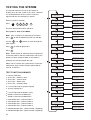
TESTING THE SYSTEM
The Control Panel has a built in test facility to
enable you to test the system at any time. However
it is recommended that the system is tested at
regular intervals not exceeding 3 months.
With the system in Standby
,
Press
1
2
3
4 ,
Detector
Walk Test
press ENTER
Walk Test
Waiting...
Wirefree Siren
Test
press ENTER
Siren ON for 5s
Stop->ESC
Internal Siren
Test
press ENTER
Siren ON for 5s
Stop->ESC
Wired Siren
Test
press ENTER
Siren ON for 5s
Stop->ESC
Auxiliary Relay
Test
press ENTER
Relay ON for 5s
Stop->ESC
Link Panel to
Spectra Lighting
press ENTER
Sending ID Code
Wait 5s...
Spectra Lighting
Test
press ENTER
Lights ON for 5s
Stop->ESC
Link Panel to
Wirefree Siren
press ENTER
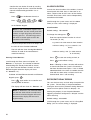
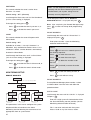
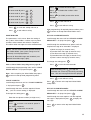
Sending ID Codes
Wait 15s...
Wirefree Siren
Service ON
press ENTER
Service ON
Wait for 5s
Wirefree Siren
Service OFF
press ENTER
Service OFF
Wait for 5s
Voice Dialler
Test Phone No.1
press ENTER
Test phone No.1
Stop->ESC
Voice Dialler
Test Phone No.2
press ENTER
Test phone No.2
Stop->ESC
Voice Dialler
Test Phone No.3
press ENTER
Test phone No.3
Stop->ESC
Voice Dialler
Test Phone No.4
press ENTER
Test phone No.4
Stop->ESC
Remote Manager
Test Phone No.1
press ENTER
Remote Manager
Test 1...Wait
Remote Manager
Test Phone No.2
press ENTER
Remote Manager
Test 2...Wait
ENTER
User Access Code
The Arm and Part-Arm LEDs will flash
The system is now in Test Mode.
Note: After completing all required test functions
press
to exit Test Mode and return to Standby.
ESC
Use the
and
menu options.
Press
ENTER
Press
ESC
buttons to scroll through the
to select displayed test.
.
Note: There will be an automatic time-out period of
10 minutes while in the test mode menu and no test
option has been selected. When a test option is
selected, this time-out period will stop.
When a test is exited, the system returns to the test
mode menu again and the time-out period will be
reset to 10 minutes.
TEST FUNCTION SUMMARY
●
●
●
●
●
●
●
●
●
●
●
●
●
●
●
●
26
Detector Walk Test
Alarm Test – Wireless Siren
Alarm Test – Internal Siren
Alarm Test – Wired Siren
Alarm Test – Auxiliary Relay
Link Control Panel to Spectra Lighting
Spectra Lighting Test
Link Control Panel to Wireless Siren
Wireless Siren Service Mode ON
Wireless Siren Service Mode OFF
Voice
Voice
Voice
Voice
Dialler
Dialler
Dialler
Dialler
Test
Test
Test
Test
–
–
–
–
phone
phone
phone
phone
number
number
number
number
1
2
3
4
Remote Manager Test – phone number 1 (Optional)
Remote Manager Test – phone number 2 (Optional)
When the detector is triggered the Control
Panel will beep to indicate that a signal has
been received and display the zone of the
detector that was activated.
DETECTOR TEST
Before commencing testing please ensure that there
is no movement in any PIR protected area for at
least 3 minutes, all doors / windows protected by
Door / Window Detectors are closed and that all
battery covers are correctly fitted.
5.
The Control Panel will beep and ‘Zone x :
MAG Tamper’ will be displayed.
Note: It may be helpful to have a 2nd person to
assist with this test.
Scroll through the top level Test Mode menu until
‘Walk Test waiting…’ is displayed and press
.
Remove the battery cover from the detector
to operate the anti-tamper switch.
Press
ESC
to exit Walk Test and return standby.
ENTER
TEST FUNCTION SUMMARY
If your system includes Remote Controls:
For each Remote Control:
1.
Activate each button on the Remote Control
in turn including the PA switch. As each
button is pressed the Control panel will beep
and the button name will be displayed,
e.g. ‘Remote Disarm’ will be displayed when
the
button is pressed.
If your system includes PIR Detectors:
For each Detector:
2.
Ensure that the area protected by the PIR
has been free from movement for at least
3 minutes and then walk into the area to
trigger the detector
Note: To conserve power the PIR will only
detect movement if there has been no
movement detected within the previous
2 minutes.
When the detector is triggered the Control
Panel will beep to indicate that a signal has
been received and display the zone of the
detector that was activated.
3.
Remove the battery cover from the detector
to operate the anti-tamper switch.
The Control Panel will beep and ‘Zone x :
PIR Tamper’ will be displayed.
When signals are received from linked devices the
appropriate messages will be displayed on the LCD
as follows:
Remote Control / Keypad - ARM
Remote/Keypad
Arm
Remote Control / Keypad – PART-ARM 1
Remote/Keypad
Part-Arm 1
Remote Control / Keypad – PART-ARM 2
Remote/Keypad
Part-Arm 2
Remote Control / Keypad - DISARM
Remote/Keypad
Disarm
Remote Control / Keypad – PANIC / PA
Remote/Keypad
Panic/PA
PIR Detector – Alarm
Zone X : PIR
Alarm
If your system includes Door / Window Detectors:
PIR Detector – Tamper
For each Detector:
4.
Open the protected door/window to trigger
the detector.
Zone X : PIR
Tamper
27
MAG Detector – Alarm
Zone X : MAG
Press
ENTER
During the test the LCD will display:
Alarm
Siren ON for 5s
Stop->ESC
MAG Detector – Tamper
Zone X : MAG
to activate the wired siren for 5s.
Press
ESC
to stop the test early.
Tamper
Smoke Detector – Alarm
Zone X : Smoke
Alarm
ALARM TEST – AUXILIARY RELAY TEST
Scroll through the menu until ‘Auxiliary Relay Test’ is
displayed on the LCD.
Press
to activate the Auxiliary Relay (n.o./n.c.)
contacts for 5s.
ENTER
Smoke Detector – Tamper
Zone X : Smoke
During the test the LCD will display:
Tamper
Siren ON for 5s
Stop->ESC
ALARM TEST – WIRELESS SIREN TEST
Scroll through the menu until ‘Wirefree Siren Test’ is
displayed on the LCD.
Press
ENTER
to activate the wireless siren for 5s.
During the test the LCD will display:
Siren ON for 5s
Stop->ESC
Press
ESC
to stop the test early.
ALARM TEST – INTERNAL / WIRED
SIREN TEST
Press
Press
In order for the Control Panel to be able to activate
the Spectra Lighting Receiver the panels code must
be learnt into memory on the Receiver. To do this
the panel must transmit a code to it.
To link the Control Panel to the Spectra Lighting
Switching Receiver…
1.
Siren ON for 5s
Stop->ESC
Press
ESC
to stop the test early.
ALARM TEST – WIRED SIREN TEST
Scroll through the menu until ‘Wired Siren Test’ is
displayed on the LCD.
28
Place the Spectra Receiver into Learn
Mode…
Send the ID codes from the panel to the
Spectra Receiver…
2.
Scroll through the system menu until ‘Link
Panel to Spectra Lighting’ is displayed.
3.
Press
to activate the Control Panel siren for 5s.
During the test the LCD will display:
to stop the test early.
LINKING THE CONTROL PANEL TO
SPECTRA LIGHTING RECEIVER
Scroll through the menu until ‘Internal Siren Test’ is
displayed on the LCD.
ENTER
ESC
ENTER
The LCD will display ‘Sending ID Code wait
5s” for 5s.
After 3 seconds a “lights on for 10s” signal
will be transmitted by the control panel to the
Spectra receiver to learn the panel’s code
into memory.
The Receiver will automatically exit Learn
mode. ‘lights on for 10s’ signal.
SPECTRA LIGHTING TESTS
Service OFF
Scroll through the menu until ‘Spectra Lighting Test’
is displayed on the LCD.
Press
for 5s.
ENTER
to activate the linked Spectra lighting
During the test the LCD will display:
Wait...
The siren will produce two short beeps followed
1 second later by a single long beep. The Siren
LEDs will flash together in conjunction with the
beeps.
beeeeeeeeeep …………….…… beep-beep
Lights ON for 5s
Stop->ESC
Press
ESC
1 second
to stop the test early.
WIRELESS SIREN SERVICE MODE
The Siren includes a Service Mode facility which
prevents the siren’s tamper switch from triggering an
alarm when it is removed from the wall for maintenance
or to change the batteries. After changing the batteries
and refitting in position, the Siren must be put back into
Operating Mode, otherwise the siren will not sound in
the event of an alarm.
REMOTE MANAGER TEST (OPTIONAL)
– PHONE NUMBER 1
Scroll through the menu until ‘Remote Manager Test
Phone No.1’ is displayed on the LCD.
Press
to activate the Remote Manager dialler to
call phone number 1.
ENTER
1.
WIRELESS SIREN SERVICE MODE ON
Remote Manager
Disabled
Scroll through the menu until ‘Wirefree Siren
Service ON’ is displayed on the LCD.
Press
Mode.
ENTER
to switch the Solar Siren into Service
2.
The LCD will display the following for 3s while the
‘Siren Service Mode ON’ signal is transmitted:
The siren will produce two short beeps followed
1 second later by a single long beep. The Siren
LEDs will flash together in conjunction with the
beeps.
If phone number 1 is not programmed the
panel will beep and the LCD will display the
following for 5s:
Phone Number 1:
Not Entered
Service ON
Wait...
If the Remote Manager is disabled the
panel will beep and the LCD will display
the following for 5s:
3.
If phone number 1 is programmed the
Remote Manager dialler will be activated
and a test call will be placed to the Alarm
Monitoring Service provider using phone
number 1. During the test the LCD will
display:
beep-beep …………….…… beeeeeeeeeep
Test Phone Number 1:
1 second
Stop->ESC
WIRELESS SIREN SERVICE MODE OFF
Scroll through the menu until ‘Wirefree Siren
Service OFF’ is displayed on the LCD.
Press
ENTER
If an acknowledgment signal is received
from the Alarm Monitoring Service the panel
will beep and the LCD will display:
to switch the Solar Siren into Service Mode.
Remote Manager
The LCD will display the following for 3s while the
‘Siren Service Mode OFF’ signal is transmitted:
Test....PASS
29
If no acknowledgment signal is received
form the Alarm Monitoring Service the panel
will beep and the LCD will display:
Remote Manager
Test....FAIL
To stop the test early at the panel press
ESC
.
REMOTE MANAGER TEST (OPTIONAL)
– PHONE NUMBER 2
When the call is answered the recorded
main alarm message only will be repeatedly
replayed for a minimum of 60s after which
time the current replay cycle will be
completed and the test will end.
The recipient of the call may acknowledge
the call and stop the test by pressing the
button on the telephone keypad.
If this occurs the panel will beep and
display the following for 5s:
Scroll through the menu until ‘Remote Manager
Test: Phone No.2’ is displayed on the LCD.
Press
to activate the Remote Manager dialler to
call phone number 2 following the same procedure
as described above for phone number 1 with the LCD
displays modified to show phone number 2.
Call
Acknowledged
ENTER
VOICE DIALLER TEST
– PHONE NUMBER 1
Scroll through the menu until ‘Voice Dialler Test:
Phone No.1’ is displayed on the LCD.
Press
to activate the Voice Dialler to call phone
number 1.
ENTER
1.
If the Voice Dialler is disabled the panel will
beep and the LCD will display the following
for 5s:
Voice Dialler
Disabled
To stop the test early at the panel press
ESC
.
VOICE DIALLER TEST
– PHONE NUMBER 2
Scroll through the menu until ‘Voice Dialler Test:
Phone No.2’ is displayed on the LCD.
Press
to activate the Voice Dialler to call phone
number 2 following the same procedure as described
above for phone number 1 with the LCD displays
modified to show phone number 2.
ENTER
VOICE DIALLER TEST
– PHONE NUMBER 3
Scroll through the menu until ‘Voice Dialler Test:
Phone No.3’ is displayed on the LCD.
Press
to activate the Voice Dialler to call phone
number 3 following the same procedure as described
above for phone number 1 with the LCD displays
modified to show phone number 3.
ENTER
2.
If phone number 1 is not programmed the
panel will beep and the LCD will display the
following for 5s:
Phone Number 1:
Not Entered
3.
If phone number 1 is programmed the voice
dialler will be activated and phone number 1
will be called. During the test the LCD will
display:
Test Phone Number 1:
Stop->ESC
30
VOICE DIALLER TEST
– PHONE NUMBER 4
Scroll through the menu until ‘Voice Dialler Test:
Phone No.4’ is displayed on the LCD.
Press
to activate the Voice Dialler to call phone
number 4 following the same procedure as described
above for phone number 1 with the LCD displays
modified to show phone number 4.
ENTER
FACTORY SETTINGS
FACTORY SETTINGS
USER CODE SETUP
Master User:
Users 1-6:
Duress Code:
LATCH KEY SETUP
Status:
Selected User Setup:
Phone Numbers:
OFF
OFF (all users)
Not programmed
ANSWER PHONE SETUP
Status:
User status:
User ID messages:
Phone Numbers:
OFF
All Off
Not recorded
Not programmed
SYSTEM SETUP MENU
Alarm Duration:
Entry/Exit Delay period:
Entry Delay Beeps:
Exit Delay Beeps:
Wireless Siren:
Wired Siren:
Auxiliary Relay:
Jamming Detection:
Zone Lockout:
Time:
Date:
Dial Mode:
Remote Phone Access:
Rings To Answer Phone:
1234
Not programmed
Not programmed
3 minutes
30s
On
On
On
Off
Off
Off
On
12:00
01/01/07
Off
Off
6
SPECTRA LIGHTING SETUP
Set Light-On Period:
3 Minutes
Spectra Mode:
OFF
Stop Time:
06:00
Start Time:
18:00
RESET FACTORY SETTINGS
1.
ZONE SETUP MENU
Zone defaults set according to detector type
identified during learning process:
,
?
?
?
? ,
ENTER
User Access Code
REMOTE MANAGER SETUP
Phone Numbers 1 and 2: Not programmed
System ID Code:
Not programmed
VOICE DIALLER SETUP MENU
Phone Numbers 1-4:
Not programmed
Messages:
Not programmed
Press
This puts the system into Test Mode.
2.
Undo the Control Panel cover fixing screws and
open the cover.
3.
Remove the DC power jack, then remove and
disconnect one of the back-up batteries.
4.
Set jumper link P1 to the ON position.
Jumper Link
PIR/MAG Detectors
Zone Name:
Zone Type:
Zone Mode:
Part-Arm 2:
Chime:
No name
Intruder
Zones 1-2:
Zones 3-36:
Zones 1-4:
Zones 5-36:
Off
Off
Smoke Detectors
Zone Name:
Zone Type:
Zone Mode:
Part-Arm 1:
Part-Arm 2:
Chime:
No name
Fire
Instant
Off
Off
Off
Part-Arm 1:
OFF
Delayed
Instant
On
Off
ON
5.
Reconnect the power supply jack.
6.
The Control Panel will now reset itself with all
factory settings.
‘EEPROM RESET’ will be displayed while the
factory settings are restored to memory. Once
the memory reset has been completed ‘DISARM
READY’ will be displayed.
7.
Reconnect and replace the back-up battery.
8.
Reset jumper link P1 into the OFF position.
9.
Close the Control Panel cover and refit the fixing
screws.
31
PROGRAMMING INSTRUCTIONS
With the system in Standby (i.e. with the display
showing ‘DISARM READY’).
Press
,
?
?
?
? ,
USER SETUP MENU
Master User Access Code
User 1 Access Code
ENTER
User 2 Access Code
Master User Access Code
User 3 Access Code
Note: To get to Standby Mode simply press
repeatedly until only the POWER LED is illuminated.
User 4 Access Code
The system is now in Program Mode.
User 6 Access Code
ESC
User 5 Access Code
Duress Access Code
NAVIGATING THROUGH THE
PROGRAMMING MODE MENUS
SYSTEM SETUP MENU
Alarm Duration
(Read carefully before you start).
Entry/Exit Delay period
The programmable system parameters are
arranged by group in a series of menus within
programming mode.
Entry Delay Beeps
Each menu (and sub-menu) will contain all
programmable system parameters related to the
particular function.
Exit Delay Beeps
Wireless Siren
Wired Siren
Auxiliary Relay
Jamming Detection
Zone Lockout
Note: Some basic system parameters will be
contained within the system menu because they
relate to a number of different functions.
Time
At each menu level use the
and
scroll through the available options.
Remote Phone Access Control
buttons to
Note: A menu item displayed in full capitals
(e.g. ‘USER SETUP’) indicates that there is
another menu below that option. An option
displayed in lower case (e.g. ‘1.0 Master User
Access Code’) indicates that this is a parameter
setting and no menu below, (although there may
be setting options).
Press
ENTER
to:
a) select the displayed menu, or
b) change the displayed parameter setting, or
c) save the changed parameter setting and
revert to the previous level.
Date
Dial Mode
Rings To Answer Phone
ZONE SETUP MENU
Learn Detector Code
Zone Name
Zone Type
Zone Mode
Part-Arm 1
Part-Arm 2
Chime
LATCH KEY SETUP MENU
Status
User status
Record User ID messages
Press
ESC
to:
a) exit to the previous menu level, or
b) revert to the previous level without saving a
changed parameter setting.
Replay User ID messages
Phone Numbers
REMOTE MANAGER SETUP MENU
Phone Numbers
Note: After programming all required functions,
press
to leave Programming mode and return
to Standby.
ESC
32
System ID Code
VOICE DIALLER SETUP MENU
1. USER SETUP
Phone Numbers
press ENTER
Record Alarm Messages
Replay Alarm Messages
1.0 Master User
Code: xxxx
1.1 User 1
Code: xxxx
press ENTER
Similar
for Users
2-6
1.7 Duress
Code: xxxx
press ENTER
press ENTER
SPECTRA LIGHTING SETUP
Set Light-On Period
Spectra Mode
Enter new code
xxxx
Enter new code
xxxx
Enter new code
xxxx
enter 4 digit code
press ENTER
enter 4 digit code
press ENTER
enter 4 digit code
press ENTER
Stop Time
Scroll through the top level programming menu until
‘1. USER SETUP’ is displayed and press
.
Start Time
ENTER
TELEPHONE APPLICATION SETUP
If using any of the telephone based functions,
(e.g. Answer Phone, Voice Dialler, Remote Phone
Access and Control etc.) the Dial Method must
be set as follows:
Remote Manager
Page 45
1) set Dialler Mode = “Remote
Manager”
see SYSTEM
SETUP menu
2) set Remote Manager Phone
Numbers
3) set System ID Code
Note: After configuring all required users, press
to return to the top level of programming menu.
MASTER USER
Default setting: 1 2 3 4
Scroll through the menu until ‘1.0 Master User
Code:’ and the current access code is displayed.
To change the access code press
see REMOTE
MANAGER
SETUP menu
Page 42
1) set Dialler Mode = “Voice Dialler”
see SYSTEM
SETUP menu
2) set Voice Dialler Phone Numbers
3) set Dial Sequence
4) record Alarm Messages
see VOICE
DIALLER
SETUP menu
ENTER
.
Enter the new 4 digit User Access Code which
will be displayed on the LCD.
Press
Voice Dialler
ESC
Press
ENTER
ESC
to save new setting and exit, or
to exit without saving.
Note: User must enter a 4 digit code, 1,2 or 3
digit codes are not acceptable.
USERS 1-6 and DURESS CODES:
Answer Phone
Page 38
1) set Rings to Answer Phone
see SYSTEM
SETUP menu
To change User 1 access code, select ‘1.1 User 1 Code’
from the menu and follow the procedure above.
Latch Key
Page 44
To change User 2 access code, select ‘1.2 User 2 Code’
from the menu and follow the procedure above.
1) set Latch Key Status =
“ON” or “OFF”
2) enable users if “ON” chosen
3) set Latch Key Phone Numbers
see
LATCH KEY
SETUP menu
To change User 3 access code, select ‘1.3 User 3 Code’
from the menu and follow the procedure above.
4) record User ID Message(s)
To change User 4 access code, select ‘1.4 User 4 Code’
from the menu and follow the procedure above.
USER SETUP
To change User 5 access code, select ‘1.5 User 5 Code’
from the menu and follow the procedure above.
This menu allows the 4 digit User Access Codes
to be configured for each user. The general users
(1- 6) may also record a 4 second message to be
used with the Latch Key feature in the Latch Key
Setup menu.
To change User 6 access code, select ‘1.6 User 6 Code’
from the menu and follow the procedure above.
To change the Duress access code, select ‘1.7 U Duress
Code’ from the menu and follow the procedure above.
33
34
display for 3s
Remotes/Keypads
Deleted
display for 3s
Saving
New Device
display for 3s
Device Confirmed
xxxxxx
Send PartArm
Waiting 15s...
display for 3s
New Device
xxxxxx
enter time
press ENTER
Enter (10-250s)
Select
OFF->3
enter time
press ENTER
ON->1
ON->1
Select
OFF->3
30s
60s
OFF
2s
ON->1
Select
OFF->3
enter date
press ENTER
DD/MM/YY
enter time
press ENTER
HH:MM
enter date
press ENTER
DD/MM/YY
ON->1
select menu item
press ENTER
OFF
Voice Dialler
Remote Manager
press ENTER
enter no of rings
press ENTER
Enter 1-9:
press ENTER
2.15 Rings to
Answer Phone: xx
Select
OFF->3
press ENTER
2.14 Phone
Control: xxx
2.13 Dialler Mode
xxxxxxxxxxxxxx
press ENTER
2.12 Date
DD/MM/YY
press ENTER
2.11 Time
HH:MM
press ENTER
2.10 Zn Lockout
xxx
press ENTER
2.9 RF Jamming
Detection: xxx
select menu item
press ENTER
180s
300s
ON until Disarm
press ENTER
2.7 Wired Siren
xxx
Select
OFF->3
press ENTER
2.8 Aux Relay
xxxxxxxxxxxxxx
System Setup Diagram
ON->1
press ENTER
2.6 Wirefree
Siren: xxx
press ENTER
2.5 Exit Delay
Beeps: xxx
Select
OFF->3
enter time
press ENTER
ON->1
press ENTER
2.4 Entry Delay
Beeps: xxx
press ENTER
2.3 Entry/Exit
Delay: xxxs
Send Disarm
Waiting 30s...
press 3 to learn device
press 1 to confirm delete
press 3 to cancel
15s time-out or auto cancel
Confirm Delete
YES->1
3->NO
press 1 to delete
2.1 Remotes = x
1->Del Learn->3
2.1 Remotes = x
Edit->Enter
enter time
press ENTER
Enter 1-60(x10)s
press ENTER
2.2 Alarm Time
xxxs
press ENTER
2. SYSTEM SETUP
enter Master User Access Code and press ENTER
PROGRAM MODE
Code:
SYSTEM SETUP
The parameters in this menu allow the configuration of
general system parameters, such as Alarm Duration
and control of any hardwired or output relay alarm
contacts. This section also contains the basic setup
information for the systems telephone dialler interface
which must be configured appropriately if any of the
telephone based functionality is to be used.
Refer to System Setup diagram on page 34.
Scroll through the top level programming menu until
‘2. SYSTEM SETUP’ is displayed and press
.
ENTER
Note: After completing the system setup press
to return to the top level programming menu.
ESC
Scroll through the menu until ‘2. SYSTEM SETUP’ is
displayed on the LCD and press
.
ENTER
After configuring the system parameters press
return to the top level programming menu.
ESC
to
LEARN REMOTE CONTROLS
AND KEYPADS
Allows up to 6 Remote Controls or Remote keypads to
be linked to the system and their ID codes learnt into
memory.
Scroll through the Zone menu until option ‘2.1 Remotes’
is displayed. The number of Remote Controls / Keypads
already linked will be shown, (e.g. if there are two
Remotes Controls and one Remote Keypad linked
the display will show ‘2.1 Remotes = 3’).
Linking a Remote Control or Remote Keypad to
the Control Panel:
Note: If there are already 6 Remote
Controls / Keypads linked to the Control Panel
then it will not be possible to link any more.
Attempting to learn a 7th device will cause the
panel to produce a single long beep and display
‘Cannot Learn - System Full’ message on
screen for 3s.
To learn a new Remote or Keypad ID code and
link it to the selected zone press 3 .
The panel will now listen for a valid signal from
a new Remote Control or Keypad.
The Panel will remain in Learn Mode for
30s. If a valid signal is not received from a
new device within 30s it will automatically
exit Learn Mode and return to the top of
level 2.0.
Send DISARM from the new Remote Control or
Remote Keypad as follows…
2.1 Remotes = x
Edit->Enter
2.1 Remotes = x
1->Del
Learn->3
x = No of remotes/keypads linked
1 = Delete or
3 = Learn
Press
3 = Learn
Press
1 = Delete
6
devices already
linked?
Confirm Delete
YES->1
3->NO
press 1 to confirm delete
press 3 to cancel
15s time-out or auto cancel
NO
on the Remote Control, or
Send Disarm
waiting 30s...
Delete confirmed
within 15s?
YES
Device Deleted
Wait...
Send Disarm
waiting 30s...
NO
YES
display for 3s
?
?
?
,
on the Remote Keypad.
NO
Signal
received within 30s
from Remote/Keypad not
yet linked?
?
Keypad User Access Code
YES
New Device
xxxxxx
Note: If the device is already linked
to the control panel then the panel will
produce a single long beep and the
received signal from the device will
be ignored.
display for 3s
Send Part-Arm
waiting 15s...
Remote/Keypad
code confirmed within
15s?
NO
If the device is new and not already linked to
the system the control panel will produce two
short beeps and the display will show ‘New
Device’ and the type or the detected device;
(e.g. Remote or Keypad).
Device Confirmed
xxxxxx
display for 3s
Saving
New Device
display for 3s
35
Confirm the new device ID code by sending
the Disarm signal from the same new Remote
Control or Remote Keypad within 15s as
follows…
Press
Press
on the Remote Control, or
?
?
?
?
,
1
Keypad User Access Code
ALARM DURATION
Controls the alarm duration of the wireless, internal
control panel and wired sirens in the event of an
alarm, subject to the On / Off status of the wireless
and hard wired sirens which can be independently
controlled and disabled.
Scroll through the system menu until ‘2.2 Alarm
Time’ (and the current setting) is displayed.
on the Remote Keypad.
Siren Duration
Note: If the confirmation signal is not
received within 15s the control panel will
produce a single long beep and exit the
learning process. The learning process
will need to started again to learn the
new device into memory.
Default setting: 180 seconds
To change the setting press
ENTER
.
Enter the required Alarm Duration in units of
10 seconds (0 - 60).
e.g. enter 6 for a 60 seconds alarm duration.
The panel will produce three short beeps and
the LCD will show ‘Device Confirmed’.
The LCD will then show ‘Saving New Device’
while the ID code of the new detector is
stored into memory.
Deleting Linked Devices:
Scroll through the Zone menu until option ‘2.1
Remotes’ is displayed. The number of Remote
Controls/Keypads already linked will be shown,
(e.g. if there are two Remotes Controls and one
Remote Keypad linked the display will show
‘2.1 Remotes = 3’).
To delete all linked Remote Controls and Remote
Keypads press 1 .
Press 1 again within 15s to confirm and
actually delete all devices.
The display will now show ‘2.1 Remotes = 0’.
Note: If delete all is not confirmed within
15s then the action will be cancelled and
the Remote Controls / Keypads will not be
deleted and the display will revert to its
original setting.
minimum setting = 0. (i.e. 0 seconds / no
alarm).
maximum setting = 60 . (i.e. 600 seconds
or 10 minutes).
Press
ENTER
Press
ESC
to save new setting and exit, or
to exit without saving.
Note: Following an alarm, the Siren will continue
to sound until either the system is Disarmed; or
the Alarm Duration time expires. If the ‘3 minute
alarm time limit’ of the Siren is enabled, then the
Siren will shut down after 3 minutes even if the
Control Panel siren is still sounding.
ENTRY/EXIT DELAY PERIOD
This sets the time entry and exit delay time period for
the system. The exit delay is the period between
arming the alarm and any detectors being allowed to
initiate an alarm (either instant or delayed). On
entering the property it sets the period between
triggering a detector configured as “delayed” and the
alarm occurring.
Default setting: 30 seconds
Scroll through the system menu until ‘2.3 Entry/Exit
Delay’ (and the current setting) is displayed.
36
To change the setting press
ENTER
.
Enter the required delay period (10 - 240s).
Press
Press
ENTER
ESC
which cannot be de-activated unless the alarm
duration is set to 0).
to save new setting and exit, or
Scroll through the system menu until ‘2.7 Wired
Siren’ (and the current setting) is displayed.
to exit without saving.
To change the setting press
ENTRY DELAY BEEPS
Allows the systems Entry-Delay warning beeps when
arming the system to be switched ON or OFF.
ENTER
.
Press
1 to enable the wired siren, or
Press
3 to disable the wired siren.
AUXILIARY RELAY
Scroll through the system menu until ‘2.4 Entry
Delay Beeps’ (and the current setting) is displayed.
To change the setting press
ENTER
.
Press
1 to enable the entry delay beeps, or
Press
3 to disable the entry delay beeps.
Controls the operation of the auxiliary relay in the
event of an alarm occurring.
Scroll through the system menu until ‘2.8 Aux Relay’
(and the current setting) is displayed.
To change the setting press
ENTER
.
EXIT DELAY BEEPS
Scroll through the menu options, until the
required setting is displayed.
Allows the systems Entry-Delay warning beeps when
arming the system to be switched ON or OFF. .
Options: OFF / 2s / 30s / 60s / 180s / 300s /
On-until-disarm
Scroll through the system menu until ‘2.5 Exit Delay
Beeps’ (and the current setting) is displayed.
Press
ENTER
Press
ESC
To change the setting press
ENTER
1 to enable the exit delay beeps, or
Press
3 to disable the exit delay beeps.
WIRELESS SIREN
Allows the wireless siren to be enabled or disabled.
If disabled it will not sound in the event of any alarm.
Default setting: ON
Scroll through the system menu until ‘2.6 Wirefree
Siren’ (and the current setting) is displayed.
ENTER
to exit without saving.
.
Press
To change the setting press
to save the new setting, or
.
Press
1 to enable the wireless siren, or
Press
3 to disable the wireless siren.
WIRED SIREN
JAMMING DETECTION
This controls the systems anti-jamming detection
facility. It is recommended that the jamming
detection is not activated for at least the first
30 days to allow time for you to become familiar
with the operation of your systems first.
Allows the control panels internal jamming detection
feature to be enabled or disabled. (The jamming
detection in the wireless siren cannot be enabled
with SK5 Platinum systems).
Default setting: OFF
Scroll through the system menu until ‘2.9 RF Jamming
Detection’ (and the current setting) is displayed.
To change the setting press
ENTER
.
Press
1 to enable jamming detection, or
Press
3 to disable jamming detection.
Allows the hard wired siren to be enabled or disabled.
If disabled it will not sound in the event of any alarm.
(This does not affect the control panels internal siren
37
ZONE LOCKOUT
REMOTE PHONE ACCESS AND CONTROL
Prevents a single zone from triggering an alarm
more than 3 times before the system is disarmed.
(Zone lockout is effective on all zones except
24-HOUR-INTRUDER and FIRE zones which
cannot be locked out).
If enabled, this allows the system to be remotely
controlled via the telephone.
Default setting: ON
Scroll through the system menu until ‘2.10 Zn
Lockout’ (and the current setting) is displayed.
To change the setting press
ENTER
.
Press
1 to enable zone lockout, or
Press
3 to disable zone lockout.
TIME & DATE SETUP
These parameters allow the systems clock and
calendar (required for the Event Log) to be configured.
Note: The clock will require updating to reflect any
time changes due spring / autumn daylight saving.
Default setting: OFF
Scroll through the system menu until ‘2.14 Remote
Phone Control’ (and the current setting) is displayed.
To change the setting press
ENTER
.
Press
1 to enable remote phone control, or
Press
3 to disable remote phone control.
DIALLER OPERATING MODE
Controls whether the telephone dialler is activated
and whether it operates with the Remote Manager
or Voice Dialler features.
Scroll through the system menu until ‘2.13 Dialler
Mode’ (and the current setting) is displayed.
To change the setting press
ENTER
.
DATE
Scroll through the menu options, until the
required setting is displayed.
To change the system date scroll through the menu
until ‘2.12 Date’ (and current setting) is displayed
and press
.
Options: OFF / Voice Dialler / Remote Manager
ENTER
Press
ENTER
Press
ESC
to save new setting and exit, or
Press
ENTER
Press
ESC
to save the new setting, or
to exit without saving.
to exit without saving.
RINGS TO ANSWER PHONE
TIME
To change the system date scroll through the menu
until ‘2.11 Time’ (and current setting) is displayed
and press
.
This sets the number of rings which occur before the
Control Panel will “pick up” an incoming call to operate
with the Remote Phone Access and Control feature.
ENTER
Default setting: 6
Enter the new time in the format “hh:mm” using
the 24 hour clock format.
Press
ENTER
Scroll through the system menu until ‘2.15 Rings To
Answer Phone’ (and the current setting) is displayed.
to save new setting and exit, or
To change the setting press
Press
ESC
ENTER
.
to exit without saving.
Enter the required number of rings (options 1-9).
38
Press
ENTER
Press
ESC
to save the new setting, or
to exit without saving.
ZONE SETUP
The parameters in this menu allow each zones specific function to be configured.
PROGRAM MODE
Code:
enter Master User Access Code and press ENTER
3. ZONE SETUP
press ENTER
Enter Zone(1-36)
nn
press ENTER
Following structure is repeated for each zone
only for
wired
zones 33-36
3.1 Znn
Wire Zone
only for wirefree
zones 1-32
3.2 Znn Name
xxxxxxxxxxxxxx
3.1 Znn: xxxxx
Edit->Enter
press ENTER
press ENTER
Menus 3.2 - 3.7
repeated
3.3 Znn Type
xxxxxxxxxxxxxx
3.1 Znn: xxxxx
1->Del Learn->3
empty
PIR
MAG
Smoke
Intruder
Front door
Back door
24 hour Intruder
Fire
Side Door
Patio door
Test
Confirm Delete
YES->1
3->NO
press 3 to learn device
Study
Play Room
Kitchen
Utility Room
Hall
press 1 to confirm
delete
Device Code
Deleted
display for 3s
Landing
Bedroom
Bedroom
Bedroom
Bedroom
New Device
xxxxx
15s time-out or
auto cancel
press ENTER
Select
ON->1
OFF->3
Select
OFF->3
ON->1
enter date
press ENTER
select menu item
press ENTER
Living room
Lounge
Send Code
Waiting 30s...
press 3 to cancel
3.7 Znn Chime
xxx
press ENTER
press ENTER
No name
Dining room
press 1 to delete
3.5 Znn
Part-Arm 1: xxx
display
for 3s
1
2
3
4
Bedroom 5
Shed
Resend Code
Waiting 15s...
3.4 Znn Mode
xxxxxxx
press ENTER
Instant
Delayed
3.6 Znn
Part-Arm 2: xxx
press ENTER
Select
ON->1
OFF->3
select menu item
press ENTER
Garage
PIR
MAG
SMOKE 1
SMOKE 2
Device Confirmed
xxxxx
SMOKE 3
display
for 3s
select menu item
press ENTER
Saving
New Device
display for 3s
Scroll through the programming menu until ‘3. ZONE
SETUP’ is displayed and press
.
ENTER
Enter the zone number to be configured (1 - 36) and
press
.
ESC
The following configuration options are based upon
setting zone 1. Options for all other zones (2-10) are
identical except the zone number reference will
change according to the zone being configured.
Zones 33-36, the wired zones are the same except
there is no learn menu option as these are wired.
Note: After completing the Zone Setup press
return to the top level programming menu.
ESC
to
39
LEARN DETECTOR CODE
(zones 1-32 only).
Allows a wireless detectors ID code to be learnt and
linked to the selected wireless zone.
3.1 Znn: xxxxx
Edit->Enter
3.1 Znn: xxxxx
1->Del
Learn->3
If the detector is new and not already linked
on any security zone the panel will produce
two short beeps and the display will show
‘New Device’ and the type or the detected
device; (e.g. PIR, MAG or Smoke).
xxxxx = PIR, MAG or Smoke, empty
1 = Delete or
3 = Learn
1 = Delete
Confirm Delete
YES->1
3->NO
press 1 to confirm delete
press 3 to cancel
15s time-out or auto cancel
NO
Delete confirmed
within 15s?
Send Code
waiting 30s...
Signal
received within 30s
from detector not
yet linked to
any zone?
NO
YES
YES
Device Deleted
Wait...
Note: If the detector is already linked
to the control panel on any other zone
then the panel will produce a single long
beep and the received signal from the
detector will be ignored.
Confirm the new device ID code by activating
the Tamper Switch on the same new PIR / MAG
detector or triggering the same smoke detector
with its test button within 15s.
New Device
xxxxx
display for 3s
display for 3s
Resend Code
waiting 15s...
Detector code
confirmed within
15s?
NO
Note: If the confirmation signal is not
received within 15s the control panel will
produce a single long beep and exit the
learning process. The learning process
will need to be started again to learn the
new device into memory.
Device Confirmed
xxxxx
display for 3s
Saving
New Device
The panel will produce three short beeps
and the LCD will show ‘Device Confirmed’.
display for 3s
Linking a New Detector to the Zone:
Note: There can only be one detector on each
zone so if a detector is already linked then linking
a new detector will replace the existing one.
To learn a new detector ID code and link it to the
selected zone press 3 .
The panel will now listen for a valid signal from
a new detector to link to the zone.
The Panel will remain in Learn Mode for
30s. If a valid signal is not received from a
new detector within 30s it will automatically
exit Learn Mode and return to the top of
level 3.1.
Activate the Tamper Switch on the PIR / MAG
detector or trigger a smoke detector via its
test button.
40
The LCD will then show ‘Saving New
Device’ while the ID code of the new
detector is stored into memory.
Deleting an Existing Device:
If a detector is already linked then the display
will show the detector type, for example:
‘3.1 Zxx: PIR’. The detector can be removed
from the system and its ID code erased from
memory without replacing it as follows:
To delete the current detector from the zone
press 1 .
Press 1 again within 15s to confirm and
actually delete the device.
The display will now show ‘3.1 Zxx: empty’.
Note: If delete all is not confirmed within
15s then the action will be cancelled and the
device will not be deleted and the display will
revert to level 3.1 as before.
NAME
To change the setting press
ENTER
.
This enables a name to be allocated to the zone so it
can be identified by its location.
Scroll through the menu options, until the
required setting is displayed.
Available for all zones 1- 36. Only available for
wireless zones 1-32 if a detector is linked.
Press
Press
Default setting: No Name
Scroll through the Zone menu until ‘3.2 Zxx Name’
(and the current setting) is displayed.
To change the setting press
ENTER
.
Scroll through the menu options, until the
required setting is displayed.
Options: No name, Front Door, Back Door,
Side Door, Patio Door, Dining Room,
Living Room, Lounge, Study,
Play Room, Kitchen, Utility Room, Hall,
Landing, Bedroom 1, Bedroom 2,
Bedroom 3, Bedroom 4, Bedroom 5,
Shed, Garage, PIR, MAG or SMOKE.
Press
Press
ENTER
ESC
to save the new setting, or
to exit without saving.
TYPE
Each zone may be programmed to operate in 1 of 4
different modes dependant upon the type of alarm
function required. The following types are available:
ENTER
ESC
to save new setting and exit, or
to exit without saving.
ZONE MODE
Each zone may be selected to operate with or
without a entry/exit delay period (see System Setup
menu). This is selected in zone mode.
Default setting: Zones 1 - 2: Delayed
Zones 3 - 36: Instant
Available for all zones 1- 36. Only available for
wireless zones 1-32 if a detector is linked
Scroll through the Zone menu until ‘3.4 Zxx Mode’
(and the current setting) is displayed.
To change the setting press
ENTER
.
Scroll through the menu options, until the
required setting is displayed.
Options: Instant / Delayed
Notes: Smoke detectors can only be
set as Instant
Press
ENTER
Press
ESC
to save new setting, or
to exit without saving.
Intruder - provides standard intruder monitoring.
PART-ARM 1
24 Hour Intruder - used to provide 24 hour
monitoring of areas requiring continuous security
protection even while the system is Disarmed, (e.g.
gun lockers). Activation of any detector on a
security zone will immediately initiate an Alarm.
Fire - used to provide 24 hour monitoring of any
Fire / Smoke detectors fitted to the system. Activation
of any detector will immediately initiate an Alarm.
This controls whether the zone is active when
Part-Arm 1 is armed.
Default setting: Zones 1 - 4: ON
Zones 5- 36: OFF
Scroll through the Zone menu until ‘3.5 Zxx Part-Arm 1’
(and the current setting) is displayed.
To change the setting press
Test - when the system is armed, any detector on
the zone will generate an entry in the Event Log
without initiating an alarm.
ENTER
.
Press
1 to enable the zone in part arm 1, or
Press
3 to disable the zone in part arm 1.
Default setting: Intruder
Scroll through the Zone menu until ‘3.3 Zxx Type’
(and the current setting) is displayed.
41
PART-ARM 2
Note: For the telephone dialler to operate
correctly with the Alarm Monitoring Service the
‘Dialler Mode’ (see System Setup) must be
correctly set and programmed.
This controls whether the zone is active when
Part-Arm 2 is armed.
Default setting: OFF (all zones)
Scroll through the Zone menu until ‘3.6 Zxx Part-Arm 2’
(and the current setting) is displayed.
To change the setting press
ENTER
Scroll through the menu until ‘6. REMOTE
MANAGER SETUP’ is displayed and press
ENTER
.
.
Press
1 to enable the zone in part arm 2, or
Press
3 to disable the zone in part arm 2.
Note: After completing the Remote Manager Setup
press
to return to the top level programming
menu.
ESC
PHONE NUMBER 1
CHIME
This controls whether the zone will operate with
Chime Mode.
Scroll through the menu until ‘6.1 Phone No.1:’ is
displayed and press
.
ENTER
Enter phone number 1 (see the Monitoring
welcome leaflet enclosed).
Default setting: OFF
Available for all zones 1- 36 only if detector is a
PIR / MAG. Only available for wireless zones 1-32 if
a detector is linked. Smoke detectors automatically
disabled in Chime Mode.
Notes:
Press
to insert a 3.5 seconds pause in
the dialling sequence.
Scroll through the Zone menu until ‘3.7 Zxx Chime’
(and the current setting) is displayed.
Press
to move the cursor left.
Press
to move the cursor right.
To change the setting press
Press
to delete the number under
the cursor.
ENTER
.
Press
1 to enable the zone in chime mode, or
Press
3
Press
number.
(and hold) to erase the entire
MONITORING SETUP
Press
ENTER
to save new setting and exit, or
REMOTE MANAGER
Press
ESC
to disable the zone in chime mode..
PROGRAM MODE
Code:
to exit without saving.
PHONE NUMBER 2
enter Master User Access Code and press ENTER
To setup Remote Manager phone number 2 select
‘6.2 Phone No.2:’ from the menu and follow the
procedure above.
6. REMOTE
MANAGER
press ENTER
UNIT ID CODE
6.1 Phone No.1
xxxxxxxxxxxxxx
press ENTER
6.2 Phone No.2
xxxxxxxxxxxxxx
press ENTER
6.3 Unit ID:
xxxx
press ENTER
Scroll through the menu until ‘6.3 Unit ID:’ is displayed
and press
.
ENTER
Enter Phone No:
Enter Phone No:
Enter Unit ID:
(32 digits max)
(32 digits max)
(4 digits max)
The parameters in this menu configure the system
telephone dialler to interface to the Alarm
Monitoring Service following the occurrence of an
appropriate alarm or system event.
42
Enter the 4 digit System ID Code obtained from
the Alarm Monitoring Service provider (see the
Monitoring welcome leaflet enclosed).
This is not to be confused with the System
Access Code or any User Access Codes.
Press
Notes:
To enter code B, press
,
1
To enter code C, press
,
2
To enter code D, press
,
3
To enter code E, press
,
4
To enter code F, press
,
5
Press
to delete the number under
the cursor.
Press
number.
(and hold) to erase the entire
Press
to save and exit, or
Press
Press
ENTER
Press
ESC
to move the cursor right.
ENTER
ESC
to exit without saving.
to save new setting and exit, or
After programming all required phone numbers press
to return to the top level Voice Dialler menu.
to exit without saving.
ESC
VOICE DIALLER
RECORD ALARM MESSAGES
The parameters in this menu allow the setting of
the systems Voice Dialler. It allows up to 4 phone
numbers to be entered and called in sequence.
The alarm voice messages are also recorded here.
Note: For the Voice Dialler to operate correctly
the ‘Dialler Mode’ (see system setup) must be
correctly set and programmed.
Ensure all Alarm Messages are recorded (see
Record Alarm Messages, right).
Scroll through the menu until ‘5.2 RECORD ALARM
MESSAGES’ is displayed and press
.
ENTER
Scroll through the available menu options until the
required message to be recorded is displayed.
a) Main message (12 seconds max.).
b) Intruder Alarm message (5 seconds max.).
c) Fire Alarm message (5 seconds max.).
d) Panic/PA Alarm message (5 seconds max.).
e) Duress alarm message (5 seconds max.).
To change the setting press
Refer to Voice Dialler Setup diagram on page 44.
Scroll through the programming menu until ‘5. VOICE
DIALER SETUP’ is displayed and press
.
ENTER
Note: After completing the Voice Dialler Setup press
to return to the top level programming menu.
Press
ENTER
.
1 to start the voice recorder.
After recording, press
to stop the
recorder and cancel any remaining recording
ESC
time. The new message will then be replayed.
ESC
Press
3 to exit without saving
PHONE NUMBERS
Press
to return to the top level Voice Dialler
Setup menu.
ESC
Scroll through the menu until ‘5-1 PHONE NUMBERS’
is displayed and press
.
ENTER
Scroll through the menu until the required ‘Phone
No._’ (and the current setting) is displayed.
To change the setting press
ENTER
.
REPLAY ALARM MESSAGES
Scroll through the menu until ‘5.2 RECORD ALARM
MESSAGES’ is displayed and press
.
ENTER
Notes:
Scroll through the menu options until the required
message is displayed and press
to replay the
message.
Press
to insert a 3.5 seconds pause in
the dialling sequence.
Press
menu.
Enter the new phone number (32 digits max.)
ENTER
Press
ESC
to return to the top level Voice Dialler
to move the cursor left.
43
44
Enter Phone No:
enter Tel No (32)...
press ENTER
enter Tel No (32)...
press ENTER
press ENTER
5.1.2 Phone No.2
xxxxxxxxxxxxxx
Enter Phone No:
press ENTER
5.1.1 Phone No.1
xxxxxxxxxxxxxx
Playing
Playing
Playing
The recording will
then be replayed.
During replay the LCD
should show...
Recording
Stop->ESC
While recording the
LCD should show...
press 1
Select
YES->1
NO->3
press ENTER
5.2.3 Fire
Alarm Message
Playing
Playing
Playing
The recording will
then be replayed.
During replay the LCD
should show...
Recording
Stop->ESC
While recording the
LCD should show...
press 1
Select
YES->1
NO->3
press ENTER
Playing
press ENTER
5.3.3 Fire
Alarm Message
Playing
The recording will
then be replayed.
During replay the LCD
should show...
Recording
Stop->ESC
While recording the
LCD should show...
press 1
Select
YES->1
NO->3
press ENTER
5.2.5 Duress
Alarm Message
press ENTER
5.3.2 Intruder
Alarm Message
press ENTER
5.3 REPLAY ALARM
MESSAGES
5.2.4 MPaniv/PA
Alarm Message
press ENTER
5.3.1 Main
Alarm Message
press ENTER
5.2 RECORD ALARM
MESSAGES
Voice Dialler Setup Diagram
The recording will
then be replayed.
During replay the LCD
should show...
Recording
Stop->ESC
Recording
Stop->ESC
The recording will
then be replayed.
During replay the LCD
should show...
While recording the
LCD should show...
press 1
Select
YES->1
NO->3
While recording the
LCD should show...
press 1
Select
YES->1
NO->3
press ENTER
5.2.2 Intruder
Alarm Message
5.2.1 Main
Alarm Message
press ENTER
enter Tel No (32)...
press ENTER
Enter Phone No:
press ENTER
5.1.4 Phone No.4
xxxxxxxxxxxxxx
enter Tel No (32)...
press ENTER
Enter Phone No:
press ENTER
5.1.3 Phone No.3
xxxxxxxxxxxxxx
press ENTER
5.1 PHONE
NUMBERS
press ENTER
5. VOICE DIALLER
SETUP
enter Master User Access Code and press ENTER
PROGRAM MODE
Code:
Playing
press ENTER
5.3.4 Panic/PA
Alarm Message
Playing
press ENTER
5.3.5 Duress
Alarm Message
LATCH KEY SETUP
STATUS
The parameters in this menu configures which
users the Latch Key feature operates with and the
telephone numbers that the system dials when the
Latch Key is activated.
This controls which users the Latch Key facility will
operate with.
Note: For Latch Key to operate correctly, the
User Access Code, Latch Key Status, User
Status, Latch Key Message and Phone number
must be correctly set and programmed.
Note: To allow the Latch Key to operate before the
system is disarmed, the User Access Code must be
programmed (see page 33).
Scroll through the top level programming menu until
‘4. LATCH KEY SETUP’ is displayed and press
.
Default setting: OFF
Scroll through the Zone menu until ‘4.0 Status’ (and the
current setting) is displayed.
To change the setting press
ENTER
.
Press
1 to enable Latch Key, or
Press
3 to disable Latch Key.
LATCH KEY USER SETUP
This configures the individual users that the Latch
Key operates with when set to ‘Selected-Users’.
ENTER
Note: After completing the Latch Key Setup press
to return to the top level programming menu.
ESC
Default setting: OFF
Scroll through the menu until the required user number
is displayed (e.g. ‘4.1 User 1 Setup’) and press
.
ENTER
PROGRAM MODE
Code:
enter Master User Access Code and press ENTER
4. LATCH KEY
SETUP
press ENTER
Users 2 to 6
Structure similar to User 1
4.0 Status
xxx
4.1 User 1 Setup
xxx
press ENTER
ON->1
4.7 Phone No.1
xxxxxxxxxxxxxx
press ENTER
press ENTER
Select
OFF->3
4.1.1 User 1
Status: xxx
press ENTER
Select
YES->1
NO->3
4.1.2 Record
User 1 Msg
press ENTER
Select
YES->1
NO->3
press 1
4.1.3 Replay
User 1 Msg
4.8 Phone No.1
xxxxxxxxxxxxxx
press ENTER
Enter Phone No.1
Enter Phone No.2
enter Tel No(32)
press ENTER
enter Tel No(32)
press ENTER
press ENTER
During replay the LCD
should show...
Playing
While recording the
LCD should show...
Recording
Stop->ESC
The recording will
then be replayed.
During replay the LCD
should show...
Playing
45
After configuring required users press
to the top level Latch Key menu.
ESC
to return
Notes:
Press
to insert a 3.5 seconds pause in
the dialling sequence.
User Status
Scroll through the system menu until ‘User x
Status’ (and the current setting) is displayed.
Press
to move the cursor left.
Press
to move the cursor right.
To change the setting press
Press
to delete the number under
the cursor.
Press
Press
ENTER
.
1 to enable user x with Latch Key, or
3 to disable user x with Latch Key.
After configuring all users as required press
return to the top level Latch Key Setup menu.
ESC
to
Press
number.
(and hold) to erase the entire
Press
ENTER
to save and exit, or
Press
ESC
to exit without saving.
RECORDING USER ID MESSAGES
After programming all required phone numbers press
to return to the top level Latch Key Setup menu.
Scroll through the menu until ‘Record User x Msg’ is
displayed and press
.
ESC
ENTER
To record the selected alarm message press
Press
ENTER
.
3 to exit without saving.
Press 1 to start the voice recorder and record
a new message.
To stop recording before the maximum
message length has expired press
.
This ends the recording and cancels any
remaining recording time.
ESC
After recording the new message will
automatically be replayed.
REPLAYING USER ID MESSAGES
Scroll through the menu until ‘Replay User x Msg’ is
displayed and press
.
ENTER
Press
ESC
to stop the message playback early.
PHONE NUMBERS
Scroll through the menu until ‘4.7 PHONE NUMBERS’
is displayed and press
.
ENTER
Scroll through the menu until the required ‘Phone
No._’ (and the current setting) is displayed.
To change the setting press
ENTER
.
Enter the new phone number (32 digits max.)
46
FRIEDLAND SPECTRA PLUS
LIGHTING SETUP
PROGRAM MODE
Code:
enter Master User Access Code and press ENTER
7. SPECTRA
LIGHTING SETUP
press ENTER
7.1 Lamp On Time
xx minutes
7.2 Lamp On Time
xxxxxxxxxxxxxx
press ENTER
press ENTER
Enter (1-20 mins)
off
24-hour
Time-Controlled
enter time
press ENTER
select menu item
press ENTER
7.4 Start Time
HH:MM
press ENTER
press ENTER
stop: HH:MM
stop: HH:MM
enter time
press ENTER
enter time
press ENTER
To change the setting press
Scroll through the menu until ‘7. SPECTRA
LIGHTING SETUP’ is displayed on the LCD and
press
.
ENTER
.
Options: OFF / 24-Hour / Time-Controlled
ENTER
After configuring the Spectra Plus lighting press
to return to the top level programming menu.
7.3 Stop Time
HH:MM
Press
ENTER
Press
ESC
to save the new setting, or
ESC
to exit without saving.
STOP TIME
SET LIGHT- ON PERIOD
This controls the time period for which any linked
Spectra lighting is switched on for following an
alarm condition.
This controls the time of day after which triggering
an alarm will no longer be able to activate the
Spectra Lighting.
Scroll through the system menu until ‘7.1 Lamp On
Time’ (and the current setting) is displayed.
Scroll through the system menu until ‘7.3 Stop Time’
(and the current setting) is displayed and press
.
To change the setting press
ENTER
.
ENTER
Enter the new time in the format ‘hh:mm’
using the 24 hour clock format.
Enter the required light-on period
(1 to 20 minutes).
Press
ENTER
Press
ENTER
Press
ESC
Press
ESC
to save the new setting, or
to exit without saving.
SET LIGHTING OPERATING MODE
This controls whether the Spectra Lighting is active
and if it operates on a 24 hours basis or is time
controlled. If time controlled it means that the user
can set the time in the morning after which an alarm
will no longer cause the lights to activate and the
time in the evening after which an alarm will allow
the lights to be activated again. This prevents the
lights from being triggered during the day.
to save the new setting, or
to exit without saving.
START TIME
This controls the time of day after which triggering
an alarm will be able to activate the Spectra Lighting.
Scroll through the system menu until ‘7.4 Start Time’
(and the current setting) is displayed and press
.
ENTER
Enter the new time in the format ‘hh:mm’
using the 24 hour clock format.
Press
ENTER
Press
ESC
to save the new setting, or
to exit without saving.
Scroll through the system menu until ‘7.2 Spectra
Mode’ (and the current setting) is displayed.
47
OPERATING INSTRUCTIONS
When leaving the premises, the system must be Armed.
However, before doing so, check that all windows are
closed and locked, all protected doors are closed and
PIR Detectors are not obstructed. Ensure that pets are
restricted to areas not protected by PIR Detectors.
The system has 3 arming modes, ARM, Part-Arm 1
and Part-Arm 2. The Part-Arm modes allow for
selected zones to be left in a Disarmed state whilst
the remainder of the system is Armed.
When the system is Armed the mode being activated
will be displayed on the screen followed by the status
of the Latch Key feature. The programmed system
exit-delay will be displayed and counted down on the
screen. If exit-delay beeps are enabled the panel
will beep with the beep rate increasing in steps as
the exit-delay expires. At the end of the Exit period
all active zones will be fully Armed. By this time the
user must have left the property and closed the final
protected door.
If while the system is armed a detector on an active
zone is triggered the programmed entry-delay for
that zone will be displayed and counted down on the
screen. If entry-delay beeps are enabled the panel
will beep with the beep rate increasing in steps as
the entry-delay expires. If the system has not been
Disarmed when the entry-delay expires a Full Alarm
will occur. (Note: if the entry-delay for the zone
triggering the alarm is disabled then an alarm will
occur immediately the detector is triggered instead).
Details of the zone event that triggered the alarm will
be recorded in the Event Log.
At the end of the set alarm duration the Siren and
Control Panel alarms will stop and the system will
automatically re-Arm itself, (subject to the conditions
of the Zone Lockout feature).
Notes:
– To conserve power and maximise battery life the
PIR detector will only detect movement if there
has been no movement detected within the
previous 2 minutes.
– If the Solar Siren is fitted and the 3 minute limit is
enabled then the siren will stop when the
programmed alarm duration expires or after 3
minutes, whichever occurs first.
48
ARMING THE SYSTEM
The system can be set in FULL ARM mode using
either the Remote Control or the Control Panel as
follows:
a.
Press
b.
Press
on the Remote Control, or
,
?
?
?
? ,
ENTER
User Access Code
on the Control Panel.
PART-ARMING THE SYSTEM:
PART-ARM 1
The system can be set in PART-ARM 1 mode using
either the Remote Control or the Control Panel as
follows:
a.
Press
b.
Press
on the Remote Control, or
,
?
?
?
? ,
ENTER
User Access Code
on the Control Panel.
PART-ARMING THE SYSTEM:
PART-ARM 2
The system can be set in PART-ARM 2 mode using
either the Remote Control or the Control Panel as
follows:
a. Press
Control, or
b.
,
on the Remote
Press
,
?
?
?
? ,
ENTER
User Access Code
on the Control Panel.
DISARMING THE SYSTEM
The system can be Disarmed using either the
Remote Control or the Control Panel as follows:
a.
Press
b.
Press
on the Remote Control, or
,
?
?
?
? ,
User Access Code
on the Control Panel.
ENTER
time a Tamper or PA switch is triggered and
each time a detector on an enabled zone is
triggered when the panel is armed.
If the system has been triggered the ‘ALARM
MEM’ LED will flash and the panel will beep
every 10 seconds.
To stop the LED flashing and panel beeping either
a.
Press
b.
Inspect the Event Log to find out the cause
of the alarm.
ESC
2.
Spectra lighting will not be triggered by Smoke
Alarm events.
or
Note: If the system is Disarmed with the Remote
Control the Siren will beep twice, (unless the warning
beeps have been disabled on the Siren).
Spectra Manual-On / Auto switching:
Press
switch the linked Spectra lighting ON.
Press
to switch the linked Spectra lighting
OFF and back to automatic operation.
QUICK SET
DISARMING THE SYSTEM WITH THE
DURESS CODE
The Quick Set function fully arms the system with a
10s second exit delay:
If the system is disarmed at the Control Panel using
the Duress Access code the system will Disarm as
normal. However, the Voice Dialler or Remote
Manager dialler will be activated (after the 30s dialler
delay) and the appropriate duress message sent.
The dialler Line LED will not be illuminated during
this call.
Press
0 , ?
?
?
? ,
ENTER
User Access Code
on the Control Panel.
Alternatively, pressing 0 during the exit-delay
period of any armed mode (including Part-Arm 1 and
Part-Arm 2) will reset the remaining exit-delay period
to 5 seconds.
FRIEDLAND SPECTRA PLUS LIGHTING
If the control panel is liked to a Spectra plus Lighting
Receiver and the Spectra lighting Control is enabled
then any alarm condition (except Fire alarms) will
cause the linked lighting to be switched on for the set
light-on duration.
00.00
Stop
Time
Start
Time
24.00
PERSONAL ATTACK (PA) ALARM
An alarm can be immediately triggered at any time
(whether the system is Armed or Disarmed) in the
event of threat or danger by activating a Personal
Attack (PA) switch on either the Remote Control or
the Control Panel as follows:
a.
Slide the Personal Attack switch on the
Remote Control upwards, or
b.
Press and hold the 9 button for
approximately 3 seconds on the Control
Panel.
!
Spectra Enabled
Spectra Disabled
Spectra Enabled
Alarm conditions
will trigger
Spectra lighting
Alarm conditions
will not trigger
Spectra lighting
Alarm conditions
will trigger
Spectra lighting
If the spectra lighting is configured as 24-hour then
the lights will be triggered at any time an alarm
occurs. However, if it is configured as time controlled
then the lights will only be triggered if the alarm
occurs either before the programmed stop time or
after the start time. If the alarm occurs between the
stop and start times the lights will not be triggered.
The alarm will continue either for the alarm duration
when the system will automatically reset or until the
system is disarmed.
Notes:
1.
Spectra lighting signal to be sent (subject to
mode and timed programmed settings) each
49
LATCH KEY
DEVICE TAMPER
If the Latch Key function is enabled and the
system is disarmed by a user that is enabled for
Latch Key then…
The Tamper zone operates on a 24 hour basis.
(i.e. Receipt of a Tamper signal form any device
will immediately trigger an alarm irrespective of
systems armed/disarmed status unless the system
is in program or Test modes).
1.
The first Latch key phone number will be called
(if entered).
2.
10s after the number is dialled the appropriate
User ID message will be replayed.
The appropriate user ID message will be repeated
continuously for 60s. After 60s has elapsed the
current message play cycle will be completed and
then the call will be terminated. This ensures the
message is not cut off part way through.
10s
If the battery cover of any device (except a Remote
Control) is removed or if the Siren or Control Panel
are removed from the wall then an alarm will
immediately occur (unless the system is in Test or
Program modes), even if the system is Disarmed.
The Alarm will sound until the set alarm duration time
expires or the system is Disarmed from the Remote
Control or Keypad. The ‘ALARM MEM’ LED on the
Control Panel will flash and the panel will beep every
few seconds to indicate an alarm has occurred.
60s Message Play Time
Message replay
starts
Dialler delay expires
number called
Message play time
expires
Message replay complete
Call ended and line hung up
3.
There is a 10s delay before the second latch
Key phone number is dialled (if entered).
4.
After both entered numbers have been dialled
once. There will be a 30s delay before the next
call sequence is started again from the first
entered number.
The dialler sequence can be stopped early by either…
a.
All numbers have been dialled three times
b.
A call is acknowledged by the recipient
pressing the
button on the telephone
keypad.
ZONE LOCKOUT
If while the system is armed a single alarm zone
triggers an alarm more than three times and zone
lockout is enable then the particular zone will be
“locked out” and any further alarm signals from that
zone will be ignored by the siren and an alarm will
not be triggered again during that armed session.
The zone lockout will be cancelled when the siren
is disarmed.
If zone lockout is disabled then there is no limit to the
number of alarms that any single zone can initiate.
Zone lockout is applicable to Alarm zones only. It
does not operate with the Fire zone.
50
CHIME
The Chime facility can only be operated with the
system in Standby mode.
Press 2 to toggle the Chime facility between ON
and OFF.
Also see page 39 in Zone Setup menu, 3.7 Znn
Chime to enable the required zone.
KEYBOARD BEEP MUTE
The keyboard beeps can be temporarily switch
on/off by pressing 3 .
ENTRY / EXIT BEEPS
If the entry/exit delay beeps are enabled then they
may be temporarily switched OFF during the active
delay period only by pressing 3 .
When the next entry/exit delay periods starts the
beeps will follow the main system setting as normal.
EVENT LOG
Any new event entered into the event log will be
indicated by the ‘Alarm Msg’ LED flashing every
5 seconds.
Note: Alarm events only will cause the panel to
beep every 10s, other system events entered into
the event log (e.g. low battery) will not initiate the
warning beeps.
To stop the LED flashing press
or access the
Event Log to read the event message.
ESC
To read the event log press
8 from Standby.
User Event Messages:
User x Arm
User x Disarm
User x PartArm 1
Use
and
to manually scroll through the
events. Events are displayed starting with event 1
which is the most recent through to event 99.
User x PartArm 2
User x Disarm
Master Arm
Note: The Event Log will not automatically scroll
through the display as before.
Master Disarm
Master PartArm 1
Press
ESC
to return to Standby.
Event Log Message Structure:
Master PartArm 2
Master Disarm
Duress Disarm
The event log messages are to be structured as
follows. This allows each event to be displayed on
a single screen and not split across two screens.
The top line being the event header detailing the
event number and when the event occurred and the
second line detailing the actual event:
System Event Messages:
AC Power Fail
System Low-bat
Remote Low-Bat
Keypad Low-Bat
E74: 13/03 14:23
Z12 Smoke LowBat
Panic / PA
System Tamper
e.g. Event 74 occurred on 13th March at 2:23pm,
Zone 12 – smoke detector – low battery
RF Jamming
Tel Line Error
V-Dialler Fail
Header:
‘Enn: DD/MM hh:mm’
V-Dialler SendOK
Where:
nn
R-Manager Fail
= event number, 01 through to 99
DD = event date
MM = event month
hh
= event hour
mm = event minute
Event Messages:
Zone Event Messages:
REMOTE PHONE ACCESS
AND CONTROL
The Remote Phone Access and Control facility, if
enabled, allows you to dial into the system and
monitor / control the basic alarm system functions.
The Control Panel will answer the call after the set
number of rings and emit 3 beeps on the phone line.
Zxx PIR Alarm
Zxx PIR Tamper
Zxx PIR LowBat
Zxx MAG Alarm
Zxx MAG Tamper
Zxx MAG LowBat
Zxx Smoke Alarm
Zxx Smoke Tamper
Zxx Smoke LowBat
Enter a User Access Code on the telephone keypad.
A valid User Access Code will be acknowledged
with 1 long beep.
An incorrect code will be acknowledged by
2 short beeps.
If a User Access Code is not entered within
30 seconds or is entered incorrectly 3 times
then the Control Panel will automatically
disconnect the line.
51
Double Dial-In for Operation with an External
Answer Phone:
If the Remote Access and Control feature is to be
used and the system is operating in conjunction with
an external Answer Phone then
1.
2.
Remote Phone Access and Control must be
enabled.
The number of ‘rings to answer’ for the Control
Panel must be greater than that of the external
answerphone.
To access the Remote System Control facility the
Control panel has a ‘double dial-in’ feature to enable
the Control Panel to pick-up the phone call before the
external answerphone cuts in. The ‘double dial-in’
procedure operates as follows:
MONITORING (OPTIONAL)
REMOTE MANAGER
Refer to Remote Manager diagram on page 53.
If an alarm occurs and the Remote Manager dialler
is enabled…
1.
The Remote Manager dialler will activate after
fixed 30s dialler delay has expired provided the
system has not been disarmed in that period.
2.
The first Remote Manager phone number will be
dialled and the appropriate alarm signal transmitted.
3.
If an acknowledgement signal is received from
the Alarm Monitoring Service the dialler will stop
and an ‘R-Manager Send OK’ message will be
entered into the event log.
1.
Dial up the system and hang up after 1 or 2 rings.
However…
2.
Wait a few seconds and then redial up the system
within 20 seconds, the system will answer the
phone after 1 ring.
4.
3.
Enter the User Access Code as described above.
There will be a 10s pause between consecutive
calls in the same sequence and a 30s pause
between consecutive sequences.
Remote Access and Control Functions:
The following functions may be access via the
remote telephone. The system will acknowledge
each signal with a single long beep over the phone.
Press
to interrogate the system status.
The status will be indicated by the following
tones which are generated once.
1
1
2
3
long beep
short beep
short beeps
short beeps
5.
If an acknowledgement signal is not received after
each entered number has been called three times
then the dialler will shut down and an ‘R-Manager
Fail’ message will be entered into the event log.
Notes:
1.
If system disarmed while dialler is operating the
current call should be completed. After a further
10s the dialler will operate and send a Cancel
signal to the alarm monitoring service using the
same dialler process described above.
2.
system Disarmed
system Armed
system Part-Armed (1 or 2)
Alarm has occurred
Press
to initiate FULL ARM mode.
Press
to initiate Part-Arm 1 mode.
Press
to initiate Part-Arm 2 mode.
The same alarm event signal must not be retransmitted until there has been at least 10
minutes of inactivity of that event. Alarm events
on different zones are treated separately.
Press
to Disarm the system.
For example:
Press
to turn the Siren OFF.
Press
to turn the Siren ON.
Press
to activate listen in.
Press
to stop Listen-In.
Press
to end the session and disconnect
the Control Panel line.
52
If an acknowledgement signal is not received
from the Alarm Monitoring Service the call will
be ended and the next number will be dialled.
If an alarm event is triggered by a detector
on zone 1, the AMS will be contacted with a
“zone 1 intruder signal”.
If another zone 1 alarm event occurs within
10 minutes the AMS will not be contacted
with this event. The 10 minute period should
restart at this point.
If a further zone 1 alarm event occurs after
more than 10 minutes then this event will be
transmitted to the AMS.
0m
5m
10m
15m
Zn 1
Alarm
event
Zn 1
Alarm
event
Zn 2
Alarm
event
Zn 1
Alarm
event
Initial Zone 1
event...
2nd Zone 1
event...
Initial Zone 2
event...
3rd Zone 1
event...
System
Armed
Zone 1 alarm
event sent
to AMS
occurs within
10 minutes
of last Zn 1
event...
occurs within
10 minutes
of last Zn 1
event...
Zone 2 alarm
event sent
to AMS
NO
communication
to AMS
AMS
AMS
AMS
Zone 1 alarm
Zone 2 alarm
Zone 1 alarm
Remote Manager Diagram
VOICE DIALLER
If an alarm is triggered and the Voice dialler is
activated then the first enabled phone number in the
dialling sequence will be called and the recorded
alarm message will be played. The recipient should
acknowledge the message by pressing the
button on their telephone keypad to shut down the
call sequence. If an acknowledgment signal is not
received, then the next enabled number in the call
sequence will be called. The dialler will continue
calling each enabled number in turn until either all
numbers in the sequence have been dialled or is
cancelled by an acknowledged signal from a recipient.
If an alarm occurs and the Voice Dialler is enabled…
1.
2.
The dialler will only activate after the fixed 30s
dialler delay has expired provided the system
has not been disarmed in that period.
Each entered phone number will be called in the
order 1 - 2 - 3 - 4
If a number is not entered it will not be dialled.
3.
The alarm and main messages will be repeated
continuously for 60s. After 60s has elapsed the
current message play cycle will be completed and
then the call will be terminated. This ensures the
message is not cut off part way through.
4.
10s delay before next entered number is dialled.
5.
After all entered numbers have been dialled
once. There will be a 30s delay before the next
call sequence is started again from the first
entered number.
30s Dialler
Delay
10s
60s Message Play Time
Alarm
Activated
Message replay
starts
Dialler delay
expires number
called
Message play
time expires
Message replay
complete
Call ended and
line hung up
10s after the number is dialled the appropriate
alarm message will be replayed followed
immediately by the main message.
53
The dialler sequence can be stopped early by either…
a.
All numbers have been dialled three times
b.
The system is disarmed
c.
A call is acknowledged by the recipient
pressing the
button on the telephone
keypad.
Note: The line status warning will not operate if the
voice dialler is disabled.
The ‘Cancel / Abort’ signal must only be sent if
Operating Mode: The siren will produce a
single long beep followed 1 second later by two
short beeps. The Siren LEDs will flash together
in conjunction with the beeps.
Press
ESC
to return to Standby mode.
BATTERY MONITORING
a. the dialler has successfully communicated
the alarm event to the AMS, or
Low battery condition
b. the system is disarmed within 10 minutes
of the last alarm event being successfully
communicated to the AMS.
All system devices continuously monitor their battery
condition. When a low battery indicator is activated,
the battery for that device should be replaced as
soon as possible.
SIREN SERVICE / OPERATING MODE
In order to remove the Solar Siren from the wall to
change the batteries, it is necessary to place the
Siren into Service mode to prevent the Tamper
switch on the Siren operating and triggering an
Alarm. When you have completed any alterations to
the system you must remember to switch the Siren
back into Operating Mode.
The Siren can be switched between Service and
Operating modes using either the Remote Control or
Control Panel as follows:
Remote Control:
Control Panel:
With the system in Standby with the Power LED ON:
,
Press
?
?
?
? ,
ENTER
User Access Code
to enter Test Mode.
Use
and
buttons to scroll through the
available options until ‘Wirefree Siren Service
ON/OFF’ is displayed.
Press
ENTER
In addition if any PIR or Door / Window Detector has a
low battery status it will be recorded by the Control
Panel and a message stored in the Event Log.
In addition a low battery status on any PIR or
Door / Window Detector will be recorded by the
Control Panel and stored in the Event Log.
Note: Before removing the battery cover on any
device to replace the battery ensure that the system
is put into Test mode to avoid initiating a Full Alarm.
The low battery indication built into each system
device is as follows:
Control Panel:
Press and hold the
button on the Remote
Control for approx. 6 seconds.
.
The mode into which the Siren is switching will
be indicated as follows:
54
Service Mode: The siren will produce two short
beeps followed 1 second later by a single long
beep. The Siren LEDs will flash together in
conjunction with the beeps.
During a period of mains supply interruption
the Control Panel will be powered by the
rechargeable backup batteries.
Under normal battery conditions the Power LED
on the panel will flash at 1 second intervals.
However, under low battery conditions the Power
LED will flash at 3 second intervals
Remote Control:
When the Remote Control is operated under low
battery conditions the transmit LED will continue
to flash after the button has been released.
Under normal battery conditions the LED will
extinguish within 2 seconds of the button being
released.
PIR Movement Detector:
Under low battery conditions the LED behind the
detector lens will flash when movement is detected
to indicate that the battery needs to be replaced.
Under normal battery conditions the LED does
not illuminate unless the PIR Detector is in Walk
Test mode.
Door / Window Detector:
When the Detector is activated, under lowbattery conditions the Transmit LED will be
illuminated for approx. 1 second as the
door/window is opened.
Under normal battery conditions the LED does
not illuminate as the Detector is operated,
(unless the Detector is in Test Mode with the
battery cover removed).
55
MAINTENANCE
Your Alarm System requires very little maintenance.
However, a few simple tasks will ensure its continued
reliability and operation.
SOLAR SIREN
1.
It is recommended that the solar panel on the top
of the siren housing should be cleaned at least
twice a year, preferably in the Spring and Autumn,
using a soft damp cloth. Do not use abrasive, solvent
based or aerosol cleaners. Do not attempt to clean
inside the unit or allow water to enter the unit.
This will ensure that the solar panel does not
become affected by the build up of excessive
dirt and receives all the available light.
during this period, provided they are kept charged.
The batteries will be damaged if they are stored in
a discharged state for long periods.
DETECTORS, REMOTE CONTROL
AND KEYPAD
The Detectors and Remote Control require very little
maintenance. The batteries should be replaced
once a year or when a low battery status is indicated.
DUMMY SIREN
The batteries in the siren should be replaced once
every year to ensure the siren continues to act as a
visual deterrent during both the day and night.
BATTERIES
2.
3.
The Siren should not be left for long periods with
the batteries connected, unless the unit is able to
receive sufficient light to maintain the battery
charge. Failure to maintain charge to the unit
will result in the rechargeable battery running
unacceptably low. Should this occur, the unit
must be recharged from a 7.5Vdc / 100mA supply
(e.g. from a mains adaptor power supply). When
re-powering the Siren, fit a new 9V PP3 leakproof Alkaline power-up battery to ensure that
the Siren receives sufficient power until the solar
panel can recharge the main battery.
The main rechargeable battery has a typical life
of 3 - 4 years and needs no maintenance during
this period, provided the battery is kept charged.
The battery will be damaged if it is stored in a
discharged state for long periods.
IMPORTANT: Before removing the Siren from the
wall ensure that the Siren is first switched into
Service Mode to prevent the Tamper switch
operating and triggering an alarm.
First, place the Control Panel into Test Mode (see
page 26) and then switch the Siren into Service
Mode (see page 29).
Note: Before removing the battery cover on any
device to replace the battery ensure that the system
is switched into Test Mode to avoid triggering an alarm.
The specifications for replacement batteries are:
Remote Control:
1 x 3V CR2032 Lithium Cell (or equivalent)
Door / Window Detector:
2 x 3V CR2032 Lithium Cells (or equivalent)
PIR Movement Detector:
1 x 9V PP3 Alkaline Battery
Keypad:
1 x 9V PP3 Alkaline Battery
Dummy Siren:
4 x 1.5V C Alkaline Batteries
Note: Rechargeable batteries should NOT be fitted
to any detector.
DISPOSAL AND RECYCLING
CONTROL PANEL
Batteries and waste electrical
products should not be disposed of
with household waste. Please
recycle where these facilities exist.
Check with your local authority or
retailer for recycling advice.
The rechargeable batteries have a typical life in
excess of 3 to 4 years and need no maintenance
The Rechargeable Batteries contain Sulphuric Acid
– DO NOT ATTEMPT TO OPEN THE CASING.
The Siren must be switched back into Operating
Mode, otherwise the system cannot be Armed.
56
ALARM RECORD
Complete the following information during installation for future reference, when adding to your system and to assist
trouble shooting.
Zone
Detector
Type(s)
Location
Type
Entry
Delay
Chime
Arm
PartArm 1
PartArm 2
1
2
3
4
5
6
7
8
9
10
11
12
13
14
15
16
17
18
19
20
21
22
23
24
25
26
27
28
29
30
31
32
33
34
35
36
57
You may make a note of your System information below.
Remote Manager Phone Numbers (Optional)
Phone No. 1:
Phone No. 2:
System ID No:
Voice Dialler Phone Numbers
Phone No. 1:
Phone No. 2:
Phone No. 3:
Phone No. 4:
Latch Key Phone Numbers
Phone No. 1:
Phone No. 2:
User Access Codes
User 1:
User 2:
User 3:
User 4:
User 5:
User 6:
Master User:
This information is confidential and should be kept in a safe location.
NOTES
58
TROUBLE SHOOTING
Symptom / Recommendation
Control Unit not working - Power LED OFF
or flashing.
Siren and Indicator LEDs operating but no
alarm at Control Panel.
1. Mains power failure - check if other electrical
circuits are operable.
1. Siren’s Tamper switch activated. Check security
of Siren fixing to wall and adjustment of antitamper switch to ensure switch is fully depressed.
2. Check that mains adaptor is plugged in and
socket is switched ON.
3. Check that DC jack plug from mains adaptor is
connected in Control Panel.
4. Check fuse / MCB in Consumer Unit on the
circuit serving the Control Panel.
Note: Before replacing any fuses or resetting
the MCB, the cause of the failure should be
investigated and rectified.
Control Unit “Low Battery” LED flashing.
1. Check all PIR, Door / Window, Remote, Keypad
and Smoke Detectors for low battery indication,
(i.e. LED behind detection lens flashes when
movement detected). Renew batteries as
required.
Control Unit not accepting User Access Code.
1. Pause between key depressions too long. Do
not pause for more than 5 seconds between
pressing keys.
2. Incorrect code entered. Press
re-entering correct code.
ESC
before
Siren not responding to Control Panel.
1. Ensure ‘ID Code’ of the Siren is learnt by the
Control Panel.
2. Ensure main Siren configuration switch is set to
SIREN.
3. Incorrect User Access Code being entered at
Control Panel.
4. Ensure Siren is within effective radio range of
Control Panel and equipment is not mounted
close to metal objects.
5. Siren rechargeable battery discharged
a. Clean Solar Panel.
b. Check age of rechargeable battery - replace if
at end of useful life.
c. Fit new initial power-up battery and re-power
up Siren.
Full Alarm sounds when system has not
been triggered by an intruder or is disarmed.
1. Tamper switch activation
3. Reset to factory defaults and reprogram system.
a. Check all detector battery covers to ensure
correctly fitted.
Detection Zone triggered (LED flashing) but
no alarm is sounding.
b. Check Control Panel and Siren are securely
mounted to the wall and Tamper switch is
closed.
1. Entry / Exit delay still running and not yet
expired.
2. Alarm duration period has already expired and
system has reset.
2. Personal Attack Alarm operated from a Remote
Control or Control Panel.
3. Jamming Detection circuit operated.
3. Alarm duration programmed to ‘no alarm’.
59
LED on Remote Control not illuminating, or
is dim when unit is operated.
PIR Detector LED flashes on detection of
movement, (device in normal operation mode).
1. Ensure battery is fitted with correct polarity.
1. PIR still in Walk Test Mode for fixed 5 minutes
after the PCB button was activated.
2. Ensure battery holder connections are making
good contact with the battery.
2. Low battery - replace battery.
3. Battery flat - replace battery.
Door / Window Detector not working.
PIR Detector false alarming.
1. Ensure that the detector is not pointing at a
source of heat or a moving object.
2. Ensure that the detector is not mounted above a
radiator or heater.
3. Ensure that the detector is not facing a window
or in direct sunlight.
4. Ensure that the detector is not in a draughty area.
5. Sensitivity set too HIGH - reset to LOW
sensitivity. (i.e. SW3 to down position).
PIR Detector not detecting a person’s
movement.
1. Ensure the battery clip is securely connected.
2. Ensure ‘ID Code’ of the detector is learnt for a
particular zone.
3. Sensitivity set too LOW - reset to HIGH
sensitivity. (i.e. SW3 to up position).
4. Ensure that detector is mounted the correct way
up, (i.e. with detection window at the bottom).
5. Ensure that the detector is mounted at the
correct height, (i.e. 2 - 2.5 metres).
6. Allow up to 3 minutes for detector to stabilize
and become fully operational. Leave the area
for this period.
7. Ensure detector is within effective radio range of
the Control Panel and is not mounted close to
metal objects which may interfere with Radio
transmission.
60
1. Ensure that Magnet is correctly positioned in
relation to Detector and that the gap between
Magnet and Detector is less than 10mm.
2. Ensure batteries are fitted with correct polarity
(correct way around).
3. Ensure battery holder connections are making
good contact with the batteries and Circuit Board.
4. Ensure ‘ID Code’ of the detector is learnt for a
particular zone.
5. If an additional wired Magnetic Contact is
connected:
a. Check that both contacts are closed.
b. Check that additional contact is correctly
wired and switch SW3 set to the INT./EXT.
position.
6. Ensure detector is within effective radio range
of Control Panel and is not mounted close to
metal objects which may interfere with Radio
transmission.
Door / Window Detector false alarming.
1. Ensure that magnet is correctly positioned in
relation to detector.
2. Ensure that gap between magnet and detector
is less than 10mm.
3. Tamper switch below battery cover is not
depressed - check battery cover is fitted
correctly and that fixing lugs are not broken.
LED on Door / Window Detector illuminating
when door or window is opened.
1. Low battery - replace batteries.
Voice-Dialler Not Responding to Alarm.
1. Telephone line not connected or faulty - check
phone line with another phone.
2. Incorrect phone numbers programmed.
Control Unit Not Contacting Remote
Manager Service on Alarm.
1. Telephone line not connected or faulty - check
phone line with another phone.
2. Dialer Mode incorrectly programmed.
3. Incorrect phone number for Remote Security
Manager Service programmed.
4. Incorrect system ID number for Remote Security
Manager Service programmed.
5. Remote Security Manager Service not
commissioned or signed up.
Remote Phone Access and Control facility
not functioning.
3. Phone numbers disabled in dialling sequence.
4. Alarm messages not recorded.
Latch Key Not Responding when system
Disarmed.
1. Telephone line not connected or faulty - check
phone line with another phone.
2. Dialer Mode incorrectly programmed.
3. Latch Key disabled.
4. Latch Key set to Selected-Users and not
enabled for User that is Disarming the system.
5. No Latch Key phone numbers programmed.
1. Telephone line not connected or faulty - check
phone line with another phone.
2. Remote Access disabled.
3. Incorrect User Access Code entered.
CUSTOMER HELPLINE
Most issues can be solved over the phone in a few minutes.
Please contact our Helpline Team on the number below for any
installation and general advice regarding our products:
0844 736 9149
Lines open 9.00am to 5.00pm, Monday to Friday.
Calls charged at service providers national rate.
61
EXTENDING YOUR ALARM SYSTEM
The following additional accessories are available to enhance your system and provide further protection and
a higher level of security where required.
ACCESSORIES
HW0
Response Dummy Siren
Accessory
HW2
Response PIR
Accessory
HW3
Response Remote
Control Accessory
HW4
Response Door/Window
Detector Accessory
HW10
Response 6V
Rechargeable Battery
Accessory
HW12
Response External
Lighting Control
Accessory
PW1
Response Wired
Door / Window Contact
Accessory Pack
0
1
2
3
4
5
6
1
7
8
9
2
HW5
Response Keypad
Accessory
GUARANTEE
Novar ED&S undertakes to replace or repair at its discretion goods (excluding non rechargeable batteries)
should they become defective within 1 year solely as a result of faulty materials and workmanship.
Understandably if the product has not been installed, operated or maintained in accordance with the instructions,
has not been used appropriately or if any attempt has been made to rectify, dismantle or alter the product in any
way the guarantee will be invalidated.
The guarantee states Novar ED&S entire liability. It does not extend to cover consequential loss or damage or
installation costs arising from the defective product. This guarantee does not in any way affect the statutory or
other rights of a consumer and applies to products installed within UK and Eire only.
If an item develops a fault, the product must be returned to the point of sale with:
1. Proof of purchase.
2. A full description of the fault.
3. All relevant batteries (disconnected).
Response is a trademark of Novar ED&S.
62
NOTES
63
COMPONENT SPECIFICATION
External Solar Siren
Control Panel
300
mm
POWER
ALARM
STATUS
ALARM MEM/
MESSAGE
1
2
3
4
5
8
●
●
●
●
●
●
●
●
●
9
RF operating frequency: 868MHz
Sealed lead acid battery 6V /1.2Ahr
Solar Panel 7.5V - Charge Rate
typically 60mA
Operation time in complete darkness
- up to 25 days
95dB Piezo Siren
10 minutes alarm duration limiter
(optional)
Siren Disable (selectable)
Rear anti-tamper protection
Jamming Detection
Audible confirmation
PIR Infra-Red Movement
Detector
●
●
●
●
●
●
●
●
●
●
●
●
●
●
●
●
●
95
mm
●
●
65
40
mm
●
●
●
●
●
●
●
●
ESC
ENTER
235
mm
94
●
●
mm
36
13
mm
60
mm
mm
mm
●
●
71
187
mm
!
0
218
mm
LINE
STATUS
6
?
7
Remote Control (Optional)
mm
RF operating frequency: 868MHz
Range: 150 metre max.
Detection range: 12 metres at 110°
Walk test facility
LOW / HIGH Detection Sensitivity
Anti-tamper protected
Corner or surface mount
Battery life >1 year
Low battery indicator
●
●
●
●
●
RF operating frequency: 868MHz
Range: 125 metre max.
Battery back-up
Detector Low-Battery Status Indication
RF Jamming Detection
90dB Piezo Siren
Dual front and rear anti-tamper
6 Users + Master User + Duress
4 digit User Access Code
6 Wireless Zones + 4 Wired zones
2 Part-Arm Facilities
Independently programmable Entry
and Exit delays
Entry / Exit Delay Warning (selectable)
Programmable Alarm Duration
Quick Set
Zone lockout
Chime
Event Log (99 events)
Latch Key
Remote Phone Access and Control
System Control
Listen-In facility.
Front & Rear Anti-Tamper protection
Personal Attack (PA) facility
Telephone Voice Dialler
Remote Security Manager interface
Connections for Hardwired Siren
External Lighting Control
(Optional)
Magnetic Door / Window
Detector(s)
●
●
●
●
●
●
●
RF operating frequency: 868MHz
Range: 80 metre max.
Personal Attack (PA) switch
Operates all ARM, PART-ARM,
and DISARM functions
Transmission indicator
Battery life >1 year
Low battery indicator
Keypad (Optional)
0
1
2
3
4
5
6
1
7
8
9
2
112
mm
●
●
●
●
●
●
●
140
mm
38
mm
RF operating frequency: 868MHz
Range: 125 metre max.
Changeable 4 digit User Access Code
Anti-tamper protected
Personal Attack (PA) facility
Battery life >1 year
Low battery indicator
RESEARCH & DEVELOPMENT
Our R & D Department is constantly
developing new products. We practice
a policy of continued improvement
and reserve the right to change
specifications without prior notice.
Novar Electrical Devices and Systems
are Quality Assurance Registered to
BS EN ISO9001 2000, by Asta.
148
mm
52
mm
125
mm
100
mm
10
mm
12
mm
●
●
26
mm
●
●
●
●
●
●
●
15
mm
RF operating frequency: 868MHz
Range: 150 metre max.
Test Mode
Anti-tamper protection
Facility to connect additional
wired Magnetic Contact
Battery life >1 year
Low battery indicator
●
●
●
●
●
32
mm
Power supply: 230Vac~50Hz
Load switching capacity
- Tungsten Filament: 1200W
- Tungsten Halogen: 1200W
- Fluorescent: 250W
Note: Not suitable for compact
fluorescent lamps
Protection: IP54
Operatingtemperature: -20°C to +50°C
Operating Frequency: 868MHz
RF range: see transmitter device spec.
No of linkable devices: 10
CUSTOMER HELPLINE
Most issues can be solved over the
phone in a few minutes.
Please contact our Helpline Team on
the number below for any
installation and general advice
regarding our products:
0844 736 9149
Lines open 9.00am to 5.00pm,
Monday to Friday. Calls charged at
service providers national rate.
Novar Electrical Devices and Systems Limited. (A Honeywell Company)
The Arnold Centre, Paycocke Road, Basildon, Essex SS14 3EA. UK
www.friedland.co.uk.
© Novar Electrical Devices and Systems Limited. 2009
50042380Rev.A