1
1 Overview
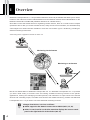
WebView Livescope MV Ver. 2.1 LE (hereafter referred to as MV LE) is software that allows you to use an
Intranet or the Internet to monitor video distributed from the Network Camera Server VB150/VB101 or the
Network Camera VB-C10/VB-C10R (hereafter referred to as “camera server”).
Since MV LE uses the wizard format for registering camera servers, there is no need to learn complex
operations. MV LE lets you access camera servers, freely remote control cameras, and simultaneously
view images from camera servers installed in more than one location (up to 4 locations), providing an
efficient monitoring environment.
*When using VB101, upgrade the firmware to version 3.0.
VC-C4
COMMUNICAT
f:4-64mm ION CAMERA
1:1.4-2.8
Network Camera Server
Monitoring via the Internet
INT
E RNET
Monitoring on an Intranet
Network Camera
MV LE is a limited edition of WebView Livescope MV Ver. 2.1. WebView Livescope MV Ver. 2.1 provides
you with a wide variety of functions such as creating versatile monitoring screens to suit specific
applications, viewing and managing recorded pictures, and notification of input events from external
devices and controlling output, to enable more efficient and reliable monitoring. Please use WebView
Livescope MV Ver. 2.1 if you wish to use more advanced monitoring functions.
e
Tip
Changes from MV Ver. 2.0 LE are as follows:
→ P.5, 13, 18).
● Added support for the Network Camera Server VB150 (→
● Added “Control on Side” to the View menu that displays the camera control
→ P.13).
panel on the right hand side of the window (→
4