1
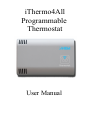
iThermo4All
Programmable
Thermostat
User Manual
Instructions for the installer...............................................4
Warranty............................................................................4
iThermo4all.......................................................................5
Placement..........................................................................5
Installation.........................................................................6
First time setup..................................................................9
Info...................................................................................11
Settings............................................................................12
Week schedule and Jolly.................................................18
Network...........................................................................20
Sensors.............................................................................21
Website............................................................................24
Specifications..................................................................26
Disposal and recycling....................................................27
Instructions for the installer
Carefully read the instructions contained in the document
that provide important information regarding the safe installation, usage and maintenance.
After removing the packing, check the integrity of the
unit. The system must be responsive to current safety
standards. The manufacturer can not be held responsible
for any damage caused by improper and erroneous usage.
For repairs contact a service center authorized by the
manufacturer. Do not block the ventilation openings or
slots or heat dissipation. Failure to comply with the above
can compromise the safety of the device.
Warranty
The product is guaranteed for a period of two years from
the date of purchase, subject to the conditions described
below. Defective components will be replaced free of
charge. The equipment must be sent postage paid to
MDV. The warranty does not include failure due to tampering by unauthorized people, as well as improper installation or negligence caused by phenomena unrelated to
the normal operation of the product. The company MDV
is not liable for any damages, direct or indirect, caused to
persons, animals or things, by damage of the product or
by the forced suspension of the use of the same.
4
iThermo4all
The programmable thermostat iThermo4all has been designed to ensure ideal temperature conditions at any time
of the day and for each day of the week. The installation
takes a few minutes and requires a connection to the
power supply (90-200Vac) and the connection to the air
conditioning. Once installed and powered please refer to
the section "First time setup” of this manual. iThermo4all
can control heating systems and cooling systems and can
be installed to replace an existing thermostat of the type
on / off. The device has a wifi module that allows you to
configure and manage the thermostat via mobile devices
or from your home computer. Once configured correctly,
you can control your thermostat remotely via the appropriate section on the web at this address:
www.ithermo4all.eu
Placement
Install the unit on an interior wall, in a suitable position to
correctly measure the temperature of the environment,
avoiding the installation in corners, behind doors, curtains
or near heat sources.
5
Installation
Open the unit, remove the terminal cover and
set the thermostat to the wall or on a mounting box using
the appropriate screws.
Electrical Connections
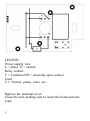
The connections must be made according to the system
controlled by thermostat: then follow the pattern
6
LEGEND
Power supply wire
L = phase N = neutral
Relay contact
C = Common NO = normally open contact
Load
U1 = burner, pump, valve, etc..
Replace the terminal cover.
Close the unit, making sure to insert the hooks into the
seats.
7
Power Supply
The power supply must be alternating current between 90
and 220V, 50/60Hz.
WARNING! Wrong connection of the power supply
can severely damage the unit.
8
First time setup
When you turn on the thermostat, it issues a double beep
if it is configured to create a own network (default) or a
single beep if it is configured to access to the home network. After a few seconds you will hear another beep to
indicate that the thermostat is ready to operate. If turning
on you hear a double beep, you can proceed with the configuration of the parameters to make sure that the thermostat connects to your network. Otherwise, to allow the device to create its own network, press for a second the button through the hole.
The hole is located below the ventilation grid in the lower
left part of the unit.
9
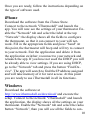
Once you are ready, follow the instructions depending on
the type of software used.
iPhone
Download the software from the iTunes Store.
Connect to the network "iThermo4all" and launch the
app. You will now see the settings of your thermostat. Enable the "Network" tab and select the label at the top
“Network": the display shows all the fields to configure
the thermostat, so that it can connect to your wifi network. Fill in the appropriate fields and press "Send" At
this point, the thermostat will beep and will try to connect
to your network. Exit the application and delete it from
the application switcher; reconnect to your network and
relaunch the app. If you have not used the DHCP you will
be already able to view settings. If you are using DHCP,
go to the "Network" tab and press the button “Find Device". The app will search to find the IP address assigned
and will take memory of it for next access. At this point
you are ready to use iThermo4all in all its functions.
Windows
Download the software at
http://www.ithermo4all.eu/download/ and execute the
setup. Connect to the network "iThermo4all" and launch
the application, the display shows all the settings on your
thermostat. Enable the "Network" tab and select the radio
button “Network”, than you will see all the fields to con10
figure the thermostat to allow it connecting to your wifi
network. Fill in the appropriate fields and press “Send".
At this point, the thermostat will beep and will try to connect to your network. Exit the application and reconnect
to your network and relaunch the program.
If you have not used the DHCP you will be already able
to view settings. If you are using DHCP, go to the "Network" tab and press the button “Find Device".
The app will search to find the IP address assigned and
will take memory of it for next access. At this point you
are ready to use iThermo4all in all its functions.
Info
This tab allows to check the various operating parameters
of the thermostat and in particular:
Iphone and Windows
Current temperature
Temperature set
Operation Mode
Day and Time
Function (Summer / Winter)
Next time of temperature change or holiday days
Name of thermostat
11
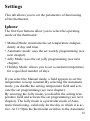
Settings
This tab allows you to set the parameters of functioning
of the thermostat.
Iphone
The first four buttons allow you to select the operating
mode of the thermostat:
• Manual Mode: maintains the set temperature independently of day and time.
• Automatic mode: uses the set weekly programming (see
next chapter).
• Jolly Mode: uses the set jolly programming (see next
chapter).
• Holiday Mode: allows you to set a constant temperature
for a specified number of days.
If you select the Manual mode, a field appears to set the
temperature to keep constant.By selecting the Automatic
mode, you disable the setting temperature field and activate the set programming (see next chapter).
By selecting the Jolly mode, you disable the setting temperature field and activate the set programming (see next
chapter). The Jolly mode is a particular mode of Automatic functioning, valid only for the day in which it is active. At 11:59pm the thermostat switches to the Automatic
12
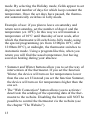
mode. By selecting the Holiday mode, fields appear to set
degrees and number of days for which keep constant the
temperature. Once the set days have passed, the thermostat automatically switches in Jolly mode.
Example of use: if you plan to leave on saturday and
return next saturday, set the number of days 6 and the
temperature (ex 10°C). In this way we will maintain a
temperature of 10°C until thursday of next week, after
which the thermostat will switch into Jolly mode, using
the special programming (ex from 12:00pm 10°C, after
12:00am 20°C), at midnight, the thermostat switches to
Automatic mode. Using a program like this, when you
return you will find the usual temperature, but having
saved on heating during your absence.
• Summer and Winter buttons allow you to set the way of
intervention of the thermostat. If you set the function
Winter, the device will turn on for temperatures lower
than the one set. If instead you set the function Summer,
the device will turn on for temperatures higher than the
one set.
• The "Web Connection" button allows you to activate /
deactivate the sending of the operating data of the thermostat to the website. Disabling the button will NOT be
possible to control the thermostat via the website (see
the chapter "The Website”).
13
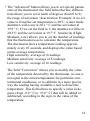
• The "Advanced" button allows you to set special parameters of the thermostat: the field delta (thermic differential) allows you to set in tenth of degrees (from 0 to 9)
the range of activation / deactivation. Example: if we set
value to 0 and the set temperature is 20°C, winter mode
shutdown will occur at 20.1 ° C and the activation at
19.9 ° C. If we set the field to 2, the shutdown will be at
20.3°C and the activation at 19.7°C. Sensitivity (High,
Medium, Low) allows you to set the number of readings
that the thermostat uses to calculate the temperature.
The thermostat does a temperature reading approximately every 10 seconds, and displays the value based
on the average temperature.
High sensitivity: average of 4 readings.
Medium sensitivity: average of 8 readings.
Low sensitivity: average of 16 readings.
The field “Correction” allows you to modify the value
of the temperature detected by the thermostat, in case is
not equal to the actual temperature for particular environmental conditions, or to calibrate in a more precise
way the reading having available a tool to detect the
temperature. This field allows to specify a value in degrees (from -9.0 ° C to +9.0 ° C) that will be added or
subtracted, according to the sign, to the value of the
temperature.
14
Once you have modified the parameters, use the "Send"
button to record the new values.
When sending parameter is also set the date and time of
the thermostat.
Setting date and time
To set the date and time, simply press the "Send" button
in the parameter settings (tab "Settings"), even if no parameter is not changed. The date and time sent to the thermostat are the same of the iPhone.
Windows
The first four buttons allow you to select the operating
mode of the thermostat:
• Manual Mode: maintains the set temperature independently of day and time.
• Automatic mode: uses the set weekly programming (see
next chapter).
• Jolly Mode: uses the set jolly programming (see next
chapter).
• Holiday Mode: allows you to set a constant temperature
for a specified number of days.
If you select the Manual mode, a field appears to set the
temperature to keep constant. By selecting the Automatic
15
mode, you disable the setting temperature field and activate the set programming (see next chapter).
By selecting the Jolly mode, you disable the setting temperature field and activate the set programming (see next
chapter). The Jolly mode is a particular mode of Automatic functioning, valid only for the day in which it is active. At 11:59pm the thermostat switches to the Automatic
mode. By selecting the Holiday mode, fields appear to set
degrees and number of days for which keep constant the
temperature. Once the set days have passed, the thermostat automatically switches in Jolly mode.
Example of use: if you plan to leave on saturday and return next saturday, set the number of days 6 and the temperature (ex 10°C). In this way we will maintain a temperature of 10°C until thursday of next week, after which
the thermostat will switch into Jolly mode, using the special programming (ex from 12:00pm 10°C, after 12:00am
20°C), at midnight, the thermostat switches to Automatic
mode. Using a program like this, when you return you
will find the usual temperature, but having saved on heating during your absence.
• Summer and Winter buttons allow you to set the way of
intervention of the thermostat. If you set the function
Winter, the device will turn on for temperatures lower
than the one set. If instead you set the function Summer,
16
the device will turn on for temperatures higher than the
one set.
• The "Web Connection" button allows you to activate /
deactivate the sending of the operating data of the thermostat to the website. Disabling the button will NOT be
possible to control the thermostat via the website (see
the chapter "The Website”).
• The "Advanced" button allows you to set special parameters of the thermostat: the field delta (thermic differential) allows you to set in tenth of degrees (from 0 to 9)
the range of activation / deactivation. Example: if we set
value to 0 and the set temperature is 20°C, winter mode
shutdown will occur at 20.1 ° C and the activation at
19.9 ° C. If we set the field to 2, the shutdown will be at
20.3°C and the activation at 19.7°C. Sensitivity (High,
Medium, Low) allows you to set the number of readings
that the thermostat uses to calculate the temperature.
The thermostat does a temperature reading approximately every 10 seconds, and displays the value based
on the average temperature.
High sensitivity: average of 4 readings.
Medium sensitivity: average of 8 readings.
Low sensitivity: average of 16 readings.
The field “Correction” allows you to modify the value
of the temperature detected by the thermostat, in case is
not equal to the actual temperature for particular environmental conditions, or to calibrate in a more precise
17
way the reading having available a tool to detect the
temperature. This field allows to specify a value in degrees (from -9.0 ° C to +9.0 ° C) that will be added or
subtracted, according to the sign, to the value of the
temperature.
Once you have modified the parameters, use the "Send"
button to record the new values. When sending parameter
is also set the date and time of the thermostat.
Week schedule and Jolly
This tab allows you to set the thermostat schedules used
during the "Automatic" or “Jolly" mode.
To set the schedules relating to the "Automatic" mode use
the “Week" button, and use the "Jolly" button to set those
relating to the Jolly mode.
Iphone
• The "Week" and “Jolly" buttons allow you to select
which type of schedule programming display or change.
• The "Open" button allows you to load a previously
saved schedule.
• The "Save" button allows you to save a schedule.
• The “Delete" button (bin) allows you to delete a schedule from the list. Click the button, select the schedules
18
you want to delete and press "Delete Selected" button or
the "Clear All" button to clear all schedules.
• To change a schedule or add a new one use the "Edit"
button.A group of elements will appear on the screen,
they allow you to set the date, time and temperature. In
the field “Day” you can select the days of the week and
also the value “Mon-Fri" that allows you to set the time
and temperature automatically for every day from Monday to Friday. Other values you can select are “Sat-Sun"
or "Every Day." Once you have set the desired values
press the "Add" button (+) to include them in the list.
Once you have completed all schedules, press the “Finish" button to close the selection boxes.
Then it is possible to check the list of set schedules and
pressing the "Send" button you can load them on the thermostat.
Windows
• The "Week" and “Jolly" buttons allow you to select
which type of schedule programming display or change.
• The "Import" button allows you to load a previously
saved schedule.
• The "Save" button allows you to save a schedule.
• To delete a schedule from the list, select the desired
schedule and press the “Canc” key.
19
• To change a schedule or add a new one, set the values in
the checking box. In particular, in the field “Day” you
can select the days of the week and also the value
“Mon-Fri" that allows you to set the time and temperature automatically for every day from Monday to Friday. Other values you can select are “Sat-Sun" or "Every Day." Once you have set the desired values press the
"Add" button (+) to include them in the list.
Then it is possible to check the list of set schedules and
pressing the "Send" button you can load them on the thermostat.
Network
This tab allows you to set the network parameters and select the type of connection.
Iphone and Windows
• The “adhoc" button sets the application to connect to the
thermostat through his own network. By using the "adhoc" mode the thermostat will not be able to connect to
the Internet. This mode is required when, for any reason, you lose the connection of the sensor to your network (usually if you change your router). To set the
thermostat in this mode, press for about a second the
20
button through the hole. A double beep will indicate that
the thermostat is in “adhoc" mode. After activating the
“adhoc” mode, to see if the thermostat communicates,
press the "Update" button, you will read "Connected" if
yes or "device not found" if the sensor is not communicating.
• The "Network" button allows you to set the parameters
of your network so that the thermostat can connect to
the same. The "Network Name" and “Password" fields
are case sensitive. In order to allow the thermostat to
connect to your network, set the required parameters
and press the "Send" button.
• The "Find device" button allows you to search thermostats on the network and store the IP address in the
list of sensors (see next chapter). At the end of scanning,
that can last about 3-4 minutes, a message will appear
on the screen with the number of found sensors.
Sensors
This tab allows you to manage the list of your thermostats.
Iphone
• The "Update" button allows you to update the list of
thermostats connected to your network. Using this function, a scan of the thermostats is performed and then
21
you receive a message that require the update of the list.
If you update the list, all the previous information are
deleted. Each element of the list shows the name of the
thermostat and its IP address; in order to communicate
with a specific sensor, just touch the desired sensor.
• The "Delete" button allows you to manually delete a
sensor from the list.
• -The "Edit" button (pencil) allows you to change the
name of a thermostat on the list. To change the name of
the thermostat, turn on the function and tap the name of
the thermostat you want to change, enter the new name
and press “OK”.
• -The "Register sensor" button (globe) allows you to associate the thermostat to your account on the website
and the registration is possible only if the function has
been activated and the web sensor has sent at least once
its operating parameters. Before using this function activate the web connection in "Settings" tab and wait at
least 15 minutes. By enabling this function, the active
sensor is associated to your account previously created
on the website (see next chapter). If you have not already created an account, you must first proceed to create your account on www.ithermo4all.eu. After recording the sensor, you can also remotely control it through
the site: www.ithermo4all.eu
The purchase of each thermostat includes the use of the
remote management for a period of 12 months from the
22
time of recording. When this time is expired, to be able to
continue to use the remote management, you need to renew your subscription through the website www.ithermo4all.eu
Windows
• The "Update List" button allows you to update the list
of thermostats are connected to your network. Using
this function is performed a scan of the thermo were
present on the network. Each element of the list shows
the name of the thermostat and its IP address; in order to
with a specific sensor, just select the desired sensor.
• To delete an item, select the sensor and press the "Canc"
button.
• To change the name of the sensor select the sensor and
press "Enter", a window will appear where input the
new name, then click “OK".
• The button "Register sensor" allows you to associate the
thermostat to your account on the website, the record is
only possible if the web function has been enabled and
the sensor has sent at least once its operating parameters. Before using this function, turn on your web connection in "Settings" tab and wait at least 15 minutes.
By activating this function, the active sensor is associated to your account previously created on the website
(see next chapter). If you have not already created an
account, you must first proceed to create your account
23
on www.ithermo4all.eu. After recording the sensor, you
can also remotely control the thermostat through the
site: www.ithermo4all.eu
The purchase of each thermostat includes the use of the
remote management for a period of 12 months from the
time of recording. When this time is expired, to be able to
continue to use the remote management, you need to renew your subscription through the website www.ithermo4all.eu
Website
The website for the management of the thermostat is located at the web address:
www.ithermo4all.eu.
By the menu, you can activate your account that allows
you to manage the thermostat also through the special
section of the site.Once registered and made the "login"
you will find a situation similar to that application (iOS or
Windows) where you can check or change settings and
schedules of the thermostat.If once inside you do not see
any thermostat associated to your account, please refer to
the section registration of the thermostat depending on the
application used.In section "Settings" there is a box that
allows you to enable the synchronization of date and time
from the web.Pointing the time zone of the location where
you installed the thermostat, it receives the time from our
24
server and will remain synchronized with the time
changes.For all other settings, you can refer to the instructions of the applications.Once you save a change, it will
not be performed immediately, but will remain in a queue
until your thermostat will query our server to check if
there are any changes to load. In the “information” tab, at
the bottom of the list, you can see the number of pending
changes.The thermostat connects to the server about every 15 minutes to send the data and see if there are
changes set by the web.The "Account" section allows you
to change your password and mail address.
25
Specifications
•
•
•
•
•
•
•
•
•
•
•
•
•
•
•
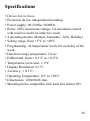
Device for civil use.
Electronic device independent mounting.
Power supply: 90-220Vac 50/60Hz
Relay: 250V maximum voltage, 5A maximum current
with resistive load (2A inductive load).
4 operating modes: Manual, Automatic, Jolly, Holidays
Setting range: from +5°C to +40°C.
Programming: 24 temperature levels for each day of the
week.
Detection range temperature: 10 sec.
Differential: from ± 0.1°C to ± 0.9°C.
Temperature correction: ± 9°C
Display Resolution: 0.1°C.
Accuracy: ± 0.3°C.
Operating Temperature: 0°C to +50°C.
Dimensions: 120x80x26 mm.
Mounting holes compatible with back box italian 503.
26
Disposal and recycling
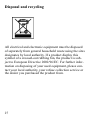
All electrical and electronic equipment must be disposed
of separately from general household waste using the sites
designates by local authority. If a product display this
symbol of a crossed-out rubbing bin, the product is subject to European Directive 2002/96/EC. For further information on disposing of your used equipment, please contact your local authority, your refuse collection service or
the dealer you purchased the product from.
27
MDV Ingegneria Elettronica
Castel Guelfo - BO - Italy
Version 0.9
www.ithermo4all.eu
www.mdvbologna.it