1
RF-AC7540-C 13-0808_MAN_V1 ENG.fm Page 7 Friday, September 6, 2013 4:26 PM
RF-AC7540-C
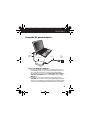
4 Connect the selected tip to the end of the output cable,
making sure that the pins on the tip are aligned with the
holes in the cable. Make sure that the tip is firmly connected
to the output cable's connector.
5 Connect the AC cord to the AC adapter.
6 Plug the AC cord into an AC power outlet. The LED on the
adapter turns on, indicating that the adapter is powered and
ready.
IMPORTANT: If the adapter's LED does not turn on, or if it
blinks, discontinue use and contact our toll free help line for
assistance at (800) 620-2790.
7 Plug the tip connected to the output cable into the DC input
jack on your laptop. The adapter powers the laptop and
charges its battery.
FAQ for Rocketfish Adapters
What tip should I use for my laptop?
You can determine the correct tip for your laptop by referencing
the Tip Compatibility Guide included with the adapter or by
visiting the Tip Wizard at www.rocketfishproducts.com, then
click Support & Service. Enter your model number
(RF-AC7540-C) in the box under Manual, Firmware, Drivers &
Product Information, then click Search. Select the Tip Wizard
link. Locate your laptop manufacturer and model and the
correct tip will be listed.
7