1
SCULPTURA SOUNDPAD
Powered Sound Station / Station de Son
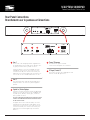
Soundpad Input / Entrées Soundpad
The first two digits of the display will indicate which input is being
used, followed by either the volume setting or the EQ setting. You
can scroll through them with the SRC (Source) button. The input
designations are as follows: / Les deux premiers chiffres de l'afficheur indiquent l'entrée est utilisé, suivi par soit le réglage du volume ou le réglage EQ. Vous pouvez les faire défiler avec la SRC
(Source) bouton. Les désignations d'entrée sont les suivantes:
Soundpad Volume Display / Affichage du volume
The display will always show the input as the first two digits, such
as BT to indicate you’re using the Bluetooth input. / L'écran affiche
toujours l'entrée que les deux premiers chiffres, tels que BT pour
indiquer que vous utilisez l'entrée Bluetooth.
BT00 means the Bluetooth input is at the absolute minimum
volume setting. Bluetooth signifie que l'entrée est au volume minimum.
BT60 means the Bluetooth input is at the absolute maximum
volume setting. /BT60 Bluetooth signifie que l'entrée est au volume
maximum.
Soundpad EQ Effects / Soundpad Effets EQ
The Soundpad is equipped with a variety of interesting effects that can
be accessed with the EQ button which will be indicated by the last two
digits in the display, following the input designation. For instance, if you
are using the Bluetooth input you will see BT in the display followed by: /
Le Soundpad est équipé d'une variété d'effets intéressants qui peuvent
être accessibles avec le bouton EQ qui sera indiquée par les deux
derniers chiffres de l'affichage, à la suite de la désignation d'entrée. Par
exemple, si vous utilisez l'entrée Bluetooth, vous verrez à l'écran BT
suivie par:
FT: Flat, the purest signal possible / Plat, le signal le plus pur possible
MU: Music, a dynamic effect for your favorite music
musique, un effet dynamique pour votre musique préférée
CM: Cinema, best effect for movies and TV
Soundpad 3D Effect / Soundpad Effet 3D
A 3D effect can be engaged by pushing on the 3D button. You will
know if the 3D effect is engaged because the effects will have periods (dots) between the letters. In the case of Clear Voice, designed
as CV, will appear as C.V. When the 3D effect is engaged and will
return to CV when the 3D effect is disengaged. / Un effet 3D peut
être engagée en appuyant sur le bouton 3D. Vous saurez si l'effet 3D
est engagée parce que les effets auront des points (points) entre les
lettres. Dans le cas de la technologie Clear Voice, conçu comme CV,
apparaîtra comme CV Lorsque l'effet 3D est engagée et sera de
retour au CV lorsque l'effet 3D est désengagé.
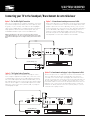
Pairing with Bluetooth
The Soundpad is equipped with Bluetooth to allow you to stream your
music wirelessly via a Bluetooth enabled device. Follow these simple
steps to pair the Soundpad to your Bluetooth device:
Press the BT Code button until BT appears in the display and starts to
flashon top of the speaker changes to blue and flashes slowly.
Now turn on the bluetooth of your device and select ‘SOUNDPAD’ from
your list of found devices. The device and Soundpad will finish pairing in
about 30 seconds, and the LED will stop flashing after they have connected.
Par exemple, en vous servant d’un téléphone cellulaire pour brancher
la barre de son par le Bluetooth, suivez les étapes suivantes:
Appuyez sur la touche SRC jusqu’à ce que la DEL (à l’avant de l’enceinte) devienne bleue. La DEL clignotera alors lentement.
Appuyez sur la touche BT CODE, la DEL clignotera rapidement.
Maintenant, activez le Bluetooth sur votre téléphone cellulaire au
même moment et sélectionnez « SOUNDPAD» dans la liste des
appareils trouvés. Le téléphone et la barre de son finiront de se jumeler en environ 30 secondes puis la DEL cessera de clignoter après que
la connexion aura été établie.
Cinéma, meilleur effet pour les films et la télévision
CV: Clear Voice, provides emphasis to dialog for TV and movies / Clear
Voice, fournit l'accent sur la boîte de dialogue pour la télévision et
le cinéma
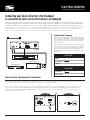
Instructions for using the Learning Function
The learning function allows you to program the functions of the Soundpad
into your current TV remote.
Cette function vous permettrez de programmer les fonctions de la
bar de son dans votre télécommande préféré.
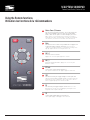
Example: If you would like the Number 1 key on the remote below remote
to control the power of the soundpad you would follow the following steps:
Comme exemple, si vous voulez le numéro 1 du télécommande soit
capable de contrôler la puissance de la bar de son, suivez ces étapes:
1)
1)
2)
3)
4)
Press the LEARN button on the soundpad for about three seconds,
the display will show “LRN” and flashes.
Press the Number 1 on your remote and the “LRN” designation in the
display will stop flashing.
Quickly press the POWER button on the sound bar top control pad and
the display will say “OK”
The POWER function of the sound bar can now be controlled by
pressing the Number 1 key on your remote.
(NOTE: this is example only. normally there is separate button on your remote for powering other
products. This same procedure is used to make any of the soundpa features work with your remote)
2)
3)
4)
Appuyer sur la touche LEARNING sur la bar de son pour environ
trois secondes, ou jusqu’au temps que la lumière commence a
clignoter vite.
Appuyer sur le numéro 1 sur le télécommande et la lumière
va clignoter moins vite.
Appuyer POWER sure le bar de son et la lumière va arrêter a
clignoter.
L'afficheur indique OK. La barre de son peut maintenant être
contrôlée en appuyant sur la touche le numéro 1 de votre
télécommande.