1
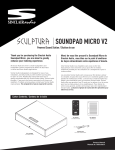
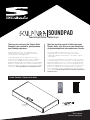
SCULPTURA SOUNDPAD
Powered Sound Station / Station de Son
Connecting your TV to the Soundpad / Branchement de votre téléviseur
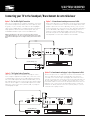
Option 1: The One Wire Digital Connection
Option 1: Le branchement numérique avec un seul câble
Make sure all components are off before starting the connections.
If your TV has an Optical Out, and all your sources (blu-ray, satellite, game, etc.) are currently connected to the TV using digital
cables (such as HDMI, Optical, or Digital Coaxial) then follow the
simple guidelines below. You will need an optical cable, not
included but available at your local Sinclair Audio dealer.
Assurez-vous que toutes les composantes soient hors tension avant de
commencer les branchements. Si vous téléviseur dispose d’une sortie
optique et que toutes vos sources (Blu-Ray, satellite, jeux, etc.) sont
actuellement branchées au téléviseur avec des câbles dits numériques
(tel un câble HDMI, câble optique ou coaxial numérique) suivez à ce
moment les étapes simple du petit guide ci-dessous. Vous aurez
besoin de vous procurer un câble optique non inclus avec l’ensemble
mais disponible chez votre marchand local Sinclair Audio.
NOTE: If your DVD player, cable tuner or satellite tuner does not have a
coaxial digital output, you can connect its analog audio output to your TV. The
TV will send its audio signal to the through the analog connection described
above.
POWER
AUDIO
IN
OFF
R
ON
L
OPTICAL
LINE IN 1
LINE IN 2
OPTICAL
INPUT
100-240V~
50-60Hz 100W
Soundpad
OUT
TV
( Satellite, BluRay, etc. )
POWER
OFF
R
ON
L
LINE IN 1
LINE IN 2
OPTICAL
INPUT
1-240V~
50-60Hz 100W
AUDIO OUT
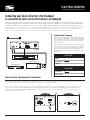
Option 2: Le branchement analogique, le plus fréquemment utilisé
Option 2: The Popular Analog Connection
Make sure all components are off before starting the connections. Using the supplied stereo audio cable, connect the ’s Line
1 (analog) input to your TV’s stereo audio output. If your TV has
two sets of audio outputs labeled as Fixed and variable, use the
pair labeled fixed. This will let you turn your TV’s speakers down
while the TV still supplies a constant audio signal to the soundpad. Then, connect your source (Satellite, DVD, etc) using the
remaining Optical input.
Assurez-vous que toutes les composantes soient hors tension avant de commencer les branchements. En vous servant du câble stéréo inclus avec
l’ensemble, reliez l’entrée de Ligne 1 (analogique) de la Station de son à la
sortie de son stéréo de votre téléviseur. Si votre téléviseur possède deux jeux
de sorties audio étiquetées Fixe et Variable, utilisez la paire Fixe. Ceci vous
permettra de réduire le niveau sonore des haut-parleurs du téléviseur à zéro
tandis que celui-ci envoie toujours un signal audio à volume constant à la
Station de son. Ensuite, branchez votre source (satellite, DVD, etc.) en vous
servant de l’entrée optique restante.
AUDIO
OUT
POWER
OPTICAL
OFF
R
ON
L
LINE IN 1
LINE IN 2
OPTICAL
INPUT
100-240V~
50-60Hz 100W
Soundpad
TV
( Satellite, DVD, etc. )
OPTICAL
POWER
OFF
R
ON
L
LINE IN 1
LINE IN 2
OPTICAL
INPUT
1-240V~
50-60Hz 100W
www.sinclairaudio.com