1
User’s Manual
3.2 Using Setup
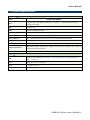
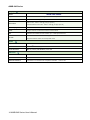
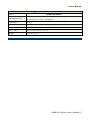
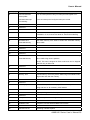
In general, you use the arrow keys to highlight items, press <Enter> to select, use the
PageUp and PageDown keys to change entries, press <F1> for help and press <Esc> to
quit. The following table provides more detail about how to navigate in the Setup program
using the keyboard.
Button
↑
Description
Move to previous item
↓
Move to next item
←
Move to the item in the left hand
→
PgUp key
Move to the item in the right hand
Main Menu -- Quit and not save changes into CMOS
Status Page Setup Menu and Option Page Setup Menu -- Exit current page and
return to Main Menu
Increase the numeric value or make changes
PgDn key
Decrease the numeric value or make changes
+ key
Increase the numeric value or make changes
- key
Decrease the numeric value or make changes
F1 key
General help, only for Status Page Setup Menu and Option Page Setup Menu
(Shift) F2 key
Change color from total 16 colors. F2 to select color forward, (Shift) F2 to select
color backward
F3 key
Calendar, only for Status Page Setup Menu
F4 key
Reserved
F5 key
Restore the previous CMOS value from CMOS, only for Option Page Setup Menu
F6 key
Load the default CMOS value from BIOS default table, only for Option Page Setup
Menu
F7 key
Load the default
F8 key
Reserved
F9 key
Reserved
F10 key
Save all the CMOS changes, only for Main Menu
Esc key
• Navigating Through The Menu Bar
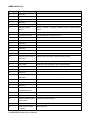
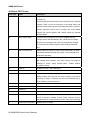
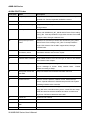
Use the left and right arrow keys to choose the menu you want to be in.
Note:
Some of the navigation keys differ from one screen to another.
AIMB-240 Series User’s Manual 53