1
Quartet 1000 – Edition 3 – 5/9/00 approved
To re-register an additional handset
Before re-registering, the old registration code
must first be erased. If necessary you can
re-register your Quartet 1000 handset by simply
following the above procedures.
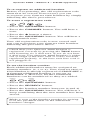
To erase a registration code
Quickdial
Ch
an
Quickdial
l
ne
• Press the QUICKDIAL button
• Press the CHANNEL button. You will hear a
tone.
• Press the ✱ button 4 times.
• Press the QUICKDIAL button. You will hear a
confirmation tone.
Your old registration code is now erased and
you can re-register your Quartet 1000 handset
following the procedure above.
Check that your Quartet 1000 handset is
registered correctly by pressing the TALK button
and listening for a dial tone. If you do not hear
a dial tone your Quartet 1000 handset is either
out of range of the base unit or it has not been
registered properly, or the base unit line cord is
not plugged in.
To set the handset number
Each additional handset must be assigned an
identity number (2, 3 or 4). Your Quartet 1100 or
1500 handset is already registered as HANDSET 1.
A Quartet additional handset is pre-set as
HANDSET 2. However, further additional
handsets can be numbered as they are added.
Quickdial
Quickdial
Secrecy
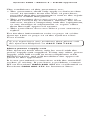
• Press the QUICKDIAL button.
• Press the SECRECY button.
• Enter the handset number between (2 and 4).
• Press the QUICKDIAL button. You will hear a
beep confirming that the new number has been
stored.
Make a note of the handset number by writing
it on the quickdial label on the additional
handset’s charger.
3