1
Quartet 1000 – Edition 3 – 5/9/00 approved
Using your Quartet
1000 Additional
Handset
Your Quartet 1000 can be used with the Quartet
1100 and Quartet 1500. Please refer to your main
Quartet User Guide for a complete list of product
features and operating instructions.
To make an external call
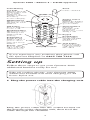
Press the buttons in the order shown:
• Lift the handset off the base unit.
• Press the TALK button. The POWER/IN USE
light on the base unit begins to flash and the
IN USE light on the handset comes on.
• Listen for the dialling tone.
• Dial the number you want.
To end a call
• Press the TALK button.
Or
• Replace the handset on the base unit.
The handset range is up to 250 metres from the
base unit in ideal conditions. If you start to go
out of range while using the phone, you will
hear warning beeps. Move closer to the base
unit. If you do not move back into range your
call may be disconnected.
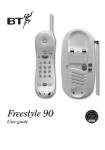
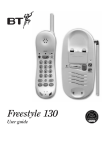
Your Quartet 1000 additional handset uses a
compact aerial which can be pulled out to
obtain the best signal and reception available.
Page button – Quartet 1100
The Quartet 1100 base unit features a PAGE
button. When pressed, the base unit and all the
handsets registered to that base unit will ring
and the IN USE/BATTERY LOW light on the
handset will flash. The PAGE button feature does
not enable conversation between the base unit
and handset.
4