1
System Setup
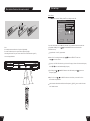
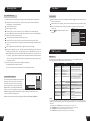
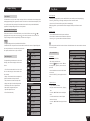
Identification of Controls
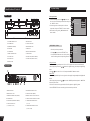
FRONT PANEL
5
2
3
4
13
USB
1
STANDBY/ON
6
7
OPEN
PLAY
8
9
STOP
HDD
14
DV
10
DVD
15
16
VIDEO
17
L---AUDIO--- R
11
SOURCE
12
10.DVD BUTTON
2.STANDBY LED
11 .SOURCE BUTTON
3.IR(REMOTE SENSOR)
12.RECORD BUTTON
4.DVD DOOR
13.USB INPUT
5.VFD DISPLAY
14.DIGITAL VIDICON INPUT
6. OPEN/CLOSE BUTTON
15. VIDEO INPUT
7.PLAY BUTTON
16.AUDIO INPUT (FRONT RIGHT)
8.STOP BUTTON
17.AUDIO INPUT (FRONT LEFT)
1
OUTPUT
VIDEO
5.1 CH
L
SL
C
L
DIGITAL OUTPUT
~110-230V 50/60Hz
OUT
Y
TV75
ANTENNA
2
SW
3
SR
S-VIDEO
R
AUDIO OUTPUT
4
5
6
R
S-VIDEO
7 8
OPTICAL
9
Cb
Y
Cb/Pb
VIDEO INPUT
VIDEO OUTPUT
11
12
COAXIAL
10
Cr
Cr/Pr
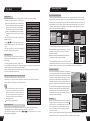
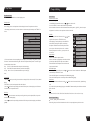
1. RF SIGNAL INPUT
7. COMPOSITE VIDEO OUTPUT
2. RF SIGNAL OUTPUT
8. S-VIDEO OUTPUT(REAR)
3. COMPOSITE VIDEO INPUT(REAR)
9. DIGITAL AUDIO- OPTICAL OUTPUT
4.S-VIDEO INPUT
10. DIGITAL AUDIO-COAXIAL OUTPUT
5. AUDIO INPUT (REAR LEFT/RIGHT)
11. COMPONENT VIDEOS INPUT
6. 5.1CH AUDIO OUTPUT
(L, R, SL, SR, C, SW )
PAL
TV Display
4:3 LB
Interlaced
Progressive
1
SETUP MENU -AUDIO
REAR PANEL
INPUT
TV Type
Video Output Format
SETUP MENU- AUDIO
9.HDD BUTTON
VIDEO
SETUP MENU -VIDEO
REC
1.STANDBY/ON BUTTON
IN
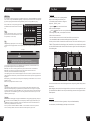
Video Output Format
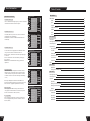
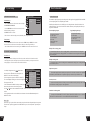
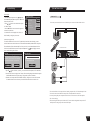
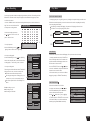
1. In the General Settings menu, use the or button to move
the cursor, select the Video Output Format item and press
the SELECT button.
2. Select the Progressive or Interlace option for video scan
output mode, and press the SELECT button to confirm.
* This function can do by pressing PS/IS button on the
remote controller.
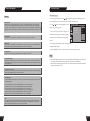
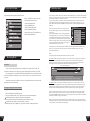
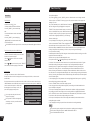
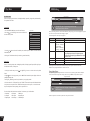
1. Enter the System Setup control menu.
2. Use the or button to select the AUDIO item.
3. Press the SELECT button to enter the Play Setting
mode. The following chart is the Play Setting main menu.
Analog Audio output
2CH
SPDIF Output
RAW
LPCM Output
LPCM 96K
Dynamic Range
Off
1
Analog Audio output
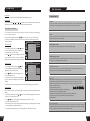
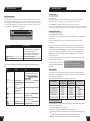
The unit can set the analog audio output at 2-CH or 5.1-CH. The output of 2-CH comes from L and R channels.
1.Enter the play settings menu, use the or button to select SPDIF Output item, and press the SELECT
button.
2.Use the or button to select 2-CH or 5.1-CH, and press the SELECT button to confirm.
SPDIF Output
This unit has a digital audio output. You can enjoy music of better quality through an amplifier with a digital audio
decoder.
1.Enter the play settings menu, use the or button to select SPDIF Output item, and press the SELECT
button to drop down a menu.
2.Use the arrow buttons to select a proper value (RAW, LPCM), and press the SELECT button.
3.Press the RETURN button to return to the upper level menu and set up other items.
(Y, Cr, Cb)
12. COMPONENT VIDEOS OUTPUT
(Y, Cr/Pr, Cb/Pb)
8
45