1
SECTION 3
ANTENNA CONFIGURATION
The VuQube Model VQ2000 and VQ3000 Automatic Satellite Systems are factory pre-set for
DIRECTV standard digital programming broadcast from the 101° W satellite.
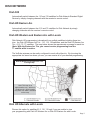
If you also receive your local channels from DIRECTV’s 119 satellite or if you subscribe to Dish
Network or Bell TV programming, you must use the VuQube hand held controller to
re-configure the antenna to work with your satellite service. Doing this will allow the VuQube to lock
on the correct satellites to receive your programming and also enable automatic satellite switching
via the receiver’s remote control for multi-satellite service.
Antenna configuration is a one time procedure that MUST BE COMPLETED before using your
VuQube antenna. To configure your antenna, follow these steps:
1. SATELLITE SERVICE OPTIONS
Determine the service you want to program (pages 6-7).
2. ANTENNA CONFIGURATION
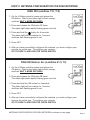
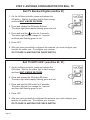
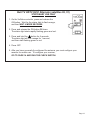
Configure the antenna for the service you chose in step 1. On pages 8-13, find your
service and follow the instructions in the box. Note: VQ2000 controller shown. Procedure
is the same for both VQ2000 and VQ3000 controllers.
DIRECTV
Single Satellite 101 (Factory Pre-set) . . . . . . .Page 8
DIRECTV Plus . . . . . . . . . . . . . . . . . . . . . . . . .Page 8
Dish Network
Dish 500 . . . . . . . . . . . . . . . . . . . . . . . . . . . . .Page 9
Dish HD Eastern Arc . . . . . . . . . . . . . . . . . . . .Page 9
Dish HD Western Arc with Locals . . . . . . . . . .Page 10
Dish HD Eastern Arc with Locals . . . . . . . . . .Page 10
Dish HD Alternate with Locals . . . . . . . . . . . . .Page 11
Bell TV
Bell TV Standard Digital 91 . . . . . . . . . . . . . . .Page 12
Bell TV HDTV 82/91 . . . . . . . . . . . . . . . . . . . .Page 12
Bell TV HDTV 82/91 Alternate . . . . . . . . . . . . .Page 13
3. DISH NETWORK AND BELL TV CHECK SWITCH PROCEDURE
For all Dish Network and Bell TV services:
Configure your receiver for mobile use by running a check switch (page 14).
Page 5