1
C-GPS Overview and Usage
WM_DEV_C-GPS_APN_001-001
In addition to the above interface characteristics of the C-GPS
board, the C-GPS chipset requires the following signals to be
driven:
•
NRST: This input signal is used to reset the C-GPS
Daughter board.
•
GPS_ENABLE: This signal is used to enable the
acquisition of GPS NMEA sentences by the GPS
Daughter board.
•
TCXO_ENABLE: This signal is used to enable the
temperature compensated crystal oscillator.
Warning: DC voltage (VBATT) is always present on the “RF”
connector in order to power supply an antenna with LNA.
References: For further reference on the details of working of
Daughter board, please refer to C-GPS Development kit
User Guide (document [2]).
4.2 Configuration on Wavecom Motherboard
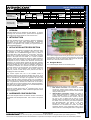
The motherboard of the Wavecom Wireless CPU which is
connected to the C-GPS Daughter board should also be configured
for proper working of the C-GPS Daughter board. The following
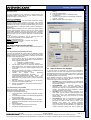
image depicts the wireless CPU motherboard which can be
connected to the C-GPS Daughter board.
NOT E
APP LICATION
1.
2.
3
4.
NRST
GPS_ENABLE
TCXO_ENABLE
LED
GPIO
providing
signal
GPIO19
GPIO 22
GPIO 23
GPIO 20
the
4.2.1 Configuration of Motherboard
The motherboard should be configured by providing the correct
switch position for “EN1/GPIO19” switch and “EN2/GPIO1” switch.
In case the user is planning to use UART1 for C-GPS, the
“EN1/GPIO19” switch must be set to select GPIO19. Also,
“EN2/GPIO1” switch must be set to EN2 to enable UART2 for the
PC.
In case the user is planning to use UART2 for C-GPS, the
“EN2/GPIO1” switch must be set to select GPIO1. Also,
“EN1/GPIO19” switch must be set to EN1 to enable UART1 for the
PC.
In addition to these configurations, the ON/OFF switch must be set
to ON and the Boot switch must be set to OFF.
5 C-GPS Open AT® Applications
®
Wavecom provides sample Open AT
applications which
®
demonstrate how Open AT applications can be created which can
be used to interface with the C-GPS Daughter board.
The following samples are provided by Wavecom:
1. Query Application
2. Interval Update Application
3. TCP Internet Connection Application
Important Note:
®
RTE mode is available with restrictions; see the Open AT SDK
Customer Release Note.
NOT E
Signal to be connected
APPLICATION
The C-GPS Daughter board should be connected to the J201
connector on the Wavecom Wireless CPU. In case, the user is
planning to use UART1 for C-GPS, then UART1/UART2
configuration switch must be set to UART2. Selection of incorrect
switch position might lead to non-working of the C-GPS Daughter
board. The C-GPS Daughter board has the following serial
communication parameters:
Baud Rate: 57600 bps
•
Character Framing: 8 Data bits, 1 stop bit and Odd
•
Parity.
•
Flow control: No flow control
®
These parameters need to be set by the Open AT application
which is interacting with the C-GPS Daughter board.
S.No.
NOT E
4.1.1 Configuration of Daughter Board
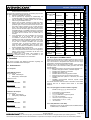
C-GPS Daughter board requires the NRST, GPS_ENABLE and
®
TCXO_ENABLE to be driven by the Open AT application. These
pins are connected with the following GPIOs on the Motherboard:
APPLICATION
NOTE: The GPS FIX LED is internally connected to GPIO20
of the Wireless CPU.
UART2/
GPIO1
switch
UART1/
GPIO19
switch
RTE mode may work with C-GPS if the baud rate is 460800 for the
UART used with the PC.
®
In Open AT SDK v4.11 in RTE mode you have to set the
RTE_PRODUCT_TYPE definition in "gpioconfig.h" (header file
used in the samples) to select your target.
The following statements should be added to be able to execute
the application correctly in RTE mode.
-> When Q2686 Wireless CPU is used, add the following lines of
code:
/***********/
/*Constants*/
/***********/
#if defined ( __REMOTETASKS__ )
/* Define the product type only for RTE mode */
/* ADL_IO_PRODUCT_TYPE_Q2686 or
ADL_IO_PRODUCT_TYPE_Q2687 */
© 2006
All rights reserved
Page: 2 / 7
This document is the sole and exclusive property of WAVECOM. Not to be distributed or divulged without prior written agreement.
Ce document est la propriété exclusive de WAVECOM. Il ne peut être communiqué ou divulgué à des tiers sans son autorisation préalable.
Template: WM ACM F 007 level002
3.
use UART1 for communicating with the Wireless CPU
(by using the Tx and Rx pins internally). Hence, UART1
cannot be used for any external application (like TE or
Hyperterminal). In this case, UART2 becomes the Debug
UART and Hyperterminal/TE can be connected to
UART2 to receive the Debug Traces and GPS data.
GPS Fix LED: A LED has been provided on the C-GPS
Daughter board. This LED indicates whether GPS fix has
been achieved or not. The behaviour of this LED is as
follows.
•
If GPS fix has not been achieved, the LED
keeps on glowing.
•
As soon as GPS fix is achieved, the LED
starts blinking. The LED blink frequency is the
same as the one with which the NMEA frames
are sent to the external application.
•
If GPS fix is lost, then again, the LED stops
blinking and keeps on glowing.