1
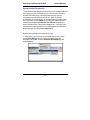
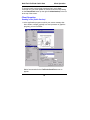
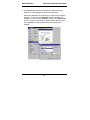
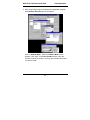
FaxFinder®
Model FF110
V.34 Fax Server
Quick Start Guide
FaxFinder Model FF110 V.34 Fax Server
Quick Start Guide
P/N 82010272L, Revision C
Copyright © 2006 by Multi-Tech Systems, Inc.
All rights reserved. This publication may not be reproduced, in whole or in part,
without prior expressed written permission from Multi-Tech Systems, Inc.
Multi-Tech Systems, Inc. makes no representation or warranties with respect to the
contents hereof and specifically disclaims any implied warranties of merchantability or
fitness for any particular purpose. Furthermore, Multi-Tech Systems, Inc. reserves the
right to revise this publication and to make changes from time to time in the content
hereof without obligation of Multi-Tech Systems, Inc., to notify any person or organization of such revisions or changes.
Record of Revisions
Revision
Date
Description
A
B
02/12/04
01/21/05
C
05/12/06
Initial Release, Rev A.
Updated tiff viewer drawings, added
FFCF Manager info.
Revise descriptions of Device Mgr
SW and of client SW to rev level
1.06.
Trademarks
FaxFinder, Multi-Tech, and the Multi-Tech logo are trademarks of Multi-Tech
Systems, Inc. All other brand and product names mentioned in this publication are
trademarks or registered trademarks of their respective companies.
GENERAL CONTACT
Multi-Tech
Systems, Inc.
2205 Woodale Drive
Mounds View,
Minnesota
55112, USA
(763) 785-3500
(800) 328-9717
Fax: 763-785-9874
www.multitech.com
TECHNICAL SUPPORT
Country
France
India
Europe,
Asia,
Africa
U.S.,
Canada,
All Others
By E-mail
support@
multitech.fr
support@
multitechindia.
com
support@
multitech.co.uk
By Phone
(33) 1-64
61 09 81
(91) 1242340780
support@
multitech.com
(800) 9722439; (763)
717-5863
2
(44) 118
959 7774
Contents
GETTING STARTED............................................................................... 5
FRONT PANEL LEDS ................................................................................. 5
WE SUPPLY............................................................................................... 5
YOU SUPPLY ............................................................................................. 6
PREREQUISITE: ORDERING THE DID LINE ................................................ 7
SERVER INSTALLATION PROCESS .................................................. 8
PART A: CONNECTING THE FAXFINDER TO POWER OUTLET, PHONE LINES,
AND ETHERNET ......................................................................................... 8
1. Connect FaxFinder to AC Outlet..................................................... 8
2. Connect FaxFinder to DID Line...................................................... 8
3. Connect FaxFinder to POTS Line ................................................... 9
4. Connect FaxFinder to Ethernet Network......................................... 9
5. Do Power-On Test ........................................................................... 9
PART B: CONFIGURING THE FAXFINDER SERVER ................................... 10
1. Setting Admin PC to Startup IP Address ....................................... 10
2. Logging In (I)................................................................................. 11
3. Setting FaxFinder IP Addresses .................................................... 11
4. Resetting Admin PC to Its Regular IP Address.............................. 12
5. Logging In (II) ............................................................................... 12
6. Setting Administrative Functions ................................................... 12
7. Setting Up the Mail Server............................................................. 15
8. Configuring the FaxFinder’s Inbound DID Modem...................... 16
9. Configuring the FaxFinder’s POTS Modem.................................. 18
10. Changing Admin’s Server Password ........................................... 21
11. Specifying Admin’s Client Password ........................................... 22
12. Sending Test Fax from Fax Machine to FaxFinder..................... 23
13. Assigning DID Numbers to Network Clients ............................... 25
CLIENT SOFTWARE INSTALLATION PROCESS ......................... 26
INSTALL FAXFINDER CLIENT SOFTWARE................................................ 26
ASSOCIATE CLIENT WITH SPECIFIC FAXFINDER UNIT(S) ........................ 27
MAKING ADDRESS BOOK ENTRIES ......................................................... 30
Making an Address Book by Direct Data Entry ................................ 30
3
Making Address Book Entries by Synchronization with Microsoft
Outlook ...............................................................................................31
SEND TEST FAX .......................................................................................33
DEVICE MANAGER SOFTWARE FUNCTIONS ..............................34
INSTALLING DEVICE MANAGER SOFTWARE ............................................34
ADDING FAXFINDERS ..............................................................................36
SYNCHRONIZING PHONEBOOKS ...............................................................37
CLIENT OPERATION............................................................................40
SENDING A FAX (QUICK VERSION) ..........................................................40
SENDING A FAX (DETAILED VERSION) ....................................................42
SENDING A TEST FAX FROM FF CLIENT TO FAX MACHINE ......................48
RECEIVING A FAX ....................................................................................49
TECH SUPPORT .....................................................................................51
4
Multi-Tech FaxFinder Quick Start
Getting Started
Getting Started
This guide shows you how to set up your Multi-Tech Model FF110
FaxFinder.
Your FaxFinder is a complete, economical, easy-to-use network fax
server. It allows you to receive faxes as emails and send faxes from
any application that can print. Simply hook up a DID trunk and a
regular POTS phone line, make an Ethernet connection to your LAN,
and assign client email addresses to the DID numbers.
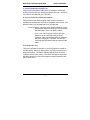
Front Panel LEDs
We Supply
• An FF110 FaxFinder with factory-installed software
• A set of four self-adhesive plastic feet
• A power supply
• One common telephone cable (RJ-11 at both ends)
• One DID telephone cable (RJ-11 at one end; RJ12 at other end)
• A product CD with software for client PCs, software for the
administrator’s PC, and additional documentation for both
administrators and client/users
• This printed Quick Start Guide
5
Getting Started
Multi-Tech FaxFinder Quick Start
You Supply
• A nearby AC power outlet
• A nearby phone line jack
• A connection to your Ethernet LAN
• A nearby analog DID trunk line with a block of associated DID
telephone numbers
• A common subscriber phone line (POTS)
• An administrative PC (with Windows NT, Windows 2000, or
Windows XP as an operating system and with a web browser) to
configure the FaxFinder unit and run the FaxFinder/CallFinder
Manager software
• Client PCs with email and printing applications. Client PCs on
your network will receive faxes in their email inboxes. They will
send faxes by printing to the FaxFinder server from application
programs while running the FaxFinder client software.
6
Multi-Tech FaxFinder Quick Start
Getting Started
Prerequisite: Ordering the DID Line
To operate the FaxFinder system, you will need a DID (Direct Inward
Dial) line in your office. You must order the DID line from your local
telephone operating company (telco). A DID line allows one phone
line to be associated with multiple directory numbers. However, only
one call can occur on this line at any given time.
DID lines are sold in groups. For example, a telco in New York City
might offer a DID line with a set of 20 directory numbers in the range
of 212-555-4101 through 212-555-4120.
When ordering your DID line, ask the telco representative for these
details about the DID service. These details will be important when
setting up your FF110 Fax Server.
Parameter
Value Required by
Telco
Number of digits used
to designate the DID extension
(usually 3, 4, 6, or 7)
Type of “DID Start” used
(wink, immediate, or delay dial)
You will need this information to configure your FaxFinder Server
(see step 8 on page 16).
7
Server Installation
Multi-Tech FaxFinder Quick Start
Server Installation Process
Part A: Connecting the FaxFinder to Power Outlet, Phone
Lines, and Ethernet
Summary: Turn off your computer. Place the FaxFinder in a
convenient location, and then connect it to your AC power outlet,
DID line, POTS line, and Ethernet.
1. Connect FaxFinder to AC Outlet
Make sure the FaxFinder’s power switch is OFF. Plug the DC power
transformer into a power outlet or power strip. Plug the other end
into the PWR jack on your FaxFinder. The DC power transformer is
included with your FaxFinder.
Caution: Use only the DC power transformer supplied with
the FaxFinder. Use of any other transformer voids
the warranty and can damage the FaxFinder.
2. Connect FaxFinder to DID Line
Plug one end of the phone cable into the FaxFinder’s DID jack and
the other end into an analog DID trunk line jack. The DID Line cable
is included with your FaxFinder.
Caution: The DID Line cable has an RJ11 connector on
one end (this is the larger of the two connectors; it
goes to the telephone wall receptacle). The DID
Line cable has an RJ12 connector on the other
end (this is the smaller connector; it goes to the
DID Port on the FaxFinder unit).
Never plug the DID connector into a standard
POTS Line. This may damage the FaxFinder or
the central office equipment. Use only an analog
DID Line.
8
Multi-Tech FaxFinder Quick Start
Server Installation
3. Connect FaxFinder to POTS Line
Plug one end of the phone cable into the FaxFinder’s POTS jack
and the other end into your standard telephone line jack. The POTS
Line cable is included with your FaxFinder.
4. Connect FaxFinder to Ethernet Network.
Plug one end of your RJ45 ethernet cable into the FaxFinder’s
ethernet jack and the other end into your network ethernet hub. This
ethernet cable is not included with your FaxFinder unit.
Caution: Before connecting to the Ethernet Network, make
sure that the network to which you are connecting
the FaxFinder is not a 192.168.2.x subnet.
If it is a 192.168.2.x subnet, connect from the
Admin PC to the FaxFinder using an RJ45
crossover cable until the FaxFinder’s IP address
has been configured. Thereafter, connect the
FaxFinder into the network with an ordinary RJ45
cable.
5. Do Power-On Test
Test your FaxFinder by turning it on (an on-off switch is located on
the back panel). When you apply power, the FaxFinder performs a
diagnostic self-test. The Status indicator flashes when the test is
complete and the unit is ready. If this does not happen, check that
the power switch is on, the power supply is solidly connected, and
the AC outlet is live.
9
Server Installation
Multi-Tech FaxFinder Quick Start
Part B: Configuring the FaxFinder Server
1. Setting Admin PC to Startup IP Address
a. Connect a pc to your network.
b. Set the pc IP address to 192.168.2.x subnet (using any address
excluding 192.168.2.1).
Windows XP
a. From the Windows desktop,
right-click on “My Network Places,”
and select “Properties.”
b. In the Network Connection
screen, right-click on “Local Area
Connection.”
c. In the Local Area Connection
Properties screen, on the
“General” tab, scroll to the “Internet
Protocol (TCP/IP)” entry and select
it. Click “Properties.”
d. In the Internet Protocol
(TCP/IP) Properties screen, record
the existing IP address. Then reset
the IP address to 192.168.2.2.
Windows 2000
a. From the Windows desktop, rightclick on “My Network Places,” and
select “Properties.”
b. In the Network and Dialup
Connections screen, right-click on
“Local Area Connection” and select
“Properties.”
c. In the Local Area Connection
Properties screen, select the
“Internet Protocol (TCP/IP)” entry.
Click “Properties.”
d. In the Internet Protocol (TCP/IP)
Properties screen, record the
existing IP address. Then reset the
IP address to 192.168.2.2.
Windows NT
a. From the Windows desktop, right-click on “Network Neighborhood,” and
select “Properties.”
b. In the Network screen, on the “Protocols” tab, select “TCP/IP Protocol” in
the list of Network Protocols. Click “Properties.”
c. In the Microsoft Internet Protocol (TCP/IP) Properties screen, record
the existing IP address. Then reset the IP address to 192.168.2.2.
10
Multi-Tech FaxFinder Quick Start
Server Installation
2. Logging In (I)
a. Bring up a Web browser on your pc. At the browser’s address
line, type the default Gateway address: http://192.168.2.1 and
press Enter.
b. The Login screen will appear.
At this point you can be assured that the FaxFinder is connected
to the network.
If the Login screen does not appear, see item #1, “What if I
can’t see the web page for my FaxFinder?” in the
Troubleshooting section of the Administrator User Guide.
c. At the Login screen, enter admin (all lower case) in the User
Name field.
d. Enter admin (all lower case) in the Password field.
e. Click the Login button. The Web Management Home screen
will appear. From this screen, you can access all of the
FaxFinder Server software screens.
3. Setting FaxFinder IP Addresses
a. In the FaxFinder Administration screen, go to the IP
Configuration fields.
Administration: IP Configuration
IP Address
192.168.4.89
Subnet Mask
255.255.255.0
Name Server 192.168.11.251
Default Gateway
192.168.4.1
Secondary
Name Server
update
b. Fill in the IP information that applies to your FF110 FaxFinder
Server unit. The fields for “IP Address,” “Subnet Mask,” “Default
Gateway” and “Name Server” are required. A “Secondary
Name Server” may be considered optional.
c. Click Update.
11
Server Installation
Multi-Tech FaxFinder Quick Start
4. Resetting Admin PC to Its Regular IP Address
In step #1 above, you recorded the original IP address of the
administrator’s PC and then reset it to the IP address required to
allow communication with the FaxFinder unit. You must now set the
IP address of the administrator’s PC back to its original value.
5. Logging In (II)
Having reset the IP address of the administrator’s PC, you must log
into the FaxFinder Server software again. Go to the Login screen,
enter admin as User Name and admin as Password.
6. Setting Administrative Functions
Go to the FaxFinder Phone Book screen.
Phone Book
Name
User ID Email Address Ext
Ad mini strator
a dmin
Function
update
update
update
update
update
update
update
POTS Li ne
D ead L etter Box
delete
delete
delete
delete
add
a. General Admin Email Address & DID
i.
ii.
In the “admin” row of the Phone Book screen, enter
the name and user ID to be used for the FaxFinder
administrator. All incoming faxes will be marked as
coming from this administrator. Then enter the email
address of the party who will act as the FaxFinder
administrator.
Click on Update in the “admin” row. At this point, a
Login screen will appear and you will be asked to log
in again. Log in using the administrator’s User ID (as
listed in the “User ID” column) and the administrator’s
current password (at this point, it should be admin).
12
Multi-Tech FaxFinder Quick Start
Server Installation
The message “Success: [name] was updated” will
appear above the Phone Book list.
Phone Book
Name
User ID Email Address Ext
H ank Gre gory -- Admi n
a dmin
hg [email protected]
POTS Li ne
D ead Le tter Box
Function
update
update
update
update
update
update
update
delete
delete
delete
delete
add
b. Destination Email Address for POTS Line Fax
i.
ii.
In the “POTS Line” row of the Phone Book screen,
enter the email address of the person whom you
want to receive all inbound faxes received on the
POTS line. (The POTS line is primarily for sending
faxes but can receive faxes, as well. Typically, faxes
coming in on the POTS Line are sent to the
FaxFinder Administrator.)
Click on Update in the “POTS Line” row. The
message “Success: POTS Line was updated” will
appear above the Phone Book list.
Phone Book
Name
User ID Email Address Ext
H ank Gre gory -- Admi n
a dmin
POTS Li ne
D ead Le tter Box
hg [email protected]
hg [email protected]
Function
update
update
update
update
update
update
update
add
13
delete
delete
delete
delete
Server Installation
Multi-Tech FaxFinder Quick Start
c. Destination Email Address for Unassigned DID
Numbers
i.
ii.
In the “Dead Letter Box” row of the Phone Book
screen, enter the email address of the person whom
you want to receive all inbound faxes sent to
unassigned DID phone numbers. (For example, a
company might obtain a group of 20 DID phone
numbers but only use 17, retaining 3 for future use.
Any faxes sent to the three unused DID numbers
would go to the Dead Letter Box. Typically, Dead
Letter Box items are sent to the FaxFinder
Administrator.)
Click on Update in the “Dead Letter Box” row. The
message “Success: Dead Letter Box was updated”
will appear above the Phone Book list.
Phone Book
Name
Ha nk Greg ory -- Admin
POTS Lin e
De ad Letter Box
User ID Email Address Ex t
ad min
hgg @rmc8 3.com
hgg @rmc8 3.com
hgg @rmc83.com
Function
update
update
update
update
update
update
update
delete
delete
delete
delete
add
d. Personal Email Address for Admin
i.
Just below the “Dead Letter Box” row of the Phone
Book screen, enter the name and user ID to be used
to receive the FaxFinder administrator’s individual
inbound faxes. (Generally, the administrator should
have an additional phonebook entry for receiving
ordinary fax traffic for his/her own use that is
separate from the administrator function.) Then
enter the email address at which the FaxFinder
administrator will receive such fax traffic.
14
Multi-Tech FaxFinder Quick Start
ii.
Server Installation
Click on Update for this row. The message
“Success: [name] was updated” will appear above
the Phone Book list.
7. Setting Up the Mail Server
The FaxFinder uses a mail server to send fax log reports, by email,
to the administrator. An email is also sent to the administrator each
time the FaxFinder is powered up. In all cases, you must specify the
address of the mail server and the email address of the
administrator. Some email servers require authentication before
allowing the FaxFinder access. In these cases, the FaxFinder unit
must be assigned a Server User ID and a password. If the mail
server does not require authentication, the related SMTP
Configuration fields (“SMTP Server User ID,” “SMTP Password,”
and “Retype SMTP Password”) must be left blank.
a. In the FaxFinder Administration screen, go to the SMTP
Configuration fields.
b. Fill in the network IP address or domain name of your mail
server.
c. Enter the email address of the administrator (the party that you
want to receive fax log reports).
d. At this point the Administrator should receive an email from your
FaxFinder saying that the mail server address has been
updated.
15
Server Installation
Multi-Tech FaxFinder Quick Start
e. Email Server Authentication Parameters. If your email server
requires authentication in order to give the FaxFinder access, fill
in the three related SMTP fields (SMTP Server User ID, SMTP
Password, Retype SMTP Password). If you can enter the
network email program and send messages without entering a
User ID and Password, then you must leave these fields blank.
However, if your network email program does require a User ID
and Password in order to send email messages, you must fill in
these three fields. If authentication is required and these fields
are left blank, then the error “SMTP Authentication Error” will
appear on the Current Status screen in the “Email Status” field.
If authentication is not required and these fields are filled in,
then an error will also occur. You must know how your email
server works in this regard and complete the Administration:
SMTP Configuration screen accordingly.
f. If you do not receive an email saying that the mail server
address has been updated, see item #2 “What if I don’t get an
email when I set the mail server address?” in the
Troubleshooting section of the Administrator User Guide.
8. Configuring the FaxFinder’s Inbound DID Modem
The FaxFinder’s DID Modem directs inbound faxes to client email
addresses.
a. In the FaxFinder Server software, go to the Modem
Configuration screen.
16
Multi-Tech FaxFinder Quick Start
Server Installation
b. Under Modem Configuration: Modem 1 (DID Modem), enter
the values that match the characteristics of your DID phone line
in the fields provided. (See the section “Prerequisite: Ordering
the DID Line” on page 7.)
c. Note that the value entered in the “Fax ID” field (typically the DID
phone number and, sometimes, an organizational identifier) will
appear in the fax log printed by the sender’s fax machine.
d. Polarity. This refers to DID battery polarity. This parameter
must be set (and possibly re-set, as needed) on a trial-and-error
basis.
Signs of incorrect polarity:
(1) outside party originating call to DID number gets immediatebusy signal after dialing;
(2) line suddenly disconnects just a call should go through.
e. Click Update.
f. Open the FaxFinder Server Home screen. Click on Current
Status. Watch the Current Status: DID Modem portion of the
screen. The “State” of the DID Modem (see Current Status:
DID Modem screen) should be “Waiting for Ring.”
17
Server Installation
Multi-Tech FaxFinder Quick Start
g. From an ordinary POTS phone, dial one of the DID phone
numbers that is active in the system. Dial the DID phone
number as you would from an outside line (it will not work to dial
the number as if it were an ordinary 3- or 4-digit extension).
h. In the Current Status: DID Modem screen, the "State" field
should change to "Waiting for Connect." On the phone, you
should hear modem dialup/negotiation tones.
i. If you observe both the "Waiting for Connect" state and hear the
tones, then the FaxFinder's DID Modem has been configured
properly.
If either of these is absent, see item #3 “What if the modem
doesn’t answer a call on the DID line?” in the “Troubleshooting”
section of the Administrator User Guide.
9. Configuring the FaxFinder’s POTS Modem
The FaxFinder’s POTS Modem directs outbound faxes sent by
clients into the public phone system. This POTS modem can also
receive faxes but that is a secondary function. All faxes coming in
on the POTS modem must go to the same email address to be
specified in the Phone Book screen.
a. In the FaxFinder Server software, go to the Modem
Configuration screen.
b. Under Modem Configuration: POTS Modem 2, enter the
settings with which you want to operate the FaxFinder’s
outbound POTS modem. The default values have been
designed to work well in many situations.
18
Multi-Tech FaxFinder Quick Start
Server Installation
c. Dial Prefix (or ‘access digit’). When the FaxFinder is attached to
an extension of a PBX or key phone system, an access digit is
often required to ‘get an outside line’ (that is, to make a
connection to the PSTN). Often a “9” or an “8” is used for this
purpose. You can also add a comma (“,”) to insert a pause that
may be required to receive dial tone for the outside line.
If needed, enter the access digit and optional comma in the “Dial
prefix” field. Inform FaxFinder client users that they should not
insert any access digits when entering fax numbers in the
FaxFinder Send Fax screen or in their FaxFinder Address
Books. Instead, client users should enter fax numbers the way
they would dial the number from an ordinary residential phone
line. Finally, avoid any access digit combination that might
predispose client users to make fax calls accidentally to 911 or
any other official/emergency phone number.
d. Fax ID. The value that you specify in the “Fax ID” field will be
printed at the top of each page of the transmitted fax. This is
usually the phone number of the line to which the POTS modem
is attached. Sometimes company names or abbreviations are
included in this text string. Some governments (including
19
Server Installation
Multi-Tech FaxFinder Quick Start
U.S.A.) require that the originating phone number be printed on
each fax page. The value entered in the “Fax ID” field will
appear in the fax log printed by the sender’s fax machine and,
typically, will be printed at the top of each page of the
transmitted fax.
e. Smart Dial. When Smart Dial mode is ON, the FaxFinder will
look for a dial tone before dialing. If, under normal
circumstances, no dial tone is presented to the FaxFinder, then
set Smart Dial to OFF. When Smart Dial is OFF, the FaxFinder
modem will seize the phone line and dial after a 3-second pause
whether a dial tone is present or not.
Hint: If ‘no dial tone’ messages appear consistently,
set Smart Dial to OFF.
f. Click Update.
Phone Book
Name
User ID E mail Address DID#
Han k Grego ry - Admin
a dmin
POTS Li ne
Dea d Letter Bo x
Han k Grego ry
hg [email protected]
hg [email protected]
hg [email protected]
h ank
hgg @rmc83.com
242 6
Function
update
update
update
update
update
update
update
delete
delete
delete
delete
add
g. Click on Current Status. Watch the Current Status: POTS
Modem 2 portion of the screen. The “State” of the POTS
Modem should be “Waiting for Ring.”
h.Test Call.. From a different POTS phone, dial the number of the
POTS phone line to which the FaxFinder is attached.
i. In the Current Status: POTS Modem 2 screen, the "State" field
should change to "Waiting for Connect." On the phone, you
should hear modem dialup/negotiation tones.
20
Multi-Tech FaxFinder Quick Start
Server Installation
j. If you both observe the "Waiting for Connect" state and hear the
tones, then the FaxFinder's Modem has been configured
properly.
If either of these is absent, see item #3 “What if the FaxFinder
doesn’t answer a fax call?” in the “Troubleshooting” chapter of
the Administrator User Guide.
10. Changing Admin’s Server Password
a. In the Password Administration screen, enter a new User ID
and Password for the FaxFinder Administrator (something other
than “admin” and “admin”). This User ID and password are to
be used in that person’s capacity as administrator. Then reenter the password in the “Confirm Password” field. Passwords
can be as short as 1 character, as long as 40 characters, and
are case-sensitive. Use a password that is non-obvious and
that cannot be guessed easily.
21
Server Installation
Multi-Tech FaxFinder Quick Start
b. Click on Update for this row. The Login screen will appear.
Passw ord Administration
Name
Han k Grego ry - Admin
Han k Grego ry
User ID Password
a dmin-h ank
h ank
*** **
Confirm
Password Function
* *** *
update
update
11. Specifying Admin’s Client Password
a. In the Password Administration screen, enter a new User ID
and Password for the FaxFinder Administrator to be used in that
person’s capacity as client/user of the FaxFinder system. Then
re-enter the password in the “Confirm Password” field.
Passwords must be at least 4 characters in length, can be as
long as 12 characters, and are case-sensitive. Use a password
that is non-obvious and that cannot be guessed easily by others.
b. Click on Update for this row.
Passw ord Administration
Name
Han k Grego ry - Admin
Han k Grego ry
User ID Password
a dmin-h ank
h ank
*** **
Confirm
Password Function
* *** *
22
update
update
Multi-Tech FaxFinder Quick Start
Server Installation
12. Sending Test Fax from Fax Machine to FaxFinder
a. Using a conventional fax machine, send a fax to the DID fax
number established for the FaxFinder Administrator.
b. Verify that the fax message sent reaches the email inbox of the
administrator.
Allow time for the fax to arrive as an email message. Arrival
time will depend on your circumstances (the page count of the
message, how often email is delivered, etc.). If the email does
not appear within a reasonable period of time, see the
“Troubleshooting” chapter of the Administrator User Guide,
specifically the item entitled “What if I don’t get the email to me
of the test fax that I sent?”
23
Server Installation
Multi-Tech FaxFinder Quick Start
c. Verify also that you can open the fax in a Tiff viewer program on
your computer. The viewer program you use could be either the
Multi-Tech Tiff Viewer or a graphic file viewer included with or
installed in your PC. (The Multi-Tech Tiff viewer is included on
the Product CD and installed with other client programs. During
installation, you can choose to associate all Tiff files with the
Multi-Tech Tiff Viewer or with another program.) In your email
program, double-click on the file attached to the email message.
The Tiff viewer program will come up automatically displaying
the tiff file of the fax.
24
Multi-Tech FaxFinder Quick Start
Server Installation
13. Assigning DID Numbers to Network Clients
a. In the Phone Book screen just below the entries for the
FaxFinder administrator, make phonebook entries for the other
persons in your office to whom DID fax numbers have been
assigned.
For each such FaxFinder client/user, enter the name, user ID,
email address, and DID extension in the appropriate fields.
b. Click on Add for this row. The message “Success: [name] was
updated” will appear above the Phone Book list.
Phone Book
Name
User ID E mail Address DID#
H ank Gre gory -- Admi n
a dmin
hg [email protected]
H ank Gre gory
h ank
hg [email protected]
242 6
Jo hn Schli ef
j ohns
jsch [email protected]
242 7
R oge r She rman
Gus Schmi dt
ro ger
g rs
rog [email protected]
grs@rmc83 .com
242 8
242 9
POTS Li ne
D ead L etter Box
hg [email protected]
hg [email protected]
Function
update
update
update
update
update
update
update
add
25
delete
delete
delete
delete
Client Installation
Multi-Tech FaxFinder Quick Start
Client Software Installation Process
Install FaxFinder Client Software
NOTE: The FaxFinder client software must be installed on each
computer by a user with administrative rights on that
computer.
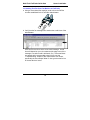
1. At the client PC, launch the installation program by clicking on
the setup.exe file on the FaxFinder Product CD. Transient
screens will appear.
2. At the Welcome screen, click Next.
3. At the Choose Destination Location screen, designate the
desired file location for the FaxFinder client software. In most
cases, the default file location is recommended.
Specify the desired file location and click Next.
4. At the Select Program Folder screen, you can designate a
program folder for the FaxFinder software. Again, in most
cases, the default is recommended unless you have other plans.
Designate a folder and click Next.
5. A transient screen will appear while files are being copied.
6. You will be asked whether or not you want to associate TIF and
CPG files with the FaxFinder viewer. Click Yes.
7. If a Question screen appears asking “Warning – the extension
CPG is already registered. Overwrite?” Click Yes.
8 If a Question screen appears asking "Warning - the extension TIF
is already registered, Overwrite?,” you must respond. Click Yes
if you wish to use the TIFF viewer installed with the FaxFinder
Client Software. Click No if you prefer to use a different
software package for viewing TIF files.
9. Then the ‘completion’ screen will appear. Click Finish.
26
Multi-Tech FaxFinder Quick Start
Client Installation
10. Icons for the FaxFinder software applications will appear in the
Windows Start menu. A FaxFinder icon will also appear in the
tray area at the lower-right corner of the screen.
Associate Client with Specific FaxFinder Unit(s)
1. At the main screen of the FaxFinder Fax Client Software, click
on Edit and select “Add Fax Server.”
27
Client Installation
Multi-Tech FaxFinder Quick Start
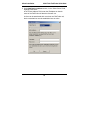
2. At the Add Device Address screen, in the “Select Server” field,
highlight “FaxFinder.”
In the “Enter Address” field, enter the IP address or domain
name of the FaxFinder unit that the client will use.
A client can be associated with more than one FaxFinder unit,
but the associations must be established one at a time.
28
Multi-Tech FaxFinder Quick Start
Client Installation
3. Enter, in the appropriate fields, the Username and Password
that the client will use when accessing this FaxFinder unit. (The
Username in the FaxFinder client software is the same as the
User ID in the FaxFinder server software.) If the client is to be
associated with multiple FaxFinder units, a different Username
and Password could be established for each. However, in most
cases, it is advisable (for the sake of simplicity and
convenience) to use the same Username and Password for all
FaxFinder units. Click OK.
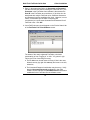
4. A new FaxFinder entry should appear on the “Device Status” tab
of the FaxFinder Fax Client Software screen.
The status of the newly registered FaxFinder unit should
momentarily go from “Logging in” to “Idle.” If it goes to Login
Failure, then one of two things is wrong:
a. The IP address or domain name is wrong. If that is the case,
delete that entry (by right click-DELETE), and enter a new one;
otherwise,
b. The Username/Password combination may be wrong. Verify
that the Username/Password combination in the client
software screen matches the UserID/Password combination
established in the FaxFinder Server software screen.
29
Client Installation
Multi-Tech FaxFinder Quick Start
Making Address Book Entries
The Address Book in the FaxFinder Fax Client software is a list of
persons to whom you expect to send faxes frequently. It is a kind of
“outbound list” or recipient list for faxing. You can create your
Address Book either by direct data entry (using the Add Contact
command in the Edit menu) or, if your PC uses Microsoft Outlook as
an email client program, by synchronizing your FaxFinder Address
Book with a folder in Microsoft Outlook that already contains fax
numbers. This synchronization process will alter both the FaxFinder
Client Address Book and the Outlook folder.
Making an Address Book by Direct Data Entry
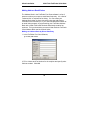
1. In the FaxFinder Fax Client Software,
go to Edit | Add Contact.
2. Fill in a Name and Fax Number for the recipient and specify other
fields as needed. Click OK.
30
Multi-Tech FaxFinder Quick Start
Client Installation
Making Address Book Entries by Synchronization with
Microsoft Outlook
1. In Microsoft Outlook, view the folder from which you want to be
able to transfer fax numbers to the the FaxFinder Client Address
Book. Confirm that you want those entries in your FaxFinder
Client Address Book. If so, proceed. (For example, you might
select the “Contacts” folder in Outlook as your source of existing
fax numbers).
2. In the FaxFinder Fax Client Software, go to File | Options |Advanced
and click on “Enable Outlook Sync.”
31
Client Installation
Multi-Tech FaxFinder Quick Start
3. Click on Browse. Select the desired folder from the Select
Contact Folder (Outlook:) screen. Click OK. If a confirmation
screen appears, click OK.
At the Options screen, click OK.
4. In the FaxFinder Fax Client Software, go to the Device Status
tab and select Outlook Synchronizer in the “Device” list.
32
Multi-Tech FaxFinder Quick Start
Client Installation
5. Right-click on Outlook Synchronizer and select Synchronize
with Outlook.
The Outlook Contact information will be copied into the
FaxFinder Address Book. Entries from the FaxFinder Address
Book (if any) will also be copied into the Outlook Contact list. A
relationship will be created between the corresponding entries
for future synchronizations.
The Outlook Synchronizer feature has many options. For
further details, see the Administrator User Guide.
Send Test Fax
To verify that the software installation has succeeded, you should
use the FaxFinder client software to send a fax to a regular fax
machine (preferrably a local fax machine). To do so, follow the
instructions for the “Sending a Fax” procedure below.
33
Device Manager
Multi-Tech FaxFinder Quick Start
Device Manager Software Functions
The Device Manager software lets you control multiple CallFinder
units as a system. It is typical to install the Device Manager program
on the administrator’s computer (Windows operating system
required).
When deploying a new system, two commands will be particularly
useful: Add Device and Synchronize Phonebooks. These Device
Manager commands are described after the installation process.
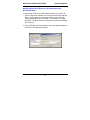
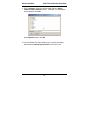
Installing Device Manager Software
34
Multi-Tech FaxFinder Quick Start
Device Manager Installation (continued)
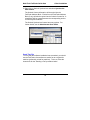
The Device Manager installation is complete.
35
Device Manager
Device Manager
Multi-Tech FaxFinder Quick Start
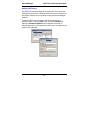
Adding FaxFinders
Any FaxFinder unit to be added to the system and come under the
management of the Device Manager software must be connected to
the same IP network as the computer running the Device Manager
software.
To add a FaxFinder to the system, start at the main Device
Manager screen. Open the Edit menu and select Add Device.
When the Add Device Address screen appears, enter the IP
address, Username, and Password for the unit you are adding to the
system. Then click OK.
36
Multi-Tech FaxFinder Quick Start
Device Manager
Synchronizing Phonebooks
To synchronize phonebooks is to cause the list of allowable inbound
fax recipients on one FaxFinder server to be the same as that on
another FaxFinder server. Both FaxFinder servers must be
connected to the same Ethernet network. When FaxFinder
phonebooks are synchronized, all non-administrative listings match.
One FaxFinder unit (the Primary unit) holds the master list that is
transmitted (using the Synchronize Phonebooks command) to
other FaxFinder units in the system (Copy units). FaxFinder units
can operate in same system but have independent phonebooks, in
which case they are designated Independent.
Synchronizing phonebooks entails three steps:
1. Designating one FaxFinder as the master phone book. In the
main Device Manager screen, right-click on the unit to be
designated as master, scroll to Set Phone Book Sharing, and
select Primary.
37
Device Manager
Multi-Tech FaxFinder Quick Start
2. Designating all other FaxFinder units participating in phonebook
sharing as Copy units. In the main Device Manager screen, rightclick on each unit to share the master phonebook, and select Copy.
3. Invoking synchronization. In the main Device Manager screen,
open the Edit menu and select Synchronize Phonebooks. The
Synchronize Phone Books screen will appear along with a series
of transient screens (denoting tftp data transfers) and confirmation
screens (where you click OK to proceed).
38
Multi-Tech FaxFinder Quick Start
Device Manager
After the master phonebook has been transferred to the first Copy
FaxFinder (or CallFinder) unit and that unit has been rebooted, the
Device Manager will automatically begin synchronizing the
additional Copy FaxFinder (or CallFinder) unit in the system (if any)
until all have been synchronized.
39
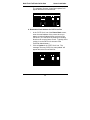
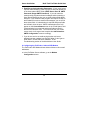
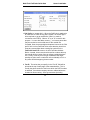
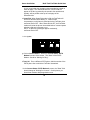
Multi-Tech FaxFinder Quick Start
Client Operation
To see the newly synchronized phonebook list in each Copy
FaxFinder unit, you must update the Phone Book screen by clicking
on the Phone Book button (to the right of Administration) in the list
at the top of the screen.
Client Operation
Sending a Fax (Quick Version)
1. At the application program on which your source message has
been written or drawn (typically in a word processor or graphics
program), print to FaxFinder.
Wait a few seconds for the FaxFinder Send Fax screen to
appear.
40
Multi-Tech FaxFinder Quick Start
Client Operation
2. At the FaxFinder Send Fax screen:
A. Enter the recipient’s name and faxing phone number in the
“Name” and “Phone Number” fields. (Add prefix 9 if needed.)
B. Click Add Recipient.
C. Click No when asked “Would you like to add the recipient to
the address book?” No forestalls the screens needed to
make an Address Book entry. (Clicking Yes, however, will be
useful if you expect to send more faxes to that party later.)
NOTE: If you want to add a cover page and/or preview the fax,
skip to Options before sending.
D. Click Send Fax.
Options.
Use Cover Page. Enter subject and cover page notes.
Cover Page Style. Choose style from drop-down menu.
View/Edit cover-page style.
Preview Fax to see entire message before sending.
41
Client Operation
Multi-Tech FaxFinder Quick Start
Sending a Fax (Detailed Version)
To send a fax by printing from an application program on a client
PC, follow the steps listed below.
1. The client PC and the FaxFinder server must both be connected
to the same Ethernet LAN system. (See the section “Part B:
Configuring the FaxFinder Server” earlier in this manual.)
2. The FaxFinder client software must be installed on the PC. (See
the section “Installing FaxFinder Client Software” earlier in this
manual.)
3. After installation, the FaxFinder Fax Client Software program
will be running whenever the PC is on. You can view the
FaxFinder program's main window by clicking on the FaxFinder
icon at the lower right of the PC’s monitor screen in its
Application Tray -- and then selecting “Show FaxFinder Client
Software.”
Note: Normally, the user can shut down the FaxFinder program
by selecting "exit" either from the tray icon or from the
main FaxFinder program screen.
If the program has been shut down, it can be restarted
from the Windows Start menu.
42
Multi-Tech FaxFinder Quick Start
Client Operation
However, you can send faxes through the FaxFinder without
bringing up the FaxFinder Fax Client Software screen.
43
Client Operation
Multi-Tech FaxFinder Quick Start
4. At the application program (for example, a word processing
program or drawing program), print to the FaxFinder.
Setting the destination of the printing job varies from program to
program. For the common Notepad text editor program, for
example, you must set the destination printer in the Page Setup
screen. In most cases, however, the destination printer can be
set in a Print menu that appears when each printing job is
initiated.
44
Multi-Tech FaxFinder Quick Start
Client Operation
5. After the printing has been initiated by the application program,
the FaxFinder Send Fax screen will appear.
Click on Address Book. When the Address Book screen
appears, click “Add.” At the New Contact screen, enter the
recipient’s name, fax number, and any other contact information
you want to retain.
45
Client Operation
Multi-Tech FaxFinder Quick Start
The recipient’s fax number should be entered as you would dial
it from a phone on the public phone network (as from a
residential phone). Click OK. At the Address Book screen,
highlight the recipient in the list and click “Select.” The party will
appear in the “Recipients” list in the FaxFinder Send Fax
screen.
Additional recipients can be added. The same fax message will
be sent to all recipients.
A recipient can also be specified directly in the FaxFinder
SendFax screen by typing his/her name in the “Name” field,
typing his/her fax number in the “Phone Number” field, and then
clicking on “Add Recipient.” Recipients specified in this way will
not be added to the Address Book.
You can also access the Address Book directly to add and edit
entries. At the FaxFinder Fax Client Software screen, go to
Edit | Add Contact.
6. If you want to include a cover page with your fax, click in the
“Use Cover Page” checkbox. Enter information as needed in
the “Subject” and “Cover Page Notes” fields.
Automated fields, like sender information (individual name,
company name, street address, phone number, fax number,
etc.) should be entered in the Address Book. The Address Book
is accessible in the “Options” menu of the FaxFinder Fax Client
Software screen. For more information about addresses and
the automated fields used in cover pages, see the Client User
Guide.
46
Multi-Tech FaxFinder Quick Start
Client Operation
The “Cover Page Style” chosen will determine how this
information will appear on the fax cover page. You can select a
standard style from the “Cover Page Style” drop-down menu or
create a style of your own in the Template Editor. To access the
Template Editor software, click on the “View/Edit” button. (For
more information, see the section “Creating or Modifying Cover
Page Styles” in the Client User Guide.)
Click on the “Preview Fax” button to check the fax before you
send it. The Mult-Tech Tiff Viewer program will appear.
In it, you can view both the cover page and the main fax
page(s). (For more information on this, see the section “Using
the Multi-Tech Tiff Viewer” in the Client User Guide.) When
satisfied with your fax, close the Multi-Tech Tiff Viewer program
and return to the FaxFinder Send Fax screen.
7. At the FaxFinder Send Fax screen, click on the “Send Fax Now”
button to send the fax.
47
Client Operation
Multi-Tech FaxFinder Quick Start
8. Confirmation of having sent the fax(es) successfully will appear
in the “Fax Log” tab of the FaxFinder Fax Client Software
screen.
Sending a Test Fax from FF Client to Fax Machine
To confirm that the FaxFinder client software is working properly,
identify a fax machine to which you can send a test fax. Ideally, the
fax machine should be in or near your own office. Then, using some
convenient application program, send a fax to that fax machine by
printing to the FaxFinder from the application program. Follow the
instructions given in the “Sending a Fax” section above. For
example, you might fax a text document by using the Print
command in MSWord, WordPerfect, or Notepad. After the
FaxFinder has been installed, a new ‘printing’ destination will appear
in the Print menu in the other application programs on your PC.
48
Multi-Tech FaxFinder Quick Start
Client Operation
Receiving a Fax
The FaxFinder Server delivers incoming faxes to client PCs in their
email inboxes.
1. A DID phone directory number must be assigned to the client PC
at the FaxFinder Server.
2. The client PC and the FaxFinder server must both be
connnected to the same Ethernet LAN system. (See the section
“Part B: Connecting the FaxFinder to your Network” earlier in
this manual.)
3. Some sender faxes a document to a FaxFinder client using that
client’s DID phone number.
4. The incoming fax arrives in the client’s email inbox as a message
with an attachment.
The email message is marked as being from the FaxFinder
Administrator.
The sender’s “Remote ID” and the client’s name appear in the
“Subject” line of the email message. (The Remote ID comes
from the sending fax machine and is typically the sender’s fax
number or name.)
49
Client Operation
Multi-Tech FaxFinder Quick Start
5. The FaxFinder client opens the email message. The incoming
fax message takes the form of a graphic file attachment. The
FaxFinder Server has assigned the file an automatic file name.
50
Multi-Tech FaxFinder Quick Start
Client Operation
6. The FaxFinder client can open or save the file.
a. Opening the fax message graphic file. Incoming fax
messages are TIFF files. These TIFF files are automatically
associated with the Multi-Tech Tiff Viewer program or with
another chosen viewer. The client can open the fax email
attachment directly in the viewer program.
b. Saving the fax message graphic file. The client can save
the fax file. The file name and directory location are determined
automatically.
7. The client views the fax message in the viewer program and/or
prints a paper copy.
Tech Support
Please direct your questions regarding technical matters, product
configuration, verification that the product is defective, etc., to our
Technical Support department at the phone number or email
address for your geographic location, as listed on page 2.
Product support resources are available at the Multi-Tech web site:
www.multitech.com.
51
Patents
This device is covered by one or more of the following patents: 6,031,867; 6,012,113; 6,009,082;
5,905,794; 5,864,560; 5,815,567; 5,815,503; 5,812,534; 5,809,068; 5,790,532; 5,764,628;
5,764,627; 5,754,589; D394,250; 5,724,356; 5,673,268; 5,673,257; 5,644,594; 5,628,030;
5,619,508; 5,617,423; 5,600,649; 5,592,586; 5,577,041; 5,574,725; D374,222; 5,559,793;
5,546,448; 5,546,395; 5,535,204; 5,500,859; 5,471,470; 5,463,616; 5,453,986; 5,452,289;
5,450,425; D361,764; D355,658; D355,653; D353,598; D353,144; 5,355,365; 5,309,562;
5,301,274. Other patents pending.
82010272L