1
At a glance
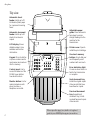
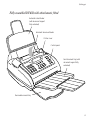
Top view
Automatic sheet
feeder. Holds up to 70
A4 sheets of plain paper
for copies and incoming
faxes.
❍ ❍ ❍ ❍ ❍ ❍ ❍ ❍ ❍ ❍ ❍ ❍ ❍ ❍ ❍ ❍ ❍ ❍ ❍ ❍ ❍ ❍ ❍ ❍ ❍ ❍ ❍ ❍ ❍ ❍
❍ ❍ ❍ ❍ ❍ ❍ ❍ ❍ ❍ ❍ ❍ ❍ ❍ ❍ ❍ ❍ ❍ ❍ ❍ ❍ ❍ ❍ ❍ ❍ ❍ ❍ ❍ ❍ ❍ ❍
❍ ❍ ❍ ❍ ❍ ❍ ❍ ❍ ❍ ❍ ❍ ❍ ❍ ❍ ❍ ❍ ❍ ❍ ❍ ❍ ❍ ❍ ❍ ❍ ❍
Automatic document
feeder. Holds up to 10
sheets to be faxed or
copied.
A4 I
LCD display. Shows
dialled numbers, time
and date and function
information.
Printer cover. Open to
install the print cartridge.
DF 450
AB
2
GH
3
JKL
5
PR
8
WX
Y
V
S
7
6
TU
STD FINE HALF TONE
1
2
3
4
MN
RX MODE
O
4
DE
F
C
1
I
Keypad. Press to dial fax
or phone numbers and to
input names and numbers
into the memory.
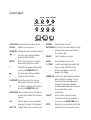
FUNCTION
CLEAR
RESOL. CONTRAST
§
©
-
+
5
6
7
8
9
10
QUICKDIAL LAST TX EXTERNAL HOLD
REDIAL
PAUSE
2. TONE
QZ
Monitor button. Use for
making telephone calls
when you have a
telephone connected.
✱
P - TB
One touch memory
buttons. Use to dial your
most frequently used
numbers with one touch.
9
A-a
Control panel. Use to
access the features of the
DF450. Seven buttons
have dual functions.
Adjustable paper
guide. Place documents
face down to ensure
straight feeding into the
machine for fax
transmission.
0
SYMBOLS
MONITOR
START
STOP
ERROR
Error indication light.
Comes on when there is a
fault in fax transmission
or reception.
Sent document tray.
Holds the original copies
of documents that have
been faxed or copied.
Received document
tray (beneath sent
document tray). Holds
received faxes and copies
of documents.
Please open this page for a further ‘at a glance’
guide to your DF450 plain paper fax machine.
1