1
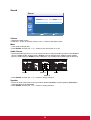
Picture
Picture
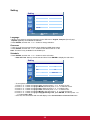
Picture Mode
Contrast
Brightness
Color
Tint
Sharpness
Backlight
DCR
Color temp.
Input Resolution
:Move
Standard
88
43
55
50
5
5
OFF
9300 K
Auto
Enter :Enter
Exit :Exit
Picture Mode
• Allows you to choose from the following preset picture modes: Standard, Vivid, Cinema and User.
• Press ENTER, and then the or button to change selection.
Contrast
• Adjusts the image brightness in relation to the input signal.
• Press the button to increase contrast, or the button to decrease contrast.
Brightness
• Adjusts the image brightness in relation to the background.
• Press the button to increase brightness, or the button to decrease brightness.
Color
• Adjusts the image color intensity.
• Press the button to increase color intensity, or the button to decrease color intensity.
Note: This item is not available for the VGA and DVI inputs.
Tint
• Adjusts the image color tint.
• Press the button to change the color to a greenish tone, or the button to change the color to a
purplish tone.
Note: This item is not available for the VGA and DVI inputs.
Sharpness
• This function is digitally capable to keep crisp image at any timings. It is adjustable to get a distinct
image or a soft one as you prefer and set independently for each picture mode.
• Press the button to increase sharpness, or the button to decrease sharpness.
Backlight
• Adjusts the backlight intensity of the LCD screen.
• Press the button to increase backlight intensity, or the button to decrease backlight intensity.
Note: This item is not available if the Ambient Light Sensor function is set to HIGH or LOW.
DCR (Dynamic Contrast Ratio)
• When turned on, this function helps enhance image contrast when displaying dark scenes.
• Press ENTER, and then the or button to turn this function on or off.
Note: This item is not available if the Ambient Light Sensor function is set to HIGH or LOW.
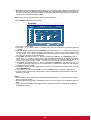
Color temp.
• Use to choose a color temperature.
• Press ENTER, and then the or button to select 12000 K, 9300 K, 6500 K, 5800 K or User.
• If User is selected, you can adjust the Red, Green and Blue settings separately.
28