1
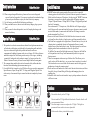
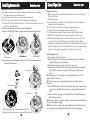
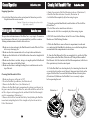
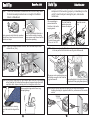
NEXVAC RoboVac 200 NEXVAC RoboVac 200 Intelligent Automatic RoboVac 200 Robotic Vacuum Cleaner RoboVac 200 Robotic Vacuum Cleaner Clean Mate 365 REV.A 120813I USER MANUAL Table of Contents RoboVac 200 Safety Precautions 1 Safety Instructions 1 Special Features 2 Cautions 3 Main Unit and Accessories 4 Main Unit Features 5 Control Panel 6 Remote Control Functions 7 Battery Installation and Removal 8 Recharging the Battery 10 Installing Accessories 11 General Operation Preparing for use Starting Operation Stopping Cleaning 13 13 13 14 Cleaning and Maintenance 14 Useful Tips Specifications Troubleshooting Warranty Policy Contact Support 18 20 21 22 23 Safety Precautions RoboVac 200 Before using this product, please read the following safety instructions and keep this operation manual for future reference. Before using this product, please follow all normal safety precautions to avoid the occurrence of situations such as fire, short-circuit, and injury. Please make sure that you observe all the following safety precautions: Safety Instructions RoboVac 200 1. Read this user manual thoroughly before using this product. 2. This product is not for use outdoors. 3. This product is an electronic device. Never get it wet or let it come in contact with water. Do not use it in a moist or wet environment. This is to prevent damage to the electronics in the unit. 4. Before using this product, please tidy up things on the floor. You must remove all objects that could get caught in the roller brush or in the air intake on the bottom of the unit. Examples include, clothing, power cords, cable, telephone cords, drapes or blinds, loose fringes of rugs. These items can get caught in the unit, and either prevent it from moving, or the unit could pull over a lamp, table, or chair (for examples) and cause damage to the unit, floor, object, or person. 5. Please do not sit or stand on this product. Pay special attention to toddlers or pets in the house to prevent damage to the unit or the child or pet. 6. Please do not use this product to clean a still-burning cigarette, a lit match or burning embers. 7. Please do not use this product to clean flammable or highly volatile liquids such as gasoline or white gasoline. 8. To prevent damage to the vacuum, make sure that nothing is obstructing the air vents on the top of the unit. 9. When not in use for long periods of time, the power switch must be turned off. 1 QQ-1 Clean Mate 365 RoboVac 200 Safety Instructions 10. When using rechargeable batteries, please use the correct voltage and current listed on the product. If you are not sure about the standard voltage, please ask your distributor or query the local electricity company. 11. Use the factory-provided RoboVac battery and charger. 12. When your hands are wet, do not touch the battery charger, plug or power cord. 13. When you need to clean this product, turn it off; unplug the charger, and remove the battery. RoboVac 200 Special Features 1. This product is a robotic vacuum cleaner that utilizes high vacuum suction, a roller brush on the bottom, a side brush for cleaning along walls and other objects, an ultraviolet light to help with disinfection, and even a compartment for adding fragrance to the air as it cleans. All of these features make this unit perfect for cleaning a wide variety of floor types, including ceramic tile, hardwood, vinyl and most carpets. As long as you have the Robotic Vacuum Cleaner, you have the most helpful house cleaning mate. 2. The compact shape enables this unit to clean under beds, tables and other furniture that standard upright vacuums cannot get to. 3. Once the RoboVac is turned on, it will follow a five step repetitive movement: Special bounce, Spiral, Along Wall, "S" shape, and Polygonal Spiral. This wide variety of movement helps to ensure that the unit completely cleans a room. Special Features RoboVac 200 4."MODE"button on the remote control allows you to select a specific cleaning pattern for the RoboVac. By default the unit operate in Automatic Mode (switches between all 5 patterns), but by using the "MODE" button on the remote, you can select a specific pattern in the following sequence: 1.Spiral 2.Special Bounce 3.Along Wall 4.'S' Shape 5.Polygonal Spiral and back to A.Automatic. Note: when mode 4 "S" shape in use, if the RoboVac in 45 degree angle get into 90 degree wall corner and stuck in the corner, please use remote control to switch other mode ( in auto mode the RoboVac will change to another mode automatically in 30 sec). 5. Sensors at the front of the unit tell the RoboVac when it comes in contact with a wall or other obstacle, to back up, turn and clean around the object. 6. The RoboVac is equipped with a light sensor. When the battery is low, or the cleaning time is completed, the unit will automatically move toward brighter areas of the room before it stops. This helps prevent the unit from stopping under furniture and makes it easier for you to find. If the RoboVac can not find the brighten areas in 10 minutes, the RoboVac will stop and turn into "sleep" mode automatically which is to prevent battery run out. 7. There is a transparent window on top of the dust bin. This allows you to easily see how full the dust bin is, so you can clean it out when it is needed. This window also serves as a holder for the remote control to help prevent misplacing or losing the remote control. 8. Photo sensors on the underside of the front of the unit detect stairs, and other drop offs, to keep it from falling off the edge and damaging the unit or anything else. 9. A handle is built-in to the unit to make it easy to pick up and move the unit to a different room. Cautions Special Bounce Sp iral Along Wall RoboVac 200 Sp iral Do not look directly at the UV light. "S" Shap e Sp iral Polygonal Sp iral Sp iral Do not touch the UV light bulb with bare hands. Natural skin oils will cause premature failure. Do not attempt to remove or replace the UV light. This light is a permanent fixture and is not user-replaceable. Make sure the battery is installed correctly. 2 3 Main Unit and Accessories No. 1 2 3 4 5 6 7 8 Description RoboVac 200 Main Unit Remote Control Filter Rechargeable Battery Charger User Manual Hand Brush Fragrance (not included) QTY 1 1 2 1 1 1 1 RoboVac 200 Main Unit Features RoboVac 200 Control Panel 1 Bumper Time Set Button Remote Control Sensor Power Button Start/Stop Button Remote Control Dust Bin Release Button Dust Bin Side Light Air Vent 2 3 Handle Battery Charging Socket 7 Ultraviolet Light Auxiliary Wheel Battery Cover Roller Brush Vacuum Entry 4 6 8 NEXVAC Side Brush RoboVac 200 5 RoboVac 200 Robotic Vacuum Cleaner Drive Wheel USER MANUAL 4 5 Control Panel QQ-1 Mate 365 RoboVacClean 200 1.Press the power button, the power blue LED will light up. 2.Press Timer button to set the length of operation time.The numerical panel will display the operation time. When power is first turned on, the default setting is 80 minutes. The timer settings are from 10 to 80 minutes in 10-minute increments. 3.Try to set the operation time by the size of the area to be cleaned in order to prevent overuse of the battery and shortening its lifespan. 4.When the battery is low, the Low Battery light will blink red. 5.In the following situations, the error light will light up: High battery temperature, overloaded motor, and no traction for more than three consecutive seconds. Forward Right Left Reverse Stop Start Time Set Button VAC Error Indicator Vacuum Motor Off Indicator Operational Time & MODE Display Timer set Start/Stop Button MODE Mode Ultraviolet Light Vacuum Motor Off Power On/Off Ultraviolet On Indicator Power On & Charging Indicator QQ-1 Clean200 Mate 365 RoboVac Remote Control Functions Low Battery Indicator Power Indicating Light 1.When the power is turned on, the light will be blue. When not in use, please remember to turn off the power. 2. When charging, power must be turned off. 3. Please see the chart below for the meaning of other lights. Function of each Button: 1. Start Button: Press the Start button to begin the automatic cleaning of the room. 2. Stop Button: Press the Stop button to stop the activity of the unit, and it will emit a long sound to make it easier to find the device. 3.Timer Button: Use this button to set the cleaning time of the RoboVac. 4. Directional Buttons: Use these buttons to manually drive the unit around the room to clean specific areas. 5. Mode Button: Press this button to pick a specific cleaning pattern for the RoboVac. By default the unit cleans in "Automatic" Mode going through all 5 cleaning movements. 6 7 Remote Control Functions RoboVac 200 QQ-1 Clean Mate 365 Press the "Mode" button once to make the unit clean in "Spiral" mode only. The Timer will display "1" for one minute and then will show the cleaning time. When the RoboVac comes in contact with any object while running in this mode, it will automatically stop its movement. Battery Installation and Removal QQ-1RoboVac Clean Mate 200 365 4. Replace the battery cover by first inserting the tabs into the slots at the back of the unit, and then pressing down on the front side of the battery cover until the plastic tabs click in place. Please see Illustration 3. Press the "Mode" button again (Twice)to make the RoboVac clean in "Special Bounce" mode only. The Timer will display "2" for one minute. Press the "Mode" button again (Three times) to make the unit run in "Along Wall" mode only. The Timer will display "3" for one minute. Illustration 1 Illustration 2 Press the "Mode" button again (Four times) to make the unit run in "S Shape" mode only. The timer will display "4" for one minute. Press the "Mode" button again (5 times) to make the unit run in "Polygonal Spiral" mode only. The Timer display will show "5" for one minute. Press the "Mode" button again (6 times) to go back to "Automatic" mode (all 5 cleaning patterns). The Timer display will show "A" for one minute. 6.UV Button: Allows you to turn on or off the ultraviolet light as needed. 7.Vacuum Motor Off Button: Press this button to turn On/Off the vacuum motor. This allows you to use the UV light to disinfect the floors without the noise of the vacuum motor. Battery Installation and Removal Illustration 3 2 RoboVac 200 1. Make sure that the power of the unit is turned 'OFF'. 2. Use your fingers to press the tabs at the front of the battery cover. Lift up the battery cover by these tabs as shown in Illustration 1. 3. Make sure the battery is inserted in the correct orientation by aligning the silver strips on the battery with the metal tabs on the inside of the battery compartment. Battery lifting band should face up after battery is installed. See Illustration 2. 8 1 9 Recharging the Battery RoboVac 200 Clean Mate 365 NOTES: The battery needs around 2.5 hours recharge time with the fast charger included. If the low battery light on the control panel blinks red, the battery must be immediately charged. 1.First, make sure that the power switch on the unit is set to 'Off'. 2.Plug the charger into the battery recharge socket on the side of the unit, then plug the other end into a wall outlet (See Illustration 1). The Power Indicating Light on the control panel of the unit will begin flashing blue, indicating that the unit is charging. Installing Accessories RoboVac 200 QQ-1 Clean Mate 365 Side Brush Installation and Removal To remove the Side Brush, use a Philips head screwdriver to remove the screw in the center of the Side Brush Assembly by turning it counter-clockwise. To install the Side Brush, place the Philips head screw through the center hole of the Side Brush assembly, and align the screw with the hole in the slot for the Side Brush. Attach the screw by turning it in a clockwise direction, until the screw is firmly in place. 3.Once the battery is fully charged, the unit will beep twice, and the charging light will stop flashing and will be replaced by a steady blue light. 4.If the RoboVac is not in use please switch off the main switch in order to protect the battery. When the power of the unit is off, plug the adapter into the battery recharge socket of the RoboVac first, and then plug the other end into a wall outlet. Illustration 1 wall outlet Roller Brush Installation and Removal Ensure that the power of the RoboVac is 'Off', and turn the RoboVac upside down so that the bottom of the unit is facing you. Align the slotted end of the roller brush with the slot in the flexible insert in the right side of the roller brush compartment (near the side brush) and press it into place. Push the free end of the roller brush down into the roller brush compartment, and align the free end with the brush holder on the left side of the compartment. Slide the roller brush to the left to secure it in place. Caution! Make sure the power switch of the unitis turned to OFF before recharging the battery! 10 11 Installing Accessories RoboVac 200 Fragrance Installation and Removal This robotic vacuum cleaner has a compartment built into it for adding fragrance to the air as the unit cleans. Any solid scent packet, insert, or dryer sheet can be used. DO NOT use any type of Liquid or Oil Fragrance with this unit. 1.Press the "Dust Bin Release Button" to release the dust bin cover. See the arrow in Illustration 1. 2.Remove the dust bin cover as shown in Illustration 2. 3.Remove the dust bin from its compartment as shown in Illustration 3. Illustration 1 Illustration 2 Illustration 3 4.Open the fragrance package and place it in the small compartment as shown in Illustration 4. Illustration 5 Illustration 4 Illustration 6 5. Replace the dust bin as shown in Illustration 5. 6. Replace the dust bin cover as shown in Illustration 6. 12 General Operation RoboVac 200 Clean Mate 365 Preparing for use 1. Make sure you have completely charged the battery before using it for the first time. 2. Room preparation: A. Pick up all large items off of the floor that could get stuck in the brushes or the vacuum intake. B. Pick up/hide all cords that could get tangled in the unit. C. Move all items that could be easily knocked over. D. Roll under loose edges of rugs with any type of stringy fringe. 3. DO NOT use the RoboVac on plush or long pile carpet or rugs. 4. When using the RoboVac in a room for the first time, watch how it operates in the room. Watch for areas that the unit has troubles operating in, and either block these areas of the room or move objects around so that the unit can clean effectively and not get stuck or hung up before it has had an opportunity to clean the entire room. Starting Operation 1. Clean out the dust bin before use. 2. Place the RoboVac on the floor in a relatively open space near the middle of the room to be cleaned. 3. Press the power button on the main unit to turn it on. 4. Set the timer of the unit to the desired cleaning time by pressing the Timer button on the control panel of the unit or on the remote control. For Reference: Use 10 minutes of cleaning time for every 54-72 square feet of floor space. Cleaning time may vary depending on the type of floor being cleaned. 5. Press the Start button on the control panel or the remote control. After a short delay, the RoboVac will begin to automatically clean the floor. 6. At the end of the cleaning cycle, the RoboVac will emit a long beep and will stop moving. If the power light on the unit is still blue, then the unit still has battery power and can be used again. If the low battery light on the unit is flashing red, then the battery is low and needs to be recharged before the unit can be used again. 13 General Operation RoboVac 200 QQ-1 Stopping Operation • Press the Start/Stop button on the control panel of the unit or press the Stop button on the remote control. Caution! Please do not change the ultraviolet light tube yourself. Cleaning and Maintenance RoboVac 200 The operation and maintenance of the RoboVac is very simple. To maintain top performance of the unit , it is recommended that you follow a routine cleaning and maintenance schedule after each use. 1. Make sure to clean and empty the Dust Bin and to brush off the Air Filter after every cleaning cycle. 2. Make sure that the vacuum intake is free of any debris and obstacles. 3. Make sure that the bristles of the Side Brush are free and not tangled with hair, etc. 4. Make sure that there is not hair, strings, etc caught up in the Roller Brush. 5. Remove and clean out the Roller Brush. 6. Make sure that there is nothing blocking the air ventilation exits on the top of the unit. Cleaning Dust Bin and Air Filter 1. Make sure the power of the unit is 'Off'. 2. Press the Dust Bin Open Button. (See Illustration 1) 3. Remove the Dust Bin Cover. (See Illustration 2) 4. Remove the Dust Bin from its compartment by placing your finger(s) in the groove near the front of the RoboVac, and on the tab at the center of the air filter. Squeeze to disengage the tab, and then lift the Dust Bin straight out of its compartment. Illustration 3 5. Remove the Air Filter from the Dust Bin by firmly holding the Dust Bin in one hand, and pulling the Air Filter straight out by the tabs on the Air Filter. Illustration 4 14 Cleaning Dust Bin and Air Filter RoboVac 200 6. Empty the contents of the Dust Bin into a trash can. (Illustration 5) • Rinse the Dust Bin with water if needed. (Illustration 6) • Let the Dust Bin completely dry before using it again. 7. Using the provided Hand Brush, brush the debris off the Air Filter. (Illustration 7) • The Air Filter can be rinsed clean with water • Make sure the Air Filter is completely dry before using it again. 8. DO NOT clean the Dust Bin or the Air Filter in a Clothes Washing Machine or a Dish Washing Machine. 9. While the Dust Bin is removed from its compartment, turn the unit over, and using the Hand Brush to brush any excess dust that might have accumulated in the compartment into a trash can. 10. Once the Dust Bin and Air filter are completely dry, put the Air Filter back in place on the Dust Bin. (Illustration 8) Then put the assembled Dust Bin and Air Filter back into the Dust Bin compartment, with the air filter pointed away from the control panel. 11. Put the Dust Bin Cover back in place by first inserting the tabs on the cover into the slots on the case of the unit, then press down firmly on the edges of the Dust Bin Cover until the Release Button clicks into place. (Illustration 10) Make sure the Dust Bin Cover is securely in place before operating the unit. Illustration 1 Illustration 2 15 Clean200 Mate 365 RoboVac Cleaning Dust Bin and Air FilterQQ-1 Illustration 3 Illustration 4 Illustration 5 Tab Cleaning the Vacuum Entry RoboVac 200 Clean Mate 365 After operating the machine for a period of time, dust and dirt will accumulate on the vacuum entry on the bottom of the RoboVac. Cleaning this area regularly will help ensure that the unit performs properly. 1.Make sure the power of the RoboVac is turned off. 2.Turn the unit upside-down, and brush any dust that has accumulated inside the vacuum entry as shown below. Shake the dust out into a trash can. Side Brush Illustration 6 Illustration 8 Vacuum Entry Illustration 7 Illustration 9 Illustration 10 Cleaning the RoboVac Over time dust and dirt can accumulate in different areas of the unit, DO NOT use water to clean the unit itself! This is an electrical unit, and if any of the electric components get wet, the unit will no longer work, and could cause a short circuit and potentially harm someone. Use Canned Air, the Hand Brush provided with the unit, or a dry cloth to wipe away accumulated dust and dirt. 16 Cleaning the Roller Brush Hair and other stringy items can get caught in the roller brush over time. 1. Make sure the power to the unit is turned off. 2.Turn the RoboVac upside-down and place it on a flat surface with the back of the unit facing you. 3. Remove the Roller Brush from its compartment by grabbing the left side of the Roller Brush, and sliding it toward the right until the left side brush is free. 4.Lift the free end of the Roller Brush out of the compartment, then slide the Roller Brush to the left, freeing it from the flexible insert. 5 Remove any hair, string or other debris from the roller brush to ensure proper performance of the unit. 6.With the Roller Brush removed, loosen any dirt that has accumulated in the Roller Brush compartment with a brush, then dump the dirt into a trash can. 7.Re-install the roller brush following the steps outlined in Roller Brush Installation and Removal Section (P.13) 17 RoboVac 200 Useful Tips QQ-1 Mate 365 CleanClean Mate 365 Tip#1: Clear the area where the RoboVac is to clean of any items that can be easily knocked over or caught in the Roller Brush or Side Brush. Useful Tips Tip#4 Fixing jams: Objects can get caught in the Roller Brush and prevent it from working properly. Immediately turn the unit off, clear the object causing the jam, and resume normal use. When something is jammed inside the RoboVac, it will emit a beeping sound. In the area where the RoboVac operates, it might knock over items such as vases, glasses, or lamps. In order to provide the RoboVac a space for fast and safe cleaning, please remove small items from the area before operating. Turn the RoboVac upside-down, and remove the objects. Clean the vacuum entry. Turn the Power switch of the unit to OFF. Tip#2 Adjust the distance between furniture, walls and other objects to be at least 36 cm (14 in). RoboVac 200 Block areas where the RoboVac could get stuck by placing objects in the way so that the RoboVac does not go into these areas. Tip#5 14 in Tip#3 Do not let the loose edges of rugs, drapes, table cloths, etc to get caught in the RoboVac. Roll under the loose edges of rugs and make sure that any table cloths, drapes, bedding etc do not hang down to the floor. Remove plastic bags and leftover longshaped garbage The space under some furniture may not be high enough for the RoboVac Use a potted plant to block the RoboVac to get underneath. and prevent it from going these places. Tip#6 Aim the remote control at the sensor on the front of the RoboVac. Anything blocking the signal will affect the performance of the remote control. Sensor T IM FO D R IG AR OP SP AL RT IR S TA 65 HT te 3 TE CK RW BA ST Ma U TM FT GH LE LI an ER & UV S IC Cle MU RW D RIG AR HT T IRA 5 SP AR ST e 36 L 19 FO TE OP CK ST BA Mat T MU FT GH 18 LE LI an ER & UV SIC TIM Cle MU When the RoboVac is cleaning rugs, fold under the edges of the rug. Make sure battery has good contact with charging stripes, and battery lifting band faces up Battery malfunction Charge battery manually for 2 days (see Page 10) or replace battery CleanMate is lifted off ground Put the CleanMate back on to the ground. over 3 seconds while running Weight Dimension Types of movement Remote control Moving speed of machine Capacity of dust bin Life time of UV light Noise Battery Fast adapter/charger Suction Power Speed Battery installation problem Both ERROR & LOW BATT indicators are on 6.6 lbs 14inch (diameter) x 3.5 inch (H) 5 types: Spiral, Special Bounce, Along Wall, S shape, Polygonal Spiral 5 ~ 6 in/sec 0.3 liter 6000 hours continuously 80dB at distance of 20 cm Ni-MH 14.4V, Rechargeable, 3.5 hours of charging time 2.5 Ah battery Output: 20Vdc 1000mA Input: 100 - 240V 50 - 60 Hz 9000 rpm vacuum motor Description This trouble shooting guide covers some RoboVac problems that you might have. If problem persists, please contact your local warranty provider or www.infinuvo.com for further assistance. The repairs that marked * needs to be done by qualified service personal. Problem Symptoms Possible Cause Things to do ERROR indicator on CleanMate is stuck Remove deris & hairs from brushes and wheels LOW BATT indicator on Battery power is low Recharge the CleanMate battery Fall down steps or stairs Malfunction cliff sensors Repair the CleanMate main unit * Always turning in circles to left Left wheel stuck or malfunction Clean or replace left wheel Always turning in circles to right Right wheel stuck or Malfunction Clean or replace right wheel Bumper protection pads not removed Remove bumper protection pads Malfunction front bumper sensor Clean or replace front bumper sensor * Malfunction control board Replace control board * Too much debris & hairs on brush Remove debris & hairs from roller brush. Replace the roller brush if necessary Malfunction brush motor Replace brush motor * Too much debris & hairs on brush Remove debris & hairs from side brush. Replace the side brush if necessary Malfunction brush motor Replace brush motor * Remote control battery bad Replace the button battery in the remote control . Remote control malfunction Replace the remote control Main roller brush stuck Side brush stuck Remote control does not work 20 RoboVac 200 Troubleshooting Always going backwards Item Specifications Infrared light with more than 9 feet controlling range, 3V Lithium button battery CR2032 RoboVac 200 Specifications 21 RoboVac 200 Warranty Policy Please fill in your warranty card completely and submit it to your local customer service center. NEXVAC provides you, as the owner of this NEXVAC product, with the following Limited Warranty Policy. RoboVac 200 Contact Support NEXVAC 716-A Crown Industrial Ct Chesterfield, MO 63005 One year Product Warranty: NEXVAC warrants to the original purchaser of this NEXVAC product that the product is free from defects in original materials and workmanship for a period of up to one year from the date of initial purchase. This warranty is only valid if the product has been properly installed and is used in the way for which it is intended, and has received only factory-authorized repairs, servicing or alterations. Under-warranty products that meet these conditions and that function improperly will be repaired or replaced, at the discretion of NEXVAC. Tel: 888-636-8227 Web: www.robovac200.com Six months Battery Warranty: NEXVAC warrants to the original purchaser of this NEXVAC product that the original batteries contained within this product will function for a period of six months. This warranty is only valid if the product has been properly installed and is used in the way of which it is intended, and has received only factory-authorized repairs, servicing, or alterations. Under-warranty batteries that meet these conditions and that function improperly will be repaired or replaced, at the discretion of NEXVAC. These warranties contain the sole express warranty of NEXVAC, which makes no other warranties, expressed or implied. These warranties are made in lieu of any implied warranties of merchantability or fitness for a particular purpose. These warranties give you specific legal rights. You may also have other rights, which vary from state to state. WHEN YOU RETURN A NEXVAC PRODUCT OR BATTERY UNDER THIS WARRANTY, you must first obtain an RMA number by calling your local customer service center. NEXVAC reserves the right to request that you submit a letter describing the circumstances under which the problem occurred and that you submit invoice and any other supporting evidence and documentation. 22 23