1
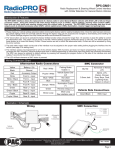
RP4-MZ11
Radio Replacement & Steering Wheel Control Interface
for Mazda Vehicles
x4
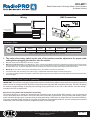
Illustration / Schematic
Wiring
SWC Connection
SWC Connection
Aftermarket Radio
Connections
Vehicle
Connector
See above chart for
different radio type
connections
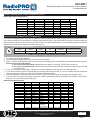
Installation Steps
9 01
SET RADIO SELECT SWITCH
456
23
Alpine
Clarion
Fusion
JVC
Kenwood
Pioneer/Sony/Other
1
4
9
2
3
7
Other = Advent, BOYO, Dual, Lightning Audio, Visteon,
78
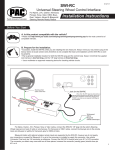
1. The radio select rotary switch on the side of the interface must be adjusted to the proper radio
setting before plugging the interface into the vehicle.
2. Make all connections as described in the chart on page 1.
3. Blue wire in vehicle harness - In the Mazda CX-5, 2013+ CX-9 & 2013+ Mazda 3 with factory navigation, the blue wire in the 24 pin vehicle
harness needs to be connected to the green/white wire in the 16-pin RP harness. This is necessary for the Bluetooth SWC to function with
the aftermarket radio. In all other applications this wire should be connected to the aftermarket radios power antenna output
4. Mazda CX-5 - This vehicle must use the orange/white wire in the interface connector for illumination.
5. Connect the SWC wire according to the chart on page 1 (aftermarket radio MUST support a wired remote input).
6. If you wish to reassign functions to the SWC or utilize short press long press dual command functionality follow the programming instructions
on the next page.
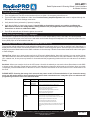
Default Steering Wheel Control Programming
IMPORTANT! The interface comes pre-programmed for all of the vehicles factory SWC functions and does not require programming
unless you wish to re-assign the SWC functions or utilize short press long press dual command functionality. The SWC can always
be restored to default settings by pressing and releasing the program button on the side of the interface once and waiting 7
seconds for the LED to flash 4 times.
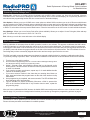
Short Press Long Press Dual Command Functionality
This feature allows you to assign two aftermarket radio functions to each of the vehicles SWC buttons. It can be used with as
many of the buttons as the user likes or none at all. When this functionality is implemented, quickly pressing and releasing a SWC
button will initiate the short press command while pressing and holding a SWC button for longer than two seconds will initiate the
long press command. Please note that no long press commands are programmed by default. If you wish to assign dual command
functionality to the SWC please follow the programming steps on the next page.
Pacific Accessory Corporation® | Santa Ana, California 92705 | Ph. 866-931-8021 | [email protected]
©2012 Pacific Accessory Corporation
www.pac-audio.com
Pacific Accessory Corporation
Rev. 052413
Page 2