1
SELECTING RESOLUTION AND EXPOSURE SETTINGS
After loading an original, you can adjust the resolution and exposure settings to match the condition of the original-for
example, if it has small or faint characters, or if it is a photo. After loading the original in fax mode, adjust the settings
as explained below.
SELECTING THE RESOLUTION
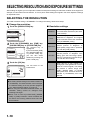
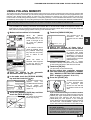
The initial resolution setting is STANDARD. To change the setting, follow these steps:
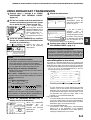
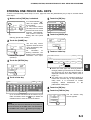
Change the resolution.
1 Touch the [RESOLUTION] key.
STANDARD
RESOLUTION
AUTO
A4
ORIGINAL
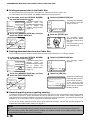
the [STANDARD] key, [FINE] key,
2 Touch
[SUPER FINE] key, or [ULTRA FINE] key.
STANDARD
FINE
SUPER FINE
HALF TONE
ULTRA FINE
The selected key is
highlighted.
If you touched the [FINE]
key, [SUPER FINE] key,
or [ULTRA FINE] key,
you can also select
halftone by touching the
[HALF TONE] key.
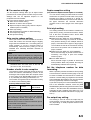
Resolution settings
Standard
Touch this key if your original consists
of normal-sized characters (like those
in this manual).
Fine
Touch this key if your original has small
characters or diagrams. The original
will be scanned at twice the resolution
of the [STANDARD] setting.
Super fine
Touch this key if your original has
intricate pictures or diagrams. A
higher-quality image will be produced
than with the [FINE] setting.
Ultra fine
Touch this key if your original has
intricate pictures or diagrams. This
setting gives the best image quality.
However, transmission will take longer
than with the other settings.
Half tone
Touch this key if your original is a
photograph or has gradations of colour
(such as a colour original). This setting
will produce a clearer image than
[FINE], [SUPER FINE], or [ULTRA
FINE] used alone. Half tone cannot be
selected if [STANDARD] has been
selected.
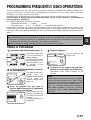
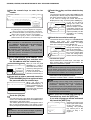
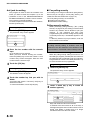
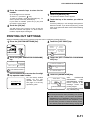
3 Touch the [OK] key.
OK
DARD
You will return to the
initial screen.
NE
FINE
HALF TONE
FINE
NOTES
The factory default setting for the initial resolution is
[STANDARD]. The initial resolution can be changed
to a different setting in the key operator programs
(see "Initial resolution setting" on page 8-4).
When using the automatic document feeder, the
resolution setting cannot be changed once
scanning has begun.
When a fax is sent at [ULTRA FINE], [SUPER
FINE], or [FINE] resolution, a lower resolution will
be used if the receiving machine does not have
that resolution.
1-10