1
Operation Manual
ENGLISH
DVD Map - USA / Canada
CNDV-50MT
CNDV-50MTP
This operation manual can be used with the following models:
AVIC-880DVD, AVIC-88DVD, AVIC-80DVD,
AVIC-90DVD, AVIC-9DVD
READ ME FIRST!
To Users Updating the Application Program
You need an AV Head Unit or Display with touch panel capability to use this software.
Make sure to use a display suitable for this system.
Please read the cautions on the next page before using the CNDV-50MT [CNDV50MTP] disc as there is a possible risk that the stored user-registered data may lost
upon completion of the update. Please be aware that the manufacturer cannot take any
responsibility for lost data in the event the data is lost.
Upgrading to the newer version ➞ page 57
Notice to all users:
This software requires that the navigation unit be properly connected to your vehicle’s
parking brake. If not properly connected and depending on your vehicle, additional installation may be required. For more information, please contact your Authorized Pioneer
Electronics retailer or call us at (800)421-1404.
Cautions on Updating the Application Program of the Navigation System:
• Stop the vehicle in a safe location. While the program update is in progress, ensure
that the power supply of the Navigation System is not turned off.
• When the update procedure is complete, the Navigation System will be restarted. After
the system has started up again, make sure not to turn off the power supply for the
Navigation System until the map of your surroundings appears.
• During the update process, there is the possible risk of the “Address Book”(*) data and
the “Destination History” data being lost. It is highly recommended to use a PC Card
(PCMCIA TYPE II <5 V>) to back up Address Book data. (Since the “Destination
History” cannot be stored on a PC Card directly, to keep the “Destination History” data,
first store it in the Address Book, then onto the PC Card.)
*“Address Book” data includes “Return Home” and “Go to” contents.
• Any existing calculated routes will be canceled.
• Personalized settings will return to their factory settings.
Application Program Update Procedure
Refer to the update procedure in the “Installing the Program” section (P.57) of this manual.
The screen shown in the example may differ from the actual screen.
The actual screen may be changed without notice for performance and function
improvements.
Introduction
License Agreement
PIONEER CNDV-50MT [CNDV50MTP] - for U.S.A.
THIS IS A LEGAL AGREEMENT BETWEEN YOU,
AS THE END USER, AND PIONEER ELECTRONICS (USA) INC. (“PIONEER”). PLEASE READ THE
TERMS AND CONDITIONS OF THIS AGREEMENT
CAREFULLY BEFORE USING THE SOFTWARE
INSTALLED ON THE PIONEER PRODUCTS. BY
USING THE SOFTWARE INSTALLED ON THE
PIONEER PRODUCTS, YOU AGREE TO BE
BOUND BY THE TERMS OF THIS AGREEMENT.
THE SOFTWARE INCLUDES A DATABASE
LICENSED BY THIRD PARTY SUPPLIER(S) (“SUPPLIERS”), AND YOUR USE OF THE DATABASE IS
COVERED BY THE SUPPLIERS’ SEPARATE
TERMS, WHICH ARE ATTACHED TO THIS
AGREEMENT (Refer to page 5). IF YOU DO NOT
AGREE WITH ALL OF THESE TERMS, PLEASE
RETURN THE PIONEER PRODUCTS (INCLUDING
THE SOFTWARE, AND ANY WRITTEN MATERIALS) WITHIN FIVE (5) DAYS OF RECEIPT OF THE
PRODUCTS, TO THE AUTHORIZED PIONEER
DEALER FROM WHICH YOU PURCHASED
THEM. USE OF THE SOFTWARE SHALL BE
DEEMED TO BE YOUR CONSENT TO THE
LICENSE AGREEMENT.
1. GRANT OF LICENSE
Pioneer grants to you a non-transferable, non
exclusive license to use the software installed on
the Pioneer products (the “Software”) and the
related documentation solely for your own personal use or for internal use by your business,
only on such Pioneer products.
You shall not copy, reverse engineer, translate,
port, modify or make derivative works of the Software. You shall not loan, rent, disclose, publish,
sell, assign, lease, sublicense, market or otherwise transfer the Software or use it in any manner not expressly authorized by this agreement.
You shall not derive or attempt to derive the
source code or structure of all or any portion of
the Software by reverse engineering, disassem-
bly, decompilation, or any other means. You shall
not use the Software to operate a service bureau
or for any other use involving the processing of
data for other persons or entities.
Pioneer and its licensor(s) shall retain all copyright, trade secret, patent and other proprietary
ownership rights in the Software. The Software is
copyrighted and may not be copied, even if modified or merged with other products. You shall not
alter or remove any copyright notice or proprietary legend contained in or on the Software.
You may transfer all of your license rights in the
Software, the related documentation and a copy
of this License Agreement to another party, provided that the party reads and agrees to accept
the terms and conditions of this License Agreement.
2. DISCLAIMER OF WARRANTY
The Software and related documentation are provided to you “AS IS”. PIONEER AND ITS LICENSOR(S) (for the purpose of provisions 2 and 3,
Pioneer and its licensor(s) shall be collectively
referred to as “Pioneer”) MAKES AND YOU
RECEIVE NO WARRANTY FOR THE SOFTWARE,
WHETHER EXPRESS OR IMPLIED, AND ALL
WARRANTIES OF MERCHANTABILITY AND FITNESS FOR ANY PARTICULAR PURPOSE FOR
THE SOFTWARE ARE EXPRESSLY EXCLUDED.
SOME STATES DO NOT ALLOW EXCLUSION OF
IMPLIED WARRANTIES, SO THE ABOVE EXCLUSION MAY NOT APPLY TO YOU. The Software is
complex and may contain some nonconformities,
defects or errors. For example, the voice recognition function as implemented by the Software
may not recognize your voice. Pioneer does not
warrant that the Software will meet your needs or
expectations, that operation of the Software will
be error free or uninterrupted, or that all non-conformities can or will be corrected. Furthermore,
Pioneer does not make any representations or
warranties regarding the use or results of the use
of the Software in terms of its accuracy, reliability
or otherwise.
1
3. LIMITATION OF LIABILITY
4. EXPORT LAW ASSURANCES
IN NO EVENT SHALL PIONEER BE LIABLE FOR
ANY DAMAGES, CLAIM OR LOSS INCURRED BY
YOU (INCLUDING, WITHOUT LIMITATION, COMPENSATORY, INCIDENTAL, INDIRECT, SPECIAL,
CONSEQUENTIAL, OR EXEMPLARY DAMAGES,
LOST PROFITS, LOST INCOME, LOST SALES OR
BUSINESS, EXPENDITURES, INVESTMENTS, OR
COMMITMENTS IN CONNECTION WITH ANY
BUSINESS, LOSS OF ANY GOODWILL, OR DAMAGES) RESULTING FROM THE USE OF OR
INABILITY TO USE THE SOFTWARE, EVEN IF PIONEER HAS BEEN INFORMED OF, KNEW OF, OR
SHOULD HAVE KNOWN OF THE LIKELIHOOD
OF SUCH DAMAGES. THIS LIMITATION APPLIES
TO ANY AND ALL CAUSES OF ACTION INDIVIDUALLY OR IN THE AGGREGATE, INCLUDING
WITHOUT LIMITATION BREACH OF CONTRACT,
BREACH OF WARRANTY, NEGLIGENCE, STRICT
LIABILITY, MISREPRESENTATION, AND OTHER
TORTS. IF PIONEER’S WARRANTY DISCLAIMER
OR LIMITATION OF LIABILITY SET FORTH IN THIS
AGREEMENT SHALL OR FOR ANY REASON
WHATSOEVER BE HELD UNENFORCEABLE OR
INAPPLICABLE, YOU AGREE THAT PIONEER’S
LIABILITY SHALL NOT EXCEED FIFTY PERCENT
(50%) OF THE PRICE PAID BY YOU FOR THE
ENCLOSED PIONEER PRODUCT.
Some states do not allow the exclusion or limitation of incidental or consequential damages, so
the above limitation or exclusion may not apply to
you. This warranty disclaimer and limitation of
liability shall not be applicable to the extent that
they are prohibited by any applicable federal,
state or local law which provides that such a disclaimer or limitation cannot be waived or preempted.
You agree and certify that neither the Software
nor any other technical data received from Pioneer, nor the direct product thereof, will be
exported outside the United States except as
authorized and as permitted by the laws and regulations of the United States. If the Software has
been rightfully obtained by you outside of the
United States, you agree that you will not reexport the Software nor any other technical data
received from Pioneer, nor the direct product
thereof, except as permitted by the laws and regulations of the United States and the laws and
regulations of the jurisdiction in which you
obtained the Software.
5. TERMINATION
This Agreement is effective until terminated. You
may terminate it at any time by destroying the
Software. The Agreement also will terminate if
you do not comply with any terms or conditions
of this Agreement. Upon such termination, you
agree to destroy the Software.
6. U.S. GOVERNMENT END USERS
If the Software is being acquired by or on behalf
of the United States government or any other
entity seeking or applying rights similar to those
customarily claimed by the United States government, the Data is licensed with “Limited Rights.”
Utilization of the Software is subject to the
restrictions specified in the “Rights in Technical
Data” clause at DFARS 252.227-7013, or the
equivalent clause for non-defense agencies. Pioneer Electronics (USA) Inc., 2265 East220th
Street, Long Beach, CA 90810.
7. MISCELLANEOUS
This is the entire Agreement between Pioneer
and you regarding its subject matter. No change
in this Agreement shall be effective unless
agreed to in writing by Pioneer. Pioneer retailers
do not have the authority to change this Agreement. This Agreement shall be governed by and
construed in accordance with the internal laws of
the State of California. If any provision of this
Agreement is declared invalid or unenforceable,
the remaining provisions of this Agreement shall
remain in full force and effect.
2
PIONEER CNDV-50MT [CNDV50MTP] - for Canada
THIS IS A LEGAL AGREEMENT BETWEEN YOU,
AS THE END USER, AND PIONEER ELECTRONICS OF CANADA, INC. (“PIONEER”). PLEASE
READ THE TERMS AND CONDITIONS OF THIS
AGREEMENT CAREFULLY BEFORE USING THE
SOFTWARE INSTALLED ON THE PIONEER
PRODUCTS. BY USING THE SOFTWARE
INSTALLED ON THE PIONEER PRODUCTS, YOU
AGREE TO BE BOUND BY THE TERMS OF THIS
AGREEMENT. THE SOFTWARE INCLUDES A
DATABASE LICENSED BY THIRD PARTY SUPPLIER(S) (“SUPPLIERS”), AND YOUR USE OF
THE DATABASE IS COVERED BY THE SUPPLIERS’ SEPARATE TERMS, WHICH ARE
ATTACHED TO THIS AGREEMENT (Refer to page
5). IF YOU DO NOT AGREE WITH ALL OF THESE
TERMS, PLEASE RETURN THE PIONEER PRODUCTS (INCLUDING THE SOFTWARE, AND ANY
WRITTEN MATERIALS) WITHIN FIVE (5) DAYS OF
RECEIPT OF THE PRODUCTS, TO THE AUTHORIZED PIONEER DEALER FROM WHICH YOU
PURCHASED THEM. USE OF THE SOFTWARE
SHALL BE DEEMED TO BE YOUR CONSENT TO
THE LICENSE AGREEMENT.
1. GRANT OF LICENSE
Pioneer grants to you a non-transferable, nonexclusive license to use the software installed on
the Pioneer products (the “Software”) and the
related documentation solely for your own personal use or for internal use by your business,
only on such Pioneer products.
You shall not copy, reverse engineer, translate,
port, modify or make derivative works of the Software. You shall not loan, rent, disclose, publish,
sell, assign, lease, sublicense, market or otherwise transfer the Software or use it in any manner not expressly authorized by this agreement.
You shall not derive, or attempt to derive, the
source code or structure of all or any portion of
the Software by reverse engineering, disassembly, decompilation, or any other means. You shall
not use the Software to operate a service bureau
or for any other use involving the processing of
data for other persons or entities.
Pioneer and its licensor(s) shall retain all copyright, trade secret, patent and other proprietary
ownership rights in the Software. The Software is
copyrighted and may not be copied, even if modified or merged with other products. You shall not
alter or remove any copyright notice or proprietary legend contained in or on the Software.
You may transfer all of your license rights in the
Software, the related documentation and a copy
of this License Agreement to another party, provided that the party reads and agrees to accept
the terms and conditions of this License Agreement.
2. DISCLAIMER OF WARRANTY
The Software and related documentation are provided to you “AS IS”. PIONEER AND ITS LICENSOR(S) (for the purpose of provisions 2 and 3,
Pioneer and its licensor(s) shall be collectively
referred to as “Pioneer”) MAKES AND YOU
RECEIVE NO WARRANTY FOR THE SOFTWARE,
WHETHER EXPRESS OR IMPLIED, AND ALL
WARRANTIES OF MERCHANTABILITY AND FITNESS FOR ANY PARTICULAR PURPOSE FOR
THE SOFTWARE ARE EXPRESSLY EXCLUDED.
SOME STATES DO NOT ALLOW EXCLUSION OF
IMPLIED WARRANTIES, SO THE ABOVE EXCLUSION MAY NOT APPLY TO YOU. The Software is
complex and may contain some nonconformities,
defects or errors. For example, the voice recognition function as implemented by the Software
may not recognize your voice. Pioneer does not
warrant that the Software will meet your needs or
expectations, that operation of the Software will
be error-free or uninterrupted, or that all non-conformities can or will be corrected. Furthermore,
Pioneer does not make any representations or
warranties regarding the use or results of the use
of the Software in terms of its accuracy, reliability
or otherwise.
3
3. LIMITATION OF LIABILITY
4. EXPORT LAW ASSURANCES
IN NO EVENT SHALL PIONEER BE LIABLE FOR
ANY DAMAGES, CLAIM OR LOSS INCURRED BY
YOU (INCLUDING, WITHOUT LIMITATION, COMPENSATORY, INCIDENTAL, INDIRECT, SPECIAL,
CONSEQUENTIAL, OR EXEMPLARY DAMAGES,
LOST PROFITS, LOST INCOME, LOST SALES OR
BUSINESS, EXPENDITURES, INVESTMENTS, OR
COMMITMENTS IN CONNECTION WITH ANY
BUSINESS, LOSS OF ANY GOODWILL, OR DAMAGES) RESULTING FROM THE USE OF OR
INABILITY TO USE THE SOFTWARE, EVEN IF PIONEER HAS BEEN INFORMED OF, KNEW OF, OR
SHOULD HAVE KNOWN OF THE LIKELIHOOD
OF SUCH DAMAGES. THIS LIMITATION APPLIES
TO ANY AND ALL CAUSES OF ACTION INDIVIDUALLY OR IN THE AGGREGATE, INCLUDING
WITHOUT LIMITATION BREACH OF CONTRACT,
BREACH OF WARRANTY, NEGLIGENCE, STRICT
LIABILITY, MISREPRESENTATION, AND OTHER
TORTS. IF PIONEER’S WARRANTY DISCLAIMER
OR LIMITATION OF LIABILITY SET FORTH IN THIS
AGREEMENT SHALL OR FOR ANY REASON
WHATSOEVER BE HELD UNENFORCEABLE OR
INAPPLICABLE, YOU AGREE THAT PIONEER’S
LIABILITY SHALL NOT EXCEED FIFTY PERCENT
(50%) OF THE PRICE PAID BY YOU FOR THE
ENCLOSED PIONEER PRODUCT.
Some states do not allow the exclusion or limitation of incidental or consequential damages, so
the above limitation or exclusion may not apply to
you. This warranty disclaimer and limitation of
liability shall not be applicable to the extent that
they are prohibited by any applicable federal,
state or local law which provides that such a disclaimer or limitation cannot be waived or preempted.
You agree and certify that neither the Software
nor any other technical data received from Pioneer, nor the direct product thereof, will be
exported outside Canada except as authorized
and as permitted by the laws and regulations of
Canada. If the Software has been rightfully
obtained by you outside of Canada, you agree
that you will not re-export the Software nor any
other technical data received from Pioneer, nor
the direct product thereof, except as permitted by
the laws and regulations of Canada and the laws
and regulations of the jurisdiction in which you
obtained the Software.
4
5. TERMINATION
This Agreement is effective until terminated. You
may terminate it at any time by destroying the
Software. The Agreement also will terminate if
you do not comply with any terms or conditions
of this Agreement. Upon such termination, you
agree to destroy the Software.
6. MISCELLANEOUS
This is the entire Agreement between Pioneer
and you regarding its subject matter. No change
in this Agreement shall be effective unless
agreed to in writing by Pioneer. Pioneer retailers
do not have the authority to change this Agreement. This Agreement shall be governed by and
construed in accordance with the internal laws of
the Province of Ontario and the federal laws of
Canada applicable therein. If any provision of this
Agreement is declared invalid or unenforceable,
the remaining provisions of this Agreement shall
remain in full force and effect.
Terms and Conditions for the
Tele Atlas Data
THIS IS A LEGAL AGREEMENT (THE “AGREEMENT”) BETWEEN YOU, THE END USER, AND
TELE ATLAS NORTH AMERICA, INC. (“Tele
Atlas”). BY USING YOUR COPY OF THE TELE
ATLAS DATA, YOU AGREE TO THE TERMS AND
CONDITIONS OF THIS AGREEMENT.
1. Grant of License.
Tele Atlas grants you a non-transferable, nonexclusive license to use the map data and business points of interest information (the “POIs”),
(together, the “Data”) contained on these discs,
solely for personal, non-commercial use and not
to operate a service bureau or for any other use
involving the processing of data of other persons
or entities. You may make one (1) copy of the
Data for archival or backup purposes only but
you may not otherwise copy, reproduce, modify,
make derivative works, derive the structure of or
reverse engineer the Data. The Data contains
confidential and proprietary information and
materials, and may contain trade secrets, so you
agree to hold the Data in confidence and in trust
and not to disclose the Data or any portions in
any form, including by renting, leasing, publishing, leasing, sublicensing or transferring the
Data to any third party. You are prohibited from
using the POIs (i) to create mailing lists or (ii) for
other such similar uses.
2. Ownership.
The Data is copyrighted by Tele Atlas and its
licensors and they retain all ownership rights in
the Data. You agree not to alter, remove, obliterate, or obscure any copyright notice or proprietary legend contained in or on the Data.
3. Warranty Disclaimer.
THE DATA IS PROVIDED ON AN “AS IS” AND
“WITH ALL FAULTS BASIS” AND TELE ATLAS, ITS
LICENSORS, AND ITS LICENSED DISTRIBUTORS
AND SUPPLIERS (COLLECTIVELY, “SUPPLIERS”) EXPRESSLY DISCLAIM ALL OTHER WARRANTIES, EXPRESS OR IMPLIED, INCLUDING
BUT NOT LIMITED TO, THE IMPLIED WARRANTIES OF NON-INFRINGEMENT, MERCHANTABILITY, EFFECTIVENESS, COMPLETENESS,
ACCURACY, TITLE AND FITNESS FOR A PARTIC-
ULAR PURPOSE. TELE ATLAS, ITS LICENSORS
AND SUPPLIERS DO NOT WARRANT THAT THE
DATA WILL MEET YOUR REQUIREMENTS OR
THAT THE OPERATION OF THE DATA WILL BE
UNINTERRUPTED OR ERROR FREE. NO ORAL
OR WRITTEN ADVICE GIVEN BY TELE ATLAS, ITS
LICENSORS, SUPPLIERS OR ANY OF THEIR
RESPECTIVE EMPLOYEES CREATES A WARRANTY OR IN ANY WAY INCREASES TELE
ATLAS’, ITS LICENSORS OR SUPPLIERS LIABILITY AND YOU MAY NOT RELY ON ANY SUCH
INFORMATION OR ADVICE. THIS DISCLAIMER
IS AN ESSENTIAL CONDITION OF THIS AGREEMENT AND YOU ACCEPT THE DATA ON THIS
BASIS.
4. Limitation of Liability.
IN NO EVENT SHALL TELE ATLAS’, ITS LICENSORS’ OR SUPPLIER’ AGGREGATE LIABILITY
FOR ALL MATTERS ARISING OUT OF THE SUBJECT MATTER OF THIS AGREEMENT, WHETHER
IN CONTRACT, TORT OR OTHERWISE, EXCEED
THE AMOUNT PAID BY YOU FOR YOUR COPY OF
THE TELE ATLAS DATA. TELE ATLAS, ITS LICENSORS AND SUPPLIERS SHALL NOT BE LIABLE
IN ANY MATTER TO YOU FOR ANY SPECIAL,
INDIRECT, CONSEQUENTIAL OR INCIDENTAL
DAMAGES (INCLUDING DAMAGES FOR LOSS
OF BUSINESS PROFITS, BUSINESS INTERRUPTION, LOSS OF BUSINESS INFORMATION, AND
THE LIKE) ARISING OUT OF THIS AGREEMENT
OR THE USE OF OR INABILITY TO USE THE
DATA, EVEN IF TELE ATLAS, ITS LICENSORS OR
SUPPLIERS HAVE BEEN ADVISED OF THE POSSIBILITY OF SUCH DAMAGES.
5. Termination.
This Agreement will terminate immediately and
automatically, without notice, if you breach any
term of this Agreement. You agree that in the
event of termination of the Agreement, you shall
return the Data (including all documentation and
all copies) to Tele Atlas and its suppliers.
6. Indemnity.
You agree to indemnify, defend and hold Tele
Atlas, its Licensors, and its Suppliers (including
their respective licensors, suppliers, assignees,
subsidiaries, affiliated companies, and the
respective officers, directors, employees, shareholders, agents and representatives) free and
5
harmless from and against any liability, loss,
injury (including injuries resulting in death),
demand, action, cost, expense, or claim of any
kind or character, including but not limited to
attorney’s fees, arising out of or in connection
with any use or possession by you of the Data.
7. U.S. Government Rights.
If you are an agency, department, or other entity
of the United States Government, or funded in
whole or in part by the United States Government, then use, duplication, reproduction,
release, modification, disclosure or transfer of
this commercial product and accompanying documentation, is restricted in accordance with FAR
12.212 and DFARS 227.7202, and by a license
agreement. Contractor/manufacturer is Tele
Atlas North America, Inc., 1605 Adams Drive,
Menlo Park, CA 94025, (650) 328-3825. The Data
is ©1984-2003 by Tele Atlas N.V. and Tele Atlas
North America, Inc. ALL RIGHTS RESERVED. For
purpose of any public disclosure provision under
any federal, state or local law, it is agreed that the
Data is a trade secret and a proprietary commercial product and not subject to disclosure.
8. Additional Provisions with respect to
Canadian Data only.
a. Warranty Disclaimer.
The Data may include the data of licensors,
including Her Majesty the Queen in Right of
Canada. Such Data is provided on an “AS IS”
AND “WITH ALL FAULTS BASIS” and the licensors, including HER MAJESTY THE QUEEN
AND THE MINISTER OF NATURAL
RESOURCES EXPRESSLY DISCLAIM ALL
WARRANTIES, EXPRESS OR IMPLIED,
INCLUDING BUT NOT LIMITED TO, THE
IMPLIED WARRANTIES OF NON-INFRINGEMENT, MERCHANTABILITY, QUALITY, EFFECTIVENESS, COMPLETENESS, ACCURACY,
TITLE AND FITNESS FOR A PARTICULAR PURPOSE. THE ENTIRE RISK AS TO THE QUALITY
AND PERFORMANCE OF THE DATA PRODUCT RESTS WITH YOU. HER MAJESTY THE
QUEEN AND THE MINISTER OF NATURAL
RESOURCES DO NOT WARRANT THAT THE
DATA WILL MEET YOUR REQUIREMENTS OR
THAT THE OPERATION OF THE DATA WILL BE
UNINTERRUPTED OR ERROR FREE. NO ORAL
OR WRITTEN ADVICE GIVEN BY HER MAJ6
ESTY THE QUEEN, THE MINISTER OF NATURAL RESOURCES, TELE ATLAS OR ITS
LICENSORS AND EMPLOYEES CREATES A
WARRANTY OR IN ANY WAY INCREASES HER
MAJESTY THE QUEEN AND THE MINISTER OF
NATURAL RESOURCES LIABILITY AND YOU
MAY NOT RELY ON ANY SUCH INFORMATION
OR ADVICE.
b. Disclaimer of Liability.
IN NO EVENT SHALL THE LICENSORS,
INCLUDING HER MAJESTY THE QUEEN IN
RIGHT OF CANADA, THE MINISTER OF NATURAL RESOURCES OR THEIR RESPECTIVE
OFFICERS, EMPLOYEES OR AGENTS (THE
“LICENSORS”), BE LIABLE TO YOU FOR MATTERS ARISING OUT OF THE SUBJECT MATTER OF THE AGREEMENTS, WHETHER IN
CONTRACT, TORT OR OTHERWISE.
THE LICENSORS SHALL NOT BE LIABLE TO
YOU FOR ANY SPECIAL, INDIRECT, CONSEQUENTIAL, OR INCIDENTAL DAMAGES
(INCLUDING DAMAGES FOR LOSS OF BUSINESS PROFITS, BUSINESS INTERRUPTION,
LOSS OF BUSINESS INFORMATION, AND THE
LIKE) ARISING OUT OF THE AGREEMENT OR
THE USE OF OR INABILITY TO USE THE DATA,
EVEN IF THEY HAVE BEEN ADVISED OF THE
POSSIBILITY OF SUCH DAMAGES.
c. Indemnification by You.
You shall indemnify and hold harmless the
licensors, including Her Majesty the Queen in
Right of Canada, the Minister of Natural
Resources and their respective officers,
employees and agents, from and against any
claim, demand or action, irrespective of the
nature of the claim, demand or action alleging
loss, costs, damages, expenses, or injury
(including injury from death) resulting from
your authorized or unauthorized use, possession, modification, or alteration of the Data.
9. Miscellaneous.
This is the exclusive and complete Agreement
between Tele Atlas and you regarding its subject
matter. Nothing in this Agreement shall create a
joint venture, partnership or principal-agent relationship between Tele Atlas and you. The internal
laws of California shall govern this Agreement
and you consent to the jurisdiction of the Northern District of California or the State of California
for the County of Santa Clara. Sections 2 - 4 and 7
- 11 shall survive the expiration or termination of
this Agreement. This Agreement may be
amended, altered, or modified only by Tele Atlas.
You may not assign any part of this Agreement
without Tele Atlas’ prior written consent. You
acknowledge and understand that the Data may
be subject to restrictions on exportation and
agree to comply with any applicable export laws.
In the event that any provision or part of a provision of this Agreement is determined to be
invalid, illegal, or unenforceable, such provision
or part thereof shall be stricken from this Agreement and the remainder of this Agreement shall
be valid, legal, and enforceable to the maximum
extent possible. Any notice under this Agreement
shall be delivered by courier to Tele Atlas North
America, Inc., Attention Legal Department, 1605
Adams Drive, Menlo Park, California 94025 USA.
Copyright
©1984-2004 Tele Atlas North America, Inc. All Rights
Reserved.
Data by Info USA ©2004 All Rights Reserved.
Canadian Data ©2004 DMTI Spatial Inc., its licensors,
and Tele Atlas North America, Inc. Portions of Canadian
map data are reproduced under license from Her Majesty the Queen in Right of Canada with permission from
Natural Resource Canada, The Queen in Right of Manitoba, and other third party suppliers.
©2005 INCREMENT P CORP. ALL RIGHTS RESERVED
About the Data for the Map
Database
• This database was developed and recorded up
to January 2004. Changes to streets/highways
made after that time may not be reflected in
this database.
• It is strictly prohibited to reproduce and use
any part or the whole of this map in any form
without permission from the copyright owner.
• If the local traffic regulations or conditions
deviate from this data, follow the local traffic
regulations (such as signs, indications, etc.)
and conditions (such as construction,
weather, etc.).
• The traffic regulation data used in the map
database applies only to standard sized passenger vehicles. Note that regulations for
larger vehicles, motorbikes, and other nonstandard vehicles are not included in the database.
7
Table of Contents
Introduction
License Agreement 1
PIONEER CNDV-50MT [CNDV-50MTP] - for
U.S.A. 1
PIONEER CNDV-50MT [CNDV-50MTP] - for
Canada 3
Terms and Conditions for the Tele Atlas Data 5
About the Data for the Map Database 7
Copyright 7
Table of Contents 8
Important Safety Information 10
Notes Before Using the System and Additional
Safety Information 11
Available models 11
Failure to Operate 11
After-sales service for Pioneer products 11
Purchasing Software Upgrade 11
Product registration 11
Precaution 11
About the AV Head Unit or Display to be
Connected 12
Features (Characteristics of this software) 12
Manual Overview 13
To users updating the application program 13
How to use this manual 13
Terminology 14
Map Discs for Navigation System 15
Configuration of data recorded on discs 15
Chapter 1
Basic Operation
Flow from Startup to Termination 17
Basic Navigation 18
Buttons you can use 21
How to Use Menu Screens 21
Main menu 21
Shortcut menu 22
How to Use the Map 23
Switching the current position screen display
mode 23
How to view the map of the current location 24
Changing the scale of the map 25
Moving the map to the location you want to
see 26
Chapter 2
Setting a Route to Your Destination
Finding Your Destination by Selecting the Type of
Facility 29
Searching for Points of Interest (POI) 29
Finding a POI in your surroundings 30
8
Searching the facilities around the scroll
cursor 30
Setting an Entrance or Exit of a Freeway as Your
Destination 31
Searching for Your Destination by Specifying the
Telephone Number 31
Route Calculation to Your Home Location or to
Your Favorite Location 31
Selecting Destination from the Destination History and Address Book 32
Modifying the Route Calculation Conditions 32
Items that users can change 32
Perform the route calculation of the several
route options, and select one 33
Checking the Set Route 34
Checking the set route with the map 34
Checking the set route with text 34
Checking the set route from the Information
menu 35
Recalculating the Route to Your Destination 35
Canceling the Route Guidance 36
Adding Way Points to the Current Route 36
Adding a way point 36
Skipping a way point 37
Deleting a way point from the route 37
Displaying certain POI on the map 37
Using POI shortcuts 38
Chapter 3
Editing the Navigation Utilities
Editing Registered Locations 39
Registering your home and your favorite
location 39
Registering a previous location in the Address
Book 40
Editing a location’s information 40
Deleting Address Book or Destination History
Information 42
Changing the position of locations registered in
the Address Book 42
Setting Areas to Avoid 43
Registering an Area to Avoid 43
Changing or deleting an Area to Avoid 43
Using a PC Card 44
Initializing a PC card 44
Storing the data of registered locations in the
PC card 44
Loading registered locations data from a PC
card 45
Deleting PC card data 45
Changing Background Picture 45
Checking the Navigation Status 47
Checking sensor learning status and driving
status 47
Checking the connections of leads and installation positions 47
Chapter 4
Customizing Your Navigation System
Modifying the Default Settings 49
Items Users can Change 49
Chapter 5
Operating Your Navigation System
with Voice
Basics of Voice Operation 53
To Ensure Safe Driving 53
Flow of voice operation 53
Voice Commands 54
Common commands 54
Commands for display change 54
Available voice commands related to
navigation 54
Available voice commands related to audio 55
An Example of Voice Operation 55
Tips for Voice Operation 56
Problems in the Navigation screen 67
Messages and how to react to them 69
Route Setting Information 73
Route search specifications 73
Auto Reroute 74
Route highlighting 74
Roads not Used in Calculations 74
Intersection enlargement 74
Tracking 74
Types of the Road Stored in the Disc 75
Roads included in the Route Guidance and
roads not Included 75
Non routable roads (pink color road) 75
Glossary 75
Display Information 77
Main menu 77
Shortcut menu 79
Appendix
Installing the Program 57
Combining and Using Pioneer AV Equipment 58
To Ensure Safe Driving 58
About AV Head Units /Displays to be
Connected 59
Characteristics of the Navigation System when
combined with Pioneer AV Head Unit or AV
System Display 60
Touch Panel Operation When Using NAVI
Source 60
Cautions when connecting a Rear Display to
the Front Display 61
Positioning Technology 61
Positioning by GPS 61
Positioning by dead reckoning 61
Handling Large Errors 62
When the positioning by GPS is impossible 62
Vehicles that Cannot Obtain Speed Pulse Data 63
Conditions Likely to Cause Noticeable Positioning
Errors 63
About the Data being Deleted 65
Limitation of Functions for Areas not Stored on
the Disc 65
Other function limitations 66
Troubleshooting 67
9
Important Safety Information
Before using your Navigation System, be sure to
read and fully understand the following safety
information:
❒ The data encoded in the disc is the intellectual property of the provider, and the provider
is responsible for such content.
❒ Keep this manual handy as a reference for
operating procedures and safety information.
❒ Read the entire manual before operating this
Navigation System.
❒ Pay close attention to all warnings in this
manual and follow the instructions carefully.
❒ The navigation features are intended solely as
an aid to you in the operation of your vehicle.
It is not a substitute for your attentiveness,
judgment, and care when driving.
❒ Do not install the display where it may (i)
obstruct the driver’s vision, (ii) impair the performance of any of the vehicle’s operating systems or safety features, including air bags,
hazard lamp buttons or (iii) impair the driver’s
ability to safely operate the vehicle.
❒ Do not operate this Navigation System if
doing so in any way will divert your attention
from the safe operation of your vehicle.
Always observe safe driving rules and follow
all existing traffic regulations. If you experience difficulty in operating the system of reading the display, park your vehicle in a safe
location and apply the parking brake before
making the necessary adjustments.
❒ Never allow others to use the system unless
they have read and understood the operating
instructions.
❒ Never use this Navigation System to route to
hospitals, police stations, or similar facilities
in an emergency. Please call 911.
❒ Route and guidance information displayed by
this equipment is for reference purposes only.
It may not accurately reflect the latest permissible routes, road conditions, one way streets,
road closures, or traffic restrictions.
❒ Traffic restrictions and advisories currently in
force should always take precedence over
guidance given by the navigation system.
Always obey current traffic restrictions, even if
the navigation system provides contrary
advice.
❒ Failure to input correct information about the
local time may result in the navigation system
providing improper routing and guidance
instructions.
❒ Never set the volume of your Navigation System so high that you cannot hear outside traffic and emergency vehicles.
❒ To promote safety, certain functions are disabled unless the parking brake is applied.
10
❒ Please remember to wear your seat belt at all
times while operating your vehicle. If you are
ever in an accident, your injuries can be considerably more severe if your seat belt is not
properly buckled.
❒ Using the most current map DVDs will allow
for most accurate destination mapping.
Upgrade DVDs are available for purchase
through your local Pioneer dealer.
❒ Never use headphones while driving.
❒ Do not attempt to install or service your display by yourself. Installation or servicing of the
display by persons without training and experience in electronic equipment and automotive accessories may be dangerous and could
expose you to the risk of electric shock or
other hazards.
Notes Before Using the System
and Additional Safety Information
Product registration
Visit us at the following site:
Available models
This software can be used with the following
models:
AVIC-9DVD, AVIC-90DVD, AVIC-80DVD, AVIC88DVD, AVIC-880DVD
➲ If the program has not been updated ➞
“Installing the Program” on page 57
Failure to Operate
Should the navigation system fail to operate properly, contact your dealer or the nearest authorized Pioneer service facility.
1. Register your product. We will keep the details
of your purchase on file to help you refer to this
information in the event of an insurance claim
such as loss or theft.
2. Receive updates on the latest products and
technologies.
3. Download owner's manuals, order product catalogs, research new products, and much
more.
4. Receive notices of software upgrades and software updates.
Precaution
After-sales service for Pioneer
products
Please contact the dealer or distributor from
where you purchased the product for its aftersales service (including warranty conditions) or
any other information. In case the necessary
information is not available, please contact the
companies listed below:
Please do not ship your product to the companies at the addresses listed below for repair without making advance contact.
U.S.A
CANADA
Pioneer Electronics
Pioneer Electronics of
(USA) Inc.
Canada, Inc.
CUSTOMER SUPCUSTOMER
PORT DIVISION
SATISFACTION
P.O. Box 1760
DEPARTMENT
Long Beach, CA
300 Allstate Parkway
90801-1760
Markham, Ontario
800 421-1404
L3R OP2
1-877-283-5901
For warranty information, please see the Limited
Warranty sheet included with your product.
Purchasing Software Upgrade
Using the most current map DVDs will allow for
most accurate destination mapping. Upgrade
DVDs are available for purchase through your
local Pioneer dealer.
Parking brake interlock
Certain functions offered by this Navigation System could be dangerous if used while driving. To
prevent them being used while in motion, there is
an interlock with your vehicle’s parking brake. If
you attempt to use these functions during driving, their onscreen touch keys may be indicated
in gray and inoperable. If so, stop in a safe place,
apply the parking brake, then operate.
To ensure safe driving
• To avoid the risk of accident and the
potential violation of applicable laws, the
navigation system is not for use with a
video screen (DVD video, TV, etc.) that is
visible to the driver.
• In some countries or states the viewing of
images on a display inside a vehicle even
by persons other than the driver may be
illegal. Where such regulations apply, they
must be obeyed.
Before viewing the DVD video using the navigation unit’s built-in DVD player, first stop the vehicle in a safe place and apply the parking brake.
The display is controlled in combination with the
brake to prevent the display of the video unless
the parking brake is applied.
11
To watch a DVD or TV, park your vehicle in a safe
place and apply the parking brake.
Features (Characteristics of this
software)
Color difference of the map display
between day and night
Touch panel key operation
It is possible to operate the navigation function
and the Audio function by using touch panel key.
Compatible with the Voice Recognition
System
Night display
The examples in this manual are illustrated using
the daytime display. When driving at night, the
colors you see may differ from those shown.
To use this function, the Orange/white lead of the
navigation unit must be connected correctly.
Using the microphone will enable voice operation
for both the navigation and AV functions*.
*: You need a display with AV function.
Variety of View Modes
Various types of screen display can be selected
for navigation guidance.
– Map View, Driver‘s View, Route View, Guide
View
➲ “Day/Night Display” ➞ Page 50
Wide Variety of POI Information
About playing the DVD video
Approximately 11 million POIs are included in
this database as of January 2004.
DVD videos and CDs can be played on AVIC9DVD, AVIC-90DVD. When using AVIC-9DVD,
refer to the DVD section in the “Operation Manual” provided with AVIC-9DVD. When using AVIC90DVD, refer to the DVD section in their respective “Hardware Manual”.
❒ Some POI information may not be accurate or
may become inaccurate through the passage
of time. Please directly contact the POI to verify the accuracy of the information about the
POI which appears in this database. POI information is subject to change without notice.
About the AV Head Unit or Display to be Connected
Auto Reroute Function
You need an AV head Unit or Display with a
touch panel capability to use this software. If
any display without a touch panel feature is connected, the software will not work properly. Make
sure to use a display suitable for the system.
❒ This function may not work for certain areas.
➲ “About AV Head Units /Displays to be Connected” ➞ Page 59
If you deviate from the set route, the system will
re-calculate the route from that point so that you
remain on track to the destination.
Assign an Original Image as a Background Image
You can store your own pictures on a
PC card in JPEG format and import original
images in this format. These imported images
can be set as a background image.
❒ Imported original images will be stored in the
memory, but saving cannot be guaranteed
completely. If original image data is deleted,
set the PC card again and re-import the original image.
12
Manual Overview
This manual provides the important information you need to make full use of your new Navigation System. The beginning sections outline the Navigation System and describe its basic operation. The later
sections describe the details of the navigation functions.
Please note that when you have decided what you want to do, you can find the page you need from the
“Table of Contents”.
If you want to check the meaning of each item displayed on the screen, you will find the necessary page
from the “Display Information” at the end of the manual.
To users updating the application program
Before using this system, check that the program has been updated. If not, upgrade it by referring to
“Installing the Program” on page 57.
How to use this manual
For reasons of safety, it is particularly important that you fully understand your Navigation System
before using it. Be sure to read Introduction and Chapter 1 in particular.
1
2
3
4
5
Basic Operation
If you want to use the Navigation System immediately, please read this section. It
will explain the basics of operating this system, including items appearing on the
display and how to use the different menus.
Setting a Route to Your Destination
This section describes various ways of searching the destination, changing the route search
conditions, and the route operation during route guidance.
Editing the Navigation Utilities
Describes convenient functions for navigation, including how to organize information on
places you have visited and how to store data on the PC card.
Customizing Your Navigation System
The behavior of your Navigation System depends on a number of settings. If you need to
change any of the initial settings (default settings), read the relevant section of this chapter.
Operating Your Navigation System with Voice
Describes navigation operations such as searching the destination and performing audio
operations by voice.
Appendix
Read the appendix to learn more about your Navigation System and such information as the
availability of after-care. Please see “Display Information” at the end of this manual for
checking the details of each item on the menu.
13
Terminology
Before moving on, take a few minutes to read the following information about the conventions used in
this manual. Familiarity with these conventions will help you greatly as you learn how to use your new
equipment.
• Buttons on your Navigation Unit are described in ALL CAPITAL, BOLD lettering:
e.g.)
❒ NAVI (or POS) button, NAVI MENU button.
• Items in the different menus or touch keys available on the screen are described in quotations (“”)
and bold:
e.g.)
❒ “Destination”, “Settings”.
• Extra information, alternative use and other notes are presented like this:
e.g.)
❒ After removing the disc from the slot, keep it in the case.
• The references are indicated like this:
e.g.)
➲ Setting the Route Options ➞ Page 32
14
Map Discs for Navigation System
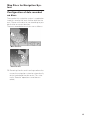
Configuration of data recorded
on discs
The map for this navigation system is supplied on
two discs: one for the west and the other for the
east. Please set the disc to use according to your
destination or current location.
The areas recorded on each disc are as follows:
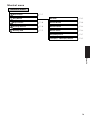
West area disc
East area disc
❒ Removing the disc and inserting another disc
causes the navigation system to automatically
restart and reload the new route. (This automatic “Reroute” operation cannot be canceled.)
15
16
Chapter 1
Basic Operation
❒ You can press the TALK (or VOICE) button of the steering remote control to proceed instead of touching “OK”.
❒ Touch keys which are not available at this
time are grayed out.
❒ Be sure to touch the touch keys with a finger. Touch keys cannot be operated by a
pen or similar object.
Flow from Startup to Termination
• If the program is not installed, see page 57
and install the program.
6
Searches the destination and gives route
guidance.
Start the engine.
After a little time, the navigation opening
screen comes on for a few seconds. Then, a
message screen is displayed.
❒ If the disc is not set, the message asking to
insert the disc appears. After you set the
disc correctly, your Navigation System
starts up.
2
Insert the Pioneer DVD map disc to the
disc loading slot.
3
Press the NAVI/AV button to switch the
Navigation map screen.
Pressing the NAVI/AV button switches
between the navigation map screen and the
audio screen.
4
Press the NAVI MENU button.
Displays the main menu.
Basic Operation
1
5
Chapter 1
At first, please confirm the positions of the following features using the navigation’s “Hardware
Manual”, “Operation Manual” and display’s
“Operation Manual”.
• Disc loading slot
• NAVI/AV button
• NAVI MENU button
➲ Specifying the address and searching the
destination ➞ Page 18
➲ Searching the destination by map ➞
Page 27
➲ Other search methods ➞ Page 29 to 32
7
Turn off the vehicle engine.
This Navigation System is also turned off.
❒ Until the vicinity of the destination is reached,
the set route will not be deleted automatically
even if the power is turned off.
Check the details of the cautionary message and touch “OK”.
You can operate the Navigation System by
touching keys displayed on the screen.
If the route is already set, it changes to route
guidance mode. The map of your surroundings is displayed.
➲ How to read the current position screen ➞
Page 24
➲ Setting the time ➞ Page 58
➲ Starting the operation with voice commands only ➞ Page 51
17
Basic Navigation
The most frequently used function is the Address
Search, in which the address is specified and the
destination searched. This section describes how
to use the Address Search and the basics of
using the Navigation System.
Basic Operation
Chapter 1
• For safety reasons, you cannot use these
basic navigation functions while your
vehicle is in motion. To enable these functions, you must stop in a safe place and
apply the parking brake.
18
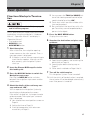
Basic flow of operation
1
Park your vehicle in a safe place, and
apply the parking brake.
2
Insert the Pioneer DVD map disc to
the disc loading slot.
3
Press the NAVI MENU button to display the Main menu.
4
Select “Destination” from the Main
menu.
5
Select the method of searching for
your destination.
6
Enter the information about your destination.
7
Your Navigation System sets the route
to your destination, and the map of
your surroundings appears.
8
After releasing the parking brake,
drive in accordance with the navigation information, subject of course to
the important safety instructions
noted on page 10 to 12.
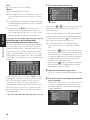
1
Press the NAVI MENU button to display
the main menu.
2
Touch “Address Search”.
Selects the method for searching the destination.
Touch “Zone code key”.
If the destination is in another zone, this
changes the zone setting.
❒ Once the zone has been selected, you only
have to change zones when your destination is outside of the zone you have
selected.
6
Input the street name.
Touch the letter you wish to input. If the next
screen is not automatically displayed even
though the street name is entered, try touching “OK”.
Zone code key
The input text.
The number of applicable candidates.
4
5
Touch the zone code of the destination
and touch “OK”.
Modifies the zone setting and returns you to
the previous display.
Input the house number and touch “OK”.
Touch the characters you wish to input.
“City” :
Touch if you wish to first specify the destination
city or area.
:
The input text is deleted letter by letter for the end
of the text. Continuing to press deletes all of the
text.
“Sym.” :
You can input text with marks such as “&”and
“+”.
19
Basic Operation
3
Return Home ➞ Page 31
Go to ➞ Page 31
POI Search ➞ Page 29
Vicinity Search ➞ Page 30
Address Book ➞ Page 32
Destination History ➞ Page 32
Freeway Search ➞ Page 31
Telephone Search ➞ Page 31
Cancel Route ➞ Page 36
Chapter 1
➲
➲
➲
➲
➲
➲
➲
➲
➲
:
The input text is deleted letter by letter from
the end of the text. Continuing to press
deletes all of the text.
“Back” :
Returns you to previous screen.
❒ Also input a prefix to the house number.
❒ If the house number you have input is not
found among subsequently selected
“Street” or “City” data, a message
appears saying that the address has not
been found. In that case, try inputting the
house number again.
❒ Touching “OK” with no input allows you to
specify and search a street name or the
name of the city or area first.
“0-9” :
You can input text with numbers.
“Back” :
Returns you to previous screen.
7
Touch the street from the list.
❒ For example, for “Early California Ct”, you can
just enter part of the name, such as “California”.
Basic Operation
Chapter 1
❒ While entering characters, if there is only one
candidate following the next, that is automatically entered.
❒ When touching “Back” on the text input
screen to return to the previous screen, you
may not be able to input text. In such a case,
delete the letters entered in the text box.
Searching your destination after
specifying the name of city or area
You can narrow down the searching candidates
by initially specifying the name of city or area
where your destination is located. Inputting the
name of the city or area then selecting the destination city or area from the list returns you to the
Street Name input screen. Now input the street
name, select the street from the list, and proceed
to step 9.
In the selected area, if you touch “City” without
entering the name of city or area, you can check
the list of the cities or areas, which you have
searched in the past. (This item cannot be
selected when searching by the name of city or
area for the first time with this system or when
you have selected an area that you have never
searched before.)
20
Scroll bar
Touching the or on the scroll bar scrolls you
through the list and allows you to view the
remaining items.
➲ Searching the destination by map ➞ Page 27
In the case of an item that cannot be displayed in
a single line, touching the
to the right of the
item allows you to see the whole line.
❒ If only one location is found from the list,
route calculation starts after pressing the
item.
• Touching the
specifies the selected street
and streets intersecting it, allowing you to set
an intersection as your destination. This is useful when you don’t know the house number of
your destination or cannot input the house
number of the specified street.
• Touching the
displays a map of the place
you have selected. (Candidate place names
may appear in the list screen.)
8
Input the destination city or area.
If the list screen is displayed, proceed to step
9.
9
Touch the city or area where your destination is located.
Route calculation starts. When the route calculation is completed, the map of your surroundings appears. (The route is displayed in
highlighted color.)
❒ If the selected street is very long and
passes through several cities or areas, the
screen for entering the name of the city or
area appears.
If you did not input the house number in Step 5,
the house number input screen comes up after
the “Street” and “City” are determined. You
should now input the house number (perform
Step 5).
❒ If you deviate from the route with the Guidance set to Route View or Guide View and
enter a street not recorded on the disc, the
screen changes to Map View. When you
return to the route, the screen returns to the
original mode and resumes route guidance.
❒ If you stop at a gas station or a restaurant during the route guidance, your Navigation System remembers your destination and route
Information. When you start the engine and
get back on the road, the route guidance
resumes.
Buttons you can use
10Drive in accordance with the screen and
voice information.
Your Navigation System gives you the following information with the timing adjusted to
the speed of your vehicle:
• Distance to the next turning point
• Direction of travel
• Road number of the freeway
• Way point (If this is set)
• Your destination
➲ How to view the screen ➞ Page 23
➲ Searching for another route ➞ Page 35
➲ Canceling route guidance ➞ Page 36
The status of the buttons appearing on the
screen is indicated by their color.
Depending on the function the navigation is performing, you can touch some buttons, while
other buttons are not available.
Blue touch key:
The button is operable.
Dark gray touch key:
The function is not available (e.g., operation is
prohibited while driving).
Light gray touch key:
The function is not available for areas not stored
on the disc.
Touching this button activates a message indicating that the function is not available.
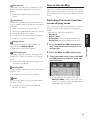
How to Use Menu Screens
The basic operation of the navigation is performed by using menus.
There are two types of menu: the “Main menu”
and the “Shortcut menu”.
Main menu
You use this menu for basic operation of your
Navigation System.
21
Basic Operation
❒ You can also see the destination on the
map by touching the
to the right of the
list.
➲ Searching the destination by map ➞
Page 27
❒ If you press the NAVI (or POS) button
during route calculation, the calculation is
canceled and the map display appears.
❒ When performing a destination search
with the route already set, select whether
to regard the specified area as your destination and search for a new route, or
search for a route via that area.
➲ Adding way points to the route ➞ Page 36
➲ Once searched for, a location is automatically stored in the “Destination History”
➞ Page 40
Chapter 1
❒ If there is more than one place for the house
number input, or if there is no such house
number in that place, displays a list of a certain range. To start the route calculation,
touch the range within the list you wish to
specify as the destination.
❒ Touching the
or pressing the remote
control‘s GUIDE button allows you to hear
the information again.
1
With the map displayed, press the NAVI
MENU button.
2
To change to the menu you want to use,
touch the name of the menu displayed at
the top of the screen.
The main menu is divided into four: “Destination”, “Information”, “Route Options”, and
“Settings”.
3
If you want to return to the map, press the
NAVI (or POS) (or NAVI MENU) button.
Route Options menu
Used to specify the conditions for setting the
route to the destination.
➲ Setting the Route Options ➞ Page 32
Settings menu
Basic Operation
Chapter 1
Destination menu
Select the destination search method. Also the
set route can be canceled from this menu.
Set the navigation functions so they can be used
easily.
➲ Specifying the address and searching the destination ➞ Page 18
➲ Settings menu ➞ Chapter 4
➲ Searching the destination by map ➞ Page 27
➲ Other search methods ➞ Page 29 to 32
Information menu
❒ If the contents of the menu are not fully displayed on the screen, touch “Next” to view
the remaining contents.
Shortcut menu
Shortcuts allow you to perform various tasks,
such as route calculation for the location indicated by the cross pointer, or registering a location in the Address Book, faster than using the
Main menu.
Used to check the route you set or check the navigation status.
❒ You can use “Route Profile” and “Route
Scroll” only when a route has been entered.
➲ Checking the set route ➞ Page 34
➲ Checking the navigation status ➞ Page 47
➲ Using a PC card ➞ Page 44
22
1
When the map is displayed, briefly touch
any part of the map.
If you continue to touch the map, it will start
scrolling.
➲ Moving the map to view the part you want
to see ➞ Page 26
:Destination
Displayed when the map is scrolled. Set the
route to the place specified with the cross
pointer.
➲ Searching the destination by map ➞
Page 27
How to Use the Map
:Chg.Route
Can be selected only during route guidance.
You can add changes to the route in the route
guidance.
➲ Searching another route ➞ Page 35
➲ Detour for a specified distance ➞ Page 35
➲ Checking the route ➞ Page 34
➲ Canceling the route guidance ➞ Page 36
➲ Skipping a way point ➞ Page 37
Switching the current position
screen display mode
1
Press the NAVI (or POS) button to display a map of the area around your current position.
2
Press the NAVI (or POS) button again.
3
Touch the mode name or press the NAVI
(or POS) button to select the mode you
want to display.
:Overlay POI
Displays on the map the mark for surrounding
facilities (POI).
➲ Viewing POI information ➞ Page 26
:Note
You can check details of the item pointed by
the scroll cursor.
➲ Viewing the information of a specified
location ➞ Page 26
❒ If the mode is selected by pressing the
NAVI (or POS) button, the screen automatically switches to the selected map display mode after 4 seconds.
23
Basic Operation
:Vicinity Search
You select a location with the cross pointer.
Nearby POIs (Points Of Interest) will also be
found.
➲ Searching the facilities surrounding a certain place ➞ Page 30
This section describes how to display the current
position screen and change the map display
mode.
There are four types of map display.
• Map View
• Driver’s View
• Guide View (during route guidance only)
• Route View (during route guidance only)
Chapter 1
:Registration
Registering the location indicated by the
cross pointer to Address Book.
➲ Registering a place ➞ Page 40
Most of the information provided by your Navigation System can be seen on the map. You need to
get to know how the information appears on the
map.
How to view the map of the current location
• In Driver’s View, a small gauge with no
scale is depicted, but is not intended to be
used as a speedometer. Use the actual
speedometer of your vehicle to confirm
speed.
Route View
Displays the name of the street you will next
travel along and an arrow indicating the direction
of travel.
Normal condition
(2) (10) (9)
(1)
(7)
(6)
(12)
(14)
(3)
(4)
Map View
Displays standard map.
Basic Operation
Chapter 1
(9)
(2)
(1)
(8)
(7) (6)
(5)
(15) (11)
When approaching an intersection
(When “Close-up of Junction” is off)
(3)
(14)
(16)
(15)
(4)
(8)
(5)
(13)
(10)
Driver’s View
The map from the driver’s viewpoint is shown.
(1)
(9)
(7)
(4)
(10)
(12)
(6)
Enlarged map of the intersection
(14)
(2)
(4)
(12)
(3)
(8)
(5)
When “Close-up of Junction” in the Settings
menu is “On”, an enlarged map of the junction
appears. If driving on freeway, the special guide
illustration is displayed.
➲ Changing the close-up of junction setting ➞
Page 50
(10)(15)(11)
(13)
Guide View
The map of your surroundings is shown on the
left, and an arrow indicating the direction of
travel is shown on the right.
(1)
(7) (14)
(9)
(16)
(3)
(15)
(12)
❒ When set to Driver’s View, the system cannot be changed to an enlarged intersection
map.
(8) (4)
24
(6)
(5)
(10)
(2)
❒ When the city map is displayed, you cannot
switch to an enlarged map of the junction.
City Map
In certain metropolitan city areas, a more
detailed “City Map” is available at the 0.05 mi (50
m) map scale or lower (only those cities whose
detailed city maps are registered in the map
disc).
(9)
(2)
(1)
(7) (6)
(3)
➲ The voice operation of the navigation system
➞ Chapter 5
(9) Current time
(10) Estimated time of arrival (or travel time
to your destination)*
The display changes with each touch.
The estimated time of arrival is automatically calculated from the Average Speed set and the
actual average speed.
➲ How to set average speed ➞ Page 49
(11) Tracking mark
The tracking mark shows the route your vehicle
has traveled.
(4)
(5)
(10)
Display items
(12) Map of your surroundings (Side map)
(13) Distance to an intersection*
Displayed on the enlarged intersection map. The
green bar gets shorter as your vehicle
approaches an intersection.
Destination*
The checkered flag indicates your destination.
(14) Next direction of travel*
When you approach an intersection, it appears
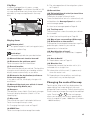
green.
(1) Name of the next street to be used*
(15) Area to Avoid*
(2) Distance to the guidance point*
Touch to access the next information.
(3) Current location
The current location of your vehicle. The tip of the
triangular mark indicates your heading and the
display moves automatically as you drive.
(4) Distance to the destination (or distance
to the next way point)*
If way points are set, the display changes with
each touch.
(5) Name of the street your vehicle is traveling along (or City Name, etc.)
(6) Compass
The red arrow shows North. Each touch changes
the map’s display direction. (North is UP or
Heading Up.)
(7) Map scale
The scale of the map is indicated at distance.
Touch to change the map’s scale.
➲ About detour area ➞ Page 43
(16) Direction line
The direction towards the location set in (4) is
indicated with a straight line.
❒ Information with the mark (*) appears only
when the route is set.
❒ Depending on the conditions and settings,
some items may not be displayed.
Changing the scale of the map
Touching the “Map scale” key displayed on the
upper right of the screen displays the scale
gauge and Direct scale key. Directly touching the
Direct scale key changes the map to the selected
scale. Touching
or
on the scale gauge
allows you to specify the scale in greater detail
within a range of 25 yards - 1000 miles (25 meters
- 2000 kilometers).
➲ Changing the map’s scale ➞ Page 25
(8) VOICE icon
Touch to change to voice recognition mode.
25
Basic Operation
Guidance point*
The next guidance point (next turning point, etc.)
is shown by a yellow flag.
➲ Select the tracking setting ➞ Page 50
Chapter 1
(8)
❒ In the vicinity of the scroll cursor the road
appears light blue. (The case of a map scale of
0.25 mile (200 m) or lower.)
(2) Direction line
The direction towards the scroll cursor is indicated with a straight line.
Direct scale key
❒ The icon of a registered location is indicated
when the map scale is 10 miles (20 km) or
lower.
Basic Operation
Chapter 1
❒ POI icon is indicated when the map scale is
0.75 mile (1 km) or lower.
❒ The Direct scale key may not appear depending on the map display mode.
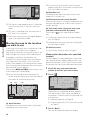
Moving the map to the location
you want to see
If you touch the map of your surroundings (Side
map) briefly, the shortcut menu appears.
Touching anywhere on the map for at least 2 seconds changes the map to Scroll mode and the
map begins scrolling in the direction you
touched. The scrolling stops when you release
your finger from the screen. At this time, the
scroll cursor appears at the center of the screen.
Also a line connecting between the current location and scroll cursor appears.
Pressing the NAVI (or POS) button returns you
to the map of your surroundings.
❒ Touch the area close to the center of the
screen to scroll slowly; touch near the sides of
the screen to scroll through quickly.
(3)
(2)
(3) Distance from the current location
Shows the distance in a straight line between the
location indicated by the scroll cursor and your
current location.
(4) The street name, city name, area name
and other information for this place.
Touching the
on the right displays hidden
text.
➲ Displaying information on the specified location ➞ Page 26
❒ According to the map scale, items displayed
on the map may differ.
(5) Shortcut menu
➲ How to view shortcut menu ➞ Page 22
Viewing the information of a specified
location
An icon appears at registered places (home location, specific places, address book entries) and
places where there is a POI icon. Place the scroll
cursor over the icon to view detailed information.
1
Scroll the map and move the cross
pointer to the icon you want to view.
2
Touch
(1)
Information for a specified location appears.
The information shown varies according to
the location. (There may be no information for
that location.)
➲ Registering places ➞ Page 39
➲ Displaying facilities (POI) mark on the map
➞ Page 37
(5)
(4)
(1) Scroll location
The position of scroll cursor shows the location
selected on the current map.
26
.
3
Touch “Back”.
You are returned to the previous display.
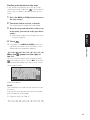
Finding a destination on the map
If you search the location you want to visit by
scrolling the map, and touch
in the Shortcut
menu, you can specify your destination on the
map.
Press the NAVI (or POS) button to access
the map screen.
2
Touch the map for at least 2 seconds.
The map display changes to Scroll mode.
3
Scroll the map and move the scroll cursor
to the place you want to make your destination.
➲ Moving the map to view the part you want
to see ➞ Page 26
4
Touch
Chapter 1
1
.
When the
the list
Basic Operation
❒ If you press the NAVI (or POS) button during route calculation, the calculation is canceled and the map display appears.
appears on the right of
You can also set a destination by touching the
to the right of the list. Touch “OK” to confirm.
The location pointed by the scroll cursor will be
set as a destination.
Alternative option:
Scroll :
The map display changes to the map with Shortcut menu.
If you touch anywhere on the map, the map display changes to Scroll mode.
➲ Shortcut menu ➞ Page 22
27
28
Basic Operation
Chapter 1
Chapter 2
Setting a Route to Your Destination
• For safety reasons, these route-setting
functions are not available while your
vehicle is in motion. To enable these functions, you must stop in a safe place and
put on the parking brake before setting
your route.
1
Touch “Destination” in the Main menu,
and then touch “POI Search”.
2
Touch the zone code key of the destination and touch “OK”.
➲ Selecting the zone where you want to
search ➞ Page 19
3
Touch “Category”.
Category
Chapter 2
❒ Some information on traffic regulations by
days or time depends on the time when the
route calculation is performed. Thus, the
information may not correspond with a certain traffic regulation when your vehicle actually passes the location. Also, the information
on the traffic regulations provided will be for a
passenger vehicle, and not for a truck/lorry or
other delivery vehicles. Always follow the
actual traffic regulations while driving.
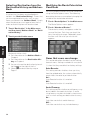
Searching for Points of Interest
(POI)
“Name” :
Touch this item if you want to specify the POI
Name at first.
“City” :
Touch this item if you want to specify the destination city or area at first.
Finding Your Destination by
Selecting the Type of Facility
Information about various facilities (Points Of
Interest - POI), such as gas stations, amusement
parks or restaurants is available. By selecting the
category (or entering the POI Name), you can
search for a Point Of Interest.
4
Touch the desired category.
POI’s are divided into several categories.
❒ You can also narrow down the search range
by initially specifying the name of the city or
area where your destination is located.
If the category is not sub-divided into more
detailed categories, the list will not be displayed. Proceed to Step 6.
29
Setting a Route to Your Destination
❒ If you press the NAVI (or POS) button during route calculation, the calculation is canceled and the map display appears.
Chapter 2
Setting a Route to Your Destination
5
Touch the subcategory.
6
Input the name of the POI.
If the list does not automatically appear when
the name of the POI has been entered, try
touching “OK”.
“City” :
First, touch to specify the destination city or
area.
7
Touch POI for your destination.
❒ Touching the
displays a map of the
surroundings of the selected POI.
➲ Searching the destination by map ➞
Page 27
❒ If the selected POI is the name of a chain
of outlets and consequently the same
store name applies to different locations
(the number of outlets appears next to the
chain’s name), touch the name of the POI
to display a list of those POIs and touch
the particular POI that is your destination.
Set:
Display the screen for creating POI shortcut.
➲ Create POI shortcut ➞ Page 38
❒ If you touch one of the POI shortcuts (e.g.
), you can start searching POI directly
by selected category on the POI shortcut.
❒ If you want to search with more detailed
categories, touch
. When the subcategory list appears, touch the items you want
to search and touch “Back”. When only a
few types of the detailed categories are
selected, blue check marks will appear.
❒ You can select the detail category for up to
100 items.
3
Touch POI.
Names of POIs and their distance from your
current location appear. They are listed in
nearest-to-furthest order. To the left of each
item is an icon indicating the category.
Finding a POI in your surroundings
You can search for Points Of Interest in your surroundings on the map. Use it to find a POI to visit
during a journey.
1
Touch “Destination” in the Main menu,
and then touch “Vicinity Search”.
The list of Points Of Interest categories
appears.
2
Touch the desired category.
The selected category will have a red check
mark.
Distance to the facility
❒ When you touch
, the POIs around the
specified location are shown on a map.
➲ Searching the destination by map ➞
Page 27
❒ Searching range is approximately 10 miles
(16 km) square from the current location.
❒ When some sub-categories are selected,
the corresponding category is marked
blue. When all the sub-categories within a
category are selected, that category is
marked red.
Category
Searching the facilities around
the scroll cursor
OK:
Starts searching
Back:
Returns to the previous screen
30
1
Scroll the map and move the scroll cursor
to the place you want to search POI.
2
Touch
.
See Step 2 of “Finding a POI in your surroundings” for the following operations.
➲ Finding a POI in your surroundings ➞
Page 30
❒ The distance indicated in the list of the
search result is the distance from the
scroll cursor to the facility.
❒ “Vicinity Search” in the Main menu
searches your surroundings. On the other
hand, in the case of
in the Shortcut
menu (➞ Page 23), the area around the
scroll cursor will be searched.
Setting an Entrance or Exit of a
Freeway as Your Destination
Searching for Your Destination
by Specifying the Telephone
Number
If you know the telephone number of your destination, you can quickly search for your destination by specifying the telephone number.
Touch “Destination” in the Main menu,
and then touch “Telephone Search”.
The telephone number entry screen appears.
2
Input a telephone number.
❒ If there is more than one place for the
number input, a list of those places is displayed. Touch the item you want in the list
and proceed to step 3.
3
If the displayed place is satisfactory,
touch “OK”.
Touching “Scroll” changes the destination.
➲ Searching the destination by map ➞
Page 27
You can set the entrance or exit of a freeway as
your destination.
1
Touch “Destination” in the Main menu,
and then touch “Freeway Search”.
The display for entering the name of the freeway appears.
2
Touch the zone code key of the destination and touch “OK”.
Enter the name of the freeway and touch
“OK”.
The list of freeways matching the name
appears.
4
Touch the freeway.
The display for selecting your destination to
the entrance or to the exit of the freeway
appears.
5
Touch “Entrance” or “Exit”.
The list of entrances to, or exits from, the
selected freeway appears.
6
Touch your destination.
❒ You can also see the destination by touching the
on the right of the list.
➲ Searching the destination by map ➞
Page 27
If your home location is registered, the route
home can be calculated by a single touch of the
touch key from the Main menu. Also, you can
register one location, such as your workplace, as
your favorite location, and the route is calculated
in a similar way.
1
Touch “Destination” in the Main menu,
and then touch “Return Home” or “Go to”.
➲ “Registering your home and your favorite location” ➞ Page 39
31
Setting a Route to Your Destination
3
Route Calculation to Your Home
Location or to Your Favorite
Location
Chapter 2
1
Selecting Destination from the
Destination History and Address
Book
Any place that has been searched before is
stored in the “Destination History”. Places that
you have registered manually, such as your
home, are stored in the “Address Book”. Simply
select the place you want to go to from the list
and a route to that place will be calculated.
Touch “Destination” in the Main menu,
and then touch “Address Book” or “Destination History”.
2
Touch your destination name.
Chapter 2
1
Setting a Route to Your Destination
Route calculation starts.
➲ For information on the Address Book ➞
Chapter 3
➲ For information on the Destination History ➞ Chapter 3
❒ You can also see the destination by touching the
on the right of the list.
➲ Searching the destination by map ➞
Page 27
Modifying the Route Calculation
Conditions
You can change the route calculation conditions
using the Route Options menu. The following
description features an example of changing the
number of the route to be searched.
1
Touch “Route Options” in the Main menu.
The Route Options menu appears.
2
Touch “Number of Routes”.
The content currently set appears under the
name of the item. Each time you touch the
item, the setting changes. Repeatedly touch
the item until the value you want to set
appears.
Items that users can change
This section describes the details of the setting
for each menu. Settings marked with an asterisk
(*) show that they are default or factory settings.
Auto Reroute
This setting controls whether, when you stray
from the guided route, the system automatically
recalculates the route to your destination.
On* :
Auto Reroute function is turned on.
Off :
Auto Reroute function is turned off.
Avoid Freeway
This setting controls whether or not freeways may
be included in the road calculation. (A route
using freeway may be calculated in some cases,
such as when setting your destination far away.)
On :
Calculate a route that avoids freeways.
Off* :
Calculate a route that may include freeways.
32
Avoid Ferry
This setting controls whether or not ferry crossings should be taken into account.
On :
Calculate a route that avoids ferries.
Off* :
Calculate a route that may include ferries.
❒ The system may calculate a route that
includes ferries even if “On” is selected.
Perform the route calculation of
the several route options, and
select one
You can get route calculations of several route
options. After route options are calculated, select
the one you want.
1
Set the “Number of Routes” to “Multiple”.
➲ Changing the search conditions ➞
Page 32
2
Search your destination and set the route.
Calculated routes are shown in different colors (from two to six routes).
3
Touch “Next” to change the displayed
route.
Route Condition
This setting controls whether the faster or the
shorter route should be calculated.
Fastest* :
Calculate a route with the shortest travel time to
your destination as a priority.
Shortest :
Calculate a route with the shortest distance to
your destination as a priority.
Chapter 2
Number of Routes
➲ Calculate several route options ➞ Page 33
Avoid Toll Road
This setting controls whether or not toll roads
(including toll areas) should be taken into
account.
On :
Calculate a route that avoids toll roads (including
toll areas).
Off* :
Calculate a route that may include toll roads
(including toll areas).
❒ The system may calculate a route that
includes toll road even if “On” is selected.
Designate Areas to Avoid
➲ About Areas to Avoid ➞ Page 43
(1)
(3) (2)
The following information is displayed on this
screen:
(1)Route calculation condition
Displaying the conditions set by the Route
Options menu by icon.
• Use/avoid freeway
• Use/avoid toll road
• Use/avoid ferry
Displaying impracticability of fulfilling the
conditions by icon.
• Pass through Area to Avoid
• Use toll road against the setting “Avoid
Toll Road” is “On”.
• Use Ferry against the setting “Avoid
Ferry” is “On”.
(2)Distance to your destination
(3)Travel time to your destination
❒ You can see other places while displaying
a candidate route by scrolling the map.
Touching “Next” moves the next candidate route to the center and indicates the
map.
33
Setting a Route to Your Destination
This setting controls whether the system should
calculate only one route, or several routes.
1*:
Only one route judged as being optimum by your
Navigation System is calculated.
Multiple :
Several route options are calculated (maximum 6
routes).
4
Setting a Route to Your Destination
Chapter 2
5
Touch “Information” to check the information on the selected route.
You can also check details of the roads along
the selected route. (If you touch “Back”, you
can return to the previous display.)
➲ “Route Scroll” ➞ Page 34 (Step 3 and 4)
➲ “Route Profile” ➞ Page 34 (Step 3 and 4)
❒ After the route is calculated, it may take
some time until the detailed route information (Route Profile) can be confirmed.
Touch “OK”.
The route you selected is accepted, and the
map of your surroundings appears. When you
start driving, the route guidance begins.
❒ If the above operations are not performed
within 30 seconds after the route calculation is completed and you have already
started your vehicle, the route selected at
the time is automatically chosen.
4
(1)
5
You can check information about the route
between your current location and your destination.
You can select two methods: checking the passing streets with a list; and checking the shape of
the route by scrolling the map along the route.
Checking the set route with the
map
Touch the map screen.
The Shortcut menu appears.
2
Touch
.
The Route/Detour menu appears.
3
Touch “Route Scroll”.
The screen to select the point to start scrolling
appears.
(3)
(2)
You can select the following items:
(1) Starting Point
(2) Way Point (If this is set)
(3) Destination
❒ If you have selected “Way Point”, a list of
the way points on the route is displayed.
Touch the place you want to start scrolling
from and proceed to step 5.
Checking the Set Route
1
Touch the point to start scrolling.
Touch
or
to scroll the
map.
To continue scrolling after you release your
finger, touch and hold
or
.
If necessary, the scale of the map can be
changed.
Current route
Scroll cursor
You can select the following items:
Map :
The scroll screen is displayed.
➲ Searching the destination by map ➞
Page 27
6
Touch “Back”.
You can return to the previous display.
Checking the set route with text
❒ This function is not available if your vehicle
has deviated from the set route.
34
1
Touch the map screen.
The Shortcut menu appears.
2
Touch
.
The Route/Detour menu appears.
3
Touch “Route Profile”.
4
Check the contents on the display.
As necessary, scroll the list.
Name of the streets you are driving through
Driving distance
5
Checking the set route from the
Information menu
1
After touching “Information” in the main
menu, touch “Route Profile” or “Route
Scroll”.
2
Check the contents on the display.
➲ “Route Scroll” ➞ Page 34 (Step 3 and 4)
➲ “Route Profile” ➞ Page 34 (Step 3 and 4)
3
Touch “Back”.
You can return to the previous display.
1
Touch the map screen.
The Shortcut menu appears.
2
Touch
.
The Route/Detour menu appears.
3
Touch “Reroute” or the distance from the
list.
After the route is calculated, the map screen
shows your surroundings and route guidance
is resumed.
On this display, you can select the following
items:
Reroute :
The route from the current position to your
destination is recalculated.
The distance of the detour
(1-50 mile/km) :
Searches detours of a specified distance in
the route ahead of your current position.
➲ For details of switching the display between
“mile” (miles) and “km”. “KM/Mile Setting”
➞ Page 51
35
Setting a Route to Your Destination
You can also check the information about the set
route from the Information menu.
You can set the length of the area, and avoid just
that area, or you can even search a new route
from the current location to your destination. (On
the map screen during route guidance, try the following operations.)
Chapter 2
Touch “Back”.
You can return to the previous display.
❒ When a long distance route is calculated,
your Navigation System may not be able to
list all the roads. (In this case, the remaining roads will be shown in the list as you
drive on.)
Recalculating the Route to Your
Destination
Canceling the Route Guidance
If you no longer need to travel to your destination
or if you want to change your destination, follow
the steps below to cancel the route guidance.
1
2
➲ Specifying the address and searching the destination ➞ Page 18
➲ Searching the destination by map ➞ Page 27
➲ Other search methods ➞ Page 29 to 32
2
Touch “Way Point”.
3
Confirm the contents of the list, and touch
“Done”.
Touch “Yes (all)”.
The current route is deleted, and a map of
your surroundings reappears.
On this screen, you can also select the following items:
Yes (one) :
Route is recalculated by canceling the
selected way point.
No :
Returns to the previous display without deleting the route.
❒ You can also cancel the route by selecting
“Cancel Route” in the Route/Detour
menu. (To display the Route/Detour menu,
select
in the Shortcut menu.)
Chapter 2
Setting a Route to Your Destination
Touch “Destination” in the Main menu,
then touch “Cancel Route”.
The message confirming whether to cancel
the current route appears.
At completion of the location search, a message is displayed asking whether or not to set
that specified location as the destination, or
as a pass-through location.
Route calculation with the specified location
as a way point starts when you touch “Done”.
On this display, you can select the following
items:
Add :
Switch the display to search for points. After
searching, add that point as a way point by
touching “OK”.
➲ Specifying the address and searching the destination ➞ Page 18
➲ Searching the destination by map ➞ Page 27
➲ Other search methods ➞ Page 29 to 32
Adding Way Points to the Current Route
You can select way points (locations you want to
visit on the way to your destination) and you can
recalculate the route to pass through these locations.
Adding a way point
You can add up to five way points. This is
achieved as follows :
1
36
Specify the location you want to visit.
Specify a way point in the same way as specifying a destination.
Delete :
You can delete way points from the list.
Sort :
You can sort your destination and way points.
The system will put the nearest point (distance in a straight line) from the current location to way point 1, and sort the other points
(including your destination) in the nearest
order from previous way point.
Original :
You can return the way points and destination
to their original order.
❒ If you set a way point(s) in the route to your
destination, the route up to the next way point
will appear light green. The rest of the route
will be light blue.
Skipping a way point
If the points are set, the next way point along the
route can be skipped.
1
Touch the map screen.
The Shortcut menu appears.
2
Touch
.
The Route/Detour menu appears.
3
Touch “Skip Way Point”.
A message asking whether you want to skip
the next way point appears.
4
Displaying certain POI on the
map
Selected POI in a certain category can be shown
on the map, and you can check the location on
the display.
2
Touch .
The list of POI categories appears.
3
Touch the category you want to display.
The selected item is marked. If you want to
select other categories, repeat this step.
❒ If you want to display with more detailed
categories, touch
. When the subcategory list appears, touch the item you want
to display and touch “Back”.
❒ You can select the detail category up to
100 items.
❒ If you touch one of the POI shortcuts (e.g.
), you can display POI immediately by
selected category on the POI shortcut.
4
Touch “Back”.
POI’s in the selected category appear on the
map.
➲ Searching the destination by map ➞
Page 27
➲ Viewing the information of POI ➞ Page 26
❒ When some sub-categories are selected,
the corresponding category is marked
blue. When all the sub-categories within a
category are selected, that category is
marked red.
❒ You can also display POI by touching
“Information” in the main menu, and
then touching “Overlay POI”.
Touch “Yes”.
A new route to your destination through all
the remaining way points, except for the
skipped way point, is calculated.
Deleting a way point from the
route
If you no longer need to pass through a way point
you have not yet reached, you can delete that
place from the list of way points and calculate a
new route.
1
Touch “Destination” in the Main menu,
then touch “Cancel Route”.
A message asking whether you want to cancel the route appears.
2
Touch “Yes (one)”.
3
Touch the way point you want to delete.
❒ If you want to delete other way points,
touch “Delete” and repeat Step 3 above.
4
Touch “Done”.
A new route to your destination via the
remaining way points is calculated.
❒ You can also cancel the route by selecting
“Cancel Route” in the Route/Detour
menu. (To display the Route/Detour menu,
select
in the Shortcut menu.)
37
Setting a Route to Your Destination
Touch any part of the map screen.
The Shortcut menu appears.
Chapter 2
1
Using POI shortcuts
5
Selecting POI shortcuts
You can select up to six shortcuts to your favorite
category for the searching points of interest
(POI).
As default setting, four icons are displayed:
Fast Food Chains, Restaurant Chains, Restaurant, and Groceries.
1
Setting a Route to Your Destination
Chapter 2
2
Touch “Destination” in the Main menu,
and then touch “Vicinity Search”.
Touch Back.
The selected category is added to the list of
POI.
❒ You can select a POI shortcut by touching
“Information” in the main menu and then
touching “Overlay POI”. The steps are the
same for both.
Use a registered shortcut to find POI
near your vehicle
1
Either touch “Vicinity Search” in the main
menu.
2
Touch the one of the POI shortcuts.
Touch “Set”.
POI shortcuts
POI shortcuts
Displays a list of already selected POI shortcuts.
3
Touch “Add”.
3
Touch POI.
See Step 3 of “Finding a POI in your surroundings” for the following options.
Deleting a POI shortcut
4
1
Touch “Destination” in the Main menu,
and then touch “Vicinity Search”.
Displays a POI category list.
2
Touch “Set”.
Touch the category you want to set.
The selected item is marked. If you want to
select other categories, repeat step 3 and 4.
3
Touch “Delete”.
Displays a list of already registered POI shortcuts.
4
Touch the shortcut to be deleted.
A red check appears next to the selected
shortcut.
5
Touch “Delete”.
Deletes the selected shortcut from the list.
❒ If you want to set more detailed categories,
touch
. When the subcategory list
appears, touch the item you want to add
and touch “Back”
38
Chapter 3
Editing the Navigation Utilities
• For safety reasons, these functions are not
available while your vehicle is in motion.
To enable these functions, you must stop
in a safe place and put on the parking
brake before setting your route.
1
Touch “Settings” in the Main menu, then
touch “Go to”.
When registering your home location, touch
“Return Home”.
Editing Registered Locations
The Address Book can store up to 300 registered locations. These can include home location, favorite place, and destinations you have
already registered. This registered location information can also be modified. Also, routes to registered locations can be calculated by touch
screen or voice. Registering places you visit frequently saves your time and effort.
Registering your home and your
favorite location
Of the 300 registered locations that can be
stored, home location and favorite location can
be stored separately in the Address Book. Registering your favorite location for the first time is
described here. You can change the registered
information later. You might find it useful to register your workplace or a relative’s home as your
favorite location.
Search for a location to register.
➲ Specifying the address and searching the
destination ➞ Page 18
➲ Searching the destination by map ➞
Page 27
➲ Other search methods ➞ Page 29 to 32
3
Point the scroll cursor to the location you
want to register and touch “OK”.
Completes the registration and returns to the
previous display.
➲ “Editing a location’s information” ➞
Page 40
Map icons:
:
Home location icon
:
Favorite location icon
39
Editing the Navigation Utilities
❒ The Address Book is automatically updated in
alphabetic order. However, “Return Home”
and “Go to” always appear at the top.
2
Chapter 3
❒ You can register up to 100 entries for voice
operation. Two out of those 100 entries are
allocated to the items that are registered to
“Return Home” and “Go to”.
You can select a method of location search on
the display.
❒ The items already registered under
“Return Home” or “Go to” can be modified.
Registering a previous location
in the Address Book
Once a destination or way point is searched, it is
automatically retained and stored in the Destination History. If a search is canceled while still
in progress, only the places where the map was
displayed and scrolled through or places where
the short-cut menu was displayed are retained
and stored. Note that after 100 places are stored,
new places are automatically overwritten on top
of old ones, in oldest to most recent order. Therefore, to ensure that certain places are kept and
not overwritten, be sure to register them in the
Address Book.
1
Touch “Destination” in the Main menu,
then touch “Destination History”.
2
Touch
on the right-hand side of the
place you want to register in the Address
Book.
In the Address Book menu, touching the
on
the right-hand side of the place displays the
Address Book Operate menu.
To edit the information about the location:
1
Touch “Destination” in the Main menu,
then touch “Address Book”.
2
Touch
on the right-hand side of the
place whose information you want to edit.
:
The information related to that place can be
edited.
:
The map of that place can be displayed.
➲ Searching the destination by map ➞
Page 27
Chapter 3
Editing the Navigation Utilities
Editing a location’s information
:
That place can be registered or deleted.
:
Displayed on the left-hand side of places that
can be searched by voice command.
3
Touch “Edit Information”.
:
The map of that place can be displayed.
➲ Searching the destination by map ➞
Page 27
3
Touch “Registration”.
Registration is now complete.
➲ “Editing a location’s information” ➞
Page 40
➲
in the Shortcut menu ➞ Page 23
The Address Information menu appears.
Refer to the item corresponding to the subsequent operation. After finishing the operation,
the Address Book menu appears. You can
continue to edit other information items if
necessary.
1
2
3
4
5
40
1. Name
The name can be used as a command for
voice operation.
2. Name (2nd line)
The name of the city appears in this column. (Not editable)
3. Phone number
You can search by registered telephone
number.
4. Pictograph
The symbol displayed on the map.
5. Sound
The selected operating sound is played.
Changing a name
1
Touch “Edit Name” and touch “Yes”.
The message confirming whether or not to
register the entered name as voice command
is displayed.
Alternative option :
No :
When not registering a name as a voice command, select “No”.
2
➲ You can also store locations in the Address
Book on a PC card ➞ Page 44
❒ You cannot change the name of your home.
❒ During voice operation, you can get a route
calculated by saying the registered name.
➲ Information on voice operation ➞ Chapter 5
Entering or changing a phone number
1
Touch “Edit Phone Number”.
2
Input a phone number; touch “OK”.
The Address Information menu appears.
❒ To change a registered phone number,
delete the existing number and then enter
a new one.
Selecting a pictograph to appear on the
map
1
Touch “Select Image”.
2
Touch the Pictograph to appear on the
map.
The Address Information menu appears.
❒ You cannot change the mark of your home
or of your favorite location.
Selecting sound
The details you set are registered, and the
Address Book menu appears.
Alternative options :
No :
Select to return to the display for entering
characters.
Repeat :
You can reconfirm the pronunciation of the
name you entered.
1
Touch “Select Sound”.
2
Select the sound.
The Address Information menu appears.
If you want to hear the operating sound, touch
.
41
Editing the Navigation Utilities
If the pronunciation is correct, touch
“Yes”.
❒ If the number of items to be used in voice
operation exceeds 100, a list appears on the
display. Select an item from the list and overwrite it.
Chapter 3
3
Enter a new name; touch “OK”.
The name of the current location appears in
the text box. Delete the current name, and
enter a new name between 6 and 23 characters long. (If you selected “No” in Step 1, you
can enter a new name between 1 and 23 characters long.)
❒ When you select “Yes”,
is shown on the
left side of the location name displayed in the
Address Book menu. This mark indicates that
this name can be used as a voice command
during voice operation.
Deleting Address Book or Destination History Information
Items registered in the Address Book or Destination History can be deleted. All entries of the
data in the Address Book or Destination History can be deleted at once.
1
Touch “Destination” in the Main menu,
then touch “Address Book”.
To delete items in the Destination History,
touch “Destination History”.
2
Touch
on the right-hand side of the
place you want to delete.
3
Select the deletion method.
Changing the position of locations registered in the Address
Book
You can select a location registered in the
Address Book, display a map of its surroundings, and change its position.
1
In the Address Book menu, touch
on
the right-hand side of the place whose
position you want to change.
2
Touch “Modify Location”.
The map of the selected area and its surroundings appears.
3
Touch the display to change its position,
then touch “OK”.
A message confirming deletion appears.
The position is changed.
Editing the Navigation Utilities
Chapter 3
Alternative options :
Delete This Item :
Delete the location selected in Step 2.
Delete All Address Book Entries (or
Delete All Destinations) :
Delete all the Address Book or Destination
History data.
4
Select “Yes”.
The data you selected is deleted.
Alternative option:
No :
The display shown in Step 3 appears.
❒ Because deleted data cannot be restored,
take extra care not to select “Delete All
Address Book Entries” by mistake.
42
Setting Areas to Avoid
5
Scroll the map, adjust the position of the
red frame, and touch “OK”.
If you register Areas to Avoid, such as crowded
intersections or congested areas, routes can be
calculated that avoid those areas. Areas to
Avoid can be set from the Route Options menu.
❒ An area not stored on the disc cannot be set
as an Area to Avoid.
Registering an Area to Avoid
This section describes how to register an Area to
Avoid for the first time. You can register up to five
Areas to Avoid.
If you want to stop registration, touch “Back”.
❒ Depending on the setting of route search conditions, you may not be able to avoid the specified areas. The confirmation message is
displayed on the screen at this time.
1
Touch “Route Options” in the Main menu,
then touch “Designate Areas to Avoid”.
➲ Information on route calculation conditions ➞
Page 33
2
Select one of the items shown in “New
Area”.
When registering for the first time, any item
on the list is shown as “New Area”.
Changing or deleting an Area to
Avoid
Once a search is complete, a map with the
specified location at its center appears.
4
Change the map scale and decide the size
of the Area to Avoid.
The Area to avoid is enclosed in a red frame.
You can also change the map scale though
the maximum map scale for registering Areas
to Avoid is 0.1 mile (100 m).
Touch “Route Options” in the Main menu,
then touch “Designate Areas to Avoid”.
2
Select the area you want to change or
delete.
3
Select the desired operation.
On this screen, you can select the following
options:
Rename :
Changes the name. Enter the new name and
touch “OK”. This returns you to the Route
Options menu.
Change :
A specified area can be changed. For the next
steps, see Step 3 in the “Registering an Area
to Avoid” above.
Delete :
Delete the selected Area to Avoid.
43
Editing the Navigation Utilities
Select the place to register and display
the map.
➲ Specifying the address and searching the
destination ➞ Page 18
➲ Searching the destination by map ➞
Page 27
➲ Other search methods ➞ Page 29 to 32
1
Chapter 3
3
You can subsequently change/rename/delete an
Area to Avoid.
Using a PC Card
You can store the following information on a PC
Card (sold separately):
• Locations registered manually such as your
home, your favorite location, or a location
whose information was edited (Registered
Locations)
• Background image when navigation or audio
is operated (Background Picture)
❒ The PC card is very useful for sharing the data
in the Address Book with friends or for storing the data as backup.
❒ If a PC card is not inserted in the navigation
system correctly, PC card functions are not
available.
Storing the data of registered
locations in the PC card
You can select any entry registered in the
Address Book and store the data on the PC
card. Data can be stored in groups. A new group
can be created.
❒ The volume of data you can register depends
on the capacity of the PC card.
1
Touch “Information” in the Main menu,
then touch “PC card” and “Save to PC
Card”.
2
Touch the desired item for storage.
Free space in the PC card
❒ For details of PC cards that support this system, refer to the following.
Editing the Navigation Utilities
Chapter 3
— If you are using “AVIC-9DVD”, refer to the
“Operation Manual”.
— If you are using models other than the
above, refer to the “Hardware Manual”.
Number of groups you can store
The selected entry is marked. To register other
locations, repeat this step.
Initializing a PC card
Before using a brand new PC card, you must initialize it.
1
2
Touch “Information” in the Main menu,
then touch “PC card” and “Initialize PC
Card”.
❒ Do not cut off the power supply for the navigation system (or turn the ignition switch
to ACC OFF) until initialization of the PC
card is complete.
Touch “Yes”.
If you want to cancel the initialization, touch
“No”.
Alternative option:
All :
All the locations are selected (or canceled) at
once.
3
After finishing the selection of locations,
touch “OK”.
4
Touch “New Group”.
❒ If the data is to be stored in a group
already registered in the PC card, select
the group name in the list.
5
After entering a group name, touch “OK” .
The data of the registered location is stored in
the entered group.
44
Loading registered locations
data from a PC card
Address Book data stored on a PC card can be
loaded to the Navigation System.
➲ “If a message about the PC card is displayed”
➞ Page 72
1
Touch “Information” in the Main menu,
then touch “PC card” and “Read from PC
Card”.
The list of groups appears.
2
Touch the desired group.
3
Touch the desired locations.
Selected locations are marked. To load the
data from other locations, repeat this step.
4
Touch “Yes”.
The specified location is deleted.
Changing Background Picture
In the menu operation screen, you can indicate a
picture you like on the background. Some pictures are already stored, but you can also use pictures (JPEG format data) created by a personal
computer or a digital camera. The following two
types of background pictures can be changed:
• AV Background : Background for the screen
during the operation of audio, or during playback.
• Navigation Background : Background of
navigation menu screen.
Several background pictures are stored in the
Pioneer DVD map disc.
Here, a method of changing background picture
is described with an example of loading the picture stored on a PC card to the navigation system
as the background picture.
❒ The “AV Background” cannot be used with
the AVD-W6210.
❒ When storing original pictures on a PC card,
create a folder named “BG” in a PC card, and
store the picture files in this folder. Up to 20
picture files can be used in the BG folder.
You can delete data for a specified location or a
whole group.
❒ When changing the background screen,
please change the settings so that the combined display also can display the navigation
system unit’s background.
1
❒ Only JPEG format (“.jpg” or “.JPG”) pictures
can be used as a background picture.
Deleting PC card data
Touch “Information” in the Main menu,
then touch “PC card” and “Delete PC
Card Data”.
2
Touch a group where the location you
want to delete is stored.
3
Touch a location you want to delete and
touch “OK”.
The selected location is marked. To delete
other locations, repeat this step.
❒ You can only use standard characters (alphabets of both cases: A-Z, a-z) and numbers (0-9)
for the file name of a background picture
(international (accented) characters cannot
be used).
❒ Pictures up to a maximum of 2048×1536 pixels can be used. We cannot guarantee a
proper operation for a picture bigger than this
size.
45
Editing the Navigation Utilities
Touch “OK”.
The data of the selected locations is stored in
the Address Book.
4
Chapter 3
Alternative option:
All :
All the locations are selected (or canceled) at
once.
Alternative option:
All :
Select (or cancel) all locations in a group.
❒ Progressive format JPEG pictures cannot be
used.
1
Insert a PC card into the PC card slot.
2
Touch “Settings” in the Main menu, then
touch “Background Picture Setting”.
The picture selected for each screen is indicated on the right side of “AV Background”
and “Navigation Background” items.
3
Editing the Navigation Utilities
Chapter 3
4
Touch “Navigation Background” or “AV
Background”.
Touch “Import from PC card”.
The list of the pictures stored in a PC card is
displayed.
On this screen, you can select the following
item:
Back to Original :
The picture when purchased is selected.
❒ In step 4, touching other than “Import
from PC card” allows you to select a
background image stored on the Pioneer
DVD map disc.
5
Touch a picture you want for the background.
6
Select how to display the picture.
You can select the following items:
Center :
Selected picture is displayed at the center of
the screen.
Repeat :
Selected picture is patterned, and displayed
as covering the whole screen.
❒ When selecting images already stored on
the Pioneer DVD map disc, you cannot
select the layout method for those images.
The background image starts changing. After
a short while, the new background image
appears.
46
7
Touch “Done”.
On this screen, you can select the following
items:
Select another Picture :
This is selected when you want to change to
another picture. Return to Step 5.
Change to another background :
Select if you want to successively change the
Audio Operating screen backgrounds or the
Navigation backgrounds. Return to step 3.
❒ When changing a picture starts, do not cut off
the power supply for the navigation system (or
turn the ignition switch to ACC OFF) until the
message informing the completion of changing a picture is indicated.
❒ When the Navigation System is reset, or the
language setting is changed, the background
picture may change back to the original picture. (There is also a possibility that the system will revert to the original picture for some
other reason.) If this happens, set the background picture again.
Checking the Navigation Status
To clear values...
The navigation status, including the driving status of a vehicle, positioning status by GPS satellite, learning status of the 3D sensor, and cable
connection status can be checked.
If you want to delete the learned results stored in
“Distance”, “Speed Pulse” or “Learning Status”, touch each item, then touch “Clear”.
Checking sensor learning status
and driving status
❒ The navigation system can automatically
detect outer dimensions of the tires. If tires
have been replaced, the navigation system
automatically detects it and begins learning
according to the new tires.
1
Touch “Information” in the Main menu,
then touch “3D Calibration”.
The 3D Calibration screen appears.
1
2
3
4
6
7
5
Check that leads are properly connected between
the navigation unit and the vehicle. Please also
check whether they are connected in the correct
positions.
1
Touch “Information” in the Main menu,
then touch “Connection Status”.
The Connection Status screen appears. The
reception status of the signal and the connection status of each cable are shown.
1. Speed Pulse
The Speed Pulse value detected by the navigation system is shown. “0” is shown while
the vehicle is stationary.
2. GPS Antenna
Indicates the connection status of the GPS
antenna, the reception sensitivity, and from
how many satellites the signal is received.
The sign of “OK” is displayed when the signal is received normally. The sign of “No
good” is displayed when the reception condition is not good.
3. Installation Position
Indicates whether the Installation position
of the navigation unit is correct or not.
When the navigation unit is installed with
an extreme angle exceeding the limitation
of the installing angle, “Incorrect angle”
47
Editing the Navigation Utilities
1
2
3
4
5
6
7
Chapter 3
1. Distance
Driving distance is indicated.
2. Speed Pulse
Total number of speed pulses is indicated.
3. Learning Status
Current sensor status is indicated.
4. Degree of learning
Sensor learning situations of distance (Distance), right turn (Right Turn), left turn
(Left Turn), and 3D detection (3D Detection) are indicated by the length of bars.
5. Speed
Speed detected by the navigation system is
indicated. (This indication may be different
from the actual speed of your vehicle, so
please do not use this instead of the speedometer of your vehicle.)
6. Acceleration and deceleration/Rotational speed
Accelerated or decelerated velocity of your
vehicle is indicated. Also, rotational speed
when your vehicle turns to left or right is
shown.
7. Inclination
Degree of slope of the street is indicated.
Checking the connections of
leads and installation positions
Editing the Navigation Utilities
Chapter 3
will be displayed. When the angle of the
navigation unit has been changed, “Excessive vibration” will be displayed.
4. Parking brake
When the parking brake is applied, “On” is
displayed. When the parking brake is
released, “Off” is displayed.
5. Power Voltage
The power supply (reference value) provided from the vehicle battery to the navigation system is shown. If the voltage does
not fall within the range of 11 to 15V, check
that power cable connection is correct.
6. Illumination
When the headlights or small lamps of a
vehicle are on, “On” is displayed. (If the
orange/white lead is not connected, “Off”
appears.)
7. Back Signal
When the gear lever is shifted to “R”, the
signal switches to “High” or “Low”. (Which
of these is displayed depends on the vehicle.)
48
Chapter 4
Customizing Your Navigation System
• For safety reasons, these functions are not
available while your vehicle is in motion.
To enable these functions, you must stop
in a safe place and put on the parking
brake before setting your route.
Modifying the Default Settings
You can tailor default settings such as navigation
functions and information display for ease of use.
The following example describes how to change
settings. In this example, the “KM/Mile Setting”
settings is set to “Mile & Yard”.
Touch “Settings” in the Main menu.
The Settings menu appears.
2
Touch “Next”.
The screen changes. “Mile” is displayed
below “KM/Mile Setting”, indicating that
this function is currently set to “Mile”.
❒ When you touch items with a setting below
them, their setting changes. When you
touch items with no setting below them, a
setting screen appears.
❒ Touching “Next” or “Previous” changes
the screen and displays another item.
Touch “KM/Mile Setting”.
This section describes the details of the setting
for each item. Settings marked with an asterisk
(*) show that they are default or factory settings.
Return Home
➲ Registering and changing your home location
➞ Page 39
Go to
➲ Registering and changing your favorite location ➞ Page 39
Average Speed
When calculating expected time of arrival and
the number of hours to the destination, the average speed for the freeway or ordinary road used
is set.
Touch “+” and “–” to change the numeric value.
• Minor Ordinary Road
• When the “KM/Mile Setting” is set to “Mile”
or “Mile & Yard”, it can be set in 5 mile increments from 10 miles to 100 miles (35 miles*).
• When the “KM/Mile Setting” is set to “km”, it
can be set in 5 km increments from 20 km to
110 km (55 km*).
49
Customizing Your Navigation System
3
Items Users can Change
Chapter 4
1
“Mile & Yard” is displayed below “KM/Mile
Setting”, indicating that “KM/Mile Setting”
is set to “Mile & Yard”.
If you want to change another setting, select
the item you want to change and repeat the
procedure in step 3.
• Major Ordinary Road
• When the “KM/Mile Setting” is set to “Mile”
or “Mile & Yard”, it can be set in 5 mile increments from 10 miles to 120 miles (45 miles*).
• When the “KM/Mile Setting” is set to “km”, it
can be set in 5 km increments from 20 km to
150 km (70 km*).
• Freeway
• When the “KM/Mile Setting” is set to “Mile”
or “Mile & Yard”, it can be set in 5 mile increments from 30 miles to 120 miles (60 miles*).
• When the “KM/Mile Setting” is set to “km”, it
can be set in 5 km increments from 60 km to
150 km (85 km*).
Modify Current Location
Touch the screen to adjust the current position
and direction of the vehicle displayed on the
map.
Hardware Volume
The sound volume for the navigation can be set.
You can separately set the volume of the route
guidance and of the beep sound.
Touch “+“ and “–” to change the numeric value.
Demo Mode
Customizing Your Navigation System
Chapter 4
This is a demonstration function for shops. After
a route is set, the simulation of the route guidance to a destination is automatically displayed.
Normally, set this to “Off”.
Repeat :
Repeat demo drive.
Off* :
Demo Mode is set off.
Day/Night Display
To improve the visibility of the map during the
evening, you can change the combination of the
colors of the map.
Nighttime* :
You can change the combination of the colors of
a map according to whether the vehicle lights are
On or Off.
Daytime :
The map is always displayed with bright colors.
Map Display
Screen display-related items can be set.
50
• Tracking Display
The tracking display setting has the following
options.
Always :
Display tracking for all journeys.
This Trip :
Display tracking dots but erase them when the
navigation system is turned off (when turning off
the engine of your vehicle or turn the ignition
switch to ACC OFF).
Off* :
Do not display tracking dots.
• AV Guide Mode
Setting whether or not to switch to the navigation
screen automatically when your vehicle
approaches a guidance point such as an intersection while displaying a screen other than navigation.
On* :
Switching from audio operation screen to navigation screen.
Off :
Screen is not switched.
❒ You cannot use this function when the AVDW6210 is connected.
• Close-up of Junction
This setting enables to switch to an enlarged
map around the point where your vehicle is
approaching an intersection, entrance/exit of
freeway, or a junction.
On* :
Display switches to an enlarged map.
Off :
Does not switch to an enlarged map.
• Arrow in AV
Set whether to display the guidance information
by arrow on the Audio Operation screen of the
Pioneer AV Head Unit or Display.
On* :
Display guidance information by arrow on the
Audio Operation screen.
Off :
Do not display guidance information by arrow on
the Audio Operation screen.
❒ You cannot use this function when the AVDW6210 is connected.
Background Picture Setting
➲ The background picture can be changed ➞
Page 45
Off :
The volume of the audio source stays the same
during voice guidance.
Language Selection
Time
➲ The language displayed can be set ➞ Page 57
Once you change the language, installation of
the program starts.
Adjusts the systems clock. The time difference
(+, –) between the time originally set in the navigation system is set here.
You can also select summer time On/Off.
➲ Time settings ➞ Page 58
• Once the installation of the program
starts, do not cut off the power supply for
the Navigation System and do not switch
off the Navigation System until the installation is completed and the map of your
surroundings appears.
Mute Setting
Items related to muting of sound volume can be
set.
This can be set when your Navigation System is
combined with the Pioneer Head Unit, AV Head
Unit or Display with a muting function.
On :
Summer time is taken into account.
Off* :
Summer time is not taken into account.
❒ When the period of summer time comes, or
when the summer time ends, the navigation
system does not automatically change the
summer time setting.
➲ Change the summer time setting ➞ Page 58
Service Info Screen
Displays the disc production number and version
information.
➲ “About AV Head Units /Displays to be Connected” ➞ Page 59
KM/Mile Setting
• Voice Recognition
This setting controls whether the volume of the
audio source is automatically muted during voice
operation.
On* :
During voice operation, the volume of the audio
source is muted automatically.
Off :
The volume of the audio source stays the same
during voice operation.
Mile* :
Show distances in miles.
Mile & Yard :
Show distances in miles and yards.
km :
Show distances in kilometers.
Auto Voice Recognition
After you have started the engine, turn on voice
recognition and set whether or not to perform all
operations up to route searching by voice.
(This function is effective only when a route is not
set.)
On :
The automatic voice recognition is engaged each
time your vehicle is started.
Off* :
For starting voice operation, press the TALK (or
VOICE) button or touch VOICE icon.
51
Customizing Your Navigation System
• Voice Guidance
This setting controls whether the volume of the
audio source is automatically muted during voice
guidance.
On* :
During voice guidance, the volume of the audio
source is muted automatically.
Chapter 4
❒ If you select “Off”, the sound from the audio
source may interfere with the voice recognition system.
This setting controls the unit of distance displayed on your Navigation System.
Voice Recog.Help
This setting controls the list of available voice
commands displayed during voice operation.
Customizing Your Navigation System
Chapter 4
On* :
The list of commands is shown.
Off :
The list of commands is not shown.
52
Chapter 5
Operating Your Navigation System with Voice
Basics of Voice Operation
2
Speak a command into the microphone.
3
When the command is recognized, it is
repeated.
4
As necessary, repeat Steps 2 and 3.
5
The voice command is carried out.
To Ensure Safe Driving
• For safety reasons, Voice Help menu
(Voice Recog.Help) is not available while
your vehicle is in motion. To enable this
function, you must stop in a safe place and
put on the parking brake before setting
your route.
Your Pioneer Navigation System comes with the
latest in voice recognition technology. You can
use voice commands to operate many of its functions. This chapter describes where you can use
voice commands, and also what commands the
system accepts.
Flow of voice operation
You can start voice operation any time even when
the map screen is displayed or audio is operated.
The basic steps of voice operation are as follows.
The steps are almost the same as when using the
Remote Control.
❒ With the “CD-SR80” Steering Remote Control
(sold separately), you can press the BAND
button and the F button to switch on the operation mode of the Steering Remote Control.
When the operation mode is switched on, by
pressing the BAND button of the Steering
Remote Control, you can activate voice operation, which is equivalent of pressing the
TALK (or VOICE) button. (“CD-SR90” and
“CD-SR100” can be used. For the details of
their operation, see the instruction manuals
attached to them.)
When using voice operation for the first
time
Until you are familiar with this system, it is recommended to stop the vehicle in a safe place and
refer to the commands displayed in the Voice
Help menu (a list of the words you can speak).
When your vehicle is parked with the parking
brake on, press the TALK (or VOICE) button or
touch VOICE icon to display a list of available
voice commands (Voice Help menu). Display of
the Voice Help menu can be turned on /off with
“Voice Recog.Help” in the Settings menu.
53
Operating Your Navigation System with Voice
Press the TALK (or VOICE) button or
touch VOICE icon to activate voice
operation.
Chapter 5
1
❒ If no command is made in the next 6 seconds,
voice recognition is canceled and the Navigation System is on hold until the next operation. Press the TALK (or VOICE) button or
touch VOICE icon to reactivate voice operation.
Voice Help
Current page
VOICE icon
When voice command is possible
Operating Your Navigation System with Voice
Chapter 5
When voice command is not accepted
➲ When you are used to voice operation features and no longer need Voice Help, you can
turn it off ➞ Page 52
Operating by only voice when the Navigation System is started
Turning on “Auto Voice Recognition” in the
Settings menu allows all settings to be implemented by voice from after the navigation system
is turned on and until the route is set (applies
only if the route is not yet set).
❒ If you press the TALK (or VOICE) button on
the remote control during voice operation,
voice operation mode is canceled.
Voice Commands
Scrolling through the Voice Help Menu
Scroll through the remaining commands using
or . You can also display the commands by
saying the words “Next Page” (or “Previous
Page”).
Common commands
Next Page, Previous Page, Back, Repeat, Next
Option
❒ If you want to listen to the message of the
Navigation System, say “Repeat”.
Commands for display change
❒ If you want to return to the previous screen,
say “Back”.
Displaying the navigation screen: Display NAVIGATION
Displaying the Audio screen: Display AV
To cancel voice operation
You can cancel voice operation features at any
time by pressing the NAVI (or POS) button on
the Navigation System. After you cancel voice
operation, the map is displayed.
❒ If the system fails to recognize the command
you speak, press the TALK (or VOICE) button or touch VOICE icon or say “Next option”
and other operable commands will be displayed. If you then press the TALK (or
VOICE) button or touch VOICE icon within 3
seconds, yet more commands are shown.
Repeat this until the command you want to
use is shown.
Available voice commands
related to navigation
You can say the following commands:
❒ Give the following verbal commands after
switching to the navigation screen.
Specifying your destination
New Destination, Address Book, Return Home,
<Registered name>, <POI category name>
❒ For the Address Book, <Registered name>,
and <POI category name>, only the commands displayed in Voice Help can be used.
❒ If there are too many items to list, “1/**” is displayed.
❒ When you input a telephone number by voice,
only numbers in data can be recognized.
❒ Depending on the operating state of the navigation system, some commands displayed in
Voice Help may be unavailable.
❒ You cannot search for telephone numbers of
registered locations.
54
Operating the route being guided
Rerouting, XX mi/km detour, Cancel Route, Cancel Way Point, Route Profile, Use/Avoid Freeway,
Use/Avoid Ferry, Use/Avoid Tollroad, Fastest
Route, Shortest Route
Changing map display
Street Map Scale, City Map Scale, Region Map
Scale, Zoom IN, Zoom Out, Driver’s View, Map
View, Route View, Guide View, Overlay POI, Cancel Overlay POI
Available voice commands
related to audio
An Example of Voice Operation
In this example, you want to search for the nearest gas station. When presented with a list of
search options, you say the number to the left of
the option you want to select.
❒ Give the following verbal commands after
switching to the navigation screen.
➲ Voice commands related to Navigation ➞
Page 54
2
Say “New Destination”.
A message to prompt the next operation is
given.
❒ The commands you can give verbally depend
on the source being switched.
❒ Some commands may be canceled according
to the condition of audio unit being combined.
❒ Some commands do not operate depending
on the connected AV Head Unit or Display.
Operating Your Navigation System with Voice
Press the TALK (or VOICE) button or
touch VOICE icon.
A list of commands for voice operation
appears. After the message, the beep indicates that the system is ready to accept your
voice command. You say a command after
this beep.
Common commands for Audio operations
Multi CD, Radio, Source by NAVI, DVD Changer,
Monitor DVD, DVD, XM Radio, TV Tuner, Video In,
Auxiliary, Source On, Source Off
For TUNER source
Preset 1-6, Band Change, Seek Up/Down
For Multi-CD (M-CD) source
Track 1-20, Random Play, Disc 1-12, ITS Play,
Next Disc, Previous Disc
For XM source
Preset 1-6, Band Change
For TV source
Preset 1-12, Seek Up/Down, Band Change
❒ Uttering <POI category name> using this
procedure starts a vicinity search in that
category. In this case, proceed to step 6.
For S-DVD (M-DVD) source
Disc 1-6, ITS Play, Random Play, Next Disc, Previous Disc
For NAVI source
Track 1-20, Repeat Play, Random Play
3
Chapter 5
1
Say “POI in Vicinity”.
You say the contents you want to operate.
Here, selection method of your destination is
specified. When you want to search the gas
station nearest to the current location, say
“POI in Vicinity”.
55
4
5
6
Say “GAS Station”.
Displays the name of a major gas station
group.
Say “All Categories”.
The map of the nearest gas station is shown.
The message, “Would you like to stop by?” follows.
After confirming the location, say “Yes”.
Tips for Voice Operation
For your voice commands to be correctly recognized and interpreted, ensure that conditions are
suitable for recognition.
Reduce the volume setting on your vehicle
audio system
➲ The sound volume is automatically reduced
during voice operation ➞ Page 51
Chapter 5
➲ If your Pioneer Head Unit has a Mute lead, the
sound volume of the Head Unit is automatically reduced during voice operation ➞
Page 51
❒ Some Pioneer Head Unit models have a Mute
control function.
Operating Your Navigation System with Voice
With the location shown on the map set as
the destination (or way point), the route calculation starts.
❒ If you want to see maps with other options,
at Step 6 say “Next” (or “Previous”).
❒ If you say “No”, the map of that place can
be displayed.
➲ Searching the destination by map ➞
Page 27
➲ “About AV Head Units /Displays to be Connected” ➞ Page 59
Close the vehicle windows
Please note that wind through the vehicle window or miscellaneous noise from outside the
vehicle can interfere with voice operation.
Position the microphone carefully
For optimum pick-up, the microphone should be
fixed at a suitable distance directly in front of the
driver.
Pause before giving a command
Speaking too soon may cause the recognition to
fail.
Pronounce your commands carefully
Speak slowly, deliberately and clearly.
56
Appendix
Installing the Program
The program is installed to the Navigation System using the application disc.
This is not necessary if your dealer already
performed the installation.
When installing the program, you carry out the
following operations. When all the setup procedures are completed, you can use the Navigation
System.
1
Turn on the ignition and start the
engine.
2
Make sure you are stationary and in a
safe location, and that the parking
brake is applied.
Insert the disc.
4
Select the language used for the Navigation System.
5
Setting the clock.
• You cannot go back to the previous (preupgrade) version of the application after
the software upgrade is completed. Also,
the map discs that were previously used
cannot be used. Instead, use the CNDV50MT [CNDV-50MTP] DVDs as your new
map discs.
1
Park your vehicle in a safe place.
Leave the engine on, and make sure that the
parking brake is on.
Insert the Pioneer DVD Map disc to the
disc loading slot of the Navigation System.
When upgrading, installation of the version
upgrade program starts immediately.
• Once the installation of the program
starts, do not cut off the power supply for
the navigation system (or turn the ignition
switch to ACC OFF) until the installation is
completed and the map of your surroundings or Audio screen appears.
3
Press the NAVI/AV button to change the
navigation screen.
4
Touch “Yes/Oui”.
When you start the navigation unit for the first
time, you will see a confirmation message
asking if you wish to select another language.
English is the default language of the Navigation System. If desired, you can select another
language as shown.
❒ To keep English, touch “No/Non”. After
this, proceed to Step 7.
❒ When you want to select another language, touch “Yes/Oui”, and proceed to
the next step.
5
Select the language from the list.
Touch the language you want to use.
Installation of the program, in the language
you chose, begins.
57
Appendix
3
2
When the installation is complete, the opening display appears.
10To complete the setting, touch “Back”.
Appendix
The map of your surroundings appears.
6
Press the NAVI/AV button to change the
navigation screen.
Some time is needed until navigation is ready.
7
Check the details of the cautionary message and touch “OK”.
8
To set the time difference, touch “+” or
“–”.
This completes the setup of your Navigation System. Chapter 1 explains the basic operation of
your Navigation System.
➲ To change the language and time later ➞
Page 51
Combining and Using Pioneer
AV Equipment
To Ensure Safe Driving
Time difference
The time difference between the time originally set in the navigation system (Pacific
Standard Time) and the current location of
your vehicle is shown. If necessary, adjust the
time difference. Touching “+” or “–” changes
the time difference display in one-hour increments. The time difference can be set from
+3 to –3 hours.
9
58
If necessary, set to summer time.
Daylight Saving Time (DST) is off by default.
Touch “Summer Time” to change the time if
you are in the daylight saving period. This
turns the display below DST “On”.
• To avoid the risk of an accident and the
potential violation of applicable laws, the
navigation system is not for use with a
video screen that is visible to the driver.
• In some countries or states the viewing of
images on a display inside a vehicle even
by persons other than the driver may be
illegal. Where such regulations apply, they
must be obeyed.
About AV Head Units /Displays
to be Connected
You need an AV head Unit or Display with a
touch panel feature to use this software. If a
display that does not have a touch panel feature
is connected, the software will not function properly. This includes Pioneer displays that do not
have touch panel features. Make sure to use a
display suitable for the system. For details, consult a dealer or product catalog.
Group 1 – AV Head Unit
The type of the unit that can be a control master
with the following features (e.g. AVH-P7600DVD,
AVH-P5700DVD, AVH-P6600DVD, AVHP6500DVD, and AVH-P7500DVD):
• a source unit can be connected to it directly,
and
• a built-in amplifier and display are equipped.
Group 2 – Display Type AVD
The type of the unit that has a built-in amplifier
only for the built-in speaker(s) and cannot be a
control master because other unit cannot be connected to it (e.g. AVD-W6210).
Group 3 – AV system display with Master/
Slave switch
The type of the unit that has no amplifier and can
be a control master by being switched to Master
and connected with other unit(s) (e.g. AVXP8DVD).
Features available to each Group
Group 1 Group 2
Group 3
Master
Slave
59
Appendix
“Touch Panel Operation When Using NAVI
X
–
X
Source” (➞ Page 60)
Map Display
X
–
X
• AV Guide Mode (➞ Page 50)
X
–
X
• Arrow in AV (➞ Page 50)
Mute Setting
X *1
X *1
X *2
• Voice Recognition (➞ Page 51)
X *1
X *1
X *2
• Voice Guidance (➞ Page 51)
“Common commands for Audio operations”
X
–
X
– *3
(➞ Page 55)
*1: The AV Head Unit or Display must be set to Mute or ATT while the Guidance is being performed by
the Navigation System.
*2: Available when the GUIDE ON lead of the Navigation System is connected to the Pioneer Head Unit.
*3: Recognizable commands are Source On, Source Off, Display AV, Display Navi, Navigation Audio,
Next page, Previous page, Repeat, and Back.
Characteristics of the Navigation System when combined
with Pioneer AV Head Unit or
AV System Display
Appendix
When the navigation system is combined with a
Pioneer AV Head Unit or AV System Display, you
can use the Navigation screen to confirm information on the audio equipment being played or
you can use the Audio Operation screen of the
Pioneer AV Head Unit or AV System Display to
confirm route guidance information. Also, you
can use the Pioneer AV Head Unit or AV System
Display to select the built-in DVD player of the
Navigation System as a “NAVI Source”. (Navigation unit that cannot play DVD-Videos or CDs on
the built-in DVD-ROM drive cannot be selected as
a source.)
When you approach an intersection with the
Audio Operation screen displayed, an enlarged
map of the intersection appears. When you have
passed through the intersection, the display
reverts to the Audio Operation screen.
➲ You can also operate audio equipment by
voice ➞ Chapter 5
(example) Navigation screen
Map display
(example) Arrow display on CD screen
Information of AV being played
Distance to the guidance point
Current direction of travel
Next direction of travel
❒ If you want to operate the Navigation System
while the enlarged intersection map is displayed, press the NAVI/AV button on the display to switch to the navigation map.
❒ When pushing the NAVI/AV button with the
map disc inside the Navigation unit, the NAVI
source screen may show “DISC DATA READING” or may be blank.
➲ The Arrow display or enlarged intersection
map display can be turned on or off ➞
Page 50
➲ NAVI Source ➞ “Switching the source” of the
Pioneer AV Head Unit or AV System Display
combined with the navigation system.
❒ For the connection methods ➞ see the installation manuals of AV equipment and your navigation unit, or consult the shop or dealer
where you purchased the navigation system.
Information of AV being played
When resetting AV Head Unit or AV
System Display
When pressing the reset button of AV Head Unit
or AV System Display while Navigation System
and AV Head Unit or AV System Display are combined, make sure that ACC (ignition) is tuned
OFF. If the reset button is pressed while ACC
(ignition) is ON, it may not work properly.
Touch Panel Operation When
Using NAVI Source
When the system is combined with the Pioneer
AV Head Unit or AV System Display, if you use
60
the built-in DVD player to play a DVD-Video or CD
when using the NAVI Source, the operation buttons are displayed on the screen and a few limited operations can be performed.
q
e
w
The accuracy of the GPS information depends on
how good the reception is. When the signals are
strong and reception is good, GPS can determine
latitude, longitude, and altitude for accurate positioning in three dimensions. But if signal quality
is poor, only two dimensions, latitude and longitude, can be obtained and positioning errors are
somewhat greater.
r
(e.g. When AVH-P5700DVD is connected)
q Switching the source
w During DVD playback : Forwarding/
rewinding the chapter.
During CD playback : Forwarding/rewinding the track.
e For future use.
r Canceling the operation buttons.
The map screen navigation images output to the
rear display differ from standard NTSC format
images. Therefore, their quality will be inferior to
the images that appear on the front display.
➲ Switching the rear display ➞ the manual for
the display you are combining.
Positioning Technology
The Navigation System accurately measures your
current location by combining the positioning by
GPS and by Dead Reckoning.
Positioning by GPS
The Global Positioning System (GPS) uses a network of satellites orbiting the Earth. Each of the
satellites, which orbit at a height of 68,900,000
feet (21,000 km), continually broadcasts radio
signals giving time and position information. This
ensures that signals from at least three can be
picked up from any open area on the earth’s surface.
The 3D Hybrid Sensor in the main unit also calculates your position. The current location is measured by detecting driving distance with the
speed pulse, the turning direction with the
Gyrosensor, and inclination of the road with the G
sensor.
The 3D Hybrid Sensor can even calculate
changes of altitude, and corrects for discrepancies in the distance traveled caused by driving
along winding roads or up slopes. Also, the Navigation System learns the driving conditions and
stores information in the memory; thus, as you
drive more, the precision of the positioning
becomes more accurate.
The method of positioning changes as follows
depending on whether the speed pulse of your
vehicle is detected or not:
3D hybrid mode
This is active when the speed pulse is detected.
Inclination of a road can be detected.
61
Appendix
Cautions when connecting a
Rear Display to the Front Display
Positioning by dead reckoning
Simple hybrid mode
When the speed pulse is not detected, positioning is performed in this mode. Only horizontal
movement is detected, so it becomes less accurate. Also, when the positioning by GPS is not
available, such as when your vehicle enters a
long tunnel, the discrepancy between your actual
and calculated position may become bigger.
❒ The speed pulse data comes from the speed
sensing circuit. The location of this speed
sensing circuit depends on your vehicle
model. In some cases, it is impossible to
make a connection to it, and in such a case
we recommend that the ND-PG1 speed pulse
generator (sold separately) be used.
❒ If the ND-PG1 is used or if your vehicle is operating in Simple hybrid mode, the distance calculation value cannot be replaced
automatically.
Map matching
As mentioned, the GPS and dead reckoning systems used by this Navigation System are susceptible to certain errors. Their calculations may, on
occasion, place you in a location on the map
where no road exists. In this situation, the processing system understands that vehicles travel
only on roads, and can correct your position by
adjusting it to a nearby road. This is called map
matching.
Appendix
How do GPS and dead reckoning work
together?
For maximum accuracy, your Navigation System
continually compares GPS data with your estimated position as calculated from the data of 3D
Hybrid Sensor. However, if only the data from the
3D Hybrid Sensor is available for a long period,
positioning errors are gradually compounded
until the estimated position becomes unreliable.
For this reason, whenever GPS signals are available, they are matched with the data of the 3D
Hybrid Sensor and used to correct it for improved
accuracy.
To ensure maximum accuracy, the dead reckoning system learns with experience. By comparing
the position it estimates with your actual position
as obtained using GPS, it can correct for various
types of error, such as tire wear and the rolling
motion of your vehicle. As you drive, the dead
reckoning system gradually gathers more data,
learns more, and the accuracy of its estimates
gradually increases. So, after you have driven
some distance, you can expect your position as
shown on the map to show fewer errors.
❒ If you use chains on your wheels for winter
driving, or if you put on the spare wheel, the
errors may appear to suddenly increase
because of the increased wheel diameter. The
system detects the fact that the tire diameter
has changed, and automatically replaces the
value for calculating distance.
62
With map matching
Without map matching
Handling Large Errors
Positioning errors are kept to a minimum by combining GPS, Dead Reckoning, and map matching. However, in some situations, these functions
may not work properly, and the error may
become bigger.
When the positioning by GPS is
impossible
• If signals cannot be received from more than
two GPS satellites, GPS positioning does not
take place.
• In some driving conditions, signals from GPS
satellites may not reach your vehicle. In this
case, it is impossible for the system to use GPS
positioning.
In tunnels or enclosed parking garages
Vehicles that Cannot Obtain
Speed Pulse Data
❒ The speed pulse data comes from the speed
sensing circuit. The location of this speed
sensing circuit depends on your vehicle
model. In some cases, it is impossible to
make a connection to it, and in such a case
we recommend that the ND-PG1 speed pulse
generator (sold separately) be used.
Conditions Likely to Cause
Noticeable Positioning Errors
Under elevated roads or similar
For various reasons such as the state of the road
you are traveling on and the state of reception of
the GPS signal, the actual position of your vehicle
may differ from the position displayed on the map
screen.
• If you make a shallow turn.
When driving among high buildings
Appendix
• If there is a parallel road.
When driving through a dense forest or tall trees
• If a vehicle phone or cellular phone is used
near the GPS antenna, GPS reception may be
lost temporarily.
• Do not cover the GPS antenna with spray paint
or vehicle wax, because this may block the
reception of GPS signals. Snow buildup can
also degrade the signals, so keep the antenna
clear.
• If there is another road very nearby, such as in
the case of an elevated freeway.
❒ If, for any reason, GPS signals cannot be
received, learning and error correction are not
possible. If GPS positioning has been operating for only a short time, your vehicle’s actual
position and the current location mark on the
map may diverge considerably. Once GPS
reception is restored, accuracy will be recovered.
63
• If you take a recently opened road that is not
on the map.
• If you drive in zig-zags.
• If you are driving on a long, straight road or a
gently curving road.
• If you are on a steep mountain road with many
height changes.
• If you enter or exit a multi-storey parking lot or
similar using a spiral ramp.
• If there is a loop or similar road configuration.
• If your vehicle is turned on a turntable or similar.
Appendix
• If the road has connected hairpin bends.
• If you take a ferry.
• If your vehicle’s wheels spin, such as on a
gravel road or in snow.
64
• If you put on chains, or change your tires for
some of a different size.
vehicle may not be displayed correctly while in a
traffic jam or in a parking lot.
About the Data being Deleted
• If trees or other obstacles block the GPS signals for a considerable period.
The following items are erased by pushing the
RESET button or disconnect yellow lead from
battery (or remove the battery itself).
• Item set in the SET-UP MENU of the built-in
DVD drive (AVIC-9DVD, AVIC-90DVD only)
• Background picture setting
• Tracking
Limitation of Functions for
Areas not Stored on the Disc
• If you drive very slowly, or in a start-and-stop
manner, as in a traffic jam.
For areas not stored on the disc (unrecorded
areas), the functions will operate as follows:
➲ Inoperable buttons for unrecorded areas ➞
Page 21
Displaying the map
Destination search
• When you pass around a traffic circle.
• When starting driving immediately after starting the engine
• If you insert the disc and turn your Navigation
System on while driving
Some types of vehicle may not output a speed
signal while driving at just a few kilometers per
hour. In such a case, the current location of your
• You cannot search a destination in an unrecorded area using Address Search, POI
Search, or Telephone Search. (In case of the
POI search, only “City Center” search is possible.)
• If you cannot search in a currently selected
zone, the system may forcibly switch to the
zone selection screen.
• A Freeway Search covers all areas, regardless of the disc on which the information is
recorded.
• If a Vicinity Search is performed on the border of an unrecorded area, the system will not
necessarily select the nearest facility. (The
search will take place only within the range of
areas recorded on the disc.)
65
Appendix
• If you join the road after driving around a large
parking lot.
• Maps with a scale of between 0.02 mi and 0.25
mi cannot be displayed. (If the scale was set to
between 0.02 mi and 0.25 mi, it is automatically switched to 0.5 mi.)
• When driving with Guide View, Route View
or Driver’s View, upon entering an unrecorded area the display automatically switches
to Map View. (When the vehicle re-enters an
area stored on the disc, the display returns to
the previous map mode except for Driver’s
View.)
Guidance
• When your vehicle approaches an unrecorded
area, you will be notified three times: when the
distance to the unrecorded area is 12 mi (20
km), 6 mi (10 km) and 3 mi (5 km) respectively.
When your vehicle enters the unrecorded area,
a caution is given.
• In the unrecorded area, only guidance for
reaching the destination is provided. No other
guidance is given.
• If a route calculation is operated within an
unrecorded area, the route might not be set
from the streets you are currently driving. Also,
if you set the destination in an unrecorded
area of the disc, the system may not be able to
set the route up to the destination.
• If the vehicle deviates from the set route in an
unrecorded area, the Auto Reroute function
will not work.
• Even if “Close-up of Junction” is “On”, the
display will not switch to an enlarged map of
the intersection.
• The arrow indicating the traveling direction will
not be displayed in the Audio screen.
Appendix
Route information
• If the set route goes through an unrecorded
area, no route profile for the unrecorded area
will be displayed. (If the set route traverses
both an unrecorded area and area stored on
the disc, only the route profile within the
recorded area will be displayed.)
• Route scrolling for an unrecorded area is possible only with a map scale of 0.5 mi or above.
Other function limitations
Overlay POI
• Overlay POI is not available in an unrecorded
area.
Avoid area
• An area not stored on the disc cannot be set as
an Area to Avoid.
❒ A set Area to Avoid may be deleted when the
software is updated. If this happens, the system will automatically try to recover the
deleted information, but data can be recovered only for areas stored on the disc. For
items that could not be recovered, a recovery
process will begin when you set another disc.
66
Troubleshooting
If you have problems operating your Navigation System, refer to this section. The most common problems are listed below, along with likely causes and solutions. While this list is not comprehensive, it
should answer your most common problems. If a solution to your problem cannot be found here, contact your dealer or the nearest authorized Pioneer service facility.
Problems in the Navigation screen
Symptom
Power doesn’t turn on.
The unit doesn’t operate.
You cannot position your vehicle on
the map or the positioning error is
large.
Cause
Leads and connectors are incorrectly
connected.
The fuse is blown.
67
Appendix
Action (See)
Confirm once more that all connections are correct.
Rectify the reason for the fuse blowing, then replace the fuse. Be very
sure to install the correct fuse with
the same rate.
The quality of signals from the GPS
Check the GPS signal reception (➞
Page 47) and the position of the
satellites is poor, causing reduced
positioning accuracy. Such a loss of GPS antenna if necessary, or consignal quality may happen for the fol- tinue driving until reception
improves. Keep the antenna clear.
lowing reasons:
•The GPS antenna is in an unsuitable location.
•Obstacles are blocking signals from
the satellites.
•The position of satellites relative to
your vehicle is bad.
•Signals from the GPS satellites
have been modified to reduce accuracy. (GPS satellites are operated by
the US Department of Defense, and
the US government reserves the right
to distort positioning data for military
reasons. This may lead to greater
positioning errors.)
•If a vehicle phone or cellular phone
is used near the GPS antenna, GPS
reception may be lost temporarily.
•Do not cover the GPS antenna with
spray paint or vehicle wax, because
this may block the reception of GPS
signals. Snow buildup can also
degrade the signals.
Signals from the vehicle’s speed
Check that the cables are properly
pulse are not being picked up propconnected. If necessary, consult the
erly.
dealer that installed the system.
The navigation unit may not be
Check that the navigation unit is
mounted securely in your vehicle.
securely mounted and, if necessary,
consult the dealer that installed the
system.
Your vehicle is operating in Simple
Connect the speed signal input (pink
hybrid mode.
lead wire) of the power cable correctly, and clear the 3D Hybrid Sensor memory (“Learning Status”).
The navigation unit is installed with
Confirm the installation angle. (The
an extreme angle exceeding the limi- navigation system must be installed
tation of the installation angle.
within +30 degrees to –15 degrees of
the horizontal, or within five degrees
of your vehicle’s direction of travel.)
Symptom
Cause
Setting of the Installation direction
lever is wrong.
Indication of the position of your
vehicle is misaligned after a U-turn or
reversing.
The map continually reorients itself.
Tracking marks are not displayed.
The daylight display is used even
when the vehicle lights are on.
Appendix
The system will not switch on or will
not operate.
The display is very dim.
The traveling direction is always set
to north.
The “Tracking Display” is turned
off.
Daytime is selected on “Day/Night
Display”.
The Orange/white lead is not connected.
Installation or connection has been
carried out incorrectly.
The vehicle’s light is turned ON, and
“Nighttime” is selected on “Day/
Night Display”.
The vehicle cabin temperature is
extremely low.
There is no voice guidance or the vol- The volume setting is low or the
ume is low.
speaker lead is disconnected.
The remote control fails to work.
Uses a type of remote control that
cannot be used with a touch panel
system.
The batteries are low.
The batteries have been inserted
incorrectly.
The remote control is pointing at the
floor or a seat.
The signal receptor on the display is
exposed to direct sunlight.
Action (See)
Check the installation position of the
navigation unit of your Navigation
System and the setting of the Installation direction lever (➞ “Installation
Manual”).
Check whether or not the reverse
gear signal input lead (purple) is connected properly. (The Navigation System works properly without the lead
connected, but positioning accuracy
will be adversely affected.)
Touch
on the screen and change
the map display.
Check the “Tracking Display” settings (➞ Page 50) and make sure
“Always” or “This Trip” is selected.
Check the “Day/Night Display” setting (➞ Page 50) and make sure
“Nighttime” is selected.
Check the connection.
Check with your dealer.
Read about the “Day/Night Display” setting (➞ Page 50) and, if
desired, select “Daytime”.
A Liquid Crystal Display (LCD) is
used, and such displays tend to
darken when cold. Wait for the vehicle to warm up.
Check the volume setting on the display or turn the volume up according
to “Hardware Volume” (➞
Page 50) and/or turn up the volume
on the display.
This navigation system mainly uses
touch panel operation. If you use a
remote control, only some of the system’s buttons can be used.
Change the batteries.
Check that the batteries are properly
inserted according to the + and –
markings.
Ensure that the remote control has a
clear line of sight to the display unit.
Move the remote control closer to the
receiver on the display unit.
When the screen is frozen...
Park your vehicle at a safe place, and cut the engine off. Turn the ignition key back to “Acc off”. Then
start the engine again, and turn the power to the main unit back on. If this does not solve the problem, press the Reset button on the main unit.
68
Messages and how to react to them
The following messages may be displayed by your Navigation System.
❒ There are occasions when you may see error messages other than those shown here. In such a
case, follow the instructions given on the display.
Message
You cannot use this function while
driving.
When
While trying to make a menu selection.
Please insert the appropriate disc.
• If you try to use a disc which is
incompatible with this system.
• If you insert a disc upside down.
• If the disc is dirty.
• If the disc is cracked or otherwise
damaged.
If the Navigation unit does not
receive the vehicle speed pulse.
This is not the appropriate disc.
Please insert the appropriate disc.
Irregular speed pulse signal is
detected. Please power off the system and check the installation. After
you have checked, please re-boot the
system and press “OK”.
Speed pulse wire is not connected.
System will start to learn without
speed pulse. Please keep in mind
that accuracy is not fully ensured
without speed pulse.
The speed signal input (pink lead
wire) of the power cable is not connected.
While the vehicle is stationary, the
Navigation System is installed in a
place where the navigation unit may
be affected by a large vibration.
Direction of G sensor is set incorrectly.
System detected that the vertical
angle of the installation has been
changed. Learning status for Gyro
Sensor has been initialized.
System detected that the vertical
angle of the installation exceeds the
permission level.Please install the
navigation unit correctly.
In case the mounting angle of the
navigation unit is changed.
If time data has been lost it cannot
be saved to the PC Card.
Abnormal output of Gyrosensor is
detected.
The navigation unit is installed with
an extreme angle exceeding the limitation of the installation angle.
If this message is displayed, the
built-in battery of the navigation unit
might be running out.
Consult your Pioneer dealer.
To operate with 3D hybrid mode, connect the speed signal input (pink
lead wire) of the power cable correctly.
Although it can be operated with
Simple hybrid mode without connecting the speed signal input, the
precision of the positioning will be
less accurate.
Re-install the navigation unit of the
Navigation System in a place where
the navigation unit will not be
affected by vibration.
See the “Installation Manual” and set
the direction of G sensor correctly.
Note down the error code shown on
the screen; turn off the power, and
then contact your nearest Pioneer
service facility.
The system initializes the sensor in
order to operate it with the maximum
performance and automatically
starts re-learning.
Check the installation position of the
navigation unit of your Navigation
System and the setting of the Installation direction lever
(➞ “Installation Manual”).
Confirm the installation angle. (The
navigation system must be installed
within +30 degrees to –15 degrees of
the horizontal, or within five degrees
of your vehicle’s direction of travel.)
• Check that the GPS aerial is correctly connected.
• Consult the Pioneer Local dealer if
this message persists.
69
Appendix
Vibration is detected. Please power
off the system and check the installation. After you have checked, please
re-boot the system and press “OK“.
Direction of G sensor is not correct.
Please power off the system and
check the installation. After you have
checked, please re-boot the system
and press “OK”.
Gyro Sensor is not working properly.
Please consult your dealer or Pioneer
service center.
What to do
Pull over and come safely to a halt,
put the parking brake on, and then
try again.
• Insert a suitable disc.
• Insert the disc with the label
upward.
• Clean the disc.
• Insert a normal, round disc.
Message
Route calculation was not possible.
When
Route calculation has failed because
of malfunction of map data, software,
hardware, or disc.
Route calculation was not possible
because the destination is too far.
The destination is too far.
Route calculation was not possible
because the destination is too near.
Route calculation was not possible
due to traffic regulations.
The destination or way point(s) is too
close.
• The destination or way point(s) are
in a Control Traffic Zone (CTR) and
the route calculation is hampered.
• Your vehicle is currently in a Control Traffic Zone (CTR) and the route
calculation is hampered.
Route calculation was not possible
because no guidance can be provided around the destination or the
starting point.
There is no route to the destination.
The destination, way point(s), or
starting point are in an area where
no road exists (e.g. a mountain) and
the route calculation is impossible.
The destination or way point(s) are in
an isolated island, etc. without a ferry
and the route calculation is impossible.
If route setting cannot avoid specified Areas to Avoid.
Appendix
The route could not avoid the specified area.
The route could not avoid the specified area.
Toll road has not been avoided.
Ferry has not been avoided.
Toll road has not been avoided.
The address does not exist.
Do you want to continue?
If the route to the destination (or way
point) cannot be established by
bypassing toll roads (including toll
areas) and Areas to Avoid.
In case a ferry route was included in
the route to the destination or way
points even though “Avoid Ferry”
was set to “On”.
If the route to the destination (or way
point) cannot be established by
bypassing toll roads (including toll
areas).
If the house number is entered without specifying City or Street and that
house number does not exist on the
data.
There is no applicable data for the
selected city. Automatically returning
to list.
If the history data of the City could
not be used (for example, in case
that the history data of the City that
was used in the POI Search cannot
be found in the Address Search.)
There is no Freeway in this area.
If no freeway was found in the
selected zone.
70
What to do
• Change the destination.
• Clean the disc.
• Consult the Pioneer Local dealer if
this message persists.
• Set a destination closer to the starting point.
• Set one or more way points.
Set a destination [and way point(s)]
farther from the starting point.
• Set a destination and way point(s)
outside the CTR if you know where
the restricted area is.
• Try the destination or way point(s)
away from the currently set points to
some extent.
• Drive your vehicle to an unrestricted area and reset the destination and way point(s).
• Set a destination and way point(s)
on roads.
• Reset the destination after you
drive the vehicle to any road.
Change the destination.
If the current route is not desired, set
destination or way points that do not
pass through the Areas to Avoid.
If the current route is not desired, set
destination or way points that do not
pass through toll roads (including
toll areas) and Areas to Avoid.
If the current route is not desired, set
destination or way points that do not
pass through a ferry route.
If the current route is not desired, set
destination or way points that do not
pass through toll roads (including
toll areas).
Re-enter the existing house number
by following the instructions shown
on the screen.
Or, proceed to the next step without
entering the house number and
specify the City or Street first.
Once the search is performed to
specify the City, the result is saved as
a history. The data of the specified
City, however, may not be hit by the
different search criteria. In this case,
try another search method or change
the destination.
Set the destination or way points
using another search method or
change the location of the destination or way points.
Message
This area does not contain any POI’s
of the selected type.
Only City Center can be searched.
When
POI Search cannot be performed
because the searched location is in
areas not stored on the map disc
(unrecorded areas).
Facilities of the selected category do
not exist in the surrounding areas.
If POI search was performed on
areas not stored on the map disc
(unrecorded areas).
This zone is not available on this
disc. Please insert appropriate disc.
When areas not stored on the map
disc (unrecorded areas) are included
in the search.
Failed to make a route profile.
Failed to generate the route profile
because the set route passes
through areas not stored on the map
disc (unrecorded areas).
If there are already 300 items when
you attempt to register an item in the
Address Book.
The maximum number of registrations has been completed. Please
clear existing registered items and
re-register current item.
Memory is full.
Too many records are selected.
Please indicate what records that
you would like to remove from the
memory.
You can select up to 98 records with
voice recognition.
If the number of registered records of
the voice recognition reaches or
exceeds 98.
Irregular character strings. Please
A symbol that cannot be pronounced
input again.
was entered.
There is no /BG/ folder. Please create Cannot load the image because the
/BG/ folder and store JPEG files in
BG folder is not found in the inserted
that Folder.
PC card.
Data read error. Change is cancelled. Failed to read the data because the
PC card is out of specifications. Or,
the PC card slot is faulty.
JPEG file is corrupt. Change is cancelled.
Data Read error. Back to Original
Background.
Please do not turn power off.
The data is damaged or an attempt
was made to set a JPEG image, that
is out of specifications, as the background picture.
Failed to read the data because the
PC card is out of specifications. Or,
the PC card slot is faulty.
Only the City Center can be
searched. If you want to search other
categories in unrecorded areas,
replace the map disc and perform
the POI Search again.
Set the areas stored on the map disc
to destination or way points.
Set the destination or way points in
the areas stored on the map disc, or
replace the map disc and perform
the search again.
Insert the map disc and retry.
Delete unnecessary data and try to
register again.
Delete unnecessary data on the system and try to register again or
reduce currently selected items.
Delete some registered items as
appropriate or reduce currently
selected items.
Appendix
Too many records are selected.
Please indicate what records that
you would like to remove from the
memory.
When the total 300 registered points
are in the PC card and Address
Book, you attempt moving an item
to the Address Book from PC card.
When the total 98 registered points
for using voice recognition are in the
PC card and Address Book, you
attempt moving an item to the
Address Book from PC card.
If the number of registered records of
the voice recognition reaches or
exceeds 98.
What to do
• Replace the map disc and perform
the POI Search again.
• Use another search method or
move to another location and perform the POI Search again.
Delete some registered items as
appropriate.
Reduce currently selected items.
Enter a word that can be pronounced.
Use the appropriate data after reading “Changing Background Picture”
on page 45.
• Use a PC card that conforms to the
specifications. (Refer to Hardware
Manual or Operation manual of the
navigation system.)
• Consult the Pioneer Local dealer if
this message persists.
Use the appropriate data after reading “Changing Background Picture”
on page 45.
• Use a PC card that conforms to the
specifications. (Refer to Hardware
Manual or Operation manual of the
navigation system.)
• Consult the Pioneer Local dealer if
this message persists.
71
Message
There are no files available in /BG/
folder.
When
If the BG folder exists on the PC card
but no data in JPEG format exists.
Initialization failed.
If the PC card could not be initialized
for any reason.
When the scale that had been displayed could not be displayed
because the map was scrolled to
areas not stored on the map disc
(unrecorded areas) or the vehicle
moved to areas not stored on the
map disc (unrecorded areas).
In case the current position is “areas
not stored on the map disc (unrecorded areas)” and an attempt was
made to zoom in to make the scale
0.5 mile or more.
With the map disc inside the Navigation unit, the NAVI source screen has
been displayed by pressing the
NAVI/AV button.
If you insert a disc upside down.
No map data available on this scale.
Scaling up.
This function is not available with the
current map disc.
DISC DATA READING
NON-PLAYABLE DISC
What to do
Use the appropriate data after reading “Changing Background Picture”
on page 45.
Use the PC to initialize.
If the desired scale cannot be
selected, insert the map disc that
contains that area and then change
the scale.
Zoom in again after the vehicle
moves into an area stored on the
map disc.
Or, replace the map disc and try to
zoom in again.
Select any other source besides
NAVI source, or press the NAVI/AV
button to switch to the Navigation
map.
Insert the disc with the label upward.
Appendix
If a message about the PC card is displayed
• If there is no more space on the PC card or 300 items of data are already stored in one group, either
delete unnecessary data or create a new group.
• If the data read from the PC card combined with the data registered in the Address Book exceeds
300 items, either delete unnecessary data or reduce the amount of data read from the PC card.
72
Route Setting Information
Route search specifications
Your Navigation System sets a route to your destination by applying certain built-in rules to the
map data. This section provides some useful
information about how a route is set.
About the route condition
When the calculation of only one route is set, you
can search a route option by combining the following conditions.
➲ How to set the calculation conditions ➞
Page 32
For example, when “Fastest” and “Avoid Freeway” (“On”) are combined, the route, which
avoids freeway, and has the shortest travel time,
will be calculated and displayed on the screen.
Condition 1 :whether to put priority on the
distance, or time
Shortest :
Calculate a route with the shortest distance to
your destination as a priority.
Condition 2 :whether to use freeway or not
Avoid Freeway :
Calculate a route that avoids freeway. (A route
using the freeway may be set if your destination
is far away.)
• The system assumes the driver deviated either
intentionally or inadvertently from the route
and searches for another route (intelligent
rerouting). Depending on the situation, the
system may search a new route that does not
return to the original one.
• The calculated route is one example of the
route to your destination decided by the Navigation System whilst taking the type of streets
or traffic regulations into account. It is not necessarily an optimum route. (In some cases, you
may not be able to set the streets you want to
pass. If you want to pass a certain street, set
the way point on that street.)
• The route set by your Navigation System is
based on the assumption that the driver does
not know the area. Thus, the streets known to
local drivers, such as small streets or special
roads, may not be used for the set route.
• Some route options may become the same
route. If visiting points are set, or the route is
set by voice operation, only one route is calculated.
• Route setting is limited to the range of the disc
in use.
• When the destination is too far, there may be
instances where the route cannot be set. (If
you want to set a long-distance route going
across several areas, set way points along the
way.)
• During voice guidance, turns and junctions
from the freeway are announced. However, if
you pass junctions, turns, and other guide
points in rapid succession, some may not be
announced.
• It is possible that guidance may direct you off a
freeway and then back on again.
• In some cases, the set route may require you to
travel in the opposite direction to your current
heading. In such cases, you are instructed to
turn around, so please turn around safely by
following the actual traffic rules.
73
Appendix
• When a route is calculated, the route and
voice guidance for the route is automatically set. Also, for day or time traffic regulations, only information about traffic
regulations at the time when the route was
calculated is shown. One-way streets and
street closures may not be taken into consideration. For example, if a street is open
during the morning only, but you arrive
later, it would be against the traffic regulations so you cannot drive along the set
route. When driving, please follow the
actual traffic signs. Also, the system may
not know some traffic regulations.
• Update Navigation DVDs are available for
purchase from your local Pioneer dealer
that includes the most current map and
point of interest information. Contact your
local Pioneer dealer for details.
Fastest :
Calculate a route with the shortest travel time to
your destination as a priority.
Appendix
• In some cases, guidance may direct you past
your destination and then indicate a U-turn to
get back to it.
• In some cases, a route may begin on the opposite side of a railway or river from your actual
current location. If this happens, drive towards
your destination for a while, and try route calculation again.
• In the following cases, the route that passes
through an Area to Avoid may be set:
- when your vehicle is in the Area to Avoid
- when your destination or way points are in
the Area to Avoid
- when it is not possible to avoid doing so
• If a suitable route cannot be set in compliance
with the specified “Detour” distance, or your
preference to avoid freeways, toll roads, ferry
route, the setting or parameter may be
ignored.
• There may be instances when the starting
point and the destination point are not on the
highlighted route.
• The number of traffic circle exits displayed on
the screen may differ from the actual number
of roads.
Auto Reroute
• Auto Reroute function will work when you deviate more than 0.01 mi (30 m) from your route.
• Auto Reroute function does not work in the following cases:
- when you are too close to your destination
- when your vehicle is not on a street
- when your vehicle is on a ferry
- when driving on a road inside a facility
- when driving on a traffic circle
- when driving on the routes are described in
“Roads not Used in Calculations”
Route highlighting
• Once set, the route is highlighted in bright
green or light blue on the map.
• The immediate vicinity of your starting point
and destination may not be highlighted, and
neither will areas with particularly complex
road layouts. Consequently, the route may
appear to be cut off on the display, but voice
guidance will continue.
74
Roads not Used in Calculations
Even though displayed onscreen, the following
roads are not included in route calculations.
• Stubble Road
• Walk Way
• Public vehicle only
• Non routable road
Intersection enlargement
• When “Close-up of Junction” is on, the map
scale increases to show more detail as you
approach an intersection.
• If the intersection is approached in a gentle
curve, the map displayed may differ from the
actual road layout.
Tracking
• Your Navigation System marks your course on
the map in certain increments. This is called
tracking. It is handy when you want to check a
route traveled without guidance or if returning
along a complex route.
• A maximum of about 145 miles (230 km) is
marked and, as you travel beyond this limit,
tracking marks are erased in order from the
most distant. Tracking display shows about
100 miles tracking of your vehicle with white
dots.
➲ Tracking can also be set for automatic erasing
whenever the Navigation System is switched
off ➞ Page 50
Types of the Road Stored in the
Disc
There are three types of roads in the map of this
disc.
Glossary
This glossary explains some of the terms used in
the manual.
3D Hybrid sensor
Roads included in the Route
Guidance and roads not
Included
Non routable roads (pink color
road)
Map display is possible, but it cannot be used for
the route calculation. Please review and obey all
local traffic rules along this route. (For your
safety.)
Address Book
A list of previously searched destinations, way points
and locations registered manually.
Current location
The present location of your vehicle; your current location is shown on the map by a red triangle mark.
Default setting
A factory setting which applies when you first switch on
the system; you can change default settings to suit your
own needs in the Route Options menu or the Settings
menu.
Destination
A location you choose as the end point of your journey.
Favorite location
A frequently visited location (such as your workplace or
a relative’s home) that you can register to allow easy
routing.
GPS
Global Positioning System. A network of satellites that
provides navigation signals for a variety of purposes.
Guidance mode
The mode in which guidance is given as you drive to your
destination; the system automatically switches to this
mode as soon as a route has been set.
Guidance point
These are important landmarks along your route, generally intersections. The next way point along your route is
indicated on the map by the yellow flag icon.
Home location
Your registered home location.
Menu
A list of options shown on the display; choices can be
selected touching the display.
Navigation map disc
This DVD-ROM disc contains Pioneer navigation software. Map data is also recorded on the disc.
75
Appendix
Turn by Turn Routable Roads contain full
attribute data and can be used for full Route
Guidance. Pioneer Navigation will display full
route guidance, including turn-by-turn voice
directions and arrow icons.
Routable Roads (The Route displayed and
highlighted in Purple Color) have only basic
data and can only be used to plot a navigable
route. Pioneer Navigation will only display a navigable route on the map (only the arrival guidance
for the destination or a way point is available).
Please review and obey all local traffic rules
along the highlighted route. (For your safety.)
No turn-by-turn directions or arrow icons will be
displayed on these roads.
When your vehicle reaches to the entrance of this
road, the icon
will be displayed, indicating
that the guidance is not available with this type of
road. The icon
will be indicated for the road
with which the guidance is available.
The Close-up of intersection function, Auto
Reroute function, Changing the view to Guide
View, or Route View are not available.
The built-in sensor which enables the system to estimate
your vehicle’s position. A learning function increases its
accuracy and its learning data can be stored in memory.
PC card
Card-type peripheral equipment mainly used for personal computers. The Navigation System can use a
memory card to store data.
Point of Interest (POI)
Point Of Interest; any of a range of locations stored in
the data, such as railway stations, shops, restaurants,
and amusement parks.
Region number
DVD players and DVD discs feature region numbers
indicating the area in which they were purchased. Playback of a DVD is not possible unless it features the same
region number as the DVD player.
Remote Control
The remote control unit for the system (➞ Chapter 1 of
the “Hardware Manual”).
Route setting
The process of determining the ideal route to a specific
location; route setting is done automatically by the system when you specify a destination.
Set route
The route marked out by the system to your destination.
It is highlighted in bright green on the map.
Appendix
Tracking
Marks on the map indicating the route you have traveled.
Voice guidance
The giving of directions by a recorded voice while in
guidance mode.
Voice recognition
The technology that allows the system to understand the
driver’s voice commands.
Way Point
A location that you choose to visit before your destination; a journey can be built up from multiple way points
and the destination.
76
Display Information
Main menu
Destination
Route Options
Address Search
P. 18
Auto Reroute
P. 32
Return Home
P. 31, 39
Avoid Freeway
P. 32
Go to
P. 31, 39
Avoid Ferry
P. 33
POI Search
P. 29
Route Condition
P. 33
Vicinity Search
P. 30
Number of Routes
P. 33
Address Book
P. 32, 40
Avoid Toll Road
P. 33
Destination History
P. 32, 40
Designate Areas to Avoid
P. 43
Freeway Search
P. 31
Telephone Search
P. 31
Cancel Route
P. 36
Appendix
Information
Route Profile
P. 34
Overlay POI
P. 37
Connection Status
P. 47
Route Scroll
P. 34
PC Card
P. 44
3D Calibration
P. 47
77
Settings
Return Home
P. 39
Go to
P. 39
Average Speed
P. 49
Modify Current Location
P. 50
Hardware Volume
P. 50
Demo Mode
P. 50
Day/Night Display
P. 50
Map Display
Appendix
P. 50
Background Picture Setting
P. 45
AV Guide Mode
P. 50
Language Selection
P. 51, 57
Close-up of Junction
P. 50
Arrow in AV
P. 50
Mute Setting
78
Tracking Display
Service Info Screen
P. 51
Time
P. 51, 58
KM/Mile Setting
P. 51
Voice Recognition
P. 51
Auto Voice Recognition
P. 51
Voice Guidance
P. 51
Voice Recog.Help
P. 52
Shortcut menu
Shortcut menu
:Destination
P. 27
:Chg.Route
Reroute
P. 35
:Registration
P. 40
Cancel Route
P. 36
:Vicinity Search
P. 30
Route Profile
P. 34
:Overlay POI
P. 37
Route Scroll
P. 34
Skip Way Point
P. 37
1 km(mi) – 50 km(mi) detour
P. 35
Appendix
79
PIONEER CORPORATION
4-1, MEGURO 1-CHOME, MEGURO-KU, TOKYO 153-8654, JAPAN
PIONEER ELECTRONICS (USA) INC.
P.O. Box 1540, Long Beach, California 90801-1540, U.S.A.
TEL: (800) 421-1404
PIONEER EUROPE NV
Haven 1087, Keetberglaan 1, B-9120 Melsele, Belgium
TEL: (0) 3/570.05.11
PIONEER ELECTRONICS ASIACENTRE PTE. LTD.
253 Alexandra Road, #04-01, Singapore 159936
TEL: 65-6472-7555
PIONEER ELECTRONICS AUSTRALIA PTY. LTD.
178-184 Boundary Road, Braeside, Victoria 3195, Australia
TEL: (03) 9586-6300
PIONEER ELECTRONICS OF CANADA, INC.
300 Allstate Parkway, Markham, Ontario L3R OP2, Canada
TEL: 1-877-283-5901
PIONEER ELECTRONICS DE MEXICO, S.A. de C.V.
Blvd.Manuel Avila Camacho 138 10 piso
Col.Lomas de Chapultepec, Mexico, D.F. 11000
TEL:55-9178-4270
Published by Pioneer Corporation.
Copyright © 2004 by Pioneer Corporation.
All rights reserved.
Printed in Japan
<KKYHF> <04L00001>
<CRB2075-A> UC