1
Useful Features
Camera Recording
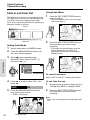
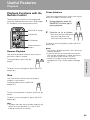
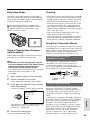
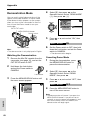
Setting the Digital Zoom
You can select from among four different zoom
ranges: 1–26K (optical zoom), 26–50K (digital
zoom), 26–100K (digital zoom) or 26–780K
(digital zoom). The digital zoom allows you to
record powerful close-up pictures with the
same operation as normal zooming.
Notes:
• The digital zoom is in addition to the optical
zoom giving a combined maximum zoom range
of 1–780K.
• As the image is enlarged digitally, the picture
quality decreases when higher digital zoom
settings are used.
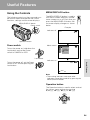
1
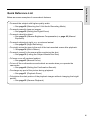
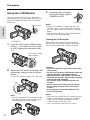
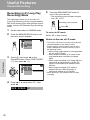
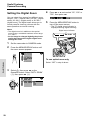
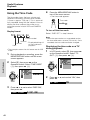
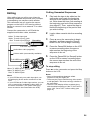
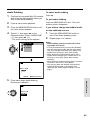
Set the camcorder to CAMERA mode.
2
Press the MENU/DISPLAY button until
the menu screen appears.
Useful Features
MANUAL SE T
MAN. FOCUS
SHU T. SP E ED
E XPOSURE
P I C. E F F E C T
SCE NE MENU
F ADE
QK. RE TURN
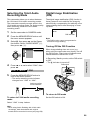
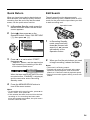
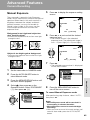
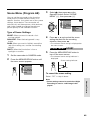
Press d or y to select “50”, “100” or
“780”, then press e.
DG T L ZOOM
5
100
Press the MENU/DISPLAY button to
turn off the menu screen.
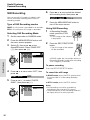
• The “D” digital zoom indicator is
displayed during digital zooming.
Digital zoom indicator
W
T D - ZOOM 5 0
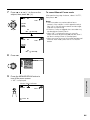
To use optical zoom only
Select “OFF” in step 4 above.
3
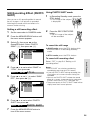
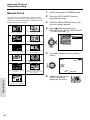
Select Y, then press r on the
Operation button. Select “DGTL ZOOM”
(1), then press r (2).
CAMERA SE T
PHOTO SNAP
SNAP E F F.
DG T L ZOOM OF F
T AP E SP E E D 5 0
100
780
29
4