1
STORING, USING AND DELETING
JOB PROGRAMS
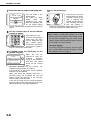
The steps of up to 10 copy jobs can be stored as job programs. Job programs can be called up with ease, and are
retained even when the power is turned off. By storing frequently used copy settings in a job program, you can
eliminate the bother of selecting the settings each time you use them for a copy job.
●If any settings related to the steps of a job program are changed in the key operator programs after the job program
is stored, the steps related to the changed settings will not be included when the job program is called up.
●To exit the job programs mode, press the [CA] (clear all) key on the operation panel or touch the [EXIT] key on the
touch panel.
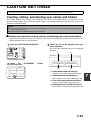
Storing a job program
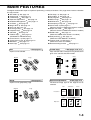
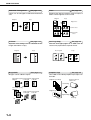
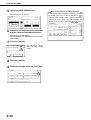
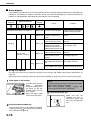
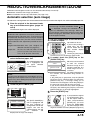
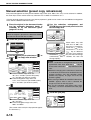
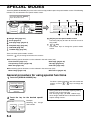
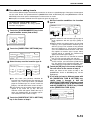
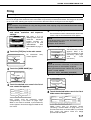
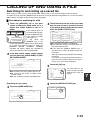
1 Press the [#/P] key.
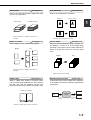
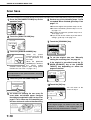
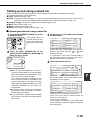
5 Touch the [OK] key.
NCEL
OK
AUTO
ORIGINAL
The selected settings
will be stored in the
number key selected in
step 3.
AUTO
2 Touch the [STORE/DELETE] key.
M NUMBER.
RECALL
STORE/DELETE
the number key ([1] to [10]) in which
3 Touch
you wish to stored the job program.
Number keys in which
job
programs
are
already
stored
are
highlighted.
PROGRAMS
ESS PROGRAM NUMBER.
RECALL
STORE/
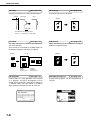
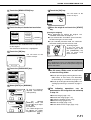
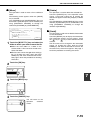
■ If a number key is selected in step 3 that has
already been programmed.
A setting confirmation screen will appear. To replace
the existing program with the new program, touch
the [STORE] key and continue from step 4. If you do
not wish to replace the existing program, touch the
[CANCEL] key to return to the screen of step 3 and
select a different number key.
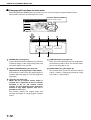
NOTE
If overwriting of programmed copy settings has been
prohibited in the key operator programs, you will not
be able to store a job program. (See page 15 of the
key operator's guide.)
the copy settings that you wish to
4 Select
store in the job program.
The number of copies
cannot be stored.
TO STORE, MAKE SELECTIONS AND PRESS
[OK], TO DELETE, PRESS [CANCEL].
SPECIAL MODES
2-SIDED COPY
OUTPUT
1.
2.
A4
3.
4.
B5
B4
B5
5-31
5